

La gestión de productos implica muchos elementos en movimiento: plazos ajustados, aportaciones del equipo y la presión de mantener las ideas encaminadas. Ahí es donde el software para crear storyboards puede ayudar. Da forma a tus conceptos y ayuda a que todo el mundo esté alineado.
Por mi experiencia, la herramienta adecuada puede reducir la confusión y aportar estructura a tu proceso creativo. He investigado las opciones más fiables disponibles y he preparado una selección que merece la pena considerar.
En este artículo, podrás conocer claramente las principales herramientas para crear storyboards, sus funciones, aquello que hacen bien y sus posibles limitaciones, para que puedas decidir cuál funciona mejor para tu equipo.
Por qué confiar en nuestras recomendaciones de software
6,700+
Reviews
20
Industry experts
16+
Evaluation factors
14
Years
Nuestro equipo lleva probando y evaluando software desde 2012. Como gestores de producto, sabemos lo difícil —y lo importante— que es elegir el software adecuado.
Para esta guía, evaluamos las herramientas mediante pruebas prácticas e investigación independiente, puntuando las herramientas según nuestros criterios de selección.
Nuestras reseñas reflejan nuestro criterio editorial humano, no un discurso de ventas.
Revisores expertos:
 Hannah ClarkSenior TPM
- Cristiano ValimSenior UI/UX Lead

Tabla comparativa de software para crear storyboards
Esta tabla comparativa resume los detalles de precios de mi selección del mejor software para crear storyboards:
| Tool | Best For | Trial Info | Price | ||
|---|---|---|---|---|---|
| 1 | Ideal para la ideación de equipos de producto nativos de Figma | Plan gratuito disponible | Desde $3/usuario/mes (facturado anualmente) | Website | |
| 2 | Ideal para crear guiones gráficos con IA a partir de indicaciones de texto | Plan gratuito disponible | Desde $11/editor/mes (facturado anualmente) | Website | |
| 3 | Ideal para talleres de guion gráfico multifuncionales | Plan gratuito + demostración gratuita disponible | Desde $9.99/usuario/mes (facturado anualmente) | Website | |
| 4 | La mejor opción para la creación manual de guiones gráficos centrada en la velocidad | Prueba gratuita disponible | Desde $12/usuario/mes (facturado anualmente) | Website | |
| 5 | Ideal para la previsualización de cámaras y escenas en tiempo real | Demostración gratuita disponible | Desde $39.99/mes | Website | |
| 6 | Ideal para crear diapositivas de guiones gráficos pulidas sin ser diseñador | Plan gratuito disponible | Desde $15/usuario/mes | Website | |
| 7 | Ideal para uso educativo | Prueba gratuita + plan gratuito disponible | Desde $14.99/mes | Website | |
| 8 | Ideal para crear animaciones preliminares colaborativas con sincronización de guiones integrada | Plan gratuito + prueba gratuita disponible | Desde $50/mes (facturado anualmente) | Website | |
| 9 | Ideal para estudios de animación | Prueba gratuita de 14 días | Desde $90/mes | Website | |
| 10 | Ideal para exportar guiones a presentaciones de propuesta animadas | Plan gratuito + demostración gratuita disponible | Desde $12/mes (facturado anualmente) | Website |


Análisis del mejor software para crear storyboards
A continuación encontrarás mis resúmenes detallados del mejor software para crear storyboards que se incluyó en mi selección. Mis análisis ofrecen una visión detallada de las funciones clave, las ventajas y desventajas, las integraciones y los casos de uso ideales de cada herramienta para ayudarte a encontrar la mejor opción para ti.
 Ideal para la ideación de equipos de producto nativos de Figma
- Plan gratuito disponible
- Desde $3/usuario/mes (facturado anualmente)
Visit WebsiteCustomer Rating:4.7/5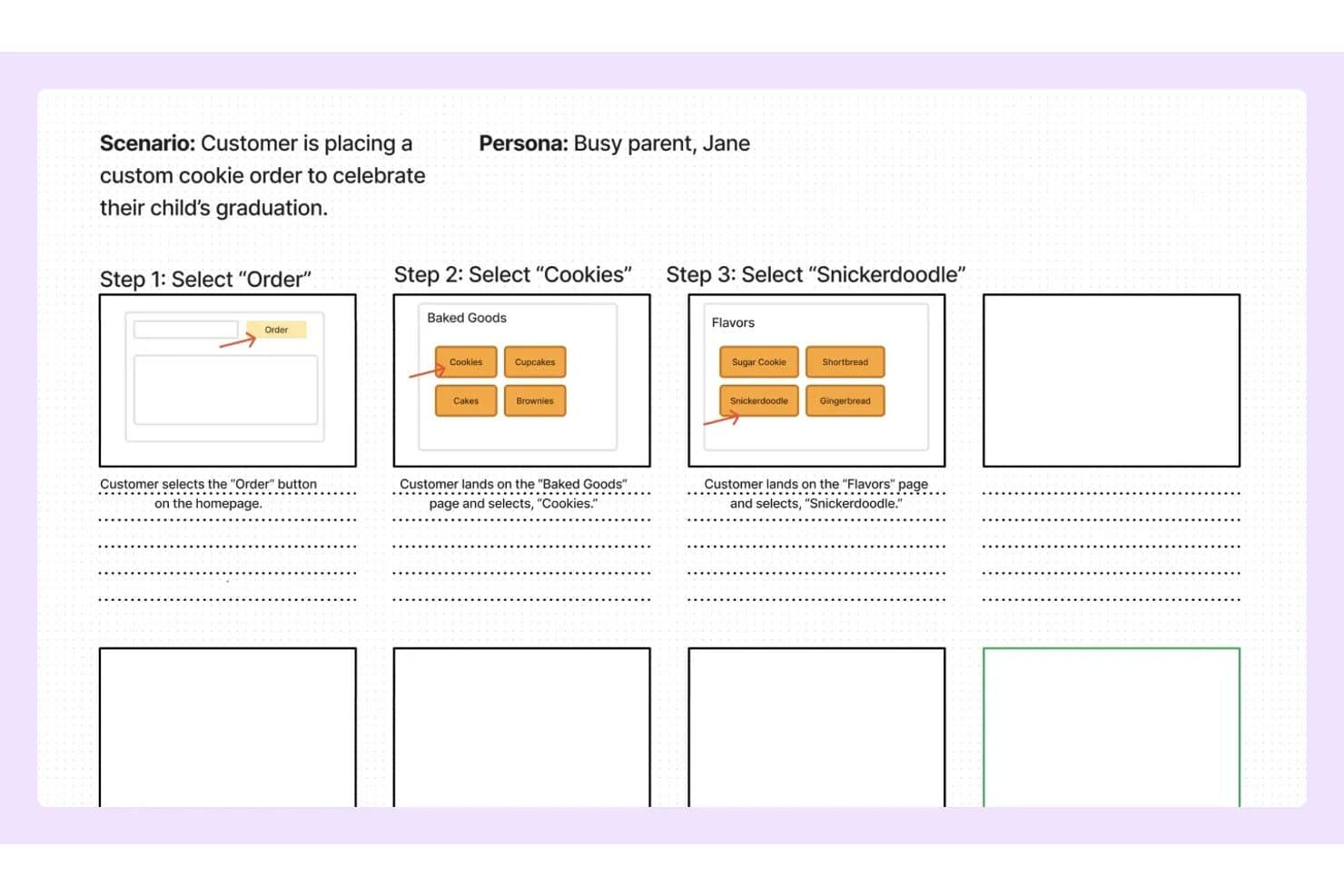
FigJam permite a los usuarios mapear los pasos de un guion gráfico con estructuras alámbricas y notas. FigJam es la herramienta de pizarra colaborativa de Figma que combina un lienzo infinito, plantillas prediseñadas de producto y UX, edición multiusuario en tiempo real y generación de tableros asistida por IA para la ideación y el mapeo visual.
¿Para quién es más adecuado FigJam?
FigJam es una opción natural para los equipos de producto y UX que ya trabajan en Figma y quieren que su ideación y creación de guiones gráficos se realicen en el mismo ecosistema que su trabajo de diseño.
Por qué elegí FigJam
Elegí FigJam como una de las mejores opciones porque se encuentra donde los equipos de producto ya trabajan: dentro de Figma. Si un día tu equipo está mapeando el recorrido de un usuario en FigJam y al siguiente está creando las pantallas reales en Figma Design, esa transferencia es instantánea, no un ritual de exportación de archivos. Me gusta especialmente la capacidad de FigJam AI para generar un tablero completamente estructurado a partir de una sola indicación de texto, lo que hace que crear un guion gráfico para una iteración o una sesión de descubrimiento sea realmente rápido. Las plantillas de mapas de recorrido del cliente y de guiones gráficos están diseñadas específicamente para los flujos de trabajo de producto, no son marcadores de posición genéricos.
Características principales de FigJam
- Edición multiusuario en tiempo real: Los colaboradores ilimitados pueden trabajar en el mismo tablero simultáneamente, con cursores en directo y chat entre cursores para comunicarse durante la sesión.
- Reuniones de audio: Las llamadas de voz integradas permiten que tu equipo hable sobre un guion gráfico o una sesión de descubrimiento sin cambiar a una herramienta externa de videoconferencias.
- Widget de Jira: Inserta tarjetas de incidencias y tableros de tareas de Jira directamente en el lienzo para conectar el trabajo del guion gráfico con la lista de tareas pendientes de tu iteración activa.
- Sesiones abiertas para invitados: Las partes interesadas externas pueden unirse y colaborar en un tablero durante un máximo de 24 horas sin necesitar una cuenta de Figma.
Integraciones de FigJam
FigJam ofrece integraciones nativas con Jira, Asana, Slack, Microsoft Teams, Google Workspace, Figma Design y más. También admite inserciones de Confluence y Notion, widgets del mercado de aplicaciones, Zapier y una API REST para integraciones personalizadas.
Pros and Cons
Pros:
- La IA puede generar plantillas de guiones gráficos al instante
- La colaboración en tiempo real admite editores ilimitados
- Plantillas especializadas para flujos de trabajo de producto y UX
Cons:
- No incluye herramientas integradas para secuenciar guiones gráficos
- No se puede exportar como vídeo ni como archivo animado
Learn more about FigJam: Ideal para crear guiones gráficos con IA a partir de indicaciones de texto
- Plan gratuito disponible
- Desde $11/editor/mes (facturado anualmente)
Visit WebsiteCustomer Rating:4.8/5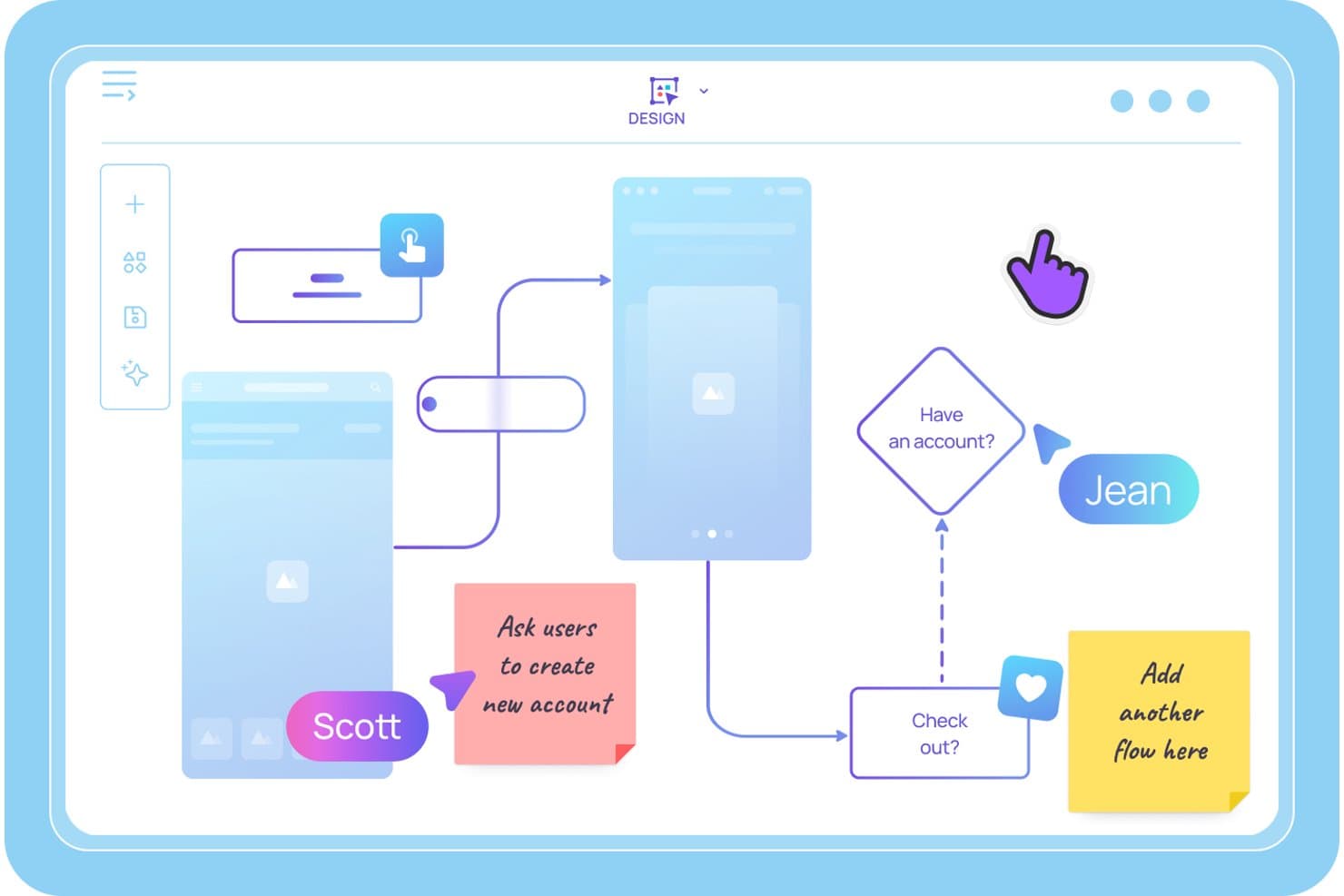
Visily permite a los usuarios trazar flujos de usuario y guiones gráficos con notas adhesivas. Visily es una herramienta de creación de guiones gráficos y bocetos de estructura impulsada por IA que permite a los equipos de producto generar paneles secuenciales de guion gráfico a partir de indicaciones de texto, crear prototipos interactivos y colaborar en mapas de recorridos del usuario y flujos de UX en tiempo real.
¿Para quién es más adecuado Visily?
Visily es una opción excelente para gerentes de producto y responsables de producto ágiles que necesitan convertir ideas en guiones gráficos y prototipos interactivos rápidamente, sin depender de un diseñador dedicado.
Por qué elegí Visily
Elegí Visily como una de las mejores opciones porque es la única herramienta que he visto que permite escribir una descripción de una escena en lenguaje sencillo y obtener en segundos un panel de guion gráfico estructurado y editable. El creador de guiones gráficos con IA convierte un escenario inicial en un conjunto secuenciado de fotogramas, y el prototipado automático conecta después esos fotogramas en un flujo de usuario en el que se puede hacer clic, sin necesidad de vincularlos manualmente. He comprobado que esta combinación resulta especialmente útil cuando necesitas poner a prueba un recorrido del usuario antes del inicio de un sprint.
Características principales de Visily
- Entrada multimodal con IA: Combina indicaciones de texto, capturas de pantalla, diagramas existentes y selecciones del lienzo en una única solicitud de generación con IA para crear paneles de guion gráfico desde cualquier lugar donde ya tengas tus ideas.
- Edición colaborativa en tiempo real con el chat de Cursor: Varios compañeros pueden editar el mismo tablero simultáneamente, con cursores en directo y un chat dentro del lienzo visible para todos los participantes de la sesión.
- Biblioteca del espacio de trabajo: Comparte plantillas personalizadas, temas y recursos sincronizados en todos los proyectos de tu espacio de trabajo, manteniendo la coherencia de los guiones gráficos en todo tu equipo de producto.
- Modo de dibujo: Usa un lápiz de trazo libre o un resaltador directamente en el lienzo para esbozar ideas o hacer anotaciones en los paneles de guion gráfico sin cambiar a otra herramienta.
Integraciones de Visily
Visily se conecta con Figma, Claude Code, Cursor, Lovable y ChatGPT mediante un complemento, y ofrece integraciones nativas con Notion, Jira y Slack.
Pros and Cons
Pros:
- La IA convierte las indicaciones de texto en paneles de guion gráfico
- El prototipado automático conecta al instante los fotogramas del guion gráfico
- La colaboración en tiempo real facilita el trabajo de equipos multifuncionales
Cons:
- No ofrece opciones para exportar vídeos ni animaciones
- La edición con IA sobrescribe los cambios manuales realizados en las pantallas
Learn more about Visily: Ideal para talleres de guion gráfico multifuncionales
- Plan gratuito + demostración gratuita disponible
- Desde $9.99/usuario/mes (facturado anualmente)
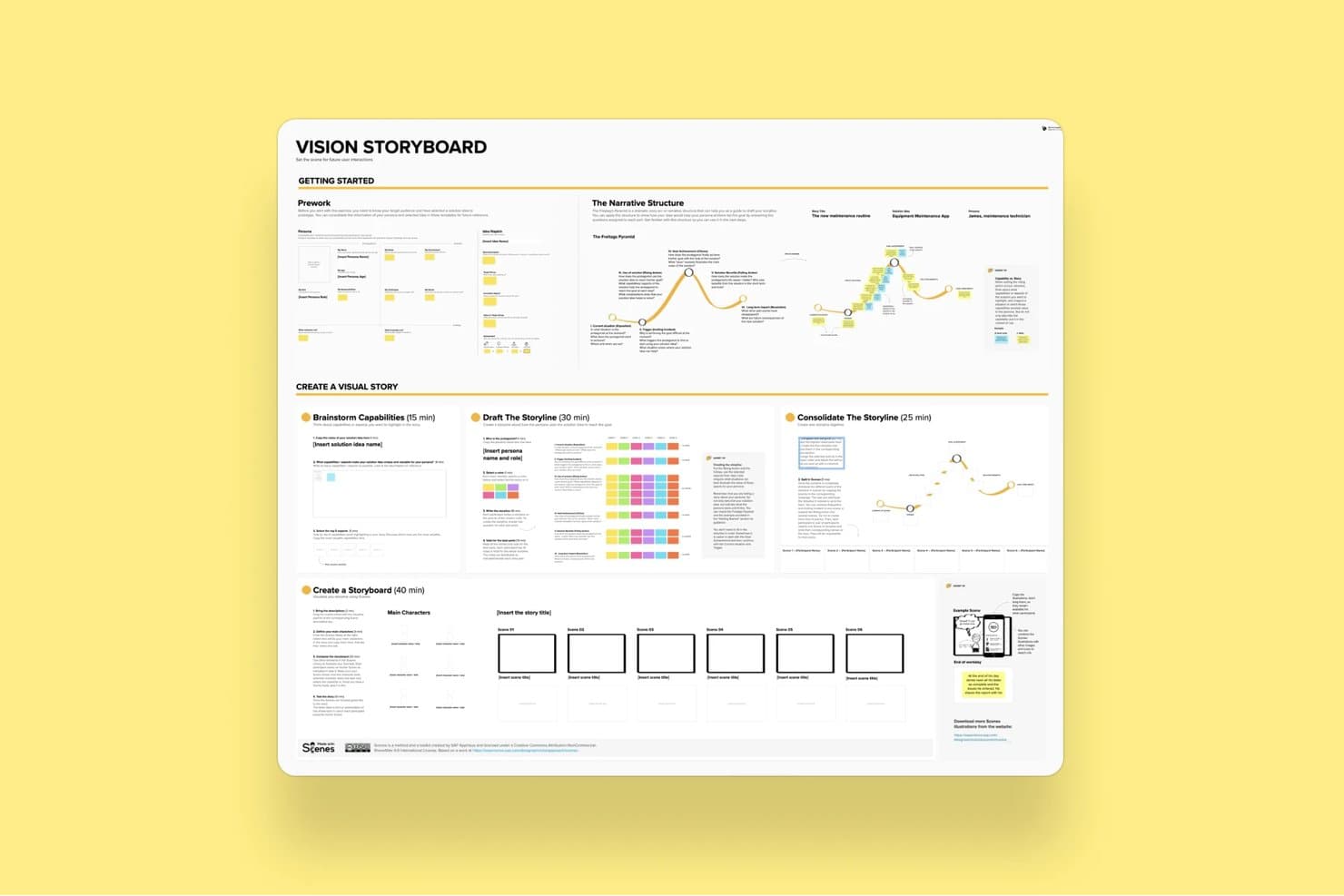
La plantilla de guion gráfico de visión de Mural guía a los usuarios en la creación de historias visuales. Mural es una plataforma de colaboración visual que combina un lienzo infinito, una plantilla de guion gráfico, edición mediante arrastrar y soltar, coedición en tiempo real y herramientas de facilitación para llevar a cabo sesiones estructuradas de ideación y talleres de producto.
¿Para quién es mejor Mural?
Mural es ideal para equipos de producto multifuncionales que organizan talleres estructurados, sprints de diseño o sesiones de descubrimiento con múltiples partes interesadas involucradas en tiempo real.
Por qué elegí Mural
Mural se ha ganado un lugar en mi lista de favoritos porque su kit de herramientas Superpoderes de Facilitación® está diseñado específicamente para el tipo de sesiones de guion gráfico desordenadas y con múltiples partes interesadas que los equipos de producto realizan en la práctica. Me encanta que funciones como el Modo privado y la Votación anónima permitan que cada participante contribuya a una secuencia de guion gráfico sin que el pensamiento grupal influya en el resultado. La Plantilla de guion gráfico específica ofrece a los equipos multifuncionales una estructura compartida sobre la que trabajar, mientras que la función Convocar me permite redirigir la vista de todos a un marco concreto a mitad de la sesión.
Características principales de Mural
- Plantilla de guion gráfico: Un marco prediseñado basado en paneles que guía a los equipos en la creación secuencial de marcos mediante notas adhesivas y subtítulos.
- Agrupación mediante Mural AI: Agrupa automáticamente las notas adhesivas por tema y las reorganiza según distintos criterios para ayudar a los equipos a sintetizar ideas en varios marcos del guion gráfico.
- Votación anónima: Permite que los participantes voten por ideas del guion gráfico sin ver las selecciones de los demás, reduciendo el pensamiento grupal durante las sesiones colaborativas.
- Exportación a PowerPoint: Convierte directamente el lienzo de Mural en un archivo de PowerPoint para compartir el trabajo del guion gráfico con las partes interesadas fuera de la herramienta.
Integraciones de Mural
Mural ofrece integraciones nativas con Figma, Jira, Azure DevOps, GitHub, Confluence, Notion, Microsoft Teams y otras herramientas. También proporciona una API para integraciones personalizadas y es compatible con Zapier.
Pros and Cons
Pros:
- Plantilla de guion gráfico específica para sesiones de producto
- Potentes herramientas de facilitación en tiempo real para equipos
- Amplia biblioteca de plantillas y recursos para gestores de producto
Cons:
- No admite la exportación de vídeo ni animaciones
- Interfaz recargada con muchos objetos
Learn more about Mural: La mejor opción para la creación manual de guiones gráficos centrada en la velocidad
- Prueba gratuita disponible
- Desde $12/usuario/mes (facturado anualmente)
Visit WebsiteCustomer Rating:4.7/5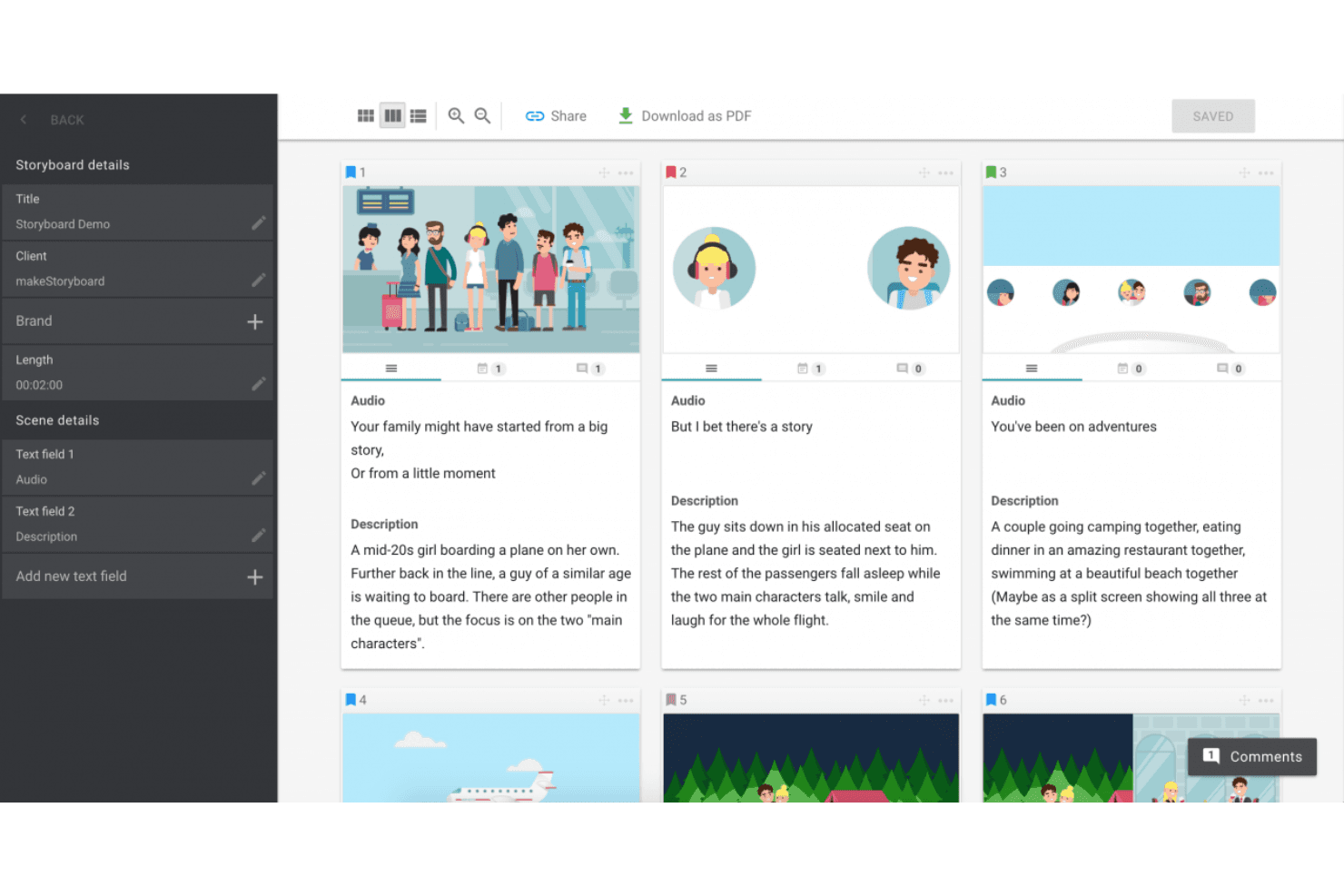
MakeStoryboard simplifica la planificación de escenas con fotogramas organizados, integración de audio y exportaciones sencillas a PDF. MakeStoryboard es una herramienta de creación de guiones gráficos basada en el navegador, diseñada en torno a la secuenciación fotograma a fotograma, un editor de lienzo de arrastrar y soltar, la colaboración en tiempo real y la exportación de animaciones MP4.
¿Para quién es más adecuado MakeStoryboard?
MakeStoryboard es una buena opción para productores de vídeo, animadores y equipos de contenido que necesitan crear y presentar guiones gráficos rápidamente sin una curva de aprendizaje pronunciada.
Por qué elegí MakeStoryboard
Elegí MakeStoryboard como una de las mejores opciones porque está diseñada específicamente para crear guiones gráficos rápidamente, sin tener que luchar contra la herramienta. La función de conversión de guiones en fotogramas es lo que me resulta más útil: pegas un guion, lo divides automáticamente en fotogramas y después añades imágenes y configuras los ángulos de cámara para cada fotograma. Cuando necesito entregar el trabajo rápidamente a un cliente, la exportación de animaciones me permite unir los fotogramas en un MP4 reproducible con audio, lo que funciona mucho mejor que un PDF estático.
Características principales de MakeStoryboard
- Colaboración en tiempo real: Varios miembros del equipo pueden editar el mismo guion gráfico simultáneamente, con comentarios por fotograma y controles de acceso basados en roles.
- Enlaces de revisión protegidos con frase de acceso: Comparte guiones gráficos con clientes externos mediante un enlace de revisión específico que no les exige crear una cuenta.
- Marca personalizada en las exportaciones: Añade el logotipo de tu empresa y una portada personalizada a las exportaciones en PDF antes de enviarlas a clientes o partes interesadas.
- Indicadores de ángulo de cámara: Cada fotograma admite etiquetas predefinidas y estándar del sector para el movimiento de cámara y el ángulo de toma, destinadas a una documentación lista para producción.
Integraciones de MakeStoryboard
Las integraciones nativas no aparecen disponibles públicamente.
Pros and Cons
Pros:
- Exportación de animaciones MP4 para la narración visual
- Enlaces de revisión para clientes protegidos con frase de acceso
- Indicadores de ángulo de cámara para las notas de producción
Cons:
- No ofrece generación de fotogramas o escenas asistida por IA
- Carece de plantillas para recorridos de usuario o perfiles de usuario
Learn more about MakeStoryboard: Ideal para la previsualización de cámaras y escenas en tiempo real
- Demostración gratuita disponible
- Desde $39.99/mes
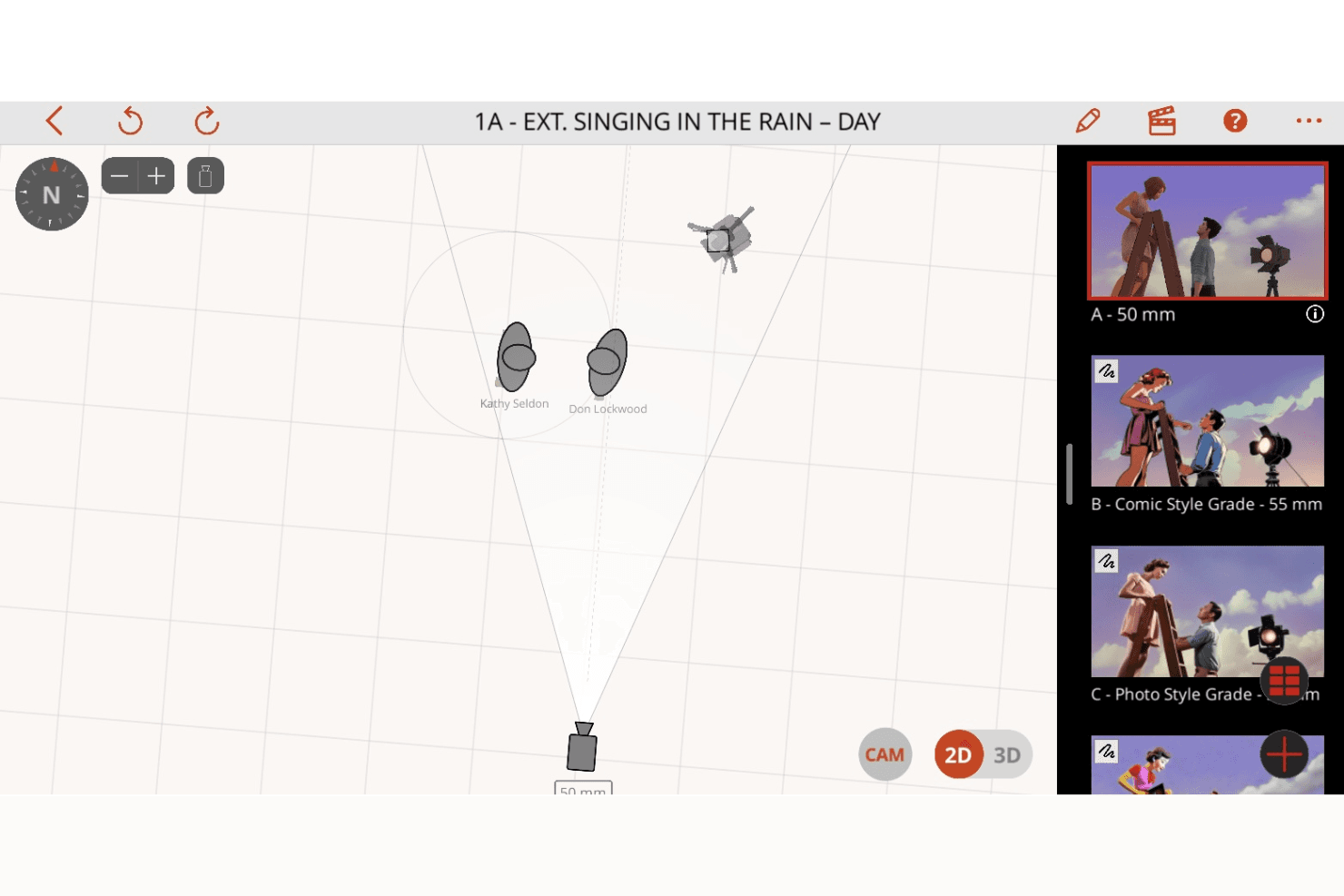
Previs Pro mejora la planificación de planos con visualización de escenas en 2D y 3D, controles de cámara y creación dinámica de guiones gráficos. Previs Pro es una herramienta de guion gráfico 3D y previsualización para la producción cinematográfica y televisiva que permite construir escenas con física realista de lentes, animar planos en una línea de tiempo editorial e importar guiones para generar automáticamente esquemas de planos.
¿Para quién es mejor Previs Pro?
Previs Pro está diseñado para profesionales del cine y la televisión—directores, directores de fotografía y artistas de previsualización—que necesitan organizar los planos y visualizar las configuraciones de cámara antes de llegar al set.
Por qué elegí Previs Pro
Previs Pro se gana un lugar entre las mejores opciones de mi lista porque simula la óptica de una cámara real dentro de un creador de escenas 3D, lo que permite a directores y directores de fotografía organizar los planos con una física de lentes precisa antes de que un solo miembro del equipo llegue al set. Me encanta cómo la función de cámara virtual permite recorrer una ubicación real con el iPhone y previsualizar la colocación de los personajes en realidad aumentada sobre el entorno real. La importación de guiones es otra de sus características destacadas: añade un archivo de Final Draft o Fountain y Previs Pro genera automáticamente un esquema de planos, con detalles completos de la escena y el reparto.
Características principales de Previs Pro
- Línea de tiempo de animaciones: Organiza y anima planos en una línea de tiempo editorial con varias escenas y cuatro pistas de audio específicas para diálogos, música, efectos de sonido y voz en off.
- Importación de guiones: Añade un archivo de Final Draft, Fountain, Fade In o Celtx y Previs Pro completa automáticamente las descripciones de las escenas, los detalles del reparto y los esquemas de planos directamente a partir del guion.
- Generación de accesorios y personajes mediante IA: Utiliza descripciones de texto para generar accesorios y personajes personalizados mediante PropGen y ActorGen sin tener que buscar recursos 3D externos.
- Exportación de la línea de tiempo a NLE: Exporta tu guion gráfico como un archivo XML de FCP7 para transferirlo directamente a Premiere Pro, DaVinci Resolve o Final Cut Pro.
Integraciones de Previs Pro
Las integraciones nativas no aparecen publicadas.
Pros and Cons
Pros:
- Anima planos con física realista de lentes
- Importa guiones y genera guiones gráficos automáticamente
- La IA genera accesorios y personajes a partir de texto
Cons:
- Solo está disponible para Mac, iPad y iPhone
- No ofrece edición colaborativa en directo y en tiempo real
Learn more about Previs Pro: Ideal para crear diapositivas de guiones gráficos pulidas sin ser diseñador
- Plan gratuito disponible
- Desde $15/usuario/mes
Visit WebsiteCustomer Rating:4.7/5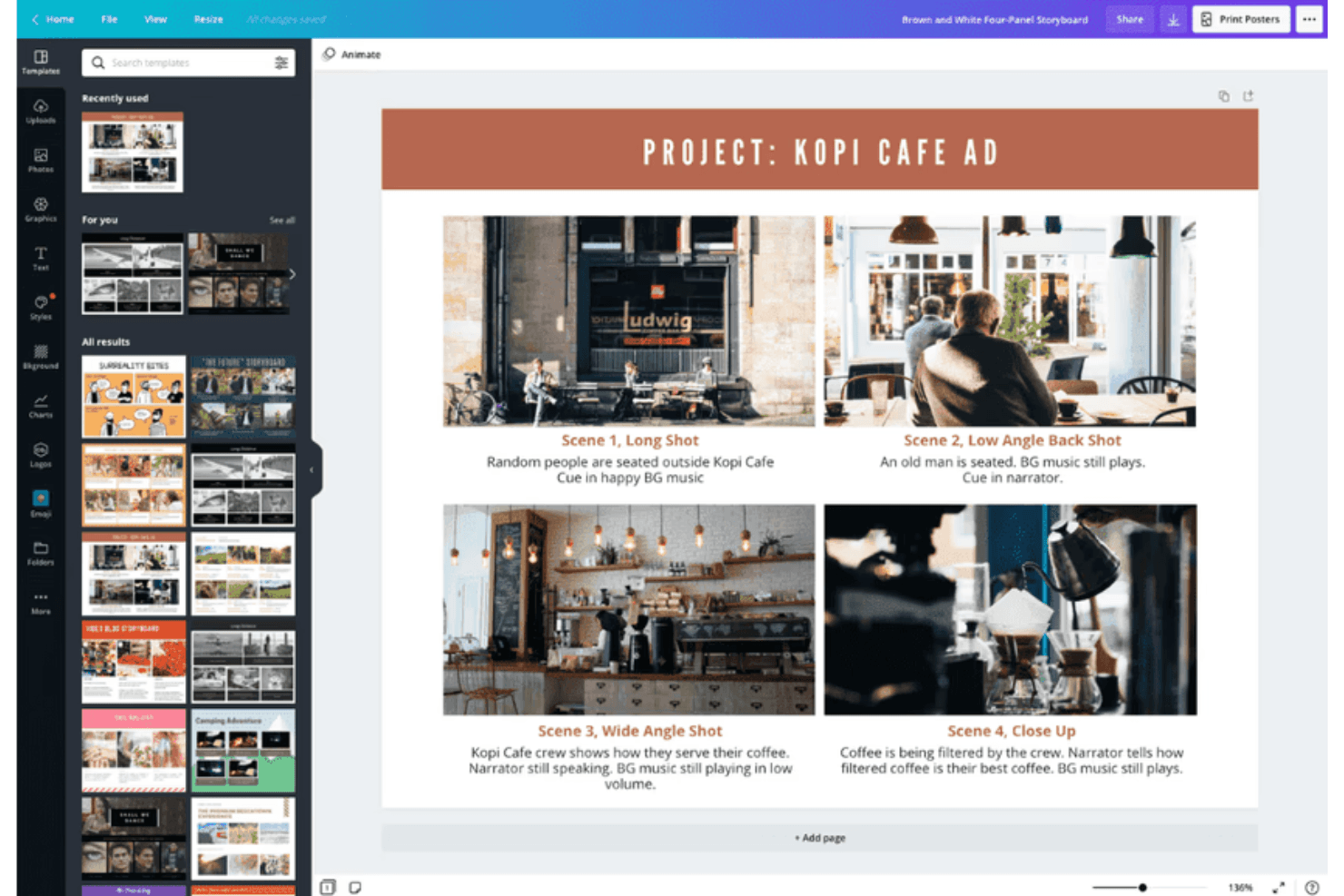
Canva permite crear guiones gráficos con plantillas personalizables para elementos visuales. Canva es una herramienta de diseño visual de uso general que permite crear guiones gráficos mediante un editor de arrastrar y soltar, una amplia biblioteca de plantillas, colaboración en tiempo real, generación de diseños asistida por IA y exportación en varios formatos, incluidos vídeo y animación.
¿Para quién es más adecuada Canva?
Canva es una excelente opción para los responsables de producto y los responsables de marketing de producto que necesitan producir rápidamente diapositivas de guiones gráficos pulidas sin depender de un diseñador.
Por qué elegí Canva
He incluido Canva entre mis principales opciones porque es la herramienta que ofrecería a cualquier responsable de producto que necesite un guion gráfico pulido al final del día sin haber utilizado antes ninguna herramienta de diseño. La biblioteca de plantillas incluye plantillas específicas para guiones gráficos y mapas del recorrido del cliente, por lo que no tienes que empezar desde cero. El conjunto de herramientas de IA de Magic Studio puede generar diseños y subtítulos a partir de una indicación de texto, lo que reduce significativamente el tiempo desde el 'lienzo en blanco' hasta las 'diapositivas listas para compartir'.
Características principales de Canva
- Conjunto de herramientas de IA de Magic Studio: Más de 20 herramientas de IA, incluida la generación de diseños a partir de texto, la redacción con IA y la edición conversacional, te permiten crear marcos de guiones gráficos a partir de una indicación de texto.
- Edición colaborativa en tiempo real: Varios miembros del equipo pueden editar el mismo guion gráfico simultáneamente, con comentarios y opiniones organizadas en hilos sobre cada marco.
- Exportación de vídeo y animación: Anima marcos individuales con Magic Animate y exporta los guiones gráficos terminados como archivos MP4 o GIF para presentaciones a las partes interesadas.
- Plantillas de mapas del recorrido del cliente: Hay plantillas específicas para crear mapas del recorrido del usuario y guiones gráficos de escenarios de producto disponibles tanto en los planes gratuitos como en los de pago.
Integraciones de Canva
Canva ofrece integraciones nativas con Slack, Google Photos, YouTube Embed, Pinterest, Brandfetch, Dropbox, Notion, Asana y más. Zapier y la API de Canva permiten conexiones adicionales, mientras que las aplicaciones e integraciones personalizadas están disponibles en el plan Enterprise.
Pros and Cons
Pros:
- Millones de plantillas de guiones gráficos y mapas del recorrido
- La IA de Magic Studio genera rápidamente diapositivas de guiones gráficos
- Edición colaborativa en tiempo real con flujos de trabajo de aprobación
Cons:
- No permite crear prototipos interactivos entre los marcos del guion gráfico
- No ofrece conexiones nativas con Jira, Figma o Notion
Learn more about Canva: Ideal para uso educativo
- Prueba gratuita + plan gratuito disponible
- Desde $14.99/mes
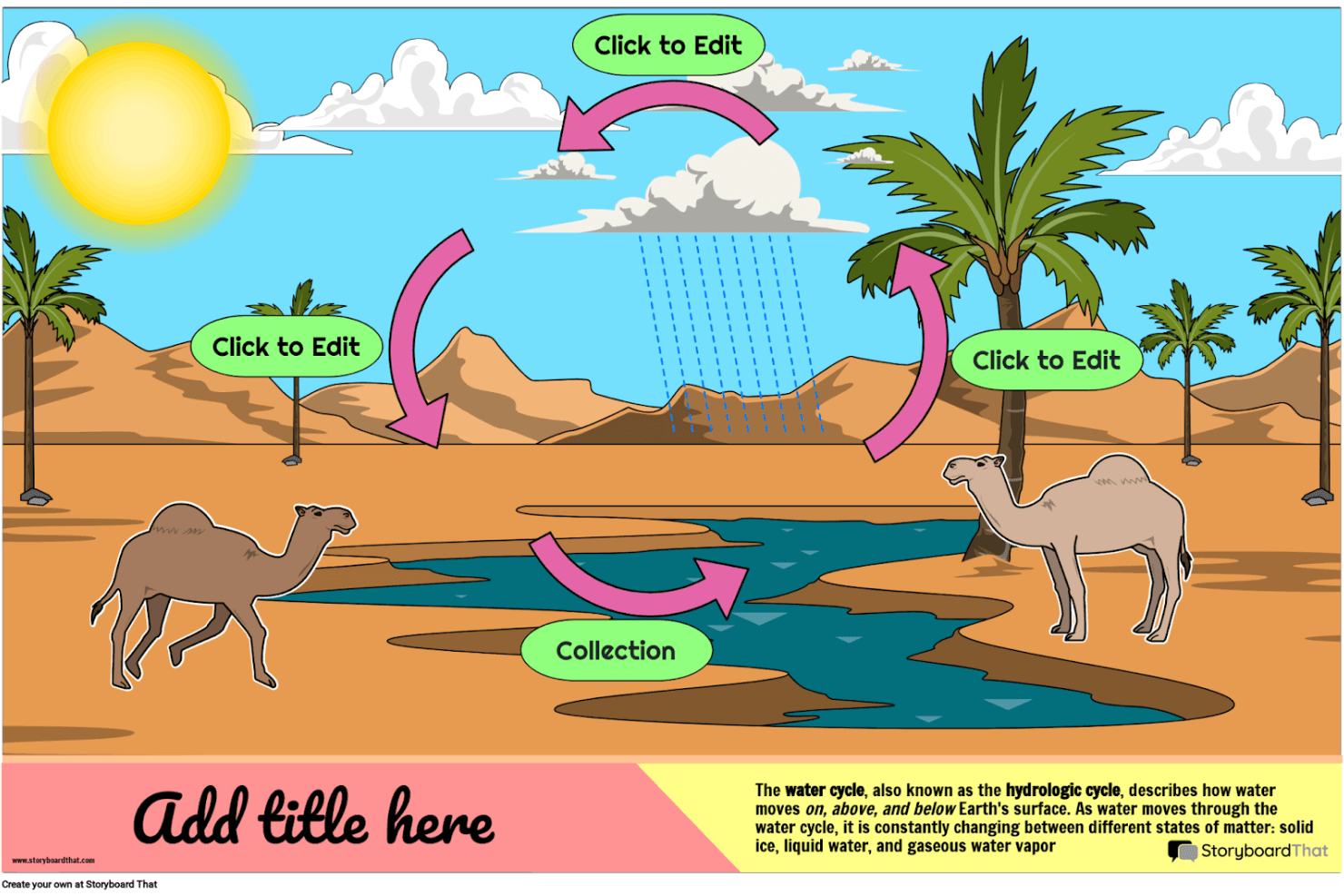
Storyboard That te ayuda a crear historias visuales y diagramas educativos atractivos con personajes, escenas y plantillas personalizables. Storyboard That es una herramienta de creación de guiones gráficos mediante arrastrar y soltar, con una amplia biblioteca de recursos ilustrados, plantillas para empresas y educación, y opciones de exportación que incluyen PDF, PowerPoint y GIF animado.
¿Para quién es más adecuado Storyboard That?
Storyboard That es una excelente opción para educadores, diseñadores instruccionales y equipos académicos que necesitan una herramienta accesible de narración visual, con integraciones integradas con LMS y cumplimiento de normas de privacidad para proteger a los estudiantes.
Por qué elegí Storyboard That
He incluido Storyboard That entre mis principales opciones porque está diseñado desde cero para entornos educativos de una manera que ninguna otra herramienta de esta lista iguala. Se conecta directamente con Google Classroom, Canvas y Schoology mediante LTI, por lo que los profesores pueden asignar proyectos de guiones gráficos sin salir de su LMS. Su cumplimiento de FERPA y COPPA también significa que los datos de los estudiantes están realmente protegidos, un requisito que la mayoría de los equipos educativos no puede pasar por alto.
Características principales de Storyboard That
- Editor de lienzo mediante arrastrar y soltar: Crea guiones gráficos arrastrando personajes, escenas, accesorios y elementos de texto a los cuadros, sin necesidad de conocimientos de diseño.
- Exportación a GIF animado: Convierte los guiones gráficos terminados en GIF animados directamente desde la plataforma, además de disponer de opciones de exportación a PDF y PowerPoint.
- Grabación de narración de audio: Graba y adjunta narraciones habladas a cuadros individuales del guion gráfico en los planes de pago.
- Modo de presentación: Muestra a las partes interesadas los cuadros del guion gráfico en una vista de presentación integrada sin salir de la herramienta.
Integraciones de Storyboard That
Storyboard That ofrece integraciones nativas con Google Classroom, Clever, ClassLink, Canvas, Schoology, Blackbaud, Buzz LMS y D2L.
Pros and Cons
Pros:
- Modo de presentación integrado para realizar demostraciones directamente
- Amplia biblioteca de ilustraciones con plantillas empresariales
- Admite narración de audio grabada por cuadro
Cons:
- No incluye funciones de inteligencia artificial ni de creación de prototipos interactivos
- Solo exporta a formatos estáticos o GIF animados
Learn more about Storyboard That: Ideal para crear animaciones preliminares colaborativas con sincronización de guiones integrada
- Plan gratuito + prueba gratuita disponible
- Desde $50/mes (facturado anualmente)
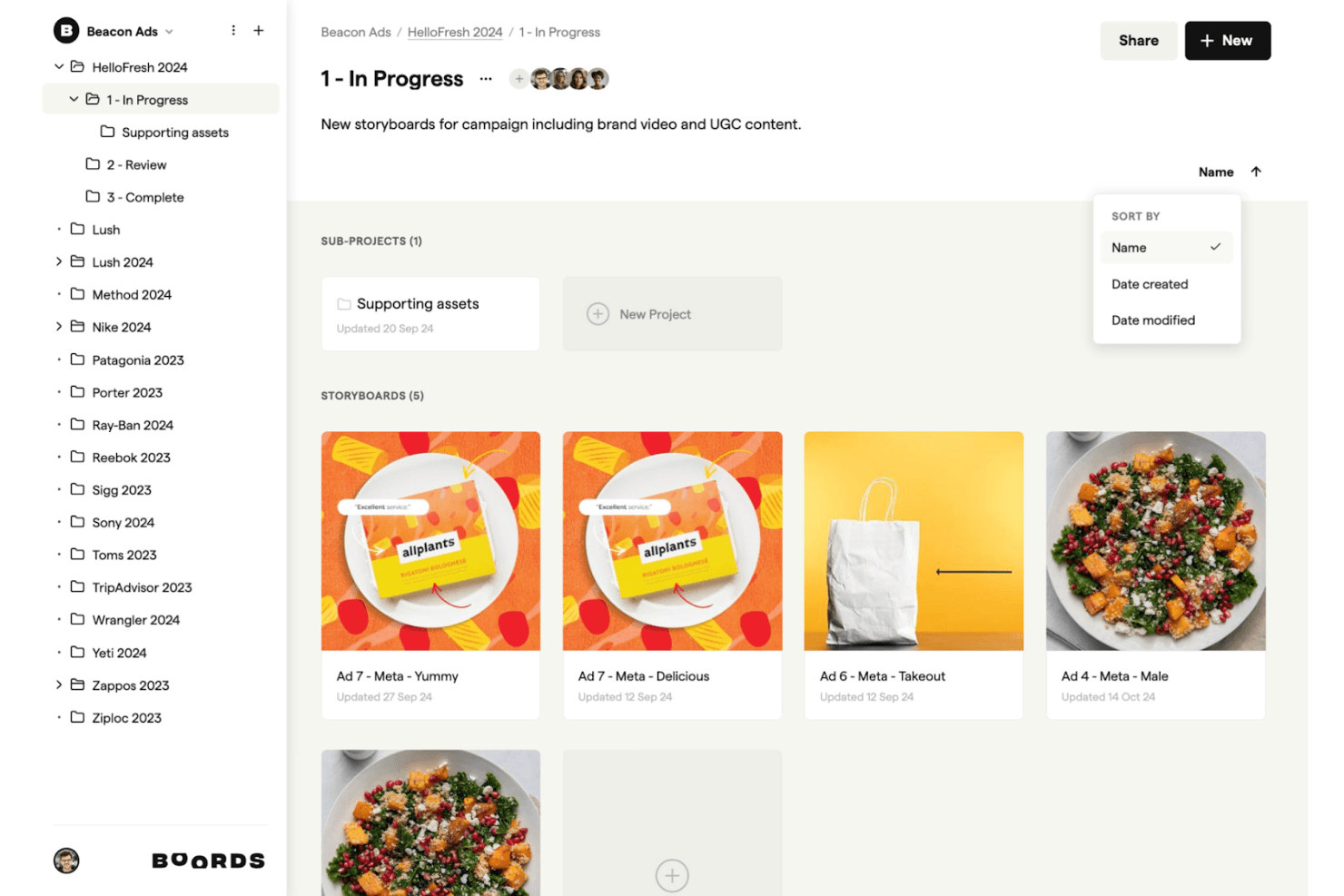
Boords apoya tu proceso creativo al permitirte organizar, editar y compartir intuitivamente guiones gráficos para campañas y contenido de marca. Boords es un software de guion gráfico basado en navegador que combina un editor de guiones, generación de guiones gráficos con IA, secuenciación fotograma a fotograma y un editor de animaciones preliminares en el navegador con exportación a MP4.
¿Para quién es Boords más adecuado?
Boords es una excelente opción para equipos creativos y especialistas en marketing de productos que necesitan crear animaciones preliminares sincronizadas con el guion y compartir avances de vídeo pulidos con clientes o partes interesadas.
Por qué elegí Boords
Boords ocupa un lugar en mi lista de favoritos porque la canalización de guion a animación preliminar que ofrece es realmente difícil de replicar en una sola herramienta. Me encanta cómo el editor de guiones integrado se sincroniza directamente con la línea de tiempo del guion gráfico, de modo que, cuando ajusto la duración de la voz en off, la secuencia de fotogramas se actualiza al mismo tiempo. El editor de animaciones preliminares en el navegador también me permite exportar un MP4 terminado sin utilizar ningún software externo, que es exactamente lo que necesito al presentar rápidamente una visión narrativa a las partes interesadas.
Funciones principales de Boords
- Generador de guiones gráficos con IA: Pega un guion o una descripción y Boords crea automáticamente un guion gráfico estructurado con imágenes generadas por IA para cada fotograma.
- Constructor de PDF: Personaliza y exporta tu guion gráfico como un PDF con formato, lo que te proporciona un control total sobre cómo aparecen los fotogramas y los campos de texto en los materiales para clientes.
- Biblioteca de recursos del equipo: Sube y organiza imágenes compartidas en una biblioteca centralizada para que todo tu equipo pueda reutilizar elementos visuales aprobados en varios proyectos.
- Enlaces de revisión para invitados: Comparte guiones gráficos con clientes mediante enlaces protegidos con contraseña que no requieren registrarse para verlos o comentarlos.
Integraciones de Boords
Boords tiene 3 integraciones nativas documentadas: Slack, Dropbox y Google Drive. También ofrece una API pública y notificaciones web para integraciones personalizadas con herramientas de producto y diseño.
Pros and Cons
Pros:
- Automatización de guion a guion gráfico con imágenes de IA
- Editor de animaciones preliminares en el navegador con exportación a MP4
- Los enlaces de revisión para invitados no requieren registro
Cons:
- No ofrece creación de prototipos interactivos ni flujos en los que se pueda hacer clic
- Carece de plantillas de UX o de recorridos de producto
Learn more about Boords: Ideal para estudios de animación
- Prueba gratuita de 14 días
- Desde $90/mes
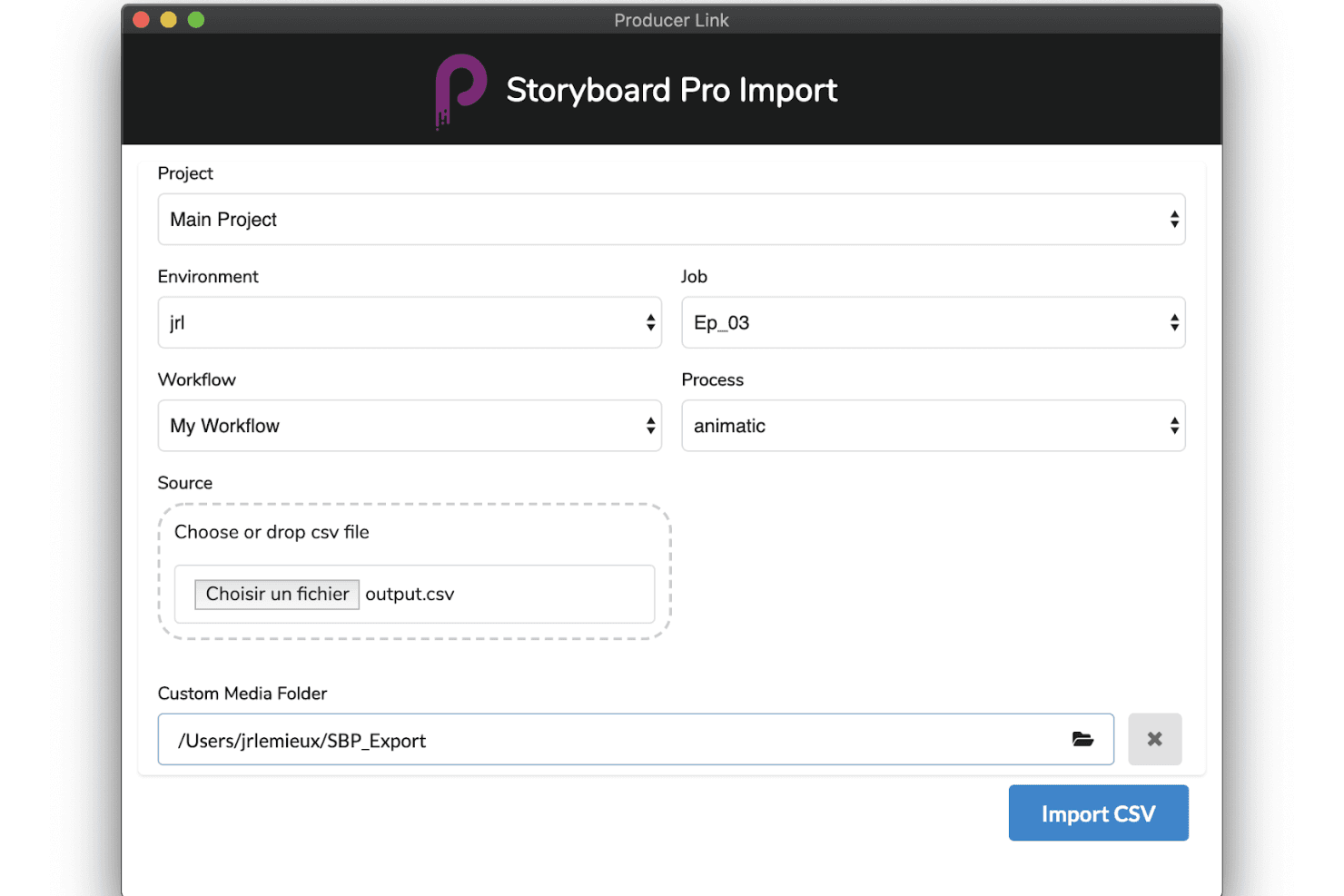
Toon Boom Storyboard Pro facilita la producción con herramientas avanzadas de importación, flujos de trabajo personalizables y una creación fluida de animáticos. Toon Boom Storyboard Pro es una aplicación profesional de escritorio para la creación de guiones gráficos, diseñada para la preproducción de animación, que ofrece secuenciación basada en paneles, una línea de tiempo completa para animáticos, herramientas de cámara 3D, sincronización de audio multipista y desglose de guiones asistido por IA mediante su conjunto de herramientas Ember.
¿Para quién es más adecuado Toon Boom Storyboard Pro?
Toon Boom Storyboard Pro está diseñado para animadores profesionales y estudios de animación que necesitan un flujo de trabajo de preproducción dedicado, desde el guion hasta el animático.
Por qué elegí Toon Boom Storyboard Pro
Toon Boom Storyboard Pro ocupa un lugar en mi lista de opciones principales porque es lo más parecido que tienen los estudios de animación a un centro de control de preproducción dedicado. Me encanta que Panel Timer permita capturar la duración de los paneles en directo al marcar el ritmo de una interpretación, una función realmente única para los estudios que crean animáticos fotograma a fotograma. Combinado con el sistema de cámara 3D y la sincronización de audio multipista, puedes pasar directamente de un guion preliminar a una vista previa completamente cronometrada y animada con cámara sin cambiar de herramienta.
Características principales de Toon Boom Storyboard Pro
- Sistema de cámara 3D: Anima movimientos de cámara virtuales —paneo, zoom e inclinación— dentro de un entorno 3D directamente en tus paneles del guion gráfico.
- Desglose de guiones con IA de Toon Boom Ember: Analiza guiones para identificar automáticamente escenas, personajes y recursos, y después completa automáticamente los paneles de diálogos y acciones.
- Sincronización de audio multipista: Importa, superpone y desplaza varias pistas de audio con visualización de forma de onda para lograr una sincronización precisa a nivel de panel.
- Exportación de escenas a Harmony: Exporta escenas completas del guion gráfico —incluidas las capas y la duración— directamente a Toon Boom Harmony para la producción de animación.
Integraciones de Toon Boom Storyboard Pro
Toon Boom Storyboard Pro ofrece integraciones nativas con Toon Boom Harmony y Adobe Photoshop, además de flujos de trabajo AAF/XML para Pro Tools y programas de edición de vídeo.
Pros and Cons
Pros:
- Herramientas completas para crear animáticos de animación
- El desglose de guiones asistido por IA agiliza el flujo de trabajo
- Compatibilidad integrada con cámaras 3D y recursos
Cons:
- No ofrece funciones de colaboración en tiempo real basadas en la nube
- Requiere conocimientos profesionales de ilustración o animación
Learn more about Toon Boom Storyboard Pro: Ideal para exportar guiones a presentaciones de propuesta animadas
- Plan gratuito + demostración gratuita disponible
- Desde $12/mes (facturado anualmente)
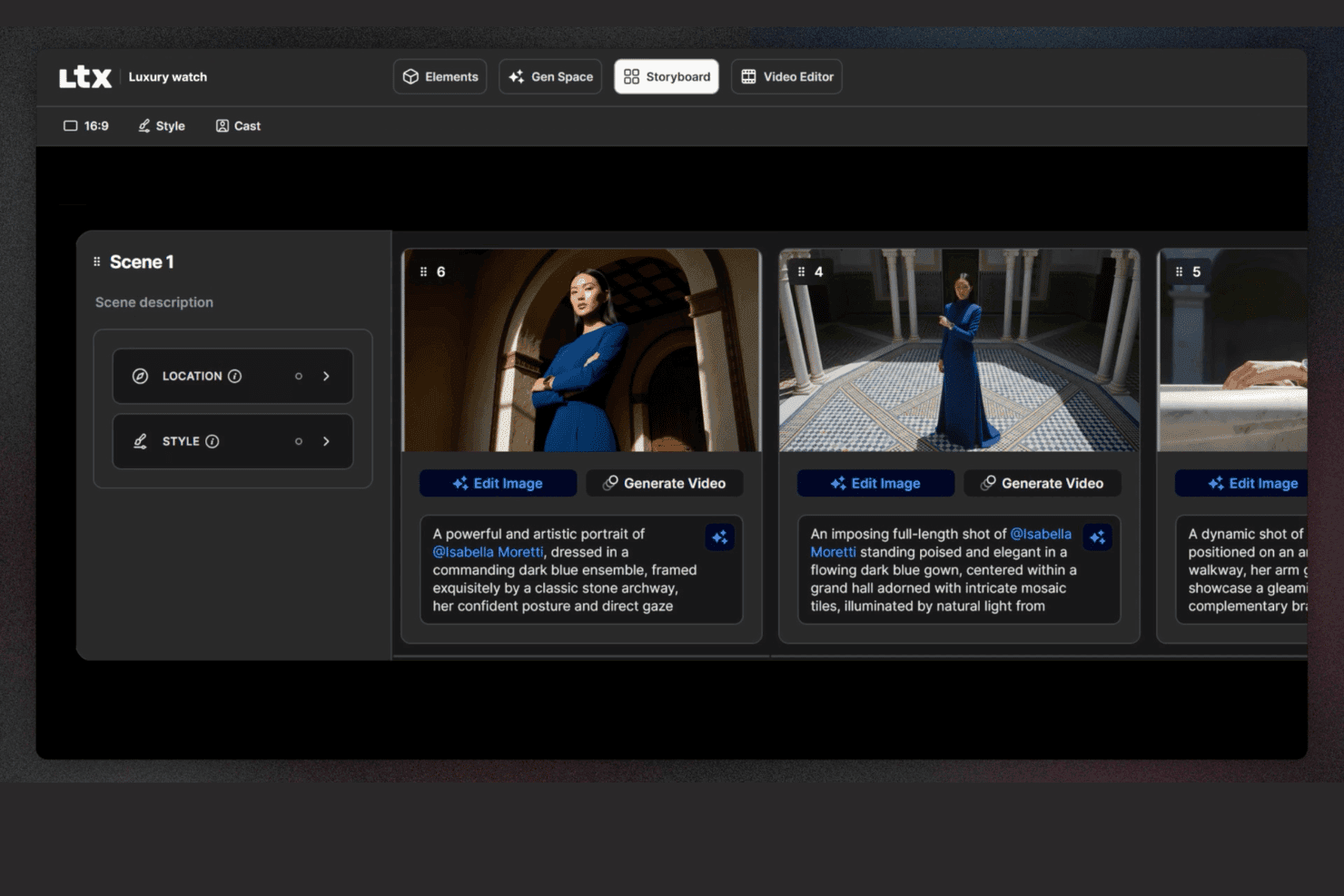
LTX Studio permite a los usuarios editar guiones gráficos con descripciones, ubicaciones y edición de imágenes. LTX Studio es una plataforma de guiones gráficos impulsada por IA que genera secuencias visuales escena por escena a partir de guiones o indicaciones de texto, con edición de línea de tiempo integrada, exportación de MP4 animado y un generador de presentaciones de propuesta.
¿Para quién es más adecuado LTX Studio?
LTX Studio es adecuado para gestores de marketing de productos y equipos creativos que necesitan convertir un guion o concepto en una presentación de propuesta animada y lista para presentar sin depender de un diseñador.
Por qué elegí LTX Studio
Elegí LTX Studio como una de las mejores opciones porque es la única herramienta de mi lista que toma un guion sin procesar y lo convierte en una presentación de propuesta animada y lista para presentar sin necesidad de ningún recurso de diseño. Introduce la narrativa de tu producto y la IA la divide en tomas secuenciadas, genera fotogramas cinematográficos y ensambla todo en un MP4 o PDF exportable. El generador de presentaciones de propuesta compila después esos elementos visuales en un formato estructurado que puedes presentar a las partes interesadas ese mismo día.
Características principales de LTX Studio
- Selección de modelos de IA: Elige entre varios modelos de generación de IA, incluidos Google Veo 3.1, Kling 2.6/3.0 Pro y el modelo propio LTX-2, en el nivel del proyecto, el tablero o el fotograma.
- Elementos persistentes de personajes: Define una vez la apariencia de un personaje y la plataforma mantiene automáticamente constantes los detalles faciales, el vestuario y el estilo en todos los fotogramas.
- Generación de audio integrada: Genera y sincroniza música de fondo, audio ambiental y narración en off directamente en el editor de línea de tiempo, sin necesidad de una herramienta de audio independiente.
- Flujos de automatización basados en nodos: Crea flujos de trabajo personalizados de generación de IA mediante un sistema visual basado en nodos, disponible en los planes Standard y superiores.
Integraciones de LTX Studio
Las integraciones nativas no se indican públicamente.
Pros and Cons
Pros:
- La IA genera guiones gráficos animados a partir de guiones
- Los personajes y elementos persistentes mantienen la coherencia
- Exporta como MP4 y como presentación de propuesta estructurada
Cons:
- No incluye un editor basado en lienzo ni plantillas de experiencia de usuario
- La colaboración es limitada en los planes que no son empresariales
Learn more about LTX Studio:
Otros programas para crear storyboards
Estas son algunas opciones adicionales de software para crear storyboards que no se incluyeron en mi selección, pero que aun así merece la pena conocer:
- 11MiroLa mejor opción para guiones gráficos vinculados a la lista de trabajo pendiente de desarrollo
- 12WhimsicalIdeal para wireframes de baja fidelidad y la creación de storyboards de flujos
- 13Adobe FireflyIdeal para la ideación visual de IA regida por la marca
- 14StudioBinderIdeal para crear guiones gráficos en equipos de producción cinematográfica
- 15KatalistIdeal para la producción de guiones gráficos de texto a vídeo
Comment j'évalue les logiciels de storyboard
Je divise mon évaluation en deux niveaux : la capacité d’un outil à construire et annoter des flux produits séquentiels, puis ce qui distingue les meilleures options.
Fonctionnalités principales (Critères incontournables pour cette liste)
Lorsque je sélectionne des outils pour ma liste, j’attribue à chacun une note de 0 (ne propose pas la fonctionnalité) à 5 (excelle dans ce domaine) pour chaque fonctionnalité principale mentionnée ci-dessous. Ensuite, je convertis le score total de l’outil en un pourcentage. Chaque outil doit obtenir un score total minimum de 65 % pour être retenu.
- Séquençage étape par étape : J’évalue comment chaque outil gère la création de panneaux ordonnés, comme la cartographie du parcours d’onboarding d’un utilisateur de l’inscription jusqu’à l’activation, étape par étape.
- Éditeur visuel à glisser-déposer : L’éditeur doit permettre aux chefs de produit de placer des personnages, des éléments d’interface et des scènes sur un canevas sans compétences en design ni outils externes.
- Bibliothèque d’éléments prêts à l’emploi : Je vérifie la diversité des modèles et la pertinence des ressources, et je recherche des éléments comme des personnages fictifs, des maquettes d’appareils ou des environnements.
- Collaboration en temps réel : Les équipes produit co-créent pendant les sprints de découverte, donc j’examine la coédition en direct, la possibilité de commenter et les indicateurs de présence dans l’espace de travail.
- Annotations et superpositions textuelles : Chaque panneau doit permettre d’ajouter des légendes, des bulles de dialogue ou des notes contextuelles pour expliquer ce qui se passe à chaque étape de l’histoire.
- Options d’exportation et de partage : J’évalue s’il est possible de partager les storyboards sous forme de PDF, d’images ou de liens pour permettre des relectures asynchrones par des parties prenantes n’ayant pas accès à l’outil.
Une fois que j’ai une liste d’outils répondant aux critères, j’examine ce qui distingue chaque plateforme.
Facteurs différenciants (Ce qui distingue les éditeurs)
Voici comment je compare et distingue les différents éditeurs :
Fonctionnalités remarquables
La génération assistée par IA constitue un réel facteur de distinction. Les outils capables de transformer une invite textuelle en storyboard brut offrent aux chefs de produit un passage plus rapide de l’idée au visuel lors de la phase de découverte. Je recherche aussi la création de prototypes interactifs, où des zones cliquables sur les panneaux permettent de simuler un parcours utilisateur et de recueillir des retours avant toute passation au design. Les modèles de parcours utilisateur préconfigurés sont aussi importants. Démarrer à partir d’un modèle d’onboarding ou d’adoption de fonctionnalité fait gagner des heures par rapport à une création de zéro à chaque sprint.
Au-delà des fonctionnalités
L’intégration avec le reste de la stack produit est cruciale. Je vérifie si les storyboards peuvent être liés à des épopées Jira ou intégrés dans des pages Confluence, car c’est l’environnement de travail habituel des équipes produit. La courbe d’apprentissage est un autre facteur clé. La plupart des chefs de produit ne sont pas designers, j’évalue donc la rapidité avec laquelle on peut produire un storyboard prêt à être partagé dès la première session. La structure tarifaire compte aussi, notamment si l’accès invité permet aux parties prenantes de relire et de commenter sans devoir acheter une licence pour chaque membre de l’équipe.
Cómo elegir un software para crear storyboards
Es fácil perderse entre largas listas de funciones y estructuras de precios complejas. Para ayudarte a mantener la concentración mientras avanzas en tu proceso único de selección de software, aquí tienes una lista de factores que debes tener en cuenta:
| Factor | Qué debes tener en cuenta |
| Escalabilidad | Asegúrate de que el software pueda crecer junto con tu equipo y admitir más usuarios o proyectos sin complicaciones. Piensa en las necesidades futuras y en si la herramienta puede gestionar una demanda mayor. |
| Integraciones | Comprueba si se integra con otras herramientas que utilices, como Adobe Creative Suite o aplicaciones de gestión de proyectos, para agilizar tu flujo de trabajo y mejorar la productividad. |
| Personalización | Busca funciones que te permitan adaptar el software a tu flujo de trabajo, como plantillas personalizables, para ahorrar tiempo y ajustarlo a las necesidades específicas de tu equipo. |
| Facilidad de uso | El software debe ser intuitivo y requerir un periodo de aprendizaje mínimo. Busca interfaces de arrastrar y soltar o tutoriales que faciliten que tu equipo empiece a trabajar rápidamente. |
| Presupuesto | Considera el coste del software en relación con tu presupuesto. Busca planes de precios flexibles o descuentos por compromisos más largos para asegurarte de que encaja económicamente. |
| Medidas de seguridad | Los datos de tu equipo deben estar protegidos. Comprueba que incluya funciones como cifrado, controles de acceso seguros y cumplimiento de la normativa de protección de datos. |
| Colaboración | Asegúrate de que la herramienta admita la colaboración en tiempo real, permitiendo que los miembros del equipo trabajen juntos de forma eficiente y proporcionen comentarios directamente dentro de la plataforma. |
| Asistencia | Considera el nivel de asistencia al cliente disponible. Busca opciones de asistencia 24/7, documentación detallada y ayuda rápida para resolver cualquier problema con prontitud. |
Tendencias
En mi investigación, recopilé innumerables actualizaciones de productos, comunicados de prensa y registros de lanzamientos de diferentes proveedores de software de guiones gráficos. Estas son algunas de las tendencias emergentes que estoy siguiendo:
- Creación de guiones gráficos asistida por AI: La AI se utiliza para sugerir diseños y escenas para los guiones gráficos, lo que ahorra tiempo y fomenta la creatividad. Algunas herramientas ofrecen ahora imágenes generadas por AI, ayudando a los usuarios a visualizar conceptos rápidamente.
- Visualización 3D: Cada vez más programas de guiones gráficos incorporan funciones 3D, lo que permite a los usuarios crear y visualizar escenas en tres dimensiones. Esta tendencia ayuda a los equipos a comprender mejor las relaciones espaciales y la dinámica de las escenas.
- Guiones gráficos interactivos: Las herramientas evolucionan para incluir elementos interactivos, permitiendo a los usuarios añadir enlaces en los que se puede hacer clic, audio y vídeo. Esto hace que los guiones gráficos sean más atractivos y útiles para las presentaciones.
- Colaboración en tiempo real: Las funciones de colaboración mejoradas permiten que los equipos trabajen simultáneamente en los guiones gráficos desde diferentes ubicaciones. Esta tendencia es crucial para los equipos remotos que necesitan mantener la eficiencia y la coordinación.
- Soluciones basadas en la nube: El almacenamiento y el acceso en la nube se están convirtiendo en elementos estándar, permitiendo que los equipos trabajen desde cualquier lugar sin perder datos. Esta tendencia favorece el trabajo remoto y garantiza que los guiones gráficos estén siempre accesibles y actualizados.
¿Qué es el software de guiones gráficos?
El software de guiones gráficos es una herramienta digital que ayuda a los usuarios a crear representaciones visuales de historias, utilizada habitualmente en el cine, la animación y el marketing. Los cineastas, animadores y profesionales creativos suelen utilizar estas herramientas para planificar escenas y visualizar narrativas, mejorando la comunicación y la planificación de proyectos. Las interfaces de arrastrar y soltar, los diseños asistidos por AI y las funciones de colaboración en tiempo real favorecen los flujos de trabajo creativos y la coordinación del equipo. En general, estas herramientas ayudan a los usuarios a ahorrar tiempo y a mejorar la claridad y eficacia de su narrativa visual.
Funciones
Al elegir un software de guiones gráficos, presta atención a las siguientes funciones clave:
- Interfaz de arrastrar y soltar: Te permite organizar, mover y cambiar rápidamente el tamaño de los paneles del guion gráfico con simples clics y arrastres. Puedes visualizar el flujo de tu proyecto tal como lo imaginas, sin necesidad de conocimientos técnicos.
- Plantillas personalizables: Elige entre una variedad de plantillas prediseñadas adaptadas a diferentes tipos de narración, como anuncios, escenas cinematográficas o animaciones. Las plantillas ahorran tiempo y te ayudan a mantenerte organizado, especialmente cuando necesitas desarrollar ideas rápidamente.
- Herramientas de colaboración: Comparte guiones gráficos en tiempo real, asigna tareas o deja comentarios para los miembros del equipo. Estas funciones mantienen a todos informados, literalmente, haciendo que los proyectos grupales sean más rápidos y entretenidos.
- Editor de guiones integrado: Combina tus elementos visuales con diálogos y descripciones directamente en la herramienta, sin necesidad de alternar entre aplicaciones. Esto agiliza tu proceso creativo y mantiene todo dentro de su contexto.
- Opciones de exportación y uso compartido: Guarda tus guiones gráficos como archivos PDF, imágenes o diapositivas de presentación, o compártelos mediante un enlace rápido. De este modo, puedes presentar tus ideas a clientes o compañeros de equipo sin obstáculos técnicos.
- Control de versiones: Haz un seguimiento de las revisiones, restaura versiones antiguas y consulta quién realizó los cambios. Esto resulta esencial cuando necesitas revisar ideas anteriores o deshacer una edición accidental.
- Compatibilidad con audio y vídeo: Añade voces en off, efectos de sonido o clips de vídeo para dar vida a tu guion gráfico. Poder integrar elementos multimedia te permite comunicar tu visión con mayor claridad.
- Organización y etiquetado: Agrupa las escenas por actos, utiliza etiquetas de colores o añade rótulos para mantenerlo todo ordenado. Cuando tu proyecto se vuelve complejo, estas herramientas te ayudan a desplazarte por él con facilidad.
Funciones habituales de AI
Además de las funciones estándar del software de guiones gráficos mencionadas anteriormente, muchas de estas soluciones están incorporando AI con funciones como:
- Entrada de voz a texto: Convierte las ideas habladas directamente en elementos de texto del guion gráfico. Puedes hacer una lluvia de ideas en voz alta y la herramienta organiza tus palabras en descripciones o diálogos dentro de tus tableros.
- Generación automática de imágenes: La AI crea paneles visuales basados en tus descripciones escritas, convirtiendo rápidamente las ideas de tu guion en imágenes y reduciendo el tiempo dedicado a la ilustración manual.
- Sugerencias inteligentes de escenas: El software recomienda posibles tomas siguientes, ángulos de cámara o transiciones de escena basándose en el contexto de tu historia, manteniendo tu impulso creativo.
- Mejora automatizada de diálogos: La AI revisa tu guion y sugiere mejoras o señala formulaciones poco naturales, ayudando a que tus personajes suenen más auténticos y atractivos.
- Análisis de la estructura narrativa: La AI analiza tu guion gráfico e identifica problemas de ritmo, lagunas argumentales o áreas que carecen de tensión, para que puedas perfeccionar tu narrativa.
Ventajas
Adoptar herramientas digitales para crear storyboards puede transformar la forma en que tu equipo planifica, comparte y perfecciona proyectos creativos. Esto es lo que puedes esperar:
- Mayor creatividad: Las composiciones asistidas por IA y las plantillas flexibles te dan margen para explorar nuevas direcciones sin empezar desde cero.
- Colaboración en equipo más sencilla: Las actualizaciones en tiempo real y el acceso basado en la nube permiten que tu equipo contribuya desde cualquier lugar y que todos estén conectados.
- Flujos de trabajo más rápidos: Las herramientas de arrastrar y soltar y las plantillas prediseñadas reducen el tiempo de configuración, para que puedas centrarte en la narración.
- Comunicación visual más eficaz: Con storyboards en 3D y funciones interactivas, tu equipo y las partes interesadas pueden visualizar el concepto con mayor claridad.
- Creación remota de storyboards: El acceso basado en la nube garantiza que no estés limitado a una sola ubicación, lo que resulta especialmente útil para equipos distribuidos.
- Asistencia detallada para la planificación: Las herramientas de cronograma y dibujo ayudan a organizar las escenas, gestionar la complejidad y mantener la calidad creativa.
- Compartición flexible: Con varias opciones de exportación, es fácil compartir tu trabajo en las redes sociales o en el formato que mejor se adapte a tus colaboradores o clientes.
Costes y precios
Elegir un software para crear storyboards requiere comprender los distintos modelos de precios y planes disponibles. Los costes varían según las funciones, el tamaño del equipo, los complementos y otros factores; el software gratuito para crear storyboards cubre uno de los extremos del espectro para los equipos que pueden trabajar con limitaciones de funciones.
La siguiente tabla resume los planes habituales, sus precios medios y las funciones que suelen incluir las soluciones de software para crear storyboards:
Tabla comparativa de planes de software para crear storyboards
| Tipo de plan | Precio medio | Funciones habituales |
| Plan gratuito | $0 | Creación básica de storyboards, plantillas limitadas y opciones básicas de exportación. |
| Plan personal | $5-$30/usuario/ mes | Plantillas personalizables, interfaz de arrastrar y soltar y acceso basado en la nube. |
| Plan empresarial | $30-$80/ usuario/mes | Colaboración en tiempo real, herramientas de dibujo avanzadas y gestión de cronogramas. |
| Plan para empresas | $80-$100+/ usuario/mes | Visualización en 3D, composiciones asistidas por IA, asistencia especializada y sólidas medidas de seguridad integrales. |
Preguntas frecuentes sobre el software de guion gráfico
Estas son algunas respuestas a preguntas frecuentes sobre el software de guion gráfico:
¿Se puede proteger un guion gráfico mediante derechos de autor?
Sí, puedes proteger un guion gráfico mediante derechos de autor. Una vez creado, queda protegido como una obra original, lo que significa que otras personas no pueden copiarlo ni distribuirlo legalmente sin permiso. Ten en cuenta que los derechos de autor protegen el contenido concreto, no la idea general o el concepto en el que se basa.
¿Qué no debe incluir un guion gráfico?
Un guion gráfico no debe incluir nada que distraiga de la historia principal. Esto significa evitar escenas innecesarias, elementos visuales excesivamente detallados o demasiado texto. El objetivo es comunicar claramente el flujo esencial de tu proyecto, no abrumar a tu equipo con cada pequeño detalle.
¿Cómo elijo el software de guion gráfico adecuado para mi equipo?
Empieza por pensar en cómo trabaja tu equipo. ¿Necesitáis colaboración en tiempo real? ¿Herramientas de dibujo? ¿Integración con otras plataformas? Busca un software que cumpla esos requisitos, sea fácil de aprender y se ajuste a tu presupuesto. Como ventaja adicional, debería poder adaptarse al crecimiento de tu equipo a medida que aumenten tus proyectos.
¿Cuáles son las ventajas de usar software de guion gráfico frente a los métodos tradicionales?
El software de guion gráfico te ayuda a trabajar más rápido y a mantenerte organizado. Facilita la actualización de tus elementos visuales, el intercambio de comentarios y la colaboración con tu equipo, todo ello sin imprimir ni escanear nada. En comparación con el papel y el bolígrafo, es más flexible, especialmente para equipos dinámicos o remotos.
¿Hay opciones gratuitas de software de guion gráfico?
Sí, bastantes herramientas ofrecen planes gratuitos con funciones básicas. Son ideales para autónomos, estudiantes o equipos pequeños que están empezando. Ten en cuenta que las versiones gratuitas suelen incluir limitaciones, como menos plantillas o exportaciones limitadas, por lo que es posible que se te queden pequeñas con el tiempo.
¿Cómo puedo garantizar que mi software de guion gráfico sea seguro?
Busca herramientas que utilicen cifrado, ofrezcan permisos de usuario o controles de acceso y sigan prácticas estándar de protección de datos. También conviene comprobar con qué frecuencia recibe actualizaciones o parches de seguridad el software. Mantener el software actualizado es una de las formas más sencillas de protegerte.