

10 mejores programas gratuitos de mapas de calor reseñados en 2026

Lista de los mejores programas gratuitos de mapas de calor


El software gratuito de mapas de calor te permite hacer un seguimiento de los clics, la profundidad de desplazamiento y la actividad en la página para detectar problemas y oportunidades de UX sin aumentar tu presupuesto.
Para gerentes de producto, especialistas en marketing y equipos de UX, es una forma asequible de comprender exactamente cómo interactúan los usuarios con tu sitio, identificando CTA ignoradas, rutas de navegación confusas o secciones que no logran captar la atención.
Después de probar y comparar varias herramientas gratuitas, he seleccionado opciones que ofrecen información fiable, funciones esenciales y una configuración sencilla sin costes ocultos, lo que te ayuda a mejorar la interacción y la conversión manteniendo el gasto en cero.
Por qué confiar en nuestras recomendaciones de software
Nuestro equipo lleva probando y evaluando software desde 2012. Como gestores de producto, sabemos lo difícil —y lo importante— que es elegir el software adecuado.
Para esta guía, evaluamos las herramientas mediante pruebas prácticas e investigación independiente, puntuando las herramientas según nuestros criterios de selección.
Nuestras reseñas reflejan nuestro criterio editorial humano, no un discurso de ventas.
Resumen de los mejores programas gratuitos de mapas de calor
Este cuadro comparativo resume los detalles de precios de mis principales selecciones de programas gratuitos de mapas de calor para ayudarte a encontrar la mejor opción para tu presupuesto y las necesidades de tu empresa.
| Tool | Best For | Trial Info | Price | ||
|---|---|---|---|---|---|
| 1 | Ideal para análisis de tasa de conversión | Prueba gratuita de 7 días + plan gratuito disponible | Desde $32/mes (facturación anual) | Website | |
| 2 | La mejor para diseño de producto continuo | Demo gratuita disponible | Precio bajo solicitud | Website | |
| 3 | Ideal para el seguimiento de usuarios en tiempo real | Prueba gratuita de 30 días + plan gratuito disponible | Desde $55/mes | Website | |
| 4 | Ideal para el análisis SEO y UX | Prueba gratuita de 14 días + plan gratis disponible | Desde $32/mes | Website | |
| 5 | Ideal para la integración de feedback de los usuarios | Hay un plan gratuito disponible | Desde $39/mes (facturado anualmente) | Website | |
| 6 | Ideal para reproducción de sesiones con embudos avanzados | Plan gratuito + demo gratis disponible | Precios a solicitud | Website | |
| 7 | Ideal para análisis de aplicaciones móviles | Plan gratuito disponible | Precio bajo consulta | Website | |
| 8 | Ideal para grabaciones de sesiones detalladas basadas en eventos | Prueba gratuita de 14 días disponible | Los planes empiezan en $65/mes | Website | |
| 9 | Ideal para capacidades de pruebas A/B | Prueba gratuita de 30 días disponible | Desde $29/mes | Website | |
| 10 | Mejor para pruebas de experiencia de producto | Prueba gratuita de 14 días + plan gratuito disponible | Desde $175/mes (facturado anualmente) | Website |
Reseña de los mejores programas gratuitos de mapas de calor
A continuación encontrarás mis resúmenes detallados de los mejores programas gratuitos de mapas de calor que llegaron a mi lista. Mis reseñas ofrecen un análisis detallado de las funciones principales, ventajas & desventajas, integraciones y casos de uso ideales de cada herramienta para ayudarte a encontrar la mejor opción para ti.

Ideal para análisis de tasa de conversión
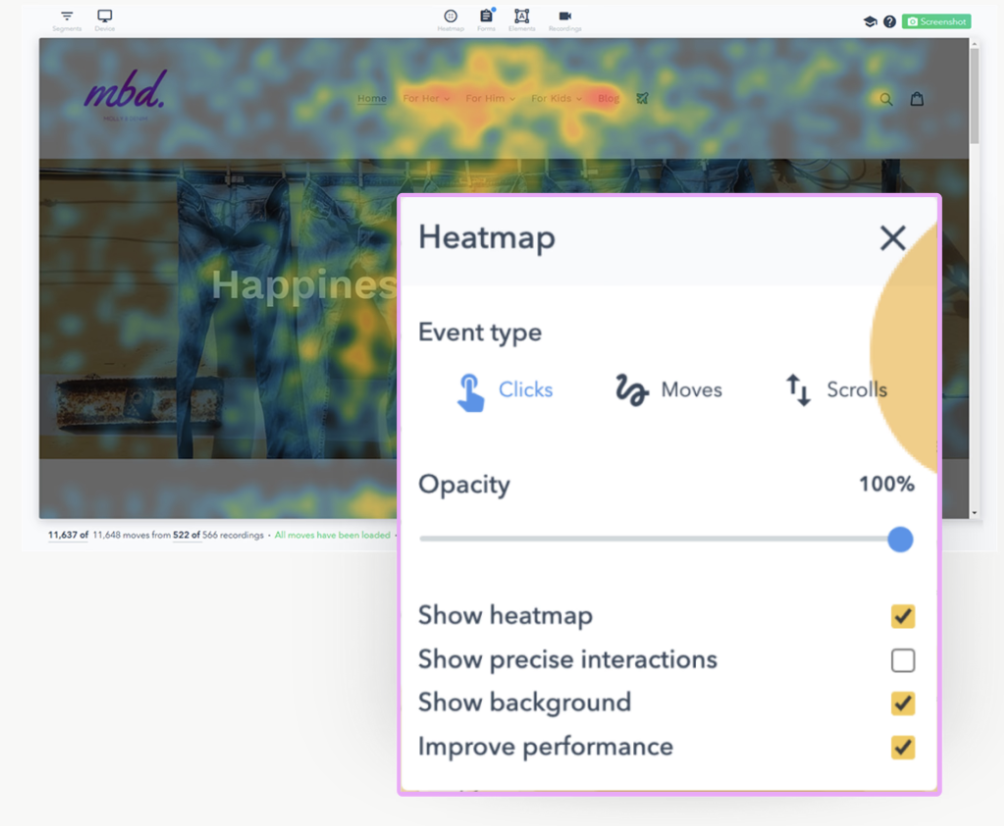
Lucky Orange es una herramienta de optimización de conversiones que ofrece a las empresas información sobre el comportamiento de los usuarios mediante mapas de calor y grabaciones de sesiones. Está dirigida principalmente a especialistas en marketing digital y propietarios de sitios web que desean mejorar sus tasas de conversión.
Por qué elegí Lucky Orange: Lo que destaca de esta herramienta es que incluso el plan gratuito es funcional para sitios pequeños—no es solo una prueba. Obtienes valor desde el principio: puedes ver dónde los usuarios reales tienen dificultades a través de mapas de calor y grabaciones, analizar embudos y entender en qué campos de los formularios se produce el abandono. Claro, algunas funciones—como gran volumen de sesiones y mayor retención—están reservadas para planes de pago, pero el nivel gratuito aún permite a los equipos probar flujos, identificar fricción de experiencia de usuario y decidir si invertir más. Además, su modelo de precios enfatiza el uso (cuotas de sesiones y período de retención) en lugar de bloquear funciones, lo que da mayor previsibilidad al escalar.
Funciones e integraciones destacadas:
Funciones incluyen soporte de chat que te permite interactuar con los visitantes en tiempo real. Puedes aprovechar encuestas y sondeos para recoger comentarios directamente desde tu sitio. La herramienta también ofrece análisis de formularios, mostrando en qué momento abandonan los usuarios el proceso de completar el formulario.
Integraciones incluyen Shopify, WordPress, HubSpot, Google Analytics, BigCommerce, Adobe Commerce, Squarespace, Weebly, Wix y Joomla.
¿Qué es gratis? Lucky Orange tiene un plan gratuito que te da 100 sesiones por mes con almacenamiento de datos por 30 días. A diferencia de algunas herramientas que limitan las funciones, el plan gratuito aún te permite usar lo esencial como mapas de calor, grabaciones de sesiones, embudos, análisis de formularios y chat en vivo—lo que lo convierte en una opción sólida para probar la plataforma sin gastar. Además, hay una prueba gratuita de 7 días de los planes de pago si quieres ver cómo los límites más altos y la mayor retención pueden adaptarse a tus necesidades.
Pros and Cons
Pros:
- Ofrece chat en tiempo real con los visitantes
- Proporciona análisis detallado de formularios
- Incluye mapas de calor dinámicos
Cons:
- El precio puede aumentar para sitios con mucho tráfico o uso detallado
- Visibilidad limitada en elementos de navegación complejos

La mejor para diseño de producto continuo
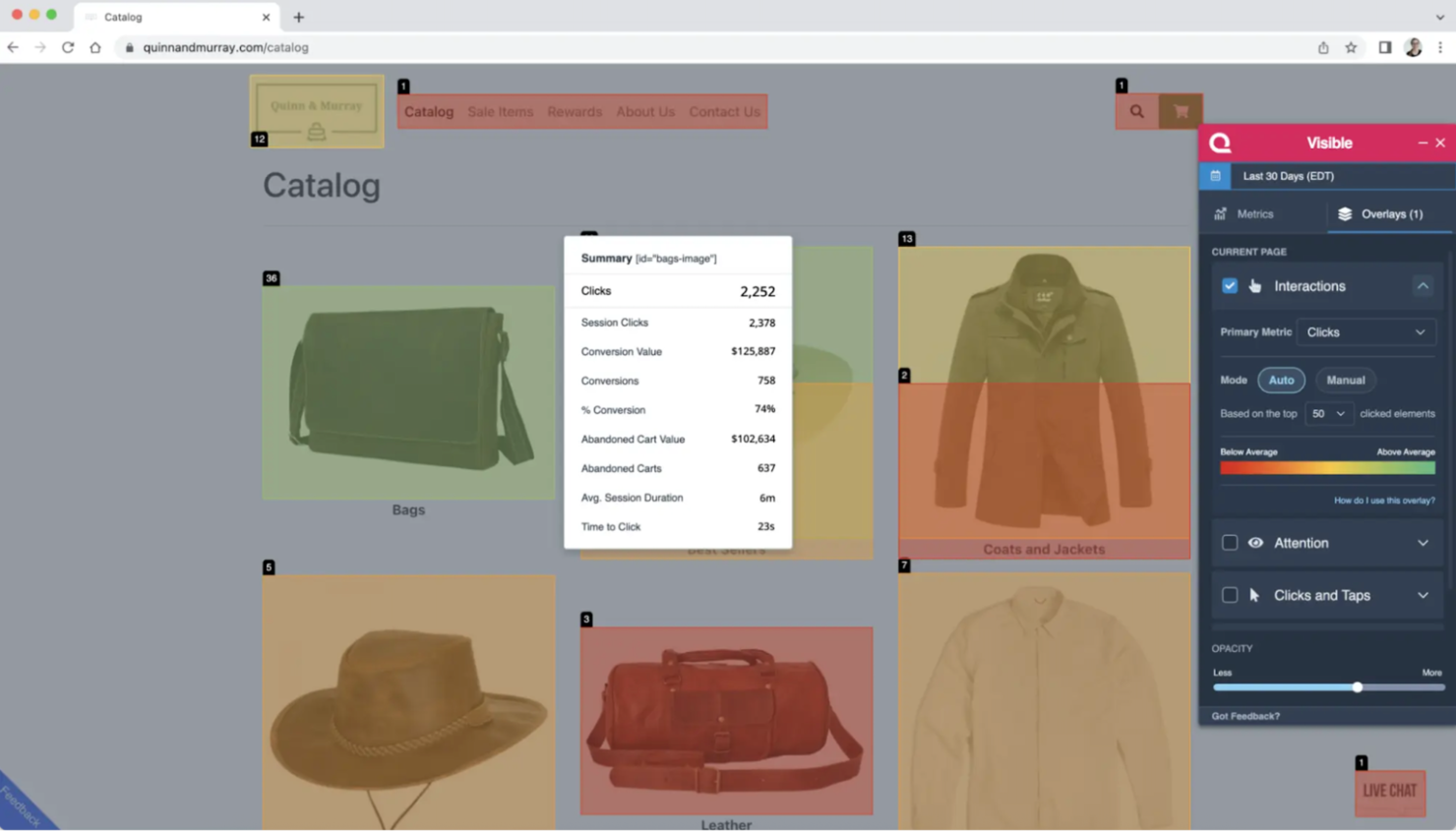
Quantum Metric es una plataforma de analítica de experiencia digital diseñada para grandes empresas que buscan mejorar sus productos digitales mediante información continua. Sirve a equipos de diversos sectores proporcionando analíticas en tiempo real y repeticiones de sesiones para comprender el comportamiento del usuario.
Por qué elegí Quantum Metric: Se centra en el diseño de productos continuo, ofreciendo datos en tiempo real que te ayudan a iterar y mejorar tu producto en función de las interacciones de los usuarios. Con funciones como las repeticiones de sesiones, puedes ver exactamente cómo navegan los usuarios por tu sitio e identificar puntos de fricción. La herramienta también ofrece detección de anomalías, alertándote sobre comportamientos inesperados de los usuarios. Este ciclo de retroalimentación continua asegura que tu producto evolucione según las necesidades de los usuarios.
Características destacadas e integraciones:
Características incluyen la detección de anomalías, que te alerta sobre comportamientos inusuales que puedan indicar problemas. El análisis de embudos te ayuda a rastrear los recorridos de los usuarios e identificar dónde abandonan, lo que te permite optimizar los caminos de conversión. Las analíticas en tiempo real ofrecen información actualizada al minuto sobre las interacciones de los usuarios, ayudándote a tomar decisiones informadas rápidamente.
Integraciones incluyen Salesforce, Adobe Analytics, Google Analytics, Optimizely, Tealium, Segment, Slack, Jira, ServiceNow y Splunk.
¿Qué es gratis? Quantum Metric no ofrece un plan gratuito para siempre. Puedes solicitar una demostración o evaluación, lo que te permite explorar sus funciones principales con algunas restricciones en el acceso a los datos y las capacidades de análisis.
Pros and Cons
Pros:
- Ofrece analíticas en tiempo real
- Proporciona alertas de detección de anomalías
- Admite análisis de embudos
Cons:
- Sin plan gratuito
- Personalización limitada en paneles de control

Ideal para el seguimiento de usuarios en tiempo real
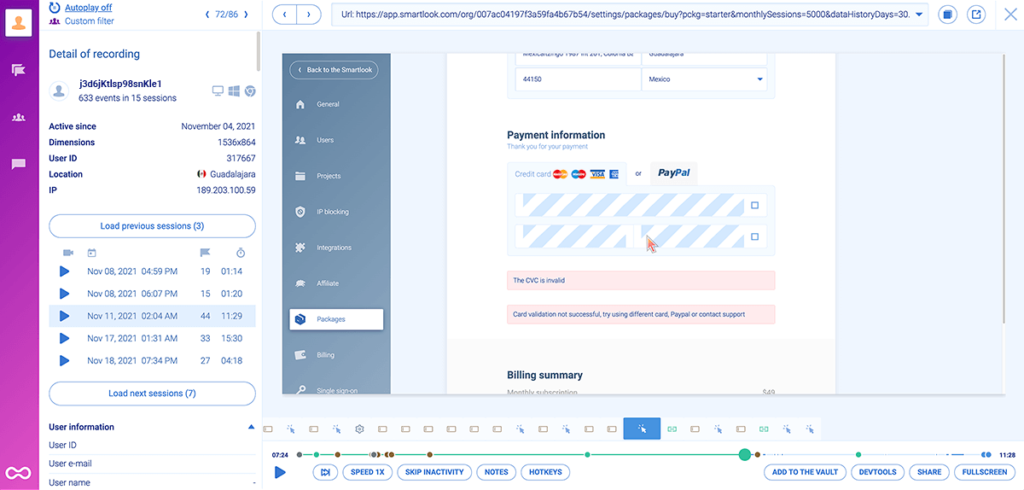
Smartlook es una herramienta de análisis de producto diseñada para empresas que buscan comprender el comportamiento de los usuarios tanto en plataformas web como móviles. Es ideal para equipos que necesitan información detallada sobre cómo interactúan los usuarios con su producto.
Por qué elegí Smartlook: Ofrece capacidades de seguimiento de usuarios en tiempo real a través de grabaciones de sesiones, lo que te permite ver exactamente cómo navegan los usuarios por tu sitio. Los mapas de calor proporcionan datos visuales sobre los clics y desplazamientos de los usuarios, ayudándote a identificar las áreas más populares de tus páginas. El seguimiento de eventos te permite monitorear acciones específicas, y el análisis de embudos muestra dónde los usuarios abandonan el proceso de conversión. Estas características la convierten en una opción fuerte para comprender las interacciones en tiempo real.
Características e integraciones destacadas:
Características incluyen grabaciones de sesiones que capturan cada interacción del usuario, seguimiento de eventos que te permite monitorear acciones específicas y análisis de embudos para entender las rutas de conversión. Los mapas de calor ofrecen una representación visual de la actividad de los usuarios, ayudándote a identificar las zonas más atractivas de tu sitio. También están disponibles informes de fallos y análisis de aplicaciones móviles para mejorar tu comprensión del comportamiento del usuario.
Integraciones incluyen Salesforce, Slack, Intercom, Zendesk, Google Analytics, HubSpot, WordPress, Shopify, Adobe Commerce y Pipedrive.
¿Qué es gratis? El plan gratuito de Smartlook incluye 3.000 sesiones mensuales, análisis básico del producto, datos históricos en mapas de calor, soporte tanto para aplicaciones web como móviles, retención de datos de un mes e integración con Slack. También puedes probar los planes avanzados con una prueba gratuita, sin necesidad de tarjeta de crédito.
Pros and Cons
Pros:
- Seguimiento de usuarios en tiempo real
- Grabaciones detalladas de sesiones
- Mapas de calor visuales
Cons:
- Algunas funciones requieren planes premium
- Problemas ocasionales de integración

Plerdy
Ideal para el análisis SEO y UX
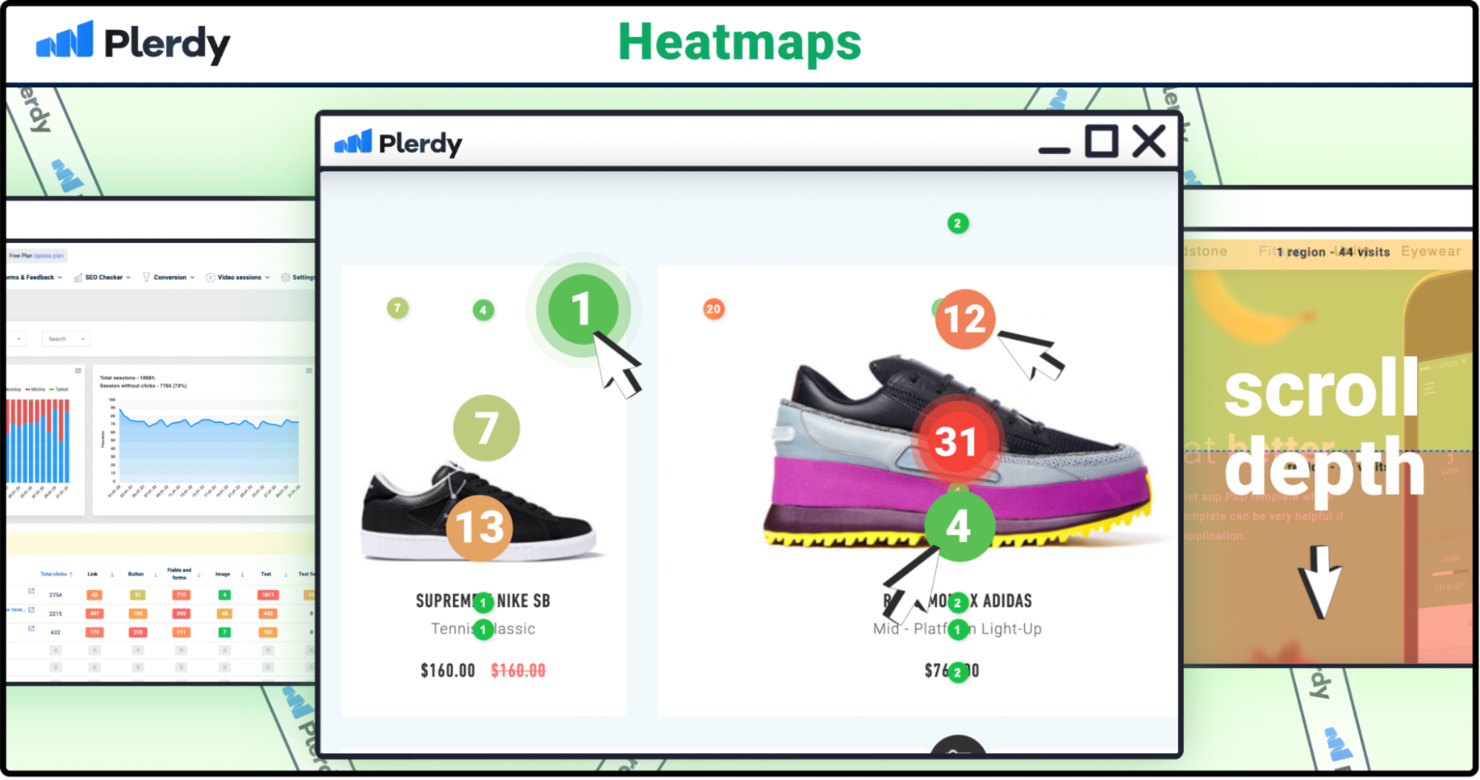
Plerdy es una herramienta de optimización de la tasa de conversión dirigida a especialistas en marketing digital, expertos en SEO y equipos de UX, que proporciona información sobre cómo se comportan las personas en tu sitio y cómo aparece tu sitio en los motores de búsqueda. Ayuda con mapas de calor, repeticiones de sesiones, pop-ups, auditorías SEO, seguimiento de eventos y más.
Por qué elegí Plerdy: Incluso su plan gratuito ofrece más que solo una demostración: puedes obtener señales reales de UX sin pagar. Con vistas limitadas pero útiles de mapas de calor, algunas repeticiones de sesión y revisiones de auditoría SEO, ya puedes ver dónde las personas hacen clic frente a dónde se desplazan, qué formularios se ignoran y dónde pueden estar ocultos los problemas de búsqueda. El plan gratuito no es ilimitado, y aspectos como más tráfico, más sesiones de video, más pop-ups o auditorías SEO extendidas están reservados para planes de pago. Pero para hacer pruebas, detectar fricciones y obtener perspectivas iniciales, supera a muchas herramientas básicas.
Características y integraciones destacadas:
Características incluyen formularios pop-up que ayudan a captar clientes potenciales y hacer crecer tu lista de correos. El seguimiento de eventos te permite monitorear acciones específicas de los usuarios, proporcionando una visión más profunda del comportamiento. Los embudos de conversión resaltan los puntos de abandono, ayudando a afinar el recorrido del usuario.
Integraciones incluyen Google Analytics, Google Tag Manager, HubSpot, Slack, WordPress, Shopify, Adobe Commerce, Wix, Drupal y Joomla.
¿Qué es gratis? Plerdy ofrece un plan Gratis para siempre que incluye un número determinado de vistas diarias de mapas de calor (≈100), alrededor de 500 capturas de video/repeticiones de sesiones, auditorías SEO básicas, algunos pop-ups/formularios y seguimiento de conversiones limitado. También obtienes una prueba gratuita de planes pagos para que puedas explorar más capacidad y características antes de decidir.
Pros and Cons
Pros:
- Proporciona alertas SEO
- Incluye mapas de calor detallados
- Ofrece análisis de embudos de conversión
Cons:
- La configuración inicial puede ser compleja
- Algunas funciones requieren conocimientos técnicos

Ideal para la integración de feedback de los usuarios

Hotjar es una herramienta de análisis de comportamiento enfocada en ayudar a las empresas a comprender las interacciones de los usuarios en sus sitios web. Está dirigida a equipos de marketing, diseñadores UX y gerentes de producto, proporcionando información sobre el comportamiento y las opiniones de los usuarios.
Por qué elegí Hotjar: Integra los comentarios de usuarios directamente en sus análisis, brindando datos cualitativos valiosos. Con funciones como encuestas y sondeos de opinión, puedes recopilar impresiones de los usuarios junto con los datos de mapas de calor. Esta combinación te permite ver no solo lo que hacen los usuarios, sino también por qué lo hacen. Esta integración de herramientas de feedback con analíticas ofrece una visión más completa de la experiencia del usuario.
Funciones destacadas & integraciones:
Funciones incluyen mapas de calor que representan visualmente las interacciones de los usuarios. Las grabaciones de sesiones permiten ver sesiones reales de usuarios para identificar puntos de fricción. Los embudos de conversión muestran en qué punto los usuarios abandonan el recorrido, ayudándote a optimizar el camino hacia la conversión.
Integraciones incluyen HubSpot, Slack, Zapier, Optimizely, Unbounce, Google Analytics, Segment, WordPress, Shopify y Squarespace.
¿Qué es gratis? Hotjar ofrece un plan gratuito para siempre con sesiones diarias y mapas de calor limitados, permitiéndote explorar sus funciones principales sin coste alguno.
Pros and Cons
Pros:
- Recopilación de feedback en tiempo real
- Configuración e instalación sencilla
- Representación visual de los datos
Cons:
- Retención de datos limitada
- El plan básico carece de funciones avanzadas

Ideal para reproducción de sesiones con embudos avanzados
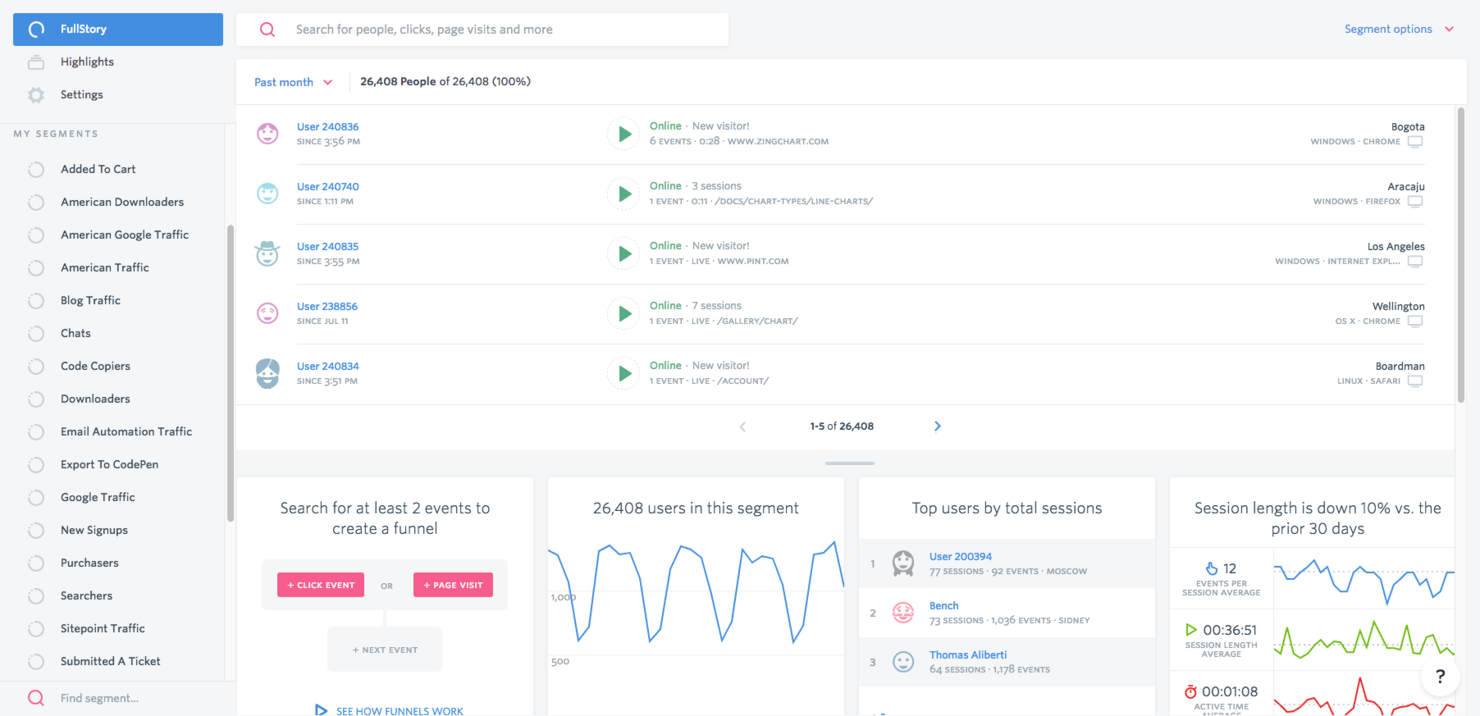
Fullstory es un software de mapas de calor que ofrece información sobre el comportamiento de los usuarios a través de análisis y reproducción de sesiones. Está dirigido a diversas industrias, como comercio minorista, finanzas y SaaS, ayudando a las empresas a mejorar la experiencia del usuario y solucionar problemas.
Por qué elegí Fullstory: Destaca en la reproducción de sesiones, lo que te permite ver en tiempo real las interacciones de los usuarios en tu sitio. Esta funcionalidad ayuda a identificar frustraciones de los usuarios y optimizar sus recorridos. Los conocimientos sobre el recorrido del cliente y la detección de fricción son componentes clave, proporcionando una visión integral del comportamiento del usuario.
Lo especialmente interesante es que incluso el plan gratuito incluye generosos límites de sesiones y un año completo de conservación de datos, algo que muchos competidores solo ofrecen en planes de pago. Estas funciones hacen de Fullstory una gran opción para mejorar experiencias digitales e incrementar el compromiso, tanto si lo pruebas en el plan gratuito como si escalas a características avanzadas.
Características destacadas e integraciones:
Características incluyen inteligencia del recorrido del cliente que mapea las interacciones de los usuarios a lo largo de tu sitio. La detección de fricción resalta áreas donde los usuarios tienen dificultades, permitiéndote hacer los ajustes necesarios. El análisis de sentimiento ofrece información sobre las emociones de los usuarios, ayudando a personalizar las experiencias.
Integraciones incluyen Salesforce, Slack, Google Analytics, Jira, Segment, Optimizely, Zendesk, HubSpot, Shopify y WordPress.
¿Qué es gratis? FullstoryFree te ofrece 30,000 sesiones al mes, 10 plazas, 5,000 eventos del lado del servidor y un año completo de conservación de repeticiones y análisis, una ventaja que muchas herramientas solo desbloquean en niveles pagos. También puedes probar funciones premium con una prueba gratuita y sin necesidad de tarjeta de crédito.
Pros and Cons
Pros:
- Reproducción detallada de sesiones
- Información sobre el recorrido del cliente
- Capacidades de detección de fricción
Cons:
- Curva de aprendizaje pronunciada para principiantes
- Opciones de personalización limitadas

UXCam
Ideal para análisis de aplicaciones móviles
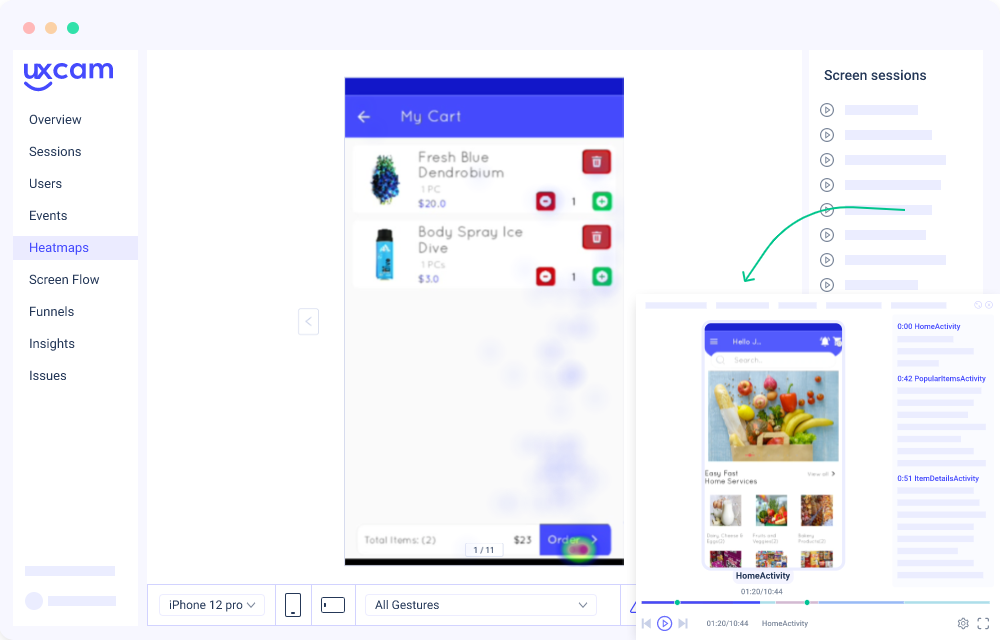
UXCam es una herramienta de analítica para aplicaciones móviles que ayuda a los equipos de producto y a los desarrolladores a comprender las interacciones de los usuarios y mejorar la experiencia en las apps. Se centra en proporcionar información sobre el comportamiento de los usuarios a través de grabaciones de sesiones y mapas de calor, dirigida principalmente a desarrolladores de aplicaciones móviles y diseñadores UX.
Por qué elegí UXCam: Se especializa en el análisis de aplicaciones móviles, ofreciendo funciones como repeticiones de sesiones y mapas de calor que muestran las interacciones dentro de tu app. Puedes rastrear los recorridos de los usuarios para entender cómo navegan, identificando posibles puntos de fricción. La herramienta también proporciona análisis de fallos, ayudándote a diagnosticar y resolver problemas rápidamente. Estas funciones son esenciales para optimizar el rendimiento y la satisfacción del usuario en apps móviles.
Características e integraciones destacadas:
Características incluyen repeticiones de sesiones que te permiten ver las interacciones de los usuarios en tiempo real, proporcionando información valiosa sobre su comportamiento. Los mapas de calor muestran visualmente dónde los usuarios tocan y se desplazan dentro de tu app, ayudándote a optimizar el diseño y la disposición. El análisis de fallos ofrece informes detallados sobre los errores de la app, permitiéndote solucionar problemas rápidamente y mejorar la estabilidad.
Integraciones incluyen Google Analytics, Mixpanel, Segment, Firebase, Amplitude, Adjust, AppsFlyer, Optimizely, Intercom y Slack.
¿Qué es gratis? En su plan gratuito, UXCam ofrece un conjunto de herramientas sorprendentemente útil para apps móviles en etapas iniciales. Obtienes repeticiones de sesiones, mapas de calor y detección básica de problemas de experiencia (errores, toques furiosos, congelamiento de interfaz, etc.), lo que te permite identificar rápidamente dónde los usuarios tienen dificultades. La cuota gratuita de sesiones es suficiente para probar hipótesis, depurar recorridos y ver el comportamiento real de los usuarios sin pagar. También está disponible una prueba gratuita de las funciones premium.
Pros and Cons
Pros:
- Incluye detección de fallos y toques furiosos
- Visualiza toques y desplazamientos mediante mapas de calor
- Permite el seguimiento de recorridos de usuarios dentro de la app
Cons:
- El plan gratuito limita a 3.000 sesiones/mes
- Retención de datos por solo 30 días en el plan gratuito

Ideal para grabaciones de sesiones detalladas basadas en eventos
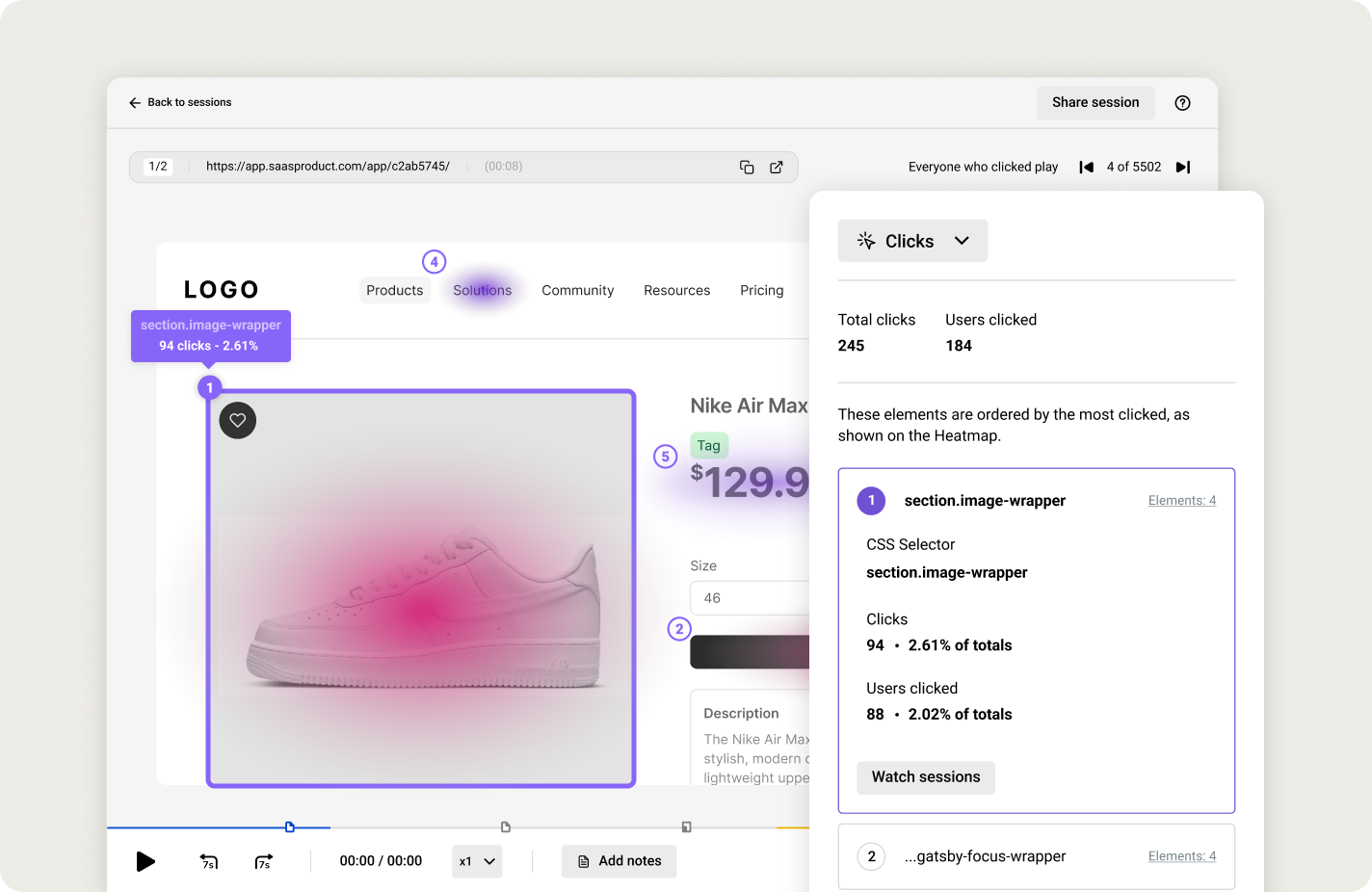
LiveSession es una herramienta de análisis diseñada para empresas que necesitan información detallada sobre las interacciones de los usuarios en sus plataformas digitales. Está pensada para compañías de comercio electrónico, proveedores SaaS y agencias digitales, ya que proporciona grabaciones detalladas de sesiones y análisis del comportamiento de los usuarios.
Por qué elegí LiveSession: El plan gratuito es realmente útil para equipos pequeños o sitios con poco tráfico, no es solo una prueba corta—por lo que puedes obtener información real sin pagar. Obtienes grabaciones detalladas de sesiones y filtros avanzados que te permiten ir más allá de “quién hizo clic dónde” para identificar frustraciones o puntos de abandono. Las herramientas de segmentación aportan otra capa de profundidad, ayudándote a probar flujos y localizar áreas problemáticas. El límite de 1.000 sesiones con retención de 30 días en el plan gratuito implica que lo superarás pronto si tienes mucho tráfico. Pero como prueba de concepto o para etapas iniciales, es más capaz que muchas ofertas gratuitas de la competencia.
Funciones y integraciones destacadas:
Funciones incluyen filtrado avanzado, que te permite filtrar sesiones según criterios específicos. Las etiquetas personalizadas te ayudan a organizar y categorizar sesiones para facilitar el análisis. La herramienta también ofrece seguimiento de errores, permitiéndote identificar y corregir problemas que los usuarios encuentran.
Integraciones incluyen Slack, Google Analytics, Intercom, HubSpot, WordPress, Shopify, Squarespace, Zendesk, Jira y Salesforce.
¿Qué es gratis? El plan gratuito para siempre de LiveSession incluye 1.000 sesiones por mes, soporte para hasta 3 usuarios en 2 proyectos y retención de datos por 30 días. Cubre funciones esenciales como reproducción de sesiones, mapas de clics y filtros, brindando a los equipos pequeños una oportunidad genuina de explorar el comportamiento de los usuarios antes de decidir si avanzar a los planes pagos. Si quieres explorar funciones premium como paneles, eventos personalizados y mayor retención, también hay una prueba gratuita de los planes de pago.
Pros and Cons
Pros:
- Análisis detallado de sesiones
- Opciones de filtrado avanzadas
- Sistema de etiquetado personalizado
Cons:
- Personalización limitada en los reportes
- Mayor curva de aprendizaje para nuevos usuarios

Ideal para capacidades de pruebas A/B
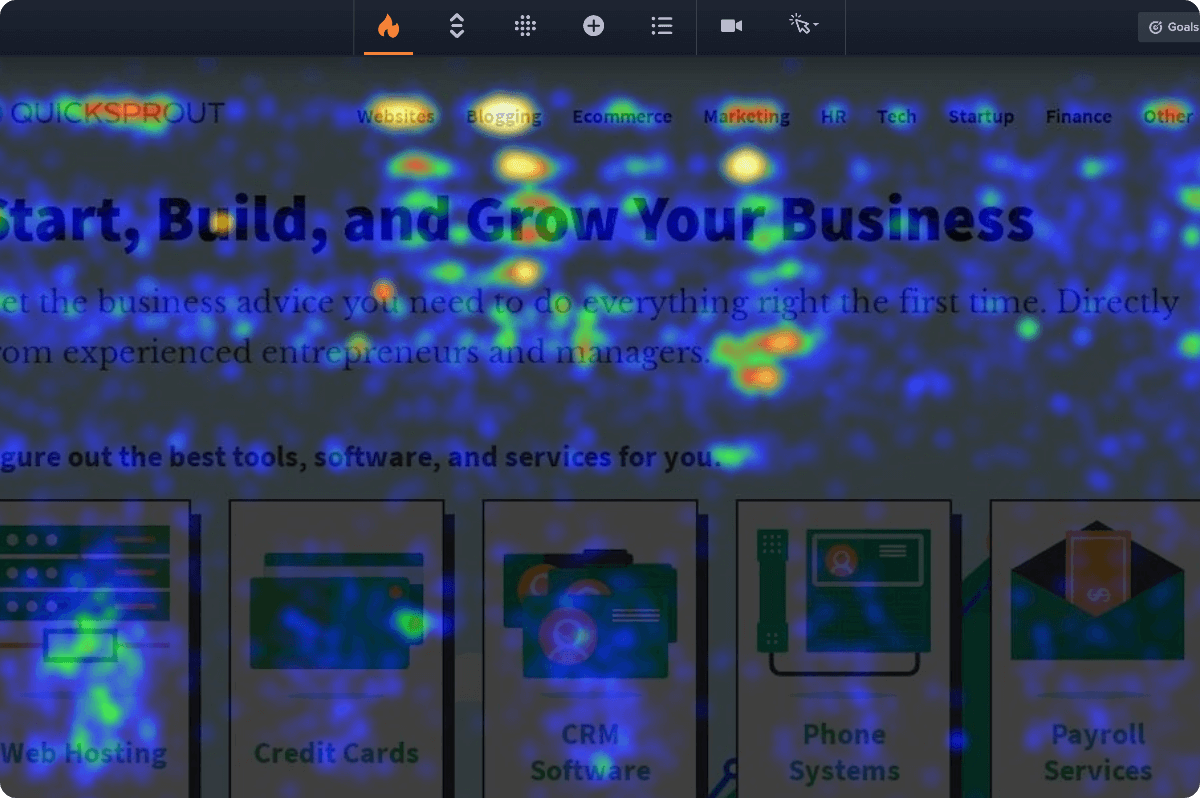
Crazy Egg es una herramienta de optimización de sitios web que ofrece información sobre el comportamiento de los usuarios a través de mapas de calor y pruebas A/B. Está orientada a especialistas en marketing y propietarios de sitios web que buscan mejorar el rendimiento y la interacción de sus páginas.
Por qué elegí Crazy Egg: Destaca en las pruebas A/B, permitiéndote experimentar con diferentes versiones de tu sitio para ver cuál funciona mejor. Los mapas de calor ofrecen una visión visual de las interacciones de los usuarios, mostrando dónde hacen clic y se desplazan los visitantes. La herramienta también incluye una función de confeti que desglosa los clics según las fuentes de referencia, ayudándote a entender los patrones de tráfico. Durante el período de prueba gratuita tienes acceso completo a funciones—mapas de calor, grabaciones, experimentos y diferentes herramientas visuales como confeti u overlay—para ver cómo los visitantes hacen clic, se desplazan y navegan. Es una excelente forma de probar qué es realmente útil para tu sitio sin pagar por adelantado.
Características destacadas e integraciones:
Funcionalidades incluyen mapas de desplazamiento que muestran hasta qué punto de la página se desplazan los usuarios, proporcionando información sobre la interacción con el contenido. Los informes de superposición resaltan los elementos clicables y su eficacia. La herramienta también ofrece grabaciones de usuarios, que te permiten ver interacciones en tiempo real en tu sitio.
Integraciones incluyen WordPress, Shopify, Wix, Adobe Commerce, Squarespace, Weebly, BigCommerce, HubSpot, Google Analytics y Optimizely.
¿Qué es gratis? Crazy Egg ofrece una prueba gratuita de 30 días, permitiéndote explorar sus funciones principales con algunas limitaciones en la cantidad de capturas y usuarios.
Pros and Cons
Pros:
- Ofrece pruebas A/B detalladas
- Proporciona información de mapas de desplazamiento
- Incluye seguimiento de clics con confeti
Cons:
- No tiene plan gratuito
- Algunas funciones requieren conocimientos técnicos

Sprig
Mejor para pruebas de experiencia de producto
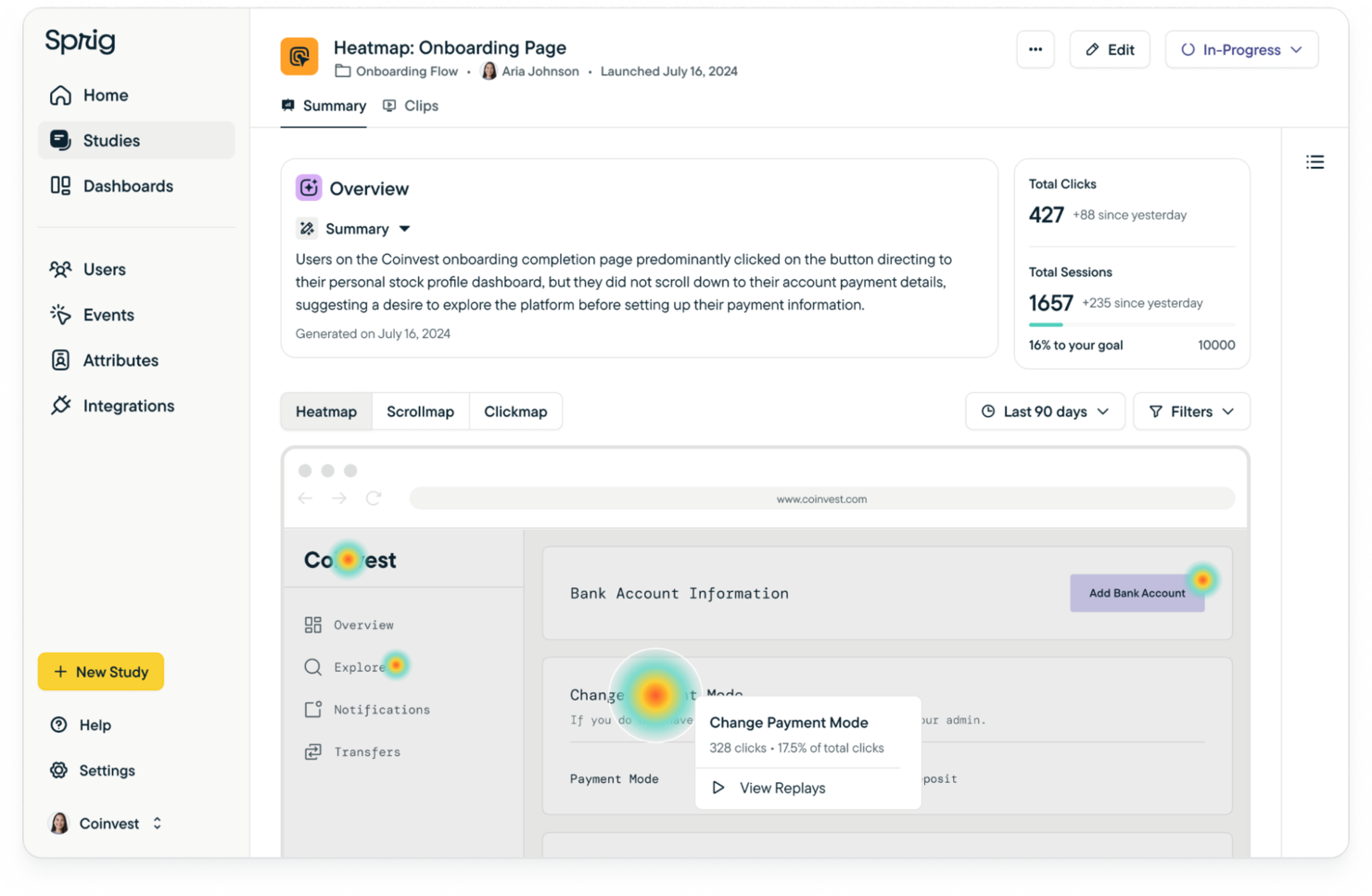
Sprig es una plataforma de investigación dirigida a equipos de producto y UX que necesitan herramientas de retroalimentación, seguimiento de comportamiento y análisis para mejorar la experiencia del usuario. Ayuda con encuestas extensas, retroalimentación dentro del producto, repeticiones de comportamiento y mapas de calor, todo integrado con IA para acelerar la generación de insights.
Por qué elegí Sprig: El Plan Gratuito es más que solo una muestra. Obtienes “unidades de estudio” que te permiten ejecutar repeticiones a pequeña escala, encuestas, mapas de calor e incluso respuestas de retroalimentación, así que ya puedes ver lo que los usuarios hacen y dicen. Ofrece lo suficiente para probar hipótesis, detectar fricciones y obtener datos cualitativos tempranos. Por supuesto, los planes de pago desbloquean límites más altos, más respuestas, segmentación avanzada y entrega móvil, por lo que si deseas escalar o profundizar, el nivel gratuito te quedará pequeño. Pero para trabajos en etapas iniciales, es sorprendentemente capaz.
Características e integraciones destacadas:
Características incluyen microencuestas que capturan retroalimentación de los usuarios en puntos clave de contacto. Las entrevistas en video permiten conversaciones en profundidad con los usuarios, proporcionando perspectivas cualitativas. Las pruebas de concepto te ayudan a validar ideas y diseños antes de su implementación total, asegurando alineación con las expectativas de los usuarios.
Integraciones incluyen Adobe Analytics, Mixpanel, Slack, Figma, Jira, Looker, Optimizely, Segment, Google Analytics y Amplitude.
¿Qué es gratis? El Plan Gratuito de Sprig incluye cuotas mensuales limitadas: 50 clips de repetición, unas 25 respuestas de encuesta, 100 capturas de mapas de calor y algunas respuestas de retroalimentación. Da acceso a las herramientas básicas: encuestas, retroalimentación, repeticiones y mapas de calor. Si necesitas más respuestas, más clips, más unidades o funciones móviles e integraciones, hay una prueba gratuita de los niveles de pago.
Pros and Cons
Pros:
- Recopilación rápida de retroalimentación
- Soporta entrevistas en video
- Pruebas de concepto efectivas
Cons:
- Funciones avanzadas de análisis e investigación limitadas
- Dominar todas las funciones puede tomar tiempo
Otros programas gratuitos de mapas de calor
Estas son algunas opciones adicionales de programas gratuitos de mapas de calor que no llegaron a mi lista, pero que aún vale la pena revisar:
- Contentsquare
Ideal para análisis visual de recorridos impulsados por IA
- Matomo
Mejor para el cumplimiento de la privacidad de los datos
- WatchThemLive
Mejor para análisis de video


Cómo evalúo el software gratuito de mapas de calor
Divido mi evaluación en lo que una herramienta debe hacer—como generar mapas de calor de clics y desplazamientos en un plan realmente gratuito—y en lo que la distingue para los equipos de producto que comparan opciones.
Funcionalidad esencial (Requisitos mínimos para esta lista)
Al seleccionar herramientas para mi lista, califico cada una en una escala de 0 (no ofrece la funcionalidad) a 5 (destaca en esta área) por cada funcionalidad principal que se indica a continuación. Luego, calculo la puntuación total de la herramienta en porcentaje. Cada herramienta debe lograr una puntuación total mínima del 65% para ser considerada para su inclusión.
- Tipos de visualización de mapas de calor: Busco herramientas que ofrezcan mapas de calor de clics, desplazamientos y movimientos como mínimo, ya que cada tipo revela una capa diferente del comportamiento de usuario en una página.
- Plan permanente gratuito: La herramienta necesita un nivel gratuito real, no una prueba limitada en el tiempo. Verifico que los límites de sesiones o vistas de página sean lo suficientemente altos como para recopilar datos útiles.
- Seguimiento de sesiones y páginas: Cada herramienta debe rastrear interacciones a través de varias páginas y soportar URLs dinámicas o aplicaciones de una sola página, donde los equipos de producto suelen lanzar características.
- Segmentación por dispositivo y viewport: Los mapas de calor separados para escritorio, tableta y móvil son importantes porque el comportamiento táctil en una pantalla de pago no se parece en nada al comportamiento del cursor en la misma página.
- Implementación del script de seguimiento: Evalúo qué tan rápido puedes activar un fragmento de seguimiento, ya sea una sola etiqueta JavaScript, un contenedor GTM o un complemento nativo para CMS.
- Filtrado y segmentación de datos: Las herramientas deben permitirte segmentar los datos del mapa de calor por fuente de tráfico, rango de fechas o segmento de usuario para que puedas comparar comportamientos entre cohortes o ventanas de lanzamiento.
Una vez que tengo una lista de herramientas que cumplen estos criterios, considero qué distingue a cada plataforma.
Factores diferenciadores (Qué distingue a los proveedores)
Así es como comparo y evalúo a diferentes proveedores:
Funciones destacadas
Las grabaciones de sesiones son un gran diferenciador porque te permiten observar los recorridos reales de los usuarios detrás de un punto destacado en tu mapa de calor. Cuando una página de pago muestra gran actividad de desplazamiento, reproducir sesiones revela si los usuarios buscan información o simplemente están confundidos. El análisis de embudo añade otra capa al conectar los datos del mapa de calor con puntos específicos de abandono en un flujo de registro o incorporación. También busco widgets de retroalimentación integrados que combinen datos de comportamiento con respuestas de los usuarios, brindando a los PM tanto el "qué" como el "por qué" en una sola herramienta.
Más allá de las funciones
Los controles de privacidad son importantes cuando los mapas de calor capturan interacciones de usuario en tu producto. Reviso si una herramienta ofrece enmascaramiento automático de PII y anonimización de IP, ya que los equipos de producto suelen rastrear páginas que incluyen datos personales. Las integraciones con el stack tecnológico también tienen mucho peso: conectar datos de mapas de calor a herramientas como Amplitude, Jira o Slack mantiene los conocimientos en el flujo de trabajo existente. Por último, evalúo el camino de escalado del plan gratuito, porque una herramienta que te obliga a un contrato empresarial en cuanto agregas un segundo sitio genera fricción que tu equipo no necesita.
Cómo elegir un programa gratuito de mapas de calor
Es fácil perderse entre largas listas de funciones y estructuras de precios complejas. Para ayudarte a mantener la concentración mientras avanzas en tu proceso único de selección de software, esta es una lista de factores que debes tener en cuenta:
| Factor | Qué debes considerar |
|---|---|
| Escalabilidad | ¿El software crecerá junto con tu empresa? Considera si puede gestionar un mayor volumen de datos y número de usuarios sin costes adicionales ni problemas de rendimiento. |
| Integraciones | ¿Se conecta con tus herramientas actuales? Comprueba la compatibilidad con tu CRM, CMS y plataformas de análisis para garantizar una integración fluida del flujo de trabajo. |
| Personalización | ¿Puedes adaptarlo a tus necesidades específicas? Busca un software que te permita personalizar los paneles y los informes para que se ajusten a los requisitos concretos de tu empresa. |
| Facilidad de uso | ¿Es intuitivo para tu equipo? Considera la curva de aprendizaje y si tu equipo puede empezar a utilizarlo eficazmente sin una formación extensa. |
| Implementación e incorporación | ¿Con qué rapidez puedes empezar? Evalúa el proceso de configuración, la disponibilidad de recursos de incorporación y si el proveedor ofrece formación o asistencia durante la implementación. |
| Coste | ¿Se ajusta a tu presupuesto? Evalúa el coste total de propiedad, incluidas las posibles tarifas ocultas, y compáralo con tu presupuesto para asegurarte de que sea una opción económicamente viable. |
| Medidas de seguridad | ¿Están protegidos tus datos y la información de los usuarios? Asegúrate de que el software cumpla las normativas de protección de datos y ofrezca funciones de seguridad avanzadas para proteger la información confidencial. |
¿Qué es un programa gratuito de mapas de calor?
El software gratuito de mapas de calor es una herramienta que visualiza las interacciones de los usuarios en los sitios web mediante mapas codificados por colores. Estas herramientas suelen ser utilizadas por especialistas en marketing, diseñadores de UX y gerentes de producto para comprender el comportamiento de los usuarios y mejorar el diseño del sitio.
Las funciones de seguimiento de clics, mapas de desplazamiento y reproducción de sesiones ayudan a identificar la interacción de los usuarios y a optimizar la experiencia del usuario. En general, estas herramientas proporcionan información valiosa que impulsa una mejor toma de decisiones para mejorar las plataformas digitales.
Funciones del software gratuito de mapas de calor
Al seleccionar un software gratuito de mapas de calor, presta atención a las siguientes funciones clave:
- Seguimiento de clics: Visualiza dónde hacen clic los usuarios en tu sitio, lo que te ayuda a identificar las áreas populares y a optimizarlas para mejorar la interacción.
- Mapas de desplazamiento: Muestran hasta dónde se desplazan los usuarios en una página, lo que indica la visibilidad del contenido y el interés de los usuarios.
- Reproducción de sesiones: Registra las interacciones de los usuarios, lo que te permite ver sesiones en tiempo real y comprender el comportamiento de los usuarios.
- Análisis del embudo de conversión: Rastrea las rutas de los usuarios y los puntos de abandono, lo que te ayuda a optimizar las tasas de conversión.
- Mapas de calor: Proporcionan un mapa codificado por colores de las interacciones de los usuarios, ofreciendo información sobre su comportamiento y participación.
- Pruebas A/B: Te permiten probar diferentes versiones de tu sitio para determinar qué funciona mejor para tu audiencia.
- Análisis de formularios: Analiza las interacciones de los usuarios con los formularios, destaca posibles puntos de abandono y mejora las tasas de finalización de formularios.
- Integración de comentarios de los usuarios: Recopila comentarios directamente del sitio, proporcionando información cualitativa junto con datos cuantitativos.
- Paneles personalizables: Te permiten adaptar las vistas analíticas para satisfacer necesidades empresariales específicas, mejorando la interpretación de los datos.
- Análisis en tiempo real: Ofrece información inmediata sobre las interacciones de los usuarios, lo que permite tomar decisiones y realizar ajustes rápidamente.
Beneficios del software gratuito de mapas de calor
Implementar un software gratuito de mapas de calor proporciona varios beneficios para tu equipo y tu empresa. Estos son algunos de los que puedes esperar:
- Mejora de la interacción de los usuarios: Al analizar el seguimiento de clics y los mapas de desplazamiento, puedes optimizar el diseño de tu sitio para aumentar la interacción de los usuarios.
- Mayores tasas de conversión: El análisis del embudo de conversión ayuda a identificar dónde abandonan los usuarios, lo que te permite realizar ajustes que mejoren las tasas de conversión.
- Mejor experiencia del usuario: La reproducción de sesiones y los mapas de calor proporcionan información sobre el comportamiento de los usuarios, lo que te permite mejorar la experiencia general del usuario.
- Decisiones basadas en datos: Los análisis en tiempo real y los paneles personalizables proporcionan información inmediata, lo que favorece una toma de decisiones rápida y fundamentada.
- Mayor finalización de formularios: El análisis de formularios destaca posibles puntos de abandono, lo que te ayuda a realizar los cambios necesarios para aumentar las tasas de finalización.
- Comentarios valiosos de los usuarios: Integrar los comentarios de los usuarios directamente con los análisis te ayuda a comprender sus necesidades y preferencias, orientando las mejoras del producto.
Costes y precios del software gratuito de mapas de calor
Seleccionar un software gratuito de mapas de calor requiere comprender los diversos modelos de precios y planes disponibles. Los costes varían según las funciones, el tamaño del equipo, los complementos y otros factores. La siguiente tabla resume los planes habituales, sus precios medios y las funciones que suelen incluir las soluciones de software gratuito de mapas de calor:
Tabla comparativa de planes de software gratuito de mapas de calor
| Tipo de plan | Precio medio | Funciones habituales |
|---|---|---|
| Plan gratuito | $0 | Mapas de calor básicos, grabaciones de sesiones limitadas y datos fundamentales sobre la interacción de los usuarios. |
| Plan personal | $5-$25/usuario/mes | Mapas de calor mejorados, mapas de desplazamiento, pruebas A/B básicas e integraciones limitadas. |
| Plan empresarial | $50-$100/usuario/mes | Mapas de calor avanzados, reproducciones completas de sesiones, análisis del embudo de conversión y herramientas de comentarios de los usuarios. |
| Plan para empresas | $150-$300/usuario/mes | Paneles personalizables, análisis exhaustivos, asistencia prioritaria e integraciones completas. |
Preguntas frecuentes sobre el software gratuito de mapas de calor
Aquí tienes algunas respuestas a preguntas frecuentes sobre el software gratuito de mapas de calor:
¿Qué tan precisos son los mapas de calor para hacer un seguimiento del comportamiento de los usuarios?
Los mapas de calor ofrecen una representación visual de las interacciones de los usuarios, pero es posible que no capturen todos los detalles. Muestran tendencias y patrones generales, lo que te ayuda a comprender dónde hacen clic y se desplazan los usuarios. Sin embargo, podrían no registrar con precisión los recorridos individuales ni las interacciones con contenido dinámico.
¿Pueden los mapas de calor hacer un seguimiento del comportamiento de los usuarios en dispositivos móviles?
Sí, muchas herramientas de mapas de calor pueden hacer un seguimiento del comportamiento de los usuarios en dispositivos móviles. Pueden ofrecer información sobre las interacciones de los usuarios móviles, como los toques y los desplazamientos. Es importante elegir una herramienta compatible con la recopilación de datos móviles para garantizar un análisis completo en todos los dispositivos.
¿Cuáles son las limitaciones del uso de mapas de calor?
Los mapas de calor pueden mostrar dónde hacen clic y se desplazan los usuarios, pero a menudo no ofrecen contexto sobre por qué se comportan de una determinada manera. No realizan un seguimiento de los recorridos individuales de los usuarios en varias páginas y pueden tener dificultades con el contenido dinámico. Complementar los mapas de calor con grabaciones de sesiones y análisis del embudo puede proporcionar información más detallada.
¿Cómo ayudan los mapas de calor a optimizar un sitio web?
Los mapas de calor ayudan a identificar qué partes de tu sitio web atraen más atención y dónde los usuarios pierden interés. Al comprender estos patrones, puedes tomar decisiones fundamentadas sobre cambios en el diseño, la ubicación del contenido y las mejoras visuales para aumentar la interacción de los usuarios y las tasas de conversión.
¿Necesito conocimientos técnicos para utilizar un software de mapas de calor?
La mayoría de las herramientas de mapas de calor están diseñadas para ser fáciles de usar y no requieren amplios conocimientos técnicos. Sin embargo, comprender los datos y tomar decisiones fundamentadas a partir de la información obtenida puede requerir ciertas habilidades analíticas. Los recursos completos de asistencia y formación pueden ayudar a facilitar el proceso de aprendizaje.
¿Existen problemas de privacidad al utilizar un software de mapas de calor?
Las herramientas de mapas de calor recopilan datos sobre las interacciones de los usuarios, lo que puede generar problemas de privacidad. Es fundamental elegir una herramienta que cumpla con las normativas de protección de datos, como el RGPD. Asegúrate de que el software anonimice los datos de los usuarios y ofrezca opciones para excluir información confidencial del seguimiento.
Lo siguiente:
Si estás investigando software gratuito de mapas de calor, contacta gratuitamente con un asesor de SoftwareSelect para recibir recomendaciones.
Rellenas un formulario y mantienes una breve conversación en la que se profundiza en los detalles de tus necesidades. Después recibirás una lista breve de programas para revisar. También te ayudarán durante todo el proceso de compra, incluidas las negociaciones de precios.