

Con tantas soluciones diferentes de seguimiento de usuarios disponibles, es difícil determinar cuál es la adecuada para ti. Sabes que quieres recopilar datos relacionados con el comportamiento, las preferencias y la interacción de los usuarios, y obtener información útil para optimizar tus productos, pero necesitas descubrir qué herramienta es la mejor. ¡Yo te ayudo! En esta publicación te ayudaré a tomar una decisión sencilla, compartiendo mi experiencia personal al utilizar docenas de herramientas de seguimiento diferentes con equipos grandes y productos diversos, junto con mis selecciones del mejor software de seguimiento de usuarios.
Por qué confiar en nuestras recomendaciones de software
6,700+
Reviews
20
Industry experts
16+
Evaluation factors
14
Years
Nuestro equipo lleva probando y evaluando software desde 2012. Como gestores de producto, sabemos lo difícil —y lo importante— que es elegir el software adecuado.
Para esta guía, evaluamos las herramientas mediante pruebas prácticas e investigación independiente, puntuando las herramientas según nuestros criterios de selección.
Nuestras reseñas reflejan nuestro criterio editorial humano, no un discurso de ventas.
Revisores expertos:
 Hannah ClarkSenior TPM
- Cristiano ValimSenior UI/UX Lead

Resumen del mejor software de seguimiento de usuarios
Esta tabla comparativa resume los detalles de precios de mis principales selecciones de software de seguimiento de usuarios para ayudarte a encontrar la mejor opción para tu presupuesto y las necesidades de tu empresa.
| Tool | Best For | Trial Info | Price | ||
|---|---|---|---|---|---|
| 1 | La mejor opción para combinar mapas de calor y reproducción de sesiones | Plan gratuito disponible | Desde 25 $/mes (facturado anualmente) | Website | |
| 2 | Ideal para el análisis de productos basado en eventos | Plan gratuito disponible | Desde $120/mes (facturado anualmente) | Website | |
| 3 | La mejor opción para el seguimiento de sesiones en sectores regulados | Demostración gratuita disponible | Precio bajo solicitud | Website | |
| 4 | Ideal para puntuar y realizar un seguimiento de la adopción del producto | Prueba gratuita de 30 días | Precio bajo consulta | Website | |
| 5 | Ideal para mapas de calor sin código y seguimiento de CRO | Prueba gratuita de 30 días disponible | Desde $29/mes | Website | |
| 6 | Ideal para análisis de recorridos y sesiones multiplataforma | Demostración gratuita disponible | Precio bajo solicitud | Website | |
| 7 | Ideal para la reproducción de sesiones vinculada a embudos cuantitativos | Plan gratuito disponible | Precios bajo petición | Website | |
| 8 | Ideal para unificar analítica, reproducciones y experimentos | Plan gratuito disponible | Precios bajo solicitud | Website | |
| 9 | Ideal para el análisis retroactivo de eventos sin etiquetado | Plan gratuito disponible | Precio bajo solicitud | Website | |
| 10 | Ideal para el seguimiento de usuarios de código abierto y nativo del almacén de datos | Plan gratuito + demostración gratuita disponible | Desde $34/mes | Website |


Reseñas del mejor software de seguimiento de usuarios
A continuación encontrarás mis resúmenes detallados del mejor software de seguimiento de usuarios que llegó a mi lista de preseleccionados. Mis reseñas ofrecen una visión detallada de las funciones principales, las ventajas y desventajas, las integraciones y los casos de uso ideales de cada herramienta para ayudarte a encontrar la mejor opción para ti.
 La mejor opción para combinar mapas de calor y reproducción de sesiones
- Plan gratuito disponible
- Desde 25 $/mes (facturado anualmente)
Visit WebsiteCustomer Rating:4.7/5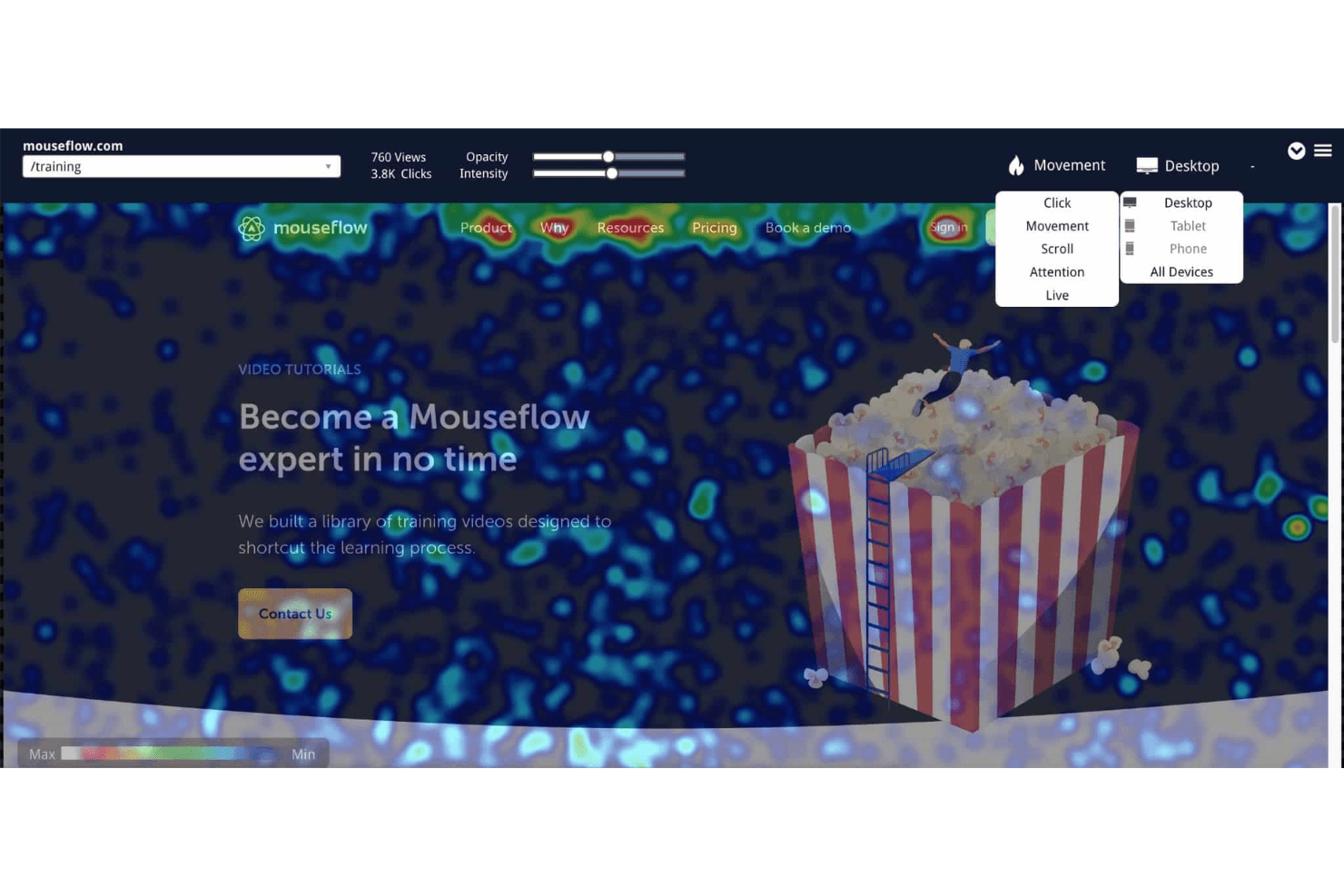
Los mapas de calor de Mouseflow visualizan el comportamiento de los usuarios recopilando y mostrando datos sobre clics, desplazamiento, atención y movimiento. Mouseflow es una plataforma de seguimiento de usuarios que captura reproducciones de sesiones, mapas de calor, embudos de conversión, análisis de formularios y detección de fricciones en experiencias web.
¿Para quién es más adecuado Mouseflow?
Mouseflow es una opción excelente para diseñadores de UX y especialistas en marketing digital que necesitan datos visuales detallados sobre el comportamiento —mapas de calor, reproducciones de sesiones y detección de fricciones— sin tener que gestionar una pila de analítica compleja.
Por qué elegí Mouseflow
Mouseflow ocupa un lugar en mi lista de favoritos porque es una de las pocas herramientas que realmente destaca tanto en mapas de calor como en reproducción de sesiones, sin tratar ninguna de las dos funciones como algo secundario. Me gusta especialmente cómo sus seis tipos de mapas de calor, incluidos los mapas de calor de fricción que detectan automáticamente los clics furiosos y los clics muertos, se combinan directamente con la reproducción de sesiones, de modo que puedo detectar un problema en el mapa de calor y acceder de inmediato a las grabaciones exactas que lo respaldan. Mina AI añade otra capa al permitirme hacer preguntas en lenguaje sencillo, como '¿Por qué abandonan los usuarios el proceso de pago?', y vincular las respuestas con sesiones específicas.
Características principales de Mouseflow
- Análisis de formularios: Realiza un seguimiento de los campos de formulario que provocan abandonos, de los envíos que fallan y de los puntos en los que los usuarios abandonan antes de completar un formulario.
- Análisis de recorridos: Traza las rutas reales que siguen los visitantes por tu sitio y destaca dónde salen.
- Embudos de conversión: Visualiza los flujos de usuarios de varios pasos con métricas de ingresos y fricción para mostrar exactamente dónde se producen los abandonos.
- Encuestas de opinión: Implementa encuestas durante la sesión, incluido el NPS, que pueden activarse automáticamente cuando un visitante encuentra un punto de fricción.
Integraciones de Mouseflow
Mouseflow incluye 42 integraciones, entre ellas Google Analytics, Google Tag Manager, Google Ads, HubSpot, Salesforce, Shopify, WordPress, Slack y Microsoft Teams. También ofrece una API REST y un servidor MCP para acceder a datos personalizados.
Pros and Cons
Pros:
- Combina mapas de calor con reproducción de sesiones
- La captura automática revela fricciones sin etiquetado manual
- Mina AI conecta los patrones con las sesiones
Cons:
- Los límites mensuales de sesiones pueden detener el seguimiento
- No dispone de SDK nativo para aplicaciones móviles
Learn more about Mouseflow: Ideal para el análisis de productos basado en eventos
- Plan gratuito disponible
- Desde $120/mes (facturado anualmente)
Visit WebsiteCustomer Rating:4.5/5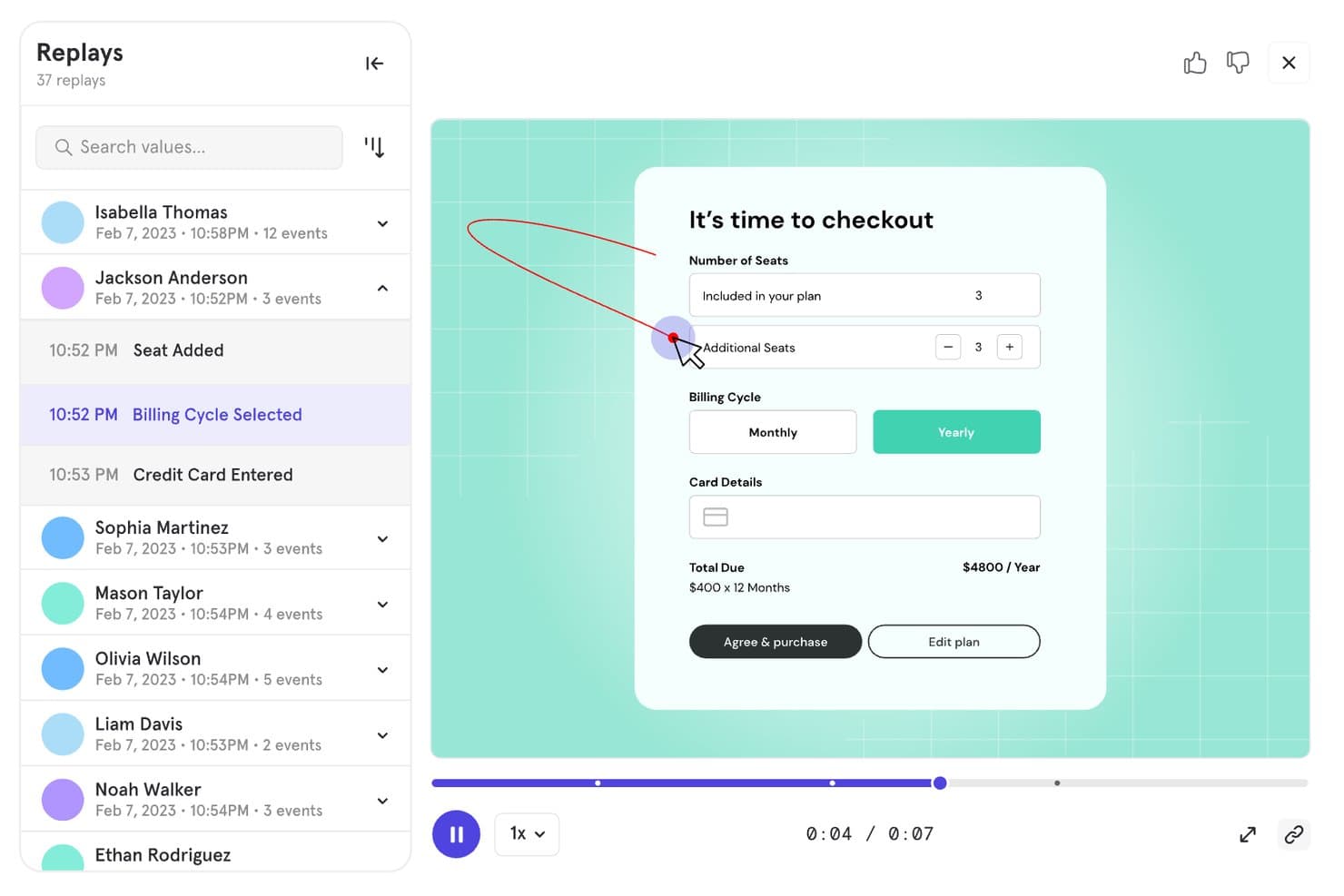
Mixpanel permite a los usuarios reproducir sesiones para hacer un seguimiento del comportamiento durante la finalización de la compra. Mixpanel es una plataforma de análisis de productos y seguimiento de usuarios que combina el seguimiento basado en eventos, la reproducción de sesiones, el análisis de embudos y retención, las cohortes de comportamiento y la experimentación y las funciones de lanzamiento integradas en fuentes de datos web, móviles y del lado del servidor.
¿Para quién es más adecuado Mixpanel?
Mixpanel es una opción excelente para los equipos de producto y crecimiento que necesitan analizar en profundidad el comportamiento de los usuarios: realizar un seguimiento de eventos, analizar embudos y ejecutar experimentos, todo en un mismo lugar.
Por qué elegí Mixpanel
Mixpanel ocupa un lugar destacado en mi lista porque el seguimiento basado en eventos es realmente su punto fuerte. Me encanta cómo puedes pasar directamente de un abandono en el embudo a reproducciones de sesiones filtradas de los usuarios exactos que abandonaron en ese paso, sin cambiar de herramienta ni perder el contexto. La captura automática gestiona el registro de interacciones en la web y en dispositivos móviles de forma automática, mientras que las cohortes de comportamiento permiten segmentar los informes de retención y flujo por cualquier propiedad o acción del usuario.
Características principales de Mixpanel
- Seguimiento de eventos multiplataforma: Captura las acciones de los usuarios en la web, iOS, Android, Flutter y fuentes del lado del servidor o del almacén de datos en una única línea de tiempo unificada.
- Cohortes de comportamiento: Permite agrupar a los usuarios según cualquier combinación de acciones, propiedades o secuencias de eventos para filtrar informes y análisis de retención.
- Experimentación integrada: Ejecuta pruebas A/B multivariantes con métodos estadísticos como frecuentista, secuencial y CUPED, además de detectar desajustes en la proporción de la muestra.
- Funciones de lanzamiento: Admite lanzamientos por porcentaje, segmentación basada en cohortes, variantes persistentes y almacenamiento en caché sin conexión, con un registro de auditoría completo.
Integraciones de Mixpanel
Mixpanel admite integraciones con Segment y mParticle, además de conectores para almacenes de datos y canalizaciones de datos. Sus API permiten la ingesta de datos personalizados, las exportaciones y las consultas.
Pros and Cons
Pros:
- Conecta directamente los embudos con las reproducciones de sesiones
- Captura el comportamiento detallado de los usuarios en distintas plataformas
- Combina análisis con experimentación y funciones de lanzamiento
Cons:
- La configuración de eventos requiere planificación técnica
- Los costes aumentan a medida que crece el volumen registrado
 La mejor opción para el seguimiento de sesiones en sectores regulados
- Demostración gratuita disponible
- Precio bajo solicitud
Visit WebsiteCustomer Rating:4.7/5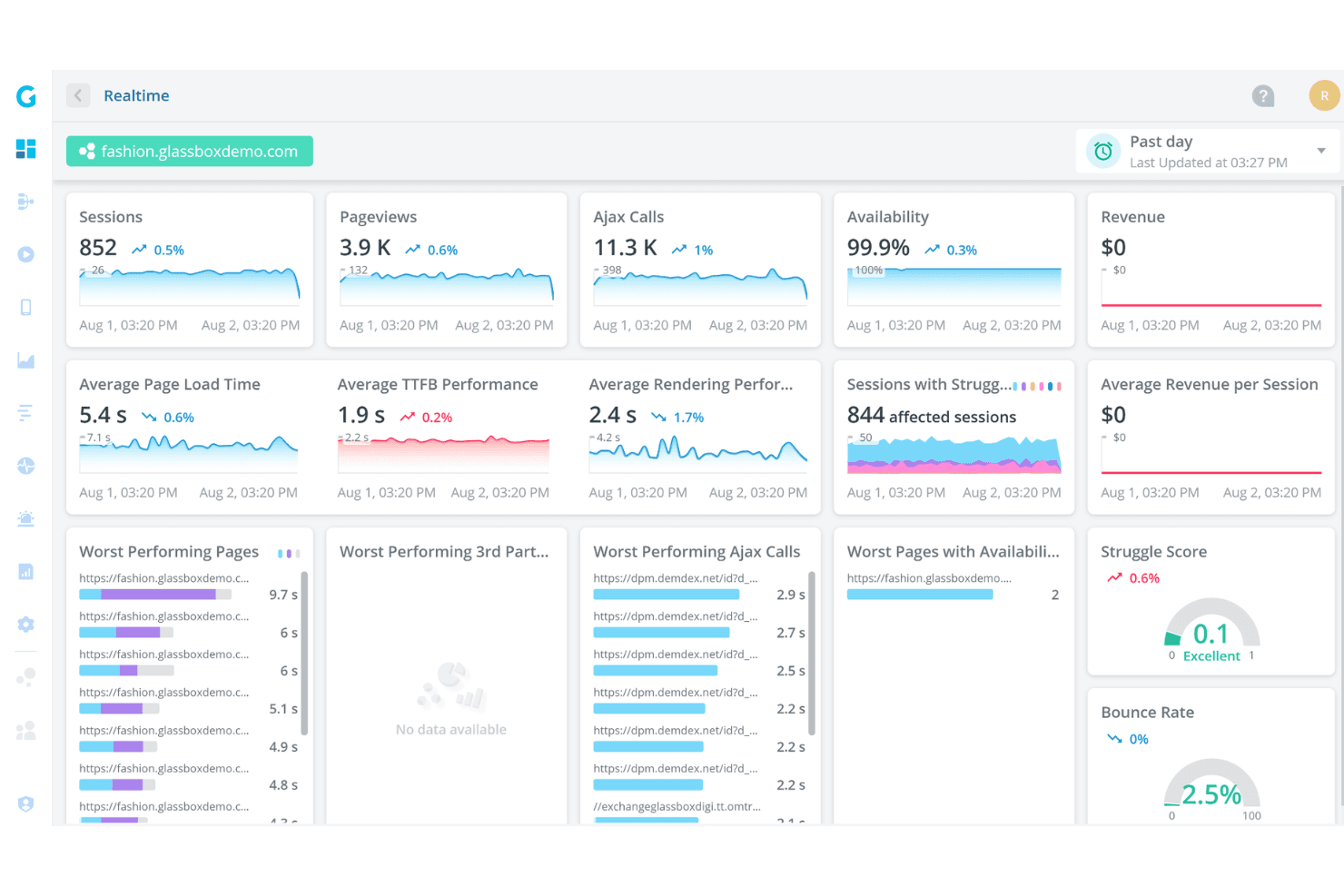
Glassbox ofrece un panel de análisis en tiempo real que muestra sesiones, páginas vistas, llamadas Ajax, disponibilidad, tiempos de carga de las páginas e índices de dificultad para un sitio web de moda de demostración. Glassbox es una plataforma de análisis de la experiencia digital que combina la captura automática sin etiquetas, la reproducción de sesiones, los mapas de calor (mapas de interacción), el análisis de embudos y la detección del comportamiento asistida por IA en sitios web y aplicaciones móviles nativas.
¿Para quién es Glassbox más adecuada?
Glassbox es una opción muy adecuada para equipos empresariales de los sectores bancario, financiero y otras industrias reguladas que necesitan realizar un seguimiento de las sesiones con controles de cumplimiento integrados.
Por qué elegí Glassbox
Glassbox ocupa un lugar en mi lista de finalistas por la seriedad con la que aborda el cumplimiento normativo sin sacrificar la profundidad de los análisis. Me gusta que incluya controles integrados para HIPAA, PCI, GDPR y GLBA, además de las certificaciones SOC 2 Tipo II e ISO 27001, lo que significa que los equipos de sectores regulados no tienen que adaptar la privacidad posteriormente sobre una herramienta de análisis. Su captura automática sin etiquetas registra más de 1.000 eventos por sesión, con los campos sensibles enmascarados de forma predeterminada, y el Índice de Dificultad señala automáticamente los momentos de fricción, de modo que los equipos con estrictos requisitos de cumplimiento pueden actuar basándose en los datos de comportamiento sin etiquetar manualmente un solo elemento.
Características principales de Glassbox
- Mapa de recorrido aumentado™: Un mapa visual de los recorridos de los usuarios por tu sitio o aplicación que destaca dónde abandonan los usuarios en cada paso.
- Resumen de sesiones de GIA: Un asistente de IA que genera resúmenes en lenguaje sencillo de sesiones individuales y permite buscar grabaciones mediante consultas en lenguaje natural.
- La voz de los silenciosos: Una herramienta integrada de comentarios de clientes que recopila información cualitativa directamente dentro de la plataforma, junto con los datos de comportamiento.
- Implementación de un solo inquilino y local: Glassbox admite la implementación en tu propia infraestructura o en una instancia dedicada en la nube de AWS o Azure.
Integraciones de Glassbox
Glassbox ofrece integraciones con Adobe Analytics, Google Analytics, Google Tag Manager, Adobe Launch, Tealium, Jira, Slack, Qualtrics, Optimizely y VWO. También proporciona una API abierta para integraciones personalizadas.
Pros and Cons
Pros:
- La captura sin etiquetas evita etiquetar eventos manualmente
- Gestiona recorridos web y móviles nativos
- Los controles de cumplimiento se adaptan a los equipos de productos de sectores regulados
Cons:
- La conservación de las reproducciones puede limitar la investigación histórica
- El gran volumen de datos puede abrumar a los usuarios nuevos
Learn more about Glassbox: Ideal para puntuar y realizar un seguimiento de la adopción del producto
- Prueba gratuita de 30 días
- Precio bajo consulta
Visit WebsiteCustomer Rating:4.4/5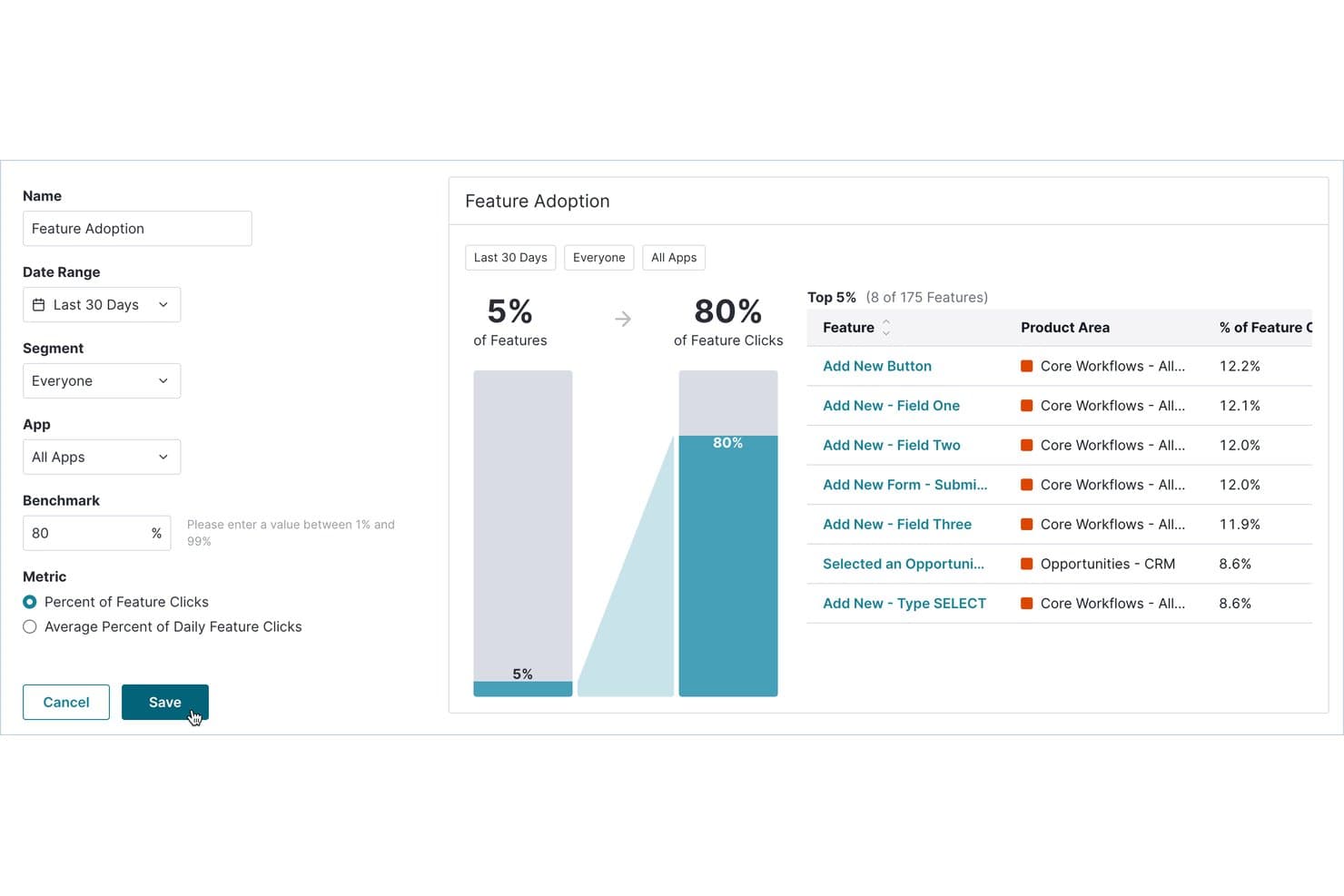
Pendo realiza un seguimiento de las funciones que generan más clics y adopción por parte de los usuarios. Pendo es una plataforma de análisis de productos y seguimiento de usuarios que combina el seguimiento automático del comportamiento, la repetición de sesiones, el análisis de embudos y recorridos, las guías dentro de la aplicación y las encuestas NPS en una sola herramienta.
¿Para quién es más adecuado Pendo?
Pendo es una excelente opción para gerentes de producto y equipos de crecimiento de empresas medianas y grandes que necesitan vincular directamente los datos del comportamiento de los usuarios con los resultados de adopción y retención.
Por qué elegí Pendo
Pendo ocupa un lugar destacado en mi lista porque cuenta con su Puntuación de interacción con el producto (PES), que combina la adopción, la fidelidad de uso y el crecimiento en una sola métrica que indica exactamente en qué punto del recorrido se encuentran los usuarios. También me encanta que la captura automática registre cada interacción desde el momento en que instalas el fragmento de código, para que puedas etiquetar funciones de forma retroactiva y seguir viendo todo su historial. Esto significa que nunca pierdo acceso a los datos históricos solo porque no instrumenté algo desde el principio.
Características principales de Pendo
- Repetición de sesiones: Observa sesiones reales de usuarios en aplicaciones web y móviles, con clics repetitivos y giros en U marcados automáticamente.
- Análisis de embudos y recorridos: Supervisa cómo avanzan los usuarios por flujos de varios pasos e identifica exactamente dónde abandonan.
- Asistente de IA Leo: Haz preguntas en lenguaje sencillo sobre los datos de tu producto y obtén respuestas directamente de los datos activos de Pendo.
- Sincronización de datos: Exporta el uso del producto y los metadatos de los usuarios a almacenes de datos como Snowflake, S3, Azure o Google Cloud.
Integraciones de Pendo
Pendo ofrece más de 85 integraciones, incluidas Salesforce, Zendesk, Atlassian, Snowflake, Amazon S3, Azure y Google Cloud. Su función de sincronización de datos envía el uso del producto y los metadatos de las cuentas a los almacenes y servicios de almacenamiento en la nube compatibles.
Pros and Cons
Pros:
- La captura automática permite analizar eventos de forma retroactiva
- La Puntuación de interacción con el producto realiza un seguimiento de las tendencias de adopción
- Las repeticiones de sesiones ilimitadas revelan señales de fricción
Cons:
- Los mapas de calor abarcan únicamente las funciones etiquetadas
- La retención de las repeticiones está configurada de forma predeterminada en 30 días
Learn more about Pendo: Ideal para mapas de calor sin código y seguimiento de CRO
- Prueba gratuita de 30 días disponible
- Desde $29/mes
Visit WebsiteCustomer Rating:4.3/5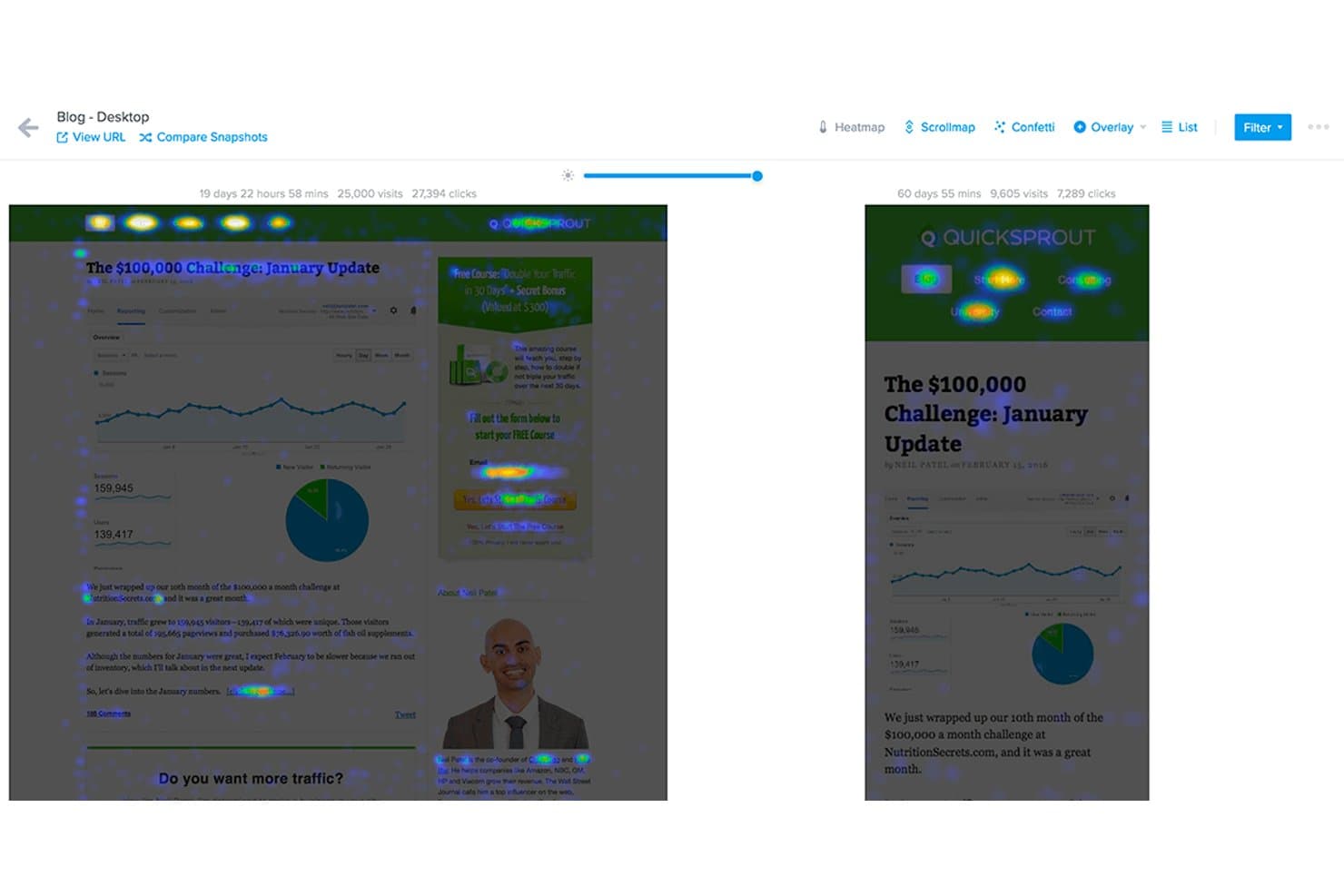
Crazy Egg compara mapas de calor de dos capturas de página una al lado de la otra. Crazy Egg es una herramienta de seguimiento del comportamiento en sitios web que combina mapas de calor, grabaciones de sesiones, seguimiento de embudos, pruebas A/B y encuestas en el sitio en una única plataforma sin código.
¿Para quién es más adecuado Crazy Egg?
Crazy Egg es una opción ideal para profesionales del marketing digital y diseñadores de UX que necesitan obtener rápidamente información sobre el comportamiento en sitios web sin código y sin gestionar una pila de análisis compleja.
Por qué elegí Crazy Egg
Crazy Egg está en mi lista de favoritos porque sus cinco tipos de mapas de calor ofrecen un nivel de detalle visual realmente difícil de encontrar en una sola herramienta sin código. Me gusta especialmente el mapa de confeti, que desglosa los clics individuales según más de 20 atributos, como la fuente UTM, el dispositivo y el tipo de tráfico, para que puedas ver exactamente qué segmento de audiencia está ignorando tu CTA. Si a esto le sumas grabaciones de sesiones señaladas por la IA y filtradas según el abandono del embudo, obtienes un ciclo de retroalimentación muy eficaz entre los datos de comportamiento y las decisiones de conversión.
Funciones principales de Crazy Egg
- Mapa de calor de desplazamiento: Muestra exactamente hasta dónde se desplazan los visitantes por una página, para que puedas ver dónde disminuye la atención antes de que los usuarios lleguen al contenido clave.
- Pruebas A/B: Te permite realizar pruebas divididas ilimitadas directamente en la plataforma sin tocar tu base de código.
- Encuestas en el sitio: Recopila comentarios cualitativos de los visitantes en puntos específicos de su recorrido mediante indicaciones de encuesta específicas dentro de la página.
- Seguimiento de errores: Señala automáticamente los errores de JavaScript y las interacciones defectuosas que pueden estar perjudicando la experiencia del usuario en tu sitio.
Integraciones de Crazy Egg
Crazy Egg ofrece integraciones con Google Tag Manager, Segment, Shopify, WordPress, Wix, Squarespace, Magento, Drupal, Joomla, Google, Meta y TikTok. También admite el seguimiento de conversiones en el servidor mediante una API.
Pros and Cons
Pros:
- Cinco tipos de mapas de calor revelan patrones de comportamiento detallados
- La IA señala grabaciones útiles para agilizar el análisis
- Los embudos relacionan los abandonos de conversión con las grabaciones
Cons:
- Los límites de grabación pueden pausar la recopilación de datos
- El seguimiento exclusivo de sitios web excluye los recorridos en aplicaciones móviles
Learn more about Crazy Egg: Ideal para análisis de recorridos y sesiones multiplataforma
- Demostración gratuita disponible
- Precio bajo solicitud
Visit WebsiteCustomer Rating:4.7/5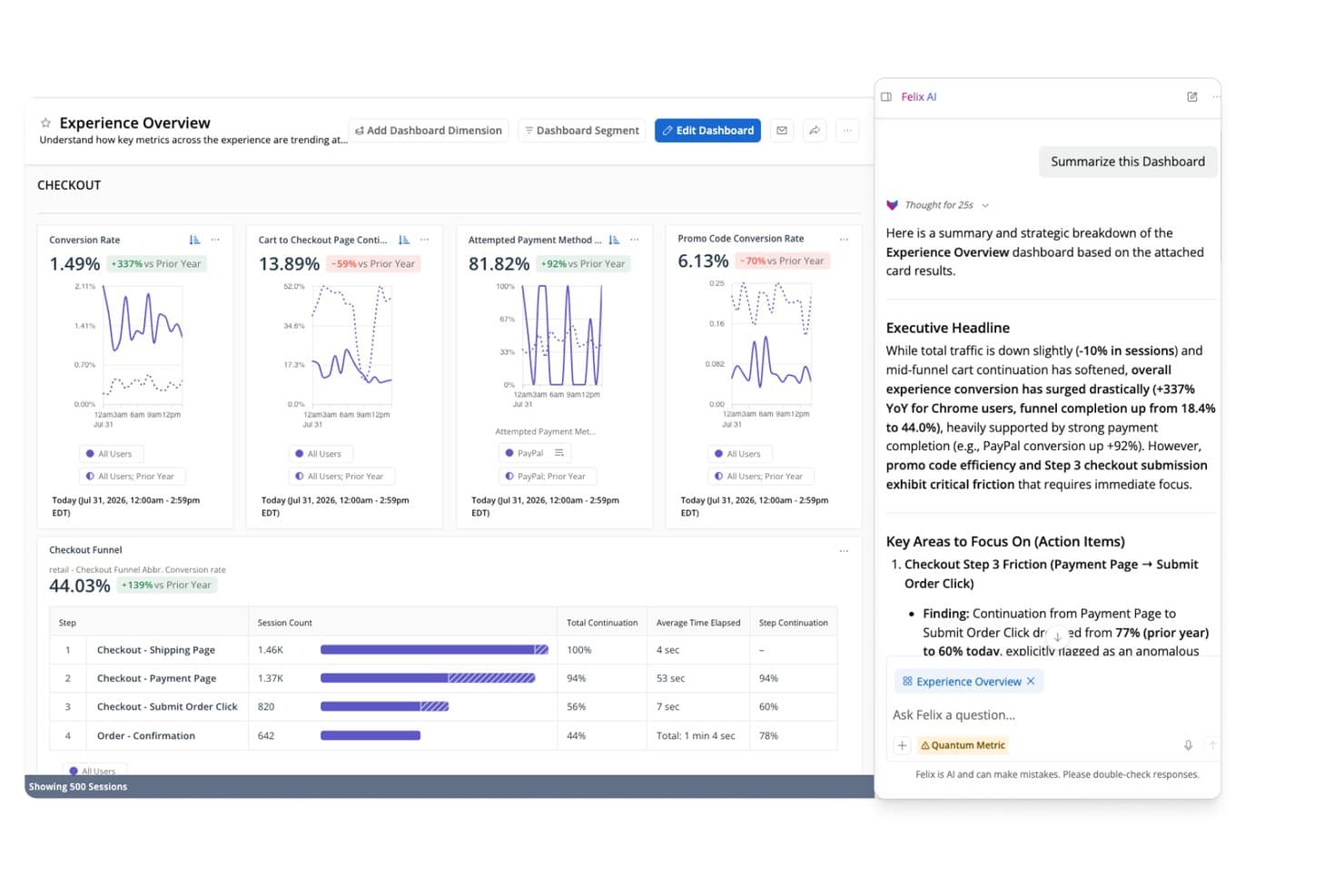
La IA Felix de Quantum Metric resume al instante los datos del embudo de pago. Quantum Metric es una plataforma empresarial de seguimiento de usuarios que combina la reproducción de sesiones con captura automática, mapas de calor de interacción en tiempo real, análisis de embudos y recorridos, y análisis del comportamiento impulsado por IA en aplicaciones web y móviles nativas.
¿Para quién es más adecuada Quantum Metric?
Quantum Metric está diseñada para equipos empresariales de producto, experiencia de usuario y análisis que necesitan conectar los datos de comportamiento web y móvil nativo en una sola plataforma.
Por qué elegí Quantum Metric
Quantum Metric ocupa un lugar en mi lista de favoritas porque integra las sesiones web y móviles nativas en una vista única y continua del recorrido, sin requerir herramientas independientes. Me encanta cómo el Análisis de oportunidades clasifica automáticamente los puntos de fricción según su impacto empresarial, para que mi equipo no tenga que adivinar qué abandono es realmente importante. Felix AI añade otra capa al redactar resúmenes de sesiones y señalar anomalías en un lenguaje sencillo, convirtiendo los datos sin procesar de las reproducciones en información sobre la que puedes actuar en cuestión de minutos.
Funciones principales de Quantum Metric
- Registro de eventos de precisión: Permite definir y capturar eventos personalizados además de las más de 300 señales capturadas automáticamente de forma predeterminada, lo que proporciona un seguimiento específico cuando el contexto del comportamiento por sí solo no es suficiente.
- Análisis de retención por cohortes: Agrupa a los usuarios según comportamientos o atributos compartidos y realiza un seguimiento de cómo regresan con el tiempo, para que puedas detectar dónde disminuye la interacción después de momentos clave del producto.
- Complemento de transmisión de datos: Envía los datos de sesiones y comportamiento directamente a Snowflake, BigQuery, Redshift, Databricks y otros destinos de almacenes de datos, aplicando filtros y alineación del esquema antes de la exportación.
- Controles de privacidad con cifrado a nivel de dispositivo: Cifra los datos confidenciales en el dispositivo del usuario antes de transmitirlos y permite excluir entradas o componentes específicos de la captura con un nivel de detalle preciso.
Integraciones de Quantum Metric
Entre las integraciones documentadas se incluyen Optimizely, Adobe Customer Journey Analytics, Alchemer, Snowflake, BigQuery, Redshift, Databricks, Amazon S3 y Oracle. El complemento de transmisión de datos de Quantum Metric conecta los datos de comportamiento con estos destinos de almacenes de datos.
Pros and Cons
Pros:
- La integración de recorridos multiplataforma unifica la web y los dispositivos móviles
- Felix AI resume sesiones y señala anomalías
- El Análisis de oportunidades conecta la fricción con el impacto empresarial
Cons:
- La carga de reproducciones y sesiones puede ser lenta
- La navegación por búsquedas y segmentos frustra a los evaluadores
Learn more about Quantum Metric: Ideal para la reproducción de sesiones vinculada a embudos cuantitativos
- Plan gratuito disponible
- Precios bajo petición
Visit WebsiteCustomer Rating:4.5/5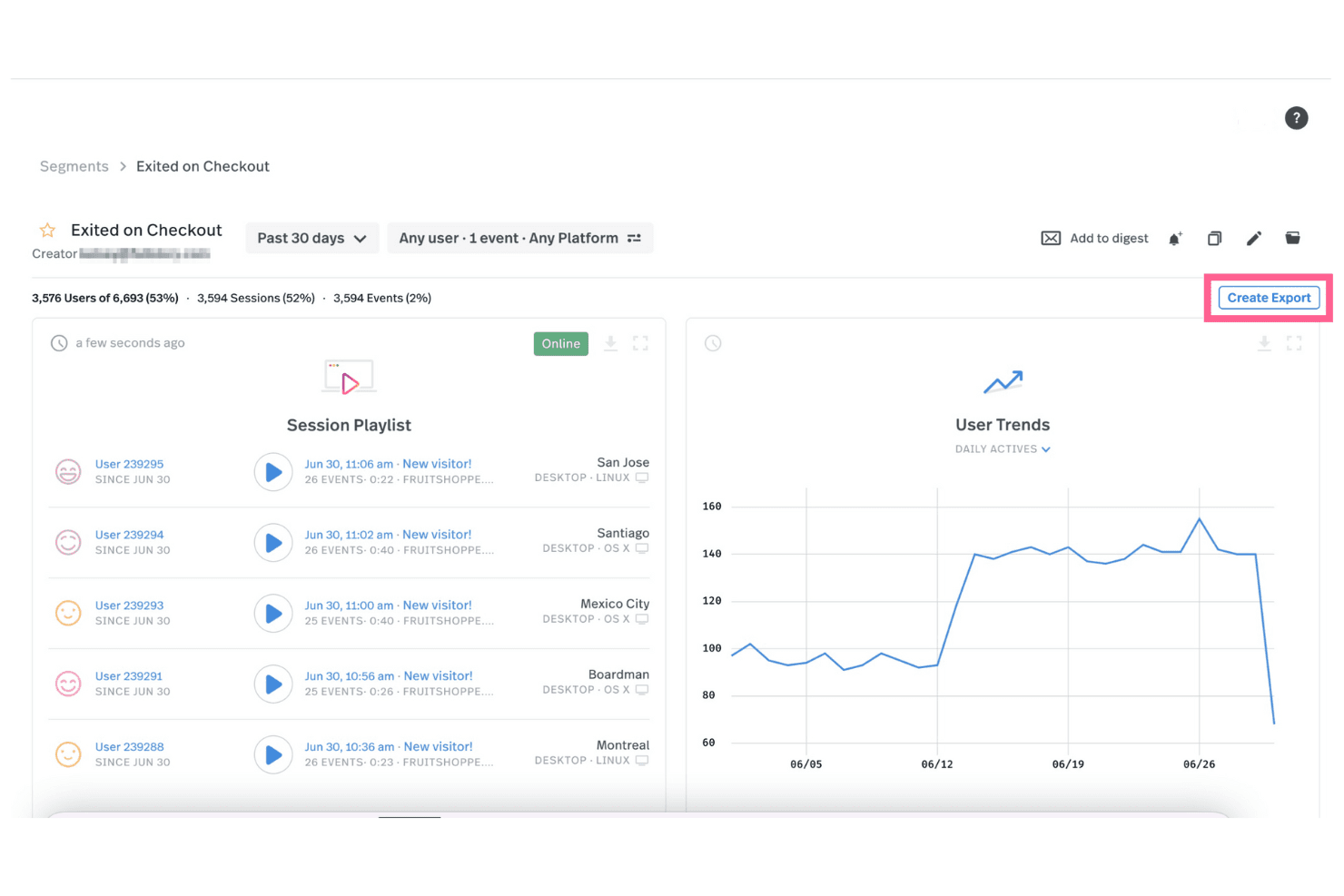
Fullstory permite ver reproducciones de sesiones para diversos eventos y exportar estos datos a otros sistemas. Fullstory es una plataforma de datos de comportamiento digital diseñada para ayudar a los equipos a comprender cómo interactúan los usuarios con su sitio web o aplicación. Al incorporar datos de comportamiento en la pila de análisis de una organización, Fullstory proporciona a los responsables de tecnología información de calidad sobre el comportamiento a gran escala. Este enfoque impulsa decisiones más centradas en el cliente.
Su función de reproducción de sesiones permite ver una grabación con precisión de píxel de lo que hacen los usuarios en su sitio, ya sea desplazarse, hacer clic o encontrarse con problemas. Puede filtrar estas reproducciones para centrarse en usuarios o comportamientos específicos, lo que facilita identificar problemas y comprender exactamente cómo interactúan los usuarios con su contenido. Otra función clave son los mapas de calor, que muestran visualmente dónde centran su atención los usuarios en su sitio. Este tipo de información ayuda a las empresas a acercarse a sus clientes y mejora la capacidad de crear experiencias que impulsen una mayor conversión en el embudo y detecten posibles fraudes o comportamientos maliciosos.
El seguimiento de eventos personalizado de Fullstory también le permite supervisar acciones específicas, como clics en botones o envíos de formularios, sin tener que configurar un seguimiento manual a través de su equipo de desarrollo. También puede realizar un seguimiento retrospectivo de eventos de sesiones anteriores, lo que ahorra tiempo y elimina la necesidad de predecir el comportamiento de los usuarios de antemano.
Las integraciones incluyen Google Analytics, Segment, Optimizely, Slack y Jira.
Learn more about Fullstory: Ideal para unificar analítica, reproducciones y experimentos
- Plan gratuito disponible
- Precios bajo solicitud
Visit WebsiteCustomer Rating:4.5/5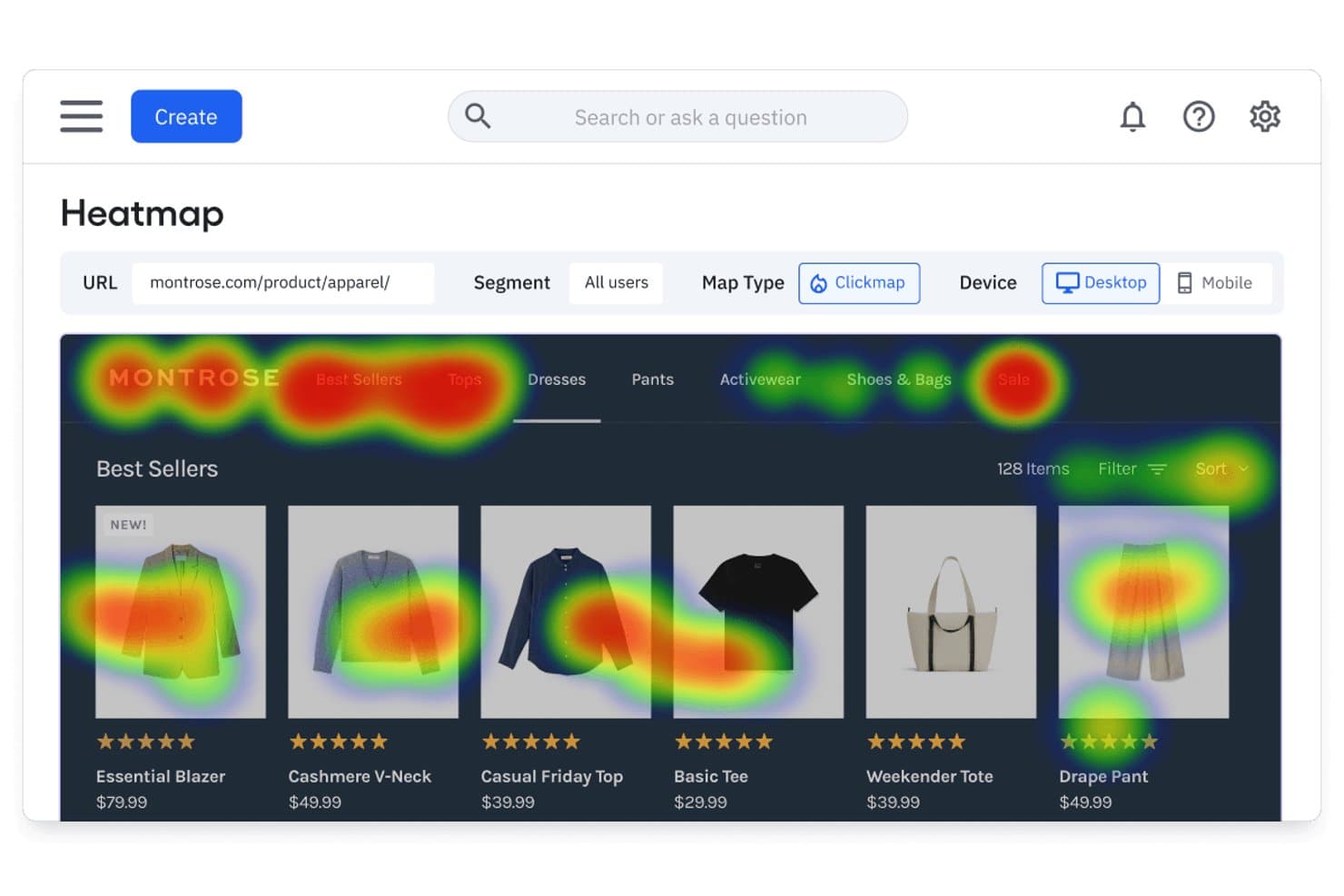
El mapa de calor de Amplitude muestra dónde hacen clic los usuarios en las páginas de productos. Amplitude es una plataforma de analítica de productos que combina el seguimiento del comportamiento basado en la captura automática, la reproducción de sesiones, los mapas de calor, el análisis de embudos y herramientas de experimentación integradas para la web y los dispositivos móviles.
¿Para quién es más adecuado Amplitude?
Amplitude es una opción ideal para los equipos de producto y crecimiento que quieren disponer de analítica, reproducción de sesiones, mapas de calor y experimentación en un solo lugar, en vez de integrar herramientas independientes.
Por qué elegí Amplitude
Amplitude ocupa un lugar destacado en mi lista porque reúne la analítica, la reproducción de sesiones, los mapas de calor y la experimentación en una sola plataforma, así que no tengo que pasar de una herramienta a otra para conectar los datos. Me gusta especialmente que las reproducciones se vinculen directamente con los eventos del embudo y que los resúmenes de IA señalen los puntos de fricción sin que tenga que revisar manualmente las grabaciones. La captura automática hace que los datos de comportamiento estén disponibles de inmediato, y el etiquetado visual de eventos permite que las personas no ingenieras de mi equipo definan qué se debe rastrear sin escribir una sola línea de código.
Funciones principales de Amplitude
- Sincronización de cohortes de comportamiento: Crea cohortes a partir de datos de comportamiento de los usuarios y sincronízalas directamente con las plataformas de marketing y mensajería conectadas.
- Creación de gráficos asistida por IA: Usa lenguaje natural para generar gráficos de analítica y recibe alertas automatizadas sobre las causas fundamentales de los cambios en las métricas.
- Etiquetado visual de eventos: Haz clic en los elementos de la página para definir y etiquetar eventos registrados sin escribir código.
- Experimentación integrada: Ejecuta experimentos de funciones y experimentos web, con pruebas de bandidos de múltiples brazos disponibles en los planes Growth y superiores.
Integraciones de Amplitude
Amplitude ofrece más de 159 integraciones, entre ellas Segment, Snowflake, BigQuery, Databricks, HubSpot, Braze, Salesforce, LaunchDarkly, Optimizely y GA4. También admite una API HTTP, webhooks y conexiones MCP para flujos de trabajo de datos personalizados.
Pros and Cons
Pros:
- Unifica la analítica, las reproducciones, los mapas de calor y los experimentos
- Los resúmenes de IA identifican los puntos de fricción dentro de las reproducciones
- El etiquetado visual de eventos reduce la dependencia del equipo de ingeniería
Cons:
- Los mapas de calor nativos para aplicaciones móviles aún no están disponibles
- La captura automática necesita eventos precisos para ofrecer profundidad
Learn more about Amplitude: Ideal para el análisis retroactivo de eventos sin etiquetado
- Plan gratuito disponible
- Precio bajo solicitud
Visit WebsiteCustomer Rating:4.3/5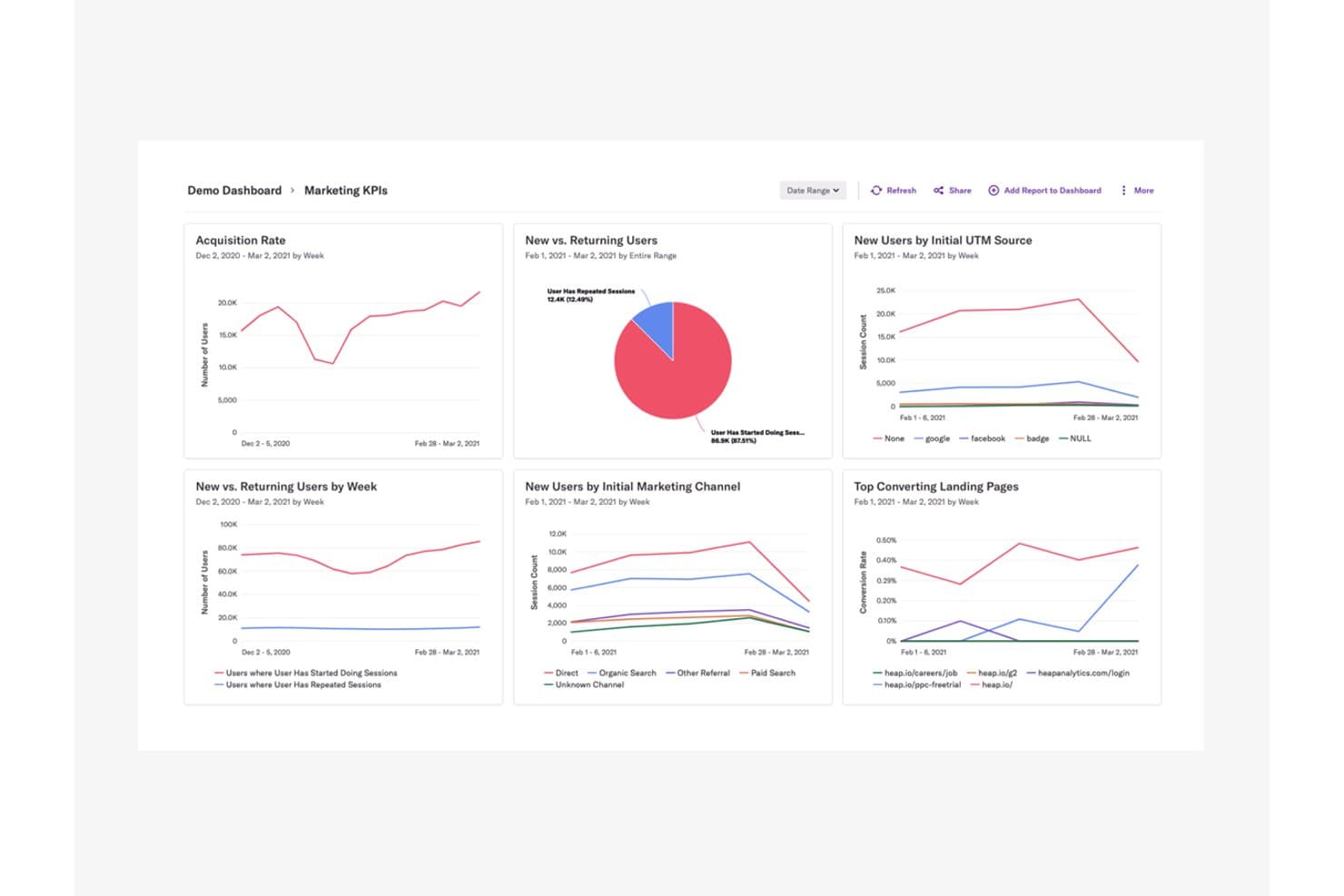
Heap centraliza los KPI de marketing para revelar las tendencias de adquisición y comportamiento de los usuarios. Heap (de Contentsquare) es una plataforma de análisis de productos y seguimiento de usuarios que captura automáticamente clics, páginas vistas, envíos de formularios y recorridos de usuarios en la web y dispositivos móviles, sin requerir que etiquetes los eventos con antelación.
¿Para quién es más adecuado Heap?
Heap es una excelente opción para los equipos de producto y crecimiento que necesitan analizar el comportamiento de los usuarios sin esperar a que ingeniería instrumente los eventos.
Por qué elegí Heap
Elegí Heap como una de las mejores opciones porque su enfoque de captura automática significa que cada clic, envío de formulario y página vista se registra desde el primer día, sin necesidad de etiquetado previo. Lo que realmente valoro es la posibilidad de definir eventos de forma retroactiva, de modo que, si aparece un abandono en un embudo semanas después del lanzamiento, aún puedo volver atrás y analizar las interacciones exactas que lo provocaron. Si a esto le sumamos la posibilidad de pasar directamente de un paso del embudo a una repetición de sesión de ese momento, se obtiene un nivel de contexto difícil de replicar en otros lugares.
Características principales de Heap
- Matriz de interacción: Visualiza los niveles de interacción de los usuarios en todo tu producto para ayudarte a identificar qué funciones impulsan la retención y cuáles no se utilizan.
- Asistente de IA Sense: Genera resúmenes, responde preguntas de seguimiento y muestra información relevante a partir de tus datos analíticos mediante una interfaz conversacional.
- Análisis basado en cuentas: Agrupa los datos de comportamiento por empresa o cuenta para que puedas analizar los patrones de uso a nivel organizativo, no solo a nivel de usuario individual.
- Heap Activate: Envía datos de comportamiento de Heap directamente a herramientas de interacción con clientes, lo que permite crear guías específicas dentro de la aplicación y enviar correos electrónicos basados en acciones reales de los usuarios.
Integraciones de Heap
Heap ofrece Heap Connect para sincronizar almacenes de datos y Heap Activate para herramientas de interacción con clientes. También hay API disponibles para integraciones personalizadas.
Pros and Cons
Pros:
- El análisis retroactivo de eventos no requiere etiquetado
- Los abandonos del embudo se conectan directamente con las repeticiones
- La captura automática reduce el trabajo de instrumentación de ingeniería
Cons:
- Las repeticiones y los mapas de calor no están incluidos universalmente
- No incluye indicadores de funciones ni experimentación nativos
Learn more about Heap (by Contentsquare): 10Ideal para el seguimiento de usuarios de código abierto y nativo del almacén de datos
PostHog
- Plan gratuito + demostración gratuita disponible
- Desde $34/mes
Visit WebsiteCustomer Rating:4.5/5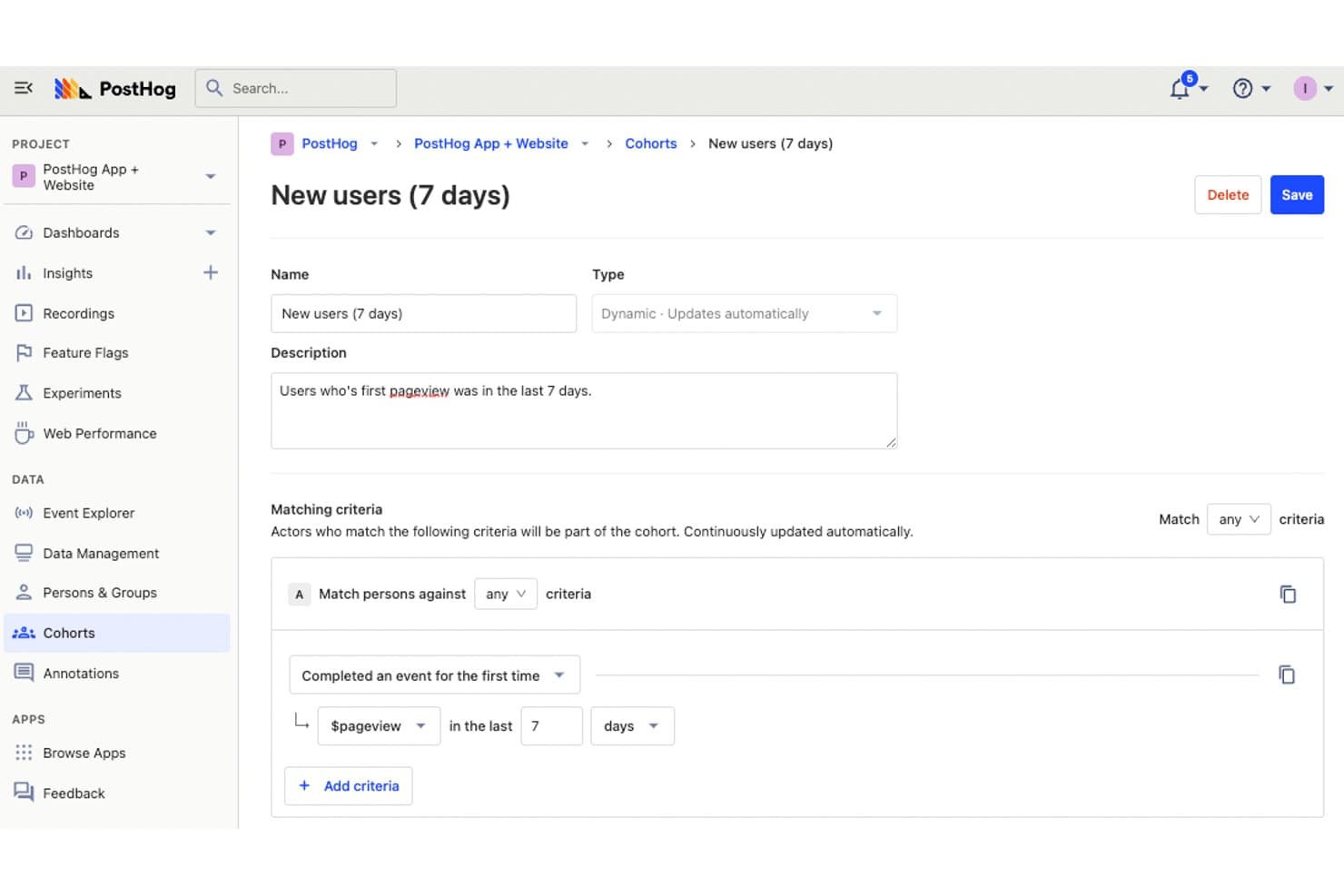
PostHog permite a los usuarios definir cohortes dinámicas para realizar un seguimiento de los usuarios nuevos. PostHog es una plataforma de código abierto para el seguimiento de usuarios que combina analítica de productos, reproducción de sesiones, mapas de calor y seguimiento de embudos con indicadores de funcionalidades, experimentación y una capa de datos nativa del almacén integrados.
¿Para quién es más adecuado PostHog?
PostHog es una opción muy adecuada para equipos de producto e ingeniería que desean tener un control total de sus datos sin reunir herramientas independientes de analítica, reproducción y experimentación.
Por qué elegí PostHog
PostHog ocupa un lugar en mi lista de favoritos porque es la única herramienta de seguimiento de usuarios que he visto que combina la reproducción de sesiones, los mapas de calor y el análisis de embudos con un almacén de datos integrado y una base de código completamente de código abierto. Me encanta que la captura automática registre clics, clics de frustración y profundidad de desplazamiento sin etiquetado manual, y que pueda pasar directamente de un abandono en el embudo a las grabaciones de las sesiones que lo provocaron. Los resúmenes de reproducciones basados en AI y el acceso mediante MCP me permiten agrupar sesiones por error o patrón de comportamiento en cuestión de segundos.
Funciones principales de PostHog
- Análisis de correlación: Detecta automáticamente qué propiedades o comportamientos de los usuarios están vinculados estadísticamente con tasas de conversión más altas o más bajas dentro de los embudos.
- Integración de indicadores de funcionalidades en las reproducciones: Los indicadores activos durante una sesión aparecen directamente en la línea de tiempo de la reproducción, por lo que puedes filtrar las grabaciones por grupo de prueba A/B o lanzamiento de una funcionalidad.
- Transformación de eventos mediante CDP: Enriquece, filtra, cambia el nombre y elimina la información de identificación personal de los eventos a medida que llegan, y después transmite los datos procesados a más de 50 destinos en tiempo real.
- Acceso SQL mediante HogQL: Permite consultar directamente los datos de eventos con un dialecto SQL basado en PostHog, lo que proporciona a los equipos de analítica e ingeniería toda la flexibilidad necesaria más allá de los tipos de informes preestablecidos.
Integraciones de PostHog
PostHog admite más de 50 destinos de CDP, incluidos Slack, Braze, Customer.io, Salesforce, HubSpot, Vitally, Gainsight, PagerDuty y webhooks. También se conecta a Snowflake y BigQuery como fuentes del almacén de datos y admite destinos personalizados.
Pros and Cons
Pros:
- La captura automática reduce el etiquetado manual de eventos
- Los embudos enlazan directamente con las reproducciones de sesiones
- La arquitectura nativa del almacén de datos permite realizar análisis SQL
Cons:
- Los flujos de trabajo orientados a desarrolladores pueden resultar difíciles para profesionales de marketing no técnicos
- Las exportaciones de reproducciones siguen limitadas a JSON
Learn more about PostHog:
Otros programas de seguimiento de usuarios
Estas son algunas opciones adicionales de software de seguimiento de usuarios que no llegaron a mi lista de preseleccionados, pero que aun así vale la pena consultar:
- 11ContentsquareLa mejor opción para el análisis del comportamiento y los recorridos vinculados a los ingresos
- 12LogRocketLa mejor opción para la repetición de sesiones vinculada al contexto de los errores
- 13SemrushIdeal para obtener datos sobre la audiencia de la competencia y mapas de calor
- 14UXCamIdeal para el seguimiento del comportamiento de aplicaciones móviles con IA
- 15UserpilotIdeal para el seguimiento del comportamiento de SaaS y el análisis de embudos
- 16Lucky OrangeIdeal para el comportamiento del sitio web en tiempo real y los análisis de IA
- 17Microsoft ClarityIdeal para la captura gratuita e ilimitada de datos de comportamiento
Cómo evalúo el software de seguimiento de usuarios
Divido mi evaluación en tres partes, y la funcionalidad principal tiene el mayor peso: busco herramientas que capturen las interacciones detalladas de los usuarios y reproduzcan las sesiones de forma fiable. A partir de ahí, evalúo funciones destacadas como la instrumentación de captura automática. Por último, considero factores que van más allá de las funciones, como la escalabilidad de los precios y la postura de cumplimiento normativo.
Funcionalidad principal (requisitos básicos para esta lista)
Cuando selecciono herramientas para mi lista, puntúo cada una en una escala de 0 (no ofrece la funcionalidad) a 5 (sobresale en esta área) para cada funcionalidad principal que se indica a continuación. Después convierto el total en un porcentaje para ayudar a evaluar la adecuación general de cada herramienta, dando un peso adicional a las funcionalidades que he considerado esenciales.
- Captura del comportamiento (esencial): Compruebo si la herramienta registra clics, desplazamientos, toques y rutas de navegación tanto en entornos web como de aplicaciones, con el nivel de detalle suficiente para reconstruir la intención real del usuario.
- Grabación o reproducción de sesiones: La calidad de la reproducción es importante, así que evalúo los filtros, los periodos de retención y si las sesiones se vinculan a errores o eventos específicos que ayuden a identificar dónde se quedan atascados los usuarios.
- Visualización mediante mapas de calor: Busco mapas de calor de clics, desplazamientos y movimientos que se puedan filtrar por segmento o dispositivo, para comparar cómo interactúan los visitantes móviles frente a los usuarios de escritorio en la misma página.
- Seguimiento de eventos y embudos: Me centro en los creadores de embudos de varios pasos. Evalúo si se pueden definir secuencias de conversión personalizadas y detectar exactamente en qué paso se pierden más usuarios durante los procesos de pago o incorporación.
- Segmentación de datos de usuarios: La capacidad de combinar atributos como el tipo de dispositivo, la fuente de referencia y la cohorte de usuarios en un único conjunto de filtros me indica si una herramienta admite el tipo de análisis comparativo que realmente necesitan los PM.
- Exportación o integración de datos: Compruebo si existen conexiones nativas con herramientas como Mixpanel, Amplitude, Segment y los almacenes de datos más habituales, además de si la exportación admite un flujo de datos automatizado o en tiempo real, en lugar de limitarse a extracciones manuales en CSV.
Una vez que tengo una lista de herramientas que cumplen los criterios, considero qué diferencia a cada plataforma.
Factores diferenciadores (lo que distingue a los proveedores)
Así es como comparo y contrasto los distintos proveedores:
Funciones destacadas
La instrumentación de captura automática es lo primero que evalúo porque elimina la necesidad de etiquetar manualmente cada botón, enlace o campo de formulario. Herramientas como Heap y PostHog adoptan enfoques diferentes en este aspecto, y analizo con qué facilidad cada una muestra de forma retroactiva eventos que no habías previsto. También compruebo si ofrecen resúmenes de sesiones mediante IA, que señalan clics repetidos por frustración y flujos sin salida para que no tengas que revisar cientos de reproducciones hasta encontrar los puntos de fricción. La gestión de indicadores de funcionalidad junto con la experimentación también es importante: cuando una herramienta permite implementar un cambio para un segmento y medir su impacto en el comportamiento dentro de la misma plataforma, se evita cambiar constantemente entre las analíticas y la plataforma de pruebas.
Más allá de las funciones
Evalúo cuánto tiempo de ingeniería exige inicialmente cada herramienta. Algunas plataformas, como Heap, capturan eventos automáticamente desde el primer momento, mientras que otras necesitan un esquema de eventos personalizado antes de mostrar datos. Esta diferencia es importante cuando tu equipo no cuenta con apoyo específico de ingeniería de datos. La escalabilidad de los precios es igual de importante: los modelos basados en el uso, vinculados a los usuarios registrados mensualmente o al volumen de eventos, pueden hacer que los costes aumenten rápidamente a medida que crece tu producto. También compruebo la postura de cumplimiento normativo de cada proveedor, examinando la anonimización integrada de información personal identificable (PII), la gestión del consentimiento y las opciones de residencia de datos que determinan si puedes implementar la reproducción de sesiones en mercados regulados.
Cómo elegir un software de seguimiento de usuarios
Es fácil perderse entre largas listas de funciones y estructuras de precios complejas. Para ayudarte a mantener la concentración mientras avanzas en tu proceso único de selección de software, aquí tienes una lista de factores que debes tener en cuenta:
| Factor | Qué debes considerar |
|---|---|
| FactorEscalabilidad | Qué debes considerar¿La herramienta crece junto con tu equipo? Comprueba si admite un número cada vez mayor de usuarios y datos sin que se degrade el rendimiento. |
| FactorIntegraciones | Qué debes considerarAsegúrate de que se conecte con tus herramientas actuales. Busca integraciones nativas con tu CRM, plataformas de análisis y otros programas esenciales. |
| FactorPersonalización | Qué debes considerar¿Puedes adaptar el software a tus flujos de trabajo? Considera si puedes personalizar los paneles, informes y configuraciones de usuario para satisfacer tus necesidades. |
| FactorFacilidad de uso | Qué debes considerar¿La interfaz es intuitiva? Comprueba si los miembros del equipo pueden aprender a utilizar y recorrer rápidamente la plataforma sin una formación extensa. |
| FactorImplementación e incorporación | Qué debes considerar¿Cuánto tiempo tardarás en empezar? Evalúa los recursos disponibles, como tutoriales y asistencia, así como el tiempo de configuración necesario. |
| FactorCoste | Qué debes considerar¿Se ajusta a tu presupuesto? Compara los planes de precios, comprueba si hay cargos ocultos y evalúa si la herramienta ofrece un buen retorno de la inversión. |
| FactorMedidas de seguridad | Qué debes considerar¿Protege tus datos? Verifica si cumple con los estándares del sector, ofrece cifrado de datos y cuenta con una política de privacidad clara. |
| FactorDisponibilidad de asistencia | Qué debes considerar¿Puedes obtener ayuda cuando la necesitas? Busca asistencia las 24 horas, los 7 días de la semana, varios métodos de contacto y un equipo de soporte receptivo que ayude a tu equipo. |
¿Qué es el software de seguimiento de usuarios?
El software de seguimiento de usuarios es una herramienta que rastrea y analiza lo que hacen las personas en sitios web, aplicaciones u otras plataformas digitales. Los profesionales del marketing, los responsables de producto y los diseñadores de UX lo utilizan para ver cómo se desplazan los visitantes por su sitio, dónde hacen clic o dónde se quedan atascados. Esta información te ayuda a detectar lo que debe corregirse, probar nuevas ideas y tomar decisiones más inteligentes para mantener la participación de los usuarios.
Características
Al seleccionar un software de seguimiento de usuarios, presta atención a las siguientes características clave:
- Mapas de calor: Visualiza dónde hacen clic, se desplazan y fijan su atención los usuarios para comprender su comportamiento en tu sitio.
- Reproducciones de sesiones: Reproduce las interacciones de los usuarios para identificar problemas de usabilidad y mejorar su experiencia.
- Embudos de conversión: Rastrea las rutas de los usuarios para ver dónde abandonan durante el proceso de conversión.
- Recopilación de comentarios de los usuarios: Recopila opiniones directas de los usuarios mediante encuestas y sondeos para tomar decisiones fundamentadas.
- Análisis en tiempo real: Accede a datos en directo para supervisar la actividad de los usuarios y responder rápidamente a los cambios.
- Paneles personalizables: Adapta los paneles para mostrar las métricas más importantes para tu equipo.
- Segmentación avanzada: Filtra y segmenta a los usuarios según su comportamiento o sus atributos para realizar análisis específicos.
- Supervisión de la velocidad de las páginas: Mide la rapidez con la que carga tu sitio para optimizar el rendimiento y mejorar la satisfacción de los usuarios.
- Supervisión de transacciones: Simula las interacciones de los usuarios para probar y garantizar la funcionalidad del sitio web.
- Análisis de la causa raíz: Identifica y diagnostica los problemas que afectan al rendimiento del sitio para implementar soluciones eficaces.
Beneficios
La implementación de un software de seguimiento de usuarios ofrece varios beneficios para tu equipo y tu empresa. Estos son algunos de los que puedes esperar:
- Mejora de la experiencia del usuario: Al analizar los mapas de calor y las reproducciones de sesiones, puedes identificar y corregir problemas de usabilidad, lo que da lugar a una experiencia del usuario más fluida.
- Aumento de las tasas de conversión: Los embudos de conversión te ayudan a comprender dónde abandonan los usuarios, lo que te permite optimizar las rutas y aumentar las conversiones.
- Decisiones basadas en datos: El análisis en tiempo real y la recopilación de comentarios de los usuarios permiten a tu equipo tomar decisiones fundamentadas basadas en el comportamiento real de los usuarios.
- Resolución más rápida de problemas: El análisis de la causa raíz te ayuda a identificar y abordar rápidamente los problemas de rendimiento, minimizando el tiempo de inactividad y las interrupciones.
- Mayor participación: Con la segmentación avanzada, puedes adaptar el contenido y las interacciones a grupos específicos de usuarios, mejorando su participación y satisfacción.
- Optimización del rendimiento: La supervisión de la velocidad de las páginas proporciona información sobre los tiempos de carga y te ayuda a optimizar el rendimiento del sitio para lograr una mayor satisfacción de los usuarios.
Costos y precios
Seleccionar un software de seguimiento de usuarios requiere comprender los distintos modelos de precios y planes disponibles. Los costos varían según las características, el tamaño del equipo, los complementos y otros factores. Los equipos que buscan minimizar los costos iniciales pueden comparar software gratuito de seguimiento de usuarios antes de contratar un plan de pago.
La siguiente tabla resume los planes habituales, sus precios promedio y las características típicas incluidas en las soluciones de software de seguimiento de usuarios:
Tabla comparativa de planes de software de seguimiento de usuarios
| Tipo de plan | Precio promedio | Características comunes |
|---|---|---|
| Tipo de planPlan gratuito | Precio promedio$0 | Características comunesMapas de calor básicos, reproducciones de sesiones limitadas y recopilación de comentarios de los usuarios. |
| Tipo de planPlan personal | Precio promedio$5-$25/usuario/mes | Características comunesMapas de calor avanzados, reproducciones de sesiones, embudos de conversión y análisis básicos. |
| Tipo de planPlan empresarial | Precio promedio$50-$150/usuario/mes | Características comunesAnálisis en tiempo real, segmentación avanzada, paneles personalizables y alertas. |
| Tipo de planPlan corporativo | Precio promedio$200-$500/usuario/mes | Características comunesPersonalización completa, asistencia prioritaria, gestor de cuenta dedicado y acceso completo a la API. |
Preguntas frecuentes sobre software de seguimiento de usuarios
Estas son algunas respuestas a preguntas frecuentes sobre el software de seguimiento de usuarios:
¿Puede el software de seguimiento de usuarios afectar al rendimiento del sitio web?
Sí, el software de seguimiento de usuarios puede afectar al rendimiento del sitio web si no se implementa correctamente. Es fundamental elegir herramientas ligeras que no ralenticen los tiempos de carga. Considera usar scripts de seguimiento asíncronos y revisar periódicamente las métricas de rendimiento para garantizar que tu sitio siga siendo rápido y receptivo para los usuarios.
¿Son seguros los datos de los usuarios recopilados por el software de seguimiento?
Sí, los programas de seguimiento de usuarios de buena reputación priorizan la seguridad de los datos. Suelen utilizar cifrado y cumplir con normativas de protección de datos como el GDPR. Comprueba siempre la política de privacidad y las medidas de seguridad del software para asegurarte de que el proveedor gestiona los datos de tus usuarios de forma responsable y segura.
¿Cómo puedes asegurarte de que los datos de seguimiento de usuarios sigan siendo útiles para la acción?
Establece objetivos claros sobre lo que necesitas aprender antes de recopilar datos. Revisa los resultados con frecuencia para detectar tendencias y eliminar información obsoleta o irrelevante. Comparte las conclusiones con tu equipo en un formato utilizable para orientar la toma de decisiones prácticas.
¿Qué errores comunes deben evitar los equipos al utilizar software de seguimiento de usuarios?
Evita recopilar datos sin objetivos ni contexto definidos. A veces, los equipos olvidan validar si las etiquetas y configuraciones de seguimiento funcionan según lo previsto. Otro error frecuente es no revisar ni depurar los datos redundantes o inexactos, lo que puede causar confusión más adelante.
Qué sigue:
Si estás investigando software de seguimiento de usuarios, contacta gratuitamente con un asesor de SoftwareSelect para recibir recomendaciones.
Rellenas un formulario y tienes una breve conversación en la que se profundiza en los detalles de tus necesidades. Después, recibirás una lista breve de programas para revisar. Incluso te ayudarán durante todo el proceso de compra, incluidas las negociaciones de precios.