

Un generador de maquetas de productos es una herramienta digital que te ayuda a crear imágenes realistas de productos sin necesidad de muestras físicas. Muchas herramientas modernas funcionan como un generador de maquetas con IA, lo que permite generar maquetas de alta calidad y una imagen de maqueta pulida con un solo clic. Estas plataformas simulan entornos de productos de la vida real, ayudando a los equipos a presentar los diseños de forma más eficaz, probar la identidad de marca y agilizar los flujos de trabajo creativos sin necesidad de realizar trabajos de diseño manuales. Elegir la herramienta adecuada puede ayudar a tu equipo a visualizar conceptos, colaborar más rápidamente y ofrecer presentaciones pulidas que impulsen la toma de decisiones. En esta lista encontrarás una variedad de generadores de maquetas adaptados a distintas necesidades de diseño, para que puedas elegir el que mejor se ajuste a tu proceso y a tus objetivos empresariales.
Por qué confiar en nuestras recomendaciones de software
6,700+
Reviews
20
Industry experts
16+
Evaluation factors
14
Years
Nuestro equipo lleva probando y evaluando software desde 2012. Como gestores de producto, sabemos lo difícil —y lo importante— que es elegir el software adecuado.
Para esta guía, evaluamos las herramientas mediante pruebas prácticas e investigación independiente, puntuando las herramientas según nuestros criterios de selección.
Nuestras reseñas reflejan nuestro criterio editorial humano, no un discurso de ventas.
Revisores expertos:
 Hannah ClarkSenior TPM
- Cristiano ValimSenior UI/UX Lead

Tabla comparativa de generadores de maquetas de productos
Esta tabla comparativa resume los detalles de precios de mi selección principal de generadores de maquetas de productos:
| Tool | Best For | Trial Info | Price | ||
|---|---|---|---|---|---|
| 1 | Ideal para crear rápidamente maquetas mediante arrastrar y soltar | Hay un plan gratuito disponible | Desde $15/usuario/mes | Website | |
| 2 | Ideal para maquetas de marcos de dispositivos de equipos de diseño | Plan gratuito disponible | Desde $16/usuario/mes | Website | |
| 3 | Ideal para mantener la coherencia de las maquetas mediante kits de marca | Plan gratuito disponible | Desde $7.99/usuario/mes (con facturación anual) | Website | |
| 4 | Plan gratuito disponible | Desde $3.99/usuario/mes (facturado anualmente) | Website | ||
| 5 | La mejor opción para crear maquetas con estilo de esquema | Prueba gratuita de 14 días | Desde $16/usuario/mes | Website | |
| 6 | Ideal para una personalización avanzada de escenas | Plan gratuito disponible | Desde $9/mes (facturado anualmente) | Website | |
| 7 | Mejor con herramientas de mejora de UX impulsadas por IA | Plan gratuito disponible | Desde $14/mes | Website | |
| 8 | Ideal para flujos de trabajo de diseño colaborativo | Hay un plan gratuito disponible | Desde 7 $/usuario/mes (facturado anualmente) | Website | |
| 9 | Ideal para escenas de maquetas generadas con IA y listas para impresión | Plan gratuito disponible | Desde $10/mes (facturado anualmente) | Website | |
| 10 | La mejor opción para escenas y maquetas 3D de comercio electrónico generadas con IA | Hay un plan gratuito disponible | Desde $5.7/mes (facturado anualmente) | Website |


Análisis de generadores de maquetas de productos
A continuación se muestran mis resúmenes detallados de los generadores de maquetas de productos que han llegado a mi lista. Mis análisis ofrecen una visión detallada de las funciones, los casos de uso más adecuados y las capacidades de cada herramienta para ayudarte a encontrar la mejor opción para tus necesidades.
 Ideal para crear rápidamente maquetas mediante arrastrar y soltar
- Hay un plan gratuito disponible
- Desde $15/usuario/mes
Visit WebsiteCustomer Rating:4.7/5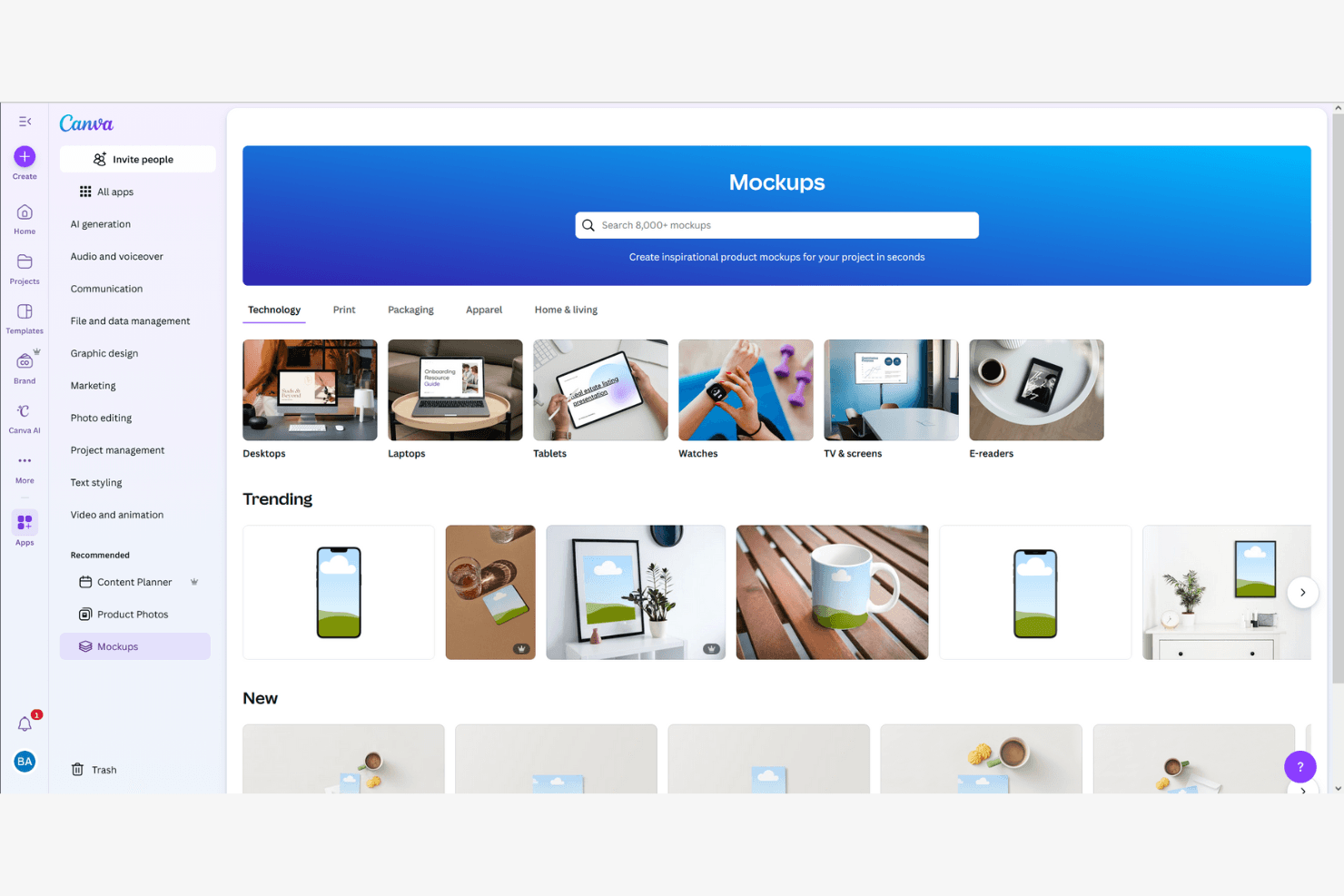
Canva permite a los usuarios crear maquetas de productos en categorías tecnológicas y de estilo de vida. Canva es una herramienta de diseño basada en el navegador que combina un editor de arrastrar y soltar, un generador de maquetas con IA y una biblioteca de más de 400 escenas de maquetas y 3,6 millones de plantillas para crear maquetas visuales de productos, presentaciones para inversores y recursos de marketing.
¿Para quién es más adecuada Canva?
Canva es una opción ideal para gerentes de producto, fundadores y especialistas en marketing de productos que necesitan convertir conceptos preliminares en elementos visuales pulidos rápidamente, sin depender de un diseñador.
Por qué elegí Canva
Elegí Canva como una de las mejores opciones porque su creación de maquetas mediante arrastrar y soltar elimina realmente el cuello de botella de tener que esperar a los recursos de diseño. Su biblioteca de más de 400 escenas de maquetas te permite colocar una captura de pantalla de una interfaz de usuario sobre el marco de un teléfono o la superficie de un producto en cuestión de segundos, y el generador de maquetas con IA puede producir una maqueta pulida de un sitio web o una aplicación con un solo clic. También me encanta que el Diseño mágico genere diseños completos a partir de una instrucción de texto, para que puedas pasar del concepto a un elemento visual listo para presentar a las partes interesadas antes de tu próxima reunión diaria.
Características principales de Canva
- Kit de marca: Guarda los colores, las fuentes y los logotipos de tu marca en un solo lugar para que cada maqueta que produzca tu equipo mantenga la identidad de marca sin esfuerzo adicional.
- Edición colaborativa en tiempo real: Varios miembros del equipo pueden trabajar en el mismo diseño simultáneamente, con comentarios y respuestas que mantienen las observaciones en contexto.
- Redimensionado mágico: Reformatea al instante un diseño para adaptarlo a distintas dimensiones del lienzo, de modo que una sola maqueta pueda cubrir varios formatos de presentación.
- Más de 300 integraciones con aplicaciones: Conecta Canva directamente desde el editor con herramientas como Slack, Asana, HubSpot y Google Workspace.
Integraciones de Canva
Las integraciones incluyen Slack, Asana, Microsoft Teams y Google Workspace.
Pros and Cons
Pros:
- La creación de maquetas mediante arrastrar y soltar no requiere formación
- Amplia biblioteca de plantillas de maquetas prediseñadas
- La IA genera elementos visuales a partir de instrucciones sencillas
Cons:
- No admite prototipos interactivos ni flujos de usuario
- No ofrece transferencia a desarrolladores ni exportación de especificaciones
Learn more about Canva: Ideal para maquetas de marcos de dispositivos de equipos de diseño
- Plan gratuito disponible
- Desde $16/usuario/mes
Visit WebsiteCustomer Rating:4.7/5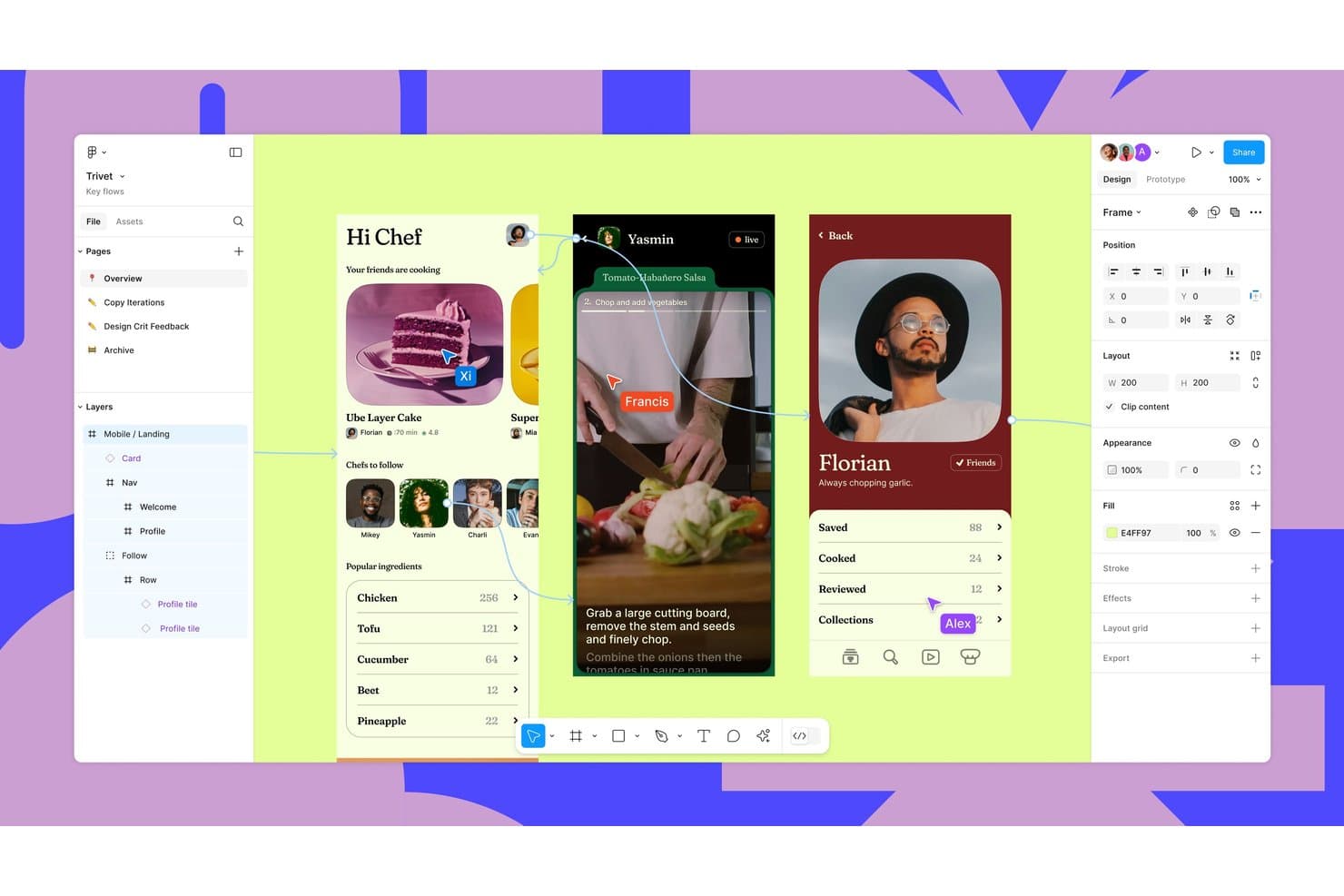
Figma permite el diseño colaborativo con cursores multijugador y creación de prototipos en tiempo real. Figma es una plataforma de diseño y colaboración basada en el navegador que permite crear maquetas de productos mediante su biblioteca Community de más de 4.700 plantillas de dispositivos, complementos de terceros como Artboard Studio y Mockuups Studio, y herramientas de edición de imágenes basadas en IA.
¿Para quién es más adecuado Figma?
Figma es una opción excelente para equipos de producto y UX que ya trabajan en Figma y necesitan colocar pantallas de aplicaciones en marcos de dispositivos para presentaciones a las partes interesadas sin cambiar de herramienta.
Por qué elegí Figma
He incluido Figma entre mis opciones principales porque es la única herramienta de esta lista en la que el flujo de trabajo de tus maquetas se encuentra dentro del mismo archivo que tus diseños reales. Cuando tu equipo presenta pantallas de aplicaciones a las partes interesadas, puede elegir entre más de 4.700 plantillas de marcos de dispositivos de la comunidad y colocar directamente sus diseños activos en marcadores de posición etiquetados sin cambiar de herramienta. Los complementos como Mokker añaden renderizado de dispositivos en 3D con iluminación y sombras para obtener resultados más pulidos.
Características principales de Figma
- Creación masiva con Figma Buzz: Sube un archivo CSV o XLSX para asignar columnas de datos a capas de diseño y generar automáticamente un recurso por fila.
- Herramientas de edición de imágenes con IA: Edita diseños mediante indicaciones de texto, elimina fondos, amplía imágenes y mejora la resolución directamente dentro de tu archivo de Figma.
- Biblioteca de plantillas de Figma Community: Accede a más de 4.700 plantillas de maquetas de dispositivos, además de archivos de empaquetado, prendas de vestir e impresión publicados por miembros de la comunidad.
- Colaboración multijugador en tiempo real: Edita archivos simultáneamente con tus compañeros de equipo, deja comentarios y comparte enlaces con un número ilimitado de usuarios gratuitos con permiso de visualización.
Integraciones de Figma
Figma admite integraciones con Cursor, VS Code y enlaces de Google Drive para los datos de creación masiva de Buzz.
Pros and Cons
Pros:
- Más de 4.700 plantillas de dispositivos permiten presentar pantallas rápidamente
- La colaboración en tiempo real simplifica las revisiones de maquetas con las partes interesadas
- La edición a nivel de capa permite crear variaciones de maquetas con la marca
Cons:
- La colocación manual sustituye a la deformación nativa de objetos inteligentes
- La calidad de los complementos varía en las maquetas fotorrealistas
 Ideal para mantener la coherencia de las maquetas mediante kits de marca
- Plan gratuito disponible
- Desde $7.99/usuario/mes (con facturación anual)
Visit WebsiteCustomer Rating:4.7/5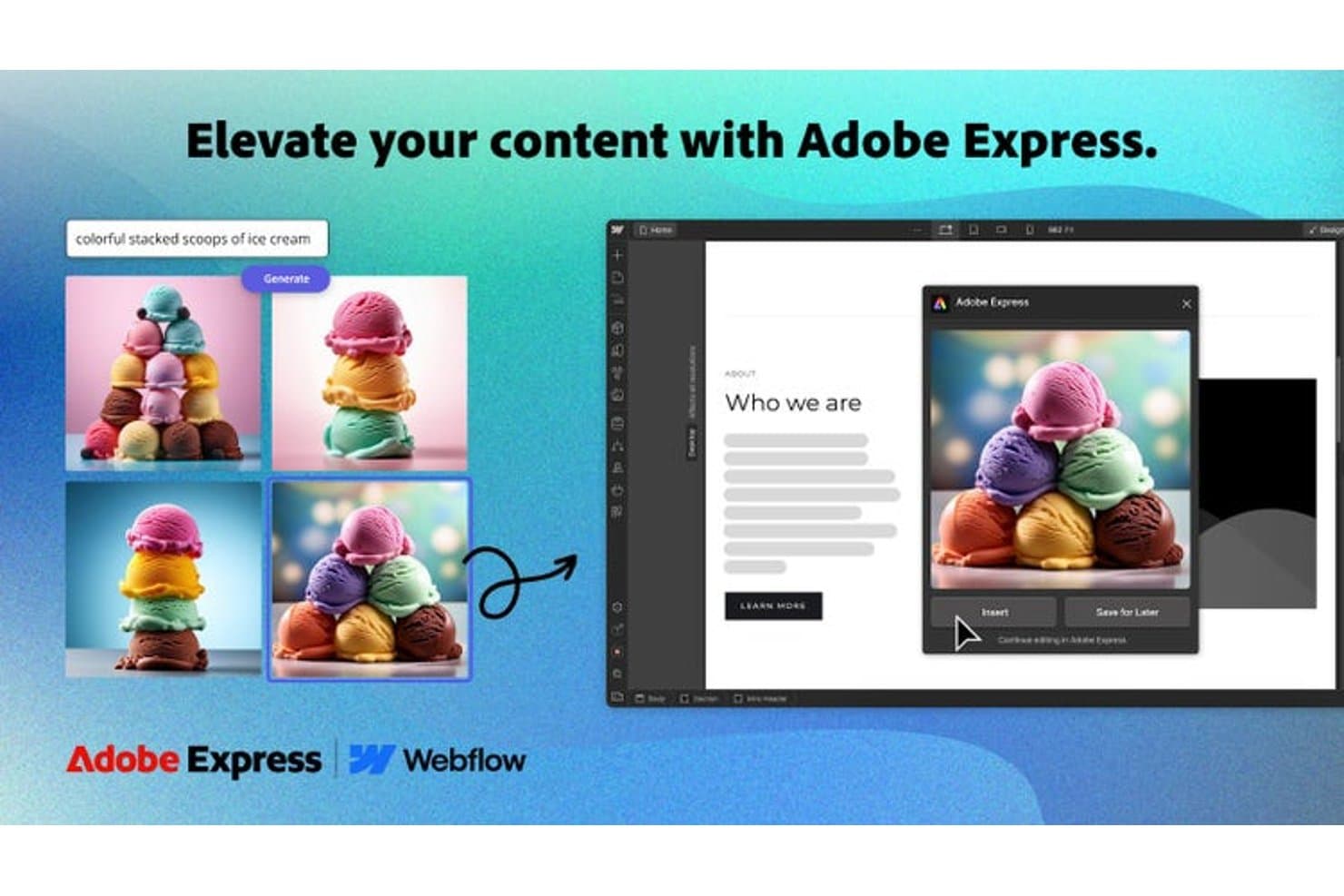
Adobe Express genera imágenes con IA directamente en maquetas web. Adobe Express es una herramienta de diseño y creación de maquetas que permite crear elementos visuales de productos mediante plantillas con la identidad de marca, un kit de marca integrado y una biblioteca de recursos personalizables para formatos impresos, digitales y de redes sociales.
¿Para quién es más adecuado Adobe Express?
Adobe Express es una opción excelente para equipos de marca y marketing que necesitan producir maquetas coherentes y alineadas con la marca a gran escala sin depender de un diseñador dedicado.
Por qué elegí Adobe Express
Elegí Adobe Express porque su función de kit de marca es realmente útil para mantener la coherencia de las maquetas en todos los recursos que produce tu equipo. Subes tus logotipos, estableces los colores de tu marca y defines la tipografía una sola vez, y Adobe Express aplica automáticamente ese kit a cualquier plantilla que utilices. También me gusta que admita maquetas para formatos impresos, digitales y de redes sociales desde un único espacio de trabajo, por lo que el lanzamiento de un producto no requiere alternar entre tres herramientas diferentes.
Funciones principales de Adobe Express
- Eliminador de fondos con un clic: Elimina al instante el fondo de las imágenes de productos para que puedas colocarlas en cualquier escena de maqueta sin editarlas manualmente.
- Efectos de texto basados en IA: Aplica tratamientos de texto estilizados y editables directamente sobre los diseños de maquetas mediante las herramientas de IA generativa de Adobe.
- Programador de contenido: Permite publicar o programar recursos preparados para maquetas directamente en los canales sociales desde la plataforma.
- Herramienta de redimensionamiento de plantillas: Cambia automáticamente el tamaño de cualquier diseño de maqueta para adaptarlo a múltiples formatos y dimensiones con una sola acción.
Integraciones de Adobe Express
Adobe Express mantiene un ecosistema de complementos e integraciones nativos, incluidos Slack, Microsoft Copilot, ChatGPT, Figma, Bynder, Frontify, Hootsuite, Sprout Social y Google Drive.
Pros and Cons
Pros:
- Los kits de marca mantienen la coherencia visual en las maquetas
- Las plantillas abarcan formatos impresos, digitales y de redes sociales
- La eliminación de fondos simplifica la colocación de imágenes de productos
Cons:
- Las escenas de maquetas especializadas parecen menos realistas
- Los controles avanzados de presentación de productos siguen siendo limitados
Learn more about Adobe Express:
- Plan gratuito disponible
- Desde $3.99/usuario/mes (facturado anualmente)
Visit WebsiteCustomer Rating:4.4/5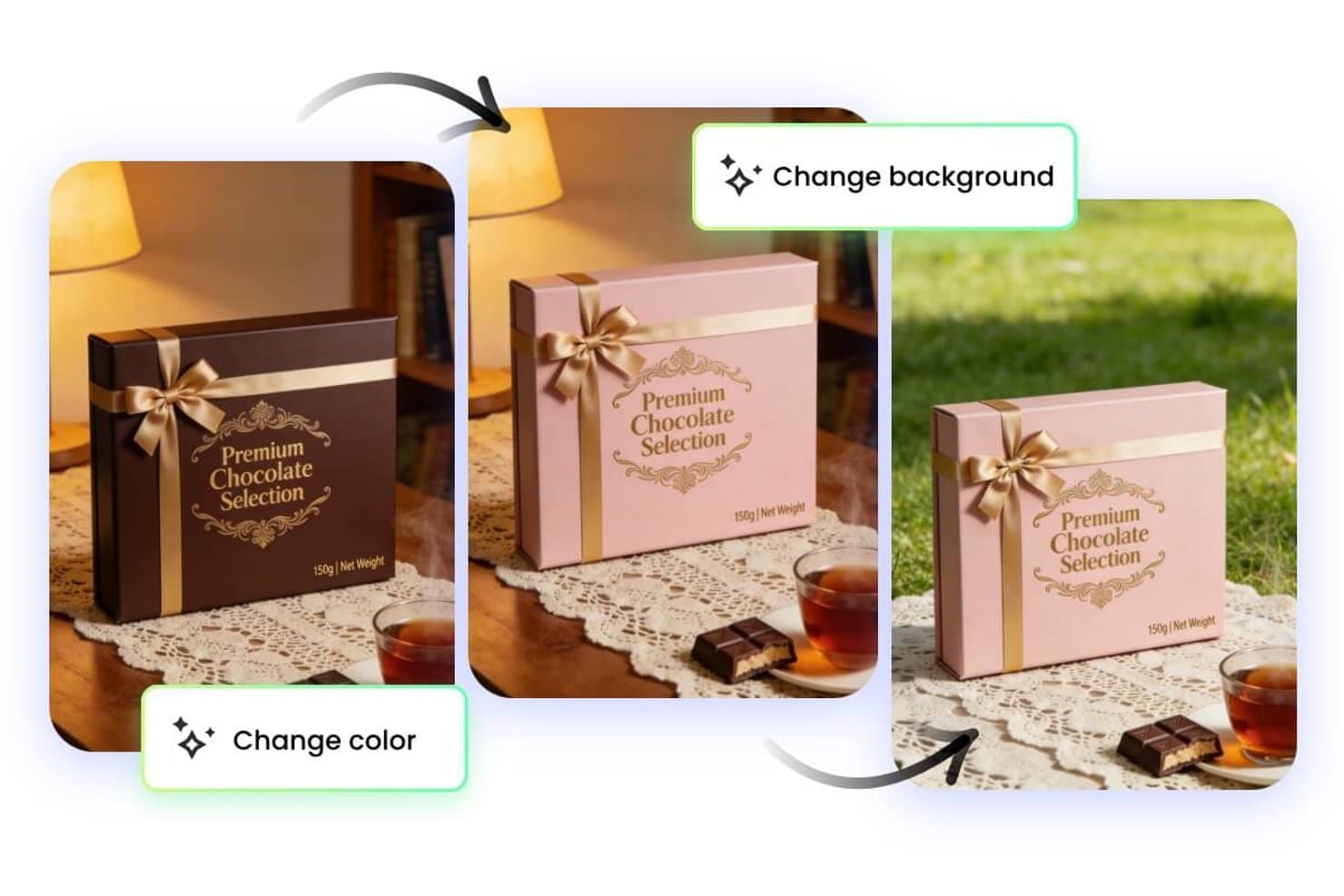
Fotor permite a los usuarios cambiar al instante los colores y los fondos de las maquetas. Fotor es una herramienta de edición de fotos y generación de maquetas con tecnología de IA que te permite crear escenas de productos, eliminar fondos y generar imágenes de estilo de vida mediante indicaciones de texto.
¿Para quién es más adecuado Fotor?
Fotor es una excelente opción para creadores independientes y pequeños equipos de comercio electrónico que quieren generar rápidamente escenas de productos pulidas sin contar con formación específica en diseño.
Por qué elegí Fotor
Fotor está en mi lista de favoritos por lo bien que su motor de indicaciones de texto a imagen convierte descripciones sencillas en escenas de productos pulidas y contextualizadas. Me gusta especialmente el generador de fondos con IA, que permite transformar una simple foto de estudio en un entorno de estilo de vida (por ejemplo, un frasco de cuidado de la piel sobre la encimera de mármol de un baño) sin necesidad de realizar composiciones manuales. La herramienta de eliminación de objetos con IA también mantiene limpias las fotos de productos antes de generar las escenas.
Características principales de Fotor
- Edición de imágenes por lotes: Aplica ediciones, filtros o ajustes de tamaño a varias fotos de productos a la vez desde un único espacio de trabajo.
- Mejorador de imágenes con IA: Aumenta automáticamente la nitidez, reduce el ruido y amplía las imágenes de productos para cumplir los requisitos de resolución de las plataformas.
- Eliminador de fondos con un clic: Aísla al instante los productos de las fotos existentes para prepararlos para la generación de nuevas escenas.
- Plantillas de efectos fotográficos prediseñadas: Aplica estilos visuales y tratamientos de color seleccionados a las fotos de productos mediante una biblioteca de plantillas listas para usar.
Integraciones de Fotor
Actualmente no se indican integraciones nativas.
Pros and Cons
Pros:
- Las escenas basadas en indicaciones son adecuadas para probar conceptos rápidamente
- La eliminación de fondos prepara los productos para las maquetas
- La edición por lotes admite múltiples variantes de productos
Cons:
- Las escenas generadas pueden requerir perfeccionar las indicaciones
- No hay integraciones nativas documentadas para flujos de trabajo de maquetas
Learn more about Fotor: La mejor opción para crear maquetas con estilo de esquema
- Prueba gratuita de 14 días
- Desde $16/usuario/mes
Visit WebsiteCustomer Rating:4.3/5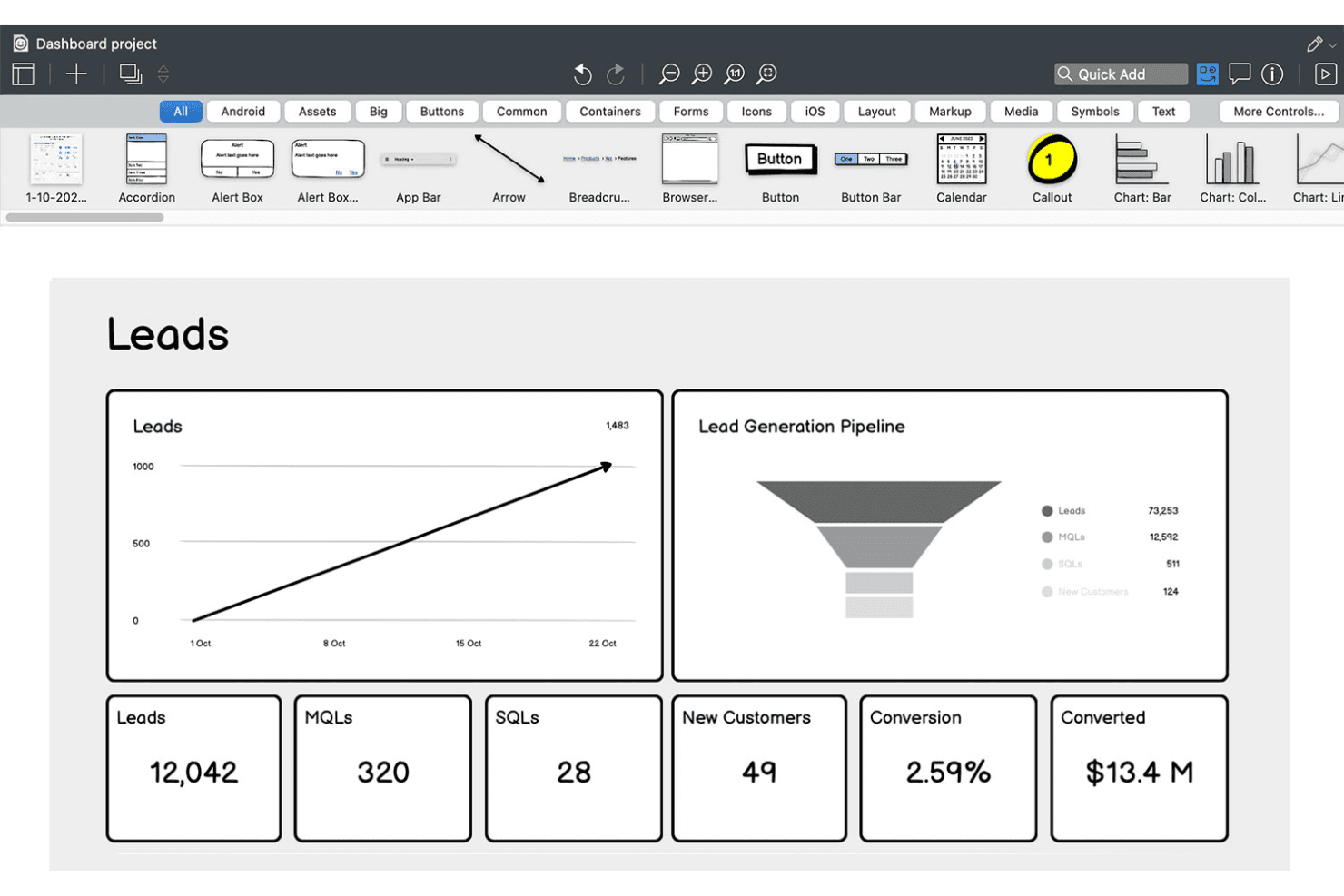
Balsamiq permite a los usuarios crear maquetas de paneles de ventas con gráficos y KPI. Balsamiq es una herramienta de creación de maquetas y esquemas de baja fidelidad que permite esbozar conceptos de interfaces de usuario mediante un editor de arrastrar y soltar, una biblioteca de componentes dibujados a mano y la generación de maquetas asistida por IA a partir de indicaciones de texto, capturas de pantalla o bocetos preliminares.
¿Para quién es más adecuado Balsamiq?
Balsamiq es una opción natural para gerentes de producto, fundadores y analistas de negocio que necesitan comunicar conceptos de interfaces de usuario rápidamente sin depender de un diseñador.
Por qué elegí Balsamiq
Balsamiq ocupa un lugar en mi lista de favoritos porque su creación de maquetas con estilo de boceto dibujado a mano mantiene las primeras conversaciones sobre el producto centradas en la estructura y el flujo, no en el perfeccionamiento de los píxeles. Me encanta que la capa de IA permita cargar un boceto preliminar hecho en una servilleta o una captura de pantalla de la aplicación de un competidor y obtener una maqueta editable en cuestión de segundos. La generación de prototipos con un solo clic a partir de pantallas existentes me resulta realmente útil cuando necesito mostrar a las partes interesadas un flujo de usuario sin perder tiempo en transiciones o animaciones.
Funciones principales de Balsamiq
- Revisores ilimitados: Cualquier cantidad de partes interesadas puede ver y comentar las maquetas sin necesitar una licencia de editor de pago.
- Controles de interfaz inspirados en Tailwind: Una biblioteca de 138 botones, campos de entrada, interruptores y menús desplegables con estilo Tailwind está disponible directamente en el panel Elementos de la interfaz.
- Integración con el servidor MCP: Conecta los tableros de Balsamiq con herramientas de programación basadas en IA como Claude, Cursor y GitHub Copilot para generar código, historias de usuario y planes de control de calidad a partir de maquetas.
- Integración con Jira y Confluence: Las maquetas y los prototipos interactivos se insertan directamente en incidencias de Jira y páginas de Confluence para que las partes interesadas puedan revisarlos en contexto.
Integraciones de Balsamiq
Balsamiq ofrece integraciones nativas con Jira, Confluence y Slack, además de integración con Trello e incrustaciones para Notion y Linear. Su servidor MCP conecta Claude, Cursor, VS Code/GitHub Copilot y ChatGPT con los tableros de Balsamiq.
Pros and Cons
Pros:
- Maqueta rápida basada en IA a partir de texto o un boceto
- Los revisores ilimitados pueden comentar sin una licencia de pago
- El estilo de baja fidelidad mantiene el foco en la estructura
Cons:
- No incluye funciones de alta fidelidad ni de sistemas de diseño
- La creación de prototipos carece de animaciones o interactividad avanzada
Learn more about Balsamiq: Ideal para una personalización avanzada de escenas
- Plan gratuito disponible
- Desde $9/mes (facturado anualmente)
Visit WebsiteCustomer Rating:3.3/5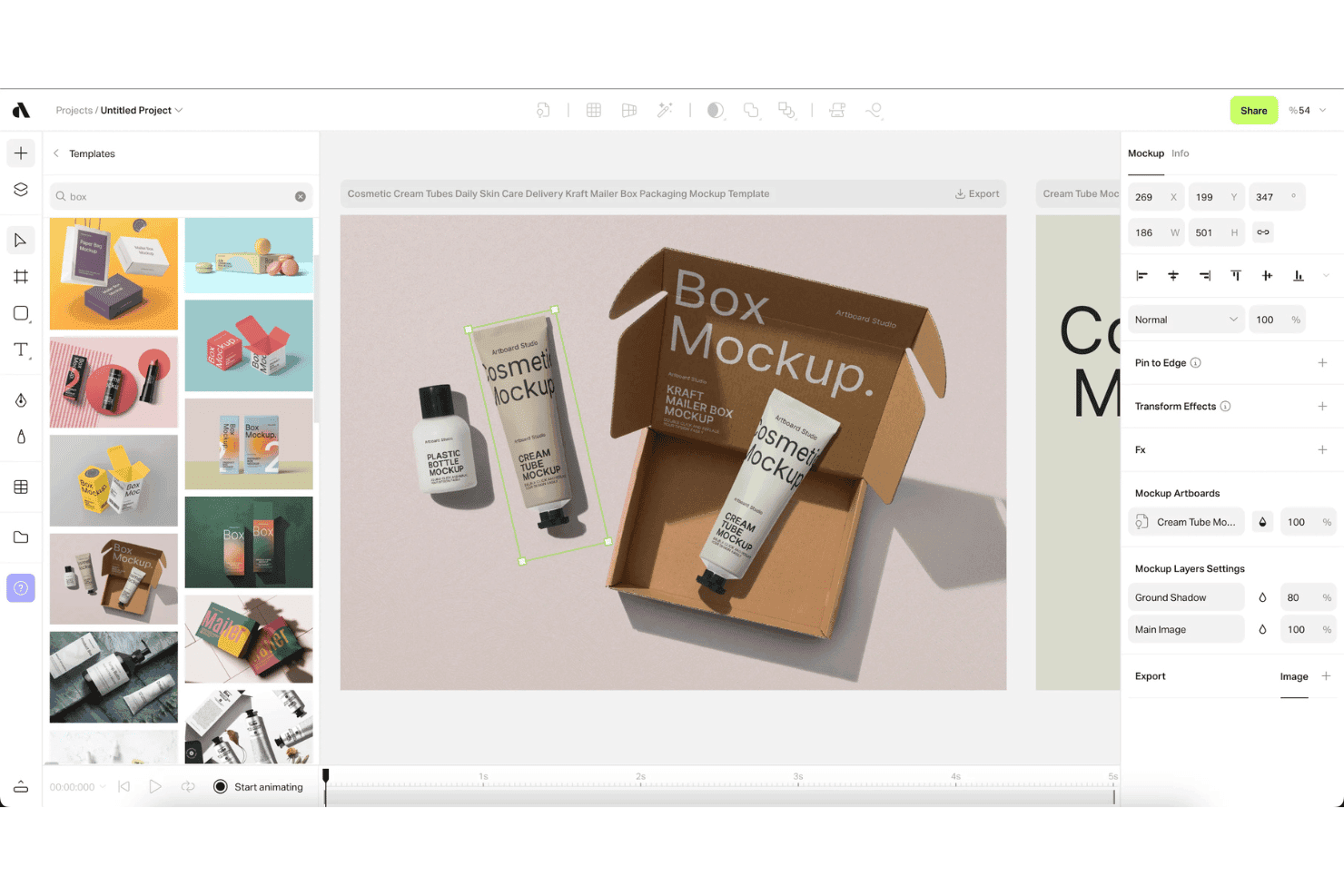
Artboard Studio permite a los usuarios aplicar maquetas de envases mediante plantillas de arrastrar y soltar. Artboard Studio es un generador de maquetas y editor de diseño de movimiento basado en el navegador que combina una biblioteca de más de 5.000 maquetas, generación de escenas con IA, compatibilidad con maquetas de vídeo y herramientas de automatización creativa.
¿Para quién es más adecuado Artboard Studio?
Artboard Studio es una opción excelente para responsables de marketing de productos y fundadores que necesitan elementos visuales de productos pulidos, materiales de lanzamiento e imágenes para presentaciones sin depender de un equipo de diseño dedicado.
Por qué elegí Artboard Studio
Artboard Studio ocupa un lugar en mi lista de favoritos por la profundidad de personalización de sus escenas. Me refiero a una biblioteca de más de 5.000 maquetas con capas de objetos inteligentes que ajustan automáticamente la perspectiva, la iluminación y la sombra, además de un generador de maquetas con IA que crea escenas completas a partir de una instrucción de texto. Lo que realmente lo distingue es la compatibilidad con maquetas de vídeo combinada con un editor de diseño de movimiento basado en una línea de tiempo, de modo que puedo producir elementos visuales de productos animados y materiales de lanzamiento, no solo imágenes estáticas.
Funciones principales de Artboard Studio
- Complementos para Figma y Adobe Express: Accede a la biblioteca completa de maquetas de Artboard Studio directamente desde Figma o Adobe Express sin cambiar de aplicación.
- Exportación masiva: Exporta varias variaciones de maquetas simultáneamente en formatos PNG, JPEG, WEBP, MP4, MOV, GIF o WebM.
- Integración con Google Sheets y Shopify: Sincroniza datos en tiempo real de Google Sheets o Shopify para rellenar y actualizar automáticamente el contenido de las maquetas a gran escala.
- Historial de versiones de proyectos: Guarda y vuelve a consultar versiones anteriores de tus proyectos, con enlaces de presentación que puedes compartir para las revisiones de las partes interesadas.
Integraciones de Artboard Studio
Artboard Studio cuenta con cuatro integraciones documentadas: Figma, Adobe Express, Google Sheets y Shopify. No están documentadas las integraciones nativas con Jira, Confluence, Notion, Slack o Zapier, ni tampoco una API pública.
Pros and Cons
Pros:
- Generación de escenas y maquetas con IA
- Gran variedad de maquetas de dispositivos y marcas
- Editor de diseño de movimiento de vídeo para elementos animados
Cons:
- No dispone de funciones de prototipado interactivo
- No ofrece opciones de traspaso a desarrolladores ni de exportación de código
Learn more about Artboard Studio: Mejor con herramientas de mejora de UX impulsadas por IA
- Plan gratuito disponible
- Desde $14/mes
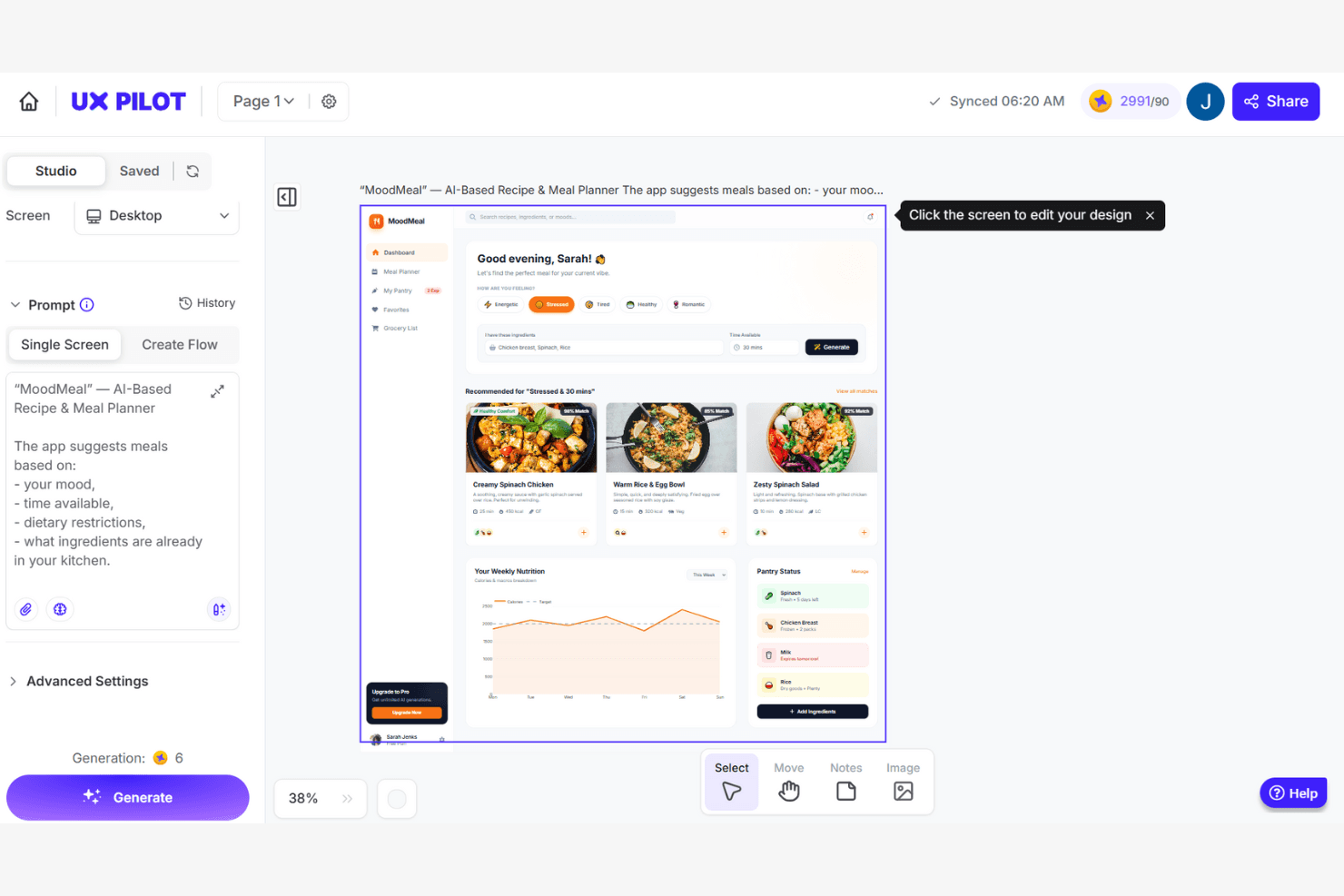
UX Pilot genera diseños de interfaz de aplicaciones basados en IA a partir de una instrucción de texto. UX Pilot es una plataforma de generación de interfaces de usuario y maquetas impulsada por IA que crea wireframes, pantallas de alta fidelidad y flujos de producto de varias pantallas a partir de indicaciones de texto, documentos de requisitos del producto, bocetos o capturas de pantalla de referencia.
¿Para quién es más adecuado UX Pilot?
UX Pilot es una opción excelente para gerentes de producto y fundadores sin formación en diseño que necesitan convertir especificaciones escritas o ideas preliminares en flujos de interfaz de usuario pulidos y de varias pantallas sin tener conocimientos de diseño.
Por qué elegí UX Pilot
He incluido UX Pilot entre mis opciones principales porque sus herramientas de mejora de UX impulsadas por IA van más allá de la generación y abarcan también la validación. Los mapas de calor predictivos simulan patrones de seguimiento ocular en tus pantallas antes de que un solo usuario las vea, lo que permite detectar problemas de jerarquía desde el principio. Después, la revisión de diseño automatizada señala en una sola pasada los conflictos de contraste, espaciado y directrices de plataforma en iOS, Android y la web, una combinación que rara vez encuentro a este precio.
Características principales de UX Pilot
- Automatización de PRD a diseño: Sube un documento de requisitos del producto y UX Pilot genera un flujo completo de interfaz de usuario de varias pantallas directamente a partir de tus especificaciones escritas.
- Generación automática de múltiples pantallas: Describe un concepto de producto en una instrucción de texto y obtén un recorrido del usuario completo y lógicamente coherente, creado a través de varias pantallas vinculadas.
- Modo de enfoque de React: Crea y publica prototipos de React totalmente interactivos con un editor visual, ediciones mediante chat en lenguaje natural y correcciones de código con IA en un solo clic.
- Sincronización con GitHub: Exporta toda tu base de código de React y sincronízala directamente con un repositorio de GitHub para entregarla fácilmente al equipo de ingeniería.
Integraciones de UX Pilot
UX Pilot ofrece integraciones nativas con Figma y GitHub para exportar diseños editables y entregar el código. Los clientes empresariales pueden acceder a una API para crear integraciones personalizadas.
Pros and Cons
Pros:
- Los mapas de calor predictivos detectan problemas de jerarquía desde el principio
- De PRD a diseño convierte rápidamente las especificaciones en pantallas
- El complemento de Figma conserva las capas y el diseño automático
Cons:
- Se descuentan créditos por resultados fallidos o incompletos
- Los flujos de varias pantallas pueden carecer de coherencia de estilo
Learn more about UX Pilot: Ideal para flujos de trabajo de diseño colaborativo
- Hay un plan gratuito disponible
- Desde 7 $/usuario/mes (facturado anualmente)
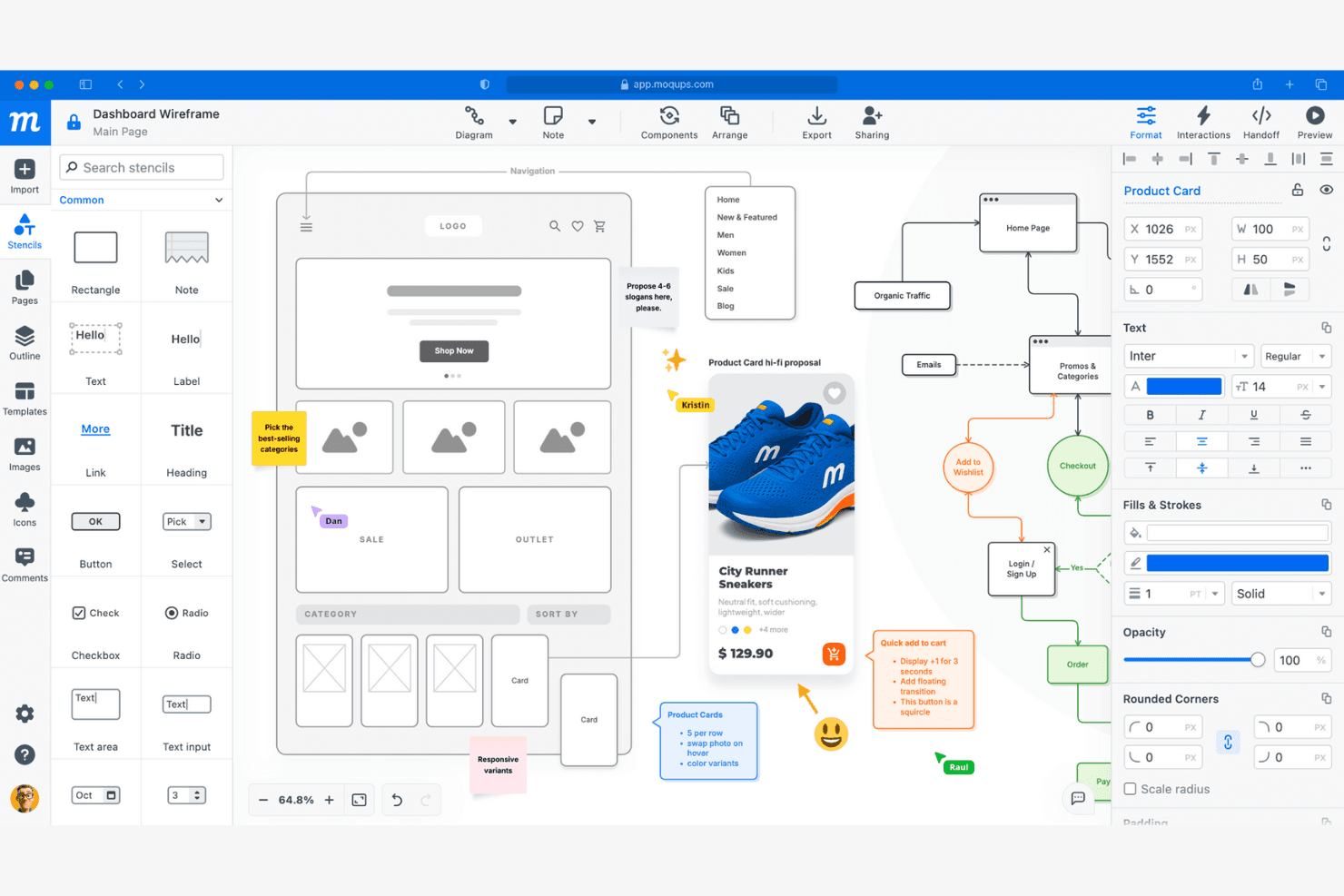
Moqups permite crear estructuras alámbricas, añadir anotaciones y colaborar en diseños de interfaces. Moqups es una herramienta de maquetas y diseño de estructuras alámbricas basada en el navegador que combina el diseño de interfaces mediante arrastrar y soltar, la creación de prototipos interactivos, la elaboración de diagramas y la colaboración en tiempo real en una sola plataforma en la nube.
¿Para quién es más adecuado Moqups?
Moqups es una excelente opción para equipos de producto multifuncionales, especialmente gerentes de producto y fundadores, que necesitan una herramienta basada en el navegador que mantenga el diseño, los comentarios y la iteración en un mismo espacio compartido.
Por qué elegí Moqups
Moqups ocupa un lugar en mi lista de favoritos por lo bien que mantiene alineados a los equipos multifuncionales sin que nadie tenga que abandonar su flujo de trabajo habitual. Me encanta que los gerentes de producto puedan insertar estructuras alámbricas activas directamente en las incidencias de Jira y las páginas de Confluence, para que los ingenieros y las partes interesadas siempre vean el diseño actual junto a las tareas. La coedición en tiempo real, los comentarios anclados con hilos y el chat integrado en la aplicación permiten que mi equipo dé y reciba comentarios sin tener que alternar entre distintas herramientas.
Características principales de Moqups
- Componentes sincronizados: Edita un componente una vez y los cambios se aplican automáticamente en todas las páginas del proyecto.
- Panel de entrega para desarrolladores: Genera fragmentos de código CSS y JSX junto con especificaciones de los objetos, como coordenadas, fuentes y colores, para facilitar la entrega al equipo de ingeniería.
- Extensión del navegador: Convierte páginas web activas o capturas de pantalla en diseños de Moqups totalmente editables directamente desde Chrome o Firefox.
- Modo de vista previa de prototipos interactivos: Activa todos los puntos de interacción y las interacciones de los objetos para que las partes interesadas puedan recorrer los flujos haciendo clic antes de que comience el desarrollo.
Integraciones de Moqups
Moqups documenta integraciones con Jira Cloud, Confluence Cloud, Google Drive, Slack, Dropbox, Box, Trello, Figma mediante un complemento y la importación desde Balsamiq, además de extensiones para Chrome y Firefox. Las integraciones con Jira y Confluence requieren un plan Business o superior.
Pros and Cons
Pros:
- La coedición en tiempo real facilita la colaboración del equipo
- Los componentes sincronizados se actualizan en todas las páginas del proyecto
- El editor de arrastrar y soltar permite crear maquetas rápidamente
Cons:
- No hay control de versiones ni ramificaciones
- Los prototipos interactivos no tienen lógica condicional
Learn more about Moqups: Ideal para escenas de maquetas generadas con IA y listas para impresión
- Plan gratuito disponible
- Desde $10/mes (facturado anualmente)
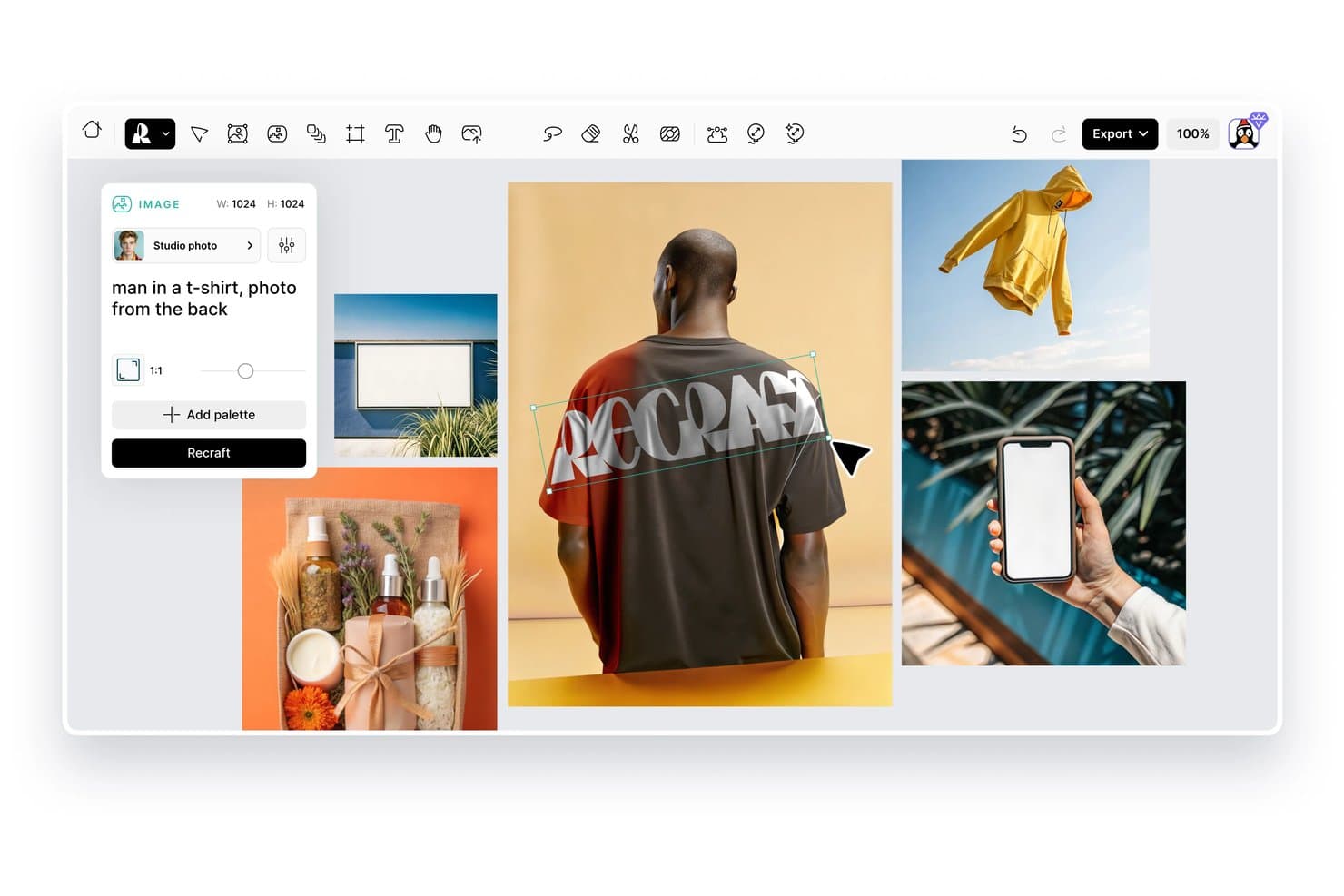
Recraft permite a los usuarios generar imágenes de maquetas de productos a partir de indicaciones de texto. Recraft es una herramienta de diseño con IA que permite generar y editar escenas de maquetas de productos, ilustraciones vectoriales y elementos visuales de marca mediante indicaciones de texto y controles de imagen.
¿Para quién es más adecuado Recraft?
Recraft es una excelente opción para diseñadores y equipos de marca que necesitan escenas de maquetas listas para impresión, con controles visuales precisos e imágenes generadas por IA.
Por qué elegí Recraft
Recraft ocupa un lugar destacado en mi lista porque genera escenas de maquetas listas para impresión con un nivel de calidad realmente difícil de reproducir con herramientas de diseño estándar. Me encanta cómo sus funciones de salida vectorial y bloqueo de estilo me permiten mantener la coherencia de los elementos visuales de la marca en múltiples variaciones de maquetas sin tener que rehacer el trabajo manualmente. La generación de escenas con IA también gestiona la iluminación realista y la textura de las superficies en las composiciones de productos, algo importante cuando se preparan recursos para envases o campañas impresas.
Funciones principales de Recraft
- Generación de texto a imagen: Crea elementos visuales originales de productos y escenas de maquetas a partir de indicaciones escritas sin tener que empezar desde cero en una herramienta de diseño.
- Biblioteca de estilos: Guarda y aplica estilos visuales personalizados a las imágenes generadas para mantener la coherencia de los recursos de marca en diferentes resultados.
- Herramienta de eliminación de fondos: Aísla automáticamente las imágenes de productos de sus fondos para que puedas incorporarlas a nuevas escenas o composiciones.
- Ampliación de imágenes: Aumenta la resolución de las imágenes de maquetas generadas para cumplir con los requisitos de alta calidad de impresión o de pantallas de gran formato.
Integraciones de Recraft
Recraft ofrece complementos, extensiones y plugins nativos oficiales para Figma, Framer, Google Docs, Google Slides, Chrome y OpenClaw. Su API REST admite integraciones personalizadas, y los planes empresariales admiten conexiones MCP con herramientas internas.
Pros and Cons
Pros:
- Las escenas listas para impresión se adaptan a los flujos de trabajo de envases
- La salida vectorial favorece la coherencia de la marca
- La iluminación realista mejora la composición de los productos
Cons:
- Las generaciones pueden omitir detalles exactos del producto
- El control de las escenas varía según las indicaciones
Learn more about Recraft: 10La mejor opción para escenas y maquetas 3D de comercio electrónico generadas con IA
Mockey
- Hay un plan gratuito disponible
- Desde $5.7/mes (facturado anualmente)
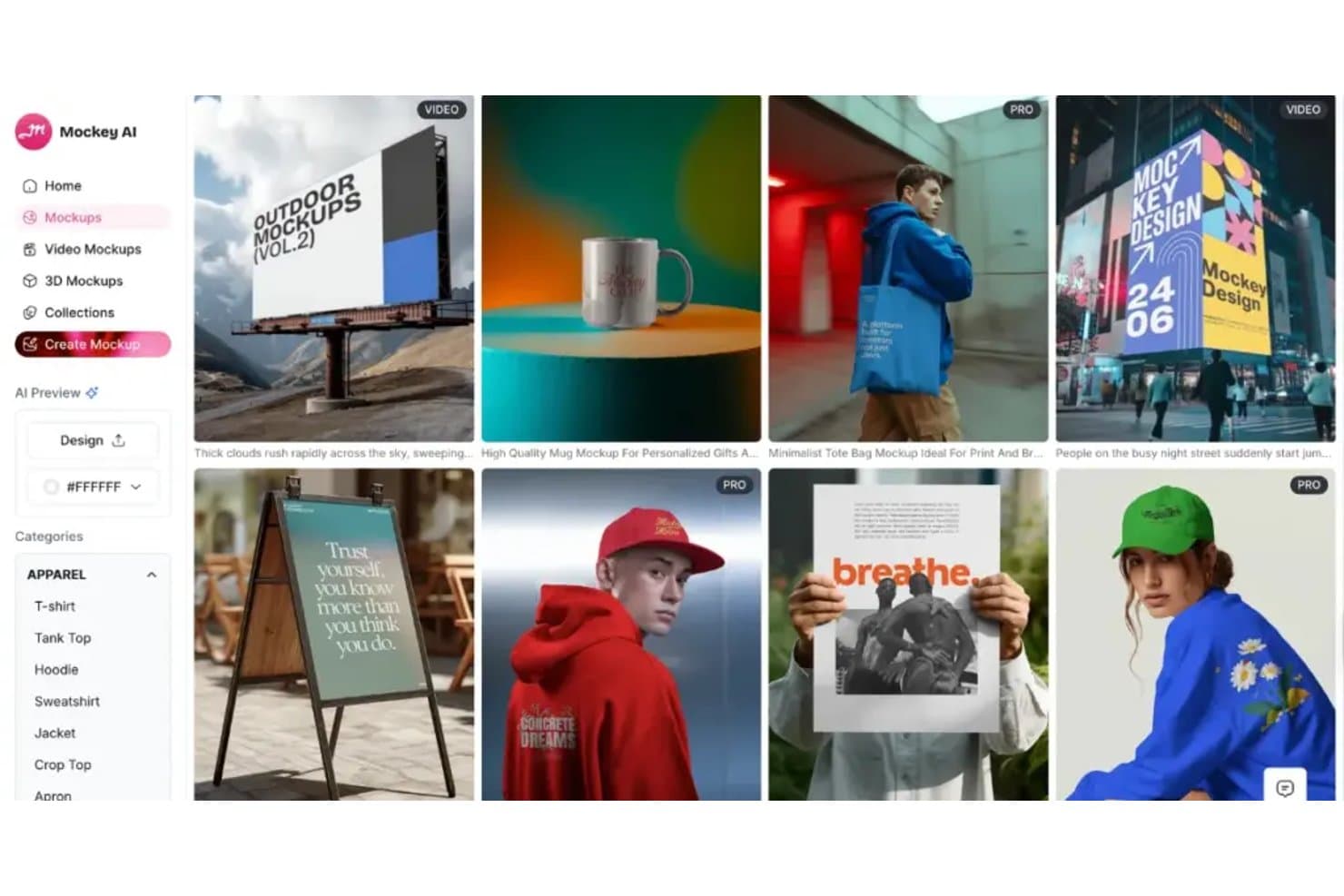
Mockey ofrece diversas categorías de maquetas para prendas de vestir, exteriores e impresión. Mockey es un generador de maquetas con tecnología de IA que te permite colocar diseños en productos, escenas y representaciones 3D mediante una amplia biblioteca de plantillas listas para comercio electrónico.
¿Para quién es más adecuado Mockey?
Mockey es una excelente opción para vendedores de comercio electrónico y diseñadores de productos que necesitan maquetas de escenas y representaciones 3D generadas por IA de forma rápida y pulida, sin un flujo de trabajo de diseño complejo.
Por qué elegí Mockey
Mockey ocupa un lugar en mi lista de favoritos por lo bien que gestiona la colocación de escenas generadas por IA y las maquetas 3D para productos de comercio electrónico. Me encanta que puedas colocar un diseño en un producto y obtener al instante una escena de estilo de vida renderizada a su alrededor, lo que ahorra el tiempo y el coste de una sesión fotográfica completa. La representación de maquetas 3D es especialmente eficaz para artículos como embalajes, prendas de vestir y productos de impresión bajo demanda.
Características principales de Mockey
- Generación masiva de maquetas: Sube varios diseños a la vez y genera maquetas con varias plantillas de productos en un solo lote.
- Eliminador de fondos: Elimina automáticamente el fondo de las imágenes de productos o diseños subidos antes de colocarlos en una escena de maqueta.
- Editor de color personalizado: Ajusta el color de los productos de las maquetas directamente en el editor para adaptarlos a requisitos específicos de la marca o del diseño.
- Exportación en formatos para redes sociales: Descarga las maquetas terminadas en dimensiones predeterminadas adaptadas a plataformas como Instagram, Facebook y Pinterest.
Integraciones de Mockey
Mockey ofrece integraciones nativas, como una aplicación de Shopify, un complemento de Figma y una tienda de Etsy.
Pros and Cons
Pros:
- Las escenas generadas por IA reducen los costes de las sesiones fotográficas
- La generación masiva admite varios diseños de productos
- Las representaciones 3D son adecuadas para embalajes y prendas de vestir
Cons:
- Los resultados de las escenas dependen de la calidad del diseño de origen
- La variedad de plantillas puede variar según el producto
Learn more about Mockey:
Otros generadores de maquetas de productos
Estas son algunas opciones adicionales de generadores de maquetas de productos que no llegaron a mi lista, pero que aun así merece la pena consultar:
- 11
- 12
- 13RenderforestIdeal para la creación integral de marcas y maquetas
- 14KittlLa mejor opción por la variedad de plantillas creativas
- 15PlaceitLa mejor opción para seleccionar maquetas de escenas de estilo de vida
- 16Mockuuups StudioLa mejor opción para la integración con aplicaciones de escritorio
- 17MediamodifierIdeal para generar maquetas en masa
- 18PixeliedIdeal para personas que no son diseñadores y crean maquetas de marca
- 19ProVisualIdeal para el renderizado de productos 3D basado en navegador
- 20PackifyIdeal para crear maquetas de embalaje desde el briefing hasta el troquel
Wie ich Produkt-Mockup-Generatoren bewerte
Ich teile meine Bewertung in drei Bereiche auf, wobei ich den größten Wert auf die grundlegende Funktionalität lege: Designs auf Vorlagen anwenden, realistische Szenen rendern und nutzbare Bilder exportieren. Als Nächstes achte ich auf die KI-Szenengenerierung und das Rendern von 3D-Modellen. Schließlich berücksichtige ich Zusammenarbeit, Lizenzierung, Einarbeitung und das Preis-Leistungs-Verhältnis.
Grundlegende Funktionen (Mindestanforderungen für diese Liste)
Bei der Auswahl der Tools für meine Liste bewerte ich jedes Tool für jede der unten aufgeführten grundlegenden Funktionen auf einer Skala von 0 (bietet die Funktionalität nicht) bis 5 (ist in diesem Bereich hervorragend). Anschließend rechne ich die Gesamtpunktzahl in einen Prozentsatz um, um die allgemeine Eignung jedes Tools besser beurteilen zu können, wobei ich Funktionen, die ich als wesentlich eingestuft habe, stärker gewichte.
- Vorlagenbibliothek (wesentlich): Ich bewerte die Breite der Kategorien, durchsuchbare Szenen sowie Vorlagen für Verpackungen, Bekleidung, Geräte und markenbezogene Oberflächen.
- Designanwendung (wesentlich): Ich prüfe, wie genau Teams Grafiken über verschiedene Produktansichten und Oberflächen hinweg platzieren, skalieren, verzerren und positionieren können.
- Realistisches Rendering: Ich achte auf überzeugende Beleuchtung, Texturen, Schatten und Perspektiven, die sich für Abstimmungen mit Stakeholdern oder Produkteinführungs-Assets eignen.
- Exportoptionen: Ich bewerte herunterladbare Formate, Auswahlmöglichkeiten bei der Auflösung und die Frage, ob sich die Ausgaben für Websites, Präsentationen und den Druck eignen.
- Szenenanpassung: Ich prüfe die Steuerungsmöglichkeiten für Hintergründe, Requisiten, Farben und Umgebungen, die markenbezogene Produktvisualisierungen unterstützen.
- Stapelgenerierung: Ich achte auf wiederholte Exporte für Produkte, Varianten oder Szenen ausgehend von einem einzigen Design, ohne jedes Mockup neu erstellen zu müssen.
Sobald ich eine Liste von Tools habe, die die Kriterien erfüllen, prüfe ich, wodurch sich die einzelnen Plattformen voneinander unterscheiden.
Unterscheidungsmerkmale (Was Anbieter voneinander abhebt)
So vergleiche ich verschiedene Anbieter miteinander:
Herausragende Funktionen
Ich achte auf eine KI-Szenengenerierung, die anhand von Texteingaben benutzerdefinierte Hintergründe erstellt. Dadurch können Produktmanager die Suche nach einer passenden Vorlage überspringen, wenn sie ein neues Konzept vorstellen. Auch der API-Zugriff ist wichtig: Teams, die große Kataloge verwalten, können Mockups für Dutzende von SKUs programmgesteuert erstellen, anstatt jedes einzelne manuell neu aufzubauen. Außerdem bewerte ich die Verwaltung von Marken-Kits, denn wenn Logos, Farben und Schriftarten an einem Ort gespeichert werden, bleibt jedes Mockup konsistent, während die Assets die verschiedenen Prüfzyklen durchlaufen.
Über die Funktionen hinaus
Ich prüfe, ob die generierten Mockups für die kommerzielle Nutzung freigegeben sind, einschließlich bezahlter Anzeigen und der Lieferung an Kunden – einige Plattformen schränken den Weiterverkauf ein oder verlangen eine Namensnennung, was Agenturen unvorbereitet treffen kann. Auch die Zusammenarbeit ist wichtig: Ich achte auf Kommentarfunktionen in Echtzeit und Freigabeprozesse, damit sich Produktmanager und Designer abstimmen können, bevor die Assets in die Produktion gelangen. Außerdem bewerte ich die Geschwindigkeit der Einarbeitung, da viele Käufer keine Designer sind und innerhalb weniger Minuten ein nutzbares Mockup benötigen – nicht erst nach stundenlangem Ansehen von Tutorial-Videos.
Cómo elegir un generador de maquetas de productos
Es fácil perderse entre largas listas de funciones y estructuras de precios complejas. Para ayudarte a mantener la concentración mientras avanzas en tu proceso específico de selección de software, aquí tienes una lista de factores que debes tener en cuenta:
| Factor | Qué debes tener en cuenta |
|---|---|
| FactorEscalabilidad | Qué debes tener en cuenta¿Admitirá la herramienta el crecimiento de tu catálogo de productos o del tamaño de tu equipo? Comprueba si existen límites de proyectos, usuarios o almacenamiento. |
| FactorIntegraciones | Qué debes tener en cuenta¿Se conecta la herramienta con tu plataforma de comercio electrónico, software de diseño o sistema de gestión de recursos? Confirma que existan integraciones nativas, no solo acceso mediante API. |
| FactorPersonalización | Qué debes tener en cuenta¿Puedes adaptar las maquetas para que coincidan con las directrices de tu marca o con tipos de productos únicos? Evalúa la flexibilidad de las plantillas y los controles de edición. |
| FactorFacilidad de uso | Qué debes tener en cuenta¿Con qué rapidez pueden los nuevos usuarios crear maquetas sin formación? Busca flujos de trabajo intuitivos y un número mínimo de pasos desde la carga hasta la exportación. |
| FactorImplementación e incorporación | Qué debes tener en cuenta¿Qué recursos están disponibles para ayudar a tu equipo a empezar? Ten en cuenta los tutoriales, las guías de incorporación y las bibliotecas de plantillas. |
| FactorCoste | Qué debes tener en cuenta¿Se ajusta el precio a tu presupuesto y a tus necesidades de uso? Presta atención a las tarifas ocultas, los modelos de pago por descarga o las actualizaciones necesarias para acceder a funciones clave. |
| FactorMedidas de seguridad | Qué debes tener en cuenta¿Cómo protege el proveedor tus diseños y datos cargados? Busca cifrado, políticas de privacidad y prácticas de conservación de datos. |
| FactorDisponibilidad de asistencia | Qué debes tener en cuenta¿Qué canales de asistencia se ofrecen y durante qué horario? Valora si necesitas asistencia por chat en directo, correo electrónico o teléfono para resolver problemas urgentes. |
¿Qué es un generador de maquetas de productos?
Un generador de maquetas de productos es una herramienta digital que permite colocar tus diseños en plantillas de productos realistas, creando vistas previas visuales para marketing, comercio electrónico o presentaciones a clientes. Estas plataformas te ayudan a visualizar rápidamente cómo aparecerán tus ilustraciones, identidad de marca o envases en artículos como prendas de vestir, embalajes o dispositivos tecnológicos, sin necesidad de muestras físicas ni conocimientos avanzados de diseño.
Características del generador de maquetas de productos
Al seleccionar un generador de maquetas de productos, presta atención a las siguientes características clave:
- Biblioteca de plantillas: Una amplia selección de plantillas de productos prediseñadas que abarca categorías como prendas de vestir, embalajes, dispositivos tecnológicos y materiales impresos, para que puedas encontrar rápidamente una maqueta que se adapte a tus necesidades.
- Carga de diseños: La posibilidad de cargar tus propias ilustraciones, logotipos o archivos de identidad de marca y aplicarlos directamente a las plantillas de maquetas para visualizarlos al instante.
- Personalización de escenas: Herramientas para ajustar fondos, accesorios, iluminación y colocación del producto, lo que te permite crear elementos visuales únicos y coherentes con tu marca.
- Exportación en alta resolución: Opciones para descargar las maquetas terminadas en formatos de alta resolución adecuados para impresión, web o presentaciones.
- Editor de arrastrar y soltar: Una interfaz intuitiva que permite colocar, cambiar el tamaño y girar tus diseños en el producto mediante sencillos controles de arrastrar y soltar.
- Compatibilidad con varios formatos: La posibilidad de exportar maquetas en distintos tipos de archivo, como PNG, JPG o incluso formatos de vídeo, para adaptarse a diferentes casos de uso.
- Procesamiento por lotes: Funciones que permiten aplicar un único diseño a varias maquetas o productos a la vez, ahorrando tiempo en tareas repetitivas.
- Herramientas de marca: Opciones integradas para añadir marcas de agua, colores de marca o texto personalizado a tus maquetas y conseguir una apariencia coherente.
- Filtrado y búsqueda de plantillas: Opciones avanzadas de búsqueda y filtrado que te ayudan a localizar rápidamente la plantilla adecuada según el tipo de producto, el estilo o la escena.
- Historial de versiones: La posibilidad de realizar un seguimiento de los cambios y volver a versiones anteriores de tus maquetas, facilitando la colaboración y el diseño iterativo.
Ventajas del generador de maquetas de productos
Implementar un generador de maquetas de productos ofrece varias ventajas para tu equipo y tu empresa. Estas son algunas de las que puedes esperar:
- Validación más rápida de los diseños: Visualiza rápidamente cómo se verán tus ilustraciones o elementos de marca en productos reales sin tener que esperar a recibir muestras físicas.
- Ahorro de costes: Elimina la necesidad de crear prototipos costosos o realizar sesiones fotográficas al generar maquetas digitales de alta calidad.
- Mejores presentaciones para clientes: Presenta elementos visuales pulidos y realistas a clientes o partes interesadas, facilitando la comunicación de los conceptos de diseño y la obtención de aprobaciones.
- Mayor flexibilidad creativa: Experimenta con distintos tipos de productos, colores y escenas utilizando una amplia biblioteca de plantillas y herramientas de personalización.
- Representación coherente de la marca: Aplica los recursos y las directrices de tu marca a todas las maquetas para garantizar una apariencia unificada en los materiales de marketing y comercio electrónico.
- Flujo de trabajo simplificado: Utiliza el procesamiento por lotes y la edición mediante arrastrar y soltar para reducir las tareas repetitivas y acelerar la creación de varias maquetas.
- Mejor colaboración: Comparte maquetas editables o historiales de versiones con los miembros del equipo para facilitar los comentarios y los procesos de diseño iterativo.
Costes y precios del generador de maquetas de productos
Seleccionar un generador de maquetas de productos requiere comprender los distintos modelos de precios y planes disponibles. Los costes varían según las funciones, el tamaño del equipo, los complementos y otros factores. La tabla siguiente resume los planes habituales, sus precios medios y las funciones que suelen incluir las soluciones de generación de maquetas de productos:
Tabla comparativa de planes del generador de maquetas de productos
| Tipo de plan | Precio medio | Funciones habituales |
|---|---|---|
| Tipo de planPlan gratuito | Precio medio$0 | Funciones habitualesAcceso a una biblioteca de plantillas limitada, cargas de diseños básicas, descargas con marca de agua y opciones de exportación limitadas. |
| Tipo de planPlan personal | Precio medio$5-$20/usuario/mes | Funciones habitualesAcceso completo a las plantillas, descargas en alta resolución, personalización básica de escenas y licencia para uso personal. |
| Tipo de planPlan empresarial | Precio medio$20-$50/usuario/mes | Funciones habitualesHerramientas de colaboración en equipo, procesamiento por lotes, personalización avanzada, asistencia prioritaria y derechos de uso comercial. |
| Tipo de planPlan empresarial avanzado | Precio medio$50-$100+/usuario/mes | Funciones habitualesIntegraciones personalizadas, gestión de cuentas exclusiva, seguridad mejorada, asistencia para la incorporación y soporte respaldado por un SLA. |
Preguntas frecuentes sobre el generador de maquetas de productos
Estas son algunas respuestas a preguntas habituales sobre el generador de maquetas de productos:
¿Puedo utilizar generadores de maquetas de productos para proyectos comerciales?
Sí, la mayoría de los generadores de maquetas de productos de pago permiten el uso comercial, pero siempre debes revisar las condiciones de licencia de cada plantilla y exportación. Algunos planes gratuitos pueden restringir el uso o exigir atribución, así que consulta los detalles antes de utilizar las maquetas en marketing o comercio electrónico.
¿Necesito conocimientos de diseño gráfico para utilizar un generador de maquetas de productos?
No, la mayoría de los generadores de maquetas de productos están diseñados para personas que no son diseñadoras y ofrecen interfaces intuitivas de arrastrar y soltar. Puedes subir tus diseños, colocarlos en plantillas y personalizar escenas sin conocimientos avanzados de diseño ni programas especializados.
¿En qué formatos de archivo puedo exportar mis maquetas?
La mayoría de los generadores de maquetas de productos permiten exportar en formatos habituales como PNG y JPG, y algunos ofrecen exportaciones en PDF o vídeo. Comprueba si la herramienta proporciona los tipos de archivo que necesitas para el uso previsto, como impresión, web o presentaciones.
¿Hay límites en la cantidad de maquetas que puedo crear o descargar?
Sí, muchas plataformas establecen límites según tu plan de suscripción. Los planes gratuitos suelen limitar el número de descargas o añadir marcas de agua, mientras que los planes de pago normalmente ofrecen un uso más amplio o ilimitado. Revisa los detalles del plan para asegurarte de que se ajusta a las necesidades de tu flujo de trabajo.
¿Puedo personalizar el fondo o la escena de mis maquetas?
Sí, la mayoría de los generadores modernos de maquetas de productos te permiten ajustar los fondos, los accesorios y la iluminación para crear escenas únicas. Sin embargo, el nivel de personalización varía, así que prueba el editor para comprobar si cumple tus requisitos creativos.