

Como responsable de producto, te enfrentas a desafíos únicos cada día. Equilibrar las exigencias de las partes interesadas, mantener a tu equipo alineado y asegurarte de que los proyectos sigan su curso puede resultar abrumador. Es posible que estés considerando alternativas a Productboard para encontrar soluciones mejores que se adapten a las necesidades de tu equipo.
Llevo años trabajando en el ámbito de la gestión de productos, probando y analizando software de forma independiente. Sé lo importante que es contar con herramientas que realmente respalden tu flujo de trabajo. Según mi experiencia, encontrar el software adecuado puede marcar una gran diferencia.
En este artículo, compartiré mis principales alternativas a Productboard. Encontrarás un análisis imparcial y bien documentado de cada opción, centrado en cómo pueden ayudarte a superar tus desafíos empresariales específicos. Encontremos juntos la opción que mejor se adapte a tu equipo.
¿Qué es Productboard?
Productboard es una plataforma central de gestión de productos que ayuda a los equipos a priorizar, planificar y crear productos de forma eficaz. Tanto si eres una empresa emergente que busca un software de hojas de ruta como si perteneces a una empresa consolidada que está perfeccionando su plataforma de gestión de productos, las herramientas de Productboard, incluido su widget para recopilar comentarios sobre el producto, pueden ayudar a los equipos a mantenerse conectados con las necesidades de los clientes. Funciones como los marcos de priorización y la planificación de hojas de ruta te ayudan a hacer un seguimiento de las necesidades de los usuarios, decidir qué desarrollar a continuación y comunicar estrategias de forma eficiente a las partes interesadas. En general, Productboard ofrece un enfoque estructurado para gestionar el ciclo de vida de tu producto, asegurándose de que tu equipo se mantenga centrado y alineado con los objetivos empresariales.
Por qué confiar en nuestras recomendaciones de software
6,700+
Reviews
20
Industry experts
16+
Evaluation factors
14
Years
Nuestro equipo lleva probando y evaluando software desde 2012. Como gestores de producto, sabemos lo difícil —y lo importante— que es elegir el software adecuado.
Para esta guía, evaluamos las herramientas mediante pruebas prácticas e investigación independiente, puntuando las herramientas según nuestros criterios de selección.
Nuestras reseñas reflejan nuestro criterio editorial humano, no un discurso de ventas.
Revisores expertos:
 Hannah ClarkSenior TPM
- Cristiano ValimSenior UI/UX Lead

Tabla comparativa de alternativas a Productboard
\u003cp data-pm-slice=\u00221 1 []\u0022\u003eUsa esta tabla comparativa para comparar los detalles de precios de mis principales alternativas a Productboard.\u003c/p\u003e
| Tool | Best For | Trial Info | Price | ||
|---|---|---|---|---|---|
| 1 | La mejor opción para el análisis de comentarios de clientes basado en inteligencia artificial | Demostración gratuita disponible | Precios bajo solicitud | Website | |
| 2 | La mejor opción para hojas de ruta públicas basadas en Jira | Plan gratuito + prueba gratuita disponible | Desde $1.10/usuario/mes | Website | |
| 3 | Idéal pour le suivi de la livraison connecté à Jira | Formule gratuite + essai gratuit disponible | À partir de $10/utilisateur/mois | Website | |
| 4 | Ideal para alinear la estrategia, la hoja de ruta y los OKR | Prueba gratuita de 30 días + demostración gratuita disponible | Desde $9/usuario/mes | Website | |
| 5 | Ideal para la gestión del backlog de producto | Prueba gratuita de 14 días + demostración gratuita disponible | Desde $44/usuario/mes (facturado anualmente) | Website | |
| 6 | Ideal para la planificación de carteras basada en IA | Demostración gratuita disponible | Precios bajo solicitud | Website | |
| 7 | Ideal para marcos de priorización personalizables | Demo gratuita disponible | Precio bajo solicitud | Website | |
| 8 | Ideal para hojas de ruta impulsadas por el descubrimiento de productos | Prueba gratuita de 14 días + demostración gratuita disponible | Desde $19/usuario/mes (facturado anualmente) | Website | |
| 9 | Ideal para recopilar comentarios de clientes mediante IA | Hay un plan gratuito disponible | Desde $79/mes (facturado anualmente) | Website | |
| 10 | Ideal para cerrar el ciclo de comentarios con los clientes | Plan gratuito disponible | Desde $29/asiento/mes (facturado anualmente) | Website |


Llevamos probando y analizando software de gestión de productos desde 2020. Como responsables de producto, sabemos lo decisivo y difícil que es tomar la decisión correcta al seleccionar un software. Invertimos en una investigación exhaustiva para ayudar a nuestra audiencia a tomar mejores decisiones de compra de software.
Hemos probado más de 2.000 herramientas para distintos casos de uso de la gestión de productos y hemos escrito más de 1.000 análisis exhaustivos de software. Descubre cómo mantenemos la transparencia y consulta nuestra metodología de análisis de software.
Análisis de las mejores alternativas a Productboard
A continuación encontrarás mis resúmenes detallados de las mejores alternativas a Productboard que entraron en mi lista de opciones. Mis análisis ofrecen una visión detallada de las funciones principales, las ventajas y desventajas, las integraciones y los casos de uso ideales de cada herramienta para ayudarte a encontrar la mejor opción para ti.
 La mejor opción para el análisis de comentarios de clientes basado en inteligencia artificial
- Demostración gratuita disponible
- Precios bajo solicitud
Visit WebsiteCustomer Rating:4.8/5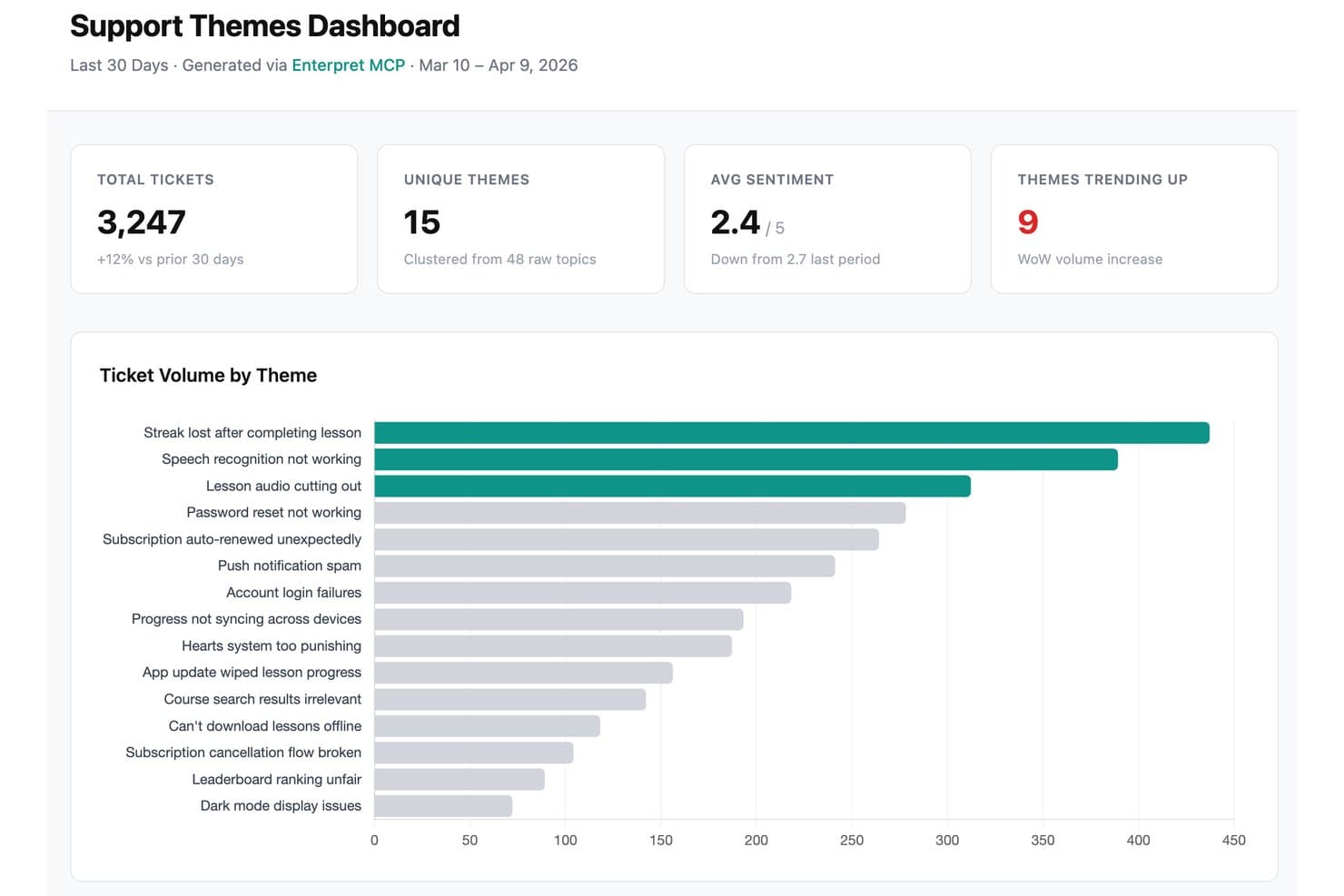
Enterpret ofrece un panel de temas de soporte que agrupa los tickets de soporte sin procesar en temas y muestra el volumen de tickets, las tendencias de sentimiento y los problemas en tendencia. Enterpret es una plataforma de comentarios de clientes para equipos de producto que unifica las perspectivas de múltiples canales, ayudando a las empresas a identificar las necesidades de los clientes, validar decisiones de producto y priorizar mejoras en la hoja de ruta.
¿Para quién es más adecuado Enterpret?
Enterpret es adecuado para equipos de producto que necesitan combinar comentarios de múltiples canales y convertir las perspectivas de los clientes en prioridades para la hoja de ruta.
Por qué Enterpret es una buena alternativa a Productboard
Elegí Enterpret porque su análisis de comentarios de clientes basado en inteligencia artificial reúne los comentarios de múltiples canales en una sola vista. Lo utilizo para identificar necesidades recurrentes de los clientes, validar decisiones de producto y conectar la evidencia con las prioridades de la hoja de ruta. Esto ayuda a mi equipo a reemplazar los comentarios dispersos por una dirección clara para el producto.
Funciones principales de Enterpret
- Integraciones de comentarios: Conecta las fuentes de comentarios de clientes en un solo espacio de trabajo.
- Taxonomía personalizada: Organiza los comentarios con categorías adaptadas a tu producto.
- Análisis de sentimientos: Clasifica los comentarios según un sentimiento positivo, negativo o neutro.
- Búsqueda y filtrado: Encuentra comentarios mediante palabras clave, etiquetas, fuentes o segmentos.
Integraciones de Enterpret
Enterpret ofrece más de 50 conectores nativos, incluidos Zendesk, Salesforce, Slack, Jira, Linear, Snowflake, Census y Notion. Admite Zapier y API de webhooks para fuentes de comentarios personalizadas.
Pros and Cons
Pros:
- Unifica los comentarios de los distintos canales de clientes
- La taxonomía personalizada conecta las perspectivas con las hojas de ruta
- El análisis de sentimientos revela necesidades recurrentes de los clientes
Cons:
- La transparencia de precios es limitada
- Se centra principalmente en el análisis de comentarios
Learn more about Enterpret: La mejor opción para hojas de ruta públicas basadas en Jira
- Plan gratuito + prueba gratuita disponible
- Desde $1.10/usuario/mes
Visit WebsiteCustomer Rating:5/5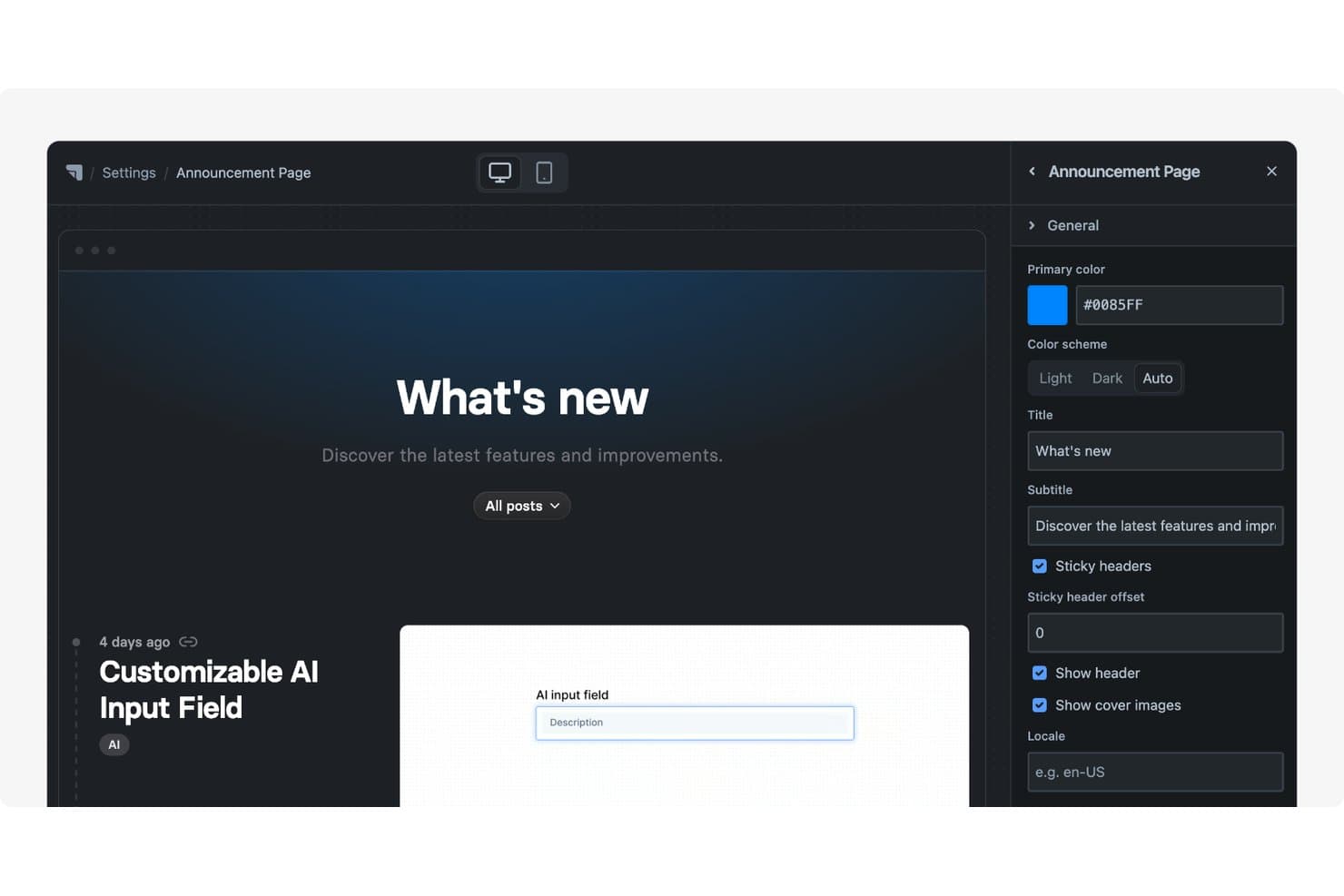
Released ofrece una página de anuncios personalizable con título, subtítulo, combinación de colores y ajustes de encabezado editables mediante un panel lateral. Released es una plataforma de gestión de productos para equipos basados en Jira que ayuda a los responsables de producto a organizar los comentarios de los clientes, priorizar solicitudes y alinear a las partes interesadas en torno a los planes del producto.
¿Para quién es más adecuado Released?
Responsables de producto de equipos basados en Jira que necesitan compartir hojas de ruta públicas y mantener los comentarios de los clientes vinculados a los planes de entrega.
Por qué Released es una buena alternativa a Productboard
Elegí Released porque es la mejor opción para crear hojas de ruta públicas basadas en Jira. Mi equipo lo utiliza para organizar los comentarios de los clientes, priorizar solicitudes y conectar las actualizaciones de la hoja de ruta con los planes de entrega de Jira. Esto ofrece a las partes interesadas una visión clara de lo que está planificado sin separar la comunicación del producto de su ejecución.
Funciones principales de Released
- Notas de lanzamiento con IA: Redacta notas de lanzamiento a partir de tickets de Jira completados.
- Registro de cambios con marca: Publica actualizaciones en dominios personalizados.
- Suscripciones por correo electrónico: Permite que los clientes se suscriban a las actualizaciones del producto.
- Portales integrables: Añade hojas de ruta y registros de cambios a sitios web o documentos.
Integraciones de Released
Released ofrece una integración nativa con Jira que conecta las hojas de ruta orientadas a los clientes, las notas de lanzamiento y las conversaciones sobre comentarios con el trabajo en Jira. Las integraciones nativas adicionales, la compatibilidad con Zapier y el acceso a la API no están documentados con claridad.
Pros and Cons
Pros:
- Publica rápidamente hojas de ruta públicas bien diseñadas
- La IA redacta notas de lanzamiento a partir del trabajo completado
- Conecta las conversaciones con los clientes con el contexto de entrega
Cons:
- Es menos adecuado para el descubrimiento de productos centrado en la investigación
- Ofrece menos marcos avanzados de priorización que Productboard
Learn more about Released: Idéal pour le suivi de la livraison connecté à Jira
- Formule gratuite + essai gratuit disponible
- À partir de $10/utilisateur/mois
Visit WebsiteCustomer Rating:4.3/5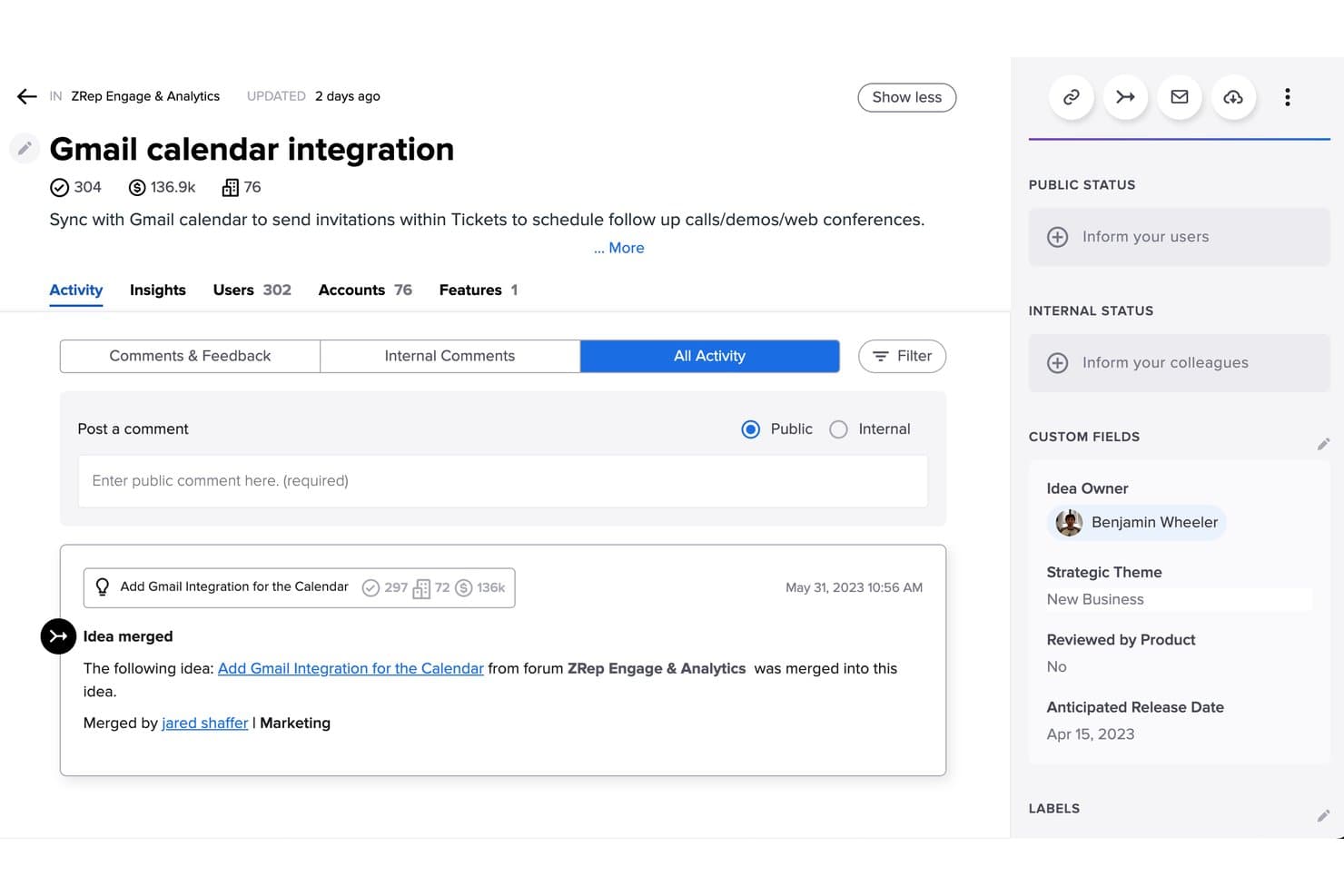
Jira Product Discovery permet aux utilisateurs de partager des vues de la feuille de route avec des personnes externes sans licence. Jira Product Discovery est une plateforme de gestion de produits destinée aux équipes qui doivent recueillir les informations sur les clients, hiérarchiser les idées et relier les décisions produit à la planification de la livraison.
À qui Jira Product Discovery convient-il le mieux ?
Jira Product Discovery convient aux responsables produit qui doivent relier les informations sur les clients et la hiérarchisation à la livraison par les équipes d’ingénierie dans Jira.
Pourquoi Jira Product Discovery est une bonne alternative à Productboard
J’ai choisi Jira Product Discovery parce qu’il relie directement la découverte produit au suivi de la livraison connecté à Jira. J’utilise les vues de collecte et de hiérarchisation des idées pour classer les problèmes rencontrés par les clients, puis je relie les opportunités sélectionnées aux tâches de livraison dans Jira. Mon équipe peut suivre une décision produit, de l’information client jusqu’à son exécution par l’équipe d’ingénierie, sans tenir à jour des informations d’état séparées.
Fonctionnalités clés de Jira Product Discovery
- Champs personnalisés : Ajoutez des informations structurées aux idées, telles que les équipes, les thèmes et les segments de clientèle.
- Formulaires d’idées : Standardisez la manière dont les membres de l’équipe soumettent de nouvelles idées de produits.
- Collecte des retours : Recueillez les informations sur les clients et les éléments probants associés aux idées.
- Feuilles de route publiques : Partagez certains plans produit avec des parties prenantes externes.
Intégrations de Jira Product Discovery
Jira Product Discovery propose des intégrations officiellement documentées avec Jira Software, Jira Service Management et Confluence, reliant les idées et les informations produit à la livraison, aux retours et à la documentation. Les idées sont des tickets Jira ; vous pouvez donc utiliser l’API REST de la plateforme Jira Cloud pour créer des intégrations personnalisées, tandis qu’une API publique est également disponible pour récupérer les informations.
Pros and Cons
Pros:
- Relie les décisions de découverte aux tâches de livraison
- La collecte structurée des idées favorise la cohérence des soumissions
- Les feuilles de route publiques facilitent la visibilité des parties prenantes
Cons:
- La hiérarchisation semble moins spécifique aux produits que celle de Productboard
- Les flux de travail de découverte avancés nécessitent une configuration manuelle
Learn more about Uservoice: 4Ideal para alinear la estrategia, la hoja de ruta y los OKR
Aha!
- Prueba gratuita de 30 días + demostración gratuita disponible
- Desde $9/usuario/mes
Visit WebsiteCustomer Rating:4.4/5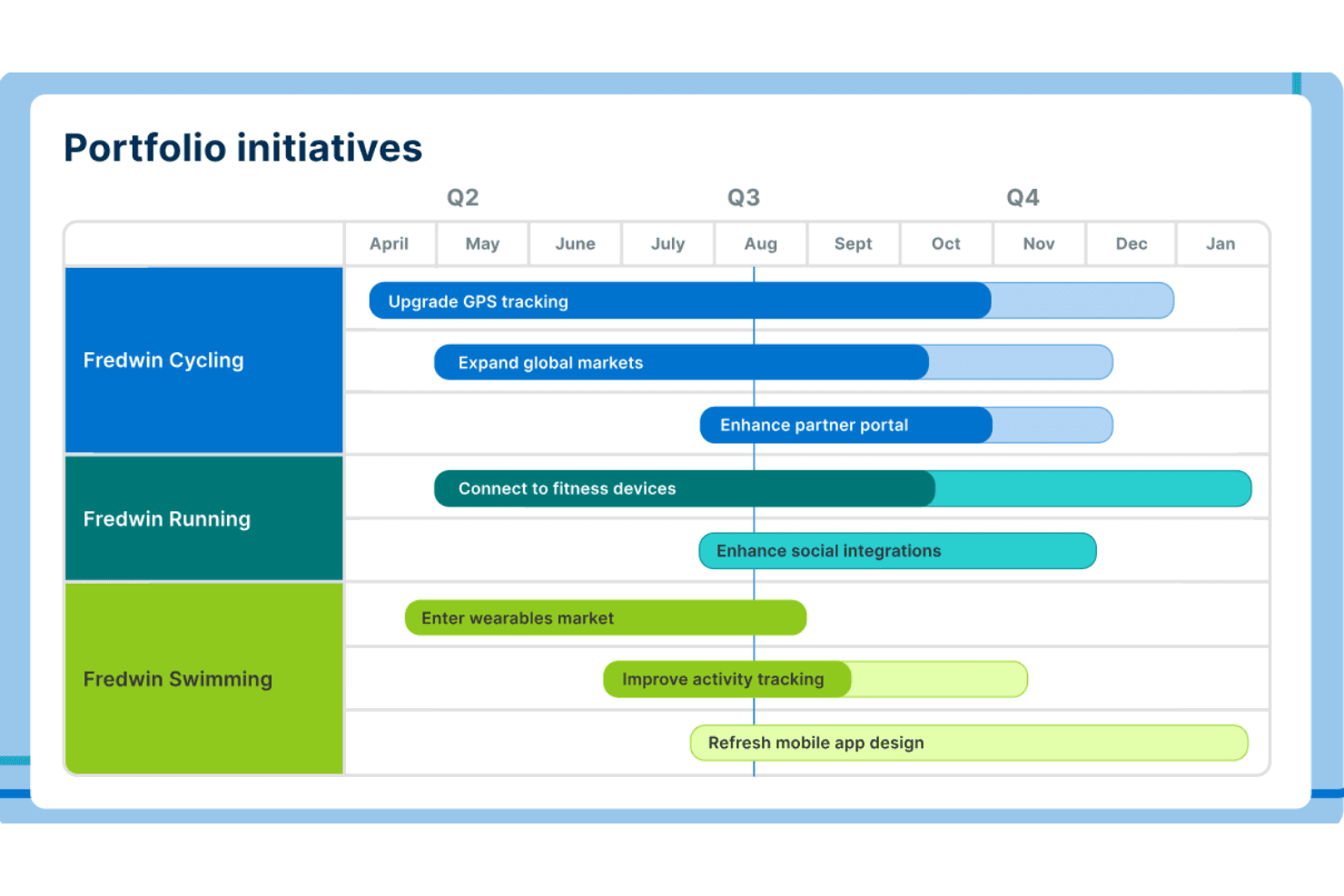
Aha! pone énfasis en la planificación estratégica de hojas de ruta con herramientas para visualizar objetivos, ideas y planes. ¡Aha! es un software de gestión de productos para equipos que necesitan conectar los conocimientos de los clientes, la estrategia de producto, las hojas de ruta, los requisitos y los planes de entrega en un único espacio de trabajo.
¿Para quién es más adecuado Aha!?
Líderes de producto y equipos de estrategia que necesitan conectar la visión del producto, las hojas de ruta y los OKR en organizaciones multifuncionales.
Por qué Aha! es una buena alternativa a Productboard
Elegí Aha! porque conecta los conocimientos de los clientes con la estrategia de producto, las hojas de ruta y los OKR en un único espacio de trabajo. Utilizo sus herramientas de planificación estratégica para definir objetivos y, después, vinculo las iniciativas y las funcionalidades con resultados medibles. Sus vistas de hojas de ruta y requisitos ayudan a mi equipo a explicar por qué cada prioridad respalda nuestra estrategia de producto.
Características principales de Aha!
- Planificación de la capacidad: Compara la capacidad del equipo con el trabajo planificado.
- Mapeo de dependencias: Vincula elementos de trabajo relacionados e identifica bloqueos.
- Automatización de flujos de trabajo: Configura reglas que actualizan los registros automáticamente.
- Campos personalizados: Añade campos de datos estructurados para capturar detalles específicos del equipo.
Integraciones de Aha!
Aha! ofrece más de 30 integraciones nativas, incluidas Jira, Azure DevOps, GitHub, Slack, Microsoft Teams, Salesforce y Zendesk. También es compatible con Zapier y proporciona una API para integraciones personalizadas.
Pros and Cons
Pros:
- Vincula los objetivos estratégicos con el trabajo de la hoja de ruta
- Captura los comentarios de los clientes junto con los planes de producto
- Las vistas personalizables permiten elaborar informes detallados para las partes interesadas
Cons:
- La configuración inicial requiere una planificación considerable
- La interfaz densa ralentiza a los usuarios nuevos
Learn more about Aha!: Ideal para la gestión del backlog de producto
- Prueba gratuita de 14 días + demostración gratuita disponible
- Desde $44/usuario/mes (facturado anualmente)
Visit WebsiteCustomer Rating:4.2/5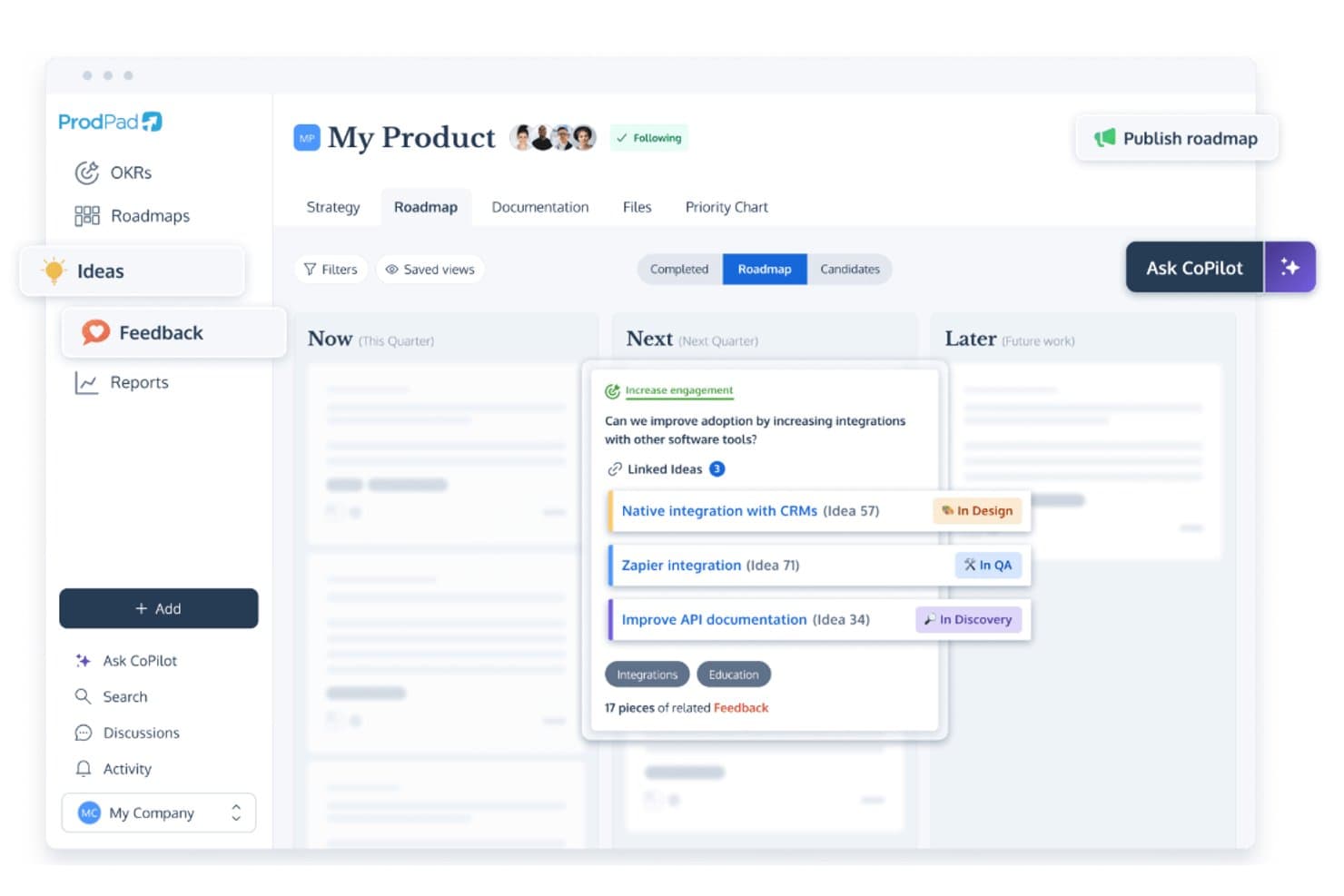
ProdPad vincula las ideas de la hoja de ruta con los comentarios y realiza un seguimiento del estado del desarrollo. ProdPad es un software de gestión de productos para equipos que conecta los conocimientos de los clientes, la estrategia de producto, las hojas de ruta y la priorización, ayudando a los gestores de producto a convertir los comentarios en planes alineados y decisiones de entrega fundamentadas.
¿Para quién es más adecuado ProdPad?
ProdPad es adecuado para gestores de producto que necesitan conectar los comentarios de los clientes, la estrategia de producto y las prioridades del backlog en un solo espacio de trabajo.
Por qué ProdPad es una buena alternativa a Productboard
Elegí ProdPad porque su gestión del backlog de producto conecta los comentarios de los clientes con las ideas de producto y los objetivos estratégicos. Utilizo sus herramientas de priorización para evaluar solicitudes, puntuar oportunidades y mantener el trabajo de descubrimiento vinculado a la hoja de ruta. Esto proporciona a mi equipo una base más clara para decidir qué elementos del backlog merecen atención a continuación.
Características principales de ProdPad
- Editor de historias de usuario: Redacta historias con criterios de aceptación y detalles complementarios.
- Lienzo de producto: Recopila usuarios, problemas, hipótesis y la visión del producto en un solo espacio de trabajo.
- Planificación de lanzamientos: Agrupa el trabajo planificado en lanzamientos con fechas y hitos.
- Integraciones de desarrollo: Conecta ProdPad con herramientas como Jira y Azure DevOps.
Integraciones de ProdPad
ProdPad ofrece integraciones con Jira y Azure DevOps, ayudando a los equipos a conectar la planificación del producto con los flujos de trabajo de desarrollo.
Pros and Cons
Pros:
- Vincula los comentarios de los clientes con las ideas de producto
- Conecta las prioridades del backlog con los objetivos estratégicos
- Separa el trabajo de descubrimiento de la planificación de la entrega
Cons:
- Las vistas centradas en historias se vuelven visualmente confusas
- El estilo único de la hoja de ruta requiere adaptación
Learn more about ProdPad: Ideal para la planificación de carteras basada en IA
- Demostración gratuita disponible
- Precios bajo solicitud
Visit WebsiteCustomer Rating:4.8/5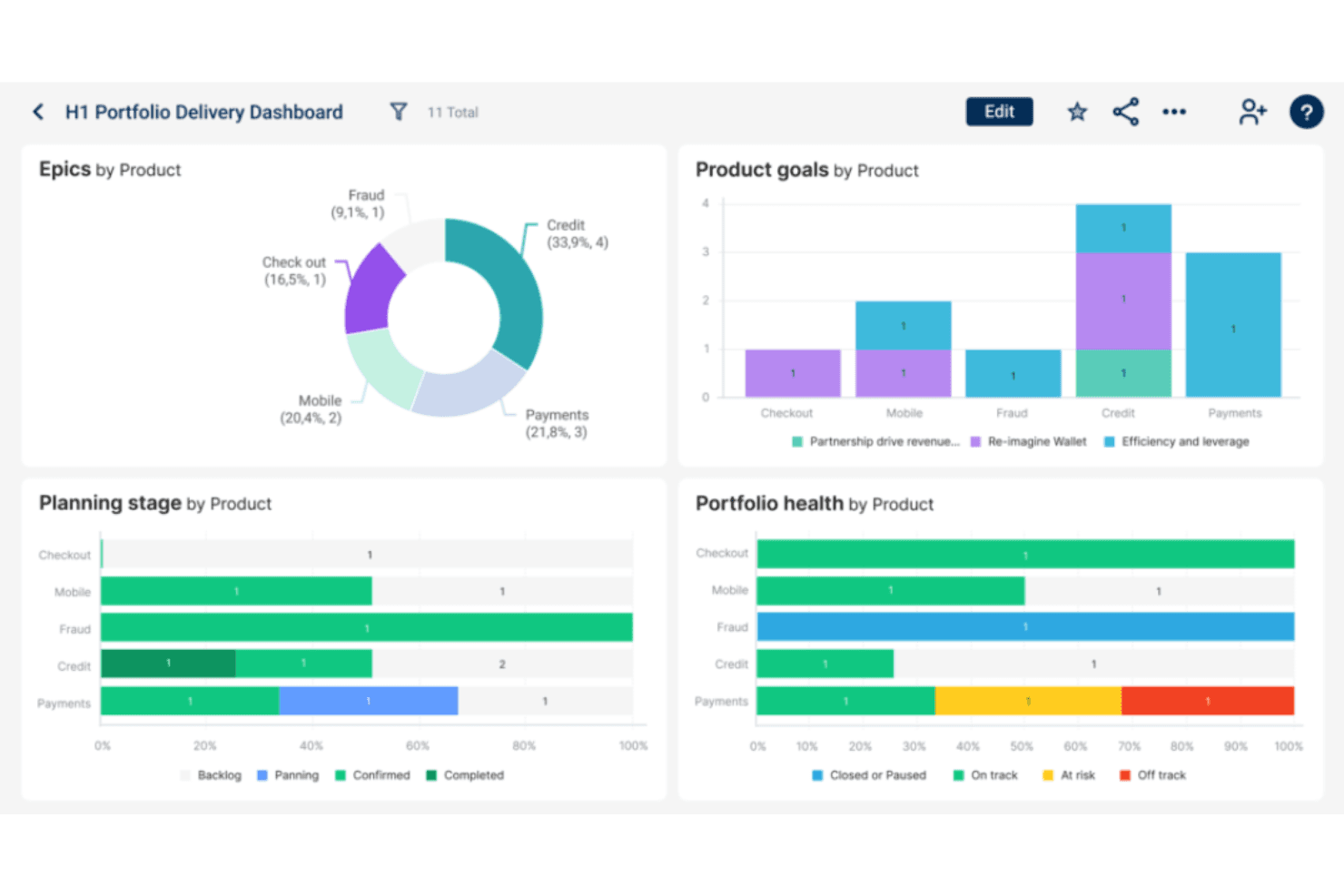
Dragonboat optimiza la estrategia de producto con información basada en IA y planificación de carteras. Dragonboat es una plataforma de gestión de carteras de productos para líderes de producto que necesitan conectar la estrategia, la priorización, la planificación de recursos y la entrega en organizaciones de productos complejas.
¿Para quién es más adecuado Dragonboat?
Líderes de producto en organizaciones en expansión que necesitan una planificación de carteras asistida por IA en las áreas de estrategia, priorización, recursos y entrega.
Por qué Dragonboat es una buena alternativa a Productboard
Elegí Dragonboat porque su planificación de carteras basada en IA conecta la estrategia de producto con la priorización, la planificación de capacidad y la entrega. Utilizo las vistas de cartera para comparar las iniciativas con los objetivos estratégicos y, después, modelar escenarios de recursos antes de comprometer la capacidad de ingeniería. Esto ayuda a mi equipo a explicar por qué cambia una hoja de ruta cuando cambian la financiación, la dotación de personal o las prioridades empresariales.
Características principales de Dragonboat
- Integraciones con Jira y Azure DevOps: Sincroniza los datos de entrega de las herramientas de desarrollo conectadas.
- Mapeo de dependencias: Vincula iniciativas relacionadas e identifica las dependencias de entrega.
- Campos personalizados: Añade atributos estructurados a las iniciativas y los registros de productos.
- Vistas de la hoja de ruta: Muestra los planes en formatos de cronograma, carriles o lista.
Integraciones de Dragonboat
Dragonboat se integra con Jira y Azure DevOps, sincronizando los datos de entrega para conectar las hojas de ruta de la cartera con el trabajo de desarrollo.
Pros and Cons
Pros:
- Conecta la estrategia con la planificación de capacidad
- Admite el mapeo de dependencias a nivel de cartera
- Ofrece vistas flexibles de la hoja de ruta
Cons:
- Menor enfoque en el descubrimiento de comentarios de los clientes
- La configuración puede requerir orientación práctica
Learn more about Dragonboat: Ideal para marcos de priorización personalizables
- Demo gratuita disponible
- Precio bajo solicitud
Visit WebsiteCustomer Rating:4.4/5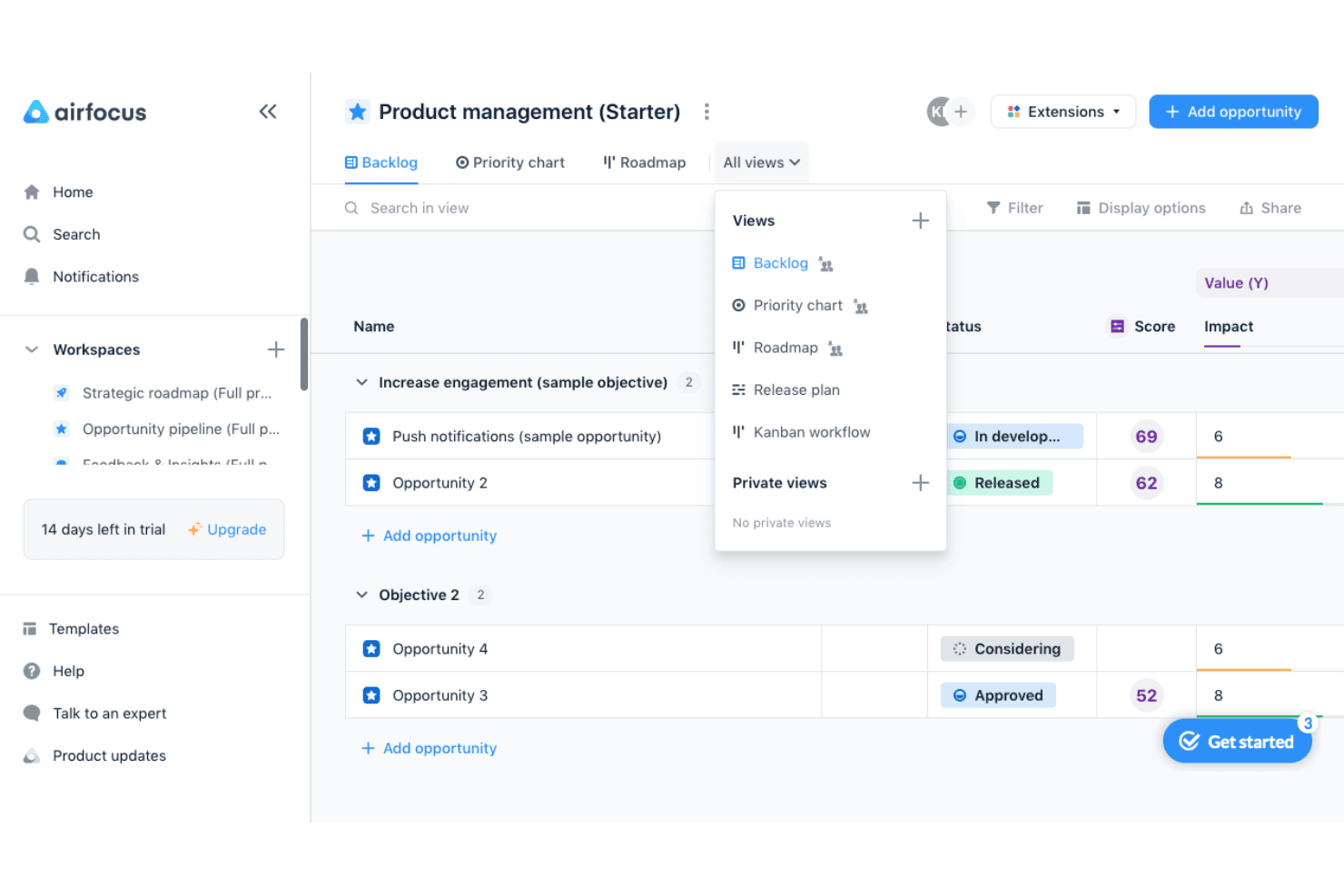
airfocus ayuda a los equipos de producto a priorizar oportunidades y alternar entre las vistas de cartera de trabajo, gráfico de prioridades, hoja de ruta, plan de lanzamientos y Kanban. airfocus es una plataforma modular de gestión de productos para equipos que necesitan conectar los comentarios de los clientes, la estrategia de producto, las hojas de ruta y las decisiones de entrega en un único espacio de trabajo.
¿Para quién es más adecuado airfocus?
Los equipos de producto que necesitan modelos de priorización flexibles pueden usar airfocus para conectar los comentarios de los clientes, la estrategia, las hojas de ruta y las decisiones de entrega.
Por qué airfocus es una buena alternativa a Productboard
Elegí airfocus porque sus marcos de priorización personalizables ayudan a mi equipo a ponderar los comentarios de los clientes frente a la estrategia de producto y las limitaciones de entrega. Usamos su espacio de trabajo modular para conectar los comentarios, las hojas de ruta y las decisiones, y después adaptamos los modelos de priorización a cada área de producto. Esto lo convierte en una alternativa práctica a Productboard cuando los distintos equipos necesitan formas diferentes de clasificar el trabajo.
Principales funciones de airfocus
- Integración con Jira: Sincroniza las incidencias entre airfocus y Jira.
- Integración con Azure DevOps: Conecta el trabajo de entrega con la planificación del producto.
- Campos personalizados: Añade campos específicos del producto a los elementos del espacio de trabajo.
- Planificación de lanzamientos: Organiza el trabajo planificado en distintos lanzamientos y cronogramas.
Integraciones de airfocus
airfocus se integra con Jira y Azure DevOps, conectando la planificación del producto con los flujos de trabajo de entrega.
Pros and Cons
Pros:
- Los modelos de puntuación personalizados se ajustan a estrategias variadas
- Los espacios de trabajo modulares se adaptan a distintos equipos de producto
- Los comentarios se conectan directamente con las decisiones de priorización
Cons:
- La configuración avanzada puede requerir orientación de un administrador
- Las vistas de hoja de ruta necesitan mayor profundidad en la entrega
 Ideal para hojas de ruta impulsadas por el descubrimiento de productos
- Prueba gratuita de 14 días + demostración gratuita disponible
- Desde $19/usuario/mes (facturado anualmente)
Visit WebsiteCustomer Rating:4.4/5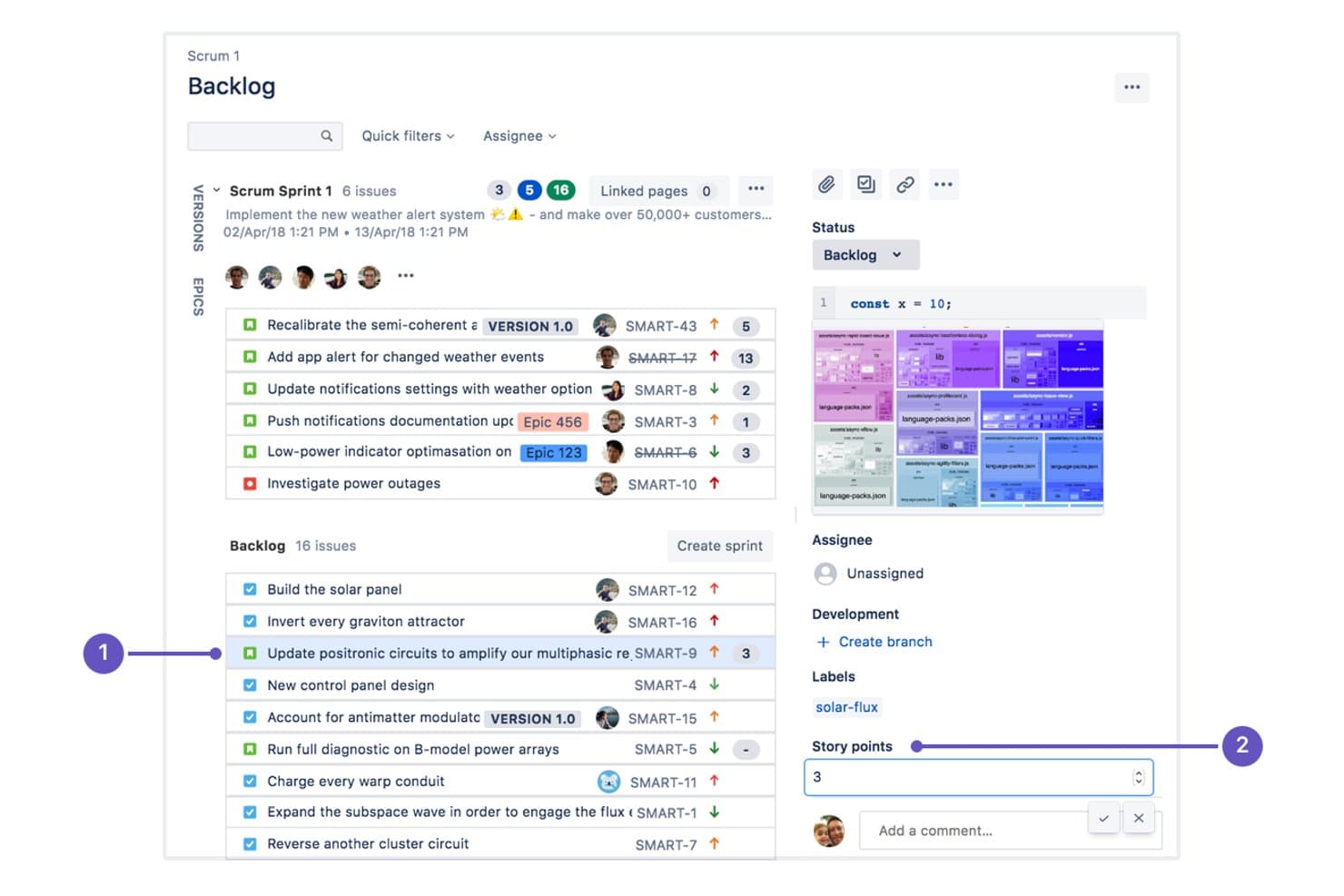
Craft.io se integra con Jira para gestionar listas de pendientes de iteraciones y puntos de historia. Craft.io es un software de gestión de productos para equipos que necesitan conectar las perspectivas de los clientes, la estrategia de producto y la planificación de la entrega, ayudando a los gerentes de producto a convertir los hallazgos del descubrimiento en hojas de ruta priorizadas.
¿Para quién es más adecuado Craft.io?
Craft.io es adecuado para gerentes de producto y equipos multifuncionales que convierten las perspectivas del descubrimiento de clientes en hojas de ruta de productos priorizadas.
Por qué Craft.io es una buena alternativa a Productboard
Elegí Craft.io porque convierte los comentarios de los clientes y las perspectivas del descubrimiento en decisiones de producto priorizadas. Su repositorio de comentarios y su sistema de puntuación de productos ayudan a mi equipo a conectar los problemas recurrentes de los usuarios con las iniciativas estratégicas. Después, asigno esas iniciativas a hojas de ruta de productos impulsadas por el descubrimiento, lo que ofrece a las partes interesadas una visión clara desde las necesidades validadas hasta los resultados planificados.
Funciones principales de Craft.io
- Gestión de la lista de pendientes: Organiza épicas, funciones e historias de usuario en una lista de pendientes estructurada.
- Integración con Jira: Sincroniza los planes de producto con el trabajo de entrega en Jira.
- Campos personalizados: Añade metadatos adaptados a productos, funciones e iniciativas.
- Permisos del equipo: Controla el acceso en espacios de trabajo, roles y contenido.
Integraciones de Craft.io
Craft.io ofrece una integración nativa con Jira, lo que permite que los planes de producto permanezcan conectados con el trabajo de entrega.
Pros and Cons
Pros:
- Las perspectivas de los clientes se conectan directamente con las iniciativas
- La puntuación ayuda a priorizar los problemas de usuario validados
- Las hojas de ruta muestran las dependencias entre los trabajos de producto
Cons:
- El filtrado de hojas de ruta es menos flexible que el de Productboard
- Los flujos de trabajo avanzados requieren tiempo para configurarse
Learn more about Craft.io: Ideal para recopilar comentarios de clientes mediante IA
- Hay un plan gratuito disponible
- Desde $79/mes (facturado anualmente)
Visit WebsiteCustomer Rating:4.6/5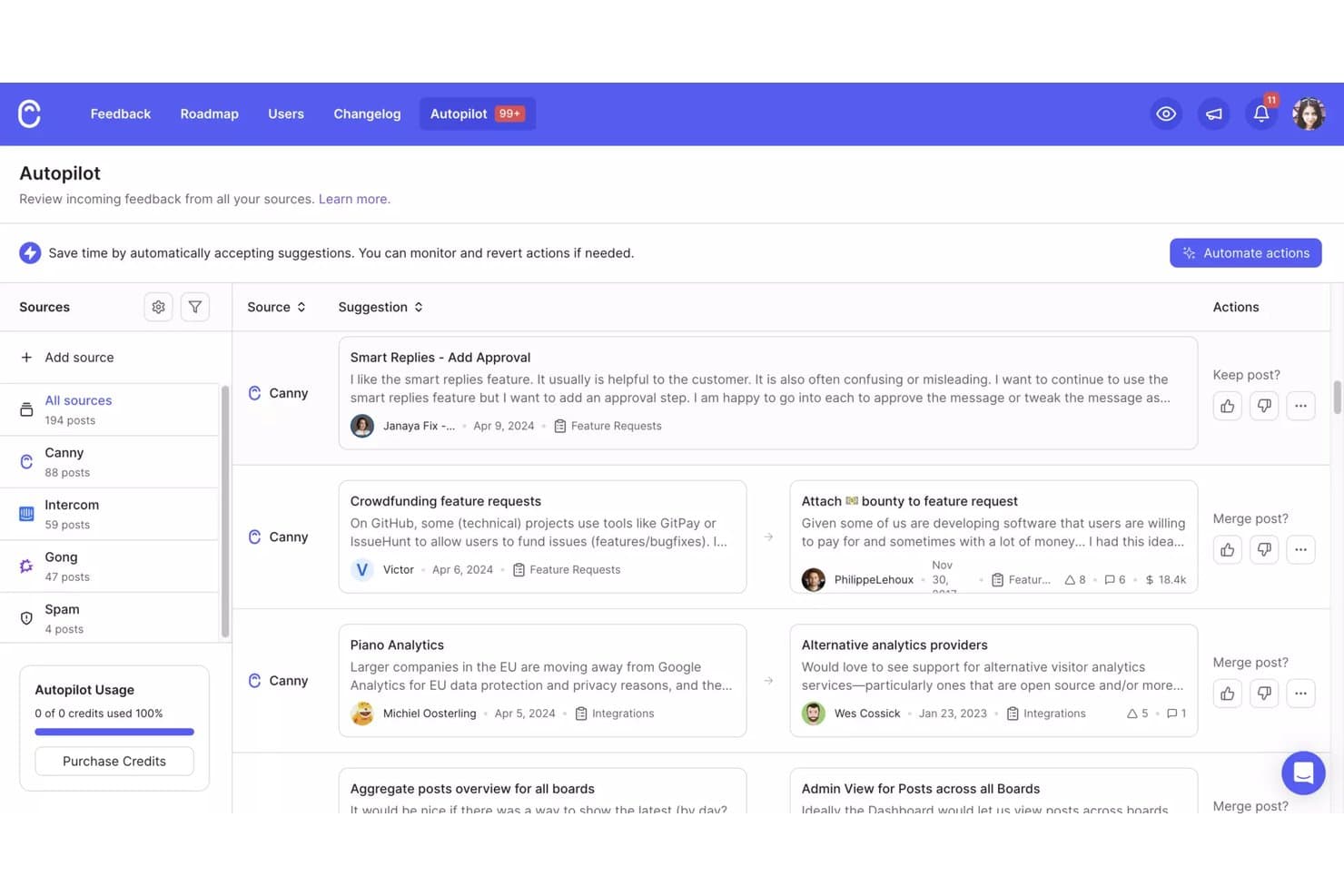
El Autopilot de Canny consolida los comentarios de varias fuentes en una sola vista. Canny es una plataforma de comentarios de clientes y gestión de productos para equipos de producto que centraliza las opiniones de los usuarios, facilita la priorización de la hoja de ruta y ayuda a conectar las decisiones de producto con las necesidades de los clientes.
¿Para quién es más adecuado Canny?
Canny es adecuado para equipos de producto de empresas en crecimiento que necesitan recopilar, organizar y priorizar los comentarios de los clientes con ayuda de la IA.
Por qué Canny es una buena alternativa a Productboard
Elegí Canny porque su recopilación de comentarios basada en IA ayuda a mi equipo a captar solicitudes de clientes desde varios canales y organizarlas en un solo lugar. La categorización basada en IA y la detección de duplicados reducen el trabajo repetitivo de clasificación, mientras que los paneles de comentarios conectan las solicitudes con las prioridades de la hoja de ruta. Utilizo esas perspectivas para validar si una funcionalidad resuelve un problema recurrente de los clientes antes de comprometer tiempo de desarrollo.
Funciones principales de Canny
- Votación de usuarios: Permite que los clientes voten por las ideas enviadas.
- Paneles públicos y privados: Controla quién puede consultar y enviar comentarios.
- Publicación del registro de cambios: Comparte las actualizaciones implementadas con los clientes.
- Estados personalizados: Realiza un seguimiento de las ideas mediante el flujo de trabajo que prefieras.
Integraciones de Canny
Canny ofrece integraciones nativas con Intercom, Zendesk, Slack, Salesforce, HubSpot, Jira Cloud, Linear, GitHub, ClickUp y Asana. También se conecta con Zapier y proporciona una API para integraciones personalizadas.
Pros and Cons
Pros:
- La detección de duplicados asistida por IA reduce la clasificación de comentarios
- La votación pública conecta las solicitudes con las prioridades de la hoja de ruta
- La publicación del registro de cambios cierra el ciclo de comentarios
Cons:
- Los informes ofrecen un análisis limitado de las tendencias
- La votación puede favorecer a los usuarios más insistentes en lugar de basarse en la evidencia
Learn more about Canny: Ideal para cerrar el ciclo de comentarios con los clientes
- Plan gratuito disponible
- Desde $29/asiento/mes (facturado anualmente)
Visit WebsiteCustomer Rating:4.7/5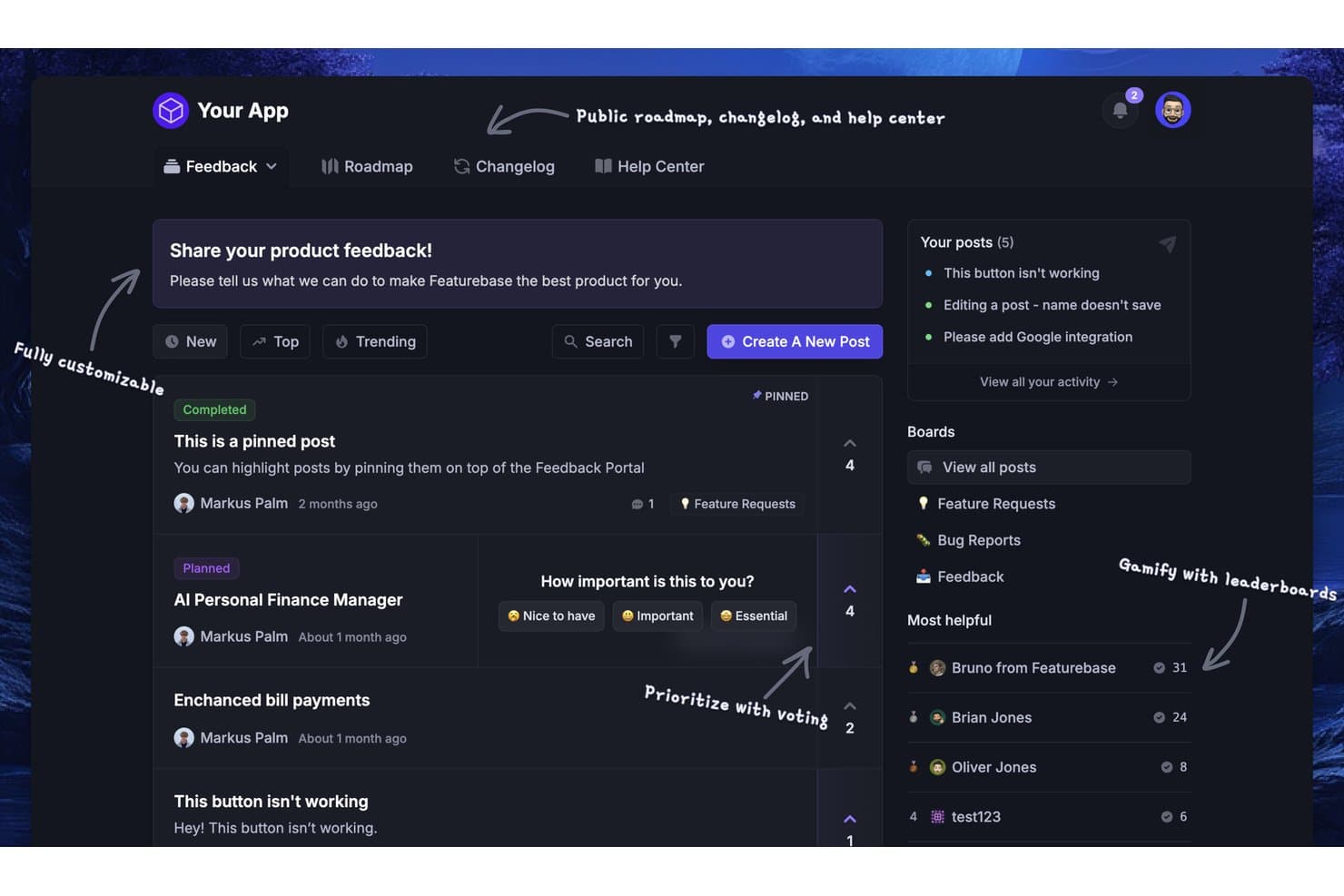
Featurebase permite a los usuarios recopilar, votar y priorizar comentarios sobre el producto. Featurebase es una plataforma de gestión de productos centrada en el cliente para equipos que necesitan organizar solicitudes de productos, priorizar decisiones de la hoja de ruta y alinear el desarrollo de productos con las necesidades de los clientes.
¿Para quién es más adecuada Featurebase?
Featurebase es adecuada para gerentes de producto y equipos de atención al cliente que necesitan recopilar, organizar y comunicar los comentarios de los clientes en un espacio de trabajo compartido.
Por qué Featurebase es una buena alternativa a Productboard
Elegí Featurebase porque ayuda a mi equipo a cerrar el ciclo de comentarios con los clientes. Recopilamos solicitudes en tableros de comentarios, las conectamos con decisiones de la hoja de ruta y compartimos actualizaciones del producto mediante registros de cambios. Los clientes pueden ver qué ideas están planificadas, implementadas o en consideración, en lugar de enviar comentarios al vacío.
Características principales de Featurebase
- Campos personalizados: Añade campos estructurados a los formularios de comentarios para indicar el tipo de problema, el segmento o la prioridad.
- Widgets dentro de la aplicación: Recopila comentarios directamente dentro de tu producto.
- Encuestas: Crea encuestas específicas para recopilar opiniones estructuradas sobre el producto.
- Integración con Jira: Envía comentarios seleccionados a Jira para realizar un seguimiento de la entrega.
Integraciones de Featurebase
Featurebase ofrece integraciones nativas con Linear, Jira, GitHub, ClickUp, Azure DevOps, Slack, HubSpot, Intercom y Zendesk. También se conecta con Zapier y proporciona una API para integraciones personalizadas.
Pros and Cons
Pros:
- Los tableros públicos permiten a los clientes votar por las solicitudes
- Los registros de cambios comunican claramente los comentarios de los clientes que se han implementado
- Los widgets dentro de la aplicación capturan comentarios durante el uso del producto
Cons:
- La planificación de la hoja de ruta está menos desarrollada que en Productboard
- Los análisis avanzados de priorización siguen siendo relativamente limitados
Learn more about Featurebase:
Otras alternativas a Productboard
¿Sigues buscando? Aquí tienes algunas alternativas adicionales a Productboard. Aunque no llegaron a estar entre las 10 principales, siguen siendo opciones valiosas que merece la pena investigar más a fondo.
- 11Jira Product DiscoveryIdeal para el seguimiento de entregas conectado a Jira
- 12MiroIdeal para la lluvia de ideas visual
- 13monday AI WorkspaceIdeal para hojas de ruta interfuncionales a gran escala
- 14ProductPlanIdeal para presentaciones de hojas de ruta dirigidas a múltiples audiencias
- 15Tempo Roadmapping SoftwareIdeal para hojas de ruta cronológicas con sincronización con Jira
- 16PendoIdeal para análisis en la aplicación relacionados con los comentarios
- 17LaunchNotesIdeal para visibilidad de producto en tiempo real
- 18SleekplanIdeal para la gestión de comentarios de IA con tarifa fija
- 19IBM TargetprocessIdeal para la elaboración de hojas de ruta de carteras SAFe
Cómo evalúo una alternativa a Productboard
Divido mi evaluación en tres partes. Primero, compruebo la funcionalidad principal; específicamente, si una herramienta puede agregar comentarios de múltiples canales y crear hojas de ruta visuales que las partes interesadas realmente puedan utilizar; estos aspectos tienen el mayor peso. Después, busco características destacadas, como la extracción de información basada en IA y la alineación con OKR. Por último, considero la transparencia de los precios y el apoyo durante la incorporación.
Funcionalidad principal (elementos imprescindibles para esta lista)
Al seleccionar herramientas para mi lista, califico cada una en una escala de 0 (no ofrece la funcionalidad) a 5 (sobresale en esta área) para cada funcionalidad principal que se indica a continuación. Después convierto el total en un porcentaje para ayudar a evaluar la adecuación general de cada herramienta, con un peso adicional para cualquier funcionalidad que haya considerado esencial.
- Comentarios de clientes (esencial): Busco comentarios consultables procedentes de los equipos de soporte y ventas, de entrevistas y de canales dentro de la aplicación, con etiquetas que revelen necesidades recurrentes de los clientes.
- Visualización de la hoja de ruta (esencial): Evalúo vistas de cronograma, carriles o kanban que comuniquen las prioridades y los horizontes de entrega a audiencias internas y externas.
- Puntuación de prioridades: Compruebo la disponibilidad de marcos adaptables, como RICE o la puntuación ponderada, que comparen el valor para el cliente, el esfuerzo, el riesgo y la adecuación estratégica.
- Vinculación de comentarios: Busco trazabilidad desde solicitudes individuales hasta funcionalidades, versiones y elementos de la hoja de ruta, incluidas señales de demanda para establecer prioridades.
- Colaboración con las partes interesadas: Evalúo los comentarios, votos y aportaciones estructuradas de los equipos de producto, ingeniería, ventas y soporte, así como de clientes y directivos.
- Integraciones: Compruebo las conexiones con sistemas de seguimiento de incidencias, CRM, mesas de ayuda, herramientas de colaboración y plataformas de automatización para actualizaciones bidireccionales del flujo de trabajo.
Una vez que tengo una lista de herramientas que cumplen los criterios, considero qué diferencia a cada plataforma.
Factores diferenciadores (lo que distingue a los proveedores)
Así es como comparo y contrasto los distintos proveedores:
Características destacadas
Busco una extracción de información basada en IA que revele temas y opiniones a partir de comentarios sin procesar sin necesidad de etiquetado manual; esto ahorra horas cuando se procesan cientos de tickets de soporte después de una versión importante. La alineación con OKR es igual de importante; compruebo si una herramienta vincula directamente los elementos de la hoja de ruta con los objetivos estratégicos para que los directivos vean el impacto empresarial, no solo las fechas de lanzamiento. También evalúo los portales orientados al cliente, ya que un portal personalizado en el que los clientes envían y realizan el seguimiento de sus solicitudes cierra el ciclo de comentarios sin la carga adicional del correo electrónico.
Más allá de las características
Evalúo si un proveedor ofrece cuentas de visualización gratuitas o de bajo coste, ya que los responsables de producto rara vez trabajan solos: los equipos de ventas y soporte, así como los directivos, necesitan visibilidad de la hoja de ruta sin inflar los costes por usuario. El apoyo para la migración es igual de importante; compruebo si existe ayuda específica durante la incorporación y herramientas de importación de datos que conserven el historial de comentarios, porque reconstruir desde cero meses de información etiquetada acaba con el impulso. También compruebo si cuenta con la certificación SOC 2 Type II o ISO 27001, especialmente cuando los comentarios de los clientes contienen datos confidenciales de sus cuentas.
¿Por qué buscar una alternativa a Productboard?
Aunque Productboard es una buena opción de software para la gestión de productos, hay varios motivos por los que algunos usuarios buscan soluciones alternativas. Por ejemplo, es posible que estés buscando una alternativa a Productboard por alguno de los siguientes motivos:
- No se ajusta a tu presupuesto
- Tu equipo necesita más personalización
- Buscas una mejor integración con otras herramientas
- Necesitas acceso sin conexión
- Buscas una interfaz de usuario más sencilla
- Tu equipo está creciendo más allá de la escalabilidad de Productboard
Si alguna de estas situaciones te resulta familiar, has llegado al lugar adecuado. Mi lista contiene varias opciones esenciales de gestión de productos más adecuadas para equipos que afrontan estos desafíos con Productboard y buscan soluciones alternativas.
Características clave que debes buscar en una alternativa a Productboard
Al elegir una alternativa a Productboard o cualquier software de gestión de productos, presta atención a las siguientes características clave:
- Portal de comentarios de los usuarios: Centraliza los comentarios sobre el producto procedentes de varias fuentes, incluida la información proporcionada directamente por los usuarios. Una herramienta de gestión de comentarios puede ayudarte a crear un panel de comentarios completo con información útil para la toma de decisiones.
- Matriz de priorización de funcionalidades: Evalúa las solicitudes de funcionalidades y asigna recursos a las iniciativas de mayor impacto, asegurándote de que tu equipo se centre en lo que importa para ofrecer mejores experiencias de usuario.
- Planificación de hojas de ruta: Aprovecha un software interactivo de hojas de ruta para visualizar la estrategia de tu plataforma de gestión de productos. Crea cronogramas claros para las nuevas funcionalidades, alineados con los objetivos de tu equipo.
- Herramientas de colaboración en equipo: Fomenta un trabajo en equipo más fluido con herramientas diseñadas para compartir ideas, intercambiar comentarios y gestionar tareas, manteniendo a tu equipo alineado con las actualizaciones dentro de la aplicación y los hitos.
- Análisis e informes: Toma decisiones sobre el producto basadas en datos mediante métricas e información detalladas. Comprende qué funciona, identifica carencias y realiza un seguimiento del éxito de las nuevas funcionalidades.
- Gestión de tareas y flujos de trabajo: Organiza y gestiona los flujos de trabajo del desarrollo de productos. Realiza un seguimiento del progreso y agiliza los procesos para garantizar la entrega puntual de los registros de cambios y las actualizaciones.
- Gestión de ideas: Captura, categoriza y revisa las ideas en un repositorio estructurado. Esta funcionalidad permite a tu equipo innovar mientras responde a las necesidades de los clientes.
P. D. Si todavía te encuentras en las primeras etapas del descubrimiento de productos, las herramientas para crear tableros de inspiración pueden ayudarte a definir el tono y la dirección visual antes de priorizar las funcionalidades. - Segmentación de usuarios: Adapta tu producto a distintos públicos segmentando a los usuarios según sus preferencias. Ofrece mejores productos que respondan a las demandas específicas del mercado.
- Notificaciones y alertas: Mantente al día con notificaciones en tiempo real. Mantén a tu equipo informado sobre cambios críticos, comentarios e hitos sin perderte nada.
- Integración con herramientas de terceros: Amplía la funcionalidad de Productboard con integraciones como Intercom, UserVoice y otras. Minimiza las interrupciones y sincroniza tus flujos de trabajo con otras herramientas de tu conjunto de aplicaciones SaaS.