

Açık kaynaklı fikir yönetimi yazılımı, platformu uygun gördüğünüz şekilde barındırmanıza, özelleştirmenize ve geliştirmenize olanak tanıyarak ekibinizin sürekli iyileştirmeyi nasıl yönlendirdiği konusunda tam görünürlük ve kontrol sağlar. Ekibinizi güçlendirmek, şeffaflığı güvence altına almak, tedarikçiye bağımlılığı önlemek veya yalnızca uygun maliyetli bir fikir yönetimine ihtiyaç duymak istiyorsanız, açık kaynaklı seçenekler kontrolü sizin elinize verir. Bu listede, fikirleri yakalamanıza, önceliklendirmenize ve hayata geçirmenize yardımcı olacak en iyi araçlara ilişkin seçimlerimi bulacaksınız. Böylece kuruluşunuzun her köşesinden gelen katkıları ölçülebilir ilerlemeye dönüştürebilirsiniz.
Why Trust Our Software Recommendations
6,700+
Reviews
20
Industry experts
16+
Evaluation factors
14
Years
Our team has been testing and reviewing software since 2012. As product managers ourselves, we know how difficult—and important—it is to choose the right software.
For this guide, we evaluated tools using hands-on testing and independent research, scoring tools using our selection criteria.
Our reviews reflect our human editorial judgment, not a sales pitch.
Expert reviewers:
- Andrew LumbySenior TPM
- Cristiano ValimSenior UI/UX Lead


Karşılaştırma Tablosu: Açık Kaynaklı Fikir Yönetimi Yazılımları
Bu karşılaştırma tablosu, en iyi açık kaynaklı fikir yönetimi yazılımı seçimlerimin fiyatlandırma ayrıntılarını özetlemektedir.
Score legend (out of 5)
- Excellent4.5–5
- Good4–4.4
- Average3–3.9
- Below average2–2.9
- Poor1–1.9
Sorted by: Default
| Tool | Starting Price | Website | |||||||
|---|---|---|---|---|---|---|---|---|---|
Best for kanban-based idea tracking via self-hosting | 3.7 out of 5 | 4 | 4 | 3 | 5 | 2 | 4 | €50/year Free plan available | Website |
Best for self-hosted project-to-roadmap workflows | 4.0 out of 5 | 5 | 5 | 4 | 5 | 1 | 4 | €5.95/user/month Free plan available; 14-day free trial available for Enterprise Cloud and on-premises | Website |
Best for agile teams tracking ideas to delivery | 3.3 out of 5 | 4 | 4 | 2 | 4 | 2 | 4 | 5€/month Free plan available | Website |
Best for community-driven idea voting at scale | 4.0 out of 5 | 2 | 5 | 4 | 5 | 4 | 4 | $100/month Free plan + 14-day free trial available | Website |
Best for AI-powered duplicate triage | 4.5 out of 5 | 5 | 4 | 5 | 5 | 5 | 3 | $19/month 14-day free trial available | Website |
Best for unlimited feedback boards | 3.5 out of 5 | 3 | 4 | 3 | 4 | 4 | 3 | $25/month Free plan available | Website |
Best for integrated public roadmaps | 4.0 out of 5 | 4 | 4 | 3 | 4 | 5 | 4 | $9/month 14-day free trial + free plan + free demo available | Website |
Best for revenue-weighted B2B feedback boards | 3.8 out of 5 | 4 | 3 | 3 | 4 | 5 | 4 | $15/user/month Free plan available | Website |
Best for MIT-licensed feedback with GitHub sync | 3.7 out of 5 | 3 | 4 | 4 | 3 | 4 | 4 | Free, open-source Free plan available | Website |
Best for developer-facing public feedback boards | 3.3 out of 5 | 3 | 2 | 5 | 4 | 3 | 3 | $3/user/month Free plan available | Website |


En İyi Açık Kaynaklı Fikir Yönetimi Yazılımları İncelemeleri
Aşağıda, kısa listeme giren en iyi açık kaynaklı fikir yönetimi yazılımlarına ilişkin ayrıntılı özetlerimi bulabilirsiniz. İncelemelerim, yenilik sürecinizi optimize etmenize yardımcı olmak için her platformun özelliklerine, entegrasyonlarına ve en uygun kullanım alanlarına ayrıntılı bir bakış sunmaktadır.
 Best for kanban-based idea tracking via self-hosting
- Free plan available
- From €50/year (billed annually)
Visit WebsiteCustomer Rating:4.8/5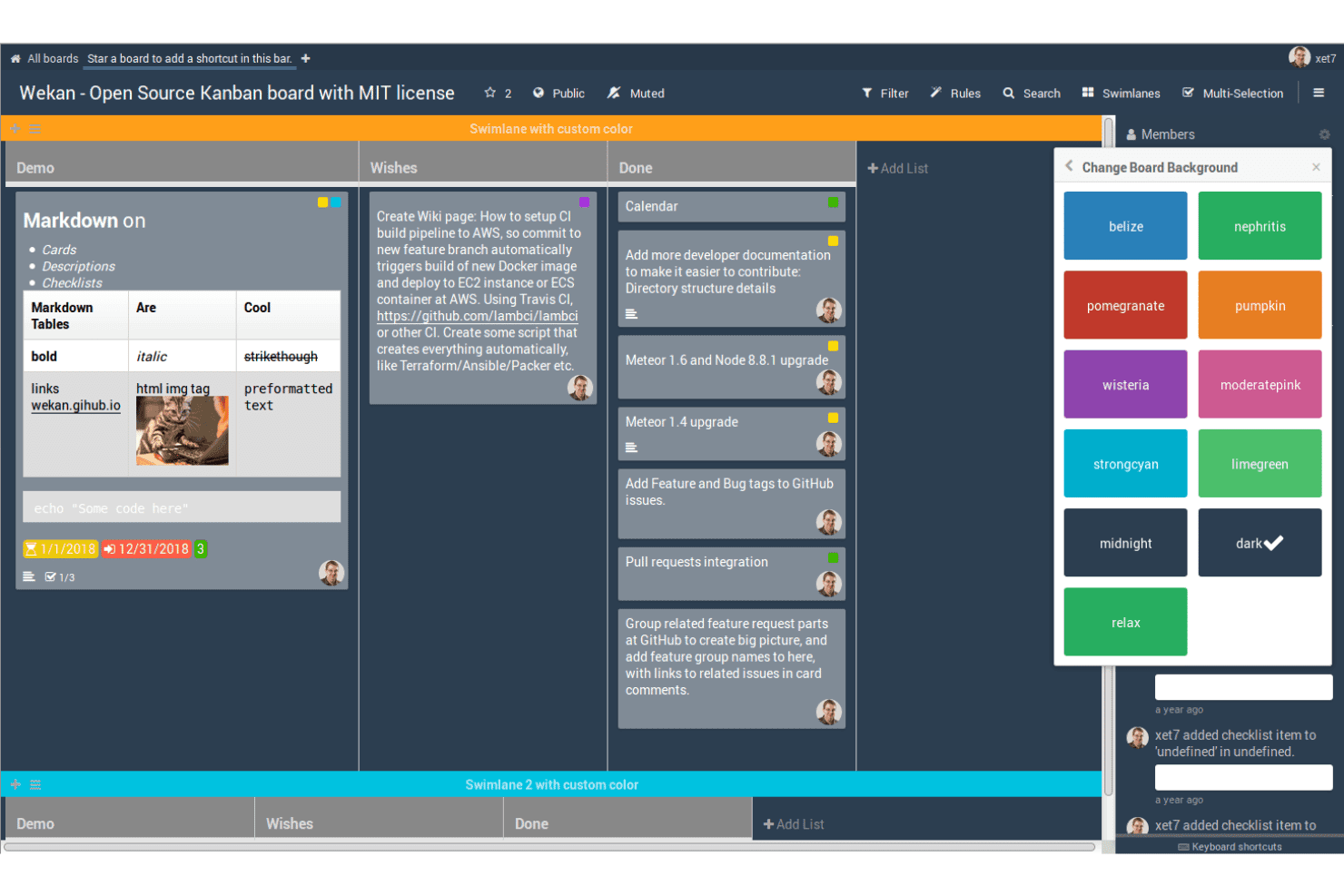
WeKan helps teams capture and organize ideas on open-source Kanban boards using customizable cards, lists, labels, and swimlanes. WeKan is a self-hosted, MIT-licensed kanban tool that organizes ideas as cards across customizable boards, with built-in voting, label-based categorization, automation rules, and a REST API for extending workflows.
Who Is WeKan Best For?
WeKan suits technically capable teams that want to self-host a kanban-based idea tracker and have the ability to configure it to fit their workflow.
Why I Picked WeKan
I picked WeKan as one of the best because it gives you complete control over your idea data through self-hosting, with deployment options spanning Docker, Helm, Snap, and a standalone zip bundle that runs without a container. I like that you can model a full idea workflow using lists as stages, like "Under Review → Planned → In Progress," and layer on automation rules that move cards automatically when conditions are met. The MIT license means zero proprietary restrictions on what you can customize or extend.
WeKan Key Features
- Card voting: Each card includes a built-in For/Against vote with an optional end date, public or private visibility, and a toggle to allow non-board members to participate.
- Nine-tier role system: Boards support nine distinct roles, including comment-only, read-only, and worker, giving you precise control over who can submit, comment, or edit.
- Automation rules: A trigger-and-action rule engine moves cards, updates fields, or fires actions across boards automatically when set conditions are met.
- Broad import support: WeKan imports boards from Trello, Jira, Asana, Kanboard, GitLab, and several other tools, reducing the friction of switching platforms.
WeKan Integrations
WeKan offers documented import and export connectivity with Jira, Asana, GitLab, OpenProject, Kanboard, Nextcloud Deck, and Zenkit. Its REST API, Python client, outgoing webhooks, and LDAP, CAS, OIDC/OAuth2, and SAML support enable custom workflows and authentication.
Pros and Cons
Pros:
- Granular roles support controlled participation
- Flexible boards model idea workflows
- MIT license enables deep customization
Cons:
- No portal for anonymous idea submissions
- For/Against voting lacks ranked prioritization
Learn more about WeKan: Best for self-hosted project-to-roadmap workflows
- Free plan available; 14-day free trial available for Enterprise Cloud and on-premises
- From €5.95/user/month (billed annually)
Visit WebsiteCustomer Rating:4.5/5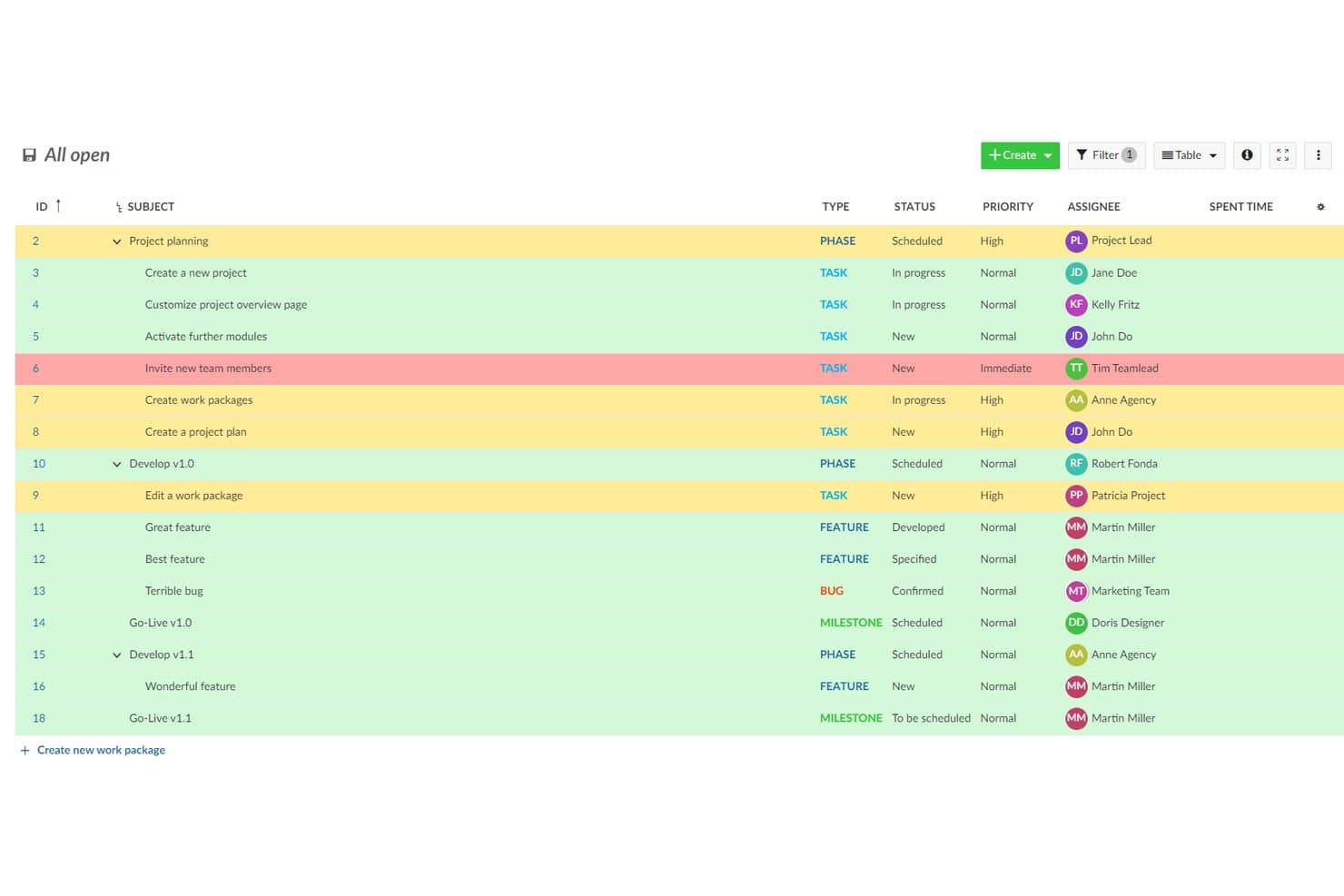
OpenProject organizes ideas and tasks with priority highlighting. OpenProject is a GPL-3.0 open-source project management suite that lets teams log and track ideas as work packages, organize them through customizable workflows, and move them into Kanban boards, Gantt charts, and product roadmaps.
Who Is OpenProject Best For?
OpenProject suits product and engineering teams that need to self-host their tooling and want a single place to move ideas through planning, delivery, and roadmap tracking.
Why I Picked OpenProject
I picked OpenProject as one of the best because it's the only tool on this list built to carry ideas all the way through delivery without leaving your infrastructure. Ideas log as work packages, get custom statuses, and move through configurable workflows into Kanban boards, Gantt charts, and a full product roadmap view in one GPL-3.0 codebase you fully own. I especially like that self-hosting is mature here, with Docker Compose, Helm, and Kubernetes options backed by active monthly releases and published security advisories.
OpenProject Key Features
- Custom work package types: Administrators can create dedicated task types like "Idea" or "Feature Request," each with its own fields, statuses, and workflow rules.
- REST API and webhooks: OpenProject exposes a full REST API and event-based webhooks for projects, tasks, and comments, letting teams build custom idea intake or reporting pipelines.
- Role-based workflow rules: Administrators define which status transitions each role can trigger per task type, so ideas move through review stages in a controlled, repeatable way.
- Forums module: Built-in threaded forums support structured discussion separate from individual work packages, with sticky posts, locking, and email notifications for followers.
OpenProject Integrations
OpenProject has documented native integrations with GitHub, GitLab, Nextcloud, OneDrive, and SharePoint, plus Git and SVN repositories for on-premises installations. Its REST API and webhooks support custom connections.
Pros and Cons
Pros:
- Workflows connect ideas to product roadmaps
- Self-hosting keeps idea data under control
- GPL-3.0 codebase supports full customization
Cons:
- External feedback requires accounts and permissions
- No native voting or idea rankings
Learn more about OpenProject: Best for agile teams tracking ideas to delivery
- Free plan available
- From 5€/month
Visit WebsiteCustomer Rating:4.3/5
Taiga helps teams capture and develop ideas through open-source Kanban and Scrum workflows with backlogs and user stories. Taiga is an open-source agile project management tool that lets teams capture issues, user stories, and epics, vote on them, track them through customizable Scrum and Kanban workflows, and self-host the entire platform under an MPL-2.0 license.
Who Is Taiga Best For?
Taiga fits agile development teams that want to self-host their project tooling and track ideas from backlog through sprint delivery under a single open-source platform.
Why I Picked Taiga
I've included Taiga in my top picks because it's one of the few genuinely open-source tools that tracks an idea all the way from raw backlog item to sprint delivery under MPL-2.0 licensing with a documented Docker Compose setup. I like that teams can vote on issues directly from the issue detail page, sort by vote count, and promote a top-voted issue into a user story without switching tools. Custom statuses, colored tags, and custom fields let you shape the workflow around how your team actually moves ideas forward.
Taiga Key Features
- Public project discovery: Teams can list projects on Taiga's Discover page, letting external users browse and submit ideas without a project membership.
- Custom fields on all item types: Admins can add text, dropdown, date, number, and checkbox fields to epics, stories, tasks, and issues to capture structured idea metadata.
- REST API with voting endpoints: Taiga exposes upvote, downvote, and voter-list endpoints for epics, user stories, and issues, making it easy to build custom intake workflows.
- Docker Compose self-hosting: A supported
taiga-dockerrepo with a.envfile and launch scripts lets teams deploy and manage their own instance with full data control.
Taiga Integrations
Taiga offers native integrations with GitHub, GitLab, Bitbucket, Gogs, and Slack, plus importers for Jira, Trello, Asana, and more. Its REST API and webhooks support custom integrations, and it’s available on Zapier.
Pros and Cons
Pros:
- Public projects invite community voting
- Custom statuses carry ideas through delivery
- MPL-2.0 licensing supports genuine self-hosting
Cons:
- Flat comments limit community discussion
- No duplicate detection or idea merging
Learn more about Taiga: Best for community-driven idea voting at scale
- Free plan + 14-day free trial available
- From $100/month
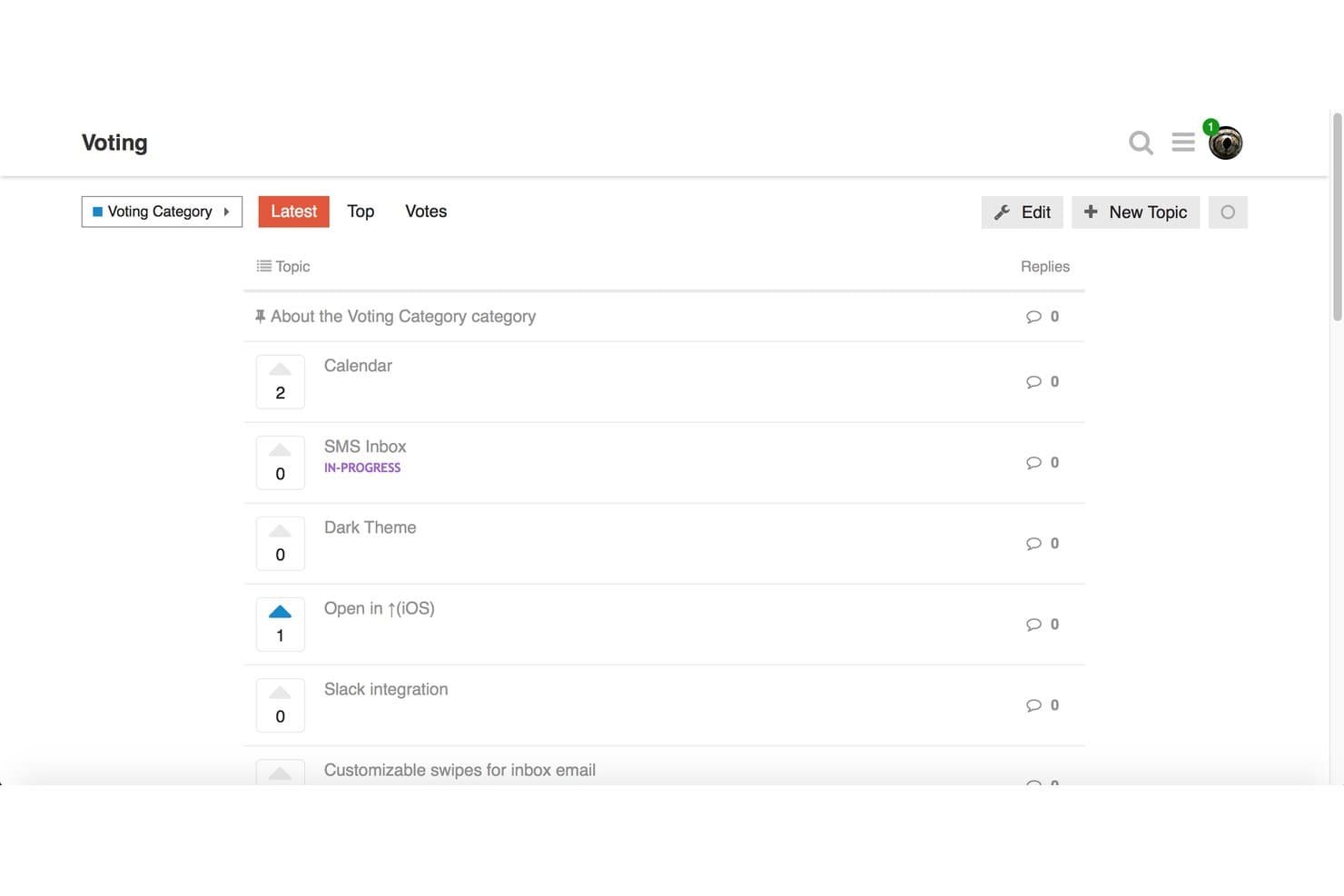
Discourse lets users vote on feature ideas to prioritize community requests. Discourse is a GPL-licensed, open-source forum platform that supports community idea submission, topic-based voting, threaded discussion, and category-based organization.
Who Is Discourse Best For?
Discourse works best for community managers and product teams that want open-source forum infrastructure where members can submit, vote on, and discuss ideas at a large scale.
Why I Picked Discourse
Discourse earns its spot on my shortlist because it handles community-driven idea voting at a scale that purpose-built tools struggle to match. I love that Topic Voting is now baked into core, so self-hosters can enable vote-based idea categories, sort submissions by recent vote activity, and award badges like "Brainstormer" without installing anything extra. The experimental Ideas category type also lets you remove per-user vote limits entirely, which is a meaningful option when you're running a large, open community with thousands of active contributors.
Discourse Key Features
- GPL-licensed open-source codebase: Discourse's full source code is publicly available on GitHub under the GPL license, so you can inspect, modify, and self-host it without restrictions.
- Docker-based self-hosting: A single command installs Discourse in a Docker container, with one-click upgrades and automatic backups built into the admin panel.
- Trust levels and community moderation: Members earn moderation abilities over time through a built-in trust level system, letting your community help manage content without admin intervention.
- Chat Integration plugin: Connects your Discourse forum to Slack, Microsoft Teams, Discord, and other messaging platforms, routing new topics and posts to the channels you choose.
Discourse Integrations
Discourse offers native integrations with Slack, Microsoft Teams, Discord, Jira, Zendesk, Salesforce, and GitHub, with availability varying by plan. Its REST API and webhooks support custom integrations.
Pros and Cons
Pros:
- Moderation tools support large-scale discussions
- Topic Voting supports community-driven prioritization
- GPL codebase supports genuine self-hosting
Cons:
- Upvotes lack weighted or negative scoring
- Status tracking relies on tags
Learn more about Discourse: Best for AI-powered duplicate triage
- 14-day free trial available
- From $19/month (billed annually)

Quackback offers boards for sorting and triaging feedback requests. Quackback is an open source idea management platform designed for collecting, organizing, and sorting your best ideas with collaborative features and advanced AI-driven workflows.
Who Is Quackback Best For?
Teams looking for a collaborative platform to manage idea submissions and automate duplicate detection with AI.
Why I Picked Quackback
I picked Quackback as one of the best because its AI-powered duplicate triage lets my team quickly identify and merge similar ideas. I like that I can set custom rules for how duplicates are flagged and review suggestions in a single dashboard.
Quackback Key Features
- Idea voting system: Allow team members and stakeholders to upvote or downvote submitted ideas.
- Category-based organization: Sort and browse ideas by custom categories for easier discovery.
- Commenting threads: Enable focused discussions on each idea with threaded conversations.
- AI-powered duplicate triage: Automatically identify, flag, and review similar idea submissions to quickly merge duplicates
Quackback Integrations
Quackback offers native integrations with Slack, Microsoft Teams, Discord, Linear, Jira, Asana, ClickUp, Hubspot, Zendesk, Salesforce, and more. It integrates with Zapier and supports custom integrations via API.
Pros and Cons
Pros:
- Open source with regular updates on GitHub
- Customizable workflow and triage controls
- AI highlights and suggests idea consolidations
Cons:
- Requires self-hosting for free tier
- Limited documentation for complex setup
Learn more about Quackback:

Fider offers voting, sorting, and search tools for managing user feedback. Fider is a community-driven open source project and idea management platform for collecting, organizing, and discussing user suggestions with voting, comment threads, status updates, and moderation controls.
Who Is Fider Best For?
Fider works well for product managers and community teams who need to collect feedback to drive informed decision-making across a large user base.
Why I Picked Fider
I picked Fider as one of the best because I can create unlimited boards to collect, organize, and prioritize feedback from different teams or products. I like how easy it is to set up public or private boards for separate communities without worrying about volume or user limits.
Fider Key Features
- Status tracking: Assign and update statuses on feedback items to reflect progress or decisions.
- Voting system: Let users upvote or downvote feedback to signal demand and priorities.
- SSO support: Integrate with external authentication providers for secure, centralized login management.
- Privacy controls: Create public or private boards to manage feedback visibility for specific communities or teams.
Fider Integrations
Fider offers an API for custom integrations. Native integrations are not publicly listed.
Pros and Cons
Pros:
- Active open-source development community
- Voting system for feedback prioritization
- Intuitive interface for feature requests
Cons:
- No built-in reporting dashboard
- Lacks built-in public product roadmaps
Learn more about Fider: Best for integrated public roadmaps
- 14-day free trial + free plan + free demo available
- From $9/month

ClearFlask offers tools to review, update, convert, and merge feedback. ClearFlask is an open source idea management platform that lets you collect, sort, and crowdsource user suggestions with voting, comment threads, project roadmaps, and customizable feedback boards.
Who Is ClearFlask Best For?
ClearFlask suits product managers and customer success teams at SaaS companies who need direct user input and want to share public product roadmaps.
Why I Picked ClearFlask
I picked ClearFlask as one of my top choices because I can set up public product roadmaps that are directly connected to user feedback. I like having votes, status updates, and idea discussions all visible beside a live roadmap, something my team finds transparent and actionable.
ClearFlask Key Features
- Customizable submission forms: Collect ideas with tailored forms matching your feedback process.
- User segmentation: Organize and analyze feedback by different user groups or customer segments.
- Advanced moderation tools: Approve, reject, or edit ideas and comments before they appear publicly.
- Public product roadmaps: Connect user feedback directly to a live roadmap to keep stakeholders aligned on feature progress.
ClearFlask Integrations
ClearFlask offers native integrations with Jira, Slack, Hotjar, GotLab, GitHub, Intercom, Segment, and Discord. It integrates with Zapier, and an API is available for custom integrations.
Pros and Cons
Pros:
- Open source codebase enables advanced self-hosting
- Idea boards can be fully customized
- Public roadmap updates are visible to users
Cons:
- Fewer collaboration features than larger competitors
- Operational setup is highly complex
Learn more about ClearFlask: Best for revenue-weighted B2B feedback boards
- Free plan available
- From $15/user/month
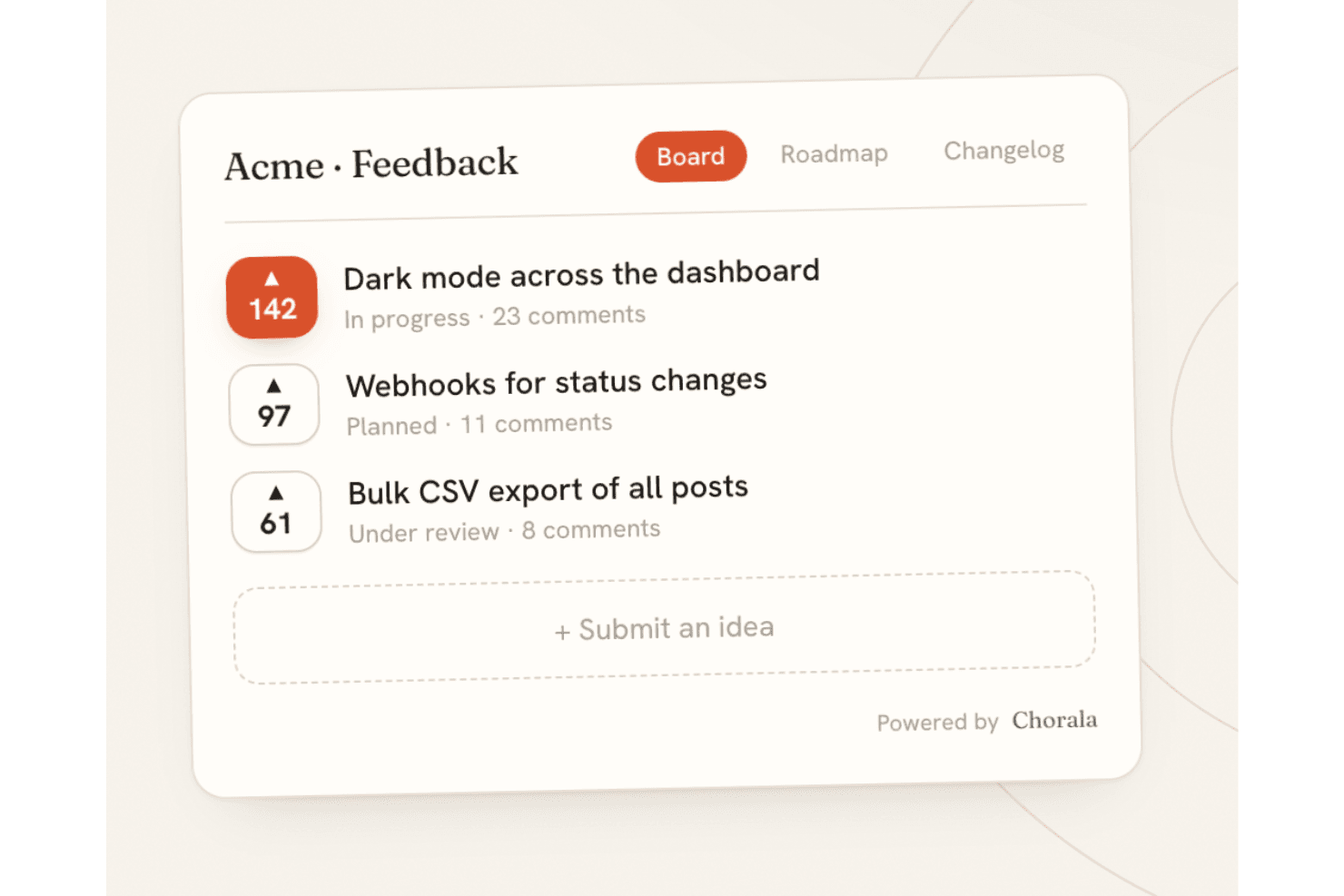
Chorala lets teams collect, vote on, and prioritize ideas through an open-source feedback board. Chorala is an open-core, self-hostable feedback platform that combines idea submission and voting, revenue-weighted prioritization, public roadmaps, changelogs, and AI-assisted triage across embeddable multilingual boards.
Who Is Chorala Best For?
Chorala is a strong fit for B2B product managers who need to prioritize feature requests by customer revenue rather than raw vote count.
Why I Picked Chorala
I picked Chorala as one of the best because it solves a real B2B prioritization problem: knowing that a feature is wanted by $200k of MRR carries far more weight than 50 anonymous upvotes. Chorala's revenue weighting syncs each company's MRR and surfaces figures like "$40k of revenue wants this" directly on the feedback board. I also like that admins can add custom RICE/ICE scoring fields and filter ideas by minimum MRR, company, or plan, so prioritization decisions are grounded in actual business impact rather than loudest voice.
Chorala Key Features
- AI Autopilot: Paste a support thread and Chorala extracts feature requests as drafts, groups similar ideas into clusters, and answers questions about your feedback in plain English.
- Self-hosted deployment: Run the full platform on your own servers via Docker Compose, with automatic migrations, unlimited admin seats, and no billing restrictions.
- Signed outbound webhooks: Chorala fires HMAC-SHA256-signed webhook events on post creation, status changes, merges, comments, and votes, with automatic retry on failure.
- Audience-targeted changelogs: Build audiences from any user attribute—plan, locale, or MRR—and send personalized changelog announcements to specific customer segments.
Chorala Integrations
Native integrations are not currently listed.
Pros and Cons
Pros:
- AI clustering turns feedback into grouped themes
- Self-hosting includes every platform feature
- Revenue-weighted prioritization reflects customer MRR
Cons:
- Self-hosters lack documented scaling guidance
- Young project has limited community validation
Learn more about Chorala: Best for MIT-licensed feedback with GitHub sync
- Free plan available
- Free, open-source
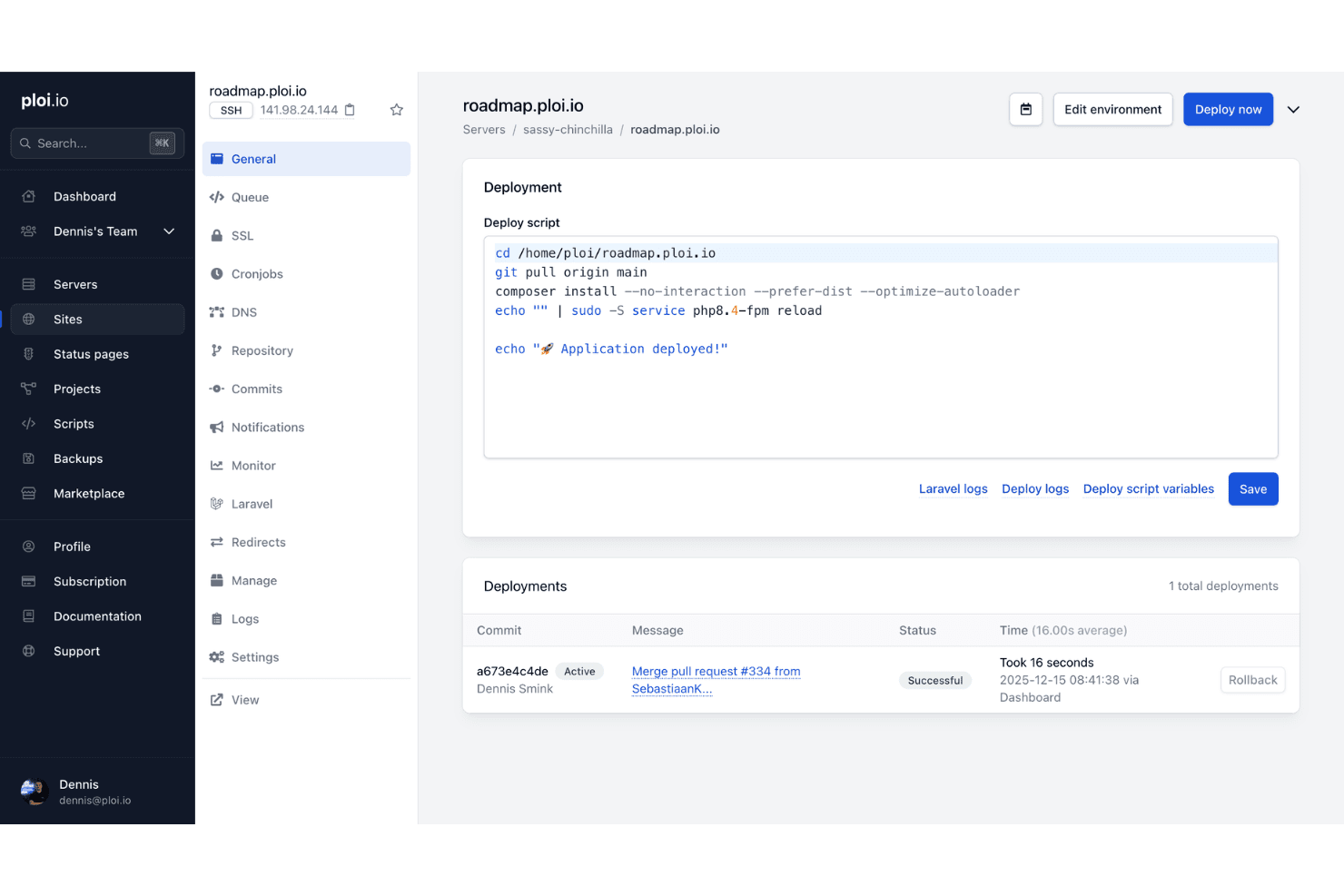
Ploi Roadmap helps teams manage and deploy an open-source idea management environment with configurable scripts and deployment tracking. Ploi Roadmap is a self-hostable, MIT-licensed idea management tool built on Laravel that lets teams collect feature requests, organize submissions across boards and projects, enable user voting and threaded comments, and sync items directly with GitHub issues.
Who Is Ploi Roadmap Best For?
Ploi Roadmap is a strong fit for PHP development teams that want full control over their feedback infrastructure without licensing restrictions.
Why I Picked Ploi Roadmap
I picked Ploi Roadmap as one of the best because its MIT license is the real differentiator: you can fork it, rebrand it, and modify it freely with zero copyleft obligations. I particularly like how GitHub sync lets you link feedback items directly to existing issues or create new ones without leaving the board, which keeps product and engineering aligned. The duplicate merging feature also stands out to me, as it consolidates votes and comments from redundant submissions into a single item without double-counting voters.
Ploi Roadmap Key Features
- Multi-project boards: Organize feedback across multiple projects, each with its own boards, visibility settings, and member access controls.
- 80+ language translations: The interface ships with locale files for over 80 languages, including Arabic, Japanese, and Chinese variants.
- Embeddable feedback widget: A JavaScript widget lets you collect feedback directly from your app, with options for button position, color, domain restriction, and user prefill.
- OAuth 2 SSO: Users can authenticate via any OAuth 2 provider, giving teams centralized login management without a separate identity system.
Ploi Roadmap Integrations
Ploi Roadmap has native GitHub integration for linking feedback to issues or creating new ones. It also supports Slack and Discord webhooks for notifications.
Pros and Cons
Pros:
- Private projects support controlled feedback collection
- Duplicate merging preserves votes and comments
- MIT license permits unrestricted customization
Cons:
- Manual deployment requires PHP expertise
- Documentation relies heavily on the README
Learn more about Ploi Roadmap:
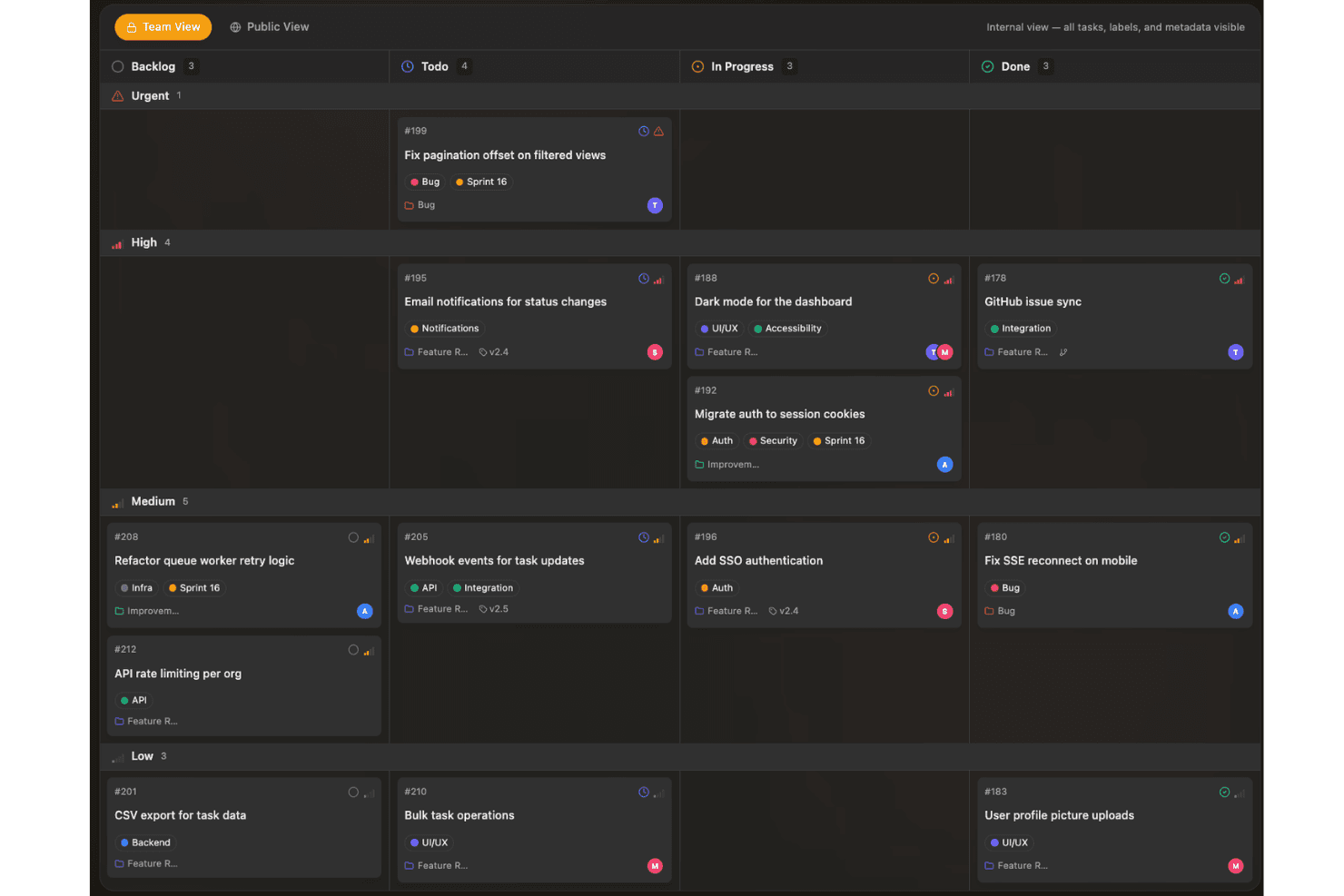
Sayr helps teams capture and prioritize ideas on a visual board organized by status, urgency, and development progress. Sayr is a source-available project management tool with a public feedback portal that lets teams collect, vote on, and discuss feature requests and bug reports through a self-hosted or cloud-hosted board with GitHub integration and Discord bot support.
Who Is Sayr Best For?
Sayr is a strong fit for developer teams and open source projects that want a self-hosted, GitHub-connected feedback board where community members can submit and vote on feature requests.
Why I Picked Sayr
I picked Sayr as one of the best because its two-way GitHub sync is genuinely built for developer-facing feedback boards. When a pull request merges with
Fixes #Nin the commit message, Sayr automatically closes the linked task on the public board, so your community always sees accurate, live status without manual updates. I also love the granular visibility controls: you can mark individual comments, labels, and timeline entries as internal, keeping engineering context private while showing customers only what's relevant.Sayr Key Features
- Public voting board: Visitors can browse, upvote, and sort feature requests by popularity, newest, or trending without needing an admin account.
- Internal vs. public comments: Team members can post internal-only comments on any task, keeping engineering discussion private while public replies stay visible to submitters.
- Discord bot integration: The
/sayr createcommand lets community members submit tasks directly from Discord using your predefined issue templates. - Releases and milestones: You can group tasks into releases with progress tracking, giving your community a visible changelog and roadmap view.
Sayr Integrations
Sayr offers native integrations with GitHub and Discord, including two-way GitHub task and issue sync and Discord task creation through
/sayr create. It also provides a REST API and CLI for custom integrations.Pros and Cons
Pros:
- Live roadmap status tracking
- Rich threaded discussion and moderation
- Granular public-private visibility controls
Cons:
- No duplicate merging or weighted voting
- Source-available, not OSI-approved
Learn more about Sayr:
Diğer Açık Kaynaklı Fikir Yönetimi Yazılımları
Kısa listeme giremeyen ancak yine de göz atmaya değer bazı ek açık kaynaklı fikir yönetimi yazılımı seçeneklerini burada bulabilirsiniz:
- 11FeatulBest for EU-hosted feedback boards with MIT licensing
- 12FeedlogBest for AI-native self-hosted feedback loops
- 13eXo PlatformBest for shared enterprise workspaces
- 14KanboardBest for MIT-licensed kanban-style idea tracking
- 15OpenideaLBest for Drupal-based idea lifecycle management
- 16LogChimpBest for customizable self-hosted portals
- 17FeedbacklandBest for AI-generated ranked roadmaps
How I Evaluate Open Source Idea Management Software
I split my evaluation into three parts, with core functionality carrying the most weight: let users submit and vote on ideas, and self-host openly licensed code. Next, I consider standout features such as API and webhook access. Finally, I weigh factors beyond features, including maintainer activity, setup guidance, and upkeep costs.
Core Functionality (Table Stakes For This List)
When I'm selecting tools for my list, I score each one on a scale from 0 (does not offer the functionality) to 5 (excels in this area) for each core functionality listed below. I then convert the total into a percentage to help assess each tool's overall fit, with extra weight on any functionalities I’ve deemed essential.
- Idea Submission & Voting (Essential): I look for a clear way for customers or employees to suggest ideas, vote, and see which requests attract support.
- Open Source Codebase (Essential): I check for a clearly licensed codebase that teams can inspect, modify, and self-host, with setup guidance and signs of active maintenance.
- Idea Status Tracking: I assess whether teams can update visible statuses, such as under review, planned, or completed, so contributors can follow decisions.
- Comments & Discussion: I look for comments that let contributors add context, discuss tradeoffs, and follow up on a suggestion.
- Self-Hosting: I consider whether deployment instructions and options, such as Docker, make it practical to run the tool on your own infrastructure.
- Categories & Tags: I check whether teams can group and filter requests by topic or board as feedback grows.
Once I have a list of tools that meet the criteria, I consider what sets each platform apart.
Differentiating Factors (What Sets Vendors Apart)
Here's how I compare and contrast different vendors:
Standout Features
I look for API and webhook access first because it determines whether ideas can flow into your existing roadmap or project tracking tools without manual copy-pasting. SSO and user management matter just as much—teams collecting internal feedback need OAuth or SAML so employees log in with existing credentials instead of managing yet another account. I also evaluate moderation controls, like duplicate merging and spam filtering, since unmanaged boards get noisy fast and bury the requests that actually matter.
Beyond Features
I check GitHub commit frequency and release cadence because a stale repo means security patches and bug fixes fall on your team. Self-hosting costs matter too—server, database, and DevOps time for backups and updates can quietly exceed a SaaS subscription. I also evaluate how easily each codebase supports custom fields or workflows, since some tools offer plugin architectures while others force you to fork core code just to add a field. Finally, native connectors to tools like Jira or Slack reduce the manual work of moving validated ideas into delivery.
Açık Kaynaklı Fikir Yönetimi Yazılımı Nasıl Seçilir?
Uzun özellik listeleri ve karmaşık fiyatlandırma yapıları içinde kaybolmak kolaydır. Kendinize özgü yazılım seçim sürecinizi yürütürken odaklanmanıza yardımcı olmak için göz önünde bulundurmanız gereken faktörlerin bir kontrol listesini burada bulabilirsiniz:
| Faktör | Göz Önünde Bulundurulması Gerekenler |
|---|---|
| FaktörÖlçeklenebilirlik | Göz Önünde Bulundurulması GerekenlerKuruluşunuz büyüdükçe yazılım daha fazla kullanıcıyı, ekibi veya fikri destekleyebilecek mi? Kullanıcı, depolama ve modül sınırlarını inceleyin. |
| FaktörEntegrasyonlar | Göz Önünde Bulundurulması Gerekenlerİletişim, dokümantasyon veya proje yönetimi araçlarınıza bağlanabiliyor mu? API'ler ve temel platformlar için desteği doğrulayın. |
| FaktörÖzelleştirilebilirlik | Göz Önünde Bulundurulması GerekenlerFormları, iş akışlarını ve izinleri kuruluşunuzun özel süreçlerine ve güvenlik gereksinimlerine göre uyarlayabilir misiniz? |
| FaktörKullanım kolaylığı | Göz Önünde Bulundurulması GerekenlerEkibinizin aracı güvenle benimsemesi için ne kadar eğitime ihtiyacı olacak? Açık ve iyi yapılandırılmış bir arayüz arayın. |
| FaktörUygulama ve işe alıştırma | Göz Önünde Bulundurulması GerekenlerKurulum için hangi kaynaklar gerekli; dokümantasyon, teknik bilgi, veri geçişi? Belirlediğiniz zaman çizelgesi içinde dağıtım ve işe alıştırma yapıp yapamayacağınızı değerlendirin. |
| FaktörMaliyet | Göz Önünde Bulundurulması GerekenlerLisans ücretlerinin yanı sıra sunucu gereksinimlerini, bakımı ve devam eden idari yükü de göz önünde bulundurun. Bütçe tahmininizde bunları hesaba katın. |
| FaktörGüvenlik önlemleri | Göz Önünde Bulundurulması GerekenlerAraç kendi sunucunuzda barındırılabilir, şifrelenebilir veya güvenlik duvarı arkasında sınırlandırılabilir mi? Denetim günlüklerini, kimlik doğrulama seçeneklerini ve veri sahipliğini doğrulayın. |
| FaktörDestek bulunabilirliği | Göz Önünde Bulundurulması GerekenlerNe tür sürekli destek mevcut; topluluk forumları, ücretli sözleşmeler, sorun takip sistemleri veya üçüncü taraf sağlayıcılar mı? İhtiyaç duyduğunuzda nereden yardım alacağınızı bilin. |
Açık Kaynaklı Fikir Yönetimi Yazılımı Nedir?
Açık kaynaklı fikir yönetimi yazılımı; ekiplerin, kaynak kodu herkese açık ve özelleştirilebilir olan bir platform aracılığıyla önerileri, geri bildirimleri ve yenilik projelerini yakalamasına, düzenlemesine ve önceliklendirmesine olanak tanır. Bu araçlar, grupların iş birliğini teşvik etmesine, fikirlerin yaşam döngüsünü izlemesine ve iş akışlarını süreçlerine göre uyarlamasına yardımcı olurken kuruluşlara dağıtım, güvenlik ve gelecekteki geliştirmeler üzerinde tam kontrol sağlar.
Özellikler
Açık kaynaklı fikir yönetimi yazılımı seçerken aşağıdaki temel özelliklere dikkat edin:
- Fikir gönderme portalı: Kullanıcıların yeni fikirler, öneriler veya geri bildirimler sunması için özel bir alan sağlar; genellikle farklı türdeki girdiler için özelleştirilebilir formlar içerir.
- İş birliği araçları: Kullanıcıların, kolektif yeniliği destekleyecek şekilde dizili konuşmalar, bahsetmeler veya ortak düzenleme yoluyla fikirleri tartışmasını, yorumlamasını ve geliştirmesini sağlar.
- Oylama ve önceliklendirme: Kullanıcıların fikirleri olumlu veya olumsuz oylamasına ya da puanlamasına olanak tanır; böylece ekipler incelenmek üzere popüler veya yüksek etkili önerileri hızlıca belirleyebilir.
- Durum takibi: Yöneticilerin her fikir için “inceleme altında”, “planlandı” veya “uygulandı” gibi durumlar atamasını sağlayarak şeffaflığı ve proje görünürlüğünü artırır.
- Erişim denetimleri: Yöneticilere kimlerin fikir veya yorum oluşturabileceğini, görüntüleyebileceğini, düzenleyebileceğini ya da denetleyebileceğini yönetme olanağı sunarak hassas bilgileri korur ve hesap verebilirliği sağlar.
- Arama ve filtreleme: Kullanıcıların fikirleri anahtar kelimelere, kategorilere, etiketlere veya gönderenlere göre bulabilmesi için gelişmiş arama özellikleri ve filtreler sunarak gezinmeyi ve keşfetmeyi hızlandırır.
- İş akışı otomasyonu: Fikirlerin farklı inceleme ve onay aşamalarındaki ilerleyişini, atamaları veya otomatik bildirimleri destekleyerek manuel çabayı en aza indirir.
- Raporlama ve analiz: Panolar ve dışa aktarılabilir raporlarla fikir gönderme eğilimleri, etkileşim düzeyleri ve uygulama oranları hakkında içgörü sağlar.
- Entegrasyon desteği: Sohbet platformları, proje yönetimi yazılımları veya bulut depolama gibi araçlara bağlanarak fikir yönetiminin mevcut iş akışlarına eklenmesini kolaylaştırır.
Avantajlar
Açık kaynaklı fikir yönetimi yazılımını uygulamak ekibiniz ve işletmeniz için çeşitli avantajlar sağlar. Yararlanabileceğiniz avantajlardan bazıları şunlardır:
- Veri sahipliği ve denetimi: Platformu kendi altyapınızda dağıtarak hassas bilgiler için veri gizliliğini ve denetimini sağlayabilirsiniz.
- Özelleştirilebilir iş akışları: Açık kaynak esnekliği, yenilikçi fikirleri yakalamanıza ve gönderim formlarını, onayları ve durumları kendinize özgü dahili süreçlerinize uyacak şekilde uyarlamanıza olanak tanır.
- Maliyet tasarrufu: Ücretsiz olarak sunulan veya kendi sunucunuzda barındırabileceğiniz çözümlerden yararlanarak yinelenen abonelik ücretlerinden ve tedarikçiye bağımlılıktan kaçının.
- Gelişmiş iş birliği: Yerleşik iletişim ve geri bildirim özellikleri, tüm ekibinizin fikirleri birlikte geliştirme ve önceliklendirme sürecine katılmasını sağlar.
- Entegrasyon potansiyeli: Açık API'ler ve belgelenmiş bağlayıcılar aracılığıyla fikir yönetimini mevcut sohbet, proje yönetimi veya depolama araçlarınıza bağlayabilirsiniz.
- Şeffaf yenilik takibi: Durum yönetimi ve raporlama özellikleri fikirlerin ilerlemesini görünür kılarak hesap verebilirliği ve etkileşimi artırır.
Maliyetler ve Fiyatlandırma
Açık kaynaklı fikir yönetimi yazılımını seçmek, mevcut çeşitli fiyatlandırma modellerinin ve planların anlaşılmasını gerektirir. Maliyetler özelliklere, ekip büyüklüğüne, eklentilere ve diğer unsurlara göre değişir. Aşağıdaki tablo, açık kaynaklı fikir yönetimi yazılımı çözümlerinde yaygın planları, bunların ortalama fiyatlarını ve genellikle dahil edilen özellikleri özetlemektedir:
Açık Kaynaklı Fikir Yönetimi Yazılımı İçin Plan Karşılaştırma Tablosu
| Plan Türü | Ortalama Fiyat | Yaygın Özellikler |
|---|---|---|
| Plan TürüÜcretsiz Plan | Ortalama Fiyat$0 | Yaygın ÖzelliklerTopluluk desteği, temel fikir gönderimi, temel iş birliği araçları ve sınırlı özelleştirme. |
| Plan TürüKişisel Plan | Ortalama Fiyat$5-$10/kullanıcı/ay | Yaygın ÖzelliklerGelişmiş izinler, öncelikli destek, gelişmiş arama ve sınırlı entegrasyonlar. |
| Plan Türüİşletme Planı | Ortalama Fiyat$10-$25/kullanıcı/ay | Yaygın ÖzelliklerÖzel iş akışları, raporlama araçları, birden fazla çalışma alanı, yönetici denetimleri ve API erişimi. |
| Plan TürüKurumsal Plan | Ortalama Fiyat$25-$50/kullanıcı/ay | Yaygın ÖzelliklerKendi sunucusunda barındırma, denetim günlükleri, gelişmiş güvenlik, uyumluluk özellikleri, özel destek ve sınırsız kullanıcı. |
Açık Kaynaklı Fikir Yönetimi Yazılımı SSS
Açık kaynaklı fikir yönetimi yazılımı hakkında sık sorulan soruların bazı yanıtları:
Açık kaynaklı fikir yönetimi yazılımı kendi sunucunuzda barındırılabilir mi?
Evet, çoğu açık kaynaklı fikir yönetimi yazılımı kendi altyapınızda barındırmanıza olanak tanır. Bu, veri güvenliği, gizlilik yapılandırmaları ve kuruluşunuzun gereksinimlerine göre uyarlanmış özel entegrasyonlar üzerinde tam kontrol sağlar.
Açık kaynaklı fikir yönetimi araçlarını özelleştirmek ne kadar zordur?
Özelleştirme araca göre değişir, ancak genel olarak açık kaynaklı platformlar, bazı teknik becerilere sahipseniz yüksek esneklik sunar. Kapsamlı değişiklikler yapmadan önce topluluk belgelerini incelemek ve geliştirme kaynaklarınızı değerlendirmek isteyebilirsiniz.
Açık kaynaklı ve ticari fikir yönetimi yazılımları arasındaki farklar nelerdir?
Açık kaynaklı araçlar maliyet tasarrufu ve esneklik sunar, ancak daha fazla kurulum çabası, teknik destek ve sürekli bakım gerektirebilir. Ticari platformlar genellikle daha yüksek yinelenen maliyetlerle birlikte daha kullanıma hazır bir kullanıcı deneyimi ve özel destek sunar.
Açık kaynaklı fikir yönetimi yazılımı kullanmanın gizli maliyetleri var mı?
Evet, yazılım ücretsiz olsa bile sunucu barındırma, güncellemeler, teknik destek ve ekibinizin istediğiniz kuruluma ulaşmak için ihtiyaç duyduğu özel geliştirme çalışmaları gibi maliyetleri planlamalısınız.
Açık kaynaklı araçlar güncellemeleri ve güvenlik yamalarını nasıl ele alır?
Çoğu proje topluluk tarafından yürütülen güncellemelere ve yayımlanan yama sürümlerine dayanır. Özellikle kendi sunucunuzda barındırılan dağıtımlarda verilerinizi korumak için bu güncellemeleri izleme ve güvenlik yamalarını uygulama süreciniz olmalıdır.