

Kullanıcı oryantasyonu, özellikle bütçeler kısıtlı olduğunda zorlayıcı olabilir. Bir ürün yöneticisi olarak yeni kullanıcıların ürününüzü hızlı bir şekilde anlamasını ve ürününüzle etkileşime geçmesini sağlama zorluğuyla karşı karşıyasınız. Ücretsiz kullanıcı oryantasyonu yazılımları, mali yükü artırmadan bir çözüm sunar.
Deneyimlerime göre bu araçlar, oryantasyon sürecini basitleştirerek ekibinizin diğer önceliklere odaklanmasına yardımcı olabilir. Kullanıcıları yönlendirmek ve başlangıçtan itibaren deneyimlerini iyileştirmek için temel özellikler sunarlar.
Bu makalede, en iyi ücretsiz oryantasyon araçları hakkındaki tarafsız incelemelerimi paylaşacağım. Her birinin neler sunduğuna ve özel ihtiyaçlarınızı nasıl karşılayabileceklerine dair bilgiler bulacaksınız. Bütçenizi zorlamadan oryantasyon sürecinizde fark yaratabilecek çözümleri birlikte keşfedelim.
Why Trust Our Software Recommendations
6,700+
Reviews
20
Industry experts
16+
Evaluation factors
14
Years
Our team has been testing and reviewing software since 2012. As product managers ourselves, we know how difficult—and important—it is to choose the right software.
For this guide, we evaluated tools using hands-on testing and independent research, scoring tools using our selection criteria.
Our reviews reflect our human editorial judgment, not a sales pitch.
Expert reviewers:
- Andrew LumbySenior TPM
- Cristiano ValimSenior UI/UX Lead


Ücretsiz Kullanıcı Oryantasyonu Yazılımları Karşılaştırma Tablosu
Listemdeki tüm kullanıcı oryantasyonu yazılımlarının ücretsiz seçenekleri olsa da yükseltme yapmak isterseniz birçoğunun ücretli planları da bulunuyor:
Score legend (out of 5)
- Excellent4.5–5
- Good4–4.4
- Average3–3.9
- Below average2–2.9
- Poor1–1.9
Sorted by: Default
| Tool | Starting Price | Website | ||||||
|---|---|---|---|---|---|---|---|---|
Best for in-app messaging tours and hints | 4.6 out of 5 | 4 | 5 | 5 | 4 | 5 | $96/month Free trial available | Website |
Best for analytics-backed onboarding trials | 4.2 out of 5 | 4 | 4 | 4 | 4 | 5 | $299/month 14-day free trial | Website |
Best for no-code flow building with AI assist | 4.6 out of 5 | 4 | 5 | 5 | 4 | 5 | $240/month 14-day free trial | Website |
Best for A/B testing onboarding flows | 4.0 out of 5 | 4 | 4 | 4 | 4 | 4 | Pricing upon request Free trial available | Website |
Best for product analytics-led onboarding | Not rated | 2 | 4 | 4 | Not rated | 4 | Pricing upon request Free plan + 30-day free trial + free demo available | Website |
Best for developer-coded B2B onboarding checklists | 2.8 out of 5 | 3 | 4 | 1 | 4 | 2 | $300/month Free plan available | Website |
Best for headless, dev-installed onboarding flows | 3.8 out of 5 | 4 | 3 | 4 | 4 | 4 | $30/month Free plan available | Website |
Best for AI-built tours with unlimited free seats | 2.8 out of 5 | 2 | 4 | 3 | 1 | 4 | $199/month Free plan available | Website |
Best for developer-built element highlighting | Not rated | 2 | Not rated | 1 | Not rated | 3 | Free to use Free plan available | Website |
Best for developer-coded product tours | Not rated | 1 | Not rated | 1 | Not rated | 4 | $50/lifetime Free plan available | Website |





En İyi Ücretsiz Kullanıcı Oryantasyonu Yazılımları İncelemeleri
Aşağıda kısa listemde yer alan en iyi ücretsiz kullanıcı oryantasyonu yazılımlarının ayrıntılı özetlerini bulabilirsiniz. İncelemelerim, size en uygun olanı bulmanıza yardımcı olmak için her aracın temel özelliklerine, artılarına & eksilerine, entegrasyonlarına ve ideal kullanım alanlarına ayrıntılı bir bakış sunuyor. Bu araçlardan bazıları tamamen ücretsiz bir sürüm sunarken diğerleri ücretsiz deneme süresi sunuyor. İncelemelerimin her birinde nelerin ücretsiz olduğuna dair bir not ekledim
 Best for in-app messaging tours and hints
- Free trial available
- From $96/month (billed annually)
Visit WebsiteCustomer Rating:4.7/5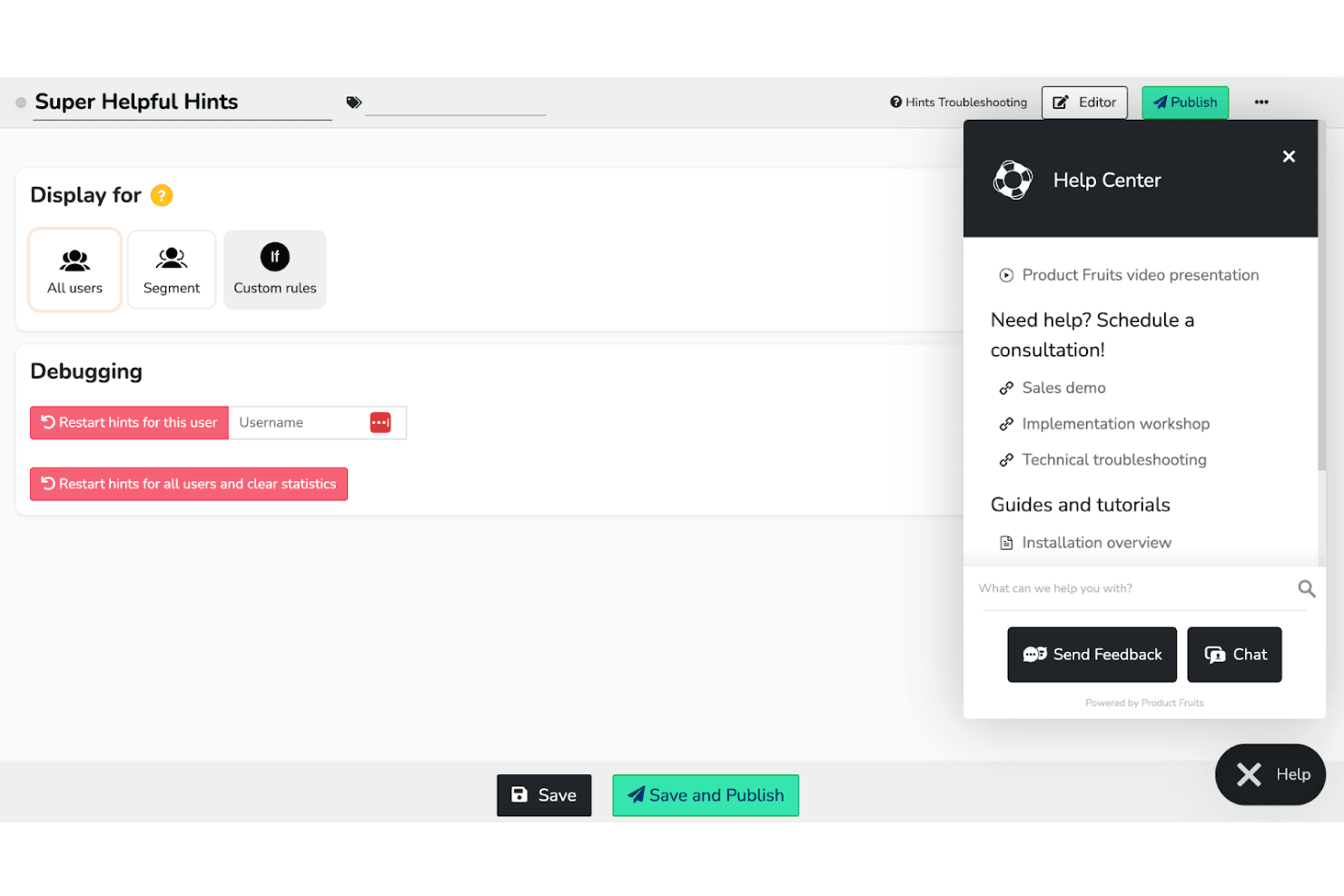
Product Fruits helps teams boost engagement with in-app guides and messages. Product Fruits is user onboarding software with no-code tours, branching Flows, checklists, hints, segmented in-app messages, surveys, and engagement analytics, available through a 14-day free trial rather than a long-term free plan.
Who Is Product Fruits Best For?
Product Fruits suits product managers and growth teams that need no-code in-app tours, contextual hints, and segmented onboarding guidance.
Why I Picked Product Fruits
I picked Product Fruits because its in-app messaging tours and hints guide users precisely where they need help. I use branching Flows for feature adoption, contextual hints for unfamiliar controls, and segmented announcements for targeted onboarding. Tour funnels reveal where users drop off, helping me refine each step.
Product Fruits Key Features
- Onboarding checklists: Assign task lists to user groups with progress tracking.
- Surveys and NPS: Collect feedback through surveys, NPS prompts, and widgets.
- Chrome extension editor: Build and preview guidance directly on your live product.
- Resource center: Embed help content and a knowledge base inside your app.
Product Fruits Integrations
Product Fruits offers native integrations with Google Analytics, Mixpanel, HubSpot, Salesforce, Segment, Slack, and Typeform. It also supports REST API, webhooks, and Zapier for custom connectivity.
What's Free?
Product Fruits offers a 14-day free trial rather than a free-forever plan. After the trial ends, you’ll need a paid plan to continue using its onboarding tours, hints, and other features.
Pros and Cons
Pros:
- Branching flows personalize onboarding paths
- Chrome extension edits live product guidance
- Detailed step-level drop-off analytics
Cons:
- Starter limits constrain smaller onboarding programs
- No lasting free plan
Learn more about Product Fruits: Best for analytics-backed onboarding trials
- 14-day free trial
- From $299/month
Visit WebsiteCustomer Rating:4.7/5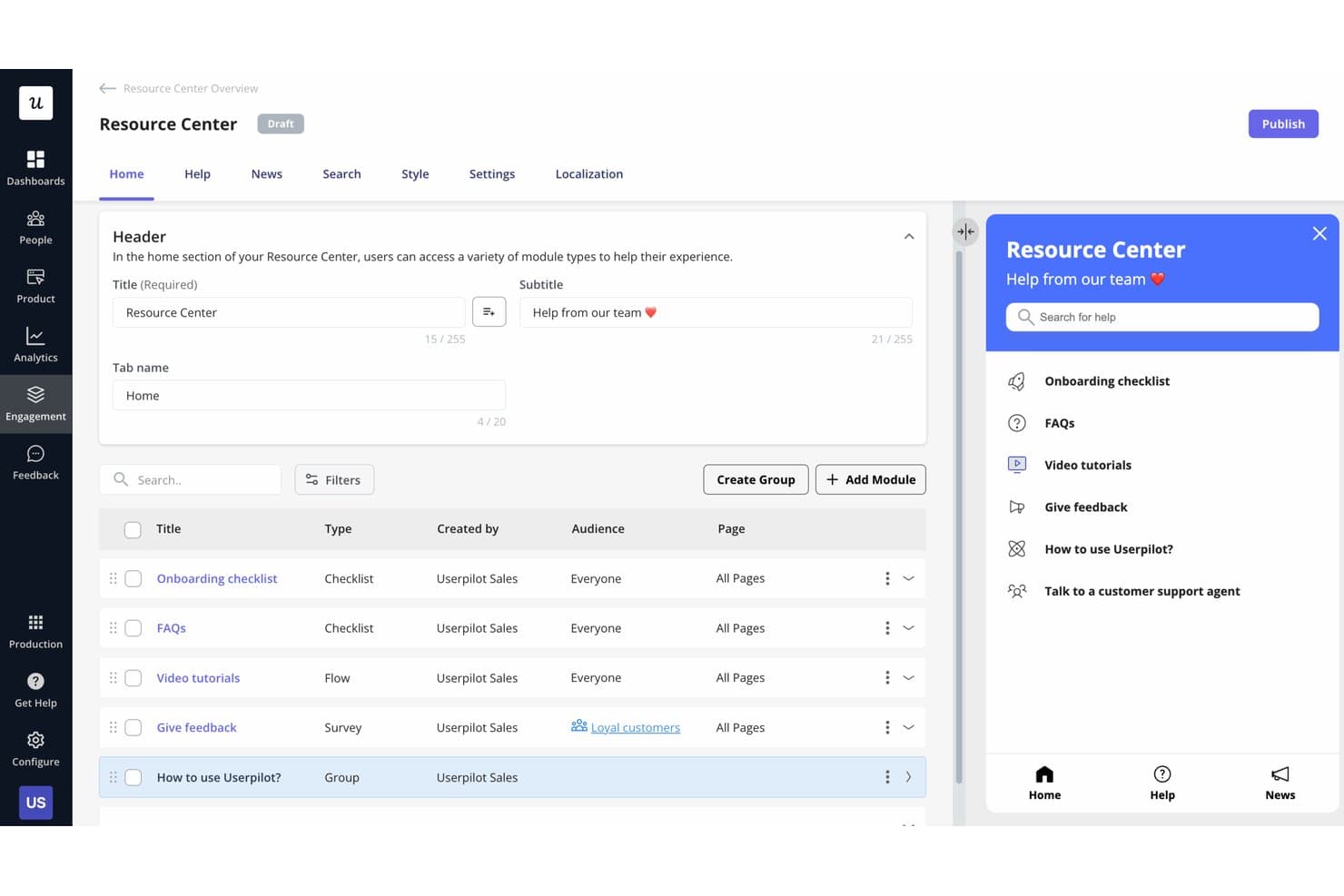
Userpilot lets users build a self-serve Resource Center for in-app help. Userpilot is a user onboarding platform with no-code in-app flows, checklists, segmentation, engagement analytics, surveys, and targeted messaging, available through a 14-day free trial rather than an ongoing free plan.
Who Is Userpilot Best For?
Userpilot suits product and growth teams that need no-code onboarding flows, user segmentation, and analytics during a 14-day trial.
Why I Picked Userpilot
I picked Userpilot for analytics-backed onboarding trials because I can connect in-app flows to engagement reporting, funnels, retention, and paths. I use segmentation and welcome surveys to tailor onboarding, then analyze where users drop off. Its 14-day trial lets me test these workflows before committing to a paid plan.
Userpilot Key Features
- Onboarding checklists: Create task lists with smart triggers, redirects, or JavaScript actions.
- NPS surveys: Collect and analyze Net Promoter Score responses inside your product.
- Session replay: Review recorded user sessions to identify friction in Growth plans.
- AI Agent Lia: Generate checklists, segments, and in-app content from natural-language prompts.
Userpilot Integrations
Userpilot has six documented native integrations, including Segment, Mixpanel, Amplitude, Heap, Intercom, and Slack. Growth and higher plans include an HTTP/REST API and webhooks for custom integrations.
What's Free?
Userpilot offers a 14-day free trial, not a free-forever plan. After the trial ends, you’ll need a paid plan.
Pros and Cons
Pros:
- Responsive support for setup questions
- No-code flow and checklist creation
- Analytics-backed onboarding insights
Cons:
- Advanced analytics require higher tiers
- No ongoing free plan
Learn more about Userpilot: Best for no-code flow building with AI assist
- 14-day free trial
- From $240/month (billed annually)
Visit WebsiteCustomer Rating:4.8/5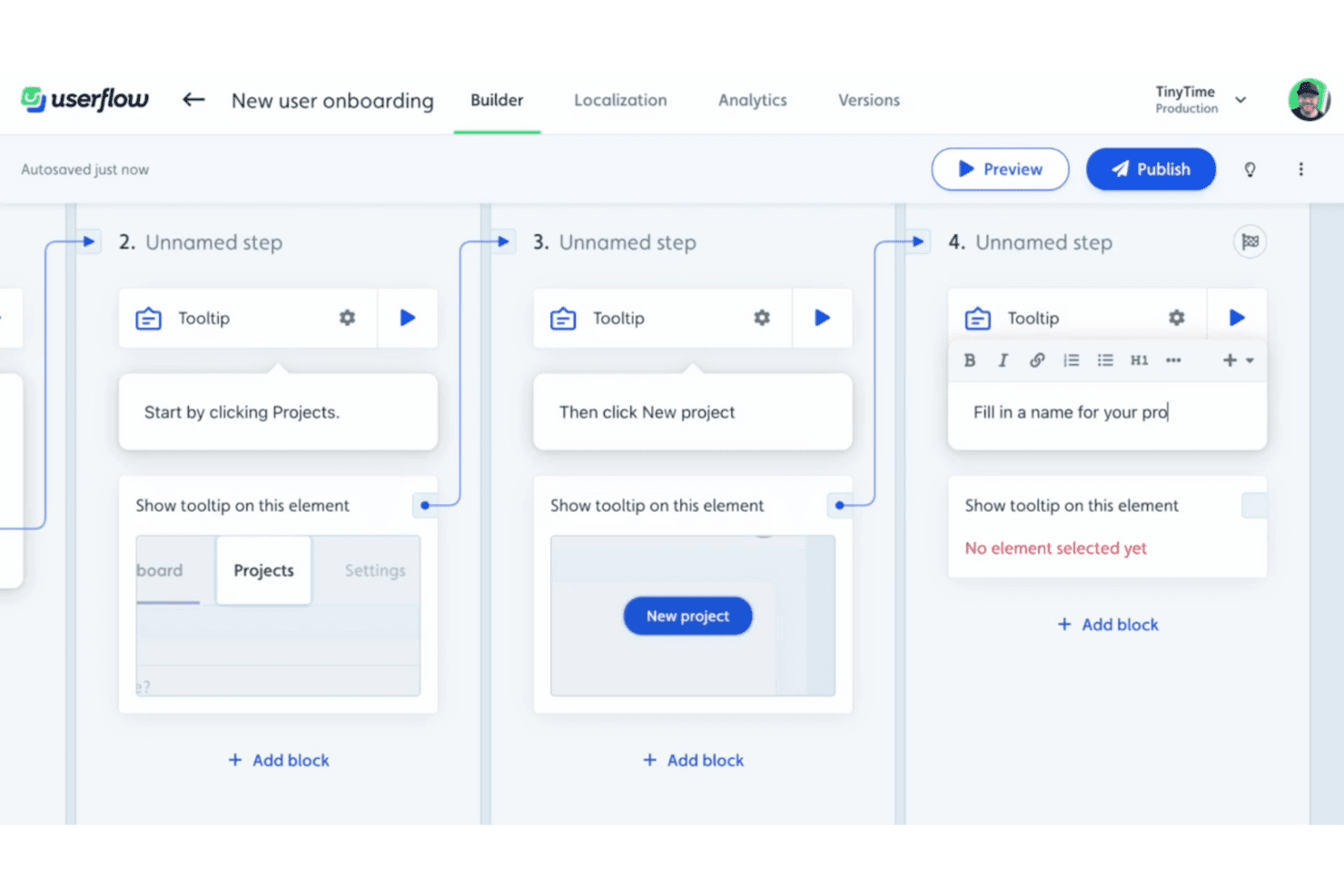
Userflow’s visual builder lets you create step-by-step onboarding flows using tooltips and triggers—no code required. Userflow is user onboarding software for creating no-code walkthroughs, checklists, segmented experiences, in-app surveys, and engagement analytics, with AI-assisted flow building and branching logic.
Who Is Userflow Best For?
Userflow suits product and growth teams at B2B SaaS companies that need personalized in-app onboarding without relying on engineering.
Why I Picked Userflow
I picked Userflow for its no-code flow building with AI assist, which turns a recorded product walkthrough into an editable flow of up to 30 steps. I use branching logic, tooltips, modals, and Smartflows to tailor onboarding by user behavior. It offers a 14-day trial, but no ongoing free plan.
Userflow Key Features
- Onboarding checklists: Create tasks with custom completion and visibility conditions.
- User segmentation: Target users by attributes, events, CSV lists, or analytics cohorts.
- Engagement analytics: Review step funnels, completion rates, drop-offs, and trends.
- In-app surveys: Trigger NPS, CSAT, CES, or custom surveys by segment or event.
Userflow Integrations
Userflow offers documented integrations with Mixpanel, Amplitude, Segment, Heap, Intercom, Zendesk, HubSpot, and Salesforce, plus Slack. It also supports custom connections through its REST API and Zapier.
What’s Free?
Userflow offers a 14-day free trial, not a free-forever plan. After the trial ends, you’ll need a paid subscription.
Pros and Cons
Pros:
- Pinpoints onboarding drop-offs with step funnels
- AI turns product tours into editable flows
- Builds branching walkthroughs without engineering
Cons:
- Advanced customization requires technical support
- No ongoing free tier
Learn more about Userflow: Best for A/B testing onboarding flows
- Free trial available
- Pricing upon request
Visit WebsiteCustomer Rating:4.7/5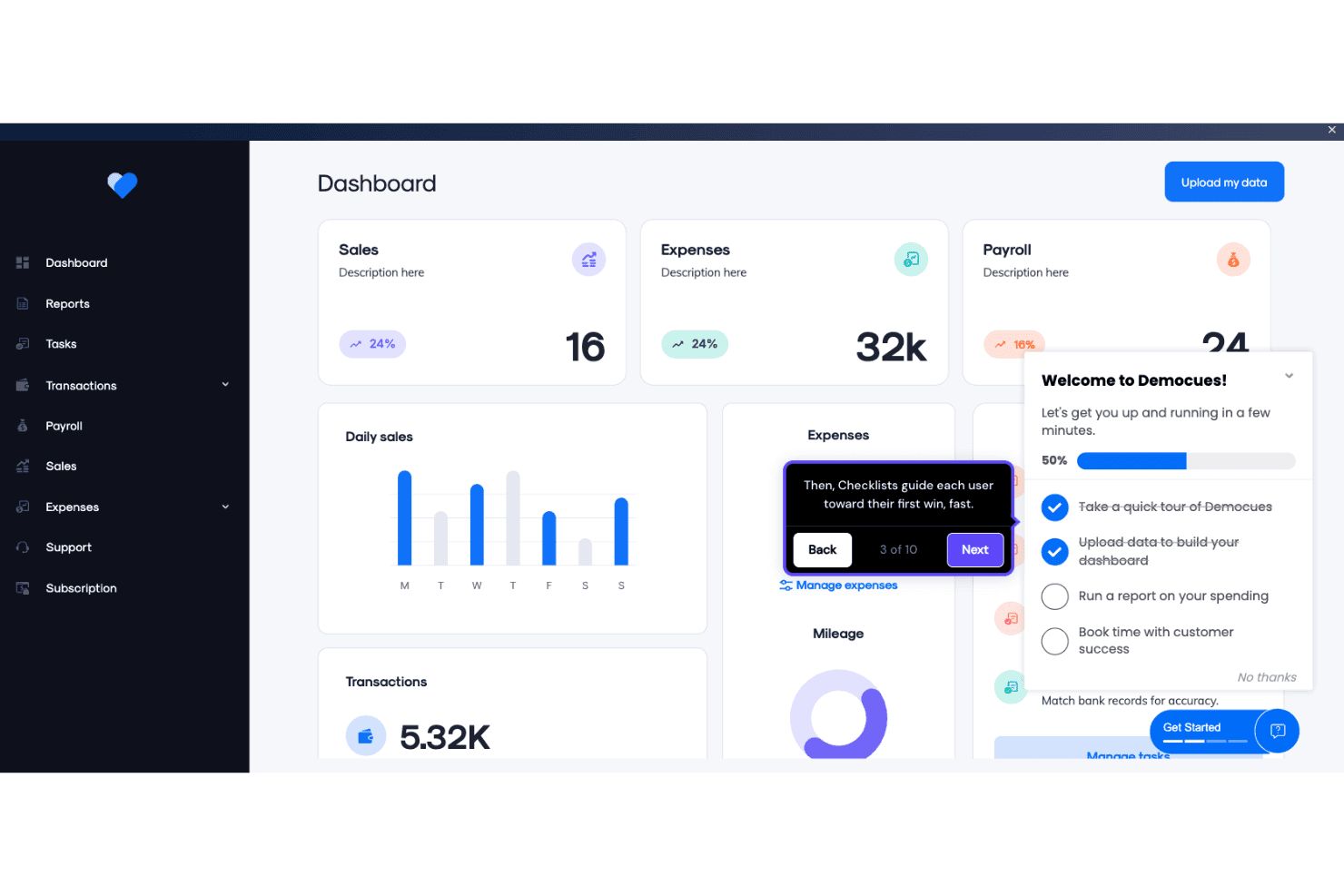
Appcues enables product teams to build in-app onboarding checklists and guided tooltips directly within a live dashboard interface. Appcues is a user onboarding platform for creating no-code flows, checklists, tooltips, banners, and resource menus, with segmentation, analytics, A/B testing, and email or push workflows; it offers a trial, not a permanent free plan.
Who Is Appcues Best For?
Appcues suits product managers and growth marketers who need to test and optimize onboarding flows without ongoing engineering support.
Why I Picked Appcues
I picked Appcues for teams that want to test onboarding flows before committing to a paid plan. Its A/B testing, control groups, goals, and step-level drop-off analytics show which onboarding paths improve activation. The 14-day trial is useful for evaluation, but Appcues doesn’t offer a permanent free plan.
Appcues Key Features
- Launchpads: Add in-app resource menus for self-service guidance.
- Checklists: Display progress-based onboarding tasks through a floating beacon.
- Multi-channel workflows: Coordinate in-app messages, email, and push notifications.
- Click to Track: Create no-code events directly within your product.
Appcues Integrations
Appcues offers six documented native two-way integrations, including Salesforce, HubSpot, Intercom, Slack, Mixpanel, and Heap. It also supports Segment, data warehouses, an API, webhooks, and Zapier.
What's Free?
Appcues offers a 14-day free trial rather than a free-forever plan. After the trial ends, you’ll need a paid plan, with pricing available upon request.
Pros and Cons
Pros:
- Checklists guide users across product milestones
- A/B tests connect onboarding to activation
- Chrome Builder supports no-code flow creation
Cons:
- Developer setup remains necessary for installation
- No permanent free plan exists
Learn more about Appcues: Best for product analytics-led onboarding
- Free plan + 30-day free trial + free demo available
- Pricing upon request
Visit WebsiteCustomer Rating:4.4/5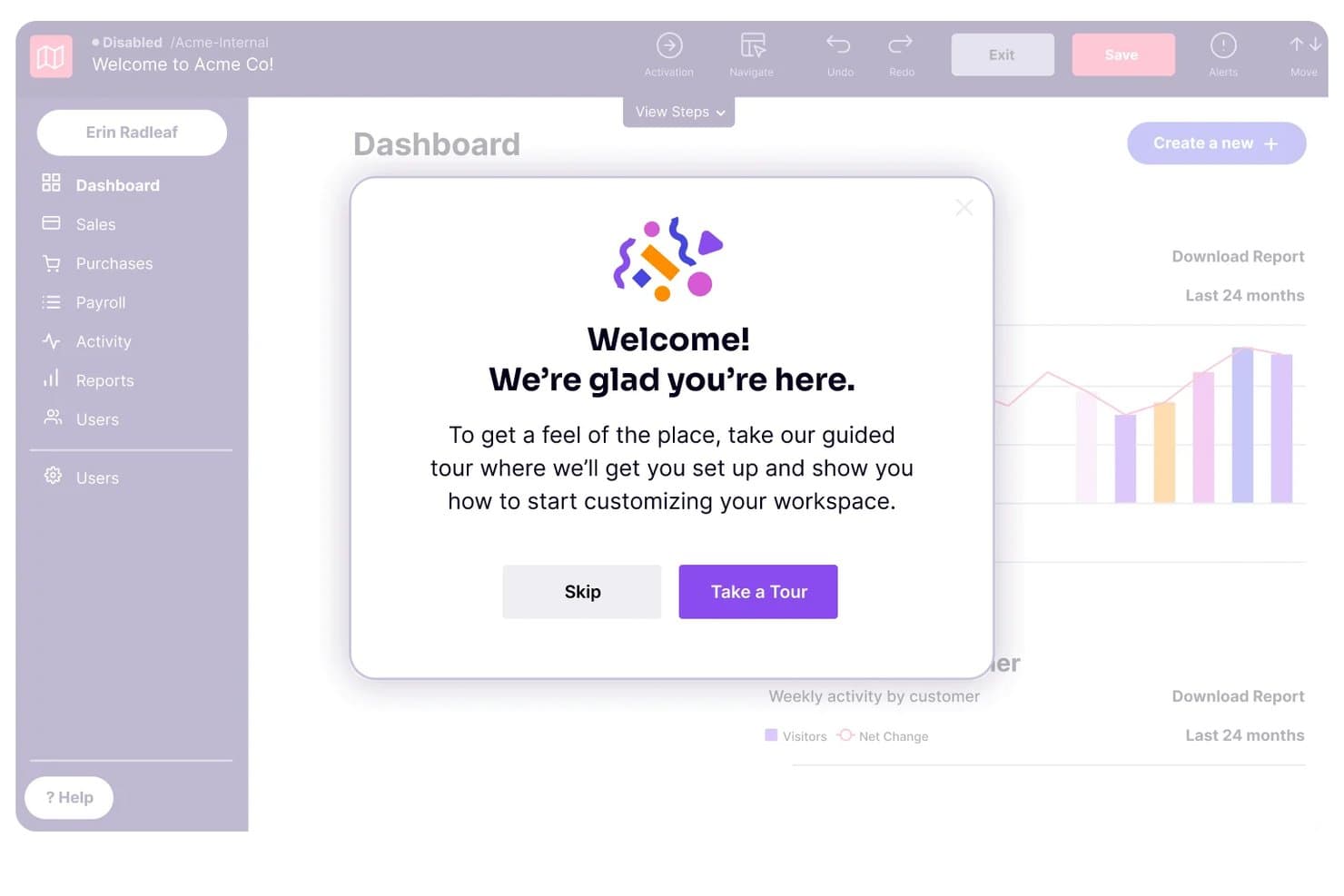
Pendo guides new users through onboarding with a welcome tour modal. Pendo is a free user onboarding platform with no-code in-app guides, behavioral segmentation, product analytics, guide metrics, and NPS surveys for web and mobile applications.
Who Is Pendo Best For?
Product managers and growth teams at small web or mobile products that need no-code guides, behavioral targeting, and detailed onboarding analytics.
Why I Picked Pendo
I picked Pendo because its analytics-led onboarding connects in-app guidance with user behavior. I use retroactive funnels, paths, retention reports, and guide-level drop-off metrics to identify where new users stall. Behavioral segmentation then lets me trigger targeted tooltips, lightboxes, or banners based on feature usage and guide interactions.
Pendo Key Features
- Mobile app support: Build guides for iOS, Android, Xamarin, and React Native apps.
- Guide staging: Test guides before publishing them to users.
- Guide triggers: Launch guides on page load, clicks, confirmations, or badges.
- Unlimited app keys: Manage multiple web and mobile applications under one account.
Pendo Integrations
Pendo Free doesn't include native integrations or API access. Paid plans offer 85+ integrations, including Salesforce, HubSpot, Intercom, Gainsight, Segment, Slack, Jira, and Zapier.
What's Free?
Pendo offers a free plan rather than only a time-limited trial. Pendo Free includes no-code guides and analytics, but excludes native integrations and API access; paid plans include 85+ integrations.
Pros and Cons
Pros:
- No-code guides need little engineering support
- Behavioral segmentation supports targeted onboarding
- Deep guide-level drop-off analytics
Cons:
- Setup can challenge single-page applications
- No checklist or task-list functionality
Learn more about Pendo: Best for developer-coded B2B onboarding checklists
- Free plan available
- From $300/month
Visit WebsiteCustomer Rating:4.7/5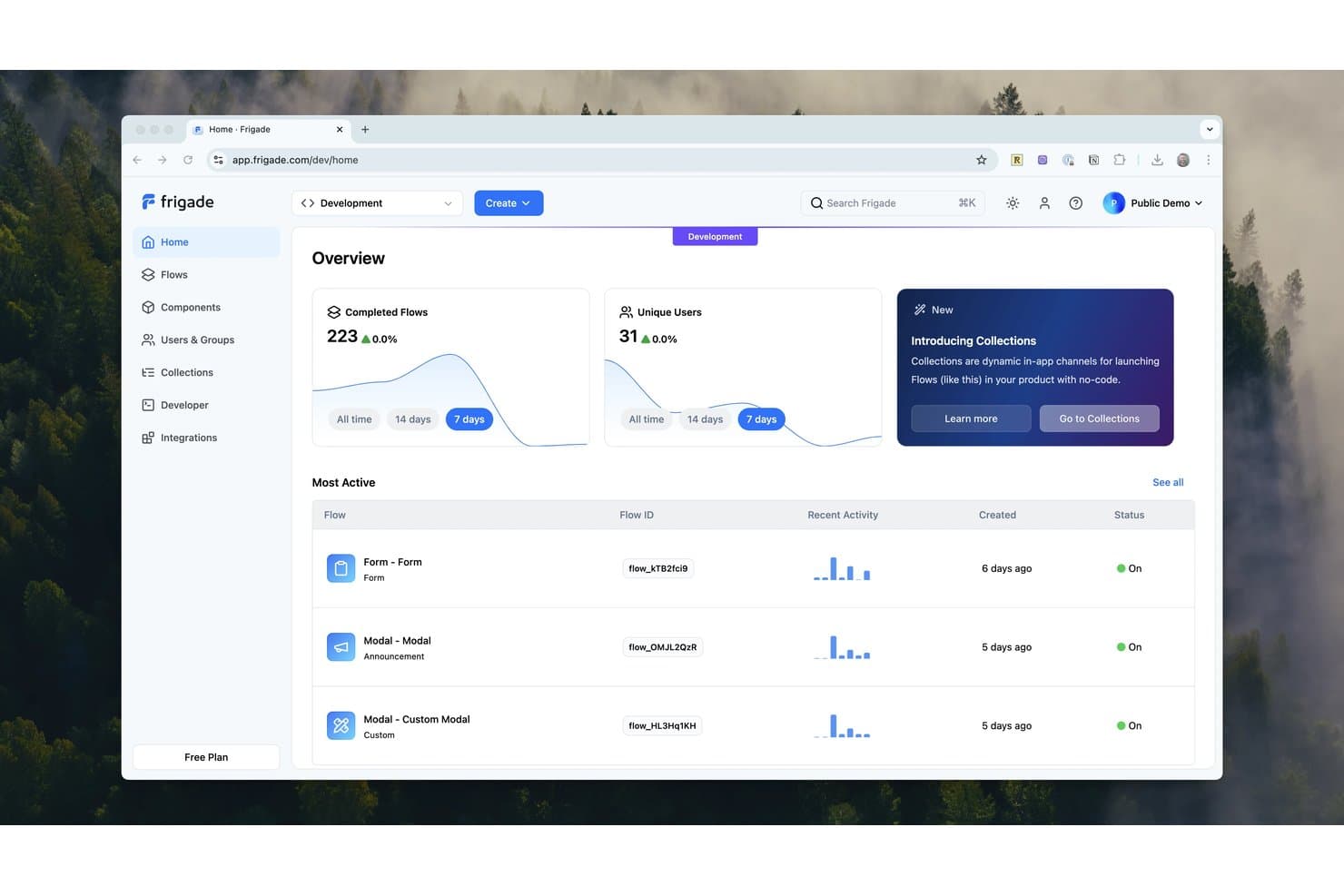
Frigade tracks flow completions and user activity from a central dashboard. Frigade is a code-first user onboarding platform for React apps, offering embedded checklists, tours, tooltips, announcements, surveys, forms, and targeted in-app messaging through a free Engage plan.
Who Is Frigade Best For?
Developer-led B2B SaaS teams that need embedded, event-driven onboarding checklists and targeted flows in React apps.
Why I Picked Frigade
I picked Frigade for Best Free User Onboarding Software because it’s built for developer-coded B2B onboarding checklists. I use its React components to create event-driven checklists, tours, and tooltips that respond to product actions. Group-level checklists also let entire customer accounts share progress, while targeting supports user properties, events, URLs, and flow completion.
Frigade Key Features
- Checklist styles: Choose Carousel or Collapsible checklist layouts.
- Persistent progress: Save checklist progress between user sessions.
- Message components: Create announcements, banners, cards, forms, and surveys.
- Custom styling: Match components to your product’s colors, fonts, and spacing.
Frigade Integrations
Frigade Engage offers eight documented integrations: Amplitude, Heap, HubSpot, Mixpanel, PostHog, Salesforce, Segment, and Slack. The Free plan includes none, but Frigade supports API access and webhooks for custom connectivity on paid plans.
What's Free?
Frigade offers a free-forever Engage plan for building onboarding checklists, tours, tooltips, and in-app messages. The Free plan includes no documented integrations, while API access and webhooks are available on paid plans.
Pros and Cons
Pros:
- React components fit branded product interfaces
- Group checklists support account-level onboarding
- Event-driven checklists reflect real product actions
Cons:
- Free users miss built-in analytics
- Developers must place components initially
Learn more about Frigade: Best for headless, dev-installed onboarding flows
- Free plan available
- From $30/month
Visit WebsiteCustomer Rating:4.4/5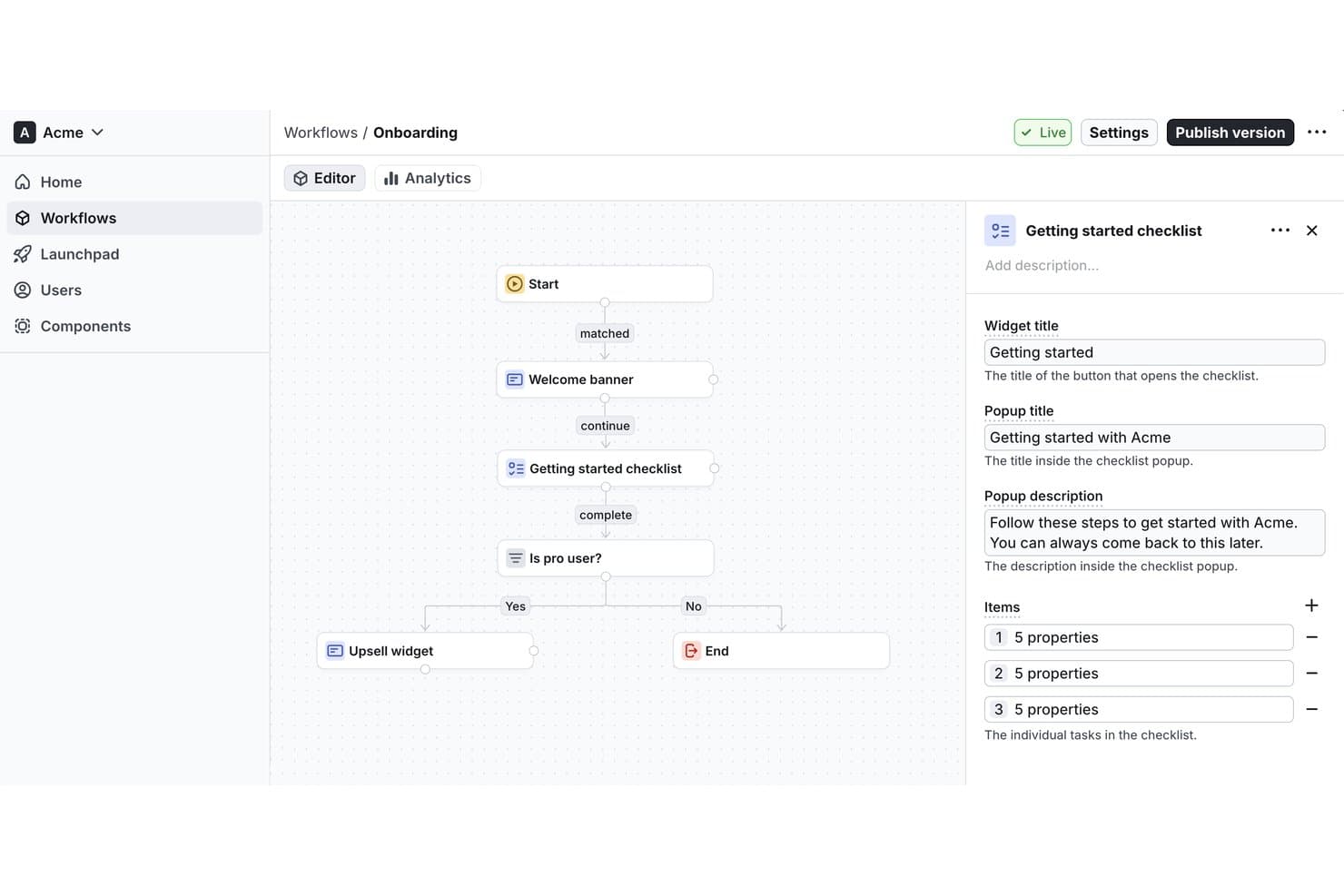
Flows lets users build onboarding workflows with checklists visually. Flows is a free user onboarding platform for building workflow-based product tours, checklists, tooltips, surveys, in-app messages, and custom components across web applications.
Who Is Flows Best For?
Flows suits product teams at early-stage web startups that can involve developers to build tailored onboarding workflows, checklists, surveys, and in-app guidance.
Why I Picked Flows
I picked Flows because it’s best for headless, dev-installed onboarding flows that need to match a product’s design system. React and JavaScript custom components let developers build native-feeling experiences, while workflow branching supports role-based tours and lifecycle onboarding. Floating Checklists can launch tours, modals, or URLs from one guided path.
Flows Key Features
- Survey formats: Create NPS, CSAT, CES, PMF, rating, and free-text surveys.
- Workflow analytics: Track entries, completions, exits, and block-level drop-off.
- Page targeting: Match URL paths using equals, contains, starts-with, or regex rules.
- Launchpad controls: Prioritize workflows and limit simultaneous in-app experiences.
Flows Integrations
Flows doesn’t have any native integrations documented. It supports React and JavaScript SDKs, framework integrations for Next.js, Angular, Vue/Nuxt, Svelte, and others, plus webhooks for custom connectivity.
What's Free?
Flows offers a free-forever Hobby plan with no credit card required, unlimited workflows, and up to 100 monthly tracked users (MTUs). It includes community support and custom component previews, but full custom components and removed Flows branding require the $30-per-month Pro plan.
Pros and Cons
Pros:
- Checklists connect directly with guided tours
- Branching supports lifecycle onboarding paths
- Unlimited workflows and team seats
Cons:
- CSS selectors complicate visual targeting
- Developer setup precedes nontechnical editing
Learn more about Flows: Best for AI-built tours with unlimited free seats
- Free plan available
- From $199/month (billed annually)
Visit WebsiteCustomer Rating:2.9/5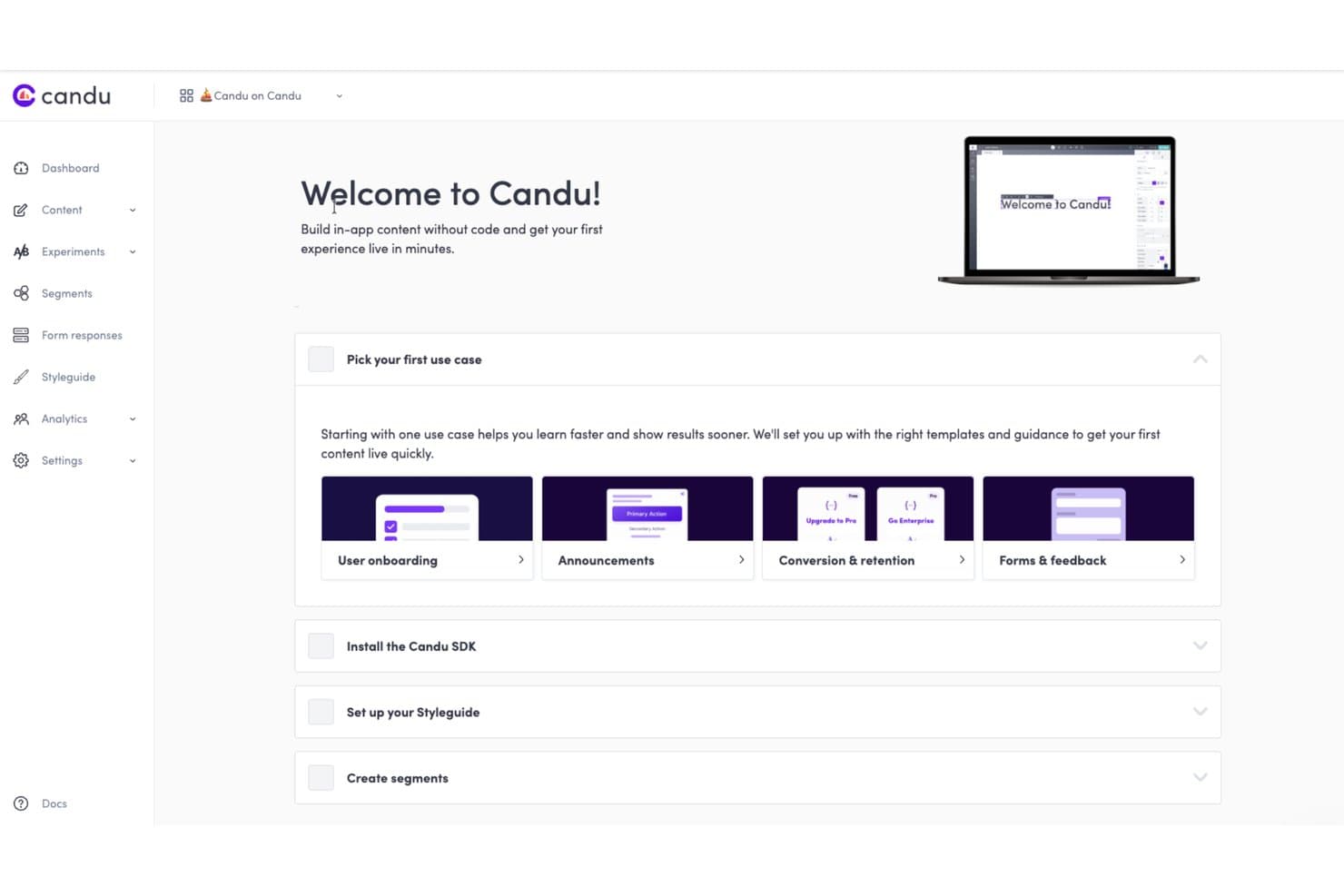
Candu guides users to pick onboarding use cases to go live fast. Candu is user onboarding software for building AI-assisted product tours, targeted overlays, and in-app guidance with no-code editing, segmentation, and engagement analytics.
Who Is Candu Best For?
Product teams that need AI-built product tours and targeted overlays with unlimited free seats for cross-functional collaborators.
Why I Picked Candu
I picked Candu because its AI-built tours turn a recorded workflow into targeted steps, copy, selectors, and URL rules. I can also give the AI assistant a screenshot or Figma file to draft an on-brand tour. Unlimited free seats let product, design, and growth teammates collaborate, although the Free plan limits teams to three live overlay experiences.
Candu Key Features
- Advanced segmentation: Target content using user attributes, events, groups, URLs, and nested rules.
- Branching tour actions: Link steps to modals, URLs, callbacks, other tours, or page elements.
- Engagement analytics: Track views, dismissals, completions, conversion rates, and funnel drop-off.
- Custom styling controls: Adjust fonts, colors, spacing, borders, shadows, and responsive layouts.
Candu Integrations
Candu documents integrations with Segment, Rudderstack, PostHog, Databricks, HubSpot (beta), Salesforce, Census, Amplitude, and Heap. It also supports webhooks plus JavaScript and REST APIs for custom data flows.
What's Free?
Candu offers a free-forever plan with unlimited seats, but it limits teams to three live overlay experiences. Paid plans start at $199 per month when billed annually, and a 14-day free trial is also available.
Pros and Cons
Pros:
- Segmentation personalizes tours by behavior
- Unlimited seats support cross-functional collaboration
- AI builds tours from recorded workflows
Cons:
- Developers must install JavaScript before launch
- Free plan excludes checklists and inline guidance
Learn more about Candu: Best for developer-built element highlighting
- Free plan available
- Free to use
Visit WebsiteCustomer Rating:5/5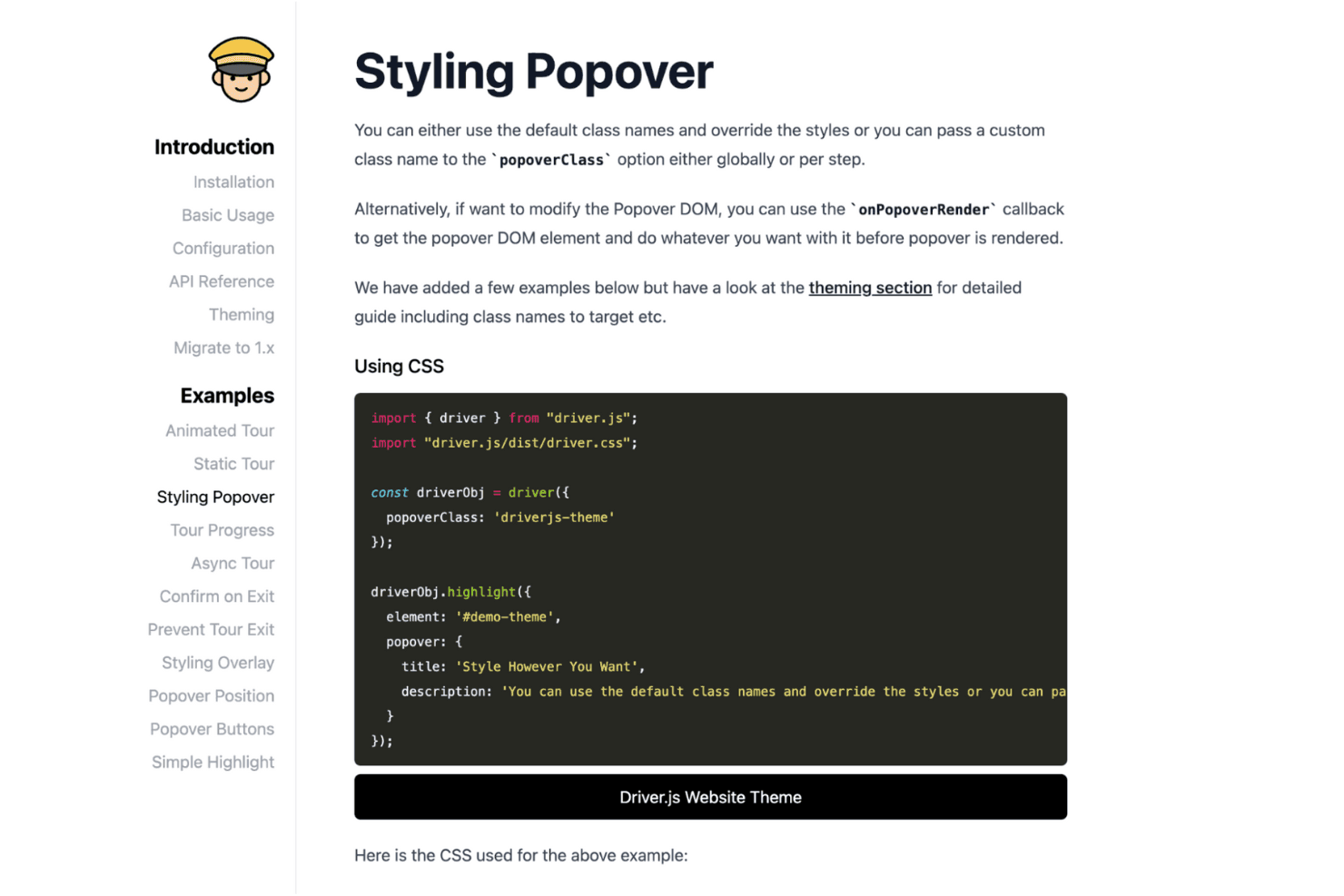
Driver.js helps teams build interactive tours by highlighting page elements. Driver.js is a free, open-source JavaScript library for user onboarding that lets developers create code-based product tours, element highlights, contextual hints, and guided interactions.
Who Is Driver.js Best For?
Driver.js suits developers who need lightweight, code-based product tours, contextual hints, and element highlights inside custom web applications.
Why I Picked Driver.js
I picked Driver.js for developer-built element highlighting because its code-based API handles focused product tours, single-element spotlights, and clickable hint beacons. I can use
highlight()for a new dashboard control,drive()for multi-step onboarding, and lifecycle hooks to connect tour events to custom analytics. It’s best suited to engineering-led onboarding rather than no-code campaign management.Driver.js Key Features
- Dependency-free package : Install the lightweight TypeScript library without additional runtime dependencies.
- Responsive support : Use tours across mobile devices and major browsers.
- Interactive controls : Configure click advancement, delayed elements, skipped steps, and custom navigation.
- Custom theming : Adjust overlays, padding, corner radius, popover classes, colors, and fonts.
Driver.js Integrations
Driver.js doesn't have any native integrations. It works with vanilla JS, React, Vue, Angular, Svelte, Solid, and Next.js, while lifecycle hooks let developers connect custom analytics or other services.
What's Free?
Driver.js is free forever as an open-source JavaScript library, with no user or time limits. It requires developer implementation and has no native integrations, so your team must connect analytics or other services through custom code.
Pros and Cons
Pros:
- Adaptable API supports custom tour behavior
- Lightweight implementation suits performance-sensitive applications
- Focused spotlight experience for key interface elements
Cons:
- No built-in analytics, segmentation, or checklists
- Every onboarding change requires developer deployment
Learn more about Driver.js: Best for developer-coded product tours
- Free plan available
- From $50/lifetime
Visit WebsiteCustomer Rating:2.6/5
Shepherd.js helps developers build interactive app tours and tutorials. Shepherd.js is a user onboarding tool designed to guide users through app tours. It's ideal for developers who want to enhance user experience with interactive tutorials. The tool supports various frameworks, making it versatile for different technical environments.
Why I picked Shepherd.js: Shepherd.js offers a free version that emphasizes guided tours, setting it apart from other tools. It includes features like full keyboard navigation and accessibility compliance, which are crucial for creating user-friendly experiences. The free version allows you to customize the look and feel of your tours, ensuring they align with your brand. It's ready to integrate with popular frameworks like React and Angular, providing flexibility for your team.
Standout features & integrations:
Features include full keyboard navigation, making it accessible for all users. The tool is highly customizable, allowing you to match your brand's aesthetics. It also provides easy integration with various frameworks, enhancing its adaptability.
Integrations include React, Ember, Angular, Vue.js, ES Modules, and plain JavaScript.
What's free? Shepherd.js offers a free-forever plan with no restrictions on the number of users or tours you can create.
Pros and Cons
Pros:
- Full keyboard navigation
- Supports multiple frameworks
- Easy to customize tours
Cons:
- Basic out-of-the-box design
- Requires technical knowledge
Learn more about Shepherd.js:
How I Evaluate Free User Onboarding Software
First, I define what counts as free. A qualifying user onboarding software plan stays free long term, not just as a trial, though seats or user volumes may be capped. From there, I split my evaluation into three parts: core functionality, weighted most, like building tours and tracking engagement; standout features, like Chrome extension editing; and free-tier growth limits.
Core Functionality (Table Stakes For This List)
In addition to my free plan requirements, I use a scoring system to select tools for my list. I score each one on a scale from 0 (does not offer the functionality) to 5 (excels in this area) for each core functionality listed below, based on what's available on the free plan. I then convert the total into a percentage to help assess each tool's overall fit, with extra weight on any functionalities I've deemed essential.
- In-App Guidance (Essential): I look for no-code tours, tooltips, or walkthroughs with enough targeting and styling to guide new users through a key task.
- Onboarding Checklists: I check whether teams can customize tasks, track completion, and guide users toward milestones like creating a first project.
- User Segmentation: I assess whether teams can target onboarding by user attributes or behavior, such as showing different guidance to new and returning users.
- Engagement Analytics: I look for completion and drop-off data that helps identify where users leave a tour or checklist unfinished.
- In-App Messaging: I consider whether teams can target messages to relevant users, such as announcing a feature to people who haven’t tried it.
Once I have a list of tools that meet the criteria, I consider what sets each platform apart.
Differentiating Factors (What Sets Vendors Apart)
Here's how I compare and contrast different vendors:
Standout Features
I look for a Chrome extension editor that lets me build and preview tours on the live product without involving engineering. I also check for no-code event tracking—tagging clicks or page visits to trigger flows based on real behavior, not just URLs. A resource center widget matters too, giving users one place to find checklists, tours, and help docs on their own.
Beyond Features
I check how quickly a lean team can go from signup to a live onboarding flow. Tools like Userflow and Chameleon let you install a snippet and publish a tour the same day, which matters when you're testing ideas on a free plan with no engineering support. I also evaluate the free tier's scalability ceiling—MAU caps and flow limits determine how long the plan stays viable as your user base grows. If a startup hits the cap mid-launch, migrating tools mid-funnel disrupts the onboarding experience. Finally, I look at self-serve support quality, since free plans rarely include dedicated help.
Ücretsiz Kullanıcı Oryantasyonu Yazılımı Nasıl Seçilir?
Karmaşık özellik listeleri ve fiyatlandırma yapıları, ücretsiz bir kullanıcı oryantasyonu yazılımıyla gerçekten ne elde ettiğinizi anlamanızı zorlaştırabilir. Yazılım seçimi sürecinizde ilerlerken odağınızı korumanıza yardımcı olmak için göz önünde bulundurmanız gereken bazı faktörleri aşağıda bulabilirsiniz:
| Faktör | Dikkat Edilmesi Gerekenler |
| Ücretsiz Teklifin Kapsamı | Ücretsiz planda nelerin bulunduğunu kontrol edin. Turlar ve araç ipuçları gibi temel özelliklerin gizli maliyetler veya ciddi sınırlamalar olmadan kullanılabildiğinden emin olun. |
| Ölçeklenebilirlik | Yazılımın ekibinizle birlikte büyüyüp büyüyemeyeceğini değerlendirin. İhtiyaçlarınız genişledikçe mevcut iş akışlarını aksatmadan yükseltme yapmanıza olanak tanıyan seçenekleri arayın. |
| Entegrasyonlar | Aracın CRM veya analiz platformları gibi mevcut sistemlerinizle entegre olduğundan emin olun. Bu, sorunsuz bir iş akışı ve veri tutarlılığı sağlar. |
| Kullanım Kolaylığı | Kullanıcı arayüzünü ve kurulum sürecini değerlendirin. Kullanıcı dostu bir tasarım zamandan tasarruf etmenizi sağlar ve ekibinizin öğrenme sürecini kısaltır. |
| Özelleştirme | Yazılımı markanızın görünümüne ve tarzına uyacak şekilde ne ölçüde uyarlayabileceğinizi belirleyin. Özelleştirme seçenekleri kullanıcı etkileşimini ve memnuniyetini artırabilir. |
| Destek | Müşteri desteğinin düzeyini ve erişilebilirliğini değerlendirin. Hızlı ve kolay erişilebilir destek, kullanıcıları sürece dahil etme sırasında karşılaşılan zorluklarda kritik olabilir. |
| Özellik Seti | Farklı araçlarda sunulan özellikleri karşılaştırın. Etkinliği en üst düzeye çıkarmak için bunların segmentasyon veya analiz gibi özel ihtiyaçlarınızla örtüştüğünden emin olun. |
| Kullanıcı Geri Bildirimi | Memnuniyeti ve yaygın sorunları değerlendirmek için kullanıcı incelemelerine göz atın. Gerçek dünyadan elde edilen bilgiler, olası sorunlardan kaçınmanıza ve doğru seçimi yapmanıza yardımcı olabilir. |
Ücretsiz Kullanıcı Sürece Dahil Etme Yazılımı Nedir?
Kullanıcıları sürece dahil etme yazılımı, etkileşimli turlar ve araç ipuçları gibi özellikler sunarak yeni kullanıcıların bir ürünü kullanmaya başlamasına yardımcı olan bir araçtır. Genellikle bu araçlar, başlangıç yapabilmeniz için ücretsiz denemeler veya sınırlı özellik erişimi sunar. Ürün yöneticileri, UX tasarımcıları ve müşteri başarısı ekipleri, kullanıcı etkileşimini ve elde tutmayı artırmak için bu araçları sıklıkla kullanır. Kontrol listeleri, uygulama içi mesajlaşma ve kullanıcı segmentasyonu, kullanıcıların ürünü etkili bir şekilde anlamasını ve kullanmasını sağlayarak sürece dahil etme çalışmalarını destekler.
Ücretsiz Kullanıcı Sürece Dahil Etme Yazılımının Özellikleri
Kullanıcıları sürece dahil etme yazılımında yaygın olarak bulunan özellikleri ve bunlardan hangilerinin genellikle ücretsiz veya ücretli planlara dahil edildiğini inceleyelim.
Genellikle Ücretsiz Planlara Dahil Edilenler
- Etkileşimli turlar: özelliklerin benimsenmesini hızlandırmak ve ürünün öğrenilmesini kolaylaştırmak için kullanıcıları arayüzünüzde adım adım yönlendirin.
- Araç ipuçları: Kullanıcıları bunaltmadan, ihtiyaç duydukları anda doğrudan uygulama içinde yararlı yönlendirmeler sunun.
- Kontrol listeleri: Kullanıcıları temel işlemleri sırasıyla tamamlamaya yönlendirerek daha sorunsuz bir müşteri sürece dahil etme akışı sağlayın.
- Açılır pencereler ve bildirimler: Kritik anlarda ürün güncellemelerini öne çıkarın veya etkileşimi teşvik edin.
- Temel analiz: Kullanıcıların sürece dahil etme öğeleriyle nasıl etkileşim kurduğunu izleyerek süreçten ayrılma noktalarını belirleyin ve akışları optimize edin.
- Özelleştirme seçenekleri: Sürece dahil etme deneyimini marka kimliğinizle uyumlu hâle getirmek için logonuzu, renklerinizi ve mesajlarınızı ekleyin.
- Sınırsız tur: Ücretsiz planda bile birden fazla uygulamalı anlatımla farklı kullanıcı yollarını destekleyin.
Genellikle Ücretli Kullanıcı Sürece Dahil Etme Yazılımı Özellikleri
- Gelişmiş analiz: Ayrıntılı raporlarla kullanıcı davranışı ve sürece dahil etme etkinliği hakkında daha derin içgörüler elde edin.
- A/B testi: Kullanıcı etkileşimi açısından en iyi sonucu neyin verdiğini belirlemek için farklı sürece dahil etme akışlarını deneyin.
- Çoklu dil desteği: Sürece dahil etme materyallerini birden fazla dilde sunarak küresel bir kitleye hitap edin.
- Uygulama içi anketler: Sürece dahil etme stratejilerini geliştirmek için kullanıcı geri bildirimlerini doğrudan uygulama içinde toplayın.
- CRM entegrasyonları: Sorunsuz bir deneyim için sürece dahil etme verilerini müşteri ilişkileri yönetimi sistemleriyle senkronize edin.
- Gelişmiş özelleştirme: Markanızın estetiğiyle tamamen uyum sağlamak için daha ayrıntılı tasarım seçeneklerine erişin.
- Performans takibi: Kullanıcı başarı oranlarını izleyin ve sürece dahil etme sürecinde iyileştirilmesi gereken alanları belirleyin.
- Öncelikli destek: Sorunları hızla çözmek için daha hızlı ve kişiselleştirilmiş yardım alın.
Ücretsiz Kullanıcı Sürece Dahil Etme Yazılımının Faydaları
Ücretsiz sürece dahil etme yazılımı, ekiplerin minimum yatırımla nitelikli ve kendi kendine kullanılabilen bir sürece dahil etme deneyimi sunmasına yardımcı olur. İster bir girişim ister yerleşik bir ürün ekibi olun, temel faydalar şunlardır:
- Küçük işletmeler için maliyet verimliliği: Ücretli bir plana geçmeden temel kullanıcı işe alıştırma işlevlerine sahip olun.
- Değere daha hızlı ulaşma: Rehberli turlar ve bağlamsal ipuçları aracılığıyla kullanıcıların temel ürün kilometre taşlarına daha hızlı ulaşmasına yardımcı olun.
- Geliştirilmiş müşteri deneyimi: Kullanıcıların ürününüzü ilk kez deneyimlediği sırada etkileşimde kalmasını ve bilgilendirilmesini sağlayın.
- Esnek kurulum: Çoğu aracın kurulumu kolaydır ve hızlı dağıtıma olanak tanır; bu da onları özel geliştirme kaynakları olmayan ekipler için ideal kılar.
- Kişiselleştirilmiş kullanıcı işe alıştırma: Ücretsiz katmanlarda bile birçok platform, daha alakalı bir kullanıcı yolculuğu oluşturmak için temel düzeyde özelleştirmeyi destekler.
- Geri bildirim ve yineleme: Girdi toplamak ve kullanıcı işe alıştırma deneyimini sürekli olarak geliştirmek için bildirimleri veya basit açılır pencereleri kullanın.
- Ölçeklenebilir kullanıcı işe alıştırma: Ücretsiz başlayın ve ürününüz olgunlaştıkça otomatik kullanıcı işe alıştırma akışları veya A/B testi gibi gelişmiş özelliklere geçin.
Ücretsiz Kullanıcı İşe Alıştırma Yazılımlarının Maliyetleri ve Fiyatlandırması
Bu makaleye, ücretsiz olarak sunulan en iyi kullanıcı işe alıştırma yazılımı seçeneklerini aradığınız için geldiğinizi biliyorum. Ancak ücretsiz planlar yalnızca sınırlı özellikler sunduğundan, gelecekte planınızı yükseltmeniz gerekme ihtimali oldukça yüksektir.
Aşağıdaki tablo, yaygın planları, ortalama fiyatlarını ve kullanıcı işe alıştırma yazılımı çözümlerinde bulunan tipik özellikleri özetlemektedir:
Kullanıcı İşe Alıştırma Yazılımları için Plan Karşılaştırma Tablosu
| Plan Türü | Ortalama Fiyat | Yaygın Özellikler |
| Ücretsiz Plan | $0 | Etkileşimli turlar, ipuçları, temel analizler ve sınırlı özelleştirme. |
| Kişisel Plan | $5-$25/kullanıcı/ay | Gelişmiş özelleştirme, kullanıcı segmentasyonu, uygulama içi mesajlaşma ve temel destek. |
| İşletme Planı | $30-$90/ kullanıcı/ay | A/B testi, çoklu dil desteği, CRM entegrasyonları ve gelişmiş analizler. |
| Kurumsal Plan | $100+/kullanıcı/ay | Özel hesap yöneticisi, öncelikli destek, tam özelleştirme ve ölçeklenebilirlik. |
Ücretsiz Kullanıcı Oryantasyon Yazılımı Hakkında SSS
Ücretsiz kullanıcı oryantasyon yazılımı hakkında sık sorulan bazı soruların yanıtları:
Ücretsiz oryantasyon yazılımıyla verilerimin güvende olduğundan nasıl emin olabilirim?
Ücretsiz oryantasyon yazılımı kullanırken sağlayıcının veri güvenliği politikalarını kontrol edin. GDPR gibi ilgili düzenlemelere uyduklarından emin olun. Veri şifreleme ve erişim denetimleri gibi özellikleri arayın. Ekibinizin verilerin nasıl yönetildiğini ve saklandığını anlaması önemlidir.
Ücretsiz planlarda kullanıcı sayısıyla ilgili sınırlamalar var mı?
Evet, birçok ücretsiz plan etkin kullanıcı veya koltuk sayısını sınırlar. Planın ekibinizin mevcut ihtiyaçlarını karşıladığından emin olmak için bu sınırlamaları incelemeniz çok önemlidir. Büyüme bekliyorsanız, daha fazla kullanıcıya uyum sağlamak için ne kadar kolay yükseltme yapabileceğinizi değerlendirin.
Ücretsiz oryantasyon yazılımını diğer araçlarla entegre edebilir miyim?
Ücretsiz sürümlerin entegrasyon özellikleri genellikle sınırlıdır. Ancak çoğu, Google Analytics veya Slack gibi popüler araçlarla temel entegrasyonlara hâlâ izin verir. Mevcut iş akışlarınızla uyumlu olduklarından emin olmak için sunulan belirli entegrasyonları kontrol edin.
Ücretsiz planlarda ne tür bir destek bekleyebilirim?
Ücretsiz planlar için destek genellikle topluluk forumları veya temel e-posta desteğiyle sınırlıdır. Canlı sohbet ve telefon desteği çoğunlukla ücretli planlara ayrılır. Taahhütte bulunmadan önce ekibinizin sunulan destek düzeyini yeterli bulduğundan emin olun.
Ücretsiz araçlarla oryantasyon sürecimin etkililiğini nasıl değerlendirebilirim?
Kullanıcı etkileşimini ve tamamlama oranlarını izlemek için ücretsiz planlarda sunulan temel analizleri kullanın. Kullanıcıların oryantasyon sürecinizle nasıl etkileşim kurduğuna dair içgörüleri arayın. Gerekli düzenlemeleri yapmak için bu verileri düzenli olarak inceleyin.
Ücretsiz yazılımla oryantasyon deneyimini özelleştirebilir miyim?
Ücretsiz planlar genellikle sınırlı özelleştirme seçenekleri sunar. Çoğu zaman renkler ve logolar gibi temel öğeleri değiştirebilirsiniz. Daha gelişmiş özelleştirme için ücretli bir plana yükseltmeniz gerekebilir. Markanız için ne kadar özelleştirmenin gerekli olduğunu değerlendirin.