

ActivTrak'e bir alternatif arıyorsanız yalnız değilsiniz. Ekibinizin özel ihtiyaçlarına daha iyi uyan bir araç arıyor veya ActivTrak'in sunmadığı özelliklere ihtiyaç duyuyor olabilirsiniz. İş gücü analitiği platformları; üretkenlik takibi ve veri gizliliği endişeleri gibi zorlukların üstesinden gelmeye yardımcı olarak işletmelerin ofiste çalışan, hibrit ve uzaktan çalışan personeli yönetmesini kolaylaştırabilir.
Deneyimlerime göre doğru aracı bulmak, deneme yanılma sürecine dönüşebilir. Size zaman ve emek kazandırmak amacıyla çeşitli alternatifleri inceledim ve sorunlarınızı gerçekten çözen seçenekleri bulmaya çalıştım.
Bu liste yazısında, benzersiz avantajlar sunan en iyi seçenekleri keşfedeceksiniz. Gelişmiş özellikler, daha uygun fiyatlandırma veya ihtiyaçlarınıza daha uygun çözümler arıyorsanız sizin için bir seçenek var. Ekibiniz için en uygun çözümü bulalım.
ActivTrak Nedir?
ActivTrak, işletmelerin ekip üretkenliğini anlamasına ve geliştirmesine yardımcı olmak için tasarlanmış bir iş gücü analitiği ve istihbarat platformudur. Çalışan performansı ve davranışları hakkında içgörüye ihtiyaç duyan yöneticiler, insan kaynakları profesyonelleri ve BT uzmanları tarafından yaygın olarak kullanılır. Otomatik zaman takibi, davranış analizi ve gerçek zamanlı izleme gibi özellikler verimsizliklerin belirlenmesine ve iş akışlarının iyileştirilmesine yardımcı olur. Genel olarak ActivTrak, ekibinizi etkili bir şekilde yönetme konusunda bilinçli kararlar almanıza yardımcı olacak değerli veriler sunar.
ActivTrak Alternatifleri Karşılaştırma Tablosu
Bu karşılaştırma tablosu, en iyi ActivTrak alternatifleri seçimlerimdeki fiyatlandırma ayrıntılarını özetlemektedir.
Score legend (out of 5)
- Excellent4.5–5
- Good4–4.4
- Average3–3.9
- Below average2–2.9
- Poor1–1.9
Sorted by: Default
| Tool | Starting Price | Website | ||||||||||||
|---|---|---|---|---|---|---|---|---|---|---|---|---|---|---|
Best for mouse-jiggler and clicker detection | Not rated | 2 | 4 | 3 | 3 | 4 | 4 | Not rated | Not rated | Not rated | Not rated | Not rated | $7/user/month Free trial available | Website |
Best for cybersecurity features | Not rated | Not rated | Not rated | Not rated | Not rated | Not rated | 4 | 4 | 5 | 4 | 5 | 5 | Pricing upon request Free demo available | Website |
Best for all-in-one time tracking and workforce ops | Not rated | 2 | 4 | 2 | 3 | 4 | 4 | Not rated | Not rated | Not rated | Not rated | Not rated | $5/user/month 14-day free trial | Website |
Best for time tracking with scheduling visibility | Not rated | Not rated | Not rated | Not rated | Not rated | Not rated | 3 | 5 | 1 | 4 | 4 | 3 | $4.99/user/month Free plan + 7-day trial + demo available | Website |
Best for time tracking with project billing | Not rated | Not rated | Not rated | Not rated | Not rated | Not rated | 4 | 3 | 2 | 4 | 4 | 3 | $3.99/user/month Free plan + free trial + free demo available | Website |
Best for on-premise visual monitoring with DLP | Not rated | Not rated | Not rated | Not rated | Not rated | Not rated | 4 | 4 | 4 | 4 | 4 | 5 | $7/user/month Free demo + 14-day free trial available | Website |
Best for remote team productivity benchmarking | Not rated | Not rated | Not rated | Not rated | Not rated | Not rated | 4 | 5 | 2 | 4 | 4 | 3 | Pricing upon request 14-day free trial | Website |
Best for distributed team tracking | Not rated | Not rated | Not rated | Not rated | Not rated | Not rated | 3 | 5 | 4 | 4 | 4 | 4 | $9/user/month 15-day free trial | Website |
Best for AI-driven workforce capacity planning | Not rated | Not rated | Not rated | Not rated | Not rated | Not rated | 4 | 4 | 3 | 4 | 5 | 3 | $8/user/month Free trial + free demo available | Website |
Best for monitoring with built-in payroll automation | Not rated | Not rated | Not rated | Not rated | Not rated | Not rated | 4 | 5 | 2 | 4 | 4 | 4 | $3.99/user/month 14-day free trial + free demo available | Website |


Why Trust Our Software Recommendations
6,700+
Reviews
20
Industry experts
16+
Evaluation factors
14
Years
Our team has been testing and reviewing software since 2012. As product managers ourselves, we know how difficult—and important—it is to choose the right software.
For this guide, we evaluated tools using hands-on testing and independent research, scoring tools using our selection criteria.
Our reviews reflect our human editorial judgment, not a sales pitch.
Expert reviewers:
- Andrew LumbySenior TPM
- Cristiano ValimSenior UI/UX Lead


En İyi ActivTrak Alternatifleri İncelemeleri
Aşağıda, kısa listeme giren en iyi ActivTrak alternatiflerine ilişkin ayrıntılı özetlerimi bulabilirsiniz. İncelemelerim; her aracın temel özelliklerine, avantajlarına ve dezavantajlarına, entegrasyonlarına ve ideal kullanım alanlarına ayrıntılı bir bakış sunarak sizin için en iyi seçeneği bulmanıza yardımcı olur.
 Best for mouse-jiggler and clicker detection
- Free trial available
- From $7/user/month
Visit WebsiteCustomer Rating:4.7/5
Apploye lets users manage and send payroll payments by hourly rate. Apploye is a time tracking and employee monitoring platform built for remote and hybrid teams that need visibility into how work hours, apps, and tasks are tracked—without relying on manual check-ins or self-reported timesheets.
Who Is Apploye Best For?
Apploye is a strong fit for small to mid-sized remote teams whose managers need time tracking, attendance, and activity monitoring without paying enterprise-level prices.
Why I Picked Apploye
I picked Apploye because it's one of the few tools that specifically detects mouse jigglers and auto-clickers, flagging them in a dedicated unusual-activity report with timestamps, duration, and screenshots captured during the event. When a remote team member's activity looks suspiciously consistent, I can pull up that report and see exactly which tool was detected and when, rather than just noticing an oddly high activity score.
Apploye Key Features
- Automatic time tracking: The desktop app records time against projects and tasks, logging app names, website URLs, and active durations in 10-minute blocks while the timer runs.
- Attendance and leave management: Managers can track clock-ins, clock-outs, leave types, balances, shift schedules, and overtime from a single dashboard.
- Configurable screenshot monitoring: Workspace owners can set screenshot frequency per plan tier—up to 60 per hour on Power—or disable screenshots entirely for specific users.
- Payroll calculation from tracked time: Apploye calculates pay from approved timesheets using hourly or fixed rates and generates client invoices directly from billable hours.
Apploye Integrations
Apploye offers native integrations with Jira, Asana, ClickUp, Trello, Monday.com, Zoho, and Deel. It also provides a read-only REST API and MCP server for custom connectivity; Slack, QuickBooks, PayPal, and Zapier are listed as coming soon.
Pros and Cons
Pros:
- Timesheets support payroll and client billing
- Offline tracking syncs after connectivity returns
- Detects mouse jigglers with timestamped evidence
Cons:
- Mobile screenshot review and approvals feel awkward
- Limited report filters hinder cross-project comparisons
Learn more about Apploye: Best for cybersecurity features
- Free demo available
- Pricing upon request
Visit WebsiteCustomer Rating:4.5/5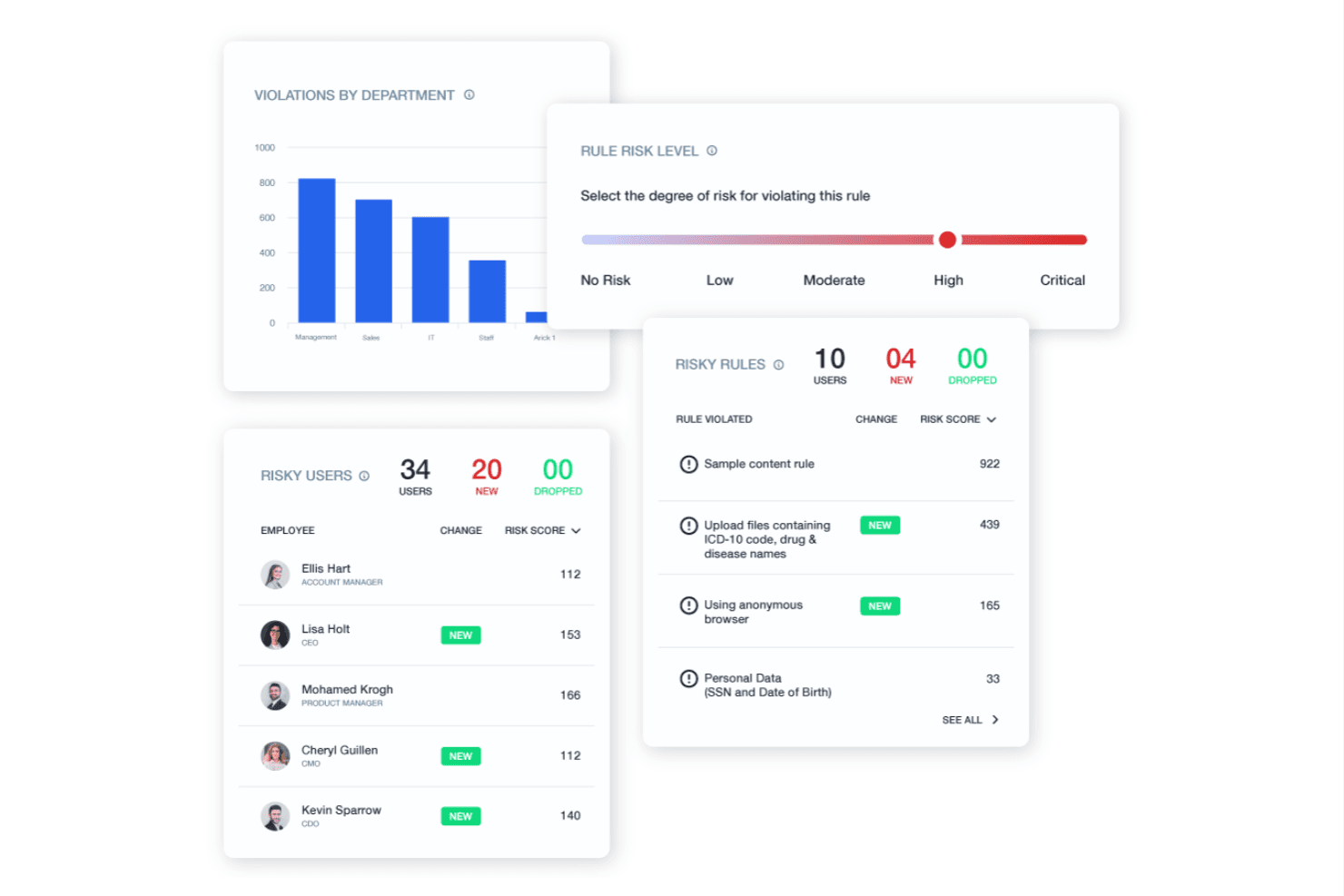
Teramind monitors user activity to protect data and enforce compliance. Teramind is employee monitoring software that helps IT and operations teams track workforce activity, understand work patterns, and investigate potential policy violations across company devices.
Who Is Teramind Best For?
Teramind suits IT and security teams that need to monitor endpoint activity, investigate insider risks, and support internal security reviews.
Why I Picked Teramind
I picked Teramind as an ActivTrak alternative because its cybersecurity features help teams trace endpoint activity and investigate policy violations. I like that teams can review recorded user sessions and set alerts for risky behavior, giving security staff evidence when they investigate unusual access or suspected data misuse.
Teramind Key Features
- Application and website tracking: Logs apps used and sites visited during work.
- Active and idle time: Separates active computer use from idle periods.
- Schedule adherence: Tracks whether employees follow assigned work schedules.
- Privacy controls: Lets admins mask sensitive data and exclude non-business domains.
Teramind Integrations
Teramind documents integrations with Splunk, ArcSight, IBM QRadar, Exabeam, OpenText, McAfee, ServiceNow, Jira, Zendesk, and Redmine. Its API supports custom integrations, which can help connect employee activity data with security and project workflows.
Pros and Cons
Pros:
- Granular rules target sensitive activity
- Recorded sessions support incident investigations
- Real-time alerts flag insider-risk behavior
Cons:
- Policy setup and reporting take work
- Intensive monitoring can feel intrusive
Learn more about Teramind: Best for all-in-one time tracking and workforce ops
- 14-day free trial
- From $5/user/month
Visit WebsiteCustomer Rating:5/5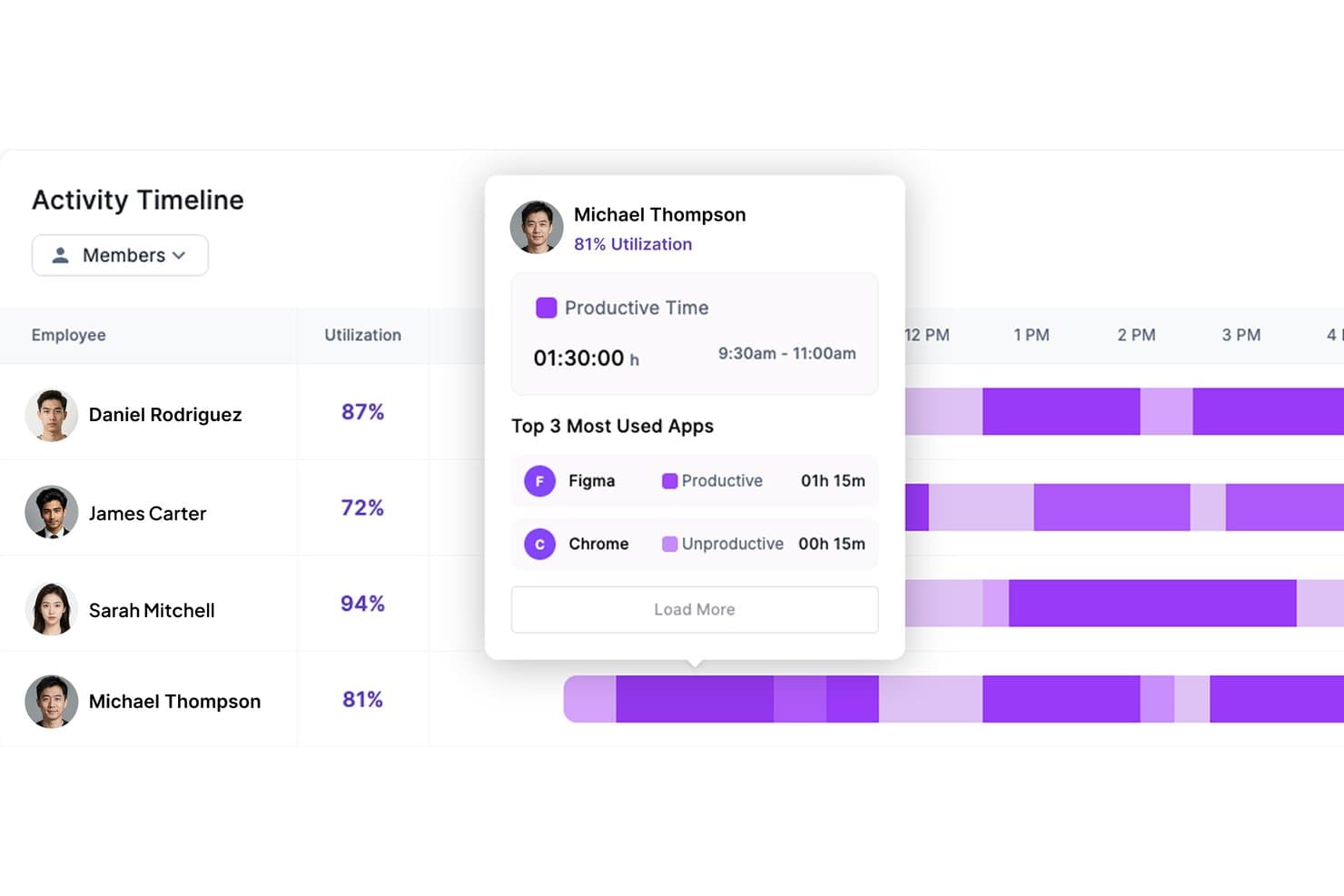
Modge tracks employee app usage and productivity time on a timeline. Modge is a workforce management platform for businesses that need visibility into employee work patterns and a clearer way to manage time, attendance, and daily operations.
Who Is Modge Best For?
Modge is a fit for operations managers overseeing shift-based or mobile teams who need to coordinate day-to-day workforce activity.
Why I Picked Modge
I picked Modge as an ActivTrak alternative for all-in-one time tracking and workforce ops. It classifies app and website activity as productive, neutral, or unproductive, while automatic session tracking feeds timesheets managers can approve. For shift-based teams, schedules and shift-adherence scores connect activity visibility with attendance and coverage.
Modge Key Features
- Optional screenshots: Configure capture intervals and blur settings by team or person.
- Productivity dashboard: Review productivity scores, active and idle time, attendance, and recent activity.
- Leave management: Set leave policies and track manager approvals, balances, and utilization.
- Profitability reports: Compare margins by project, client, and person using bill and pay rates.
Modge Integrations
Modge doesn’t list native integrations. It offers payroll-ready CSV exports in generic, Wise, and PayPal formats.
Pros and Cons
Pros:
- Reviewers praise real-time visibility and interface
- Shift adherence connects attendance with activity
- Automatic sessions feed approval-ready timesheets
Cons:
- Activity monitoring may feel intrusive to employees
- Desktop tracking supports only Windows and macOS
Learn more about Modge: Best for time tracking with scheduling visibility
- Free plan + 7-day trial + demo available
- From $4.99/user/month
Visit WebsiteCustomer Rating:4.8/5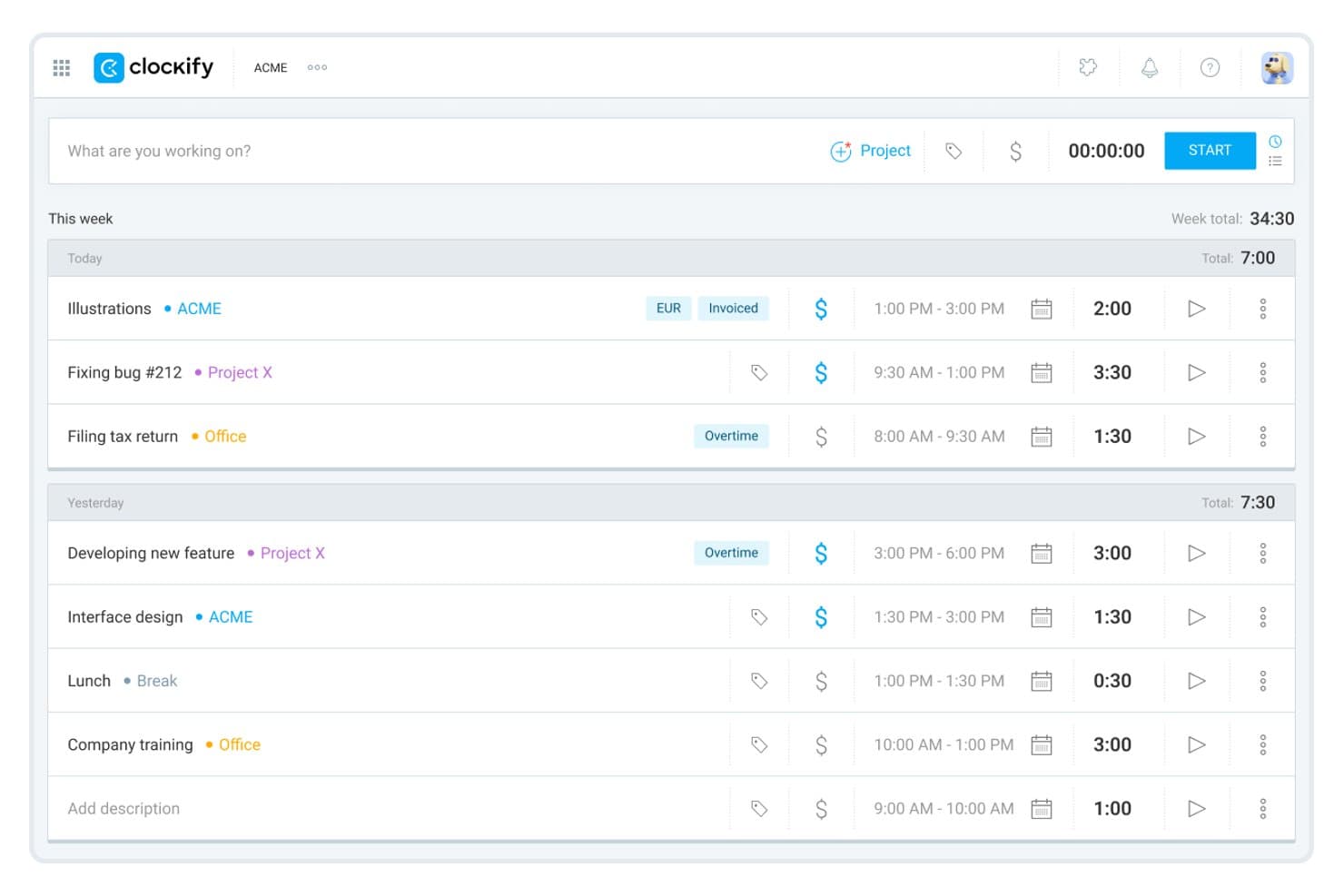
Clockify lets users log and review daily time entries by project. Clockify is time-tracking software for product and project teams that need work-hour records and project reports to understand where effort goes without relying on activity surveillance.
Who Is Clockify Best For?
Clockify suits product operations and project leads who need to compare team schedules with tracked hours across projects.
Why I Picked Clockify
I picked Clockify for time tracking with scheduling visibility as an alternative to activity monitoring. Its team schedule lets me compare planned work with tracked hours, while project reports show where time went across initiatives. I use those records to spot capacity gaps before a product milestone slips.
Clockify Key Features
- Kiosk: Let team members clock in and out from a shared device.
- Time off: Record and manage team members’ leave requests.
- Expense tracking: Log project-related expenses alongside work records.
- Timesheet approval: Review and approve submitted timesheets.
Clockify Integrations
Clockify lists native integrations with Pumble, Plaky, QuickBooks, Xero, Jira, Google Calendar, and Outlook; its browser extension adds timer buttons in 90+ web apps, including Asana, Trello, GitHub, and Azure DevOps. It also supports Zapier and offers a REST API for custom integrations.
Pros and Cons
Pros:
- Manual time logs avoid screen surveillance
- Project reports show where team hours go
- Planned schedules compare against tracked hours
Cons:
- No automatic activity monitoring
- Scheduling tools remain basic
Learn more about Clockify: Best for time tracking with project billing
- Free plan + free trial + free demo available
- From $3.99/user/month (billed annually)
Visit WebsiteCustomer Rating:4.7/5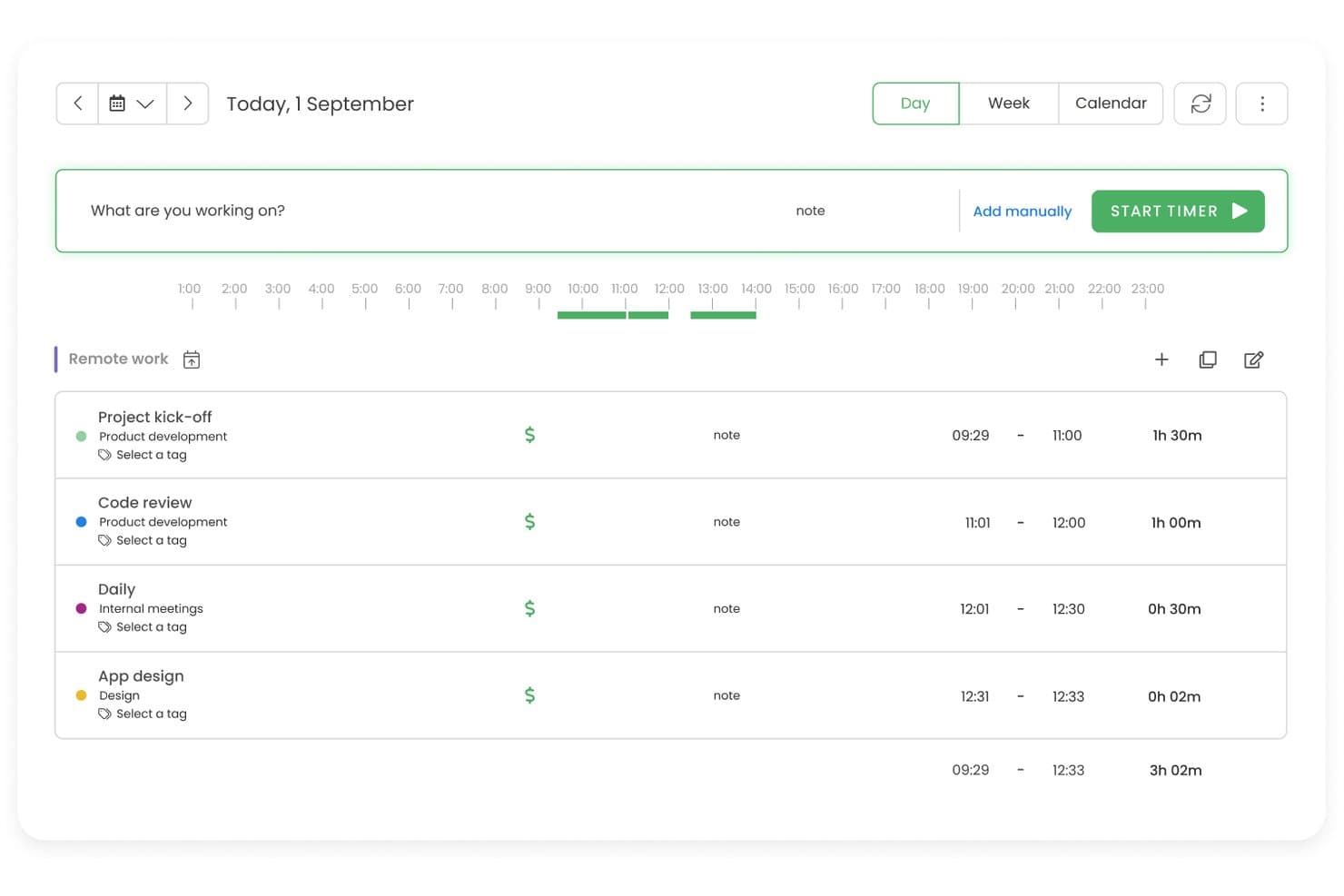
TimeCamp tracks daily work sessions with timers and task labels. TimeCamp is a time-tracking platform for product and project teams that need clearer visibility into how employees allocate work hours across initiatives.
Who Is TimeCamp Best For?
TimeCamp suits agencies, consultancies, and client-service teams that need to track billable hours and connect time records to project costs.
Why I Picked TimeCamp
I picked TimeCamp as a Best ActivTrak alternative when the priority is Best for time tracking with project billing. I can track billable hours against project budgets, set custom rates, and review costs and revenue as work happens. That gives me a view of how recorded work hours map to client projects, rather than focusing on screen surveillance.
TimeCamp Key Features
- Apps and website tracking: TimeCamp records app and website activity during tracked work.
- Optional screenshots: Admins can enable screenshots to review activity snapshots.
- Attendance tracking: Record work hours, overtime, absences, and time off.
- Timesheet approvals: Managers can review, approve, reject, or reopen submitted timesheets.
TimeCamp Integrations
TimeCamp’s integration catalog includes Asana, Azure DevOps, ClickUp, Jira, GitHub, GitLab, Slack, Google Calendar, QuickBooks Online, Xero, and Zapier. It also offers a REST API for custom integrations.
Pros and Cons
Pros:
- Optional screenshots add reviewable activity context
- Automatic activity capture helps recover unlogged work
- Project budgets connect hours to client profitability
Cons:
- Desktop and mobile sync can lag
- Reporting filters limit project-to-invoice comparisons
Learn more about TimeCamp: Best for on-premise visual monitoring with DLP
- Free demo + 14-day free trial available
- From $7/user/month (billed annually)
Visit WebsiteCustomer Rating:4.8/5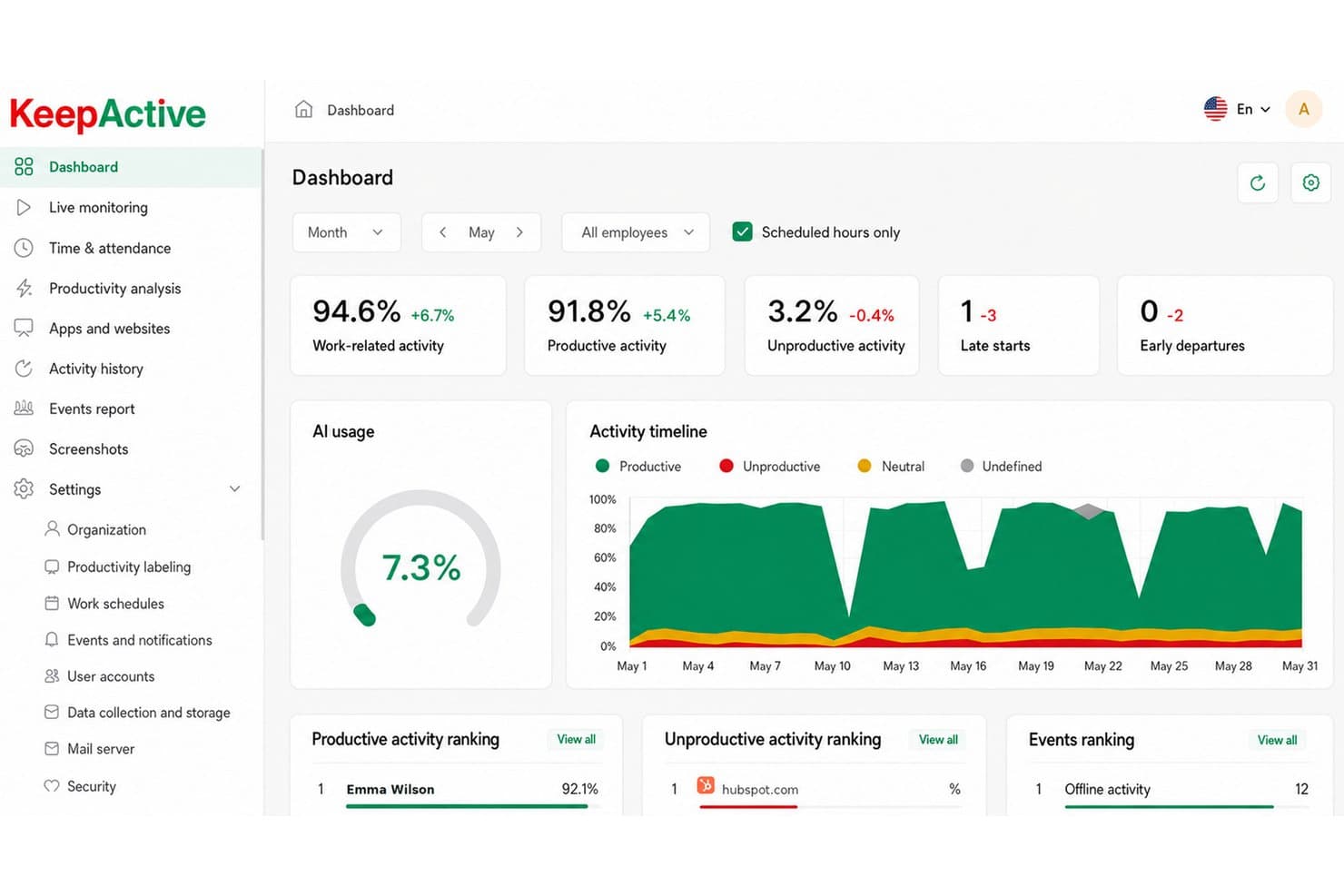
KeepActive tracks productivity, late starts, and AI usage in one dashboard. Keepactive is an employee monitoring platform that helps businesses review work activity, track attendance, and identify productivity or workflow issues across their teams.
Who Is Keepactive Best For?
Keepactive suits IT and security teams that need on-premise employee activity monitoring, visual oversight, and data loss prevention controls.
Why I Picked Keepactive
I picked Keepactive as an ActivTrak alternative because it combines on-premise deployment with visual employee monitoring and DLP controls. I can review screen activity and investigate potential mishandling of sensitive data while keeping monitoring infrastructure in-house.
Keepactive Key Features
- Time tracking: Review timesheets and compare employees’ active time with their recorded work time.
- Productivity analysis: Report on productive, unproductive, neutral, and idle time across selected periods.
- App and website reports: Review usage by application, website, and category.
- Project and task tracking: Create projects, epics, and tasks, then assign team members and managers.
Keepactive Integrations
Keepactive supports Active Directory synchronization for user accounts, company structure, and monitoring settings. It also provides an API for custom integrations; specific native integrations with third-party business applications aren’t clearly documented.
Pros and Cons
Pros:
- DLP helps detect risky data handling
- Live screen playback supports incident reviews
- On-premise deployment keeps monitoring in-house
Cons:
- Management console lacks administrative depth
- Server setup can require hands-on configuration
Learn more about Keepactive: Best for remote team productivity benchmarking
- 14-day free trial
- Pricing upon request
Visit WebsiteCustomer Rating:4.5/5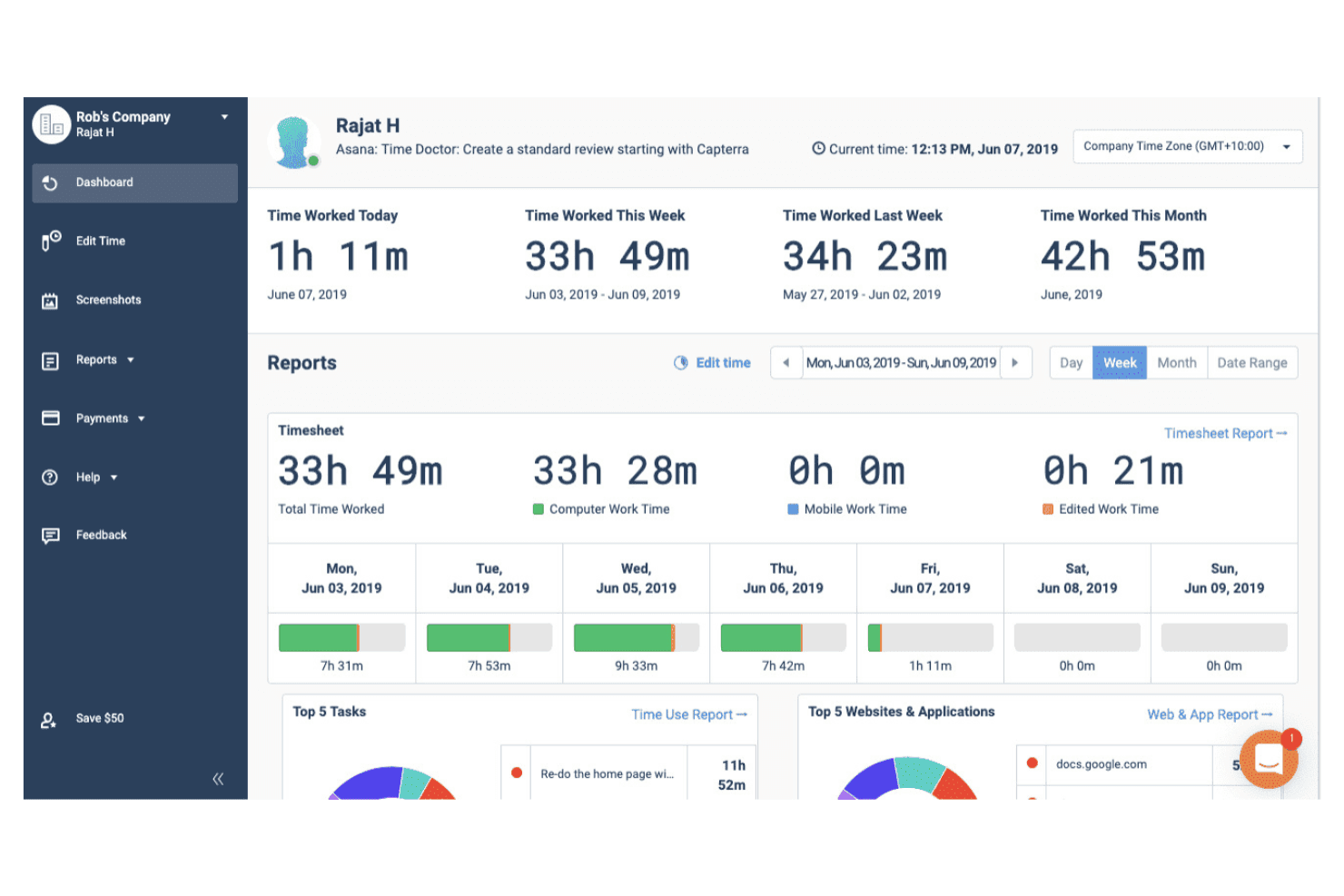
Time Doctor monitors remote team productivity and tracks work hours. Time Doctor combines employee monitoring and time tracking for distributed teams, helping managers review attendance, work patterns, and potential workflow issues.
Who Is Time Doctor Best For?
Time Doctor suits operations leads and managers at remote-first companies who need time-use data to compare workload patterns across teams.
Why I Picked Time Doctor
I picked Time Doctor, Best for remote team productivity benchmarking, because its time-use data helps me compare workload patterns across distributed teams. I also review attendance and work patterns to spot potential workflow issues and understand where teams’ time goes.
Time Doctor Key Features
- Optional screenshots: Capture screenshots at configurable intervals for review.
- App and website tracking: Record which applications and websites employees use.
- Idle alerts: Notify employees or managers when inactivity is detected.
- Payroll integrations: Send approved timesheet data to supported payroll platforms.
Time Doctor Integrations
Time Doctor offers 60+ integrations, including Asana, ClickUp, Jira, Trello, GitHub, GitLab, Salesforce, HubSpot, ADP, and Gusto, and connects with Zapier. It also provides a developer API for custom integrations.
Pros and Cons
Pros:
- Attendance reports reveal team work patterns
- Configurable screenshots help verify logged work
- Timesheets tie hours to tasks and projects
Cons:
- Screenshot tracking can feel intrusive
- Team-level capacity insights trail ActivTrak’s
Learn more about Time Doctor: Best for distributed team tracking
- 15-day free trial
- From $9/user/month (billed annually)
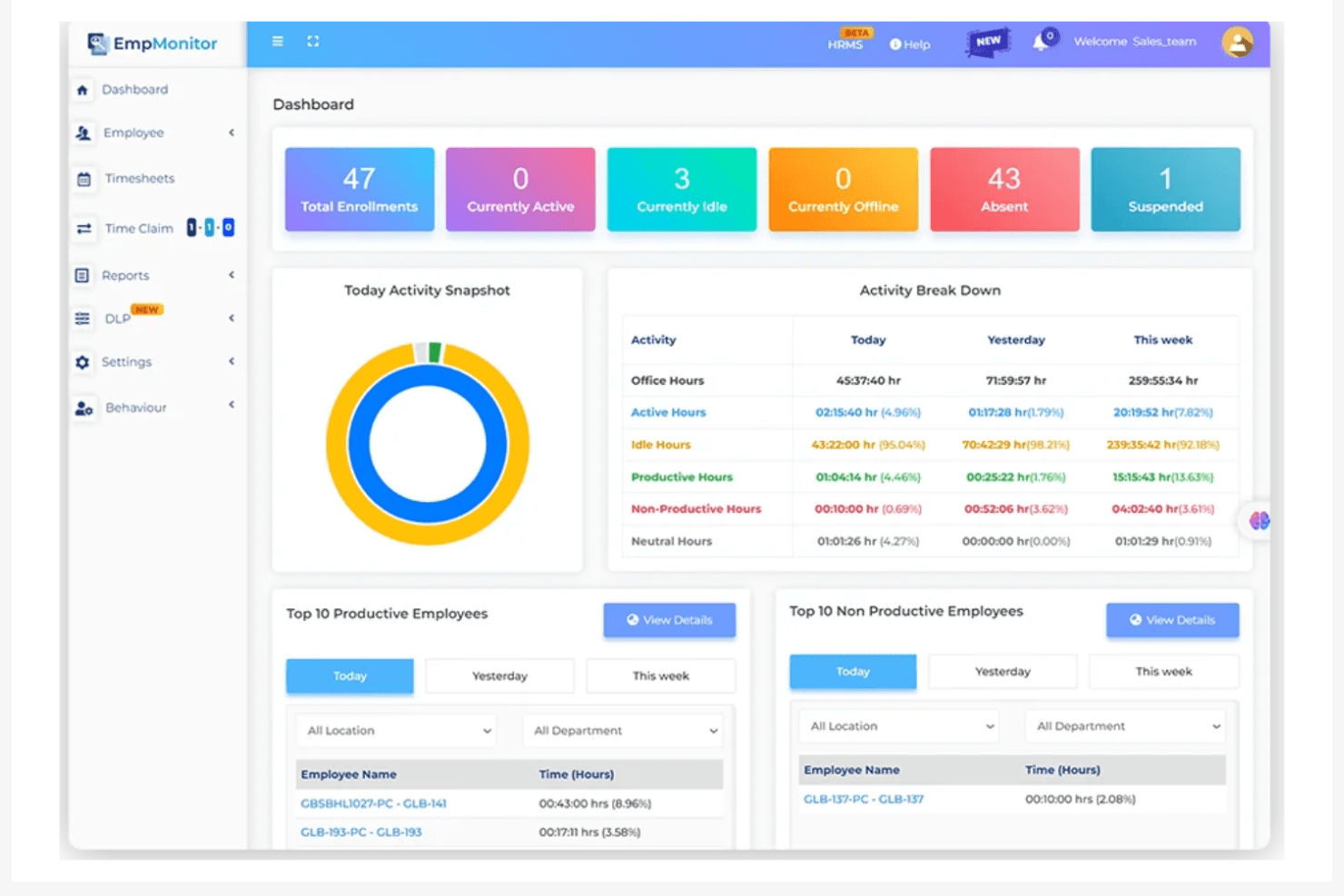
EmpMonitor analyzes employee activity and productivity performance. EmpMonitor combines employee monitoring and workforce-management tools, helping organizations track app and web activity, attendance, and productivity in one platform.
Who Is EmpMonitor Best For?
EmpMonitor suits operations and HR teams managing remote or hybrid workforces across multiple locations.
Why I Picked EmpMonitor
I picked EmpMonitor for distributed team tracking because it brings employee monitoring and workforce management together. I use its app and web activity tracking alongside attendance records to review work patterns across remote and hybrid teams in multiple locations. Its productivity tracking adds another view of how work time is spent.
EmpMonitor Key Features
- Live screencasting: View employee screens in real time from the web dashboard.
- Screen recordings: Review time-stamped video segments by employee and date.
- Screenshots: Capture employee screen images during work sessions.
- Task and project tracking: Create tasks and projects, assign them, and track progress.
EmpMonitor Integrations
EmpMonitor supports connections to Google Drive, Dropbox, Amazon S3, and Microsoft OneDrive for data storage, and lists Active Directory integration. It also offers REST-based APIs for custom integrations and Syslog exports.
Pros and Cons
Pros:
- Workload comparisons help guide task assignments
- Automated attendance and idle-time tracking
- Remote work hours and app activity visibility
Cons:
- Mobile app can lag between sections
- Reports offer limited customization
Learn more about EmpMonitor: Best for AI-driven workforce capacity planning
- Free trial + free demo available
- From $8/user/month (billed annually)
Visit WebsiteCustomer Rating:4.8/5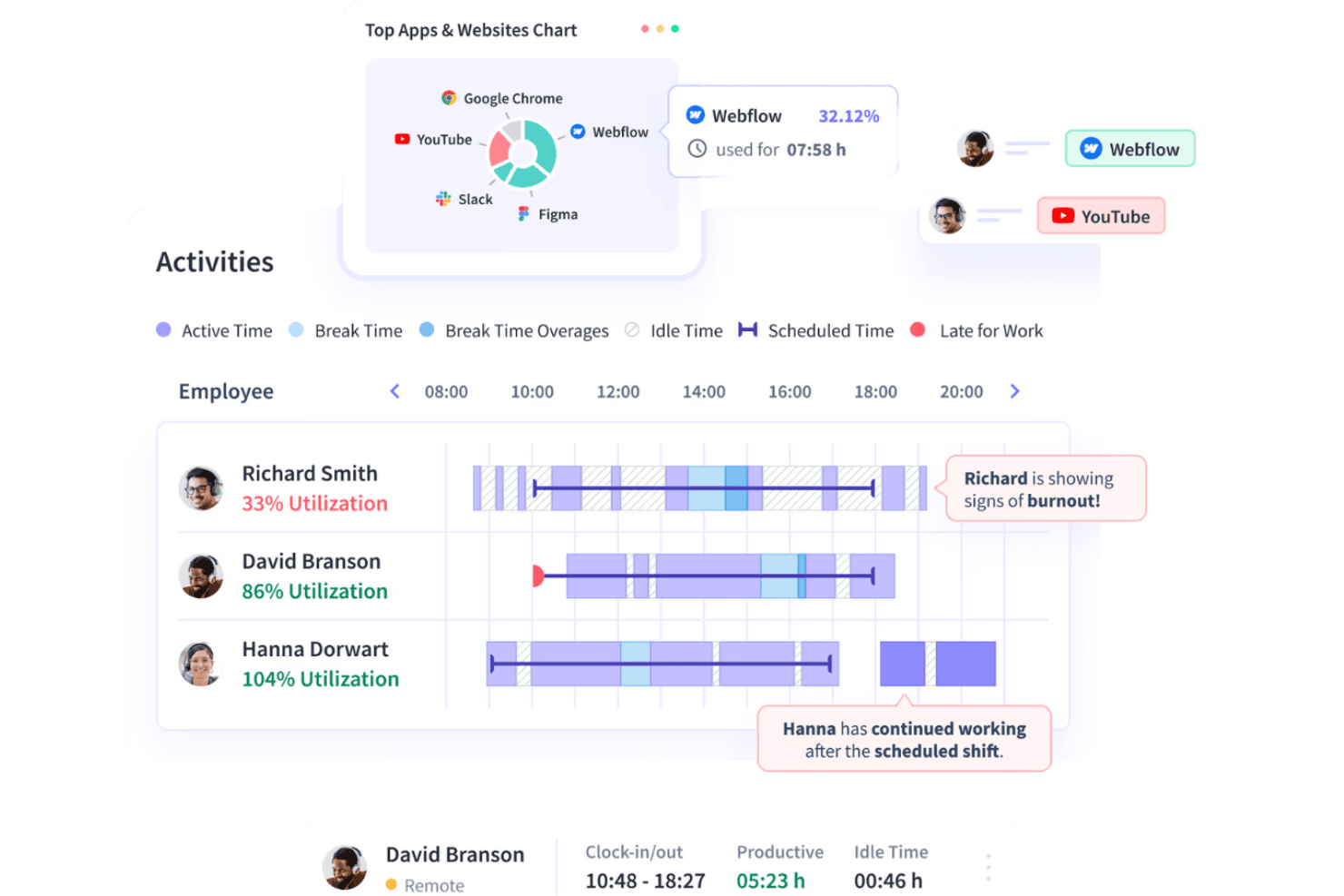
Insightful reviews employee behavior and delivers productivity analytics. Insightful combines employee monitoring and workforce analytics to help distributed teams understand work patterns, identify capacity gaps, and make informed staffing decisions.
Who Is Insightful Best For?
Insightful suits workforce planning and operations leaders at distributed organizations who need AI-assisted insight into team capacity and staffing needs.
Why I Picked Insightful
I picked Insightful as a good Best ActivTrak Alternatives Reviewed option because it pairs employee monitoring with AI-driven workforce capacity planning. I like that its workforce analytics help teams identify capacity gaps and use work-pattern insights to inform staffing decisions.
Insightful Key Features
- App and website tracking: Records which applications and websites employees use.
- Screenshots: Captures random, manual, or activity-triggered screenshots with configurable blur options.
- Time and attendance tracking: Records working hours and attendance automatically.
- Project and task time tracking: Logs time spent on projects and tasks.
Insightful Integrations
Insightful offers 50+ integrations, including Jira, Asana, Azure DevOps, Workday, ADP Workforce Now, BambooHR, Okta, and BigQuery. It also provides a Public API for custom integrations.
Pros and Cons
Pros:
- Employee dashboards pair with manager analytics
- Automatic tracking reduces manual timesheet work
- Surfaces utilization and overload trends for planning
Cons:
- Dashboard and report customization remains limited
- Screen-based activity scores can misread offline work
Learn more about Insightful: Best for monitoring with built-in payroll automation
- 14-day free trial + free demo available
- From $3.99/user/month (billed annually)
Visit WebsiteCustomer Rating:4.6/5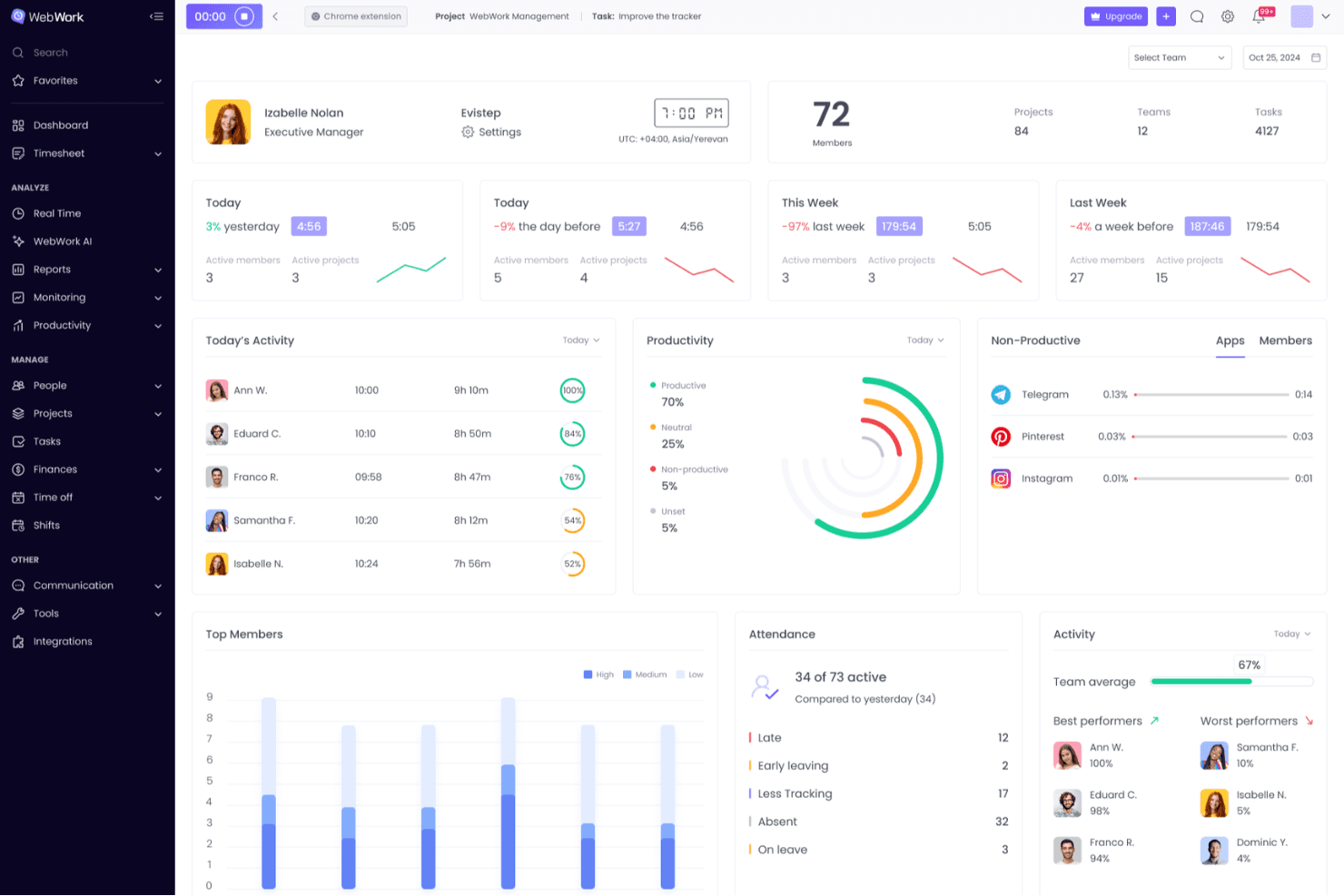
WebWork Time Tracker displays team productivity, attendance, and activity in one dashboard. WebWork Time Tracker combines time tracking and employee monitoring for distributed product teams that need better visibility into work hours, activity, and team workloads.
Who Is WebWork Time Tracker Best For?
WebWork Time Tracker suits operations and HR teams that oversee remote employees and need activity monitoring alongside payroll automation.
Why I Picked WebWork Time Tracker
I picked WebWork Time Tracker because it’s Best for monitoring with built-in payroll automation. I like that it combines activity monitoring with time tracking, so operations teams can review remote employees’ activity and recorded hours while managing payroll.
WebWork Time Tracker Key Features
- Screenshots: Capture periodic or blurred screenshots of employees’ work.
- App and website usage: View which apps and websites employees access.
- GPS tracking: Record employee locations through GPS tracking and geofencing.
- Task tracking: Assign tasks with due dates, subtasks, and status updates.
WebWork Time Tracker Integrations
WebWork offers 25+ native integrations, including Jira, Notion, ClickUp, Deel, QuickBooks, Slack, GitHub, Google Workspace, and Salesforce. It also connects with Make and Zapier and provides a public API for custom integrations.
Pros and Cons
Pros:
- Configurable screenshots support remote oversight
- Task-linked time clarifies project workloads
- Payroll-ready reports reduce manual reconciliation
Cons:
- Sync delays can distort recorded hours
- Frequent screenshots can feel intrusive
Learn more about WebWork Time Tracker :
Diğer ActivTrak Alternatifleri
Kısa listeme giremeyen ancak yine de göz atmaya değer bazı ek ActivTrak alternatifleri şunlardır:
- 11HubstaffBest for GPS tracking for distributed teams
- 12DeskTimeBest for transparent, privacy-first time tracking
- 13VeriatoBest for insider threat risk scoring
- 14ControlioBest for workload and burnout visibility
- 15MonitaskBest for proof-of-work screenshots
- 16WorkTimeBest for ethical, noninvasive monitoring
- 17IntelogosBest for AI-driven productivity scoring
- 18ProdoscoreBest for AI-driven retention risk signals
- 19InterGuardBest for off-network DLP and endpoint lockdown
- 20StaffCounterBest for self-hosted monitoring on any OS
- 21CurrentWareBest for bundled web filtering and USB control
How I Evaluate ActivTrak Alternatives
I split my evaluation into three parts. Core functionality comes first—I check if a tool tracks app and website activity and converts that into productivity reports, since these criteria carry the most weight. Then I look for workload visibility or self-service dashboards, and finally I weigh deployment flexibility and vendor rollout support.
Core Functionality (Table Stakes For This List)
When I'm selecting tools for my list, I score each one on a scale from 0 (does not offer the functionality) to 5 (excels in this area) for each core functionality listed below. I then convert the total into a percentage to help assess each tool's overall fit, with extra weight on any functionalities I’ve deemed essential.
- Activity & Time Tracking (Essential): I look for app, website, and task detail with useful categorization, such as distinguishing focused research from idle time.
- Productivity Analytics (Essential): I assess whether reports show individual and team trends over time, and whether managers can tailor views to workload questions.
- Behavior Monitoring: I check for patterns across people and teams that can surface changes in work habits without losing relevant context.
- Alerts & Risk Detection: I look for configurable alerts that flag policy concerns or unusual activity, with enough context to help managers assess them.
- Activity Visibility: I evaluate the available evidence, such as screenshots or activity logs, and check for controls over capture frequency and privacy.
- Export & Integrations: I check whether teams can export activity data or connect it to systems used for reporting, workforce planning, or payroll.
Once I have a list of tools that meet the criteria, I consider what sets each platform apart.
Differentiating Factors (What Sets Vendors Apart)
Here's how I compare and contrast different vendors:
Standout Features
I look for self-service employee dashboards that let people see their own activity data. When a team member can review their own focus time without a manager pulling a report, trust goes up and adoption friction drops. I also evaluate workload and capacity planning views, checking whether a tool visualizes task distribution well enough to help me rebalance work across a sprint. AI-powered insights matter too—I check if the platform flags burnout risk or shifting work patterns before they surface in a retrospective.
Beyond Features
I check whether a vendor offers consent workflows or visible tracking indicators, since teams that can see when monitoring is active are far more likely to trust the data. Deployment flexibility matters too—I evaluate OS coverage and agent footprint, especially for hybrid setups where people switch between corporate laptops and virtual desktops. I also look at how much change management support a vendor provides, like rollout communication templates or admin training, because a miscommunicated launch can undo months of planning.
Neden ActivTrak Alternatifi Aramalısınız?
ActivTrak, iş gücü analitiği ve istihbarat platformu için iyi bir seçenek olsa da bazı kullanıcıların alternatif çözümler aramasının birçok nedeni vardır. Şu nedenlerle ActivTrak alternatifi arıyor olabilirsiniz…
- Daha fazla özelleştirme seçeneğine ihtiyacınız var
- Ekibiniz çevrim dışı izleme gerektiriyor
- Daha iyi veri gizliliği özellikleri arıyorsunuz
- İşletmenizin küresel desteğe ihtiyacı var
- Gelişmiş yapay zekâ içgörüleri arıyorsunuz
- Daha basit bir kullanıcı arayüzüne ihtiyacınız var
Bunlardan herhangi biri size uyuyorsa doğru yere geldiniz. Listemde, ActivTrak ile ilgili bu zorluklarla karşılaşan ve alternatif çözümler arayan ekipler için daha uygun çeşitli iş gücü analitiği ve istihbarat platformu seçenekleri yer alıyor.
ActivTrak'in Temel Özellikleri
Alternatif çözümlerin sunduklarını karşılaştırmanıza yardımcı olmak için ActivTrak'in bazı temel özelliklerini aşağıda bulabilirsiniz:
- İş gücü yönetimi: Ekip faaliyetleri ve günlük iş ölçümleri hakkında gerçek zamanlı görünürlük sağlayarak verimlilik eğilimlerini ve programlara uyumu izlemenize yardımcı olur.
- Verimlilik optimizasyonu: İş yükü dengesini belirlemek için görevlere harcanan zamanı analiz eder ve içgörülere dayalı koçluk fırsatları sunar.
- Teknoloji kullanımı ve uyumluluk: Zaman hırsızlığını tespit etmek için uygulama ve web sitesi kullanımını izler ve politika ihlalleri için uyumluluk alarmları sağlar.
- Yönetici içgörüleri: Finansal etkiler ve iş gücü planlamasıyla ilgili bilinçli kararlar alınabilmesi için veriye dayalı öneriler sunar.
- Özelleştirilebilir panolar: Daha iyi veri görselleştirmesi için panoları belirli ihtiyaçlara ve ölçümlere göre uyarlamanıza olanak tanır.
- Veri gizliliği ve güvenliği: Uyumluluk ve gizliliğin sağlanması için kullanıcı verilerini korumaya yönelik güçlü önlemleri vurgular.
- Entegrasyon özellikleri: Ayrıntılı içgörüler ve hızlı iş akışı entegrasyonu için çeşitli uygulamaları bir araya getirmenize olanak tanır.