
Piyasada çok sayıda farklı paydaş yönetimi platformu bulunduğundan, sizin için en iyisini seçmek zor olabilir. Paydaş ilişkilerini geliştirmek, iletişimi güçlendirmek, paydaş beklentileriyle daha iyi uyum sağlamak ve paydaş katılımıyla ilişkili riskleri azaltmak istiyorsunuz; ancak ekibiniz için doğru araca ihtiyacınız var. Size yardımcı olabilirim! Bu yazıda, farklı ürünleri yönetme ve büyük ekipler ile birden fazla paydaşla birçok farklı platformu kullanma konusundaki kişisel deneyimimden yararlanarak en iyi paydaş yönetimi yazılımı seçimlerimi paylaşıyorum.
Why Trust Our Software Recommendations
6,700+
Reviews
20
Industry experts
16+
Evaluation factors
14
Years
Our team has been testing and reviewing software since 2012. As product managers ourselves, we know how difficult—and important—it is to choose the right software.
For this guide, we evaluated tools using hands-on testing and independent research, scoring tools using our selection criteria.
Our reviews reflect our human editorial judgment, not a sales pitch.
Expert reviewers:
- Andrew LumbySenior TPM
- Cristiano ValimSenior UI/UX Lead


Paydaş Yönetimi Yazılımları Karşılaştırma Tablosu
Aşağıdaki tablo, en iyi paydaş yönetimi yazılımı seçimlerimin fiyatlandırma ayrıntılarını karşılaştırır.
Score legend (out of 5)
- Excellent4.5–5
- Good4–4.4
- Average3–3.9
- Below average2–2.9
- Poor1–1.9
Sorted by: Default
| Tool | Starting Price | Website | |||||||
|---|---|---|---|---|---|---|---|---|---|
Best for approval workflows involving stakeholders | Not rated | 1 | 2 | Not rated | 1 | 3 | 2 | $169/month Free plan + 14-day free trial | Website |
Best for infrastructure and government engagement teams | 3.8 out of 5 | 4 | 3 | 4 | 4 | 4 | 4 | Pricing upon request Free demo available | Website |
Best for property and GIS-linked stakeholder tracking | 3.3 out of 5 | 3 | 3 | 3 | 4 | 3 | 4 | Pricing upon request Free trial available and free demo available | Website |
Best for community and public engagement tracking | 3.3 out of 5 | 4 | 4 | 3 | 2 | 3 | 4 | Pricing upon request Free demo available | Website |
Best for engagement and consultation teams | 3.5 out of 5 | 4 | 3 | 4 | 2 | 4 | 4 | $995/user/month No Free Trial | Website |
Best for building stakeholder plans around projects | 3.5 out of 5 | 4 | 4 | 3 | 3 | 4 | 3 | $12/user/month 30-day free trial available | Website |
Best for field-based community engagement teams | 3.8 out of 5 | 4 | 4 | 3 | 4 | 4 | 4 | Pricing upon request Free demo available | Website |
Best for sales team stakeholder mapping in Salesforce | 3.7 out of 5 | 3 | 3 | 4 | 4 | 4 | 4 | Pricing upon request Free demo available | Website |
Best for sales account stakeholder mapping | 3.5 out of 5 | 3 | 2 | 4 | 4 | 4 | 4 | Pricing upon request Free demo available | Website |
Best for large-scale public engagement audit trails | 3.5 out of 5 | 4 | 4 | 2 | 3 | 4 | 4 | £9,495/year Not available | Website |





En İyi Paydaş Yönetimi Yazılımı İncelemeleri
Her bir paydaş yönetimi sisteminin kısa açıklaması; her aracın en uygun kullanım alanını, dikkat çeken bazı özelliklerini ve kullanıcı arayüzüne genel bir bakış sunan ekran görüntülerini gösterir.
 Best for approval workflows involving stakeholders
- Free plan + 14-day free trial
- From $169/month (billed annually)
Visit WebsiteCustomer Rating:4.7/5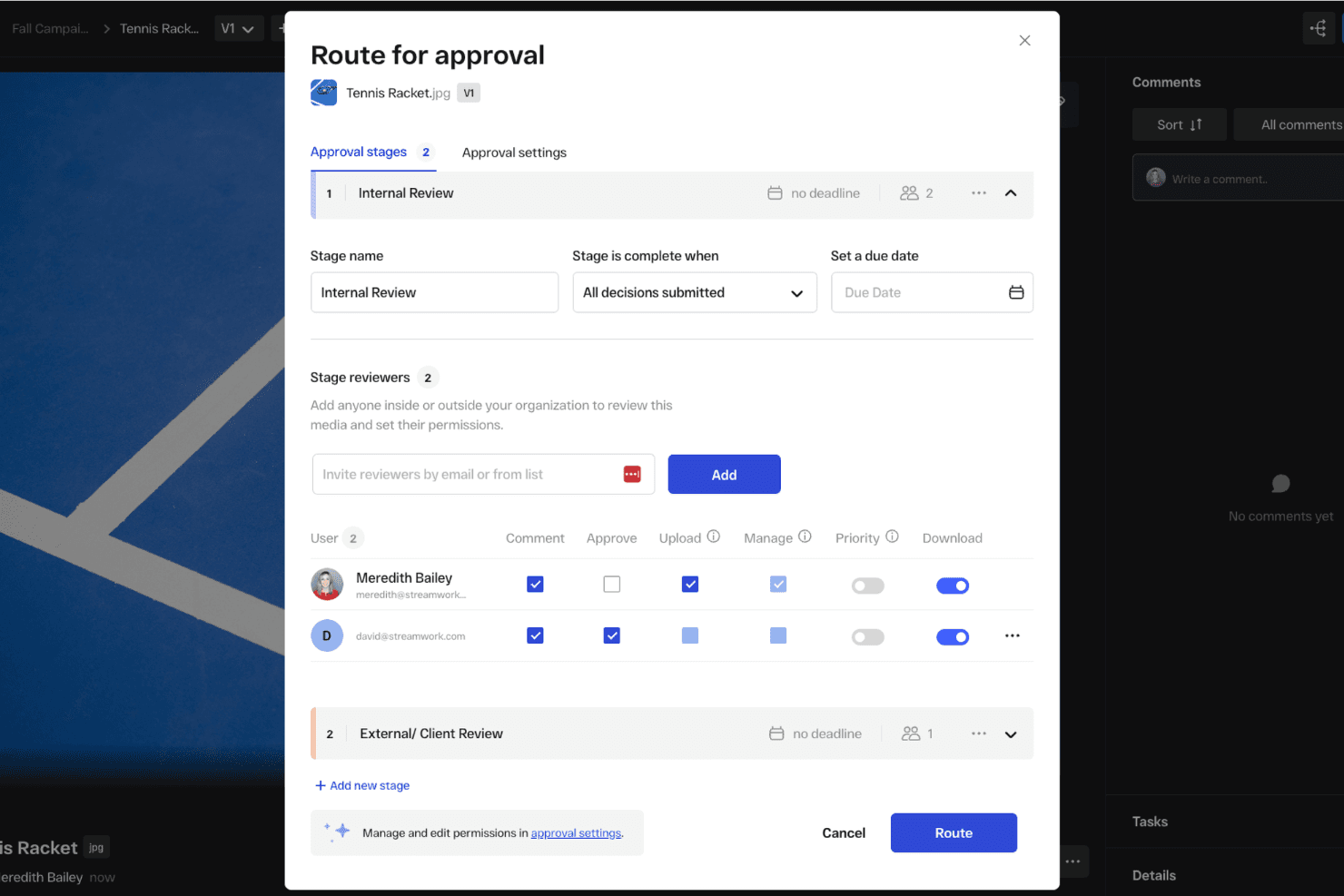
You can set up automated approval workflows to get feedback from external stakeholders. StreamWork is an AI-enabled online proofing and creative approval platform that handles multi-stage approval routing, version tracking, time-stamped feedback, and external reviewer access.
Who Is StreamWork Best For?
StreamWork suits marketing teams and creative agencies that need to manage multi-stage content approvals with external stakeholders like clients, executives, or legal reviewers.
Why I Picked StreamWork
I picked StreamWork as one of the best because it handles the part of stakeholder management that tends to break down most: getting sign-off from people outside your team. I love that external reviewers, whether that's a client, legal, or a senior executive, can approve directly through a single link with no account required. Multi-stage routing lets you sequence approvals through legal, then brand, then leadership, and every decision gets a timestamped audit trail.
StreamWork Key Features
- Multi-stage approval routing: Build sequential approval workflows that move through distinct groups—like legal, brand, and leadership—one stage at a time.
- Time-stamped, pinned comments: Reviewers can leave feedback anchored to a specific location on a file or exact frame in a video, keeping context intact.
- Automated reminders and deadlines: StreamWork sends nudges to approvers automatically, so you're not manually following up to keep reviews on schedule.
- One-click audit trail: Every version, comment, and approval decision is logged and accessible in a single click for governance and accountability purposes.
StreamWork Integrations
StreamWork lists seven integrations, including Adobe Creative Cloud, Slack, monday.com, Asana, Dropbox, Figma, and Box. It also offers an API and webhooks for custom integrations.
Pros and Cons
Pros:
- Multi-stage routing records approval decisions
- Pinned comments preserve review context
- External stakeholders approve without accounts
Cons:
- Creative reviews replace relationship tracking
- No stakeholder mapping or contact database
Learn more about StreamWork: Best for infrastructure and government engagement teams
- Free demo available
- Pricing upon request
Visit WebsiteCustomer Rating:5/5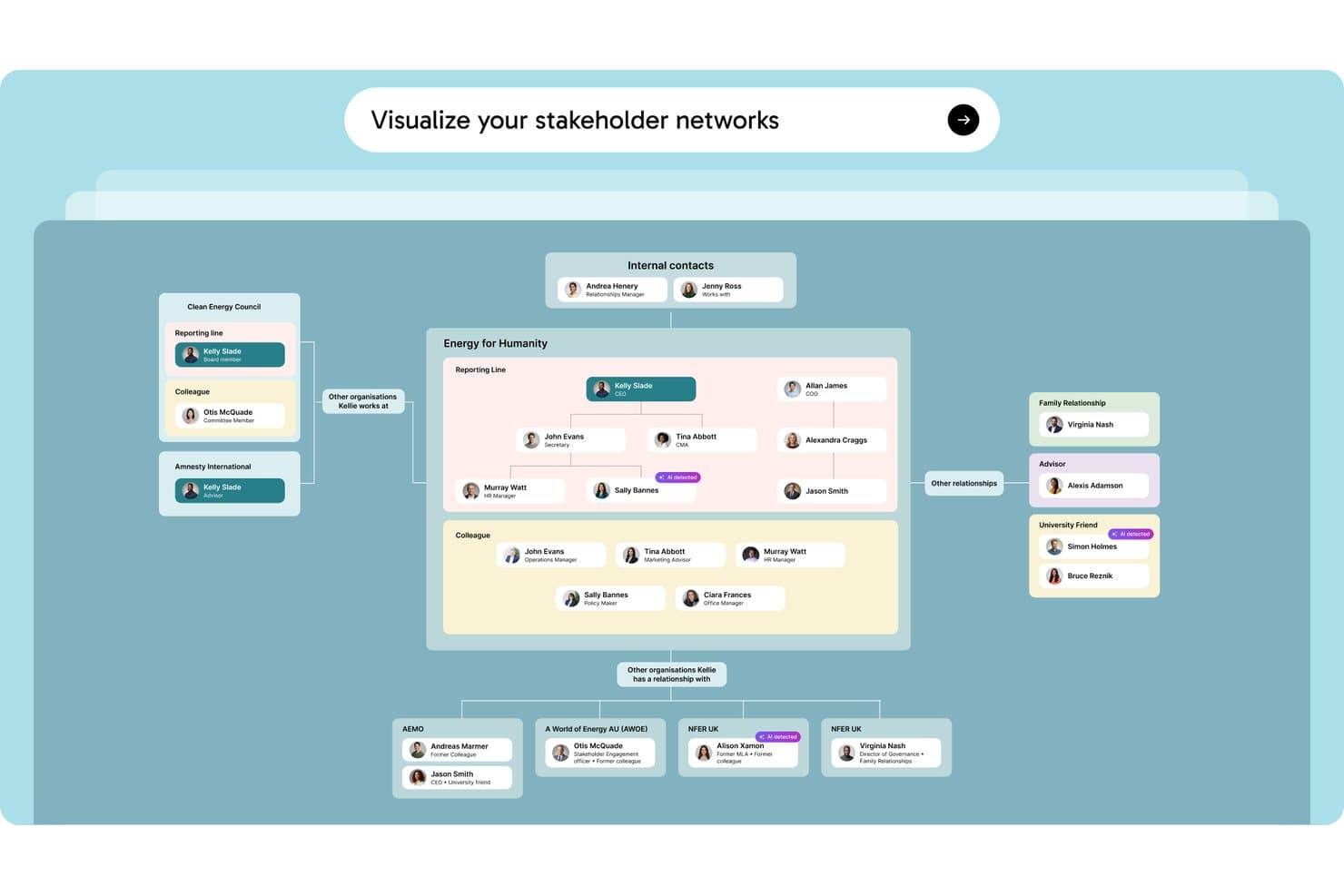
Simply Stakeholders maps relationships between stakeholders, internal contacts, and external organizations in a visual network. Simply Stakeholders is a stakeholder relationship management platform designed for complex, long-term engagement programs, offering multi-dimensional stakeholder mapping, interaction tracking, sentiment analysis, and AI-generated reporting.
Who Is Simply Stakeholders Best For?
Simply Stakeholders is a strong fit for community engagement officers, communications teams, and program managers working in infrastructure, energy, and government sectors.
Why I Picked Simply Stakeholders
I've included Simply Stakeholders in my top picks because it's purpose-built for the long-term, relationship-heavy engagement programs common in infrastructure and government work. I particularly like its multi-dimensional stakeholder mapping, which lets you score each stakeholder across influence, interest, impact, criticality, and position simultaneously. Its AI-driven sentiment analysis also updates based on logged interactions, so your team can spot shifting opposition before it becomes a problem on a major project.
Simply Stakeholders Key Features
- Outlook and Gmail plugins: Save emails, meetings, and contact details directly into the platform from your inbox without switching tools.
- Grievance management module: Log, track, and resolve community grievances in a dedicated add-on module built for public-facing engagement programs.
- Role-based access controls: Restrict access to confidential contacts and interactions so only the right team members can view or engage sensitive stakeholder records.
- Mobile app: Access stakeholder records, log interactions, and manage tasks on the go via Android and iOS apps.
Simply Stakeholders Integrations
Simply Stakeholders offers Outlook and Gmail plugins, plus an API for custom integrations. It also supports Zapier.
Pros and Cons
Pros:
- Role controls protect confidential stakeholder records
- AI summarizes interactions and tracks sentiment
- Maps stakeholders across five dimensions
Cons:
- Limited fit for product management teams
- Large contact imports require upfront setup
Learn more about Simply Stakeholders: Best for property and GIS-linked stakeholder tracking
- Free trial available and free demo available
- Pricing upon request
Visit WebsiteCustomer Rating:4.8/5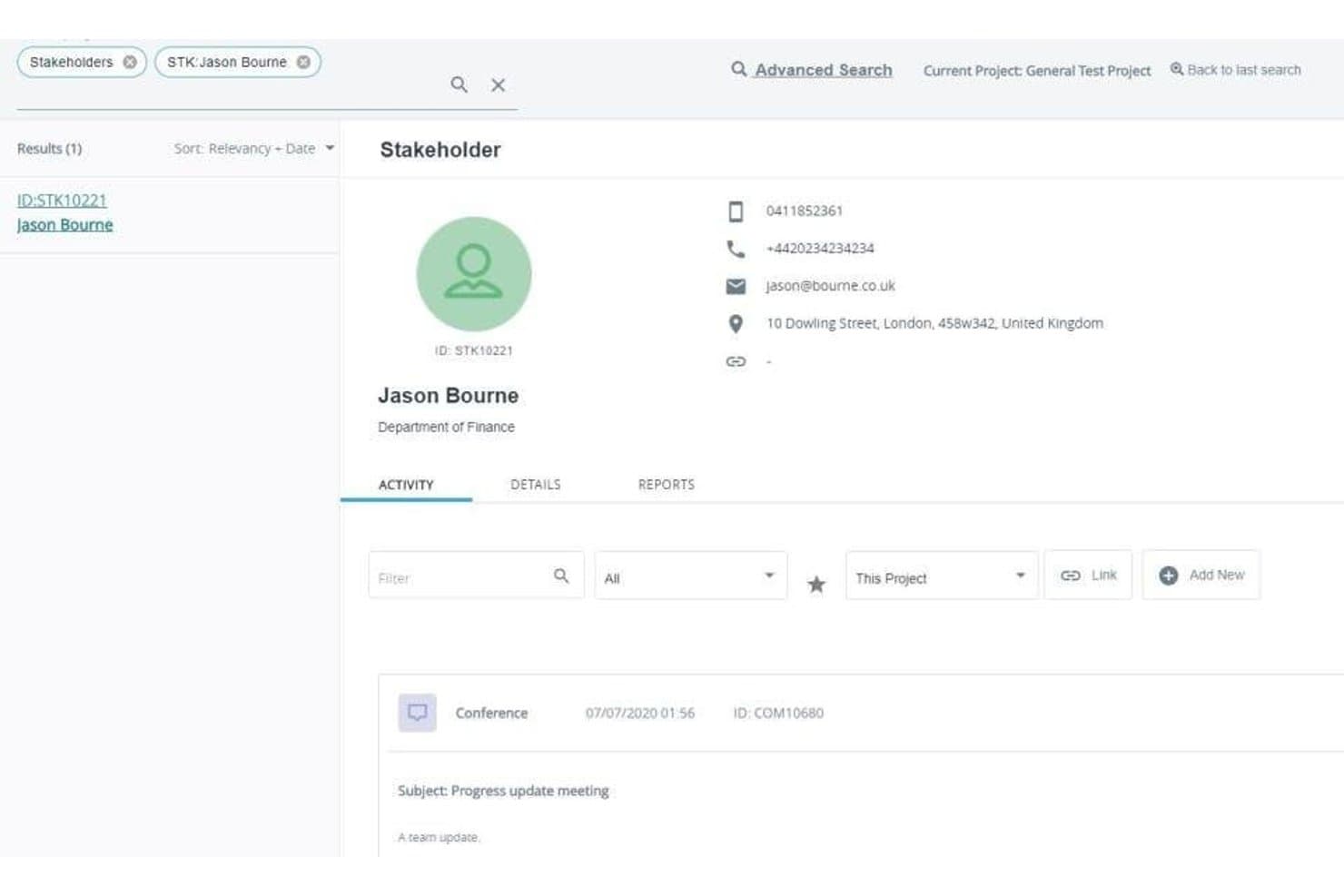
Darzin's stakeholder profiles log contact details and a full activity history of every interaction. Darzin is a stakeholder management platform purpose-built for public consultation and engagement teams, combining stakeholder mapping, multi-channel interaction tracking, AI sentiment analysis, issue management, and cross-project reporting.
Who Is Darzin Best For?
Darzin is a strong fit for public consultation and community engagement teams in government who need to manage stakeholder relationships across complex, multi-project environments.
Why I Picked Darzin Software
I picked Darzin as one of the best because it's genuinely built like a CRM, but wired specifically for stakeholder relationships rather than sales pipelines. I love that it maps stakeholders by influence, interest, and impact, while also linking affected properties to a GIS map so you can see exactly who raised which issues and where. AI sentiment analysis runs across text-heavy feedback, surfacing common themes and points of disagreement without manual review.
Darzin Software Key Features
- Outlook and Gmail plugins: Email plugins automatically log emails to the correct stakeholder record and create a new contact if one doesn't exist.
- Cross-project reporting: You can run automated reports across multiple projects or your entire organization from a single view.
- Survey creation and publishing: You can build and publish surveys directly in the platform, with responses matched to stakeholder records automatically.
- Mobile field apps: iOS and Android apps let you capture notes and interactions while working on-site or in the field.
Darzin Software Integrations
Darzin connects with Outlook and Gmail through plugins. Native integrations and API availability aren’t clearly documented.
Pros and Cons
Pros:
- Centralized interaction history spans engagement channels
- AI sentiment analysis surfaces feedback themes
- GIS links issues to affected properties
Cons:
- Limited public review evidence
- No roadmap or backlog workflows
Learn more about Darzin Software: Best for community and public engagement tracking
- Free demo available
- Pricing upon request
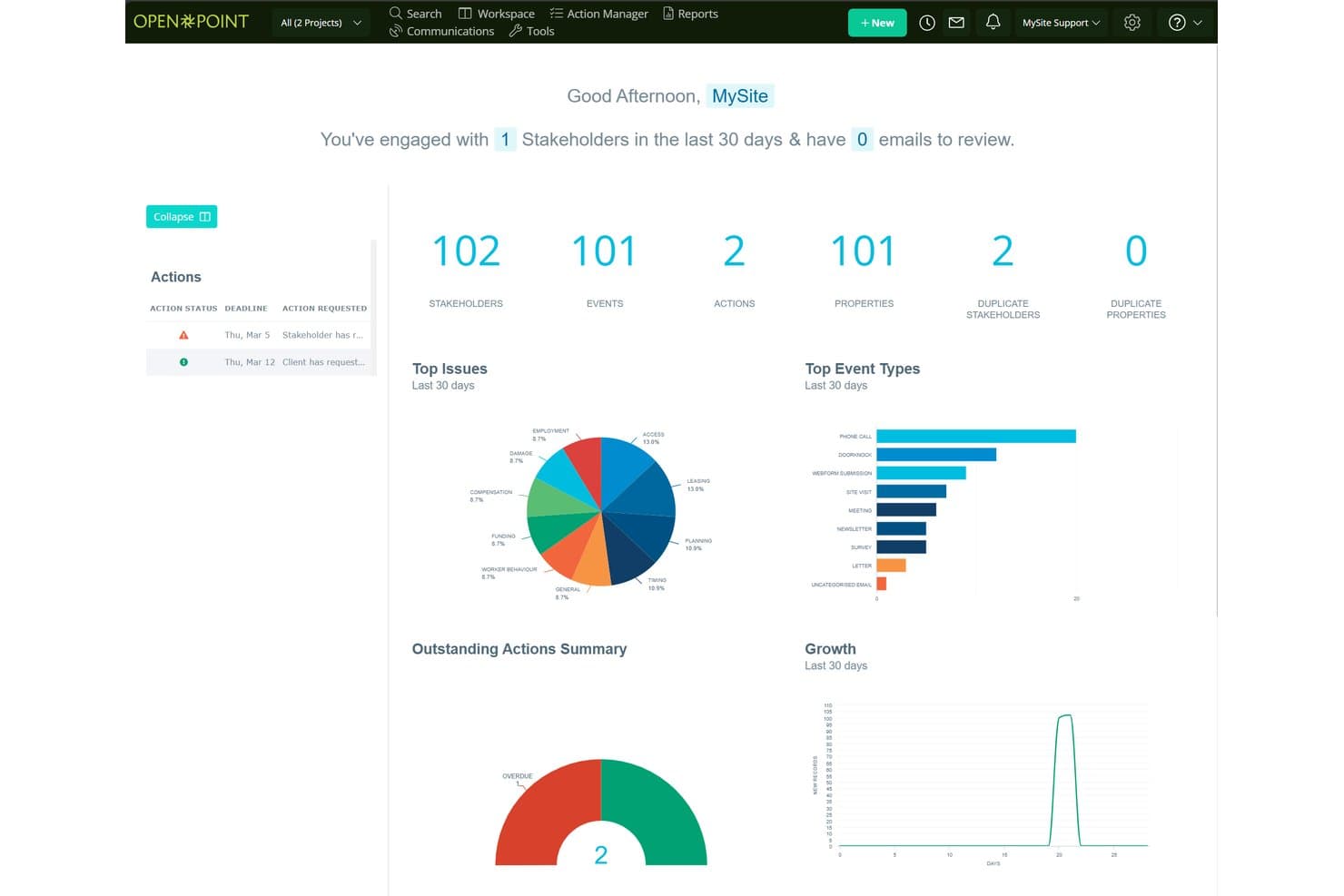
Social Pinpoint centralizes stakeholder data, events, and actions in one dashboard. Social Pinpoint is a stakeholder engagement platform that combines a stakeholder relationship management system, community engagement tools, interaction tracking, and AI-driven sentiment analysis and reporting.
Who Is Social Pinpoint Best For?
Social Pinpoint suits teams in government, infrastructure, and utilities that need to manage public consultation and community engagement across large-scale projects.
Why I Picked Social Pinpoint
I picked Social Pinpoint as one of the best because no other tool on this list combines a full community engagement toolkit with a stakeholder relationship management system in one platform. I love that it captures every interaction across email, SMS, calls, and webforms, then links them directly to stakeholder records and projects. Its AI-driven sentiment tagging flags negative responses in real time, so I can spot rising community opposition before it escalates.
Social Pinpoint Key Features
- Outlook add-in: Saves emails from Outlook directly into stakeholder records, keeping your interaction history complete without manual entry.
- GIS-based map layers: Visualizes stakeholder concentrations as icons, heatmaps, or clusters on a custom base map to identify geographic hot spots for specific issues.
- 40+ community engagement tools: Includes social maps, quick polls, participatory budgeting, idea walls, forums, and Q&A tools for structured public consultation.
- Cross-project reporting: Compares engagement activity, sentiment, and themes across multiple projects, programs, regions, and time periods in one dashboard.
Social Pinpoint Integrations
Documented integrations include Microsoft Outlook, Social Point, and its stakeholder management module. Social Pinpoint also offers an open REST API for CRM, GIS, and document management connections, plus SAML SSO with Microsoft Entra ID and Okta.
Pros and Cons
Pros:
- Supports audits with detailed interaction histories
- Maps geographic engagement hotspots and sentiment
- Links community feedback to stakeholder records
Cons:
- Targets consultation teams over product managers
- Lacks influence-interest stakeholder mapping
Learn more about Social Pinpoint:
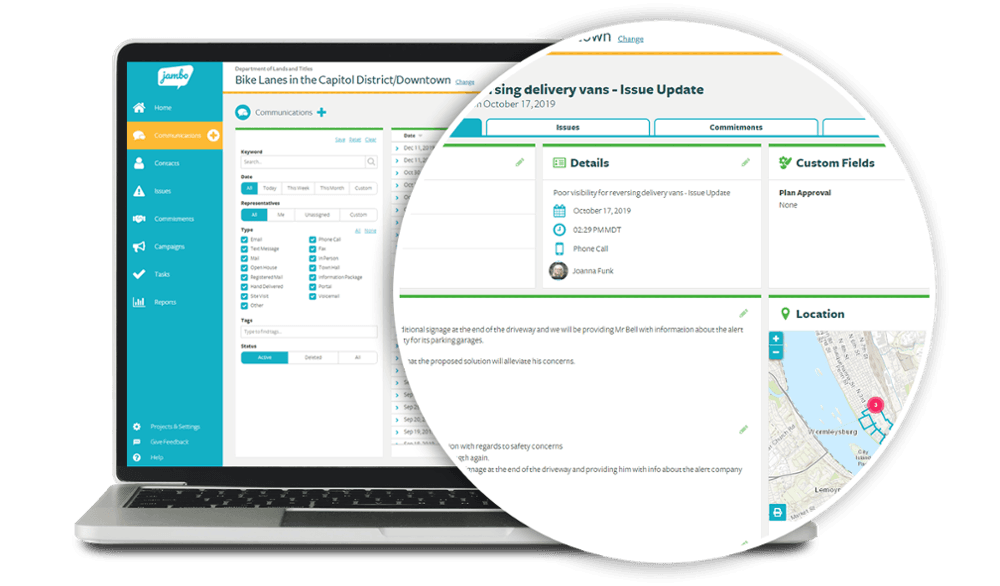
Jambo allows stakeholders to dig down into the detail. Jambo is a stakeholder relationship management (SRM) platform built for engagement and consultation teams, offering interaction tracking, issue and grievance logging, sentiment analysis, geospatial mapping, and compliance reporting.
Who Is Jambo Best For?
Jambo is a strong fit for government, energy, and infrastructure teams that manage community and regulatory engagement across multiple projects.
Why I Picked Jambo
I picked Jambo as one of the best because it's purpose-built for engagement and consultation teams in a way that generic CRMs simply aren't. I love how it ties interaction logging directly to issues and grievances, so when a community concern escalates, your full communication history is already attached. Its AI Sentiment scoring also updates automatically from interaction records, giving you a real-time read on stakeholder mood across a project without manual tagging.
Jambo Key Features
- Outlook add-in: A free Microsoft Outlook add-in logs emails and meetings directly into Jambo and creates contact records automatically.
- Visual risk matrix: Issues and grievances are ranked by impact and urgency on a visual matrix, giving your team a clear view of escalating concerns.
- Global View dashboard: Combines data across all your projects into a single view, with the ability to split by project, sub-project, or program.
- Geospatial mapping: A built-in Esri map viewer displays engagement locations and hotspots, with an optional add-on for ArcGIS Pro integration and project boundary layers.
Jambo Integrations
Jambo has documented integrations with Microsoft Outlook and Esri ArcGIS Pro. Enterprise and higher plans include a public API and Zapier.
Pros and Cons
Pros:
- Supports compliance-focused reporting workflows
- Links grievances with engagement records
- Centralizes stakeholder communication histories
Cons:
- Campaign coordination tools remain unreleased
- No influence-interest stakeholder mapping
Learn more about Jambo: Best for building stakeholder plans around projects
- 30-day free trial available
- From $12/user/month
Visit WebsiteCustomer Rating:4.4/5
Smartsheet offers a useful stakeholder communication plan template. Smartsheet is a spreadsheet-based work management platform that supports stakeholder tracking through customizable registers, engagement plan templates, Gantt and calendar views, automated reminders, and reporting dashboards.
Who Is Smartsheet Best For?
Smartsheet is a strong fit for project-driven teams that want to manage stakeholder registers, engagement plans, and communication logs in the same place they run their projects.
Why I Picked Smartsheet
I picked Smartsheet as one of the best because it's the only tool on this list that lets you manage stakeholder plans directly inside your project work. I love that free engagement plan templates come with built-in Gantt and calendar views, so you can plot outreach tasks on the same timeline as your deliverables. Unlimited free Contributors and Guests mean external stakeholders can be part of the plan without adding to your seat count.
Smartsheet Key Features
- Stakeholder register builder: Create custom stakeholder logs with dropdown columns, conditional formatting, and row-level comments, attachments, and activity history.
- Automated reminders and alerts: Set up rule-based automations to trigger outreach reminders, approval requests, and status alerts across your team.
- Reporting dashboards: Build unlimited reports and dashboards across all plans to visualize stakeholder activity and share progress with leadership.
- Dynamic View: Control exactly which rows and columns external stakeholders can see or edit, giving you scoped, secure access without extra licensing costs.
Smartsheet Integrations
Smartsheet offers nearly 100 integrations, including Microsoft 365, Google Workspace, Slack, Power BI, Tableau, HubSpot, Microsoft Dynamics 365, and Jira through a connector add-on.
Pros and Cons
Pros:
- External participants can contribute without full access
- Flexible registers support custom engagement workflows
- Stakeholder plans share project timelines
Cons:
- Users report dated, changing interface experiences
- Stakeholder mapping requires manual setup
Learn more about Smartsheet:- Best for field-based community engagement teams
- Free demo available
- Pricing upon request
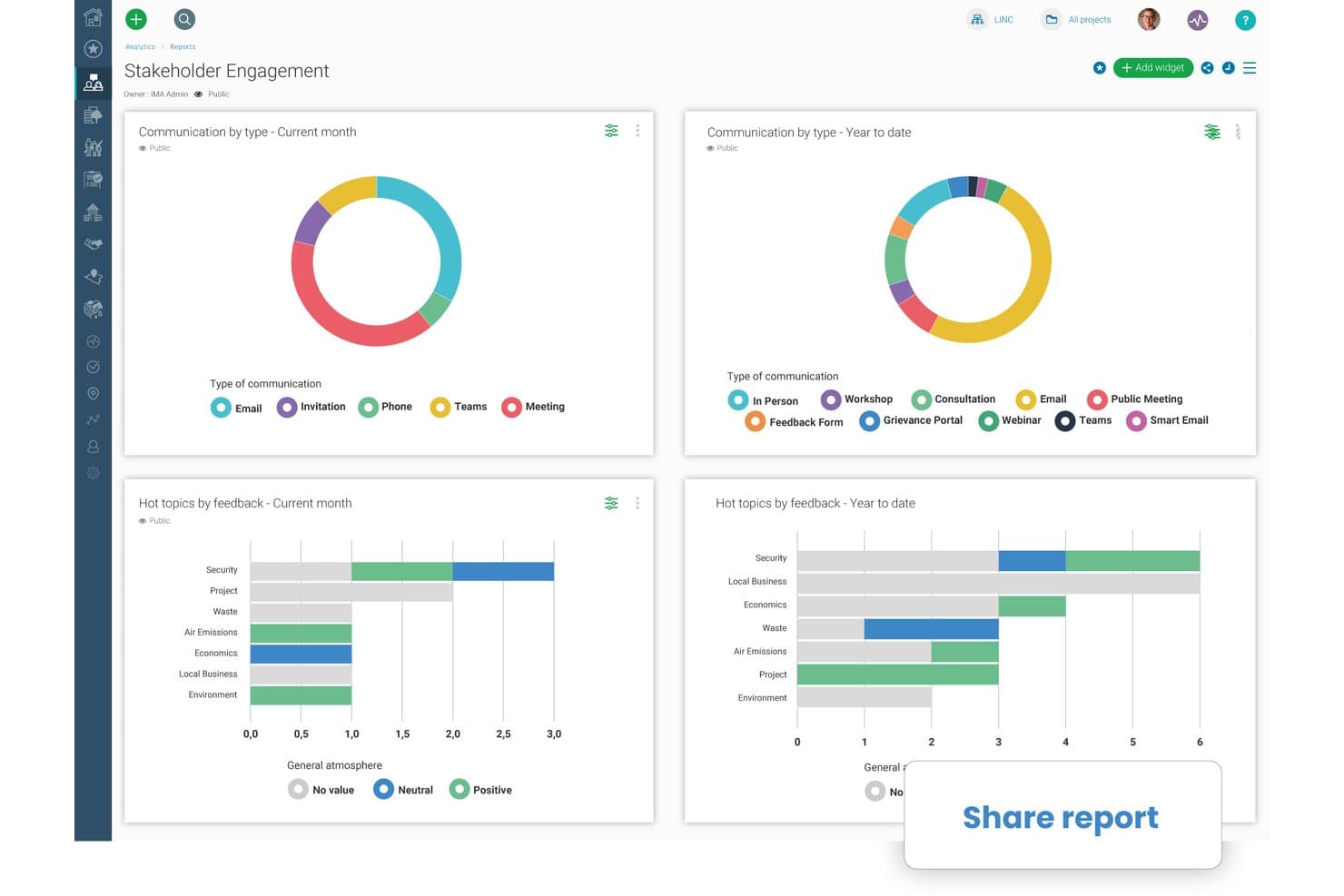
Borealis lets users share stakeholder engagement reports instantly. Borealis is a stakeholder engagement platform built for field-based and community relations teams, combining GIS mapping, interaction tracking, engagement planning, grievance management, and AI-powered reporting in one place.
Who Is Borealis Best For?
Borealis is a strong fit for community relations and public engagement teams working in regulated, land-based industries like energy, mining, and utilities.
Why I Picked Borealis
Borealis earns its spot on my shortlist because it's purpose-built for community relations teams doing real field work, not just desk-based stakeholder tracking. I love that its built-in GIS and ArcGIS mapping links stakeholders directly to physical assets and locations, which matters when your team is managing land-based projects across multiple sites. The offline mobile app means field staff can log interactions and grievances on-site without waiting for connectivity.
Borealis Key Features
- AI-powered report drafting: Borealis automatically generates draft reports from your logged project data, pulling in relevant interactions, issues, and stakeholder details.
- "Ask AI" query tool: You can ask direct questions about your project data in plain language, and the AI returns answers with cited sources from within Borealis.
- Grievance and contribution portals: Built-in online portals let community members submit complaints, donation requests, or concerns directly into the platform for your team to manage.
- Power BI API connection: Borealis connects to Power BI via API, letting you pull engagement and reporting data into your existing analytics environment.
Borealis Integrations
Borealis offers built-in integrations with Outlook, Gmail, Mailchimp, ArcGIS, and the U.S. Government Officials Database. Its API connects with Power BI, CRM, project management tools, and other corporate systems.
Pros and Cons
Pros:
- AI drafts reports from logged engagement data
- Offline mobile logging supports field visits
- GIS maps stakeholders to physical assets
Cons:
- Online engagement options remain relatively limited
- Configuration can complicate initial onboarding
Learn more about Borealis: - Best for sales team stakeholder mapping in Salesforce
- Free demo available
- Pricing upon request
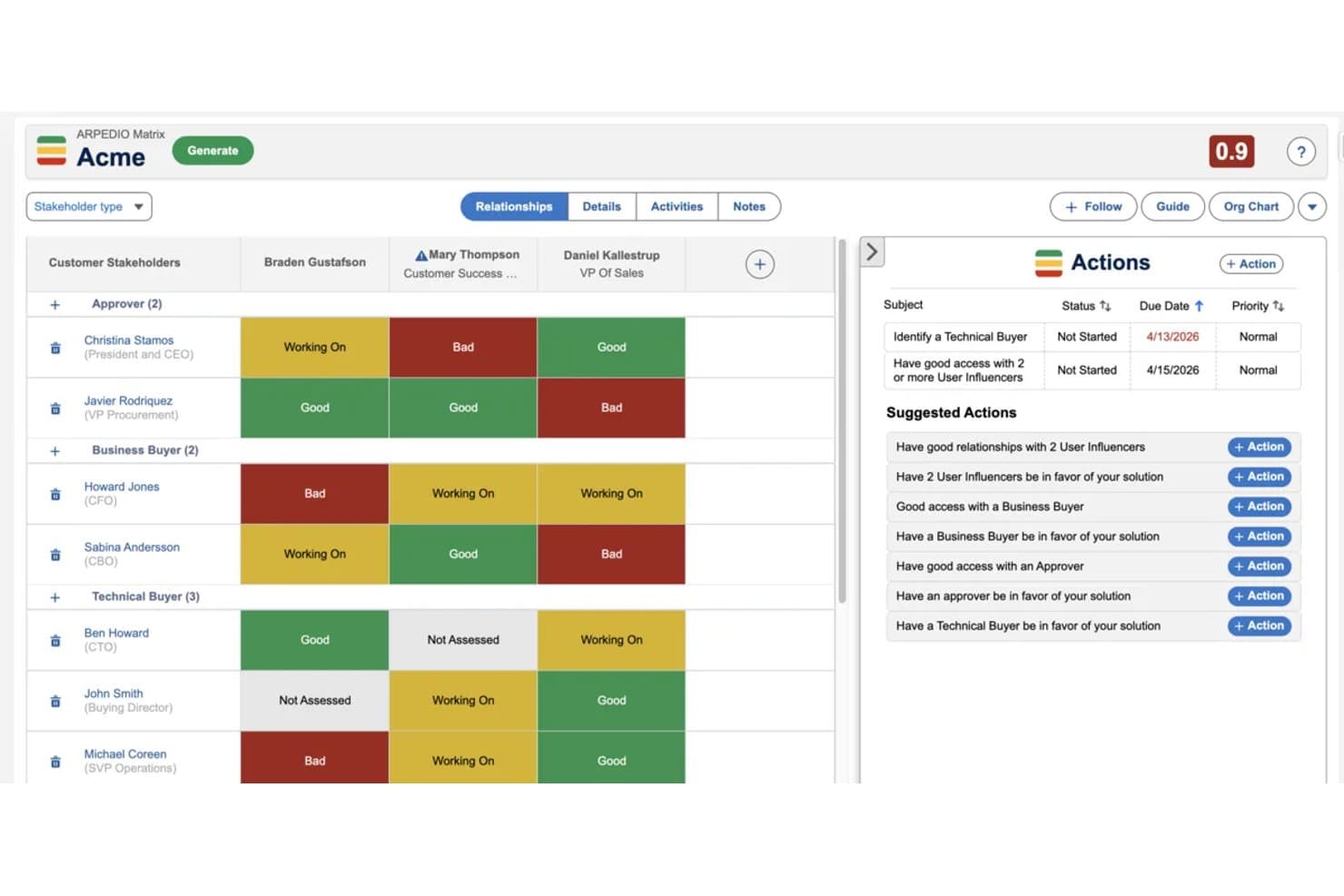
Arpedio maps stakeholder relationships and tracks engagement status visually. Arpedio is a Salesforce-native account-based selling platform that combines AI-powered stakeholder mapping, relationship scoring, interaction tracking, and account planning tools for enterprise sales teams.
Who Is Arpedio Best For?
Arpedio is built for enterprise sales teams—strategic account managers, key account managers, and RevOps leaders—who run complex B2B deals entirely inside Salesforce.
Why I Picked Arpedio
Arpedio earns its spot on my shortlist because it's the only stakeholder mapping tool I've found that's built entirely inside Salesforce rather than bolted onto it. For sales teams running complex B2B deals, that means AI-generated org charts built from existing contact and activity data, with no manual diagramming required. I also like the relationship matrix, which scores each stakeholder on access, influence, and support level, so reps can immediately see who's a champion and who's a blocker.
Arpedio Key Features
- Sentiment agent: Tracks whether individual stakeholder relationships are warming, cooling, or stalled based on activity data, and surfaces coaching prompts for reps.
- Account plan records: Structured Salesforce records that include an executive summary, SWOT analysis, success criteria, and milestones tied to specific stakeholders.
- Activity history continuity: Logs emails, calls, meetings, and notes to contact records so the full relationship history carries over when reps change.
- White-space analysis matrix: Maps your Salesforce product catalogue against account dimensions like regions and business units to surface revenue gaps.
Arpedio Integrations
Arpedio runs natively in Salesforce Lightning and integrates with Einstein Activity Capture, Salesforce Inbox, and Outreach for activity data. It also supports custom activity connectors, but no native Jira, Slack, Asana, or product-tool integrations are documented.
Pros and Cons
Pros:
- Sentiment signals flag cooling relationships early
- Relationship history survives account team changes
- AI-built org charts reduce manual mapping
Cons:
- No classic influence-interest grid
- Sales focus excludes project stakeholder workflows
Learn more about Arpedio:  Best for sales account stakeholder mapping
- Free demo available
- Pricing upon request
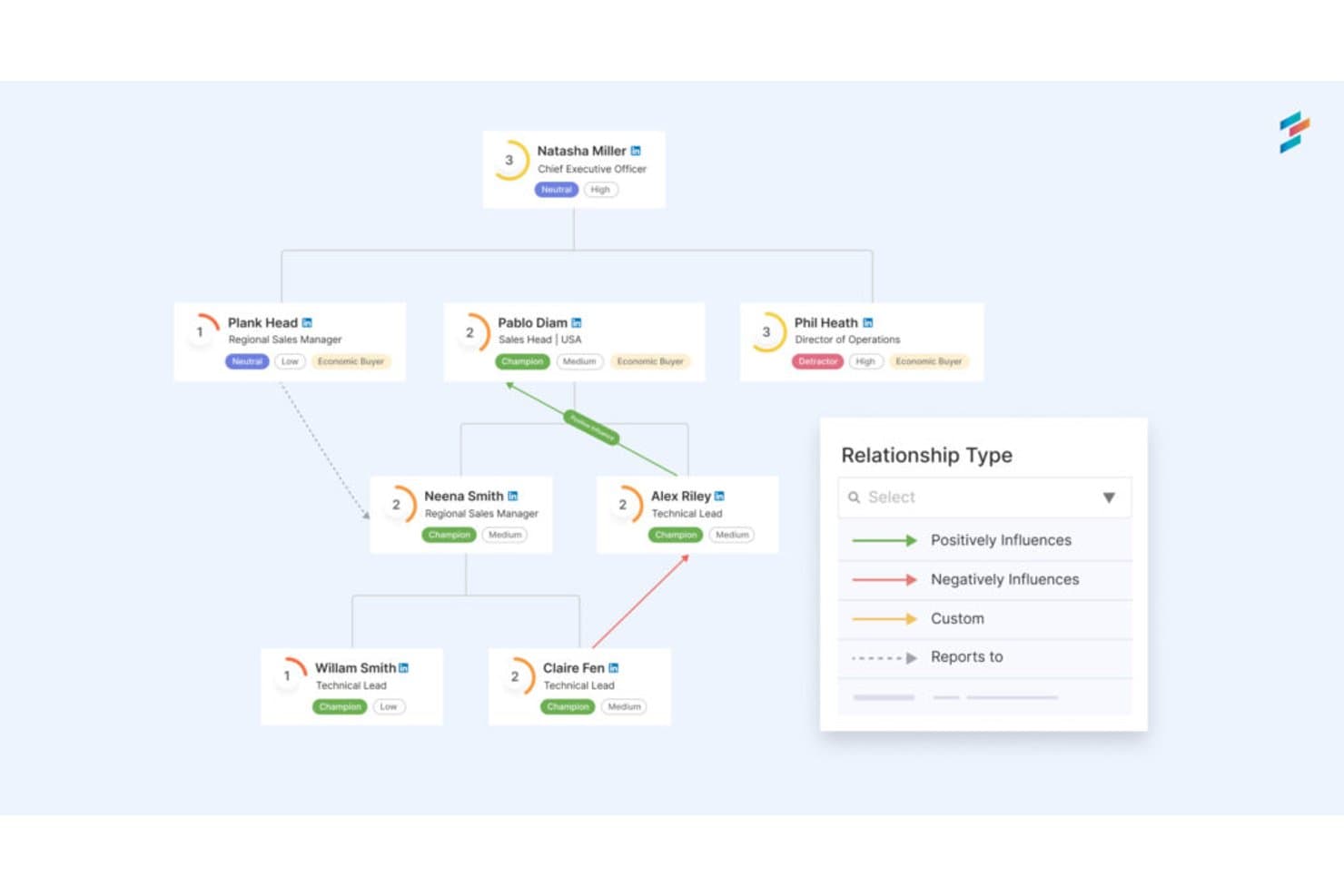
DemandFarm maps stakeholder relationships and influence across org charts. DemandFarm is a B2B key account management platform that combines relationship mapping, AI-driven sentiment analysis, interaction tracking, and deal risk assessment for sales teams managing complex customer accounts.
Who Is DemandFarm Best For?
DemandFarm is a strong fit for B2B sales teams managing strategic accounts with complex, multi-contact buying committees.
Why I Picked DemandFarm
DemandFarm earns its spot on my shortlist because of how well it handles B2B account relationship mapping. I love that its Relationship Maps auto-generate from CRM contacts and let you layer on power and affinity scores for each person in a buying committee. The Kampanion AI goes further, flagging silent influencers and cold decision makers before they become deal risks. That level of contact-level intelligence is rare in a sales account tool.
DemandFarm Key Features
- Automated risk surveillance: Monitors account health and flags relationship cracks, slow-moving objectives, and at-risk contacts before they threaten deals.
- Engagement analytics: Tracks how frequently and meaningfully your team engages each contact, so you can prioritize outreach where it matters most.
- White Space Planner: Identifies untapped revenue opportunities within existing accounts by mapping where growth potential remains uncovered.
- CRM-mirrored permissions: Syncs access controls directly with your CRM so users only see the account data they're already authorized to view.
DemandFarm Integrations
DemandFarm integrations include Salesforce, HubSpot, Microsoft Dynamics, Microsoft Teams, Outlook, Gmail Calendar, Slack, and Gong. No public API documentation is listed for custom integrations.
Pros and Cons
Pros:
- Mirrors CRM permissions across account teams
- Flags silent influencers before deals stall
- Maps buying committees with power scores
Cons:
- Offers no roadmap or consultation planning
- Focuses on sales accounts, not general stakeholders
Learn more about DemandFarm: Best for large-scale public engagement audit trails
- Not available
- From £9,495/year (billed annually)

Tractivity's dashboard gives a real-time overview of stakeholder data. Tractivity is a stakeholder engagement platform built for public-sector and regulated industries, offering contact management, multi-channel outreach, issue logging, sentiment tracking, and configurable reporting across large-scale engagement programmes.
Who Is Tractivity Best For?
Tractivity is a strong fit for public engagement and communications teams in regulated industries like energy, water, and infrastructure.
Why I Picked Tractivity
Tractivity earns its spot on my shortlist because it's built from the ground up for public and regulatory engagement, not adapted from a generic CRM. I'm particularly impressed by its issue logging at scale: EDF used it to log around 30,000 issues across Hinkley Point C and Sizewell C, which tells you a lot about what it can handle. Commitment tracking is another standout, letting teams log every promise made during a consultation with an owner, deadline, and live status tied directly to each stakeholder record.
Tractivity Key Features
- Outlook add-in and email capture: Log emails directly to stakeholder records from Outlook, with AI scanning shared mailboxes to pick up new contacts automatically.
- Unlimited surveys and newsletters: Run branded surveys, email campaigns, and newsletters with no send or volume caps included in the base subscription.
- Event management: Plan and manage workshops, seminars, and Q&A sessions, including attendee registration and outcome tracking, all linked to stakeholder records.
- 150+ configurable reports: Export stakeholder engagement data as PDFs, Excel files, or CSVs, with scheduled email delivery and real-time KPI dashboards.
Tractivity Integrations
Tractivity offers integrations with Microsoft Outlook, Microsoft Teams, Power BI, Dotdigital, Mapolitical, Google Maps, Google Places, and Royal Mail address validation. It also provides a public API, bulk import, and Zapier connectivity.
Pros and Cons
Pros:
- Produces audit-ready reports for leadership
- Tracks issues, commitments, and sentiment together
- Built for regulated public engagement programmes
Cons:
- Suits public engagement more than product teams
- Offers limited structured risk scoring
Learn more about Tractivity:
Diğer Paydaş Yönetimi Yazılımları
Kısa listeme giremeyen ancak yine de incelemeye değer bazı ek paydaş yönetimi yazılımı seçenekleri şunlardır:
- 11PublicInputBest for multi-channel civic engagement tracking
- 12ClickUpBest for all-in-one PM and stakeholder tracking
- 13monday AI WorkspaceBest for managing stakeholders within project boards
- 14KintoneBest for no-code custom workflow apps
- 15StakeTrackerBest for a secure, online stakeholder management system
- 16Engagement HubBest for public consultation engagement teams
- 17SMARTBest for intelligent stakeholder engagement
How I Evaluate Stakeholder Management Software
I split my evaluation into three parts, with core functionality carrying the most weight: I look for tools that map key people, log conversations, and plan follow-ups. Next, I consider differentiators such as calendar sync and roadmap-linked stakeholder views. Finally, I weigh onboarding, support, and pricing as teams grow.
Core Functionality (Table Stakes For This List)
When I'm selecting tools for my list, I score each one on a scale from 0 (does not offer the functionality) to 5 (excels in this area) for each core functionality listed below. I then convert the total into a percentage to help assess each tool’s overall fit, with extra weight on any functionalities I’ve deemed essential.
- Stakeholder Mapping (Essential): I look for ways to classify stakeholders by influence and interest, such as placing decision-makers and affected users on a shared map.
- Interaction Tracking (Essential): I check whether teams can keep contact details and searchable conversation notes together, so anyone can pick up an ongoing stakeholder discussion.
- Engagement Planning: I assess whether teams can schedule consultations, assign outreach, and tie follow-ups to stakeholder records or groups.
- Risk & Sentiment: I look for structured ways to flag opposition or shifting sentiment, such as noting concerns after a review meeting.
- Reporting & Analytics: I consider whether reports show engagement coverage and activity, helping teams explain who they’ve consulted and what they heard.
- Collaboration & Access: I check how teams share stakeholder records and coordinate outreach, including whether permissions suit different roles.
Once I have a list of tools that meet the criteria, I consider what sets each platform apart.
Differentiating Factors (What Sets Vendors Apart)
Here's how I compare and contrast different vendors:
Standout Features
Meeting and calendar integration is where I see the biggest time savings. I check whether a tool auto-logs stakeholder touchpoints from calendar events and prompts follow-ups, since manual tracking falls apart after a few busy weeks. AI-generated summaries matter too—tools that draft sentiment snapshots from meeting notes cut hours of post-meeting write-ups. I also evaluate custom stakeholder portals, where executive or external stakeholders can self-serve status updates without needing a full login, which keeps visibility high and inbox noise low.
Beyond Features
I check how well a tool fits cross-functional teams—executives and sales reps won't adopt a platform built only for PMs. Onboarding ease for non-technical stakeholders directly affects data completeness. I also evaluate integration depth with existing product tooling like Jira, Salesforce, or Slack, since duplicate data entry kills adoption fast. Finally, role-based permissions and audit trails matter whenever you're sharing sensitive roadmap data with external partners.
Paydaş Yönetimi Yazılımı Nasıl Seçilir?
Uzun özellik listeleri ve karmaşık fiyatlandırma yapılarına takılıp kalmak kolaydır. Kendinize özgü yazılım seçim sürecinizi yürütürken odaklanmanıza yardımcı olmak için göz önünde bulundurmanız gereken faktörlerin bir kontrol listesini aşağıda bulabilirsiniz:
| Faktör | Dikkat Edilmesi Gerekenler |
|---|---|
| FaktörÖlçeklenebilirlik | Dikkat Edilmesi GerekenlerYazılım ekibinizle birlikte büyüyebilir mi? Ekibiniz genişledikçe kullanıcı sınırlarını ve fiyatlandırmayı göz önünde bulundurun. |
| FaktörEntegrasyonlar | Dikkat Edilmesi GerekenlerCRM veya proje yönetimi platformları gibi mevcut araçlarınızla entegre oluyor mu? |
| FaktörÖzelleştirilebilirlik | Dikkat Edilmesi GerekenlerYazılımı belirli iş akışlarınıza uyacak şekilde uyarlayabilir misiniz? Esnek panolar ve alanlar arayın. |
| FaktörKullanım kolaylığı | Dikkat Edilmesi GerekenlerArayüz ekibiniz için sezgisel mi? Öğrenme eğrisini değerlendirmek için bir demo ile test edin. |
| FaktörUygulama ve işe alıştırma | Dikkat Edilmesi GerekenlerEkibiniz ne kadar hızlı çalışmaya başlayabilir? Eğitim kaynakları ve destek seçenekleri arayın. |
| FaktörMaliyet | Dikkat Edilmesi GerekenlerFiyatlandırma bütçenizle uyumlu mu? Gizli ücretleri veya gerekli eklentileri göz önünde bulundurun. |
| FaktörGüvenlik önlemleri | Dikkat Edilmesi GerekenlerAraç, veri güvenliği standartlarınıza uyuyor mu? Şifreleme ve kullanıcı izinlerini kontrol edin. |
| FaktörDestek erişilebilirliği | Dikkat Edilmesi GerekenlerHangi destek kanalları mevcut? Desteğin ekibinizin ihtiyaçları ve saat dilimleriyle uyumlu olduğundan emin olun. |
Paydaş Yönetimi Yazılımındaki Eğilimler
Kuruluşların paydaşlarıyla iletişim kurma, iş birliği yapma ve etkileşimde bulunma biçimlerini yeniden şekillendiren önemli yeniliklere ve değişimlere tanık olduk; bunun sonucunda paydaş yönetimi yazılımında birçok trend ortaya çıktı. Hem sektörün değişen önceliklerini ve taleplerini yansıtan hem de paydaş yönetimi teknolojisinin ilerlediği yönü gösteren çeşitli trendler belirledim.
Veriye Dayalı İçgörüler ve Analizler
- Yapay Zekâ Destekli Analizler: Paydaş geri bildirimlerini ve etkileşim düzeylerini analiz etmek için yapay zekâ kullanımı giderek yaygınlaşmıştır. Bu teknoloji, paydaşların duygu ve düşünceleri hakkında daha derin içgörüler sağlayarak kuruluşların stratejilerini daha etkili bir şekilde uyarlamasına olanak tanır.
- Öngörücü Analizler: Araçlar, geçmiş verilere dayanarak gelecekteki paydaş davranışlarını ve tercihlerini öngören öngörücü analiz özelliklerini giderek daha fazla içermektedir. Bu işlev, tepkisel paydaş yönetimi yerine proaktif paydaş yönetimine olanak tanır.
Yeni ve Alışılmadık İşlevler
- Şeffaflık için Blok Zinciri: Bazı araçlar, paydaş iletişiminde şeffaflığı ve güvenliği artırmak için blok zinciri teknolojisini denemektedir. Bu yeni yaklaşım, veri bütünlüğüne ve şeffaflığa öncelik veren kuruluşlar için özellikle caziptir.
- Sanal Gerçeklikle (VR) Etkileşim: Henüz başlangıç aşamasında olsa da paydaş etkileşimi için VR kullanımı, sürükleyici iletişim stratejilerine yönelik son teknoloji bir yaklaşımı temsil eder ve paydaşlara proje sonuçlarını deneyimleyip bunlarla etkileşim kurmaları için benzersiz bir yol sunar.
Kişiselleştirme ve Segmentasyon
- Yapay Zekâ Destekli Kişiselleştirme: İletişim ve etkileşim stratejilerini paydaşların bireysel tercihleri ve davranışlarına göre uyarlamak için yapay zekâ kullanımına yönelik artan bir trend vardır. Bu düzeydeki kişiselleştirme, paydaşların ilgili ve zamanında bilgi almasını sağlayarak etkileşim çalışmalarının etkililiğini artırır.
Paydaş yönetimi yazılımındaki trendler, daha entegre, akıllı ve sürükleyici araçlara doğru bir geçişi vurgulamaktadır. Bu trendler gelişmeye devam ederken, teknolojinin güçlü paydaş ilişkileri kurma ve sürdürmede kilit bir rol oynayacağı paydaş yönetiminin geleceğine dair bir fikir sunmaktadır.
Paydaş Yönetimi Yazılımı Nedir?
Paydaş yönetimi yazılımı, kuruluşların paydaşlarla etkileşimlerini takip etmesine ve yönetmesine yardımcı olan bir araçtır. Proje yöneticileri, ekip liderleri ve iletişim sorumluları, paydaşlarla iletişimi ve etkileşimi geliştirmek için genellikle bu araçları kullanır. Görev takibi, raporlama ve iletişim özellikleri, paydaş etkileşimlerinin düzenlenmesine ve projenin uyumlu ilerlemesinin sağlanmasına yardımcı olur. Genel olarak bu araçlar, paydaş ilişkilerinin ve proje sonuçlarının daha iyi yönetilmesini sağlar.
Özellikler
Paydaş yönetimi yazılımı seçerken aşağıdaki temel özelliklere dikkat edin:
- Kişi yönetimi: Paydaş bilgilerini merkezileştirerek etkili iletişim için ayrıntılara kolayca erişilmesini ve bunların güncellenmesini sağlar.
- Görev takibi: Görevleri atamanıza ve izlemenize yardımcı olarak son teslim tarihlerine uyulmasını ve projelerin planlandığı şekilde ilerlemesini sağlar.
- Raporlama: Paydaş etkileşimi ve proje ilerlemesi hakkında içgörüler sunarak bilinçli karar alınmasına yardımcı olur.
- İletişim araçları: Paydaşlarla doğrudan iletişimi kolaylaştırarak etkileşimi ve şeffaflığı geliştirir.
- Özelleştirilebilir gösterge panelleri: Arayüzü iş akışınıza uyacak şekilde uyarlamanıza olanak tanıyarak kullanılabilirliği ve verimliliği artırır.
- Gantt şemaları: Proje zaman çizelgelerini ve kilometre taşlarını görselleştirerek ekiplerin projeleri verimli bir şekilde planlamasına ve yürütmesine yardımcı olur.
- Otomatik hatırlatıcılar: Yaklaşan görevler ve son teslim tarihleri hakkında uyarılar göndererek ekibinizin programa uymasını sağlar.
- Entegrasyon özellikleri: Teknoloji yığınınızdaki diğer araçlara bağlanarak sorunsuz veri akışı ve iş birliği sağlar.
- Güvenlik önlemleri: Şifreleme ve erişim denetimleriyle paydaş verilerini koruyarak gizliliği ve uyumluluğu sürdürür.
- Analizler: Paydaş etkileşimleri ve proje ölçümleri hakkında ayrıntılı içgörüler sunarak stratejik planlamayı destekler.
Faydalar
Paydaş yönetimi yazılımını uygulamak ekibiniz ve işletmeniz için çeşitli faydalar sağlar. Yararlanabileceğiniz birkaç fayda şunlardır:
- Geliştirilmiş iletişim: Paydaşlarla doğrudan etkileşimi kolaylaştırarak herkesin bilgili ve sürece dahil olmasını sağlar.
- Geliştirilmiş organizasyon: Paydaş verilerini ve proje ayrıntılarını merkezileştirerek bilgileri ve görevleri yönetmeyi kolaylaştırır.
- Artan verimlilik: Anımsatıcıları ve görev takibini otomatikleştirerek ekibinizin manuel denetim olmadan son teslim tarihlerine uymasına yardımcı olur.
- Daha iyi karar alma: Ayrıntılı raporlama ve analizler sunarak bilinçli stratejik seçimler yapmanız için içgörüler sağlar.
- Daha fazla şeffaflık: Proje ilerlemesi ve paydaş katılımı hakkında görünürlük sunarak herkesin aynı bilgiler doğrultusunda hareket etmesini sağlar.
- Özelleştirilebilir iş akışları: Süreçleri benzersiz ihtiyaçlarınıza uyacak şekilde düzenlemenize olanak tanıyarak genel verimliliği artırır.
- Veri güvenliği: Hassas paydaş bilgilerini güçlü şifreleme ve erişim denetimleriyle koruyarak uyumluluğu ve gizliliği güvence altına alır.
Maliyetler ve Fiyatlandırma
Paydaş yönetimi yazılımı seçmek, sunulan çeşitli fiyatlandırma modellerinin ve planların anlaşılmasını gerektirir. Maliyetler özelliklere, ekip büyüklüğüne, eklentilere ve diğer unsurlara göre değişir. Aşağıdaki tablo, paydaş yönetimi yazılımı çözümlerinde yaygın olarak sunulan planları, ortalama fiyatlarını ve tipik özelliklerini özetlemektedir:
Paydaş Yönetimi Yazılımı için Plan Karşılaştırma Tablosu
| Plan Türü | Ortalama Fiyat | Yaygın Özellikler |
|---|---|---|
| Plan TürüÜcretsiz Plan | Ortalama Fiyat$0 | Yaygın ÖzelliklerTemel kişi yönetimi, sınırlı görev takibi ve basit raporlama. |
| Plan TürüKişisel Plan | Ortalama Fiyat$5-$25/kullanıcı/ay | Yaygın ÖzelliklerGörev takibi, temel entegrasyonlar ve sınırlı özelleştirme seçenekleri. |
| Plan Türüİşletme Planı | Ortalama Fiyat$25-$50/kullanıcı/ay | Yaygın ÖzelliklerGelişmiş raporlama, güçlendirilmiş güvenlik özellikleri ve daha fazla entegrasyon. |
| Plan TürüKurumsal Plan | Ortalama Fiyat$50-$100/kullanıcı/ay | Yaygın ÖzelliklerTam özelleştirme, öncelikli destek ve kapsamlı analizler ile raporlama. |
Paydaş Yönetimi Yazılımı SSS
Paydaş yönetimi yazılımı hakkında sık sorulan bazı soruların yanıtlarını burada bulabilirsiniz:
Ekibimin paydaş yönetimi yazılımına ihtiyacı olup olmadığını nasıl anlayabilirim?
Ekibiniz paydaş etkileşimlerini ve geri bildirimlerini takip etmekte zorlanıyorsa paydaş yönetimi yazılımına ihtiyacınız olabilir. Mevcut süreçlerinizi değerlendirin: Son teslim tarihlerini kaçırıyor veya önemli iletişimleri unutuyor musunuz? Öyleyse bu araçlar, bu görevleri düzenlemenize ve otomatikleştirmenize yardımcı olarak ekibinizin stratejik kararlara odaklanmasını sağlayabilir.
Paydaş yönetimi yazılımını kullanmak için eğitim gerekli mi?
Eğitim genellikle önerilir, ancak birçok araç sezgisel olacak şekilde tasarlanmıştır. Ekibinizin kullanmaya başlamasına yardımcı olmak için eğitimler, web seminerleri veya etkileşimli kılavuzlar sunan yazılımları tercih edin. Örneğin, kısa bir ürün tanıtımı ekibinizin arayüze aşina olmasını sağlayarak aracı en başından itibaren etkili şekilde kullanabilmesine yardımcı olabilir.
Hangi yaygın uygulama zorluklarını öngörmelisiniz?
Yeni bir sistemin uygulanması genellikle verilerin taşınmasını, kullanıcıların eğitilmesini ve iş akışlarının uyumlu hâle getirilmesini içerir. Birçok ekip bu adımları gereğinden kolay görür; bu da gecikmelere veya hayal kırıklığına neden olabilir. Ekibiniz aracı benimsemezse ya da veriler aktarım öncesinde temizlenmezse başlangıçta büyük olasılıkla sorunlarla karşılaşırsınız.