

Açık kaynaklı web tasarımı yazılımları, kaynak kodu herkes tarafından incelenebilen, değiştirilebilen ve paylaşılabilen web sitesi oluşturma ve düzenleme araçlarını ifade eder. Web siteleri tasarlamak, oluşturmak veya yönetmek için esnek ve uygun maliyetli yollar arıyorsanız bu platformlar özellikleri özelleştirmenize, başkalarıyla iş birliği yapmanıza ve belirli bir sağlayıcıya bağımlı kalmaktan kaçınmanıza olanak tanır. Bu liste, görsel düzenlemeden kod tabanlı site yönetimine kadar çeşitli alanlarda önde gelen açık kaynaklı seçenekleri karşılaştırmanıza yardımcı olacak; böylece iş akışınız ve proje ihtiyaçlarınız için en uygun seçeneği belirleyebileceksiniz.
Why Trust Our Software Recommendations
6,700+
Reviews
20
Industry experts
16+
Evaluation factors
14
Years
Our team has been testing and reviewing software since 2012. As product managers ourselves, we know how difficult—and important—it is to choose the right software.
For this guide, we evaluated tools using hands-on testing and independent research, scoring tools using our selection criteria.
Our reviews reflect our human editorial judgment, not a sales pitch.
Expert reviewers:
- Andrew LumbySenior TPM
- Cristiano ValimSenior UI/UX Lead


Açık Kaynaklı Web Tasarımı Yazılımları Karşılaştırma Tablosu
Bu karşılaştırma tablosu, en iyi açık kaynaklı web tasarımı yazılımı seçimlerim için fiyatlandırma ayrıntılarını özetlemektedir.
Score legend (out of 5)
- Excellent4.5–5
- Good4–4.4
- Average3–3.9
- Below average2–2.9
- Poor1–1.9
Sorted by: Default
| Tool | Starting Price | Website | |||||||
|---|---|---|---|---|---|---|---|---|---|
Best for headless, API-first flat-file sites | 4.0 out of 5 | 3 | 5 | 5 | 4 | 2 | 5 | $140 Free plan available | Website |
Best for enterprise multisite agency deployments | 3.8 out of 5 | 3 | 5 | 5 | 3 | 2 | 5 | $44.50/month Free plan available | Website |
Best for .NET-based headless and traditional CMS | 3.7 out of 5 | 2 | 5 | 5 | 2 | 3 | 5 | €45/month Free plan available | Website |
Best for security-focused open source CMS hosting | 4.0 out of 5 | 4 | 5 | 4 | 3 | 4 | 4 | $4.99/month Free plan available | Website |
Best with integrated business app modules | 3.8 out of 5 | 4 | 4 | 4 | 4 | 3 | 4 | Pricing upon request Free demo available | Website |
Best for plugin extensibility | 4.7 out of 5 | 4 | 5 | 5 | 5 | 4 | 5 | $9/month Free plan available | Website |
Best for multilingual site management | 4.2 out of 5 | 4 | 5 | 5 | 4 | 2 | 5 | Free and open-source Free download available | Website |
Best for complex content structuring | 4.5 out of 5 | 3 | 5 | 5 | 5 | 4 | 5 | Free and open-source Free forever plan | Website |
Best for WordPress visual design at scale | 4.7 out of 5 | 5 | 4 | 5 | 4 | 5 | 5 | $5/month Free plan available | Website |
Best for on-page live editing without plugins | 4.0 out of 5 | 3 | 5 | 4 | 4 | 4 | 4 | $10/website/month Free demo available | Website |


Açık Kaynaklı Web Tasarımı Yazılımları İncelemeleri
Aşağıda, kısa listeme giren açık kaynaklı web tasarımı yazılımları hakkındaki ayrıntılı özetlerimi bulabilirsiniz. İncelemelerim, her platformun özelliklerine, en uygun kullanım alanlarına ve yeteneklerine ayrıntılı bir bakış sunarak sizin için en iyi seçeneği bulmanıza yardımcı olur.
 1Best for headless, API-first flat-file sites
Grav
- Free plan available
- From $140
Visit WebsiteCustomer Rating:4.9/5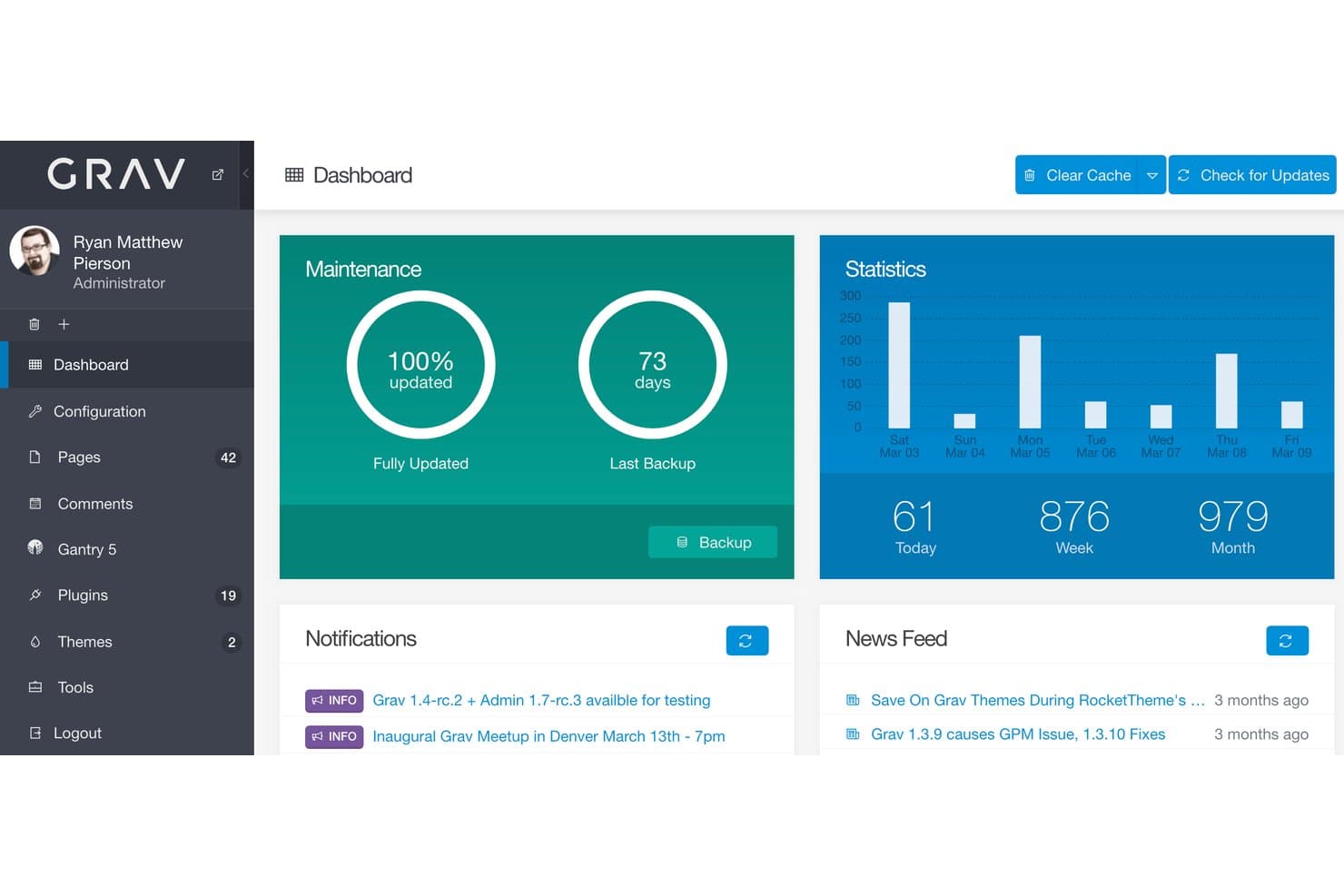
Grav is an open source, flat-file CMS built on PHP and Twig that covers content management, REST API access, theme customization, and plugin extensibility—all without a database.
Who Is Grav Best For?
Grav is a strong fit for web developers and digital agencies who want a database-free, Git-friendly CMS they can deploy, extend, and connect to any front-end stack.
Why I Picked Grav
Grav earns its spot on my shortlist because it's the only flat-file CMS I've worked with that pairs a fully versioned REST API with an MCP server, making it genuinely built for headless, API-first deployments from the ground up. I love that the entire content layer lives as Markdown and YAML files, so connecting a Next.js or SvelteKit front end via the TypeScript SDK (
@grav/sdk) is straightforward rather than bolted on. Its MIT-licensed core also gives me full access to the PHP and Twig source, which I rely on when customizing theme logic or registering custom API endpoints through the plugin event system.Grav Key Features
- Grav Package Manager (GPM): A CLI-based package manager that lets you install, update, and manage plugins and themes directly from the official index.
- Modular page composition: Build long-form pages from reusable content modules, such as hero sections, feature blocks, and text modules, without duplicating templates.
- Multi-site support: Run multiple distinct sites from a single Grav install, with per-environment YAML configuration overrides for each.
- Built-in asset pipeline: Handles CSS and JavaScript minification, ordering, and caching out of the box, without requiring a separate build tool.
Grav Integrations
Grav supports headless integrations with SvelteKit, Next.js, and React Native through its versioned REST API and
@grav/sdk. It also supports GitHub and GitLab deployment workflows and real-time updates through Mercure-compatible sync plugins.Pros and Cons
Pros:
- Twig inheritance enables precise theme control
- File-based content fits Git-based workflows
- MIT-licensed core supports unrestricted modifications
Cons:
- Grav 2 breaks compatibility with Grav 1.x
- Layout building requires Twig, HTML, and CSS
Learn more about Grav: Best for enterprise multisite agency deployments
- Free plan available
- From $44.50/month (billed annually)
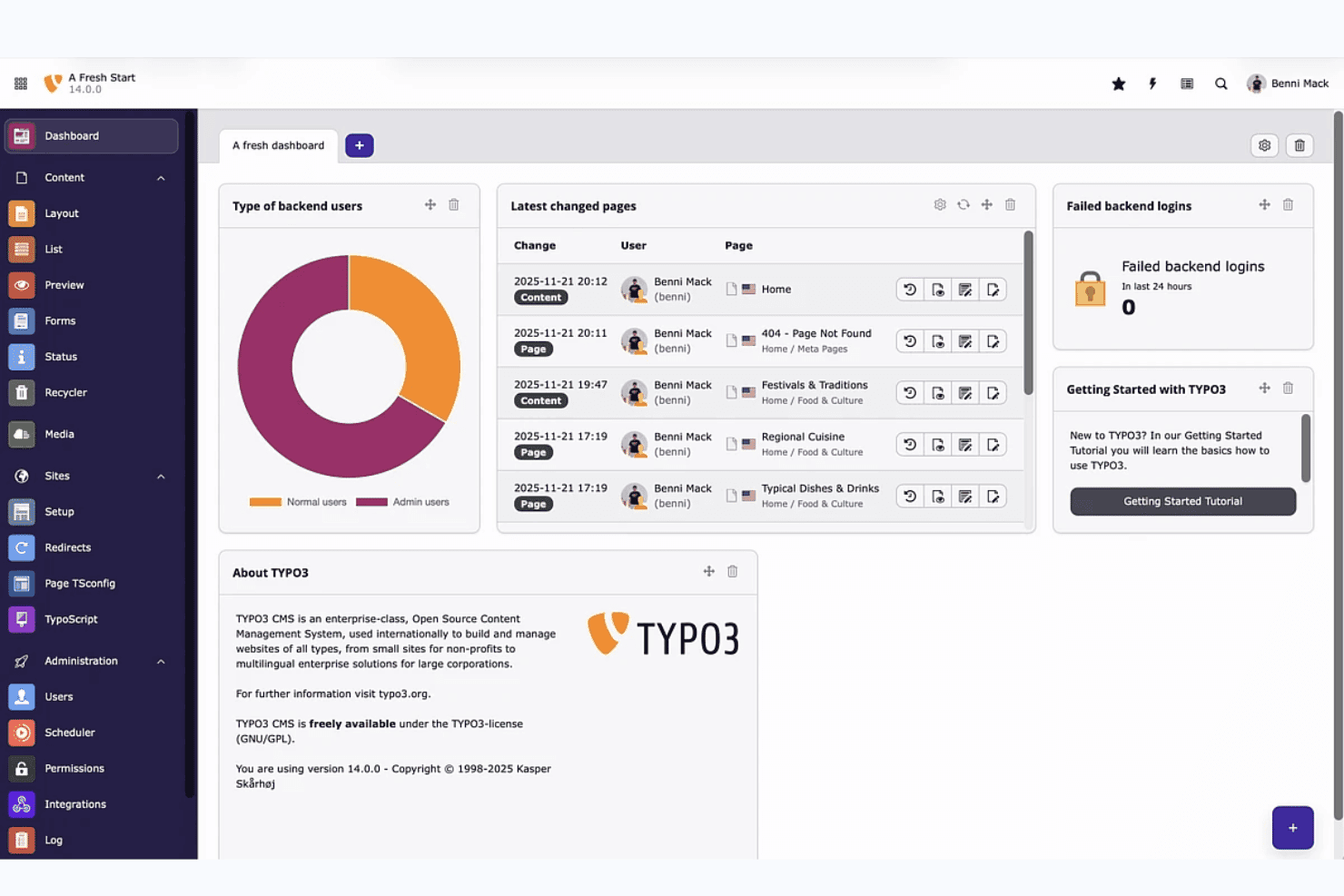
TYPO3 dashboard gives editors a real-time overview of site activity. TYPO3 is a GPL-licensed, self-hosted CMS built on PHP and Symfony that supports multisite deployments, multilingual content, role-based permissions, and a large extension ecosystem for custom web design.
Who Is TYPO3 Best For?
TYPO3 is a strong fit for digital agencies and enterprise teams managing multiple client sites across different languages and regions.
Why I Picked TYPO3
I've included TYPO3 in my top picks because it's genuinely built for agency teams managing multiple client sites from a single installation, with unlimited sites and languages supported out of the box. I love how site packages keep all theme configuration version-controlled in Git, making client handoffs and deployments far cleaner than patching files manually. Role-based permissions let you lock each client's editors to their own content area, which is exactly what agency workflows require.
TYPO3 Key Features
- GPL open-source licensing: TYPO3 is fully GPL v2+ licensed with no paid tiers, feature gates, or per-seat charges, so you get the complete platform for free.
- TYPO3 Extension Repository (TER): TER hosts thousands of extensions for adding functionality, with additional packages available via Packagist and GitHub.
- Site Package Builder: A dedicated tool at get.typo3.org generates a starter theme package you can version-control in Git from day one.
- Content Blocks editor: A visual backend module lets you build custom content elements and page types without writing YAML or PHP by hand.
TYPO3 Integrations
TYPO3 documents integrations with React, Vue.js, Nuxt, Bootstrap, Shopify, Salesforce, Matomo, Solr, AWS, and Cloudflare. Its open API, Composer ecosystem, and GitLab CI/CD templates support custom integrations and deployment workflows.
Pros and Cons
Pros:
- Offers granular editorial permissions
- Enables Git-controlled site configuration
- Supports unlimited sites and languages
Cons:
- Documentation challenges slow new adopters
- Layout creation remains developer-dependent
Learn more about TYPO3: Best for .NET-based headless and traditional CMS
- Free plan available
- From €45/month
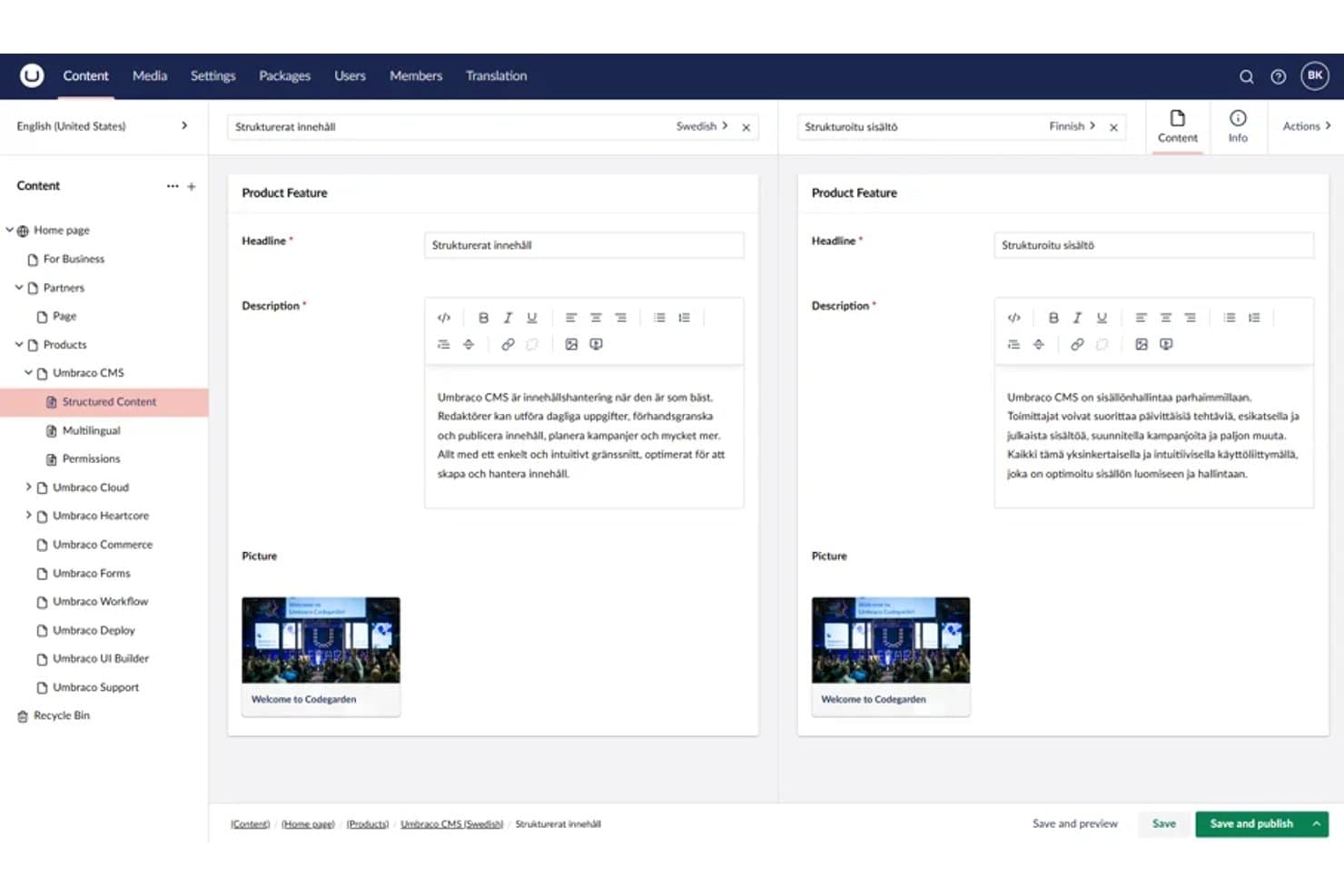
Umbraco lets users edit multilingual content side by side in split view. Umbraco is a .NET-based, MIT-licensed open-source CMS that combines traditional content authoring with headless API delivery, a Block Grid editor for visual layout arrangement, and a fully extensible backoffice built on an extension registry.
Who Is Umbraco Best For?
Umbraco is a strong fit for .NET developers and digital agencies building content-driven sites that need both traditional CMS editing and headless API delivery without licensing costs.
Why I Picked Umbraco
I've included Umbraco in my top picks because it's the only MIT-licensed CMS on this list built natively on .NET, making it the go-to choice for .NET developers who want full markup control without licensing fees. I particularly like its Block Grid editor, which lets content editors arrange and resize blocks visually while developers write the Razor views behind each block. The free Content Delivery API is also a standout inclusion, outputting Block Grid content as structured JSON so teams can run a traditional CMS and a headless front end from a single install.
Umbraco Key Features
- Content Delivery API: A built-in REST API that outputs structured JSON, supporting filtering, sorting, paging, and multilingual content for headless front-end delivery.
- Backoffice extension registry: A system where every UI element is an extension, letting developers add, replace, or remove dashboards, editors, and panels without modifying core code.
- uSync package: A community package that syncs Umbraco schema, settings, and content through source control, enabling version-controlled deployments across environments.
- Webhook support: Built-in webhooks that trigger on content events, letting you connect Umbraco to external services and automation tools without custom middleware.
Umbraco Integrations
Umbraco Forms connects to Zapier, Make, and n8n, while marketplace integrations include Google Maps. Its Content Delivery API, webhooks, and Heartcore REST and GraphQL APIs support custom integrations.
Pros and Cons
Pros:
- Razor templates provide precise markup control
- Block Grid supports visual layout arrangement
- MIT license permits unrestricted customization
Cons:
- Ready-made themes remain relatively limited
- Developers must build each visual block
Learn more about Umbraco: Best for security-focused open source CMS hosting
- Free plan available
- From $4.99/month (billed annually)
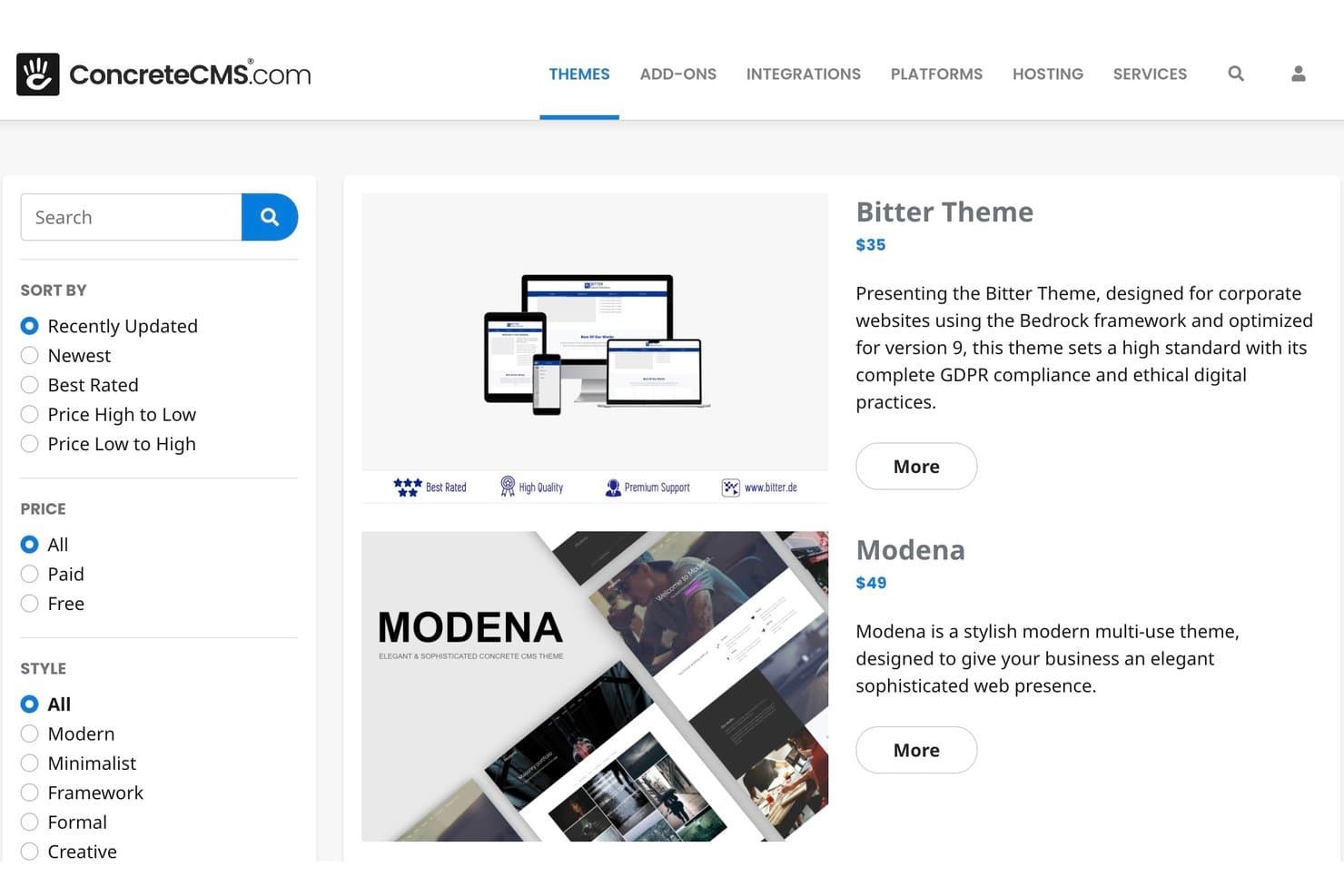
Concrete CMS offers a marketplace with filterable, styled themes. Concrete CMS is a PHP-based, MIT-licensed open source CMS with in-context drag-and-drop editing, a style editor, multisite support, a REST API, and a built-in form builder.
Who Is Concrete CMS Best For?
Concrete CMS is a strong fit for IT teams and digital agencies that need a self-hosted CMS with built-in compliance credentials, granular permissions, and low-overhead managed hosting.
Why I Picked Concrete CMS
I've included Concrete CMS in my top picks because its security credentials set it apart from most open-source CMS options. It backs a HackerOne bug bounty program, ships with Site Health and Production Mode audits, and supports ISO 27001, SOC 2, and HIPAA-compliant hosting. I also like that granular permissions extend down to the block level, so IT teams can lock down exactly who edits what across a multisite setup.
Concrete CMS Key Features
- In-context drag-and-drop editor: Edit content directly on the live page with draggable blocks, reusable stacks, and a WYSIWYG editor—no preview toggle needed.
- Twig templating: Build block views and page templates using Twig, added in v9.5.0 alongside continued support for standard PHP templates.
- Multisite and multilingual support: Manage multiple sites and languages from a single Concrete CMS install, with these capabilities built into the core product.
- REST API with OAuth2: Access and extend site content programmatically through a built-in REST API that supports OAuth2 and OpenID Connect authentication.
Concrete CMS Integrations
Marketplace integrations include Vimeo, AnveVoice, and Mailchimp add-ons. Concrete CMS also provides a REST API with OAuth2 and OpenID Connect, plus GitLab CI/CD workflows for custom SLA hosting.
Pros and Cons
Pros:
- MIT licensing preserves source ownership
- Block-level permissions suit regulated teams
- In-context editing needs little training
Cons:
- No simultaneous co-editing for teams
- Smaller theme ecosystem limits choices
Learn more about Concrete CMS:
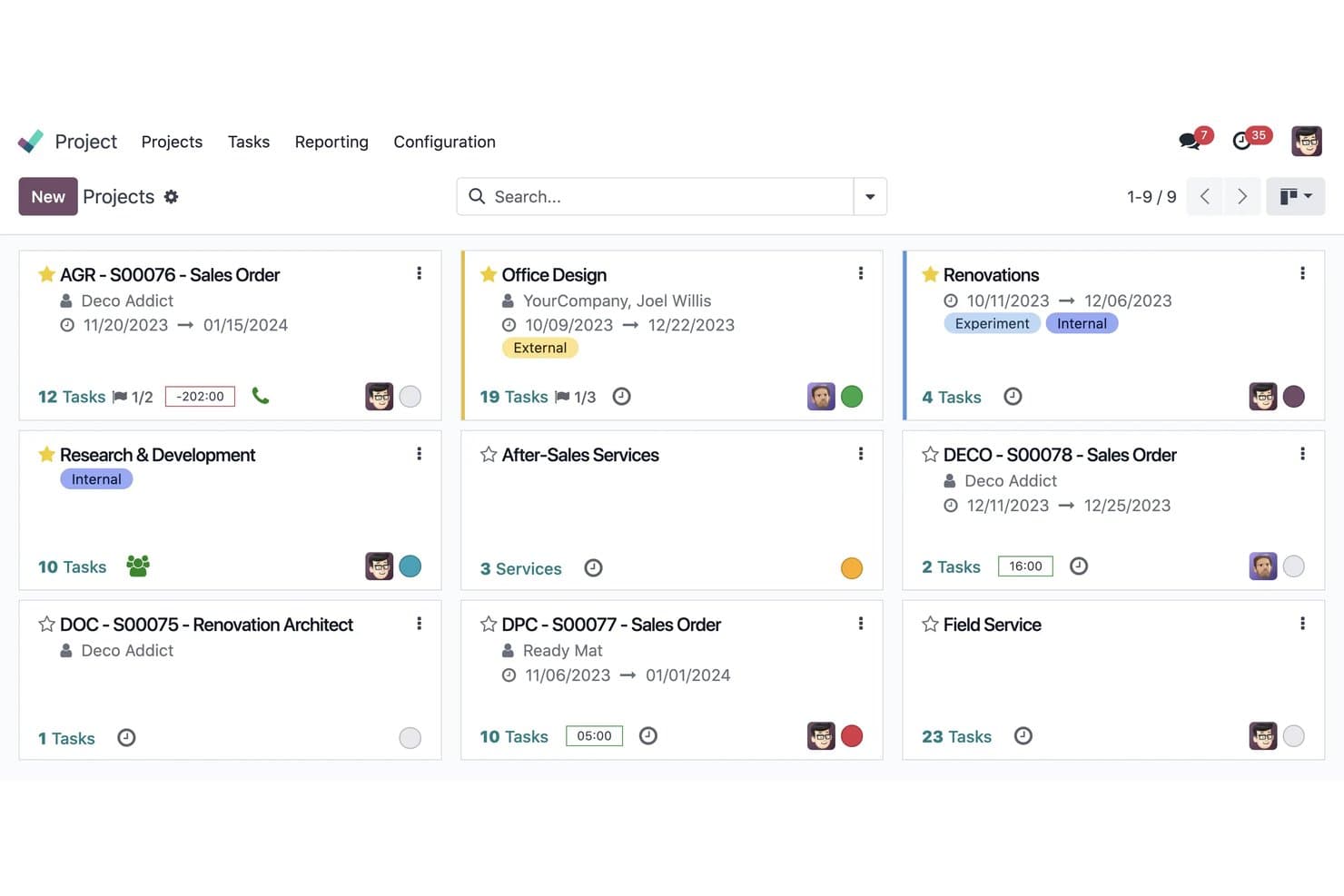
Odoo organizes all projects in a visual kanban card layout. Odoo is an open-source website builder and business suite that combines drag-and-drop page design, theme customization, and native integrations with ecommerce, CRM, and other business apps.
Who Is Odoo Best For?
Odoo suits small businesses and digital agencies that want a website built into the same platform handling their CRM, ecommerce, and back-office operations.
Why I Picked Odoo
I've included Odoo in my top picks because it's the only open-source website builder I know that shares a live database with your CRM, ecommerce catalog, and inventory. Build a lead form in the drag-and-drop editor and it creates a CRM opportunity automatically, no integration required. For teams already running Odoo's business suite, the LGPL-licensed Website app and roughly 37 free official themes mean your site and back office evolve from a single codebase.
Odoo Key Features
- Multi-site management: Run multiple websites from a single database, each with its own domain, theme, pages, and language settings.
- Bootstrap 5 theme development: Build custom themes using QWeb templates, SCSS, and XML inheritance on top of a Bootstrap 5 foundation.
- AI-assisted page creation: Generate page content, custom blocks, and SEO metadata from text prompts directly inside the editor.
- Website form routing: Create forms that automatically generate CRM opportunities, Helpdesk tickets, or project tasks without any third-party integration.
Odoo Integrations
Odoo offers native connections across its business apps, including CRM, eCommerce, Events, eLearning, Helpdesk, and Recruitment, plus Google Calendar and Outlook calendars. Its XML-RPC API supports custom integrations, with hosted API access available on the Custom plan.
Pros and Cons
Pros:
- QWeb enables deep theme customization
- Bootstrap themes deliver responsive layouts
- LGPL Community code supports self-hosting
Cons:
- Theme development requires XML and SCSS
- Visual editor limits fine-grained layout control
Learn more about Odoo:
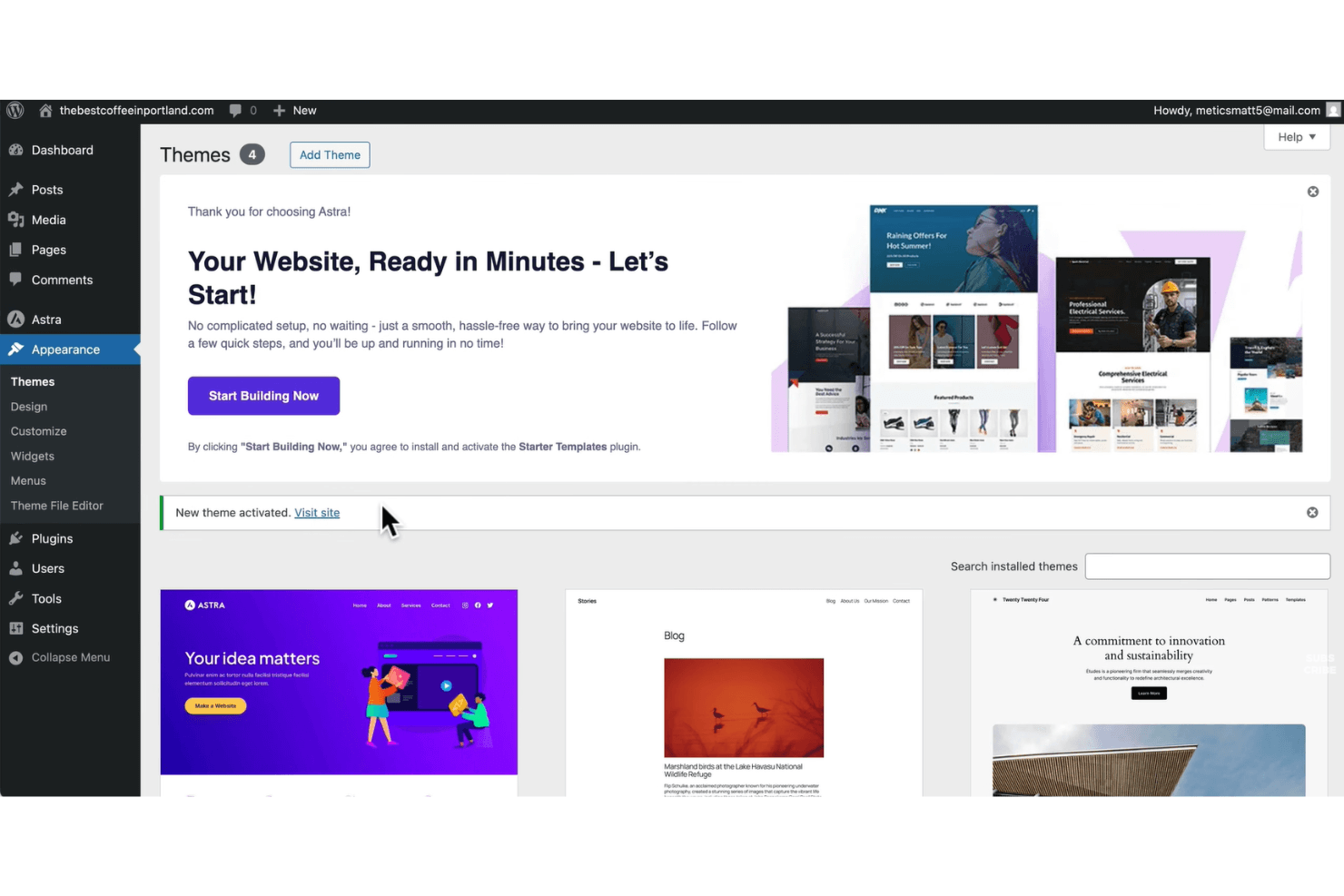
WordPress offers a Themes screen that supports managing and activating site designs. WordPress is an open-source web design and content management platform that combines a visual block-based editor, thousands of themes, and an extensive plugin ecosystem for building and customizing websites.
Who Is WordPress Best For?
WordPress is a strong fit for developers and agencies who need to extend site functionality through a deep library of plugins and custom code.
Why I Picked WordPress
WordPress earns its spot on my shortlist because no other open source platform comes close to its plugin ecosystem. With 60,000+ plugins in the repository, including tools like Elementor (10M+ installs) and WooCommerce, I can extend a site's functionality in almost any direction without writing custom code from scratch. I also rely on the REST API and WP-CLI for headless builds and automated workflows, which makes WordPress a genuinely developer-extensible platform, not just a visual builder.
WordPress Key Features
- Site Editor: Customize colors, fonts, layouts, and templates across your entire site from a single visual interface.
- theme.json design tokens: Centralize color, typography, and spacing settings in a single file, with support for style variations across block themes.
- GitHub deployments: Connect your theme or plugin repository to WordPress.com and trigger deploys on every commit or manually, with support for custom build steps.
- Device-level block visibility: Show or hide individual blocks per device type—desktop, tablet, or mobile—directly in the editor without CSS or plugins.
WordPress Integrations
WordPress supports integrations with WooCommerce, Stripe, PayPal, Google Analytics 4, Google Site Kit, HubSpot CRM, MailPoet, and GitHub. Its REST API also supports custom integrations and headless website builds.
Pros and Cons
Pros:
- Combines visual editing with deep theming
- Supports self-hosting with GPL code access
- Extends functionality through 60,000-plus plugins
Cons:
- Self-hosting shifts maintenance onto your team
- Plugin updates can introduce compatibility problems
Learn more about WordPress: Best for multilingual site management
- Free download available
- Free and open-source
Visit WebsiteCustomer Rating:4.1/5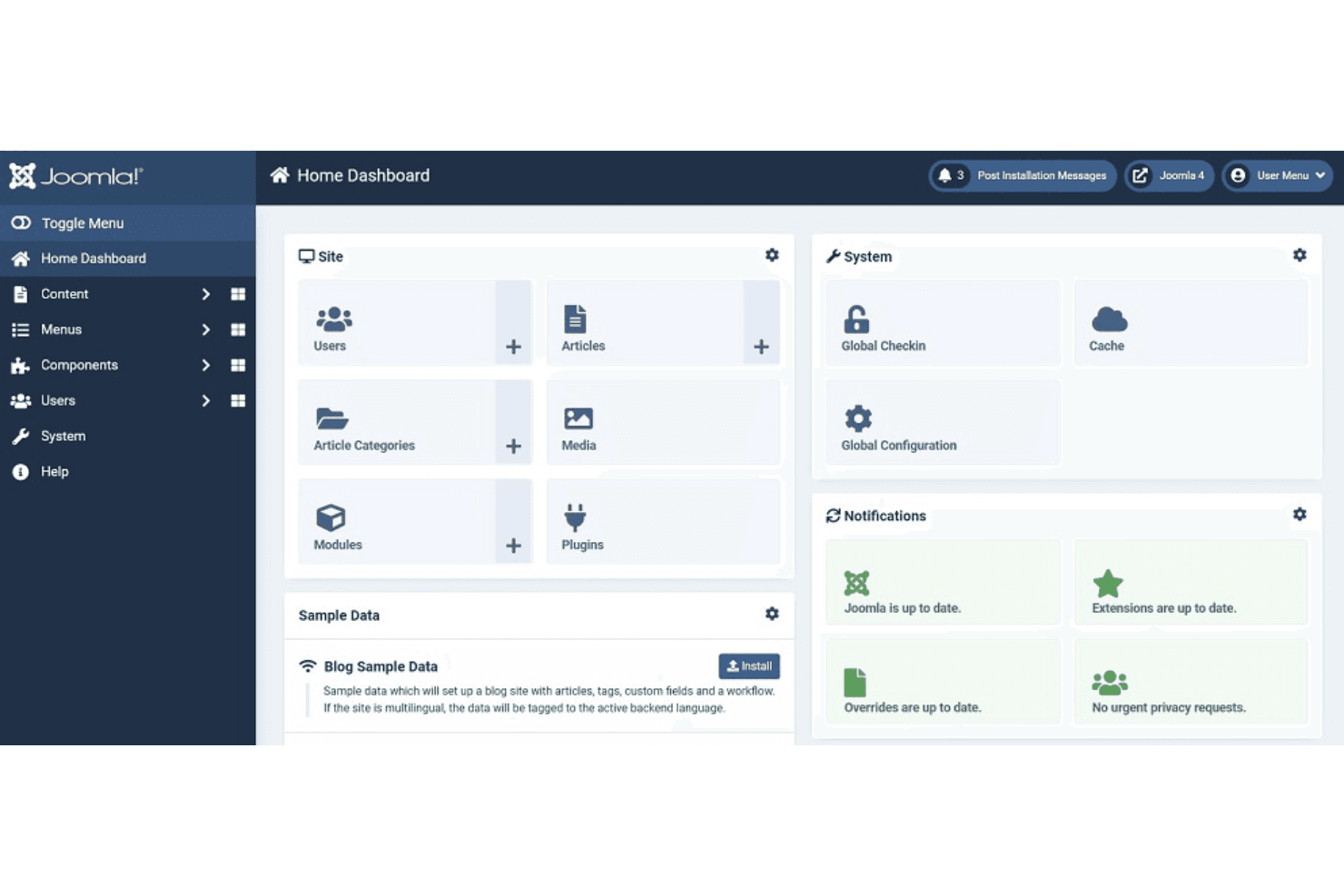
Joomla! offers a centralized dashboard that supports content, user, and system management. Joomla is an open-source CMS that combines multilingual content management, a template override system, access control, and a REST API to support building and managing websites across complex, content-heavy use cases.
Who Is Joomla Best For?
Joomla is a strong fit for developers and digital agencies managing content-heavy sites that need to serve audiences in multiple languages.
Why I Picked Joomla
I picked Joomla as one of the best because its multilingual capabilities are built directly into the core, with no third-party plugin required. The Multilingual Associations component lets you link and edit translated content side by side, and the Language Filter plugin handles language routing automatically. Joomla 6.1 extended this to modules, so every layer of a site can be translated and managed in one place.
Joomla Key Features
- Template override system: Customize the output of any core or extension template file without editing source code, so your changes survive updates.
- Child templates: Create a child template that inherits all parent files except the ones you override, letting you add custom CSS and layouts independently.
- REST Web Services API: Access and manage site content programmatically through built-in API endpoints covering articles, menus, modules, categories, and languages.
- Access control list (ACL): Set granular view, edit, create, and delete permissions for any user group across content, components, and administrative functions.
Joomla Integrations
Joomla offers marketplace integrations via JED extensions, including MailChimp, AWeber, GetResponse, ActiveCampaign, Google Analytics, DeepL, Google Translate, and Azure. Its REST Web Services API supports custom integrations.
Pros and Cons
Pros:
- Self-hosting supports infrastructure control
- Template overrides preserve customizations
- Core multilingual content management
Cons:
- Module-based layouts complicate visual iteration
- No native drag-and-drop page builder
Learn more about Joomla: Best for complex content structuring
- Free forever plan
- Free and open-source
Visit WebsiteCustomer Rating:4.1/5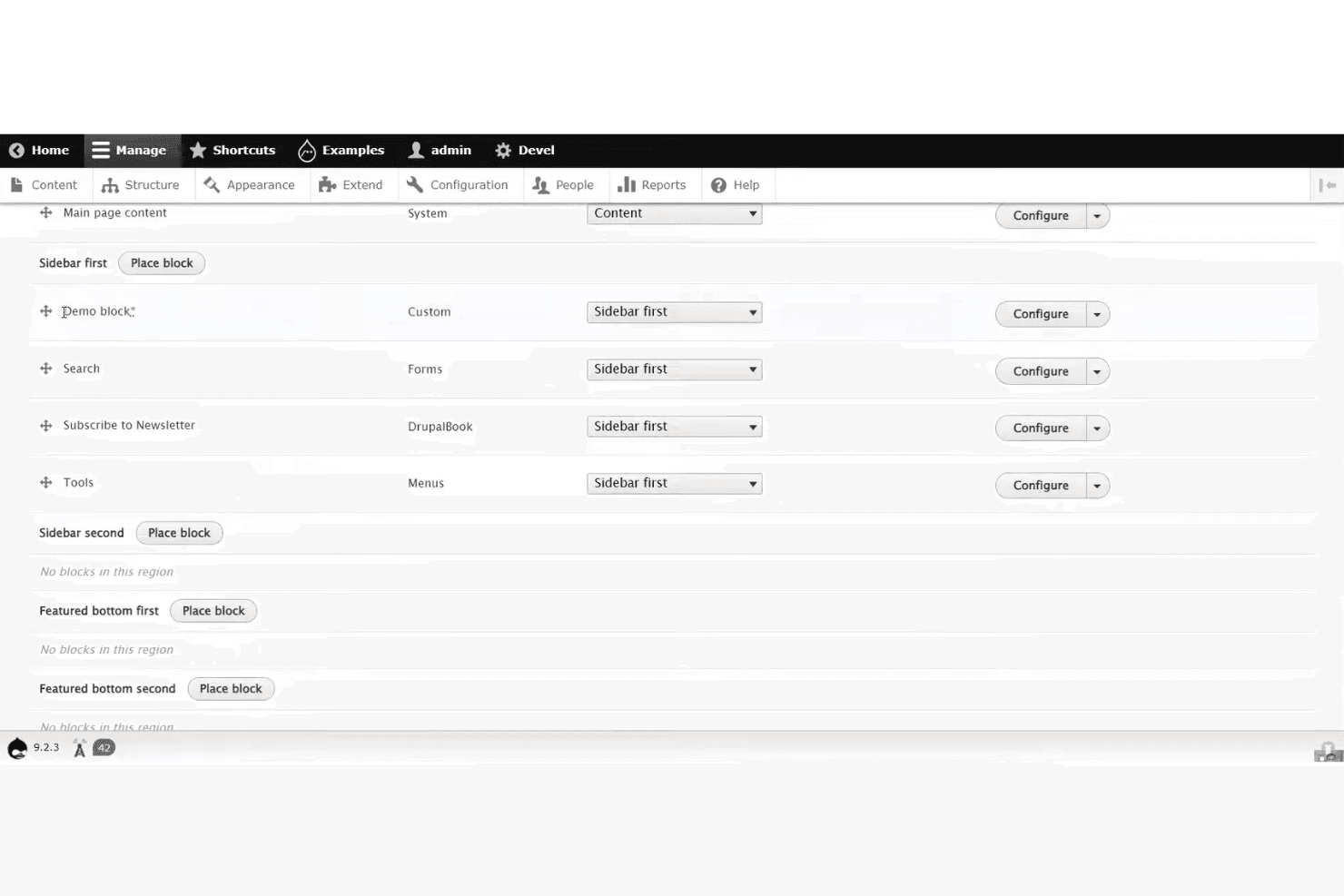
Drupal admin layout showing block placement controls across sidebar regions. Drupal is an open-source CMS built on a modular architecture that combines visual page building via Canvas, a theme and template ecosystem with thousands of contributed options, and headless API access through JSON:API and GraphQL.
Who Is Drupal Best For?
Drupal is a strong fit for developers and digital agencies building content-heavy sites that require structured data, granular access control, and deep extensibility.
Why I Picked Drupal
I've included Drupal in my top picks because no other open-source CMS matches its ability to model and govern complex content at scale. Its content type system, combined with 56,000+ contributed modules, lets you define structured data relationships that persist across channels, from a traditional front end to a React or Astro build via its built-in JSON:API. I also like that site templates like Byte ship with full content models and editorial workflows, not just visual skins.
Drupal Key Features
- JSON:API module: Ships in Drupal core and provides standards-compliant REST operations with zero configuration, enabling headless builds with React, Vue, or Astro frontends.
- Single-Directory Components (SDC): Packages HTML, CSS, and JS into reusable UI components defined with YAML props, letting developers build consistent design systems across the site.
- Automatic security updates: Built into Drupal CMS, this feature applies security patches without manual intervention, reducing the maintenance burden on site owners.
- Multisite support: Runs multiple sites from a single codebase, each with its own database and configuration, making it practical for agencies managing several client properties.
Drupal Integrations
Drupal connects with amazee.ai, OpenAI, Anthropic, Mailchimp, React, Vue, Astro, Tailwind CSS, Bootstrap 5, and ZURB Foundation. Its JSON:API and GraphQL support enables custom integrations, while Composer, Drush, DDEV, and Git/GitLab support development workflows.
Pros and Cons
Pros:
- Granular permissions support governed team publishing
- JSON:API supports headless design workflows
- Structured content models scale across channels
Cons:
- Module quality varies across contributed projects
- Canvas remains limited for global layouts
Learn more about Drupal: Best for WordPress visual design at scale
- Free plan available
- From $5/month (billed annually)
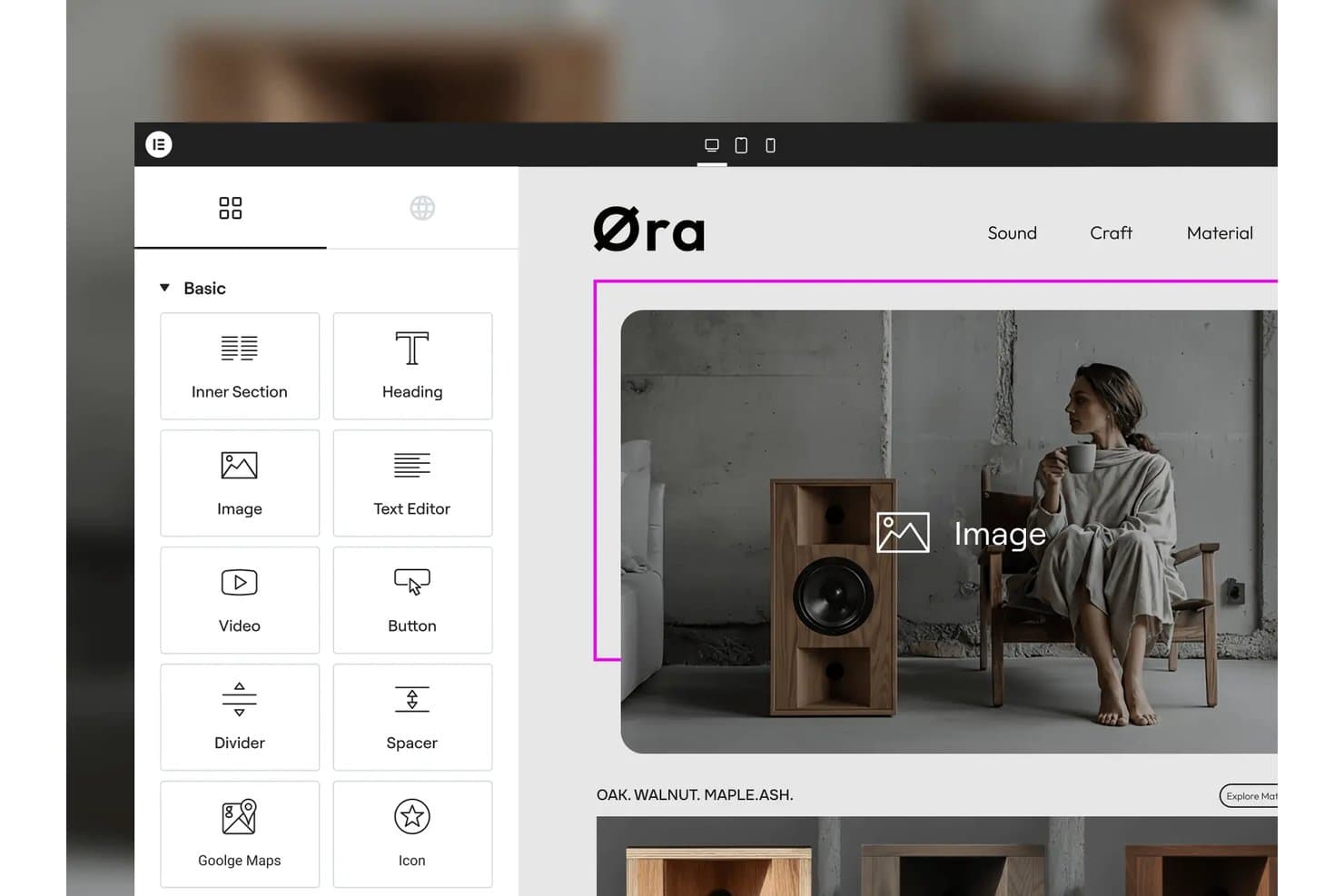
Elementor lets users drag and drop widgets onto pages visually. Elementor is a WordPress page builder plugin with a GPL-3.0-licensed core that includes a drag-and-drop visual editor, 40+ widgets, responsive design controls, and an extensible developer API.
Who Is Elementor Best For?
Elementor is a strong fit for WordPress designers and developers who need to build visually complex, multi-page sites without writing markup from scratch.
Why I Picked Elementor
Elementor earns its spot on my shortlist because the GPL-3.0 core plugin gives you a genuinely open-source foundation you can self-host on any WordPress-compatible server, with no vendor lock-in. I love how the Atomic Editor in v4 lets you set every style property per device, which makes building pixel-precise, responsive layouts across dozens of pages far more manageable than hand-coding breakpoints. The Class Manager and Variables system work like site-wide design tokens, so when a client changes a brand color, one edit propagates across the entire site instantly.
Elementor Key Features
- GPL-3.0 core plugin: The core editor is publicly available on GitHub under a GPL-3.0 license, so you can inspect, fork, and modify the codebase freely.
- WooCommerce builder: Dedicated widgets let you design product pages, cart layouts, checkout flows, and account pages directly inside the visual editor.
- Developer API: Custom widgets, dynamic tags, form actions, hooks, and a CLI give developers structured extension points beyond what the UI exposes.
- Per-breakpoint interactions: You can set motion effects and interaction behaviors independently for each device breakpoint, not just globally.
Elementor Integrations
Elementor integrates with WooCommerce, PayPal, Stripe, WPML, Polylang, TranslatePress, Weglot, Google Analytics, and Google Search Console. Its Developer API supports custom widgets, dynamic tags, form actions, and other extensions.
Pros and Cons
Pros:
- Developer API extends widgets, controls, and workflows
- Per-device styling handles responsive layouts precisely
- GPL-3.0 core supports self-hosted control
Cons:
- No white-label or Git-based version control
- Pro features remain outside the open core
Learn more about Elementor: Best for on-page live editing without plugins
- Free demo available
- From $10/website/month ($1 for the first month)

Microweber offers built-in eCommerce tools that support product and content management. Microweber is an open-source CMS and website builder with a live, on-page drag-and-drop editor, built-in e-commerce, blogging, and multilingual tools, all running on a PHP/Laravel foundation.
Who Is Microweber Best For?
Microweber is a strong fit for freelance designers and small agencies who want to build and deliver client sites without assembling a plugin stack.
Why I Picked Microweber
I've included Microweber in my top picks because its live, on-page editor lets you click directly on any element and edit it in place, with no admin panel switching required. Every change, from text to layout repositioning, renders instantly on the actual page. I also like that the drag-and-drop system supports free-draggable elements and reusable blocks, so you can build and rearrange layouts without touching a single line of code or installing a single plugin.
Microweber Key Features
- MIT-licensed open source core: The full codebase is publicly available on GitHub under the MIT License, so you can modify, redistribute, and use it commercially without restrictions.
- Built-in e-commerce engine: Product management, inventory, multi-currency support, tax zones, coupons, and order workflows are included out of the box with no sales commission.
- White-label licensing: You can remove Microweber branding, apply your own domain and logo, and integrate with WHMCS, Plesk, or cPanel for agency and hosting reseller setups.
- Template Style Editor: A global editor lets you control fonts, colors, spacing, heading styles, and button styles across your entire site from one place.
Microweber Integrations
Documented integrations include Stripe, PayPal, FedEx, UPS, DHL, WHMCS, Plesk, cPanel, Okta, and Azure. Microweber also offers API and webhook access for custom integrations, although public API documentation is limited.
Pros and Cons
Pros:
- Built-in ecommerce avoids plugin stacking
- MIT licensing permits commercial customization
- Live editing happens directly on-page
Cons:
- Sparse releases raise maintenance concerns
- Recent CVEs require careful patch management
Learn more about Microweber:
Diğer Açık Kaynaklı Web Tasarımı Yazılımları
İşte kısa listeme girmeyen ancak yine de göz atmaya değer bazı ek açık kaynaklı web tasarımı yazılımı seçenekleri:
- 11GrapesJSBest for embedding a custom white-label builder
- 12PubliiBest for privacy-first static site publishing
- 13GhostBest for newsletter and membership site builds
- 14SilverstripeBest for developer-led agency site builds
- 15HugoBest for high-speed static site generation
- 16PenpotBest for design-to-dev handoff via open source
- 17SilexBest for clean static HTML/CSS export
- 18WebstudioBest for collaborative visual editing
- 19PlasmicBest for React-native codegen and design tokens
- 20JekyllBest for Git-based static site deployment
How I Evaluate Open Source Web Design Software
I split my evaluation into three parts, giving the most weight to core functionality: inspect and modify open code, then build responsive pages visually. Next, I look for standout features such as Git-based version control for branching site changes. Finally, I consider factors beyond features, including community support and the hosting and maintenance costs of self-hosting.
Core Functionality (Table Stakes For This List)
When I'm selecting tools for my list, I score each one on a scale from 0 (does not offer the functionality) to 5 (excels in this area) for each core functionality listed below. I then convert the total into a percentage to help assess each tool's overall fit, with extra weight on any functionalities I’ve deemed essential.
- Open-Source License (Essential): I check that the public license permits code inspection, modification, and redistribution, including commercial use, and review the project’s public repository.
- Visual Page Design (Essential): I look for ways to arrange and style page elements visually, such as building a landing page from sections without coding the full layout.
- Themes & Templates: I assess the variety and customizability of themes, including whether a team can revise a site’s structure and styling without rebuilding its content.
- Self-Hosting: I check whether teams can deploy on infrastructure they control, using documented setup guidance and common server requirements.
- Extensibility: I evaluate available plugins, modules, APIs, or code hooks for adding features such as forms, search, or custom content types.
- Responsive Output: I consider how themes and templates adapt to different screens, including whether navigation and content remain usable on mobile devices.
Once I have a list of tools that meet the criteria, I consider what sets each platform apart.
Differentiating Factors (What Sets Vendors Apart)
Here's how I compare and contrast different vendors:
Standout Features
I evaluate whether a platform exposes REST or GraphQL APIs so content and front-end layers stay independent. That matters when your product stack spans a mobile app and a marketing site pulling from one content hub. I also look at Git-based version control—tools like Strapi and Ghost let teams branch and roll back site changes alongside code, which keeps designers and engineers in a shared workflow instead of working in silos.
Beyond Features
I evaluate total cost of ownership because "free" gets expensive fast—self-hosting WordPress or Ghost means budgeting for server uptime, security patches, and DevOps hours that SaaS alternatives bundle in. Data privacy control matters just as much, especially when teams need to meet data residency or GDPR requirements; self-hosting Strapi or Directus, for example, lets you run audits against your own source code. I also check community health—active GitHub repos, plugin ecosystems, and responsive forums signal a project won't stall when you need a fix.
Açık Kaynaklı Web Tasarımı Yazılımı Nasıl Seçilir?
Uzun özellik listeleri ve karmaşık fiyatlandırma yapıları içinde kaybolmak kolaydır. Benzersiz yazılım seçimi süreciniz üzerinde çalışırken odağınızı korumanıza yardımcı olmak için göz önünde bulundurmanız gereken faktörleri içeren bir kontrol listesi hazırladım:
| Faktör | Göz Önünde Bulundurulması Gerekenler |
|---|---|
| FaktörÖlçeklenebilirlik | Göz Önünde Bulundurulması GerekenlerAraç, siteniz boyut, karmaşıklık veya kullanıcı trafiği bakımından büyüdükçe onu destekleyebilecek mi? Yalnızca mevcut projeleri değil, gelecekteki ihtiyaçları da göz önünde bulundurun. |
| FaktörEntegrasyonlar | Göz Önünde Bulundurulması GerekenlerYazılım mevcut araçlarınıza (CMS, analiz, sürüm denetimi) bağlanabiliyor mu? Yerel entegrasyonları veya kullanılabilir API'leri kontrol edin. |
| FaktörÖzelleştirilebilirlik | Göz Önünde Bulundurulması Gerekenlerİş akışınıza uyacak şekilde kod tabanını değiştirebilir veya eklentiler ekleyebilir misiniz? Tasarım ve işlevsellik açısından ne kadar esnekliğe ihtiyacınız olduğunu değerlendirin. |
| FaktörKullanım kolaylığı | Göz Önünde Bulundurulması GerekenlerEkibiniz aracı ne kadar hızlı öğrenip kullanabilir? Açık belgeler, sezgisel arayüzler ve aktif kullanıcı toplulukları arayın. |
| FaktörUygulama ve işe alıştırma | Göz Önünde Bulundurulması GerekenlerBaşlamak için hangi kaynaklar gerekiyor? Taşıma adımlarını, eğitim ihtiyaçlarını ve işe alıştırma kılavuzlarının veya şablonlarının bulunabilirliğini göz önünde bulundurun. |
| FaktörMaliyet | Göz Önünde Bulundurulması GerekenlerEklentiler, destek veya güncellemeler için gizli maliyetler var mı? Yalnızca başlangıç fiyatını veya ücretsiz katmanı değil, toplam sahip olma maliyetini karşılaştırın. |
| FaktörGüvenlik önlemleri | Göz Önünde Bulundurulması GerekenlerAraç düzenli güvenlik güncellemeleri sunuyor ve izinleri yönetmenize olanak tanıyor mu? Güvenlik açıklarını ve kullanıcı verilerini nasıl ele aldığını değerlendirin. |
| FaktörDestek kullanılabilirliği | Göz Önünde Bulundurulması GerekenlerHangi destek kanalları mevcut (forumlar, e-posta, canlı sohbet)? Yanıt sürelerini ve desteğin topluluk tarafından mı yoksa sağlayıcı tarafından mı sunulduğunu göz önünde bulundurun. |
Açık Kaynaklı Web Tasarımı Yazılımı Nedir?
Açık kaynaklı web tasarım yazılımı, kullanıcıların temel kaynak koduna erişerek web siteleri oluşturmasına, düzenlemesine ve yönetmesine olanak tanıyan bir araç türüdür. Bu araçların kullanımı, değiştirilmesi ve dağıtılması genellikle ücretsizdir; bu da onları esneklik ve kontrol isteyen geliştiriciler ve tasarımcılar arasında popüler kılar. Açık kaynak seçenekleri genellikle iş birliğini, özelleştirmeyi ve diğer web teknolojileriyle entegrasyonu destekleyerek ekiplerin kendi benzersiz ihtiyaçlarına uygun siteler oluşturmasına yardımcı olur.
Açık Kaynaklı Web Tasarım Yazılımının Özellikleri
Açık kaynaklı web tasarım yazılımı seçerken aşağıdaki temel özelliklere dikkat edin:
- Görsel düzenleyici: Web sayfası öğelerini sürükle ve bırak veya WYSIWYG arayüzü kullanarak tasarlamanıza ve düzenlemenize olanak tanır; böylece yaptığınız değişiklikleri anında görebilirsiniz.
- Kod düzenleyici: HTML, CSS ve JavaScript yazıp düzenleyebileceğiniz ve vurgulayabileceğiniz bir alan sunarak sitenizin yapısı ve stili üzerinde doğrudan kontrol sağlar.
- Duyarlı tasarım araçları: Farklı ekran boyutları için düzenleri önizlemenize ve ayarlamanıza olanak tanır; böylece sitenizin masaüstü bilgisayarlarda, tabletlerde ve telefonlarda iyi görünmesini sağlar.
- Şablon kitaplığı: Özelleştirebileceğiniz, önceden oluşturulmuş düzen ve temalardan oluşan bir koleksiyon sunar; projelere hızlı başlamanıza ve tasarım tutarlılığını korumanıza yardımcı olur.
- Sürüm denetimi entegrasyonu: Değişiklikleri izlemek, revizyonları yönetmek ve çalışmanızı kaybetmeden başkalarıyla iş birliği yapmak için Git gibi sistemlere bağlanır.
- Varlık yönetimi: Görselleri, yazı tiplerini ve diğer medya dosyalarını projeniz içinde düzenleyerek kaynakları sayfalar arasında güncellemeyi ve yeniden kullanmayı kolaylaştırır.
- Canlı önizleme: Düzenleme yaptıkça sitenizdeki güncellemeleri gerçek zamanlı olarak gösterir; böylece yayımlamadan önce değişikliklerinizin etkisini hemen görebilirsiniz.
- Eklenti veya uzantı desteği: Yazılıma yeni özellikler veya araçlar eklemenize olanak tanıyarak yeteneklerini iş akışınıza ya da proje ihtiyaçlarınıza uyacak şekilde genişletir.
- Çoklu dil desteği: İçeriği birden fazla dilde oluşturmanızı ve yönetmenizi sağlar; bu özellik uluslararası veya yerelleştirilmiş web siteleri oluşturmak için kullanışlıdır.
Açık Kaynaklı Web Tasarım Yazılımının Faydaları
Açık kaynaklı web tasarım yazılımını kullanmak ekibiniz ve işletmeniz için çeşitli faydalar sağlar. Yararlanabileceğiniz bazı avantajlar şunlardır:
- Koda tam erişim: Kaynak kodunu tam gereksinimlerinize uyacak şekilde değiştirebilir, benzersiz iş akışlarını ve özel özellikleri destekleyebilirsiniz.
- Lisans ücreti yok: Çoğu açık kaynaklı araç ücretsiz olarak kullanılabilir; bu da yazılım maliyetlerini azaltmanıza ve bütçeyi başka alanlara ayırmanıza yardımcı olur.
- Topluluk odaklı iyileştirmeler: Sık güncellemeler, hata düzeltmeleri ve yeni özellikler genellikle küresel bir geliştirici topluluğu tarafından katkı olarak sunulur.
- Esnek entegrasyonlar: Açık kaynaklı çözümler genellikle eklentileri, uzantıları ve API'leri destekler; bu da teknoloji yığınınızdaki diğer araçlara bağlanmayı kolaylaştırır.
- Gelişmiş iş birliği: Birçok araç, ekiplerin birlikte çalışmasına ve değişiklikleri verimli bir şekilde izlemesine olanak tanıyan sürüm denetimi ve açıklama ekleme gibi özellikler sunar.
- Modern standartlar için destek: Açık kaynaklı projeler yeni web teknolojilerini hızlı bir şekilde benimseme eğilimindedir; bu da güncel en iyi uygulamaları karşılayan siteler oluşturmanıza yardımcı olur.
- Şeffaflık ve güvenlik: Açık kod sayesinde güvenlik açıklarını denetleyebilir ve yazılımın kuruluşunuzun güvenlik gereksinimlerini karşıladığından emin olabilirsiniz.
Açık Kaynaklı Web Tasarım Yazılımının Maliyetleri ve Fiyatlandırması
Açık kaynaklı web tasarım yazılımı seçmek, sunulan çeşitli fiyatlandırma modellerinin ve planların anlaşılmasını gerektirir. Maliyetler özelliklere, ekip büyüklüğüne, eklentilere ve daha fazlasına göre değişir; bazı ekipler maliyetleri en aza indirmek için ücretsiz web tasarım araçlarını tercih eder. Aşağıdaki tablo, açık kaynaklı web tasarım yazılımı çözümlerinde yaygın planları, ortalama fiyatlarını ve genellikle sunulan özellikleri özetlemektedir:
Açık Kaynaklı Web Tasarım Yazılımı için Plan Karşılaştırma Tablosu
| Plan Türü | Ortalama Fiyat | Yaygın Özellikler |
|---|---|---|
| Plan TürüÜcretsiz Plan | Ortalama Fiyat$0 | Yaygın ÖzelliklerTemel özelliklere erişim, topluluk desteği, temel şablonlar ve açık kaynak kodu. |
| Plan TürüKişisel Plan | Ortalama Fiyat$4-$20/ay | Yaygın ÖzelliklerEk şablonlar, öncelikli güncellemeler, e-posta desteği ve eklenti veya uzantı erişimi. |
| Plan Türüİşletme Planı | Ortalama Fiyat$25-$75/ay | Yaygın ÖzelliklerEkip iş birliği araçları, gelişmiş entegrasyonlar, varlık yönetimi ve gelişmiş güvenlik seçenekleri. |
| Plan TürüKurumsal Plan | Ortalama Fiyat$950+/ay | Yaygın ÖzelliklerÖzel işe alıştırma, özel destek, uyumluluk araçları, gelişmiş analizler ve SLA garantileri. |
Açık Kaynaklı Web Tasarım Yazılımı SSS
Açık kaynaklı web tasarım yazılımı hakkında sık sorulan soruların bazı yanıtları burada yer alıyor:
Açık kaynaklı web tasarım yazılımını ticari projelerde kullanabilir miyim?
Evet, çoğu açık kaynaklı web tasarım yazılımı ticari projelerde kullanılabilir. Uyumluluğu sağlamak için her zaman ilgili lisans koşullarını inceleyin; ancak açık kaynak lisansları genellikle hem kişisel hem de ticari kullanıma ek ücret olmadan izin verir.
Açık kaynaklı web tasarım yazılımının güvenli olup olmadığını nasıl anlayabilirim?
Düzenli güncellemeleri, etkin bir geliştirici topluluğunu ve güvenlik uygulamalarına ilişkin şeffaf belgeleri kontrol edin. Güvenlik açıklarının ne kadar hızlı giderildiğini görmek için projenin sorun takip sistemini inceleyin ve yazılımın kullanıcı izinlerini ve veri koruma özelliklerini destekleyip desteklemediğini değerlendirin.
Açık kaynaklı web tasarım yazılımını kullanmak için hangi teknik beceriler gereklidir?
Çoğu araç, HTML, CSS ve bazen JavaScript hakkında temel bilgi gerektirir. Bazıları yeni başlayanlar için görsel düzenleyiciler sunar; ancak şablonları özelleştirmek veya gelişmiş özellikler eklemek genellikle kod ya da yapılandırma dosyalarını düzenlemeyi gerektirir.
Açık kaynaklı web tasarım yazılımı için destek nasıl sağlanır?
Destek genellikle topluluk forumları, belgeler ve kullanıcı grupları aracılığıyla sağlanır. Bazı projeler ücretli destek veya danışmanlık sunar; ancak çoğu, kullanıcılar arası yardıma ve gönüllü geliştiricilerin katkılarına dayanır.
Açık kaynaklı web tasarım yazılımını iş akışıma uyacak şekilde özelleştirebilir miyim?
Evet, açık kaynaklı web tasarım yazılımı özelleştirme amacıyla tasarlanmıştır. Aracı ekibinizin özel ihtiyaçlarına ve süreçlerine uyarlamak için kaynak kodunu değiştirebilir, eklentiler yükleyebilir veya kendi uzantılarınızı geliştirebilirsiniz.