

Idea capture tools are cloud-based platforms that help you collect, organize, and manage ideas from your team or stakeholders in one place. If you’re searching for ways to keep valuable suggestions from slipping through the cracks, the right idea management tool can make all the difference. With so many options available, it’s tough to know which solution fits your workflow, collaboration style, and open innovation goals. This list will help you quickly compare the top software tools for 2026, so you can choose the best idea management platform to support your team’s creativity and turn ideas into real outcomes.
Why Trust Our Software Recommendations
6,700+
Reviews
20
Industry experts
16+
Evaluation factors
14
Years
Our team has been testing and reviewing software since 2012. As product managers ourselves, we know how difficult—and important—it is to choose the right software.
For this guide, we evaluated tools using hands-on testing and independent research, scoring tools using our selection criteria.
Our reviews reflect our human editorial judgment, not a sales pitch.
Expert reviewers:
- Andrew LumbySenior TPM
- Cristiano ValimSenior UI/UX Lead


Idea Capture Tools Comparison Table
The table below compares pricing details for my top idea capture tools selections.
| Tool | Best For | Trial Info | Price | ||
|---|---|---|---|---|---|
| 1 | Best for sharing Jira updates | 30-day free trial + free plan available | From $1.10/user/month | Website | |
| 2 | Best for government-grade crowdsourced innovation | Free demo available | Pricing upon request | Website | |
| 3 | Best for visual boards that organize creative ideas | Free plan available | From $9.99/user/month (billed annually) | Website | |
| 4 | Best for capturing ideas within Google Workspace | Free plan available | From $7/user/month | Website | |
| 5 | Best for enterprise-wide idea campaign management | Free demo available | Pricing upon request | Website | |
| 6 | Best for organizing ideas alongside project docs | Free plan available | From $10/user/month (billed annually) | Website | |
| 7 | Best for free capture across all Apple devices | Free plan available | Free to use | Website | |
| 8 | Best for multi-format capture across all devices | Free plan + 7-day free trial available | From $8.25/month (billed annually) | Website | |
| 9 | Best for notes that connect ideas over time | 14-day free trial + free demo available | Pricing upon request | Website | |
| 10 | Best for collecting feedback from SaaS users | Free plan + free trial + free demo available | From $79/month (billed annually) | Website |



Idea Capture Tools Reviews
Below are my detailed summaries of the idea capture tools that made it onto my shortlist. My reviews offer a detailed look at the features, best use cases, and integrations of each platform to help you find the best one for you.
 Best for sharing Jira updates
- 30-day free trial + free plan available
- From $1.10/user/month
Visit WebsiteCustomer Rating:5/5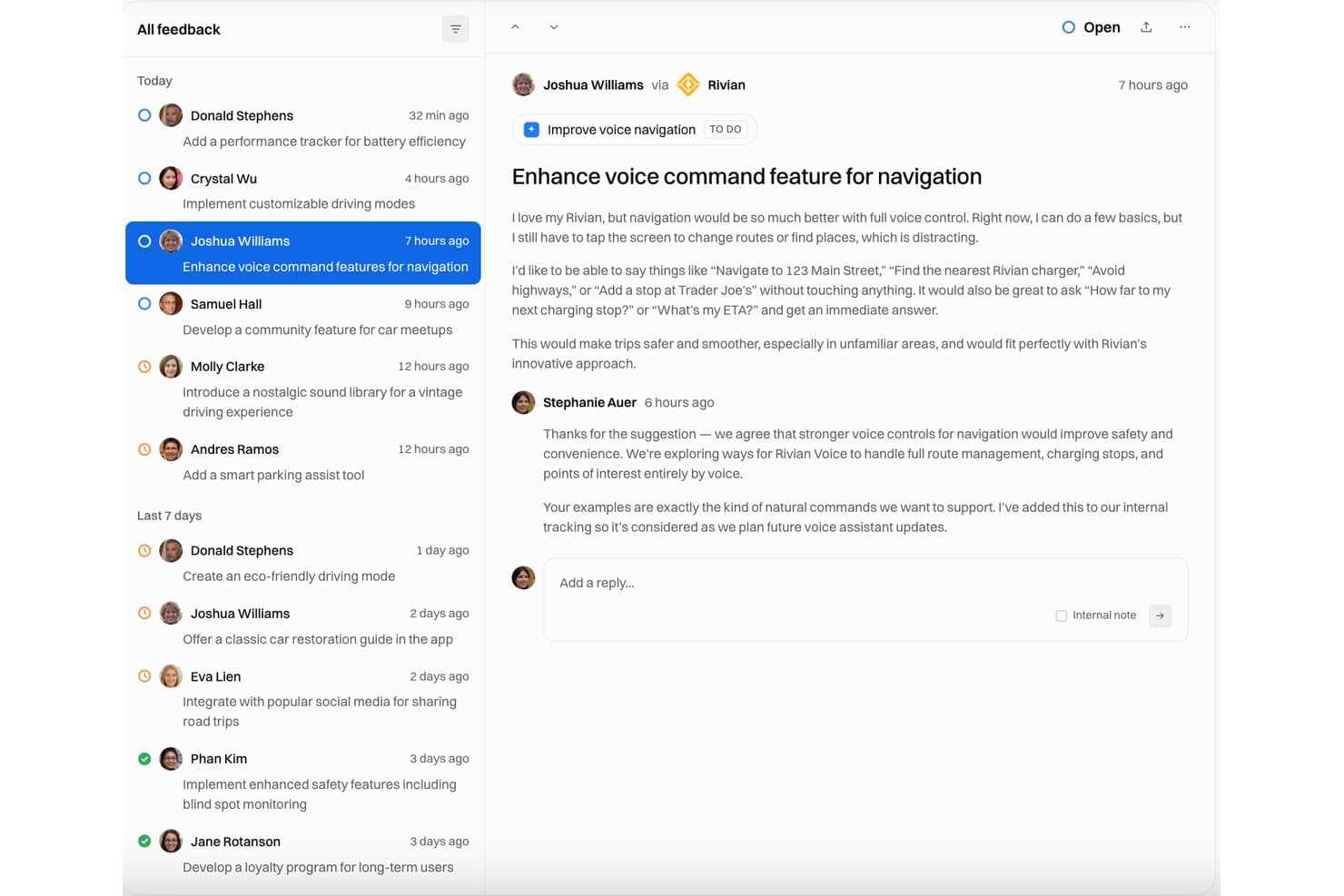
Released displays a feedback inbox where voice navigation enhancement requests are tracked with open status and team responses. Released is a Jira-native feedback capture and roadmap communication tool that collects customer and stakeholder ideas through hosted portals, embeddable forms, and Slack, linking submissions directly to Jira issues and Jira Product Discovery.
Who Is Released Best For?
Released suits product teams already standardized on Jira who need to share roadmap progress and release updates with customers or partners without giving them Jira access.
Why I Picked Released
Released earns its spot on my shortlist because of how well it closes the communication gap between Jira and the outside world. I love that I can publish audience-specific roadmap views (one for customers, one for execs) from a single Jira source, with no exports or PowerPoint rebuilds needed. The AI release notes feature is genuinely useful too: it drafts polished updates from completed Jira tickets, which I can push to a branded changelog, Slack, or email subscribers in minutes.
Released Key Features
- Centralized feedback inbox: All submitted ideas and feedback flow into a searchable triage inbox native to Jira.
- Embeddable feedback form: Add idea capture forms directly inside your web app, product, or website.
- Roadmap visualization: Create and share real-time public roadmaps that sync automatically from Jira projects.
- Jira Product Discovery integration: Customer feedback can generate Insights linked directly to ideas in Jira Product Discovery.
Released Integrations
Released offers native integration with Jira. An API is available for custom integrations.
Pros and Cons
Pros:
- Public portal requires no Jira login
- AI drafts release notes from closed tickets
- Jira-native idea capture without extra setup
Cons:
- No built-in idea scoring or prioritization
- Only works within the Jira ecosystem
Learn more about Released: Best for government-grade crowdsourced innovation
- Free demo available
- Pricing upon request
Visit WebsiteCustomer Rating:4.6/5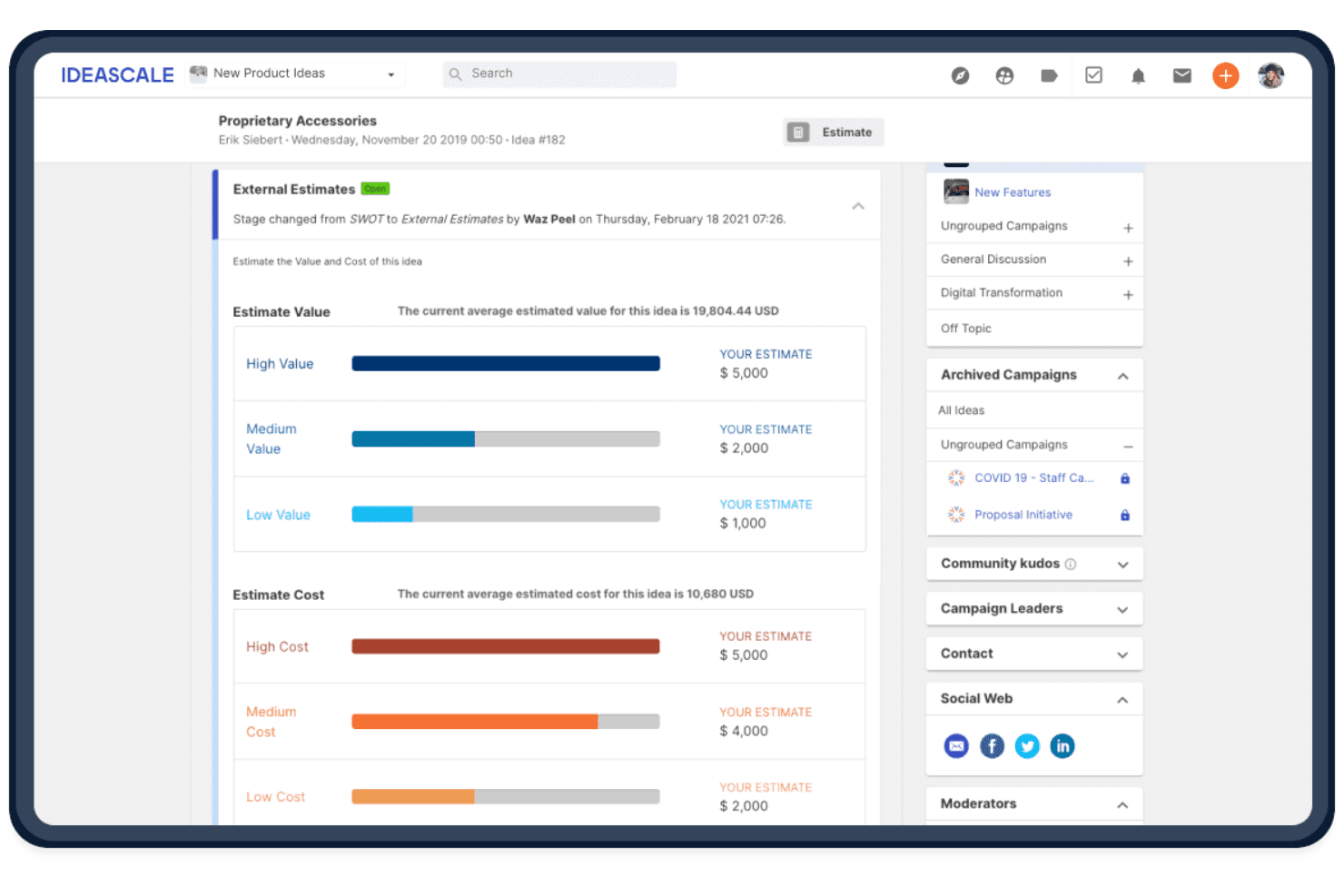
IdeaScale helps teams evaluate captured ideas by comparing estimated value and cost to support prioritization. IdeaScale is an enterprise innovation management platform that lets organizations crowdsource, organize, evaluate, and route ideas through structured campaigns and workflows.
Who Is IdeaScale Best For?
IdeaScale fits innovation and R&D teams at large enterprises, government agencies, and universities that need to run structured, organization-wide idea campaigns at scale.
Why I Picked IdeaScale
IdeaScale earns its spot on my shortlist because it's the only FedRAMP-certified idea management solution I've found, which matters enormously when you're running innovation campaigns inside a government agency or regulated enterprise. I like how the platform combines community voting, AI-powered duplicate detection, and two-way Jira sync to move ideas from raw submission all the way to a prioritized roadmap item without manual handoffs.
IdeaScale Key Features
- Slack and Teams idea capture: Submit ideas directly from a Slack command or Microsoft Teams without leaving your workflow.
- Linked ideas: Connect related ideas using seven relationship types, including "similar to," "supports," and "is part of," across campaigns.
- Idea Portfolio view: Review ideas from all communities in one Kanban or list view, with bulk actions for tagging, assigning owners, and exporting.
- AI duplicate detection: Flags similar ideas during submission and shows a side-by-side comparison with a similarity percentage to reduce overlap.
IdeaScale Integrations
IdeaScale offers native integrations with Slack, Microsoft Teams, Jira, Azure Boards, Trello, YouTrack, Power BI, and Tableau. It also supports webhooks, a REST API, and Zapier for custom connections.
Pros and Cons
Pros:
- Surfaces duplicates before submission
- Links ideas to structured evaluation stages
- Supports organization-wide idea campaigns
Cons:
- Text and attachments limit input formats
- Requires organizational setup for capture
Learn more about IdeaScale: Best for visual boards that organize creative ideas
- Free plan available
- From $9.99/user/month (billed annually)
Visit WebsiteCustomer Rating:4.7/5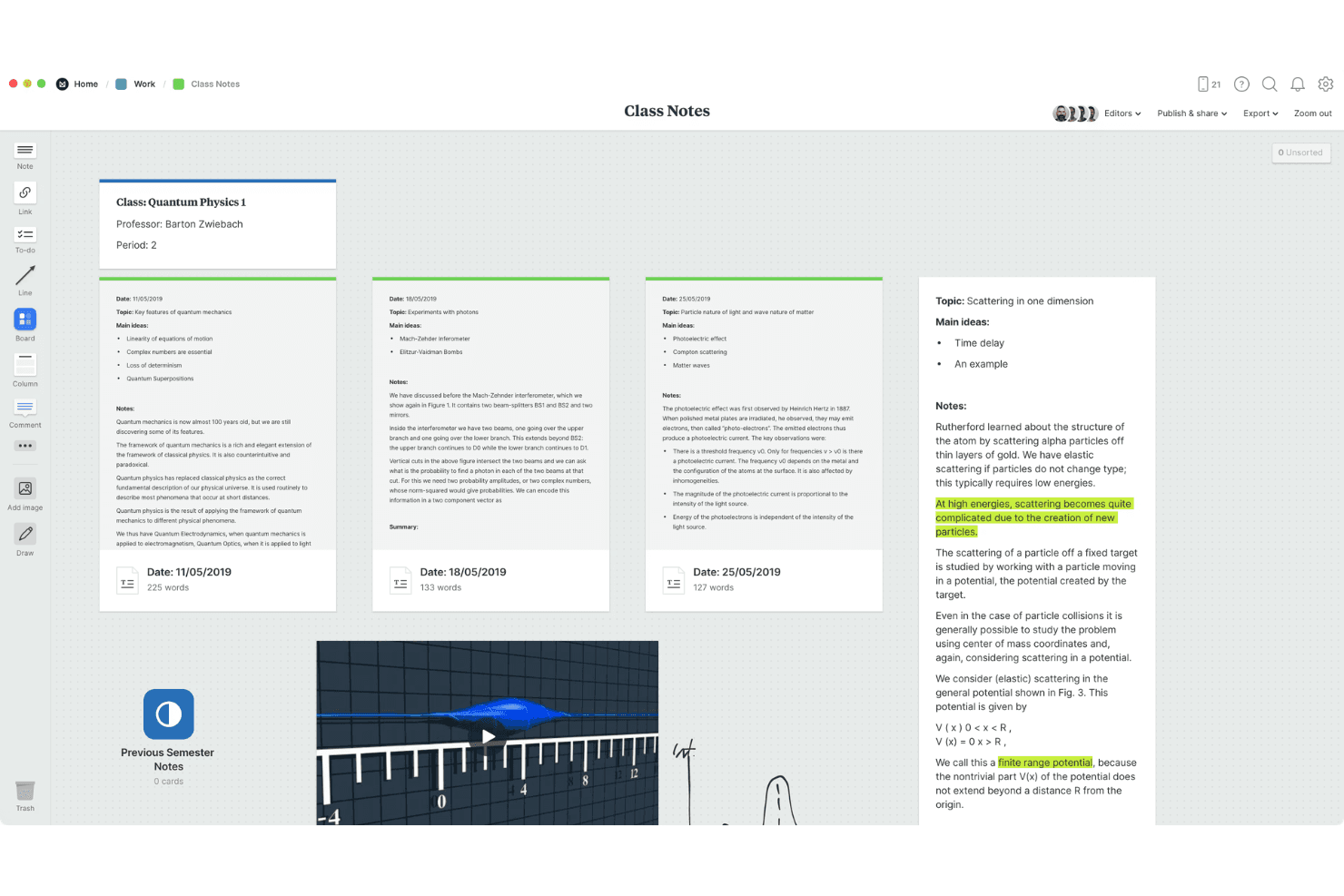
Multimedia support adds images, links, and notes to boards. Milanote is a visual idea capture tool that lets you collect notes, images, links, files, and web clips onto flexible, nestable boards with support for real-time collaboration and multi-device sync.
Who Is Milanote Best For?
Milanote is a great fit for individual knowledge workers and solo creatives who think visually and want a flexible space to capture and connect ideas across multiple formats.
Why I Picked Milanote
Milanote earns its spot on my shortlist because of how naturally it turns scattered ideas into organized visual boards. I love that you can drag notes, images, links, and web clips onto a single canvas and then nest boards inside boards to build real structure. Quick Notes on mobile lets me capture a fleeting thought instantly, then sort it into the right board later on desktop.
Milanote Key Features
- Web clipper: A browser extension for Chrome, Firefox, and Safari that saves images, text, links, and videos directly to your boards, automatically recording the source URL.
- Nested boards: Boards can be placed inside other boards, letting you build layered structures that grow with a project without losing visual clarity.
- Multi-format canvas: A single board can hold text notes, images, videos, sketches, files, links, and to-do items, all arranged and connected by dragging.
- Flexible sharing controls: Share boards as editable, comment-only, or read-only links, with optional password protection and no login required for viewers.
Milanote Integrations
Milanote doesn't have any native integrations with product management or collaboration tools. It supports Dropbox file links, browser extensions for Chrome, Firefox, and Safari, and board embeds, but no public API is documented.
Pros and Cons
Pros:
- Mixed media keeps context beside ideas
- Nested boards organize sprawling creative projects
- Quick Notes capture fleeting ideas instantly
Cons:
- Manual organization replaces tags and scoring
- No offline access for idea review
Learn more about Milanote: Best for capturing ideas within Google Workspace
- Free plan available
- From $7/user/month
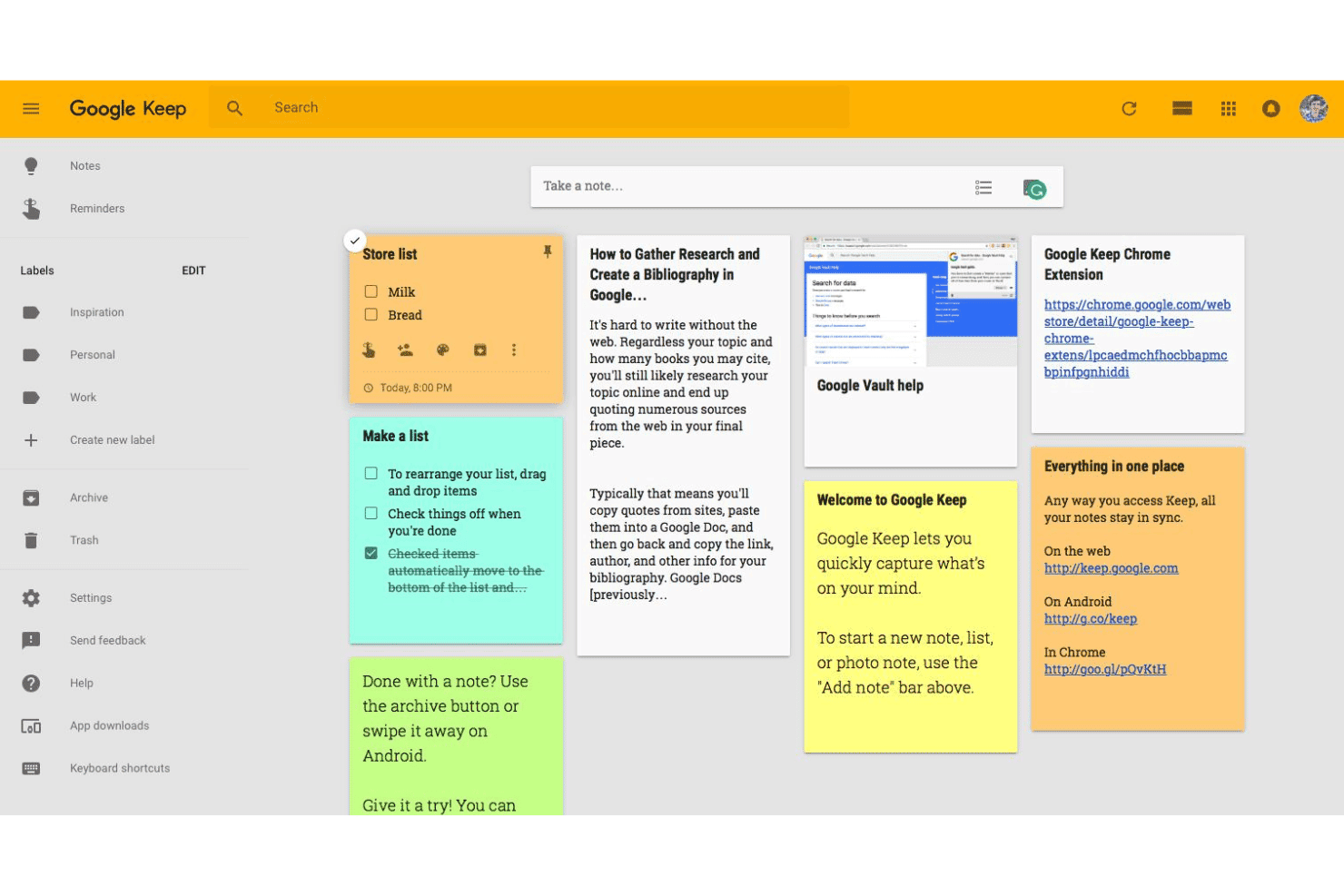
Google Keep helps users capture, organize, and share notes effortlessly. Google Keep is a note-taking and idea capture tool that supports text, checklists, photos, drawings, and audio recording, with real-time sync across devices and light collaboration through shared, co-editable notes.
Who Is Google Keep Best For?
Google Keep is a natural fit for individual contributors and founders who are already deep in Google Workspace and want a zero-friction way to capture ideas without switching tools.
Why I Picked Google Keep
I've included Google Keep in my top picks because it's the only idea capture tool that lives natively inside Google Workspace, meaning you can log a thought directly from the Gmail or Docs side panel without ever opening a new tab. I love that it captures ideas in text, checklists, photos, drawings, and audio, so whatever format a thought arrives in, Keep handles it. The real-time cross-device sync, including offline editing, means nothing gets lost between your phone and desktop.
Google Keep Key Features
- Label and color organization: Assign color codes and flat labels to notes so you can filter and locate specific ideas quickly.
- Google Docs export: Convert any note directly into a Google Docs file to expand a raw idea into a full document.
- Reminder integration: Set time- or location-based reminders on individual notes to follow up on ideas at the right moment.
- Image text extraction: Use built-in OCR to pull text from photos, letting you capture handwritten notes or printed content as searchable text.
Google Keep Integrations
Google Keep offers native integrations with Gmail and Google Docs through the Google Workspace side panel.
Pros and Cons
Pros:
- Shared notes support real-time co-editing
- Syncs ideas across devices with offline editing
- Captures text, photos, drawings, and audio
Cons:
- No voting, scoring, or roadmap conversion
- Flat labels limit idea organization
Learn more about Google Keep: Best for enterprise-wide idea campaign management
- Free demo available
- Pricing upon request

HYPE Innovation lets users manage ideas visually across review stages. HYPE Innovation is an enterprise innovation management platform that collects, organizes, and evaluates ideas through structured campaigns, AI-powered categorization, and collaborative review workflows.
Who Is HYPE Innovation Best For?
HYPE Innovation is built for innovation leaders and R&D teams at large organizations who need to run structured idea campaigns across thousands of employees.
Why I Picked HYPE Innovation
I picked HYPE Innovation as one of the best because it's purpose-built for running structured idea campaigns across large organizations. I love how the AI smart categorization automatically sorts incoming ideas by business unit, strategic priority, or topic, so reviewers aren't buried in untagged submissions. The Similarity Search surfaces duplicate or related ideas instantly, which matters when you're managing thousands of entries across a global workforce.
HYPE Innovation Key Features
- Open Innovation add-on: Extends idea campaigns beyond your internal workforce to include external partners, suppliers, and customers as contributors.
- Campaign Assistant: Uses natural language processing to summarize campaign results and surface key insights from large volumes of submissions.
- Stage-gate workflows: Moves ideas through configurable review phases with decision checkpoints, keeping evaluators aligned on where each idea stands.
- MCP server integration: Connects AI agents and copilots like Microsoft Copilot Studio to read, create, and update HYPE data while respecting your existing permissions.
HYPE Innovation Integrations
HYPE Innovation offers native integrations with Microsoft Teams, SharePoint, Outlook, Jira, SAP, Power BI, and Tableau. REST APIs and an MCP server support custom integrations with AI agents and copilots.
Pros and Cons
Pros:
- Voting and expert review support collaboration
- AI categorization reduces duplicate idea review
- Enterprise-wide campaigns organize ideas at scale
Cons:
- Advanced setup needs outside help
- Structured forms slow spontaneous idea capture
Learn more about HYPE Innovation: Best for organizing ideas alongside project docs
- Free plan available
- From $10/user/month (billed annually)
Visit WebsiteCustomer Rating:4.6/5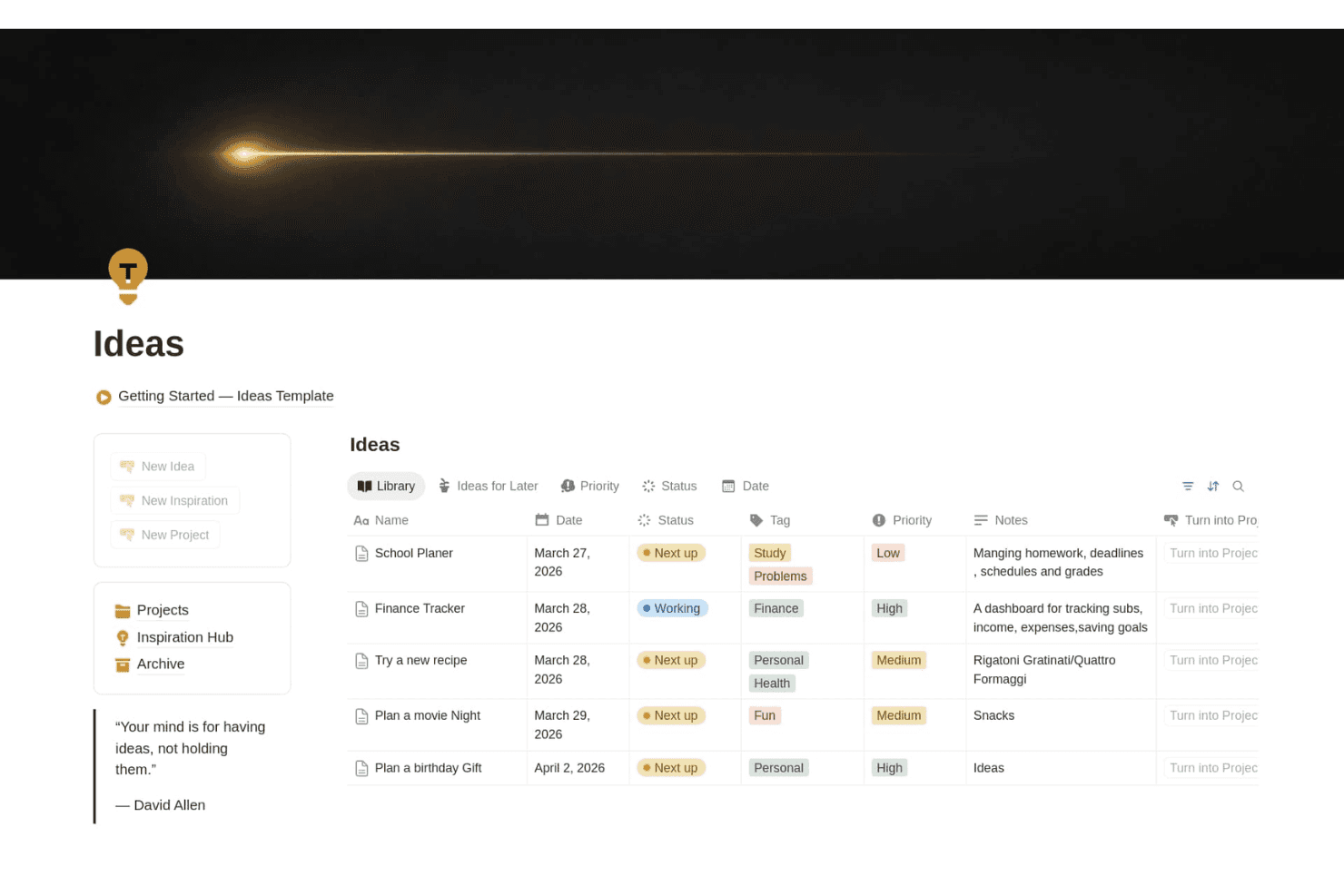
Notion helps teams capture and organize ideas by status, priority, tags, dates, and notes in a customizable workspace. Notion is a flexible workspace tool that combines idea capture, database-driven organization, and document management through pages, forms, a web clipper, and linked databases.
Who Is Notion Best For?
Notion works best for product managers and innovation teams who want to capture and organize ideas within the same workspace where they manage roadmaps and project docs.
Why I Picked Notion
Notion earns its spot on my shortlist because it's the only tool here that lets your ideas live in the same workspace as your roadmaps, specs, and project docs. I particularly like how linked databases let you connect a raw idea directly to a task or roadmap item, so nothing gets lost in a separate app. The Web Clipper also means I can pull competitor pages or customer feedback straight into an ideas database, tagged and ready to review.
Notion Key Features
- Web Clipper: A browser extension that saves any webpage directly into your Notion workspace or a specific database for later review.
- Custom database properties: Add tags, statuses, select fields, and filters to organize ideas with as much or as little structure as your team needs.
- Forms with conditional logic: Collect idea submissions from teammates or stakeholders straight into a database, available on Plus and higher plans.
- Offline access: Desktop and mobile apps both support full offline use, so you can capture and review ideas without a connection.
Notion Integrations
Notion offers documented integrations with Slack, Google Drive, GitHub, Asana, and Jira, with one-way database syncs for Jira, GitHub, and Asana in beta. It also provides a public API and webhooks for custom integrations.
Pros and Cons
Pros:
- Web Clipper captures research for later
- Custom tags support structured idea review
- Ideas connect directly to roadmaps
Cons:
- No native voting or duplicate detection
- Mobile quick capture feels slow
Learn more about Notion: Best for free capture across all Apple devices
- Free plan available
- Free to use
Visit WebsiteCustomer Rating:4.7/5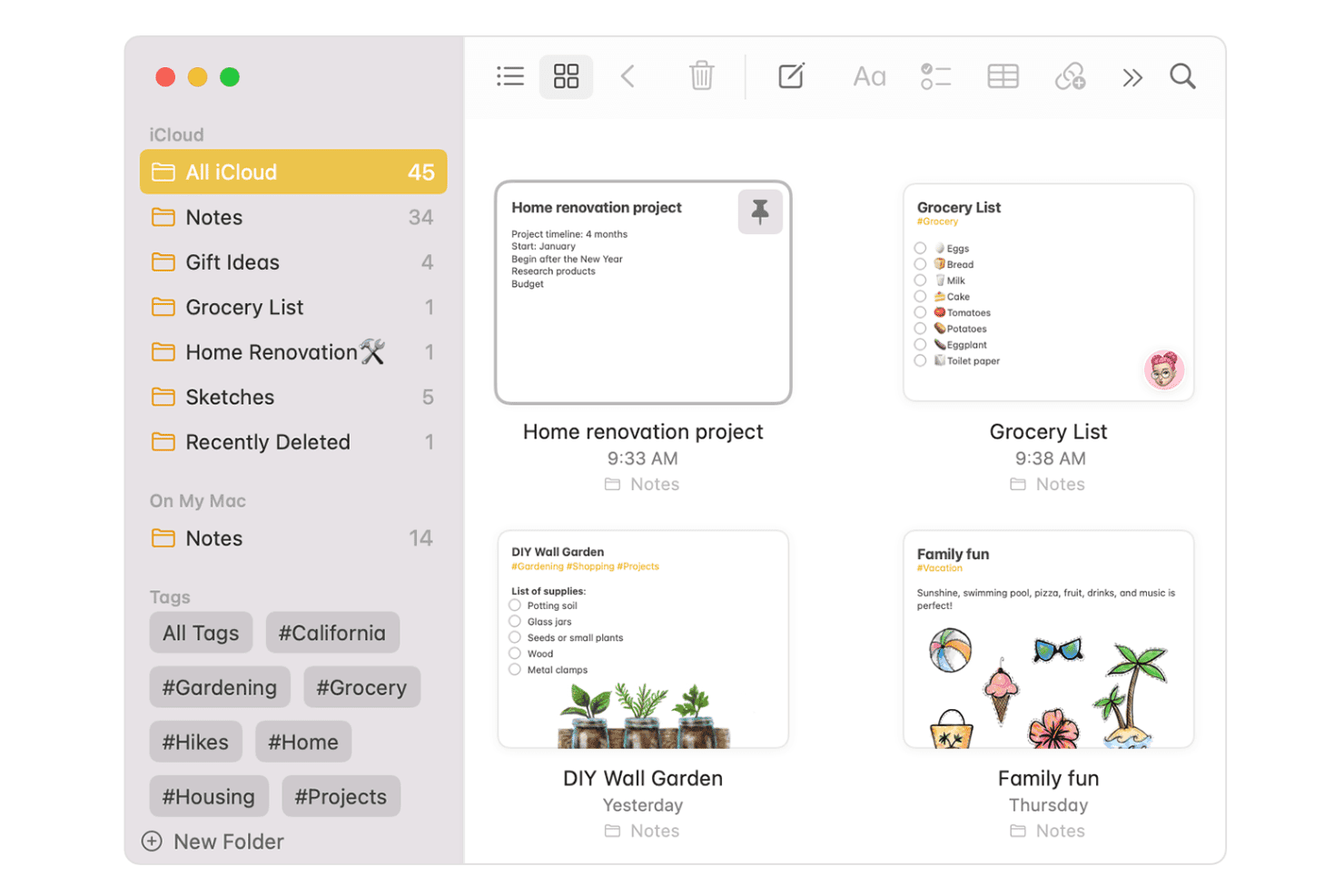
Apple Notes simplifies note-taking, organization, and collaboration across Apple devices. Apple Notes is a free note-taking app built into every Apple device that supports text, audio with transcription, drawings, scans, and file attachments—all organized through folders, tags, and Smart Folders with iCloud sync across devices.
Who Is Apple Notes Best For?
Apple Notes is ideal for solo founders and individual knowledge workers who want a free, always-available place to capture ideas across their iPhone, iPad, Mac, and Apple Watch.
Why I Picked Apple Notes
Apple Notes earns its spot on my shortlist because no other free tool matches its capture speed across every Apple device. I love that tapping the Lock Screen with an Apple Pencil instantly opens a new note, and that audio recordings come with live, searchable transcripts—so a quick voice memo from your Apple Watch doesn't disappear into an unlabeled file. Smart Folders and tags then make it easy to surface those captured ideas later without any manual sorting.
Apple Notes Key Features
- Document scanning: Use your camera to scan physical documents, receipts, or whiteboards directly into a note as a searchable, signable file.
- Inline math solving: Type any mathematical expression followed by "=" and Notes calculates the result automatically within your note.
- Smart Folders: Automatically group notes by tags, date, or other criteria so related ideas surface together without manual sorting.
- Note-to-note linking: Type ">>" followed by a note's title to create a direct link between notes, connecting related ideas across your library.
Apple Notes Integrations
Apple Notes offers native integrations across the Apple ecosystem, including Safari, Maps, Photos, Siri, Apple Intelligence, iCloud Drive, and iCloud.com.
Pros and Cons
Pros:
- Links, tags, and Smart Folders organize ideas
- Searches handwriting, scans, and image objects
- Instant capture from Lock Screen and Apple Watch
Cons:
- No direct conversion into tasks or roadmaps
- No voting or idea scoring workflows
Learn more about Apple Notes: Best for multi-format capture across all devices
- Free plan + 7-day free trial available
- From $8.25/month (billed annually)
Visit WebsiteCustomer Rating:4.4/5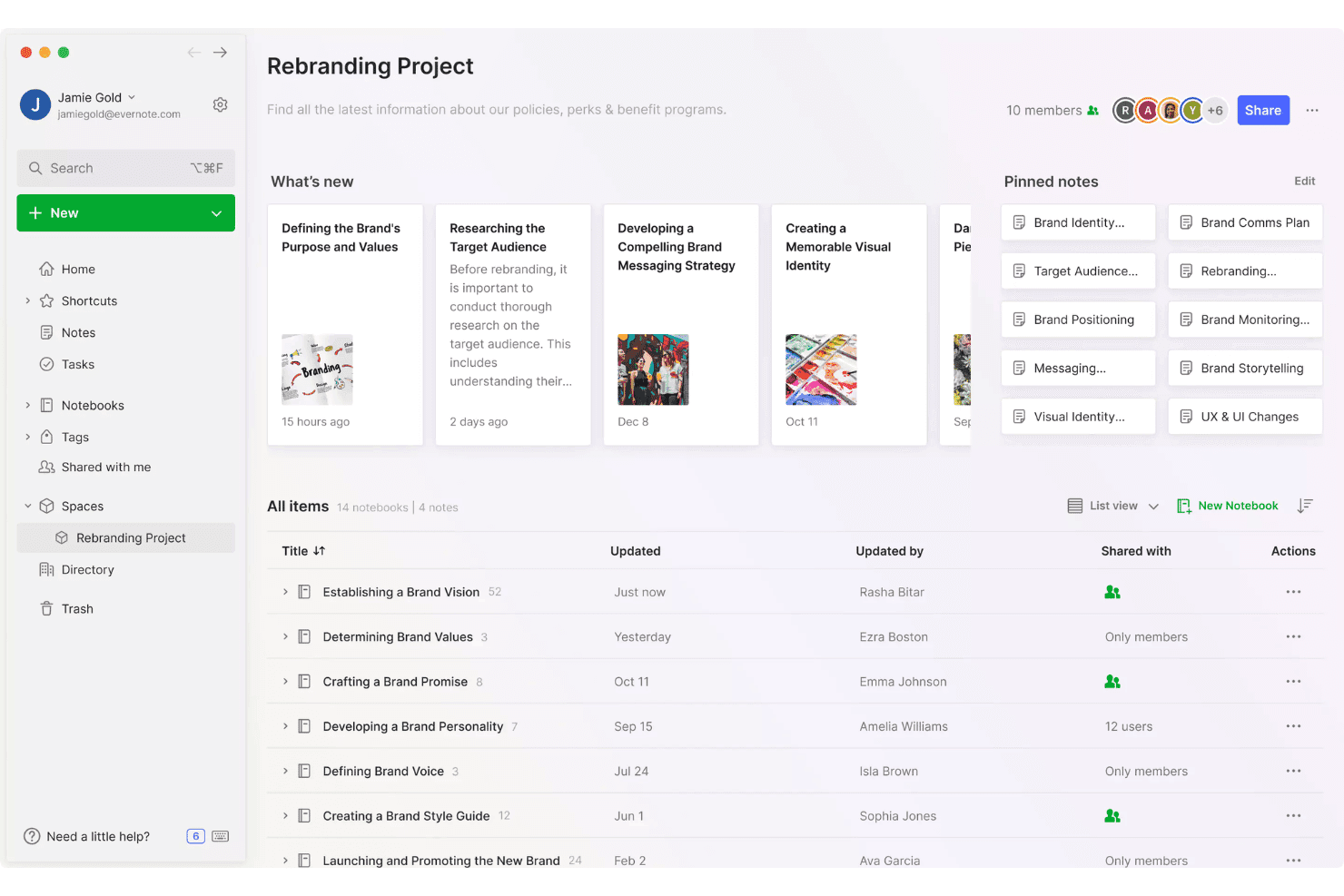
Evernote helps teams capture and organize ideas in shared project spaces using notes, notebooks, tags, and pinned content. Evernote is a note-taking and idea capture app that supports text, audio, document scanning, web clipping, and handwriting input across desktop, mobile, and browser environments.
Who Is Evernote Best For?
Evernote is a strong fit for solo founders and individual knowledge workers who need to capture ideas quickly across multiple devices and formats without managing a complex tool.
Why I Picked Evernote
Evernote earns its spot on my shortlist because no other tool I've tested captures ideas in as many formats without forcing you to switch apps. I can snap a photo of a whiteboard sketch, record a voice memo on my commute, and clip a competitor's pricing page from Chrome, and everything lands in one searchable note. Semantic Search then finds that note from a plain-language description, even weeks later.
Evernote Key Features
- AI Assistant: A built-in chat tool that organizes notes, adds tags, and retrieves content from your existing notes using plain-language prompts.
- Web Clipper: A browser extension that saves full pages, articles, PDFs, and screenshots directly to Evernote, with options to tag and sort on capture.
- Collaborative tasks: Assignable tasks with due dates and reminders that live inside notes, supporting shared accountability across a team.
- MCP connector: Connects your Evernote notes to external AI tools like Claude and ChatGPT, letting you query your note library from those environments.
Evernote Integrations
Evernote offers native integrations with Gmail, Google Drive, Google Calendar, Microsoft Outlook, and Slack. Its MCP connector also connects notes with Claude, ChatGPT, and other MCP-compatible AI tools.
Pros and Cons
Pros:
- Syncs ideas across desktop, mobile, and web
- Semantic search retrieves ideas from plain descriptions
- Captures audio, scans, clips, and handwriting
Cons:
- No voting, scoring, or roadmap conversion
- Free plan limits notes, notebooks, and devices
Learn more about Evernote: Best for notes that connect ideas over time
- 14-day free trial + free demo available
- Pricing upon request
Visit WebsiteCustomer Rating:4.8/5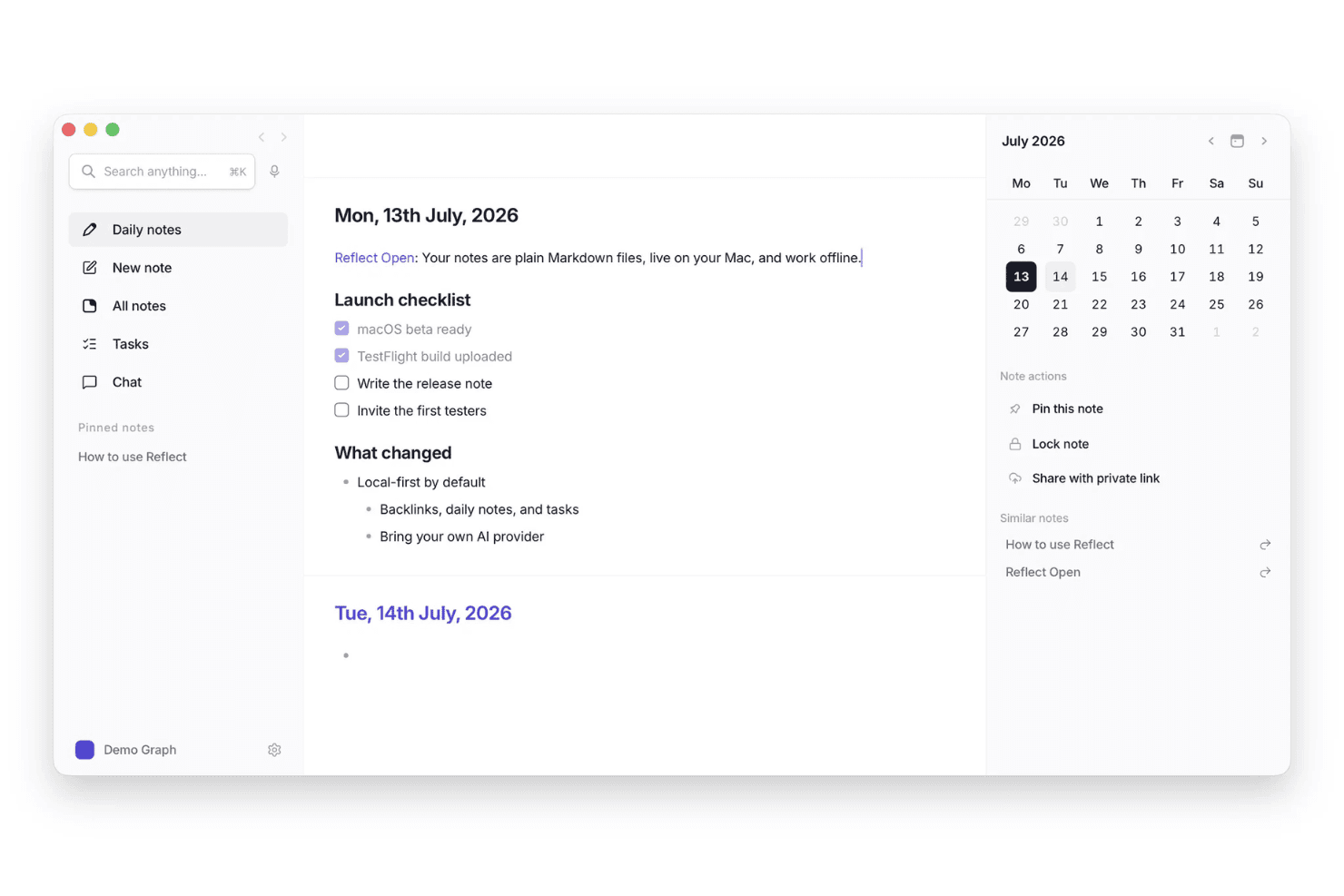
Reflect helps users capture ideas in daily notes and connect them with tasks, related notes, and calendar dates. Reflect is a personal note-taking and idea capture tool built around daily notes, backlinks, AI-assisted summarization, and voice transcription.
Who Is Reflect Best For?
Reflect works best for individual knowledge workers and solo thinkers who need a low-friction way to capture and connect ideas across daily notes, voice, and web clips.
Why I Picked Reflect
I've included Reflect in my top picks because it's built around the idea that notes should connect, not just accumulate. Backlinks and a visual graph view mean a thought you captured months ago can resurface when you're working on something new. I especially like the voice transcription feature, which turns spoken ideas into linked notes without breaking your flow.
Reflect Key Features
- Web clipper: Save snippets from web pages directly into your notes via the Chrome or Safari browser extension.
- End-to-end encryption: Notes are encrypted so that even Reflect can't access your content.
- Calendar and contact sync: Connect Google or Outlook calendars and contacts to pull events and people directly into your notes.
- AI-powered action item extraction: The built-in AI assistant scans your notes and surfaces key takeaways and action items automatically.
Reflect Integrations
Reflect integrates with Readwise and Kindle highlights, and Chrome and Safari web clippers. It also offers an API for custom integrations and supports Zapier.
Pros and Cons
Pros:
- Backlinks resurface connections across older notes
- Voice transcription preserves ideas during busy moments
- Daily notes capture thoughts without folder decisions
Cons:
- No direct path from ideas to roadmaps
- No shared spaces for collaborative idea refinement
Learn more about Reflect: 10Best for collecting feedback from SaaS users
Canny
- Free plan + free trial + free demo available
- From $79/month (billed annually)
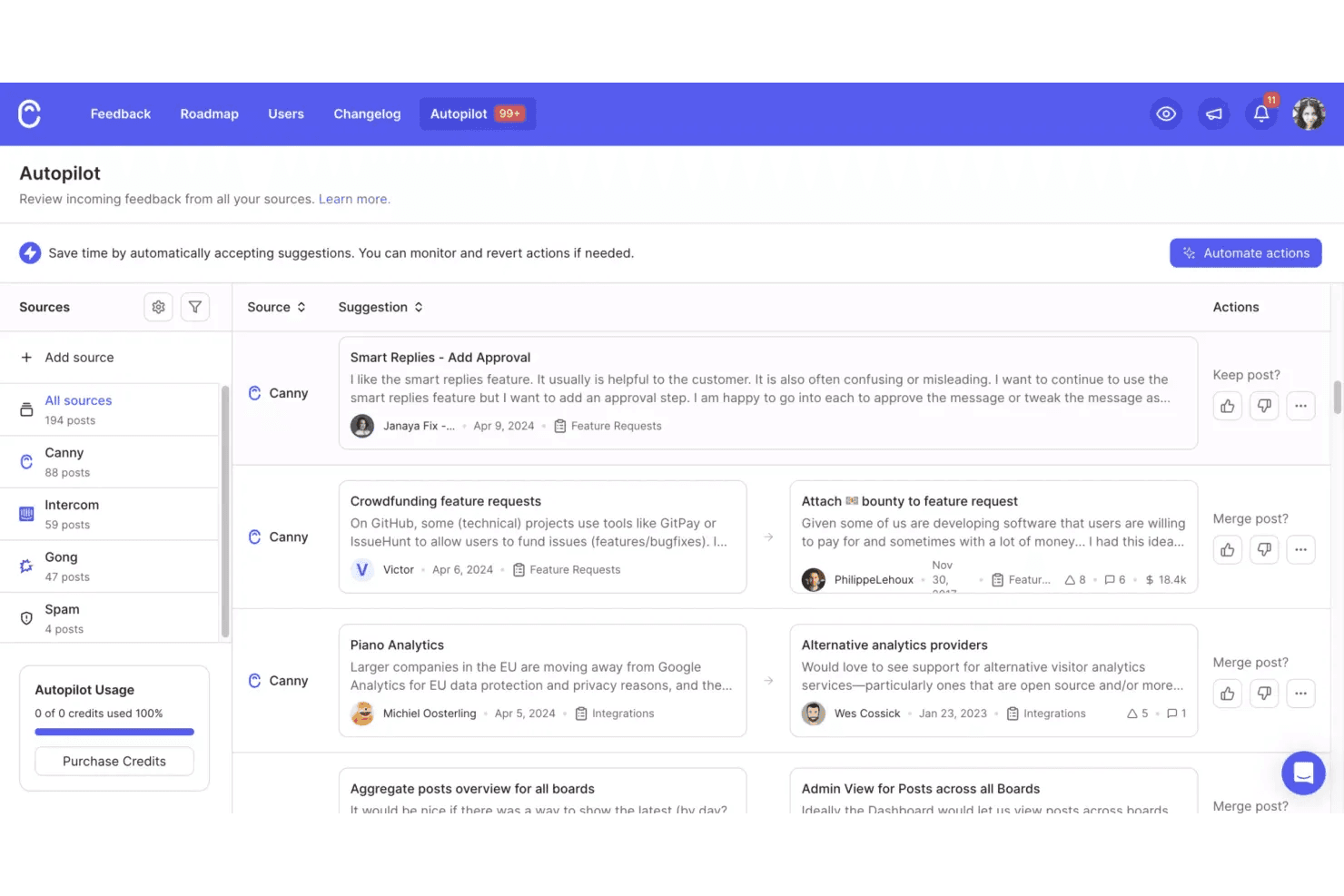
Canny helps teams collect and organize incoming product feedback from multiple sources, with automated suggestions for merging related ideas. Canny is a customer feedback and idea management platform that lets SaaS teams collect, organize, and prioritize feature requests through public or private boards, voting, AI-powered feedback capture, and roadmap planning.
Who Is Canny Best For?
Canny is a strong fit for SaaS product teams that want to turn customer feedback into prioritized roadmap items without manually triaging dozens of support tickets and conversations.
Why I Picked Canny
I picked Canny as one of the best because it's purpose-built for something most idea capture tools treat as an afterthought: turning SaaS customer feedback into prioritized product decisions. Its Autopilot feature automatically pulls feature requests from support conversations, call transcripts, and public reviews, so ideas aren't lost in Zendesk or Gong. I also like that every idea is tied to the customer and account behind it, which means I can sort requests by MRR impact rather than just vote count.
Canny Key Features
- Autopilot duplicate detection: Automatically identifies and merges repeat feature requests from multiple sources so your feedback board stays clean and actionable.
- Voter segmentation: Filters ideas by user attributes like plan type or MRR impact so you can weigh requests by the accounts that matter most to your business.
- Public and private roadmaps: Shares product direction with customers or keeps it internal, with status updates sent automatically to voters as items progress.
- Changelog with in-app widget: Publishes release notes directly inside your product, with scheduled releases and labels to keep users informed of what shipped.
Canny Integrations
Canny offers integrations with Jira, Linear, GitHub, ClickUp, Asana, Azure DevOps, Slack, Microsoft Teams, Salesforce, and HubSpot. It also provides an API, webhooks, and Zapier connectivity.
Pros and Cons
Pros:
- Converts feedback into prioritized roadmap items
- Autopilot captures requests from conversations
- Links feedback to customers and revenue
Cons:
- Deliberate posting slows spontaneous idea capture
- No native mobile or voice capture
Learn more about Canny:
Other Idea Capture Tools
Here are some additional idea capture tools options that didn’t make it onto my shortlist, but are still worth checking out:
- 11DraftsBest for capture-first writing on Apple
- 12ProductboardBest for turning customer feedback into features
- 13ViimaBest for visualizing idea progress in real time
- 14MiroBest for collaborative whiteboard brainstorming
- 15Microsoft OneNoteBest for note-taking within Microsoft 365 teams
- 16ObsidianBest for note-linking that maps how ideas connect
- 17IdeamapBest with AI-powered idea clustering
- 18Aha! IdeasBest for turning customer feedback into roadmap ideas
- 19Tana OutlinerBest for solo idea capture with AI-structured notes
How I Evaluate Idea Capture Tools
I split my evaluation into three parts: core functionality (capturing ideas instantly and retrieving them by search), standout features like voice-to-text capture, and beyond-feature factors such as onboarding support and pricing flexibility. Core functionality carries the most weight.
Core Functionality (Table Stakes For This List)
When I'm selecting tools for my list, I score each one on a scale from 0 (does not offer the functionality) to 5 (excels in this area) for each core functionality listed below. I then convert the total into a percentage to help assess each tool's overall fit, with extra weight on any functionalities I've deemed essential.
- Rapid Idea Capture (Essential): I check whether a tool lets you log a thought in one action—a keyboard shortcut, mobile widget, or voice command—without navigating menus first.
- Idea Organization & Tagging: Flexible tagging and custom grouping matter here. I look for nested tags, custom fields, or smart folders that hold up once you have hundreds of entries.
- Cross-Device Sync: I evaluate whether ideas sync near-instantly across desktop, mobile, and web. Offline access with automatic conflict resolution is a key differentiator.
- Multi-Format Input Support: Tools should accept text, voice memos, images, and web clips within a single idea record. I look at how well each format integrates rather than just whether it exists.
- Search & Retrieval: I test keyword search against idea content, tags, and attachments. Filter options by date, format, or tag tell me whether retrieval stays fast as volume grows.
- Collaborative Sharing: Product teams need shared idea spaces with commenting and voting. I evaluate whether teammates can co-create and refine ideas without resorting to copy-paste workarounds.
Once I have a list of tools that meet the criteria, I consider what sets each platform apart.
Differentiating Factors (What Sets Vendors Apart)
Here's how I compare and contrast different vendors:
Standout Features
I look for a duplicate detection engine that flags repeated or overlapping submissions before they pile up. When hundreds of ideas flow in from Slack, support tickets, and portal submissions, spotting duplicates manually is unrealistic. I also evaluate voice-to-text capture, checking whether dictated ideas land as structured entries rather than raw transcripts. Idea-to-roadmap automation matters too. I check if high-scoring ideas convert directly into backlog items in tools like Jira without manual re-entry.
Beyond Features
I check whether a tool's integration ecosystem connects to the PM and support tools your team already uses, like Jira or Zendesk, since manual idea transfer kills momentum. Data security also matters—I look for role-based permissions and SOC 2 compliance, especially when strategic ideas need restricted visibility. Finally, I evaluate onboarding support, because a tool with guided templates and migration help gets a product team capturing ideas in days, not weeks.
How to Choose Idea Capture Tools
It’s easy to get bogged down in long feature lists and complex pricing structures. To help you stay focused as you work through your unique software selection process, here’s a checklist of factors to keep in mind:
| Factor | What to Consider |
|---|---|
| FactorScalability | What to ConsiderWill the tool support your team as it grows? Consider user limits, storage caps, and pricing jumps as your needs expand. |
| FactorIntegrations | What to ConsiderDoes the tool connect with your existing apps (like project management or communication tools)? Check for native integrations, not just API access. |
| FactorCustomizability | What to ConsiderCan you tailor categories, tags, or workflows to match your team’s process? Avoid tools that force rigid structures if your needs are unique. |
| FactorEase of use | What to ConsiderHow quickly can new users start capturing ideas? Look for minimal onboarding steps and a clear, distraction-free interface. |
| FactorImplementation and onboarding | What to ConsiderWhat resources or support does the vendor provide for setup? Consider if you’ll need training, data migration, or admin configuration. |
| FactorCost | What to ConsiderAre there hidden fees, required upgrades, or per-user pricing? Compare total cost of ownership, not just monthly rates. |
| FactorSecurity safeguards | What to ConsiderDoes the tool offer encryption, access controls, and compliance with your industry’s data standards? Ask about data residency and privacy policies. |
| FactorSupport availability | What to ConsiderWhat support channels are offered (chat, email, phone) and during what hours? Consider if you’ll need fast help during critical project phases. |
What Are Idea Capture Tools?
These all-in-one idea capture tools are digital platforms designed to help individuals and teams quickly record, organize, and manage concepts as they arise during idea generation. This type of idea management software supports a range of input types, such as text, images, and voice notes, and often includes features for categorizing and retrieving ideas later. They play a key role in ensuring valuable insights aren’t lost and can be developed into actionable projects or solutions.
Features
When selecting idea capture tools, keep an eye out for the following key features:
- Text input: Allows users to quickly jot down ideas in written form, supporting fast capture and easy editing.
- Image attachments: Lets you add photos, screenshots, or sketches to ideas, making it easier to capture visual inspiration or context.
- Voice notes: Enables recording of spoken ideas, which is helpful for capturing thoughts on the go or when typing isn’t practical.
- Categorization: Provides folders, tags, or labels to organize ideas by topic, project, or priority for easier retrieval.
- Search and filter: Offers robust search and filtering tools so users can quickly find specific ideas or group related concepts.
- Collaboration: Supports sharing ideas with team members, allowing for feedback, discussion, and collective development of concepts.
- Reminders and notifications: Lets users set reminders to revisit or expand on ideas, helping ensure nothing gets forgotten.
- Export options: Allows users to export ideas to other formats or platforms, supporting integration with broader workflows.
- Mobile app availability: Ensures users can capture and access ideas from any device, not just a desktop or web browser.
Benefits
Implementing idea capture tools provides several benefits for your team and your business. Here are a few you can look forward to:
- Fewer lost ideas: Quick capture features ensure valuable insights are recorded before they’re forgotten.
- Better organization: Categorization and search tools make it easy to sort, find, and revisit ideas when needed.
- Faster collaboration: Sharing and commenting features help teams develop and refine ideas together in real time.
- Increased productivity: Reminders and notifications prompt users to act on ideas, turning inspiration into action.
- Greater flexibility: Mobile access and multiple input options let users capture ideas anytime, anywhere, in the format that suits them.
- Improved knowledge retention: Centralized storage keeps all ideas in one place, making it easier to build on past thinking.
- Streamlined workflows: Export and integration options connect idea capture with other business tools, supporting end-to-end project development.
Costs & Pricing
Selecting idea capture tools requires an understanding of the various pricing models and plans available. Costs vary based on features, team size, add-ons, and more. The table below summarizes common plans, their average prices, and typical features included in idea capture tools solutions:
Plan Comparison Table for Idea Capture Tools
| Plan Type | Average | Common Features |
|---|---|---|
| Plan TypeFree Plan | Average $0 | Common FeaturesBasic idea capture, limited storage, single user access, and basic search and organization. |
| Plan TypePersonal Plan | Average $15–$40/user/month | Common FeaturesUnlimited ideas, mobile app access, image and file attachments, and basic export options. |
| Plan TypeBusiness Plan | Average $45–$90/user/month | Common FeaturesTeam collaboration, advanced organization, integrations with other tools, and admin controls. |
| Plan TypeEnterprise Plan | Average $95–$150/user/month | Common FeaturesCustom integrations, enhanced security, priority support, advanced analytics, and onboarding support. |
Idea Capture Tools FAQs
Here are some answers to common questions about idea capture tools:
How do idea capture tools support remote or hybrid teams?
Idea capture tools support remote or hybrid teams by providing a centralized space to collect, organize, and share ideas from anywhere. Features like real-time collaboration, mobile access, and cloud syncing help distributed teams contribute and review ideas without needing to be in the same location.
Can idea capture tools integrate with project management platforms?
Yes, many idea capture tools offer integrations with project management platforms. This allows teams to move ideas directly into project workflows, assign tasks, and track progress without manual copying or switching between systems.
What security features should I look for in idea capture tools?
Look for security features such as data encryption, user access controls, and compliance with privacy standards like GDPR. These safeguards help protect sensitive ideas and ensure only authorized users can access or modify information.
How do I migrate existing ideas into a new idea capture tool?
Most idea capture tools provide import options, such as CSV uploads or integrations with other platforms. Before migrating, review the tool’s documentation and consider cleaning up or organizing your existing ideas to make the transition smoother.
Are there offline options for capturing ideas?
Yes, some idea capture tools offer offline modes that let you record ideas without an internet connection. Once you’re back online, the tool syncs your new ideas to the cloud, ensuring nothing is lost.