
User onboarding can be tough, especially when budgets are tight. As a product manager, you face the challenge of ensuring new users understand and engage with your product quickly. Free user onboarding software offers a solution without adding financial strain.
In my experience, these tools can simplify the onboarding process, helping your team focus on other priorities. They provide essential features to guide users and improve their experience from the start.
In this article, I'll share my unbiased reviews of top free onboarding tools. You'll find insights on what each offers and how they can address your specific needs. Let's explore solutions that can make a difference in your onboarding process without breaking the bank.
Why Trust Our Software Recommendations
6,700+
Reviews
20
Industry experts
16+
Evaluation factors
14
Years
Our team has been testing and reviewing software since 2012. As product managers ourselves, we know how difficult—and important—it is to choose the right software.
For this guide, we evaluated tools using hands-on testing and independent research, scoring tools using our selection criteria.
Our reviews reflect our human editorial judgment, not a sales pitch.
Expert reviewers:
- Andrew LumbySenior TPM
- Cristiano ValimSenior UI/UX Lead


Free User Onboarding Software Comparison Table
While all of the user onboarding software in my list has free offerings, many also have paid plans should you wish to upgrade:
| Tool | Best For | Trial Info | Price | ||
|---|---|---|---|---|---|
| 1 | Best for analytics-backed onboarding trials | 14-day free trial | From $299/month | Website | |
| 2 | Best for no-code flow building with AI assist | 14-day free trial | From $240/month (billed annually) | Website | |
| 3 | Best for A/B testing onboarding flows | Free trial available | Pricing upon request | Website | |
| 4 | Best for product analytics-led onboarding | Free plan + 30-day free trial + free demo available | Pricing upon request | Website | |
| 5 | Best for headless, dev-installed onboarding flows | Free plan available | From $30/month | Website | |
| 6 | Best for developer-built element highlighting | Free plan available | Free to use | Website | |
| 7 | Best for developer-coded B2B onboarding checklists | Free plan available | From $300/month | Website | |
| 8 | Best for developer-coded product tours | Free plan available | From $50/lifetime | Website | |
| 9 | Best for PostHog-tracked dev-built flows | Free plan available | Free plan available | Website | |
| 10 | Best for AI-built tours with unlimited free seats | Free plan available | From $199/month (billed annually) | Website |





Best Free User Onboarding Software Reviews
Below are my detailed summaries of the best free user onboarding software that made it onto my shortlist. My reviews offer a detailed look at the key features, pros & cons, integrations, and ideal use cases of each tool to help you find the best one for you. While some of these tools offer a completely free version, others offer a free trial period. I’ve added a note about what’s free in each of my reviews
 Best for analytics-backed onboarding trials
- 14-day free trial
- From $299/month
Visit WebsiteCustomer Rating:4.7/5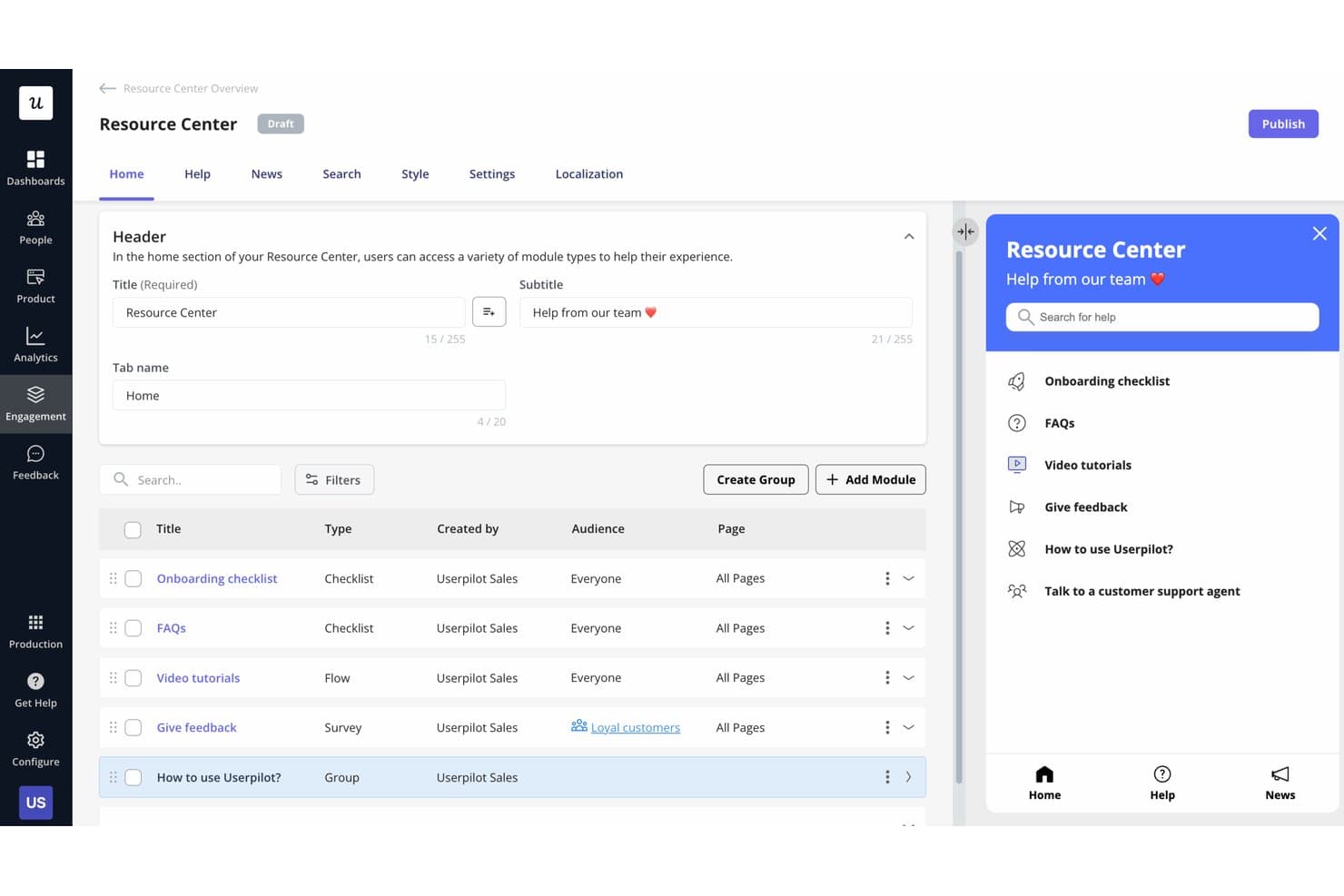
Userpilot lets users build a self-serve Resource Center for in-app help. Userpilot is a user onboarding platform with no-code in-app flows, checklists, segmentation, engagement analytics, surveys, and targeted messaging, available through a 14-day free trial rather than an ongoing free plan.
Who Is Userpilot Best For?
Userpilot suits product and growth teams that need no-code onboarding flows, user segmentation, and analytics during a 14-day trial.
Why I Picked Userpilot
I picked Userpilot for analytics-backed onboarding trials because I can connect in-app flows to engagement reporting, funnels, retention, and paths. I use segmentation and welcome surveys to tailor onboarding, then analyze where users drop off. Its 14-day trial lets me test these workflows before committing to a paid plan.
Userpilot Key Features
- Onboarding checklists: Create task lists with smart triggers, redirects, or JavaScript actions.
- NPS surveys: Collect and analyze Net Promoter Score responses inside your product.
- Session replay: Review recorded user sessions to identify friction in Growth plans.
- AI Agent Lia: Generate checklists, segments, and in-app content from natural-language prompts.
Userpilot Integrations
Userpilot has six documented native integrations, including Segment, Mixpanel, Amplitude, Heap, Intercom, and Slack. Growth and higher plans include an HTTP/REST API and webhooks for custom integrations.
What's Free?
Userpilot offers a 14-day free trial, not a free-forever plan. After the trial ends, you’ll need a paid plan.
Pros and Cons
Pros:
- Responsive support for setup questions
- No-code flow and checklist creation
- Analytics-backed onboarding insights
Cons:
- Advanced analytics require higher tiers
- No ongoing free plan
Learn more about Userpilot: Best for no-code flow building with AI assist
- 14-day free trial
- From $240/month (billed annually)
Visit WebsiteCustomer Rating:4.8/5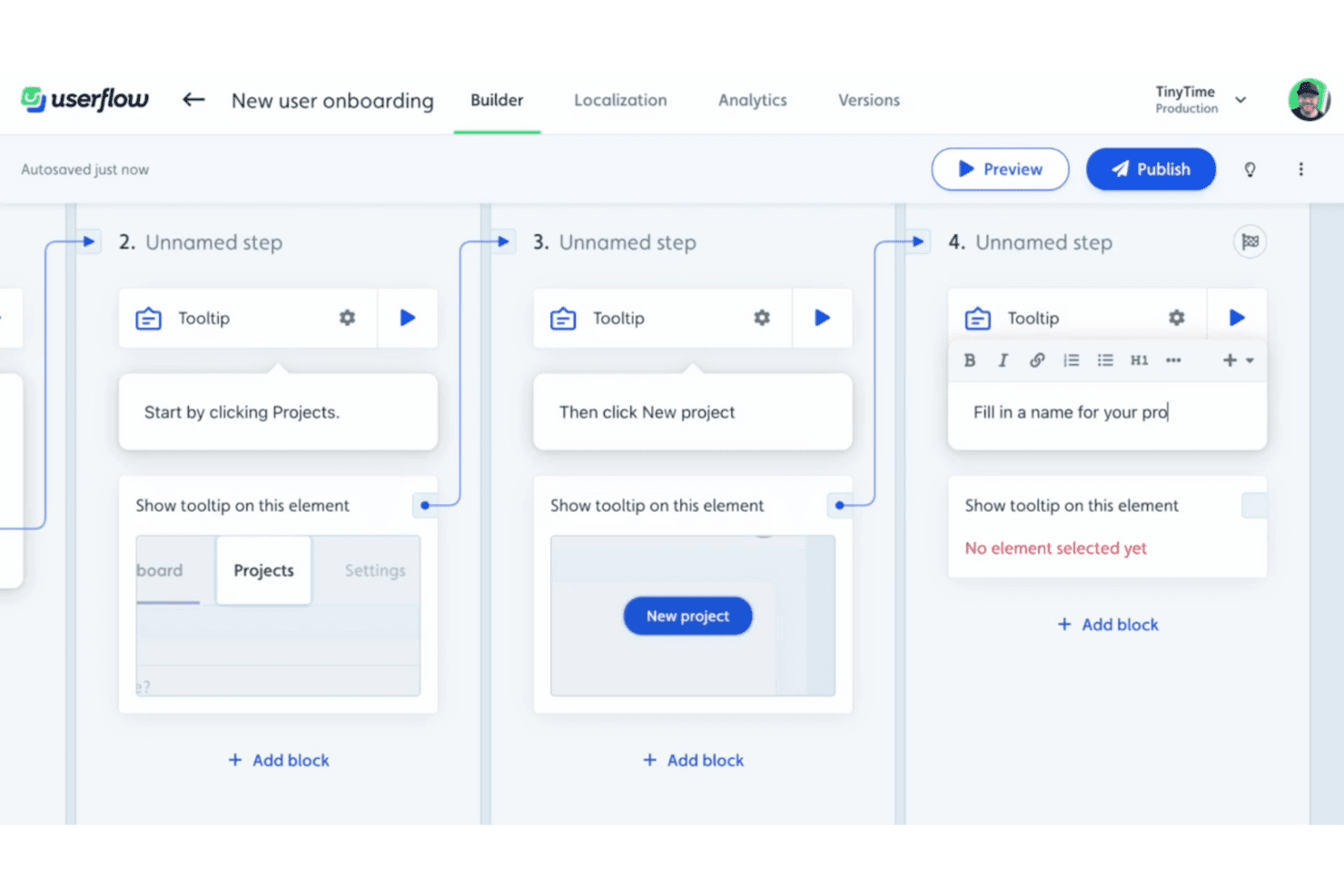
Userflow’s visual builder lets you create step-by-step onboarding flows using tooltips and triggers—no code required. Userflow is user onboarding software for creating no-code walkthroughs, checklists, segmented experiences, in-app surveys, and engagement analytics, with AI-assisted flow building and branching logic.
Who Is Userflow Best For?
Userflow suits product and growth teams at B2B SaaS companies that need personalized in-app onboarding without relying on engineering.
Why I Picked Userflow
I picked Userflow for its no-code flow building with AI assist, which turns a recorded product walkthrough into an editable flow of up to 30 steps. I use branching logic, tooltips, modals, and Smartflows to tailor onboarding by user behavior. It offers a 14-day trial, but no ongoing free plan.
Userflow Key Features
- Onboarding checklists: Create tasks with custom completion and visibility conditions.
- User segmentation: Target users by attributes, events, CSV lists, or analytics cohorts.
- Engagement analytics: Review step funnels, completion rates, drop-offs, and trends.
- In-app surveys: Trigger NPS, CSAT, CES, or custom surveys by segment or event.
Userflow Integrations
Userflow offers documented integrations with Mixpanel, Amplitude, Segment, Heap, Intercom, Zendesk, HubSpot, and Salesforce, plus Slack. It also supports custom connections through its REST API and Zapier.
What’s Free?
Userflow offers a 14-day free trial, not a free-forever plan. After the trial ends, you’ll need a paid subscription.
Pros and Cons
Pros:
- Pinpoints onboarding drop-offs with step funnels
- AI turns product tours into editable flows
- Builds branching walkthroughs without engineering
Cons:
- Advanced customization requires technical support
- No ongoing free tier
Learn more about Userflow: Best for A/B testing onboarding flows
- Free trial available
- Pricing upon request
Visit WebsiteCustomer Rating:4.7/5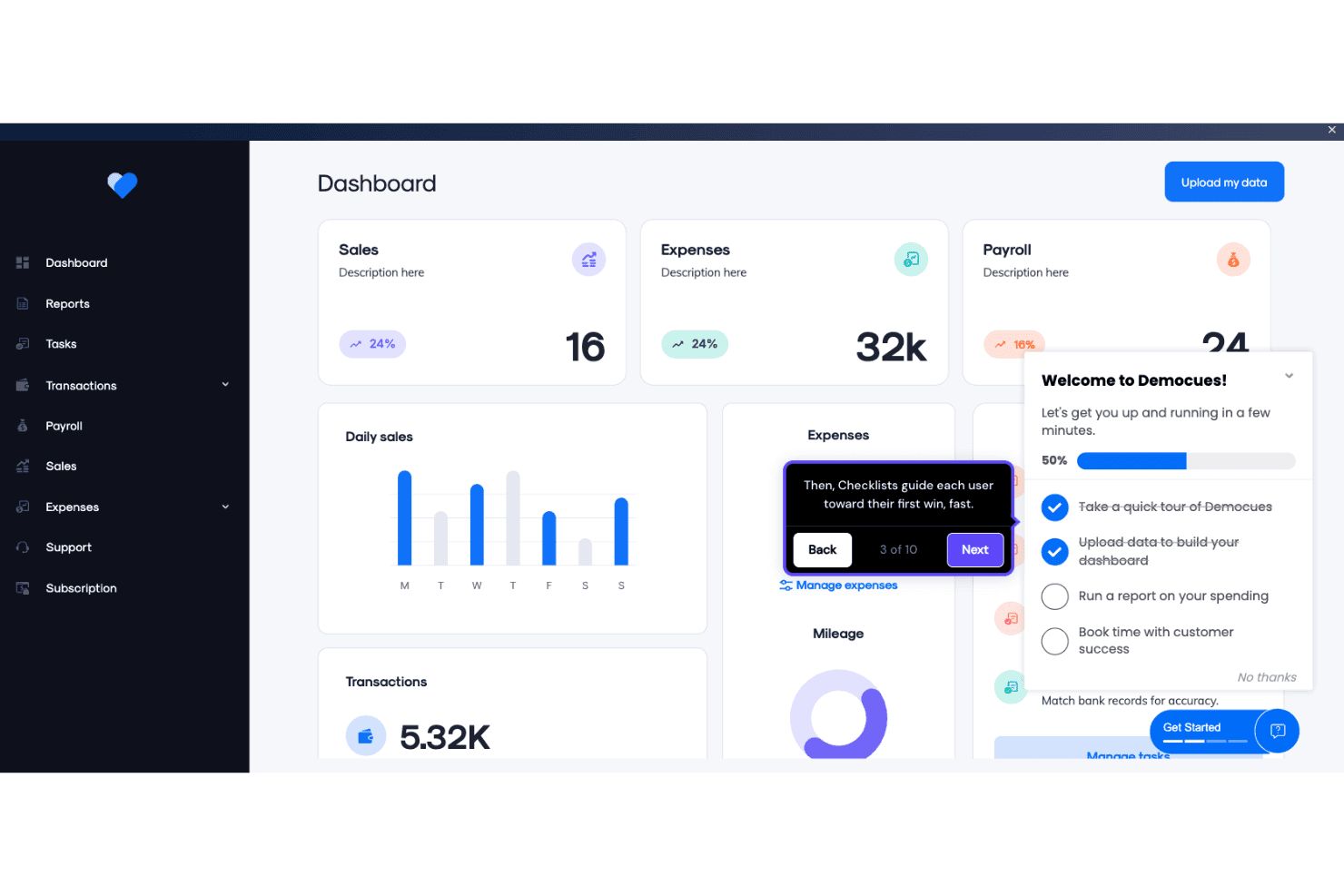
Appcues enables product teams to build in-app onboarding checklists and guided tooltips directly within a live dashboard interface. Appcues is a user onboarding platform for creating no-code flows, checklists, tooltips, banners, and resource menus, with segmentation, analytics, A/B testing, and email or push workflows; it offers a trial, not a permanent free plan.
Who Is Appcues Best For?
Appcues suits product managers and growth marketers who need to test and optimize onboarding flows without ongoing engineering support.
Why I Picked Appcues
I picked Appcues for teams that want to test onboarding flows before committing to a paid plan. Its A/B testing, control groups, goals, and step-level drop-off analytics show which onboarding paths improve activation. The 14-day trial is useful for evaluation, but Appcues doesn’t offer a permanent free plan.
Appcues Key Features
- Launchpads: Add in-app resource menus for self-service guidance.
- Checklists: Display progress-based onboarding tasks through a floating beacon.
- Multi-channel workflows: Coordinate in-app messages, email, and push notifications.
- Click to Track: Create no-code events directly within your product.
Appcues Integrations
Appcues offers six documented native two-way integrations, including Salesforce, HubSpot, Intercom, Slack, Mixpanel, and Heap. It also supports Segment, data warehouses, an API, webhooks, and Zapier.
What's Free?
Appcues offers a 14-day free trial rather than a free-forever plan. After the trial ends, you’ll need a paid plan, with pricing available upon request.
Pros and Cons
Pros:
- Checklists guide users across product milestones
- A/B tests connect onboarding to activation
- Chrome Builder supports no-code flow creation
Cons:
- Developer setup remains necessary for installation
- No permanent free plan exists
Learn more about Appcues: Best for product analytics-led onboarding
- Free plan + 30-day free trial + free demo available
- Pricing upon request
Visit WebsiteCustomer Rating:4.4/5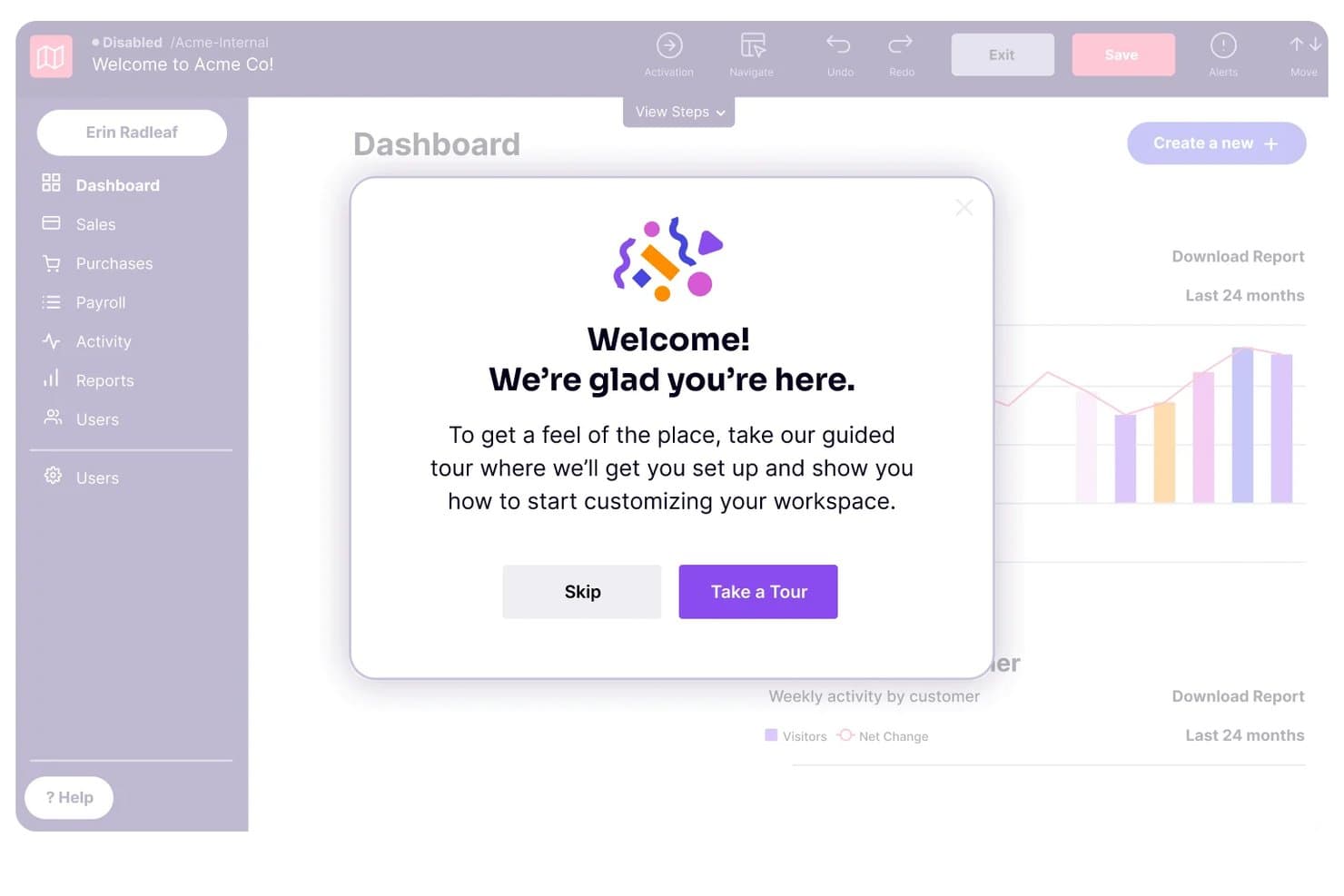
Pendo guides new users through onboarding with a welcome tour modal. Pendo is a free user onboarding platform with no-code in-app guides, behavioral segmentation, product analytics, guide metrics, and NPS surveys for web and mobile applications.
Who Is Pendo Best For?
Product managers and growth teams at small web or mobile products that need no-code guides, behavioral targeting, and detailed onboarding analytics.
Why I Picked Pendo
I picked Pendo because its analytics-led onboarding connects in-app guidance with user behavior. I use retroactive funnels, paths, retention reports, and guide-level drop-off metrics to identify where new users stall. Behavioral segmentation then lets me trigger targeted tooltips, lightboxes, or banners based on feature usage and guide interactions.
Pendo Key Features
- Mobile app support: Build guides for iOS, Android, Xamarin, and React Native apps.
- Guide staging: Test guides before publishing them to users.
- Guide triggers: Launch guides on page load, clicks, confirmations, or badges.
- Unlimited app keys: Manage multiple web and mobile applications under one account.
Pendo Integrations
Pendo Free doesn't include native integrations or API access. Paid plans offer 85+ integrations, including Salesforce, HubSpot, Intercom, Gainsight, Segment, Slack, Jira, and Zapier.
What's Free?
Pendo offers a free plan rather than only a time-limited trial. Pendo Free includes no-code guides and analytics, but excludes native integrations and API access; paid plans include 85+ integrations.
Pros and Cons
Pros:
- No-code guides need little engineering support
- Behavioral segmentation supports targeted onboarding
- Deep guide-level drop-off analytics
Cons:
- Setup can challenge single-page applications
- No checklist or task-list functionality
Learn more about Pendo: Best for headless, dev-installed onboarding flows
- Free plan available
- From $30/month
Visit WebsiteCustomer Rating:4.4/5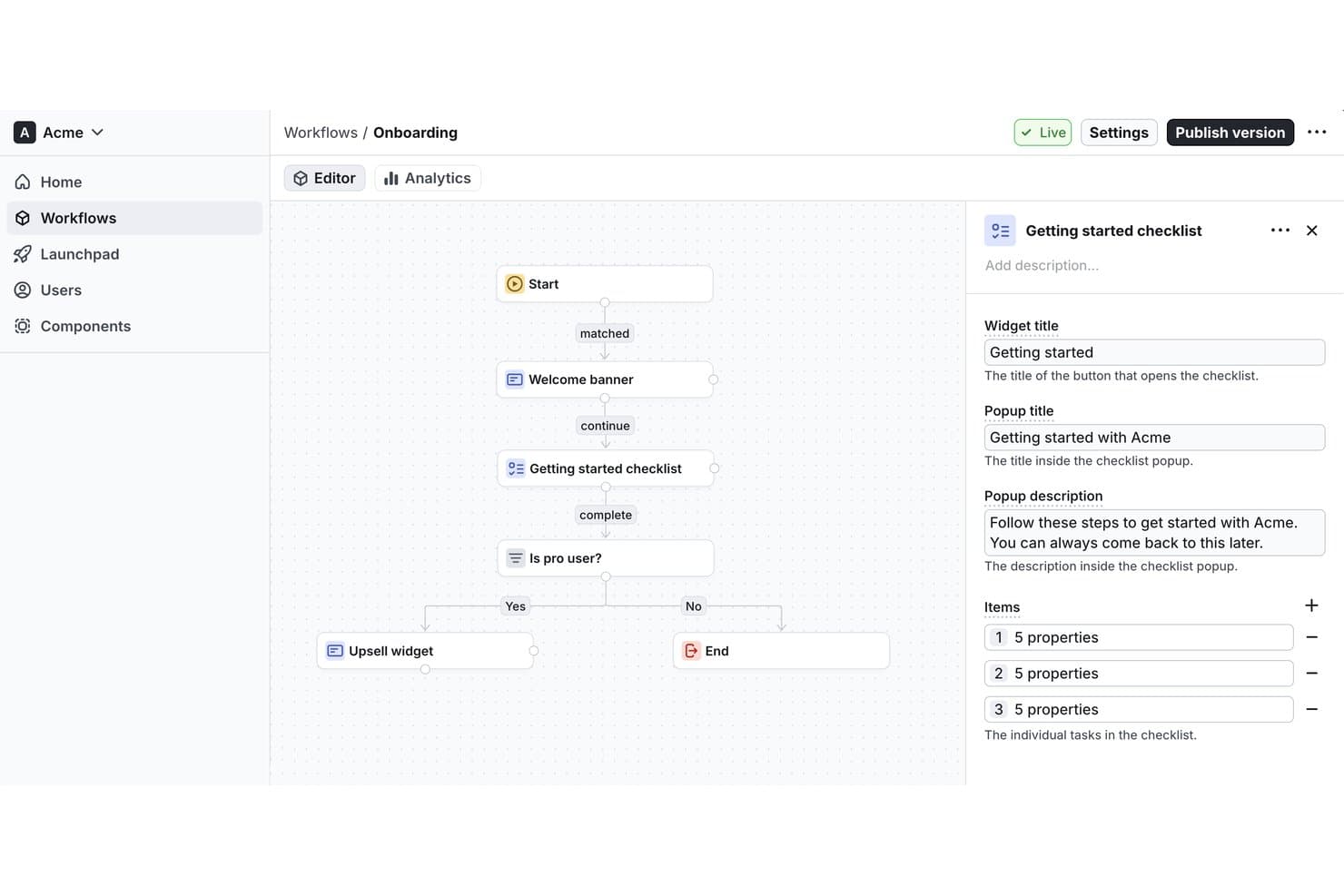
Flows lets users build onboarding workflows with checklists visually. Flows is a free user onboarding platform for building workflow-based product tours, checklists, tooltips, surveys, in-app messages, and custom components across web applications.
Who Is Flows Best For?
Flows suits product teams at early-stage web startups that can involve developers to build tailored onboarding workflows, checklists, surveys, and in-app guidance.
Why I Picked Flows
I picked Flows because it’s best for headless, dev-installed onboarding flows that need to match a product’s design system. React and JavaScript custom components let developers build native-feeling experiences, while workflow branching supports role-based tours and lifecycle onboarding. Floating Checklists can launch tours, modals, or URLs from one guided path.
Flows Key Features
- Survey formats: Create NPS, CSAT, CES, PMF, rating, and free-text surveys.
- Workflow analytics: Track entries, completions, exits, and block-level drop-off.
- Page targeting: Match URL paths using equals, contains, starts-with, or regex rules.
- Launchpad controls: Prioritize workflows and limit simultaneous in-app experiences.
Flows Integrations
Flows doesn’t have any native integrations documented. It supports React and JavaScript SDKs, framework integrations for Next.js, Angular, Vue/Nuxt, Svelte, and others, plus webhooks for custom connectivity.
What's Free?
Flows offers a free-forever Hobby plan with no credit card required, unlimited workflows, and up to 100 monthly tracked users (MTUs). It includes community support and custom component previews, but full custom components and removed Flows branding require the $30-per-month Pro plan.
Pros and Cons
Pros:
- Checklists connect directly with guided tours
- Branching supports lifecycle onboarding paths
- Unlimited workflows and team seats
Cons:
- CSS selectors complicate visual targeting
- Developer setup precedes nontechnical editing
Learn more about Flows: Best for developer-built element highlighting
- Free plan available
- Free to use
Visit WebsiteCustomer Rating:5/5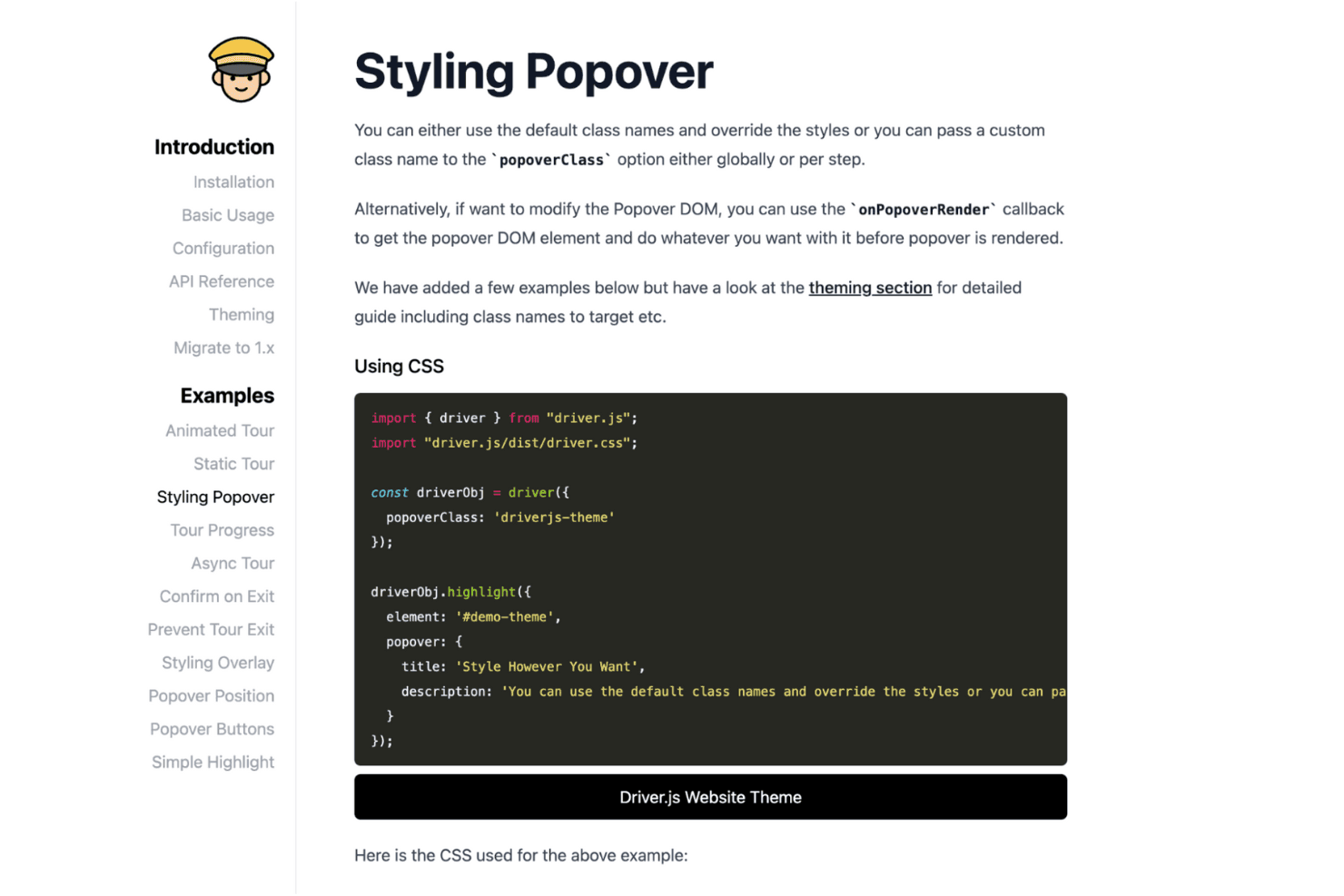
Driver.js helps teams build interactive tours by highlighting page elements. Driver.js is a free, open-source JavaScript library for user onboarding that lets developers create code-based product tours, element highlights, contextual hints, and guided interactions.
Who Is Driver.js Best For?
Driver.js suits developers who need lightweight, code-based product tours, contextual hints, and element highlights inside custom web applications.
Why I Picked Driver.js
I picked Driver.js for developer-built element highlighting because its code-based API handles focused product tours, single-element spotlights, and clickable hint beacons. I can use
highlight()for a new dashboard control,drive()for multi-step onboarding, and lifecycle hooks to connect tour events to custom analytics. It’s best suited to engineering-led onboarding rather than no-code campaign management.Driver.js Key Features
- Dependency-free package : Install the lightweight TypeScript library without additional runtime dependencies.
- Responsive support : Use tours across mobile devices and major browsers.
- Interactive controls : Configure click advancement, delayed elements, skipped steps, and custom navigation.
- Custom theming : Adjust overlays, padding, corner radius, popover classes, colors, and fonts.
Driver.js Integrations
Driver.js doesn't have any native integrations. It works with vanilla JS, React, Vue, Angular, Svelte, Solid, and Next.js, while lifecycle hooks let developers connect custom analytics or other services.
What's Free?
Driver.js is free forever as an open-source JavaScript library, with no user or time limits. It requires developer implementation and has no native integrations, so your team must connect analytics or other services through custom code.
Pros and Cons
Pros:
- Adaptable API supports custom tour behavior
- Lightweight implementation suits performance-sensitive applications
- Focused spotlight experience for key interface elements
Cons:
- No built-in analytics, segmentation, or checklists
- Every onboarding change requires developer deployment
Learn more about Driver.js: Best for developer-coded B2B onboarding checklists
- Free plan available
- From $300/month
Visit WebsiteCustomer Rating:4.7/5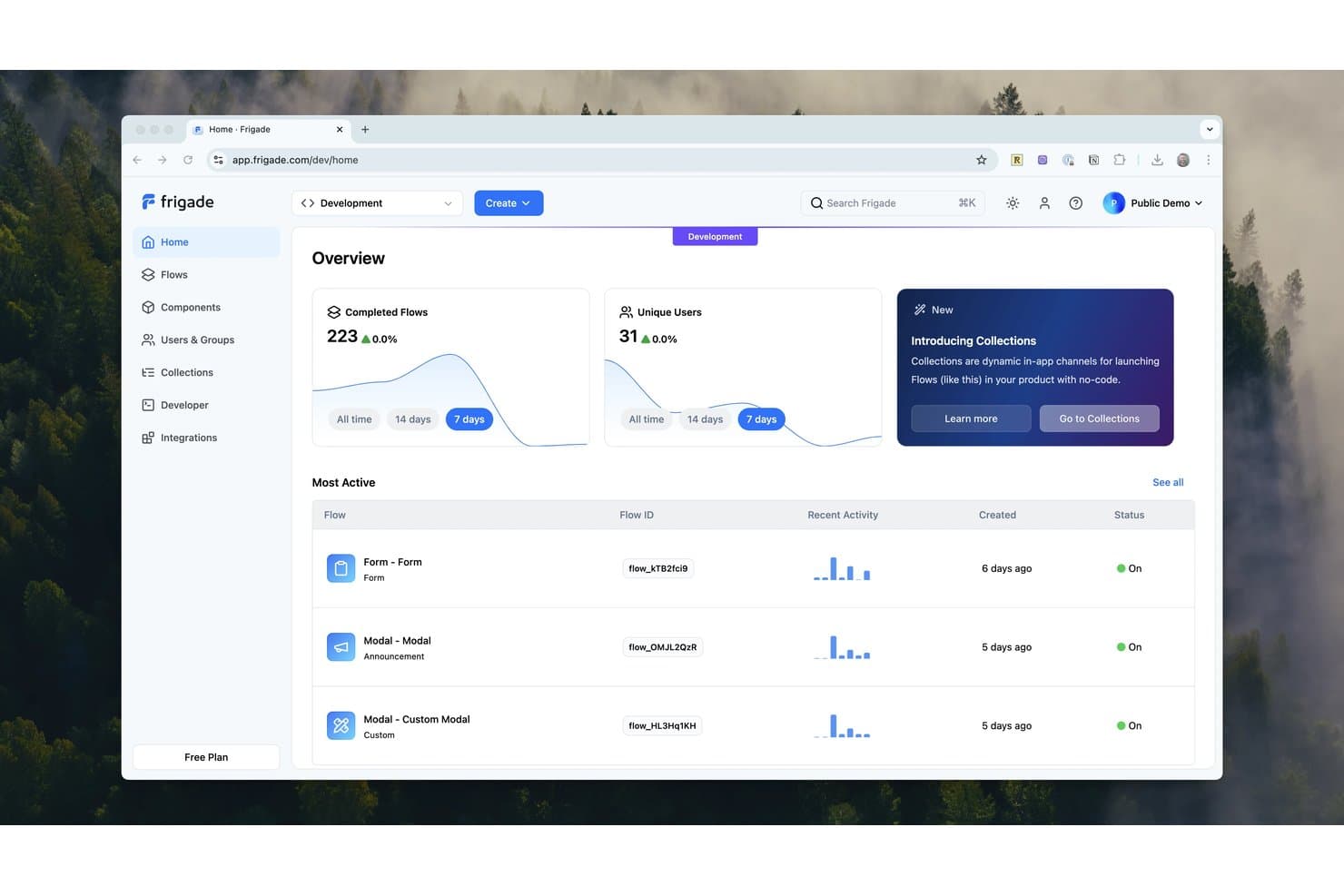
Frigade tracks flow completions and user activity from a central dashboard. Frigade is a code-first user onboarding platform for React apps, offering embedded checklists, tours, tooltips, announcements, surveys, forms, and targeted in-app messaging through a free Engage plan.
Who Is Frigade Best For?
Developer-led B2B SaaS teams that need embedded, event-driven onboarding checklists and targeted flows in React apps.
Why I Picked Frigade
I picked Frigade for Best Free User Onboarding Software because it’s built for developer-coded B2B onboarding checklists. I use its React components to create event-driven checklists, tours, and tooltips that respond to product actions. Group-level checklists also let entire customer accounts share progress, while targeting supports user properties, events, URLs, and flow completion.
Frigade Key Features
- Checklist styles: Choose Carousel or Collapsible checklist layouts.
- Persistent progress: Save checklist progress between user sessions.
- Message components: Create announcements, banners, cards, forms, and surveys.
- Custom styling: Match components to your product’s colors, fonts, and spacing.
Frigade Integrations
Frigade Engage offers eight documented integrations: Amplitude, Heap, HubSpot, Mixpanel, PostHog, Salesforce, Segment, and Slack. The Free plan includes none, but Frigade supports API access and webhooks for custom connectivity on paid plans.
What's Free?
Frigade offers a free-forever Engage plan for building onboarding checklists, tours, tooltips, and in-app messages. The Free plan includes no documented integrations, while API access and webhooks are available on paid plans.
Pros and Cons
Pros:
- React components fit branded product interfaces
- Group checklists support account-level onboarding
- Event-driven checklists reflect real product actions
Cons:
- Free users miss built-in analytics
- Developers must place components initially
Learn more about Frigade: Best for developer-coded product tours
- Free plan available
- From $50/lifetime
Visit WebsiteCustomer Rating:2.6/5
Shepherd.js helps developers build interactive app tours and tutorials. Shepherd.js is a user onboarding tool designed to guide users through app tours. It's ideal for developers who want to enhance user experience with interactive tutorials. The tool supports various frameworks, making it versatile for different technical environments.
Why I picked Shepherd.js: Shepherd.js offers a free version that emphasizes guided tours, setting it apart from other tools. It includes features like full keyboard navigation and accessibility compliance, which are crucial for creating user-friendly experiences. The free version allows you to customize the look and feel of your tours, ensuring they align with your brand. It's ready to integrate with popular frameworks like React and Angular, providing flexibility for your team.
Standout features & integrations:
Features include full keyboard navigation, making it accessible for all users. The tool is highly customizable, allowing you to match your brand's aesthetics. It also provides easy integration with various frameworks, enhancing its adaptability.
Integrations include React, Ember, Angular, Vue.js, ES Modules, and plain JavaScript.
What's free? Shepherd.js offers a free-forever plan with no restrictions on the number of users or tours you can create.
Pros and Cons
Pros:
- Full keyboard navigation
- Supports multiple frameworks
- Easy to customize tours
Cons:
- Basic out-of-the-box design
- Requires technical knowledge
Learn more about Shepherd.js: Best for PostHog-tracked dev-built flows
- Free plan available
- Free plan available
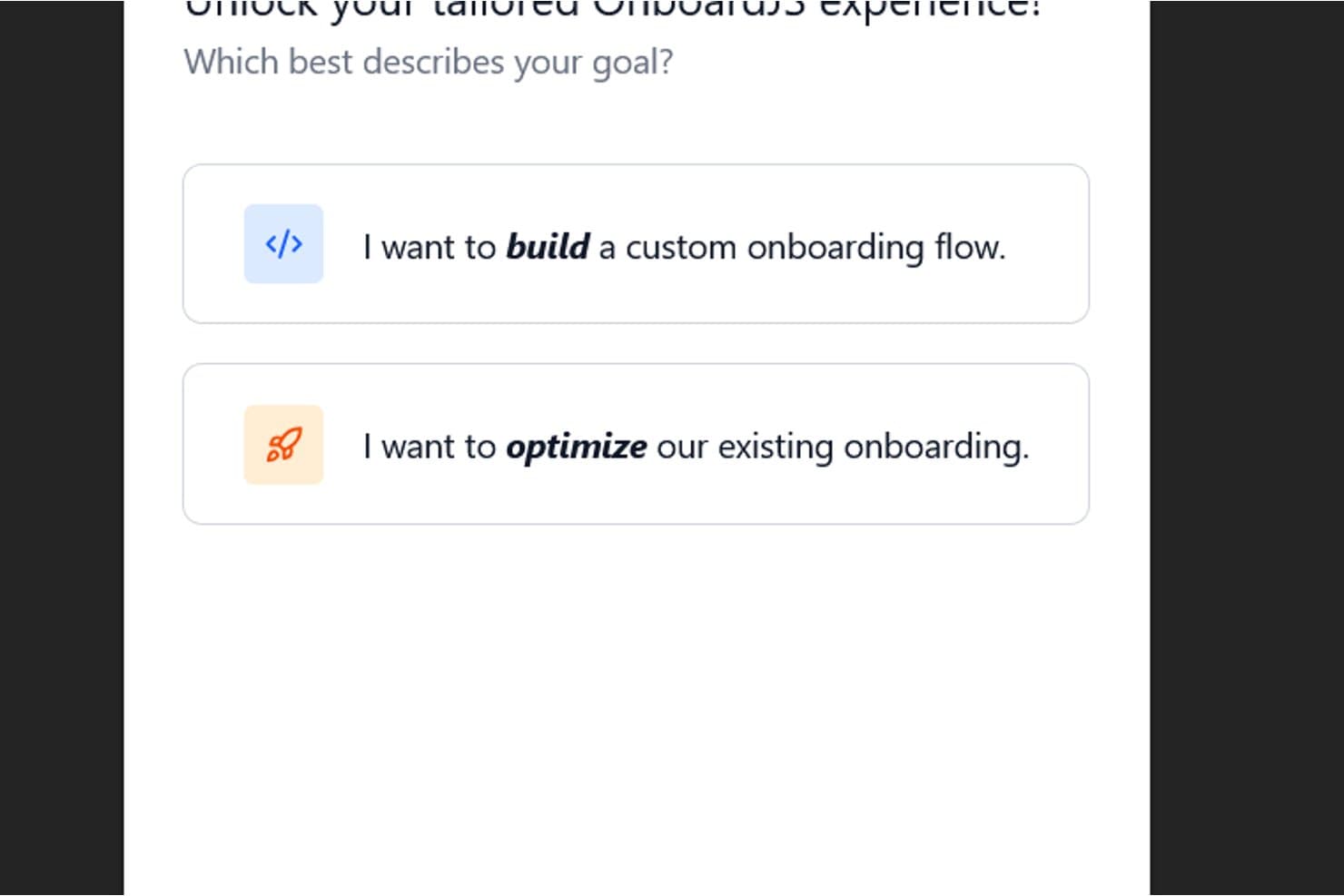
OnboardJS tailors onboarding flows based on user goals. OnboardJS is a free, MIT-licensed user onboarding library for React and Next.js that lets developers code branching flows, checklists, custom UI components, saved progress, and PostHog or Mixpanel tracking.
Who Is OnboardJS Best For?
Engineering teams building React or Next.js products with PostHog will value its coded, branching onboarding flows and activation analysis.
Why I Picked OnboardJS
I picked OnboardJS for teams that want PostHog-tracked dev-built flows. I can define branching React or Next.js journeys, then use its PostHog plugin for drop-off funnels, progress milestones, churn-risk detection, and feature-flagged A/B tests. It suits engineers who want activation data tied directly to custom onboarding logic.
OnboardJS Key Features
- Checklist step type: Create progress-based onboarding checklists with conditional visibility.
- Saved progress: Store onboarding state in localStorage, Supabase, or a custom backend.
- React and Next.js support: Add onboarding flows to React applications with SSR-safe support.
- TypeScript API: Define typed steps with autocomplete and compile-time checks.
OnboardJS Integrations
OnboardJS offers three documented official integrations: Supabase for authentication and saved progress, plus PostHog and Mixpanel for analytics. Its plugin system supports custom storage, analytics, and step types.
What's Free?
OnboardJS is free forever as an MIT-licensed library, rather than a limited-time trial. It requires developer implementation in a React or Next.js product, and you’ll need to configure your own storage, analytics, and custom UI components.
Pros and Cons
Pros:
- Progress tracking supports resumable user journeys
- Full control over branded onboarding interfaces
- Branching flows support conditional activation journeys
Cons:
- No visual segmentation or messaging controls
- Developers must build every onboarding interface
Learn more about OnboardJS: 10Best for AI-built tours with unlimited free seats
Candu
- Free plan available
- From $199/month (billed annually)
Visit WebsiteCustomer Rating:2.9/5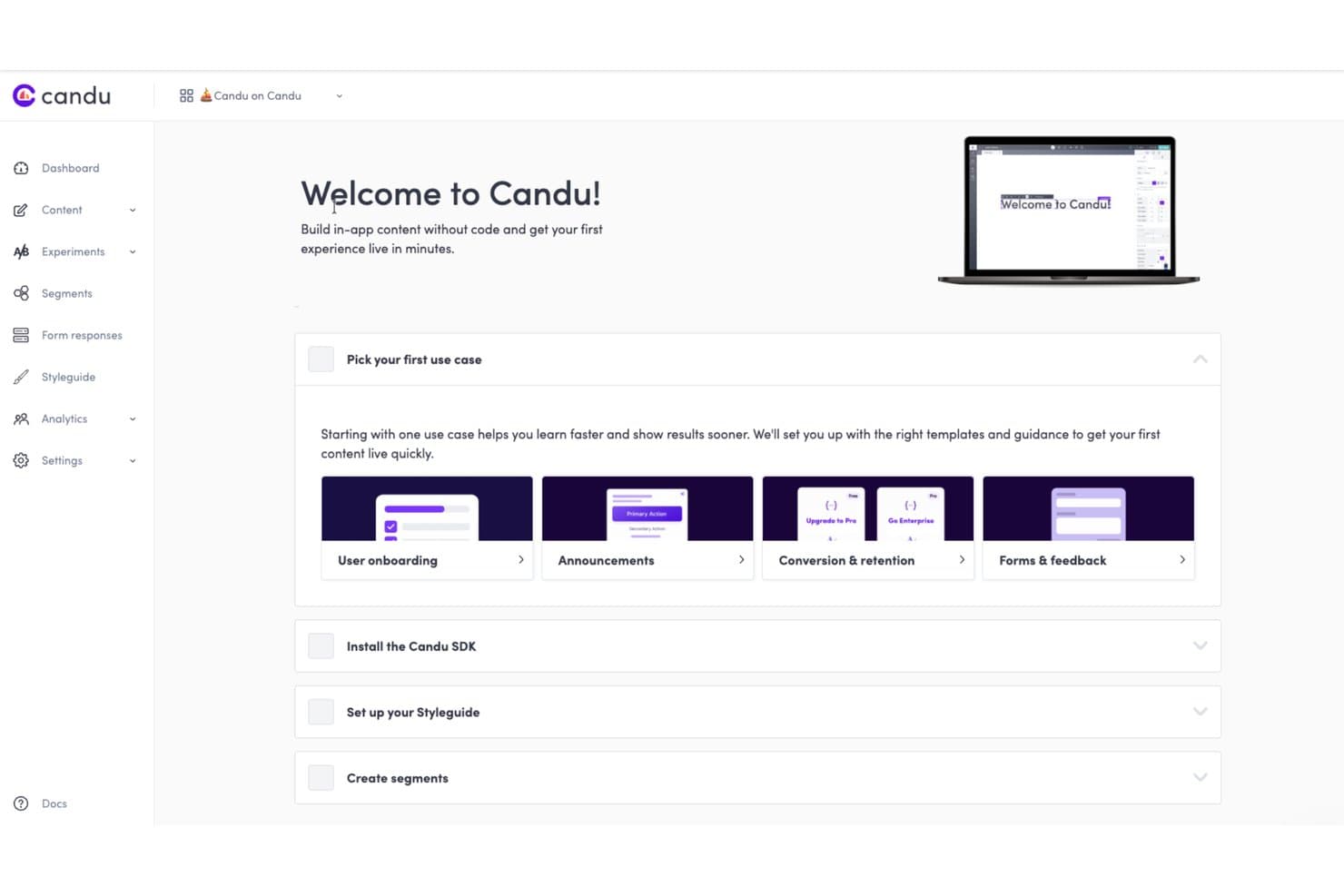
Candu guides users to pick onboarding use cases to go live fast. Candu is user onboarding software for building AI-assisted product tours, targeted overlays, and in-app guidance with no-code editing, segmentation, and engagement analytics.
Who Is Candu Best For?
Product teams that need AI-built product tours and targeted overlays with unlimited free seats for cross-functional collaborators.
Why I Picked Candu
I picked Candu because its AI-built tours turn a recorded workflow into targeted steps, copy, selectors, and URL rules. I can also give the AI assistant a screenshot or Figma file to draft an on-brand tour. Unlimited free seats let product, design, and growth teammates collaborate, although the Free plan limits teams to three live overlay experiences.
Candu Key Features
- Advanced segmentation: Target content using user attributes, events, groups, URLs, and nested rules.
- Branching tour actions: Link steps to modals, URLs, callbacks, other tours, or page elements.
- Engagement analytics: Track views, dismissals, completions, conversion rates, and funnel drop-off.
- Custom styling controls: Adjust fonts, colors, spacing, borders, shadows, and responsive layouts.
Candu Integrations
Candu documents integrations with Segment, Rudderstack, PostHog, Databricks, HubSpot (beta), Salesforce, Census, Amplitude, and Heap. It also supports webhooks plus JavaScript and REST APIs for custom data flows.
What's Free?
Candu offers a free-forever plan with unlimited seats, but it limits teams to three live overlay experiences. Paid plans start at $199 per month when billed annually, and a 14-day free trial is also available.
Pros and Cons
Pros:
- Segmentation personalizes tours by behavior
- Unlimited seats support cross-functional collaboration
- AI builds tours from recorded workflows
Cons:
- Developers must install JavaScript before launch
- Free plan excludes checklists and inline guidance
Learn more about Candu:
Other User Onboarding Software
Here are some additional user onboarding software options that also offer free plans or trials. While these tools didn’t make it onto my shortlist, they’re still worth checking out:
- 11UsertourBest for behavior-based tour triggering
- 12Product FruitsBest for in-app messaging tours and hints
How I Evaluate Free User Onboarding Software
First, I define what counts as free. A qualifying user onboarding software plan stays free long term, not just as a trial, though seats or user volumes may be capped. From there, I split my evaluation into three parts: core functionality, weighted most, like building tours and tracking engagement; standout features, like Chrome extension editing; and free-tier growth limits.
Core Functionality (Table Stakes For This List)
In addition to my free plan requirements, I use a scoring system to select tools for my list. I score each one on a scale from 0 (does not offer the functionality) to 5 (excels in this area) for each core functionality listed below, based on what's available on the free plan. I then convert the total into a percentage to help assess each tool's overall fit, with extra weight on any functionalities I've deemed essential.
- In-App Guidance (Essential): I look for no-code tours, tooltips, or walkthroughs with enough targeting and styling to guide new users through a key task.
- Onboarding Checklists: I check whether teams can customize tasks, track completion, and guide users toward milestones like creating a first project.
- User Segmentation: I assess whether teams can target onboarding by user attributes or behavior, such as showing different guidance to new and returning users.
- Engagement Analytics: I look for completion and drop-off data that helps identify where users leave a tour or checklist unfinished.
- In-App Messaging: I consider whether teams can target messages to relevant users, such as announcing a feature to people who haven’t tried it.
Once I have a list of tools that meet the criteria, I consider what sets each platform apart.
Differentiating Factors (What Sets Vendors Apart)
Here's how I compare and contrast different vendors:
Standout Features
I look for a Chrome extension editor that lets me build and preview tours on the live product without involving engineering. I also check for no-code event tracking—tagging clicks or page visits to trigger flows based on real behavior, not just URLs. A resource center widget matters too, giving users one place to find checklists, tours, and help docs on their own.
Beyond Features
I check how quickly a lean team can go from signup to a live onboarding flow. Tools like Userflow and Chameleon let you install a snippet and publish a tour the same day, which matters when you're testing ideas on a free plan with no engineering support. I also evaluate the free tier's scalability ceiling—MAU caps and flow limits determine how long the plan stays viable as your user base grows. If a startup hits the cap mid-launch, migrating tools mid-funnel disrupts the onboarding experience. Finally, I look at self-serve support quality, since free plans rarely include dedicated help.
How to Choose Free User Onboarding Software
Complex feature lists and pricing structures can make it hard to figure out what you’re really getting from a free user onboarding software. To help you stay focused as you work through your software selection process, here are some factors to keep in mind:
| Factor | What to Consider |
| Free Offer Scope | Check what's included in the free plan. Ensure essential features like tours and tooltips are available without hidden costs or severe limitations. |
| Scalability | Consider if the software can grow with your team. Look for options that allow you to upgrade as your needs expand without disrupting current workflows. |
| Integrations | Make sure the tool integrates with your existing systems, like CRM or analytics platforms. This ensures a smooth workflow and data consistency. |
| Ease of Use | Evaluate the user interface and setup process. A user-friendly design saves you time and reduces the learning curve for your team. |
| Customization | Determine how much you can tailor the software to fit your brand's look and feel. Customization options can enhance user engagement and satisfaction. |
| Support | Assess the level and availability of customer support. Quick and accessible support can be crucial when facing onboarding challenges. |
| Feature Set | Compare the features offered across different tools. Ensure they align with your specific needs, like segmentation or analytics, to maximize effectiveness. |
| User Feedback | Look at user reviews to gauge satisfaction and common issues. Real-world insights can help you avoid potential pitfalls and choose wisely. |
What Is Free User Onboarding Software?
User onboarding software is a tool that helps guide new users through a product, offering features like interactive tours and tooltips. Typically, these tools offer free trials or limited feature access to get you started. Product managers, UX designers, and customer success teams often use these tools to enhance user engagement and retention. Checklists, in-app messaging, and user segmentation support effective onboarding by ensuring users understand and utilize the product efficiently.
Features of Free User Onboarding Software
Let’s go over the features commonly found in user onboarding software, and which ones are usually included in free vs. paid plans.
Typically Included in Free Plans
- Interactive tours: Guide users through your interface step-by-step to accelerate feature adoption and ease product learning.
- Tooltips: Deliver helpful, in-app guidance exactly when users need it—without overwhelming them.
- Checklists: Ensure a smoother customer onboarding flow by prompting users to complete key actions in sequence.
- Pop-ups and notifications: Highlight product updates or prompt engagement at critical moments.
- Basic analytics: Monitor how users interact with onboarding elements to spot drop-offs and optimize flows.
- Customization options: Add your logo, colors, and messaging to align onboarding with your brand identity.
- Unlimited tours: Support diverse user paths with multiple walkthroughs, even on a free plan.
Typically Paid User Onboarding Software Features
- Advanced analytics: Gain deeper insights into user behavior and onboarding effectiveness with detailed reports.
- A/B testing: Experiment with different onboarding flows to determine what works best for user engagement.
- Multi-language support: Cater to a global audience by providing onboarding materials in multiple languages.
- In-app surveys: Collect user feedback directly within the app to refine onboarding strategies.
- CRM integrations: Sync onboarding data with customer relationship management systems for a seamless experience.
- Advanced customization: Access more detailed design options to fully match your brand’s aesthetics.
- Performance tracking: Monitor user success rates and identify areas for improvement in the onboarding process.
- Priority support: Receive faster and more personalized assistance to resolve any issues quickly.
Benefits of Free User Onboarding Software
Free onboarding software helps teams deliver a polished, self-service onboarding experience with minimal investment. Whether you’re a startup or an established product team, here are the key benefits:
- Cost-efficiency for small businesses: Get essential onboarding functionality without committing to a paid plan.
- Faster time-to-value: Help users reach key product milestones faster through guided tours and contextual tooltips.
- Improved customer experience: Keep users engaged and informed during their first product experience with your product.
- Flexible setup: Most tools are easy to install and allow for rapid deployment—perfect for teams without dedicated dev resources.
- Personalized onboarding: Even in free tiers, many platforms support basic tailoring to create a more relevant user journey.
- Feedback and iteration: Use notifications or lightweight pop-ups to gather input and continually refine the onboarding experience.
- Scalable onboarding: Start free and grow into advanced features like automated onboarding flows or A/B testing as your product matures.
Costs and Pricing of Free User Onboarding Software
I realize you came to this article looking for the best user onboarding software options that are available for free. However, since free plans only offer limited features, there's a good chance you'll need to scale your plan up in the future.
The table below summarizes common plans, their average prices, and typical features included in user onboarding software solutions:
Plan Comparison Table for User Onboarding Software
| Plan Type | Average Price | Common Features |
| Free Plan | $0 | Interactive tours, tooltips, basic analytics, and limited customization. |
| Personal Plan | $5-$25/user/month | Advanced customization, user segmentation, in-app messaging, and basic support. |
| Business Plan | $30-$90/ user/month | A/B testing, multi-language support, CRM integrations, and advanced analytics. |
| Enterprise Plan | $100+/user/month | Dedicated account manager, priority support, full customization, and scalability. |
Free User Onboarding Software FAQs
Here are some answers to common questions about free user onboarding software:
How can I ensure my data is secure with free onboarding software?
When using free onboarding software, check the provider’s data security policies. Ensure they comply with relevant regulations like GDPR. Look for features like data encryption and access controls. It’s important that your team understands how data is managed and stored.
Are there limits on the number of users in free plans?
Yes, many free plans limit the number of active users or seats. It’s crucial to review these limitations to ensure the plan meets your team’s current needs. If you expect growth, consider how easily you can upgrade to accommodate more users.
Can I integrate free onboarding software with other tools?
Free versions often have limited integration capabilities. However, many still allow basic integrations with popular tools like Google Analytics or Slack. Check the specific integrations available to ensure they align with your existing workflows.
What kind of support can I expect with free plans?
Support for free plans is typically limited to community forums or basic email support. Live chat and phone support are often reserved for paid plans. Make sure your team is comfortable with the level of support offered before committing.
How do I evaluate the effectiveness of my onboarding process with free tools?
Use the basic analytics provided in free plans to track user engagement and completion rates. Look for insights on how users interact with your onboarding process. Regularly review this data to make necessary adjustments.
Can I customize the onboarding experience with free software?
Free plans usually offer limited customization options. You can often change basic elements like colors and logos. For more advanced customization, you might need to upgrade to a paid plan. Consider how much customization is essential for your brand.