

Asana vs. Confluence: Comparison & Expert Reviews For 2026
We review tools independently, and commissions help fund our testing. See our transparency policy, our methodology, or suggest a tool.
Asana is a project management tool built to help teams plan, track, and manage tasks and workflows. Confluence is a documentation and collaboration platform designed for creating, organizing, and sharing internal knowledge. While they serve different core functions, many teams compare them because they’re evaluating tools to support project work, team communication, or both.
At first glance, Asana and Confluence seem to serve separate purposes—but if you’re comparing them, you might be wondering where their capabilities overlap, whether you really need both, or which one is the better fit for how your team works.
In this article, we’ll break down the differences and similarities between Asana and Confluence, including features, pros and cons, pricing, and use cases—so you can confidently decide which tool (or combination of tools) works best for your team.
Asana
4.4/5
- Free plan + trial + demo available
- From $10.99/user/month (billed annually)
Confluence

4.3/5
- Free plan + 7-day trial available
- From $5.78/user/month (billed annually)
Why Trust Our Software Recommendations
6,700+
Reviews
20
Industry experts
16+
Evaluation factors
14
Years
Our team has been testing and reviewing software since 2012. As product managers ourselves, we know how difficult—and important—it is to choose the right software.
For this guide, we evaluated tools using hands-on testing and independent research, scoring tools using our selection criteria.
Our reviews reflect our human editorial judgment, not a sales pitch.
Expert reviewers:
- Andrew LumbySenior TPM
- Cristiano ValimSenior UI/UX Lead
| Asana | Confluence | |
|---|---|---|
| Free Trial | Free plan + trial + demo available | Free plan + 7-day trial available |
| Pricing | From $10.99/user/month (billed annually) | From $5.78/user/month (billed annually) |
| Asana | Confluence | |
|---|---|---|
| API | Yes | Yes |
| Batch Permissions & Access | Yes | Yes |
| Budgeting | Yes | No |
| Calendar Management | Yes | Yes |
| Contact Management | Yes | No |
| Contact Sharing | No | No |
| Customer Management | No | No |
| Dashboard | Yes | Yes |
| Data Export | Yes | Yes |
| Data Import | Yes | No |
| Data Visualization | Yes | Yes |
| Expense Tracking | Yes | No |
| External Integrations | Yes | Yes |
| Gantt Charts | Yes | No |
| Multi-User | Yes | Yes |
| Notifications | Yes | Yes |
| Project Management | Yes | Yes |
| Resource Management | No | No |
| Scheduling | Yes | No |
| Task Scheduling/Tracking | Yes | Yes |
| Third-Party Plugins/Add-Ons | Yes | Yes |
| Travel Management | No | No |
Asana vs. Confluence Pricing & Hidden Costs
Asana pricing follows a tiered subscription model, offering several plans based on features and team size, with potential extra costs for premium integrations. Confluence pricing also uses a tiered approach, with charges increasing as your team grows, and additional costs for certain add-ons and storage needs. To choose the right tool for your budget, assess not just the base price but also consider the total cost of ownership, including any necessary add-ons and integrations that your team will require both now and as it scales in the future.
| Integration | Asana | Confluence |
|---|---|---|
| IntegrationSlack | Asana✅ | Confluence✅ |
| IntegrationMicrosoft Teams | Asana✅ | Confluence✅ |
| IntegrationGoogle Drive | Asana✅ | Confluence✅ |
| IntegrationDropbox | Asana✅ | Confluence✅ |
| IntegrationSalesforce | Asana✅ | Confluence✅ |
| IntegrationJira | Asana✅ | Confluence✅ |
| IntegrationTrello | Asana✅ | Confluence✅ |
| IntegrationMicrosoft Outlook | Asana✅ | Confluence✅ |
| IntegrationAPI | Asana✅ | Confluence✅ |
| IntegrationZapier | Asana✅ | Confluence✅ |
These integrations play a key role in connecting your product and project workflows. With a Salesforce integration, teams can manage customer relationships alongside project tasks, making it especially useful for sales-aligned product teams. Confluence, part of the Atlassian suite, works really well with Jira to link backlogs, update Confluence pages, and support Agile planning. Whether you're organizing subtasks, coordinating with team members, or tracking progress through notifications, these connections help extend your project management software into a more unified, real-time workspace.
| Factor | Asana | Confluence |
|---|---|---|
| FactorData Encryption | AsanaAsana encrypts data in transit and at rest using industry-standard protocols. | ConfluenceConfluence secures data with encryption during transit and storage. |
| FactorRegulatory Compliance | AsanaAsana complies with GDPR and offers data processing agreements. | ConfluenceConfluence is GDPR-compliant and provides enterprise-grade compliance features. |
| FactorAccess Controls | AsanaAsana provides customizable permissions and two-factor authentication. | ConfluenceConfluence offers granular permission settings and supports SAML single sign-on. |
| FactorUptime Guarantee | AsanaAsana boasts a 99.9% uptime SLA for enterprise users. | ConfluenceConfluence offers a 99.9% uptime SLA for its cloud services. |
Security is a critical factor when evaluating any project management tool, and both Asana and Confluence offer strong coverage, but with slightly different emphases. Asana focuses on permissions, encryption, and user-level controls that are especially valuable in work management environments involving multiple stakeholders and teams. Confluence, as part of the Atlassian products suite, leans into secure wiki-style documentation and tight integration with tools like Jira, which is useful for teams managing technical docs, dependencies, or regulated workflows.
If your use case involves handling sensitive data or managing compliance-heavy project management features, it's worth reviewing each tool’s audit logs, uptime SLAs, and support responsiveness. The right choice comes down to how well these security protocols support your methodology and the specific needs of your team structure.
| Factor | Asana | Confluence |
|---|---|---|
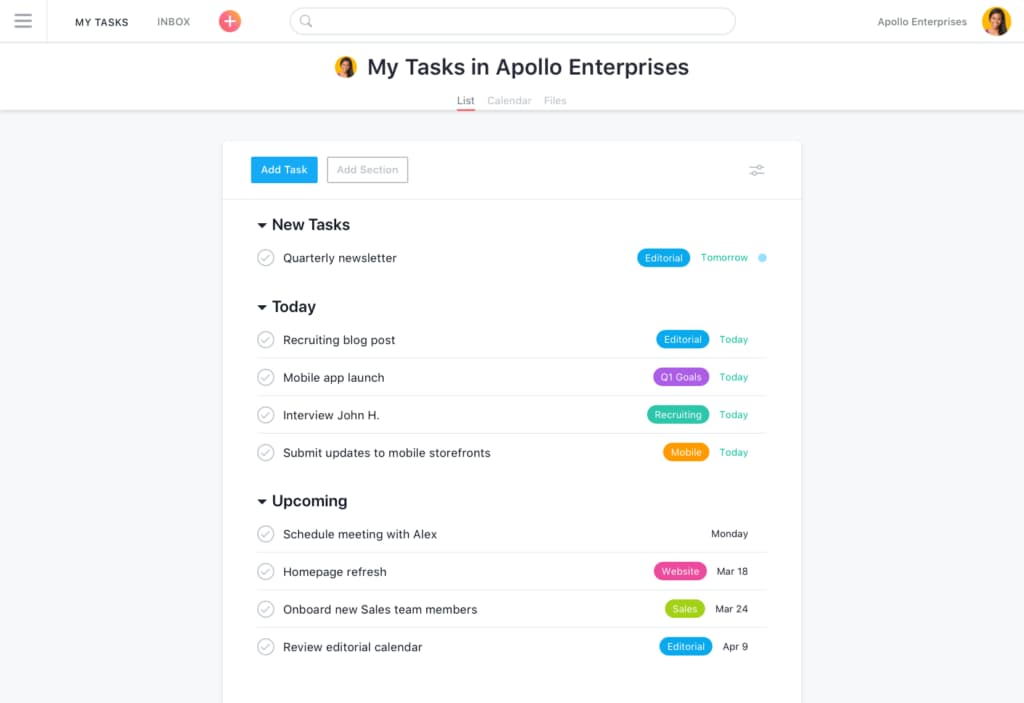
| FactorUser Interface | AsanaAsana’s intuitive drag-and-drop Kanban boards, Gantt charts, calendar view, and customizable automations make task management straightforward. | ConfluenceConfluence’s dashboards offer some more advanced features. While excellent for detailed planning, it may also create a more complex user experience. |
| FactorOnboarding Experience | AsanaAsana offers interactive tutorials and templates for a smooth start. | ConfluenceConfluence provides extensive documentation but can be overwhelming for beginners. |
| FactorCustomization | AsanaAsana allows easy customization of Asana tasks, project views, and workflows. | ConfluenceConfluence offers deep customization options, which might require technical know-how. |
Asana excels in simplicity and ease of navigation, making it easy to get started and manage tasks efficiently. Confluence, while powerful, can be challenging to master due to its complex interface and extensive customization options, which might demand more effort to set up effectively.
Asana
- You can easily track your team's progress with Asana's intuitive task management.
- The customizable project views let your team work in the way that suits them best.
- Asana's collaboration tools keep your team connected and coordinated.
- You might find the notifications overwhelming if not managed properly.
- Asana can feel complex for smaller projects or teams.
- Some users report that advanced features require a learning curve.
Confluence
- AI-powered search quickly surfaces relevant project information
- Real-time collaborative editing for distributed teams
- Rich templates for product requirements and documentation
- Navigation can become complex in large workspaces
- Limited workflow automation for product development processes
- No built-in task or issue tracking features
Asana

- Tech StartupsAsana’s flexibility and robust task management help your team adapt quickly to change and scale projects efficiently.
- Creative AgenciesYour team can benefit from Asana’s visual project tracking to manage design and content workflows smoothly.
- Marketing TeamsAsana’s collaboration tools keep your team aligned, making campaign planning and execution more efficient.
- Remote TeamsAsana connects your team with its collaboration features, keeping everyone on the same page despite the distance.
- Product DevelopmentThe customizable task management lets your team manage product roadmaps and feature releases seamlessly.
- Nonprofit OrganizationsAsana helps your team coordinate volunteers and manage projects effectively with its user-friendly interface.
Confluence

- Mid-Sized EnterprisesGrowing companies benefit from scalable knowledge bases and permissions control.
- Product Management TeamsRequirements, roadmaps, and feedback can be documented and shared in one place.
- Higher EducationFaculty and staff can organize curriculum, research, and committee notes.
- HR DepartmentsPolicy management and onboarding guides are easy to maintain and update.
- Consulting FirmsCentralized client documentation and project wikis streamline knowledge transfer.
- Software Development TeamsConfluence supports detailed documentation, version history, and integration with code repositories.
Who Should Use Asana, and Who Should Use Confluence?
In my opinion, Asana is best suited for teams that need straightforward task management and value a user-friendly interface, making it ideal for startups and small businesses focused on efficient project execution. From my perspective, Confluence is more suitable for larger organizations or teams that require extensive documentation and collaboration capabilities, especially in tech-heavy industries. I believe if your team values customization and detailed project records, Confluence is the way to go. Ultimately, the choice depends on your team's specific needs and how you prioritize simplicity versus depth in features.
| Asana | Confluence | |
|---|---|---|
| Documentation | Asana Asana provides basic note-taking and task descriptions. | Confluence Confluence offers robust documentation and collaboration tools for detailed records. |
| Integrations | Asana Asana integrates well with CRM tools like Salesforce. | Confluence Confluence integrates deeply with development tools like Jira. |
| Pricing | Asana Asana uses a tiered subscription model with potential add-on costs. | Confluence Confluence has a similar tiered model, but charges can increase with add-ons and storage. |
| Task Management | Asana Asana excels in task tracking with an intuitive drag-and-drop interface. | Confluence Confluence focuses on documentation, lacking advanced task management features. |
| User Interface | Asana Asana's interface is user-friendly and easy to navigate. | Confluence Confluence's interface can be complex, requiring a learning curve. |
| Cloud-Based Access | Both tools are cloud-based, ensuring your team can access projects and documents from anywhere with an internet connection. |
|---|---|
| Collaboration | Both Asana and Confluence support team collaboration, with Asana using task comments and Confluence using shared pages. |
| Customization | Both platforms allow customization to fit your workflow, with Asana focusing on project views and Confluence on page layouts. |
| Integrations | They both offer extensive integration options, allowing your team to connect with tools like Slack and Google Drive. |
| Security | Asana and Confluence both prioritize security, offering encryption and compliance with standards like GDPR. |
