

Gerir os seus esforços de marketing de produto pode ser desafiante, especialmente se as suas ferramentas atuais não estiverem a responder às suas necessidades. Poderá descobrir que o Ignition já não é a solução perfeita para a sua equipa. Talvez lhe faltem funcionalidades específicas ou talvez não consiga acompanhar o crescimento da sua empresa.
Com base na minha experiência, encontrar o software certo pode fazer toda a diferença na eficiência com que trabalha, juntamente com a sua equipa. Foi por isso que testei e analisei de forma independente várias alternativas ao Ignition.
Neste artigo, partilharei as minhas principais escolhas de alternativas ao Ignition, com foco nas suas funcionalidades únicas e na forma como respondem a problemas comuns. Encontrará uma análise imparcial e fundamentada que o ajudará a tomar a melhor decisão para a sua empresa.
O que é o Ignition?
O Ignition é um software de marketing de produto concebido para ajudar as equipas a gerir e executar as suas estratégias de entrada no mercado. É habitualmente utilizado por gestores de produto, equipas de marketing e estrategas empresariais que precisam de alinhar os lançamentos de produtos com os planos de marketing. Funcionalidades como ferramentas de colaboração, acompanhamento de análises e gestão de campanhas ajudam a organizar os esforços da sua equipa e a acompanhar as tendências do mercado. De um modo geral, o Ignition proporciona valor ao melhorar a capacidade da sua equipa para planear e executar lançamentos de produtos bem-sucedidos.
Why Trust Our Software Recommendations
6,700+
Reviews
20
Industry experts
16+
Evaluation factors
14
Years
Our team has been testing and reviewing software since 2012. As product managers ourselves, we know how difficult—and important—it is to choose the right software.
For this guide, we evaluated tools using hands-on testing and independent research, scoring tools using our selection criteria.
Our reviews reflect our human editorial judgment, not a sales pitch.
Expert reviewers:
- Andrew LumbySenior TPM
- Cristiano ValimSenior UI/UX Lead


Tabela comparativa: alternativas ao Ignition
Esta tabela comparativa resume os detalhes de preços das minhas principais escolhas de alternativas ao Ignition.
| Tool | Best For | Trial Info | Price | ||
|---|---|---|---|---|---|
| 1 | Best for accounting firms replacing Ignition | 14-day free trial | From $19/month (billed annually) | Website | |
| 2 | Best for accounting firm engagement letters | Free demo available | From $79/user/month | Website | |
| 3 | Best for accounting firms replacing siloed tools | Free demo available | From $58.33/user/month (billed annually) | Website | |
| 4 | Best for interactive web-based proposals | 14-day free trial | From $35/user/month (billed annually) | Website | |
| 5 | Best for accounting firms leaving Ignition | 30-day free trial | Pricing upon request | Website | |
| 6 | Best for accounting engagement letters | 14-day free trial | From $20/month (billed annually) | Website | |
| 7 | Best for sign-and-pay in one document | Free plan + 14-day free trial + free demo available | From $19/user/month | Website | |
| 8 | Best for proposal-to-payment client onboarding | Free trial + free demo available | From $28/month (billed annually) | Website | |
| 9 | Best for per-payment billing with no subscription | Free demo available | Pricing upon request | Website | |
| 10 | Best for accounting firm pricing proposals | 30-day free trial | From $75/month | Website |


Análises das melhores alternativas ao Ignition
Seguem-se os meus resumos detalhados das melhores alternativas ao Ignition que entraram na minha seleção. As minhas análises apresentam uma visão detalhada das principais funcionalidades, vantagens \u0026 desvantagens, integrações e casos de utilização ideais de cada ferramenta, para o ajudar a encontrar a melhor opção para si e para a sua equipa.
 Best for accounting firms replacing Ignition
- 14-day free trial
- From $19/month (billed annually)
Visit WebsiteCustomer Rating:4.8/5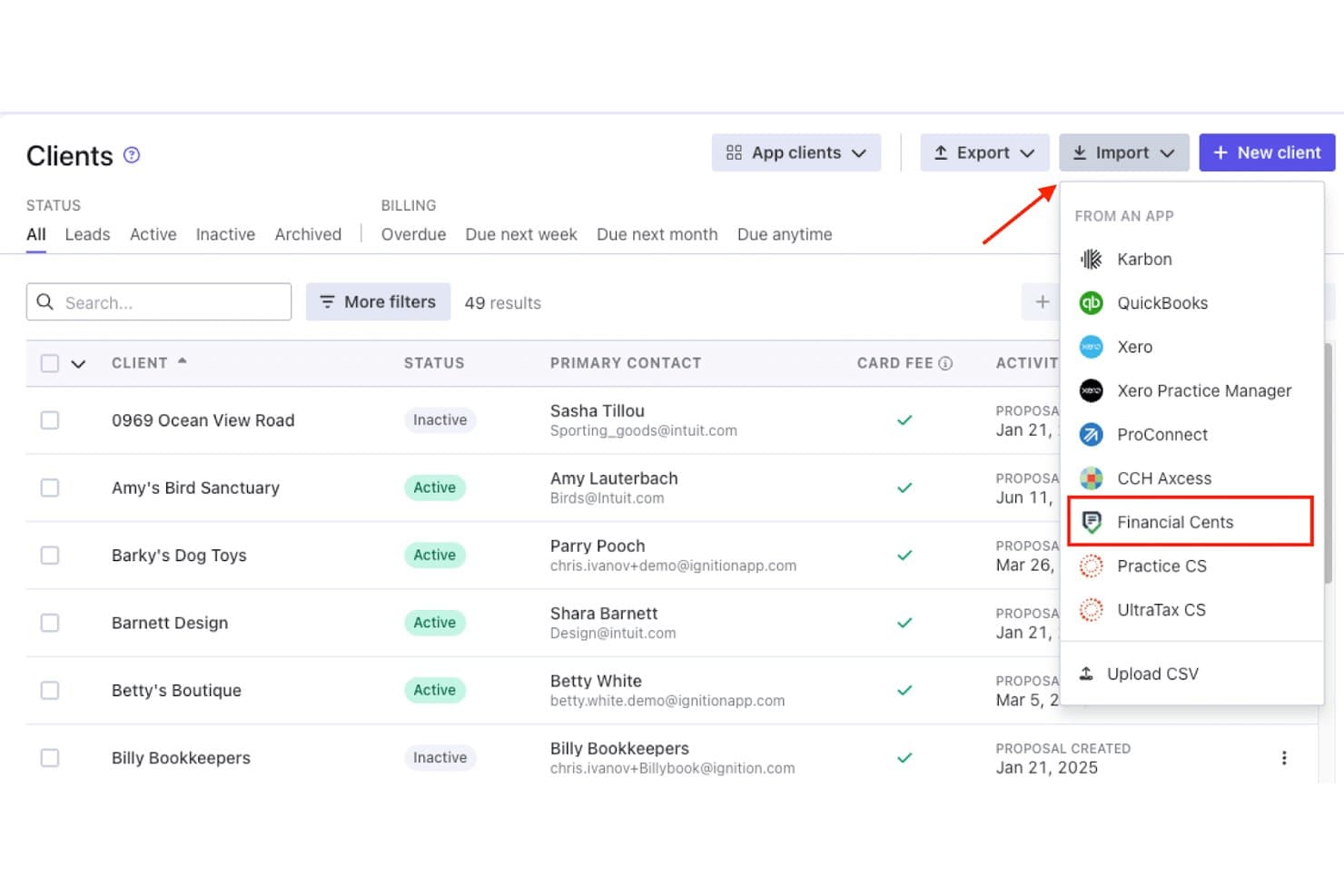
Financial Cents lets users import clients directly from the Ignition app. Financial Cents is accounting practice management software that helps firms organize workflows, deadlines, and client communication, making it Best for accounting firms replacing Ignition.
Who Is Financial Cents Best For?
Accounting firms replacing Ignition with a broader practice management system for proposals, payments, client work, and team workflows.
Why Financial Cents Is a Good Best Ignition Alternatives
I picked Financial Cents as a good Best Ignition Alternatives option because it supports accounting firms replacing Ignition with broader practice management. I use its proposals and payment workflows to move prospects into client work, then manage deadlines, team tasks, and client communication in one place.
Financial Cents Key Features
- Time tracking: Record billable hours against clients and projects.
- Client portal: Let clients upload files and review requested information.
- Workflow templates: Create repeatable processes for recurring engagements.
- Email integration: Connect email conversations to related client records.
Financial Cents Integrations
Financial Cents supports integrations with QuickBooks Online, SmartVault, OneDrive, Google Drive, Ignition, Gmail, and Outlook, plus Zapier. Scale and Enterprise plans also provide an open API for custom integrations.
Pros and Cons
Pros:
- Recurring templates expose deadlines and capacity
- Client portals reduce document-chasing
- Proposal signatures create workflows and invoices
Cons:
- Internal storage and high-level reporting feel limited
- Task views offer limited column control
Learn more about Financial Cents: Best for accounting firm engagement letters
- Free demo available
- From $79/user/month
Visit WebsiteCustomer Rating:4.8/5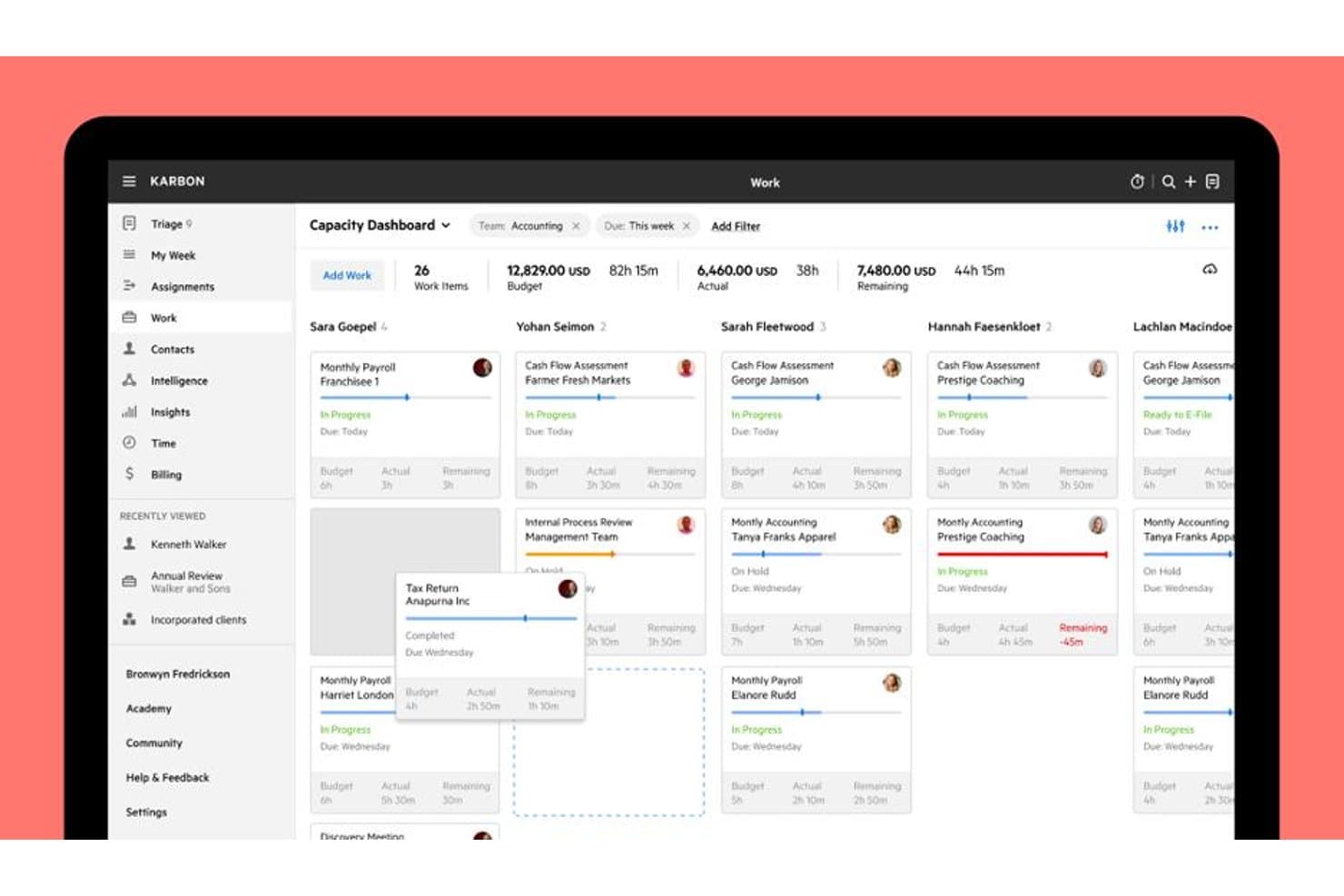
Karbon's Capacity Dashboard tracks team workload and budgets at a glance. Karbon is practice management software for accounting firms that helps teams coordinate client work, manage proposals, and turn approved services into clear engagement workflows.
Who Is Karbon Best For?
Accounting firms that need to draft, send, and manage engagement letters alongside client work.
Why Karbon Is a Good Best Ignition Alternatives
I picked Karbon because it connects proposal work with accounting firm engagement letters. I use its proposal workflows to move approved services into clear engagement workflows, while coordinating related client work in one place. That keeps the signed scope connected to delivery tasks instead of leaving it in a separate document.
Karbon Key Features
- Proposal templates: Create reusable templates for recurring accounting services.
- Custom fields: Add structured client and service details to proposal records.
- Email integration: Manage proposal-related email conversations within Karbon.
- Document storage: Keep proposal files and supporting documents with client records.
Karbon Integrations
Karbon documents integrations with Ignition, QuickBooks Online Accountant, Dropbox, Google Drive, Microsoft OneDrive, Slack, Microsoft Teams, Google Calendar, Outlook Calendar, and HubSpot. It also supports Zapier and provides a Karbon API for custom integrations.
Pros and Cons
Pros:
- Supports detailed task dependencies and deadlines
- Centralizes client emails and work history
- Connects engagement letters with delivery workflows
Cons:
- Setup demands substantial workflow configuration
- Interface can require too many clicks
Learn more about Karbon: Best for accounting firms replacing siloed tools
- Free demo available
- From $58.33/user/month (billed annually)
Visit WebsiteCustomer Rating:4.7/5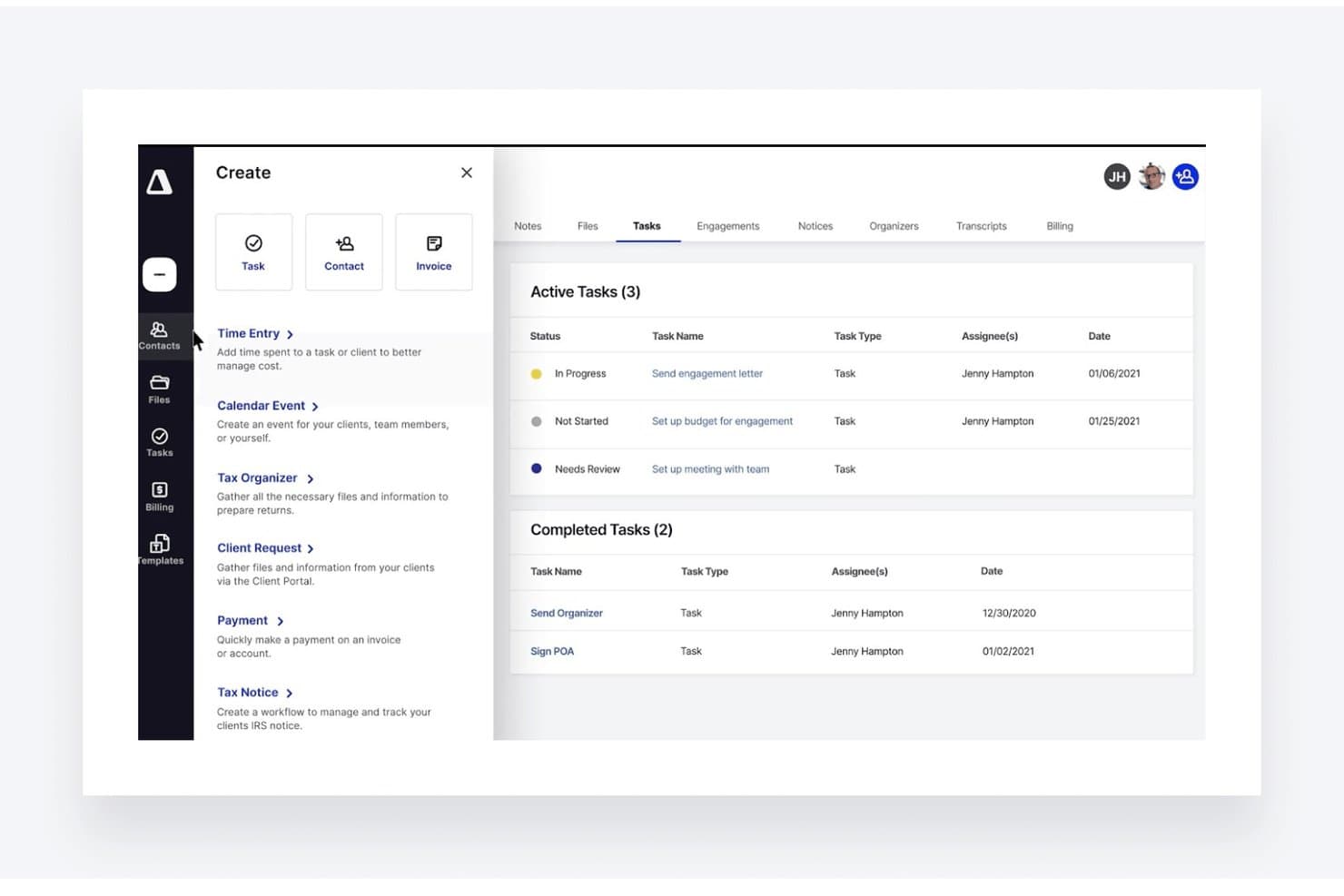
TaxDome lets users create and track client tasks from one dashboard. TaxDome is an all-in-one practice management platform for accounting firms that brings client communication, document workflows, billing, and team operations into one connected workspace.
Who Is TaxDome Best For?
TaxDome fits accounting firms that want one workspace for client communication, documents, billing, and team workflows instead of separate tools.
Why TaxDome Is a Good Best Ignition Alternatives
I picked TaxDome because it is best for accounting firms replacing siloed tools. I use its client portal, document workflows, billing, and team operations in one workspace, so client requests and approvals stay connected. My team can manage document collection, invoices, and communication without switching between separate systems.
TaxDome Key Features
- Contact management: Store client records, notes, tags, and custom fields.
- Email sync: Connect email accounts and save client correspondence automatically.
- Mobile app: Access client records and tasks from iOS and Android devices.
- Reporting dashboards: Track practice activity with configurable performance reports.
TaxDome Integrations
TaxDome offers documented integrations with QuickBooks Online and Xero Tax, plus Zapier. It works with tax programs such as Drake, UltraTax, Lacerte, CCH, TaxWise, ProSeries, and DATEV through its desktop print workflow, but it doesn’t have a public API.
Pros and Cons
Pros:
- Team task visibility keeps work coordinated
- Document collection supports repeatable client requests
- Unified client portal and billing workflows
Cons:
- Reporting feels limited for complex firms
- Setup requires significant workflow configuration
Learn more about TaxDome: Best for interactive web-based proposals
- 14-day free trial
- From $35/user/month (billed annually)
Visit WebsiteCustomer Rating:4.5/5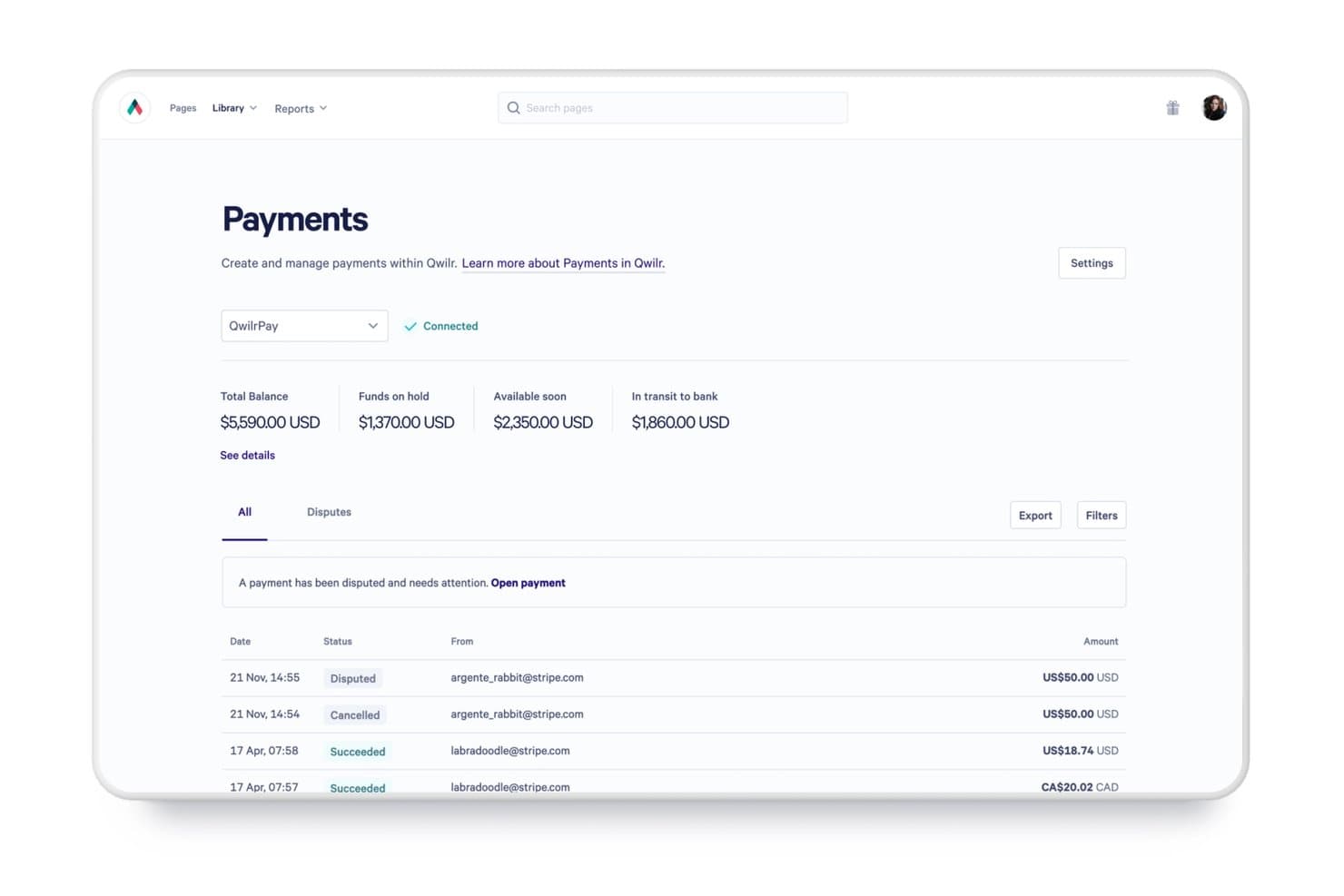
Qwilr tracks payment statuses, balances, and disputes in one place. Qwilr is a proposal management platform for sales and professional services teams that helps create polished, personalized proposals, centralize content, and guide prospects toward signed agreements.
Who Is Qwilr Best For?
Qwilr suits sales and professional services teams that create interactive proposals, tailor content for prospects, and move deals toward signed agreements.
Why Qwilr Is a Good Best Ignition Alternatives
I picked Qwilr as a Best Ignition Alternatives option because it turns proposals into interactive web-based proposals. I use branded pages with personalized content, videos, pricing tables, and embedded e-signatures to guide buyers from evaluation to approval. Proposal analytics also show which sections prospects view before follow-up.
Qwilr Key Features
- Proposal templates: Start documents with reusable, professionally designed templates.
- Content library: Store approved text, images, and assets for reuse.
- CRM integrations: Connect Qwilr with supported CRM platforms and workflows.
- Payment collection: Add payment options for clients to complete transactions.
Qwilr Integrations
Qwilr supports integrations with Microsoft Dynamics 365, HubSpot, Salesforce, Zoho CRM, Slack, Stripe, QuickBooks, and Pipedrive, and connects with Zapier. Qwilr also provides an API for custom integrations with CRMs, ERPs, and databases.
Pros and Cons
Pros:
- Embedded signing and payments shorten approval cycles
- Buyer engagement analytics guide timely follow-ups
- Interactive pages make proposals feel more engaging
Cons:
- Payment emails can get stuck
- Advanced template edits feel restrictive
Learn more about Qwilr: Best for accounting firms leaving Ignition
- 30-day free trial
- Pricing upon request
Visit WebsiteCustomer Rating:4.5/5
Onboardme guides clients through multi-step contact detail collection forms. Onboardme is client engagement software for accounting firms moving away from Ignition, helping teams manage client onboarding and engagement workflows in one place.
Who Is Onboardme Best For?
Accounting firms replacing Ignition can use Onboardme to manage client onboarding and engagement workflows from one workspace.
Why Onboardme Is a Good Best Ignition Alternatives
I picked Onboardme because it gives accounting firms leaving Ignition one workspace for client onboarding and engagement workflows. I use it to keep new-client steps and ongoing engagement activity together, rather than splitting work across separate tools. That makes it a practical fit when replacing Ignition.
Onboardme Key Features
- Proposal creation: Send personalized proposals with flexible pricing options.
- Debtor management: Bill clients upfront or when work is complete.
- Identity and AML checks: Run identity verification and AML/PEP checks automatically.
- Client subscriptions: Set up recurring client subscriptions and payments.
Onboardme Integrations
OnboardMe offers integrations with Xero Practice Manager, Xero Accounting, FYI, Karbon, MYOB Practice Management, QuickBooks, BGL, FreeAgent, and GreatSoft, plus Zapier. These connections support client, job, billing, document, payment, and invoice data workflows across accounting practice systems.
Pros and Cons
Pros:
- Supports recurring client subscriptions
- Automates identity and AML checks
- Combines proposals and onboarding workflows
Cons:
- Fewer practice-management features than Ignition
- Limited public review coverage
Learn more about Onboardme: Best for accounting engagement letters
- 14-day free trial
- From $20/month (billed annually)
Visit WebsiteCustomer Rating:4.8/5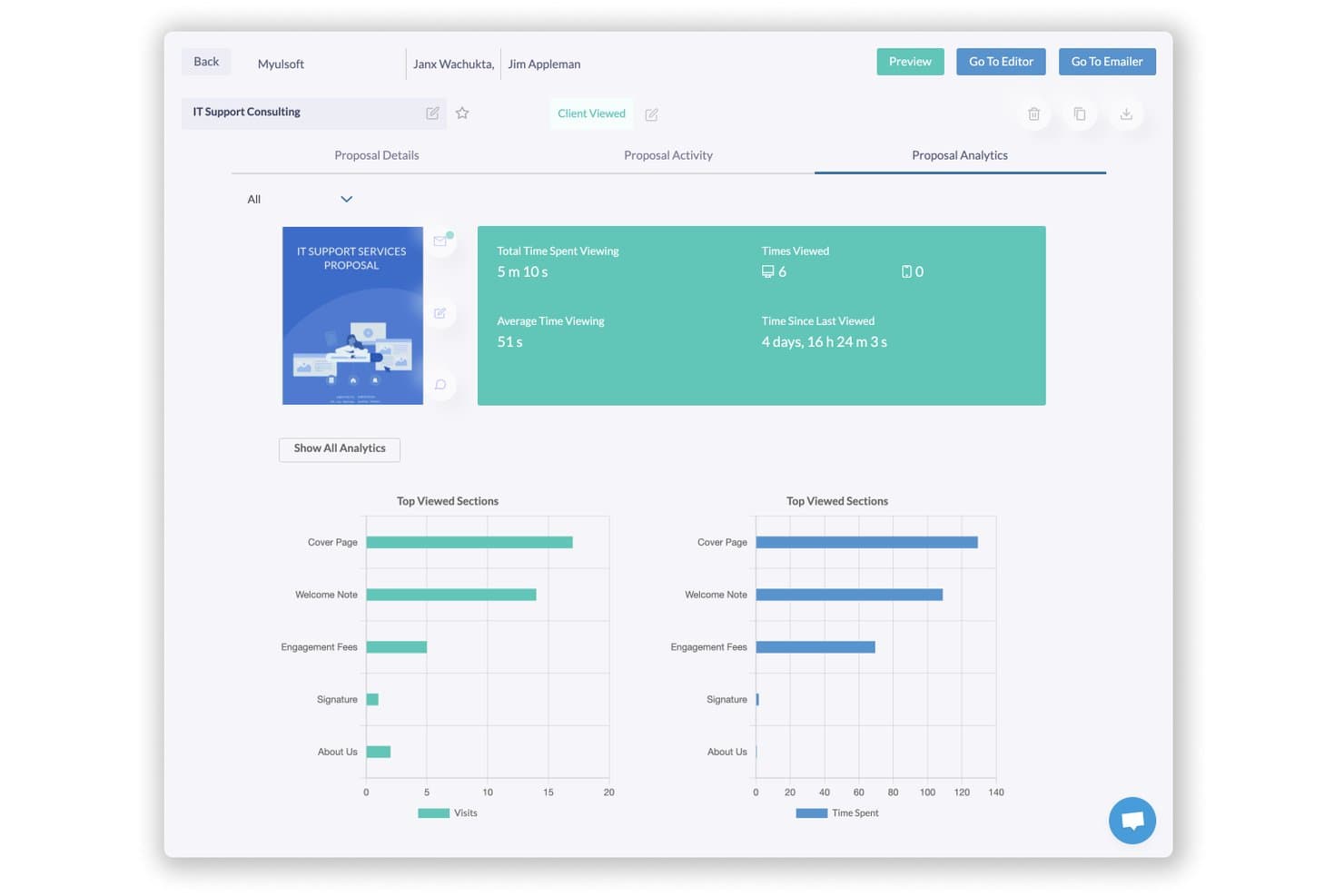
Fresh Proposals lets users track proposal views, time spent, and top sections. Fresh Proposals is proposal management software for accounting firms—Best for accounting engagement letters—that helps teams create, customize, send, and manage client proposals.
Who Is Fresh Proposals Best For?
Accounting firms that need reusable engagement letter templates and a central workflow for sending and managing client proposals.
Why Fresh Proposals Is a Good Best Ignition Alternatives
I picked Fresh Proposals because it’s Best for accounting engagement letters. I use its reusable proposal templates to create engagement letters, customize client details, and send them for approval. My team also tracks sent proposals and manages client responses from one workspace.
Fresh Proposals Key Features
- Electronic signatures: Add legally binding signature fields to proposals.
- Payment collection: Include payment options within proposal documents.
- Proposal analytics: Monitor views, time spent, and engagement activity.
- Team collaboration: Assign proposal tasks and manage internal approvals.
Fresh Proposals Integrations
Fresh Proposals offers 14+ native integrations, including HubSpot, Pipedrive, Zoho CRM, QuickBooks, Xero, CPACharge, LawPay, Trello, and Slack, and connects with Zapier. It also provides REST API and webhook access for custom integrations on request for enterprise accounts.
Pros and Cons
Pros:
- Responsive customer support
- Built-in signatures and payment collection
- Accounting-specific engagement letter templates
Cons:
- Design elements sometimes misalign
- Occasional slow performance and bugs
Learn more about Fresh Proposals: Best for sign-and-pay in one document
- Free plan + 14-day free trial + free demo available
- From $19/user/month
Visit WebsiteCustomer Rating:4.5/5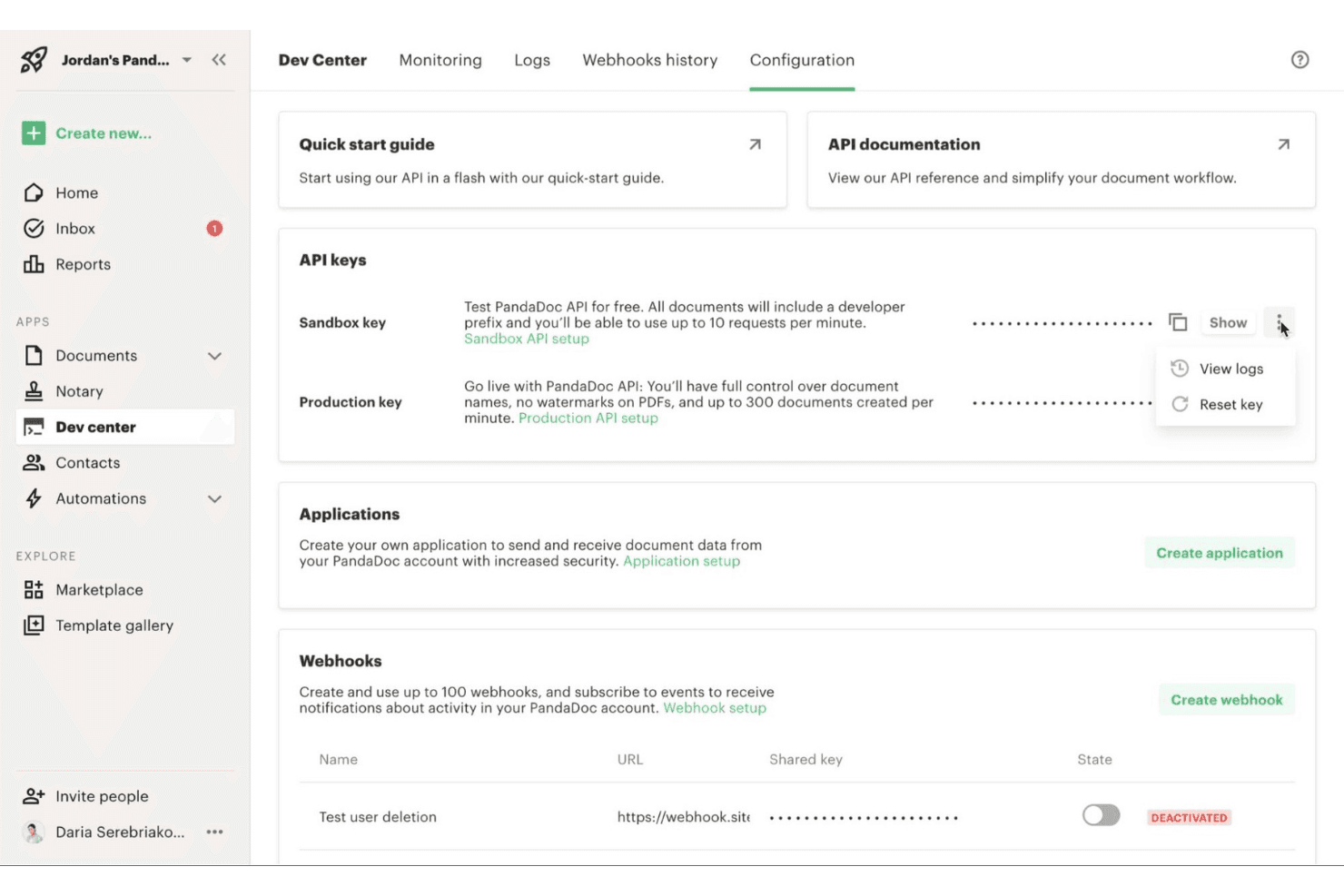
PandaDoc is a document automation tool that helps teams quickly build, send, and manage proposals, quotes, and contracts in one place. PandaDoc is a proposal management platform for sales and client-facing teams that brings document creation, approvals, e-signatures, and payment collection into one workflow, helping businesses reduce manual handoffs and move deals forward.
Who Is PandaDoc Best For?
PandaDoc suits sales teams and service businesses that need clients to review, sign, and pay from one document.
Why PandaDoc Is a Good Best Ignition Alternatives
I picked PandaDoc because it combines proposal creation, e-signatures, and payment collection in one document. My team uses it to send a client proposal, capture approval and signatures, then collect payment without switching workflows. That makes it a strong choice for sign-and-pay in one document.
PandaDoc Key Features
- Templates: Create reusable proposal templates with standardized content.
- Content library: Store approved text, images, pricing tables, and clauses.
- Approval workflows: Route documents to designated reviewers before sending.
- CRM integrations: Sync document data with supported customer relationship platforms.
PandaDoc Integrations
PandaDoc offers native integrations with Salesforce, HubSpot, and Pipedrive, plus an API for custom integrations. It also connects with Zapier.
Pros and Cons
Pros:
- Approval workflows reduce internal review delays
- Reusable templates support consistent client documents
- Combines proposals, signatures, and payments
Cons:
- Advanced reporting needs remain limited
- Complex documents may require formatting workarounds
Learn more about PandaDoc: Best for proposal-to-payment client onboarding
- Free trial + free demo available
- From $28/month (billed annually)
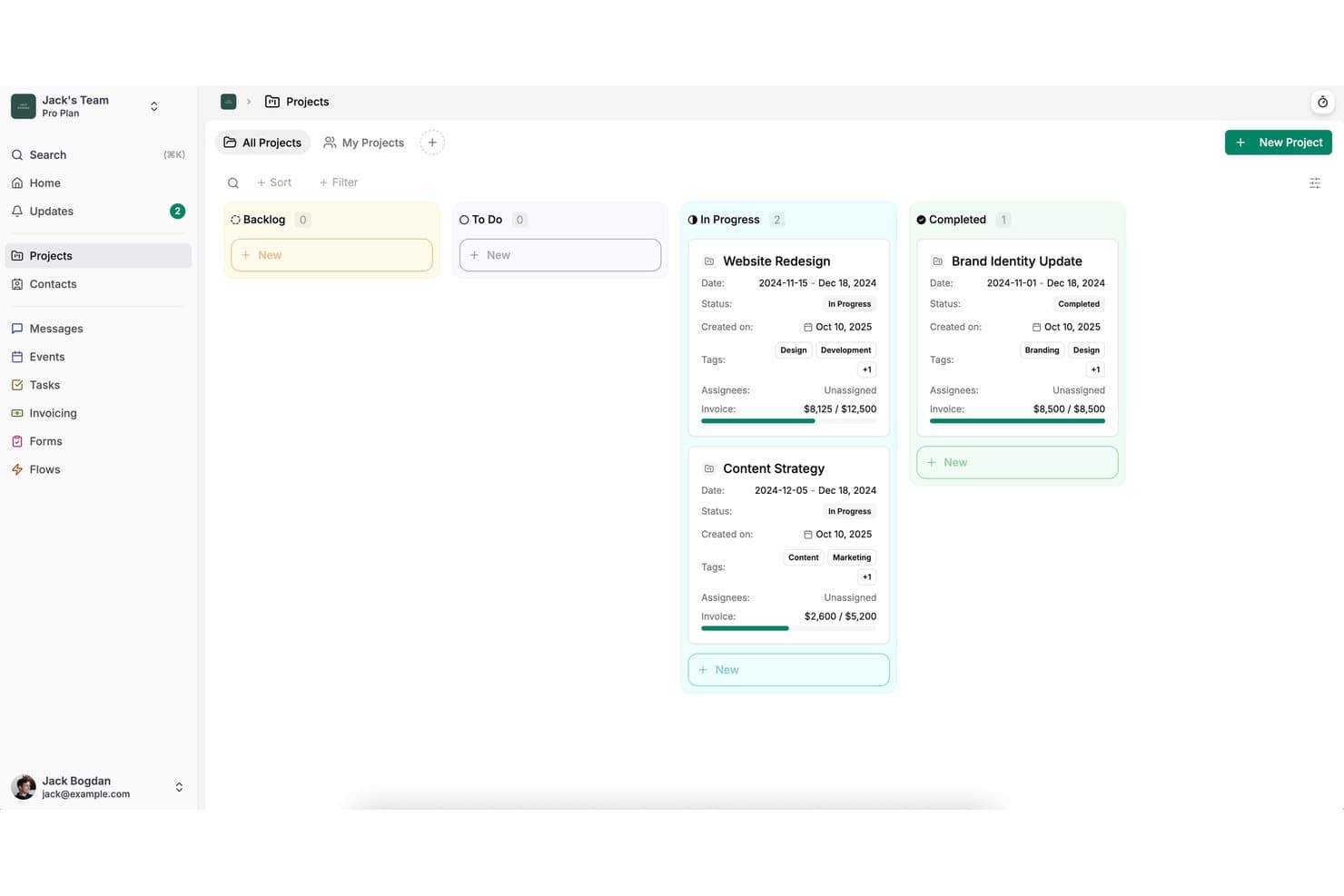
Dubsado organizes client projects by status in a kanban-style board view. Dubsado is client onboarding software for freelancers, agencies, and service businesses that brings forms, contracts, scheduling, invoices, and client communication into one workspace.
Who Is Dubsado Best For?
Dubsado suits freelancers and small service businesses that need to connect proposals, contracts, payments, and client communication in one workflow.
Why Dubsado Is a Good Best Ignition Alternatives
I picked Dubsado because it connects proposal, contract, scheduling, and payment steps in one client workflow. I use its forms and invoices to move a new client from signed proposal to paid engagement without switching platforms. That makes it a strong choice for proposal-to-payment client onboarding.
Dubsado Key Features
- Client portal: Give clients a private space for project details and documents.
- Workflow automation: Trigger emails and actions from defined workflow steps.
- Email templates: Save reusable messages for recurring client communications.
- Payment plans: Set installment schedules for client payment arrangements.
Dubsado Integrations
Dubsado offers direct integrations with QuickBooks Online, Xero, Zoom, Google Meet, Microsoft Teams, Google Calendar, Outlook, Square, and PayPal. It also connects with Zapier.
Pros and Cons
Pros:
- Flexible forms and workflows support repeat engagements
- Client portal keeps documents and communication together
- Proposal, contract, and payment workflow in one place
Cons:
- Reporting feels limited for detailed analysis
- Workflow builder takes time to configure
Learn more about Dubsado: Best for per-payment billing with no subscription
- Free demo available
- Pricing upon request
Visit WebsiteCustomer Rating:5/5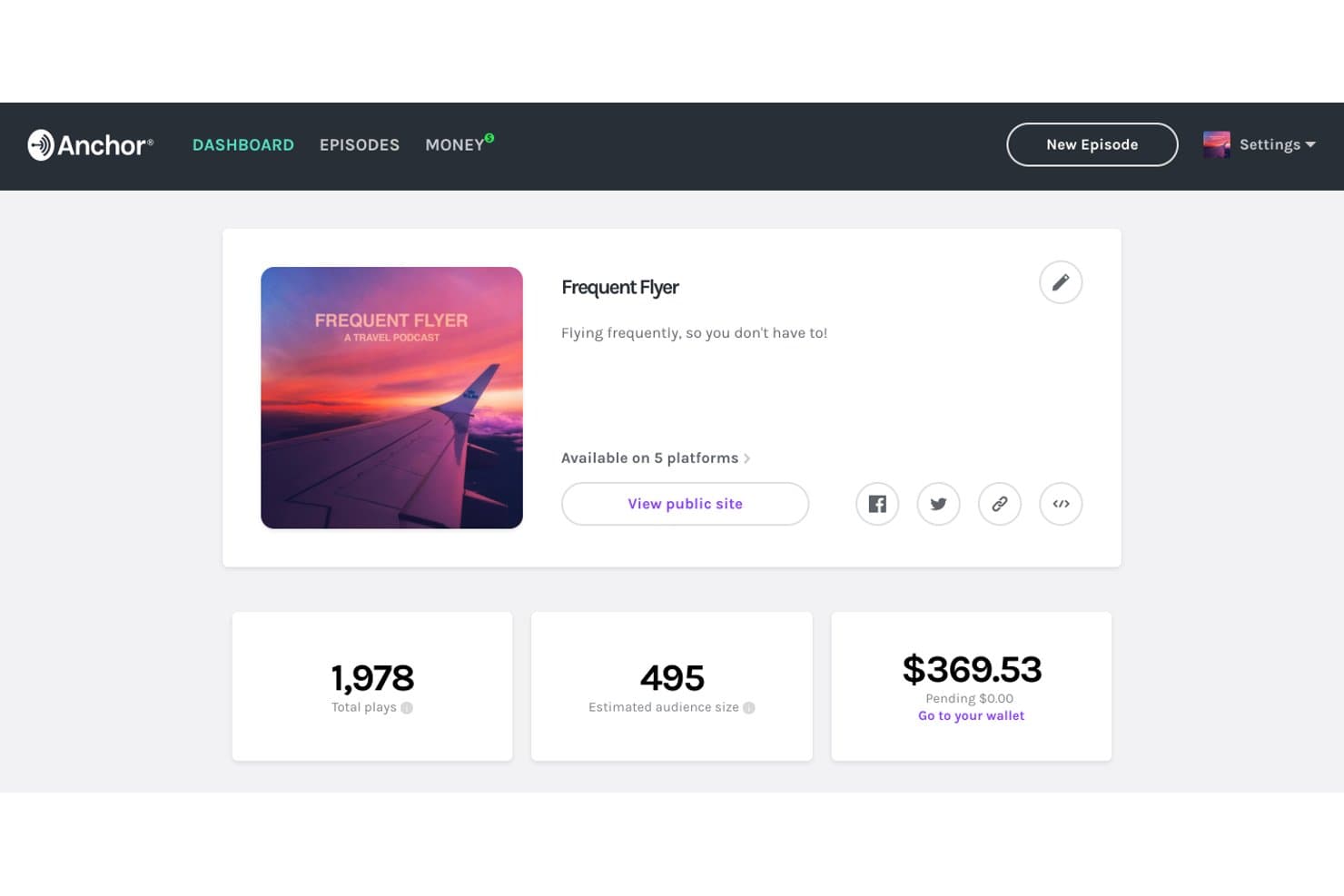
Anchor tracks plays, audience size, and earnings in one dashboard. Anchor is a data platform for teams that need to collect, organize, and access operational information without committing to a subscription, making it a flexible option for industrial data workflows.
Who Is Anchor Best For?
Anchor suits industrial teams that need to collect and access operational data without committing to recurring subscription fees.
Why Anchor Is a Good Best Ignition Alternatives
I picked Anchor because it supports industrial data workflows without requiring a recurring subscription. My team can collect, organize, and access operational information for SCADA-related projects, then pay per payment instead of committing to ongoing fees. That fits pilots, temporary deployments, and facilities with changing data requirements.
Anchor Key Features
- Operational data records: Capture structured information from industrial workflows.
- Asset grouping: Arrange records by equipment, site, or process.
- Data retrieval: Find stored information when reviewing SCADA operations.
- Workflow documentation: Maintain reference details for industrial projects.
Anchor Integrations
Anchor integrates with Okta, Microsoft Entra ID, Ping Identity, Microsoft 365, SharePoint, OneDrive, Box, and Dropbox. It also supports SIEM integration, but specific SIEM vendors and API support aren’t clearly documented.
Pros and Cons
Pros:
- Fits temporary industrial data deployments
- Organizes records by assets and sites
- Supports operational data collection workflows
Cons:
- Less suited to real-time control systems
- Limited evidence of native SCADA connectivity
Learn more about Anchor:
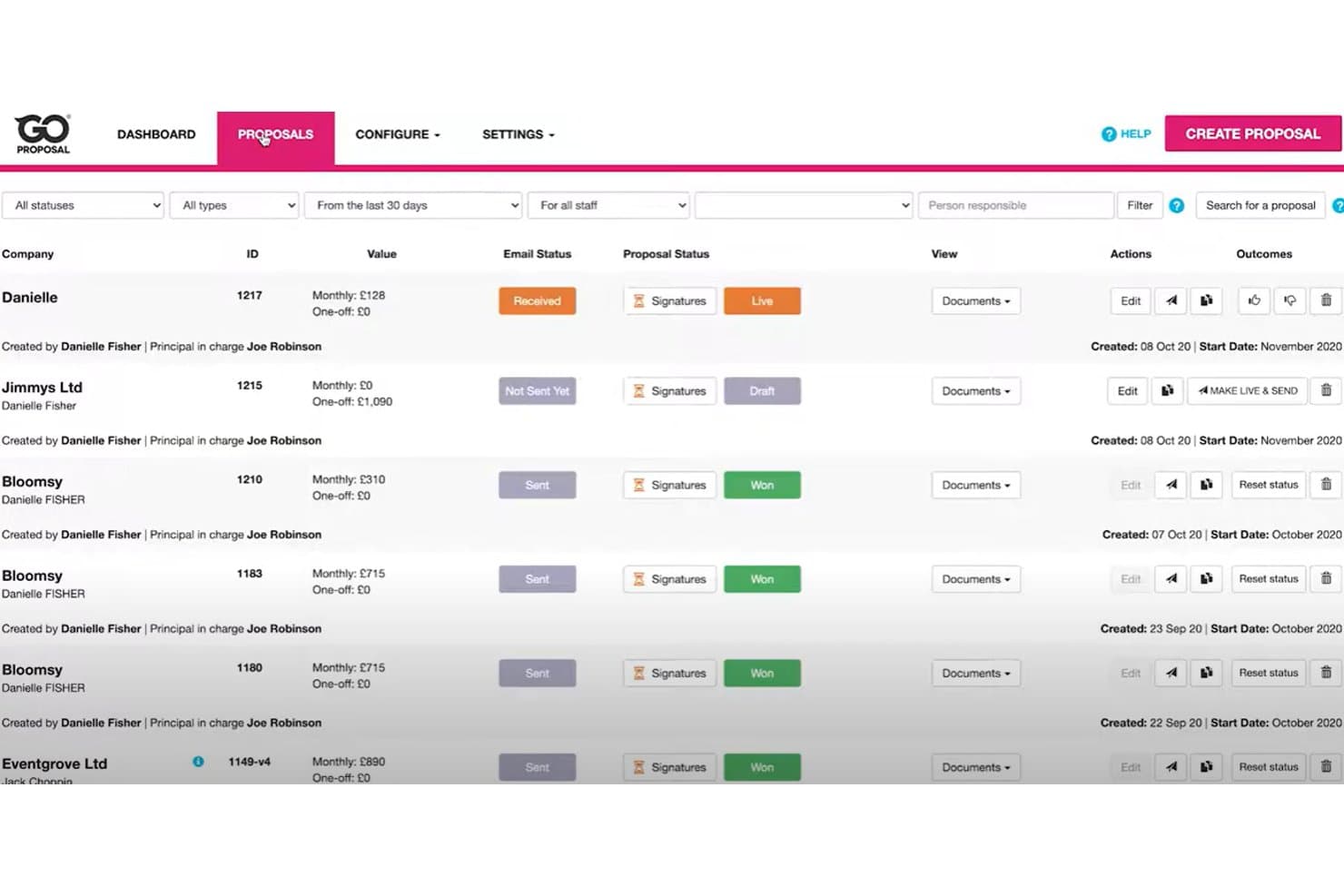
GoProposal tracks proposal statuses, values, and signatures in one view. GoProposal is a proposal platform for accounting firms that helps you package services, present pricing clearly, and secure client approval through a structured sales process.
Who Is GoProposal Best For?
Accounting firm owners and teams that need to package services, price engagements, and present client-ready proposals.
Why GoProposal Is a Good Best Ignition Alternatives
I picked GoProposal because it is Best for accounting firm pricing proposals. I use its service packaging, structured pricing, and client approval workflow to turn complex accounting engagements into clear proposals. That makes it a practical alternative when your priority is winning and defining accounting work rather than managing SCADA operations.
GoProposal Key Features
- Proposal templates: Start proposals with reusable layouts.
- E-signatures: Collect electronic signatures within proposals.
- CRM integrations: Connect proposal data with supported CRM tools.
- Sales reporting: Review proposal activity and conversion metrics.
GoProposal Integrations
GoProposal documents eight direct integrations, including Sage Accounting, Xero, QuickBooks, AccountancyManager, Karbon, Senta, GoCardless, and Dext Precision. It also connects with Zapier.
Pros and Cons
Pros:
- Guides clients through digital approval
- Packages services with clear pricing options
- Built specifically for accounting firm proposals
Cons:
- Proposal customization can feel restrictive
- Less suitable for non-accounting service businesses
Learn more about GoProposal:
Outras alternativas ao Ignition
Eis algumas alternativas adicionais ao Ignition que não entraram na minha seleção, mas que vale a pena conhecer:
- 11ConeBest for accounting firms billing by proposal
- 12DealHub AIBest for B2B sales quote-to-revenue workflows
- 13QuoteWerksBest for IT and MSP quote-to-signature workflows
- 14ProposifyBest for drag-and-drop proposal branding
- 15OdooBest for quote-to-cash on one platform
- 16BonsaiBest for creative firms managing proposals to payment
- 17AssemblyBest for AI-built, white-labeled client portals
- 18MoxieBest for freelancers sending proposals and contracts
- 19TidyflowBest for accounting firms scaling by team, not clients
- 20FigsFlowBest for UK accounting firm compliance proposals
How I Evaluate an Ignition Alternative
I split my evaluation into three parts. First, core functionality: can it build digital proposals and capture e-signatures? That carries the most weight. Second, I look for standout features like automated renewal workflows or client payment portals. Third, I consider onboarding support and pricing transparency.
Core Functionality (Table Stakes For This List)
When I'm selecting tools for my list, I score each one on a scale from 0 (does not offer the functionality) to 5 (excels in this area) for each core functionality listed below. I then convert the total into a percentage to help assess each tool's overall fit, with extra weight on any functionalities I’ve deemed essential.
- Proposal Creation (Essential): I look for customizable proposals and reusable service templates that let a firm package bookkeeping, advisory, or other services for each client.
- E-Signatures (Essential): I check that clients can sign within the proposal workflow, with signing status and an audit trail visible to the team.
- Billing & Payments: I assess whether accepted proposals can trigger one-off or recurring charges and let clients pay through the platform.
- Pricing & Scope: I consider how teams configure service packages, add-ons, and scope so the proposed price reflects the work each client selects.
- Workflow Tracking: I look for clear sent, viewed, signed, and declined statuses, plus reminders that support follow-up when a proposal stalls.
- Accounting Integrations: I check for connections to accounting, CRM, or practice systems that sync client and billing details without relying on manual re-entry.
Once I have a list of tools that meet the criteria, I consider what sets each platform apart.
Differentiating Factors (What Sets Vendors Apart)
Here's how I compare and contrast different vendors:
Standout Features
I look for automated renewal workflows that pre-generate proposals before an engagement expires. Firms lose clients when renewals slip through the cracks during busy periods, so I check whether a tool can schedule and send those proposals without manual intervention. Proposal analytics also matter—I evaluate whether a platform tracks how long clients spend on each section, which helps teams adjust pricing or restructure scope. A client payment portal rounds out the picture, giving clients a self-service space to view invoices and pay directly.
Beyond Features
I evaluate how quickly a firm can send its first proposal after signing up, including whether the vendor offers guided setup or migration help for existing client data. Pricing transparency matters too—some tools charge per proposal or per signature, which gets expensive as client volume grows. I also check for bidirectional sync with platforms like QuickBooks or Xero, since unreliable data sync creates duplicate billing records that erode client trust.
Por que procurar uma alternativa ao Ignition?
Embora o Ignition seja uma solução de software sólida para gerir propostas e relações com clientes, existem várias razões pelas quais os profissionais procuram alternativas. Poderá estar a considerar mudar porque:
- Precisa de maior controlo sobre o seu modelo de preços
- Procura ferramentas com melhor suporte para API e integrações
- O seu processo de integração de novos utilizadores está a tornar-se mais complexo à medida que a sua equipa cresce
- Pretende funcionalidades mais aprofundadas de análise e elaboração de relatórios
- Opera em vários idiomas ou regiões
- É uma pequena empresa ou trabalhador independente à procura de uma opção mais económica
Uma nota sobre as integrações: Muitas equipas utilizam o Ignition em conjunto com o Excel, sistemas de contabilidade ou CRM para apoiar o processo de vendas, mas as integrações podem ser limitadas consoante a sua infraestrutura tecnológica. Se isso for uma preocupação, várias das alternativas apresentadas acima oferecem opções mais flexíveis e modernas para expandir as suas operações, melhorando simultaneamente a experiência do utilizador.
Principais funcionalidades do Ignition
Eis uma visão geral do que o Ignition oferece, para que possa comparar as suas capacidades com as de outras ferramentas:
- Gestão de tarefas – Atribua e acompanhe tarefas utilizando etiquetas e comentários em sequência para promover a colaboração.
- Visualização de projetos – Organize o trabalho com quadros Kanban, vistas de cronograma, listas e painéis.
- Acompanhamento de OKR – Alinhe as equipas com objetivos e resultados-chave, apoiados por métricas de desempenho.
- Documentação de lançamento – Elabore e organize documentos de estratégia, com recursos incorporados e controlo de versões.
- Gestão de documentos e recursos digitais – Armazene ficheiros, gira aprovações e adicione etiquetas para uma recuperação fácil.
- Automatização com IA – Gere informações, textos de marketing e planos de projeto utilizando inteligência artificial.
- Modelos e lógica de fluxos de trabalho – Utilize modelos pré-criados e fluxos de trabalho condicionais para aumentar a eficiência.
- Informações sobre a concorrência – Automatize análises de vitórias e derrotas, fichas de argumentação e inquéritos de feedback dos clientes.
- Planeamento de produtos e funcionalidades – Gira roteiros, recolha ideias e publique notas de lançamento.