

De beste verktøyene for brukergrensesnittautomatisering effektiviserer programvaretesting ved å redusere manuelle feil, fremskynde lanseringssykluser og gi teamene tillit til produktkvaliteten. Uten slike verktøy opplever produktledere forsinkelser på grunn av gjentakende testtilfeller, uensartede resultater på tvers av nettlesere eller enheter og bortkastede utviklingstimer på å løse problemer som kunne ha blitt oppdaget tidligere.
Den rette plattformen automatiserer disse trinnene, integreres med arbeidsflyten din og frigjør teamet ditt slik at det kan fokusere på å levere funksjoner. Etter å ha testet flere verktøy på tvers av produktteam med høyt tempo har jeg identifisert de mest pålitelige alternativene for å hjelpe deg med å forbedre nøyaktighet, hastighet og samarbeid.
Hvorfor du kan stole på våre programvareanbefalinger
6,700+
Reviews
20
Industry experts
16+
Evaluation factors
14
Years
Teamet vårt har testet og anmeldt programvare siden 2012. Vi er selv produktledere, så vi vet hvor vanskelig og hvor viktig det er å velge riktig programvare.
I denne guiden har vi vurdert verktøyene gjennom praktisk testing og uavhengig research og gitt dem poeng ut fra våre utvelgelseskriterier.
Anmeldelsene våre bygger på vår egen redaksjonelle vurdering. De er ikke et salgsargument.
Ekspertanmeldere:
- Andrew LumbySenior TPM
- Cristiano ValimSenior UI/UX Lead


Sammenligningstabell for verktøy for brukergrensesnittautomatisering
Denne sammenligningstabellen oppsummerer prisdetaljene for mine beste utvalgte verktøy for brukergrensesnittautomatisering:
| Tool | Best For | Trial Info | Price | ||
|---|---|---|---|---|---|
| 1 | Best for AI-managed test suite with flake guarantees | Free demo available | From 1¢/AI credit | Website | |
| 2 | Best for real-device cross-browser testing at scale | Free trial available | From $29/user/month (billed annually) | Website | |
| 3 | Best for plain-English test authoring at scale | Free plan + 14-day free trial + free demo available | Pricing upon request | Website | |
| 4 | Best for web, API, and mobile testing in one platform | Free plan + 30-day free trial + free demo available | From $180/seat/month | Website | |
| 5 | Best for cloud-native continuous testing | Free demo available | Pricing upon request | Website | |
| 6 | Best for large-scale test management in enterprises | Free demo available | Pricing upon request | Website | |
| 7 | Best for enterprise continuous testing at scale | Free trial + free demo available | Pricing upon request | Website | |
| 8 | Best for AI-driven end-to-end test automation | 14-day free trial + free demo available | Pricing upon request | Website | |
| 9 | Best for developer-friendly cross-browser automation | Free plan available | Free, open-source | Website | |
| 10 | Best for scriptless testing | 14-day free trial + free demo available | From $3,598/year (billed annually) | Website |


Anmeldelser av de beste verktøyene for brukergrensesnittautomatisering
Nedenfor finner du mine detaljerte oppsummeringer av de beste verktøyene for brukergrensesnittautomatisering som kom med på kortlisten. Anmeldelsene mine gir et detaljert innblikk i de viktigste funksjonene, fordelene og ulempene, integrasjonene og ideelle bruksområdene for hvert verktøy, slik at du kan finne det beste alternativet for deg.
 Best for AI-managed test suite with flake guarantees
- Free demo available
- From 1¢/AI credit
Visit WebsiteCustomer Rating:4.9/5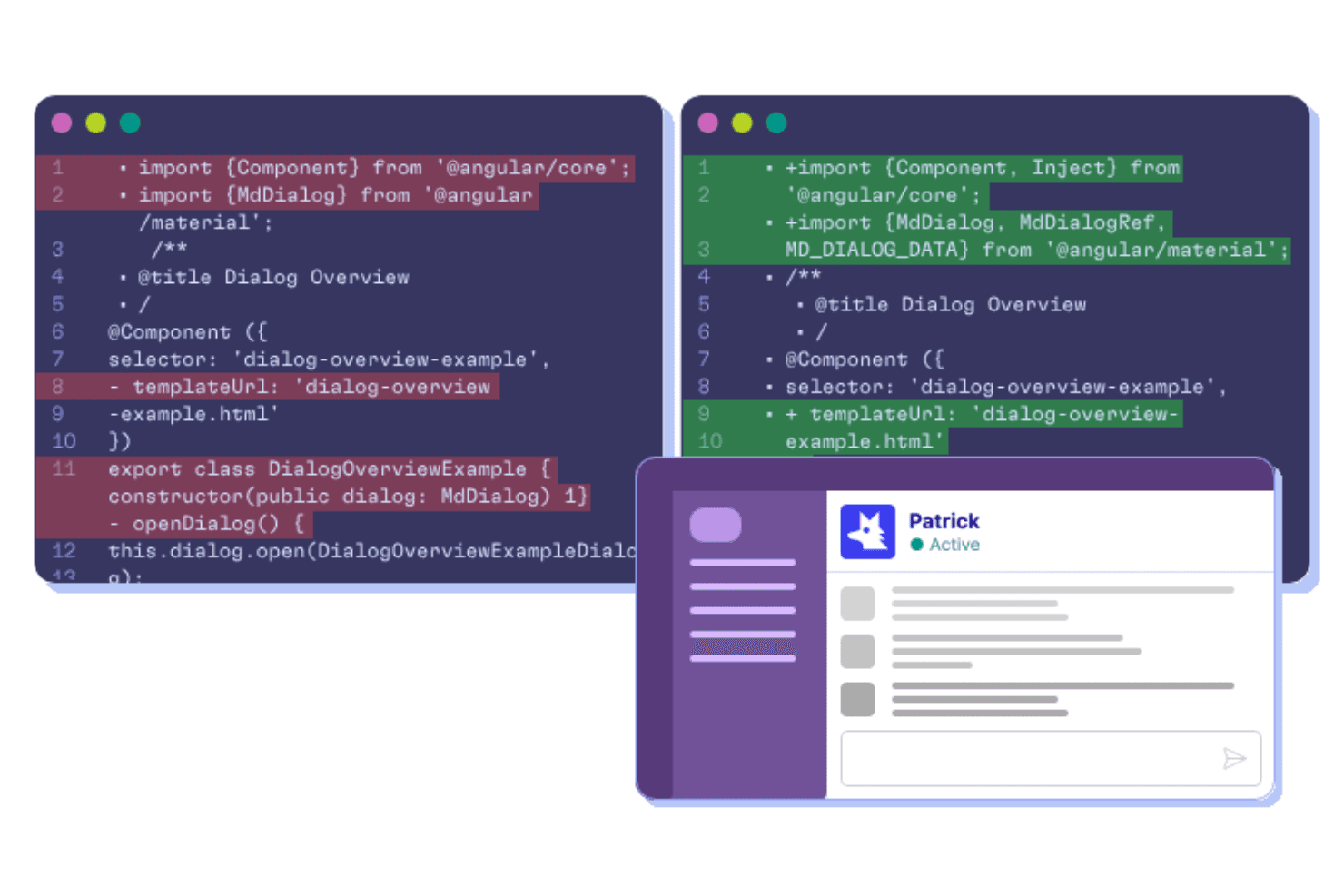
QA Wolf supports UI automation by helping teams create, maintain, and troubleshoot automated end-to-end tests as application code changes. QA Wolf is a UI test automation platform that combines AI-driven test creation, cloud-based parallel execution, and an optional fully managed service for building and maintaining end-to-end test suites across web, mobile, and Electron apps.
Who Is QA Wolf Best For?
QA Wolf is a strong fit for QA engineers and test managers at scaling software teams who need AI-driven test coverage without the overhead of building and maintaining the infrastructure themselves.
Why I Picked QA Wolf
I picked QA Wolf as one of the best because its AI-managed service is the only option I've seen that backs a full test suite with a Zero Flake Guarantee and a 24-hour maintenance SLA. Automation AI doesn't just flag broken tests; it reproduces the failure, identifies the root cause, and rewrites the Playwright or Appium code automatically. Mapping AI can explore your app and generate 200+ test cases without any human input, then adjust those tests as you ship new features.
QA Wolf Key Features
- Parallel test execution: Run unlimited tests simultaneously, each in its own isolated container with pre-warmed environments to cut startup time to milliseconds.
- Visual regression testing: Capture pixel-level screenshot comparisons with adjustable tolerances across web and native mobile to catch unintended UI changes.
- Run Rules: Configure test order, dependencies, and multi-user workflows without writing custom orchestration scripts.
- CI/CD triggers: Kick off test runs via deploy webhook, REST API, CLI, or the
@qawolf/ci-sdk, with results reporting back as GitHub or GitLab checks.
QA Wolf Integrations
QA Wolf has native integrations with GitHub, GitLab, CircleCI, TestRail, Xray, Zephyr, Qase.io, Jira, Linear, and Azure DevOps Boards. It also supports REST API, webhooks,
@qawolf/ci-sdk, CLI, and GitHub Actions for CI/CD workflows.Pros and Cons
Pros:
- Handles complex mobile and multi-user workflows
- Isolated containers support unlimited parallel runs
- AI repairs nearly all flaky tests
Cons:
- Mobile testing requires managed service
- Dashboards can obscure failure signals
Learn more about QA Wolf: Best for real-device cross-browser testing at scale
- Free trial available
- From $29/user/month (billed annually)
Visit WebsiteCustomer Rating:4.5/5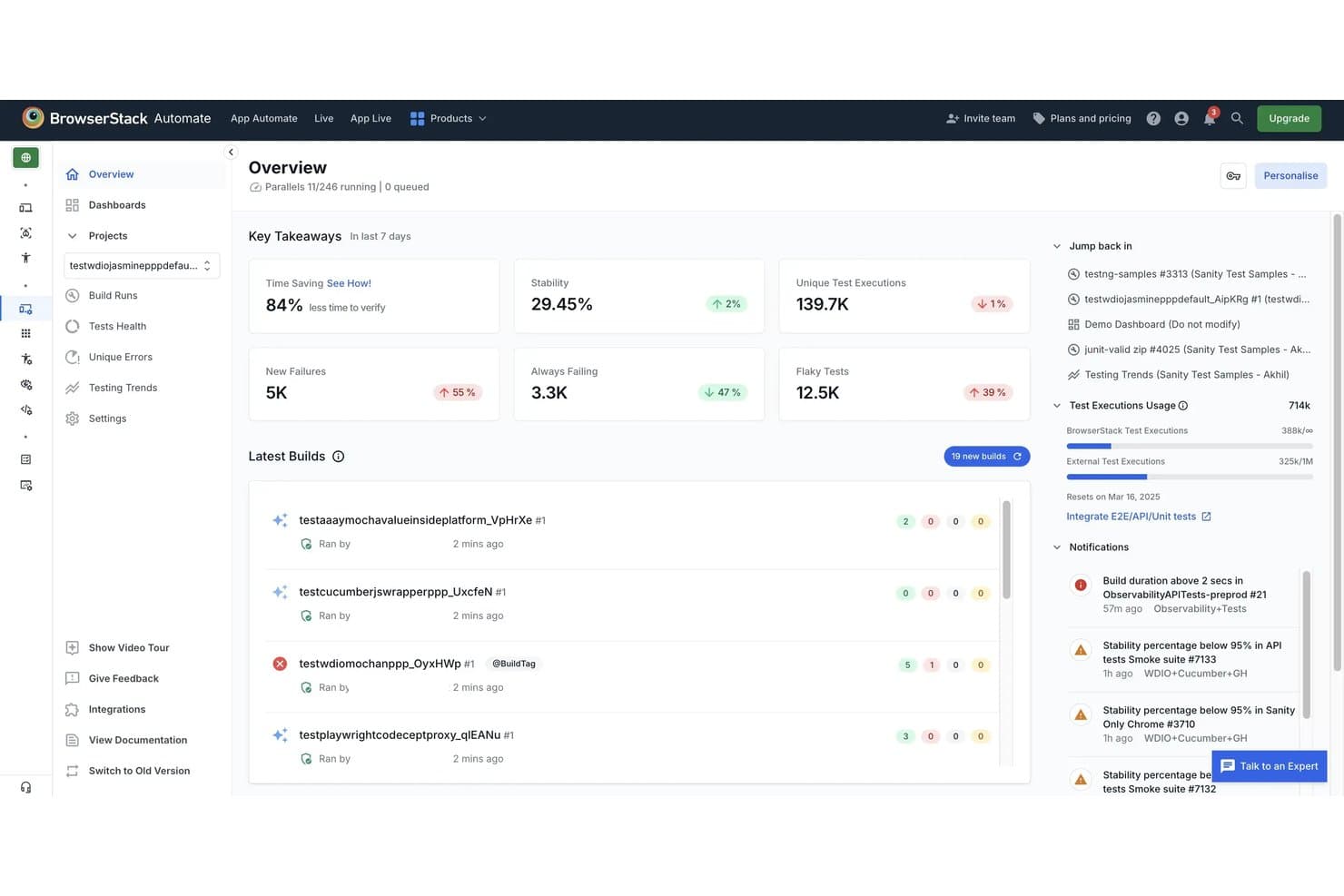
BrowserStack helps teams monitor UI automation runs, test stability, failures, and flaky tests from one dashboard. BrowserStack is a cloud-based UI automation platform that runs test scripts across real devices and browsers, supporting frameworks like Selenium, Playwright, Cypress, and Appium alongside low-code and AI-assisted test creation tools.
Who Is BrowserStack Best For?
BrowserStack is a strong fit for QA and DevOps teams that need to run automated tests across a wide range of real browsers and devices without maintaining their own infrastructure.
Why I Picked BrowserStack
BrowserStack earns its spot as one of the best on my shortlist because no other tool comes close to its real-device and browser coverage: 35,000+ real devices and 3,500+ browser combinations, all without maintaining a single piece of hardware. I love that parallel execution scales to run thousands of tests simultaneously, with customer examples like 20,000 tests completing in two hours. The AI-powered Test Failure Analysis Agent automatically sorts failures into product, automation, or environment issues, cutting triage time significantly.
BrowserStack Key Features
- Test Failure Analysis Agent: Automatically categorizes test failures into product, automation, or environment issues to speed up root-cause investigation.
- 46 CI/CD integrations: Connects with Jenkins, GitHub Actions, GitLab CI, Azure Pipelines, CircleCI, and more to fit tests directly into your existing pipeline.
- Percy visual regression testing: Uses AI-based visual comparisons to detect layout shifts, DOM changes, and CSS differences across builds.
- Quality Gates: Lets you set rules that block or allow merges and deployments based on test stability, new failures, and flakiness thresholds.
BrowserStack Integrations
BrowserStack lists integrations across multiple products, including Jenkins, GitHub Actions, GitLab, Azure Pipelines, CircleCI, Jira, GitHub, Slack, and Microsoft Teams. A REST API supports custom CI/CD integrations.
Pros and Cons
Pros:
- Detailed videos and logs speed debugging
- Parallel execution cuts regression cycles
- Real-device coverage across browsers and devices
Cons:
- Self-healing supports only Selenium and Cypress
- Peak-time queues slow test sessions
Learn more about BrowserStack: Best for plain-English test authoring at scale
- Free plan + 14-day free trial + free demo available
- Pricing upon request
Visit WebsiteCustomer Rating:4.8/5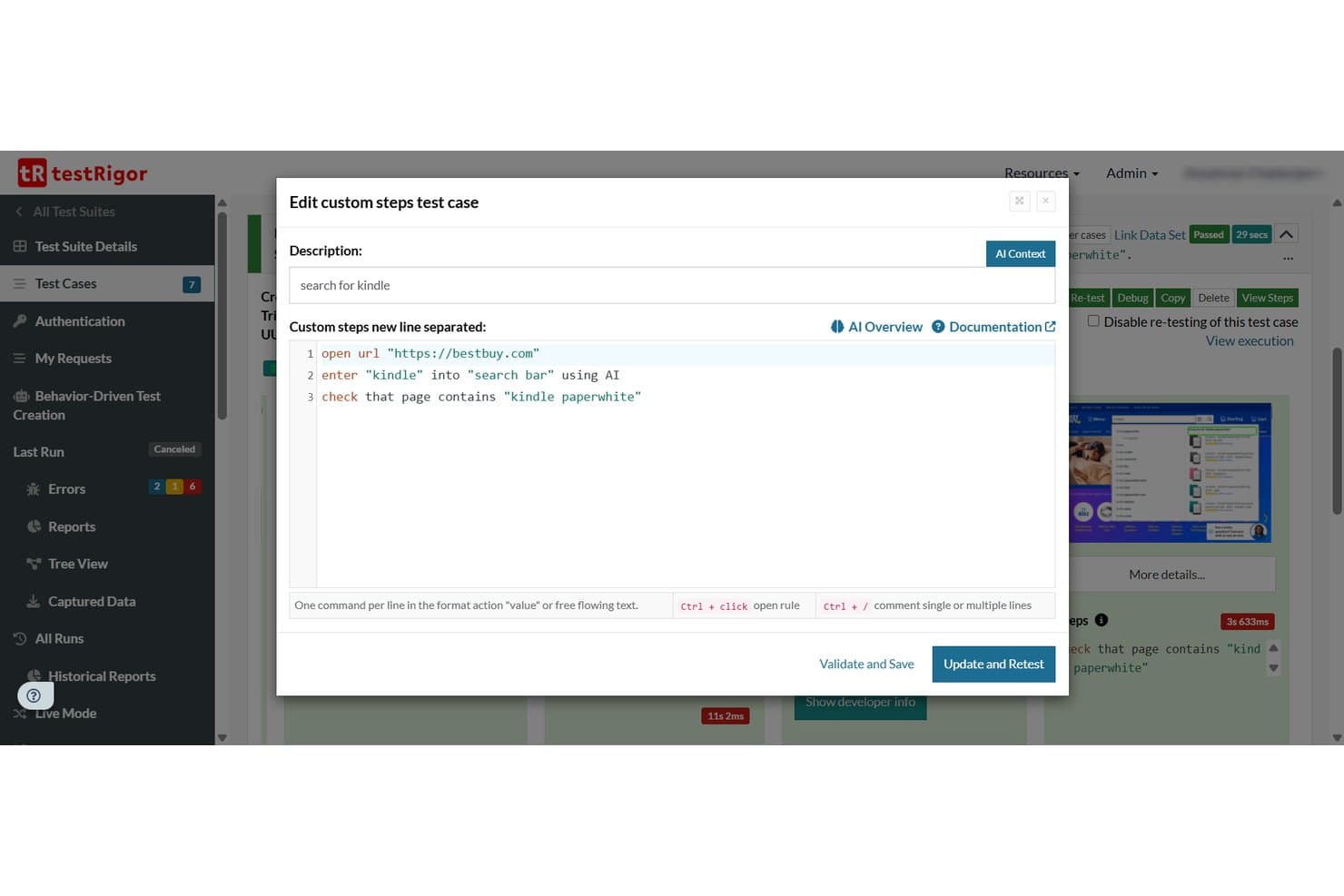
testRigor lets users write plain-English test steps for UI automation. testRigor is a UI automation testing platform that supports web, mobile, desktop, API, and email testing through plain-English test scripts, AI-generated test cases, and cross-environment execution across thousands of browser, device, and OS combinations.
Who Is testRigor Best For?
testRigor is a strong fit for QA teams and product managers who need to build and scale test coverage without relying on engineers to write or maintain every test.
Why I Picked testRigor
testRigor earns its spot on my shortlist because it lets non-engineers write real end-to-end tests in plain English, like
click "Add to cart"orcheck that page contains "Order confirmed", without touching a single selector. I also like that you can paste a Jira ticket or user story directly into testRigor and get a runnable test suite out of it, which genuinely cuts the time from spec to coverage. On top of that, one test can chain web, mobile, API, email, and SMS steps together, so you're not juggling separate tools for each surface.testRigor Key Features
- Visual regression testing: Compare screens pixel-by-pixel against previous versions or stored baselines, with configurable tolerance levels and severity classifications.
- Parallel test execution: Run up to 10,000 parallel servers simultaneously, with configurable batch sizes and team-based server allocation on Enterprise plans.
- API and database testing: Execute API calls, run SQL queries against MySQL, PostgreSQL, Oracle, and MongoDB, and validate downloaded file contents within your test flows.
- Production behavior-based test generation: A JavaScript library captures anonymized usage data from your live app and automatically generates tests for your most frequent user flows.
testRigor Integrations
testRigor offers documented integrations with GitHub Actions, GitLab, Jenkins, Azure DevOps, CircleCI, BrowserStack, LambdaTest, SauceLabs, Jira, and TestRail. It also supports custom integrations through its CLI and API.
Pros and Cons
Pros:
- Parallel execution supports large regression suites
- Cross-platform coverage spans web, mobile, desktop
- Plain-English scripts reduce locator maintenance
Cons:
- Occasional reruns and crashes disrupt execution
- Debugging failures can lack sufficient visibility
Learn more about testRigor: Best for web, API, and mobile testing in one platform
- Free plan + 30-day free trial + free demo available
- From $180/seat/month
Visit WebsiteCustomer Rating:4.4/5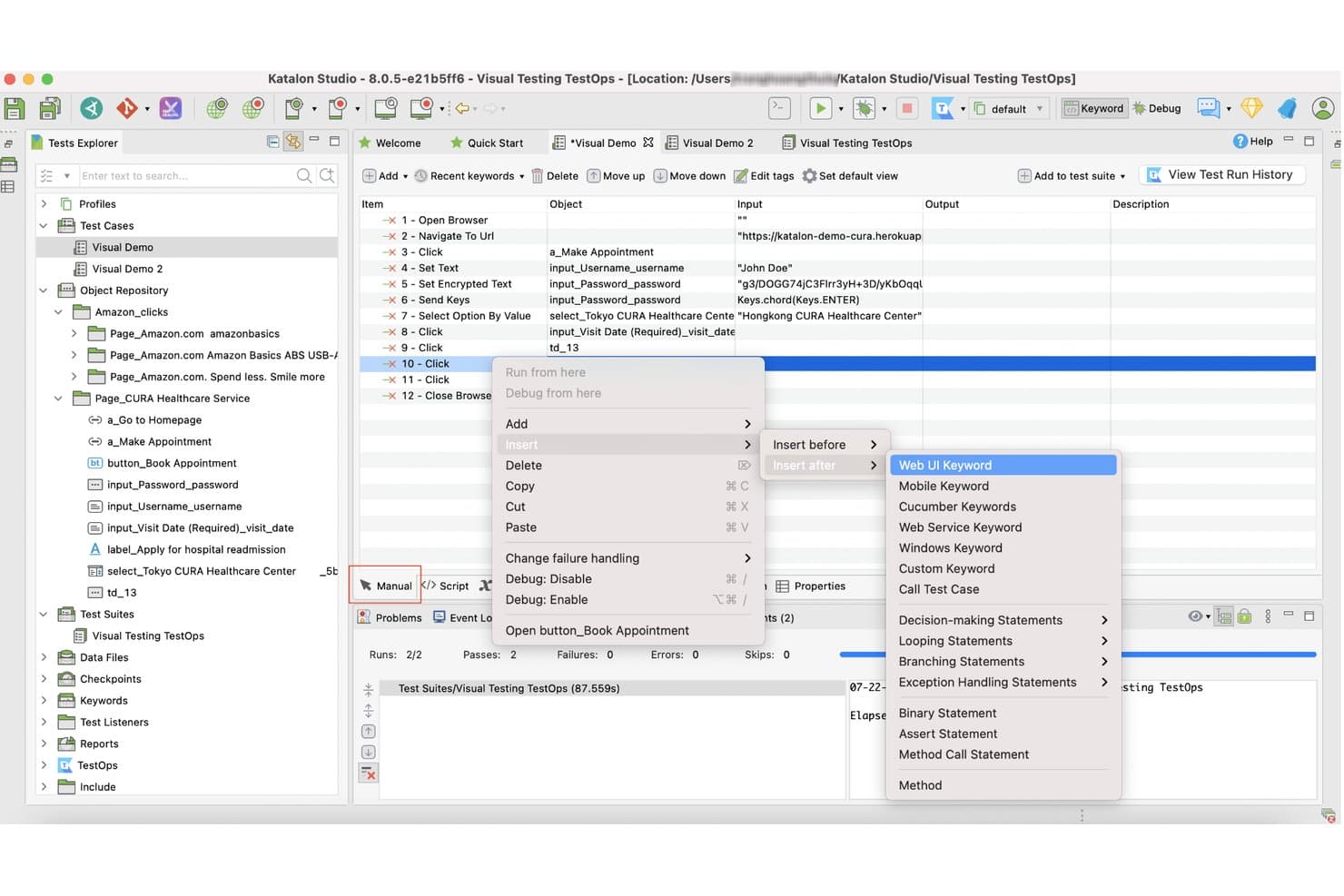
Katalon Studio lets users insert Web UI keywords via right-click context menu. Katalon Studio is a UI automation testing platform that supports web, mobile (iOS and Android), API, and Windows desktop testing from a single IDE, with no-code recorders, full Groovy/Java scripting, and built-in AI-assisted test creation.
Who Is Katalon Studio Best For?
Katalon Studio is a strong fit for QA engineers and test managers on mixed-skill teams who need to cover web, mobile, API, and desktop testing without juggling multiple tools.
Why I Picked Katalon Studio
I picked Katalon Studio as one of the best because it genuinely consolidates web, mobile, API, and Windows desktop testing into a single project, so I'm not context-switching between tools mid-sprint. I particularly like the no-code recorder paired with full Groovy/Java scripting, which means both manual testers and engineers can contribute to the same suite. The two-layer self-healing (classic locator fallback, then AI-assisted analysis with human approval) keeps tests alive through UI changes without requiring a full rewrite.
Katalon Studio Key Features
- AI test generation: Creates test cases automatically from Jira tickets or written requirements, supporting both low-code authoring and natural-language test steps.
- Visual regression testing: Compares UI screenshots against baselines using pixel-level, layout, or text-content analysis, with configurable sensitivity and a review workflow for each difference.
- TestOps traceability: Links requirements, test runs, defects, and releases into a single view, giving test managers real-time release-readiness data.
- Real-device cloud grid: Runs tests on actual iOS and Android devices with advanced mobile simulation, including GPS spoofing, network throttling, and camera injection.
Katalon Studio Integrations
Katalon Studio offers native integrations with Jenkins, GitHub Actions, GitLab, Azure DevOps, Jira, Slack, TestRail, BrowserStack, LambdaTest, and Selenium Grid. It also supports integrations with Postman, SoapUI, and SQL Server.
Pros and Cons
Pros:
- Provides human-reviewed self-healing suggestions
- Supports no-code through Groovy and Java
- Covers web, mobile, API, and desktop
Cons:
- AI image healing can be unreliable
- Resource-heavy suites can slow or crash
Learn more about Katalon Studio: Best for cloud-native continuous testing
- Free demo available
- Pricing upon request
Visit WebsiteCustomer Rating:4.4/5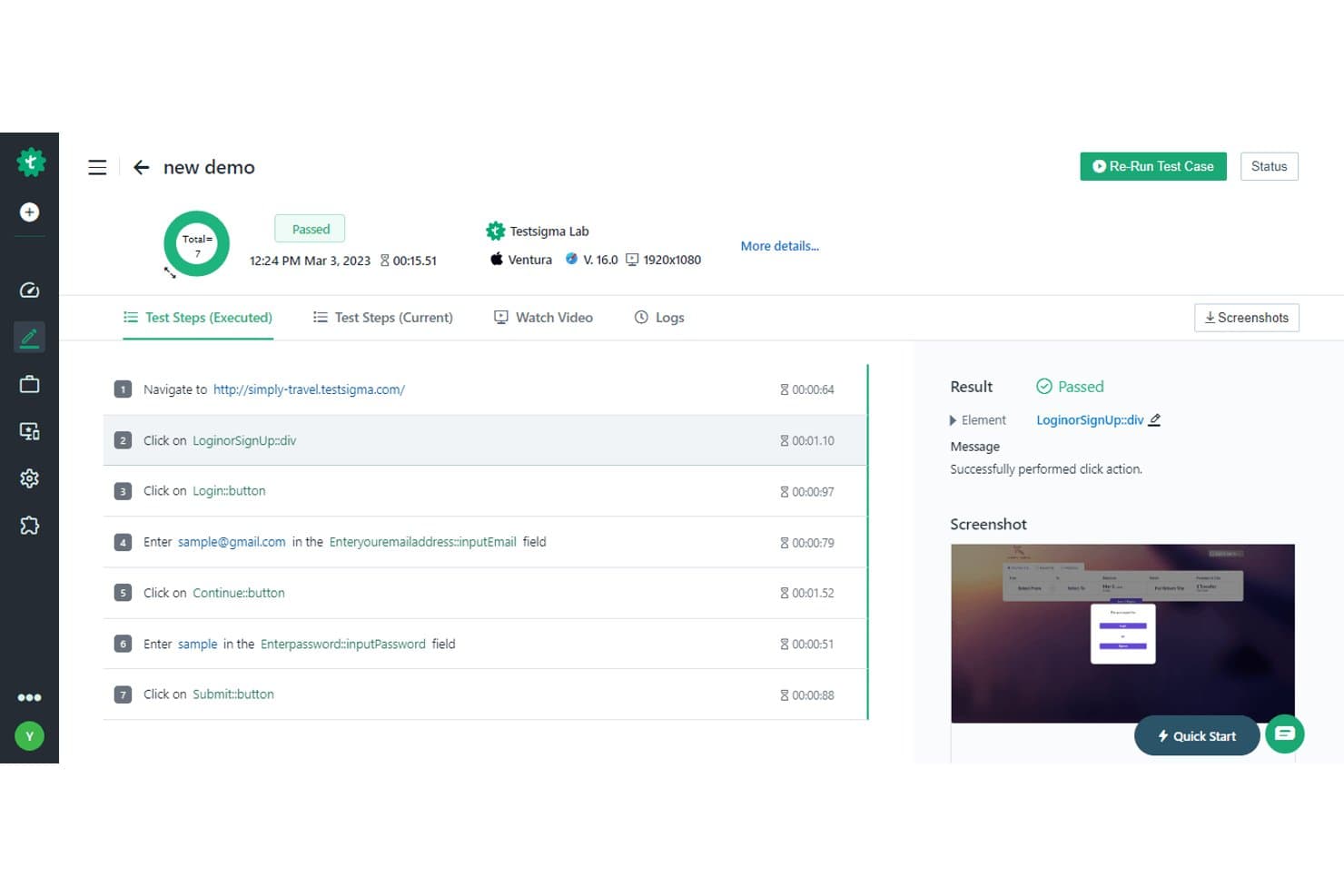
Testsigma displays detailed test step results with pass/fail status and screenshots. Testsigma is a cloud-native UI automation testing platform that supports web, mobile, desktop, API, Salesforce, and SAP testing through a combination of plain-English test creation, AI-driven test generation, and built-in CI/CD integrations.
Who Is Testsigma Best For?
Testsigma is a strong fit for QA and DevOps teams that need to run continuous, automated tests across web, mobile, and API layers within active CI/CD pipelines.
Why I Picked Testsigma
Testsigma earns its spot on my list because it's built from the ground up for cloud-native continuous testing, not retrofitted for it. I love that the Atto AI agents handle the full test lifecycle: generating tests from Jira stories or Figma designs, healing broken locators automatically, and producing a release confidence score that combines pass rate, coverage, and critical-path risk into one actionable number. That last feature alone makes it easier to gate releases in a live CI/CD pipeline without manual sign-off.
Testsigma Key Features
- Visual regression testing: Compares screenshots at each test step and lets you limit comparisons to specific page areas or elements.
- API testing: Supports REST, SOAP, and GraphQL, with test generation from Postman collections and Swagger/OpenAPI specs.
- Test data management: Stores positive and negative data sets in one place, with support for runtime variables, randomized data, and AI-generated test data.
- Cross-platform coverage: Runs tests across web, mobile (iOS and Android), Windows desktop, Salesforce, and SAP from a single platform.
Testsigma Integrations
Testsigma offers 30+ native integrations on Pro and 40+ on Enterprise, including Jenkins, GitHub Actions, Azure DevOps, Jira, Slack, Microsoft Teams, BrowserStack, Sauce Labs, and LambdaTest. Its REST API supports custom CI/CD workflows and environment-targeted test execution.
Pros and Cons
Pros:
- Diagnoses failures with visual evidence
- Covers web, mobile, APIs, and desktop
- Generates tests from Jira and Figma
Cons:
- Large test runs may execute slowly
- Complex workflows can challenge automation
Learn more about Testsigma: Best for large-scale test management in enterprises
- Free demo available
- Pricing upon request
Visit WebsiteCustomer Rating:4.2/5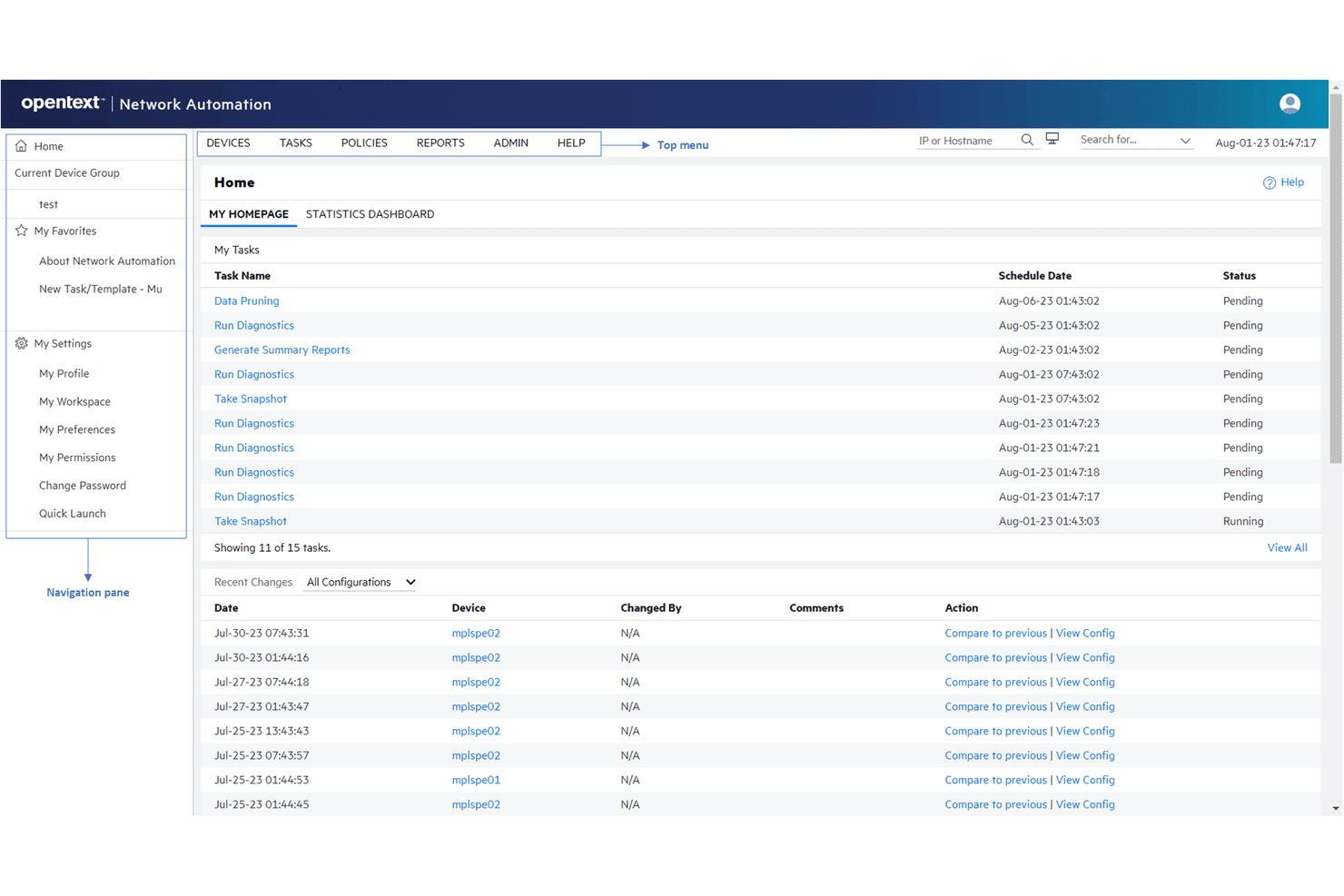
OpenText delivers functional, performance, and load testing for enterprises. OpenText Functional Testing is a UI automation platform that covers web, desktop, mobile, API, and enterprise app testing—with scripting in Python and VBScript, a real-device lab, model-based testing, and built-in test management tools like AQM and SDM.
Who Is OpenText Best For?
OpenText is a strong fit for enterprise QA and test engineering teams that need to manage large-scale test programs across legacy, desktop, and modern web environments from a single vendor.
Why I Picked OpenText
OpenText earns its spot on my shortlist because no other tool covers large-scale enterprise test management as thoroughly from a single vendor. I like that AQM provides requirements-driven test planning with full traceability matrices and audit trails, which matters when you're managing thousands of test assets across regulated environments. The Autonomous Tester in Core SDP can execute existing manual tests without any scripting, cutting the overhead for teams running high-volume regression programs at scale.
OpenText Key Features
- Python and VBScript scripting: Write test scripts in either Python or VBScript, with support for data-driven testing and modular, reusable components.
- Real-device lab: Run tests on real Android and iOS devices, emulators, and cloud browsers, with built-in accessibility testing and AWS Device Farm access.
- CI/CD pipeline plugins: Connect directly to Jenkins, Azure DevOps, GitHub Actions, GitLab, and Harness CI with ready-made plugins and integrations.
- Autonomous Tester: Execute existing manual, Gherkin/BDD, and MBT tests automatically without writing any scripts.
OpenText Integrations
OpenText offers native integrations with Jenkins, Azure DevOps, GitHub Actions, GitLab, Git, and Docker. Functional Testing Lab also supports Selenium, and Appium.
Pros and Cons
Pros:
- Unifies UI, API, mobile, and governance
- Supports large-scale parallel regression execution
- Covers legacy and modern enterprise applications
Cons:
- VBScript dependence persists alongside Python support
- Long runs can become slow or unstable
Learn more about OpenText: Best for enterprise continuous testing at scale
- Free trial + free demo available
- Pricing upon request
Visit WebsiteCustomer Rating:4.2/5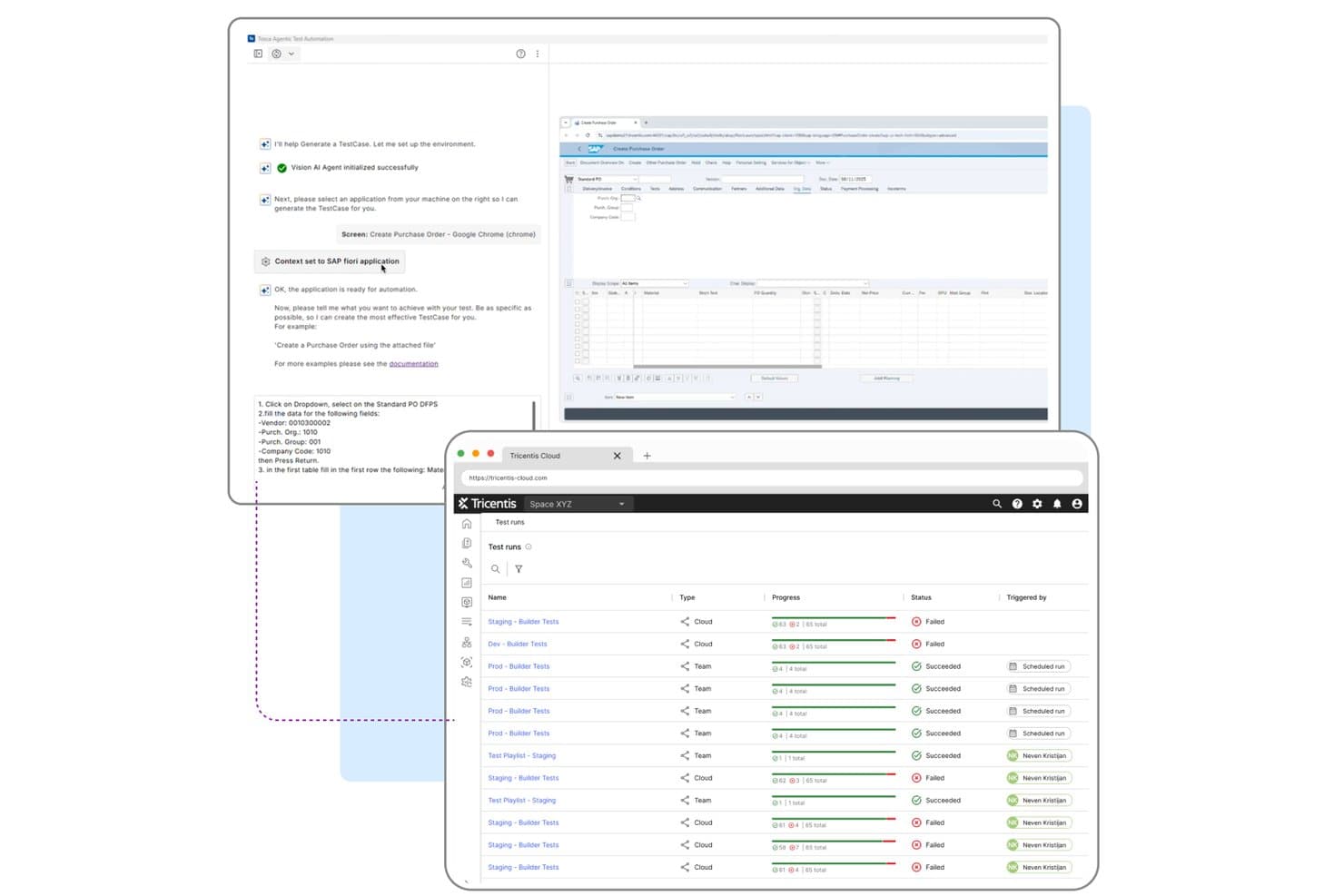
Tricentis Tosca automates UI test creation and tracks cloud test run results. Tricentis Tosca is a model-based UI automation platform that covers web, desktop, mobile, and enterprise apps—including SAP, Oracle, Salesforce, and Workday—with codeless test creation, AI-driven test generation, self-healing, and parallel execution at scale.
Who Is Tricentis Tosca Best For?
Tosca is a strong fit for QA teams at large enterprises that need to automate testing across SAP, Oracle, Salesforce, or Workday alongside web, desktop, and mobile apps in a single platform.
Why I Picked Tricentis Tosca
Tricentis Tosca earns its spot on my shortlist because no other tool handles enterprise app ecosystems—SAP, Oracle, Salesforce, Workday—alongside web, desktop, and mobile in a single platform the way Tosca does. I'm particularly impressed by the Elastic Execution Grid, which runs thousands of tests in parallel across cloud, on-prem, or hybrid agents without manual load balancing. The Agentic Test Automation feature also stands out to me: you describe a test in plain language and Tosca generates it, merging the result with your existing assets automatically.
Tricentis Tosca Key Features
- Vision AI recognition: Identifies UI controls by visual attributes—type, label, position, and color—so tests run on any technology, including Citrix and VMware remote desktops.
- Self-healing test execution: Automatically repairs broken test steps using weighted or combination matching, then flags healed steps in the execution log for review.
- Model-based test architecture: Stores test logic in reusable modules separate from application code, so a single fix to a shared module updates every test that references it.
- Tosca Query Language (TQL) AI queries: Converts plain-language questions into TQL queries to locate unused, duplicate, or failing tests across your workspace.
Tricentis Tosca Integrations
Tricentis Tosca integrates with Jenkins, qTest, Sauce Labs, BrowserStack, LambdaTest, and Perfecto. Its REST API and CLI support custom CI/CD connections, including Azure DevOps workflows.
Pros and Cons
Pros:
- Runs thousands of tests in parallel
- Reusable models reduce regression maintenance
- Covers SAP, Oracle, Salesforce, and Workday
Cons:
- Cloud reports expire after 30 days
- Complex setup challenges smaller QA teams
Learn more about Tricentis Tosca: 8Best for AI-driven end-to-end test automation
Mabl
- 14-day free trial + free demo available
- Pricing upon request
Visit WebsiteCustomer Rating:4.2/5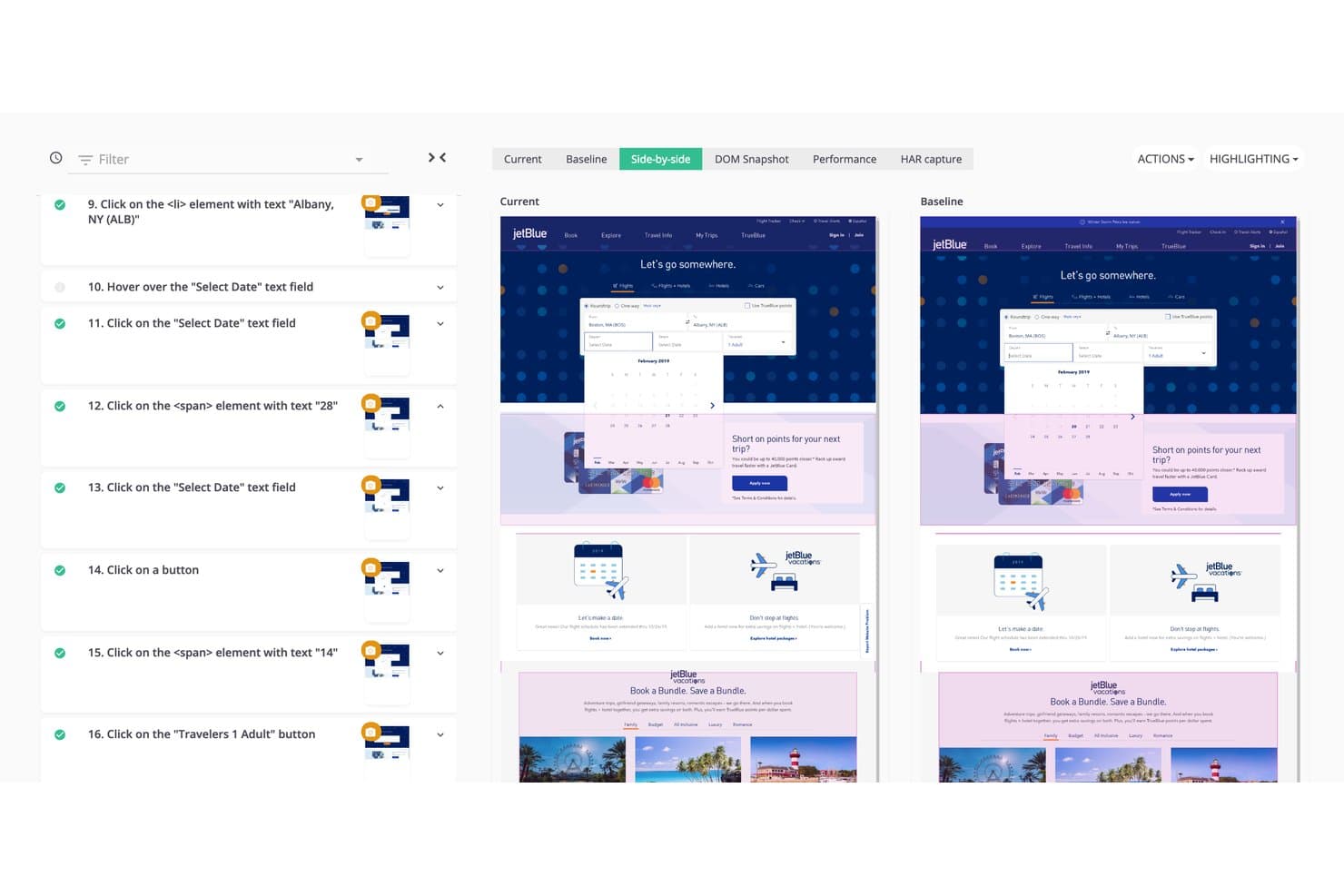
Mabl lets users compare current vs. baseline UI screenshots side by side. Mabl is an AI-driven test automation platform that combines agentic test authoring, low-code recording, cross-browser execution, self-healing maintenance, and built-in API, visual, and mobile testing in a single suite.
Who Is Mabl Best For?
Mabl is a strong fit for QA and DevOps teams that need to scale end-to-end test coverage across web and mobile without growing their maintenance burden.
Why I Picked Mabl
Mabl earns its spot on my shortlist because its agentic test authoring genuinely changes how fast a team can build end-to-end coverage. I love that you can describe a test in plain language, and the agent writes the steps, runs them, and reworks anything that fails before saving. The Adaptive Auto-Healing layer then handles UI changes automatically, using multiple AI models to update locators without you touching the test.
Mabl Key Features
- Unlimited cloud concurrency: Run browser, API, and mobile tests in parallel across all environments at no extra cost.
- Auto TFA (automatic test failure analysis): Analyzes each failed test to identify root cause and labels it as a real regression, app change, or noise.
- Visual regression testing: Compares baseline and current screenshots side by side, flagging UI changes with bounding boxes for review.
- Cross-browser execution: Tests run across Chrome, Edge, Firefox, and Safari from a single test, with no browser-specific code required.
Mabl Integrations
Mabl offers native integrations with GitHub Actions, GitLab, Jenkins, Azure Pipelines, Bitbucket, Jira, TestRail, Slack, Microsoft Teams, and Postman, plus a REST API and CLI for custom CI/CD workflows.
Pros and Cons
Pros:
- Cross-browser execution supports broad UI coverage
- Auto-healing reduces locator maintenance work
- Agentic authoring expands coverage quickly
Cons:
- Trainer consumes substantial computer memory
- Cloud test execution can run slowly
Learn more about Mabl: Best for developer-friendly cross-browser automation
- Free plan available
- Free, open-source
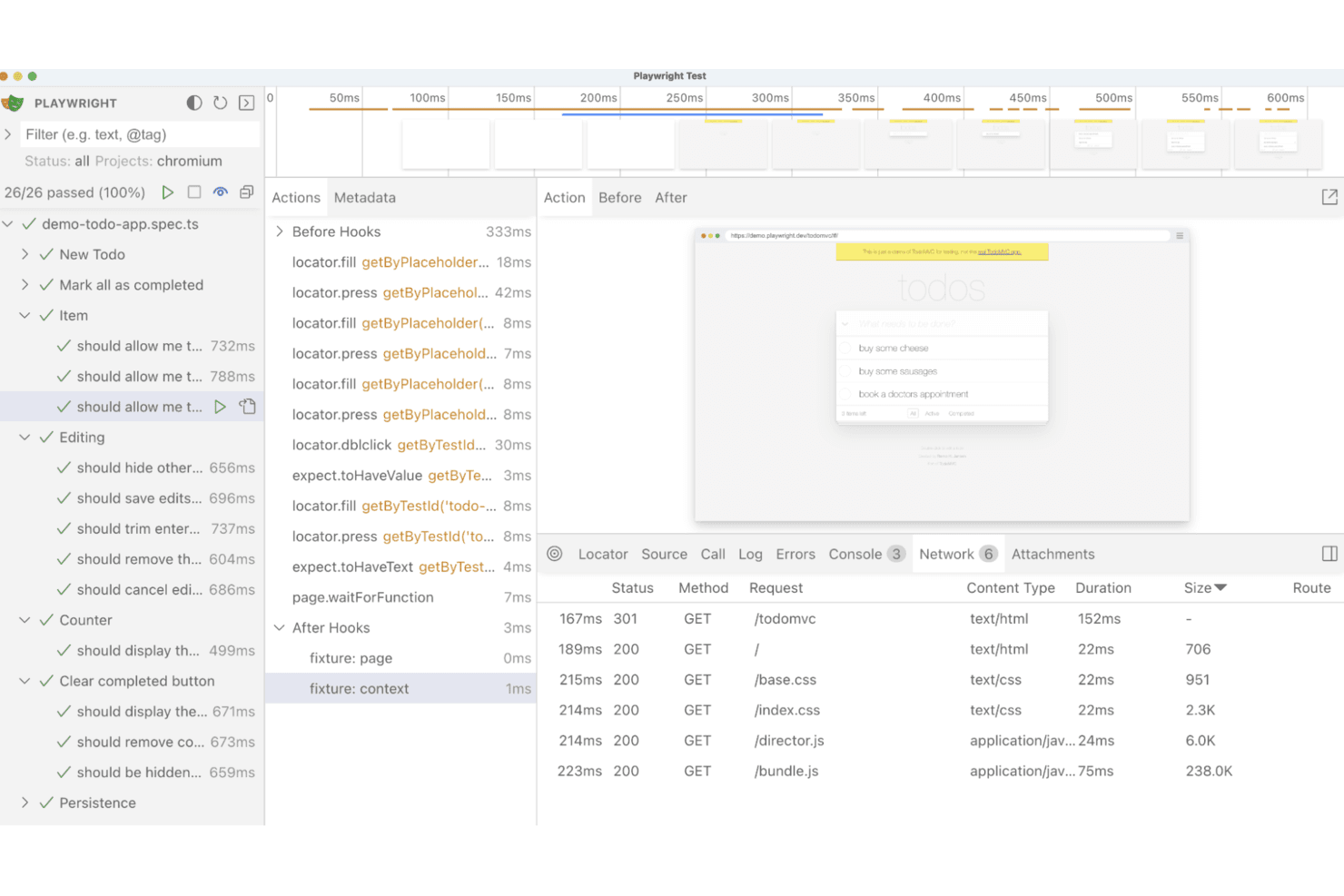
Playwright supports cross-browser automation for end-to-end application testing. Playwright is an open-source UI automation framework from Microsoft that supports cross-browser test scripting, parallel execution, visual regression testing, API testing, and network mocking across Chromium, Firefox, and WebKit.
Who Is Playwright Best For?
Playwright is built for QA automation engineers and DevOps engineers who write and maintain test code and need reliable cross-browser coverage wired into CI/CD pipelines.
Why I Picked Playwright
Playwright earns its spot on my shortlist because it's the most developer-native cross-browser automation framework I've worked with. I love that a single config covers Chromium, Firefox, and WebKit, plus branded Chrome and Edge, without any extra setup. Its Trace Viewer is genuinely useful: after a failed CI run, I can step through a full DOM timeline, network requests, and console logs to pinpoint exactly what broke.
Playwright Key Features
- AI test agents: Three agents—Planner, Generator, and Healer—help you draft test plans, generate test files, and repair failing tests against a live app.
- Network interception and mocking: Intercept, modify, or replay network requests using
page.routeor recorded HAR files, including WebSocket mocking. - Visual regression testing:
toHaveScreenshot()compares page renders against pixel-level baselines, with configurable thresholds and ARIA snapshot comparisons. - API testing fixture: A built-in
requestfixture lets you write standalone API tests or combine HTTP calls with UI test steps to set up and verify app state.
Playwright Integrations
Playwright documents integrations with GitHub Actions, Azure Pipelines, CircleCI, Jenkins, Bitbucket Pipelines, Docker, and the VS Code extension. It supports custom connectivity through JUnit, JSON, and custom reporter outputs.
Pros and Cons
Pros:
- Parallel workers shorten regression test cycles
- Trace Viewer accelerates failed-test diagnosis
- Cross-browser coverage includes Chromium, Firefox, WebKit
Cons:
- Mobile coverage relies mainly on emulation
- Recorded tests still require code maintenance
Learn more about Playwright: Best for scriptless testing
- 14-day free trial + free demo available
- From $3,598/year (billed annually)
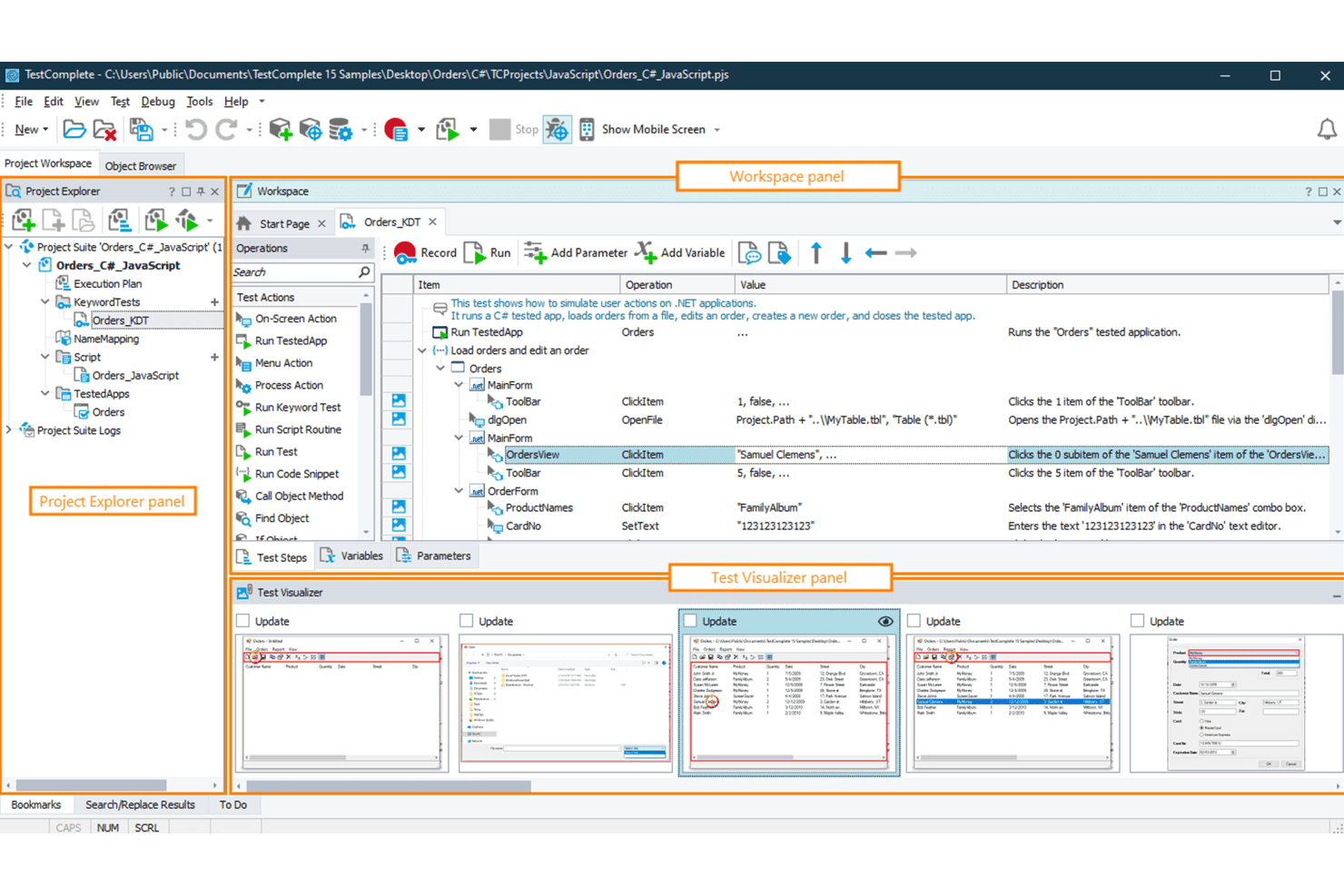
TestComplete enables scriptless automated UI testing for desktop, web, and mobile. TestComplete is a UI automation testing tool from SmartBear that supports scriptless record-and-replay, keyword-driven, BDD, and scripted test creation across desktop, web, and mobile applications.
Who Is TestComplete Best For?
TestComplete is a strong fit for QA automation engineers and test managers at enterprises that need to cover desktop, web, and mobile apps from a single tool.
Why I Picked TestComplete
TestComplete earns its spot on my shortlist because its scriptless capabilities go deeper than basic record and replay. I love that keyword-driven tests let you build out complex UI scenarios, including handling unwanted pop-ups or database access, without writing a single line of code. When your suite outgrows that, one click converts any test to Python or JavaScript. It's one of the few tools that covers desktop, web, and mobile from a single authoring environment without forcing you to switch products.
TestComplete Key Features
- Selenium WebDriver import: Run existing Selenium scripts written in JUnit or TestNG directly inside TestComplete without rewriting them.
- Name Mapping object repository: Store and manage how UI objects are identified across your entire test suite in one centralized location.
- CI/CD pipeline integration: Connect TestComplete to Jenkins, Azure DevOps, GitHub Actions, TeamCity, and Bamboo via a CLI or REST API.
- Cross-platform mobile testing: Test iOS and Android apps on real or virtual devices, including React Native, Flutter, and SwiftUI apps, without jailbreaking.
TestComplete Integrations
TestComplete offers native integrations with Jenkins, Azure DevOps, GitHub Actions, TeamCity, Bamboo, Jira, Zephyr Enterprise, Selenium, and Appium. Its CLI and REST API support CI/CD workflows and custom integrations.
Pros and Cons
Pros:
- Supports legacy desktop controls and packaged applications
- Covers desktop, web, and mobile applications
- Scriptless tests convert to Python or JavaScript
Cons:
- Codeless suites often require scripting at scale
- Windows authoring limits platform flexibility
Learn more about TestComplete:
Andre verktøy for brukergrensesnittautomatisering
Her er noen andre alternativer for verktøy for brukergrensesnittautomatisering som ikke kom med på kortlisten min, men som fortsatt er verdt å undersøke:
- 11LeapworkBest for no-code automation
- 12Sahi ProBest for testing legacy and complex web apps
- 13Sauce LabsBest for cross-browser and real-device test execution
- 14CypressBest for fast test execution
- 15SquishBest for cross-platform GUI testing
- 16ApplitoolsBest for AI-powered visual validation
- 17Ranorex StudioBest for mixed no-code and C# desktop testing
- 18Robot FrameworkBest for keyword-driven testing
How I Evaluate UI Automation Tools
I split my evaluation into three parts, with the most weight on core needs: create UI tests and run them across browsers and devices. Next, I look for differentiators such as visual regression testing. Finally, I consider support, onboarding, and pricing value.
Core Functionality (Table Stakes For This List)
When I'm selecting tools for my list, I score each one on a scale from 0 (does not offer the functionality) to 5 (excels in this area) for each core functionality listed below. I then convert the total into a percentage to help assess each tool's overall fit, with extra weight on any functionalities I’ve deemed essential.
- Test Creation (Essential): I look for recording, scripting, or visual builders that help teams create reusable tests, such as checking a checkout flow after a UI update.
- Cross-Environment Execution (Essential): I assess browser, operating system, and device coverage, including how easily a team can run the same regression test across environments.
- CI/CD Integration: I check how tests fit into pipeline workflows, such as triggering a focused UI suite after a deployment or before a release.
- Test Maintenance: I look for ways tools detect or handle changed UI elements, such as when a renamed button breaks a test after a redesign.
- Reporting & Insights: I assess whether results include useful failure context, such as logs or screenshots that help teams trace a failed sign-in test.
- Parallel Execution: I check whether teams can run multiple tests at once, particularly when a growing regression suite needs to finish before release decisions.
Once I have a list of tools that meet the criteria, I consider what sets each platform apart.
Differentiating Factors (What Sets Vendors Apart)
Here's how I compare and contrast different vendors:
Standout Features
Visual regression testing is the first thing I check. A broken layout after a font change won't fail a functional test, but a screenshot comparison catches it instantly. I look for tools that flag pixel-level differences and let you approve intentional changes without noise. AI test generation also matters—I evaluate whether a tool can turn a plain-language description of a signup flow into a runnable test, cutting authoring time for teams without deep scripting skills. Finally, cloud device grid access determines whether your team can validate on real device and browser combinations without maintaining its own lab.
Beyond Features
I check whether non-engineers can realistically own tests. If a product manager needs to verify a post-launch flow, a codeless builder with templates beats filing a ticket with QA. Pricing transparency also matters—some vendors bundle cloud device access into base tiers while others charge per parallel session, which changes the true cost fast. I also evaluate vendor support quality, since teams without dedicated QA engineers need responsive help when a test suite breaks after a platform update.
Slik velger du verktøy for brukergrensesnittautomatisering
Det er lett å gå seg vill i lange funksjonslister og komplekse prismodeller. For å hjelpe deg med å holde fokus mens du arbeider deg gjennom din unike prosess for programvarevalg, får du her en sjekkliste over faktorer du bør ha i mente:
| Faktor | Hva du bør vurdere |
|---|---|
| FaktorSkalerbarhet | Hva du bør vurdereKan verktøyet vokse sammen med teamet ditt? Vurder om det støtter et økende antall testtilfeller og brukere uten redusert ytelse. Undersøk om det håndterer prosjekter i stor skala. |
| FaktorIntegrasjoner | Hva du bør vurdereFungerer det med de eksisterende verktøyene dine? Kontroller kompatibiliteten med CI/CD-pipelines, versjonskontrollsystemer og feilsporingsverktøy, slik at det passer sømløst inn i arbeidsflytene. |
| FaktorTilpasningsmuligheter | Hva du bør vurdereKan du tilpasse det til behovene dine? Se etter alternativer for å tilpasse testskript, kontrollpaneler og rapporter slik at de samsvarer med teamets prosesser og krav. |
| FaktorBrukervennlighet | Hva du bør vurdereHvor brukervennlig er det? Vurder om grensesnittet er intuitivt, og om brukerne raskt kan lære seg og navigere i det uten omfattende opplæring eller støtte. |
| FaktorImplementering og innføring | Hva du bør vurdereHvor lang tid vil det ta å komme i gang? Vurder tiden og ressursene som kreves for konfigurering, og om det finnes veiledninger, opplæringsmateriell og støtte under innføringen. |
| FaktorKostnad | Hva du bør vurdereLigger det innenfor budsjettet ditt? Sammenlign prismodeller, inkludert abonnementsavgifter og eventuelle skjulte kostnader for ekstra funksjoner eller brukere, for å avgjøre om det er kostnadseffektivt. |
| FaktorSikkerhetstiltak | Hva du bør vurdereBeskytter det dataene dine? Sørg for at verktøyet overholder sikkerhetsstandarder og tilbyr funksjoner som kryptering og tilgangskontroller for å beskytte informasjonen. |
| FaktorTilgjengelig kundestøtte | Hva du bør vurdereHvilken hjelp er tilgjengelig? Se etter støtte døgnet rundt, dedikerte kundeansvarlige og flere støttekanaler for å løse problemer raskt når de oppstår. |
Hva er verktøy for brukergrensesnittautomatisering?
Verktøy for UI-automatisering er programvareløsninger som automatiserer testingen av brukergrensesnittene i applikasjoner. Disse verktøyene brukes vanligvis av QA-testere, utviklere og produktansvarlige for å sikre at applikasjoner fungerer som de skal, og gir verdi ved å forbedre effektiviteten og nøyaktigheten i testingen.
Funksjoner som automatisert testkjøring, kompatibilitet på tvers av nettlesere og detaljert rapportering bidrar til å redusere behovet for manuell testing, sikre konsistens i grensesnittet og gi handlingsrettet innsikt. Samlet sett forbedrer disse verktøyene kvaliteten og påliteligheten til programvareapplikasjoner ved å automatisere repetitive testoppgaver.
Funksjoner i verktøy for UI-automatisering
Når du velger verktøy for UI-automatisering til programvaretesting, bør du se etter funksjoner som forbedrer effektiviteten og nøyaktigheten i hele testpakken:
- Automatisert testkjøring: Kjører tester automatisk, reduserer den manuelle innsatsen og støtter kontinuerlig integrasjon i programvareutviklingen.
- Kompatibilitet på tvers av nettlesere: Validerer applikasjoner i Chrome, Firefox og andre nettlesere for å sikre jevn ytelse.
- Selvhelende funksjoner: Tilpasser seg endringer i UI-elementer, minimerer behovet for feilsøking og reduserer vedlikeholdet av tester.
- Parallell testkjøring: Gjør det mulig å kjøre flere tester samtidig på ulike operativsystemer, inkludert Linux, slik at leveringen går raskere.
- Oppretting av tester uten skripting: Lavkodealternativer gjør det enklere for team å utforme tester uten avanserte programmeringskunnskaper i Python eller Ruby.
- AI-drevet visuell testing: Oppdager subtile forskjeller i brukerinteraksjoner og sikrer visuell nøyaktighet på tvers av enheter og emulatorer.
- Detaljert rapportering: Gir innsikt i testresultater i sanntid og gjør det enklere å identifisere problemer raskere.
- Integrasjon med CI/CD-pipelines: Passer direkte inn i eksisterende automatiseringsrammeverk og arbeidsflyter for programvareutvikling.
- Tilpassbare kontrollpaneler: Utvidbare rapporteringsvisninger kan skreddersys til bestemte prosjekter og legger til rette for samarbeid.
- Støtte for avspilling og IDE: Alternativer for opptak og avspilling kombinert med IDE-integrasjon gir team fleksibilitet i administrasjon og redigering av testtilfeller.
Fordeler med verktøy for UI-automatisering
Implementering av verktøy for UI-automatisering gir flere fordeler for teamet og virksomheten din. Her er noen av fordelene du kan se frem til:
- Økt effektivitet: Automatisert testing forkorter testsyklusene og reduserer repetitive manuelle oppgaver.
- Forbedret nøyaktighet: Funksjoner som selvhelende tester og støtte for Selenium WebDriver sikrer konsistent og pålitelig kjøring.
- Bedre testdekning: Testing på tvers av nettlesere i Chrome og Firefox, og på flere operativsystemer, øker applikasjonens pålitelighet.
- Raskere lanseringssykluser: Parallell testkjøring og CI/CD-integrasjon fremskynder distribusjoner.
- Bedre innsikt: Detaljert rapportering og kontrollpaneler med sanntidsdata gir handlingsrettede data for feilsøking.
- Brukervennlighet: Oppretting av tester uten skripting og med lavkode gjør det mulig for flere teammedlemmer å delta uten inngående programmeringskunnskaper.
- Konsistent kvalitet: AI-drevne sammenligninger opprettholder integriteten til brukergrensesnittet og sikrer at brukerinteraksjoner forblir sømløse på tvers av HTML-oppsett, emulatorer og enheter.
Kostnader og priser for verktøy for UI-automatisering
Valg av verktøy for UI-automatisering krever en forståelse av de ulike prismodellene og abonnementene som er tilgjengelige. Kostnadene varierer basert på funksjoner, teamstørrelse, tillegg og mer. Tabellen nedenfor oppsummerer vanlige abonnementer, gjennomsnittsprisene deres og typiske funksjoner som er inkludert i løsninger for UI-automatisering:
Sammenligningstabell for abonnementer for verktøy for UI-automatisering
| Abonnementstype | Gjennomsnittspris | Vanlige funksjoner |
|---|---|---|
| AbonnementstypeGratisabonnement | Gjennomsnittspris$0/bruker/måned | Vanlige funksjonerGrunnleggende testkjøring, begrenset rapportering og brukerstøtte fra fellesskapet. |
| AbonnementstypePersonlig abonnement | Gjennomsnittspris$5-$25/bruker/måned | Vanlige funksjonerAutomatisert testkjøring, testing på tvers av nettlesere og grunnleggende analyse. |
| AbonnementstypeForretningsabonnement | Gjennomsnittspris$50-$100/bruker/måned | Vanlige funksjonerParallell testkjøring, detaljert rapportering og integrasjon med CI/CD-pipelines. |
| AbonnementstypeVirksomhetsabonnement | Gjennomsnittspris$150-$300/bruker/måned | Vanlige funksjonerTilpassbare kontrollpaneler, avanserte sikkerhetsfunksjoner og dedikert kundestøtte. |
Vanlige spørsmål om verktøy for brukergrensesnittautomatisering
Her er noen svar på vanlige spørsmål om verktøy for brukergrensesnittautomatisering:
Kan verktøy for brukergrensesnittautomatisering håndtere testing av mobilapper?
Ja, mange verktøy for brukergrensesnittautomatisering støtter testing av mobilapper. Sørg for at verktøyet du velger, er kompatibelt med plattformene du trenger, for eksempel iOS eller Android. Se etter funksjoner som enhetsemulering og testing på fysiske enheter for å sikre full dekning.
Hva er de vanligste utfordringene ved implementering av automatisering av brukergrensesnittet?
Vanlige utfordringer omfatter vedlikehold av testskript etter hvert som applikasjonen utvikler seg, integrering av verktøyet med eksisterende systemer og sikring av kompatibilitet på tvers av nettlesere. Planlegg regelmessige oppdateringer, og velg et verktøy med god støtte og dokumentasjon for å redusere disse utfordringene.
Hvordan kan jeg sikre at de automatiserte testene mine er pålitelige?
For å sikre pålitelighet bør du bruke robuste metoder for testutforming, som datadrevet testing og parameterisering. Oppdater testene regelmessig slik at de gjenspeiler endringer i applikasjonen, og bruk verktøy med selvreparerende funksjoner for å minimere vedlikeholdsarbeidet.
Finnes det sikkerhetsproblemer knyttet til bruk av verktøy for brukergrensesnittautomatisering?
Sikkerhetsproblemer kan oppstå hvis verktøyet får tilgang til sensitive data under testingen. Velg verktøy som tilbyr funksjoner for sikker datahåndtering, for eksempel kryptering og tilgangskontroller. Gå alltid gjennom verktøyets sikkerhetspolicyer og samsvar med bransjestandarder.
Hvordan integreres verktøy for brukergrensesnittautomatisering med CI/CD-rørledninger?
De fleste verktøy for brukergrensesnittautomatisering støtter integrasjon med CI/CD-rørledninger via programtillegg eller API-er. Denne integrasjonen gjør det mulig å automatisere testing som en del av arbeidsflyten for utvikling, noe som sikrer raskere tilbakemeldinger og mer effektive lanseringssykluser.