

Programvare for åpen kildekodebasert idéhåndtering gir deg full oversikt over og kontroll over hvordan teamet ditt driver kontinuerlig forbedring, ved at du kan være vert for, tilpasse og utvide plattformen slik du selv ønsker. Hvis du vil gi teamet ditt større handlingsrom, sikre åpenhet, unngå leverandørbinding eller ganske enkelt trenger kostnadseffektiv idéhåndtering, gir alternativer med åpen kildekode deg kontrollen. I denne listen finner du mine anbefalinger av de beste verktøyene for å samle inn, prioritere og følge opp ideer, slik at du kan omsette innspill fra alle deler av organisasjonen til målbare fremskritt.
Why Trust Our Software Recommendations
6,700+
Reviews
20
Industry experts
16+
Evaluation factors
14
Years
Our team has been testing and reviewing software since 2012. As product managers ourselves, we know how difficult—and important—it is to choose the right software.
For this guide, we evaluated tools using hands-on testing and independent research, scoring tools using our selection criteria.
Our reviews reflect our human editorial judgment, not a sales pitch.
Expert reviewers:
- Andrew LumbySenior TPM
- Cristiano ValimSenior UI/UX Lead


Sammenligningstabell: Programvare for åpen kildekodebasert idéhåndtering
Denne sammenligningstabellen oppsummerer prisdetaljene for mine beste utvalgte programmer for åpen kildekodebasert idéhåndtering.
| Tool | Best For | Trial Info | Price | ||
|---|---|---|---|---|---|
| 1 | Best for kanban-based idea tracking via self-hosting | Free plan available | From €50/year (billed annually) | Website | |
| 2 | Best for self-hosted project-to-roadmap workflows | 14-day free trial + free plan available | From $7.25/user/month (billed annually) | Website | |
| 3 | Best for agile teams tracking ideas to delivery | Free plan available | From €5/month | Website | |
| 4 | Best for community-driven idea voting at scale | Free plan + 14-day free trial available | From $100/month | Website | |
| 5 | Best for AI-powered duplicate triage | 14-day free trial available | From $19/month (billed annually) | Website | |
| 6 | Best for unlimited feedback boards | Free plan available | From $25/month | Website | |
| 7 | Best for integrated public roadmaps | 14-day free trial + free plan + free demo available | From $9/month | Website | |
| 8 | Best for revenue-weighted B2B feedback boards | Free plan available | From $15/user/month | Website | |
| 9 | Best for MIT-licensed feedback with GitHub sync | Free plan available | Free, open-source | Website | |
| 10 | Best for developer-facing public feedback boards | Free plan available | From $3/user/month | Website |


Anmeldelser av den beste programvaren for åpen kildekodebasert idéhåndtering
Nedenfor finner du mine detaljerte sammendrag av den beste programvaren for åpen kildekodebasert idéhåndtering som kom med på kortlisten. Anmeldelsene mine gir et detaljert innblikk i funksjonene, integrasjonene og de beste bruksområdene for hver plattform, slik at du kan optimalisere innovasjonsprosessen din.
 Best for kanban-based idea tracking via self-hosting
- Free plan available
- From €50/year (billed annually)
Visit WebsiteCustomer Rating:4.8/5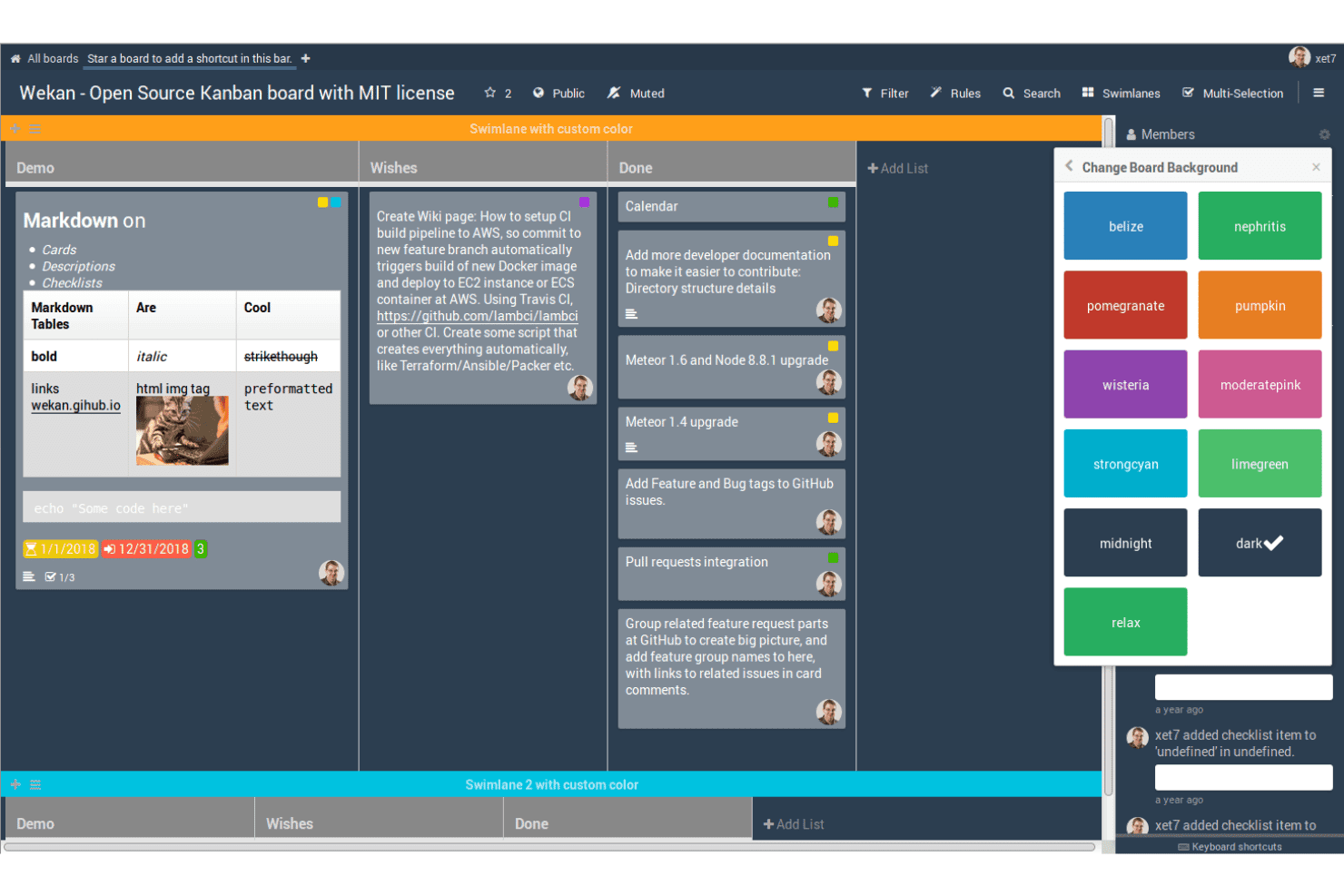
WeKan helps teams capture and organize ideas on open-source Kanban boards using customizable cards, lists, labels, and swimlanes. WeKan is a self-hosted, MIT-licensed kanban tool that organizes ideas as cards across customizable boards, with built-in voting, label-based categorization, automation rules, and a REST API for extending workflows.
Who Is WeKan Best For?
WeKan suits technically capable teams that want to self-host a kanban-based idea tracker and have the ability to configure it to fit their workflow.
Why I Picked WeKan
I picked WeKan as one of the best because it gives you complete control over your idea data through self-hosting, with deployment options spanning Docker, Helm, Snap, and a standalone zip bundle that runs without a container. I like that you can model a full idea workflow using lists as stages, like "Under Review → Planned → In Progress," and layer on automation rules that move cards automatically when conditions are met. The MIT license means zero proprietary restrictions on what you can customize or extend.
WeKan Key Features
- Card voting: Each card includes a built-in For/Against vote with an optional end date, public or private visibility, and a toggle to allow non-board members to participate.
- Nine-tier role system: Boards support nine distinct roles, including comment-only, read-only, and worker, giving you precise control over who can submit, comment, or edit.
- Automation rules: A trigger-and-action rule engine moves cards, updates fields, or fires actions across boards automatically when set conditions are met.
- Broad import support: WeKan imports boards from Trello, Jira, Asana, Kanboard, GitLab, and several other tools, reducing the friction of switching platforms.
WeKan Integrations
WeKan offers documented import and export connectivity with Jira, Asana, GitLab, OpenProject, Kanboard, Nextcloud Deck, and Zenkit. Its REST API, Python client, outgoing webhooks, and LDAP, CAS, OIDC/OAuth2, and SAML support enable custom workflows and authentication.
Pros and Cons
Pros:
- Granular roles support controlled participation
- Flexible boards model idea workflows
- MIT license enables deep customization
Cons:
- No portal for anonymous idea submissions
- For/Against voting lacks ranked prioritization
Learn more about WeKan: Best for self-hosted project-to-roadmap workflows
- 14-day free trial + free plan available
- From $7.25/user/month (billed annually)
Visit WebsiteCustomer Rating:4.5/5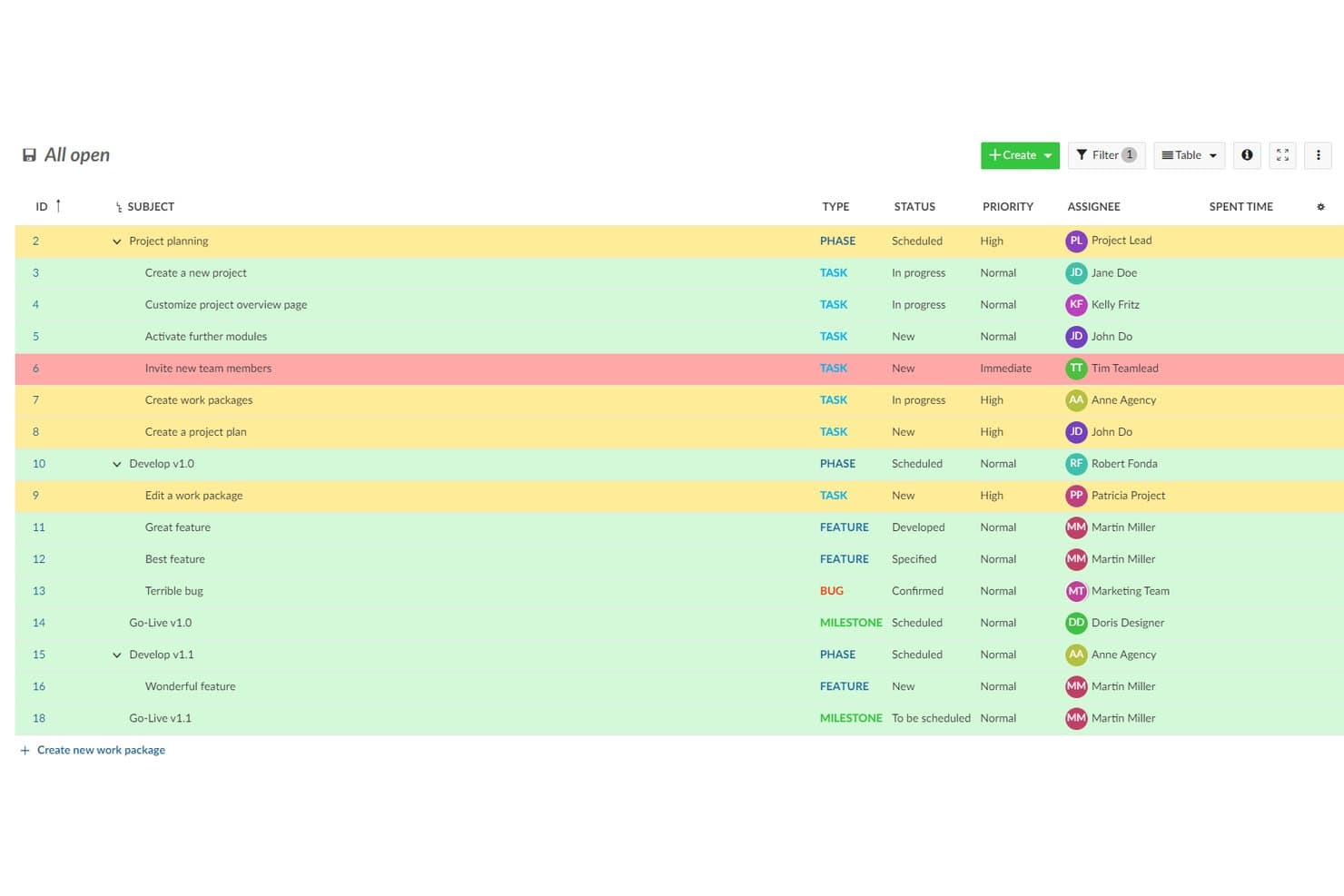
OpenProject organizes ideas and tasks with priority highlighting. OpenProject is a GPL-3.0 open-source project management suite that lets teams log and track ideas as work packages, organize them through customizable workflows, and move them into Kanban boards, Gantt charts, and product roadmaps.
Who Is OpenProject Best For?
OpenProject suits product and engineering teams that need to self-host their tooling and want a single place to move ideas through planning, delivery, and roadmap tracking.
Why I Picked OpenProject
I picked OpenProject as one of the best because it's the only tool on this list built to carry ideas all the way through delivery without leaving your infrastructure. Ideas log as work packages, get custom statuses, and move through configurable workflows into Kanban boards, Gantt charts, and a full product roadmap view in one GPL-3.0 codebase you fully own. I especially like that self-hosting is mature here, with Docker Compose, Helm, and Kubernetes options backed by active monthly releases and published security advisories.
OpenProject Key Features
- Custom work package types: Administrators can create dedicated task types like "Idea" or "Feature Request," each with its own fields, statuses, and workflow rules.
- REST API and webhooks: OpenProject exposes a full REST API and event-based webhooks for projects, tasks, and comments, letting teams build custom idea intake or reporting pipelines.
- Role-based workflow rules: Administrators define which status transitions each role can trigger per task type, so ideas move through review stages in a controlled, repeatable way.
- Forums module: Built-in threaded forums support structured discussion separate from individual work packages, with sticky posts, locking, and email notifications for followers.
OpenProject Integrations
OpenProject has documented native integrations with GitHub, GitLab, Nextcloud, OneDrive, and SharePoint, plus Git and SVN repositories for on-premises installations. Its REST API and webhooks support custom connections.
Pros and Cons
Pros:
- Workflows connect ideas to product roadmaps
- Self-hosting keeps idea data under control
- GPL-3.0 codebase supports full customization
Cons:
- External feedback requires accounts and permissions
- No native voting or idea rankings
Learn more about OpenProject: Best for agile teams tracking ideas to delivery
- Free plan available
- From €5/month
Visit WebsiteCustomer Rating:4.3/5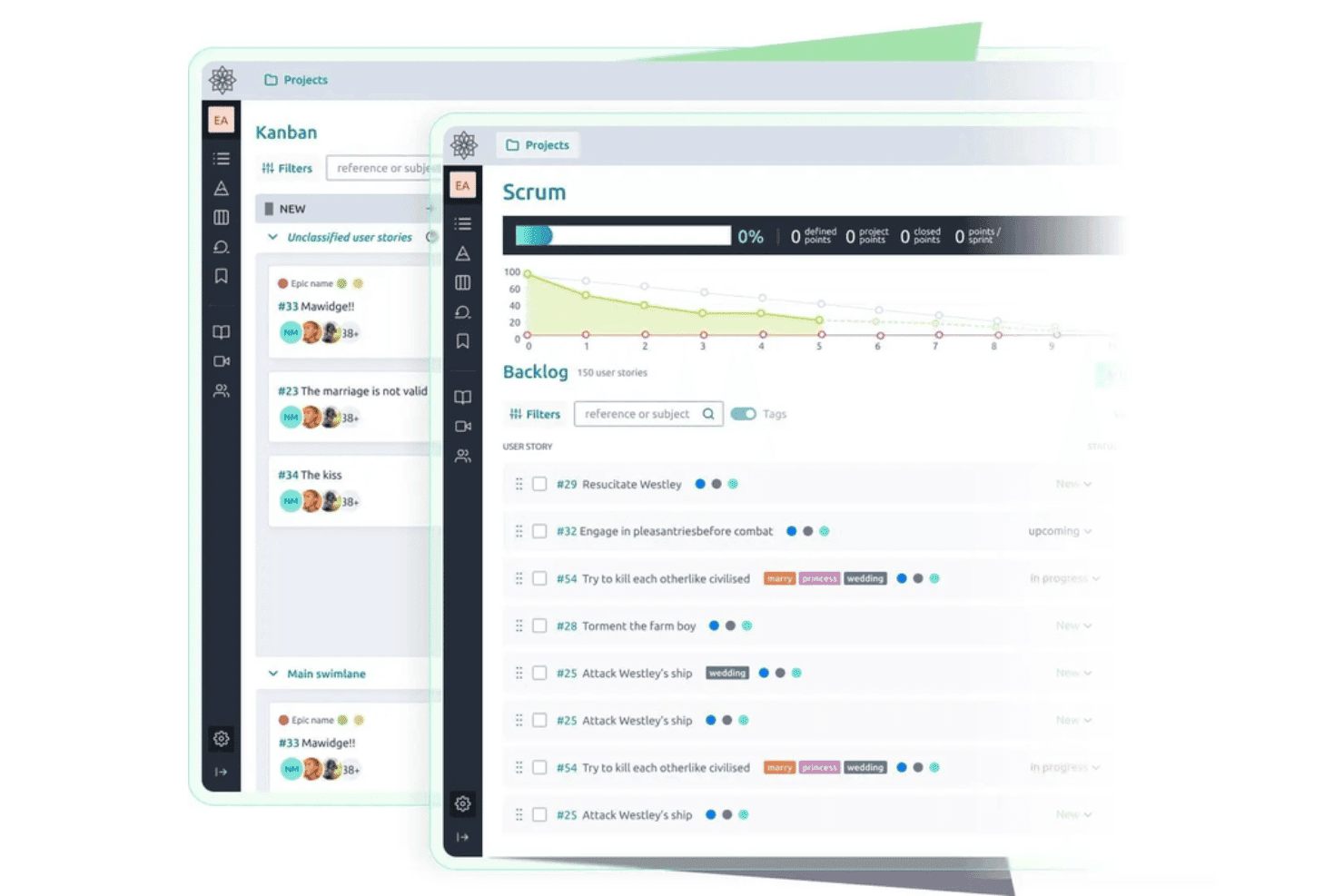
Taiga helps teams capture and develop ideas through open-source Kanban and Scrum workflows with backlogs and user stories. Taiga is an open-source agile project management tool that lets teams capture issues, user stories, and epics, vote on them, track them through customizable Scrum and Kanban workflows, and self-host the entire platform under an MPL-2.0 license.
Who Is Taiga Best For?
Taiga fits agile development teams that want to self-host their project tooling and track ideas from backlog through sprint delivery under a single open-source platform.
Why I Picked Taiga
I've included Taiga in my top picks because it's one of the few genuinely open-source tools that tracks an idea all the way from raw backlog item to sprint delivery under MPL-2.0 licensing with a documented Docker Compose setup. I like that teams can vote on issues directly from the issue detail page, sort by vote count, and promote a top-voted issue into a user story without switching tools. Custom statuses, colored tags, and custom fields let you shape the workflow around how your team actually moves ideas forward.
Taiga Key Features
- Public project discovery: Teams can list projects on Taiga's Discover page, letting external users browse and submit ideas without a project membership.
- Custom fields on all item types: Admins can add text, dropdown, date, number, and checkbox fields to epics, stories, tasks, and issues to capture structured idea metadata.
- REST API with voting endpoints: Taiga exposes upvote, downvote, and voter-list endpoints for epics, user stories, and issues, making it easy to build custom intake workflows.
- Docker Compose self-hosting: A supported
taiga-dockerrepo with a.envfile and launch scripts lets teams deploy and manage their own instance with full data control.
Taiga Integrations
Taiga offers native integrations with GitHub, GitLab, Bitbucket, Gogs, and Slack, plus importers for Jira, Trello, Asana, and more. Its REST API and webhooks support custom integrations, and it’s available on Zapier.
Pros and Cons
Pros:
- Public projects invite community voting
- Custom statuses carry ideas through delivery
- MPL-2.0 licensing supports genuine self-hosting
Cons:
- Flat comments limit community discussion
- No duplicate detection or idea merging
Learn more about Taiga: Best for community-driven idea voting at scale
- Free plan + 14-day free trial available
- From $100/month
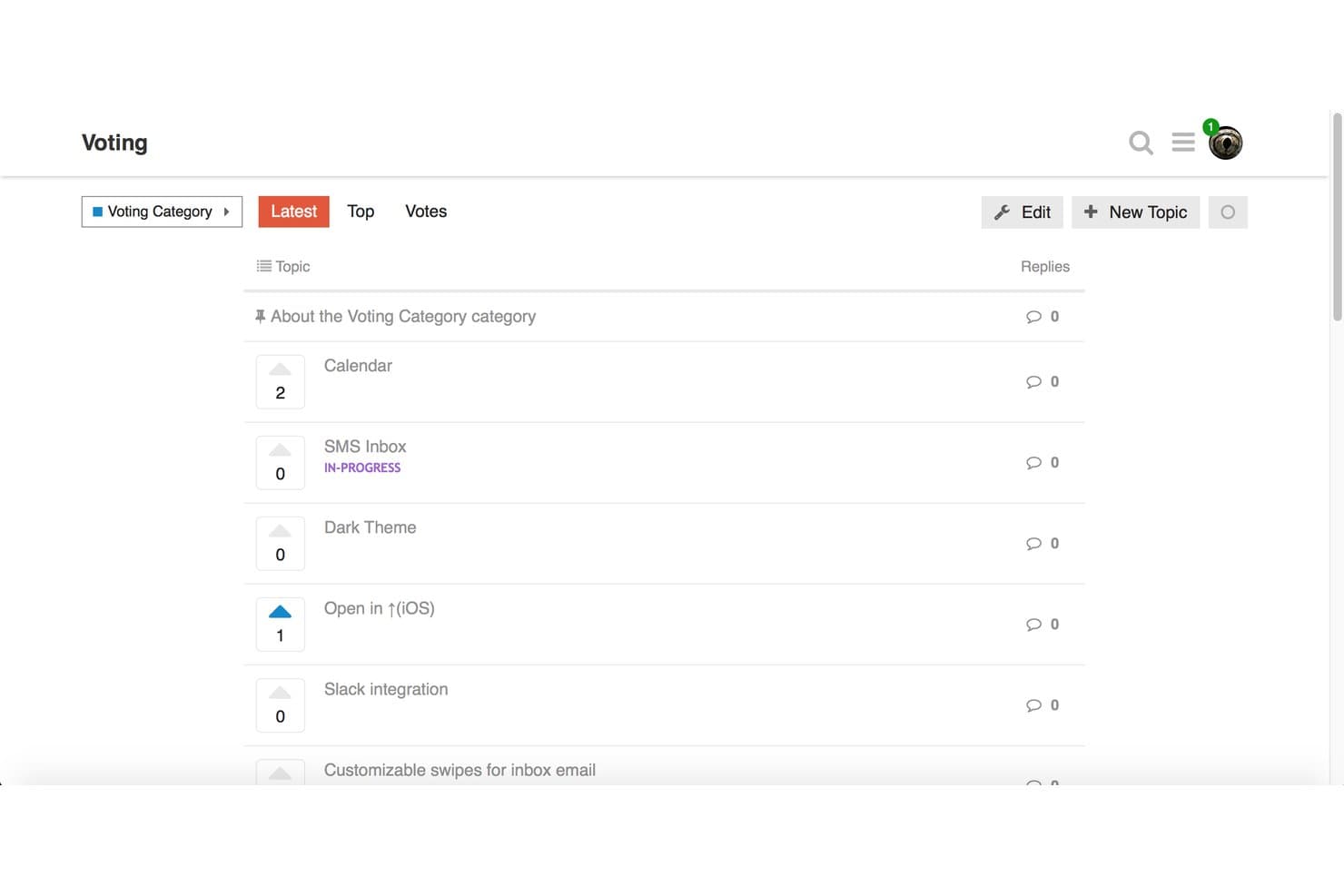
Discourse lets users vote on feature ideas to prioritize community requests. Discourse is a GPL-licensed, open-source forum platform that supports community idea submission, topic-based voting, threaded discussion, and category-based organization.
Who Is Discourse Best For?
Discourse works best for community managers and product teams that want open-source forum infrastructure where members can submit, vote on, and discuss ideas at a large scale.
Why I Picked Discourse
Discourse earns its spot on my shortlist because it handles community-driven idea voting at a scale that purpose-built tools struggle to match. I love that Topic Voting is now baked into core, so self-hosters can enable vote-based idea categories, sort submissions by recent vote activity, and award badges like "Brainstormer" without installing anything extra. The experimental Ideas category type also lets you remove per-user vote limits entirely, which is a meaningful option when you're running a large, open community with thousands of active contributors.
Discourse Key Features
- GPL-licensed open-source codebase: Discourse's full source code is publicly available on GitHub under the GPL license, so you can inspect, modify, and self-host it without restrictions.
- Docker-based self-hosting: A single command installs Discourse in a Docker container, with one-click upgrades and automatic backups built into the admin panel.
- Trust levels and community moderation: Members earn moderation abilities over time through a built-in trust level system, letting your community help manage content without admin intervention.
- Chat Integration plugin: Connects your Discourse forum to Slack, Microsoft Teams, Discord, and other messaging platforms, routing new topics and posts to the channels you choose.
Discourse Integrations
Discourse offers native integrations with Slack, Microsoft Teams, Discord, Jira, Zendesk, Salesforce, and GitHub, with availability varying by plan. Its REST API and webhooks support custom integrations.
Pros and Cons
Pros:
- Moderation tools support large-scale discussions
- Topic Voting supports community-driven prioritization
- GPL codebase supports genuine self-hosting
Cons:
- Upvotes lack weighted or negative scoring
- Status tracking relies on tags
Learn more about Discourse: Best for AI-powered duplicate triage
- 14-day free trial available
- From $19/month (billed annually)

Quackback offers boards for sorting and triaging feedback requests. Quackback is an open source idea management platform designed for collecting, organizing, and sorting your best ideas with collaborative features and advanced AI-driven workflows.
Who Is Quackback Best For?
Teams looking for a collaborative platform to manage idea submissions and automate duplicate detection with AI.
Why I Picked Quackback
I picked Quackback as one of the best because its AI-powered duplicate triage lets my team quickly identify and merge similar ideas. I like that I can set custom rules for how duplicates are flagged and review suggestions in a single dashboard.
Quackback Key Features
- Idea voting system: Allow team members and stakeholders to upvote or downvote submitted ideas.
- Category-based organization: Sort and browse ideas by custom categories for easier discovery.
- Commenting threads: Enable focused discussions on each idea with threaded conversations.
- AI-powered duplicate triage: Automatically identify, flag, and review similar idea submissions to quickly merge duplicates
Quackback Integrations
Quackback offers native integrations with Slack, Microsoft Teams, Discord, Linear, Jira, Asana, ClickUp, Hubspot, Zendesk, Salesforce, and more. It integrates with Zapier and supports custom integrations via API.
Pros and Cons
Pros:
- Open source with regular updates on GitHub
- Customizable workflow and triage controls
- AI highlights and suggests idea consolidations
Cons:
- Requires self-hosting for free tier
- Limited documentation for complex setup
Learn more about Quackback:

Fider offers voting, sorting, and search tools for managing user feedback. Fider is a community-driven open source project and idea management platform for collecting, organizing, and discussing user suggestions with voting, comment threads, status updates, and moderation controls.
Who Is Fider Best For?
Fider works well for product managers and community teams who need to collect feedback to drive informed decision-making across a large user base.
Why I Picked Fider
I picked Fider as one of the best because I can create unlimited boards to collect, organize, and prioritize feedback from different teams or products. I like how easy it is to set up public or private boards for separate communities without worrying about volume or user limits.
Fider Key Features
- Status tracking: Assign and update statuses on feedback items to reflect progress or decisions.
- Voting system: Let users upvote or downvote feedback to signal demand and priorities.
- SSO support: Integrate with external authentication providers for secure, centralized login management.
- Privacy controls: Create public or private boards to manage feedback visibility for specific communities or teams.
Fider Integrations
Fider offers an API for custom integrations. Native integrations are not publicly listed.
Pros and Cons
Pros:
- Active open-source development community
- Voting system for feedback prioritization
- Intuitive interface for feature requests
Cons:
- No built-in reporting dashboard
- Lacks built-in public product roadmaps
Learn more about Fider: Best for integrated public roadmaps
- 14-day free trial + free plan + free demo available
- From $9/month

ClearFlask offers tools to review, update, convert, and merge feedback. ClearFlask is an open source idea management platform that lets you collect, sort, and crowdsource user suggestions with voting, comment threads, project roadmaps, and customizable feedback boards.
Who Is ClearFlask Best For?
ClearFlask suits product managers and customer success teams at SaaS companies who need direct user input and want to share public product roadmaps.
Why I Picked ClearFlask
I picked ClearFlask as one of my top choices because I can set up public product roadmaps that are directly connected to user feedback. I like having votes, status updates, and idea discussions all visible beside a live roadmap, something my team finds transparent and actionable.
ClearFlask Key Features
- Customizable submission forms: Collect ideas with tailored forms matching your feedback process.
- User segmentation: Organize and analyze feedback by different user groups or customer segments.
- Advanced moderation tools: Approve, reject, or edit ideas and comments before they appear publicly.
- Public product roadmaps: Connect user feedback directly to a live roadmap to keep stakeholders aligned on feature progress.
ClearFlask Integrations
ClearFlask offers native integrations with Jira, Slack, Hotjar, GotLab, GitHub, Intercom, Segment, and Discord. It integrates with Zapier, and an API is available for custom integrations.
Pros and Cons
Pros:
- Open source codebase enables advanced self-hosting
- Idea boards can be fully customized
- Public roadmap updates are visible to users
Cons:
- Fewer collaboration features than larger competitors
- Operational setup is highly complex
Learn more about ClearFlask: Best for revenue-weighted B2B feedback boards
- Free plan available
- From $15/user/month
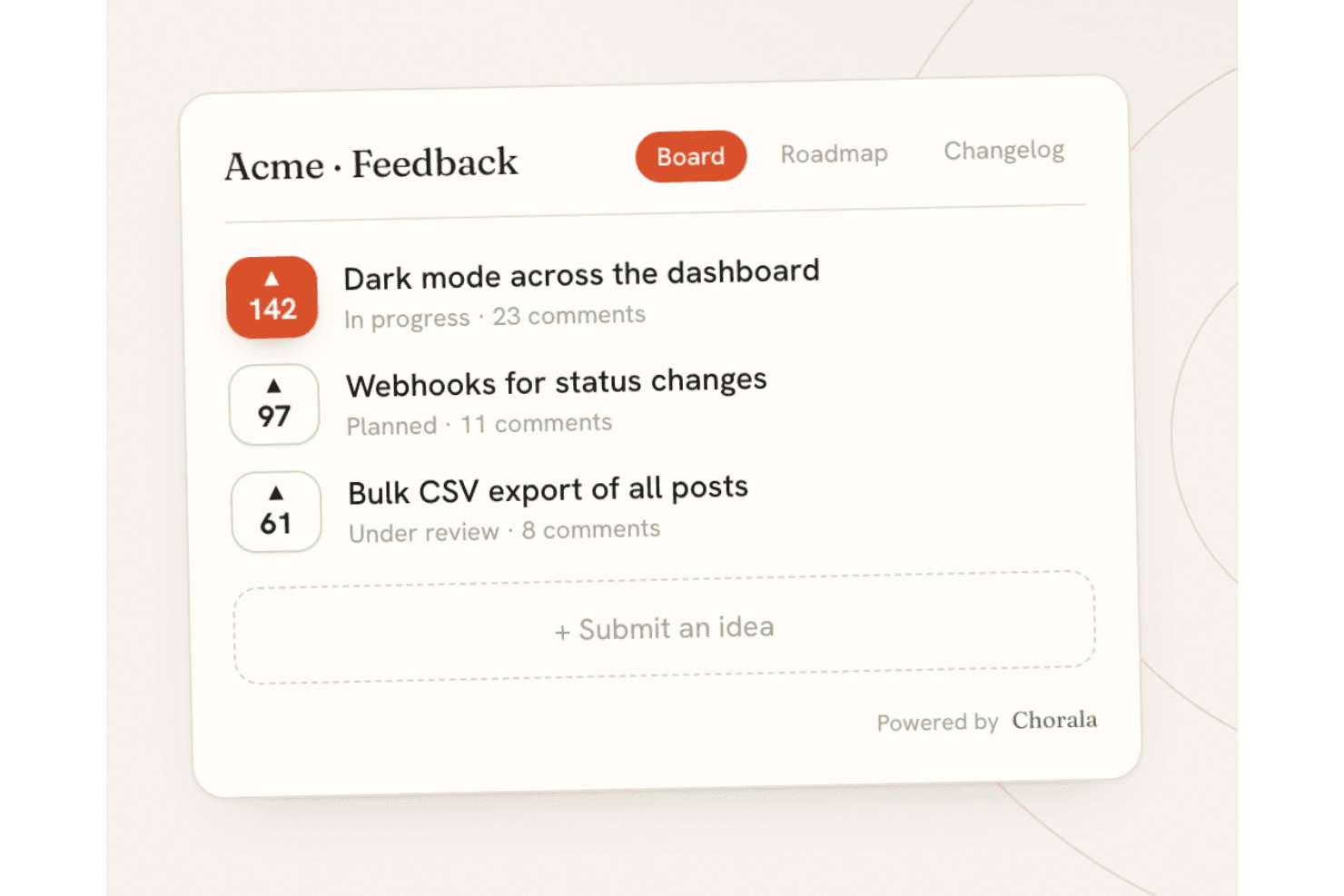
Chorala lets teams collect, vote on, and prioritize ideas through an open-source feedback board. Chorala is an open-core, self-hostable feedback platform that combines idea submission and voting, revenue-weighted prioritization, public roadmaps, changelogs, and AI-assisted triage across embeddable multilingual boards.
Who Is Chorala Best For?
Chorala is a strong fit for B2B product managers who need to prioritize feature requests by customer revenue rather than raw vote count.
Why I Picked Chorala
I picked Chorala as one of the best because it solves a real B2B prioritization problem: knowing that a feature is wanted by $200k of MRR carries far more weight than 50 anonymous upvotes. Chorala's revenue weighting syncs each company's MRR and surfaces figures like "$40k of revenue wants this" directly on the feedback board. I also like that admins can add custom RICE/ICE scoring fields and filter ideas by minimum MRR, company, or plan, so prioritization decisions are grounded in actual business impact rather than loudest voice.
Chorala Key Features
- AI Autopilot: Paste a support thread and Chorala extracts feature requests as drafts, groups similar ideas into clusters, and answers questions about your feedback in plain English.
- Self-hosted deployment: Run the full platform on your own servers via Docker Compose, with automatic migrations, unlimited admin seats, and no billing restrictions.
- Signed outbound webhooks: Chorala fires HMAC-SHA256-signed webhook events on post creation, status changes, merges, comments, and votes, with automatic retry on failure.
- Audience-targeted changelogs: Build audiences from any user attribute—plan, locale, or MRR—and send personalized changelog announcements to specific customer segments.
Chorala Integrations
Native integrations are not currently listed.
Pros and Cons
Pros:
- AI clustering turns feedback into grouped themes
- Self-hosting includes every platform feature
- Revenue-weighted prioritization reflects customer MRR
Cons:
- Self-hosters lack documented scaling guidance
- Young project has limited community validation
Learn more about Chorala: Best for MIT-licensed feedback with GitHub sync
- Free plan available
- Free, open-source
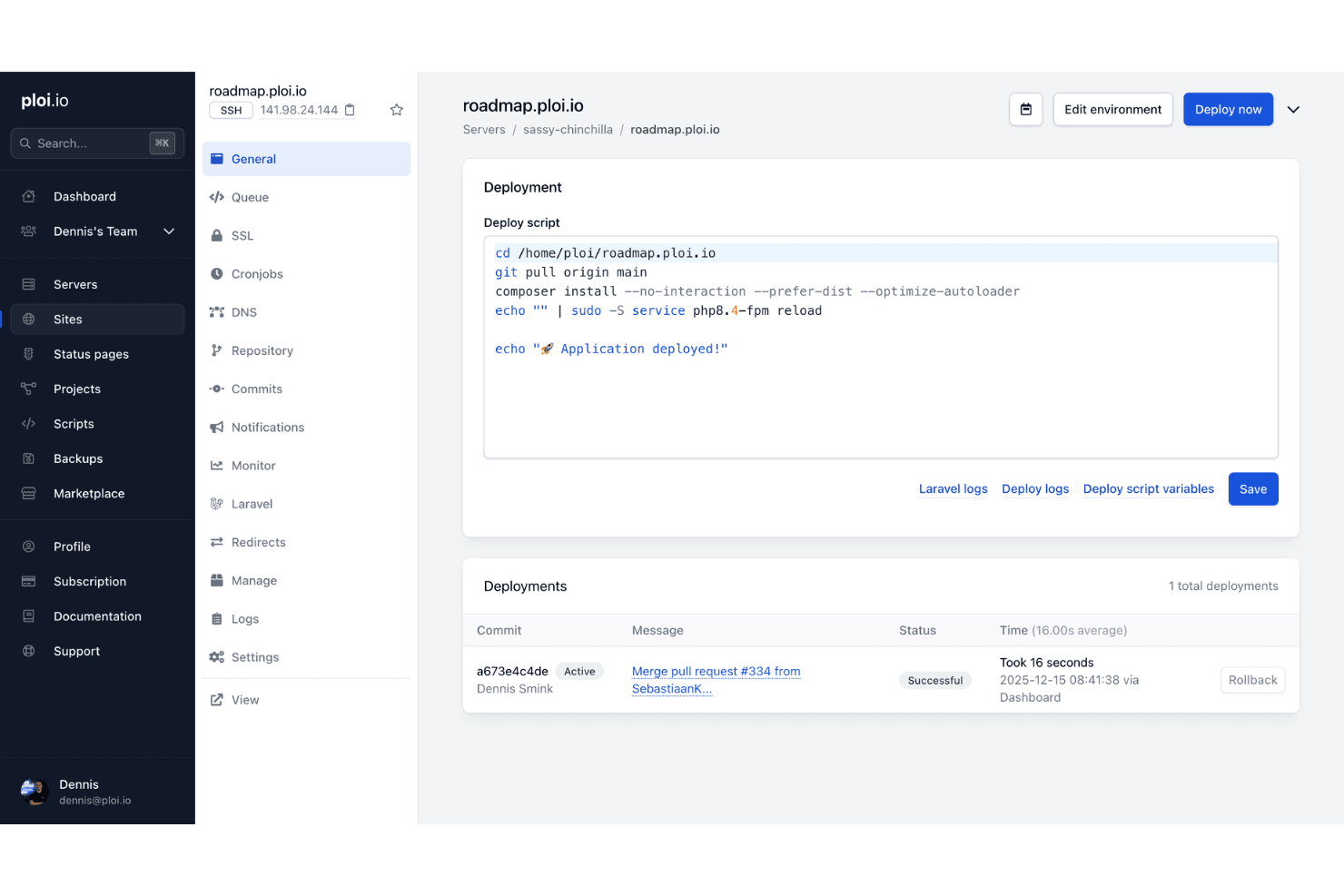
Ploi Roadmap helps teams manage and deploy an open-source idea management environment with configurable scripts and deployment tracking. Ploi Roadmap is a self-hostable, MIT-licensed idea management tool built on Laravel that lets teams collect feature requests, organize submissions across boards and projects, enable user voting and threaded comments, and sync items directly with GitHub issues.
Who Is Ploi Roadmap Best For?
Ploi Roadmap is a strong fit for PHP development teams that want full control over their feedback infrastructure without licensing restrictions.
Why I Picked Ploi Roadmap
I picked Ploi Roadmap as one of the best because its MIT license is the real differentiator: you can fork it, rebrand it, and modify it freely with zero copyleft obligations. I particularly like how GitHub sync lets you link feedback items directly to existing issues or create new ones without leaving the board, which keeps product and engineering aligned. The duplicate merging feature also stands out to me, as it consolidates votes and comments from redundant submissions into a single item without double-counting voters.
Ploi Roadmap Key Features
- Multi-project boards: Organize feedback across multiple projects, each with its own boards, visibility settings, and member access controls.
- 80+ language translations: The interface ships with locale files for over 80 languages, including Arabic, Japanese, and Chinese variants.
- Embeddable feedback widget: A JavaScript widget lets you collect feedback directly from your app, with options for button position, color, domain restriction, and user prefill.
- OAuth 2 SSO: Users can authenticate via any OAuth 2 provider, giving teams centralized login management without a separate identity system.
Ploi Roadmap Integrations
Ploi Roadmap has native GitHub integration for linking feedback to issues or creating new ones. It also supports Slack and Discord webhooks for notifications.
Pros and Cons
Pros:
- Private projects support controlled feedback collection
- Duplicate merging preserves votes and comments
- MIT license permits unrestricted customization
Cons:
- Manual deployment requires PHP expertise
- Documentation relies heavily on the README
Learn more about Ploi Roadmap:
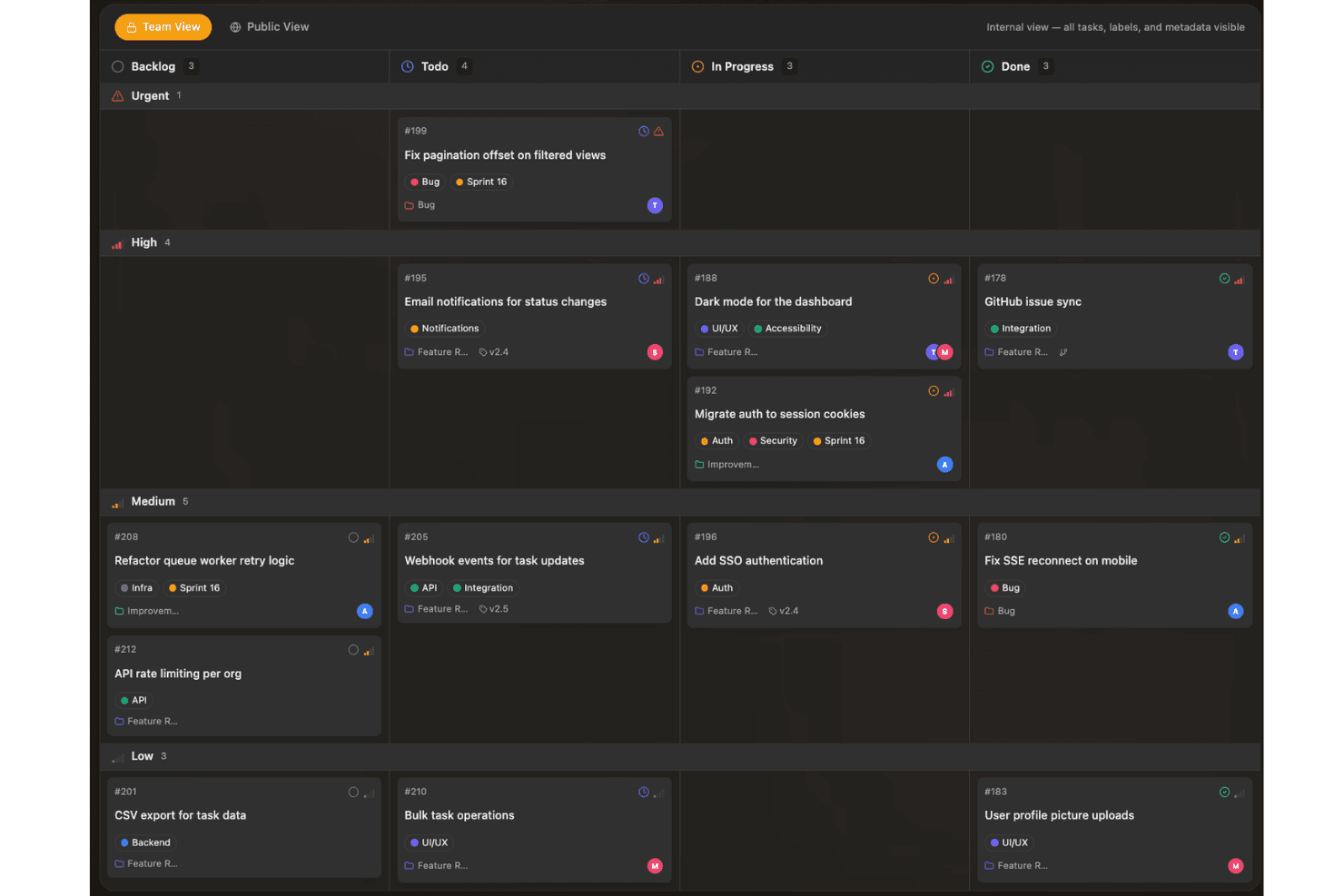
Sayr helps teams capture and prioritize ideas on a visual board organized by status, urgency, and development progress. Sayr is a source-available project management tool with a public feedback portal that lets teams collect, vote on, and discuss feature requests and bug reports through a self-hosted or cloud-hosted board with GitHub integration and Discord bot support.
Who Is Sayr Best For?
Sayr is a strong fit for developer teams and open source projects that want a self-hosted, GitHub-connected feedback board where community members can submit and vote on feature requests.
Why I Picked Sayr
I picked Sayr as one of the best because its two-way GitHub sync is genuinely built for developer-facing feedback boards. When a pull request merges with
Fixes #Nin the commit message, Sayr automatically closes the linked task on the public board, so your community always sees accurate, live status without manual updates. I also love the granular visibility controls: you can mark individual comments, labels, and timeline entries as internal, keeping engineering context private while showing customers only what's relevant.Sayr Key Features
- Public voting board: Visitors can browse, upvote, and sort feature requests by popularity, newest, or trending without needing an admin account.
- Internal vs. public comments: Team members can post internal-only comments on any task, keeping engineering discussion private while public replies stay visible to submitters.
- Discord bot integration: The
/sayr createcommand lets community members submit tasks directly from Discord using your predefined issue templates. - Releases and milestones: You can group tasks into releases with progress tracking, giving your community a visible changelog and roadmap view.
Sayr Integrations
Sayr offers native integrations with GitHub and Discord, including two-way GitHub task and issue sync and Discord task creation through
/sayr create. It also provides a REST API and CLI for custom integrations.Pros and Cons
Pros:
- Live roadmap status tracking
- Rich threaded discussion and moderation
- Granular public-private visibility controls
Cons:
- No duplicate merging or weighted voting
- Source-available, not OSI-approved
Learn more about Sayr:
Annen programvare for åpen kildekodebasert idéhåndtering
Her er noen flere alternativer for åpen kildekodebasert idéhåndtering som ikke kom med på kortlisten min, men som likevel er verdt å undersøke:
- 11FeatulBest for EU-hosted feedback boards with MIT licensing
- 12FeedlogBest for AI-native self-hosted feedback loops
- 13eXo PlatformBest for shared enterprise workspaces
- 14KanboardBest for MIT-licensed kanban-style idea tracking
- 15OpenideaLBest for Drupal-based idea lifecycle management
- 16LogChimpBest for customizable self-hosted portals
- 17FeedbacklandBest for AI-generated ranked roadmaps
How I Evaluate Open-Source Idea Management Software
I split my evaluation into three parts, giving the most weight to core functionality: collect ideas, let users vote and comment, and track statuses. Next, I look for standout features such as API and webhook access. Finally, I consider what lies beyond features, including self-hosting support, maintenance, onboarding, and pricing value.
Core Functionality (Table Stakes For This List)
When I'm selecting tools for my list, I score each one on a scale from 0 (does not offer the functionality) to 5 (excels in this area) for each core functionality listed below. I then convert the total into a percentage to help assess each tool's overall fit, with extra weight on any functionalities I’ve deemed essential.
- Idea Submission & Voting (Essential): I look for customer idea forms, visible vote counts, sorting, duplicate handling, and support for prioritizing popular requests.
- Open Source Codebase (Essential): I assess public licensing, repository activity, setup documentation, contribution guidance, and whether teams can inspect or modify the code.
- Idea Status Tracking: I check for visible, customizable statuses such as under review, planned, in progress, and completed.
- Commenting & Discussion: Threaded comments, notifications, mentions, and moderation help teams clarify requests and capture context.
- Self-Hosting Deployment: I look for documented Docker or other deployment options, configuration guidance, upgrade notes, and support for private installations.
- Idea Categorization & Tagging: I evaluate boards, tags, filters, and search for organizing feedback across products, customer groups, and roadmap themes.
Once I have a list of tools that meet the criteria, I consider what sets each platform apart.
Differentiating Factors (What Sets Vendors Apart)
Here's how I compare and contrast different vendors:
Standout Features
API and webhook access matters most to me because it determines whether you can sync ideas into your existing roadmap or support tools without manual copy-pasting. I check for well-documented REST endpoints and webhook triggers that fire on status changes or new votes. SSO support is equally important—if your team uses SAML or OAuth, you need login to work without creating yet another credential set. I also evaluate multi-language localization, since global product teams need feedback boards that participants can actually read in their own language.
Beyond Features
I check GitHub commit frequency and release cadence because a stale repo means bugs pile up and security patches lag. Self-hosting costs matter too—server, database, and DevOps time for backups and upgrades can outweigh what you'd pay for a hosted plan. I also evaluate data ownership, especially whether a tool supports encryption at rest and easy export, since teams handling customer feedback often need to meet GDPR or internal data residency requirements.
Slik velger du programvare for åpen kildekodebasert idéhåndtering
Det er lett å gå seg vill i lange funksjonslister og komplekse prismodeller. For å hjelpe deg med å holde fokus mens du arbeider deg gjennom den unike utvelgelsesprosessen for programvare, får du her en sjekkliste over faktorer du bør ha i bakhodet:
| Faktor | Hva bør du vurdere? |
|---|---|
| FaktorSkalerbarhet | Hva bør du vurdere?Vil programvaren håndtere flere brukere, team eller ideer etter hvert som organisasjonen vokser? Se gjennom begrensningene for brukere, lagring og moduler. |
| FaktorIntegrasjoner | Hva bør du vurdere?Kan den kobles til verktøyene dine for kommunikasjon, dokumentasjon eller prosjektstyring? Bekreft støtte for API-er og sentrale plattformer. |
| FaktorTilpasningsmuligheter | Hva bør du vurdere?Kan du tilpasse skjemaer, arbeidsflyter og tillatelser til organisasjonens spesifikke prosesser og sikkerhetsbehov? |
| FaktorBrukervennlighet | Hva bør du vurdere?Hvor mye opplæring trenger teamet ditt for å ta i bruk verktøyet på en trygg måte? Se etter et tydelig og velstrukturert grensesnitt. |
| FaktorImplementering og innføring | Hva bør du vurdere?Hvilke ressurser kreves for oppsettet; dokumentasjon, teknisk kompetanse og datamigrering? Vurder om du kan distribuere løsningen og lære opp brukerne innen tidsplanen din. |
| FaktorKostnad | Hva bør du vurdere?Utover lisensavgifter bør du vurdere serverkrav, vedlikehold og løpende administrativt arbeid. Ta høyde for dette i budsjettprognosen. |
| FaktorSikkerhetstiltak | Hva bør du vurdere?Kan verktøyet driftes på egne servere, krypteres eller begrenses bak en brannmur? Kontroller revisjonslogging, autentiseringsalternativer og dataeierskap. |
| FaktorTilgjengelig brukerstøtte | Hva bør du vurdere?Hvilken type løpende brukerstøtte finnes; fellesskapsfora, betalte avtaler, feilsporingssystemer eller tredjepartsleverandører? Finn ut hvor du kan få hjelp hvis du trenger det. |
Hva er programvare for åpen kildekodebasert idéhåndtering?
Programvare for åpen kildekodebasert idéhåndtering er en plattform som lar team samle inn, organisere og prioritere forslag, tilbakemeldinger og innovasjonsprosjekter, med kildekode som er offentlig tilgjengelig og kan tilpasses. Disse verktøyene hjelper grupper med å fremme samarbeid, følge ideenes livssyklus og tilpasse arbeidsflyter til prosessene sine, samtidig som organisasjoner får full kontroll over distribusjon, sikkerhet og videreutvikling.
Funksjoner
Når du velger programvare med åpen kildekode for idéhåndtering, bør du se etter følgende viktige funksjoner:
- Portal for innsending av ideer: Gir brukerne et eget sted der de kan foreslå nye ideer, forslag eller tilbakemeldinger, ofte med tilpassbare skjemaer for ulike typer innspill.
- Samarbeidsverktøy: Gjør det mulig for brukerne å diskutere, kommentere og videreutvikle ideer med trådede samtaler, omtaler eller felles redigering, noe som støtter kollektiv innovasjon.
- Avstemning og prioritering: Lar brukerne stemme ideer opp eller ned, eller gi dem en vurdering, slik at team raskt kan identifisere populære forslag eller forslag med stor innvirkning for videre vurdering.
- Statussporing: Lar administratorer tilordne statuser som «under vurdering», «planlagt» eller «implementert» til hver idé, noe som forbedrer åpenheten og synligheten i prosjektene.
- Tilgangskontroller: Gir administratorer mulighet til å styre hvem som kan opprette, se, redigere eller moderere ideer eller kommentarer, beskytte sensitiv informasjon og sikre ansvarlighet.
- Søk og filtrering: Tilbyr avanserte søkemuligheter og filtre som gjør det mulig for brukerne å finne ideer etter nøkkelord, kategorier, tagger eller innsendere, noe som gjør navigering og oppdagelse raskere.
- Automatisering av arbeidsflyt: Støtter automatiske varsler, tildelinger eller fremdrift for ideer gjennom ulike vurderings- og godkjenningsfaser, og reduserer manuelt arbeid.
- Rapportering og analyse: Gir innsikt i trender for innsending av ideer, engasjementsnivåer og implementeringsgrad gjennom oversikter og rapporter som kan eksporteres.
- Støtte for integrasjoner: Kobler seg til verktøy som chatteplattformer, prosjektstyringsprogramvare eller skylagring, noe som gjør det enklere å integrere idéhåndtering i eksisterende arbeidsflyter.
Fordeler
Implementering av programvare med åpen kildekode for idéhåndtering gir flere fordeler for teamet og virksomheten din. Her er noen av fordelene du kan se frem til:
- Dataeierskap og kontroll: Du kan distribuere plattformen på din egen infrastruktur, noe som sikrer personvern og oversikt over sensitiv informasjon.
- Tilpassbare arbeidsflyter: Fleksibiliteten i åpen kildekode gjør det mulig å fange opp innovative ideer og tilpasse innsendinger, godkjenninger og statuser slik at de samsvarer med dine unike interne prosesser.
- Kostnadsbesparelser: Unngå gjentakende abonnementsavgifter og leverandørbinding ved å benytte fritt tilgjengelige eller selvhostede løsninger.
- Forbedret samarbeid: Innebygde funksjoner for kommunikasjon og tilbakemeldinger gjør det mulig for hele teamet å delta i videreutvikling og prioritering av ideer sammen.
- Integrasjonspotensial: Du kan koble idéhåndtering til eksisterende verktøy for chat, prosjektstyring eller lagring via åpne API-er og dokumenterte koblinger.
- Transparent innovasjonssporing: Funksjoner for statusstyring og rapportering gjør fremdriften for ideer synlig, noe som fremmer ansvarlighet og engasjement.
Kostnader og priser
Valg av programvare med åpen kildekode for idéhåndtering krever en forståelse av de ulike prismodellene og planene som er tilgjengelige. Kostnadene varierer basert på funksjoner, teamstørrelse, tillegg og mer. Tabellen nedenfor oppsummerer vanlige planer, gjennomsnittsprisene deres og typiske funksjoner som er inkludert i løsninger for idéhåndtering med åpen kildekode:
Sammenligningstabell for planer for programvare med åpen kildekode for idéhåndtering
| Plantype | Gjennomsnittspris | Vanlige funksjoner |
|---|---|---|
| PlantypeGratisplan | Gjennomsnittspris$0 | Vanlige funksjonerBrukerstøtte fra fellesskapet, grunnleggende innsending av ideer, sentrale samarbeidsverktøy og begrensede tilpasningsmuligheter. |
| PlantypePersonlig plan | Gjennomsnittspris$5-$10/user/month | Vanlige funksjonerUtvidede tillatelser, prioritert brukerstøtte, avansert søk og begrensede integrasjoner. |
| PlantypeBedriftsplan | Gjennomsnittspris$10-$25/user/month | Vanlige funksjonerTilpassede arbeidsflyter, rapporteringsverktøy, flere arbeidsområder, administratorkontroller og API-tilgang. |
| PlantypeVirksomhetsplan | Gjennomsnittspris$25-$50/user/month | Vanlige funksjonerSelvhosting, revisjonslogging, avansert sikkerhet, funksjoner for etterlevelse, dedikert brukerstøtte og ubegrenset antall brukere. |
Vanlige spørsmål om programvare for idéhåndtering med åpen kildekode
Her er noen svar på vanlige spørsmål om programvare for idéhåndtering med åpen kildekode:
Kan programvare for idéhåndtering med åpen kildekode driftes på egen server?
Ja, det meste av programvaren for idéhåndtering med åpen kildekode lar deg drifte løsningen på din egen infrastruktur. Dette gir deg full kontroll over datasikkerhet, personverninnstillinger og tilpassede integrasjoner som er skreddersydd etter organisasjonens behov.
Hvor vanskelig er det å tilpasse verktøy for idéhåndtering med åpen kildekode?
Tilpasningsmulighetene varierer fra verktøy til verktøy, men generelt gir plattformer med åpen kildekode stor fleksibilitet hvis du har teknisk kompetanse. Du bør se gjennom dokumentasjonen fra fellesskapet og vurdere utviklingsressursene dine før du gjør omfattende endringer.
Hva er fordelene og ulempene ved programvare for idéhåndtering med åpen kildekode sammenlignet med kommersiell programvare?
Verktøy med åpen kildekode kan gi kostnadsbesparelser og fleksibilitet, men kan kreve mer arbeid med oppsett, teknisk støtte og løpende vedlikehold. Kommersielle plattformer tilbyr vanligvis en mer gjennomarbeidet brukeropplevelse og dedikert support, men med høyere løpende kostnader.
Finnes det skjulte kostnader ved bruk av programvare for idéhåndtering med åpen kildekode?
Ja, selv om programvaren er gratis, bør du planlegge for kostnader som serverdrift, oppdateringer, teknisk støtte og eventuell tilpasset utvikling som teamet ditt trenger for å oppnå ønsket oppsett.
Hvordan håndterer verktøy med åpen kildekode oppdateringer og sikkerhetsoppdateringer?
De fleste prosjekter er avhengige av oppdateringer fra fellesskapet og publiserte sikkerhetsoppdateringer. Du trenger en prosess for å følge med på disse oppdateringene og installere sikkerhetsoppdateringer for å beskytte dataene dine, særlig ved egen drift.