

Som produktleder kjenner jeg både gleden ved å lansere en sømløs produktopplevelse og frustrasjonen ved å måtte tette hull som brukerne uventet har oppdaget.
På de tøffe dagene kan du oppleve at du:
- Sliter med å holde oversikt over spredte tilbakemeldinger fra kunder, noe som gjør det vanskeligere å forstå hva brukerne egentlig trenger.
- Møter team som ikke er samkjørte, der tverrfunksjonelt samarbeid føles mer som en tautrekking enn en samlet innsats.
- Sløser bort verdifull tid på å forsøke å måle hvor vellykkede funksjonene er, med uklare data og verktøy som ikke fungerer sammen.
Når jeg reflekterer over disse utfordringene, har jeg innsett at de ofte skyldes at man ikke har de riktige verktøyene for å effektivisere arbeidsflyter, samle innsikt på ett sted og skape samordning. Derfor har jeg satt sammen denne oversikten over den beste programvaren for styring av produktopplevelsen. Disse løsningene er utviklet for å hjelpe produktteam med å planlegge, analysere og forbedre hvordan kundene opplever produktene deres.
I denne artikkelen finner du en oversikt over de beste verktøyene, et sammendrag av hvordan de fungerer, og innsikt i hva hvert enkelt verktøy gjør best – slik at du kan velge riktig programvare med trygghet.
Why Trust Our Software Recommendations
6,700+
Reviews
20
Industry experts
16+
Evaluation factors
14
Years
Our team has been testing and reviewing software since 2012. As product managers ourselves, we know how difficult—and important—it is to choose the right software.
For this guide, we evaluated tools using hands-on testing and independent research, scoring tools using our selection criteria.
Our reviews reflect our human editorial judgment, not a sales pitch.
Expert reviewers:
- Andrew LumbySenior TPM
- Cristiano ValimSenior UI/UX Lead


Sammenligningstabell for programvare for styring av produktopplevelsen
Denne sammenligningstabellen oppsummerer prisopplysningene for utvalget mitt av den beste programvaren for styring av produktopplevelsen:
| Tool | Best For | Trial Info | Price | ||
|---|---|---|---|---|---|
| 1 | Best with adaptive feedback taxonomy | Free demo available | Pricing upon request | Website | |
| 2 | Best with advanced AI-driven text categorization | Free demo available | Pricing upon request | Website | |
| 3 | Best for product feedback analytics dashboards | Free demo available | Pricing upon request | Website | |
| 4 | Best for personalized user experiences | 14-day free trial | From $174/month (billed annually) | Website | |
| 5 | Best survey tool with built-in CRM integration | 10-day free trial | From $114/month (billed annually) | Website | |
| 6 | Best for syndicating content to retailer networks | Free demo available | Pricing upon request | Website | |
| 7 | Best for PIM automation and analysis | Free demo available | Pricing upon request | Website | |
| 8 | Best for syndicating catalogs to 500+ retailers | Free trial + free demo available | From $45,000/year | Website | |
| 9 | Best for B2B catalog syndication with built-in DAM | Free trial + free demo available | Pricing upon request | Website | |
| 10 | Best for AI-powered customer intelligence | 30-day free trial | From $2,000/month (billed annually) | Website |


Anmeldelser av den beste programvaren for styring av produktopplevelsen
Her er en kort beskrivelse av hver programvare for styring av produktopplevelsen på listen min, med informasjon om hva den gjør best, samt skjermbilder som viser noen av funksjonene.
 Best with adaptive feedback taxonomy
- Free demo available
- Pricing upon request
Visit WebsiteCustomer Rating:4.8/5
Enterpret surfaces churn drivers and automates customer escalation alerts. Enterpret is a customer intelligence platform that aggregates feedback from support, sales, surveys, reviews, and product usage data, then organizes it into an adaptive taxonomy to surface actionable insights for product teams.
Who Is Enterpret Best For?
Enterpret suits product teams at mid-to-large SaaS companies that need to make sense of high volumes of customer feedback across support, sales, and review channels.
Why I Picked Enterpret
I've included Enterpret in my top picks because its adaptive feedback taxonomy automatically reshapes itself as your customers' language and product evolve, meaning you're never manually recategorizing feedback to keep insights current. I particularly like how the Customer Context Graph ties individual feedback signals to business outcomes like churn and retention, so product teams can see which complaints actually move the needle. The AI Insights layer lets you query that entire feedback corpus in plain language, which cuts the time between spotting a pattern and acting on it.
Enterpret Key Features
- Feedback source integrations: Pulls in customer signals from support tickets, sales calls, surveys, app store reviews, social media, and CRM data into a single workspace.
- Customer Context Graph: Links individual feedback records to specific product features, customer segments, and business outcomes like churn and expansion revenue.
- Workflow integrations: Automatically creates Jira or Linear tickets and sends Slack alerts when feedback analysis surfaces a pattern worth acting on.
- Impact measurement: Tracks changes in ticket volume, sentiment, and adoption before and after a product update to show whether an issue has been resolved.
Enterpret Integrations
Enterpret integrates with Salesforce, Slack, Jira, Linear, Claude, and ChatGPT through its MCP server. It also provides API access for custom integrations.
Pros and Cons
Pros:
- Connects complaints with retention and churn outcomes
- Adaptive taxonomy tracks changing customer language
- Centralizes feedback across product touchpoints
Cons:
- No syndication, digital assets, or channel formatting
- No product catalog or attribute management
Learn more about Enterpret: Best with advanced AI-driven text categorization
- Free demo available
- Pricing upon request
Visit WebsiteCustomer Rating:4.4/5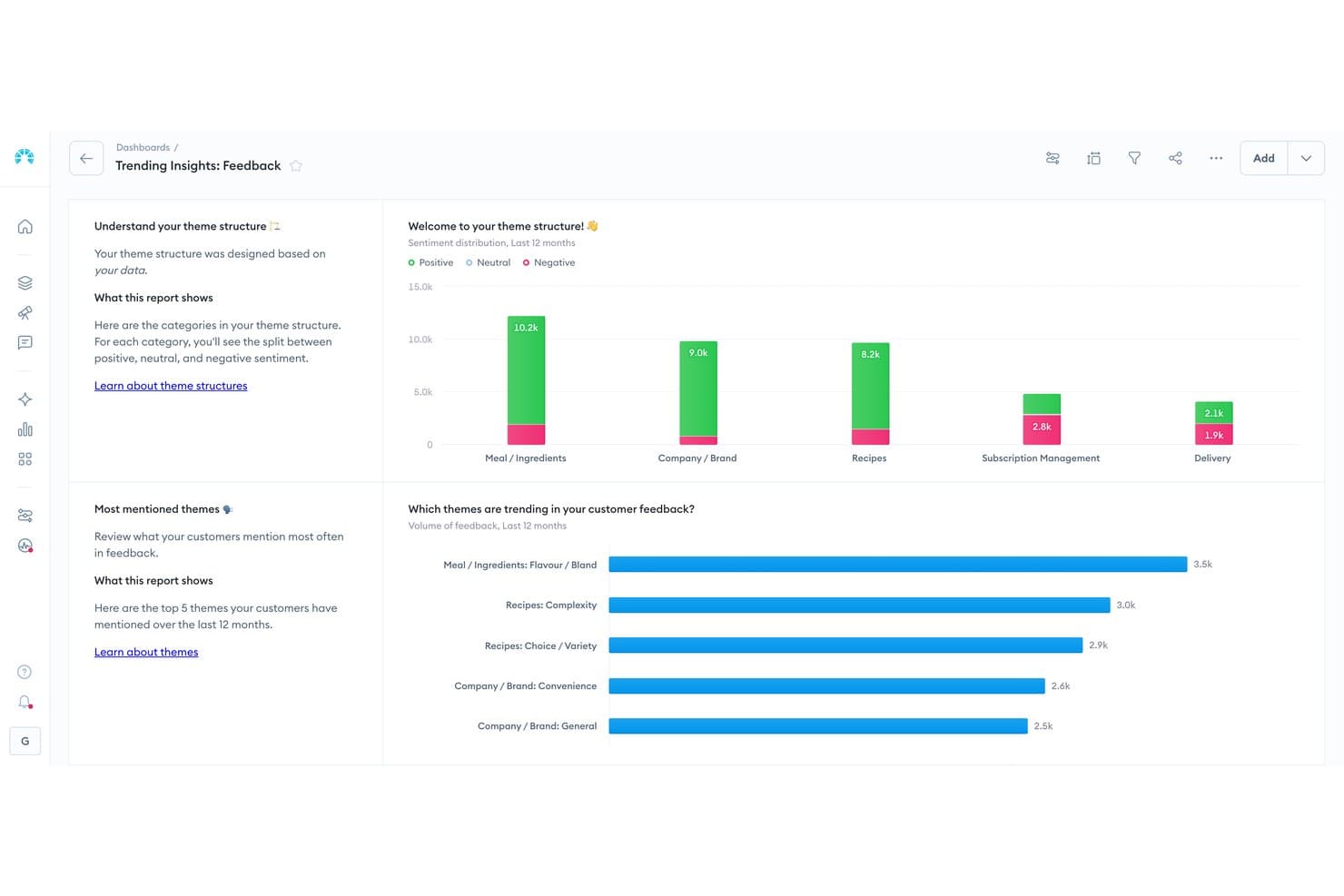
Chattermill visualizes customer feedback sentiment across product themes. Chattermill is an AI-native customer feedback analysis platform that ingests data from surveys, reviews, support tickets, and social media to surface themes, sentiment, and root causes across the customer experience.
Who Is Chattermill Best For?
Chattermill suits enterprise CX and product teams that need AI-driven analysis of large volumes of customer feedback to uncover sentiment patterns and return drivers at scale.
Why I Picked Chattermill
I picked Chattermill as one of the best because its Lyra AI engine does something I haven't seen matched elsewhere: it automatically tags themes, sentiment, and root causes across thousands of unstructured feedback items, from reviews to support tickets, without manual tagging. When product teams need to know exactly why customers are returning items or dropping off, Lyra Agent surfaces those answers with direct customer quotes and business impact data attached.
Chattermill Key Features
- Lyra Agent: An AI analyst that answers questions about NPS, CSAT, churn, and product returns, surfacing answers with direct customer quotes and data charts.
- Proactive anomaly detection: Automatically flags spikes, emerging issues, and opportunities in feedback data, then sends alerts to Slack, email, or Jira.
- Impact analysis: Maps feedback themes directly to business metrics like churn and revenue so you can prioritize what drives measurable outcomes.
- MCP and Skills integration: Makes Chattermill data accessible inside AI assistants like Claude and ChatGPT for analysis within your existing workflows.
Chattermill Integrations
Chattermill offers 65+ native integrations, including Shopify App Store, Loop Returns, Trustpilot, Bazaarvoice, Salesforce, and Zendesk. It also supports API access, CSV uploads, and secure data feeds for custom connectivity.
Pros and Cons
Pros:
- Handles high-volume customer feedback analysis
- Return analysis informs product content decisions
- AI categorizes themes, sentiment, and root causes
Cons:
- No syndication or channel-specific formatting
- No centralized product data repository
Learn more about Chattermill: Best for product feedback analytics dashboards
- Free demo available
- Pricing upon request
Visit WebsiteCustomer Rating:4.7/5
Sogolytics helps product experience teams understand user sentiments with various metrics displayed on its dashboard. Sogolytics is a customer and employee experience platform that collects feedback across surveys, email, chat, and social channels, then surfaces themes, sentiment, and trends through AI-driven analysis and real-time analytics dashboards.
Who Is Sogolytics Best For?
Sogolytics works well for product teams that need to centralize customer feedback from multiple channels and surface actionable trends through real-time analytics dashboards.
Why I Picked Sogolytics
I picked Sogolytics as one of the best because of how well it centralizes feedback from surveys, chat, social, and reviews into analytics dashboards that actually surface what matters. I love that its AI-driven analysis automatically identifies themes, sentiment, and key drivers across all that input, so product teams aren't manually sifting through noise. Its real-time dashboards make it easy to spot trends in customer feedback before they become bigger product problems.
Sogolytics Key Features
- Multi-channel feedback collection: Gathers customer input from surveys, email, chat, social media, in-app feedback, and reviews in one place.
- Key driver analysis: Identifies which feedback factors most influence customer sentiment and product experience outcomes.
- Automated action routing: Assigns feedback items to designated owners with deadlines and SLA tracking to ensure follow-through.
- Churn prediction: Uses predictive analytics to flag at-risk customers based on patterns in their feedback and engagement signals.
Sogolytics Integrations
Sogolytics lists 14 integrations, including Shopify, Webflow, Salesforce, HubSpot, Snowflake, Zendesk, ServiceNow, Slack, and Microsoft Teams.
Pros and Cons
Pros:
- Routes feedback owners with SLA tracking
- Surfaces themes through real-time analytics
- Centralizes feedback across customer touchpoints
Cons:
- Cannot syndicate listings across sales channels
- Doesn’t manage product catalogs or attributes
Learn more about Sogolytics: Best for personalized user experiences
- 14-day free trial
- From $174/month (billed annually)
Visit WebsiteCustomer Rating:4.7/5
UserGuiding's walkthroughs can help shape the user experience from the moment they first engage with your product. UserGuiding is a digital adoption platform that delivers in-app onboarding, product tours, tooltips, checklists, and self-service support through targeted, segmented guidance inside web applications.
Who Is UserGuiding Best For?
UserGuiding is a strong fit for SaaS product teams that want to guide users through features with personalized, segmented in-app experiences—no engineering resources required.
Why I Picked UserGuiding
I picked UserGuiding as one of the best because of how well its segmentation engine delivers genuinely personalized in-app experiences. You can target specific user cohorts with tailored product tours, onboarding checklists, and announcement modals based on behavior, role, or lifecycle stage. I especially like that its Resource Center and AI Assistant adapt to who's asking, surfacing relevant guidance without a support ticket in sight.
UserGuiding Key Features
- Onboarding checklists: Step-by-step task lists that guide users through completing key actions inside your product.
- In-app surveys: Lightweight feedback forms triggered within the product to capture user input at specific moments.
- No-code event tracking: A point-and-click analytics tool that tracks user interactions without requiring engineering support.
- Announcement modals: Pop-up messages you can deploy inside the product to surface updates, new features, or targeted messages to specific user segments.
UserGuiding Integrations
UserGuiding offers integrations with HubSpot, Segment, Mixpanel, Google Analytics, Intercom, Amplitude, Salesforce, and Webhook.
Pros and Cons
Pros:
- Combines feedback, support, and adoption tools
- Deploys no-code onboarding guidance quickly
- Personalizes in-app experiences through segmentation
Cons:
- Cannot syndicate content across sales channels
- Lacks centralized product content management
Learn more about UserGuiding: Best survey tool with built-in CRM integration
- 10-day free trial
- From $114/month (billed annually)
Visit WebsiteCustomer Rating:4.6/5
Survicate offers a straightforward way to analyze survey responses, including NPS scores, CSAT scores, and open text responses. Survicate is a customer feedback and survey platform that collects responses across web, email, mobile, and in-product channels, using AI to analyze sentiment, group feedback by topic, and sync results to CRM and marketing tools.
Who Is Survicate Best For?
Survicate suits product and customer experience teams that need to collect feedback across multiple touchpoints and push results directly into their CRM or marketing stack.
Why I Picked Survicate
I've included Survicate in my top picks because its built-in CRM integration means feedback doesn't sit in a silo—survey responses sync directly to Salesforce, HubSpot, or Pipedrive, so product teams can act on customer signals without manual exports. I particularly like how its AI Research Hub automatically tags sentiment and groups feedback by topic across surveys, support tickets, and call recordings. That kind of cross-source analysis gives product managers a clearer read on what customers actually think about their experience.
Survicate Key Features
- Multi-channel survey delivery: Deploy surveys across web, email, mobile apps, in-product, QR codes, and chat tools like Intercom from a single platform.
- AI Research Hub: Automatically pulls in feedback from surveys, support tickets, call recordings, and reviews, then tags sentiment and groups responses by topic.
- Automated survey triggers: Fire surveys based on specific user events, such as a purchase, support interaction, or cancellation, without manual intervention.
- Custom branching logic: Build surveys with conditional question paths that adapt based on how respondents answer earlier questions.
Survicate Integrations
Survicate offers 50+ integrations, including Productboard, Salesforce, HubSpot, Google Sheets, Segment, and Zapier. Growth and higher plans include webhooks and an export API for custom connections.
Pros and Cons
Pros:
- Triggers surveys after key product events
- AI groups sentiment across feedback sources
- Centralizes customer feedback for product decisions
Cons:
- No digital asset or retailer governance
- No product catalog or listing syndication
Learn more about Survicate: Best for syndicating content to retailer networks
- Free demo available
- Pricing upon request
Visit WebsiteCustomer Rating:4.4/5
Salsify automates product data extraction and syndication with AI workflows. Salsify is a product experience management (PXM) platform that combines centralized product information management, digital asset management, AI-driven content enrichment, and a retailer syndication network.
Who Is Salsify Best For?
Salsify is a strong fit for brands managing large product catalogs across multiple retail channels who need to automate syndication at scale.
Why I Picked Salsify
Salsify earns its spot on my shortlist because of its syndication network, which connects to 7,500+ retail destinations and automatically updates to match each retailer's latest content requirements. I love that when a retailer like Walmart changes its item setup specs, Salsify flags the gap and guides you through fixing it before the content goes out. The platform's AI layer, including the Angie assistant and Intelligence Suite, also handles bulk content tasks like translation and persona-level tailoring directly inside the workflow.
Salsify Key Features
- Intelligence Suite: A bulk AI automation layer that runs tasks like content translation and persona-level tailoring directly inside your existing workflows.
- Data validation engine: Checks product content against each retailer's specific requirements in real time before anything is published.
- Supplier Experience Management (SXM): A dedicated module for collecting and managing product data directly from suppliers within the platform.
- Workflow engine: Assigns, tracks, and enforces content tasks across teams to keep governance rules consistent across your catalog.
Salsify Integrations
Salsify’s Syndication Network connects to 7,500+ retailer destinations, including Walmart. It also supports a GDSN Data Pool, APIs, webhooks, and marketplace integrations with Acquia DAM and Bynder.
Pros and Cons
Pros:
- Centralizes product data and assets
- Flags changing retailer requirements before publication
- Syndicates content across 7,500+ retailer destinations
Cons:
- Some retailer connections require manual intervention
- Older assets can be difficult to locate
Learn more about Salsify: Best for PIM automation and analysis
- Free demo available
- Pricing upon request
Visit WebsiteCustomer Rating:4.1/5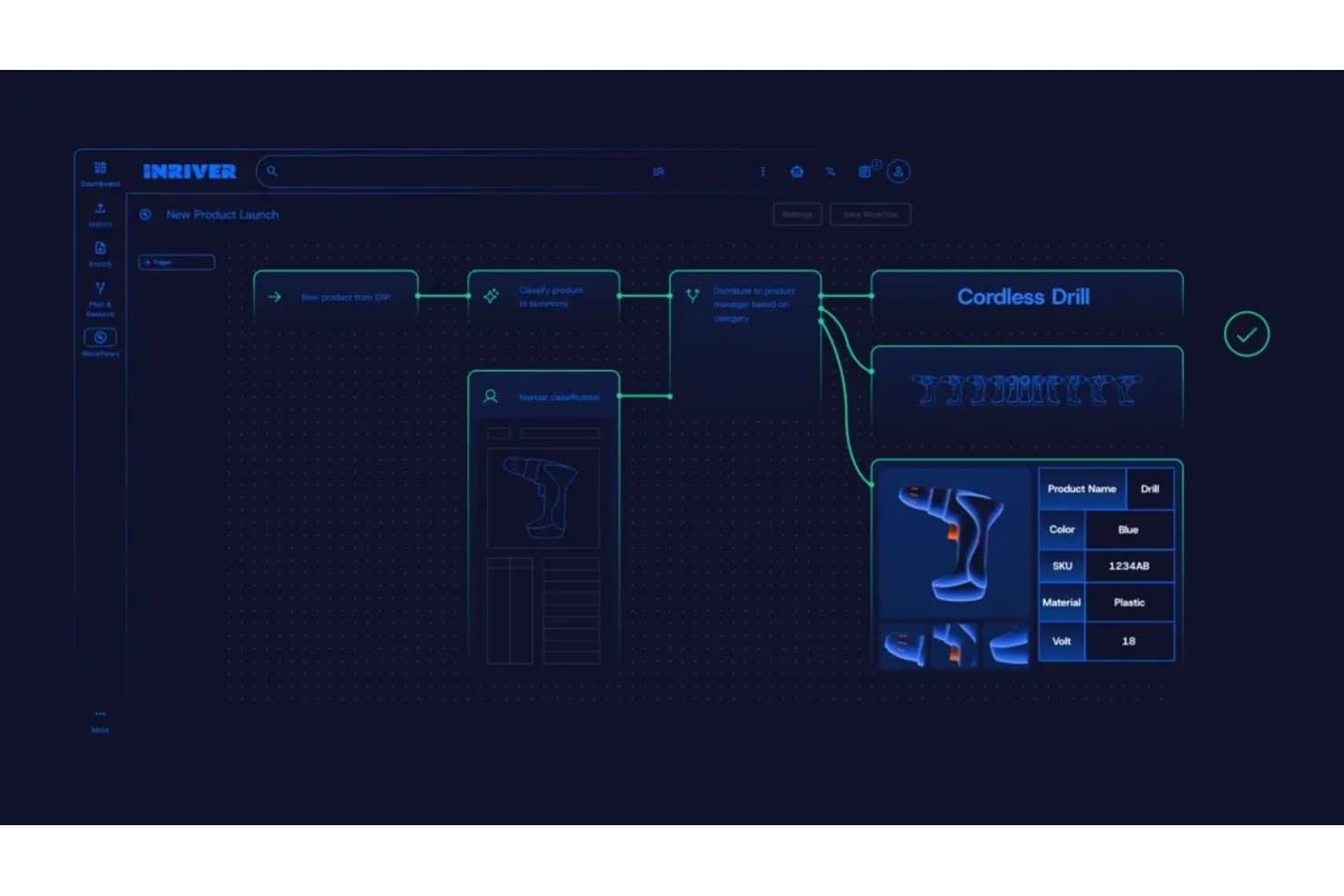
Inriver automates product data workflows from import to enrichment. Inriver is an AI-powered PIM platform that centralizes product data management, multi-channel syndication, content enrichment, and digital shelf analytics across complex, large-scale catalogs.
Who Is Inriver Best For?
Inriver is a strong fit for enterprise and mid-market teams managing large, complex product catalogs across multiple regions and sales channels.
Why I Picked Inriver
Inriver earns its spot on my shortlist because its AI-driven automation covers the full product data lifecycle, from ingesting and classifying incoming supplier data to generating channel-ready listings with Inspire AI. I'm particularly impressed by how Digital Shelf Analytics closes the loop: it monitors live listings for suppression or inaccuracies, then connects directly back to the PIM so my team fixes the source data rather than chasing symptoms. That publish-monitor-fix cycle is something I rarely see this tightly integrated in a single platform.
Inriver Key Features
- Elastic data model: Supports catalogs from 1,000 to 1,000,000 SKUs with a fully configurable structure that adapts as your business grows.
- Content Onboarding: Pulls supplier and partner data into the PIM, with AI mapping it to the right attributes and flagging gaps before enrichment begins.
- Brand Store: A self-service portal where internal teams, distributors, and partners can access approved product content and brand assets on demand.
- Product relationship mapping: Lets you define and manage upsell, cross-sell, and bundle relationships directly within the platform, available on the Professional tier and above.
Inriver Integrations
Inriver integrations include SAP Commerce Cloud, Adobe Commerce, Salesforce B2C Commerce, Adobe Experience Manager Assets, Bynder, Aprimo, Shopify, Amazon, and Microsoft. Its API-based syndication and configurable Integration Framework support custom connectors.
Pros and Cons
Pros:
- Shelf analytics links issues to source data
- AI enriches, translates, and validates listings
- Flexible modeling scales across complex catalogs
Cons:
- Some workflows depend on partner assistance
- Native digital asset management remains limited
Learn more about Inriver: Best for syndicating catalogs to 500+ retailers
- Free trial + free demo available
- From $45,000/year

Akeneo lets users switch between grouped, flat, or consolidated product list views. Akeneo is a product experience management platform that combines centralized PIM, integrated DAM, AI-driven content enrichment, and multi-channel syndication into a single product cloud.
Who Is Akeneo Best For?
Akeneo is a strong fit for digital merchandising and ecommerce teams managing large, complex catalogs across dozens of retail and marketplace channels.
Why I Picked Akeneo
I picked Akeneo as one of the best because no other tool on this list matches its syndication reach: 500+ retailer and marketplace destinations through its Activation module, complete with AI-powered auto-mapping and syndication error management. I love that channel readiness scoring flags issues before a listing goes live, which matters when you're pushing the same catalog to dozens of destinations simultaneously. The AI content generation also tailors descriptions by brand voice, locale, and channel requirements without manual rewrites.
Akeneo Key Features
- Data Quality Insights dashboard: Monitors product content completeness and quality scores per channel and locale, with AI-driven recommendations to fix gaps before publishing.
- Supplier Data Manager: Automates supplier onboarding and collects product data directly from suppliers, reducing manual data entry.
- Digital Showroom: Transforms your product catalog data into shareable, AI-assisted sales materials for buyers and distributors.
- Rules engine: Automatically updates product data attributes based on conditions you define, reducing repetitive enrichment work at scale.
Akeneo Integrations
Akeneo has native integrations with Salesforce Commerce Cloud, Adobe Commerce, and Shopify, plus 250+ marketplace integrations through the Akeneo App Store. Its REST API supports custom connections to ERP, PLM, MDM, CRM, ecommerce, and marketplace systems.
Pros and Cons
Pros:
- Centralizes complex multilingual product catalogs
- AI maps channels and flags readiness gaps
- Syndicates catalogs across 500+ retailers
Cons:
- Reporting feels limited for deeper analysis
- Asset handling can feel cumbersome
Learn more about Akeneo: Best for B2B catalog syndication with built-in DAM
- Free trial + free demo available
- Pricing upon request
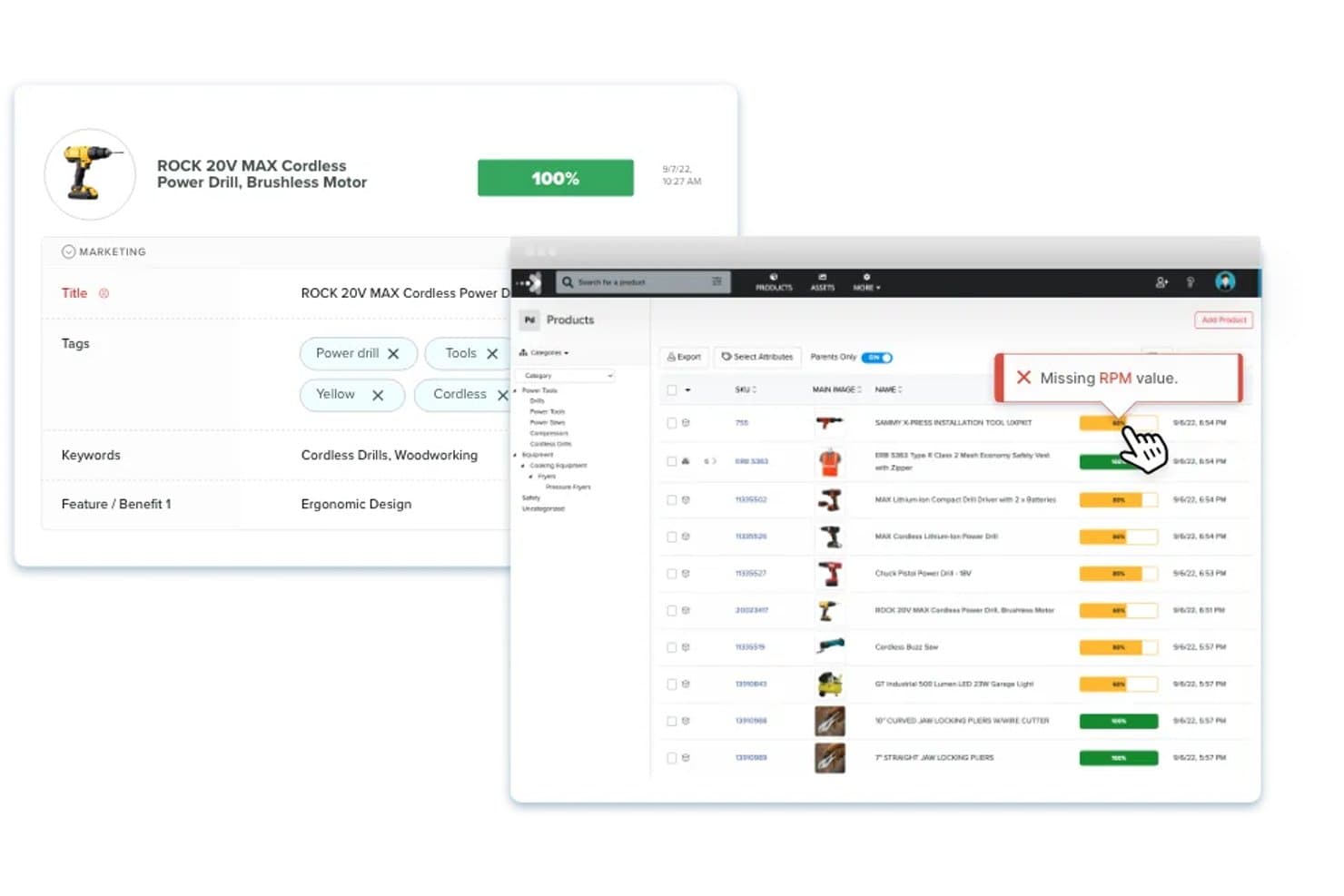
Catsy flags missing product attributes to maintain content completeness. Catsy is a PIM and DAM platform built for B2B manufacturers and distributors, combining centralized product data management, AI-driven content enrichment, multi-channel syndication, and an InDesign-based catalog builder in one system.
Who Is Catsy Best For?
Catsy is a strong fit for B2B manufacturers and distributors managing complex product catalogs across multiple sales channels and print formats.
Why I Picked Catsy
Catsy earns its spot on my shortlist because it's the only PIM platform I've seen that pairs B2B catalog syndication with a fully integrated DAM and an InDesign-based catalog builder in one system. I love that its AI enrichment pulls attributes directly from product images and fills gaps automatically, which is a real time-saver when you're managing thousands of industrial SKUs. Its unlimited marketplace channels across every pricing tier means syndicating to Amazon, Walmart, and Shopify never becomes a capacity bottleneck.
Catsy Key Features
- AI attribute extraction: Catsy's AI pulls product attributes directly from uploaded images and fills missing data fields automatically across your catalog.
- Multi-language content generation: Built-in AI translates and generates product descriptions, SEO metadata, and feature lists in 95+ languages from a single source.
- Automated workflow triggers: Task-based approval workflows send inbox notifications and trigger actions when product data meets defined conditions, keeping teams aligned on new product releases.
- Rollback and audit history: Every data change is logged with version control, and you can restore any previous version of a product record when errors are caught late.
Catsy Integrations
Catsy offers native API syncs with Shopify, Amazon, and Salesforce. It also exports product data to Walmart, Shopify Plus, BigCommerce, WooCommerce, and Shopware, with spreadsheet, API, and scheduled import options for additional data sources.
Pros and Cons
Pros:
- Rollback history supports safer catalog governance
- Print catalogs stay synced with product data
- AI extracts attributes from product images
Cons:
- Digital shelf analytics remain undocumented
- New users report complicated setup
Learn more about Catsy: 10Best for AI-powered customer intelligence
Unwrap
- 30-day free trial
- From $2,000/month (billed annually)
Visit WebsiteCustomer Rating:4.8/5
Unwrap highlights key customer feedback trends to support product experience decisions. Unwrap is a customer intelligence platform that uses AI to collect, categorize, and analyze customer feedback from surveys, support tickets, calls, and reviews to surface trends and guide product decisions.
Who Is Unwrap Best For?
Unwrap suits product and customer experience teams that need to make sense of high volumes of unstructured customer feedback across surveys, support tickets, and reviews.
Why I Picked Unwrap
I picked Unwrap as one of the best because its AI-powered Auto Tagger cuts through high volumes of unstructured customer feedback, instantly classifying signals from reviews, support tickets, and calls into actionable product themes. I especially like the plain-language Assistant, which lets product teams query their feedback data the way they'd ask a colleague, surfacing trends without manual analysis. Pair that with real-time Alerts, and you can catch emerging product issues before they scale.
Unwrap Key Features
- Feedback responder: Lets your team reply directly to customer feedback from within the platform without switching between tools.
- User segmentation: Filters and breaks down feedback by specific customer segments so you can compare responses across different groups.
- Multilingual support: Automatically processes and analyzes feedback submitted in multiple languages without manual translation.
- PII removal: Automatically detects and redacts personally identifiable information from incoming feedback before it's stored or analyzed.
Unwrap Integrations
Unwrap connects to 3,000+ feedback sources, including surveys, support tickets, calls, and reviews. It offers API access for custom integrations.
Pros and Cons
Pros:
- PII redaction protects customer feedback
- Plain-language analysis supports product decisions
- AI tags customer feedback themes
Cons:
- No product content syndication capabilities
- No centralized product data management
Learn more about Unwrap:
Andre løsninger for styring av produktopplevelsen
Her er noen flere programmer for styring av kundeopplevelsen som ikke kom med på topplisten.
- 11SyndigoBest for syndicating to top global retailers
- 12PimberlyBest for B2B catalog data and asset governance
- 13Bluestone PIMBest for composable PIM with MCP-native AI agents
- 14PimcoreBest for open-core, unlimited-scale catalog modeling
- 15PIMworksBest for omnichannel catalog syndication
- 16PlytixBest for centralizing multi-channel product data
- 17Pattern PXMBest for marketplace-native catalog syndication
- 18QuableBest for bundled DAM and PIM enrichment
- 19Centric PXMBest for syndicating catalogs across 1,000+ channels
How I Evaluate Product Experience Management Software
My evaluation splits into three parts. First—and most important—I look for tools that can consolidate product data into a single source and syndicate listings across retailers and marketplaces. Then I check for differentiating features like digital shelf scorecards. Finally, I consider onboarding support and pricing value.
Core Functionality (Table Stakes For This List)
When I'm selecting tools for my list, I score each one on a scale from 0 (does not offer the functionality) to 5 (excels in this area) for each core functionality listed below. I then convert the total into a percentage to help assess each tool's overall fit, with extra weight on any functionalities I've deemed essential.
- Product Data Management (Essential): I evaluate how well each tool structures attributes, handles variants, and scales across complex catalogs with thousands of SKUs.
- Multi-Channel Syndication (Essential): Each tool needs to push product content to marketplaces, retailer portals, and storefronts with channel-specific mapping and ongoing sync.
- Digital Asset Management: I check whether images, videos, and documents link directly to product records and whether the tool supports version control across channels.
- Content Enrichment & Scoring: Good tools flag incomplete descriptions and score listing quality against channel requirements, not just generic completeness checks.
- Data Validation & Governance: I look for configurable rules, role-based approval workflows, and audit trails that keep catalog data accurate as teams scale.
- Channel-Specific Formatting: The tool should adapt product content to each retailer's template requirements automatically rather than forcing manual rework per channel.
Once I have a list of tools that meet the criteria, I consider what sets each platform apart.
Differentiating Factors (What Sets Vendors Apart)
Here's how I compare and contrast different vendors:
Standout Features
Digital shelf scorecards are the first thing I check. I want to see how a tool benchmarks your listings against competitors on content compliance, imagery, and search rank at each retailer. Retailer compliance alerts matter just as much—tools like Salsify and Syndigo flag style-guide violations before you publish, which saves painful post-launch takedowns. I also evaluate AI-generated content capabilities, specifically whether the AI can draft and localize descriptions tuned to category norms rather than producing generic copy.
Beyond Features
I evaluate how quickly a platform moves new SKUs from draft to live across channels, especially during seasonal pushes where a missed launch window costs real revenue. Scalability matters just as much—tools need to handle multi-brand catalogs with thousands of attributes without choking on bulk updates. I also check for native connectors to ERP and commerce platforms like Shopify or SAP, since custom workarounds add maintenance debt fast.
Trender innen programvare for styring av produktopplevelsen
I arbeidet med undersøkelsen hentet jeg inn utallige produktoppdateringer, pressemeldinger og lanseringslogger fra ulike leverandører av programvare for styring av produktopplevelsen. Her er noen av trendene som er i ferd med å vokse frem, og som jeg følger med på:
- AI-drevet innsikt: Leverandører bruker AI til å analysere brukerdata mer inngående. Dette hjelper team med å forstå kundenes atferd og preferanser raskere. Noen verktøy tilbyr for eksempel nå prediktiv analyse for å forutse brukernes behov.
- Funksjoner for personalisering: Det er stadig større fokus på å personalisere brukeropplevelser. Programvaren gjør det nå mulig å tilpasse produktinteraksjoner til enkeltbrukere, slik at opplevelsen blir mer relevant og engasjerende.
- Programmer for kundens stemme: Flere verktøy har nå funksjoner for å samle inn og analysere direkte tilbakemeldinger fra kunder. Denne trenden er viktig for å utvikle produkter som treffer brukerne, og noen leverandører tilbyr oversikter over tilbakemeldinger i sanntid.
- Bærekraftsindikatorer: Etter hvert som virksomheter fokuserer på bærekraft, inkluderer noe programvare nå funksjoner for å spore miljøpåvirkning. Dette hjelper team med å samordne produktutviklingen med virksomhetens bærekraftsmål.
- Integrasjon av utvidet virkelighet (AR): AR brukes til å forbedre produktopplevelser, særlig innen detaljhandel og e-handel. Noen leverandører tilbyr AR-verktøy for virtuelle produktutprøvinger, noe som gir brukerne en mer interaktiv opplevelse.
Hva er programvare for håndtering av produktopplevelser?
Programvare for håndtering av produktopplevelser er et verktøy som hjelper virksomheter med å levere en helhetlig og engasjerende opplevelse av produktene sine på tvers av ulike digitale kontaktpunkter. Den tilbyr verktøy for håndtering av produktinformasjon og digitale ressurser, samt innsamling, lagring, håndtering og analyse av kundenes produktinteraksjoner og tilbakemeldinger på ett sentralt sted. Dette sikrer at kundene får nøyaktig og overbevisende informasjon om produktene uansett hvor de interagerer med merkevaren.
Denne typen programvare omfatter funksjoner som sentralisert håndtering av produktinnhold, håndtering av digitale ressurser, publisering i flere kanaler og analyse. Til sammen bidrar disse funksjonene til å levere en enhetlig og positiv opplevelse på tvers av kanaler, noe som fører til økt kundetilfredshet og lojalitet.
Funksjoner i programvare for håndtering av produktopplevelser
Når du velger programvare for håndtering av produktopplevelser, bør du vurdere disse nøkkelfunksjonene:
- Lokaliseringsfunksjoner: Tilpasser produktinnholdet til regionale språk, valutaer og kulturelle nyanser for globale markeder.
- Personaliseringverktøy: Leverer tilpassede produktopplevelser basert på kundenes preferanser og atferd.
- Sentralisert produktinnhold: Sikrer konsekvente og nøyaktige produktdata på tvers av plattformer for å lykkes i det digitale produktmarkedet.
- Tilpasning til flere regioner: Støtter lokaliserte kampanjer, priser og samsvar med regelverk for å møte ulike kundebehov.
- Dynamiske anbefalinger: Gir personlige produktforslag for å øke engasjementet og fremme konverteringer.
- Iterative tilbakemeldingssystemer: Samler inn og analyserer løpende tilbakemeldinger fra kunder for å forbedre produktopplevelser og håndtere problemområder.
- Verktøy for prioritering av produktveikart: Samordner produktveikartet og utviklingen med kundenes behov ved å rangere funksjoner basert på tilbakemeldinger og innvirkning.
Fordeler med programvare for håndtering av produktopplevelser
Implementering av programvare for håndtering av produktopplevelser kan gi flere fordeler for teamet og virksomheten din. Her er noen eksempler:
- Konsekvent merkevarekommunikasjon: Sentralisert innholdshåndtering sikrer nøyaktig og enhetlig produktinformasjon på tvers av alle kanaler.
- Større kundelojalitet: Personalisering og lokalisering skaper meningsfulle forbindelser og oppmuntrer til gjentatte kjøp.
- Raskere markedsinntreden: Lokaliseringsfunksjoner effektiviserer tilpasningen av produktinnhold til nye markeder og fremskynder ekspansjonen.
- Færre feil: Automatiserte oppdateringer og innholdssynkronisering reduserer risikoen for unøyaktigheter eller utdaterte produktdetaljer.
- Høyere konverteringsfrekvenser: Dynamiske anbefalinger og personlige handleopplevelser øker engasjementet og fremmer salget.