

Det finnes så mange ulike plattformer for interessenthåndtering på markedet at det kan være vanskelig å velge den beste for deg. Du ønsker å forbedre forholdet til interessentene, styrke kommunikasjonen, oppnå bedre samsvar med interessentenes forventninger og redusere risiko knyttet til interessentengasjement, men trenger det riktige verktøyet for teamet ditt. Jeg hjelper deg! I dette innlegget bruker jeg min personlige erfaring med å administrere ulike produkter og bruke mange forskjellige plattformer med store team og flere interessenter, mens jeg deler mine anbefalinger av den beste programvaren for interessenthåndtering.
Why Trust Our Software Recommendations
6,700+
Reviews
20
Industry experts
16+
Evaluation factors
14
Years
Our team has been testing and reviewing software since 2012. As product managers ourselves, we know how difficult—and important—it is to choose the right software.
For this guide, we evaluated tools using hands-on testing and independent research, scoring tools using our selection criteria.
Our reviews reflect our human editorial judgment, not a sales pitch.
Expert reviewers:
- Andrew LumbySenior TPM
- Cristiano ValimSenior UI/UX Lead


Sammenligningstabell for programvare for interessenthåndtering
Tabellen nedenfor sammenligner prisdetaljene for mine beste anbefalinger innen programvare for interessenthåndtering.
| Tool | Best For | Trial Info | Price | ||
|---|---|---|---|---|---|
| 1 | Best for approval workflows involving stakeholders | Free plan available | From $169/month (billed annually) | Website | |
| 2 | Best for all-in-one PM and stakeholder tracking | Free plan available | From $9/user/month (billed annually) | Website | |
| 3 | Best for infrastructure and government engagement teams | Free demo available | Pricing upon request | Website | |
| 4 | Best for property and GIS-linked stakeholder tracking | Free trial available and free demo available | Pricing upon request | Website | |
| 5 | Best for community and public engagement tracking | Free demo available | Pricing upon request | Website | |
| 6 | Best for building stakeholder plans around projects | 30-day free trial | From $9/user/month (billed annually) | Website | |
| 7 | Best for engagement and consultation teams | No Free Trial | From $995/user/month | Website | |
| 8 | Best for field-based community engagement teams | Free demo available | Pricing upon request | Website | |
| 9 | Best for sales team stakeholder mapping in Salesforce | Free demo available | Pricing upon request | Website | |
| 10 | Best for sales account stakeholder mapping | Free demo available | Pricing upon request | Website |





Anmeldelser av den beste programvaren for interessenthåndtering
Her er en kort beskrivelse av hvert system for interessenthåndtering, som viser hvert verktøys beste bruksområde, noen bemerkelsesverdige funksjoner og skjermbilder som gir et innblikk i brukergrensesnittet.
 Best for approval workflows involving stakeholders
- Free plan available
- From $169/month (billed annually)
Visit WebsiteCustomer Rating:4.7/5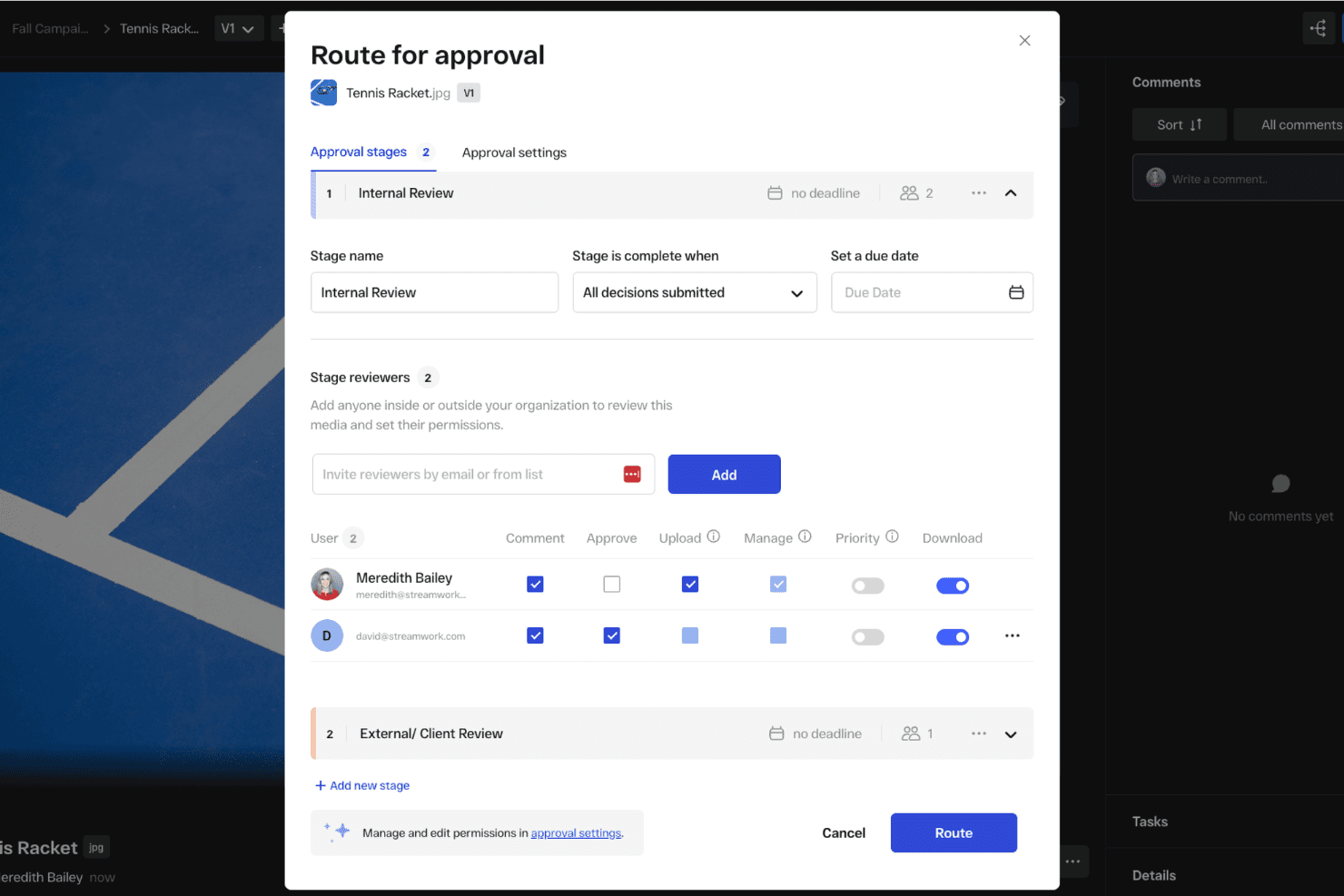
You can set up automated approval workflows to get feedback from external stakeholders. StreamWork is an AI-enabled online proofing and creative approval platform that handles multi-stage approval routing, version tracking, time-stamped feedback, and external reviewer access.
Who Is StreamWork Best For?
StreamWork suits marketing teams and creative agencies that need to manage multi-stage content approvals with external stakeholders like clients, executives, or legal reviewers.
Why I Picked StreamWork
I picked StreamWork as one of the best because it handles the part of stakeholder management that tends to break down most: getting sign-off from people outside your team. I love that external reviewers, whether that's a client, legal, or a senior executive, can approve directly through a single link with no account required. Multi-stage routing lets you sequence approvals through legal, then brand, then leadership, and every decision gets a timestamped audit trail.
StreamWork Key Features
- Multi-stage approval routing: Build sequential approval workflows that move through distinct groups—like legal, brand, and leadership—one stage at a time.
- Time-stamped, pinned comments: Reviewers can leave feedback anchored to a specific location on a file or exact frame in a video, keeping context intact.
- Automated reminders and deadlines: StreamWork sends nudges to approvers automatically, so you're not manually following up to keep reviews on schedule.
- One-click audit trail: Every version, comment, and approval decision is logged and accessible in a single click for governance and accountability purposes.
StreamWork Integrations
StreamWork lists seven integrations, including Adobe Creative Cloud, Slack, monday.com, Asana, Dropbox, Figma, and Box. It also offers an API and webhooks for custom integrations.
Pros and Cons
Pros:
- Multi-stage routing records approval decisions
- Pinned comments preserve review context
- External stakeholders approve without accounts
Cons:
- Creative reviews replace relationship tracking
- No stakeholder mapping or contact database
Learn more about StreamWork: Best for all-in-one PM and stakeholder tracking
- Free plan available
- From $9/user/month (billed annually)
Visit WebsiteCustomer Rating:4.6/5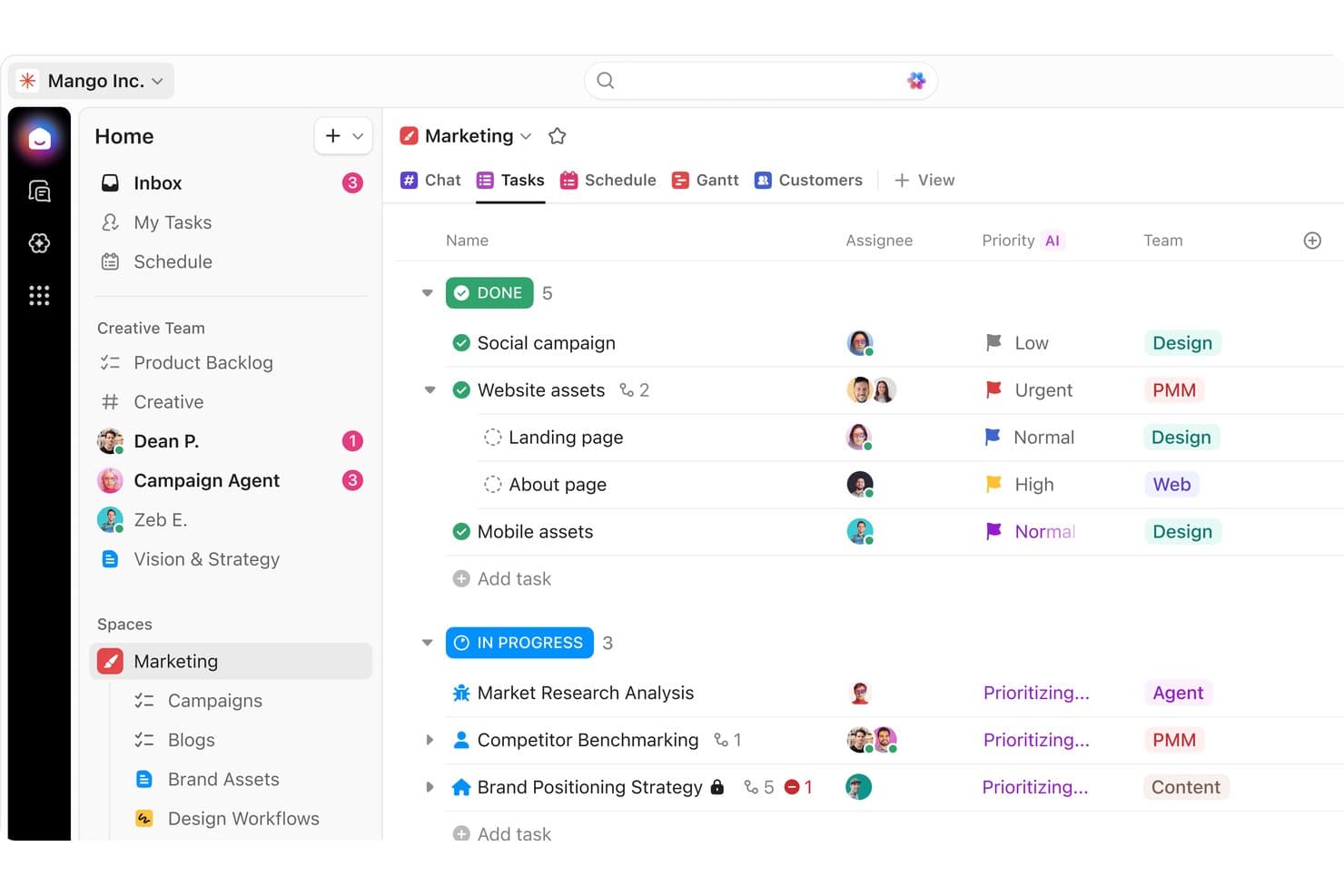
ClickUp organizes marketing tasks by status, priority, and team for stakeholders. ClickUp is a general-purpose work management platform that combines task tracking, project planning, stakeholder analysis templates, custom fields, dashboards, and collaboration tools in a single workspace.
Who Is ClickUp Best For?
ClickUp works well for cross-functional teams that already manage projects in one workspace and want to layer stakeholder tracking on top without adopting a separate tool.
Why I Picked ClickUp
I've included ClickUp in my top picks because it lets teams run stakeholder tracking and project delivery in the same workspace, without juggling separate tools. I particularly like its Stakeholder Analysis Template, which uses influence and support scoring across grouped views to help teams prioritize who needs attention and what action to take. The AI Notetaker also adds real value, automatically turning meeting touchpoints with stakeholders into assigned tasks tied directly to your project records.
ClickUp Key Features
- Stakeholder Analysis Template: A pre-built template with custom fields for influence and support scoring, plus grouped views that organize stakeholders by influence level, action type, and support status.
- Unlimited dashboards: Business plan users can build multiple dashboards with custom cards to track engagement activity and share progress with leadership across projects.
- Automations: Rule-based automations trigger task assignments, status updates, and reminders based on stakeholder record changes, reducing manual follow-up across your team.
- Guest access with permissions: External stakeholders can be invited as guests with role-specific permissions, controlling exactly what they can view or edit within your workspace.
ClickUp Integrations
ClickUp has native integrations with Slack, Microsoft Teams, Google Calendar, Zoom, HubSpot, Zendesk, GitHub, and Tableau. It also supports custom integrations through its API and Zapier.
Pros and Cons
Pros:
- Dashboards connect engagement with delivery
- Meeting notes become assigned follow-ups
- Stakeholder templates speed influence assessment
Cons:
- Cluttered workflows can hinder executive adoption
- Stakeholder relationships require manual modeling
Learn more about ClickUp: Best for infrastructure and government engagement teams
- Free demo available
- Pricing upon request
Visit WebsiteCustomer Rating:5/5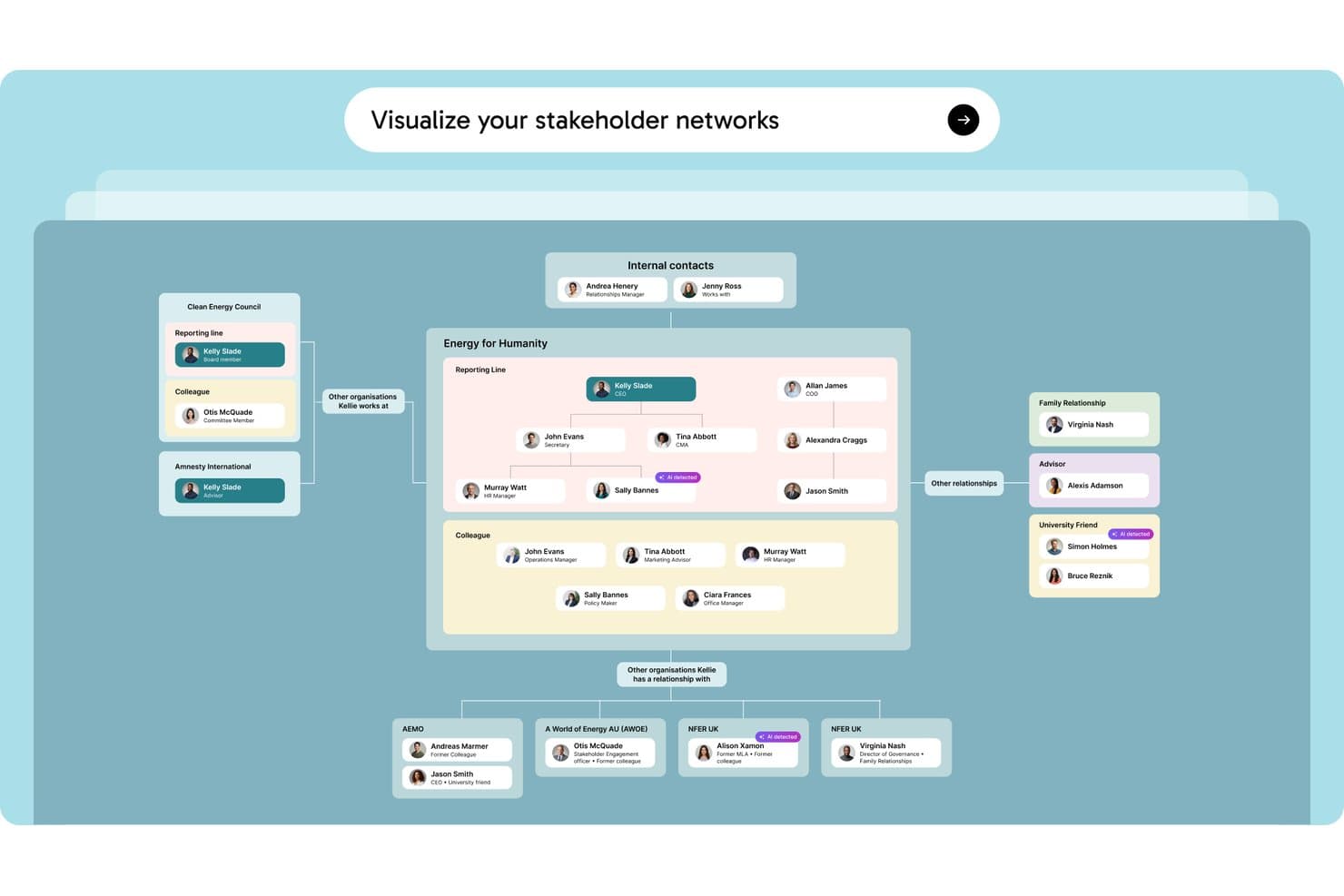
Simply Stakeholders maps relationships between stakeholders, internal contacts, and external organizations in a visual network. Simply Stakeholders is a stakeholder relationship management platform designed for complex, long-term engagement programs, offering multi-dimensional stakeholder mapping, interaction tracking, sentiment analysis, and AI-generated reporting.
Who Is Simply Stakeholders Best For?
Simply Stakeholders is a strong fit for community engagement officers, communications teams, and program managers working in infrastructure, energy, and government sectors.
Why I Picked Simply Stakeholders
I've included Simply Stakeholders in my top picks because it's purpose-built for the long-term, relationship-heavy engagement programs common in infrastructure and government work. I particularly like its multi-dimensional stakeholder mapping, which lets you score each stakeholder across influence, interest, impact, criticality, and position simultaneously. Its AI-driven sentiment analysis also updates based on logged interactions, so your team can spot shifting opposition before it becomes a problem on a major project.
Simply Stakeholders Key Features
- Outlook and Gmail plugins: Save emails, meetings, and contact details directly into the platform from your inbox without switching tools.
- Grievance management module: Log, track, and resolve community grievances in a dedicated add-on module built for public-facing engagement programs.
- Role-based access controls: Restrict access to confidential contacts and interactions so only the right team members can view or engage sensitive stakeholder records.
- Mobile app: Access stakeholder records, log interactions, and manage tasks on the go via Android and iOS apps.
Simply Stakeholders Integrations
Simply Stakeholders offers Outlook and Gmail plugins, plus an API for custom integrations. It also supports Zapier.
Pros and Cons
Pros:
- Role controls protect confidential stakeholder records
- AI summarizes interactions and tracks sentiment
- Maps stakeholders across five dimensions
Cons:
- Limited fit for product management teams
- Large contact imports require upfront setup
Learn more about Simply Stakeholders: Best for property and GIS-linked stakeholder tracking
- Free trial available and free demo available
- Pricing upon request
Visit WebsiteCustomer Rating:4.8/5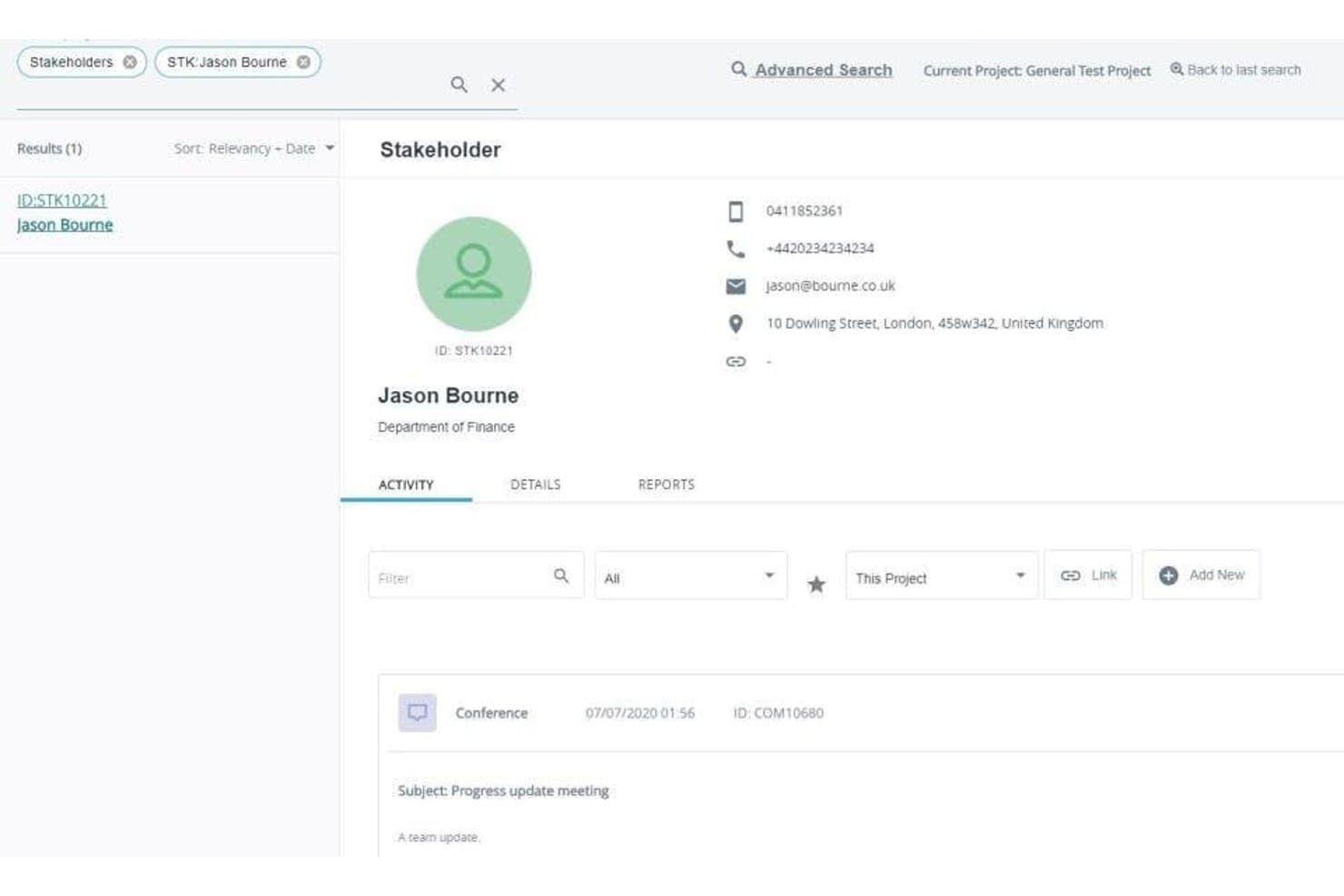
Darzin's stakeholder profiles log contact details and a full activity history of every interaction. Darzin is a stakeholder management platform purpose-built for public consultation and engagement teams, combining stakeholder mapping, multi-channel interaction tracking, AI sentiment analysis, issue management, and cross-project reporting.
Who Is Darzin Best For?
Darzin is a strong fit for public consultation and community engagement teams in government who need to manage stakeholder relationships across complex, multi-project environments.
Why I Picked Darzin Software
I picked Darzin as one of the best because it's genuinely built like a CRM, but wired specifically for stakeholder relationships rather than sales pipelines. I love that it maps stakeholders by influence, interest, and impact, while also linking affected properties to a GIS map so you can see exactly who raised which issues and where. AI sentiment analysis runs across text-heavy feedback, surfacing common themes and points of disagreement without manual review.
Darzin Software Key Features
- Outlook and Gmail plugins: Email plugins automatically log emails to the correct stakeholder record and create a new contact if one doesn't exist.
- Cross-project reporting: You can run automated reports across multiple projects or your entire organization from a single view.
- Survey creation and publishing: You can build and publish surveys directly in the platform, with responses matched to stakeholder records automatically.
- Mobile field apps: iOS and Android apps let you capture notes and interactions while working on-site or in the field.
Darzin Software Integrations
Darzin connects with Outlook and Gmail through plugins. Native integrations and API availability aren’t clearly documented.
Pros and Cons
Pros:
- Centralized interaction history spans engagement channels
- AI sentiment analysis surfaces feedback themes
- GIS links issues to affected properties
Cons:
- Limited public review evidence
- No roadmap or backlog workflows
Learn more about Darzin Software: Best for community and public engagement tracking
- Free demo available
- Pricing upon request
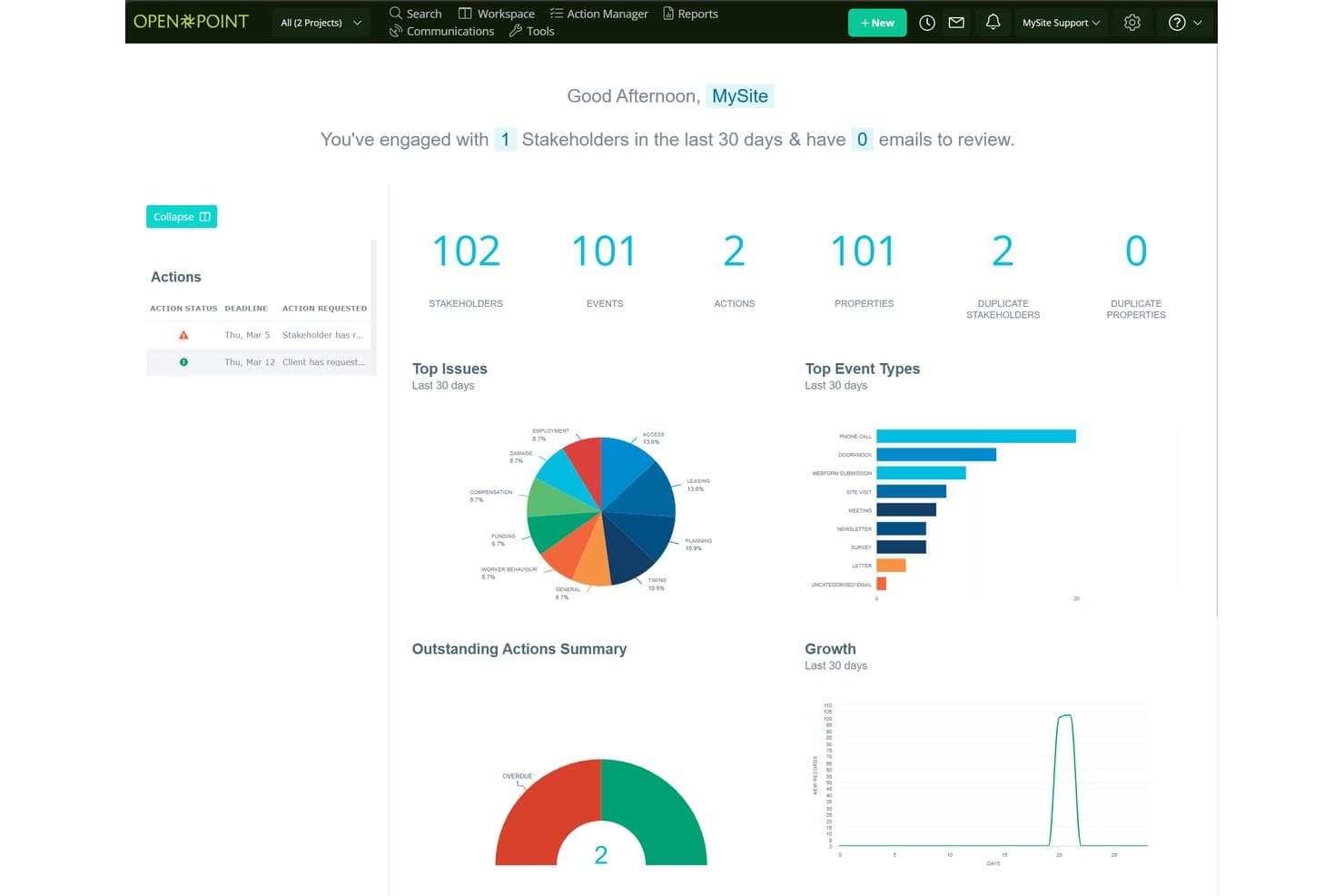
Social Pinpoint centralizes stakeholder data, events, and actions in one dashboard. Social Pinpoint is a stakeholder engagement platform that combines a stakeholder relationship management system, community engagement tools, interaction tracking, and AI-driven sentiment analysis and reporting.
Who Is Social Pinpoint Best For?
Social Pinpoint suits teams in government, infrastructure, and utilities that need to manage public consultation and community engagement across large-scale projects.
Why I Picked Social Pinpoint
I picked Social Pinpoint as one of the best because no other tool on this list combines a full community engagement toolkit with a stakeholder relationship management system in one platform. I love that it captures every interaction across email, SMS, calls, and webforms, then links them directly to stakeholder records and projects. Its AI-driven sentiment tagging flags negative responses in real time, so I can spot rising community opposition before it escalates.
Social Pinpoint Key Features
- Outlook add-in: Saves emails from Outlook directly into stakeholder records, keeping your interaction history complete without manual entry.
- GIS-based map layers: Visualizes stakeholder concentrations as icons, heatmaps, or clusters on a custom base map to identify geographic hot spots for specific issues.
- 40+ community engagement tools: Includes social maps, quick polls, participatory budgeting, idea walls, forums, and Q&A tools for structured public consultation.
- Cross-project reporting: Compares engagement activity, sentiment, and themes across multiple projects, programs, regions, and time periods in one dashboard.
Social Pinpoint Integrations
Documented integrations include Microsoft Outlook, Social Point, and its stakeholder management module. Social Pinpoint also offers an open REST API for CRM, GIS, and document management connections, plus SAML SSO with Microsoft Entra ID and Okta.
Pros and Cons
Pros:
- Supports audits with detailed interaction histories
- Maps geographic engagement hotspots and sentiment
- Links community feedback to stakeholder records
Cons:
- Targets consultation teams over product managers
- Lacks influence-interest stakeholder mapping
Learn more about Social Pinpoint: Best for building stakeholder plans around projects
- 30-day free trial
- From $9/user/month (billed annually)
Visit WebsiteCustomer Rating:4.5/5
Smartsheet offers a useful stakeholder communication plan template. Smartsheet is a spreadsheet-based work management platform that supports stakeholder tracking through customizable registers, engagement plan templates, Gantt and calendar views, automated reminders, and reporting dashboards.
Who Is Smartsheet Best For?
Smartsheet is a strong fit for project-driven teams that want to manage stakeholder registers, engagement plans, and communication logs in the same place they run their projects.
Why I Picked Smartsheet
I picked Smartsheet as one of the best because it's the only tool on this list that lets you manage stakeholder plans directly inside your project work. I love that free engagement plan templates come with built-in Gantt and calendar views, so you can plot outreach tasks on the same timeline as your deliverables. Unlimited free Contributors and Guests mean external stakeholders can be part of the plan without adding to your seat count.
Smartsheet Key Features
- Stakeholder register builder: Create custom stakeholder logs with dropdown columns, conditional formatting, and row-level comments, attachments, and activity history.
- Automated reminders and alerts: Set up rule-based automations to trigger outreach reminders, approval requests, and status alerts across your team.
- Reporting dashboards: Build unlimited reports and dashboards across all plans to visualize stakeholder activity and share progress with leadership.
- Dynamic View: Control exactly which rows and columns external stakeholders can see or edit, giving you scoped, secure access without extra licensing costs.
Smartsheet Integrations
Smartsheet offers nearly 100 integrations, including Microsoft 365, Google Workspace, Slack, Power BI, Tableau, HubSpot, Microsoft Dynamics 365, and Jira through a connector add-on.
Pros and Cons
Pros:
- External participants can contribute without full access
- Flexible registers support custom engagement workflows
- Stakeholder plans share project timelines
Cons:
- Users report dated, changing interface experiences
- Stakeholder mapping requires manual setup
Learn more about Smartsheet:
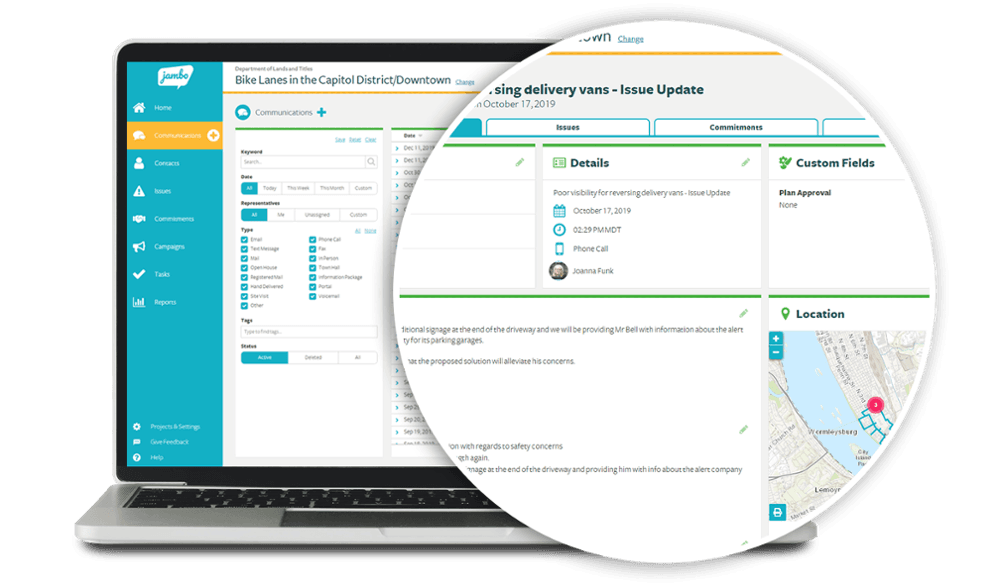
Jambo allows stakeholders to dig down into the detail. Jambo is a stakeholder relationship management (SRM) platform built for engagement and consultation teams, offering interaction tracking, issue and grievance logging, sentiment analysis, geospatial mapping, and compliance reporting.
Who Is Jambo Best For?
Jambo is a strong fit for government, energy, and infrastructure teams that manage community and regulatory engagement across multiple projects.
Why I Picked Jambo
I picked Jambo as one of the best because it's purpose-built for engagement and consultation teams in a way that generic CRMs simply aren't. I love how it ties interaction logging directly to issues and grievances, so when a community concern escalates, your full communication history is already attached. Its AI Sentiment scoring also updates automatically from interaction records, giving you a real-time read on stakeholder mood across a project without manual tagging.
Jambo Key Features
- Outlook add-in: A free Microsoft Outlook add-in logs emails and meetings directly into Jambo and creates contact records automatically.
- Visual risk matrix: Issues and grievances are ranked by impact and urgency on a visual matrix, giving your team a clear view of escalating concerns.
- Global View dashboard: Combines data across all your projects into a single view, with the ability to split by project, sub-project, or program.
- Geospatial mapping: A built-in Esri map viewer displays engagement locations and hotspots, with an optional add-on for ArcGIS Pro integration and project boundary layers.
Jambo Integrations
Jambo has documented integrations with Microsoft Outlook and Esri ArcGIS Pro. Enterprise and higher plans include a public API and Zapier.
Pros and Cons
Pros:
- Supports compliance-focused reporting workflows
- Links grievances with engagement records
- Centralizes stakeholder communication histories
Cons:
- Campaign coordination tools remain unreleased
- No influence-interest stakeholder mapping
Learn more about Jambo:- Best for field-based community engagement teams
- Free demo available
- Pricing upon request
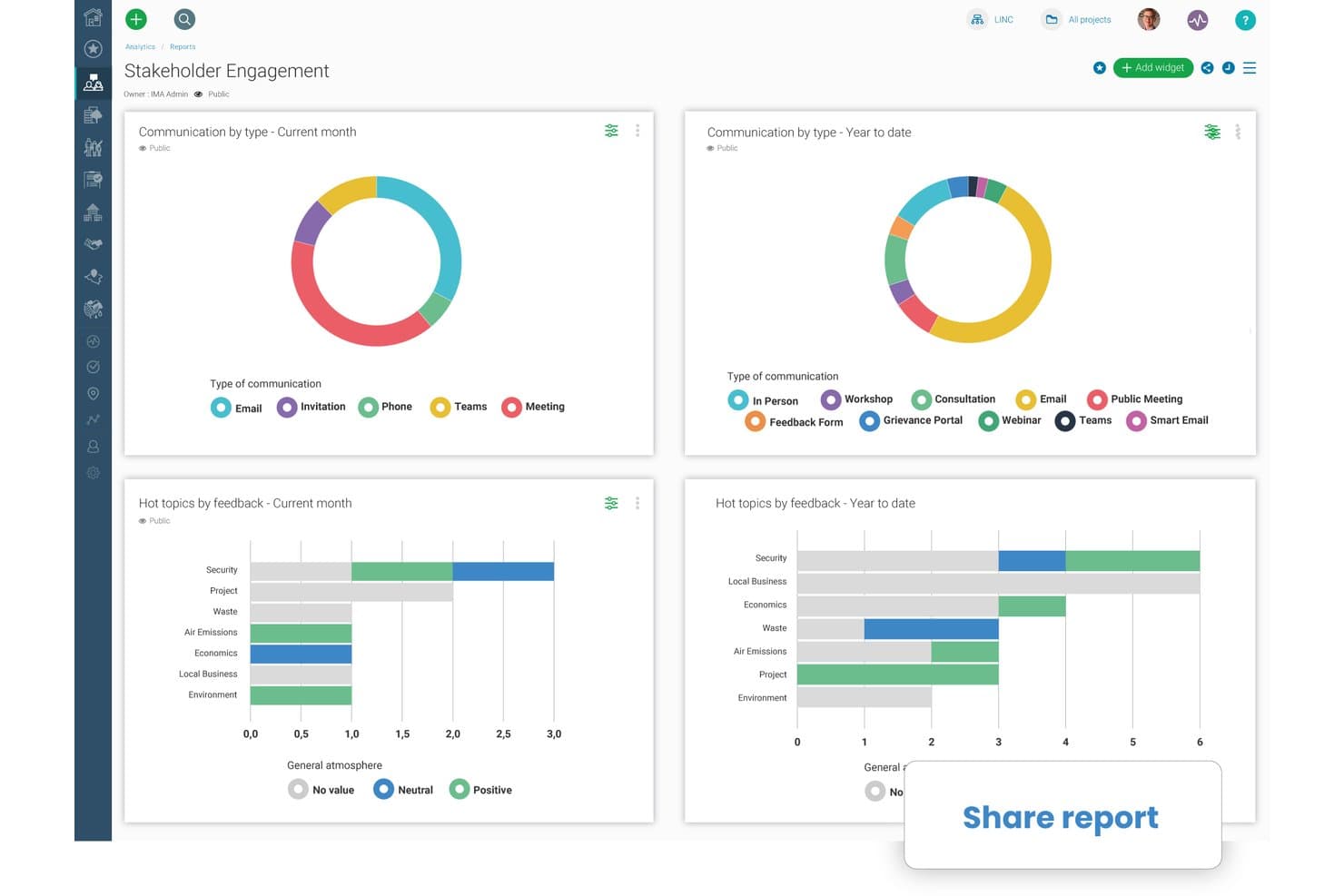
Borealis lets users share stakeholder engagement reports instantly. Borealis is a stakeholder engagement platform built for field-based and community relations teams, combining GIS mapping, interaction tracking, engagement planning, grievance management, and AI-powered reporting in one place.
Who Is Borealis Best For?
Borealis is a strong fit for community relations and public engagement teams working in regulated, land-based industries like energy, mining, and utilities.
Why I Picked Borealis
Borealis earns its spot on my shortlist because it's purpose-built for community relations teams doing real field work, not just desk-based stakeholder tracking. I love that its built-in GIS and ArcGIS mapping links stakeholders directly to physical assets and locations, which matters when your team is managing land-based projects across multiple sites. The offline mobile app means field staff can log interactions and grievances on-site without waiting for connectivity.
Borealis Key Features
- AI-powered report drafting: Borealis automatically generates draft reports from your logged project data, pulling in relevant interactions, issues, and stakeholder details.
- "Ask AI" query tool: You can ask direct questions about your project data in plain language, and the AI returns answers with cited sources from within Borealis.
- Grievance and contribution portals: Built-in online portals let community members submit complaints, donation requests, or concerns directly into the platform for your team to manage.
- Power BI API connection: Borealis connects to Power BI via API, letting you pull engagement and reporting data into your existing analytics environment.
Borealis Integrations
Borealis offers built-in integrations with Outlook, Gmail, Mailchimp, ArcGIS, and the U.S. Government Officials Database. Its API connects with Power BI, CRM, project management tools, and other corporate systems.
Pros and Cons
Pros:
- AI drafts reports from logged engagement data
- Offline mobile logging supports field visits
- GIS maps stakeholders to physical assets
Cons:
- Online engagement options remain relatively limited
- Configuration can complicate initial onboarding
Learn more about Borealis: - Best for sales team stakeholder mapping in Salesforce
- Free demo available
- Pricing upon request
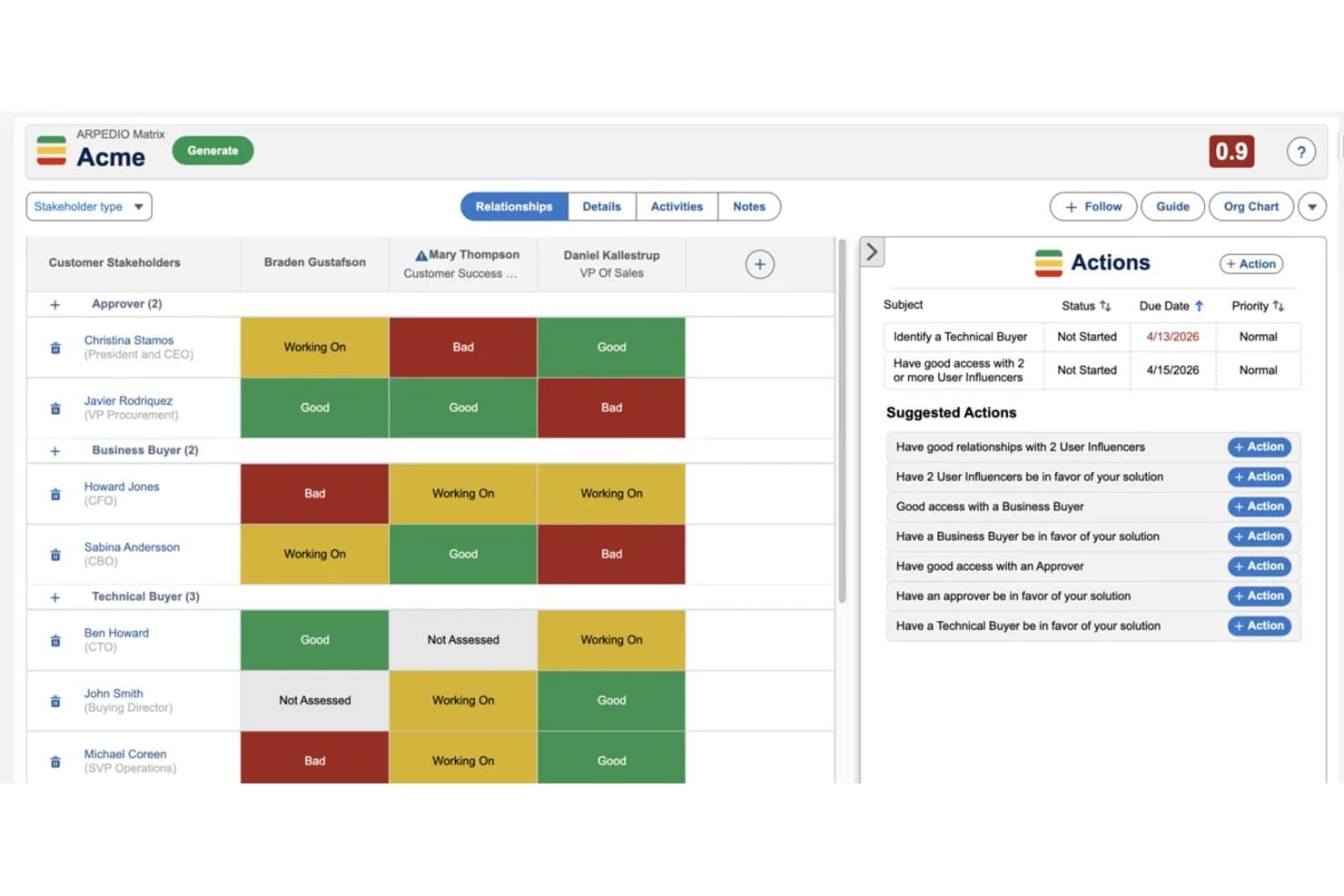
Arpedio maps stakeholder relationships and tracks engagement status visually. Arpedio is a Salesforce-native account-based selling platform that combines AI-powered stakeholder mapping, relationship scoring, interaction tracking, and account planning tools for enterprise sales teams.
Who Is Arpedio Best For?
Arpedio is built for enterprise sales teams—strategic account managers, key account managers, and RevOps leaders—who run complex B2B deals entirely inside Salesforce.
Why I Picked Arpedio
Arpedio earns its spot on my shortlist because it's the only stakeholder mapping tool I've found that's built entirely inside Salesforce rather than bolted onto it. For sales teams running complex B2B deals, that means AI-generated org charts built from existing contact and activity data, with no manual diagramming required. I also like the relationship matrix, which scores each stakeholder on access, influence, and support level, so reps can immediately see who's a champion and who's a blocker.
Arpedio Key Features
- Sentiment agent: Tracks whether individual stakeholder relationships are warming, cooling, or stalled based on activity data, and surfaces coaching prompts for reps.
- Account plan records: Structured Salesforce records that include an executive summary, SWOT analysis, success criteria, and milestones tied to specific stakeholders.
- Activity history continuity: Logs emails, calls, meetings, and notes to contact records so the full relationship history carries over when reps change.
- White-space analysis matrix: Maps your Salesforce product catalogue against account dimensions like regions and business units to surface revenue gaps.
Arpedio Integrations
Arpedio runs natively in Salesforce Lightning and integrates with Einstein Activity Capture, Salesforce Inbox, and Outreach for activity data. It also supports custom activity connectors, but no native Jira, Slack, Asana, or product-tool integrations are documented.
Pros and Cons
Pros:
- Sentiment signals flag cooling relationships early
- Relationship history survives account team changes
- AI-built org charts reduce manual mapping
Cons:
- No classic influence-interest grid
- Sales focus excludes project stakeholder workflows
Learn more about Arpedio:  Best for sales account stakeholder mapping
- Free demo available
- Pricing upon request
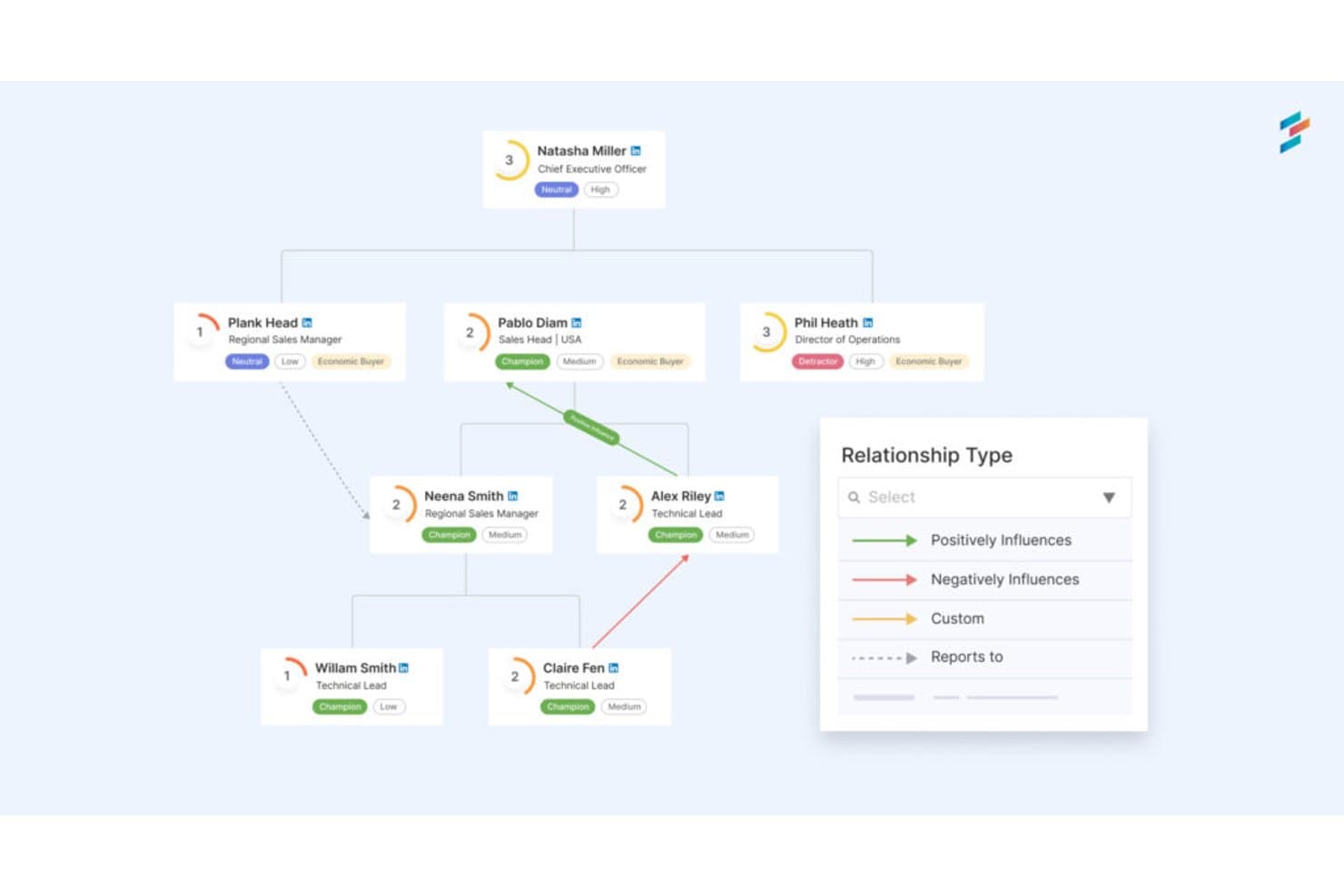
DemandFarm maps stakeholder relationships and influence across org charts. DemandFarm is a B2B key account management platform that combines relationship mapping, AI-driven sentiment analysis, interaction tracking, and deal risk assessment for sales teams managing complex customer accounts.
Who Is DemandFarm Best For?
DemandFarm is a strong fit for B2B sales teams managing strategic accounts with complex, multi-contact buying committees.
Why I Picked DemandFarm
DemandFarm earns its spot on my shortlist because of how well it handles B2B account relationship mapping. I love that its Relationship Maps auto-generate from CRM contacts and let you layer on power and affinity scores for each person in a buying committee. The Kampanion AI goes further, flagging silent influencers and cold decision makers before they become deal risks. That level of contact-level intelligence is rare in a sales account tool.
DemandFarm Key Features
- Automated risk surveillance: Monitors account health and flags relationship cracks, slow-moving objectives, and at-risk contacts before they threaten deals.
- Engagement analytics: Tracks how frequently and meaningfully your team engages each contact, so you can prioritize outreach where it matters most.
- White Space Planner: Identifies untapped revenue opportunities within existing accounts by mapping where growth potential remains uncovered.
- CRM-mirrored permissions: Syncs access controls directly with your CRM so users only see the account data they're already authorized to view.
DemandFarm Integrations
DemandFarm integrations include Salesforce, HubSpot, Microsoft Dynamics, Microsoft Teams, Outlook, Gmail Calendar, Slack, and Gong. No public API documentation is listed for custom integrations.
Pros and Cons
Pros:
- Mirrors CRM permissions across account teams
- Flags silent influencers before deals stall
- Maps buying committees with power scores
Cons:
- Offers no roadmap or consultation planning
- Focuses on sales accounts, not general stakeholders
Learn more about DemandFarm:
Annen programvare for interessenthåndtering
Her er noen flere alternativer innen programvare for interessenthåndtering som ikke kom med på kortlisten min, men som fortsatt er verdt å undersøke:
- 11TractivityBest for large-scale public engagement audit trails
- 12PublicInputBest for multi-channel civic engagement tracking
- 13monday AI WorkspaceBest for managing stakeholders within project boards
- 14KintoneBest for no-code custom workflow apps
- 15StakeTrackerBest for a secure, online stakeholder management system
- 16Engagement HubBest for public consultation engagement teams
- 17SMARTBest for intelligent stakeholder engagement
How I Evaluate Stakeholder Management Software
I split my evaluation into three parts: core functionality first (can the tool map stakeholders by influence and log interaction history?), then standout features like native roadmap integration, and finally what the vendor offers beyond features—onboarding support, pricing transparency, and team scalability.
Core Functionality (Table Stakes For This List)
When I'm selecting tools for my list, I score each one on a scale from 0 (does not offer the functionality) to 5 (excels in this area) for each core functionality listed below. I then convert the total into a percentage to help assess each tool's overall fit, with extra weight on any functionalities I've deemed essential.
- Stakeholder Mapping (Essential): I check whether the tool offers visual grids or matrices that let you plot stakeholders by influence and interest, not just flat lists.
- Interaction Tracking (Essential): Each tool should log contacts and communication history in one place, ideally capturing multi-channel exchanges with searchable records.
- Engagement Planning: I look for structured scheduling of outreach activities tied directly to stakeholder records, with reminders and team assignment options.
- Risk & Sentiment Assessment: Structured scoring matters here. I evaluate whether you can tag sentiment or opposition levels using defined criteria, not just free-text notes.
- Reporting & Analytics: Dashboards that visualize engagement trends and stakeholder coverage tell me more than raw data exports or static summary tables.
- Collaboration & Access Controls: I check for role-based permissions so multiple teams can coordinate on shared stakeholder data without exposing sensitive records.
Once I have a list of tools that meet the criteria, I consider what sets each platform apart.
Differentiating Factors (What Sets Vendors Apart)
Here's how I compare and contrast different vendors:
Standout Features
Meeting and calendar integration is where I see the biggest time savings. Tools that sync with your calendar to auto-log stakeholder touchpoints eliminate the "did I follow up?" guesswork after a packed sprint review week. I also evaluate AI-generated stakeholder summaries, which pull sentiment snapshots from meeting notes so you're not manually writing recaps. Custom stakeholder portals matter too. Giving executives a self-serve view of roadmap status cuts down on ad hoc update requests that pull PMs out of deep work.
Beyond Features
I check whether a tool fits cross-functional teams, not just PMs. If a VP of sales can't onboard in minutes and pull a stakeholder view without training, adoption stalls and your data stays incomplete. Integration depth matters just as much—native connections to Jira, Slack, or Salesforce mean stakeholder records stay current without duplicate entry across systems. I also evaluate how licensing scales as stakeholder volume grows, since a pricing model that penalizes you for adding external collaborators can quietly break your budget mid-rollout.
Slik velger du programvare for interessenthåndtering
Det er lett å gå seg vill i lange funksjonslister og komplekse prisstrukturer. For å hjelpe deg med å holde fokus mens du går gjennom den unike prosessen med å velge programvare, får du her en sjekkliste over faktorer du bør ha i bakhodet:
| Faktor | Hva du bør vurdere |
|---|---|
| FaktorSkalerbarhet | Hva du bør vurdereKan programvaren vokse sammen med teamet ditt? Vurder brukerbegrensninger og priser etter hvert som teamet utvides. |
| FaktorIntegrasjoner | Hva du bør vurdereKan den integreres med eksisterende verktøy som CRM- eller prosjektstyringsplattformer? |
| FaktorTilpasningsmuligheter | Hva du bør vurdereKan du tilpasse programvaren til de spesifikke arbeidsflytene dine? Se etter fleksible oversikter og felter. |
| FaktorBrukervennlighet | Hva du bør vurdereEr grensesnittet intuitivt for teamet ditt? Test det med en demonstrasjon for å vurdere læringskurven. |
| FaktorImplementering og oppstart | Hva du bør vurdereHvor raskt kan teamet ditt komme i gang? Se etter opplæringsressurser og tilgjengelige alternativer for kundestøtte. |
| FaktorKostnad | Hva du bør vurdereEr prisen i tråd med budsjettet ditt? Vurder skjulte gebyrer eller nødvendige tillegg. |
| FaktorSikkerhetstiltak | Hva du bør vurdereOppfyller verktøyet standardene dine for datasikkerhet? Se etter kryptering og brukertillatelser. |
| FaktorTilgjengelig kundestøtte | Hva du bør vurdereHvilke kanaler for kundestøtte er tilgjengelige? Sørg for at kundestøtten er tilpasset teamets behov og tidssoner. |
Trender innen programvare for interessenthåndtering
Vi har sett betydelige innovasjoner og endringer som omformer hvordan organisasjoner kommuniserer, samarbeider og engasjerer interessentene sine, noe som har ført til mange endrede trender innen programvare for interessenthåndtering. Jeg har identifisert flere trender som både gjenspeiler bransjens endrede prioriteringer og krav, og fremhever retningen teknologien for interessenthåndtering beveger seg i.
Datadrevne innsikter og analyser
- AI-drevne analyser: Bruken av kunstig intelligens til å analysere tilbakemeldinger fra interessenter og engasjementsnivåer har blitt stadig mer utbredt. Denne teknologien gir dypere innsikt i interessentenes oppfatninger, slik at organisasjoner kan tilpasse strategiene sine mer effektivt.
- Prediktive analyser: Verktøy inkluderer i økende grad funksjoner for prediktive analyser som forutsier fremtidig interessentatferd og preferanser basert på historiske data. Denne funksjonaliteten muliggjør proaktiv i stedet for reaktiv interessenthåndtering.
Nye og uvanlige funksjoner
- Blokkjede for åpenhet: Enkelte verktøy eksperimenterer med blokkjedeteknologi for å forbedre åpenhet og sikkerhet i kommunikasjonen med interessenter. Denne nye tilnærmingen er spesielt attraktiv for organisasjoner som prioriterer dataintegritet og åpenhet.
- Engasjement gjennom virtuell virkelighet (VR): Selv om bruken fortsatt er på et tidlig stadium, representerer bruk av VR til interessentengasjement en banebrytende tilnærming til oppslukende kommunikasjonsstrategier, og gir interessenter en unik måte å oppleve og samhandle med prosjektresultater på.
Personalisering og segmentering
- AI-drevet personalisering: Det er en økende trend å bruke AI til å tilpasse kommunikasjon og engasjementsstrategier til individuelle interessenters preferanser og atferd. Dette nivået av personalisering forbedrer effektiviteten i engasjementsarbeidet ved å sikre at interessentene mottar relevant og tidsriktig informasjon.
Trendene innen programvare for interessenthåndtering viser en utvikling mot mer integrerte, intelligente og oppslukende verktøy. Etter hvert som disse trendene fortsetter å utvikle seg, gir de et innblikk i fremtidens interessenthåndtering, der teknologi vil spille en avgjørende rolle i å bygge og opprettholde sterke interessentrelasjoner.
Hva er programvare for interessenthåndtering?
Programvare for interessenthåndtering er et verktøy som hjelper organisasjoner med å følge opp og håndtere samhandling med interessenter. Prosjektledere, teamledere og kommunikasjonsansvarlige bruker vanligvis disse verktøyene for å forbedre kommunikasjonen med og engasjementet blant interessentene. Funksjoner for oppgavesporing, rapportering og kommunikasjon bidrar til å organisere samhandlingen med interessenter og sikre at prosjektet er samordnet. Samlet sett gir disse verktøyene bedre håndtering av interessentrelasjoner og prosjektresultater.
Funksjoner
Når du velger programvare for interessenthåndtering, bør du se etter følgende nøkkelfunksjoner:
- Kontaktadministrasjon: Sentraliserer interessentinformasjon, slik at det blir enkelt å finne og oppdatere opplysninger for effektiv kommunikasjon.
- Oppgavesporing: Hjelper deg med å tildele og overvåke oppgaver, slik at tidsfrister overholdes og prosjekter holder fremdriften.
- Rapportering: Gir innsikt i interessentengasjement og prosjektfremdrift, og bidrar til velinformerte beslutninger.
- Kommunikasjonsverktøy: Tilrettelegger for direkte kommunikasjon med interessenter og forbedrer engasjement og åpenhet.
- Tilpassbare dashbord: Lar deg tilpasse grensesnittet til arbeidsflyten din, noe som forbedrer brukervennligheten og effektiviteten.
- Gantt-diagrammer: Visualiserer prosjektets tidslinjer og milepæler, og hjelper team med å planlegge og gjennomføre prosjekter effektivt.
- Automatiske påminnelser: Hjelper teamet med å holde tidsplanen ved å sende varsler om kommende oppgaver og tidsfrister.
- Integrasjonsmuligheter: Kobler seg til andre verktøy i teknologistakken din og sikrer sømløs dataflyt og samarbeid.
- Sikkerhetstiltak: Beskytter interessentdata med kryptering og tilgangskontroller, og ivaretar personvern og samsvar.
- Analyser: Gir detaljert innsikt i samhandling med interessenter og prosjektmålinger, og støtter strategisk planlegging.
Fordeler
Implementering av programvare for interessenthåndtering gir flere fordeler for teamet og virksomheten din. Her er noen av fordelene du kan se frem til:
- Forbedret kommunikasjon: Tilrettelegger for direkte interaksjon med interessenter og sikrer at alle holdes informert og engasjert.
- Forbedret organisering: Sentraliserer interessentdata og prosjektdetaljer, noe som gjør det enklere å administrere informasjon og oppgaver.
- Økt effektivitet: Automatiserer påminnelser og oppfølging av oppgaver, slik at teamet kan overholde frister uten manuell oppfølging.
- Bedre beslutningstaking: Gir detaljerte rapporter og analyser som gir deg innsikt til å ta informerte strategiske beslutninger.
- Større åpenhet: Gir innsyn i prosjektfremdrift og interessentengasjement, slik at alle har samme oversikt.
- Tilpassbare arbeidsflyter: Lar deg tilpasse prosesser etter dine unike behov, noe som forbedrer den generelle produktiviteten.
- Datasikkerhet: Beskytter sensitiv interessentinformasjon med robust kryptering og tilgangskontroller, noe som sikrer samsvar og personvern.
Kostnader og priser
Valg av programvare for interessenthåndtering krever en forståelse av de ulike prismodellene og abonnementene som er tilgjengelige. Kostnadene varierer basert på funksjoner, teamstørrelse, tillegg og mer. Tabellen nedenfor oppsummerer vanlige abonnementer, gjennomsnittsprisene deres og typiske funksjoner som er inkludert i programvareløsninger for interessenthåndtering:
Sammenligningstabell for programvare for interessenthåndtering
| Abonnementstype | Gjennomsnittspris | Vanlige funksjoner |
|---|---|---|
| AbonnementstypeGratisabonnement | Gjennomsnittspris$0 | Vanlige funksjonerGrunnleggende kontaktadministrasjon, begrenset oppfølging av oppgaver og enkel rapportering. |
| AbonnementstypePersonlig abonnement | Gjennomsnittspris$5-$25/bruker/måned | Vanlige funksjonerOppfølging av oppgaver, grunnleggende integrasjoner og begrensede tilpasningsmuligheter. |
| AbonnementstypeBedriftsabonnement | Gjennomsnittspris$25-$50/bruker/måned | Vanlige funksjonerAvansert rapportering, forbedrede sikkerhetsfunksjoner og flere integrasjoner. |
| AbonnementstypeStorbedriftsabonnement | Gjennomsnittspris$50-$100/bruker/måned | Vanlige funksjonerFull tilpasning, prioritert brukerstøtte samt omfattende analyser og rapportering. |
Vanlige spørsmål om programvare for interessenthåndtering
Her finner du svar på noen vanlige spørsmål om programvare for interessenthåndtering:
Hvordan vet jeg om teamet mitt trenger programvare for interessenthåndtering?
Hvis teamet ditt har problemer med å holde oversikt over interaksjoner med interessenter og tilbakemeldinger, kan det hende dere trenger programvare for interessenthåndtering. Evaluer de nåværende prosessene deres: Oversitter dere frister eller glemmer dere viktig kommunikasjon? I så fall kan disse verktøyene bidra til å organisere og automatisere disse oppgavene, slik at teamet kan fokusere på strategiske beslutninger.
Kreves det opplæring for å bruke programvare for interessenthåndtering?
Opplæring anbefales ofte, selv om mange verktøy er utviklet for å være intuitive. Se etter programvare som tilbyr veiledninger, webinarer eller interaktive guider for å hjelpe teamet med å komme i gang. En rask produktgjennomgang kan for eksempel gjøre teamet kjent med grensesnittet, slik at de kan bruke verktøyet effektivt fra starten av.
Hvilke vanlige utfordringer ved implementering bør du forvente?
Implementering av et nytt system innebærer ofte migrering av data, opplæring av brukere og samkjøring av arbeidsflyter. Mange team undervurderer disse trinnene, noe som kan føre til forsinkelser eller frustrasjon. Hvis teamet ditt ikke tar i bruk verktøyet, eller dataene ikke renses før migreringen, vil dere sannsynligvis møte problemer tidlig i prosessen.