

Med så mange ulike løsninger for produktinnsikt tilgjengelig er det vanskelig å finne ut hvilken som passer for deg. Du vet at du ønsker å spore brukeratferd, effektivisere manuell datainnsamling, hente inn innsikt mer effektivt og få tilgang til detaljerte innsikter om konkurrentene dine som styrker beslutningstakingen din med prediktiv analyse, men du må finne ut hvilket verktøy som er best. Jeg hjelper deg! I dette innlegget gjør jeg valget enklere ved å dele mine personlige erfaringer med bruk av dusinvis av ulike verktøy for innsikt i store team og komplekse produkter, samt mine anbefalinger av den beste programvaren for produktinnsikt.
Hvorfor du kan stole på våre programvareanbefalinger
6,700+
Reviews
20
Industry experts
16+
Evaluation factors
14
Years
Teamet vårt har testet og anmeldt programvare siden 2012. Vi er selv produktledere, så vi vet hvor vanskelig og hvor viktig det er å velge riktig programvare.
I denne guiden har vi vurdert verktøyene gjennom praktisk testing og uavhengig research og gitt dem poeng ut fra våre utvelgelseskriterier.
Anmeldelsene våre bygger på vår egen redaksjonelle vurdering. De er ikke et salgsargument.
Ekspertanmeldere:
- Andrew LumbySenior TPM
- Cristiano ValimSenior UI/UX Lead


Sammenligningstabell: Programvare for produktinnsikt
Denne sammenligningstabellen oppsummerer prisdetaljer for mine beste utvalgte programmer for produktinnsikt.
| Tool | Best For | Trial Info | Price | ||
|---|---|---|---|---|---|
| 1 | Best for connecting feedback to product outcomes | Free demo available | Pricing upon request | Website | |
| 2 | Best for session replay with AI-driven insight | Free plan available | Pricing upon request | Website | |
| 3 | Best for capturing all user interactions automatically | Free plan available | Pricing upon request | Website | |
| 4 | Best for open-source product analytics | Free plan available | Pricing upon request | Website | |
| 5 | Best for visualizing user interactions | 14-day free trial + free plan available | From $176/month (billed annually) | Website | |
| 6 | Best for AI-driven revenue impact prioritization | Free demo available | Pricing upon request | Website | |
| 7 | Best for product and user behavior analytics | Free plan available | Pricing upon request | Website | |
| 8 | Best for in-app user interaction tracking | Free plan + 30-day free trial + free demo available | Pricing upon request | Website | |
| 9 | Best for real-time data analytics | Free plan available | From $140/month | Website | |
| 10 | Best for unified digital and product analytics | Free plan + free demo + 15-day free trial available | From $39/month (billed annually) | Website |


Anmeldelser av den beste programvaren for produktinnsikt
Nedenfor finner du mine detaljerte sammendrag av den beste programvaren for produktinnsikt som kom med på kortlisten min. Anmeldelsene mine gir en detaljert gjennomgang av de viktigste funksjonene, fordelene og ulempene, integrasjonene og de ideelle bruksområdene for hvert verktøy, slik at du kan finne det beste for deg.
 Best for connecting feedback to product outcomes
- Free demo available
- Pricing upon request
Visit WebsiteCustomer Rating:4.8/5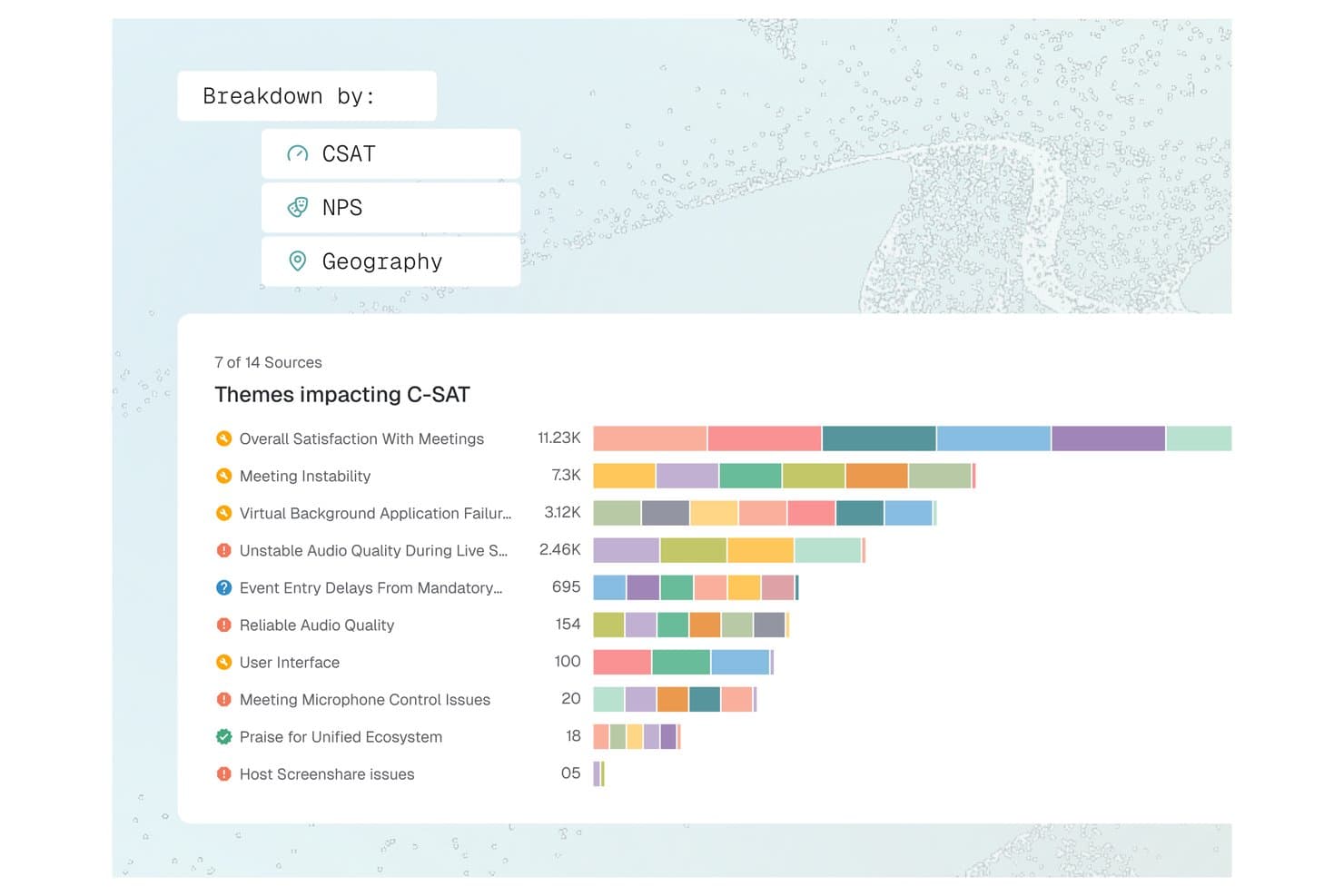
Enterpret offers a C-SAT theme breakdown dashboard that visualizes feedback topics like Meeting Instability and Audio Quality by volume across multiple sources. Enterpret is a customer feedback intelligence platform that unifies support tickets, call recordings, surveys, and social signals into AI-analyzed, structured product insights via an adaptive taxonomy and customer context graph.
Who Is Enterpret Best For?
Enterpret suits product managers and CX leaders at mid-market to enterprise B2B SaaS companies that receive high volumes of customer feedback across multiple channels each month.
Why I Picked Enterpret
Enterpret earns its spot because of how it connects feedback to real product context. The Customer Context Graph links each feedback record to account details, usage patterns, and deal status, so I'm reading complaints in the context of who's actually churning. Wisdom, Enterpret's AI query layer, lets me ask questions like "what are power users saying about onboarding?" and get summaries backed by actual feedback examples, not just aggregated tags.
Enterpret Key Features
- Adaptive taxonomy: Lets you automatically classify unstructured feedback into dynamic, customizable themes using AI-driven tagging.
- Multi-source feedback integrations: Connects and unifies feedback from support tools, surveys, reviews, call recordings, and social channels.
- Data enrichment: Enriches each feedback record with user, account, and product context from connected systems.
- Close-the-loop workflows: Assigns feedback-based tasks to product and engineering teams through workflow integrations like Jira and Slack.
Enterpret Integrations
Enterpret offers native integrations with Zendesk, Intercom, Salesforce, Gong, Slack, Qualtrics, Linear, Jira, Google Play Store, and the Apple App Store. An API is available for custom integrations.
Pros and Cons
Pros:
- Surfaces trends across high-volume feedback data
- Links customer feedback directly to product metrics
- AI taxonomy adapts automatically to feedback
Cons:
- Reporting depth limited without technical configuration
- Initial taxonomy setup demands significant time
Learn more about Enterpret: Best for session replay with AI-driven insight
- Free plan available
- Pricing upon request
Visit WebsiteCustomer Rating:4.5/5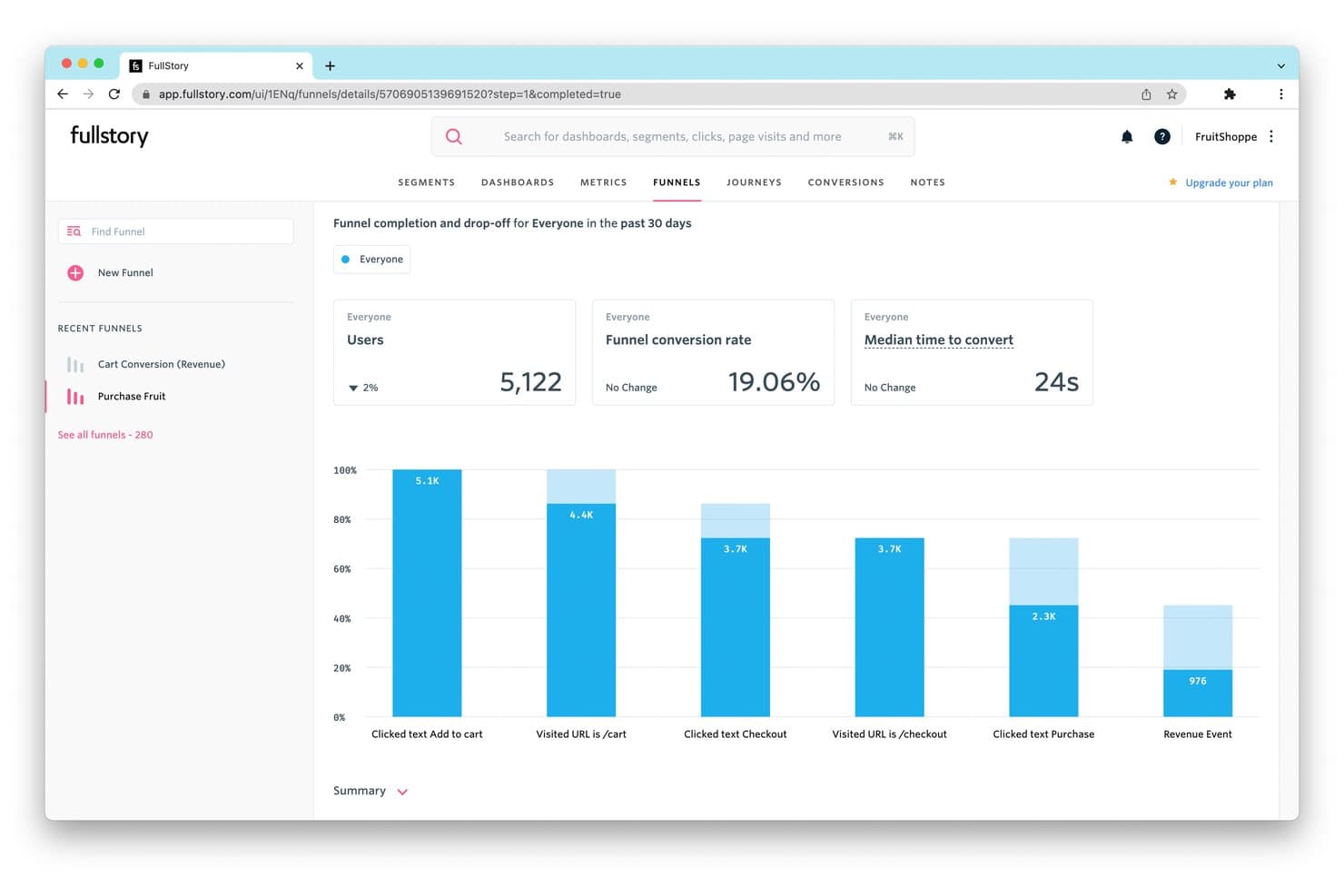
FullStory tracks funnel drop-off rates to reveal where users abandon purchases. Fullstory is a product intelligence platform that combines session replay, autocapture-based behavioral analytics, funnel and path analysis, retention tracking, in-app guides, and AI-powered insight detection across web and native mobile apps.
Who Is Fullstory Best For?
Fullstory is a strong fit for product and growth teams at mid-market to enterprise companies that need to connect qualitative session behavior with quantitative analytics in one place.
Why I Picked Fullstory
Fullstory earns its spot on my shortlist because its session replay capability goes further than most tools I've tested, pairing high-fidelity recordings with AI-generated session summaries via StoryAI that cut through hours of footage in seconds. I'm particularly drawn to Fullcapture™, which captures every click, scroll, and interaction retroactively, so I can define a new behavioral signal today and apply it to data from months ago. Frustration Signals automatically flag rage clicks and error clicks, linking them to estimated revenue impact.
Fullstory Key Features
- Conversion funnels: Multi-step funnel analysis with drop-off visualization that links directly to session replays of users who abandoned at each step.
- Journey Maps: ML-powered path analysis that surfaces the most common routes users take through your product, including unexpected detours and exit paths.
- In-app guides and surveys: Deploy product tours, onboarding checklists, tooltips, and NPS surveys from within Fullstory without engineering support.
- Anywhere: Warehouse: Hourly behavioral data sync to Snowflake, BigQuery, and Redshift for downstream BI and predictive modeling workflows.
Fullstory Integrations
Fullstory offers native integrations with Twilio Segment, Amplitude, Snowflake, Google BigQuery, Amazon Redshift, and RudderStack, plus Intercom, Invoca, Kustomer, and Olark. Its FS.Identity, Element, fs.event, and Consent APIs support custom integrations.
Pros and Cons
Pros:
- Privacy-first data capture with automatic PII masking
- Retroactive behavioral event tracking for web and mobile
- Session replay with AI-powered session summaries
Cons:
- Advanced analytics locked to higher-tier plans
- No built-in A/B testing or feature flags
Learn more about Fullstory: Best for capturing all user interactions automatically
- Free plan available
- Pricing upon request
Visit WebsiteCustomer Rating:4.3/5
Here's the path comparisons feature in Heap. Heap is a product analytics platform that makes user interactions and activity data instantly accessible and usable for businesses. Its primary strength is its automatic data capture feature, which eliminates the need for manual tracking setup, thereby reducing the chances of missed data or insights.
Why I Picked Heap:
I selected Heap for my list due to its automatic user interaction capture capability, which sets it apart from many other tools in the market. While most tools require manual configuration for tracking different events, Heap captures all user actions from the get-go, making it truly "best for capturing all user interactions automatically."
Standout features & integrations:
Heap's key features include automatic event capturing, retroactive analytics, and data governance, which offer a rich, flexible, and secure environment for data analysis. Heap smoothly integrates with platforms such as Salesforce, Optimizely, and Google Ads.
Pros and Cons
Pros:
- Integrates well with many commonly used platforms
- Ability to perform retroactive analytics
- Automatic capturing of all user interactions
Cons:
- Some users might find the user interface less intuitive than competitor platforms
- Can be expensive for small businesses or startups
- Custom pricing may lack transparency for potential customers
Learn more about Heap (by Contentsquare): Best for open-source product analytics
- Free plan available
- Pricing upon request
Visit WebsiteCustomer Rating:4.5/5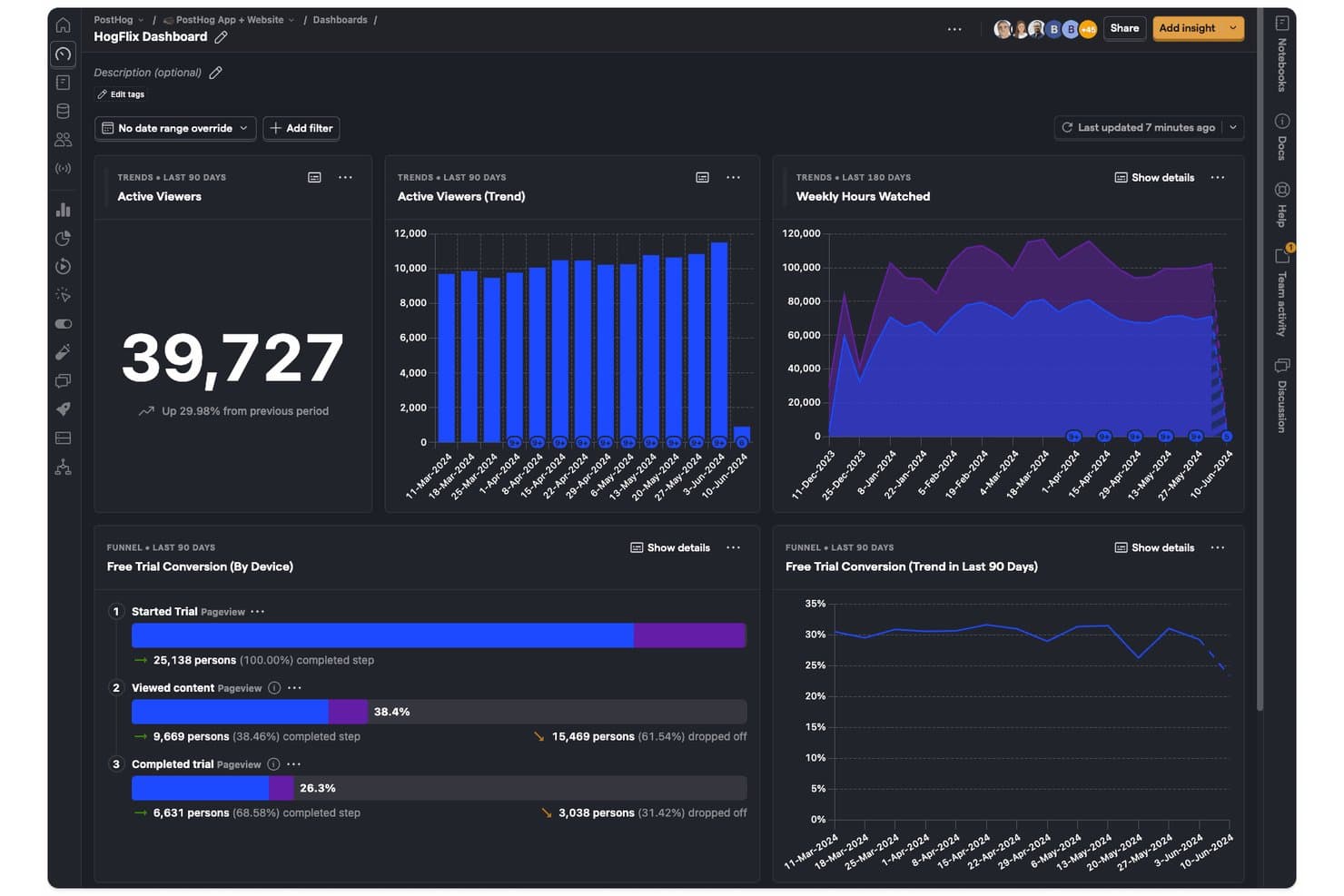
PostHog tracks viewer trends, hours watched, and trial conversions in one dashboard. PostHog is an open-source product intelligence platform that combines product analytics, session replay, feature flags, A/B testing, surveys, and a built-in CDP into a single unified toolset.
Who Is PostHog Best For?
PostHog is a strong fit for technical product teams and developers who want a single platform to cover analytics, session replay, feature flags, and experimentation without stitching together multiple tools.
Why I Picked PostHog
PostHog earns its spot as one of the best on my shortlist because its open-source foundation gives technical product teams something most analytics platforms won't: full visibility into how their data is collected, stored, and processed. I love that autocapture logs clicks, pageviews, and form submissions from day one, while Correlation Analysis automatically surfaces the behavioral factors statistically tied to conversion or drop-off. Teams can jump directly from any funnel step into the session recordings behind it, turning a data point into a real user story without switching tools.
PostHog Key Features
- Lifecycle analysis: Segments users into new, returning, resurrecting, and dormant categories so you can track engagement shifts across your entire user base over time.
- Native A/B and multivariate testing: Runs experiments with both Bayesian and frequentist statistical engines, including holdout groups and group-level testing for B2B products.
- In-app surveys: Triggers NPS, CSAT, PMF, and open-text surveys based on user behavior, event history, or feature flag status, with responses linked directly to analytics data.
- HogQL custom queries: Lets you write SQL directly against your PostHog data for ad hoc analysis and custom reporting beyond the standard insight builder.
PostHog Integrations
PostHog offers 50+ native event destinations, including Slack, Braze, Customer.io, Salesforce, HubSpot, Intercom, and PagerDuty. It also connects to Snowflake, BigQuery, Databricks, and Redshift, with open APIs and Hog functions for custom data pipelines.
Pros and Cons
Pros:
- Advanced funnel analysis with correlation insights
- Session replay tightly integrated with analytics
- Open source with self-hosted deployment option
Cons:
- Limited session replay retention to 3 months
- Interface overwhelms non-technical product teams
Learn more about PostHog: Best for visualizing user interactions
- 14-day free trial + free plan available
- From $176/month (billed annually)
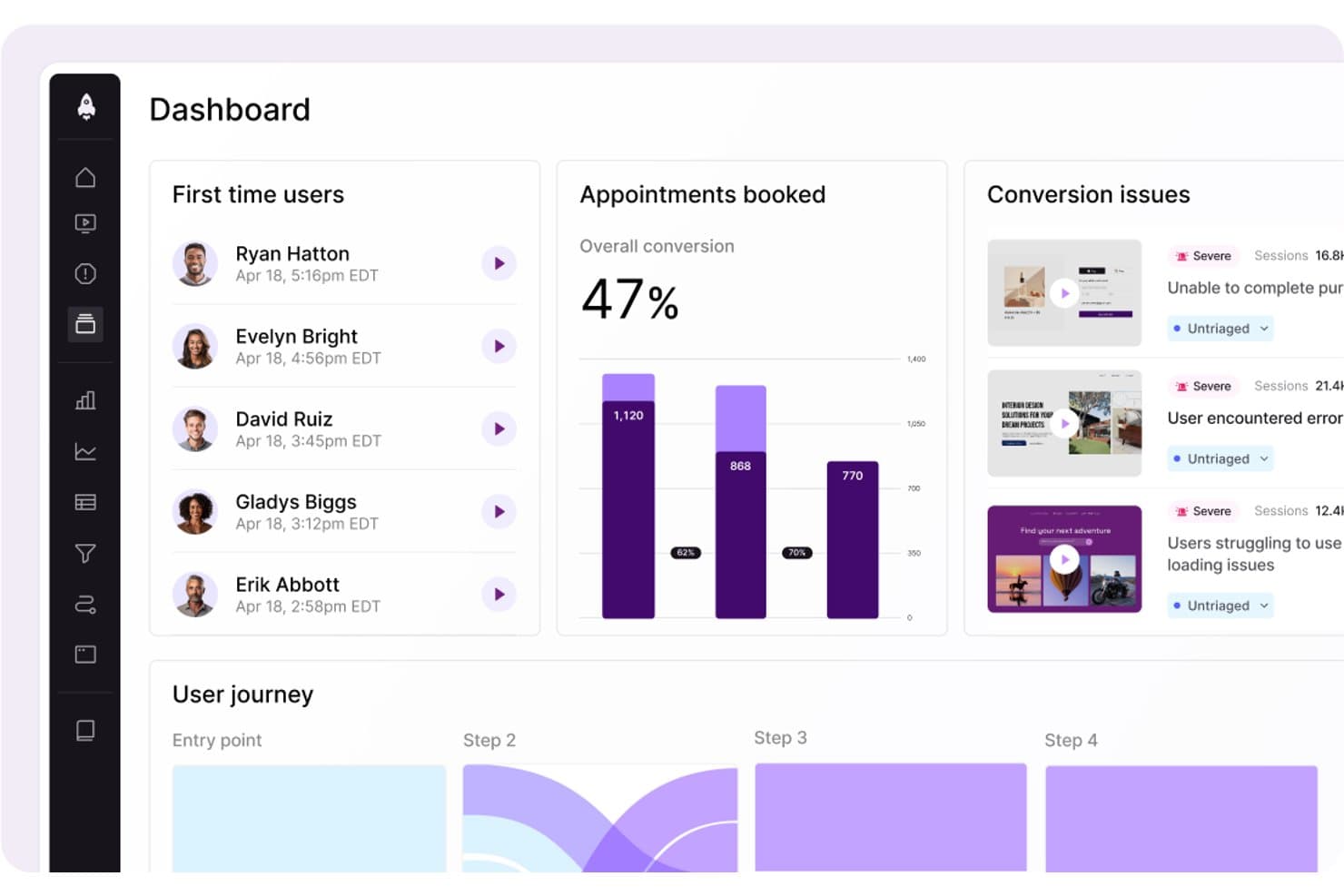
LogRocket surfaces conversion issues and user journey data in one dashboard. LogRocket is a product intelligence platform that combines session replay, product analytics, UX analytics, error tracking, and AI-powered insights through its Galileo AI layer into a single tool.
Who Is LogRocket Best For?
LogRocket is a strong fit for product managers and product analytics teams who need to connect quantitative funnel data with real session context to understand the "why" behind user behavior.
Why I Picked LogRocket
LogRocket earns its spot on my shortlist because of how well it captures and visualizes exactly what users experience. Session replay is the core strength here: pixel-perfect playback across web and native mobile, paired with heatmaps, clickmaps, and rage-click maps that turn raw interaction data into something you can actually act on. I also love that Galileo AI watches sessions automatically and surfaces the moments worth your attention, so you're not scrubbing through hours of footage to find where users struggled.
LogRocket Key Features
- Autocapture with retroactive definitions: LogRocket records every user event automatically and lets you label events in plain language—applied instantly to all historical sessions.
- Path analysis: Visualizes the exact routes users take through your product, forward and backward from any page or event, including drop-off points.
- In-app surveys: Collects qualitative user feedback directly within your product, tied to behavioral session data for added context.
- Streaming data export: Delivers a continuous, warehouse-native data connection to Snowflake, BigQuery, Redshift, Databricks, and Amazon S3 for BI analysis.
LogRocket Integrations
LogRocket offers 75+ integrations, including Amplitude, Mixpanel, Segment, LaunchDarkly, Optimizely, Zendesk, Intercom, Jira, Slack, and Snowflake. It also provides API and MCP access, plus Enterprise streaming exports to Snowflake, BigQuery, Redshift, Databricks, and Amazon S3.
Pros and Cons
Pros:
- AI-driven funnel and heatmap insights
- Autocapture with retroactive event labeling
- Pixel-perfect session replay across web and mobile
Cons:
- Retention analytics less advanced than top competitors
- Advanced AI features require higher plans
Learn more about LogRocket: Best for AI-driven revenue impact prioritization
- Free demo available
- Pricing upon request
Visit WebsiteCustomer Rating:4.7/5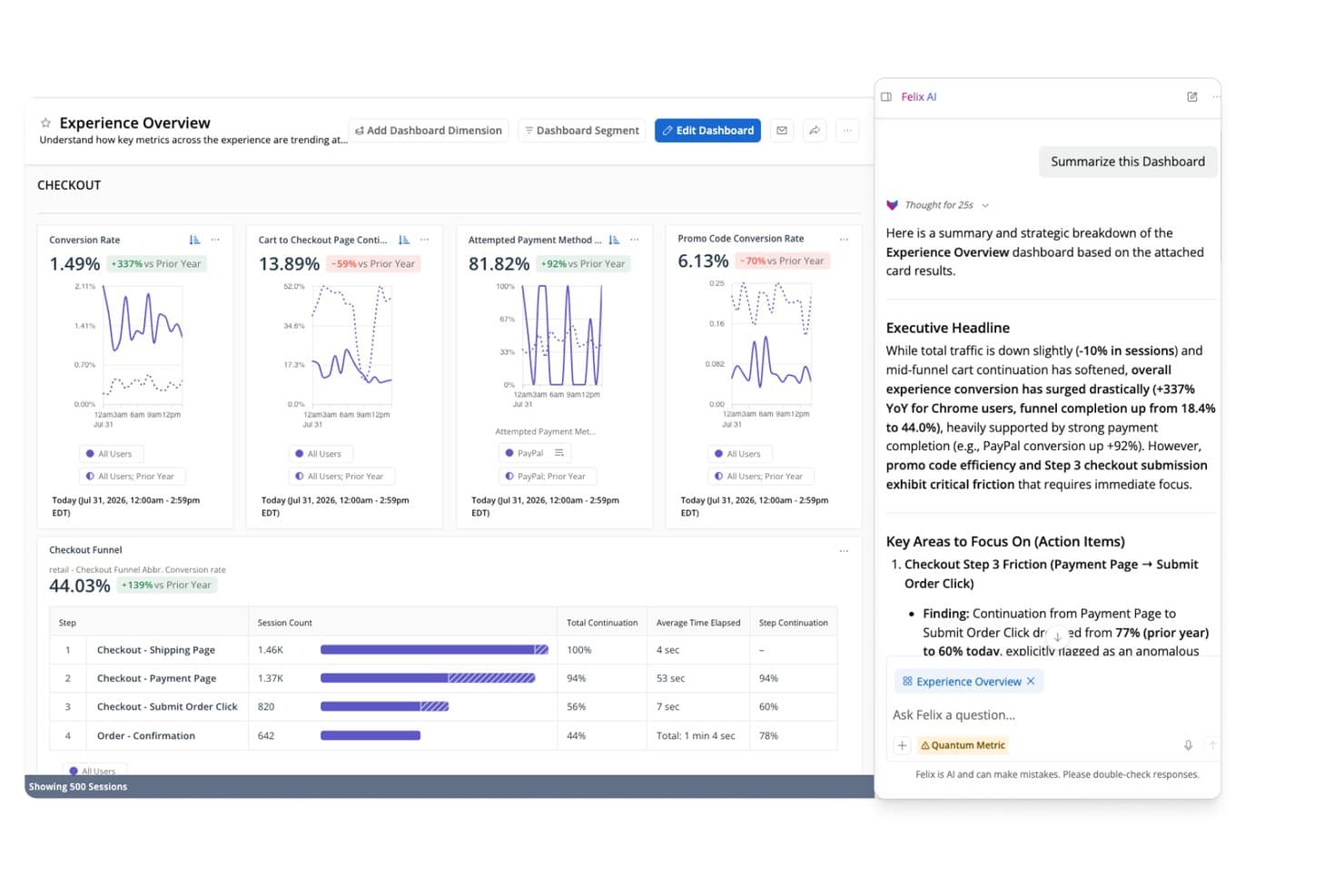
Quantum Metric's Felix AI summarizes checkout funnel insights instantly. Quantum Metric is a product intelligence platform that combines autocapture behavioral analytics, session replay, funnel and journey analysis, AI-driven anomaly detection, and real-time data activation across web and native mobile applications.
Who Is Quantum Metric Best For?
Quantum Metric is a strong fit for enterprise product and digital teams in regulated industries—like financial services, insurance, and retail—that need AI-driven revenue prioritization backed by strict data privacy controls.
Why I Picked Quantum Metric
Quantum Metric earns its spot on my shortlist because its Felix AI Agentic layer does something I haven't seen matched elsewhere: it continuously monitors your digital journeys, quantifies the revenue impact of each friction point, and surfaces prioritized issues before anyone has to go looking. I particularly like Opportunity Analysis, which automatically scores friction against business impact so product and digital teams can defend roadmap decisions with dollar figures, not gut instinct. Pair that with autocapture of 300+ behavioral signals across web and native mobile from day one, and you're working with a platform built around revenue-driven prioritization from the ground up.
Quantum Metric Key Features
- Session replay: Reproduces web and native mobile user interactions with DOM-based fidelity, including a technical pane with network diagnostics for engineering triage.
- Data Streaming: Exports behavioral data in real time to warehouses like Snowflake, BigQuery, Redshift, and Databricks, with support for filters and custom schema alignment.
- Segment Builder: Builds behavioral audience segments using nested AND, OR, THEN, and WHERE logic across hundreds of metrics, usable across all platform views.
- AutoPII scanning: Continuously scans raw data and session replays using Cloud DLP to detect, mask, and purge sensitive information before it's exposed.
Quantum Metric Integrations
Quantum Metric offers documented integrations with Snowflake, Google BigQuery, Databricks, Amazon Redshift, LaunchDarkly, Optimizely, Salesforce Service Cloud, Qualtrics, Medallia, and Slack, plus data enrichment from offline, call center, VoC, and POS sources.
Pros and Cons
Pros:
- Session replay pivots from any aggregate view
- Felix AI agents proactively surface opportunities
- Quantifies revenue impact for every user friction
Cons:
- Relies on third-party tools for experimentation
- No free trial or startup access
Learn more about Quantum Metric: Best for product and user behavior analytics
- Free plan available
- Pricing upon request
Visit WebsiteCustomer Rating:4.5/5
Here's Amplitude's business KPI dashboard feature. Amplitude is a comprehensive product intelligence platform known for its ability to track and analyze product and user behavior data effectively. Its strength lies in unraveling patterns in user behavior, providing valuable inputs for product development and optimization.
Why I Picked Amplitude:
Amplitude made it to my list due to its robust and detailed user behavior analytics. When evaluating various platforms, I found that Amplitude presents an exceptional ability to parse through user behavior data and draw meaningful inferences, making it a standout choice. Its claim to be "Best for product and user behavior analytics" is underpinned by these strong capabilities.
Standout features & integrations:
Amplitude's key features include real-time analytics, cohort analysis, and advanced segmentation, which are critical in understanding and influencing user behavior. On the integration front, Amplitude aligns well with tools like Slack, Jira, and Zendesk, promoting data sharing and team collaboration.
Pros and Cons
Pros:
- Strong integration capabilities
- Real-time analytics
- Comprehensive user behavior analytics
Cons:
- Custom pricing lacks upfront clarity
- It may take time to navigate and fully utilize the complex feature set
- The cost may be prohibitive for smaller businesses
Learn more about Amplitude: Best for in-app user interaction tracking
- Free plan + 30-day free trial + free demo available
- Pricing upon request
Visit WebsiteCustomer Rating:4.4/5
Here's the multi-app analytics dashboard feature in Pendo. Pendo is a product experience platform that allows businesses to understand their user's interactions within the app. It provides critical insights about in-app user behavior and leverages these to deliver a better user experience.
Why I Picked Pendo:
Pendo emerged as a strong contender in my research, primarily for its in-depth in-app interaction tracking capabilities. I noticed that Pendo excels at providing detailed analytics about how users navigate within an application. It stands apart from the rest because of its unique focus on maximizing user experience, which directly aligns with its prowess in tracking in-app interactions.
Standout features & integrations:
Pendo is loaded with features like user segmentation, which helps in targeting specific user groups. It offers rich feedback and analytics features, providing a holistic view of the user experience. Pendo’s integration capabilities are vast, supporting integration with major CRM and marketing tools like Salesforce, Marketo, and Slack.
Pros and Cons
Pros:
- Vast integration options
- Rich feedback and analytics capabilities
- Extensive in-app tracking
Cons:
- Custom pricing can lack transparency
- Steeper learning curve compared to similar platforms
- Pricing can be high for smaller businesses
Learn more about Pendo:

Screenshot of product metrics dashboard in Mizpanel. Mixpanel is an advanced analytics platform designed to analyze, measure, and improve user engagement across a range of applications. Its ability to provide real-time data analytics makes it a powerful tool for businesses that need to respond quickly to changing user trends.
Why I Picked Mixpanel:
Choosing Mixpanel for this list was a straightforward decision, largely due to its outstanding real-time analytics capabilities. In comparing Mixpanel to similar platforms, I found its real-time data analytics to be a distinct advantage, enabling businesses to make prompt, data-driven decisions. The tool excels in delivering real-time insights, setting it apart in the crowded field of product intelligence software.
Standout features & integrations:
Mixpanel’s standout features include its event-based tracking and user journey funnels, which offer a deep understanding of user interactions. Furthermore, its cohort analysis allows businesses to group users based on behavior, providing targeted insights. As for integrations, Mixpanel syncs with numerous platforms such as Salesforce, Zendesk, and Jira, facilitating a unified workflow across diverse systems.
Pros and Cons
Pros:
- Extensive integration options
- Advanced event-based tracking
- Real-time analytics
Cons:
- Custom pricing lacks upfront transparency
- The user interface may require a learning curve
- Pricing might be steep for startups
Learn more about Mixpanel: Best for unified digital and product analytics
- Free plan + free demo + 15-day free trial available
- From $39/month (billed annually)
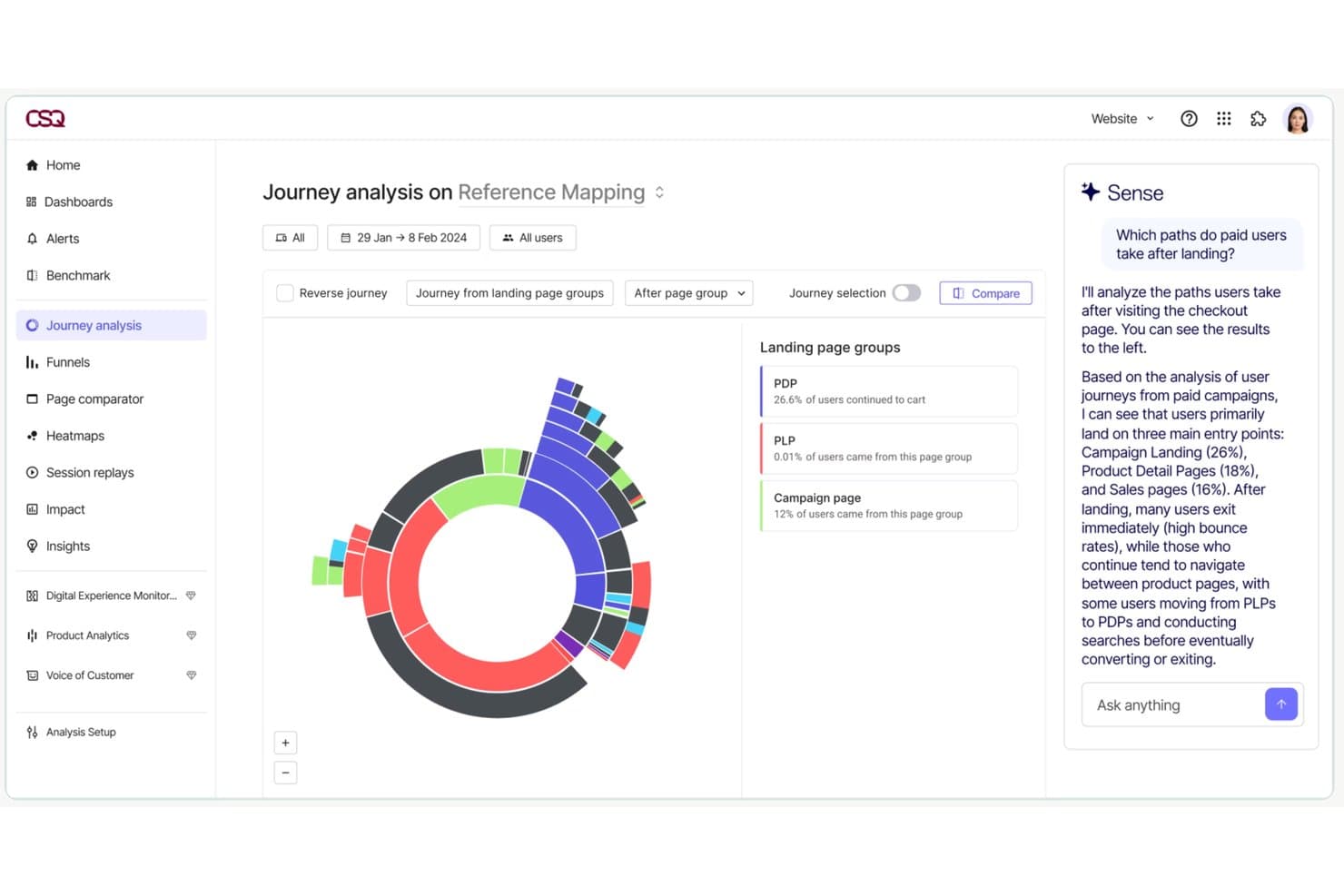
Contentsquare lets users analyze paid user journey paths with AI insights. Contentsquare is a digital and product experience intelligence platform that combines auto-capture behavioral analytics, session replay, heatmaps, journey analysis, in-app surveys, and product analytics into a single suite across web and mobile.
Who Is Contentsquare Best For?
Contentsquare is a strong fit for mid-market and enterprise product teams that need behavioral analytics, session replay, and journey analysis in one place rather than stitched across multiple tools.
Why I Picked Contentsquare
Contentsquare earns its spot on my shortlist because it's the only tool I've seen that genuinely unifies digital and product analytics without forcing you to stitch together separate platforms. I'm particularly impressed by Smart Capture, which auto-records every interaction retroactively, so my team can define new metrics against historical data without bugging engineering. Pair that with Impact Quantification, which ties specific friction points directly to revenue, and you have a clear way to justify roadmap calls with hard numbers.
Contentsquare Key Features
- Smart Capture auto-capture: Automatically records every user interaction across web and native mobile apps without manual event tagging or engineering work.
- In-app surveys: 40+ pre-built survey templates, an AI survey generator, and exit intent triggers let you collect user feedback directly within your product.
- Sense AI chat: A natural language interface that lets you query your analytics data and get plain-language answers without needing data expertise.
- Data Connect ETL export: A managed pipeline that exports Contentsquare behavioral data directly to Snowflake, AWS, or Azure for warehouse-level analysis.
Contentsquare Integrations
Contentsquare offers 100+ integrations, including Snowflake, AWS, Azure, Segment, mParticle, RudderStack, Optimizely, and VWO. Data Connect exports behavioral data to warehouses, while its open API and MCP Server support custom analytics workflows.
Pros and Cons
Pros:
- Combines analytics, session replay, and surveys
- Links behavioral data directly to revenue
- Auto-captures all web and app interactions
Cons:
- Session replay may show incomplete recordings
- Advanced analysis features require higher tiers
Learn more about Contentsquare:
Annen programvare for produktinnsikt
Her er noen flere alternativer for programvare for produktinnsikt som ikke kom med på kortlisten min, men som likevel er verdt å se nærmere på:
- 11Gainsight PXBest for B2B product adoption and CS alignment
- 12StatsigBest for experiment-driven product analytics
- 13KissmetricsBest for customer journey and funnel tracking
- 14GlassboxBest for enterprise digital journey friction analysis
- 15UXCamBest for mobile funnel drop-off to session replay
- 16UserpilotBest for analytics-to-in-app action in one workflow
- 17CleverTapBest for mobile-first businesses
- 18MoEngageGood for customer segmentation and engagement
- 19Adobe AnalyticsBest for marketing performance tracking
- 20KubitBest for warehouse-native product analytics
How I Evaluate Product Intelligence Software
I split my evaluation into two layers: the core capabilities—like funnel analysis and cohort segmentation—a tool must have, and the differentiators that set the best options apart.
Core Functionality (Table Stakes For This List)
When I'm selecting tools for my list, I rank each one on a scale from 0 (does not offer the functionality) to 5 (excels in this area) for each core functionality listed below. Then, I calculate the tool's total score into a percentage. Each tool needs to achieve a minimum total score of 65% to be considered for inclusion.
- Behavioral Event Tracking: I check whether a tool can capture user actions like button clicks, form submissions, and page views across web and mobile with minimal engineering lift.
- Funnel & Path Analysis: Multi-step funnels that show where users drop off—say, between adding an item to a cart and completing checkout—are what I evaluate here.
- Cohort & User Segmentation: I look for the ability to group users by behavior and attributes, such as comparing trial users who completed onboarding against those who didn't.
- Retention & Engagement Analytics: Tools should surface retention curves and stickiness metrics so you can answer questions like "are users coming back after their first week?"
- Session Replay or User-Level Insights: I evaluate whether the tool provides qualitative context, like watching a user struggle with a settings page, alongside quantitative data.
- Integrations & Data Pipeline: Compatibility with warehouses like Snowflake or BigQuery and CDPs like Segment matters here, along with CRM and marketing tool connectivity.
Once I have a list of tools that meet the criteria, I consider what sets each platform apart.
Differentiating Factors (What Sets Vendors Apart)
Here's how I compare and contrast different vendors:
Standout Features
AI-powered insights are a big differentiator—I look for tools that automatically flag unexpected drops in activation or retention without requiring manual dashboard exploration. Native A/B testing is another factor I weigh, since it lets product teams measure the impact of a new onboarding flow or pricing page directly within the analytics environment. I also evaluate feature flag integration, which ties release events to usage data so you can see exactly how a new feature affects engagement.
Beyond Features
Pricing model matters a lot here. Event-based pricing can spiral quickly as your product scales, so I evaluate whether a vendor's model stays predictable as your user base grows. Warehouse and data stack fit is equally important—I check whether a tool works natively with your existing warehouse or requires a separate data pipeline. I also consider data governance, especially role-based access controls and compliance certifications, since product data often contains sensitive user behavior that teams across the organization will access.
Slik velger du programvare for produktinnsikt
Det er lett å gå seg vill i lange funksjonslister og komplekse prisstrukturer. For å hjelpe deg med å holde fokus mens du går gjennom den unike prosessen din for valg av programvare, får du her en sjekkliste over faktorer du bør ha i bakhodet:
| Faktor | Hva du bør vurdere |
|---|---|
| FaktorSkalerbarhet | Hva du bør vurdereKan programvaren vokse sammen med teamet ditt? Vurder fremtidig vekst og om verktøyet kan håndtere økte datamengder og flere brukere uten ytelsesproblemer. |
| FaktorIntegrasjoner | Hva du bør vurdereKan den kobles til de eksisterende verktøyene dine? Sjekk kompatibilitet med CRM-, analyse- og kommunikasjonsplattformene dine for å unngå avbrudd i arbeidsflyten. |
| FaktorTilpasningsmuligheter | Hva du bør vurdereKan du tilpasse programvaren etter behovene dine? Se etter muligheter til å justere dashbord, rapporter og arbeidsflyter slik at de passer teamets preferanser. |
| FaktorBrukervennlighet | Hva du bør vurdereEr verktøyet brukervennlig? Vurder læringskurven og om teamet raskt kan tilpasse seg uten omfattende opplæring. |
| FaktorImplementering og opplæring | Hva du bør vurdereHvor smidig er oppsettet? Vurder tiden og ressursene som kreves for utrulling, inkludert opplæring og støtte under overgangen. |
| FaktorKostnad | Hva du bør vurderePasser det inn i budsjettet ditt? Sammenlign prisplaner, se opp for skjulte gebyrer og vurder verdien av funksjonene som tilbys i hvert nivå. |
| FaktorSikkerhetstiltak | Hva du bør vurdereEr dataene og personvernet ditt beskyttet? Se etter kryptering, tilgangskontroller for brukere og samsvar med relevante regler for databeskyttelse. |
Hva er programvare for produktinnsikt?
Programvare for produktinnsikt (PI) er et verktøy som hjelper virksomheter med å samle inn og analysere data om hvordan brukere samhandler med produktene deres. Produktledere, markedsførere og dataanalytikere bruker vanligvis disse verktøyene til å ta informerte beslutninger og forbedre produkttilbudene. Funksjoner som sporing av bruker atferd, dataanalyse og rapportering bidrar til å forstå kundenes behov og forbedre produktutviklingen. Alt i alt gir disse verktøyene verdifull innsikt som fremmer produktsuksess og kundetilfredshet.
Funksjoner
Når du velger programvare for produktinnsikt, bør du se etter følgende viktige funksjoner:
- Sporing av bruker atferd: Samler inn data om hvordan brukere samhandler med produktet ditt, slik at du kan identifisere populære funksjoner og områder som kan forbedres.
- Dataanalyse: Tilbyr verktøy for å analysere brukerdata og generere innsikt som danner grunnlag for produktbeslutninger og strategier.
- Rapportering: Tilbyr tilpassbare rapporter for å visualisere datatrender og følge produktets ytelse over tid.
- Målgruppesegmentering: Gjør det mulig å kategorisere brukere basert på atferd og egenskaper for målrettet analyse og markedsføring.
- Prediktiv analyse: Bruker historiske data til å forutsi fremtidige trender og bruker atferd, noe som bidrar til proaktiv beslutningstaking.
- Integrasjonsmuligheter: Kobler seg til andre verktøy og plattformer for å sikre sømløs dataflyt og helhetlig analyse.
- Tilpassbare kontrollpaneler: Lar deg tilpasse grensesnittet slik at de mest relevante måleverdiene og innsiktene for teamet ditt vises.
- Databehandling i sanntid: Gir umiddelbar innsikt i brukerinteraksjoner, slik at du kan reagere raskere på trender og problemer.
- Sikkerhetstiltak: Sikrer databeskyttelse med kryptering og tilgangskontroller, slik at brukerinformasjon holdes trygg.
- Interaktive produktvisninger: Veileder nye brukere gjennom funksjonene og forbedrer opplæringen og brukeropplevelsen.
Fordeler
Implementering av programvare for produktinnsikt gir flere fordeler for teamet og virksomheten din. Her er noen av fordelene du kan se frem til:
- Bedre beslutningstaking: Tilgang til detaljert dataanalyse hjelper teamet ditt med å ta informerte produktbeslutninger basert på reell bruker atferd.
- Bedre kundeinnsikt: Sporing av bruker atferd gir innsikt i kundenes behov og preferanser, slik at produktforbedringer kan målrettes bedre.
- Økt effektivitet: Automatisert rapportering sparer tid ved å gi rask tilgang til viktige måleverdier og ytelsesindikatorer.
- Proaktiv utvikling: Prediktiv analyse gjør det mulig for teamet ditt å forutse trender og planlegge forbedringer før problemer oppstår.
- Målrettet markedsføring: Målgruppesegmentering legger til rette for mer presise markedsføringsstrategier ved å identifisere tydelige brukergrupper.
- Bedre brukeropplevelse: Interaktive produktvisninger og funksjoner for opplæring forbedrer brukertilfredsheten ved å gjøre produktet enklere å lære og bruke.
- Trygghet for datasikkerheten: Sikkerhetstiltak beskytter brukerdata, sikrer samsvar med personvernregelverk og bygger kundetillit.
Kostnader og priser
Valg av programvare for produktinnsikt krever en forståelse av de ulike prismodellene og abonnementene som er tilgjengelige. Kostnadene varierer basert på funksjoner, teamstørrelse, tillegg og mer. Tabellen nedenfor oppsummerer vanlige abonnementer, gjennomsnittsprisene deres og typiske funksjoner som inngår i løsninger for produktinnsikt:
Sammenligningstabell for programvare for produktinnsikt
| Abonnementstype | Gjennomsnittspris | Vanlige funksjoner |
|---|---|---|
| AbonnementstypeGratisabonnement | Gjennomsnittspris$0 | Vanlige funksjonerGrunnleggende analyse, begrenset brukersporing og grunnleggende rapportering. |
| AbonnementstypePersonlig abonnement | Gjennomsnittspris$5-$25/user/month | Vanlige funksjonerAvansert analyse, tilpassede kontrollpaneler og brukerstøtte via e-post. |
| AbonnementstypeBedriftsabonnement | Gjennomsnittspris$30-$60/user/month | Vanlige funksjonerBrukersegmentering, integrasjonsmuligheter og prioritert brukerstøtte. |
| AbonnementstypeVirksomhetsabonnement | Gjennomsnittspris$75-$150/user/month | Vanlige funksjonerPrediktiv analyse, en dedikert kundeansvarlig og avanserte sikkerhetsfunksjoner. |
Vanlige spørsmål om programvare for produktinnsikt
Her er noen svar på vanlige spørsmål om programvare for produktinnsikt:
Hvordan samler programvare for produktinnsikt inn data?
Programvare for produktinnsikt samler inn data gjennom ulike metoder, blant annet ved å spore brukerinteraksjoner på nettstedet eller i appen din, integrere med andre verktøy som CRM-systemer og importere eksisterende datasett. Den bruker informasjonskapsler, hendelsessporing og API-tilkoblinger for å samle inn informasjon. Du må sørge for at programvaren overholder personvernregler som GDPR når du samler inn brukerdata.
Kan programvare for produktinnsikt fungere på tvers av flere team?
Ja, de fleste verktøy kan støtte produkt-, markedsførings- og kundestøtteteam samtidig. Hvert team kan bruke ulike oversikter for å fokusere på det som er viktig for dem. Produktledere ser kanskje på funksjonsbruk, mens markedsførere er opptatt av konverteringer. Du kan angi egendefinerte tilgangsnivåer for å unngå unødvendig støy.
Hvordan bruker produktteam trakter i programvare for produktinnsikt?
Trakter hjelper deg med å måle hvordan brukere beveger seg gjennom viktige prosesser, som introduksjon eller utsjekking. Du kan finne ut hvor brukerne faller fra og teste endringer for å forbedre dette trinnet. Produktteam bygger ofte trakter for både nye og tilbakevendende brukere. Du kan også bryte dem ned etter segment eller plattform.
Kreves det opplæring for å bruke programvare for produktinnsikt?
Ja, det kreves vanligvis noe opplæring for å bruke programvare for produktinnsikt effektivt. Selv om mange verktøy er brukervennlige, kan det være nødvendig med veiledninger eller opplæringsøkter for å forstå alle funksjonene. Se etter programvare som tilbyr omfattende ressurser for introduksjon, for eksempel videoer, webinarer og dokumentasjon, slik at teamet raskt kommer i gang.