

DevOps-automatiseringsverktøy er programvareplattformer som hjelper teamet ditt med å automatisere, administrere og koordinere oppgaver gjennom hele livssyklusen for programvareutvikling og IT-drift. Hvis du leter etter de beste DevOps-automatiseringsverktøyene, har du sannsynligvis som mål å redusere manuelt arbeid, øke distribusjonshastigheten og holde arbeidsflytene konsekvente etter hvert som prosjektene dine vokser.
Å velge de riktige verktøyene kan være forskjellen mellom konstant brannslukking og en pålitelig, effektiv prosess. Denne listen dekker verktøy for CI/CD, infrastruktur som kode, konfigurasjonsadministrasjon og policyautomatisering – slik at du har alternativer enten du automatiserer prosesser, klargjøring av infrastruktur eller arbeidsflyter for styring. Vi har satt sammen løsninger som dekker teamets behov og videreutvikler DevOps-praksisen din.
Hvorfor du kan stole på våre programvareanbefalinger
6,700+
Reviews
20
Industry experts
16+
Evaluation factors
14
Years
Teamet vårt har testet og anmeldt programvare siden 2012. Vi er selv produktledere, så vi vet hvor vanskelig og hvor viktig det er å velge riktig programvare.
I denne guiden har vi vurdert verktøyene gjennom praktisk testing og uavhengig research og gitt dem poeng ut fra våre utvelgelseskriterier.
Anmeldelsene våre bygger på vår egen redaksjonelle vurdering. De er ikke et salgsargument.
Ekspertanmeldere:
- Andrew LumbySenior TPM
- Cristiano ValimSenior UI/UX Lead


Sammenligningstabell for DevOps-automatiseringsverktøy
Denne sammenligningstabellen oppsummerer prisdetaljene for mine beste utvalgte DevOps-automatiseringsverktøy:
| Tool | Best For | Trial Info | Price | ||
|---|---|---|---|---|---|
| 1 | Best for infrastructure as code | Free plan available | Pricing upon request | Website | |
| 2 | Best for AI-automated continuous delivery | Free plan available | Pricing upon request | Website | |
| 3 | Best for event-driven remediation at scale | 60-day free trial | Pricing upon request | Website | |
| 4 | Best for AI-powered developer-first IaC | Free plan available | From $40/month | Website | |
| 5 | All-in-One DevSecOps Platform | Free plan available; 30-day free trial | From $29/user/month (billed annually) | Website | |
| 6 | Best for customizable pipelines | Free plan available | Pricing upon request | Website | |
| 7 | Best for enterprise Jenkins governance at scale | Free demo available | Pricing upon request | Website | |
| 8 | Best for AI-driven microservices lifecycles | Free demo available | Pricing upon request | Website | |
| 9 | Best for AI-powered Microsoft ecosystem | Free plan available | From $6/user/month | Website | |
| 10 | Best for multi-cloud canary deployments at scale | Free plan available | From $0/month | Website |


Anmeldelser av de beste DevOps-automatiseringsverktøyene
Nedenfor finner du mine detaljerte sammendrag av de beste DevOps-automatiseringsverktøyene som kom med på kortlisten min. Anmeldelsene mine gir et grundig innblikk i de viktigste funksjonene, fordelene og ulempene, integrasjonene og ideelle bruksområdene for hvert verktøy, slik at du kan finne det beste alternativet for deg.
 Best for infrastructure as code
- Free plan available
- Pricing upon request
Visit WebsiteCustomer Rating:4.7/5
Terraform workspaces dashboard showing run status, recent changes, and linked repos. Terraform is an infrastructure-as-code tool designed for IT professionals and DevOps teams. It allows you to build, change, and version infrastructure efficiently, supporting both low-level components, such as compute instances, and high-level components, such as DNS entries.
Why I picked Terraform: It’s a tool that distinguishes itself in providing infrastructure as code, making it ideal for teams needing to manage complex infrastructure. Terraform’s ability to support and manage automated infrastructure provisioning across multiple cloud providers differentiates it from others.
Features such as its modular architecture and extensive provider ecosystem support its USP. Its idempotent operations are essential for CI/CD pipelines. Terraform allows you to validate configuration files to ensure that the syntax and semantics are correct. You can version your infrastructure, ensuring consistency and reliability across deployments.
Standout Features and Integrations:
Features include its configuration language that simplifies infrastructure description, the Terraform CLI for command-line workflows, and the ability to collaborate with your team using HCP Terraform.
Integrations include AWS, Azure, Google Cloud Platform, Heroku, Confluent, UpCloud, DNSimple, Cloudflare, vSphere, Oracle Cloud Infrastructure, Docker, Kubernetes, Consul, and more.
Pros and Cons
Pros:
- Large provider ecosystem
- Infrastructure versioning capability
- Supports multi-cloud environments
Cons:
- State file management is complex at scale
- Learning curve due to proprietary HCL syntax
Learn more about Terraform: Best for AI-automated continuous delivery
- Free plan available
- Pricing upon request
Visit WebsiteCustomer Rating:4.6/5
Harness executes automated continuous delivery releases with deployment control. Harness is a continuous delivery platform aimed at DevOps teams and IT professionals. It automates the deployment process, enabling your team to release applications quickly and reliably.
Why I picked Harness: It’s tailored for continuous delivery, offering features that simplify and automate the deployment pipeline. Harness includes automated rollback capabilities, which ensure stability in your releases. With its machine learning algorithms, you can minimize manual oversight during deployments. You can collect and view system and service metrics using monitoring tools such as Prometheus and Grafana. It provides real-time deployment metrics, allowing teams to quickly detect and fix issues. You can also benefit from its intuitive dashboard that provides clear visibility into your deployment process.
Standout Features and Integrations:
Features include continuous verification that uses machine learning to detect anomalies. It provides automated canary deployments to reduce risk during updates. You can also use its feature flags to manage deployments without affecting end-users.
Integrations include Kubernetes, Docker, AWS, Azure DevOps, Google Cloud Platform, GitHub, GitLab, Bitbucket, Jenkins, PagerDuty, Jira, Figma, Lucidchart, ServiceNow, and more.
Pros and Cons
Pros:
- Supports canary deployments
- Machine learning for anomaly detection
- Automated rollback capabilities
Cons:
- Requires configuration for optimal use
- Initial setup may be complex
Learn more about Harness: Best for event-driven remediation at scale
- 60-day free trial
- Pricing upon request
Visit WebsiteCustomer Rating:4.6/5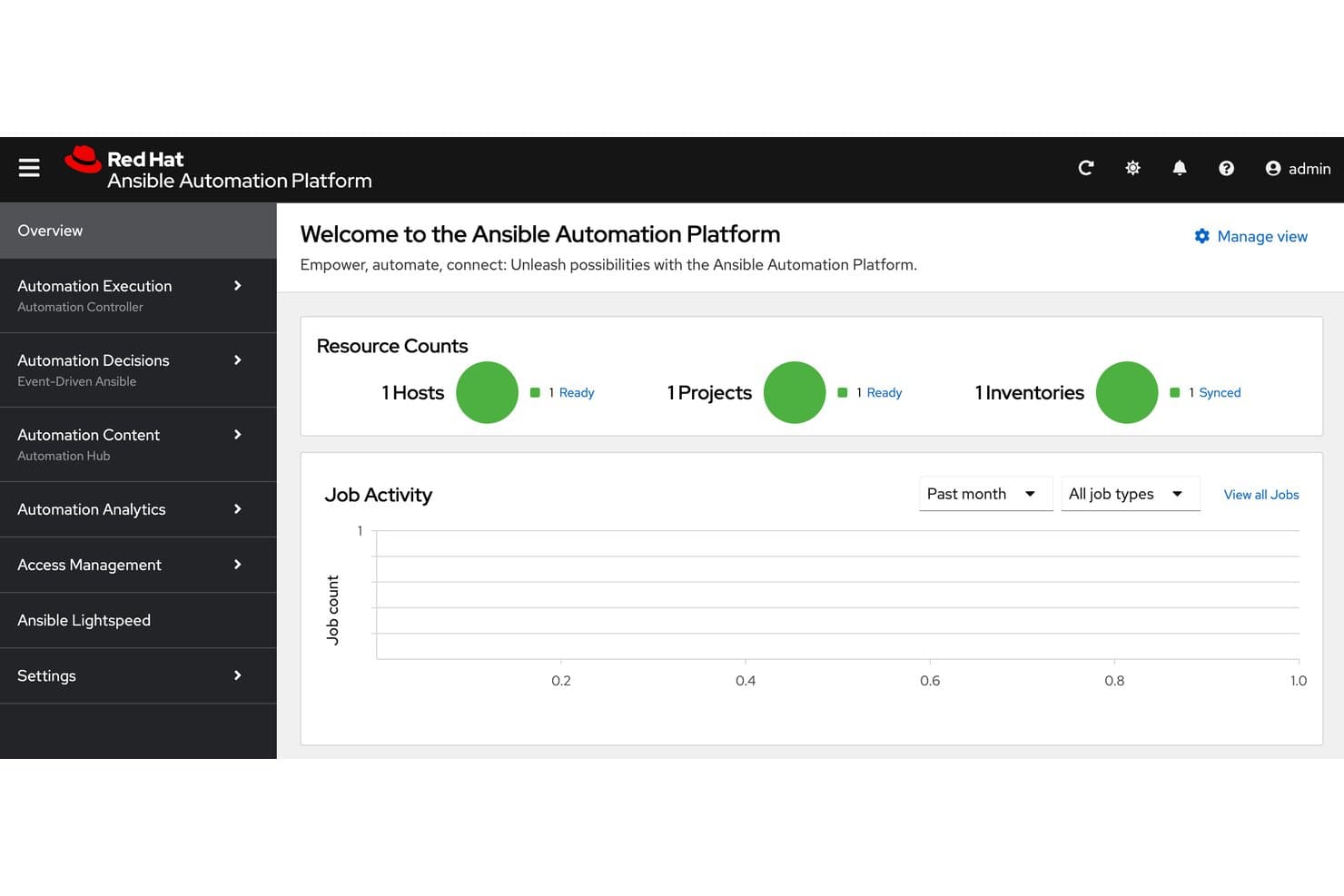
Ansible centralizes host, project, and inventory status at a glance. Ansible is an agentless DevOps automation platform that covers infrastructure provisioning, configuration management, deployment automation, workflow orchestration, and event-driven remediation through YAML-based playbooks and a centralized automation controller.
Who Is Ansible Best For?
Ansible is a strong fit for DevOps and platform engineering teams that need to manage infrastructure and automate remediation across large, complex environments.
Why I Picked Ansible
I picked Ansible as one of the best because Event-Driven Ansible is genuinely impressive for automated remediation at scale. When a Splunk alert fires, a rulebook can trigger a remediation playbook instantly, no human in the loop. I also like that the Automation Orchestrator lets my team chain Ansible playbooks, Terraform modules, and REST calls in a single visual workflow with conditional logic and approval gates baked in.
Ansible Key Features
- Agentless execution: Connects to managed nodes over SSH or WinRM, so you don't need to install anything on the machines you're automating.
- Execution environments: Container images that pin exact runtime dependencies, ensuring playbook runs are consistent and repeatable across teams.
- Policy-as-code enforcement: Integrates with Open Policy Agent to check and block jobs before they run if they violate defined policies.
- Self-service automation portal: Point-and-click forms let non-specialist users launch pre-approved automation without writing any code.
Ansible Integrations
Ansible offers 140+ Certified Content Collections from 60+ partners, with integrations including AWS, Azure, Google Cloud, Kubernetes, Terraform, ServiceNow, Splunk, HashiCorp Vault, GitHub, and GitLab. Its REST API supports custom integrations.
Pros and Cons
Pros:
- Approval gates support governed releases
- Event-driven remediation handles alerts automatically
- Agentless playbooks reduce deployment overhead
Cons:
- No persistent state for infrastructure drift
- No native build or test runners
Learn more about Ansible: Best for AI-powered developer-first IaC
- Free plan available
- From $40/month
Visit WebsiteCustomer Rating:4.8/5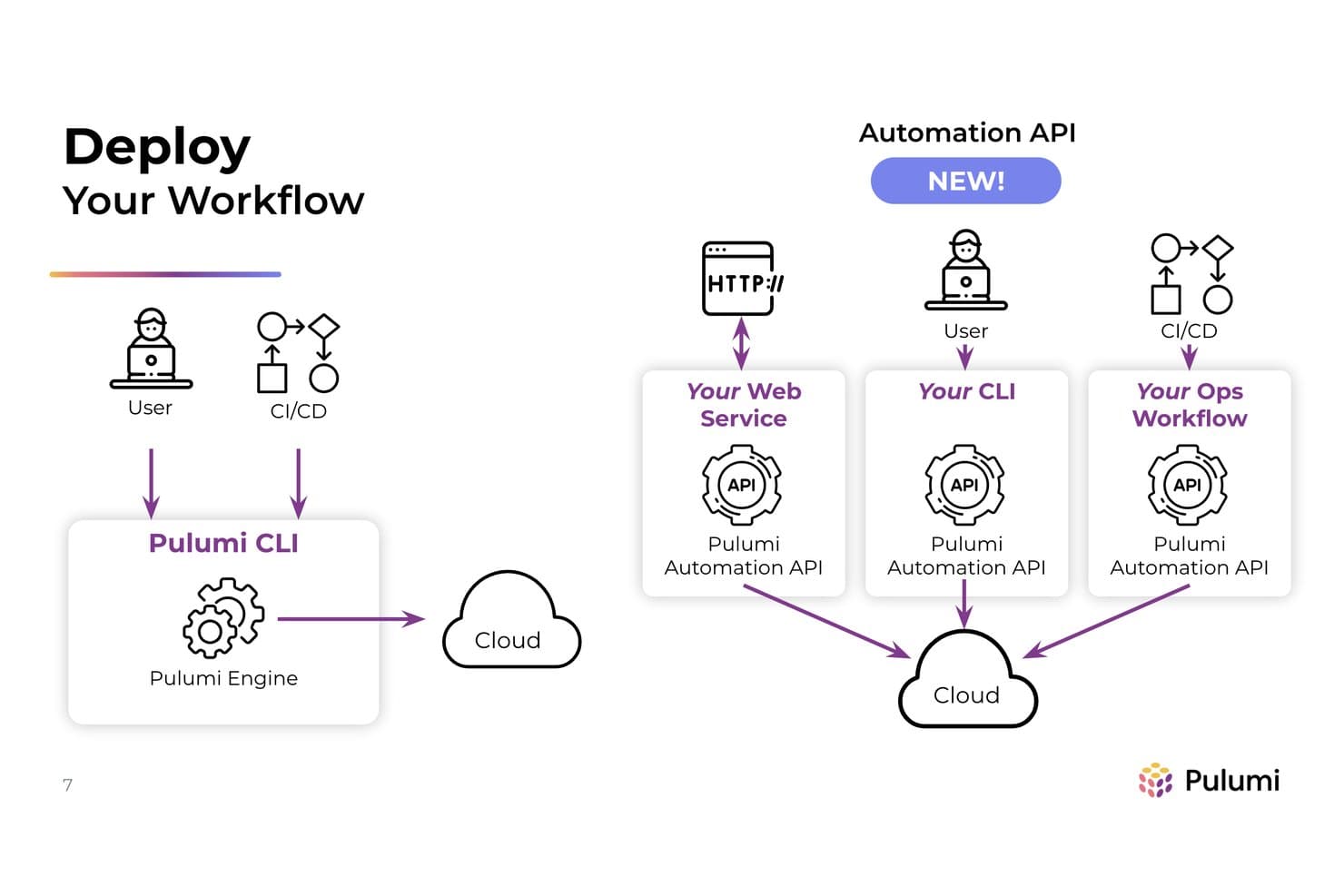
Pulumi's Automation API embeds cloud deployments into custom workflows. Pulumi is an infrastructure-as-code platform that lets you define, deploy, and manage cloud infrastructure using general-purpose programming languages, with added layers for secrets management, policy as code, and AI-assisted infrastructure automation.
Who Is Pulumi Best For?
Pulumi is a strong fit for DevOps and platform engineering teams that want to manage cloud infrastructure in the same programming languages they use to build applications.
Why I Picked Pulumi
I picked Pulumi as one of the best because it's the only IaC platform where your infrastructure is genuinely written in TypeScript, Python, Go, or Java—not a templating language bolted on top. What really sets it apart is Neo, an AI agent that handles multi-step infrastructure tasks end to end, generates code, diagnoses deployment failures in plain English, and even posts AI-driven code reviews directly on your PRs. Pair that with review stacks that spin up a real cloud environment for every pull request and tear it down on merge, and you get a tight, code-native DevOps workflow that Terraform simply can't match.
Pulumi Key Features
- Policy as code enforcement: Write compliance policies in TypeScript or Python and enforce them as advisory or mandatory gates that block non-compliant deployments.
- Drift detection and remediation: Continuously compares live cloud resources against your code and can automatically fix any configuration drift on a schedule.
- Pulumi ESC secrets management: Centrally manage, version, and rotate secrets and environment configs across stacks, with dynamic credentials and approval workflows.
- Automation API: Embed Pulumi directly in your own code to build custom multi-stack orchestration workflows without relying on the CLI.
Pulumi Integrations
Pulumi documents integrations with GitHub, GitLab, Azure DevOps, Bitbucket, Jenkins, CircleCI, AWS CodeBuild, Slack, and Microsoft Teams. Its 315+ registry packages support cloud, Kubernetes, SaaS, and secrets providers, while the Automation API and webhooks enable custom orchestration.
Pros and Cons
Pros:
- Review stacks create ephemeral testing environments
- General-purpose languages support reusable infrastructure
- AI agent diagnoses infrastructure failures
Cons:
- Large stacks can slow deployment runs
- Application builds and tests remain external
Learn more about Pulumi: All-in-One DevSecOps Platform
- Free plan available; 30-day free trial
- From $29/user/month (billed annually)
Visit WebsiteCustomer Rating:4.5/5
GitLab unifies code management, CI/CD, and monitoring workflows. GitLab is a complete DevOps platform designed for software development teams looking to manage the entire software development lifecycle. It offers tools for source code management, CI/CD, and monitoring, allowing your team to collaborate and innovate efficiently.
Why I picked GitLab: GitLab differentiates itself by combining source control, CI/CD, security scanning, and project management into one platform. Instead of integrating multiple tools to cover planning, testing, security, and deployment, GitLab keeps everything under a single workflow.
That consolidation matters for teams trying to reduce context switching and enforce consistency across environments. Built-in security testing, merge approvals, and deployment pipelines allow you to shift compliance and code quality checks earlier in the process. If your priority is lifecycle control rather than modular flexibility, GitLab delivers a tightly integrated DevSecOps experience.
Standout Features and Integrations:
Features include monitoring dashboards that provide visibility into application performance alongside deployment and infrastructure metrics. With its issue tracking and project management features, you can keep your team aligned and focused. You also have access to security testing tools that integrate naturally into your workflow.
Integrations include GitHub, Jira, Slack, Microsoft Teams, Jenkins, Docker, Kubernetes, Bitbucket, AWS, Google Cloud Platform, and more.
Pros and Cons
Pros:
- Efficient container registry management
- Integrated security testing tools
- Covers the entire DevOps lifecycle
Cons:
- Requires configuration for optimal use
- Can be complex to configure
Learn more about GitLab: Best for customizable pipelines
- Free plan available
- Pricing upon request
Visit WebsiteCustomer Rating:4.4/5
Jenkins automates builds, tests, and deployments for development teams. Jenkins is an open-source automation server widely used by software developers and DevOps teams. It helps automate parts of the software development process, including building, testing, and deploying code.
Why I picked Jenkins: It’s particularly well-suited for building customizable pipelines, offering flexibility that many teams find valuable. Its open-source nature allows for extensive customization, making it adaptable to various workflows.
Jenkins DevOps pipelines support multiple programming languages for build and deployment scripts, and plugins can facilitate troubleshooting by adding more detailed diagnostic information. You can create a continuous integration and delivery environment that aligns with your team’s unique requirements.
Standout Features and Integrations:
Features include a web-based interface for easy setup, the ability to distribute builds across multiple machines, and a rich plugin ecosystem that extends its functionality.
Integrations include GitHub, GitLab, Bitbucket, Docker, Kubernetes, Maven, Gradle, JUnit, Selenium, and more.
Pros and Cons
Pros:
- Open-source flexibility
- Highly customizable pipelines
- Extensive plugin library
Cons:
- Requires maintenance and updates
- Can be complex to configure
Learn more about Jenkins: Best for enterprise Jenkins governance at scale
- Free demo available
- Pricing upon request
Visit WebsiteCustomer Rating:4.4/5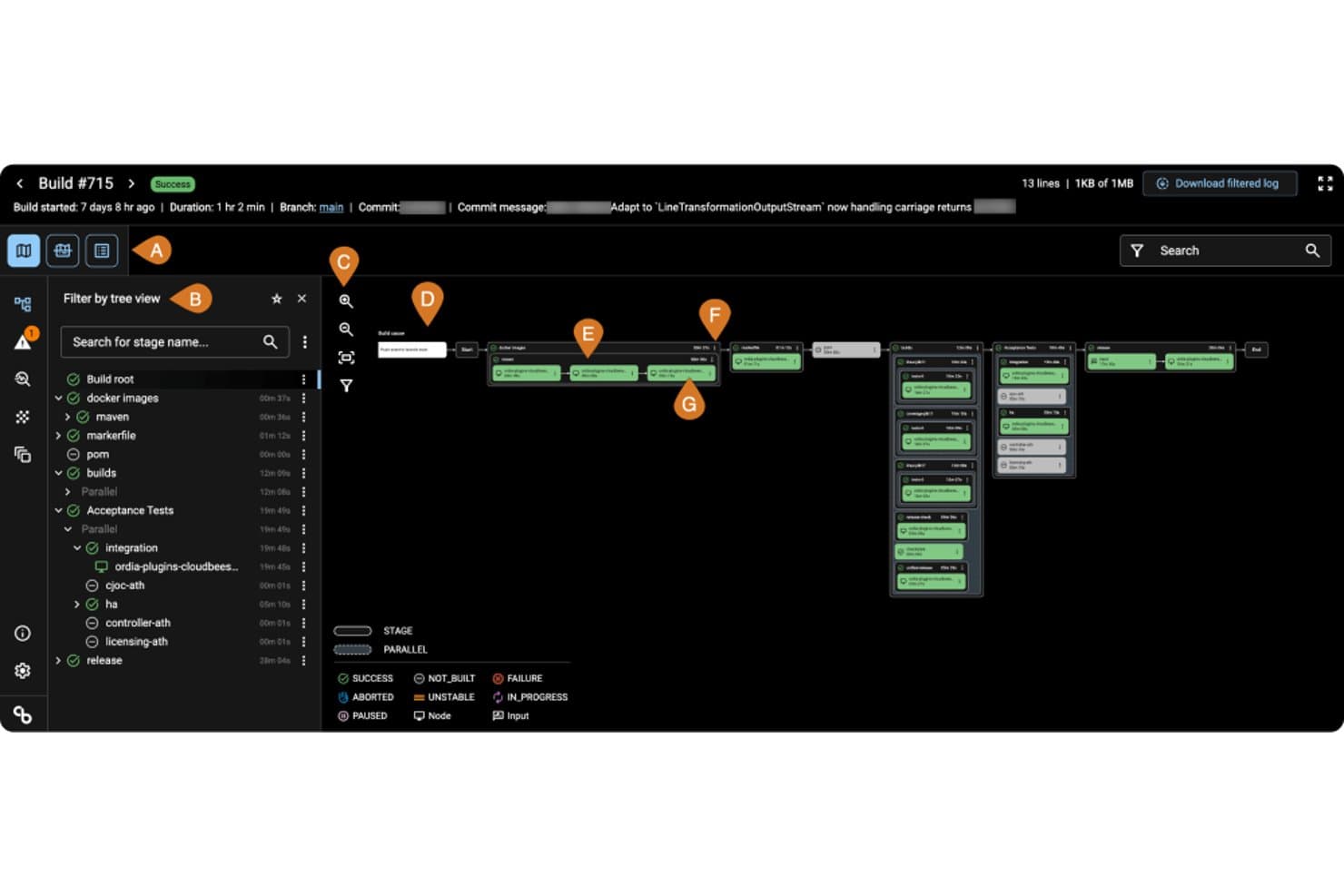
CloudBees visualizes CI/CD pipeline stages and parallel build flows. CloudBees is an enterprise DevOps automation platform that combines CI/CD pipeline management, release orchestration, feature management, and policy-as-code governance across Jenkins, GitHub Actions, and Tekton environments.
Who Is CloudBees Best For?
CloudBees is built for large enterprise engineering teams that need centralized governance and compliance controls across distributed Jenkins environments.
Why I Picked CloudBees
I picked CloudBees as one of the best because it's the clearest answer I've found for enterprise teams running Jenkins at scale who need real governance controls, not just pipeline automation. Policy-as-code via Open Policy Agent lets teams encode SOC 2, PCI, and FedRAMP rules directly into delivery workflows, with named approvers, expiry dates, and automatic audit evidence capture. I also like that CloudBees CI sits on top of existing Jenkins infrastructure, so teams at Autodesk-scale (4,000 engineers, 200+ apps) can centralize control without rewriting a single pipeline.
CloudBees Key Features
- Smart Tests: AI-driven test selection that runs only the tests most relevant to each code change, cutting test execution time by up to 80%.
- Release orchestration: Staged release workflows with milestones, approvals, and a one-click audit report covering environments, artifacts, and owners.
- Feature management: Git-native feature flags with gradual rollout controls and instant rollback without redeploying.
- DORA metrics and analytics: Built-in tracking of deployment frequency, lead time, change failure rate, and MTTR to surface pipeline bottlenecks and SLA risks.
CloudBees Integrations
CloudBees offers documented integrations with GitHub, GitLab, Bitbucket, Gerrit, Jenkins, GitHub Actions, Tekton, Jira, Snyk, and SonarQube. It also connects with Slack, AWS ECR, JFrog Artifactory, and AI tools through its MCP server.
Pros and Cons
Pros:
- Captures approvals and audit evidence automatically
- Preserves existing pipelines during modernization
- Centralizes Jenkins governance across enterprise teams
Cons:
- IaC support focuses on scanning, not provisioning
- Requires skilled staff for ongoing administration
Learn more about CloudBees: Best for AI-driven microservices lifecycles
- Free demo available
- Pricing upon request
Visit WebsiteCustomer Rating:4.3/5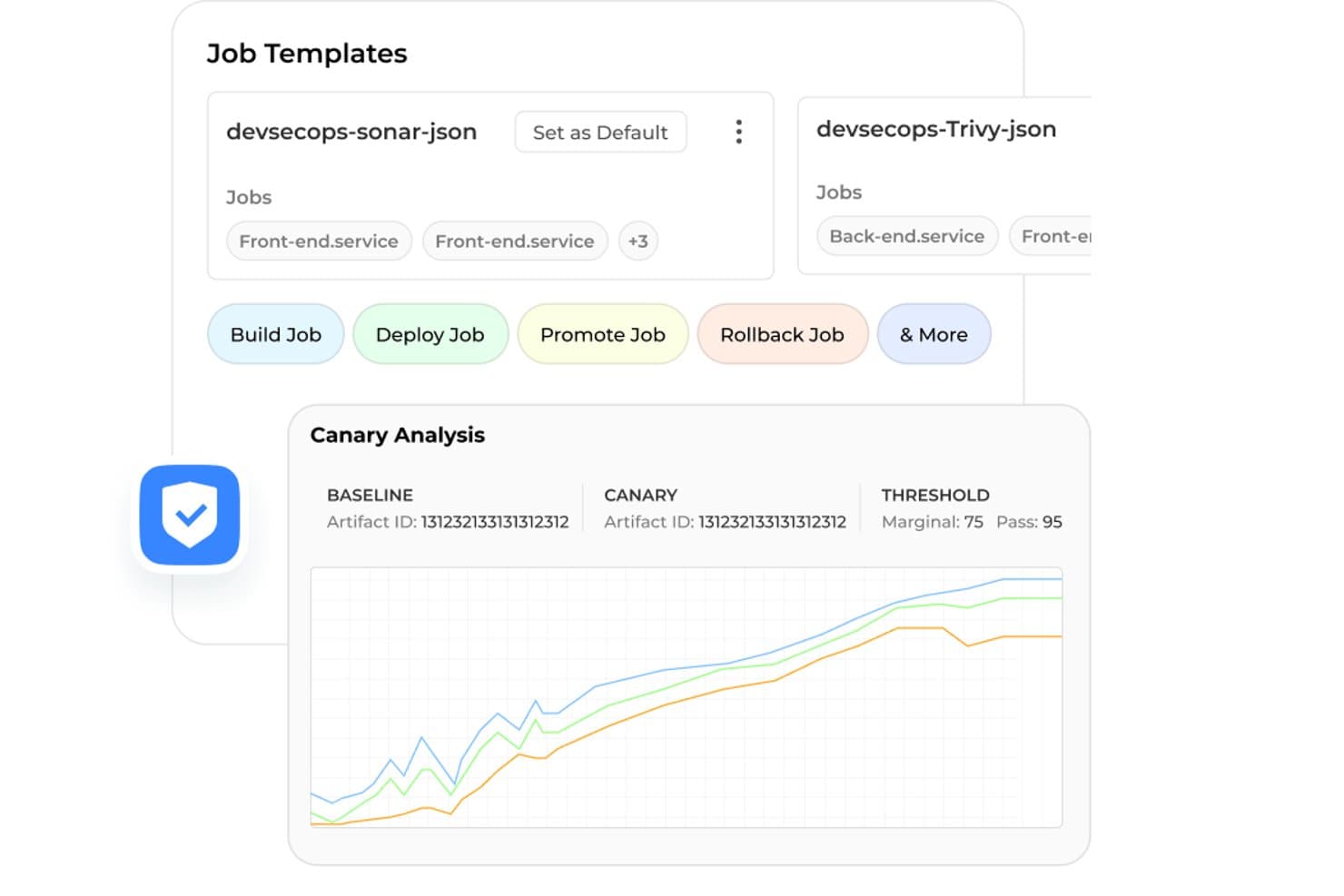
BuildPiper supports canary analysis and job templates for safe deployments. BuildPiper is a DevSecOps automation platform that covers CI/CD pipelines, Kubernetes management, GitOps, cloud orchestration, and AI-driven observability across microservices, monolith, and serverless workloads.
Who Is BuildPiper Best For?
BuildPiper is a strong fit for DevOps and platform engineering teams managing complex microservices environments who want CI/CD, Kubernetes, and AI-driven observability in one platform.
Why I Picked BuildPiper
I picked BuildPiper as one of the best because it's purpose-built for teams running complex microservices at scale, and the Ask Olly AI module is what sets it apart. When a deployment fails, Ask Olly analyzes logs in real time, identifies the root cause, and walks you through remediation steps instead of leaving you to dig through Grafana manually. I also like that native DORA metrics and policy-based deployment gates are baked in, so engineering leads get visibility into release velocity without bolting on a separate analytics tool.
BuildPiper Key Features
- Zero-touch CI/CD pipelines: Automated pipelines support multi-language builds, parallel execution, and conditional stage logic with blue-green, canary, and rolling deployment strategies.
- Policy-based deployment gates: Preset or configurable quality and security gates enforce standards before any deployment moves forward, with full audit trails for each release.
- GitOps event listeners: Watches Git repository events and automatically triggers defined pipeline actions, reducing manual handoffs between development and operations.
- Secrets management integration: Connects natively with HashiCorp Vault, AWS Secrets Manager, and Azure Secrets Manager to centralize credential handling across environments.
BuildPiper Integrations
BuildPiper integrates with GitHub, GitLab, Jenkins, ArgoCD, Kubernetes, AWS, Azure, Jira, ServiceNow, and Prometheus. It also supports GitOps workflows and Terraform modules for infrastructure delivery.
Pros and Cons
Pros:
- Reviewers praise responsive, hands-on customer support
- Native DORA metrics clarify release performance
- AI diagnoses deployment failures with remediation steps
Cons:
- New users need portal guidance and training
- Multi-account and cluster setups confuse reviewers
Learn more about BuildPiper: Best for AI-powered Microsoft ecosystem
- Free plan available
- From $6/user/month

Azure DevOps connects planning, development, delivery, and operations workflows. Azure DevOps is an extensive suite of development tools aimed at software development teams, particularly those within the Microsoft ecosystem. It provides cloud-based functionalities for planning, developing, delivering, and operating applications, ensuring a cohesive workflow for your team.
Why I picked Azure DevOps: It supports the complete software cycle end-to-end and integrates cohesively with other Microsoft products, making it an excellent choice for teams already using Microsoft technologies. Azure Pipelines allows for continuous integration and delivery. You can build, test, and deploy Python, Java, PHP, Ruby, Android, and iOS apps, among others. It integrates AI-assisted code suggestions and review tools to accelerate development and reduce human error.
Azure Pipelines supports workflows that build container images and push them to registries, helping teams implement containerization as part of their CI/CD pipelines. With Azure Boards, you can track work with user-friendly Kanban boards, backlogs, and custom reporting. You can also manage your source code with Azure Repos, providing unlimited private Git repositories.
Standout Features and Integrations:
Features include Azure Test Plans for testing and shipping with confidence. Azure Artifacts enables you to create and share Maven, npm, and NuGet package feeds. You can also use its built-in wiki to document your processes and knowledge.
Integrations include GitHub, Slack, Jenkins, Docker, Kubernetes, Visual Studio, Microsoft Teams, and more.
Pros and Cons
Pros:
- Supports multiple programming languages
- Extensive CI/CD capabilities
- Cohesive integration with Microsoft products
Cons:
- Limited non-Microsoft integrations
- Complex setup for new users
Learn more about Azure DevOps: Best for multi-cloud canary deployments at scale
- Free plan available
- From $0/month
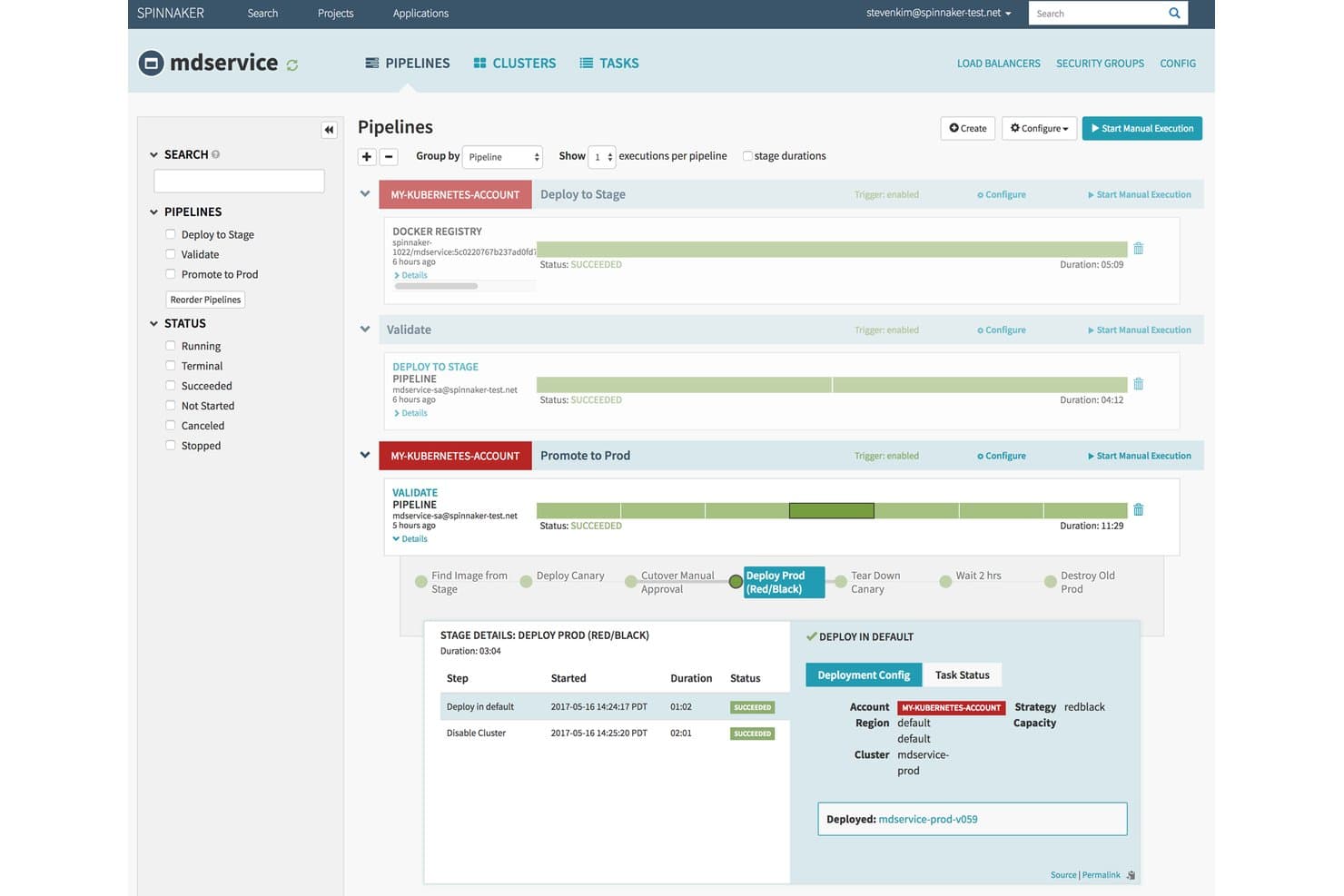
Spinnaker visualizes multi-stage deployment pipelines with real-time execution status. Spinnaker is an open-source continuous delivery platform that manages multi-cloud deployment pipelines, supporting deployment strategies like canary and blue/green across Kubernetes, AWS, Azure, and Google Cloud.
Who Is Spinnaker Best For?
Spinnaker fits DevOps and platform engineering teams that need to manage deployments across multiple clouds and Kubernetes clusters at scale.
Why I Picked Spinnaker
Spinnaker earns its spot on my shortlist because it's the most mature open-source option for running canary deployments across multiple clouds from a single control plane. I like how Kayenta, its built-in canary analysis engine, automatically compares new code against a baseline using metrics from Prometheus, Datadog, or New Relic, and fails the deployment if scores drop below your threshold. Airbnb credited Kayenta with catching a dozen regressions before they hit production, which is the kind of real outcome that justifies the operational investment.
Spinnaker Key Features
- Managed Pipeline Templates: Reusable, parameterized pipeline templates you can share across applications or entire Spinnaker installs via the spin CLI or UI.
- SpEL conditional logic: Spring Expression Language lets you add dynamic, condition-based branching directly inside pipeline stage configurations.
- Role-based access control: Granular READ, WRITE, and EXECUTE permissions scoped to individual accounts and applications through the Fiat authorization service.
- Pipeline revision history: Every pipeline save is versioned, letting you diff changes and restore earlier configurations at any point.
Spinnaker Integrations
Spinnaker offers native integrations with AWS, Azure, Google Cloud, Kubernetes, Jenkins, GitHub, Bitbucket Server, JFrog Artifactory, Prometheus, and Datadog. It also supports webhooks, CDEvents, and plugins for custom connectivity.
Pros and Cons
Pros:
- Immutable deployments simplify rollback across environments
- Visual pipelines support complex release orchestration
- Multi-cloud canary analysis catches regressions
Cons:
- Upgrades can break plugins and configurations
- Microservices footprint demands substantial operational investment
Learn more about Spinnaker:
Andre DevOps-automatiseringsverktøy
Her er noen flere alternativer for DevOps-automatiseringsverktøy som ikke kom med på kortlisten min, men som likevel er verdt å undersøke:
- 11Argo CDBest for GitOps-driven Kubernetes promotion
- 12DatadogBest for observability-driven pipeline governance
- 13ChefBest for compliance-driven config management at scale
- 14Octopus DeployBest for multi-environment release orchestration
- 15SpaceliftBest for policy as code
- 16NorthflankBest for AI-powered rapid deployment and scaling
How I Evaluate DevOps Automation Tools
I split my evaluation into three parts, giving core functionality the most weight: build, test, and deploy across environments; provision versioned infrastructure. Next, I look for policy-as-code guardrails or pull-request preview environments. Finally, I consider onboarding, adoption, security, and pricing as teams scale.
Core Functionality (Table Stakes For This List)
When I'm selecting tools for my list, I score each one on a scale from 0 (does not offer the functionality) to 5 (excels in this area) for each core functionality listed below. I then convert the total into a percentage to help assess each tool's overall fit, with extra weight on any functionalities I’ve deemed essential.
- CI/CD Pipelines (Essential): I look for automated build, test, and deploy stages, including branch conditions and parallel jobs for releases across development, staging, and production.
- Infrastructure as Code (Essential): I assess how teams version and reuse infrastructure definitions, apply them across environments, and detect drift as cloud resources change.
- Workflow Orchestration: I consider whether event-driven workflows coordinate approvals, deployment tasks, and handoffs across tools and teams.
- Integrations: I check for connections to version control, cloud platforms, containers, and monitoring tools used across the delivery lifecycle.
- Environment and Releases: I look for controls that manage multiple environments and structure release promotion, such as moving a tested build from staging to production.
- Monitoring and Alerts: I evaluate how tools detect pipeline or deployment issues and route configurable alerts to the teams responsible for responding.
Once I have a list of tools that meet the criteria, I consider what sets each platform apart.
Differentiating Factors (What Sets Vendors Apart)
Here's how I compare and contrast different vendors:
Standout Features
I evaluate whether a platform offers DORA metrics benchmarking, since tracking deployment frequency and change failure rate against industry peers gives PMs real data for capacity planning. Policy-as-code governance matters just as much—I check if pipelines can block a release that skips a required security scan. Ephemeral preview environments round out the picture; when a stakeholder can click a link on a pull request and see the change live, feedback cycles shrink dramatically.
Beyond Features
I evaluate how quickly non-engineering teammates can read dashboards and join release decisions without scripting knowledge. A tool that requires a platform engineer to pull deployment stats for every sprint review slows the whole team down. I also check whether pricing scales predictably—some vendors charge per build minute, which can spike during hardening sprints. Security posture matters too; I look for SOC 2 compliance, SSO support, and granular role-based access so regulated teams don't need a separate toolchain.
Slik velger du DevOps-automatiseringsverktøy
Det er lett å gå seg vill i lange funksjonslister og komplekse prisstrukturer. For å hjelpe deg med å holde fokus mens du går gjennom den unike prosessen din for valg av programvare, får du her en sjekkliste over faktorer du bør ha i bakhodet:
| Faktor | Hva du bør vurdere |
|---|---|
| FaktorSkalerbarhet | Hva du bør vurdereVil verktøyet vokse sammen med teamet ditt? Se etter løsninger som kan håndtere økt arbeidsmengde og flere brukere uten betydelig ytelsesreduksjon. |
| FaktorIntegrasjoner | Hva du bør vurdereFungerer det med de eksisterende verktøyene dine? Kontroller kompatibilitet med de nåværende systemene dine, for eksempel versjonskontroll, skyleverandører og kommunikasjonsplattformer. |
| FaktorTilpasningsmuligheter | Hva du bør vurdereKan du tilpasse det etter behovene dine? Vurder hvor enkelt du kan justere arbeidsflyter og innstillinger slik at de passer til de spesifikke prosessene og målene dine. |
| FaktorBrukervennlighet | Hva du bør vurdereEr grensesnittet intuitivt for teamet ditt? Vurder hvor raskt teamet kan lære å bruke verktøyet effektivt uten omfattende opplæring. |
| FaktorImplementering og introduksjon | Hva du bør vurdereHvor smidig er overgangen? Se etter verktøy med tydelige ressurser for introduksjon, for eksempel veiledninger, maler og brukerstøtte som gjør overgangen enklere. |
| FaktorKostnad | Hva du bør vurderePasser det inn i budsjettet ditt? Sammenlign prisene med budsjettet ditt, og ta hensyn til eventuelle skjulte kostnader, for eksempel tillegg eller nødvendige oppgraderinger, som kan påvirke totalkostnaden. |
| FaktorSikkerhetstiltak | Hva du bør vurdereEr dataene og driften din beskyttet? Sørg for at verktøyet tilbyr sikkerhetstiltak som kryptering og tilgangskontroller for å beskytte sensitiv informasjon. |
Hva er DevOps-automatiseringsverktøy?
DevOps-automatiseringsverktøy er programvareløsninger som automatiserer prosessene som inngår i programvareutvikling og -distribusjon. Programvareutviklere, IT-fagfolk og DevOps-team bruker vanligvis verktøy for å forbedre samarbeid og effektivitet. Funksjoner for automatisert distribusjon, kontinuerlig integrasjon og infrastrukturstyring bidrar til å redusere feil og fremskynde leveringsprosessen. Samlet sett gir disse verktøyene betydelig verdi ved å gjøre det mulig for team å levere programvare av høy kvalitet raskere og mer pålitelig.
Funksjoner
Når du velger DevOps-automatiseringsverktøy, bør du se etter følgende viktige funksjoner:
- Automatisert distribusjon: Forenkler utgivelsesprosessen, reduserer manuelle feil og fremskynder leveringstidene.
- Kontinuerlig integrasjon: Slår sammen kodeendringer regelmessig, slik at nye oppdateringer testes og integreres på en smidig måte.
- Infrastruktur som kode: Administrerer infrastruktur gjennom kode, noe som muliggjør konsistente og gjentakbare distribusjoner.
- Integrasjon med versjonskontroll: Fungerer sømløst med versjonskontrollsystemer og legger til rette for samarbeid og sporing av endringer.
- Retningslinjer som kode: Håndhever samsvar og styring ved å definere retningslinjer i kode, slik at det sikres konsistens på tvers av miljøer.
- Deteksjon av avvik: Identifiserer og korrigerer uventede endringer i infrastrukturen og opprettholder systemintegriteten.
- Tilpassbare arbeidsflyter: Gjør det mulig for team å tilpasse prosesser til sine spesifikke behov, noe som øker fleksibiliteten og effektiviteten.
- Sikkerhetstiltak: Tilbyr kryptering og tilgangskontroller for å beskytte sensitive data og sikre trygg drift.
- Skalerbarhet: Støtter økende arbeidsmengder og team, og håndterer økt etterspørsel uten ytelsesproblemer.
- Samarbeidsverktøy: Styrker kommunikasjon og koordinering i teamet og forbedrer produktiviteten og prosjektresultatene.
Fordeler
Implementering av DevOps-automatiseringsverktøy gir flere fordeler for teamet og virksomheten din. Her er noen av fordelene du kan se frem til:
- Raskere distribusjon: Automatiserte distribusjonsprosesser reduserer manuelle oppgaver, slik at teamet kan gi ut oppdateringer raskere.
- Bedre samarbeid: Integrasjon med versjonskontroll- og samarbeidsverktøy styrker teamarbeidet og kommunikasjonen.
- Konsistens og pålitelighet: Infrastruktur som kode sørger for at miljøene er konsistente, og reduserer risikoen for feil.
- Økt sikkerhet: Sikkerhetstiltak som kryptering og tilgangskontroller beskytter dataene og driften din.
- Skalerbarhet: Støtter teamet og arbeidsmengden i vekst, og tilpasser seg økt etterspørsel uten at ytelsen svekkes.
- Redusert nedetid: Deteksjon av avvik og kontinuerlig integrasjon bidrar til å identifisere og løse problemer før de fører til driftsstans.
- Kostnadseffektivitet: Automatisering av repetitive oppgaver sparer tid og ressurser, noe som gir mer effektiv bruk av budsjettet.
Kostnader og priser
Ved valg av DevOps-automatiseringsverktøy er det nødvendig å forstå de ulike prismodellene og abonnementene som er tilgjengelige. Kostnadene varierer basert på funksjoner, teamstørrelse, tillegg og mer. Tabellen nedenfor oppsummerer vanlige abonnementer, gjennomsnittsprisene deres og typiske funksjoner som er inkludert i løsninger for DevOps-automatiseringsverktøy:
Sammenligningstabell for DevOps-automatiseringsverktøy
| Abonnementstype | Gjennomsnittspris | Vanlige funksjoner |
|---|---|---|
| AbonnementstypeGratisabonnement | Gjennomsnittspris$0 | Vanlige funksjonerGrunnleggende CI/CD-funksjoner, begrensede integrasjoner og brukerstøtte fra fellesskapet. |
| AbonnementstypePersonlig abonnement | Gjennomsnittspris$4-$29 per bruker per måned | Vanlige funksjonerForbedrede CI/CD-funksjoner, grunnleggende brukerstøtte og tilgang til et begrenset antall maler og automatiseringsskript. |
| AbonnementstypeForretningsabonnement | Gjennomsnittspris$25-$52 per bruker per måned | Vanlige funksjonerAvanserte integrasjoner, prioritert brukerstøtte, tilpassbare arbeidsflyter og sikkerhetsfunksjoner. |
| AbonnementstypeBedriftsabonnement | Gjennomsnittspris$75-$150 per bruker per måned | Vanlige funksjonerOmfattende sikkerhetstiltak, dedikert brukerstøtte, tilpassede integrasjoner og avansert analyse. |
Vanlige spørsmål om automatiseringsverktøy for DevOps
Her er noen svar på vanlige spørsmål om automatiseringsverktøy for DevOps:
Hva er forskjellen mellom DevOps og automatiseringsverktøy for DevOps?
DevOps er et sett med praksiser som har som mål å forbedre samarbeidet og effektiviteten mellom utviklings- og driftsteam. Automatiseringsverktøy for DevOps er programvareløsninger som automatiserer ulike DevOps-prosesser, for eksempel integrasjon, testing og utrulling. Hvis du implementerer DevOps-praksiser, kan bruk av automatiseringsverktøy hjelpe teamet ditt med å redusere manuelt arbeid og øke konsistensen på tvers av prosjekter.
Kan automatiseringsverktøy for DevOps fungere med eksisterende eldre systemer?
Ja, mange automatiseringsverktøy for DevOps kan integreres med eksisterende eldre systemer. Når du velger et verktøy, bør du kontrollere at det er kompatibelt med den nåværende infrastrukturen og programvaren din. Noen verktøy tilbyr programtillegg eller API-er for å forenkle integrasjonen, noe som kan gjøre overgangen enklere og sikre at teamet ditt kan dra nytte av automatisering uten å bygge om eksisterende systemer.
Hvordan vet jeg om teamet mitt er klart for automatiseringsverktøy for DevOps?
For å finne ut om teamet ditt er klart, bør du evaluere den nåværende arbeidsflyten og identifisere flaskehalser i utviklings- og utrullingsprosessene. Hvis manuelle oppgaver bremser teamet ditt, er det en god indikasjon på at automatisering kan gi verdi. Vurder å starte med et pilotprosjekt for å teste hvor effektive verktøyene er og få støtte fra teamet ditt.
Er automatiseringsverktøy for DevOps sikre?
Ja, de fleste automatiseringsverktøy for DevOps inneholder sikkerhetsfunksjoner som kryptering og tilgangskontroller. Det er imidlertid viktig å gjennomgå de spesifikke sikkerhetstiltakene for alle verktøy du vurderer. Se etter funksjoner som rollebasert tilgangskontroll og revisjonslogger for å sikre at dataene og driften din forblir sikre når du automatiserer prosesser.