

Et godt alternativ til Adobe Captivate gir deg fleksibel kursproduksjon, praktiske integrasjoner og pålitelig støtte for ulike e-læringsformater. Hvis du ser etter alternativer til Adobe Captivate, ønsker du verktøy som gjør det enklere å utforme interaktive kurs, støtter innholdsstandardene dine og fungerer godt for team i den virkelige verden.
Jeg vet at det er vanskelig å finne den riktige plattformen som balanserer funksjonalitet for kursproduksjon, brukervennlighet og pris – særlig når du har vokst fra Captivate eller trenger noe som passer bedre til arbeidsflyten din. Her får du tydelige sammenligninger av de beste løsningene, slik at du kan velge verktøyet som passer til målene dine for e-læring.
Hva er Adobe Captivate?
Adobe Captivate er et verktøy for produksjon av e-læring som lar deg lage interaktive nettkurs, programvaresimuleringer og responsivt innhold. Det støtter en rekke multimedieformater og innebygde vurderingsfunksjoner. Instruksjonsdesignere, kursholdere og læringsteam bruker Adobe Captivate til å bygge kurs for introduksjon av ansatte, samsvar og faglig utvikling på bedriftens læringsplattform. Integrasjonsmulighetene og fleksibiliteten for innhold gjør det til et populært valg for digital opplæring og utdanning.
Sammenligningstabell for alternativer til Adobe Captivate
Nedenfor finner du mine detaljerte oppsummeringer av de beste alternativene til Adobe Captivate som kom med på kortlisten min:
| Tool | Best For | Trial Info | Price | ||
|---|---|---|---|---|---|
| 1 | Best for PowerPoint-based course development | Free trial available | From $970/author (billed annually) | Website | |
| 2 | Best for course creation with prompts | Free plan available | From $49.99/user/month | Website | |
| 3 | Best for rapid interactive content creation | 30-day free trial available | From $1,449/user (billed annually) | Website | |
| 4 | Best for AI-driven branching scenario authoring | Free plan + free demo + free trial available | From €72/month (billed annually) | Website | |
| 5 | Best for user-friendly course creation | Free trial + free demo available | From $116/author/month (billed annually) | Website | |
| 6 | Best for robust accessibility support | 30-day free trial + free demo available | From $129/month (billed annually) | Website | |
| 7 | Best for collaborative authoring teams | 14-day free trial + free demo available | From $2,000/author (billed annually) | Website | |
| 8 | Best for open-source extensibility | Free demo available | Free (open-source) | Website | |
| 9 | Best for multi-device course delivery | 21-day free trial + free demo available | Pricing upon request | Website | |
| 10 | Best for advanced screen recording tools | Free edition available | From $249/license (one-time cost) | Website |


Hvorfor du kan stole på våre programvareanbefalinger
6,700+
Reviews
20
Industry experts
16+
Evaluation factors
14
Years
Teamet vårt har testet og anmeldt programvare siden 2012. Vi er selv produktledere, så vi vet hvor vanskelig og hvor viktig det er å velge riktig programvare.
I denne guiden har vi vurdert verktøyene gjennom praktisk testing og uavhengig research og gitt dem poeng ut fra våre utvelgelseskriterier.
Anmeldelsene våre bygger på vår egen redaksjonelle vurdering. De er ikke et salgsargument.
Ekspertanmeldere:
- Andrew LumbySenior TPM
- Cristiano ValimSenior UI/UX Lead


Anmeldelser av de beste alternativene til Adobe Captivate
Nedenfor finner du mine detaljerte oppsummeringer av de beste alternativene til Adobe Captivate som kom med på kortlisten min. Anmeldelsene mine gir et detaljert innblikk i funksjonene, de beste bruksområdene og integrasjonene til hvert verktøy for produksjon av e-læring, slik at du kan finne det som passer best for deg.
 Best for PowerPoint-based course development
- Free trial available
- From $970/author (billed annually)
Visit WebsiteCustomer Rating:4.6/5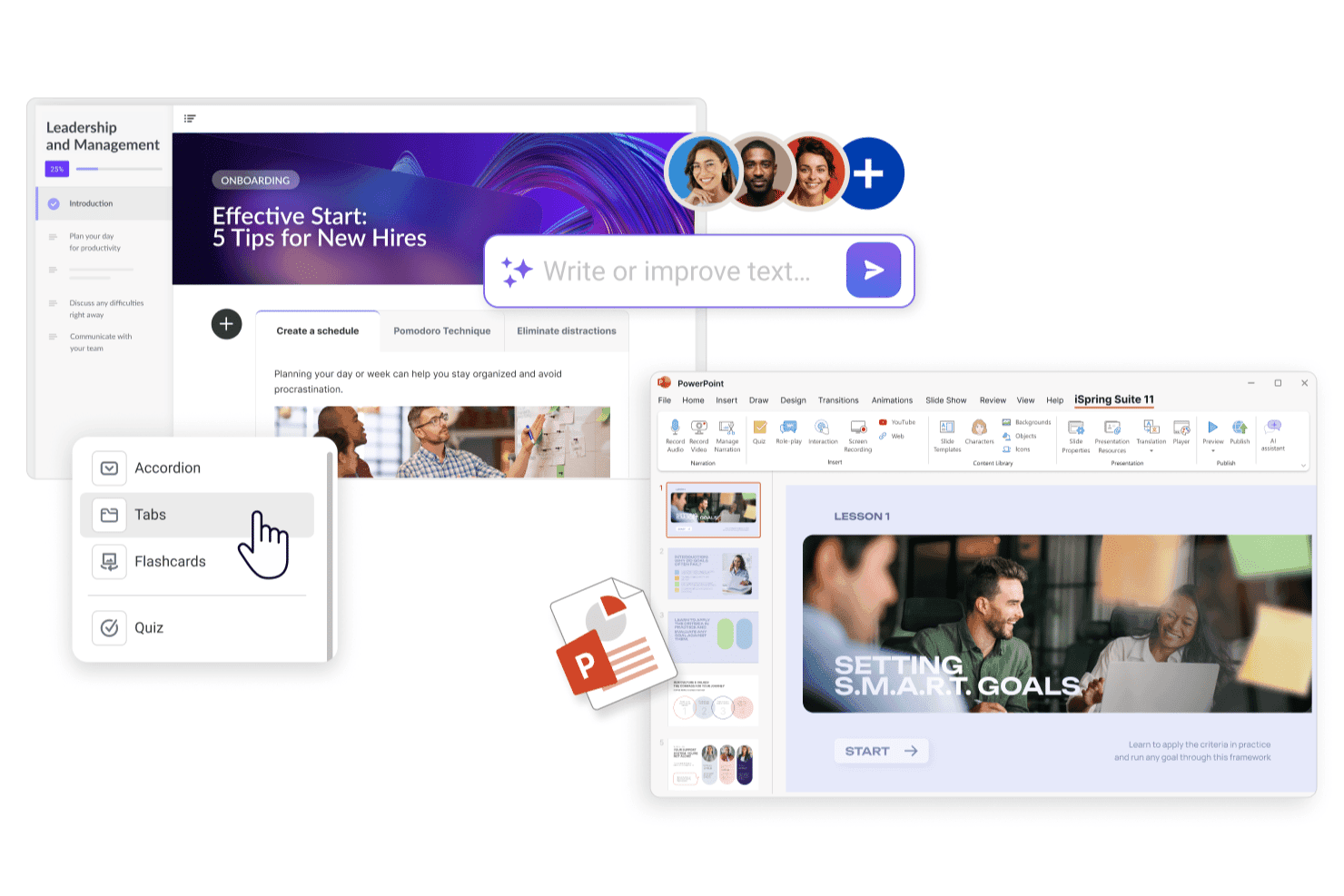
iSpring Suite helps teams create interactive eLearning courses in PowerPoint with AI-assisted content, quizzes, and interactive elements. iSpring Suite is a PowerPoint-based eLearning authoring tool that lets instructional designers convert existing presentations into interactive e-learning modules and SCORM-compliant courses without rebuilding content from scratch.
Who Is iSpring Suite Best For?
iSpring Suite is a natural fit for corporate L&D teams that already build training content in PowerPoint and want to publish it as eLearning without switching tools.
Why iSpring Suite Is a Good Adobe Captivate Alternative
I picked iSpring Suite because it installs directly inside PowerPoint as an add-in, so my team authors courses entirely inside a tool we already know. Instead of rebuilding slides in a new environment, I can take existing decks and layer in quizzes, branching dialog simulations, and role-play scenarios without leaving PowerPoint. The AI text-to-speech feature also lets me add narration and sync it to slide animations in minutes, which cuts a lot of the production back-and-forth that slows teams down in Adobe Captivate.
iSpring Suite Key Features
- SCORM publishing: Exports courses as SCORM 1.2, SCORM 2004, xAPI, and cmi5 packages for deployment in any LMS.
- Content library: Provides pre-built templates, photorealistic characters, and illustrated scenes for building visually polished courses.
- AI course translation: Translates entire courses into 50+ languages directly inside the authoring environment.
- Review and approval workflow: Collects, threads, and resolves stakeholder feedback in a single web app alongside the course content.
iSpring Suite Integrations
iSpring Suite is primarily a PowerPoint add-in authoring tool, so it doesn't have a wide set of native integrations on its own. It publishes courses in SCORM 1.2, SCORM 2004, xAPI, and cmi5 formats, which means your output works with virtually any LMS. iSpring's companion product, iSpring LMS, offers integrations with Zoom, Microsoft Teams, Google Meet, BambooHR, Salesforce, Shopify, Microsoft Entra ID, and LinkedIn Learning, along with Albato for workflow automation and a REST API for custom integrations.
Pros and Cons
Pros:
- Converts existing PowerPoint decks into courses
- Content library includes 134,000+ eLearning assets
- Clean, reliable SCORM and xAPI output
Cons:
- Screen recording lacks advanced simulation features
- Windows-only with no native Mac support
Learn more about iSpring Suite : Best for course creation with prompts
- Free plan available
- From $49.99/user/month

CourseEngine lets users build gamified courses with AI-generated module briefs, narrative themes, and a Mars-mission flight-path mechanic. CourseEngine is a prompt-driven eLearning authoring tool that lets L&D teams and subject matter experts turn plain-language descriptions into fully structured courses — complete with voiceovers, animations, and SCORM exports — without manual slide-building.
Who Is CourseEngine Best For?
It's a strong fit for training teams at associations, healthcare organizations, and professional education providers that need to produce polished courses without dedicated instructional designers on staff.
Why CourseEngine Is a Good Adobe Captivate Alternative
I picked CourseEngine as one of the best because it replaces the manual build process entirely. Instead of assembling slides in a traditional editor, you describe your course topic and audience in plain language, and the AI generates a full storyboard, voiceover, and animations. I especially like how pedagogy is baked in: the agent applies Bloom's Taxonomy and knowledge-check gating automatically, so the output isn't just fast, it's structurally sound.
CourseEngine Key Features
- SCORM Dispatch: Deliver and update a single online course across multiple LMS platforms from one central workspace.
- Instructor-led training presenter view: Presenters run live sessions with a dedicated speaker screen that syncs with the participant view.
- Game-based learning environments: Let learners practice decisions and scenarios inside immersive, AI-built games integrated into course content.
- Automatic video-to-course conversion: Instantly turn recorded videos, webinars, or screencasts into interactive, SCORM-ready training modules.
CourseEngine Integrations
Native integrations are not clearly documented.
Pros and Cons
Pros:
- Converts existing videos into SCORM modules
- Bloom's Taxonomy applied automatically
- Generates full courses from plain-text prompts
Cons:
- No documented native integrations
- Limited simulation and screen recording capabilities
Learn more about CourseEngine: Best for rapid interactive content creation
- 30-day free trial available
- From $1,449/user (billed annually)
Visit WebsiteCustomer Rating:4.7/5
Articulate 360 lets users build courses faster with ready-made slide templates. Articulate 360 is a suite-based eLearning authoring platform designed for instructional designers and L&D teams who prioritize ease of use but need to build interactive, media-rich courses without a steep learning curve or slow production cycle.
Who Is Articulate 360 Best For?
Articulate 360 is a strong fit for mid-size to enterprise L&D teams that need to produce professional-grade eLearning courses at scale.
Why Articulate 360 Is a Good Adobe Captivate Alternative
I picked Articulate 360 because it combines two dedicated authoring apps, Rise and Storyline, into one subscription. Rise's block-based authoring lets me stack interactive elements and build device-responsive courses without manual formatting. Storyline's trigger-and-state system lets me build custom branching scenarios, drag-and-drop activities, and screen simulations with granular control. Together, they cut course production time considerably, which is exactly what you need when Adobe Captivate's production workflow starts slowing your team down.
Articulate 360 Key Features
- AI-powered course authoring: Uses built-in AI to generate course content, quizzes, and learning objectives directly inside the authoring environment.
- Content Library 360: Gives you access to 13+ million royalty-free photos, characters, icons, and templates within the authoring apps.
- In-context review: Lets stakeholders leave feedback directly on course slides, which you can view and resolve without leaving the authoring app.
- Localization tools: Supports course translation and multi-language management across your content library from within the platform.
Articulate 360 Integrations
Articulate 360's Reach component integrates with Slack, Microsoft Teams, and Zapier and offers a custom API for automating training delivery, learner management, and analytics. Courses built in Storyline or Rise export to SCORM, xAPI, and cmi5, so they'll work with most LMS platforms.
Pros and Cons
Pros:
- Large eLearning Heroes community for peer support
- Built-in templates and assets speed up development
- Rise and Storyline cover different complexity levels
Cons:
- Storyline crashes on projects with 300+ slides
- Storyline is Windows-only with no Mac support
Learn more about Articulate 360: Best for AI-driven branching scenario authoring
- Free plan + free demo + free trial available
- From €72/month (billed annually)
Visit WebsiteCustomer Rating:4.6/5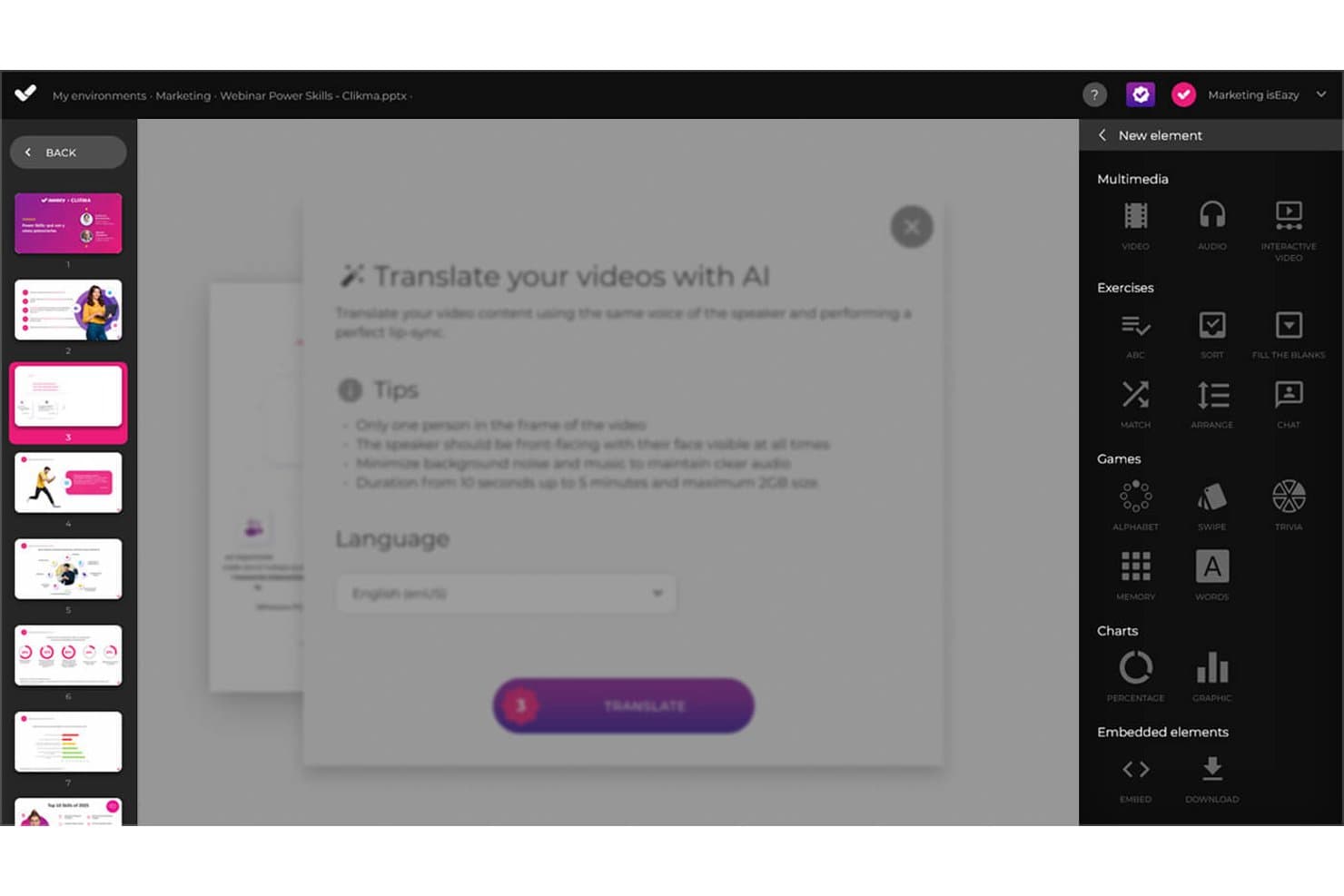
isEazy Author lets users translate video content with AI lip-sync. isEazy Author is a cloud-based eLearning authoring platform for L&D teams and subject-matter experts who need to create interactive training without relying on specialist design or coding skills.
Who Is isEazy Author Best For?
It’s a good fit for instructional designers and L&D teams creating AI-assisted branching scenarios for decision-based employee training.
Why I Picked isEazy Author
I picked isEazy Author as a Best Adobe Captivate alternative, particularly for its “Best for AI-driven branching scenario authoring” focus. I like how linked scenes and hotspots map workplace choices into distinct learning paths, while AI-generated exercises let learners practice their responses.
isEazy Author Key Features
- Collaborative editing: Multiple authors can work on a course at the same time.
- Automatic translation: Translate courses into more than 40 languages.
- Accessibility settings: Create courses aligned with WCAG 2.1 AA and Section 508.
- LMS export: Publish courses in SCORM 1.2, SCORM 2004, or xAPI formats.
isEazy Author Integrations
Native integrations aren’t clearly documented. isEazy Author exports courses as SCORM 1.2 or SCORM 2004 packages for compatible LMSs; xAPI distribution is available on the Enterprise plan.
Pros and Cons
Pros:
- Accessible settings include WCAG 2.1 AA
- AI generates games for scenario practice
- Visual scene maps build branching scenarios
Cons:
- Block-based layouts limit design freedom
- Scene linking takes time to learn
Learn more about isEazy Author: Best for user-friendly course creation
- Free trial + free demo available
- From $116/author/month (billed annually)
Visit WebsiteCustomer Rating:4.7/5
Easygenerator lets teams build interactive courses without tech skills. Easygenerator is a cloud-based eLearning authoring tool built for subject matter experts who need to create and publish courses without relying on a dedicated instructional designer or technical support.
Who Is Easygenerator Best For?
Easygenerator is a strong fit for mid-size to large organizations that want to shift course creation directly to employees and subject matter experts across departments.
Why Easygenerator Is a Good Adobe Captivate Alternative
I picked Easygenerator as one of the best because its employee-generated learning model genuinely sets it apart. Where Adobe Captivate is built for trained instructional designers, Easygenerator's EasyAI feature guides subject matter experts through course structure, turning a Word doc or PowerPoint deck into a first draft in minutes. I also like the dynamic SCORM feature, which lets you update a published course without re-exporting and re-uploading the SCORM file every time content changes.
Easygenerator Key Features
- EasyCoach: Build AI-powered roleplay simulations where learners practice real-world conversations using voice or text.
- Text-to-speech: Add AI-generated voiceovers to course slides directly in the editor, without recording audio.
- Co-authoring: Invite colleagues to contribute to a course simultaneously, with stakeholder review built into the workflow.
- Branding and customization: Apply your organization's logo, colors, and fonts globally so every course stays on brand regardless of who authors it.
Easygenerator Integrations
Easygenerator offers native integrations with LMS and LXP platforms, including Cornerstone, LearnUpon, HowNow, Blend LXP, Civica, Degreed, Disprz, EdCast, Mycademy, and Rise Up.
Pros and Cons
Pros:
- Scales distributed authoring across large teams
- Stakeholder review links with inline comments
- Built-in multi-language translation workflow
Cons:
- Lacks dynamic slide presentation layouts
- Limited animation and interaction options
Learn more about Easygenerator: Best for robust accessibility support
- 30-day free trial + free demo available
- From $129/month (billed annually)

Lectora includes accessibility features for creating inclusive eLearning. Lectora is an eLearning authoring tool from ELB Learning built for instructional designers and L&D teams who need to create WCAG-compliant, interactive courses for corporate compliance, DEI, and regulated industry training.
Who Is Lectora Best For?
Lectora is a strong fit for enterprise L&D teams in regulated industries like healthcare, government, and financial services.
Why Lectora Is a Good Adobe Captivate Alternative
I picked Lectora as one of the best because its accessibility tools go deeper than any other authoring tool I've used. It includes a built-in accessibility guide that walks you through Section 508 and WCAG 2.0 Level AA compliance as you build, covering things like predictable focus, layering and tabbing order, and accessible video and audio controls. I also like that its skip-navigation controls let you exclude as many elements as you need from the screen reader reading order, which Captivate can't match out of the box. For teams producing training for government agencies or regulated industries, that level of built-in compliance control makes a real difference at the authoring stage.
Lectora Key Features
- Branching scenarios: Build multi-path, decision-tree simulations using variables and conditional actions to trigger different content based on learner input.
- ReviewLink: Share courses with stakeholders for in-context feedback and revision comments without requiring a Lectora license.
- Multi-language publishing: Export course text for translation and reimport localized versions to produce multilingual course variants from a single project.
- SCORM, xAPI, and cmi5 publishing: Export courses in all major LMS-compatible standards directly from the authoring environment.
Lectora Integrations
Lectora doesn't offer traditional third-party native integrations. It connects to LMS platforms through SCORM 1.2, SCORM 2004, xAPI, and cmi5 exports, and includes built-in access to the ELB Learning Asset Library, BranchTrack for scenario simulations, ReviewLink for stakeholder feedback, and CenarioVR for embedded VR content.
Pros and Cons
Pros:
- Ready-made course frameworks and style packs included
- Variables, JavaScript, and custom actions supported
- Built-in Section 508 and WCAG compliance tools
- The desktop version is Windows-only, with a web alternative
- Complex interactions without extensive coding knowledge
- Built-in Section 508 and WCAG compliance tools
Cons:
- Desktop version only available on Windows
- The interface looks and feels dated
Learn more about Lectora: Best for collaborative authoring teams
- 14-day free trial + free demo available
- From $2,000/author (billed annually)

dominKnow | ONE lets teams review and co-author eLearning projects together. dominKnow | ONE is a cloud-based eLearning authoring platform built for L&D teams who need to co-author, review, and publish courses without the version control and file-sharing headaches that come with desktop-first tools like Adobe Captivate.
Who Is dominKnow | ONE Best For?
dominKnow | ONE is a strong fit for mid-to-large L&D teams where multiple authors, reviewers, and subject matter experts work on courses simultaneously.
Why dominKnow | ONE Is a Good Adobe Captivate Alternative
I picked dominKnow | ONE as one of the best because it solves the biggest friction point in team-based course development: simultaneous authoring. Where Adobe Captivate locks files to a single desktop user, dominKnow | ONE lets multiple authors work inside the same project in real time, with built-in review workflows that route SME feedback directly into tracked issues you can resolve without leaving the platform. I also like its LCMS-style content reuse model, where shared learning topics update across every project they're published to, so your team isn't manually pushing the same edit to a dozen separate course files.
dominKnow | ONE Key Features
- Adaptive interface: Switch between Essentials, Essential Plus, or Designer interface modes to match each author's skill level and role.
- Software simulation capture: Record screen captures with dominKnow's built-in Capture tool, then publish as Show Me, Try Me, Guide Me, or Test Me simulation modes.
- Single-source publishing: Tag pages or elements for specific audiences and publish the same project to LMS, web, instructor-led, or print formats simultaneously.
- Question banks with randomization: Build topic-based question banks and configure randomized question and answer order for each learner attempt.
dominKnow | ONE Integrations
dominKnow | ONE doesn't offer traditional third-party native integrations. It connects to LMS platforms through SCORM 1.2, SCORM 2004, AICC, xAPI, and PENS publishing standards, and supports SSO via SAML 2.0 as well as embedded media from YouTube and Vimeo. An API is available for custom integrations with content, user login, and mobile apps, and the team can build custom media library connections to services like Google Drive, Box, or Dropbox.
Pros and Cons
Pros:
- Built-in software simulation Capture tool
- Strong xAPI implementation and reporting
- True responsive design across devices
Cons:
- Requires stable internet to author content
- Container-based layouts limit freeform design
Learn more about dominKnow | ONE: Best for open-source extensibility
- Free demo available
- Free (open-source)
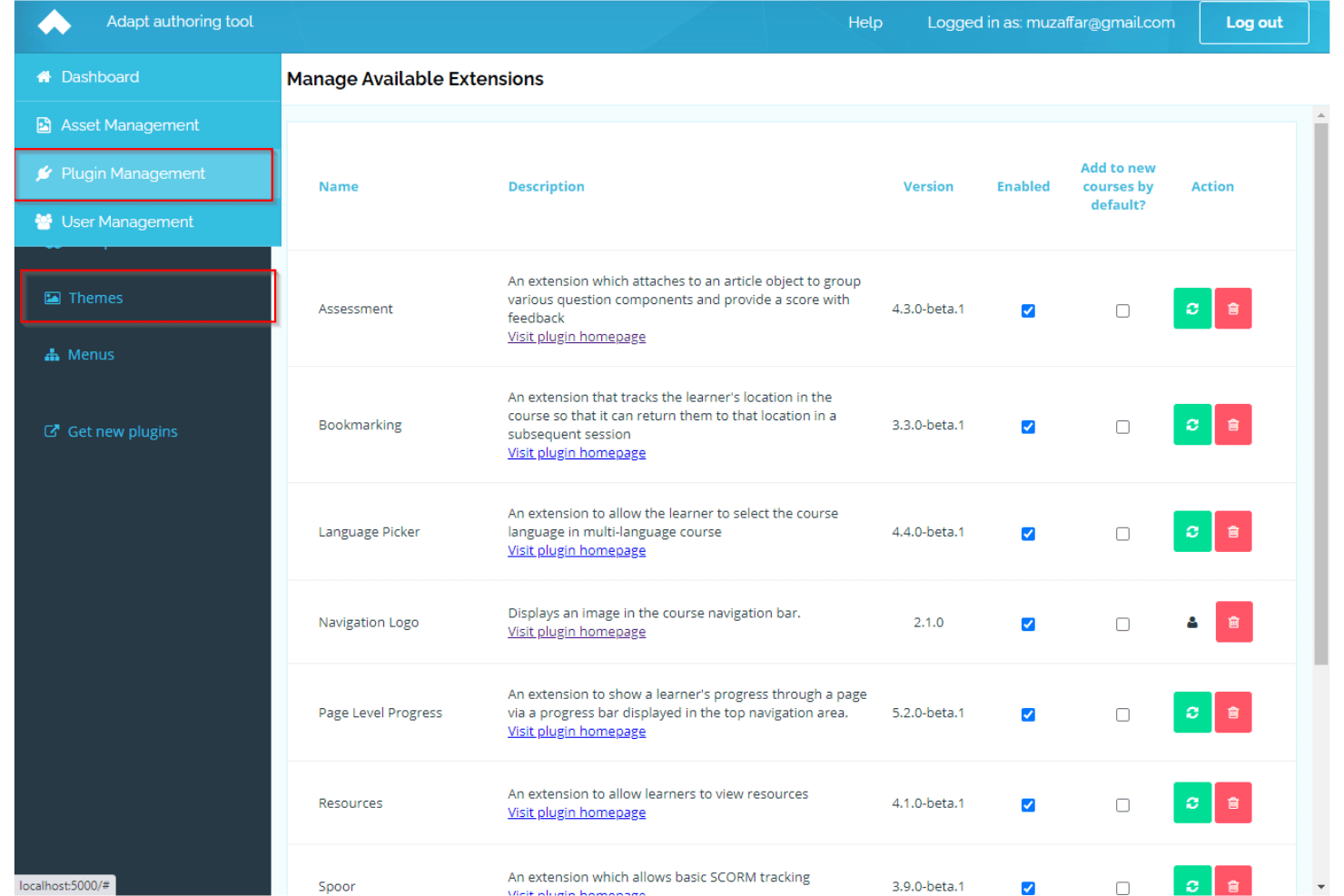
Adapt Learning lets users manage and extend functionality with plugins. Adapt Learning is a free, open-source eLearning authoring framework that lets developers and instructional designers build fully responsive HTML5 courses with deep control over course structure, interactivity, and functionality.
Who Is Adapt Learning Best For?
Adapt Learning is a strong fit for developer-led L&D teams and technical instructional designers who need full control over course architecture without licensing costs.
Why Adapt Learning Is a Good Adobe Captivate Alternative
I picked Adapt Learning because its plugin architecture gives you a level of extensibility that proprietary tools like Adobe Captivate simply can't match. Every interactive element, from question types to navigation patterns, is a plugin you can modify or replace entirely using the open plugin library. I also like that the Adapt Authoring Tool provides a browser-based GUI on top of the framework, so non-developers on my team can build courses while I handle custom plugin development in parallel.
Adapt Learning Key Features
- SCORM and stand-alone delivery: Publish courses to any SCORM-compliant LMS or host them independently on a web server.
- WAI AA accessibility compliance: The framework meets WAI AA standards out of the box, including right-to-left language compatibility.
- Step-locking and bookmarking: Control learner progression through content sequencing and let learners resume where they left off.
- Multi-language localization: Build courses that support multiple languages within a single course structure.
Adapt Learning Integrations
Adapt Learning doesn't have native integrations with third-party tools. It delivers courses to any SCORM-compliant LMS or web server and supports xAPI tracking through a community plugin.
Pros and Cons
Pros:
- Complete source code access for customization
- Outputs fully responsive multi-device HTML5
- Community-built plugin library grows over time
Cons:
- Requires technical skills for advanced theming
- Limited animation and timed interaction support
Learn more about Adapt Learning : Best for multi-device course delivery
- 21-day free trial + free demo available
- Pricing upon request

Gomo Learning offers course launch analytics across desktop and mobile. Gomo Learning is a cloud-based eLearning authoring tool built for global enterprise teams that need to create, localize, and distribute courses across devices and languages without managing multiple file versions.
Who Is Gomo Learning Best For?
Gomo Learning is a strong fit for enterprise L&D teams managing multilingual, globally distributed workforces who need consistent course delivery across desktop and mobile devices.
Why Gomo Learning Is a Good Adobe Captivate Alternative
I picked Gomo Learning as one of the best because it's built from the ground up for multi-device delivery. Every course I build is automatically responsive, so there's no separate mobile build to manage. I also like the instant cloud-based content updates: when I change a course, it refreshes for learners immediately without re-exporting or re-uploading to the LMS. For global teams, the 250+ language support with OpenAI-powered auto-translation means I can localize an entire course without manually managing separate language files.
Gomo Learning Key Features
- Dynamic branching: Tailor the learner journey by job role or location using variables and display conditions to control which content each learner sees.
- Question banks: Build randomized, reusable assessment pools to support compliance training and reduce predictable question ordering.
- Multi-author collaboration: Multiple authors can work on the same course simultaneously with role-restricted access controls.
- SCORM and xAPI publishing: Export courses in SCORM or xAPI format to publish to any compatible LMS outside of Bridge.
Gomo Learning Integrations
Gomo allows you to publish directly to Bridge LMS, which is its primary native integration, as both products sit within the Learning Technologies Group family.
Pros and Cons
Pros:
- Lacks screen recording and video editing tools
- Live content updates skip LMS re-uploads
- No built-in screen recording or video editing
- Cloud-based authoring with no software install
Cons:
- Requires internet for all authoring work
- No built-in screen recording or video editing
Learn more about Gomo Learning: Best for advanced screen recording tools
- Free edition available
- From $249/license (one-time cost)
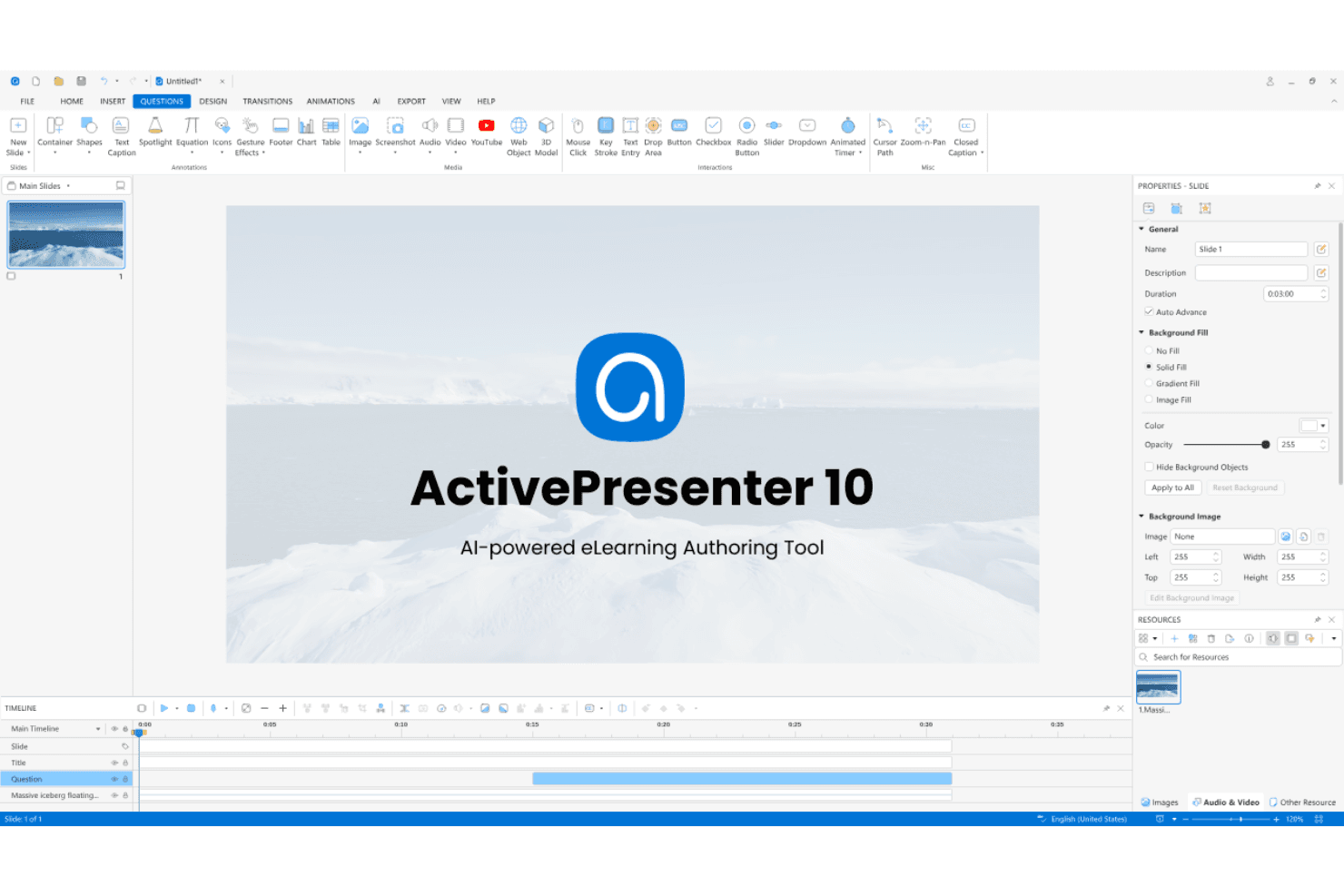
ActivePresenter offers AI-powered authoring with screen recording and interactions. ActivePresenter is a desktop-based eLearning authoring tool for instructional designers who need advanced features to build software simulations, interactive tutorials, and video-based courses without the cost overhead of enterprise authoring platforms.
Who Is ActivePresenter Best For?
ActivePresenter is a strong fit for instructional designers and IT trainers who need to produce software simulation courses and screen-captured tutorials on a tight budget.
Why ActivePresenter Is a Good Adobe Captivate Alternative
I picked ActivePresenter because its screen recording capabilities go well beyond basic capture. When I record a software walkthrough, ActivePresenter simultaneously captures the screen, webcam, system audio, and microphone, then drops everything into a timeline editor where I can apply noise removal, auto-captions, and cursor customization in one pass. I also like its interactive simulation mode, which auto-generates click-through practice scenarios directly from a recorded session, something that takes significant manual effort in Adobe Captivate.
ActivePresenter Key Features
- Quiz builder: Supports 13 interactive question types, including pools with randomized shuffle and scoring feedback.
- PowerPoint import: Converts existing PowerPoint presentations into LMS-ready courses with SCORM and xAPI export.
- AI content generation: Generates learning materials, images, and text-to-speech audio directly inside the authoring environment.
- Gamification elements: Adds drag-and-drop interactions, timers, and game-style mechanics to course slides.
ActivePresenter Integrations
ActivePresenter doesn't have native integrations with third-party software tools. It connects to LMS platforms through SCORM 1.2, SCORM 2004, xAPI, and cmi5 package exports, and you can publish directly to its companion platform, uPresenter. It also supports custom JavaScript in HTML5 output for interacting with external web services.
Pros and Cons
Pros:
- Strong JavaScript support for custom interactions
- One-time perpetual license, no subscription
- Smart Capture auto-generates slide-based simulations
Cons:
- AI features require purchasing extra credits
- Transition and animation quality feels dated
Learn more about ActivePresenter:
Andre alternativer til Adobe Captivate
Her er noen flere alternativer til Adobe Captivate som ikke kom med på kortlisten min, men som likevel er verdt å undersøke:
- 11MindsmithBest for AI-driven course generation from source docs
- 12Intellum EvolveBest for AI-driven course creation from documents
- 13ProProfs Training MakerBest for built-in quiz and assessment tools
- 14Tovuti LMSBest for integrated virtual classroom features
- 15ConfirmBest for enterprise-scale content management
- 16CompozerBest for block-based authoring on a low budget
- 17SoftChalkBest for education-focused content tools
How I Evaluate Adobe Captivate Alternatives
I split my evaluation into three parts: core functionality, standout features, and factors beyond the feature set. Core functionality carries the most weight—I check whether a tool can build interactive courses and publish to SCORM or xAPI. Then I look for AI course generation, and consider pricing model and onboarding support.
Core Functionality (Table Stakes For This List)
When I'm selecting tools for my list, I score each one on a scale from 0 (does not offer the functionality) to 5 (excels in this area) for each core functionality listed below. I then convert the total into a percentage to help assess each tool’s overall fit, with extra weight on any functionalities I’ve deemed essential.
- Interactive Authoring (Essential): I look for quizzes, branching, and layered interactions that can support scenarios such as product onboarding or compliance training.
- LMS Export Standards (Essential): I check support for SCORM, xAPI, AICC, or cmi5 so teams can match course exports to their LMS requirements.
- Responsive Output: I assess how course layouts adapt across desktop, tablet, and mobile, and whether teams need to make device-specific adjustments.
- Software Simulations: For software training, I look for screen capture that turns process steps into demos or interactive practice.
- Templates And Assets: I consider whether built-in templates and media assets suit common learning needs and can be adapted to a team’s course style.
- Collaborative Review: I check whether stakeholders can comment on shareable drafts and whether teams can track feedback through review and approval.
Once I have a list of tools that meet the criteria, I consider what sets each platform apart.
Differentiating Factors (What Sets Vendors Apart)
Here's how I compare and contrast different vendors:
Standout Features
I look for AI-powered course generation that turns source documents into draft courses, quizzes, or storyboards. When a product team needs to ship onboarding content the same week a feature launches, that speed matters. I also evaluate cloud-based real-time co-authoring, since product managers and SMEs often need to edit the same module simultaneously rather than passing files back and forth. Beyond authoring, I check for built-in analytics dashboards that go deeper than SCORM completion scores—quiz item analysis, for example, helps pinpoint where learners struggle so you can iterate on content with real data.
Beyond Features
I evaluate how quickly new authors can publish their first course. Tools like iSpring Suite lean on a familiar PowerPoint interface, which helps SMEs contribute without training. Pricing models also matter—per-seat subscriptions scale differently than per-course plans, so I check total cost including asset libraries and hosting. For teams handling compliance or proprietary product content, I look at data security posture, including SOC 2 readiness and data residency options.
Hvorfor se etter et alternativ til Adobe Captivate?
Selv om Adobe Captivate er et godt valg blant alternativene til Adobe Captivate, finnes det flere grunner til at enkelte brukere ser etter andre løsninger. Du ser kanskje etter et alternativ til Adobe Captivate fordi …
- Startkostnaden og fornyelsesgebyrene er for høye
- Avanserte animasjoner krever mye opplæring
- Begrenset støtte for innebygd spillifisering
- Mac-brukere opplever begrensninger i funksjonene eller kompatibilitetsproblemer
- Hyppige oppdateringer forstyrrer eksisterende arbeidsflyter
- Tilgjengelighetssamsvar er ujevnt uten manuelt arbeid
Hvis noe av dette høres kjent ut, har du kommet til rett sted. Listen min inneholder flere alternativer til Adobe Captivate som passer bedre for team som møter disse utfordringene med Adobe Captivate og ser etter alternative løsninger.
Viktige funksjoner i Adobe Captivate
Her er noen av de viktigste funksjonene i Adobe Captivate, slik at du kan sammenligne hva alternative løsninger tilbyr:
- Responsivt design: Opprett innhold som automatisk tilpasser seg alle skjermstørrelser eller enheter, slik at kursene blir mobilvennlige uten ekstra bygging.
- Lysbildebasert oppretting: Bygg interaktive leksjoner ved hjelp av kjente lysbildeoppsett som ligner på Articulate Storyline, med detaljert kontroll over presentasjonselementer og sekvensering.
- Avansert interaktivitet: Legg direkte inn interaktive hotspots, dra-og-slipp-elementer, forgrenede scenarioer og simuleringer i leksjonene for å engasjere brukerne.
- Programvaresimulering: Ta opp og rediger trinnvise programvaredemonstrasjoner og opplæringssimuleringer, inkludert automatisk registrering av klikk og tekstinntasting.
- Eksport til SCORM, xAPI og AICC: Publiser innhold i mye brukte standarder for e-læring, slik at det kan integreres sømløst med de fleste læringsstyringssystemer.
- Støtte for virtuell virkelighet (VR): Bygg 360-graders VR-opplæring og oppslukende scenarioer ved hjelp av standard bilder eller videoressurser og interaktive spørsmål lagt over innholdet.
- Videobasert læring: Integrer, rediger og legg interaktive elementer over videoer ved hjelp av innebygde redigeringsverktøy eller eksterne verktøy som Camtasia, slik at passiv visning blir til aktive læringsopplevelser.
- Innebygd ressursbibliotek: Få tilgang til tusenvis av royaltyfrie bilder, ikoner, figurer, maler og bakgrunner for å forbedre læringsinnholdet visuelt.
- Objekter med flere tilstander: Utform komplekse brukerinteraksjoner og animerte overganger ved å opprette objekter med tilstander som kan byttes basert på handlinger utført av den lærende.
- Automatisk teksting: Generer eller importer teksting for kursmedier for å sikre tilgjengelighet og global rekkevidde.