

Verktøy for A/B-testing av nettsteder lar deg sammenligne ulike versjoner av nettstedet ditt for å se hvilken som fungerer best med virkelige brukere. Hvis du leter etter de beste verktøyene for A/B-testing av nettsteder, ønsker du sannsynligvis å forbedre konverteringsfrekvensen, validere designendringer eller ta datadrevne beslutninger som påvirker virksomhetens resultater.
Det kan være utfordrende å velge riktig verktøy når det finnes så mange alternativer – hvert av dem tilbyr ulike funksjoner for analyse, personalisering eller arbeidsflytintegrasjon. Denne listen hjelper deg med å raskt evaluere de beste løsningene, forstå hva som skiller dem fra hverandre og finne det beste alternativet for teamets behov innen eksperimentering.
Why Trust Our Software Recommendations
6,700+
Reviews
20
Industry experts
16+
Evaluation factors
14
Years
Our team has been testing and reviewing software since 2012. As product managers ourselves, we know how difficult—and important—it is to choose the right software.
For this guide, we evaluated tools using hands-on testing and independent research, scoring tools using our selection criteria.
Our reviews reflect our human editorial judgment, not a sales pitch.
Expert reviewers:
- Andrew LumbySenior TPM
- Cristiano ValimSenior UI/UX Lead


Sammenligningstabell for verktøy for A/B-testing av nettsteder
Tabellen nedenfor sammenligner prisopplysninger for mine utvalgte verktøy for A/B-testing av nettsteder.
| Tool | Best For | Trial Info | Price | ||
|---|---|---|---|---|---|
| 1 | Best for statistical rigor across test types | 15-day free trial + free demo available | From $420/month (billed annually) | Website | |
| 2 | Best for actionable cohort-based insights | Free plan available | Pricing upon request | Website | |
| 3 | Best for ecommerce growth experimentation | 30-day free trial + free demo available | From $350/100k users/month | Website | |
| 4 | Best for enterprise-level personalization | Free demo available | Pricing upon request | Website | |
| 5 | Best for engineering-centric experimentation workflows | Free plan available | From $150/month | Website | |
| 6 | Best for AI-driven test ideation at scale | Free demo available | Pricing upon request | Website | |
| 7 | Best for marketing-led emotion-based targeting | Free demo available | Pricing upon request | Website | |
| 8 | Best for all-in-one behavioral and test analytics | 30-day free trial + free demo available | Pricing upon request | Website | |
| 9 | Best for open-source warehouse-native experimentation | Free plan + free demo available | From $40/user/month | Website | |
| 10 | Best for multivariate testing at scale | Free demo available | Pricing upon request | Website |


Anmeldelser av verktøy for A/B-testing av nettsteder
Nedenfor finner du mine detaljerte sammendrag av verktøyene for A/B-testing av nettsteder som kom med på kortlisten. Anmeldelsene mine gir et detaljert innblikk i funksjonene, de beste bruksområdene og integrasjonene for hver plattform, slik at du kan finne det beste alternativet for deg.
 Best for statistical rigor across test types
- 15-day free trial + free demo available
- From $420/month (billed annually)
Visit WebsiteCustomer Rating:4.6/5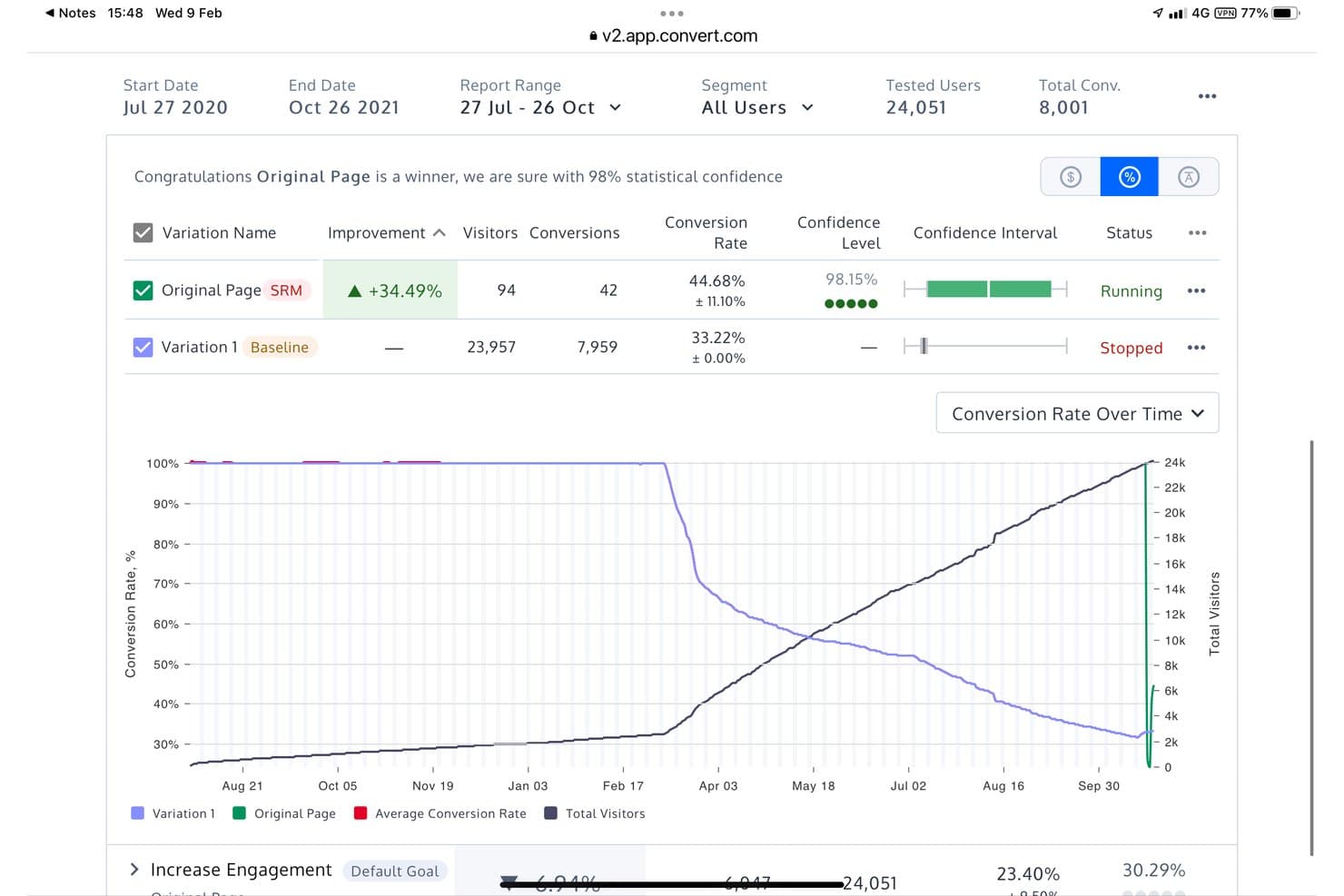
Convert Experiences supports both Frequentist and Bayesian analysis. Convert Experiences is a website A/B testing platform that supports A/B, split URL, multivariate, and multi-page experiments through a visual editor and code editor, with a choice of Frequentist, Bayesian, and sequential statistical engines, plus server-side testing and feature flags via Full Stack.
Who Is Convert Experiences Best For?
Convert Experiences is a strong fit for CRO specialists and growth marketers who need flexibility in how they evaluate test results—whether that means Frequentist, Bayesian, or sequential testing.
Why I Picked Convert Experiences
Convert Experiences earns its spot on my shortlist because no other tool at this price point gives you three fully functional statistical engines: Frequentist, Bayesian, and sequential testing. I particularly like the sequential engine, which uses Asymptotic Confidence Sequences so you can check results as they come in without inflating false positives. Pair that with multi-armed bandit auto-allocation using Thompson Sampling, and you've got a setup that's genuinely rigorous whether you're running a careful hypothesis test or optimizing traffic in real time.
Convert Experiences Key Features
- Multi-armed bandit auto-allocation: Automatically shifts traffic toward better-performing variants using Thompson Sampling, Epsilon-Greedy, or UCB strategies.
- Sample ratio mismatch (SRM) checks: Runs a chi-square test at 99% confidence to detect imbalances in how visitors are distributed across variants.
- Convert Signals® session replay: Flags sessions showing friction signals—like rage clicks, hesitation, and abandonment—broken down by variation.
- Full Stack SDKs: Lets you run server-side experiments and manage feature flags across web and mobile apps using six language SDKs.
Convert Experiences Integrations
Convert Experiences offers 90+ integrations, including GA4, Adobe Analytics, Amplitude, Segment, Tealium, HubSpot, Salesforce, Shopify, Hotjar, and Microsoft Clarity. REST API access and webhooks support custom data connections.
Pros and Cons
Pros:
- Flicker-free delivery protects experiment validity
- Bandit allocation adapts traffic toward better variants
- Three statistical engines support rigorous test decisions
Cons:
- Advanced experiments require technical implementation skills
- Segmentation reports limit cross-variant analysis
Learn more about Convert Experiences: Best for actionable cohort-based insights
- Free plan available
- Pricing upon request
Visit WebsiteCustomer Rating:4.5/5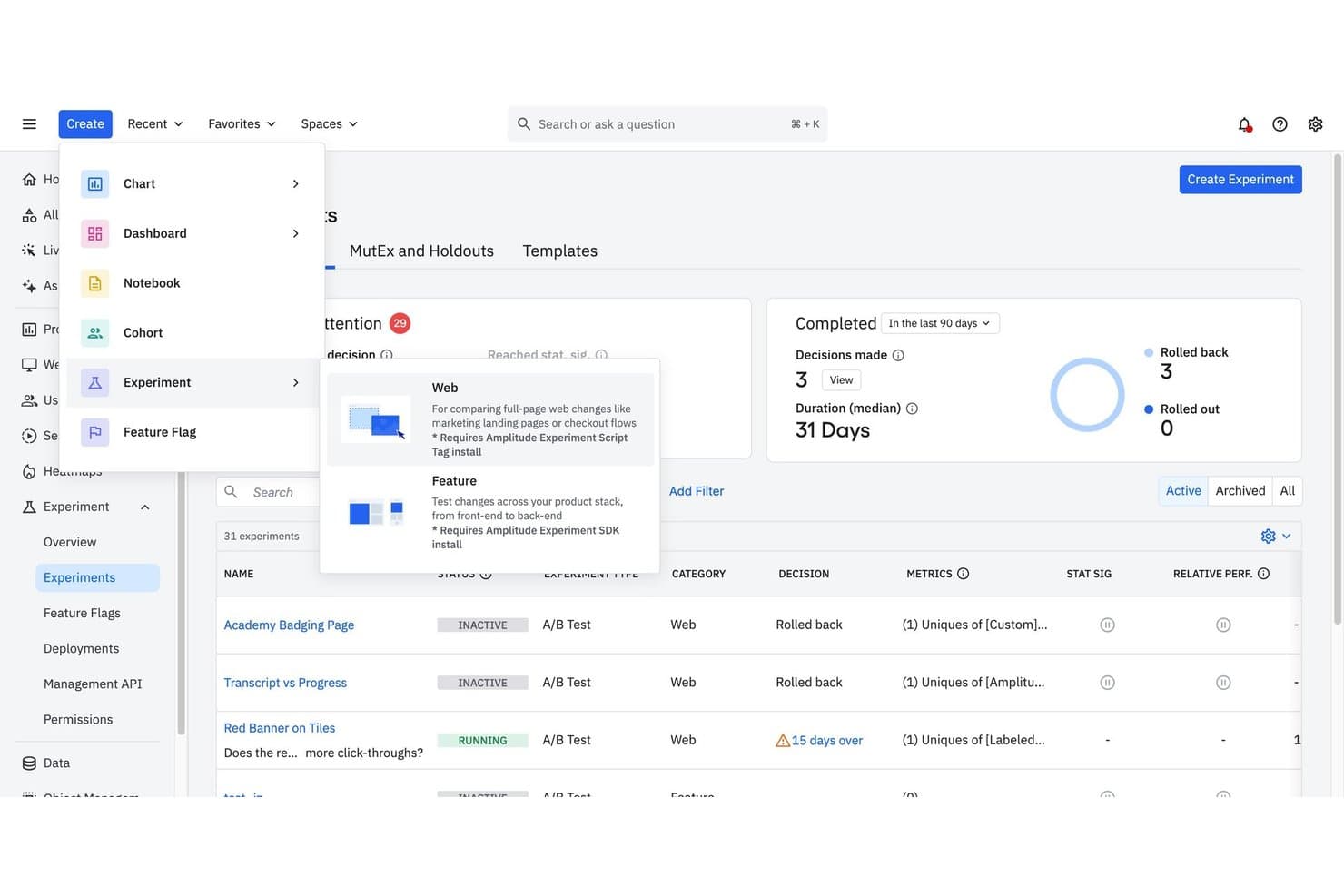
Amplitude supports running and managing A/B test experiments across web and feature types. Amplitude is an analytics-native A/B testing platform that combines a no-code visual editor for web experiments with server-side feature experimentation, behavioral cohort targeting, and built-in session replay and heatmaps.
Who Is Amplitude Best For?
Amplitude is a strong fit for product and growth teams that already live inside Amplitude Analytics and want experimentation tied directly to behavioral cohorts and event data.
Why I Picked Amplitude
Amplitude earns its spot on my shortlist because its behavioral cohort targeting ties directly into the same analytics data powering your broader product insights. I love that you can target an experiment to a cohort built from real event sequences, like users who triggered a specific funnel step in the last 30 days, without any data stitching. The statistical engine backs that up with sequential testing, CUPED variance reduction, and SRM checks baked in, so results you act on are actually trustworthy.
Amplitude Key Features
- Visual experiment builder: A no-code editor lets you select, edit, move, hide, or restyle any page element directly without touching code.
- AI Stylizer: A built-in AI tool that accepts natural-language prompts to rewrite copy, apply brand styling, and generate multiple variants inside the editor.
- URL redirect variants: Lets you run split-URL and landing page tests, with query parameter carryover and built-in SEO guidance.
- Session Replay and Heatmaps: Native qualitative tools that let you filter replays and heatmaps by experiment group to understand why a variant performed the way it did.
Amplitude Integrations
Amplitude documents 159+ integrations, including Segment, Tealium, HubSpot, GA4, BigQuery, LaunchDarkly, and Optimizely. Its cohort, webhook, and CI/CD APIs support custom data connections and experiment rollouts.
Pros and Cons
Pros:
- Session replays explain why variants convert
- Statistical safeguards support trustworthy experiment decisions
- Cohort targeting connects directly to analytics
Cons:
- Some reviewers report slow support responses
- Closed shadow DOM limits visual edits
Learn more about Amplitude: Best for ecommerce growth experimentation
- 30-day free trial + free demo available
- From $350/100k users/month
Visit WebsiteCustomer Rating:4.4/5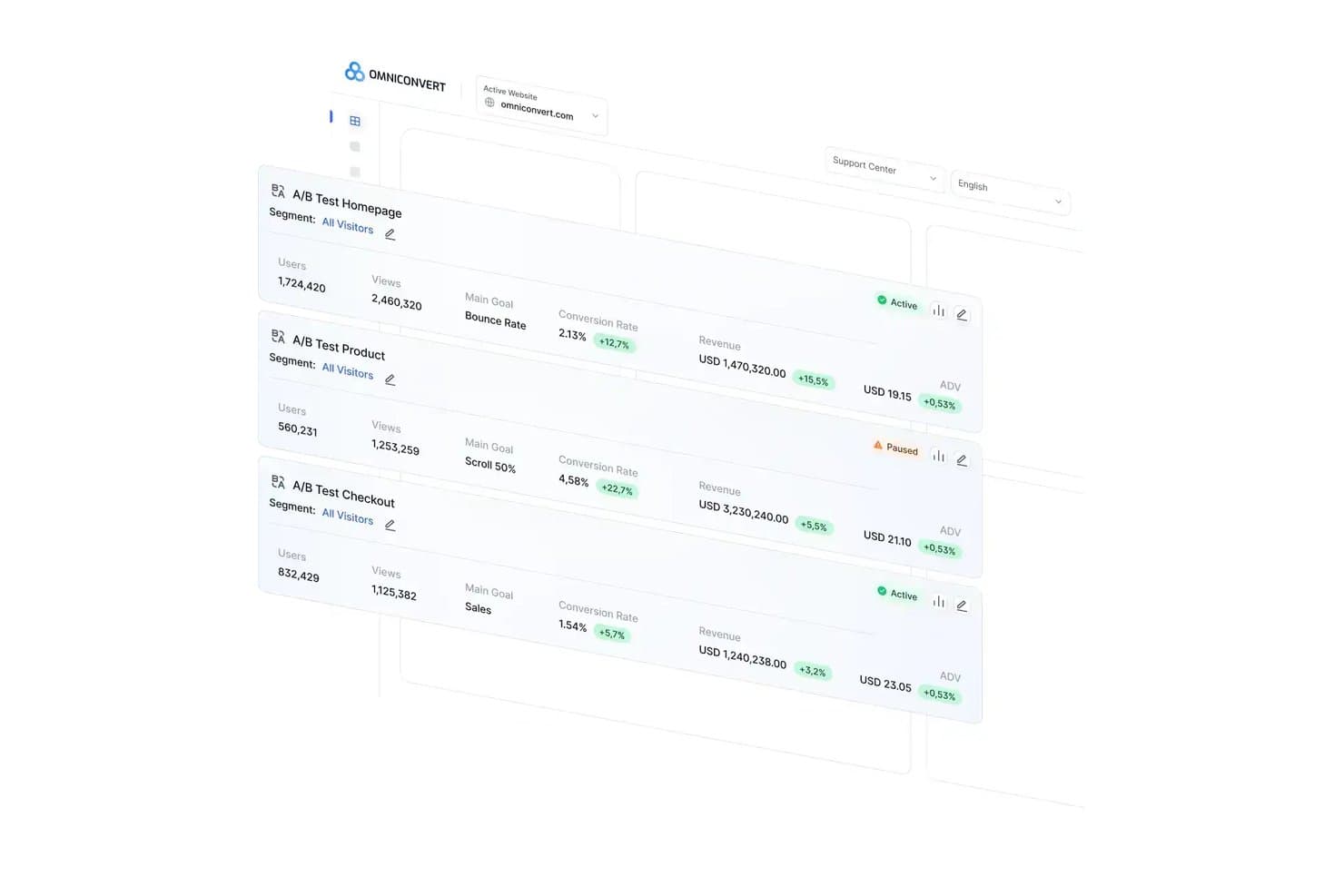
Omniconvert tracks A/B test performance across key metrics in one dashboard. Omniconvert Explore is a website A/B testing and CRO platform built for ecommerce teams, offering client-side, server-side, and split URL testing alongside multivariate experiments, 40+ segmentation parameters, and dual Bayesian/Frequentist statistical engines.
Who Is Omniconvert Best For?
Omniconvert is a strong fit for ecommerce teams that need revenue-focused experimentation, from CRO specialists running segmented tests to growth marketers optimizing checkout and post-purchase flows.
Why I Picked Omniconvert
I've included Omniconvert in my top picks because it's built specifically for ecommerce growth experimentation in a way that most A/B testing tools aren't. Its 40+ segmentation parameters let you target by RFM score, CLV, and cart value, so you can run a test on high-value returning customers at checkout without touching your general traffic. I also rate its dual Bayesian and Frequentist statistical engines highly, since you can run both on the same test and see chance-to-win metrics alongside classical significance.
Omniconvert Key Features
- AI prompt-to-code builder: Describe a variation in plain English and Omniconvert writes, checks, and previews the experiment code automatically.
- Stacked testing: The winning variation becomes the new control without any developer involvement, so you can run sequential tests continuously.
- Mutually exclusive experiment groups: Assign visitors to separate, non-overlapping test groups to prevent experiments from interfering with each other's results.
- Server-side testing: Run experiments on pricing logic, checkout flows, and algorithms via a PHP SDK, with Redis caching and full goal tracking.
Omniconvert Integrations
Omniconvert has native integrations with GA4, Google Tag Manager, Shopify, Magento, BigCommerce, Klaviyo, Salesforce, and Hotjar. It also offers a REST API for custom integrations and Zapier connectivity.
Pros and Cons
Pros:
- Granular RFM and CLV audience targeting
- Bayesian and Frequentist results support cross-checking
- Revenue and AOV reporting guides ecommerce decisions
Cons:
- No native heatmaps or session replay
- Complex custom campaigns can become buggy
Learn more about Omniconvert: Best for enterprise-level personalization
- Free demo available
- Pricing upon request
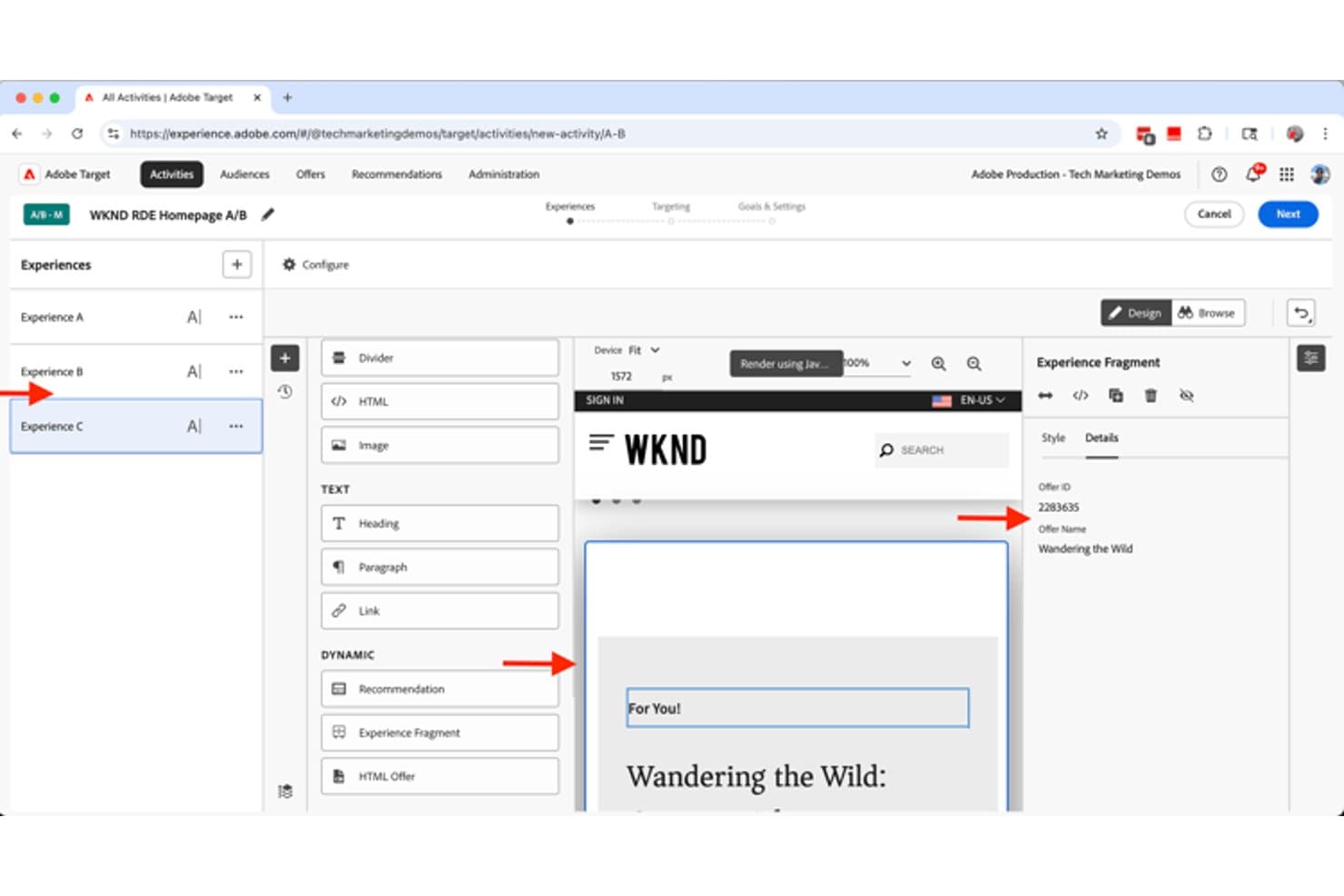
Adobe Target lets users build A/B test experiences with dynamic content fragments. Adobe Target is an enterprise A/B testing and personalization platform that supports A/B/n, multivariate, and multipage testing alongside AI-driven traffic allocation, audience targeting, and server-side feature-flag experimentation.
Who Is Adobe Target Best For?
Adobe Target is a strong fit for large enterprises with dedicated implementation teams running high-volume, cross-channel personalization programs.
Why I Picked Adobe Target
Adobe Target earns its spot on my shortlist because its AI-driven personalization goes beyond standard A/B testing. I'm particularly impressed by Auto-Target, which uses machine learning to serve the best experience to each individual visitor in real time, and by Automated Personalization, which builds separate models per visitor profile. The Experimentation Accelerator also analyzes past test results to generate prioritized test ideas automatically, which speeds up planning significantly.
Adobe Target Key Features
- Multipage activity testing: Build and test experiences across multiple connected pages, like homepage to category to product, within a single activity.
- Auto-Allocate traffic control: Automatically shifts traffic toward better-performing variations every two hours using a multi-armed bandit approach.
- Dual statistical methods: Applies Bayesian analysis for conversion goals and Welch's t-test for revenue and engagement metrics, with continuous monitoring and no early-stopping penalty.
- Enterprise user permissions: Restrict view, edit, approve, and publish rights by region, environment, or channel through role-based Product Profiles.
Adobe Target Integrations
Adobe Target offers native integrations with Adobe Analytics, Customer Journey Analytics, Real-Time CDP, Adobe Journey Optimizer, Adobe Experience Manager, and Audience Manager. It also supports custom integrations through its APIs, at.js, Web SDK, and Node.js and Java SDKs.
Pros and Cons
Pros:
- Multipage funnel testing supports complex journeys
- Auto-Allocate shifts traffic toward winners
- Bayesian and frequentist result analysis
Cons:
- SPA experiments require technical implementation work
- Visual editor struggles with complex changes
Learn more about Adobe Target : Best for engineering-centric experimentation workflows
- Free plan available
- From $150/month
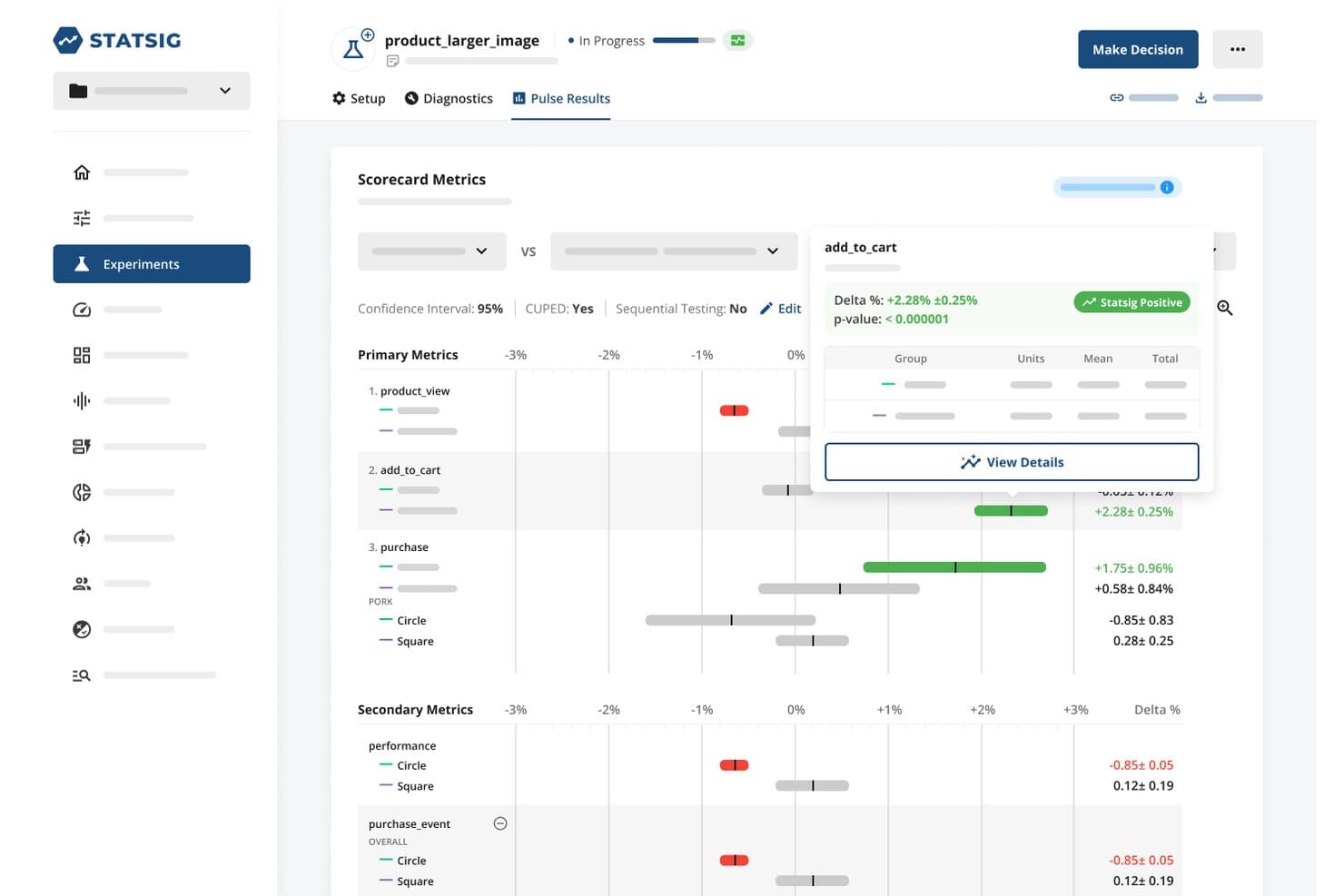
Statsig lets users analyze A/B test metrics with statistical significance at a glance. Statsig is a feature flagging and experimentation platform that combines A/B testing, server-side and client-side experiments, audience targeting, a statistical analysis engine, and built-in session replay and product analytics.
Who Is Statsig Best For?
Statsig is a strong fit for product and engineering teams that want to run rigorous, code-first experiments alongside feature flagging in a single platform.
Why I Picked Statsig
I picked Statsig as one of the best because its statistical engine is genuinely unlike what most A/B testing tools offer. You get Bayesian and frequentist analysis in the same platform, plus CUPED variance reduction, sequential testing, and automatic detection of heterogeneous effects across segments. I've found that kind of depth invaluable when running server-side experiments on checkout flows or feature rollouts where a weak stats layer leads to bad ship decisions.
Statsig Key Features
- Audience targeting rules: Layer targeting conditions by URL pattern, country, device type, browser, and custom user attributes to control exactly who sees each experiment.
- Traffic allocation and layers: Assign percentage-based rollouts and use experiment layers to prevent concurrent tests from interfering with each other.
- Autocapture for web events: Automatically capture clicks, page views, and Core Web Vitals without custom instrumentation, then use them directly as experiment metrics.
- Session replay with experiment context: Replay individual user sessions tagged with which experiment variant they were exposed to, so you can investigate unexpected results visually.
Statsig Integrations
Statsig offers documented integrations with Amplitude, Mixpanel, Google Analytics, Segment, Snowflake, BigQuery, Datadog, Jira, Slack, and GitHub. It also supports a data export API and webhooks for custom connectivity.
Pros and Cons
Pros:
- Flags connect rollouts with website experiments
- CUPED reduces variance in noisy tests
- Deep Bayesian and frequentist experiment analysis
Cons:
- SPA targeting still requires JavaScript configuration
- Visual Editor supports only basic page edits
Learn more about Statsig: Best for AI-driven test ideation at scale
- Free demo available
- Pricing upon request
Visit WebsiteCustomer Rating:4.7/5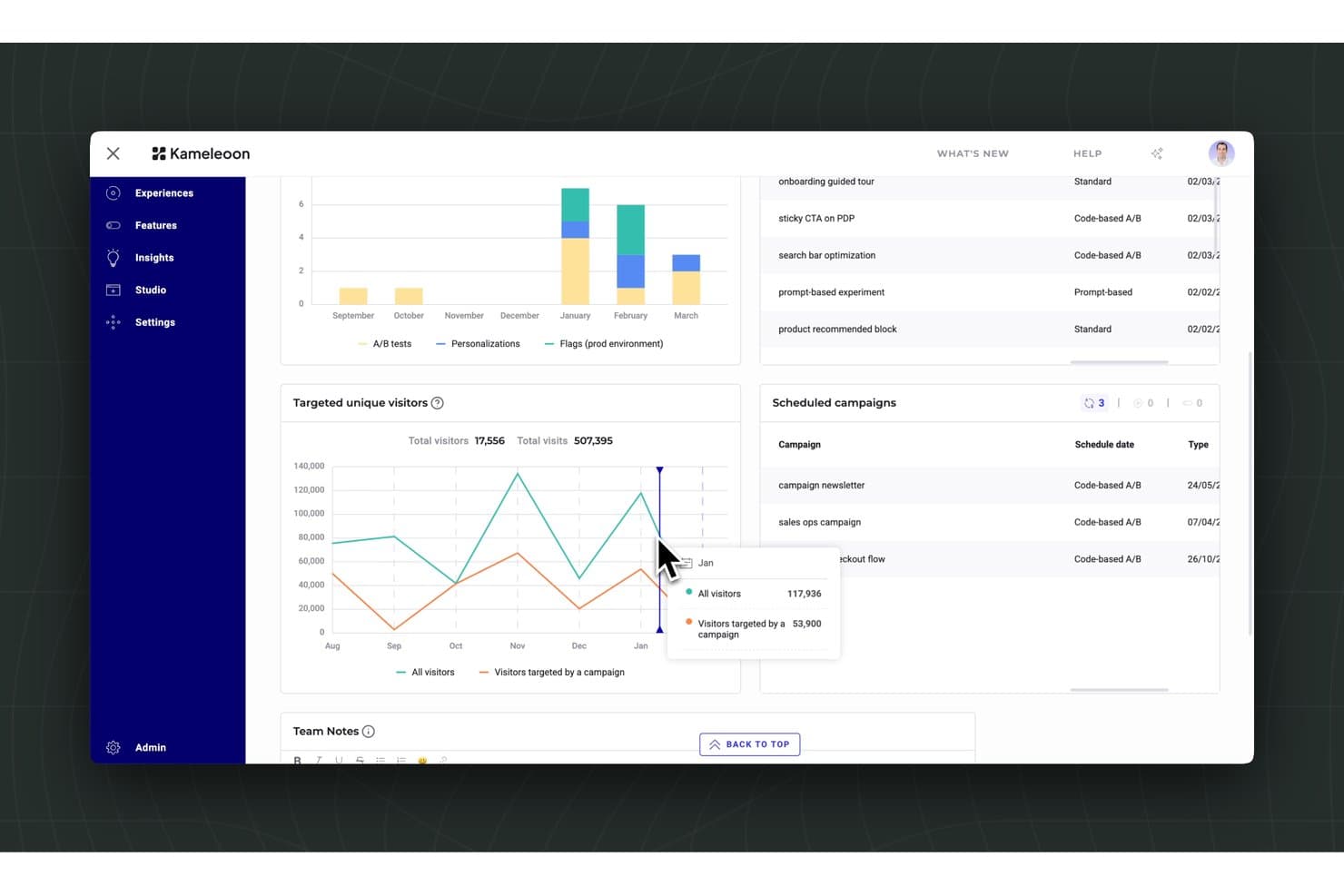
Kameleoon tracks visitor targeting and scheduled A/B campaign performance. Kameleoon is a website A/B testing and experimentation platform that combines an AI-driven prompt-based builder, a visual editor, server-side testing, feature flags, and audience personalization into a single tool.
Who Is Kameleoon Best For?
Kameleoon is a strong fit for product and growth teams at mid-market to enterprise companies that need to run high-volume experiments across web and product surfaces without bottlenecking developers.
Why I Picked Kameleoon
Kameleoon earns its spot on my shortlist because its Prompt-Based Experimentation (PBX) genuinely changes how fast you can get tests live. I love that the Ideate agent pulls from over 25,000 historical experiments to suggest ranked test ideas, each with a confidence score and projected uplift, so you're not starting from a blank page. The Build agent then reads your entire site, not just the current page, and turns a plain-language description into a live variation in minutes.
Kameleoon Key Features
- Statistical engine: Combines Bayesian and Frequentist methods, CUPED variance reduction, sequential testing, and automatic SRM detection in one built-in results engine.
- Multi-page experiment type: Tests full visitor journeys—like checkout flows or multi-step signups—as a single experiment, with flexible URL and element-based page targeting.
- Audience segmentation builder: Lets you build segments from 40+ behavioral and contextual criteria, with support for CDP and data warehouse sync for richer targeting.
- Feature flags with rollback: Supports percentage-based rollouts across unlimited environments, with automatic rollback triggered when KPIs drop below set thresholds.
Kameleoon Integrations
Kameleoon offers 100+ native integrations, including Google Analytics, Adobe Analytics, Amplitude, Contentsquare, Hotjar, Segment, Snowflake, Google Tag Manager, and Figma. JavaScript, Data, Automation, and MCP APIs support custom integrations and developer workflows.
Pros and Cons
Pros:
- Statistical safeguards catch SRM and test interactions
- PBX creates complex variations from prompts
- AI ranks test ideas with confidence scores
Cons:
- Native heatmaps and session replay are absent
- Graphic editor challenges nontechnical optimization teams
Learn more about Kameleoon: Best for marketing-led emotion-based targeting
- Free demo available
- Pricing upon request
Visit WebsiteCustomer Rating:4.5/5
AB Tasty supports enterprise experimentation with multivariate and server-side testing. AB Tasty is a website A/B testing and experimentation platform that combines a visual editor, multipage and multivariate testing, EmotionsAI-powered audience segmentation, and server-side feature flags in one tool.
Who Is AB Tasty Best For?
AB Tasty is a strong fit for growth marketers and CRO teams who want to run emotion-based audience targeting and personalization campaigns without relying heavily on developers.
Why I Picked AB Tasty
I've included AB Tasty in my top picks because its EmotionsAI segmentation does something most A/B testing tools can't: it groups visitors by emotional state, like frustration, enthusiasm, or hesitation, and lets you serve different test variations to each segment. Pair that with multipage campaign testing across full funnel journeys (home to product page to checkout) and you get experiments that reflect how real buyers actually behave. I especially like that Bayesian stats with Chance to Win and automatic Bonferroni correction are built in, so results from multi-variation emotion-targeted tests stay statistically sound.
AB Tasty Key Features
- Visual WYSIWYG editor: A no-code editor lets you modify copy, layouts, CTAs, and page elements across A/B, split, multipage, and multivariate campaign types without developer support.
- Dynamic traffic allocation: A multi-armed bandit option automatically shifts new traffic toward the best-performing variation based on a primary conversion goal.
- Guardrail metrics: Pro and above let you define guardrail metrics that flag when a winning variation is hurting a secondary KPI, keeping rollout decisions grounded in full-funnel data.
- Server-side feature flags: Open-source SDKs across 10+ languages enable sub-millisecond flag evaluation, with OpenFeature compliance and support for staged rollouts and auto-killswitches.
AB Tasty Integrations
AB Tasty offers native integrations with GA4, Adobe Analytics, Segment, BigQuery, Snowflake, Shopify, Salesforce Commerce Cloud, OneTrust, Jira, and Slack. Enterprise plans include REST API access for custom integrations, and Zapier is also supported.
Pros and Cons
Pros:
- Multipage testing follows complete buyer journeys
- Visual widgets speed campaign launches
- Emotion-based segments sharpen audience-specific experiments
Cons:
- Client-side rendering can cause visible flicker
- Advanced controls require higher-tier plans
Learn more about AB Tasty: 8Best for all-in-one behavioral and test analytics
VWO
- 30-day free trial + free demo available
- Pricing upon request
Visit WebsiteCustomer Rating:4.3/5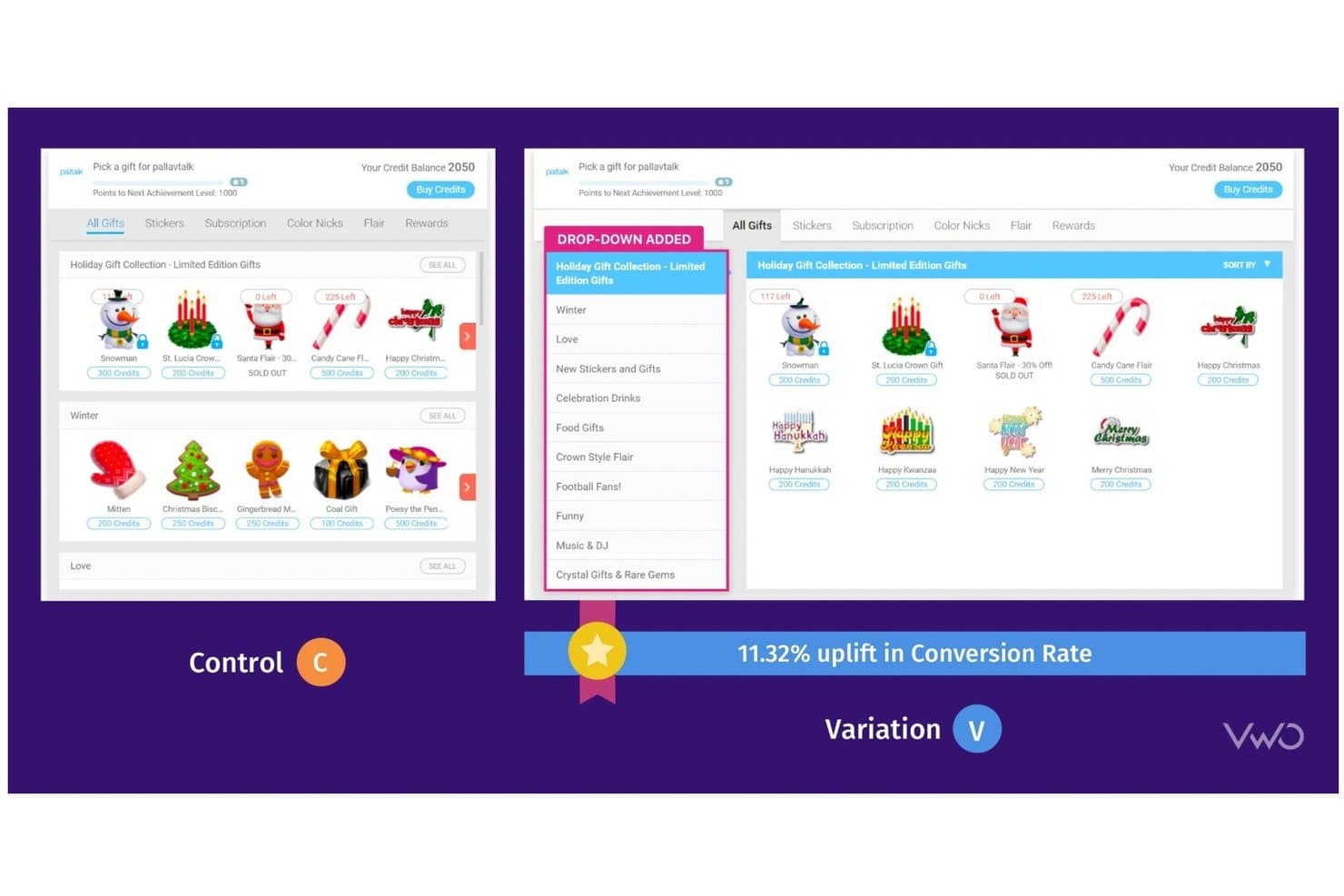
VWO lets users A/B test UI changes to boost conversion rates. VWO is a digital experience optimization platform that combines A/B, split URL, and multivariate testing with behavioral analytics tools like heatmaps, session recordings, and surveys, alongside server-side feature experimentation and AI-assisted test ideation.
Who Is VWO Best For?
VWO is a strong fit for mid-market and enterprise product and growth teams that want testing, behavioral analytics, and feature experimentation in a single platform.
Why I Picked VWO
VWO earns its spot on my shortlist because it's the only tool that pulls behavioral analytics and experiment data into one place, so I'm not juggling Hotjar alongside a separate testing platform. I particularly like SmartStats, VWO's Bayesian engine, which applies guardrail metrics and SRM detection to automatically flag unhealthy tests before bad data drives a bad call. The Wingz AI layer adds another dimension I find genuinely useful: it reads session recordings, heatmaps, and funnel data to surface hypotheses, then builds and QA-checks variations before launch.
VWO Key Features
- Multi-armed bandit traffic allocation: Automatically shifts traffic toward better-performing variations using Thompson Sampling and epsilon-greedy methods, without waiting for a test to end.
- Mutually exclusive groups: Prevents test collisions by ensuring visitors are only ever assigned to one experiment at a time across concurrent campaigns.
- Session recording filters by variation: Lets you replay sessions segmented by which test variation a visitor saw, directly inside the platform.
- Split URL testing: Runs experiments across entirely separate URLs, making it practical for testing major redesigns or alternate page flows.
VWO Integrations
VWO lists 54 documented integrations, including GA4, Adobe Analytics, Amplitude, Mixpanel, HubSpot, Salesforce, Shopify, Segment, FullStory, and Google Tag Manager. Its REST API and 10+ SDKs support custom integrations.
Pros and Cons
Pros:
- Behavioral analytics inform stronger test hypotheses
- AI generates and QA-checks test variations
- SmartStats flags unhealthy experiments early
Cons:
- Funnel tracking follows rigid step sequences
- Visual editor glitches on dynamic pages
Learn more about VWO: Best for open-source warehouse-native experimentation
- Free plan + free demo available
- From $40/user/month
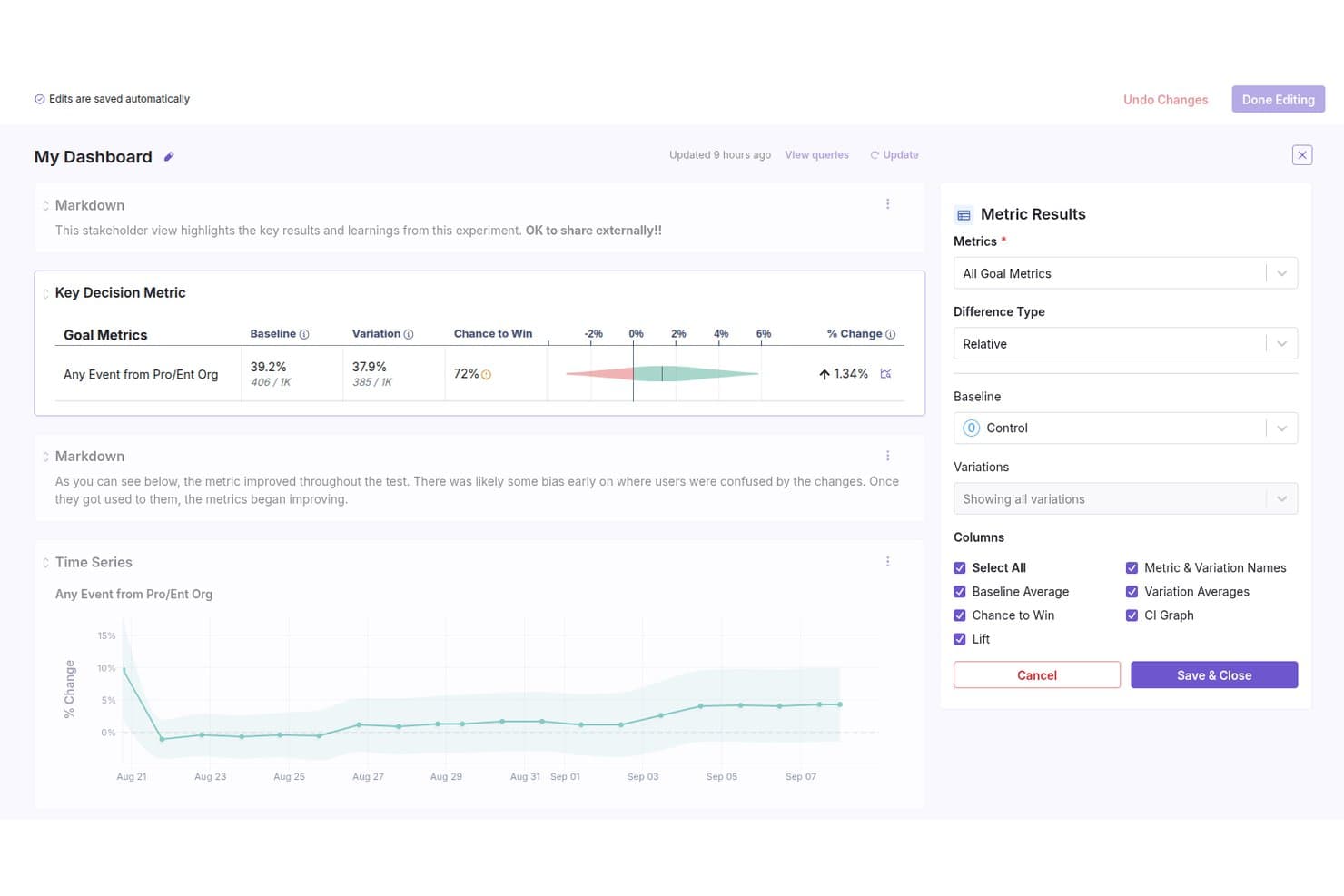
GrowthBook lets users build shareable experiment dashboards with metric results. GrowthBook is an open-source A/B testing and feature flagging platform that supports visual experiment building, a Bayesian and frequentist statistical engine, audience targeting, multi-armed bandits, and warehouse-native data integration.
Who Is GrowthBook Best For?
GrowthBook is a strong fit for technically sophisticated product and engineering teams that want to run rigorous experiments without sending user data to a third-party platform.
Why I Picked GrowthBook
GrowthBook earns its spot on my shortlist because it's built from the ground up for teams that need experiment data to stay inside their own warehouse. I love that it runs SELECT-only queries against Snowflake, BigQuery, or Redshift, so no raw user data ever leaves your infrastructure. Pair that with a Bayesian and frequentist stats engine that includes CUPED variance reduction and automatic SRM checks, and you get genuinely rigorous results without a third-party data handoff.
GrowthBook Key Features
- AI Visual Editor: A Chrome side-panel tool that lets you build test variations using plain-language prompts or point-and-click editing, without writing code.
- Sticky bucketing: Keeps users in the same variation if rollout percentages or targeting rules change mid-experiment, using cookies, localStorage, or Redis.
- Multi-armed bandits: Automatically shifts traffic toward better-performing variations using Thompson sampling, while keeping every variation at a minimum of 1% traffic.
- Dimension breakdowns: Slice experiment results by attributes like browser or country directly in the results tab, with high-cardinality dimensions grouped automatically.
GrowthBook Integrations
GrowthBook integrates with Snowflake, BigQuery, Redshift, Databricks, GA4, Segment, Rudderstack, Firebase, FullStory, and Microsoft Clarity. It also offers REST API access, webhooks, a CLI, and an MCP server for custom workflows.
Pros and Cons
Pros:
- Traffic allocation includes Thompson-sampling bandits
- Warehouse-native privacy controls
- Deep Bayesian and frequentist experiment analysis
Cons:
- Client-rendered SPAs can flicker
- Visual editor requires developer setup
Learn more about GrowthBook: Best for multivariate testing at scale
- Free demo available
- Pricing upon request
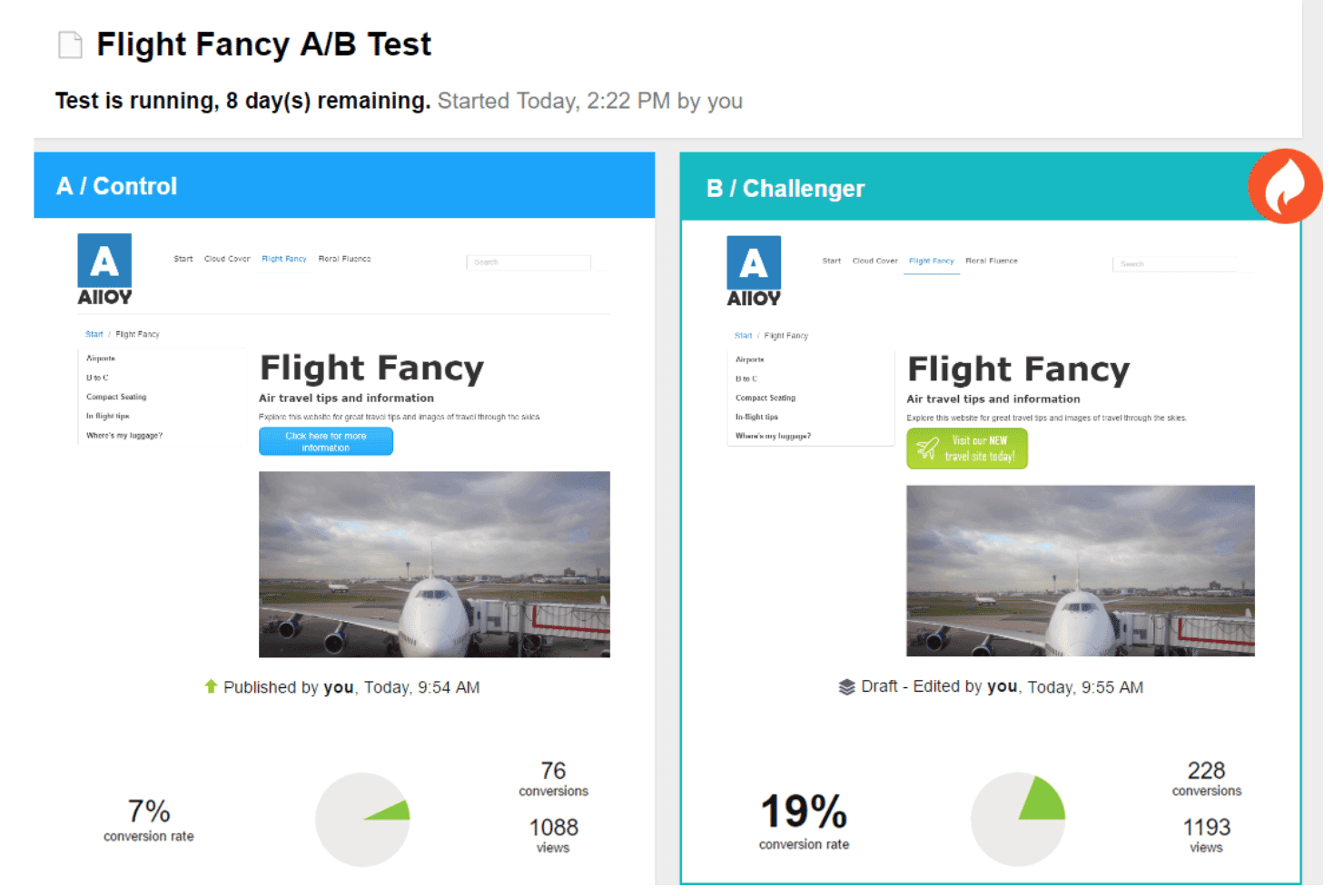
Optimizely Web Experimentation runs A/B tests comparing page variants by conversion rate. Optimizely Web Experimentation is a website A/B testing platform that supports A/B/n, multivariate, multi-page, and bandit-based tests through a visual editor, AI-assisted variation building, advanced statistical analysis, and audience targeting tools.
Who Is Optimizely Web Experimentation Best For?
Optimizely Web Experimentation is a strong fit for enterprise teams running high-volume experiment programs that demand rigorous statistical controls and complex multivariate test designs.
Why I Picked Optimizely Web Experimentation
Optimizely Web Experimentation earns its spot on my shortlist because of how thoroughly it handles multivariate testing at scale. I love that it supports full and partial factorial MVT designs with up to 64 combinations, plus section rollups that let individual test sections reach significance faster with less traffic. Its Stats Accelerator uses a bandit-based approach to automatically shift traffic toward winning variations hourly, so large-scale tests don't stall waiting for results.
Optimizely Web Experimentation Key Features
- Visual overlay editor: Edit variations directly on your live site without an iframe, using a no-code interface with AI-assisted element creation via Opal.
- Audience Builder: Define test audiences with AND/OR logic across behavioral, geographic, cookie, and custom attribute conditions, plus a code mode for custom JSON rules.
- Multi-page funnel testing: Run tests across unlimited pages while keeping each visitor in a consistent variation throughout the entire funnel.
- Stats Accelerator: Automatically shifts traffic toward better-performing variations hourly using an Upper Confidence Bound bandit approach.
Optimizely Web Experimentation Integrations
Optimizely Web Experimentation connects with Google Analytics 4, Google Tag Manager, Amplitude, Contentsquare, Hotjar, Mouseflow, SessionCam, Segment, and Fivetran through native, add-on, or third-party connectors. REST and JavaScript APIs support custom integrations.
Pros and Cons
Pros:
- Section rollups reduce traffic requirements for MVTs
- Stats Engine supports peeking without invalidating results
- Handles multivariate tests with 64 combinations
Cons:
- Audience segmentation loses statistical error controls
- Dynamic React sites can create code conflicts
Learn more about Optimizely Web Experimentation:
Andre verktøy for A/B-testing av nettsteder
Her er noen flere alternativer for verktøy for A/B-testing av nettsteder som ikke kom med på kortlisten, men som likevel er verdt å se nærmere på:
- 11Dynamic YieldBest for Bayesian-powered audience-targeted testing
- 12MidaBest for Bayesian-first testing with revenue metrics
- 13Crazy EggBest for visual heatmap-driven insights
- 14LaunchDarklyBest for feature flag-driven testing
- 15Zoho PageSenseBest for integrated analytics and personalization
- 16PostHogBest for product teams needing self-hosting
- 17OptibaseBest for privacy-focused experimentation
- 18EppoBest for advanced statistical analysis options
- 19Nelio A/B TestingBest for WordPress site integration
How I Evaluate Website A/B Testing Tools
I split my evaluation into three parts, weighting core functionality most: build variations, control traffic, and measure conversion results. Next, I look for standout features such as flicker-free testing and session replay. Finally, I consider support, onboarding, privacy, integrations, and pricing value.
Core Functionality (Table Stakes For This List)
When I'm selecting tools for my list, I score each one on a scale from 0 (does not offer the functionality) to 5 (excels in this area) for each core functionality listed below. I then convert the total into a percentage to help assess each tool's overall fit, with extra weight on any functionalities I’ve deemed essential.
- Visual Experiment Builder (Essential): I look for no-code editing of layouts, copy, images, and page elements, including variations for landing pages and checkout flows.
- Statistical Results Engine (Essential): I assess significance, confidence levels, sample-size guidance, and methods that help teams avoid premature winners.
- Audience Targeting: I check targeting by device, location, traffic source, behavior, and layered audience conditions.
- Traffic Allocation: I evaluate custom variation splits, holdout groups, and rules for adjusting exposure during live experiments.
- Multi-Page Funnel Testing: I look for linked tests across journeys such as product discovery, checkout, signup, and onboarding.
- Results Dashboards: I assess variation comparisons, conversion trends, segment breakdowns, and reporting that supports stakeholder decisions.
Once I have a list of tools that meet the criteria, I consider what sets each platform apart.
Differentiating Factors (What Sets Vendors Apart)
Here's how I compare and contrast different vendors:
Standout Features
Session replay and heatmaps paired with test data tell you why a variant won, not just that it did. I look for tools that layer click maps and scroll depth onto variation reports so I can show stakeholders exactly where user behavior shifted. Server-side and feature-flag experimentation matters when you need to test pricing logic or API responses that a visual editor can't touch. I also evaluate flicker-free rendering, because a content flash during page load erodes user trust and can quietly skew conversion metrics.
Beyond Features
I check how each tool's snippet affects page speed, since added latency can skew conversion data and hurt search rankings. Integration depth matters just as much—I look for native connections to analytics platforms like GA4 or Amplitude so experiment results tie directly to retention and engagement metrics. Pricing models based on monthly tracked users can spiral fast on high-traffic sites, so I evaluate whether tiers scale with your team's experiment velocity rather than penalizing growth.
Slik velger du verktøy for A/B-testing av nettsteder
Det er lett å gå seg vill i lange funksjonslister og kompliserte prismodeller. For å hjelpe deg med å holde fokus mens du arbeider deg gjennom den unike prosessen med å velge programvare, får du her en sjekkliste over faktorer du bør ha i tankene:
| Faktor | Hva du bør vurdere |
|---|---|
| FaktorSkalerbarhet | Hva du bør vurdereVil verktøyet støtte dagens og fremtidens testvolum, inkludert flere nettsteder eller sider med mye trafikk? |
| FaktorIntegrasjoner | Hva du bør vurdereKan verktøyet kobles direkte til CMS-, analyse- og markedsføringsplattformene dine uten omveier? |
| FaktorTilpasningsmuligheter | Hva du bør vurdereKan du tilpasse testparametere, rapportering og arbeidsflyter slik at de samsvarer med teamets prosesser og mål? |
| FaktorBrukervennlighet | Hva du bør vurdereVil ikke-tekniske brukere kunne sette opp og tolke tester, eller trenger du løpende støtte fra utviklere? |
| FaktorImplementering og oppstart | Hva du bør vurdereHvor lang tid vil det ta å komme i gang, og hvilke ressurser eller hvilken opplæring trenger teamet ditt for å starte testingen? |
| FaktorKostnad | Hva du bør vurdereSamsvarer prisnivåene med bruken din, og kommer det ekstra kostnader for domener, brukere eller avanserte funksjoner? |
| FaktorSikkerhetstiltak | Hva du bør vurdereTilbyr verktøyet datakryptering, tilgangskontroller for brukere og samsvar med personvernregler som GDPR? |
| FaktorTilgjengelig kundestøtte | Hva du bør vurdereHvilke støttekanaler tilbys, og er responstidene og kompetansen tilstrekkelige for virksomhetens behov? |
Hva er verktøy for A/B-testing av nettsteder?
Verktøy for A/B-testing av nettsteder er programvareplattformer som hjelper team med å gjennomføre eksperimenter ved å sammenligne testvarianter av nettsider for å finne ut hvilken som fungerer best. Disse verktøyene støtter optimalisering av konverteringsfrekvensen ved å fordele trafikk, måle brukeratferd og analysere måltall som fluktfrekvens og resultater for handlingsoppfordringer. De brukes vanligvis av markedsføringsteam, produktledere og små bedrifter til å validere endringer og forbedre kundeopplevelsen som en del av en bredere markedsføringsstrategi.
Mange av de beste verktøyene for A/B-testing inkluderer også funksjoner som en visuell redigerer eller koderedigerer, målretting mot målgrupper og innebygd analyse, slik at både nybegynnere og viderekomne brukere kan gjennomføre eksperimenter uten omfattende teknisk arbeid. Selv om verktøy som Google Optimize historisk har spilt en rolle på dette området, fokuserer moderne plattformer nå på dypere innsikt, raskere eksperimentering og bedre integrasjon i virksomhetens digitale økosystem.
Funksjoner i verktøy for A/B-testing av nettsteder
Når du velger verktøy for A/B-testing av nettsteder, bør du se etter følgende viktige funksjoner:
- Oppretting av A/B-tester: Sett opp eksperimenter for å sammenligne to eller flere versjoner av en nettside, slik at du kan teste endringer i innhold, layout eller design.
- Trafikkfordeling: Kontroller hvordan besøkstrafikken fordeles mellom ulike sidevarianter for å sikre statistisk gyldige resultater.
- Konverteringssporing: Overvåk bestemte brukerhandlinger – for eksempel klikk, registreringer eller kjøp – for å måle effekten av hver variant.
- Rapportering i sanntid: Få tilgang til oppdaterte analyser og resultatdata for pågående tester, slik at du kan ta beslutninger i tide.
- Visuell redigerer: Gjør endringer i sideelementer og opprett varianter uten å måtte skrive kode, slik at testing blir tilgjengelig for ikke-utviklere.
- Segmentering av målgrupper: Målrett eksperimenter mot bestemte brukergrupper basert på kriterier som geografisk plassering, enhet eller atferd for å få mer presis innsikt.
- Beregning av statistisk signifikans: Fastslå automatisk når testresultatene er pålitelige og ikke skyldes tilfeldigheter.
- Integrasjon med analyseverktøy: Koble til eksterne analyseplattformer for å berike eksperimentdata og effektivisere rapporteringen.
- Planlegging av tester: Angi start- og sluttdatoer for eksperimenter slik at de samsvarer med kampanjer eller forretningssykluser.
- Rollebasert tilgangskontroll: Administrer tillatelser for teammedlemmer og sørg for at de riktige personene kan opprette, redigere eller se tester og resultater.
Fordeler med verktøy for A/B-testing av nettsteder
Implementering av verktøy for A/B-testing av nettsteder gir flere fordeler for teamet og virksomheten din. Her er noen av fordelene du kan se frem til:
- Datadrevet beslutningstaking: Gjør velbegrunnede endringer på nettstedet ved å basere deg på reelle brukerdata og statistisk gyldige testresultater.
- Forbedrede konverteringsfrekvenser: Finn ut hvilke sideelementer eller oppsett som fører til flere registreringer, kjøp eller andre viktige handlinger.
- Mindre gjetting: Test hypoteser og designideer før du ruller dem ut bredt, slik at risikoen for negativ påvirkning reduseres.
- Raskere optimaliseringssykluser: Start, overvåk og analyser eksperimenter raskt, slik at nettstedet kan forbedres kontinuerlig.
- Personlige brukeropplevelser: Bruk segmenteringsfunksjoner til å tilpasse innhold og design for ulike målgrupper.
- Effektiv ressursbruk: Konsentrer utviklings- og designressurser om endringer som er dokumentert å gi målbare resultater.
- Tydelig rapportering for interessenter: Del lettforståelige resultater fra eksperimenter med kunder eller ledelsen ved hjelp av innebygde oversikter og rapporter.
Kostnader og priser for verktøy for A/B-testing av nettsteder
Når du velger verktøy for A/B-testing av nettsteder, må du forstå de ulike prismodellene og abonnementene som er tilgjengelige. Kostnadene varierer basert på funksjoner, teamstørrelse, tillegg og mer. Tabellen nedenfor oppsummerer vanlige abonnementer, gjennomsnittsprisene deres og typiske funksjoner som er inkludert i løsninger for A/B-testing av nettsteder:
Sammenligningstabell for abonnementer for verktøy for A/B-testing av nettsteder
| Abonnementstype | Gjennomsnittspris | Vanlige funksjoner |
|---|---|---|
| AbonnementstypeGratisabonnement | Gjennomsnittspris$0 | Vanlige funksjonerGrunnleggende oppretting av A/B-tester, begrenset antall eksperimenter, støtte for ett domene og grunnleggende rapportering. |
| AbonnementstypePersonlig abonnement | Gjennomsnittspris$20-$50 per måned | Vanlige funksjonerUbegrenset antall eksperimenter, visuell redigerer, konverteringssporing, prioritert e-poststøtte og integrasjoner. |
| AbonnementstypeForretningsabonnement | Gjennomsnittspris$100-$300 per måned | Vanlige funksjonerStøtte for flere domener, avansert analyse, målgruppesegmentering, teamsamarbeid og planlegging. |
| AbonnementstypeEnterprise-abonnement | Gjennomsnittspris$500-$2000 per måned | Vanlige funksjonerTilpassede integrasjoner, dedikert kundeansvarlig, avansert sikkerhet, SLA-støtte og hjelp med oppstart. |
Vanlige spørsmål om verktøy for A/B-testing av nettsteder
Her er noen svar på vanlige spørsmål om verktøy for A/B-testing av nettsteder:
Hvordan fordeler verktøy for A/B-testing av nettsteder trafikken mellom variantene?
Verktøy for A/B-testing av nettsteder bruker algoritmer til å tilordne besøkende tilfeldig til ulike versjoner av siden, slik at hver variant mottar en bestemt prosentandel av den totale trafikken. Denne randomiseringen bidrar til å produsere objektive resultater og gjør det mulig å sammenligne brukeratferd på tvers av variantene på en nøyaktig måte.
Kan jeg kjøre flere tester samtidig på nettstedet mitt?
Ja, de fleste verktøy lar deg kjøre flere eksperimenter samtidig. Du bør imidlertid planlegge testene nøye for å unngå overlappende endringer på samme side, noe som kan påvirke resultatene og gjøre det vanskeligere å tolke utfallet.
Hvilke beregninger bør jeg følge under en A/B-test?
Følg med på beregninger som samsvarer med målene for eksperimentet, for eksempel konverteringsfrekvens, klikkfrekvens, gjennomsnittlig ordreverdi eller tid på siden. Velg beregninger som direkte gjenspeiler brukerhandlingene eller forretningsresultatene du ønsker å forbedre.
Trenger jeg kodeferdigheter for å bruke verktøy for A/B-testing av nettsteder?
Nei, mange verktøy tilbyr visuelle redigeringsverktøy og grensesnitt uten kode, slik at ikke-tekniske brukere kan opprette og starte tester. For mer avanserte tilpasninger lar noen verktøy deg legge til egendefinert kode eller skript ved behov.
Hvor lenge bør jeg kjøre en A/B-test før jeg tar en beslutning?
Kjør testen til du oppnår statistisk signifikans, noe som avhenger av trafikkvolumet og størrelsen på effekten du måler. De fleste verktøy tilbyr kalkulatorer eller veiledning som hjelper deg med å avgjøre når resultatene dine er pålitelige.