

Et godt Whatfix-alternativ gir teamet ditt fleksible introduksjonsforløp, veiledning i appen, analyse og funksjoner for produktadopsjon som passer til virksomhetens behov og brukeratferd. Hvis du ser etter de beste alternativene til Whatfix, er du sannsynligvis på jakt etter verktøy som tilbyr lignende eller bedre måter å fremme produktadopsjon, støtte sluttbrukere og måle engasjement på – uten å ofre tilpasningsmuligheter eller brukervennlighet. Denne listen hjelper deg med å sammenligne de beste Whatfix-alternativene for 2026, slik at du trygt kan velge en plattform for digital adopsjon (DAP) som passer til målene dine for kundeintroduksjon, medarbeiderintroduksjon og produktledet vekst.
Hva er Whatfix?
Whatfix er et AI-drevet verktøy for produktadopsjon som brukes av produktteam til å lage opplevelser i appen, introduksjonsforløp og interaktive gjennomganger. Team bruker Whatfix til å levere kontekstuell veiledning, automatisere opplæring og spore bruker atferd i nettbaserte applikasjoner som et ERP- eller LMS-system. De brukervennlige funksjonene støtter introduksjon av nye brukere, utrulling av funksjoner via en redigerer uten kode og reduksjon av frafall ved å gjøre programvaren enklere å forstå. For å støtte digital transformasjon bruker løsningen en selvhjelpswidget, smarte tips og opplæringsmoduler for praktisk læring. Den hjelper SMB-er og større virksomheter med å spore månedlig aktive brukere (MAU-er), det totale antallet brukere og samle inn tilbakemeldinger fra kunder, selv om den endelige kostnaden avhenger av den spesifikke prismodellen.
Sammenligningstabell over Whatfix-alternativer
Denne sammenligningstabellen fremhever prisdetaljer for mine beste Whatfix-alternativer.
| Tool | Best For | Trial Info | Price | ||
|---|---|---|---|---|---|
| 1 | Best for auto-capturing internal process guides | Free plan available | From $15/user/month (billed annually) | Website | |
| 2 | Best for behavior-triggered onboarding flows | 14-day free trial | From $299/month | Website | |
| 3 | Best for no-code customer onboarding flows | Free trial available | Pricing upon request | Website | |
| 4 | Best for if/then in-app guidance automation | Free demo available | Pricing upon request | Website | |
| 5 | Best for cross-platform enterprise DAP rollouts | Not available | Pricing upon request | Website | |
| 6 | Best for pairing usage analytics with in-app guides | Free plan + 30-day free trial + free demo available | Pricing upon request | Website | |
| 7 | Best for desktop and legacy app guidance | Free demo available | Pricing upon request | Website | |
| 8 | Best for audio-visual guided walkthroughs | Free demo available | Pricing upon request | Website | |
| 9 | Best for linking product usage to CS health scores | Free trial available | Pricing upon request | Website | |
| 10 | Best for analytics-native in-app guide targeting | Free plan available | Pricing upon request | Website |


Hvorfor du kan stole på våre programvareanbefalinger
6,700+
Reviews
20
Industry experts
16+
Evaluation factors
14
Years
Teamet vårt har testet og anmeldt programvare siden 2012. Vi er selv produktledere, så vi vet hvor vanskelig og hvor viktig det er å velge riktig programvare.
I denne guiden har vi vurdert verktøyene gjennom praktisk testing og uavhengig research og gitt dem poeng ut fra våre utvelgelseskriterier.
Anmeldelsene våre bygger på vår egen redaksjonelle vurdering. De er ikke et salgsargument.
Ekspertanmeldere:
- Andrew LumbySenior TPM
- Cristiano ValimSenior UI/UX Lead


Anmeldelser av de beste Whatfix-alternativene
Nedenfor finner du mine detaljerte sammendrag av de beste Whatfix-alternativene på kortlisten min. Anmeldelsene mine gir en detaljert oversikt over funksjonene, de beste bruksområdene og integrasjonene til hver plattform, slik at du kan finne den som passer best for deg.
 Best for auto-capturing internal process guides
- Free plan available
- From $15/user/month (billed annually)
Visit WebsiteCustomer Rating:4.8/5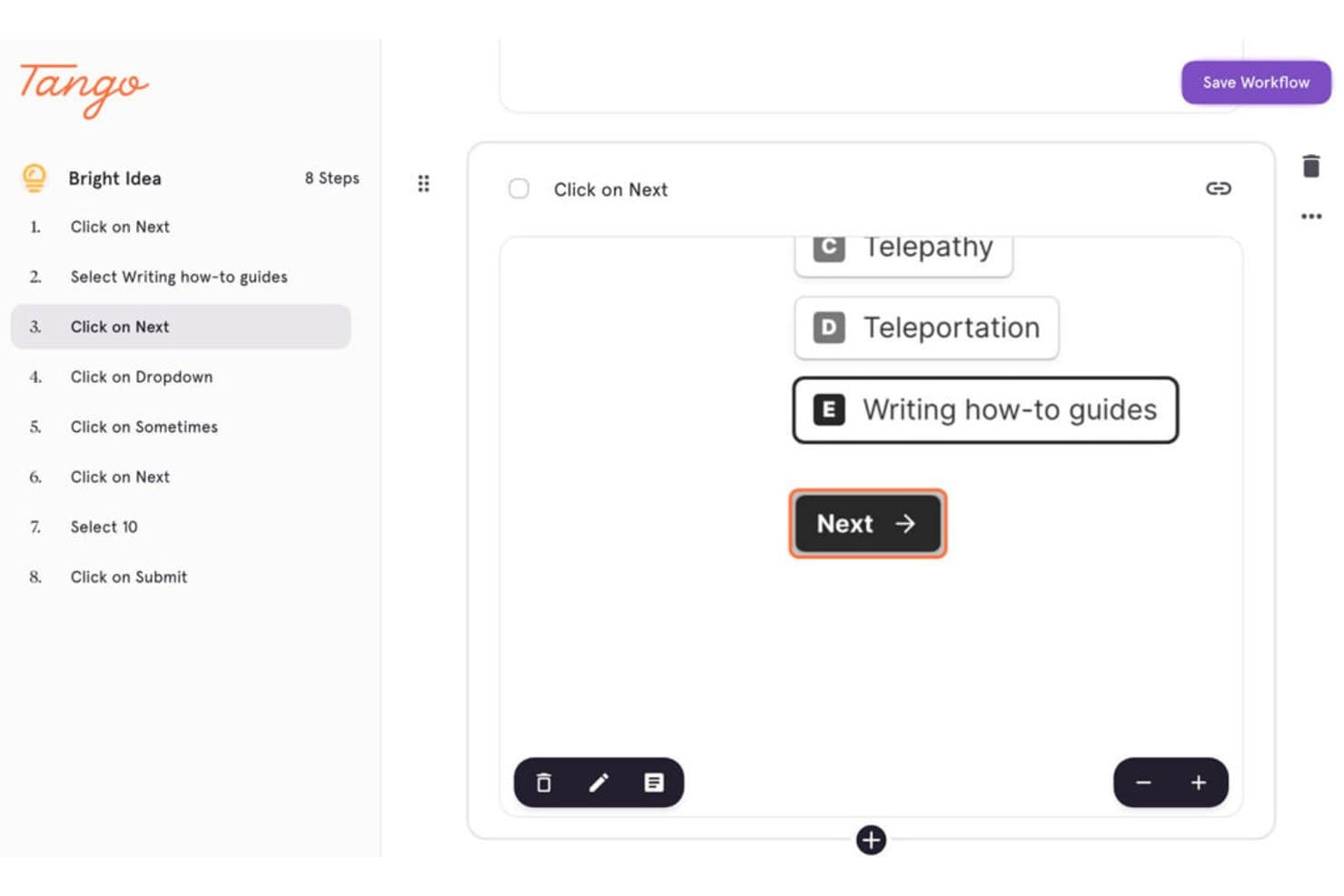
Tango captures step-by-step workflows with annotated UI interactions. Tango is a digital adoption platform for product operations, IT, and enablement teams that makes complex software easier to use, reducing training gaps and improving workflow consistency.
Who Is Tango Best For?
Tango suits product operations, IT, and enablement teams that need to turn software workflows into process guides.
Why Tango Is a Good Best Whatfix Alternatives Picked
I picked Tango because it auto-captures internal process guides while I complete workflows in a browser or desktop app. Its step-by-step screenshots, written instructions, and annotations help my team document tasks like onboarding users or updating product records. I can then refine each guide before sharing it as a repeatable reference.
Tango Key Features
- AI-powered search: Find relevant process guides using natural-language queries.
- Usage analytics: Review guide views and engagement data.
- Advanced permissions: Control who can access and manage guides.
- PII detection and redaction: Identify and remove sensitive personal information.
Tango Integrations
Tango doesn’t clearly document native integrations; its browser extension works across web-based apps, including HubSpot and Salesforce, without requiring APIs or custom integration setup.
Pros and Cons
Pros:
- Redacts sensitive information from captures
- Creates guides quickly for onboarding
- Auto-captures screenshots and workflow steps
Cons:
- Captured steps sometimes require manual cleanup
- Advanced screenshot editing remains limited
Learn more about Tango: Best for behavior-triggered onboarding flows
- 14-day free trial
- From $299/month
Visit WebsiteCustomer Rating:4.7/5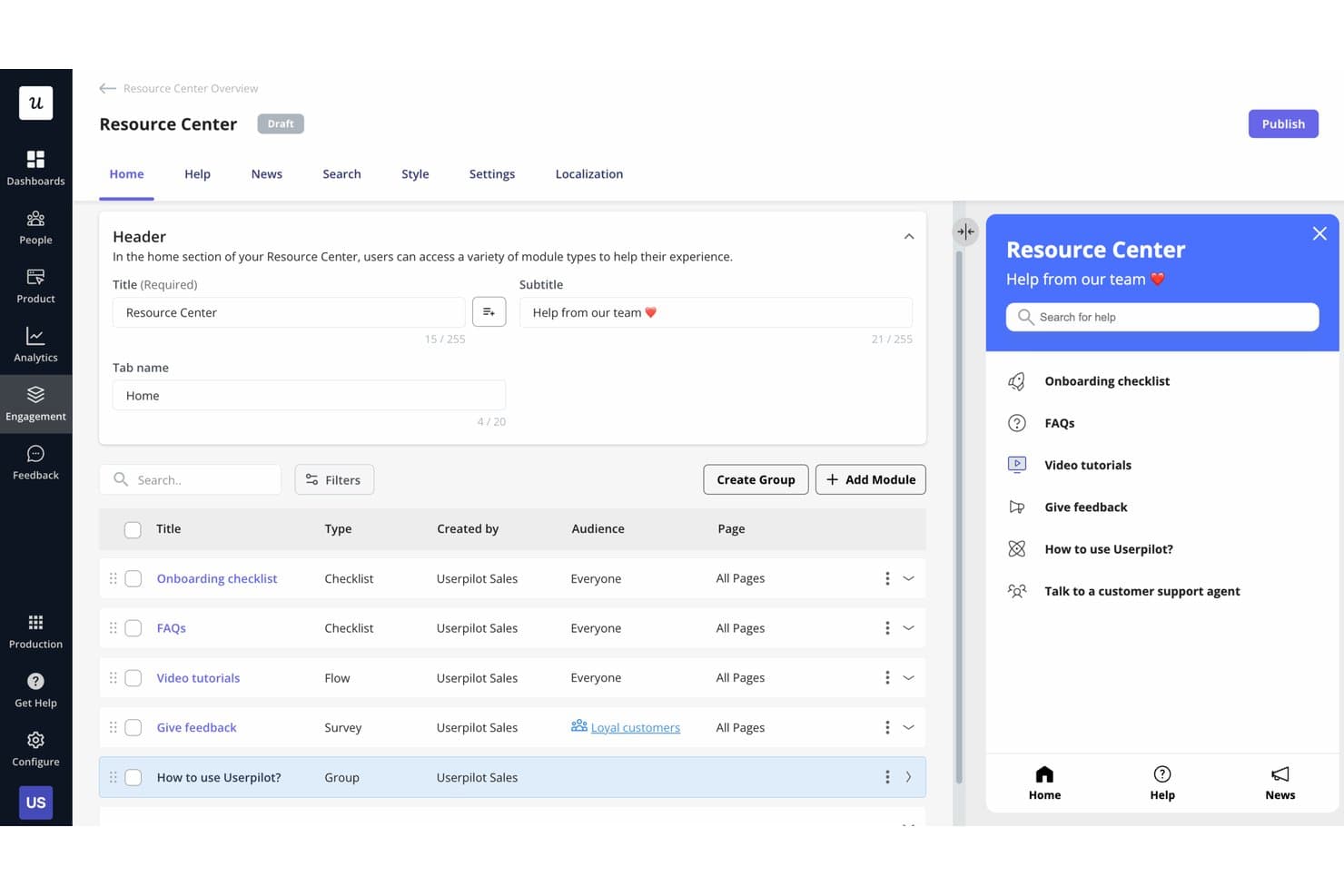
Userpilot lets users build a self-serve Resource Center for in-app help. Userpilot is a product adoption platform for SaaS product teams that helps personalize in-app experiences, guide users through key workflows, and improve activation, feature adoption, and retention.
Who Is Userpilot Best For?
Userpilot fits SaaS product and customer success teams that need to trigger in-app onboarding based on user behavior.
Why Userpilot Is a Good Best Whatfix Alternatives Picked
I picked Userpilot as a Best Whatfix Alternatives Picked option because it’s best for behavior-triggered onboarding flows. I use event-based triggers and user segmentation to show contextual tooltips when customers reach specific product milestones. Checklists and in-app walkthroughs then guide users through workflows such as connecting a data source or inviting teammates.
Userpilot Key Features
- Feature tagging: Tag interface elements without coding.
- Product analytics: Track feature engagement and user activity.
- NPS surveys: Collect and analyze in-app customer feedback.
- Resource center: Add searchable help content inside your product.
Userpilot Integrations
Userpilot offers 11 native integrations, including HubSpot, Salesforce, Amplitude, Mixpanel, Heap, Segment, Google Tag Manager, Google Analytics, Intercom, Zendesk, and Slack. It also supports HTTP API integrations and webhooks for custom connections, and connects with Zapier.
Pros and Cons
Pros:
- Surveys connect feedback with usage data
- Checklists guide multi-step product adoption
- Behavior-based triggers support contextual onboarding
Cons:
- Builder navigation can feel unintuitive
- Advanced styling often requires custom CSS
Learn more about Userpilot: Best for no-code customer onboarding flows
- Free trial available
- Pricing upon request
Visit WebsiteCustomer Rating:4.7/5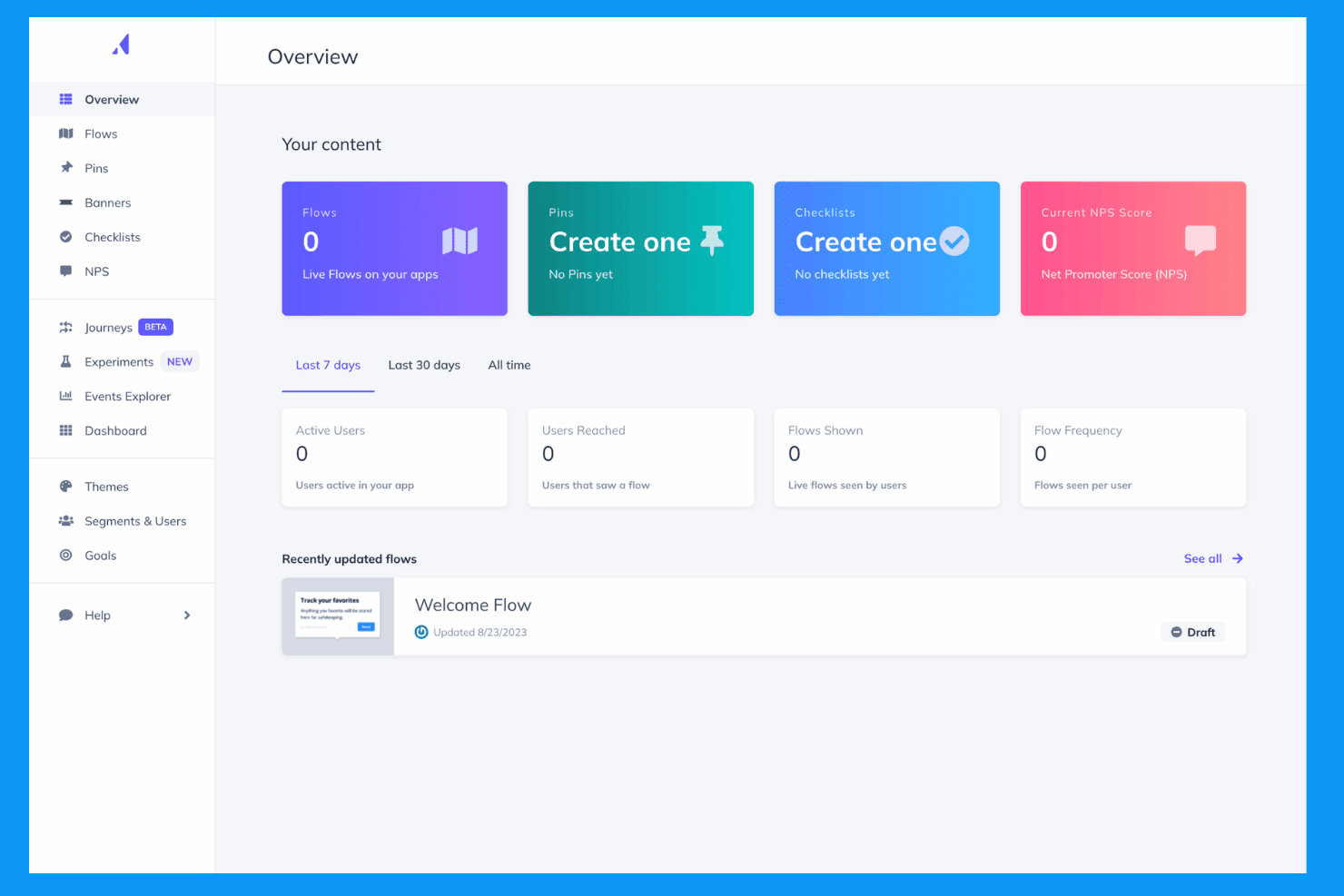
Appcues creates personalized in-app onboarding and engagement experiences. Appcues is a digital adoption platform for product and customer success teams that helps SaaS businesses guide users through products, improve feature adoption, and reduce onboarding friction.
Who Is Appcues Best For?
Appcues suits product and customer success teams at SaaS companies that need no-code onboarding flows to guide users through key product experiences.
Why Appcues Is a Good Best Whatfix Alternatives Picked
I picked Appcues because I can build no-code customer onboarding flows around specific product milestones. I use tooltips, modals, and checklists to guide new users through setup, then target messages by user segment or behavior. That helps product teams promote feature adoption without waiting for engineering support.
Appcues Key Features
- NPS surveys: Create in-app NPS surveys to collect customer feedback.
- Resource centers: Add an in-app hub for help content, links, and announcements.
- A/B testing: Compare experience variants to measure engagement.
- Integrations: Connect Appcues with CRM, analytics, and customer data tools.
Appcues Integrations
Appcues offers integrations with Salesforce, HubSpot, Segment, Mixpanel, Google Analytics, Heap, Intercom, Slack, Zendesk Support, and FullStory. It connects with Zapier and provides an API for custom integrations.
Pros and Cons
Pros:
- Analytics connect guidance with feature adoption
- Flows can launch without production deployments
- Targeted segmentation supports behavior-based onboarding
Cons:
- Skipped tour steps cannot be restarted
- Basic exports limit deeper analysis
Learn more about Appcues: Best for if/then in-app guidance automation
- Free demo available
- Pricing upon request
Visit WebsiteCustomer Rating:4.6/5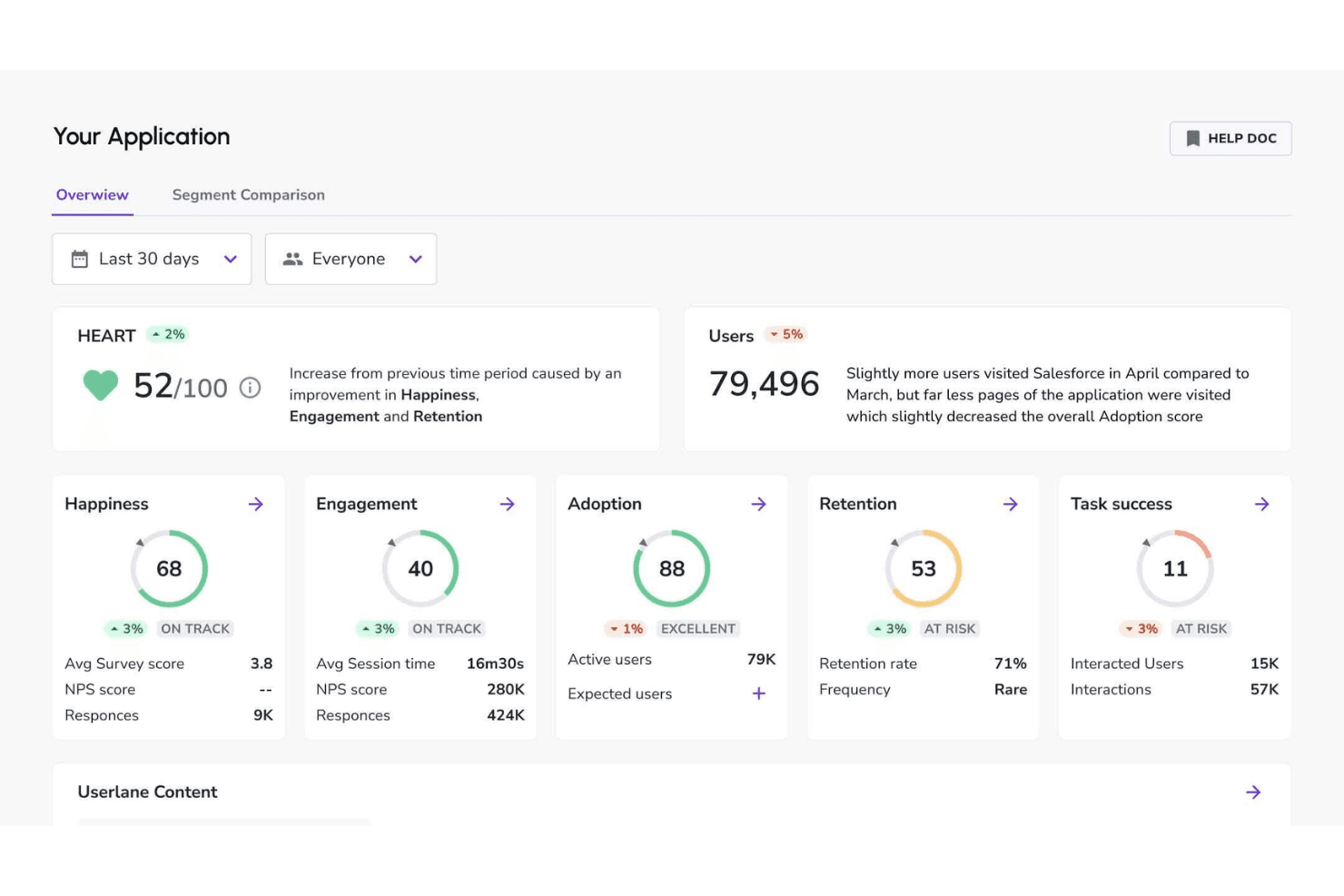
Userlane tracks user health to power real-time in-app support. Userlane is a digital adoption platform that helps enterprise teams guide employees through complex software, improve onboarding, and increase adoption across business applications.
Who Is Userlane Best For?
Userlane suits enterprise IT, HR, and operations teams that need contextual, conditional guidance across complex software workflows.
Why Userlane Is a Good Best Whatfix Alternatives Picked
I picked Userlane because it’s best for if/then in-app guidance automation. I use its no-code editor to build conditional walkthroughs that change based on a user’s role, location, or completed action. That lets my team guide employees through branching workflows, such as showing different steps for managers and individual contributors.
Userlane Key Features
- Analytics dashboard: Track user engagement, completion rates, and guidance usage.
- Resource center: Organize help content, guides, and support resources in one menu.
- In-app announcements: Publish targeted messages directly inside business applications.
- Application integrations: Connect Userlane with enterprise software and existing support tools.
Userlane Integrations
Userlane offers documented integrations with SharePoint, Confluence, KnowledgeOwl, and Zendesk for searching external knowledge content through Userlane Assistant. It also provides APIs for custom integrations, user attribute imports, and analytics exports; integrations aren’t available for self-hosted deployments.
Pros and Cons
Pros:
- Analytics reveal completion and engagement patterns
- Guides can be created within minutes
- Branching walkthroughs adapt to user actions
Cons:
- Enterprise deployment may need technical support
- Advanced workflows require careful configuration
Learn more about Userlane: Best for cross-platform enterprise DAP rollouts
- Not available
- Pricing upon request
Visit WebsiteCustomer Rating:4.5/5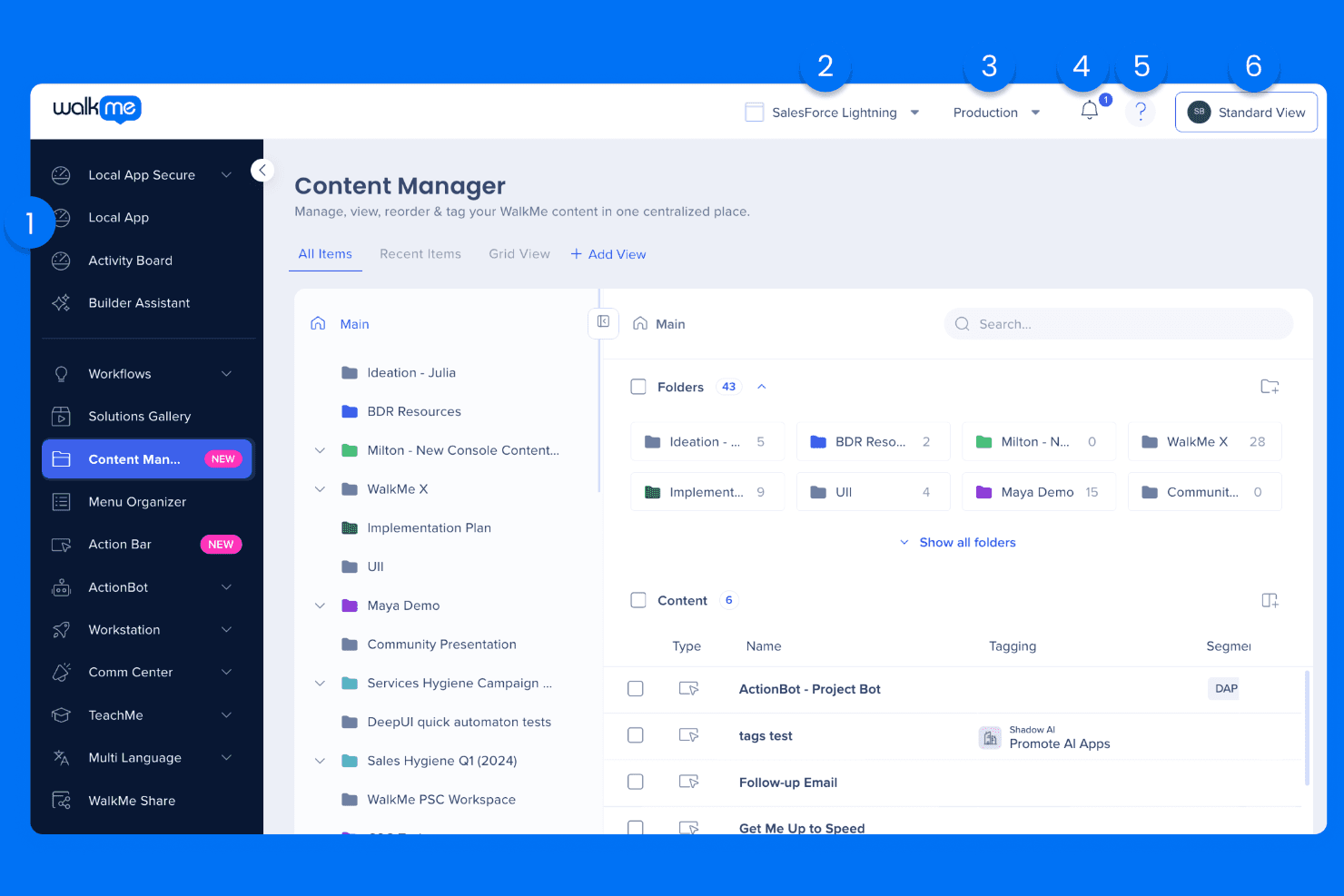
WalkMe supports product adoption with AI-driven guidance. WalkMe is a digital adoption platform for enterprise product, IT, and operations teams that guides employees through complex software, improves onboarding, and supports adoption across fragmented workflows.
Who Is WalkMe Best For?
WalkMe suits enterprise IT, product, and operations teams rolling out adoption programs across multiple business applications and workflows.
Why WalkMe Is a Good Best Whatfix Alternatives Picked
I picked WalkMe because its cross-platform enterprise DAP supports guided workflows across multiple business applications. I use Walk-Thrus and SmartTips to help employees complete tasks spanning systems, while analytics reveal where adoption breaks down. This fits rollouts such as onboarding teams across CRM, HR, and finance platforms.
WalkMe Key Features
- ActionBot: Provides conversational, in-app answers and task assistance.
- Surveys: Creates in-app surveys to collect user feedback.
- Launchers: Adds clickable elements that start guidance or actions.
- Segmentation: Targets content based on user attributes and behavior.
WalkMe Integrations
WalkMe supports integrations with Salesforce, Jira, ServiceNow, Slack, Confluence, Google Workspace, Outlook, and SAP across its desktop and mobile menu. It also provides APIs for incoming data, enterprise search, and custom connections.
Pros and Cons
Pros:
- ActionBot reduces repetitive support requests
- Analytics expose workflow drop-off points
- Cross-application guidance supports fragmented workflows
Cons:
- Some users report slow interface performance
- Technical setup requires dedicated administration
Learn more about WalkMe: Best for pairing usage analytics with in-app guides
- Free plan + 30-day free trial + free demo available
- Pricing upon request
Visit WebsiteCustomer Rating:4.4/5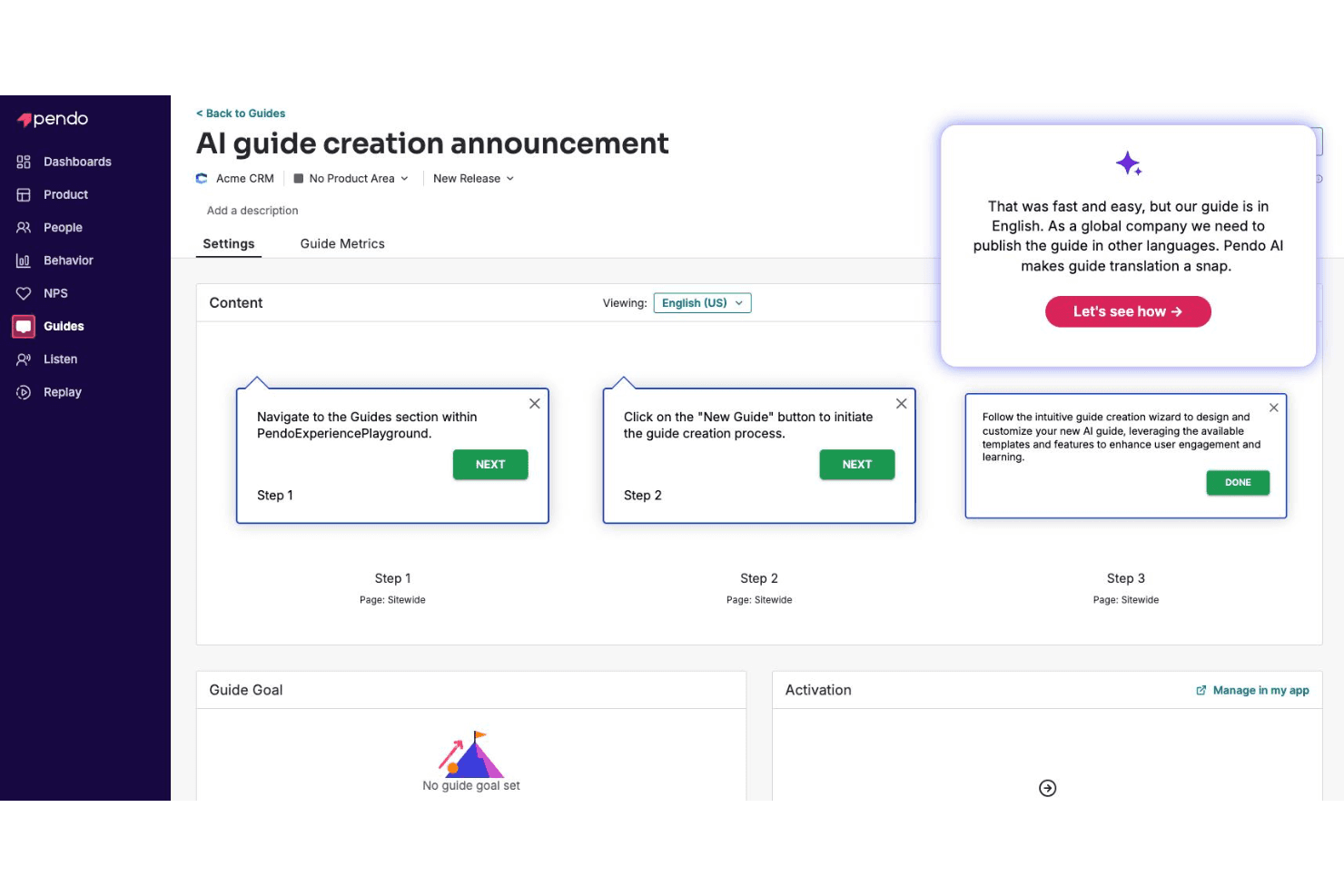
Pendo AI creates in-app guides using product insights. Pendo is a digital adoption platform for product and customer success teams that combines product analytics, user feedback, and in-app guidance to improve adoption and help users reach value faster.
Who Is Pendo Best For?
Pendo suits product and customer success teams that want to connect usage insights with targeted in-app guidance.
Why Pendo Is a Good Best Whatfix Alternatives Picked
I picked Pendo because it is best for pairing usage analytics with in-app guides. Its funnels, paths, and feature adoption reports show where users stall, while behavior-targeted tooltips and walkthroughs address those moments inside the product. I also use in-app feedback to test whether guidance improves adoption.
Pendo Key Features
- Resource center: Add an in-app hub for guides, documentation, and support resources.
- NPS surveys: Collect in-app Net Promoter Score responses from users.
- Session replay: Review recorded user sessions to inspect product interactions.
- Product feedback: Capture ideas, requests, and user comments in one workspace.
Pendo Integrations
Pendo offers native integrations with Salesforce, HubSpot, Intercom, Marketo, Okta, Slack, Confluence, Algolia, Drift, and Help Scout, plus a partner-built Jira integration and Zapier. It supports custom connections through APIs, webhooks, and MCP, while Salesforce and some data sync capabilities require paid add-ons.
Pros and Cons
Pros:
- Combines feedback with session replay
- Strong funnels, paths, and adoption reports
- Connects usage data to targeted guides
Cons:
- Guide management can become administratively heavy
- Advanced analytics require careful configuration
Learn more about Pendo: Best for desktop and legacy app guidance
- Free demo available
- Pricing upon request
Visit WebsiteCustomer Rating:4.7/5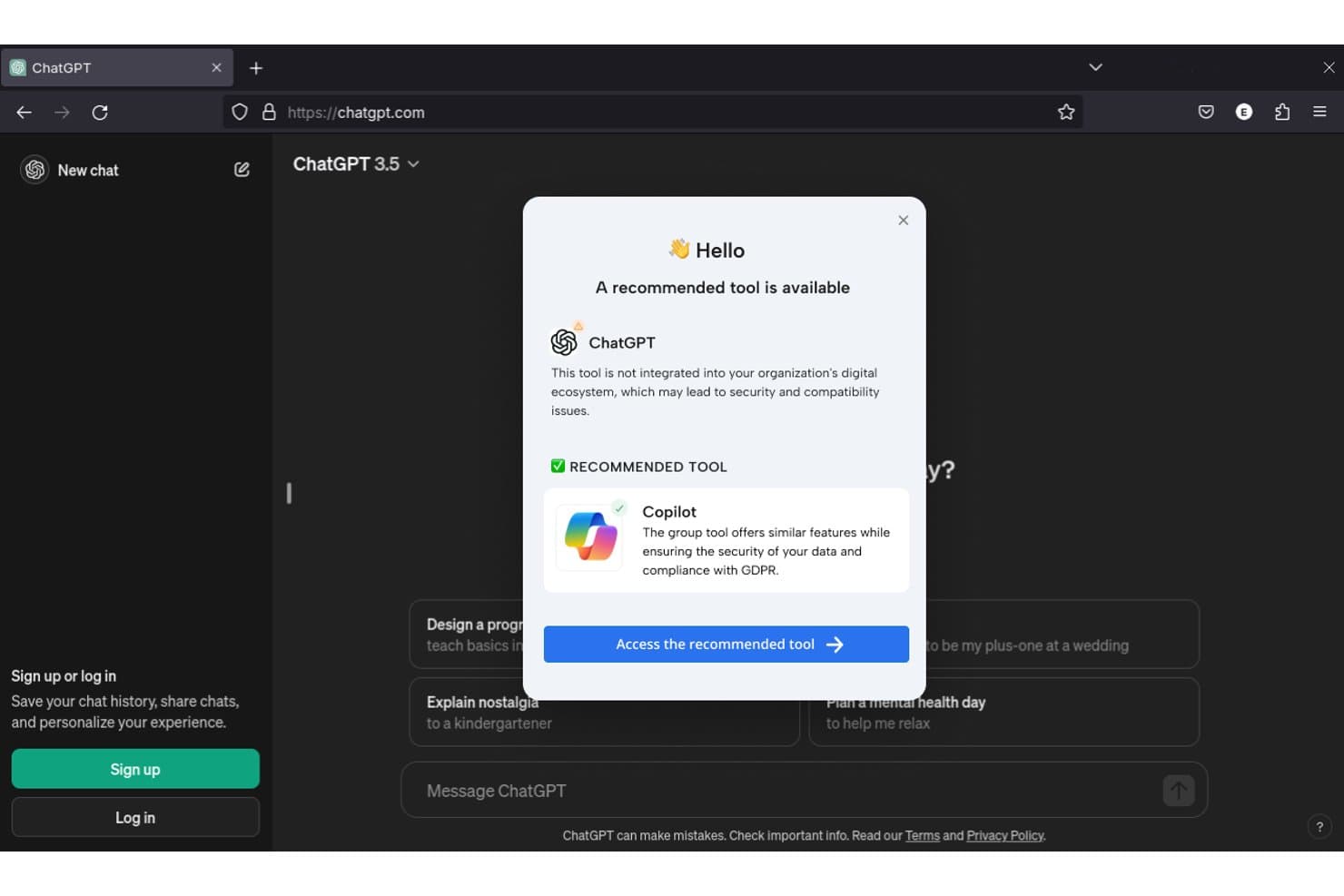
Lemon Learning alerts users when unauthorized AI tools are detected. Lemon Learning is a digital adoption platform for organizations with complex software environments, helping teams onboard users, support process changes, and improve adoption across business applications.
Who Is Lemon Learning Best For?
Lemon Learning suits organizations that need to guide employees through desktop software, legacy applications, and changing digital workflows.
Why Lemon Learning Is a Good Best Whatfix Alternatives Picked
I picked Lemon Learning because it guides users directly through desktop and legacy applications. I like its contextual, step-by-step walkthroughs for tasks such as processing records in older enterprise software. My team can support process changes in the flow of work without replacing systems employees still depend on.
Lemon Learning Key Features
- Adoption analytics: Track guidance usage and completion data.
- No-code authoring: Create and update content without coding.
- AI translation: Translate guidance into more than 100 languages.
- Software governance: Manage software adoption across your application portfolio.
Lemon Learning Integrations
Lemon Learning supports guidance across 300+ applications, including Salesforce, SAP, and Workday, without requiring API integrations or engineering tickets. Native integrations and Zapier support aren’t clearly documented.
Pros and Cons
Pros:
- No-code authoring reduces engineering dependence
- Supports multilingual guidance across global teams
- Guides desktop and legacy workflows in-app
Cons:
- Advanced analytics details remain limited publicly
- Guide creation can take substantial time
Learn more about Lemon Learning: Best for audio-visual guided walkthroughs
- Free demo available
- Pricing upon request
Visit WebsiteCustomer Rating:4.3/5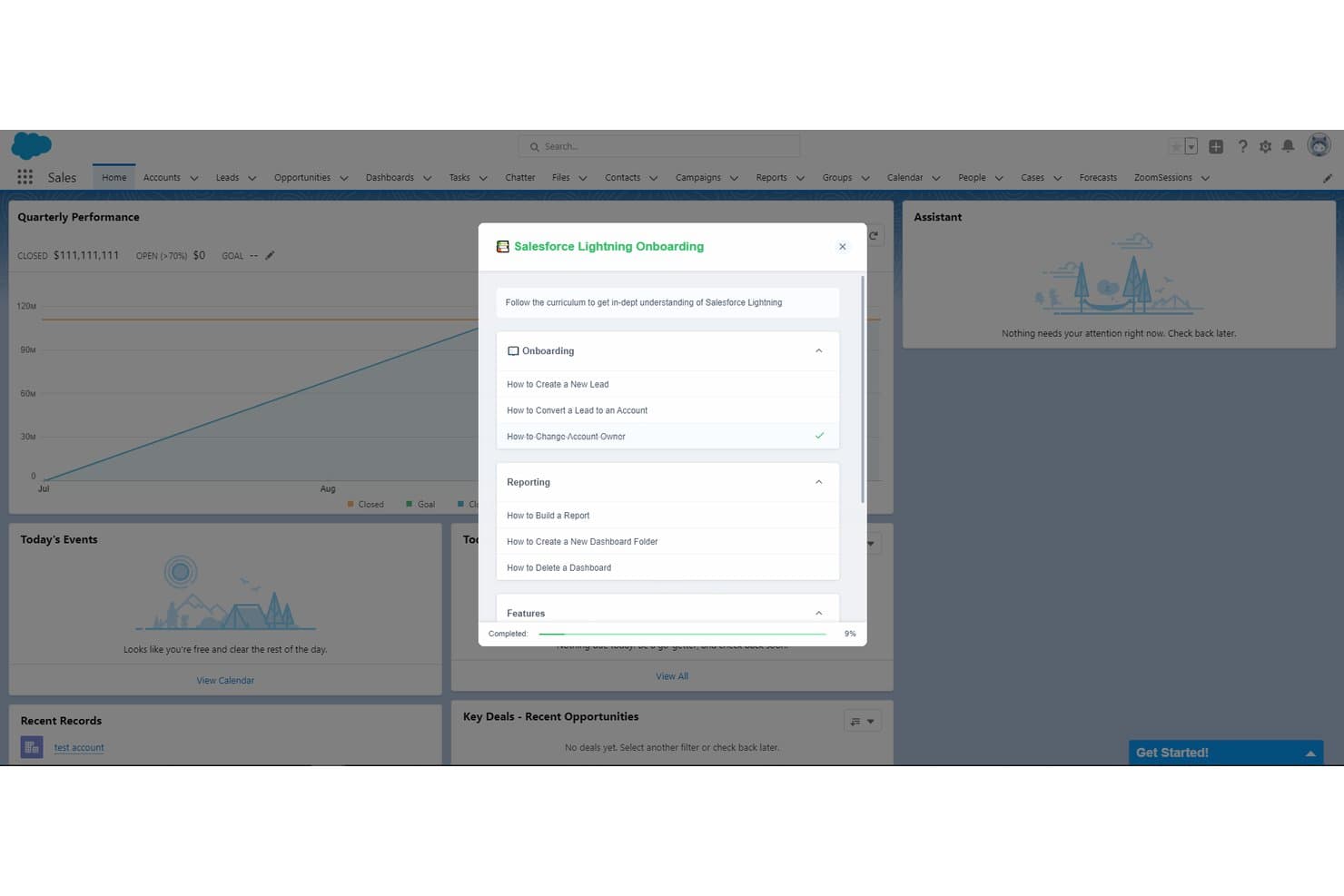
Toonimo guides users through Salesforce Lightning with structured onboarding checklists. Toonimo is a digital adoption platform for product, operations, and training teams that helps users navigate unfamiliar software, reduce support requests, and improve adoption through interactive in-app guidance.
Who Is Toonimo Best For?
Toonimo suits product, operations, and training teams that guide users through unfamiliar software with narrated, visual in-app instruction.
Why Toonimo Is a Good Best Whatfix Alternatives Picked
I picked Toonimo because its audio-visual guided walkthroughs combine voiceovers, animated characters, and on-screen prompts. My team uses it to guide new users through software workflows, such as completing a setup process or learning an unfamiliar dashboard. This approach helps product teams replace static help content with narrated, step-by-step guidance.
Toonimo Key Features
- No-code editor: Build and update walkthroughs without developer support.
- Audience targeting: Display guidance based on user attributes, pages, or actions.
- Engagement analytics: Track views, completion rates, and interaction data.
- Localization support: Create guidance for different languages and audiences.
Toonimo Integrations
Toonimo supports integrations with 20+ enterprise platforms, including Salesforce, SAP, Oracle Cloud, Microsoft Dynamics 365, ServiceNow, Workday, UKG, NetSuite, SharePoint, and Moodle. Enterprise Plus also includes custom integrations via API.
Pros and Cons
Pros:
- Customer success teams help launch walkthroughs
- Builds walkthroughs without code access
- Audio narration improves onboarding engagement
Cons:
- No automatic recording of user flows
- Analytics require drilling into individual engagements
Learn more about Toonimo: Best for linking product usage to CS health scores
- Free trial available
- Pricing upon request
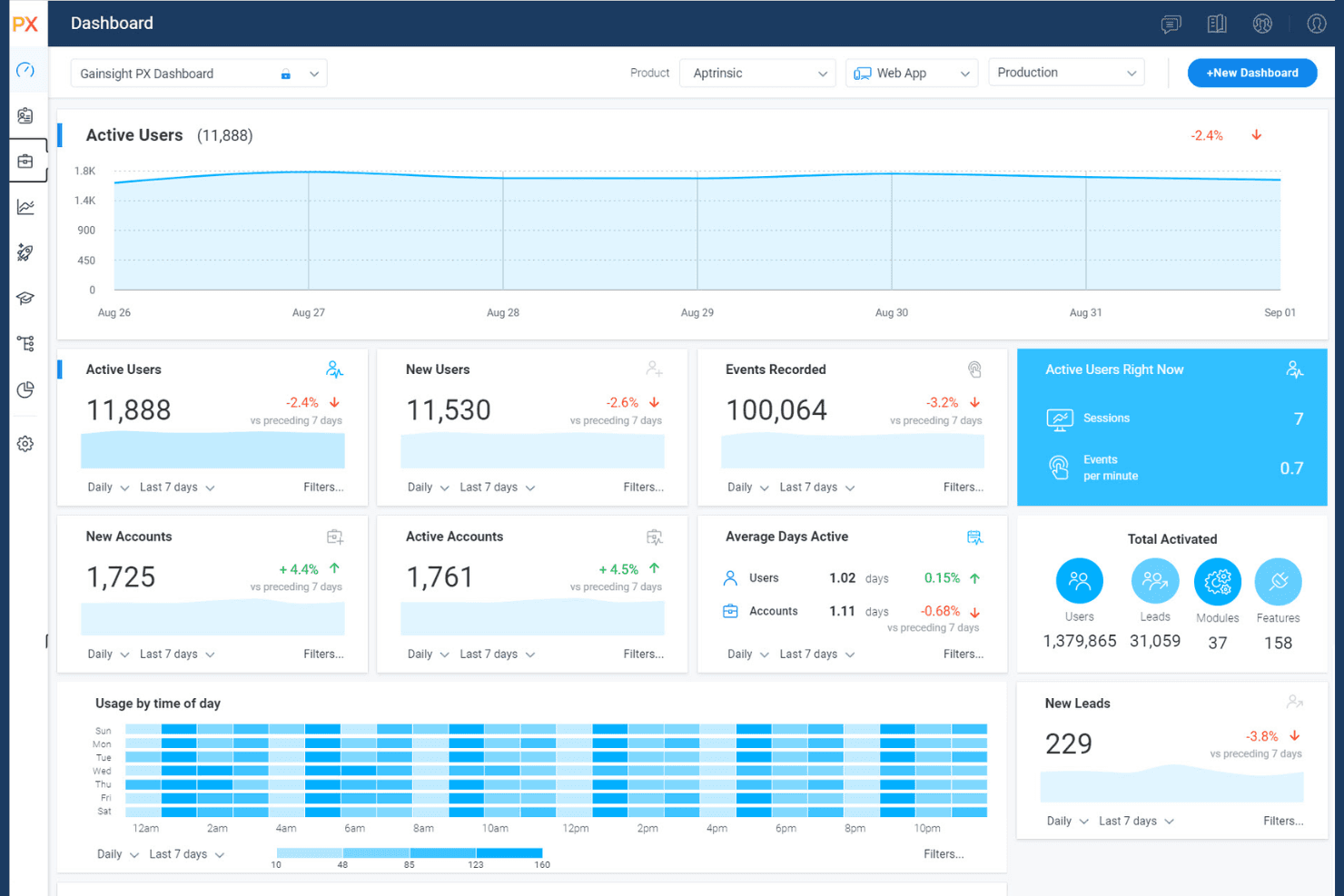
Gainsight PX manages engagement, feedback, and product analytics. Gainsight PX is a product experience platform for product and customer success teams that helps identify friction, understand user behavior, and improve adoption across digital products.
Who Is Gainsight PX Best For?
Gainsight PX fits product-led companies where product managers and customer success teams connect in-app behavior with account health and adoption.
Why Gainsight PX Is a Good Best Whatfix Alternatives Picked
I picked Gainsight PX because I can connect in-product behavior with customer success health scores. Its product analytics reveal where users encounter friction, while adoption data helps my team spot accounts that need targeted support. This makes it useful when a digital adoption program must inform both product decisions and customer success action.
Gainsight PX Key Features
- In-app engagements: Create contextual guides, tooltips, and banners.
- Audience segmentation: Build audiences from user attributes and behaviors.
- In-app surveys: Launch NPS and custom surveys within your product.
- Knowledge Center Bot: Surface help content through an in-app resource center.
Gainsight PX Integrations
Gainsight PX provides built-in integrations with Salesforce, Gainsight CS, Slack, Zendesk, and FullStory, supporting customer health, product usage, feedback, and engagement workflows. It also offers REST API access and webhooks for custom integrations.
Pros and Cons
Pros:
- Segments audiences by user behavior
- Contextual in-app guides and surveys
- Links product usage to account health
Cons:
- Individual activation insights can be limited
- Setup requires careful event instrumentation
Learn more about Gainsight PX: Best for analytics-native in-app guide targeting
- Free plan available
- Pricing upon request
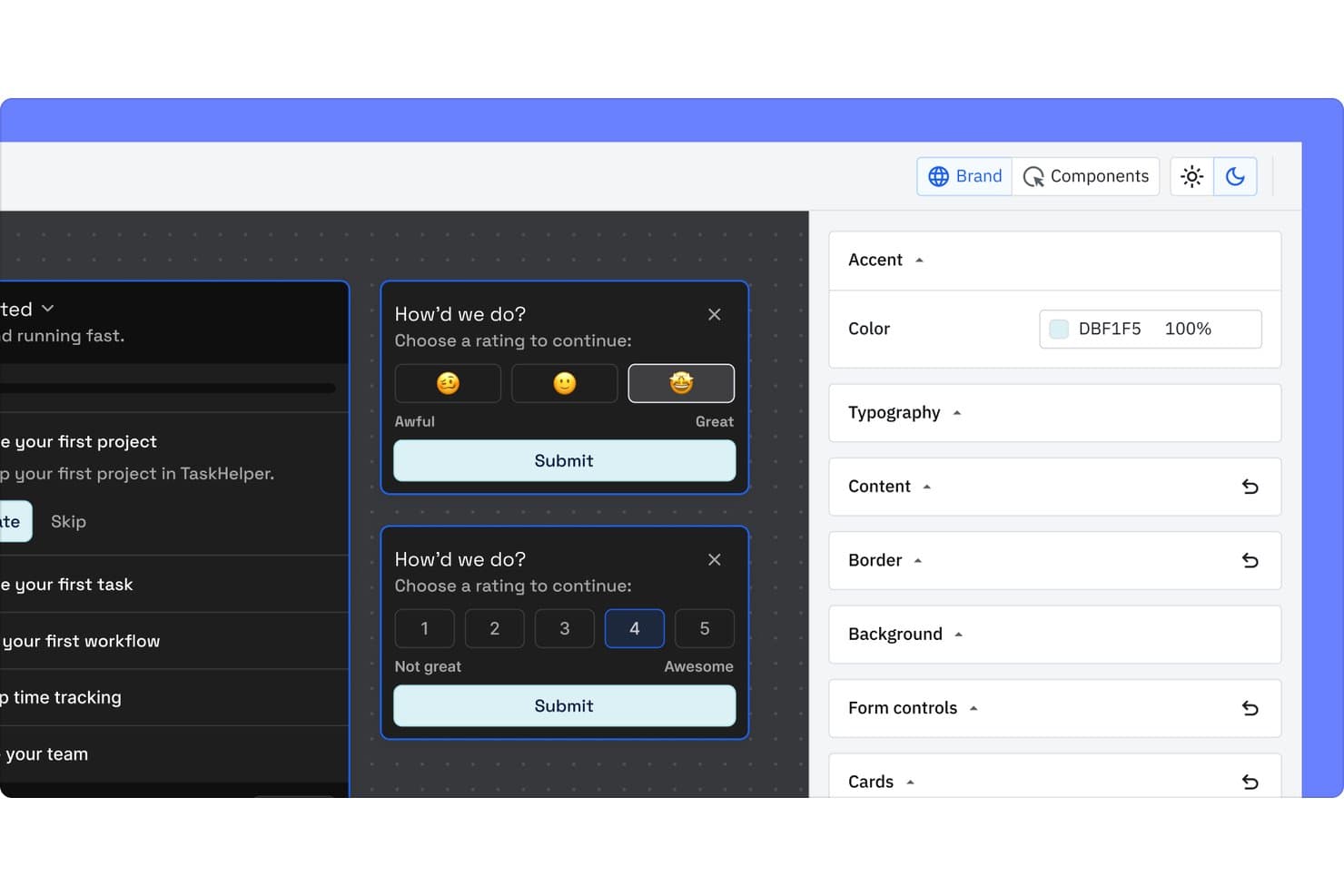
Amplitude Guides and Surveys lets users collect feedback via emoji or numeric rating surveys. Amplitude Guides and Surveys is an in-app engagement platform for product and growth teams that helps educate users, collect feedback, and improve adoption through targeted experiences.
Who Is Amplitude Guides and Surveys Best For?
Product and growth teams that use behavioral analytics to target in-app guides and surveys around user actions.
Why Amplitude Guides and Surveys Is a Good Best Whatfix Alternatives Picked
I picked Amplitude Guides and Surveys because its analytics-native in-app guide targeting connects user behavior with product education. My team can trigger contextual guides after events, then use in-app surveys to capture feedback on onboarding or feature adoption. This fits digital adoption initiatives that require measurable, behavior-based engagement.
Amplitude Guides and Surveys Key Features
- Guide formats: Build tours, checklists, announcements, tooltips, banners, and modals.
- Display guardrails: Set prioritization rules to control guide and survey frequency.
- Annoyance measurement: Track user frustration signals from in-app nudges.
- Brand customization: Match guides and surveys to your colors and fonts.
Amplitude Guides and Surveys Integrations
Amplitude Guides and Surveys integrates natively with Amplitude Analytics through its Browser SDK plugin and supports deployment through an official Google Tag Manager template. It can forward events to third-party analytics providers through custom SDK integrations, but specific native provider integrations, Zapier support, and API availability aren’t clearly documented.
Pros and Cons
Pros:
- Surveys connect feedback with product behavior
- Built-in guardrails reduce repetitive in-app prompts
- Behavior-based targeting supports contextual user guidance
Cons:
- Advanced conditional logic requires higher-tier plans
- Customization options can restrict tailored experiences
Learn more about Amplitude Guides and Surveys:
Andre Whatfix-alternativer
Her er noen flere Whatfix-alternativer som ikke kom med på kortlisten min, men som likevel er verdt å undersøke:
- 11ChameleonBest for AI-guided tour authoring
- 12Product FruitsBest for in-app bug and idea capture
- 13UserGuidingBest for no-code web app onboarding tours
- 14NewiredBest for EU-hosted enterprise app guidance
- 15AptyBest for data-validation-led employee app guidance
- 16StonlyBest for branching, choice-driven user guides
- 17UserflowBest for AI-generated onboarding flows
- 18JIMOBest for AI-guided B2B SaaS customer onboarding
- 19Oracle Guided LearningBest for guiding users through Oracle app workflows
- 20Nexthink GuidesBest for IT-led employee app guidance
How I Evaluate Whatfix Alternatives
I split my evaluation into three parts. First, core functionality: any alternative must let you build in-app walkthroughs and deliver those flows through a no-code editor—this carries the most weight. Second, I look for standout features like AI content generation or no-code backend integration. Third, I consider pricing transparency and support quality.
Core Functionality (Table Stakes For This List)
When I'm selecting tools for my list, I score each one on a scale from 0 (does not offer the functionality) to 5 (excels in this area) for each core functionality listed below. I then convert the total into a percentage to help assess each tool's overall fit, with extra weight on any functionalities I’ve deemed essential.
- In-App Guidance (Essential): I look for triggered walkthroughs, tooltips, modals, and branching flows that guide users through real tasks.
- No-Code Editor (Essential): The visual builder should let product teams create, edit, style, and publish guidance without engineering support.
- User Segmentation: I assess targeting by role, lifecycle stage, account, behavior, and in-app conditions for relevant guidance.
- Engagement Analytics: I check completion, drop-off, interaction, and funnel reporting to connect guidance with feature usage.
- Cross-Platform Deployment: Tools should manage guidance across multiple web, desktop, or mobile applications from a central workspace.
- Self-Service Widget: I look for searchable, embedded help centers that surface relevant walkthroughs and resources inside the application.
Once I have a list of tools that meet the criteria, I consider what sets each platform apart.
Differentiating Factors (What Sets Vendors Apart)
Here's how I compare and contrast different vendors:
Standout Features
AI content generation is a big deal for lean teams. I evaluate whether a platform can auto-draft tooltip copy, step text, or even translations so you're not writing every guide from scratch. No-code backend integration matters just as much. When a tool pulls in CRM or product-usage attributes without an engineering ticket, you can personalize guidance by plan tier, lifecycle stage, or feature usage—something like showing upgrade prompts only to trial users who've hit a usage limit. I also check for native mobile SDK support, since teams shipping iOS or Android apps need onboarding flows that feel native, not bolted on.
Beyond Features
Pricing model matters. MAU-based tiers can spike costs fast when you scale across multiple products, so I check whether vendors gate advanced segmentation or analytics behind higher plans. I also evaluate the integration ecosystem—native connections to tools like Amplitude, Segment, or Zendesk mean your guidance data flows into existing workflows without custom engineering. Finally, support quality separates good vendors from frustrating ones. A dedicated CSM who shares adoption playbooks beats a ticket queue when a broken tour is blocking live users.
Hvorfor se etter et Whatfix-alternativ?
Selv om Whatfix er et godt valg av plattform for produktadopsjon, finnes det flere grunner til at noen brukere ser etter alternative løsninger. Du ser kanskje etter et Whatfix-alternativ fordi …
- Du trenger mer avanserte alternativer for personalisering
- Teamet ditt trenger innebygde funksjoner for stemmeveiledning
- Du ønsker mer transparente eller fleksible priser
- Du trenger dypere analyse eller sporing av samsvar
- Organisasjonen din opererer på flere språk
- Du foretrekker et verktøy med flere ferdigbygde introduksjonsmaler
Hvis noe av dette høres kjent ut, har du kommet til rett sted. Listen min inneholder flere alternativer for produktadopsjonsplattformer som passer bedre for team som står overfor disse utfordringene med Whatfix og ser etter alternative løsninger.
Viktige Whatfix-funksjoner
Her er noen av de viktigste funksjonene i Whatfix, slik at du kan sammenligne hva alternative løsninger tilbyr:
- Interaktive veiledninger i appen: Interaktive veiledninger som leder brukerne gjennom nye verktøy, arbeidsflyter eller prosesser direkte i applikasjonen din.
- Brukersegmentering: Lar deg levere personlig tilpasset introduksjons- og brukerstøtteinnhold til ulike brukergrupper basert på atferd, rolle eller region.
- Innebygd kunnskapsbase: Integrerer hjelpetekst, vanlige spørsmål og opplæringsmateriell i produktet ditt, slik at brukerne får svar uten å forlate plattformen.
- Sanntidsanalyse: Sporer hvordan brukerne samhandler med veiledninger, verktøytips og andre elementer, slik at du kan oppdage mangler i bruk og måle resultater.
- Verktøytips og fremhevede områder: Legger til dynamiske hint eller forklaringer ved viktige elementer i brukergrensesnittet for å øke bevisstheten, bruken eller korrekt bruk.
- Sjekklister for introduksjon: Gir brukerne oppgavelister som viser fremdrift, oppmuntrer til fullføring av introduksjonstrinn og støtter brukerbevaring.
- Innholdsoppretting uten kode: Gjør det mulig for ikke-teknisk personale å bygge, oppdatere eller administrere alle introduksjonsforløp og veiledninger uten støtte fra utviklere.
- Hendelsesbaserte utløsere: Viser relevant innhold eller relevante meldinger når behovet oppstår, basert på brukerhandlinger eller viktige milepæler i arbeidsflyten.
- Flerspråksstøtte: Gjør det mulig for team å lokalisere introduksjonsinnhold for globale team eller ulike brukergrupper ved hjelp av språkvalg i appen.
- Innsamling av tilbakemeldinger fra brukere: Samler innspill og vurderinger fra brukerne under eller etter introduksjonen for å legge grunnlag for forbedringer og videreutvikle brukeropplevelsen.