

Å håndtere programvareutgivelser kan være en stor utfordring. Du må balansere tidsfrister, sikre kvalitet og holde teamet på rett spor. Det er her verktøy for programvareutgivelsesstyring kommer inn – de hjelper deg med å koordinere alt på en smidig måte.
Etter min erfaring er disse verktøyene svært nyttige, fordi de gir deg strukturen og oversikten du trenger. De kan hjelpe deg med å unngå overraskelser i siste liten og holde prosjektene dine fremdriftsrettet.
Jeg har testet og vurdert en rekke av disse verktøyene uavhengig for å finne de beste alternativene for behovene dine. I denne artikkelen deler jeg mine beste anbefalinger, slik at du kan ta en informert beslutning for teamet ditt. Enten du er en erfaren produktleder eller nettopp har begynt, finnes det noe her for deg.
Why Trust Our Software Recommendations
6,700+
Reviews
20
Industry experts
16+
Evaluation factors
14
Years
Our team has been testing and reviewing software since 2012. As product managers ourselves, we know how difficult—and important—it is to choose the right software.
For this guide, we evaluated tools using hands-on testing and independent research, scoring tools using our selection criteria.
Our reviews reflect our human editorial judgment, not a sales pitch.
Expert reviewers:
- Andrew LumbySenior TPM
- Cristiano ValimSenior UI/UX Lead


Sammenligningstabell: Verktøy for programvareutgivelsesstyring
Denne sammenligningstabellen oppsummerer prisdetaljene for mine beste utvalgte verktøy for programvareutgivelsesstyring.
| Tool | Best For | Trial Info | Price | ||
|---|---|---|---|---|---|
| 1 | ITSM tool with release management features | 14-day free trial | From $19/user/month (billed annually) | Website | |
| 2 | Best for all-in-one DevOps CI/CD pipeline releases | Free plan available; 30-day free trial | From $29/user/month (billed annually) | Website | |
| 3 | Best for ITSM-led deployment change control | Free plan + 14-day free trial available | From $25/user/month | Website | |
| 4 | Best for Microsoft-stack CI/CD governance | Free plan available | From $6/user/month | Website | |
| 5 | Best for multi-cloud canary and blue/green deploys | Free plan available | From $0/month | Website | |
| 6 | Best for AI-driven cross-team release orchestration | Free plan available | Pricing upon request | Website | |
| 7 | Best for compliance-driven release governance | Free demo available | Pricing upon request | Website | |
| 8 | Best for multi-tenant deployment pipeline automation | 30-day free trial | From $4,330/year (billed annually) | Website | |
| 9 | Best for AI-assisted release risk scoring | Free trial available | Pricing upon request | Website | |
| 10 | Best for GitOps-driven Kubernetes release promotion | Free plan available | From $495/month | Website |


Anmeldelser av de beste verktøyene for programvareutgivelsesstyring
Nedenfor finner du mine detaljerte sammendrag av de beste verktøyene for programvareutgivelsesstyring som kom med på kortlisten. Anmeldelsene mine gir en detaljert oversikt over de viktigste funksjonene, fordelene og ulempene, integrasjonene og ideelle bruksområdene for hvert verktøy, slik at du kan finne det beste alternativet for deg.
 ITSM tool with release management features
- 14-day free trial
- From $19/user/month (billed annually)
Visit WebsiteCustomer Rating:4.6/5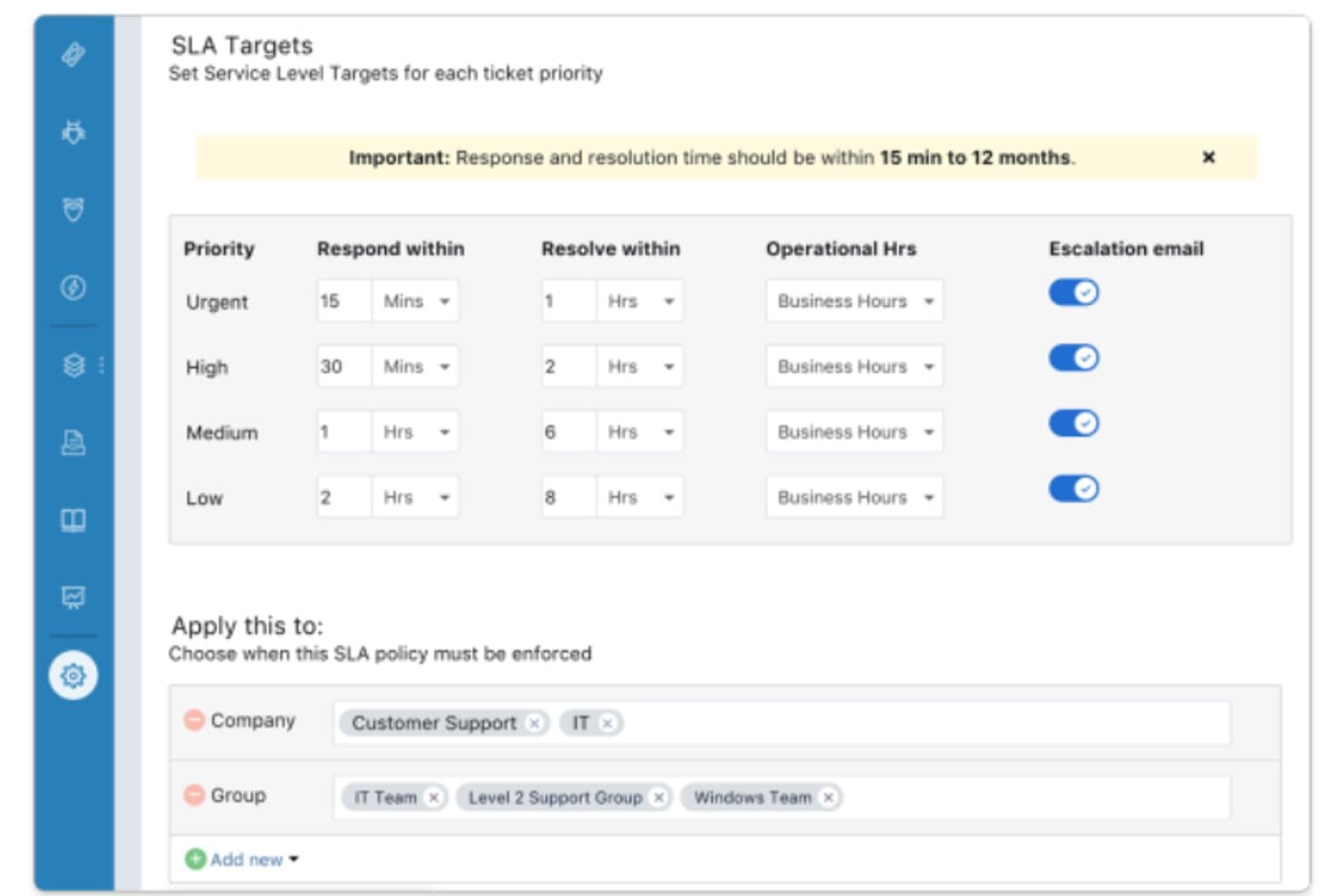
Combining IT service desk with release management features. Freshservice is an ITSM platform that brings change management, CMDB, and ITIL-style release records together in one place, letting you govern releases through CAB approvals, CI linkage, and status tracking.
Who Is Freshservice Best For?
Freshservice suits release managers and IT teams operating in ITIL-governed environments who need release governance tied to change approvals and asset tracking—not deployment automation.
Why I Picked Freshservice
I've included Freshservice in my top picks because it's an ITSM tool with release management features that sits where most pure DevOps tools don't: inside your ITIL governance layer. Release records tie directly to CAB-approved changes, so a release can't progress without a formal approval trail. CMDB linkage lets you attach specific configuration items to each release, giving you a clear picture of which services are in scope before anything ships.
Freshservice Key Features
- Release record templates: Each release record includes dedicated fields for build plans, test plans, notes, and tasks, giving you a structured container for every release cycle.
- CMDB CI attachment: Attach specific configuration items from the CMDB directly to a release so your team can see exactly which services and assets are in scope.
- Saved release views: Filter and sort releases by status, priority, or assignment using pre-built views like unassigned, emergency, and completed releases.
- ChatOps via ServiceBot: A ServiceBot integrated with Microsoft Teams and Slack lets agents manage releases and tickets without leaving their messaging tools.
Freshservice Integrations
Freshservice offers more than 1,200 Marketplace integrations, including ServiceBot connectivity with Slack and Microsoft Teams. A REST API supports custom integrations, including connections to external CI/CD tools.
Pros and Cons
Pros:
- Supports release status views and activity logs
- Links affected assets through CMDB records
- Connects releases to CAB-approved changes
Cons:
- Offers no native code rollback capability
- Doesn’t automate build or deployment pipelines
Learn more about Freshservice: Best for all-in-one DevOps CI/CD pipeline releases
- Free plan available; 30-day free trial
- From $29/user/month (billed annually)
Visit WebsiteCustomer Rating:4.5/5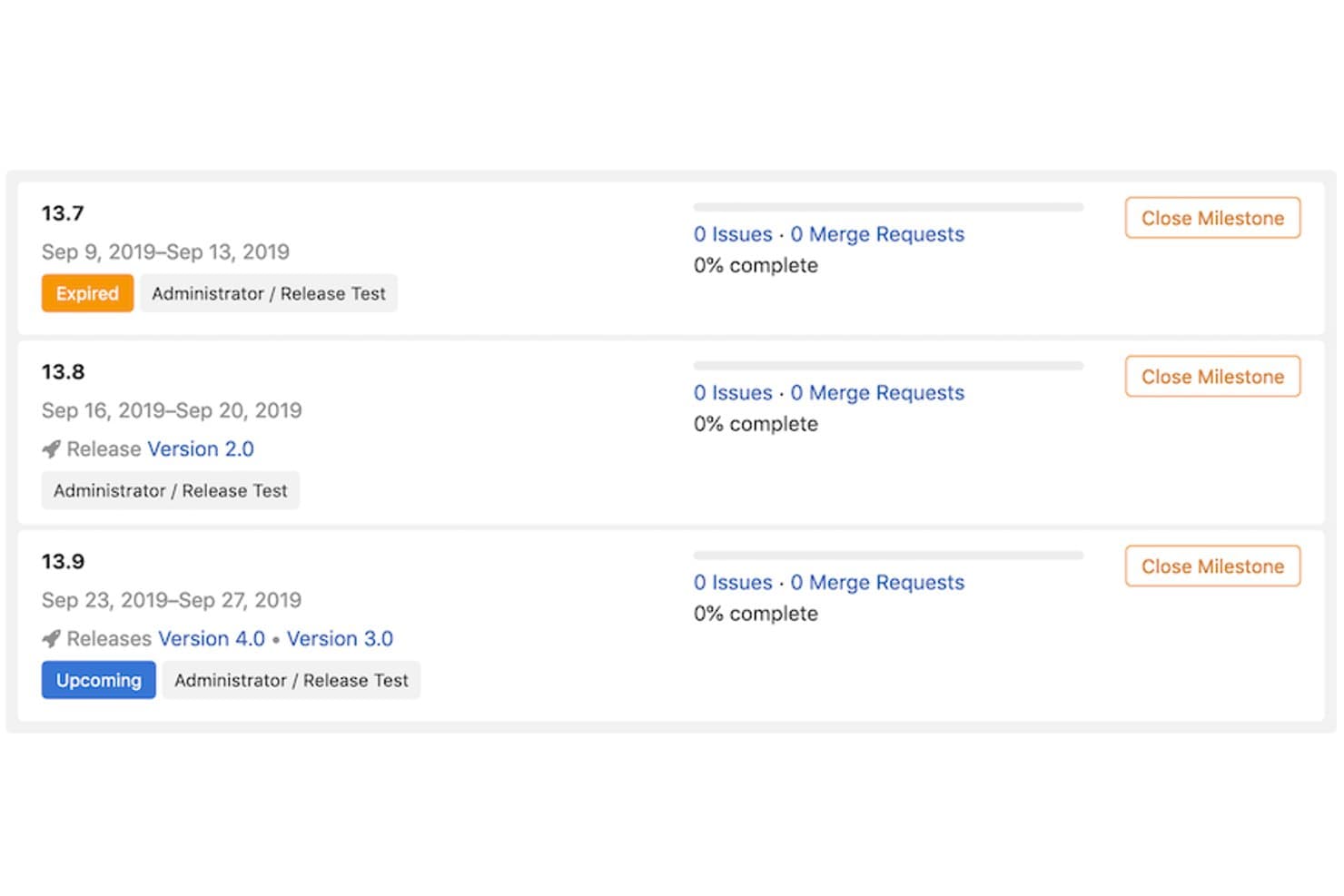
GitLab links milestones to releases for structured version tracking. GitLab is an all-in-one DevOps platform that combines source control, CI/CD pipelines, deployment tracking, environment management, feature flags, and release automation in a single tool.
Who Is GitLab Best For?
GitLab is a strong fit for DevOps engineers and engineering teams who want source control, CI/CD, and deployment management in one place.
Why I Picked GitLab
GitLab earns its spot on my shortlist because it collapses the entire release lifecycle into a single platform, from source control to deployment. I love that CI/CD pipelines are available on every tier, so my team can define multi-stage pipelines with conditional logic, dynamic review app environments, and DAG-based job dependencies without needing a separate tool. On Premium, multi-project pipelines let me trigger deployments across repositories in one coordinated flow, which is exactly what cross-team release orchestration looks like in practice.
GitLab Key Features
- Deployment approvals: Block deployments to protected environments until designated users or groups approve, with full comment history tracked on Premium and above.
- Feature flags: Control feature rollouts by environment, user list, or percentage without a new deployment, using GitLab's built-in flag system compatible with Unleash.
- Deploy freezes: Define cron-based time windows that automatically block deployments during high-risk periods like holidays or peak traffic events.
- One-click rollback: Re-deploy any earlier successful deployment directly from the Environments page without writing new pipeline code.
GitLab Integrations
GitLab has native integrations with Jira and Slack, plus integrations with Microsoft Teams, PagerDuty, and Datadog. REST and GraphQL APIs, webhooks, and the GitLab agent for Kubernetes support custom release workflows.
Pros and Cons
Pros:
- Enables one-click rollback from deployment history
- Supports multi-stage pipelines with deployment approvals
- Unifies source control, pipelines, and deployments
Cons:
- Advanced governance and rollback require higher tiers
- No cross-team release calendar or conflict detection
Learn more about GitLab: Best for ITSM-led deployment change control
- Free plan + 14-day free trial available
- From $25/user/month
Visit WebsiteCustomer Rating:4/5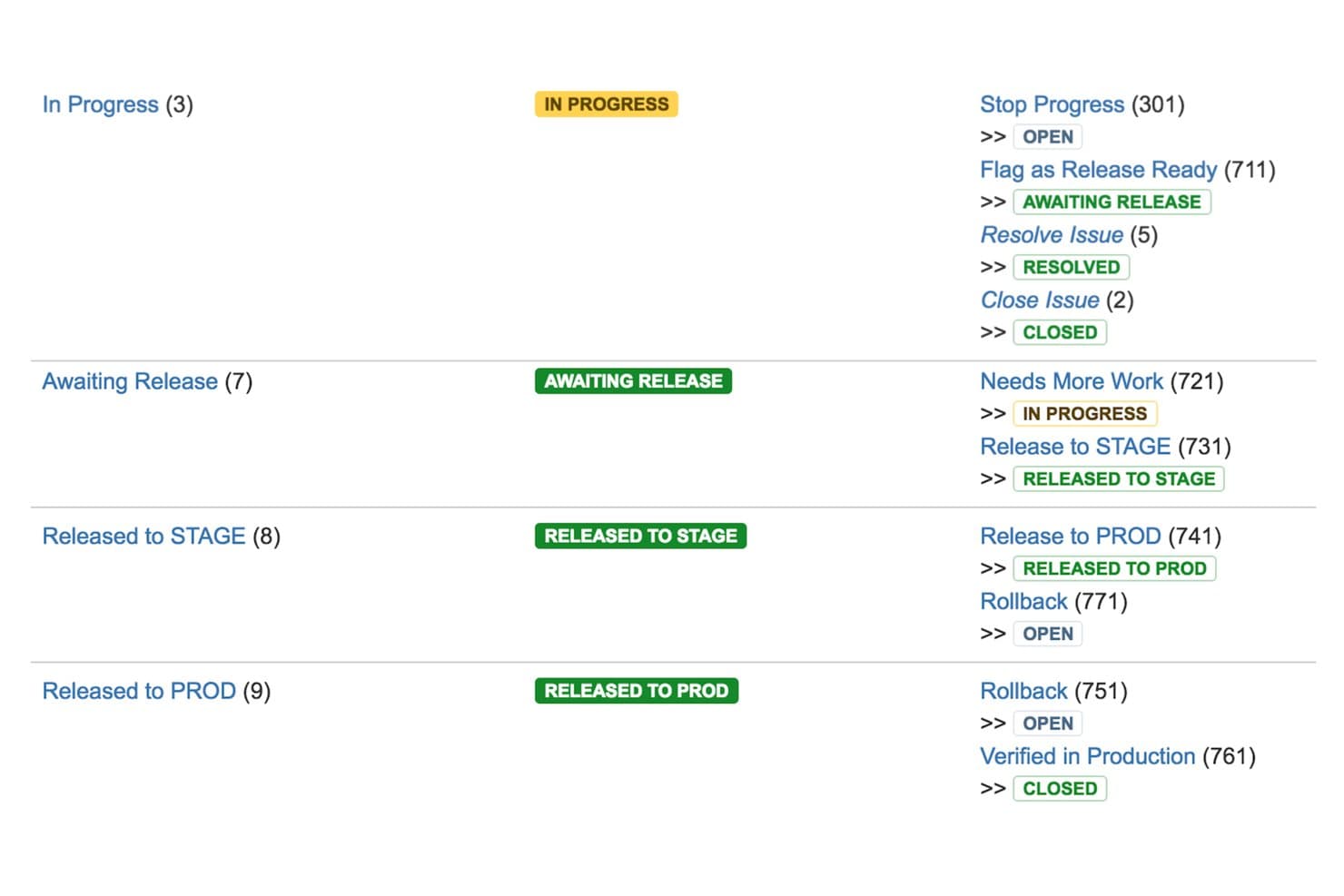
Jira Service Management maps release workflows from In Progress to Production. Jira Service Management is an ITSM platform from Atlassian that combines change management, deployment gating, a CMDB, approval workflows, and a change calendar to govern and track software deployments across CI/CD pipelines.
Who Is Jira Service Management Best For?
Jira Service Management is a strong fit for release managers and engineering team leads in compliance-heavy organizations that need formal ITIL-style change control layered on top of their existing CI/CD pipelines.
Why I Picked Jira Service Management
Jira Service Management earns its spot on my shortlist because it's the only tool here that wraps formal ITIL-style change control directly around your CI/CD pipelines. I particularly like the deployment gating feature: when a pipeline hits a gated environment, JSM automatically creates a change request and holds the deployment until it's approved. The AI Change Risk Assessment scores technical, operational, and security risk, giving approvers real context before they sign off.
Jira Service Management Key Features
- Change calendar: A built-in calendar displays past, ongoing, and upcoming changes, and flags scheduling conflicts and active incidents across teams.
- Assets/CMDB: A structured registry maps applications, services, APIs, and infrastructure with upstream and downstream dependencies, linking changes and incidents to affected assets.
- Automated approval workflows: Role-based approval workflows trigger based on change type, routing requests through the right reviewers or CAB processes automatically.
- Incident-to-deployment linkage: Incident investigations surface recent deployments, commits, and code changes in a single view to support faster root cause analysis.
Jira Service Management Integrations
Jira Service Management offers native integrations with Bitbucket Pipelines, CircleCI, Jenkins, and Octopus Deploy for deployment gating and tracking. It also connects with Jira and Confluence, supports Slack and Microsoft Teams, and provides REST and Jira Deployments APIs for custom integrations.
Pros and Cons
Pros:
- Change calendar flags conflicts and incidents
- AI risk assessment gives approvers useful context
- Formal change approvals around deployments
Cons:
- No native automated rollback capability
- Cannot orchestrate builds or deployments
Learn more about Jira Service Management: Best for Microsoft-stack CI/CD governance
- Free plan available
- From $6/user/month
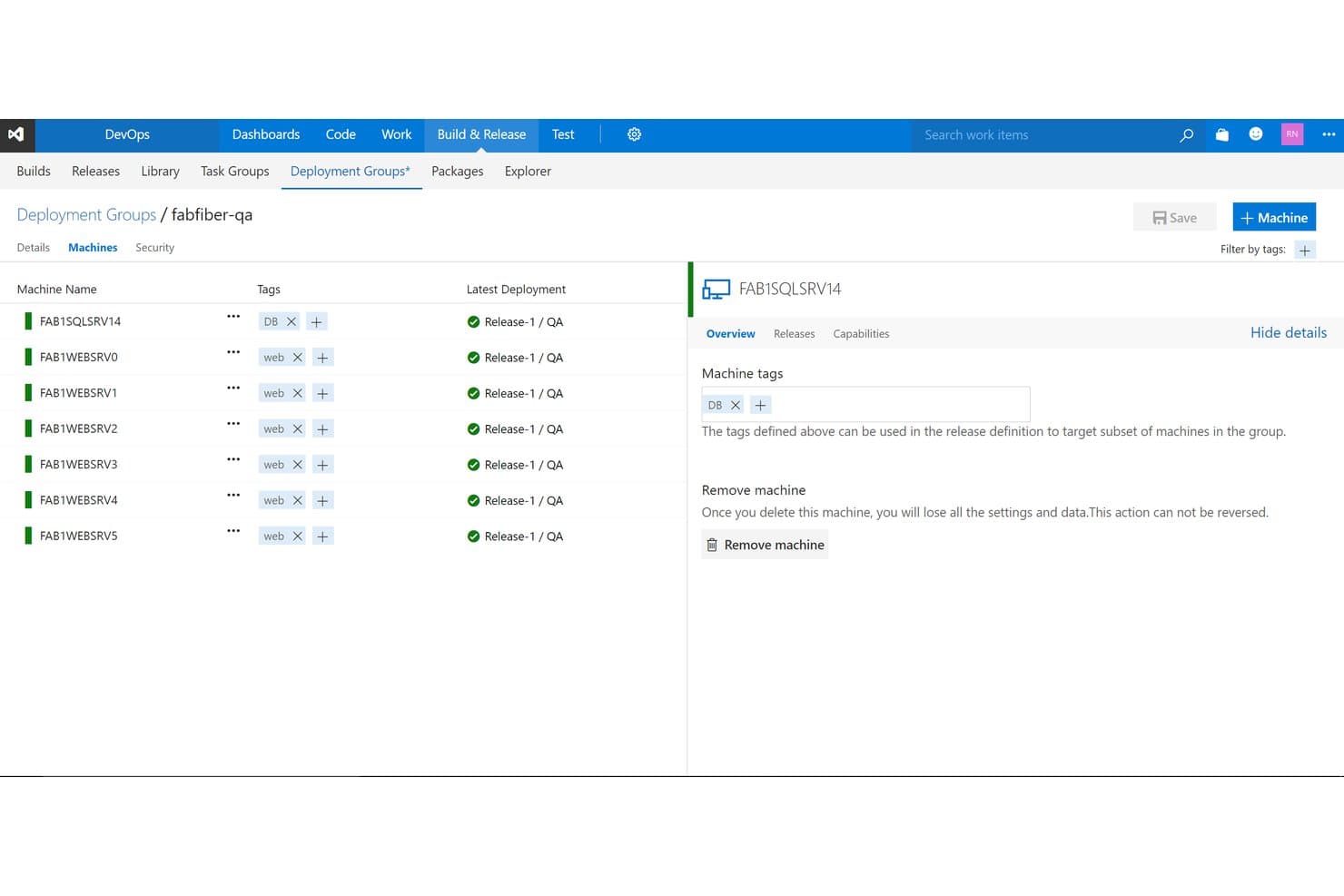
Azure DevOps manages machine deployment groups with tags and release status. Azure DevOps is a Microsoft platform for software release management that covers CI/CD pipeline orchestration, deployment tracking, approval and governance workflows, environment management, and work item tracking across the full delivery lifecycle.
Who Is Azure DevOps Best For?
Azure DevOps is a strong fit for engineering teams already invested in the Microsoft ecosystem who need a single platform to connect CI/CD pipelines with governance, approvals, and work tracking.
Why I Picked Azure DevOps
Azure DevOps earns its spot on my shortlist because of how tightly it connects CI/CD pipelines with governance inside a Microsoft-native environment. I particularly like the environment checks system, which lets you layer manual approvals, branch controls, business-hours windows, and Azure Monitor gates onto any deployment stage. Combined with YAML-based multi-stage pipelines that support rolling and canary strategies, you get real control over how code moves from staging to production in regulated or audit-heavy settings.
Azure DevOps Key Features
- Multi-stage YAML pipelines: Define build, test, and deployment stages in code, with conditional logic, parallelism, and reusable templates across projects.
- Deployment strategies: Choose from runOnce, rolling, and canary deployment job types to control how releases roll out across environments.
- Azure Boards integration: Link work items, commits, and pull requests directly to pipeline runs so you can trace exactly what shipped in each deployment.
- Self-hosted and cloud-hosted agents: Run pipeline jobs on Microsoft-hosted agents or your own infrastructure, supporting hybrid and air-gapped deployment scenarios.
Azure DevOps Integrations
Azure DevOps offers native integrations across the Microsoft ecosystem, plus Marketplace integrations for GitHub, Bitbucket Cloud, Jira, Microsoft Teams, Slack, Kubernetes, and Terraform. REST APIs, service hooks, and custom tasks support tailored release workflows.
Pros and Cons
Pros:
- Deployment history links code with work items
- Canary and rolling deployments reduce rollout risk
- Flexible approval checks support governed releases
Cons:
- No native release calendar detects conflicts
- Automatic rollback requires custom pipeline scripting
Learn more about Azure DevOps: Best for multi-cloud canary and blue/green deploys
- Free plan available
- From $0/month
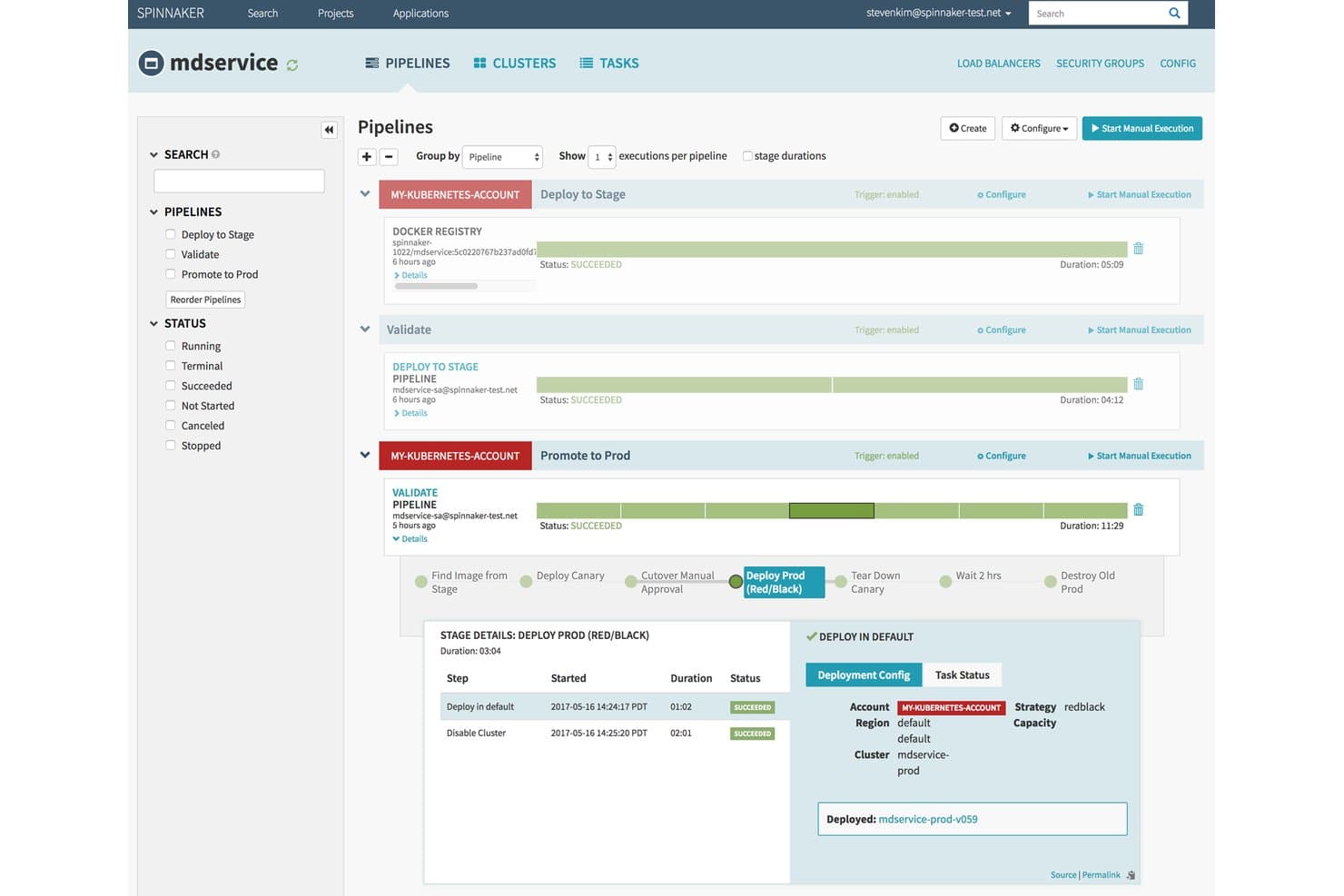
Spinnaker visualizes multi-stage deployment pipelines with real-time execution status. Spinnaker is an open-source continuous delivery platform, originally built by Netflix, that supports multi-cloud pipeline orchestration, automated deployment strategies, canary analysis, and approval gates across cloud environments.
Who Is Spinnaker Best For?
Spinnaker is a strong fit for DevOps engineers at large organizations who need fine-grained control over multi-cloud deployment pipelines and advanced strategies like canary analysis and blue/green releases.
Why I Picked Spinnaker
Spinnaker earns its spot on my shortlist because of how it handles multi-cloud canary and blue/green deployments at a level most tools can't match. I love that automated canary analysis lets you release to a slice of your fleet, then compare metrics from Datadog or Prometheus against your baseline before promoting further. Blue/green is built into the core pipeline model, with health-check-driven traffic switching and immutable images that make rollbacks fast and predictable.
Spinnaker Key Features
- Managed Delivery: Define the desired state for each environment declaratively, and Spinnaker automatically detects new artifact versions and brings live state into alignment.
- Manual Judgment stage: Require a human approval at any point in a pipeline before a release continues to the next stage.
- Restricted Execution Windows: Limit pipeline stages to run only within defined time windows, such as off-peak hours or maintenance slots.
- Multi-cloud deployment targets: Deploy across AWS EC2, Kubernetes, Google Cloud, Azure, Cloud Foundry, and more from a single pipeline configuration.
Spinnaker Integrations
Spinnaker offers documented integrations with Jenkins, Travis CI, Git, Docker, AWS EC2, Kubernetes, Google Compute Engine, Azure, Datadog, and Prometheus. It also connects with New Relic, SignalFx, Slack, OAuth, SAML, LDAP, and GitHub Teams.
Pros and Cons
Pros:
- Pipeline stages support complex release logic
- Blue/green rollbacks reduce recovery time
- Multi-cloud deployment visibility
Cons:
- No shared release calendar or dependencies
- Self-hosted operations demand dedicated expertise
Learn more about Spinnaker: Best for AI-driven cross-team release orchestration
- Free plan available
- Pricing upon request
Visit WebsiteCustomer Rating:4.6/5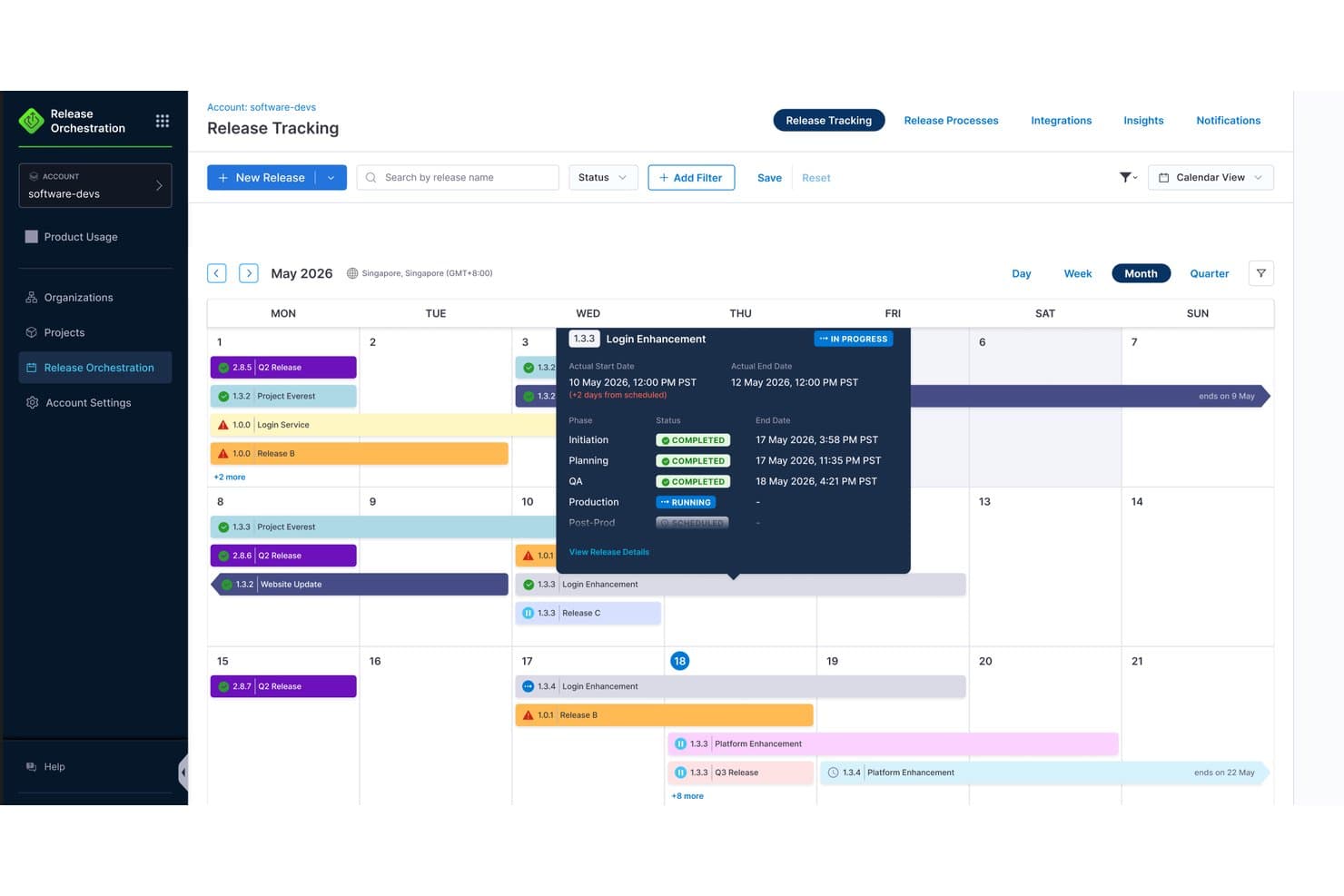
Harness provides a calendar view to track release schedules and phases. Harness is a CI/CD and release orchestration platform that spans pipeline automation, cross-team deployment coordination, feature flag management, and GitOps across cloud, Kubernetes, and hybrid environments.
Who Is Harness Best For?
Harness is a strong fit for engineering and DevOps teams that manage releases across multiple services, squads, or deployment environments and need a single platform to coordinate pipelines, approvals, and rollout visibility at scale.
Why I Picked Harness
I picked Harness as one of the best because its AI-driven release orchestration genuinely sets it apart when releases span multiple teams and services. I love how the "prompt-to-process" setup lets you describe a release in plain language and watch Harness build out the phases, approvals, and pipeline triggers automatically. The AI Verify feature monitors deployment health in real time and can trigger rollback before users notice a problem, which is exactly the kind of safety net I want coordinating cross-team releases at scale.
Harness Key Features
- Cross-team release calendar: A shared calendar lets teams plan, schedule, and deconflict releases across services and squads in one place.
- OPA policy-as-code governance: Open Policy Agent policies enforce pipeline compliance rules automatically, with RBAC and immutable audit logs for SOX, HIPAA, and PCI requirements.
- Test Intelligence: Harness identifies and runs only the tests affected by a code change, cutting test time by up to 80% and automatically quarantining flaky tests.
- Native feature flag management: A built-in feature management module lets teams toggle flags directly inside release pipelines, separating code deployment from feature exposure.
Harness Integrations
Harness offers 100+ integrations, including GitHub, GitLab, Jira, ServiceNow, Slack, Microsoft Teams, PagerDuty, Kubernetes, Terraform, and Datadog. These connections support cross-team release coordination, deployment workflows, approvals, and monitoring.
Pros and Cons
Pros:
- Embeds approvals, audit trails, and policies
- AI verifies deployments and triggers rollback
- Coordinates cross-team releases in one calendar
Cons:
- No predictive risk scoring or roadmap sync
- Release setup can feel configuration-heavy
Learn more about Harness: Best for compliance-driven release governance
- Free demo available
- Pricing upon request
Visit WebsiteCustomer Rating:4.4/5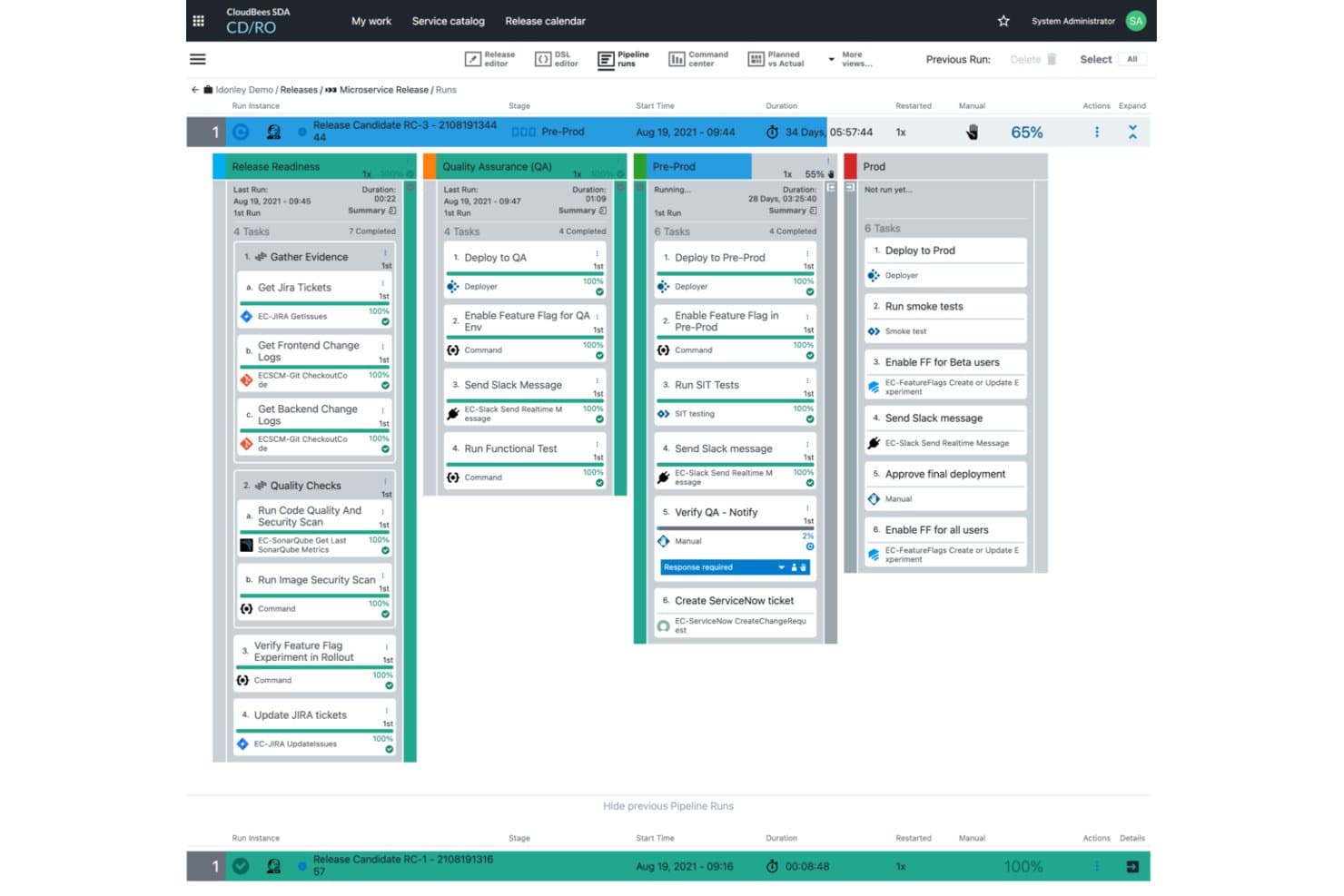
Create and manage release pipelines with CloudBees. CloudBees CD/RO is an enterprise release orchestration platform that combines multi-stage pipeline automation, release manifest tracking, approval workflows, audit reporting, and a shared release calendar across teams and environments.
Who Is CloudBees Best For?
CloudBees is built for large enterprises in regulated industries where every release needs a full audit trail, multi-team approval workflows, and end-to-end traceability.
Why I Picked CloudBees
CloudBees earns its spot on my shortlist because its audit and governance capabilities go deeper than most release tools I've evaluated. Every stage approval, sign-off, and configuration change is logged automatically, and single-click audit reports give you end-to-end traceability without manual evidence collection. I also like that the release manifest tracks every component and version in a release, which makes rollbacks far less chaotic when something goes wrong in a regulated environment.
CloudBees Key Features
- Release calendar: A multi-view calendar that displays planned, active, and completed releases alongside environment reservations and blackout periods across teams.
- DSL editor: Lets you define and edit release pipelines as code, making it easier to version-control and replicate pipeline logic across environments.
- ServiceNow integration: Creates change requests, checks approval status, and logs incidents directly between CloudBees CD/RO and ServiceNow without switching tools.
- Smart Tests: An AI-driven test selection feature that runs only the tests relevant to a given change, reducing feedback wait times for developers.
CloudBees Integrations
CloudBees offers documented integrations with Jenkins, ServiceNow, JFrog Artifactory, Kubernetes, and Argo Rollouts. Its Plugin Developer Kit and Plugin Manager support custom integrations across hybrid and multi-cloud toolchains.
Pros and Cons
Pros:
- Shared calendars prevent environment conflicts
- Release manifests clarify component versions
- Audit trails support regulated releases
Cons:
- Automated rollback triggers lack documentation
- Plugin management requires substantial setup effort
Learn more about CloudBees: Best for multi-tenant deployment pipeline automation
- 30-day free trial
- From $4,330/year (billed annually)
Visit WebsiteCustomer Rating:3.2/5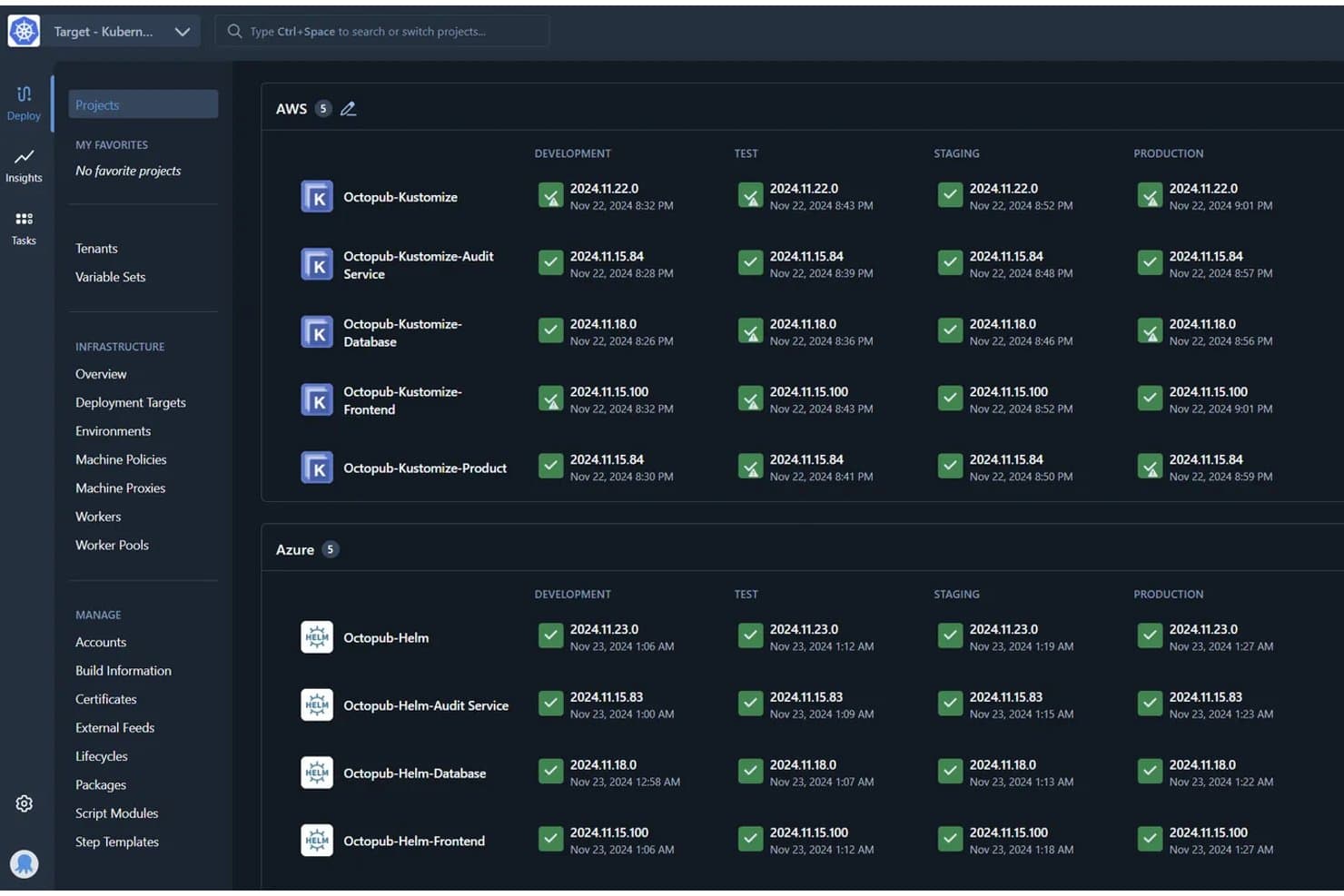
Octopus Deploy tracks deployments across environments in one dashboard. Octopus Deploy is a continuous delivery platform that automates deployment pipelines across multi-environment, multi-tenant, and multi-cloud setups, with support for rolling, blue/green, and canary release strategies.
Who Is Octopus Deploy Best For?
Octopus Deploy is a strong fit for DevOps engineers and release managers at mid-to-large teams running deployments across multiple environments, tenants, or cloud targets.
Why I Picked Octopus Deploy
I've included Octopus Deploy in my top picks because it handles multi-tenant deployment pipeline automation better than anything else I've tested. One deployment process can scale across thousands of tenants, which is a real advantage when you're shipping to separate customer environments with different configs. I also like the guided failure mode, which lets you decide how to handle a failed step mid-deployment rather than triggering a full abort.
Octopus Deploy Key Features
- Runbooks: Automate routine and emergency operations tasks directly within the platform, separate from your deployment process.
- Deployment freezes: Block deployments for specific projects and environments during defined windows to protect production stability.
- Step template library: Access 500+ pre-built step templates to standardize and reuse deployment steps across projects.
- Role-based access control (RBAC): Assign granular permissions across teams, spaces, and environments on every plan, including Free.
Octopus Deploy Integrations
Octopus Deploy offers native integrations with GitHub Actions, Azure DevOps, Jenkins, GitLab CI, TeamCity, Kubernetes, Argo CD, Slack, ServiceNow, and Jira Service Management. ServiceNow and Jira Service Management integrations require Enterprise.
Pros and Cons
Pros:
- Reusable processes support complex releases
- Guided failure handling avoids unnecessary deployment aborts
- Multi-tenant releases scale across customer environments
Cons:
- No shared calendar maps cross-team conflicts
- Rollback usually requires redeploying prior releases
Learn more about Octopus Deploy: Best for AI-assisted release risk scoring
- Free trial available
- Pricing upon request
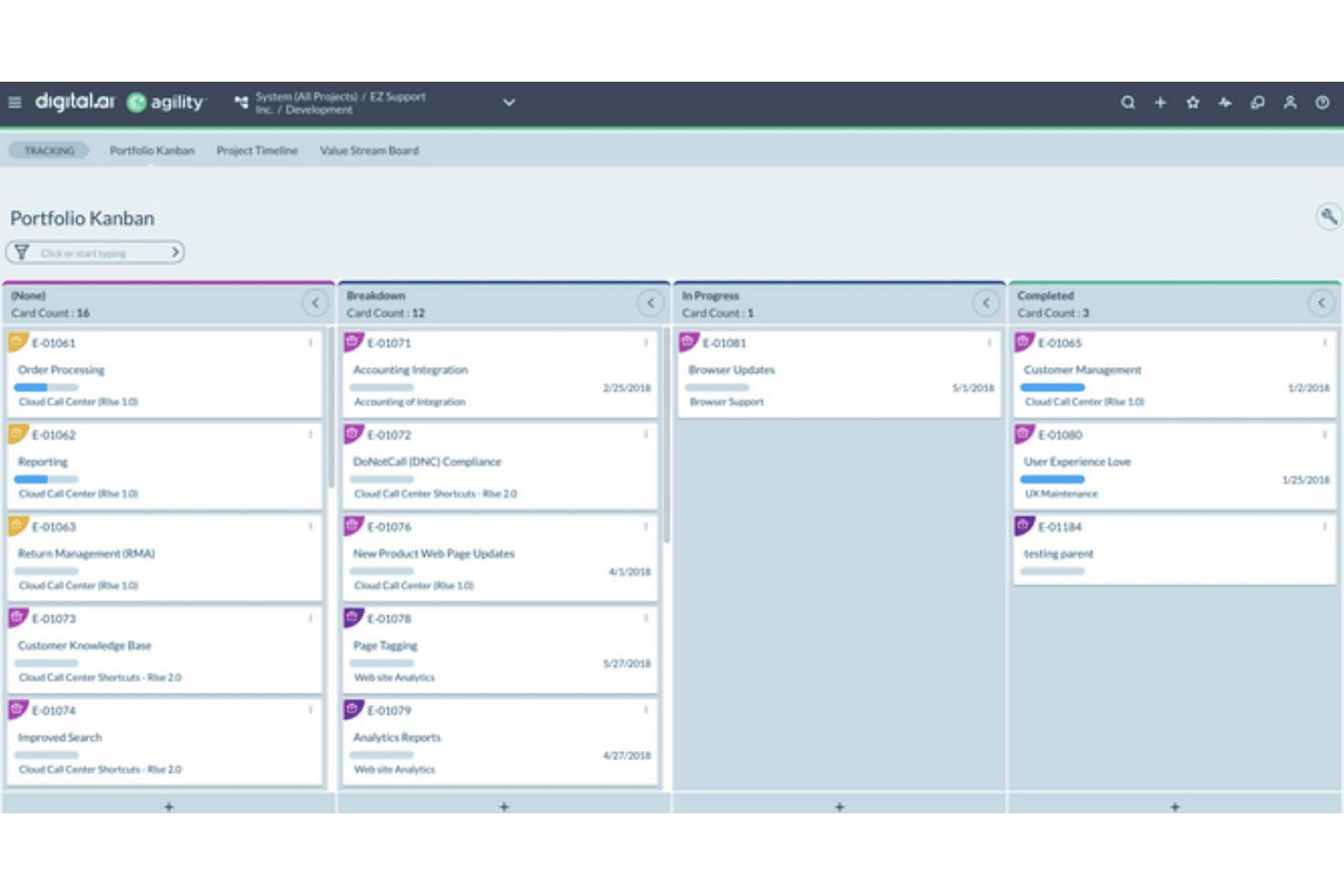
Digital.ai organizes release work across workflow stages on a Portfolio Kanban board. Digital.ai Release is an enterprise release orchestration platform that combines pipeline automation, approval governance, risk scoring, GitOps visibility, and multi-team dependency coordination across cloud-native and traditional deployment environments.
Who Is Digital.ai Best For?
Digital.ai Release is built for large enterprises and regulated industries where release managers and DevOps engineers need governance-grade orchestration across dozens of teams and toolchains.
Why I Picked Digital.ai
I picked Digital.ai Release as one of the best because its AI-assisted risk scoring genuinely changes how release decisions get made. The Intelligent Change Risk prediction automatically routes low-risk changes through a faster path while flagging higher-risk releases for closer review, so teams aren't treating every deployment the same. I also like the AI Reporting Agent, which lets you ask plain-language questions and get charts back that you can pin directly to dashboards.
Digital.ai Key Features
- Policy-as-code gates: Runs approval gates using Open Policy Agent (OPA), with a full audit trail and one-click chain-of-custody reports for every release.
- Release train orchestration: Combines multi-team, multi-toolchain dependencies into a single coordinated release pipeline across cloud-native and traditional environments.
- GitOps and Kubernetes visibility: Provides centralized control over deployments running through Argo CD and FluxCD, with live deployment cards showing real-time status.
- Self-service workflow catalog: Lets teams trigger guided, pre-approved release workflows without waiting on platform engineers, with custom workflow authoring available in Pro and Premium editions.
Digital.ai Integrations
Digital.ai cites 400+ marketplace integrations, including Argo CD, FluxCD, Kubernetes, Terraform, Ansible, ServiceNow, AWS Secrets Manager, Azure Key Vault, and HashiCorp Vault. An open API and plug-in model support custom integrations.
Pros and Cons
Pros:
- Policy-as-code supports audit-ready governance
- Release trains coordinate complex enterprise dependencies
- AI-assisted risk scoring prioritizes release reviews
Cons:
- Analytics dashboards changed in recent releases
- Pipeline visibility can hinder failure diagnosis
Learn more about Digital.ai:
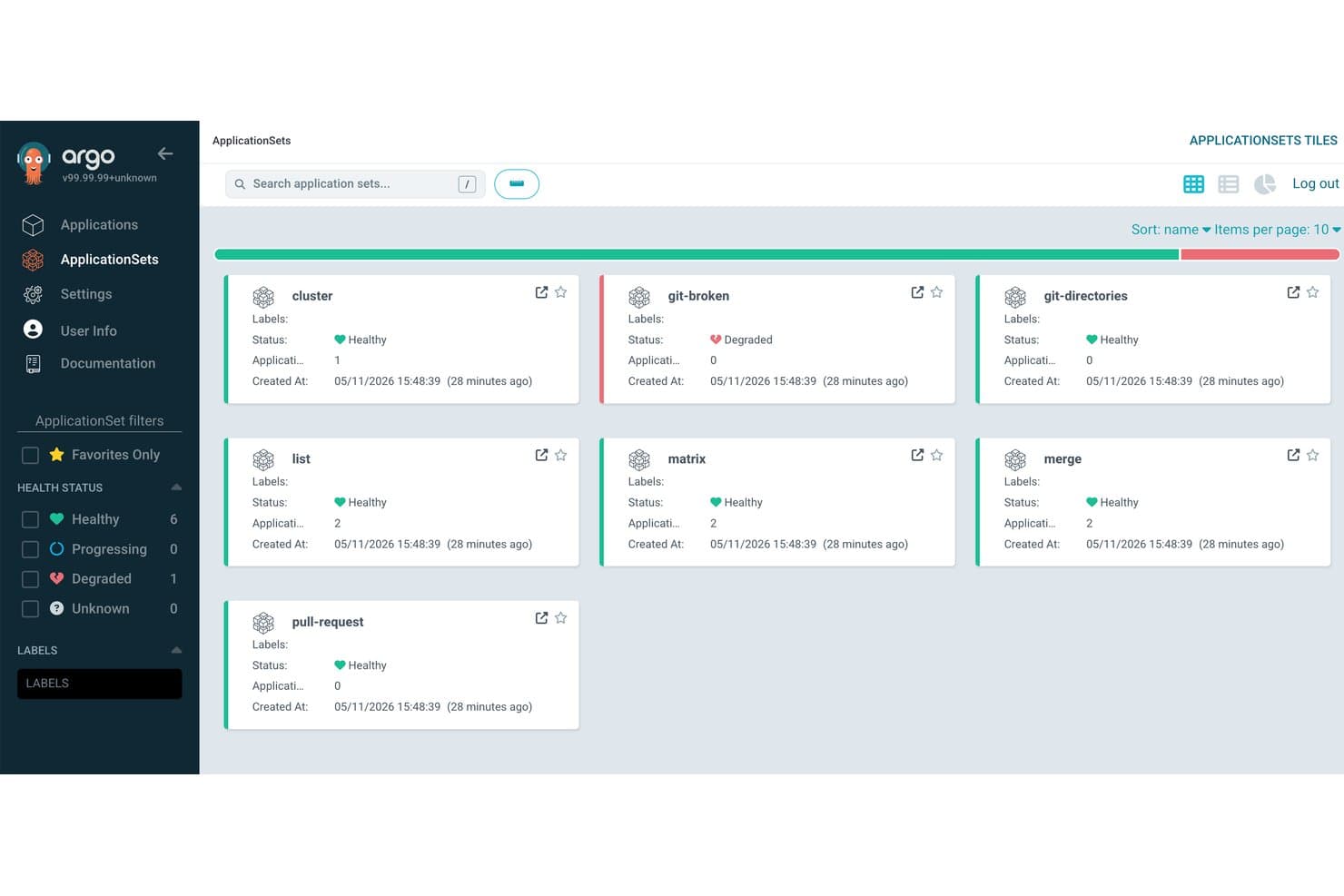
Argo CD organizes application deployments into grouped sets with health status. Argo CD is a Kubernetes-native GitOps delivery tool that automates multi-stage release promotion, deployment tracking, and rollback through the Akuity Platform.
Who Is Argo CD Best For?
Argo CD is a strong fit for DevOps engineers and engineering leads running Kubernetes workloads who want Git-driven release promotion across multiple environments.
Why I Picked Argo CD
I picked Argo CD as one of the best because it's the only tool on this list built specifically around GitOps-driven Kubernetes promotion, where Git is the single source of truth for every release. Kargo's multi-stage promotion pipelines move artifacts from dev through staging to production automatically, with every promotion committed back to Git for a full audit trail. When a verification step fails, automated rollback reverts the entire stage in seconds, covering Kubernetes and non-Kubernetes resources like Terraform alike.
Argo CD Key Features
- Multi-stage promotion pipelines: Kargo moves artifacts through dev, staging, and production environments automatically, based on artifact and commit metadata.
- Insights and DORA metrics dashboards: Built-in dashboards surface deployment frequency, change failure rate, and app sync history across your organization.
- AI On-Call Agent: Automatically opens incidents when an app degrades, investigates the issue, runs runbooks, and sends Slack notifications.
- SOC 2 Type 2 compliance and audit logs: Searchable audit records track every action across the platform, with retention up to two years on Enterprise plans.
Argo CD Integrations
Akuity Platform integrations include GitHub, Jira, Slack, Microsoft Teams, Terraform, Kubernetes, Helm, JFrog, Datadog, and Azure. It also supports API access through system accounts and scoped API keys for custom integrations.
Pros and Cons
Pros:
- Automated rollback restores failed stages quickly
- Multi-stage pipelines coordinate Kubernetes environments
- GitOps promotions create auditable release histories
Cons:
- Formal promotion approvals remain limited
- No release calendar or scheduling controls
Learn more about Argo CD:
Andre verktøy for programvareutgivelsesstyring
Her er noen flere alternativer for verktøy for programvareutgivelsesstyring som ikke kom med på kortlisten min, men som likevel er verdt å se nærmere på:
- 11Enov8Best for SAFe-aligned enterprise release governance
- 12Planview ReleaseBest for cross-team release dependency mapping
- 13UnleashBest for flag-based rollouts with compliance controls
- 14CircleCIBest for health-check-based auto-rollback on deploys
How I Evaluate Software Release Management Tools
I split my evaluation into three parts. Core functionality—planning releases across environments and orchestrating deployment pipelines—carries the most weight. From there, I look at standout features like CI/CD toolchain integrations, then consider what a tool offers beyond features, including onboarding support and pricing value.
Core Functionality (Table Stakes For This List)
When I'm selecting tools for my list, I score each one on a scale from 0 (does not offer the functionality) to 5 (excels in this area) for each core functionality listed below. I then convert the total into a percentage to help assess each tool's overall fit, with extra weight on any functionalities I've deemed essential.
- Release Planning (Essential): I check whether you can build structured release calendars, coordinate timelines across multiple teams, and sequence releases at the portfolio level.
- Pipeline Orchestration (Essential): Multi-stage deployment automation matters here—I evaluate how well a tool handles environment promotion, parallel workflows, and cross-toolchain triggers.
- Release Visibility & Tracking: Real-time dashboards that show release readiness across teams are what I look for, not static status pages that someone has to update manually.
- Dependency & Risk Management: I look at how a tool surfaces conflicts between releases or components—flagging a shared microservice change that could break another team's deploy, for example.
- Approval & Governance Workflows: Configurable approval gates at each release stage matter, especially for teams operating under audit or compliance requirements that need role-based sign-offs.
- Rollback & Version Control: I evaluate whether the tool ties rollback actions to version control history so you can trace exactly what changed and recover quickly when a release goes sideways.
Once I have a list of tools that meet the criteria, I consider what sets each platform apart.
Differentiating Factors (What Sets Vendors Apart)
Here's how I compare and contrast different vendors:
Standout Features
I evaluate whether a tool supports feature flagging natively or through integrations, since decoupling deployment from release lets you push code to production without exposing it to users—useful when coordinating a launch across marketing, support, and engineering on different timelines. CI/CD toolchain integrations also matter; I check for native connectors to tools like Jenkins, GitHub Actions, and GitLab so teams aren't building custom glue between systems. Beyond the pipeline, I look at ChatOps support—pushing approval requests and release status into Slack or Teams keeps decisions moving without forcing people into another dashboard.
Beyond Features
I evaluate how well each tool scales from a single squad to enterprise-wide, multi-product coordination—some platforms price per pipeline, which gets expensive fast as release cadence grows. Compliance readiness matters too; regulated teams need verifiable audit trails and role-based access, not just configurable settings. I also check onboarding support, since complex orchestration tools with poor documentation can stall a migration for months.
Slik velger du et verktøy for programvareutgivelsesstyring
Det er lett å gå seg vill i lange funksjonslister og kompliserte prisstrukturer. For å hjelpe deg med å holde fokus mens du arbeider deg gjennom den unike prosessen med å velge programvare, får du her en sjekkliste over faktorer du bør ha i tankene:
| Faktor | Hva du bør vurdere |
|---|---|
| FaktorSkalerbarhet | Hva du bør vurdereVil verktøyet vokse sammen med teamet ditt? Vurder verktøy som støtter flere brukere og prosjekter etter hvert som behovene dine øker. Unngå verktøy med strenge brukerbegrensninger. |
| FaktorIntegrasjoner | Hva du bør vurdereFungerer verktøyet med de eksisterende systemene dine? Kontroller kompatibiliteten med versjonskontrollen, CI/CD og andre verktøy du er avhengig av. |
| FaktorTilpasningsmuligheter | Hva du bør vurdereKan du tilpasse verktøyet til arbeidsflytene dine? Se etter muligheter for å tilpasse oversikter, rapporter og varsler slik at de passer til prosessen din. |
| FaktorBrukervennlighet | Hva du bør vurdereEr verktøyet intuitivt? Velg verktøy med oversiktlige grensesnitt for å minimere opplæringstiden og redusere hindringer for bruk. |
| FaktorImplementering og introduksjon | Hva du bør vurdereHvor raskt kan du komme i gang? Vurder tiden det tar å sette opp løsningen, tilgjengelige ressurser som veiledninger og støtten du får under introduksjonen. |
| FaktorKostnad | Hva du bør vurderePasser prisen budsjettet ditt? Sammenlign kostnaden med budsjettet ditt og funksjonene som tilbys. Se etter skjulte gebyrer eller kostnader ved skalering. |
| FaktorSikkerhetstiltak | Hva du bør vurdereEr dataene og prosessene dine sikre? Sørg for at verktøyet oppfyller sikkerhetsstandardene dine, tilbyr kryptering og overholder regelverket. |
| FaktorTilgjengelig kundestøtte | Hva du bør vurdereFår du hjelp når du trenger det? Kontroller leverandørens åpningstider for kundestøtte, tilgjengelige kanaler og svartider for å sikre rask hjelp. |
Hva er verktøy for programvareutgivelsesstyring?
Verktøy for håndtering av programvareutgivelser er løsninger som bidrar til å koordinere, spore og automatisere prosessen med å utgi programvareoppdateringer og nye versjoner. Produktansvarlige, utviklere og IT-driftsteam bruker vanligvis disse verktøyene for å forbedre effektiviteten og redusere feil under distribusjon. Funksjoner som planlegging av utgivelser, sporing av distribusjoner og integrasjon med versjonskontrollsystemer bidrar til å håndtere utgivelser effektivt. Alt i alt hjelper disse verktøyene team med å levere programvareoppdateringer mer pålitelig og effektivt.
Funksjoner
Når du velger verktøy for håndtering av programvareutgivelser, bør du se etter følgende viktige funksjoner:
- Planlegging av utgivelser: Automatiserer tidspunktet for programvareutgivelser for å sikre punktlige og koordinerte distribusjoner.
- Sporing av distribusjoner: Overvåker fremdriften for utgivelser og gir innsikt i hvert trinn i distribusjonsprosessen.
- Integrasjon med versjonskontroll: Kobler seg til versjonskontrollsystemer for å håndtere kodeendringer og opprettholde konsistens på tvers av utgivelser.
- Tilpassbare kontrollpaneler: Tilbyr personlige visninger og rapporter for å spore måleverdier og overvåke utgivelsespipelinen.
- Rollebasert tilgangskontroll: Begrenser tilgangen til funksjoner og data basert på brukerroller, noe som styrker sikkerheten og etterlevelsen av krav.
- Avansert analyse og rapportering: Gir detaljert innsikt i utgivelsesytelsen og bidrar til å identifisere områder som kan forbedres.
- Støtte for flere miljøer: Håndterer distribusjoner på tvers av ulike miljøer, for eksempel utvikling, testing og produksjon.
- Interaktive verktøy for innføring: Inkluderer opplæringsprogrammer, produktomvisninger og veiledninger som hjelper brukerne med raskt å forstå og bruke verktøyet.
- Sikkerhetstiltak: Sikrer databeskyttelse gjennom kryptering og etterlevelse av bransjestandarder.
- Tilgjengelig kundestøtte døgnet rundt: Tilbyr kontinuerlig støtte gjennom ulike kanaler for å løse problemer raskt og effektivt.
Fordeler
Implementering av verktøy for håndtering av programvareutgivelser gir flere fordeler for teamet og virksomheten din. Her er noen av fordelene du kan se frem til:
- Mer effektiv distribusjon: Automatisering av planlegging og sporing av utgivelser hjelper team med å distribuere oppdateringer raskere og med færre feil.
- Bedre samarbeid: Integrasjon med versjonskontroll og tilpassbare kontrollpaneler legger til rette for bedre kommunikasjon mellom teammedlemmene.
- Større oversikt: Avansert analyse og rapportering gir innsikt i utgivelsesytelsen og hjelper team med å ta velinformerte beslutninger.
- Økt sikkerhet: Rollebasert tilgangskontroll og sikkerhetstiltak sørger for at sensitive data er beskyttet og at kravene etterleves.
- Skalerbarhet: Støtte for flere miljøer gjør det mulig for team å håndtere utgivelser på tvers av ulike stadier og imøtekomme økende prosjektbehov.
- Redusert opplæringstid: Interaktive verktøy for innføring gjør det mulig for nye brukere å komme raskt i gang, slik at forstyrrelser under implementeringen minimeres.
Kostnader & priser
Ved valg av verktøy for håndtering av programvareutgivelser er det viktig å forstå de ulike prismodellene og tilgjengelige abonnementene. Kostnadene varierer basert på funksjoner, teamstørrelse, tillegg og mer. Tabellen nedenfor oppsummerer vanlige abonnementer, gjennomsnittsprisene deres og typiske funksjoner som er inkludert i løsninger for håndtering av programvareutgivelser:
Sammenligningstabell for verktøy for håndtering av programvareutgivelser
| Abonnementstype | Gjennomsnittspris | Vanlige funksjoner |
|---|---|---|
| AbonnementstypeGratisabonnement | Gjennomsnittspris$0 | Vanlige funksjonerGrunnleggende planlegging av utgivelser, begrenset sporing av distribusjoner og brukerstøtte fra fellesskapet. |
| AbonnementstypePersonlig abonnement | Gjennomsnittspris$5-$25/bruker/måned | Vanlige funksjonerPlanlegging av utgivelser, sporing av distribusjoner, grunnleggende analyse og støtte via e-post. |
| AbonnementstypeBedriftsabonnement | Gjennomsnittspris$30-$75/bruker/måned | Vanlige funksjonerAvansert analyse, integrasjon med versjonskontroll, tilpassbare kontrollpaneler og prioritert brukerstøtte. |
| AbonnementstypeVirksomhetsabonnement | Gjennomsnittspris$100+/bruker/måned | Vanlige funksjonerStøtte for flere miljøer, rollebasert tilgangskontroll, dedikert kundeansvarlig og støtte døgnet rundt. |
Vanlige spørsmål om verktøy for håndtering av programvareutgivelser
Her er noen svar på vanlige spørsmål om verktøy for håndtering av programvareutgivelser:
Hvordan støtter verktøy for håndtering av programvareutgivelser tilbakerulling ved mislykkede utgivelser?
De fleste verktøy for håndtering av programvareutgivelser tilbyr versjonskontroll og funksjoner for øyeblikksbilder som lar deg gå tilbake til en stabil utgivelse. Du kan merke utgivelser og automatisere trinn for tilbakeføring når noe slutter å fungere. Dette reduserer nedetid og unngår manuell inngripen. Sørg for at strategien for tilbakerulling er testet i testmiljøet før den tas i bruk.
Kan verktøy for håndtering av programvareutgivelser integreres med CI/CD-pipelines?
Ja, mange verktøy støtter direkte integrasjon med CI/CD-plattformer som Jenkins, GitLab og GitHub Actions. Det betyr at du kan utløse distribusjoner automatisk etter vellykkede bygginger eller tester. Det gjør det også enklere å spore utgivelseshistorikk og revidere endringer. Du må konfigurere legitimasjon og tillatelser nøye for å unngå forsinkelser.
Hvordan håndterer verktøy for håndtering av programvareutgivelser distribusjoner til flere miljøer?
Du kan definere ulike distribusjonsarbeidsflyter for utviklings-, test- og produksjonsmiljøer. De fleste verktøy lar deg bruke miljøspesifikke variabler og godkjenninger. Dette hjelper teamet med å rulle ut oppdateringer på en kontrollert måte. Bruk miljømerker eller grener for å unngå forveksling mellom versjoner.
Passer verktøy for håndtering av programvareutgivelser for små team?
Ja, verktøy for håndtering av programvareutgivelser kan være nyttige for små team. De hjelper med å håndtere utgivelser effektivt, selv med begrensede ressurser. Mange verktøy tilbyr skalerbare abonnementer som passer budsjettet til mindre team. Begynn med et kostnadsfritt abonnement eller et personlig abonnement for å prøve det ut, og oppgrader etter hvert som teamet vokser. Det viktigste er å velge et verktøy som dekker teamets spesifikke behov uten å overvelde dem med unødvendige funksjoner.
Hvor ofte oppdateres verktøy for håndtering av programvareutgivelser?
Verktøy for håndtering av programvareutgivelser oppdateres vanligvis regelmessig. Oppdateringer kan variere fra mindre feilrettinger til større funksjonsforbedringer. Ved å holde deg oppdatert på disse oppdateringene sikrer du at du har de nyeste funksjonene og sikkerhetsoppdateringene. Sjekk leverandørens retningslinjer for oppdateringer og utgivelsesnotater for å forstå hvor ofte oppdateringer kommer, og hva de inneholder. Denne informasjonen hjelper deg med å planlegge eventuell nødvendig opplæring eller tilpasninger teamet ditt kan ha behov for.