Med så mange ulike løsninger for brukertilbakemeldinger tilgjengelig er det vanskelig å finne ut hvilken som passer for deg. Du vet at du ønsker å samle inn innsikt om brukeropplevelser, preferanser og utfordringer for å kunne ta informerte beslutninger om produktforbedringer og videreutvikling, men du må finne ut hvilket verktøy som er best. Jeg hjelper deg! I dette innlegget skal jeg gjøre valget enklere ved å bruke mine personlige erfaringer med dusinvis av ulike verktøy, store team og forskjellige produkter til å dele mine anbefalinger for den beste programvaren for brukertilbakemeldinger.
Why Trust Our Software Recommendations
6,700+
Reviews
20
Industry experts
16+
Evaluation factors
14
Years
Our team has been testing and reviewing software since 2012. As product managers ourselves, we know how difficult—and important—it is to choose the right software.
For this guide, we evaluated tools using hands-on testing and independent research, scoring tools using our selection criteria.
Our reviews reflect our human editorial judgment, not a sales pitch.
Expert reviewers:
- Andrew LumbySenior TPM
- Cristiano ValimSenior UI/UX Lead


Sammenligningstabell for programvare for brukertilbakemeldinger
Denne sammenligningstabellen oppsummerer prisopplysningene for mine utvalgte favoritter innen programvare for brukertilbakemeldinger:
| Tool | Best For | Trial Info | Price | ||
|---|---|---|---|---|---|
| 1 | Best for AI-powered contextual insights | Free demo available | Pricing upon request | Website | |
| 2 | Best for advanced omnichannel survey creation and distribution | Free demo available | Pricing upon request | Website | |
| 3 | Best for actionable feedback | Free plan available | From $29/month (billed annually) | Website | |
| 4 | Best for automated feedback tagging | Free demo available | Pricing upon request | Website | |
| 5 | Best for real-time multi-location feedback | 14-day free trial | Pricing upon request | Website | |
| 6 | Best for enterprise-wide voice-of-customer programs | Free demo available | Pricing upon request | Website | |
| 7 | Best for linking feedback to revenue impact | Free plan + 30-day free trial + free demo available | Pricing upon request | Website | |
| 8 | Best for revenue-weighted feedback prioritization | 30-day free trial + free demo available | From $16,000/year | Website | |
| 9 | Best for visual and video bug feedback capture | Free 15-day trial | From $45/month | Website | |
| 10 | Best for AI-driven research repository analysis | Free plan + free demo available | Pricing upon request | Website |


Anmeldelser av den beste programvaren for brukertilbakemeldinger
Nedenfor finner du mine detaljerte oppsummeringer av den beste programvaren for brukertilbakemeldinger som kom med på kortlisten min. Anmeldelsene mine gir en detaljert gjennomgang av de viktigste funksjonene, fordeler & ulemper, integrasjoner og ideelle bruksområder for hvert verktøy, slik at du kan finne det beste for deg.
 Best for AI-powered contextual insights
- Free demo available
- Pricing upon request
Visit WebsiteCustomer Rating:4.8/5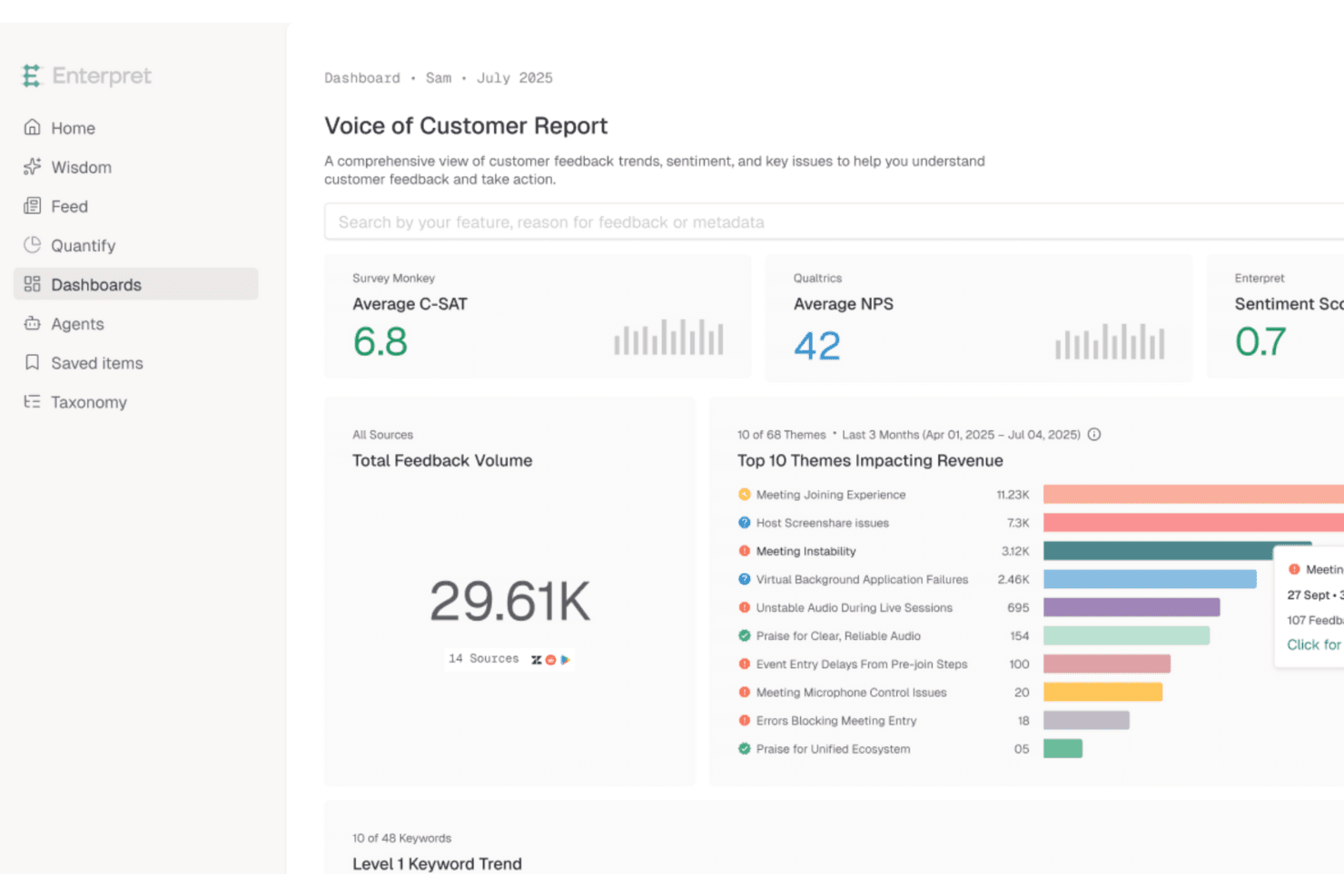
Enterpret unifies customer feedback to surface AI-driven insights fast. Enterpret is a customer intelligence platform that aggregates feedback from support tools, CRMs, sales calls, surveys, and review sites into a unified repository, then uses AI to categorize, analyze, and surface trends across all of it.
Who Is Enterpret Best For?
Enterpret is a strong fit for UX researchers and product teams at mid-market and enterprise companies that already collect feedback across multiple tools and need AI to make sense of it all.
Why I Picked Enterpret
Enterpret earns its spot on my shortlist because its AI doesn't just tag feedback—it builds a living "Customer Context Graph" that links every piece of feedback to specific product areas, customer segments, and business outcomes like churn and revenue. I love how the Adaptive Taxonomy updates itself as customer language evolves, so your categories stay accurate without manual upkeep. When a team like Canva's is processing feedback from 200M+ users, that kind of self-correcting AI analysis is what separates signal from noise.
Enterpret Key Features
- Plain-language search: Query your entire feedback repository using natural language instead of filters or boolean logic.
- Revenue-linked prioritization: Connect Salesforce and HubSpot data to feedback so you can rank issues by churn risk, NPS, and CSAT impact.
- Sales and market intelligence: Surface deal blockers and competitor trends from sales calls and market data alongside customer feedback.
- Close the Loop module: Automatically detects when a reported issue has been resolved and triggers follow-up workflows in tools like Jira, Linear, and Slack.
Enterpret Integrations
Enterpret offers documented integrations with Salesforce, HubSpot, Zendesk, Qualtrics, SurveyMonkey, Typeform, Jira, Linear, Slack, and Zapier. It also supports custom connectivity through APIs, webhooks, CSV uploads, Snowflake, and Segment.
Pros and Cons
Pros:
- Plain-language search supports cross-team analysis
- Adaptive taxonomy reveals evolving customer themes
- Connects feedback to revenue and churn
Cons:
- Users report inaccuracies and filtering issues
- Requires separate tools to collect feedback
Learn more about Enterpret: Best for advanced omnichannel survey creation and distribution
- Free demo available
- Pricing upon request
Visit WebsiteCustomer Rating:4.7/5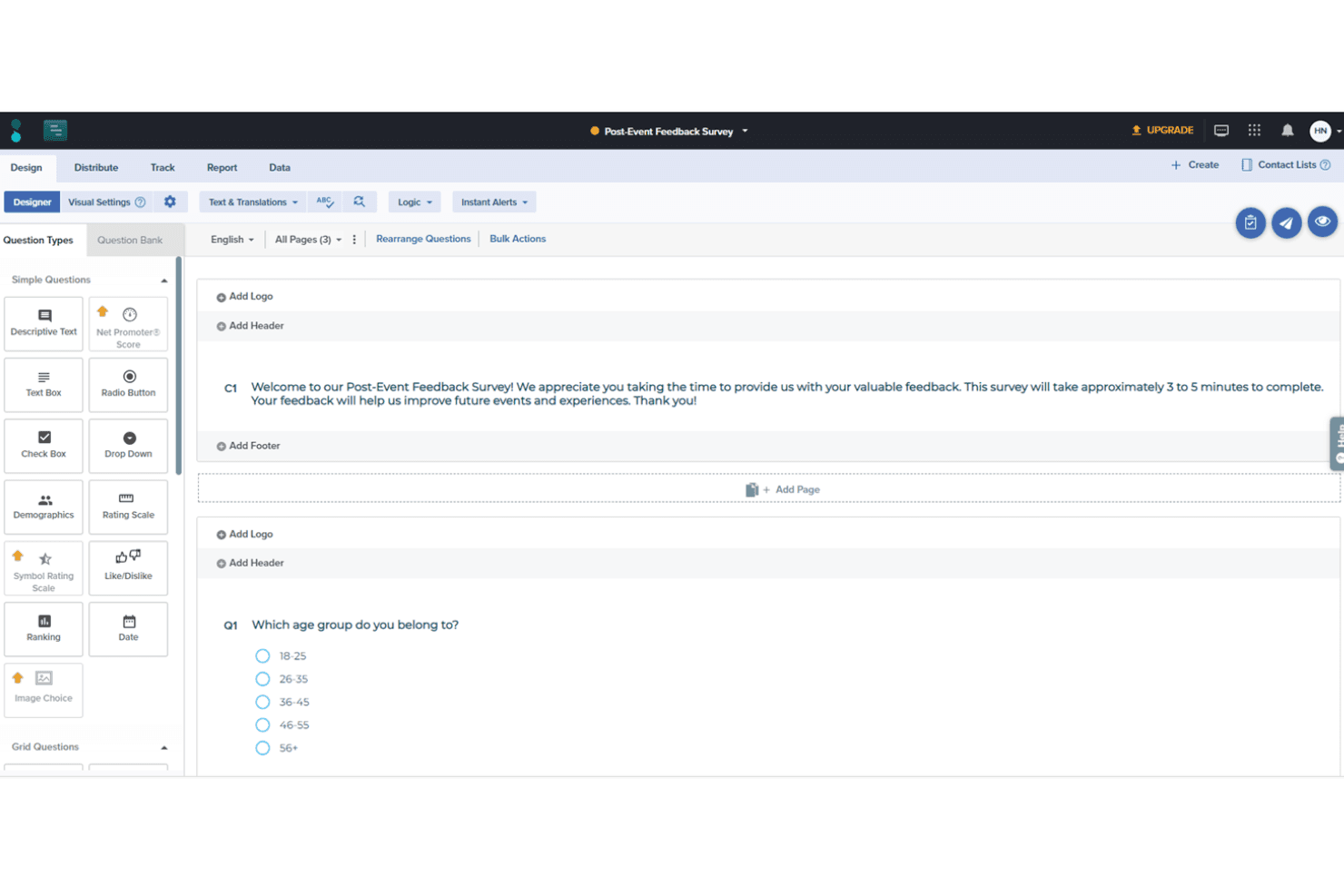
Sogolytics offers many options for survey designs, including various question types tailored to your unique needs. Sogolytics is an omnichannel survey and experience management platform that supports feedback collection across email, chat, social media, in-app, and more, with built-in AI-driven sentiment analysis, automated workflows, and real-time reporting.
Who Is Sogolytics Best For?
Sogolytics is a strong fit for customer experience and customer success teams that need to collect feedback across multiple channels and act on it through structured workflows.
Why I Picked Sogolytics
Sogolytics earns its spot on my shortlist because it covers more feedback channels in one platform than almost anything else I've evaluated. I particularly like how its triggered survey workflows fire automatically based on lifecycle events, so a delivery confirmation can instantly launch a CSAT survey without any manual setup. Its AI-driven sentiment and theme detection then surfaces patterns across all those responses in real time, which is exactly what CX teams need to act fast on customer issues.
Sogolytics Key Features
- Key Driver Analysis: Identifies which specific factors, like support wait times or onboarding steps, most influence customer satisfaction scores and renewal intent.
- SLA tracking: Assigns owners and deadlines to open feedback cases and monitors resolution times against defined service-level agreements.
- 100+ survey templates: Includes pre-built CSAT, NPS, and general feedback templates you can deploy immediately across any supported channel.
- Role-based data access controls: Lets you define who can view, edit, or export feedback data across teams and departments.
Sogolytics Integrations
Sogolytics lists 14 integrations, including Salesforce, HubSpot, Zendesk, Intercom, Slack, Microsoft Teams, ServiceNow, Snowflake, Shopify, and Stripe. It also lists Zapier.
Pros and Cons
Pros:
- Triggered surveys capture lifecycle feedback automatically
- AI surfaces sentiment and themes quickly
- Omnichannel collection captures feedback across channels
Cons:
- Public roadmap and changelog are absent
- No voting or request prioritization workflow
Learn more about Sogolytics: Best for actionable feedback
- Free plan available
- From $29/month (billed annually)
Visit WebsiteCustomer Rating:4.8/5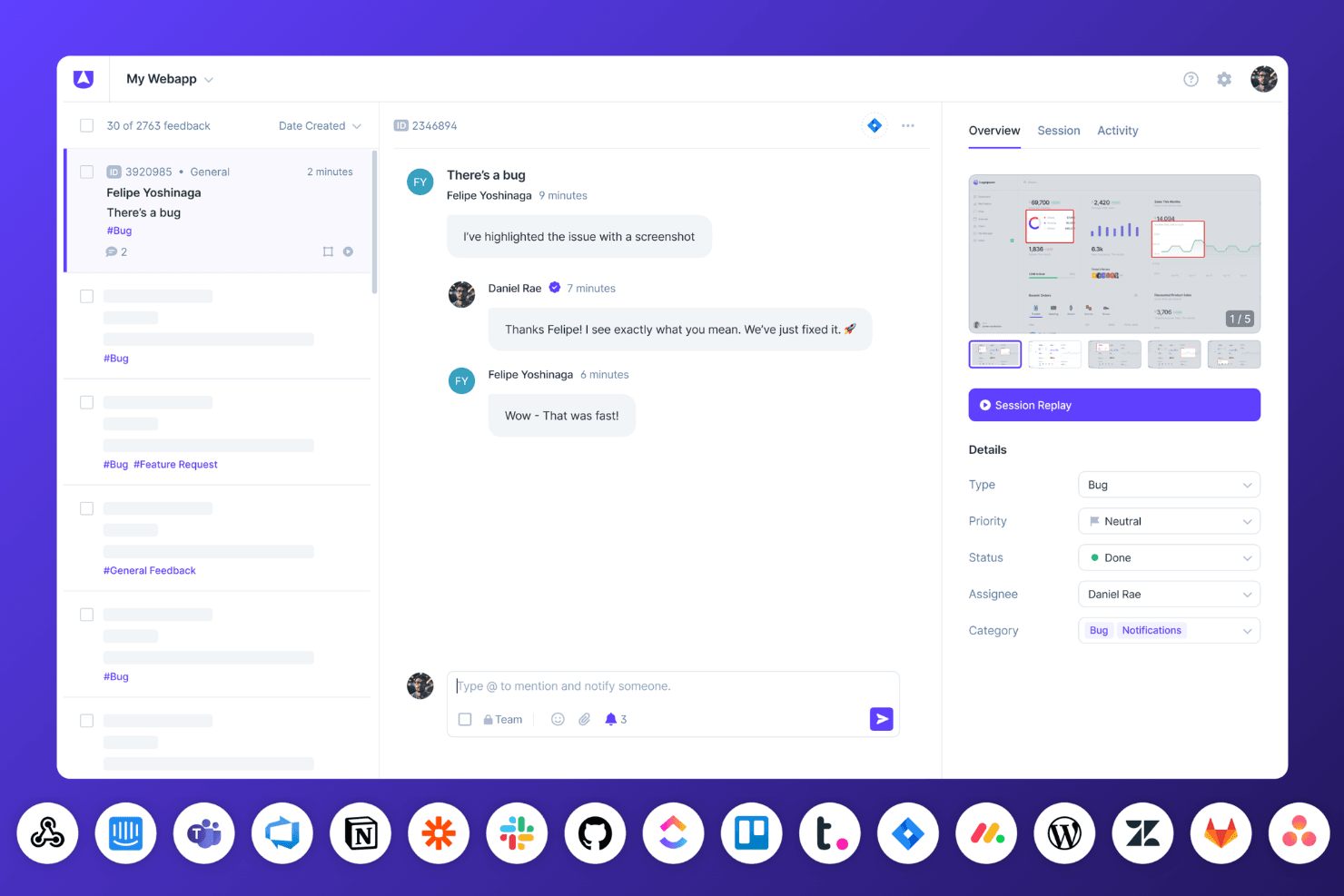
Userback’s bug tracking dashboard displays session replays, team conversations, and real-time status updates with connected integrations. Userback is a user feedback platform that combines embeddable widgets, visual annotation tools, in-app surveys, session replay, and AI-powered insights to help teams collect, organize, and act on customer feedback.
Who Is Userback Best For?
Userback is a strong fit for product managers and customer success teams who need visual, context-rich feedback they can act on immediately.
Why I Picked Userback
I picked Userback as one of the best because every piece of feedback arrives with real context you can act on: annotated screenshots, session replays, and captured console logs come bundled automatically. I love that AI Feedback & Insights then groups similar submissions and surfaces recurring themes, so patterns emerge without manual sorting. The MCP connectors, which pipe feedback directly into tools like Cursor or Claude, close the gap between what users report and what developers actually fix.
Userback Key Features
- NPS, CSAT, and CES surveys: Run in-app surveys using pre-built templates, with targeting options based on device, page, or user segment.
- Feature Portal: A branded community space where users can submit, view, and vote on feature requests, complete with a public roadmap and announcements.
- Browser extension: Lets internal teams and clients leave feedback on any webpage without any code or installation required.
- Feedback inbox and Kanban boards: A centralized workspace for managing, filtering, merging, and assigning incoming feedback across projects.
Userback Integrations
Userback offers 12+ integrations, including Jira, ClickUp, Asana, Intercom, Zendesk, Slack, Microsoft Teams, and MCP connectors for Claude, ChatGPT, and Cursor. It also supports Zapier and provides REST API access and webhooks on Business Plus.
Pros and Cons
Pros:
- Surveys measure satisfaction inside product journeys
- AI groups recurring themes and similar submissions
- Annotated feedback captures actionable technical context
Cons:
- Notification settings can feel overwhelming
- Prioritization lacks revenue-weighted scoring
Learn more about Userback: Best for automated feedback tagging
- Free demo available
- Pricing upon request
Visit WebsiteCustomer Rating:4.4/5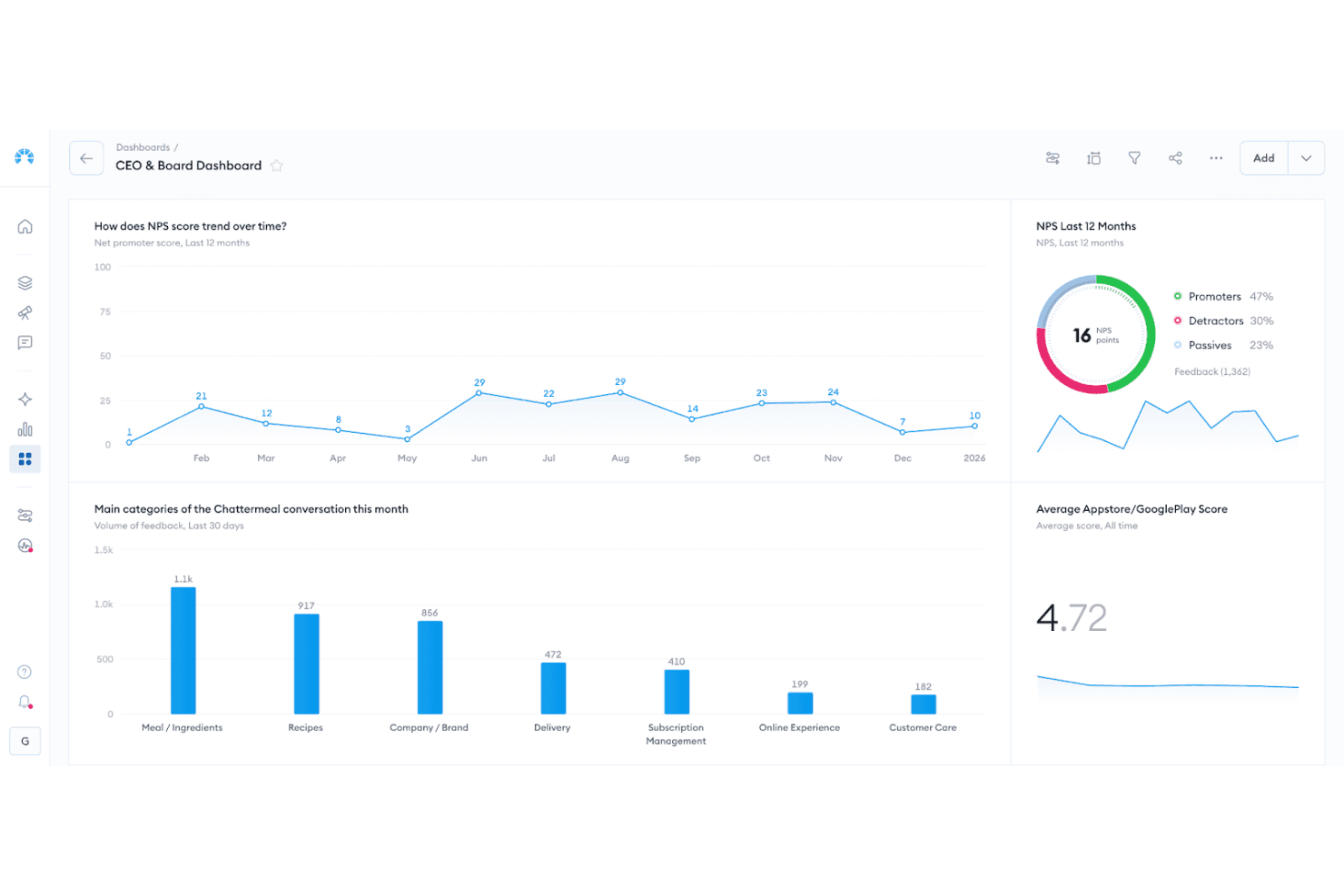
Chattermill dashboard visualizing sentiment themes, feedback volume, and trend changes over time. Chattermill is an AI-native feedback analysis platform that aggregates multichannel customer feedback from 65+ sources into a central repository, then applies automated tagging, sentiment analysis, and theme detection to surface patterns across large volumes of unstructured data.
Who Is Chattermill Best For?
Chattermill is a strong fit for enterprise CX and VoC teams that already collect feedback through other tools and need AI-powered analysis to make sense of it at scale.
Why I Picked Chattermill
I picked Chattermill as one of the best because its AI-driven tagging does something most tools can't: it automatically categorizes unstructured feedback across dozens of channels without manual effort. Precision Insights assigns themes and sentiment to every feedback item at scale, so patterns surface on their own. Lyra Agent takes it further, delivering analyst-level answers backed by verified customer quotes on demand.
Chattermill Key Features
- Anomaly detection: Automatically flags unexpected spikes or drops in feedback themes and sends real-time alerts to Slack, email, or Jira.
- Revenue-linked analysis: Connects feedback themes to CRM and transaction data to show how customer issues tie to churn or revenue impact.
- MCP and skills integrations: Lets you query your feedback data directly from AI tools like Claude, ChatGPT, and Notion AI.
- Contextual enrichment: Attaches metadata—including customer ID, channel, and location—to every feedback item for more precise filtering and reporting.
Chattermill Integrations
Chattermill offers 65+ native integrations, including Zendesk, Intercom, Qualtrics, SurveyMonkey, Trustpilot, Salesforce, Slack, Jira, and Snowflake. It also supports API connections, secure data feeds, and CSV uploads for centralizing feedback.
Pros and Cons
Pros:
- Surfaces anomalies with actionable internal alerts
- Links customer themes to revenue outcomes
- Automates tagging across unstructured feedback
Cons:
- Lacks customer-facing request voting
- Doesn't collect feedback directly
Learn more about Chattermill: Best for real-time multi-location feedback
- 14-day free trial
- Pricing upon request
Visit WebsiteCustomer Rating:4.7/5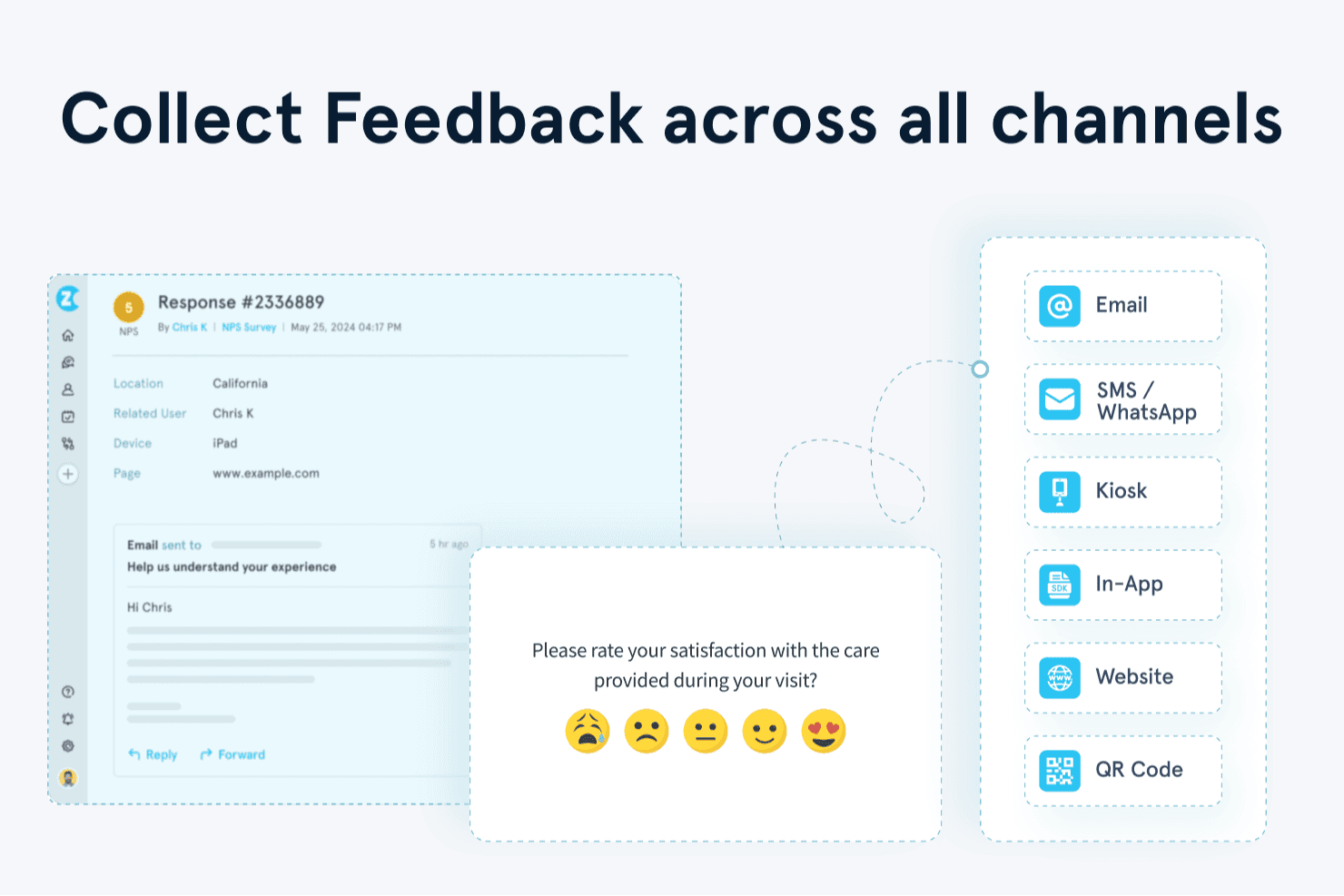
Zonka Feedback helps you collect customer feedback across email, SMS, WhatsApp, kiosks, websites, apps, and QR codes. Zonka Feedback is a multichannel user feedback platform that collects and centralizes responses from offline kiosks, email, SMS, WhatsApp, web, and in-app surveys, then applies AI-driven sentiment analysis, thematic tagging, and real-time reporting across locations and teams.
Who Is Zonka Feedback Best For?
Zonka Feedback is a strong fit for CX and customer success teams managing feedback across multiple physical or digital locations, especially in retail, hospitality, and healthcare.
Why I Picked Zonka Feedback
Zonka Feedback earns its spot on my shortlist because of how well it handles feedback across multiple physical locations in real time. I particularly like the offline kiosk mode, which keeps surveys running on iPads or Android tablets even without a connection, then syncs responses automatically. Admins can monitor every device's uptime, battery, and sync status remotely, making it easy to manage feedback collection across dozens of sites without being on the ground.
Zonka Feedback Key Features
- Multichannel survey distribution: Deploy surveys across email, SMS, WhatsApp, web, in-app SDK, and offline kiosks from a single platform.
- AI thematic and sentiment analysis: Automatically tags responses with themes, sentiment, and emotions to surface patterns across large volumes of feedback.
- Real-time alerts and case management: Triggers instant notifications via Slack, MS Teams, email, or SMS when low ratings come in, with task assignment built in.
- Ask AI co-pilot: Lets you query your entire feedback dataset using natural-language questions to get instant, data-backed answers.
Zonka Feedback Integrations
Zonka Feedback offers 20+ integrations, including Salesforce, HubSpot, Zendesk, Intercom, Jira, Slack, and Microsoft Teams. It also supports API, webhooks, Make, Integrately, and Zapier connections.
Pros and Cons
Pros:
- Reviewers praise responsive customer support
- Surfaces sentiment and themes automatically
- Tracks kiosk uptime across multiple locations
Cons:
- Some reviewers report bugs and instability
- No voting board for feature requests
Learn more about Zonka Feedback: Best for enterprise-wide voice-of-customer programs
- Free demo available
- Pricing upon request
Visit WebsiteCustomer Rating:4.6/5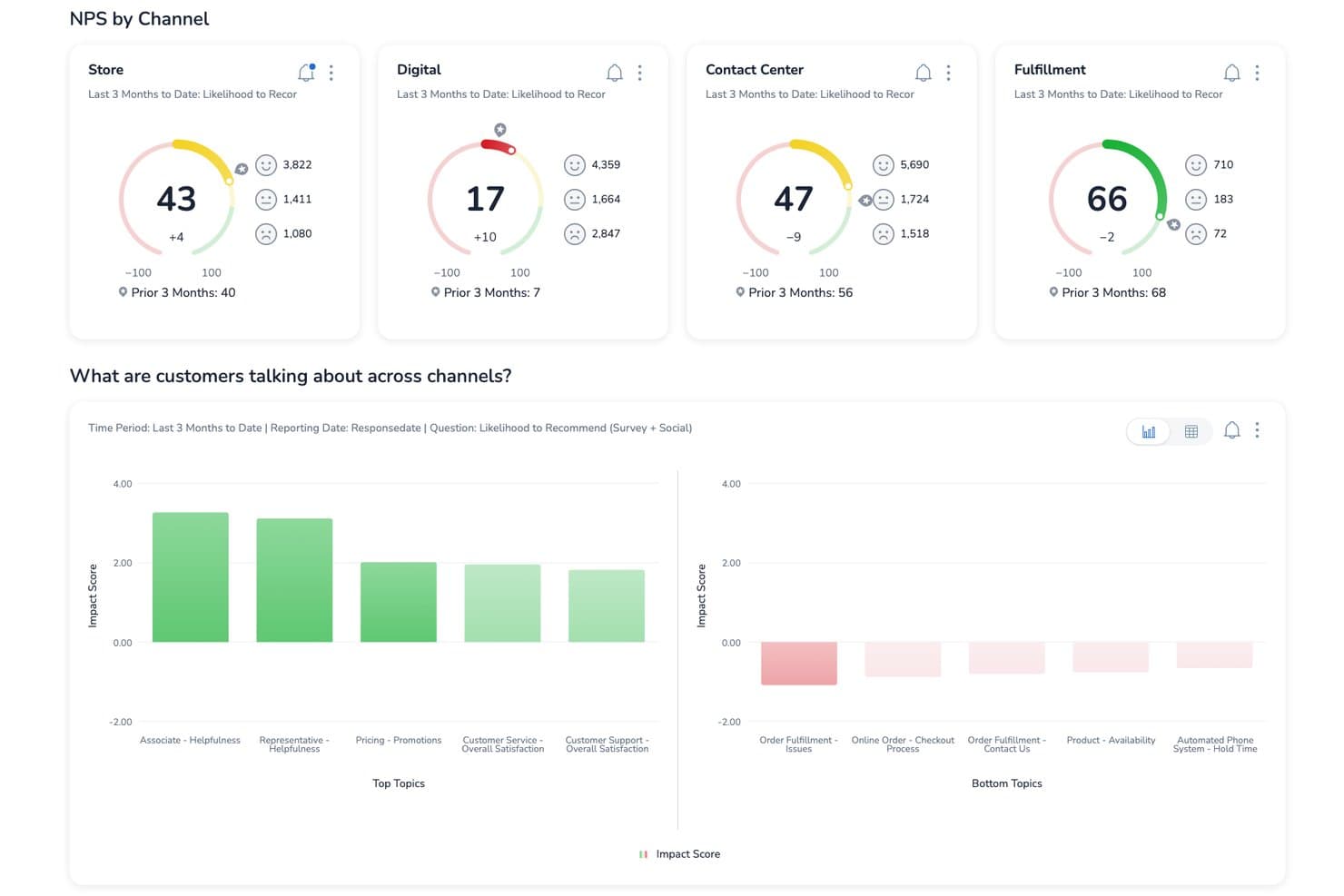
Medallia tracks NPS scores by channel to improve customer satisfaction. Medallia is an enterprise customer feedback platform that captures signals across web, mobile, in-app, speech, video, and social channels, then centralizes them into unified customer profiles with AI-powered text analytics, closed-loop case management, and role-based reporting.
Who Is Medallia Best For?
Medallia is a strong fit for enterprise CX teams running organization-wide voice-of-customer programs across multiple channels and regions.
Why I Picked Medallia
Medallia earns its spot on my shortlist because no other platform I've reviewed captures voice-of-customer signals at the same enterprise scale. I'm particularly impressed by TX Profiles, which build continuous, 360-degree timelines for each customer across web, mobile, speech, and social channels. Its AI text analytics layer then surfaces themes, sentiment, and emotion in real time, so CX teams can act on trends before they compound.
Medallia Key Features
- TX Profiles: Builds continuous, individual and account-level timelines that aggregate customer interactions across every channel in one place.
- Closed-loop case management: Automatically triggers follow-up actions and alerts frontline teams when feedback requires a direct response.
- Multi-language text and speech analytics: Detects themes, sentiment, emotion, and effort across dozens of languages using prebuilt and custom topic models.
- Role-based reporting: Delivers personalized dashboards and feedback views tailored to each team's function, with no user limits.
Medallia Integrations
Medallia offers integrations with Salesforce, Adobe, and ServiceNow, embedding customer insights into those platforms. Its Developer Portal supports custom connectivity, although specific API capabilities aren’t documented.
Pros and Cons
Pros:
- Closed-loop alerts prompt timely customer follow-up
- Connects sentiment themes to CSAT outcomes
- Captures feedback across web, mobile, and speech
Cons:
- No feature voting for product requests
- Enterprise implementation demands substantial planning
Learn more about Medallia: Best for linking feedback to revenue impact
- Free plan + 30-day free trial + free demo available
- Pricing upon request
Visit WebsiteCustomer Rating:4.4/5
You can use Pendo’s sentiment analysis to understand what delights or frustrates customers about your products and services. Pendo is a user feedback tool you can use to create in-app walkthroughs to improve new users’ onboarding and introduce existing users to new features. You can use Pendo to store user feedback giving you a better idea of the features you need to improve and new features customers want to see.
Pendo lets you generate reports and metrics using user feedback that the software collected so you can prioritize new features that can help boost your revenue. Understanding how customers feel about your products and services is an excellent way of determining areas where you are excelling and areas where you need to improve, and Pendo’s sentiment analysis feature can help you.
Pendo can help you analyze online reviews to gauge whether customers feel positively or negatively about your products and services. Instead of sending an online survey to a customer, you can use Pendo to present NPS, quizzes, and polls directly to customers through your mobile app to boost response rates.
Pendo integrates with other business tools, including Calendly, Figma, QualtricsXM, Amazon Redshift, and TrustRadius.
Pendo has a free plan, while the pricing for paid plans is available upon request.
Learn more about Pendo: Best for revenue-weighted feedback prioritization
- 30-day free trial + free demo available
- From $16,000/year
Visit WebsiteCustomer Rating:4.3/5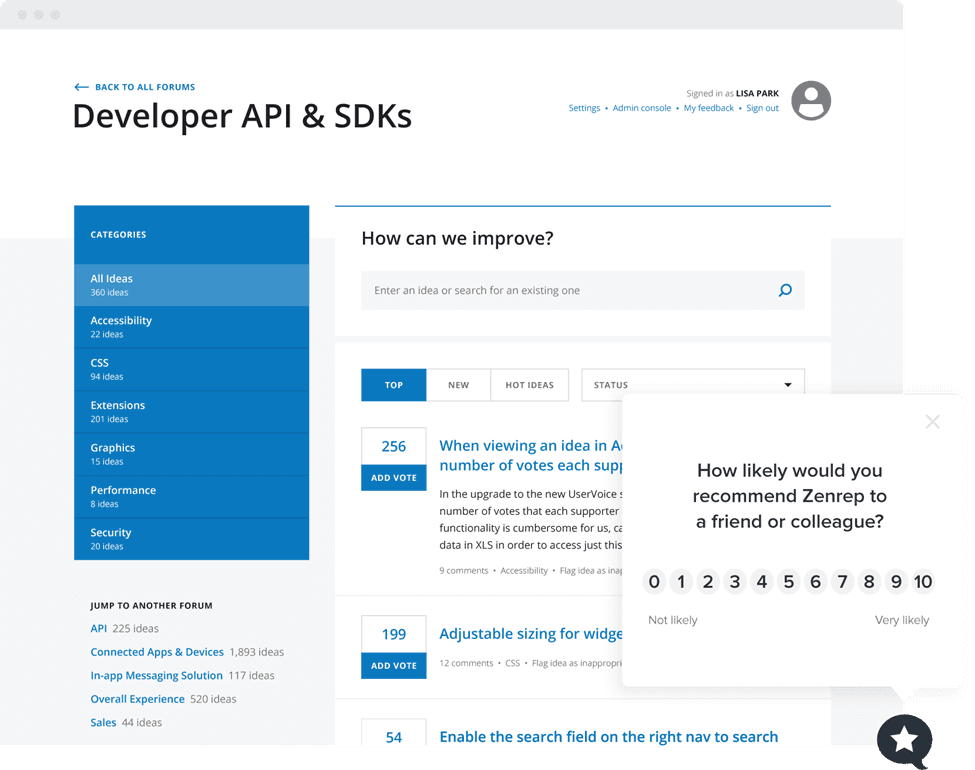
You can use Uservoice’s NPS widget to gauge customer loyalty and the likelihood of your product getting recommended to new users. UserVoice is an enterprise customer intelligence platform that collects feedback across portals, in-app widgets, and integrations, then centralizes, categorizes, and prioritizes it using AI-driven analysis and revenue-weighted scoring.
Who Is UserVoice Best For?
UserVoice is a strong fit for product managers and customer success teams at mid-market to enterprise companies that need to tie customer feedback directly to revenue impact.
Why I Picked UserVoice
UserVoice earns its spot on my list because of how it ties feedback directly to revenue. Its Indexing feature ranks ideas by ARR and account value pulled from Salesforce or HubSpot, so a request from a $200K account automatically outweighs one from a free trial user. AI Idea Insights then summarizes those ranked requests into digestible themes, so I'm not manually sifting through hundreds of submissions to find what actually moves the needle.
UserVoice Key Features
- AI Theme Detection: Automatically identifies recurring themes across submitted feedback and links each theme back to the original customer submissions.
- Feedback portal: A public-facing space where customers can post ideas, vote on existing requests, comment, and subscribe to status updates.
- Chrome extension: Lets internal teams capture feedback directly from email, support tools, and other workflows without switching to a separate app.
- Impact Reports: Displays urgency, sentiment, importance, and the revenue behind each request in a single view for quick decision-making.
UserVoice Integrations
UserVoice offers native integrations with Salesforce, HubSpot, Zendesk, Gainsight, Slack, Microsoft Teams, Jira, Azure DevOps, FullStory, and Dragonboat. Its Admin API supports custom integrations and data exports.
Pros and Cons
Pros:
- Status updates help close the feedback loop
- AI themes reveal recurring customer concerns
- Revenue-weighted prioritization focuses roadmap decisions
Cons:
- Advanced reporting feels limited for some teams
- Setup can take four to six weeks
Learn more about Uservoice: Best for visual and video bug feedback capture
- Free 15-day trial
- From $45/month
Visit WebsiteCustomer Rating:4.5/5
Customers can use Usersnap to send video feedback or screen recording about issues they encounter with your product. Usersnap is a customer feedback software for SaaS companies that collect customer feedback through video feedback and customer surveys. You can use Usersnap to label and assign issues to your product development team using Usersnap’s dashboard.
The software can help improve customer engagement by sharing ticket status and directly responding to feedback senders to close the customer feedback loop. If you want to understand better the issues customers are encountering with your products, then Usersnap is the ideal user feedback software for you because of its video feedback feature.
With Usersnap, customers can record their screens to capture issues, allowing a better context to help find solutions quickly. This visual feedback feature allows you to capture critical metadata like URL, browser information, and console log errors you can send to your engineers to help customers.
Usersnap integrates with other customer feedback and product management tools like Basecamp, Trello, WordPress, Evernote, and GitLab.
Usersnap pricing starts at $9/month/up to 2 users, and they provide a 15-day free trial.
Learn more about Usersnap: 10Best for AI-driven research repository analysis
Dovetail
- Free plan + free demo available
- Pricing upon request
 Learn more about Dovetail:
Annen programvare for brukertilbakemeldinger
Her er noen flere alternativer innen programvare for brukertilbakemeldinger som ikke kom med på kortlisten min, men som likevel er verdt å sjekke ut:
- 11SurveySparrowBest for conversational surveys
- 12CannyUser feedback software for analyzing feedback from specific customers
- 13SurvicateBest for customer feedback integration
- 14UnwrapBest for automatic feedback trend detection
- 15FormsuiteBest for AI-generated feedback forms
- 16ProductboardBest for revenue-weighted feature prioritization
- 17ProdPadBest for linking feedback directly to roadmap outcomes
- 18Qualtrics XMBest for enterprise-scale CX feedback analysis
- 19FeaturebaseBest for closing the feedback loop with users
- 20FrillBest for idea boards with revenue-weighted voting
How I Evaluate User Feedback Software
I split my evaluation into three parts. Core functionality carries the most weight: I look for tools that capture feedback directly from users and centralize it in one searchable place. From there, I evaluate standout features like customer-weighted scoring, then consider support and onboarding quality.
Core Functionality (Table Stakes For This List)
When I'm selecting tools for my list, I score each one on a scale from 0 (does not offer the functionality) to 5 (excels in this area) for each core functionality listed below. I then convert the total into a percentage to help assess each tool's overall fit, with extra weight on any functionalities I've deemed essential.
- Feedback Collection (Essential): I check whether each tool offers surveys, in-app widgets, and embeddable forms that can be deployed across multiple touchpoints without heavy setup.
- Centralized Feedback Repository (Essential): Every tool needs a single, searchable hub where feedback from support tickets, sales calls, and direct submissions lives together.
- Categorization and Tagging: I look for flexible tagging systems that let you group feedback by theme, product area, or customer segment to spot patterns fast.
- Prioritization or Voting: Tools like Canny and Productboard handle this differently, so I evaluate whether voting, scoring, or weighted ranking helps surface high-impact requests.
- Analysis and Reporting: I evaluate whether the tool can surface sentiment shifts, trending topics, and volume changes over time in dashboards you can actually act on.
- Closing the Feedback Loop: Good tools notify users when their request ships or moves forward. I look for built-in status updates, changelogs, or automated emails tied to feedback items.
Once I have a list of tools that meet the criteria, I consider what sets each platform apart.
Differentiating Factors (What Sets Vendors Apart)
Here's how I compare and contrast different vendors:
Standout Features
Customer-weighted scoring is the feature I evaluate most closely. Tools like Productboard and Canny can tie votes to CRM data like MRR or plan tier, so a request from your largest account carries more weight than one from a free-trial user. I also check whether each tool offers AI-powered insight summarization, which clusters hundreds of raw feedback entries into themed summaries. That's the difference between reading 400 tickets and scanning five actionable trends. Finally, I look at duplicate detection and merging. Without it, the same request logged by three different reps fragments your data and skews prioritization.
Beyond Features
I evaluate how easily sales and CS teams can actually log feedback during their daily work. A browser extension or CRM plugin that lets a CSM capture a request mid-call matters more than a feature list no one uses. I also check API access and export options, since teams often need to pull feedback into internal BI tools or sync data with roadmap platforms like Jira or Shortcut. Security rounds out my review: SOC 2 compliance, role-based access controls, and GDPR readiness are non-negotiable when feedback is tied to customer accounts.
Slik velger du programvare for brukertilbakemeldinger
Det er lett å gå seg vill i lange funksjonslister og kompliserte prismodeller. For å hjelpe deg med å holde fokus mens du går gjennom den unike prosessen din for valg av programvare, har jeg laget en sjekkliste over faktorer du bør ha i tankene:
| Faktor | Hva bør du vurdere? |
|---|---|
| FaktorSkalerbarhet | Hva bør du vurdere?Vil programvaren vokse sammen med virksomheten din? Vurder om den støtter økende mengder tilbakemeldinger og brukere uten betydelige ytelsesproblemer. |
| FaktorIntegrasjoner | Hva bør du vurdere?Fungerer den sammen med de eksisterende verktøyene dine? Kontroller om den integreres sømløst med CRM-systemet, prosjektstyringsprogramvaren og kommunikasjonsplattformene dine. |
| FaktorTilpasningsmuligheter | Hva bør du vurdere?Kan du tilpasse den etter behovene dine? Se etter muligheter for å tilpasse tilbakemeldingsskjemaer, oversikter og rapporter slik at de passer til de spesifikke kravene i arbeidsflyten din. |
| FaktorBrukervennlighet | Hva bør du vurdere?Er den brukervennlig for teamet ditt? Vurder læringskurven og om grensesnittet er intuitivt nok til at alle teammedlemmer kan bruke det effektivt. |
| FaktorImplementering og innføring | Hva bør du vurdere?Hvor raskt kan du komme i gang? Vurder prosessen for innføring, tiden det tar å sette opp løsningen og tilgjengeligheten av opplæringsressurser som veiledninger og guider. |
| FaktorKostnad | Hva bør du vurdere?Er den innenfor budsjettet ditt? Sammenlign prisene med funksjonene som tilbys. Ta høyde for skjulte kostnader eller gebyrer for flere brukere eller funksjoner. |
| FaktorSikkerhetstiltak | Hva bør du vurdere?Hvor godt beskyttet er dataene dine? Sørg for at løsningen følger bransjestandarder for databeskyttelse og tilbyr funksjoner som kryptering og regelmessige sikkerhetskopier. |
Hva er programvare for brukertilbakemeldinger?
Programvare for brukertilbakemeldinger er et verktøy som hjelper deg med å samle inn og forstå tilbakemeldinger fra kundene eller brukerne dine. Produktledere, markedsførere og kundestøtteteam bruker den til å finne ut hva folk liker, misliker eller ønsker å få rettet. Den lar deg lage spørreundersøkelser, oppdage trender i resultatene og bestemme hva som bør forbedres, slik at du vet at du jobber med det som betyr mest.
Funksjoner
Når du velger programvare for tilbakemeldinger fra brukere, bør du se etter følgende viktige funksjoner:
- Oppretting av spørreundersøkelser: Gjør det mulig å utforme og distribuere spørreundersøkelser for å samle inn brukerinnsikt på en effektiv måte.
- Dataanalyse: Tilbyr verktøy for å tolke tilbakemeldingsdata og avdekke trender og mønstre.
- Integrasjonsmuligheter: Sikrer kompatibilitet med eksisterende programvare som CRM-systemer og verktøy for prosjektstyring.
- Tilpassbare skjemaer: Lar deg tilpasse tilbakemeldingsskjemaer etter dine spesifikke behov og arbeidsflyter.
- Sanntidsanalyse: Gir umiddelbar innsikt i tilbakemeldinger fra brukere, slik at du kan ta beslutninger i tide.
- Innsamling av tilbakemeldinger fra flere kanaler: Gjør det mulig å samle inn tilbakemeldinger fra ulike plattformer, inkludert nettsteder og mobilapper.
- Sentimentanalyse: Bruker kunstig intelligens til å identifisere og tolke kundenes følelser og holdninger i tilbakemeldinger.
- Visualisering av veikart: Hjelper deg med å planlegge og prioritere produktutviklingen basert på tilbakemeldinger fra brukere.
- Sikkerhetstiltak: Beskytter brukerdata gjennom kryptering og samsvar med standarder for databeskyttelse.
- Betinget logikk: Gjør det mulig å tilpasse spørreundersøkelser og skjemaer basert på brukernes svar, noe som øker engasjementet.
Fordeler
Implementering av programvare for tilbakemeldinger fra brukere gir flere fordeler for teamet og virksomheten din. Her er noen av fordelene du kan se frem til:
- Bedre beslutningstaking: Tilgang til sanntidsanalyse og dataanalyse hjelper teamet ditt med å ta informerte beslutninger raskt.
- Forbedret produktutvikling: Innsikt fra tilbakemeldinger og visualisering av veikart hjelper teamet ditt med å prioritere funksjoner som betyr mest for brukerne.
- Kundetilfredshet: Sentimentanalyse og tilpassbare skjemaer gjør det mulig å imøtekomme brukernes behov på en effektiv måte, noe som øker tilfredsheten.
- Tidsbesparelser: Integrasjonsmuligheter og innsamling av tilbakemeldinger fra flere kanaler effektiviserer tilbakemeldingsprosessen og sparer teamet ditt for verdifull tid.
- Databeskyttelse: Sikkerhetstiltak sørger for at brukerdata håndteres på en trygg måte, slik at du opprettholder kundenes tillit.
- Økt engasjement: Betinget logikk og personlige spørreundersøkelser holder brukerne engasjert og villige til å gi flere tilbakemeldinger.
- Innsikt på tvers av plattformer: Innsamling av tilbakemeldinger fra flere kanaler gir deg et helhetlig bilde av brukeropplevelsen på tvers av ulike plattformer.
Kostnader & priser
Valg av programvare for tilbakemeldinger fra brukere krever en forståelse av de ulike prismodellene og abonnementene som er tilgjengelige. Kostnadene varierer basert på funksjoner, teamstørrelse, tillegg og mer. Tabellen nedenfor oppsummerer vanlige abonnementer, gjennomsnittsprisene deres og typiske funksjoner som inngår i programvareløsninger for tilbakemeldinger fra brukere:
Sammenligningstabell for abonnementer for programvare for tilbakemeldinger fra brukere
| Abonnementstype | Gjennomsnittspris | Vanlige funksjoner |
|---|---|---|
| AbonnementstypeGratisabonnement | Gjennomsnittspris$0 | Vanlige funksjonerGrunnleggende oppretting av spørreundersøkelser, begrenset antall svar og nødvendig analyse. |
| AbonnementstypePersonlig abonnement | Gjennomsnittspris$5-$25/user/month | Vanlige funksjonerTilpassbare skjemaer, grunnleggende integrasjoner og standardanalyse. |
| AbonnementstypeBedriftsabonnement | Gjennomsnittspris$30-$75/user/month | Vanlige funksjonerAvanserte alternativer for spørreundersøkelser, tilbakemeldinger fra flere kanaler og forbedrede rapporteringsverktøy. |
| AbonnementstypeAbonnement for større virksomheter | Gjennomsnittspris$100-$200/user/month | Vanlige funksjonerUbegrenset antall svar, avanserte sikkerhetsfunksjoner og dedikert kontostøtte. |
Vanlige spørsmål om programvare for tilbakemeldinger fra brukere
Her er noen svar på vanlige spørsmål om programvare for tilbakemeldinger fra brukere:
Er data som samles inn gjennom programvare for tilbakemeldinger fra brukere, sikre?
Ja, anerkjente løsninger for programvare for tilbakemeldinger fra brukere prioriterer datasikkerhet. De bruker kryptering og følger bransjestandarder for databeskyttelse. Før du kjøper, bør du gjennomgå programvarens sikkerhetsfunksjoner og retningslinjer. Sørg for at de oppfyller organisasjonens krav til beskyttelse av sensitiv brukerinformasjon.
Hvordan kan programvare for tilbakemeldinger fra brukere forbedre beslutningsprosessen deres?
Den hjelper teamet ditt med å se hva brukerne faktisk synes om produktet eller tjenesten, slik at dere kan basere oppdateringer på reelle tilbakemeldinger og ikke antakelser. Dere vil oppdage mønstre i hva brukerne liker eller misliker, noe som hjelper teamet med å fokusere på de mest virkningsfulle endringene. Den gir dere også et tydeligere bilde av hvor innsatsen deres gir resultater.
Hvordan analyserer man tilbakemeldinger fra brukere for å finne handlingsrettet innsikt?
Begynn med å gruppere kommentarer eller svar etter tema, slik at dere kan se hvilke områder som oftest blir nevnt. Se etter ord eller temaer som gjentar seg, og som viser trender i brukernes holdninger. Ved å oppsummere disse punktene blir det enklere for teamet å forstå det overordnede budskapet bak enkeltkommentarene.
Hvordan kan team oppmuntre flere brukere til å dele tilbakemeldinger?
Gjør det enkelt og raskt for brukerne å gi tilbakemeldinger ved å holde skjemaene enkle og tilgjengelige på kjente steder, for eksempel etter at en oppgave er fullført eller på en produktside. Bekreft at tilbakemeldingene er mottatt, slik at brukerne føler seg hørt. Når folk vet at meningene deres betyr noe, er det mer sannsynlig at de svarer igjen.
Hvilke vanlige utfordringer møter team når de håndterer tilbakemeldinger fra brukere?
Det kan komme inn for mange tilbakemeldinger til at de kan behandles effektivt, eller de kan være spredt på tvers av ulike kanaler. Det er også lett å fokusere på ekstreme meninger i stedet for balansert innsikt. Ved å sette tydelige mål for hvilken type tilbakemeldinger dere samler inn, kan teamet holde fokus.
Hvordan følger man opp etter at man har samlet inn tilbakemeldinger fra brukere?
Del oppdateringer eller svar som viser brukerne at innspillene deres har ført til endringer. Selv en kort bekreftelse bidrar til å bygge tillit og holde tilbakemeldingsflyten sterk. Når brukerne ser at meningene deres fører til konkrete resultater, er de mer villige til å fortsette å engasjere seg med teamet.