

Med så mange ulike løsninger for produktutvikling tilgjengelig er det vanskelig å finne ut hvilken som passer for deg. Du vet at du vil administrere kundebehov, tilby integrasjon med undersøkelsesverktøy og gjøre det mulig å samle inn tilbakemeldinger fra brukere, men du må finne ut hvilket verktøy som er best. Jeg hjelper deg! I dette innlegget gjør jeg valget enklere ved å dele mine personlige erfaringer med å bruke dusinvis av ulike verktøy for produktutvikling i store team og prosjekter, sammen med mine anbefalinger av de beste gratisverktøyene for produktutvikling.
Hvorfor du kan stole på våre programvareanbefalinger
6,700+
Reviews
20
Industry experts
16+
Evaluation factors
14
Years
Teamet vårt har testet og anmeldt programvare siden 2012. Vi er selv produktledere, så vi vet hvor vanskelig og hvor viktig det er å velge riktig programvare.
I denne guiden har vi vurdert verktøyene gjennom praktisk testing og uavhengig research og gitt dem poeng ut fra våre utvelgelseskriterier.
Anmeldelsene våre bygger på vår egen redaksjonelle vurdering. De er ikke et salgsargument.
Ekspertanmeldere:
- Andrew LumbySenior TPM
- Cristiano ValimSenior UI/UX Lead


Sammenligningstabell: Gratis programvare for produktutvikling
Denne sammenligningstabellen oppsummerer prisdetaljene for mine beste utvalgte gratisprogrammer for produktutvikling.
| Tool | Best For | Trial Info | Price | ||
|---|---|---|---|---|---|
| 1 | Best for dev-native issue and sprint tracking | Free plan available | From $4/user/month | Website | |
| 2 | Best for unlimited-user sprint and task tracking | Free plan available | From $7/user/month (billed annually) | Website | |
| 3 | Best for self-hosted dev tracking without user caps | Free plan available; 14-day free trial available for Enterprise Cloud and on-premises | From €5.95/user/month (billed annually) | Website | |
| 4 | Best for dev teams tracking sprints with GitHub | Free plan + 14-day free trial + free demo available | From $8.50/user/month (billed annually) | Website | |
| 5 | Best for sprint planning with unlimited free seats | Free plan available | From $10/user/month (billed annually) | Website | |
| 6 | Best for flexible, database-powered project tracking | Free plan available; 14-day free trial | From $20/user/month (billed annually) | Website | |
| 7 | Best for docs, roadmaps, and sprints in one workspace | Free plan available | From $10/user/month (billed annually) | Website | |
| 8 | Best for Agile sprint and backlog management | Free plan available | From $7.91/user/month | Website | |
| 9 | Best for AI-assisted roadmap and feedback workflows | Free plan available; 14-day free trial; free demo available | From $12/user/month (billed annually) | Website | |
| 10 | Best for free feedback-to-roadmap workflows | Free plan available | From $29/user/month (billed annually) | Website |


Anmeldelser av den beste gratisprogramvaren for produktutvikling
Nedenfor finner du mine detaljerte sammendrag av den beste gratisprogramvaren for produktutvikling som kom med på kortlisten min. Anmeldelsene mine gir en detaljert gjennomgang av de viktigste funksjonene, fordelene & ulempene, integrasjonene og ideelle bruksområdene for hvert verktøy, slik at du kan finne det beste for deg. Noen av disse verktøyene tilbyr en helt gratis versjon, mens andre tilbyr en gratis prøveperiode. Jeg har lagt til en merknad om hva som er gratis i hver anmeldelse.
 Best for dev-native issue and sprint tracking
- Free plan available
- From $4/user/month
Visit WebsiteCustomer Rating:4.8/5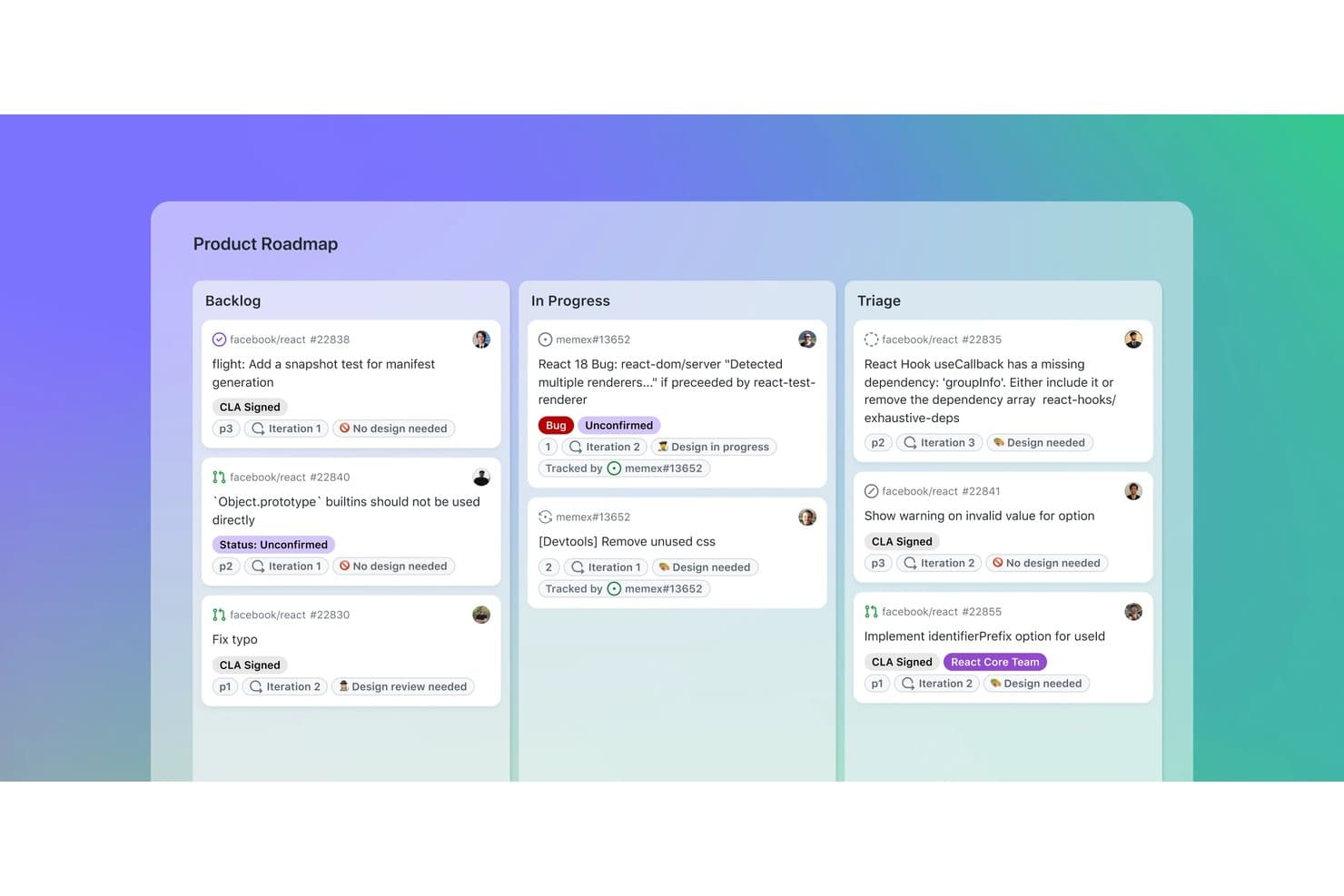
GitHub organizes product tasks across Backlog, In Progress, and Triage boards. GitHub is a product development platform that combines code repositories with issue tracking, project roadmaps, sprint boards, custom fields, pull requests, and team discussions.
Who Is GitHub Best For?
GitHub suits product and engineering teams that want dev-native issue and sprint tracking alongside code, pull requests, and releases.
Why I Picked GitHub
I picked GitHub because it connects product planning directly to the development work that follows. Issues link with commits and pull requests, while Projects adds iteration-based sprint boards, sub-issues, and dependencies. This makes GitHub best for dev-native issue and sprint tracking when product decisions need clear delivery context.
GitHub Key Features
- Issue forms: Create structured requests with fields, labels, and file uploads.
- GitHub Discussions: Organize threaded feedback, polls, upvotes, and marked answers.
- Insights charts: View current project data and historical burn-up charts.
- GitHub Actions: Automate project updates and development workflows.
GitHub Integrations
GitHub offers native Slack integration, plus Marketplace integrations with Zenhub, Azure Boards, Linear, CircleCI, and Codecov. REST and GraphQL APIs, webhooks, GitHub Actions, and the MCP server support custom connectivity and CI/CD workflows.
What's Free?
GitHub offers a free-forever plan with unlimited public and private repositories and unlimited collaborators. Private repositories have feature limits, including 2,000 GitHub Actions minutes and 500 MB of Packages storage per month; additional usage may require payment.
Pros and Cons
Pros:
- Roadmaps are shareable with external stakeholders
- Sprint boards support dependencies and hierarchy
- Issues connect directly with code changes
Cons:
- Feedback collection requires GitHub accounts
- Prioritization lacks built-in scoring frameworks
Learn more about GitHub: Best for unlimited-user sprint and task tracking
- Free plan available
- From $7/user/month (billed annually)
Visit WebsiteCustomer Rating:4.6/5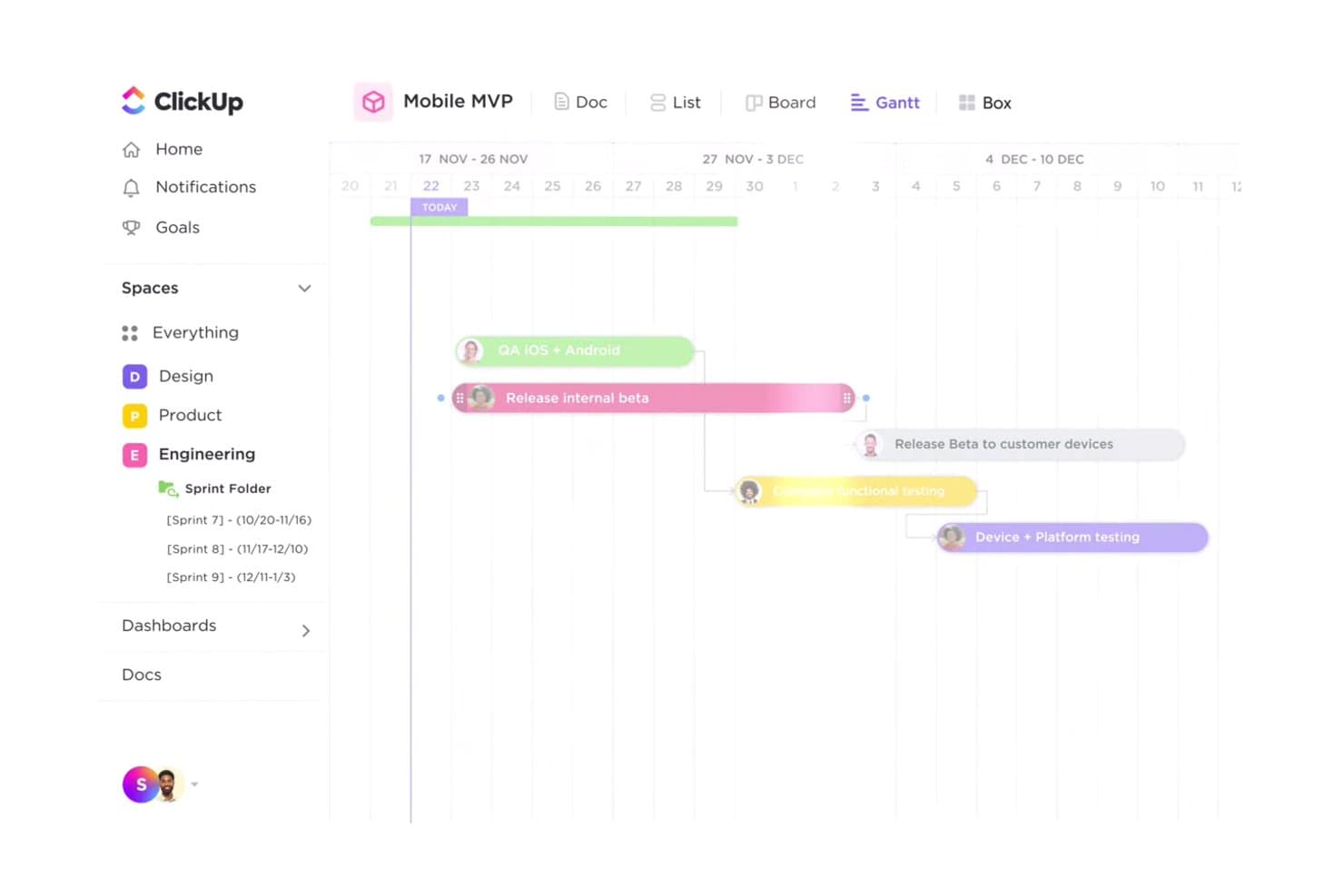
ClickUp's Gantt view helps teams track product launch timelines visually. ClickUp is a free product development workspace that combines task and issue tracking, sprint boards, roadmaps, Gantt views, Docs, Whiteboards, Forms, and developer integrations in one platform.
Who Is ClickUp Best For?
Product managers, developers, and program managers who want one workspace for sprints, product planning, and cross-functional delivery will find ClickUp a practical fit.
Why I Picked ClickUp
I picked ClickUp because its free plan supports unlimited-user sprint and task tracking without limiting task volume. My team can manage Kanban workflows, custom statuses, dependencies, and GitHub-linked development tasks in one workspace. Custom sprint lengths also help us coordinate releases from backlog refinement through launch.
ClickUp Key Features
- Gantt charts: Map dependencies, milestones, critical paths, and slack time.
- Feedback forms: Convert customer feedback and bug reports into tasks.
- Collaborative Docs: Create product briefs, requirements, and release notes.
- Whiteboards: Turn visual ideas into actionable tasks.
ClickUp Integrations
ClickUp offers 200+ native integrations, including GitHub, GitLab, Bitbucket, Figma, Slack, Microsoft Teams, Intercom, Zendesk, and Google Drive. It also supports a public API, webhooks, Zapier, and Make.
What's Free?
ClickUp offers a free-forever plan rather than only a time-limited trial. It supports unlimited users and unlimited tasks for sprint and task tracking.
Pros and Cons
Pros:
- Docs, Whiteboards, and forms connect discovery work
- Custom sprints and Kanban cover delivery workflows
- Unlimited tasks and members support large teams
Cons:
- Free feedback capture limited to one form
- Lifetime caps on planning views disrupt roadmaps
Learn more about ClickUp: Best for self-hosted dev tracking without user caps
- Free plan available; 14-day free trial available for Enterprise Cloud and on-premises
- From €5.95/user/month (billed annually)
Visit WebsiteCustomer Rating:4.5/5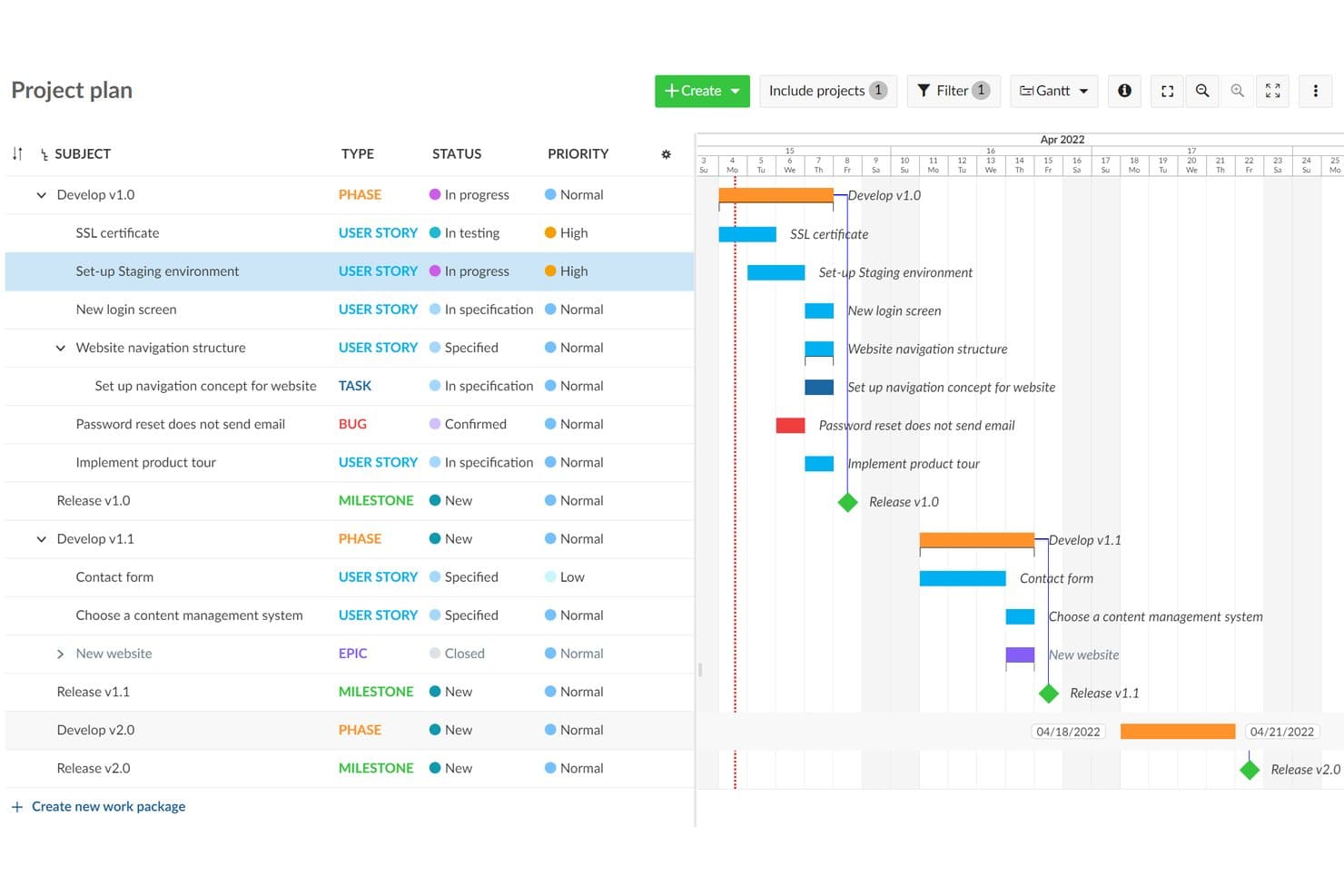
OpenProject visualizes project timelines with a Gantt chart roadmap view. OpenProject is an open-source product development platform combining work package tracking, Scrum backlogs, Gantt planning, roadmaps, collaboration, and workflow boards in a self-hosted workspace.
Who Is OpenProject Best For?
Technical product teams needing unlimited users and projects, self-hosted control, and integrated development tracking will find OpenProject a practical fit.
Why I Picked OpenProject
I picked OpenProject because it combines self-hosted dev tracking without user caps with strong product delivery controls. Unlimited teams can manage work packages, dependencies, and custom workflows, then plan Scrum sprints with story points and burndown charts. Gantt timelines connect release planning to the engineering work behind it.
OpenProject Key Features
- Git integrations: Connect GitHub, GitLab, SVN, and Git repositories to development projects.
- Real-time document editing: Collaborate on shared documents with rich text, linked work packages, and embedded charts.
- Email-to-task conversion: Turn incoming emails into trackable work packages.
- Project templates: Reuse standardized project structures without copying budgets or time data.
OpenProject Integrations
OpenProject offers native integrations with GitHub, GitLab, Nextcloud, SVN, and Git repositories. Its REST API and BCF API support custom integrations.
What’s Free?
OpenProject’s Community edition is free forever, self-hosted, and supports unlimited users and projects. You’ll need to host and administer it yourself, while enterprise add-ons, professional support, and managed cloud hosting require a paid plan.
Pros and Cons
Pros:
- Templates support repeatable delivery workflows
- Scrum backlogs include story points and burndowns
- Handles dependencies across complex project hierarchies
Cons:
- Requires server administration before teams can start
- Roadmaps rely on basic version progress views
Learn more about OpenProject: Best for dev teams tracking sprints with GitHub
- Free plan + 14-day free trial + free demo available
- From $8.50/user/month (billed annually)
Visit WebsiteCustomer Rating:4.5/5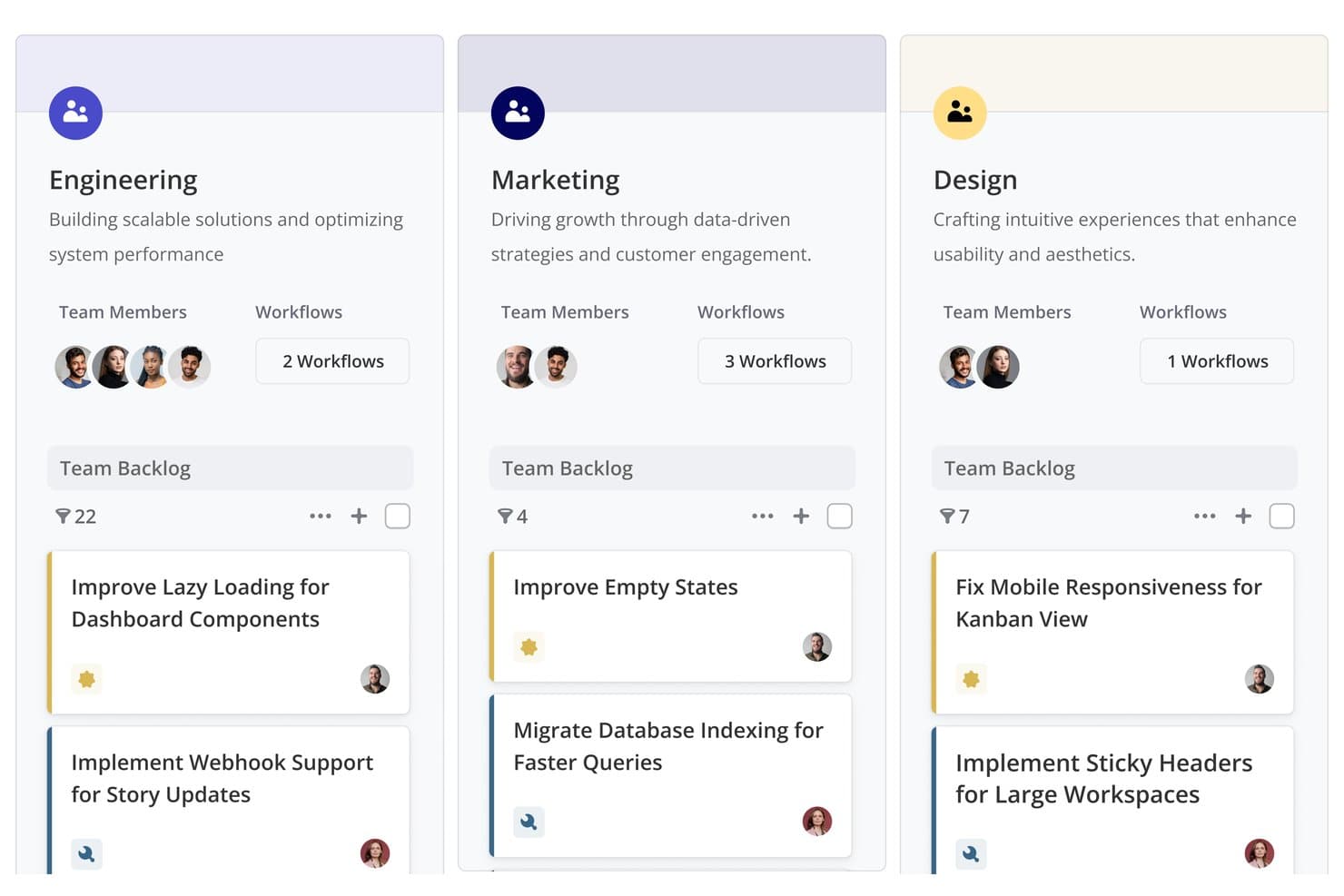
Shortcut organizes team backlogs by department with tasks and workflows. Shortcut is product development software with a free-forever plan that combines roadmaps, Epics, Stories, Kanban boards, Iterations, Docs, and GitHub-linked development workflows.
Who Is Shortcut Best For?
Shortcut fits software development teams that need GitHub-connected sprint planning, roadmaps, and delivery tracking in one workspace.
Why I Picked Shortcut
I rate Shortcut highly for dev teams tracking sprints with GitHub. Its Iterations, Kanban boards, and burndown reports connect sprint planning to daily delivery work. Stories can move as pull requests progress, so my team keeps development status current without updating every ticket manually.
Shortcut Key Features
- Sub-tasks: Break Stories into estimated, trackable work items.
- Custom fields: Organize work with predefined product and technical fields.
- Backlog view: Sort, filter, group, and reorder Stories.
- Slack integration: Create Stories from messages and sync threads.
Shortcut Integrations
Shortcut integrates with GitHub, GitLab, Bitbucket Cloud, Slack, Figma, Zendesk, Productboard, Savio, and Google Sheets. It also offers a REST API and Zapier connectivity for custom workflows.
What's Free?
Shortcut offers a free-forever plan with Epics, Iterations, Roadmaps, Docs, GitHub integration, and unlimited Stories. It supports one Team with up to 10 users, while a 14-day trial provides full access without requiring a credit card.
Pros and Cons
Pros:
- Sprint reports clarify iteration progress
- Roadmap views connect strategy with execution
- Unlimited Stories support ongoing product delivery
Cons:
- No native customer feedback collection
- Prioritization relies on manual ranking
Learn more about Shortcut: Best for sprint planning with unlimited free seats
- Free plan available
- From $10/user/month (billed annually)
Visit WebsiteCustomer Rating:4.6/5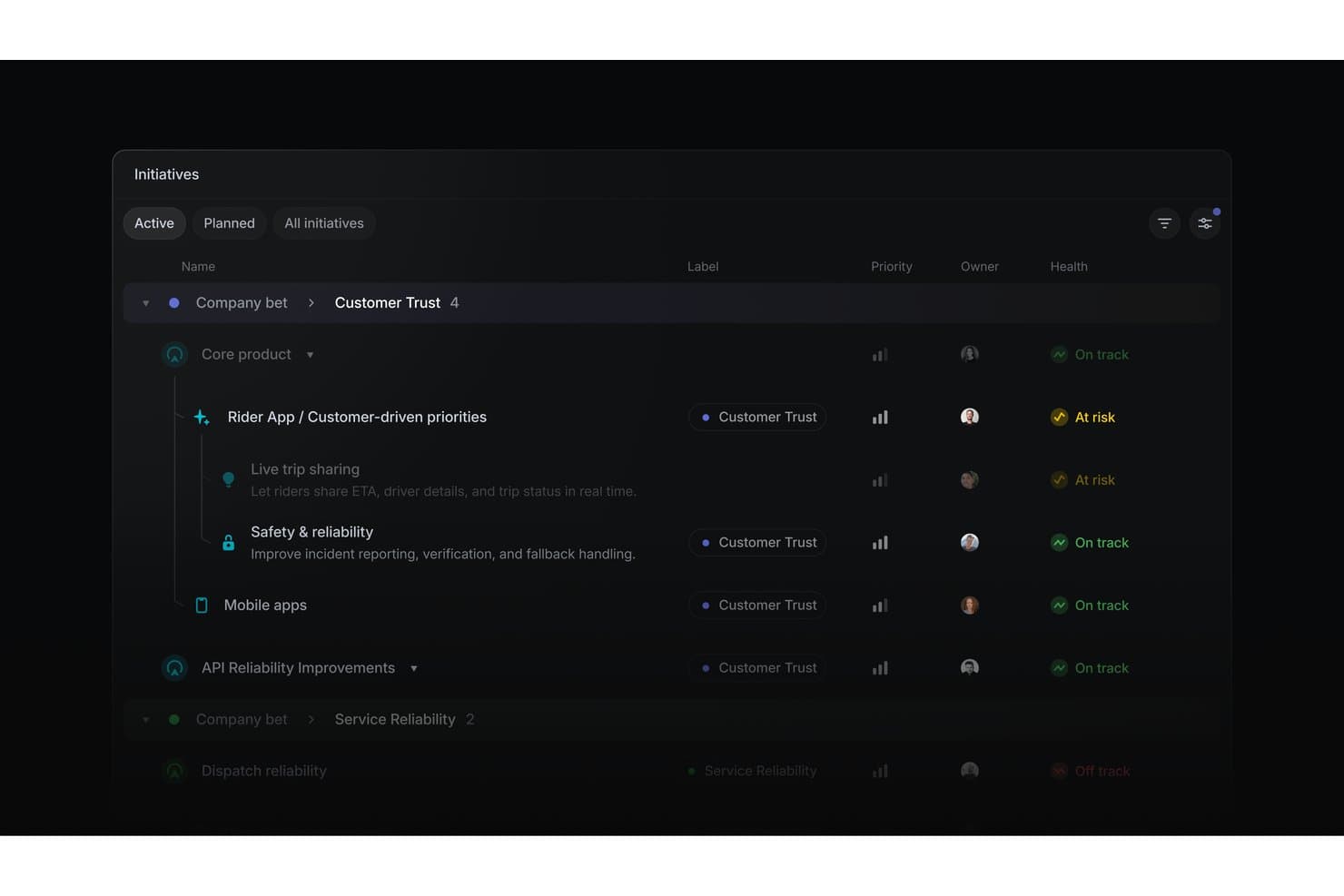
Linear organizes product initiatives by health status, priority, and owner. Linear is product development software for organizing initiatives, projects, issues, cycles, timelines, dependencies, and engineering integrations in one workspace.
Who Is Linear Best For?
Product managers and software developers at startups that need sprint planning, issue tracking, and roadmap coordination with unlimited free seats.
Why I Picked Linear
I picked Linear because it supports sprint planning with unlimited free seats, letting product, engineering, and design collaborate in one workspace. Cycles run one to eight weeks, roll unfinished issues forward, and include capacity tracking. Customizable boards, swimlanes, estimates, dependencies, and issue relationships help my team manage sprint work from backlog to release.
Linear Key Features
- Linear Agent: Creates and updates issues, projects, and initiatives through natural-language prompts.
- Customer Requests: Links manually entered feedback to issues and projects.
- Project templates: Presets milestones, issues, leads, members, and initiatives.
- GitHub integration: Syncs issues and automates pull request updates.
Linear Integrations
Linear offers native integrations with GitHub, GitLab, Slack, Figma, Microsoft Teams, Notion, and Google Sheets. It also supports custom connections through its public API and webhooks, plus Zapier.
What's Free?
Linear offers a free-forever plan at $0 for unlimited members. It includes two teams and up to 250 issues, with file uploads limited to 10 MB.
Pros and Cons
Pros:
- Board swimlanes clarify sprint ownership
- Initiatives connect goals to releases
- Cycles roll unfinished work forward
Cons:
- No built-in impact-effort scoring
- Customer requests require manual entry
Learn more about Linear: Best for flexible, database-powered project tracking
- Free plan available; 14-day free trial
- From $20/user/month (billed annually)
Visit WebsiteCustomer Rating:4.6/5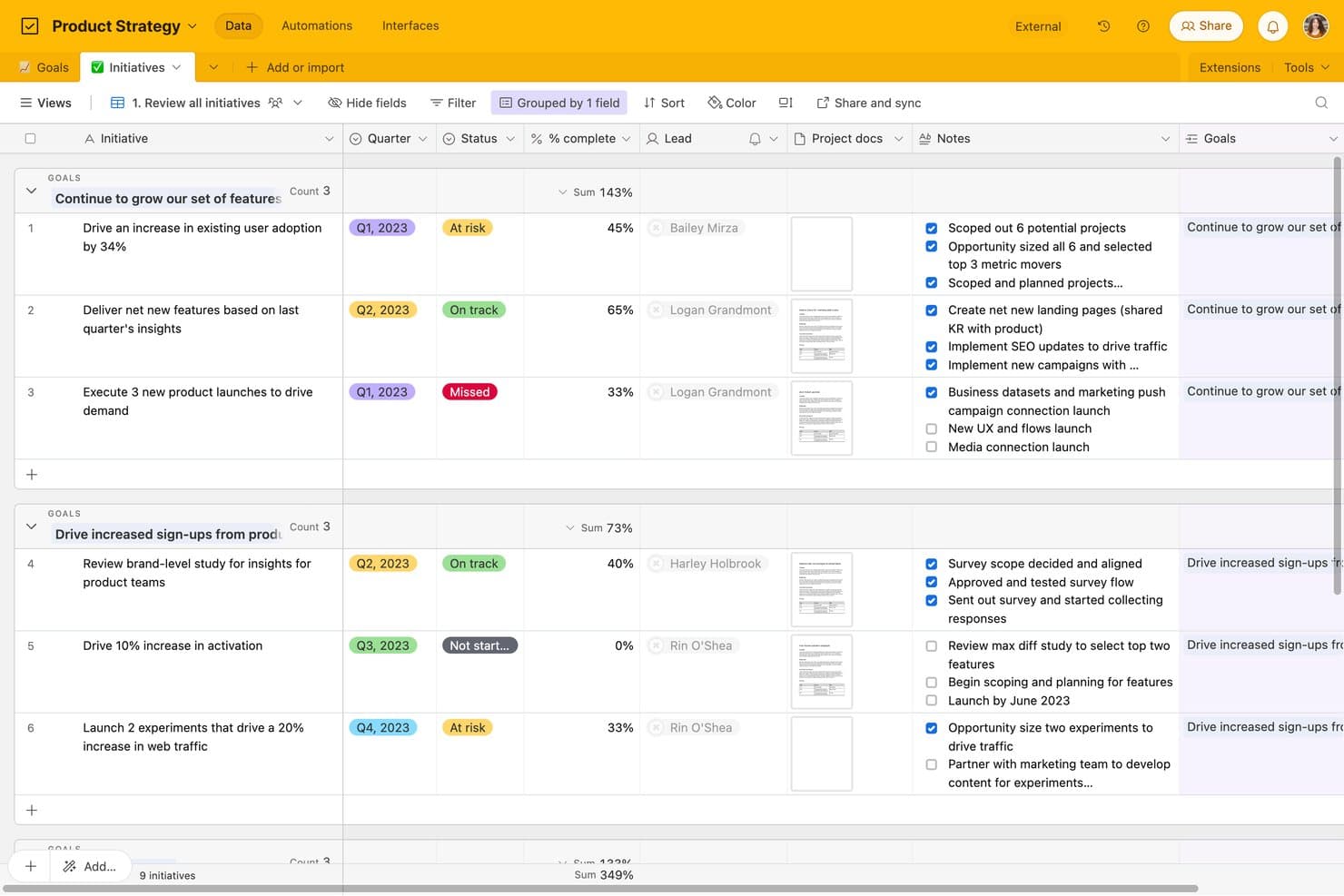
Airtable tracks product initiatives by goal, status, and completion. Airtable is product development software built around relational databases, combining roadmap planning, task tracking, feedback forms, kanban workflows, custom views, and cross-functional collaboration.
Who Is Airtable Best For?
Product managers, startup founders, and program managers can connect roadmaps, feedback, and delivery work in a flexible relational database.
Why I Picked Airtable
I picked Airtable because its relational database structure connects product feedback, roadmap initiatives, and delivery tasks in one workspace. I use linked records and rollups to trace customer requests through epics and sprint work, while kanban views keep execution visible. Forms turn new feedback into records the team can prioritize.
Airtable Key Features
- Interface Designer: Create custom pages with grid, gallery, calendar, form, and dashboard layouts.
- Automation triggers: Start workflows from record changes, form submissions, schedules, webhooks, or buttons.
- Public view sharing: Share views and interface pages through links without requiring viewer accounts.
- CSV import and export: Move data between Airtable and other tools using CSV files.
Airtable Integrations
Airtable lists 27 integrations, including Jira, GitHub, Slack, Google Drive, Google Calendar, Salesforce, Zendesk, Miro, and Typeform. Its free plan includes API access for custom integrations, while sync integrations and Jira automation require paid plans.
What's Free?
Airtable offers a free-forever plan, so you don’t need to start a paid subscription after a trial. It supports unlimited read-only collaborators, up to five editors or creators, 50 commenters, 1,000 records per base, 1 GB of attachments, and 1,000 API calls monthly; sync integrations and Jira automation require a paid plan.
Pros and Cons
Pros:
- Unlimited read-only stakeholder visibility
- Flexible relational tracking for product workflows
- Connects feedback, roadmaps, and tasks
Cons:
- Free tier caps records and automation runs
- Timeline and Gantt views require upgrades
Learn more about Airtable: Best for docs, roadmaps, and sprints in one workspace
- Free plan available
- From $10/user/month (billed annually)
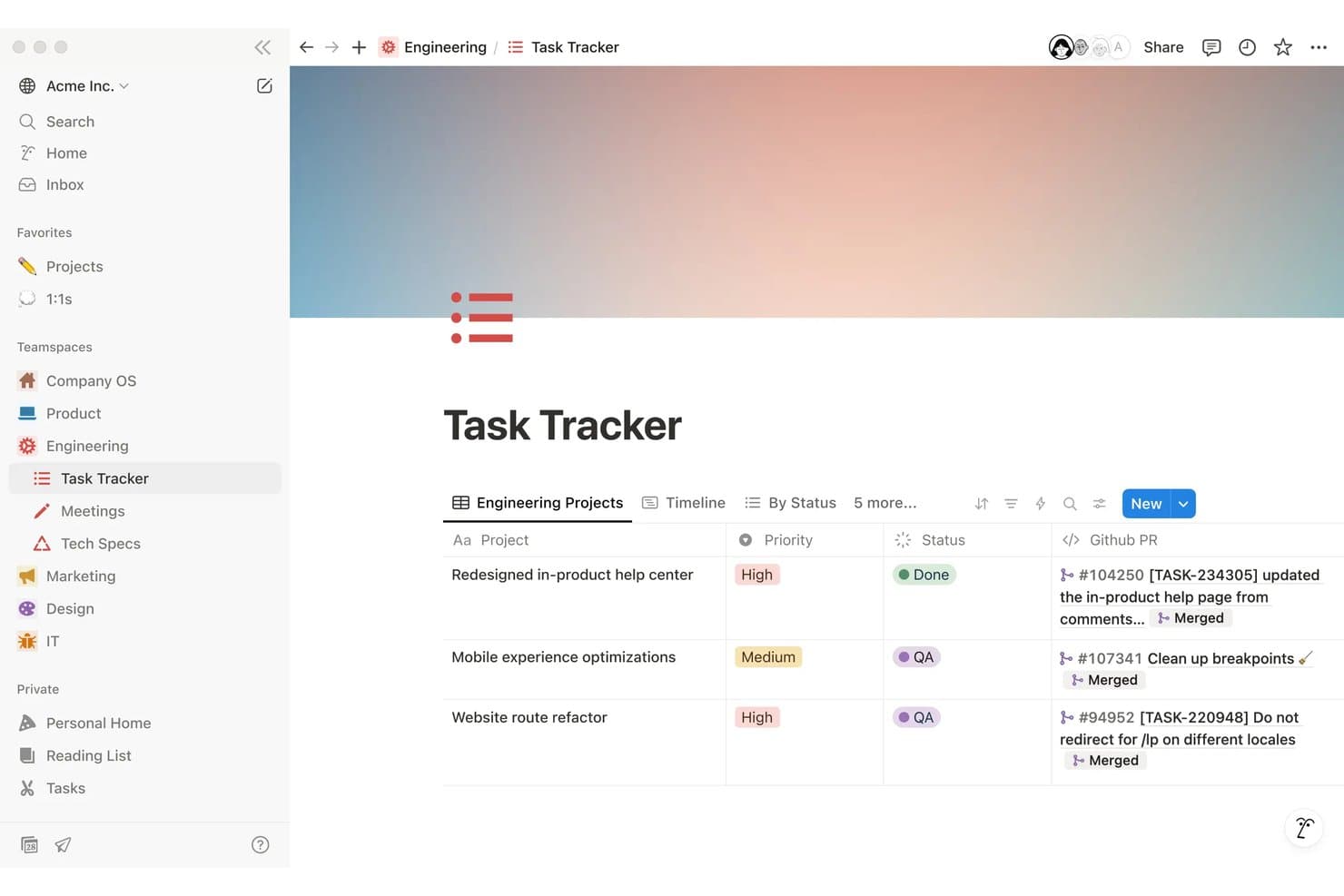
Notion tracks engineering tasks with priority, status, and linked GitHub PRs. Notion is a free product development workspace for creating PRDs, managing roadmaps and tasks, planning sprints, collecting feedback through forms, and collaborating across linked databases and documents.
Who Is Notion Best For?
Product managers at startups and small teams who need one workspace for PRDs, roadmaps, sprint planning, and cross-functional collaboration.
Why I Picked Notion
I picked Notion as one of the best free product development tools because it keeps docs, roadmaps, and sprints in one workspace. I use timeline views to map releases, link PRDs to roadmap items, and run sprints with dedicated backlog and planning views. Teams can also publish roadmap views through Notion Sites.
Notion Key Features
- Unlimited forms: Collect responses through public or embedded forms without requiring Notion accounts.
- Task dependencies: Link related tasks and identify work that must happen first.
- Custom task IDs: Assign prefixes and unique URLs to tasks for easier reference.
- Database comments: Add threaded comments to pages, items, and individual properties.
Notion Integrations
Notion supports connections with GitHub, Jira, Figma, Slack, Trello, Asana, and more. It also provides a public API and webhooks for custom integrations, plus Zapier.
What's Free?
Notion offers a free-forever plan at $0 per member per month, with unlimited pages and blocks for individual users. Important limits include 5 MB file uploads, seven-day page history, up to 10 guests, and limited collaborative blocks for teams.
Pros and Cons
Pros:
- Collects unlimited feedback form responses
- Publishes interactive roadmaps publicly
- Links PRDs, roadmaps, and sprints
Cons:
- Requires manual prioritization scoring setup
- Free team workspaces cap blocks
Learn more about Notion:
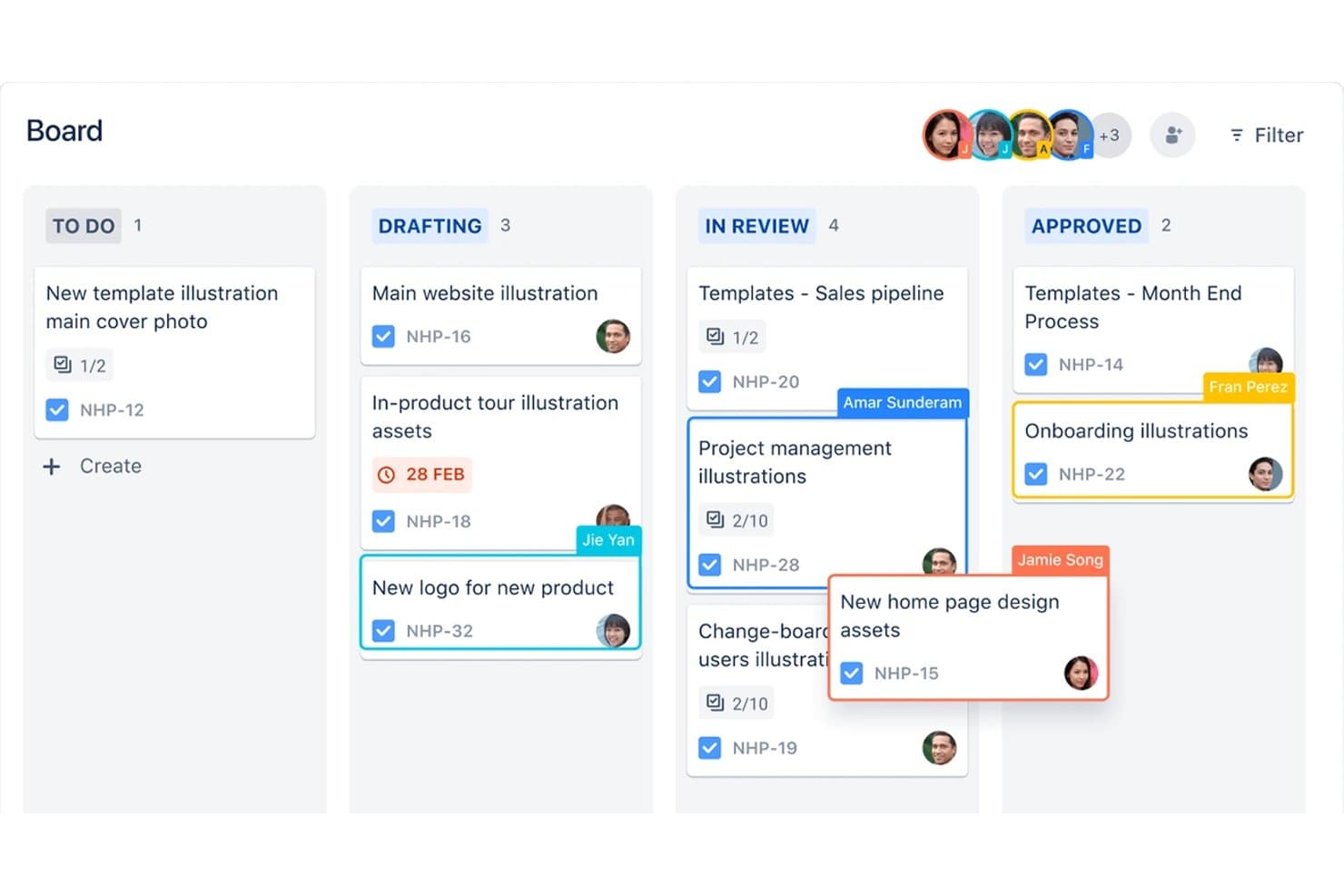
Jira organizes product tasks across kanban board stages by assignee. Jira is product development software from Atlassian that combines backlog and issue tracking, Scrum and Kanban boards, sprint planning, timeline roadmaps, and Jira Product Discovery for prioritization and customer insights.
Who Is Jira Best For?
Jira suits product and engineering teams that manage Agile backlogs, Scrum sprints, Kanban workflows, and cross-functional delivery.
Why I Picked Jira
I picked Jira because it is best for Agile sprint and backlog management, with Scrum and Kanban boards built around ranked backlogs and sprint planning. I use burndown, velocity, cycle time, and cumulative flow reports to spot delivery issues. Its timeline view also connects epics, dependencies, and release work in one delivery plan.
Jira Key Features
- Custom workflows: Configure statuses, rules, and transitions for different delivery processes.
- Custom fields: Add text, dropdown, date, label, and user-picker fields to work items.
- CSV import: Move existing work items into Jira from another tool.
- Marketplace apps: Extend Jira with integrations and add-ons from Atlassian Marketplace.
Jira Integrations
Jira has native integrations with Confluence, Trello, Bitbucket, Slack, Microsoft Teams, Gmail, Figma, and Jira Product Discovery. Its Atlassian Marketplace offers 3,000+ apps, while its REST API supports custom integrations.
What's Free?
Jira has a free-forever plan for up to 10 users, with unlimited projects, boards, backlogs, reports, and basic views. It includes 2 GB of storage and 150 automation steps monthly, but limits support to the community and excludes advanced permissions, data residency, and Rovo AI.
Pros and Cons
Pros:
- JPD connects discovery scores to delivery
- Unlimited work items support detailed tracking
- Agile boards support sprints and WIP limits
Cons:
- Free permissions make every user administrator
- Roadmapping and prioritization span separate products
Learn more about Jira: Best for AI-assisted roadmap and feedback workflows
- Free plan available; 14-day free trial; free demo available
- From $12/user/month (billed annually)
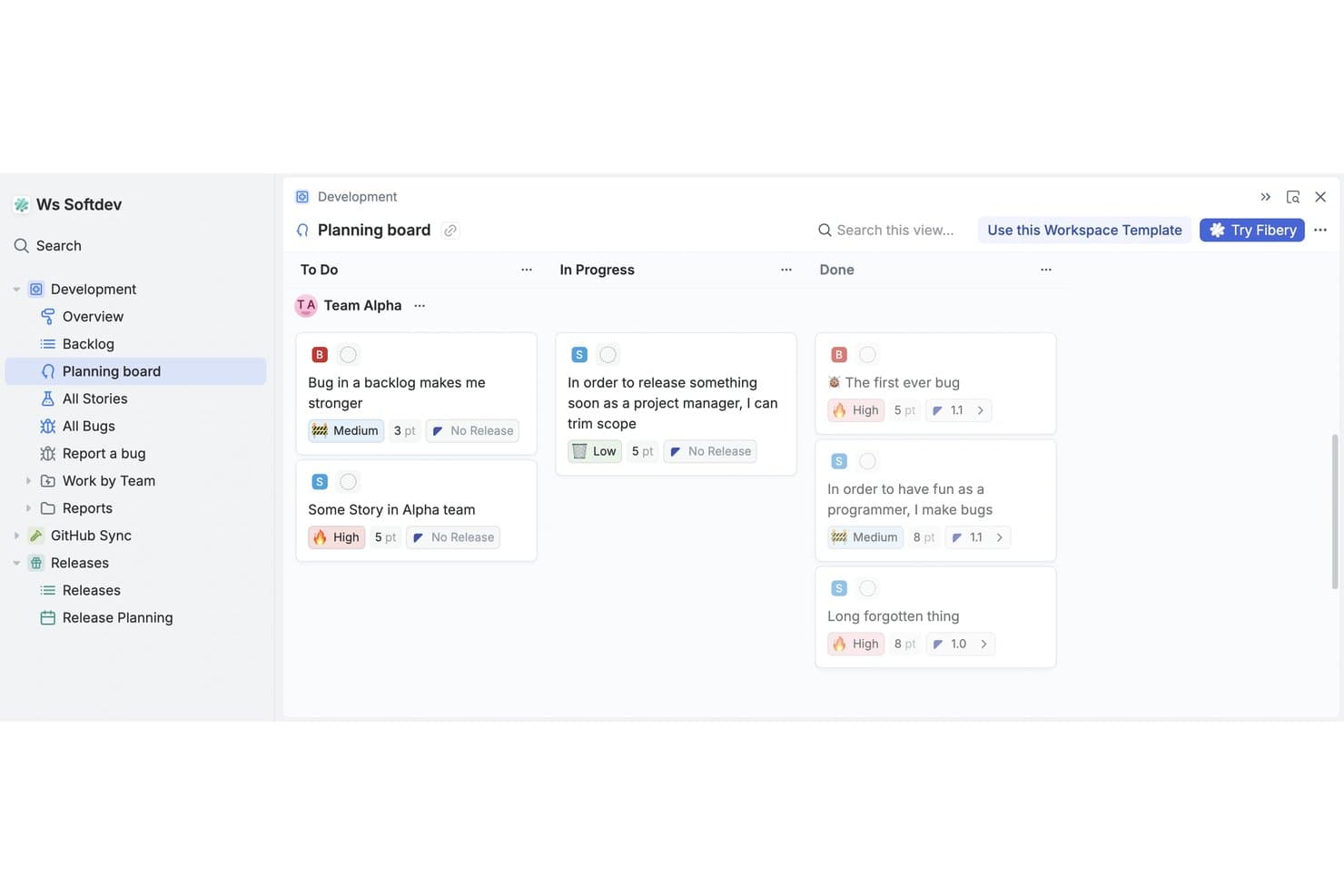
Fibery's planning board organizes tasks by status across teams. Fibery is a free product development platform that combines a no-code relational workspace with customer feedback, feature prioritization, roadmaps, product specs, and software development tracking.
Who Is Fibery Best For?
Product teams at startups and small companies that need AI-assisted feedback analysis, prioritization, roadmaps, and development tracking in one workspace.
Why I Picked Fibery
I picked Fibery because its AI-assisted roadmap and feedback workflows connect customer evidence directly to product decisions. I use AI to identify feedback themes, suggest links to backlog items, and score sentiment before prioritizing work with RICE, Kano, MoSCoW, or WSJF formulas. I can then publish updated roadmaps and changelogs from the same workspace.
Fibery Key Features
- Git sync: Connect GitHub or GitLab branches, commits, and pull requests to issues.
- Custom workflow boards: Configure states, filters, and views for sprints, releases, and priorities.
- Collaborative docs: Create linked product specifications, wikis, and team documentation.
- Feedback forms: Collect submissions through shareable links, embeds, or QR codes.
Fibery Integrations
Fibery offers documented integrations with GitHub, GitLab, Jira, Linear, Intercom, Zendesk, HubSpot, and Slack. It also provides a REST API, webhooks, an MCP server, and Zapier.
What's Free?
Fibery offers a free-forever plan for up to 10 users and 10 guests. It includes 10 databases, unlimited entities, 1 GB of file storage, 14 days of version history, 250 AI credits, and 5,000 entity syncs.
Pros and Cons
Pros:
- Supports tailored product development workflows
- Publishes live roadmaps and changelogs
- Connects feedback directly to prioritization
Cons:
- Free plan limits collaborative views
- Requires substantial initial workspace configuration
Learn more about Fibery: Best for free feedback-to-roadmap workflows
- Free plan available
- From $29/user/month (billed annually)
Visit WebsiteCustomer Rating:4.7/5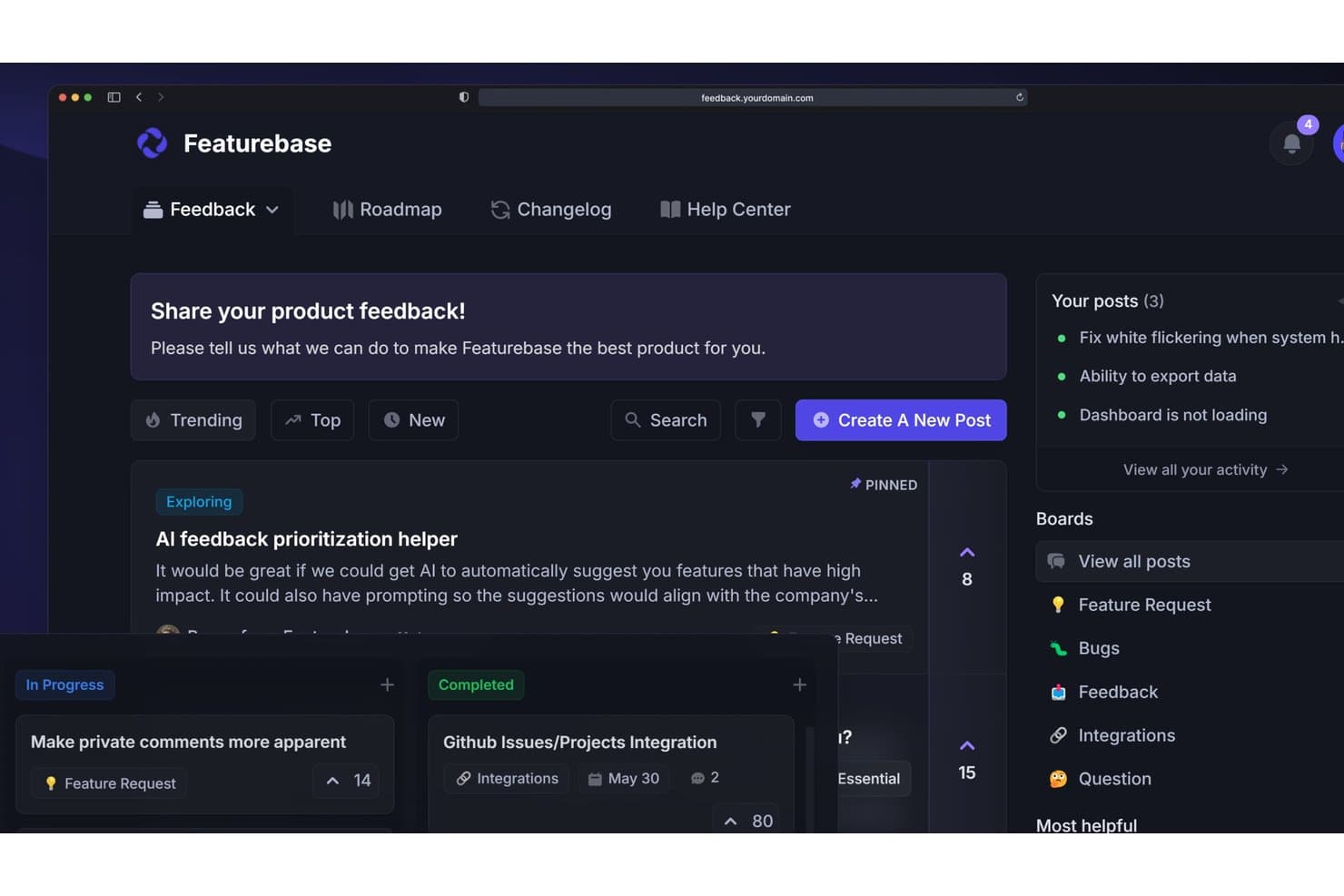
Featurebase lets users collect, prioritize, and track product feedback in one place. Featurebase is product development software that combines customer feedback collection, request prioritization, shareable roadmaps, release changelogs, surveys, and support workflows in one platform.
Who Is Featurebase Best For?
Featurebase suits solo product managers and early-stage founders who need to turn customer feedback into prioritized, shareable roadmaps.
Why I Picked Featurebase
I rate Featurebase Best for free feedback-to-roadmap workflows because its portal and in-app widget turn customer input into organized Requests. I use the value/effort matrix to rank opportunities, then publish status-based or date-based roadmaps for stakeholders. It fits feedback-led planning better than sprint execution.
Featurebase Key Features
- NPS and CSAT surveys: Create in-app surveys to collect customer ratings.
- Public changelog: Publish product updates with segmented release notifications.
- Request comments: Add threaded public or private comments with .
- CSV data management: Import feedback with field mapping and export Request data.
Featurebase Integrations
Featurebase offers native integrations with Linear, Jira, GitHub, ClickUp, Slack, Discord, Intercom, Zendesk, HubSpot, and Segment. It also supports API, MCP, webhooks, and Zapier for custom connectivity.
What's Free?
Featurebase offers a free plan, rather than only a time-limited trial. The available plan details don’t specify user, integration, or usage limits, so check its current pricing page before choosing it for your team.
Pros and Cons
Pros:
- Public roadmaps close the feedback loop
- Value/effort matrix supports clearer prioritization
- Feedback, roadmaps, and changelog stay linked
Cons:
- Free collaboration doesn’t support cross-functional teams
- No native sprint or dependency planning
Learn more about Featurebase:
Annen gratis programvare for produktutvikling
Her er noen flere alternativer for programvare for produktutvikling som også tilbyr gratis abonnementer eller prøveperioder. Selv om disse verktøyene ikke kom med på kortlisten min, er de fortsatt verdt å ta en titt på:
- 11MiroBest for visual whiteboarding across teams
- 12Zoho ProjectsGood for Zoho ecosystem project tracking
- 13TrelloBest for Kanban boards on a free plan
- 14CannyBest for closing the customer feedback loop
- 15PlaneBest for open-source, self-hosted roadmap tracking
How I Evaluate Free Product Development Software
First, I define what counts as free. A free product development tool needs a genuine free-forever plan, not just a trial; I consider its user and feature limits. From there, I split my evaluation into three parts: core functionality, which carries the most weight, like building roadmaps and tracking development work; standout features, like public roadmap sharing; and what a tool offers beyond its feature set, like how its free plan scales as a team grows.
Core Functionality (Table Stakes For This List)
In addition to my free plan requirements, I use a scoring system to select tools for my list. I score each one on a scale from 0 (does not offer the functionality) to 5 (excels in this area) for each core functionality listed below, based on what's available on the free plan. I then convert the total into a percentage to help assess each tool's overall fit, with extra weight on any functionalities I've deemed essential.
- Roadmapping & Planning (Essential): I look for editable release plans with clear timelines and views that help teams connect strategic priorities to upcoming work.
- Task & Issue Tracking (Essential): I assess whether teams can assign, organize, and track backlog items, such as a bug fix or launch task, through completion.
- Prioritization Tools: I check for practical ways to rank ideas, such as voting or impact-and-effort scores, before teams commit them to a release.
- Feedback Collection: I look for ways to capture and organize customer requests, then connect recurring themes to planned features or backlog items.
- Collaboration & Comments: I assess whether teammates can discuss roadmap items and tasks in context, with shared visibility for engineering, design, and stakeholders.
- Sprint & Workflow Boards: I look for visual boards that show work by status and support a team's sprint, kanban, or delivery workflow.
Once I have a list of tools that meet the criteria, I consider what sets each platform apart.
Differentiating Factors (What Sets Vendors Apart)
Here's how I compare and contrast different vendors:
Standout Features
I look for a native feedback widget that lets teams collect user input directly inside their product, then link those requests to backlog items without jumping between tools. Public roadmap sharing is another differentiator: I check whether a free plan lets you publish a live, customer-facing view of planned work so stakeholders can track progress without needing a login. I also evaluate cross-tool import support, since most teams switching from spreadsheets or another tracker need a clean CSV migration path on day one.
Beyond Features
I check whether a free plan's user and project caps can actually grow with a small team. Some tools gate functionality behind storage or usage limits that force an upgrade mid-sprint. Data portability matters just as much: I look for native CSV or API export so you can move roadmaps and backlogs to another tool without losing context. I also evaluate how approachable the workspace is for non-PM teammates like engineers and designers, since simple permissions keep everyone aligned without extra seat costs.
Slik velger du gratis programvare for produktutvikling
Komplekse funksjonslister og prismodeller kan gjøre det vanskelig å finne ut hva du egentlig får med gratis programvare for produktutvikling. For å hjelpe deg med å holde fokus mens du går gjennom prosessen med å velge programvare, er det noen faktorer du bør ha i bakhodet:
| Faktor | Hva du bør vurdere |
|---|---|
| FaktorOmfanget av gratistilbudet | Hva du bør vurdereSe på hva som er inkludert i gratisabonnementet. Sørg for at det dekker teamets grunnleggende behov uten skjulte kostnader. |
| FaktorSkalerbarhet | Hva du bør vurdereVurder om programvaren kan vokse i takt med virksomheten din. Sjekk om den støtter flere brukere eller prosjekter etter hvert som behovene dine øker. |
| FaktorIntegrasjoner | Hva du bør vurdereSørg for at den kan integreres med verktøy teamet ditt allerede bruker, som Slack eller Google Workspace, for å unngå å forstyrre arbeidsflyten. |
| FaktorBrukervennlighet | Hva du bør vurdereVurder hvor intuitivt grensesnittet er. Teamet ditt bør kunne begynne å bruke det med minimal opplæring. |
| FaktorSikkerhet | Hva du bør vurdereSjekk om programvaren overholder sikkerhetsstandarder som er relevante for bransjen din, særlig hvis du håndterer sensitive data. |
| FaktorKundestøtte | Hva du bør vurdereSe etter tilgjengelige støttealternativer i gratisversjonen, som chat- eller e-poststøtte, slik at teamet ditt kan få hjelp når problemer oppstår. |
| FaktorTilpasning | Hva du bør vurdereFinn ut om du kan tilpasse programvaren til de spesifikke arbeidsflytene dine, også i gratisversjonen, for å maksimere produktiviteten. |
| FaktorAlternativer for tilbakemeldinger | Hva du bør vurdereVurder hvordan programvaren lar deg samle inn og handle på tilbakemeldinger fra brukere for å forbedre prosessen for produktutvikling. |
Hva er gratis programvare for produktutvikling?
Programvare for produktutvikling er utviklet for å hjelpe team med å planlegge, administrere og gjennomføre produktideer. Disse verktøyene tilbyr ofte gratis abonnementer eller prøveperioder, slik at brukerne kan utforske grunnleggende funksjoner uten økonomiske forpliktelser. Vanligvis bruker produktledere, designere og utviklere disse verktøyene for å forbedre samarbeid og effektivitet.
Funksjoner som veikartplanlegging, oppgavehåndtering og innsamling av tilbakemeldinger hjelper team med å holde orden, prioritere oppgaver og innhente viktig innsikt, noe som støtter en mer effektiv utviklingsprosess.
Funksjoner
La oss se nærmere på funksjonene som vanligvis finnes i programvare for produktutvikling, og hvilke som vanligvis er inkludert i gratis- og betalingsabonnementer.
Funksjoner i vanligvis gratis programvare for produktutvikling
- Oppgavehåndtering: Hjelper med å organisere og tildele oppgaver til teammedlemmer, slik at alle holder seg på sporet.
- Veikartplanlegging: Gir en visuell tidslinje for produktmål og bidrar til strategisk planlegging.
- Innsamling av tilbakemeldinger: Gjør det mulig for team å samle inn innsikt fra brukere, noe som kan bidra til produktforbedringer.
- Samarbeidsverktøy: Forenkler kommunikasjon og samarbeid, slik at alle er oppdatert.
- Grunnleggende integrasjoner: Kobler til andre verktøy som Slack eller Google Workspace og forbedrer arbeidsflyten.
- Tilpassbare dashbord: Lar brukerne tilpasse visningen for rask tilgang til viktig informasjon.
- Administrasjon av brukerroller: Gjør det mulig å angi tillatelser for å kontrollere tilgangen basert på teamroller.
Funksjoner i vanligvis betalt programvare for produktutvikling
- Avansert analyse: Tilbyr dyptgående dataanalyse for å hjelpe team med å ta velinformerte beslutninger.
- Automatiserte varsler: Holder team oppdatert med automatiske varsler om endringer i prosjekter.
- Samarbeid i sanntid: Gjør det mulig for flere brukere å arbeide med de samme dokumentene samtidig.
- Forbedrede sikkerhetsfunksjoner: Gir ekstra sikkerhetstiltak for å beskytte sensitive data.
- Prioritert kundestøtte: Tilbyr raskere responstid og dedikert støtte for hastesaker.
- Ubegrenset lagring: Håndterer store datamengder, noe som er viktig for team i vekst.
- Avanserte tilpasningsalternativer: Gir større fleksibilitet til å tilpasse programvaren til bestemte arbeidsflyter.
Fordeler
Implementering av gratis programvare for produktutvikling gir flere fordeler for teamet og virksomheten din. Her er noen av fordelene du kan se frem til:
- Kostnadsbesparelser: Få tilgang til viktige verktøy uten økonomiske forpliktelser, slik at budsjettet kan brukes på andre behov.
- Bedre organisering: Bruk oppgavehåndtering for å holde prosjekter og ansvarsområder tydelige og på sporet.
- Bedre samarbeid: Innebygde kommunikasjonsverktøy sørger for at teamet holder kontakten og arbeider mot samme mål.
- Verdifull innsikt: Funksjoner for innsamling av tilbakemeldinger hjelper deg med å forstå brukernes behov og ta velinformerte beslutninger.
- Fleksibilitet: Tilpassbare dashbord lar deg tilpasse arbeidsområdet etter arbeidsflyten din.
- Skalerbarhet: Start med grunnleggende funksjoner og utvid etter hvert som teamet vokser, slik at du kan tilpasse deg endrede behov.
- Rask oppstart: Enkle grensesnitt og grunnleggende integrasjoner gjør det lett å komme i gang uten omfattende opplæring.
Kostnader og priser
Jeg forstår at du kom til denne artikkelen på jakt etter de beste alternativene for programvare til produktutvikling som er tilgjengelige gratis. Siden gratisabonnementer imidlertid bare tilbyr begrensede funksjoner, er det en god sjanse for at du må oppgradere abonnementet ditt i fremtiden.
Tabellen nedenfor oppsummerer vanlige abonnementer, gjennomsnittsprisene deres og typiske funksjoner som er inkludert i løsninger for programvare til produktutvikling:
Sammenligningstabell for abonnementer på programvare for produktutvikling
| Plantype | Gjennomsnittspris | Vanlige funksjoner |
|---|---|---|
| PlantypeGratisabonnement | Gjennomsnittspris$0 | Vanlige funksjonerGrunnleggende oppgavehåndtering, planlegging av veikart, innsamling av tilbakemeldinger, samarbeidsverktøy og grunnleggende integrasjoner. |
| PlantypePersonlig abonnement | Gjennomsnittspris$5-$25/bruker/måned | Vanlige funksjonerAlle gratisfunksjoner, i tillegg til styring av brukerroller, tilpassbare dashbord og mer lagringsplass. |
| PlantypeForretningsabonnement | Gjennomsnittspris$30-$75/bruker/måned | Vanlige funksjonerAlle funksjonene i det personlige abonnementet, i tillegg til avansert analyse, automatiserte varsler og forbedrede sikkerhetsfunksjoner. |
| PlantypeBedriftsabonnement | Gjennomsnittspris$80-$150/bruker/måned | Vanlige funksjonerAlle funksjonene i forretningsabonnementet, i tillegg til prioritert kundestøtte, ubegrenset lagringsplass og avanserte tilpasningsmuligheter. |
Vanlige spørsmål om gratis programvare for produktutvikling
Her er noen svar på vanlige spørsmål om gratis programvare for produktutvikling:
Kan jeg stole på gratis programvare for produktutvikling ved langsiktig bruk?
Gratisversjoner kan være gode for oppstartsbedrifter eller små team med grunnleggende behov. Etter hvert som teamet vokser, kan det imidlertid hende at dere trenger avanserte funksjoner som er tilgjengelige i betalte abonnementer. Det er viktig å vurdere om gratisversjonen oppfyller de langsiktige målene deres.
Hvilke begrensninger bør jeg forvente i gratis programvare for produktutvikling?
Gratisabonnementer har ofte begrenset lagringsplass, færre integrasjoner og grunnleggende kundestøtte. Det kan også være begrensninger på antall brukere eller prosjekter. Vurder disse begrensningene opp mot teamets behov for å avgjøre om et gratisabonnement er tilstrekkelig.
Hvor sikker er gratis programvare for produktutvikling?
Sikkerheten kan variere mellom leverandører. Se etter programvare som tilbyr grunnleggende sikkerhetsfunksjoner, for eksempel datakryptering. Hvis du skal håndtere sensitiv informasjon, bør du undersøke om leverandøren følger bransjestandarder og regelverk.
Kan jeg enkelt oppgradere fra et gratis til et betalt abonnement?
De fleste leverandører tilbyr en enkel oppgraderingsprosess. Du kan vanligvis beholde eksisterende data og innstillinger når du går over til et betalt abonnement. Sjekk med leverandøren om eventuell nedetid eller problemer med datamigrering under oppgraderingen.