

De beste gratis plattformene for digital adopsjon hjelper deg med å lære opp brukere, fremme produktadopsjon og forbedre engasjementet – uten å belaste budsjettet. Uten riktig verktøy kan opplæringen bli usammenhengende, ansatte kan få problemer med å ta i bruk viktige funksjoner, og engasjementet synker. Resultatet er underutnyttet programvare og frustrerte team.
Den rette plattformen gir deg veiledning i appen, gjennomganger og analyser for å sikre smidig adopsjon i stor skala. Etter å ha testet og vurdert flere gratisløsninger selv har jeg identifisert de mest effektive plattformene som balanserer kostnad, brukervennlighet og effekt – slik at du kan tilby bedre opplæring og adopsjon uten å bruke for mye penger.
Hvorfor du kan stole på våre programvareanbefalinger
6,700+
Reviews
20
Industry experts
16+
Evaluation factors
14
Years
Teamet vårt har testet og anmeldt programvare siden 2012. Vi er selv produktledere, så vi vet hvor vanskelig og hvor viktig det er å velge riktig programvare.
I denne guiden har vi vurdert verktøyene gjennom praktisk testing og uavhengig research og gitt dem poeng ut fra våre utvelgelseskriterier.
Anmeldelsene våre bygger på vår egen redaksjonelle vurdering. De er ikke et salgsargument.
Ekspertanmeldere:
- Andrew LumbySenior TPM
- Cristiano ValimSenior UI/UX Lead


Sammenligningstabell for gratis plattformer for digital adopsjon
Denne sammenligningstabellen viser startkostnadene for mine beste utvalgte gratis plattformer for digital adopsjon, inkludert tilgjengelige betalte oppgraderingsalternativer.
| Tool | Best For | Trial Info | Price | ||
|---|---|---|---|---|---|
| 1 | Best for onboarding checklists | 14-day free trial | From $174/month (billed annually) | Website | |
| 2 | Best for behavior-led analytics on a free tier | Free plan available | Pricing upon request | Website | |
| 3 | Best for advanced product analytics & cohorts | Free plan available | Pricing upon request | Website | |
| 4 | Best for product feedback | Free plan + 30-day free trial + free demo available | Pricing upon request | Website | |
| 5 | Best for SDK-based in-app onboarding flows | Free plan available | From $30/month | Website | |
| 6 | Best lightweight option for quick tutorials | Free plan available | From $9.99 (lifetime purchase) | Website | |
| 7 | Best for web tour creation with unlimited users | Free plan + 15-day free trial available | From $19/month | Website | |
| 8 | Best open-source library for fully custom tours | Free plan available | From $50/lifetime | Website | |
| 9 | Best for self-hosted web app onboarding flows | Free plan available | From $59/month | Website | |
| 10 | Best for click-through SOP guides on free | Free plan available | From $15/user/month (billed annually) | Website |


Anmeldelser av de beste gratis plattformene for digital adopsjon
Nedenfor finner du mine detaljerte sammendrag av de beste gratis plattformene for digital adopsjon som kom med på listen min. Anmeldelsene gir et detaljert innblikk i de viktigste funksjonene, fordelene og ulempene, integrasjonene og de ideelle bruksområdene for hvert verktøy, slik at du kan finne det som passer best for deg. Noen av disse verktøyene tilbyr en helt gratis versjon, mens andre tilbyr en gratis prøveperiode. Jeg har lagt til en merknad om hva som er gratis i hver anmeldelse.
 Best for onboarding checklists
- 14-day free trial
- From $174/month (billed annually)
Visit WebsiteCustomer Rating:4.7/5
UserGuiding simplifies walkthroughs with prompts, cues, and progress steps. UserGuiding is a no-code digital adoption platform for SaaS products, with tools to create in-app guides, product tours, tooltips, onboarding flows, and surveys.
Who Is UserGuiding Best For?
SaaS product teams that need onboarding checklists to guide new users through setup tasks are a good fit for UserGuiding.
Why I Picked UserGuiding
I picked UserGuiding because its onboarding checklists guide new users through setup tasks, making it a fit for teams evaluating digital adoption platforms. In-app guides and tooltips can explain each step in context, while product tours introduce the broader workflow.
UserGuiding Key Features
- In-app surveys: Create surveys to collect user feedback inside your product.
- Resource center: Add a menu where users can access help content and product resources.
- User segmentation: Target in-app experiences to groups based on user attributes.
- Analytics dashboard: Review engagement data for your in-app content.
UserGuiding Integrations
UserGuiding integrates with Segment, Google Analytics, Mixpanel, and Intercom. Webhooks support connections with third-party apps, and UserGuiding provides a User API.
What's Free?
UserGuiding offers a 14-day free trial, not a free-forever plan. You can try its features without entering a credit card.
Pros and Cons
Pros:
- Tooltips explain workflows in context
- No-code guides reduce engineering requests
- Checklists guide users through setup tasks
Cons:
- Mobile app guidance has limited support
- Complex guides can require code
Learn more about UserGuiding: Best for behavior-led analytics on a free tier
- Free plan available
- Pricing upon request
Visit WebsiteCustomer Rating:4.5/5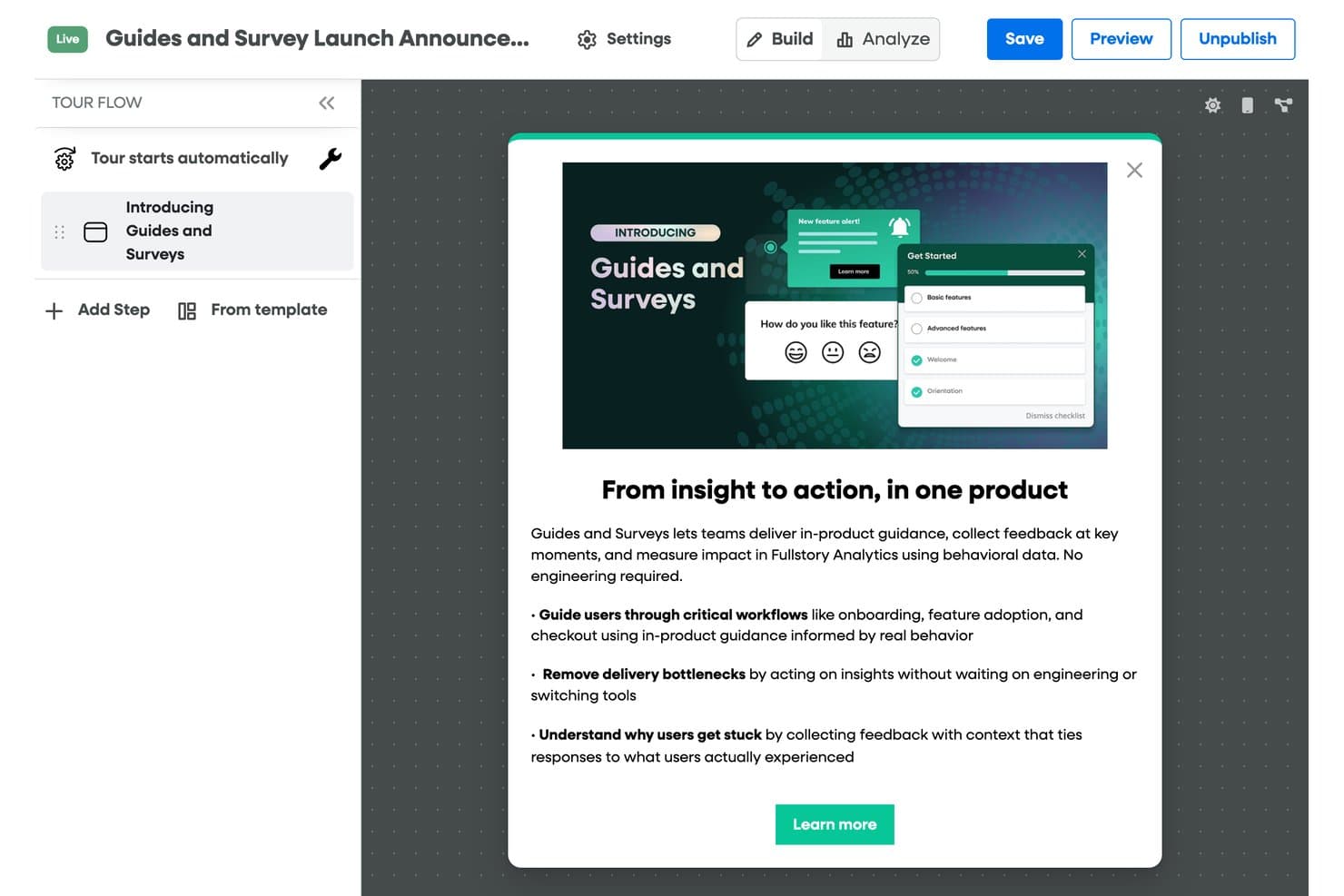
Fullstory lets users build and publish in-product guided tours easily. Fullstory is a product analytics platform with a paid digital adoption add-on for no-code tours, tooltips, checklists, banners, and surveys; its free plan includes session replay and analytics, but no guidance tools.
Who Is Fullstory Best For?
Product teams that need session replay and behavioral analytics to investigate user journeys, understand friction, and troubleshoot issues.
Why I Picked Fullstory
I picked Fullstory as “Best for behavior-led analytics on a free tier” because its free plan includes session replay and basic analytics. With up to 30,000 sessions monthly and 12-month retention, I can trace where users stall or encounter friction. Tours, tooltips, and other adoption guidance require a paid add-on, so the free plan is for diagnosing behavior, not guiding users.
Fullstory Key Features
- Automatic data masking: Personal data is masked and excluded by default.
- Consent-based recording: Configure recording to respect user consent choices.
- Server-side event capture: FullstoryFree includes up to 5,000 server-side events monthly.
- User deletion: Remove user data from Fullstory when needed.
Fullstory Integrations
Fullstory connects with Segment, Google Tag Manager, Adobe Analytics, Slack, Salesforce, Medallia, and Zapier. APIs and webhooks support custom integrations, but Guides and Surveys isn’t included in the free plan.
What’s Free?
Fullstory offers a free plan with session replay and analytics for up to 30,000 sessions monthly. It includes 12-month retention and 5,000 server-side events per month, but Guides and Surveys require a paid add-on.
Pros and Cons
Pros:
- Reviewers praise behavioral insights for UX research
- Replay helps reproduce user-reported bugs
- Session replays reveal onboarding friction
Cons:
- Tours and tips require a paid add-on
- Free tier has no in-app guidance
Learn more about Fullstory: Best for advanced product analytics & cohorts
- Free plan available
- Pricing upon request
Visit WebsiteCustomer Rating:4.5/5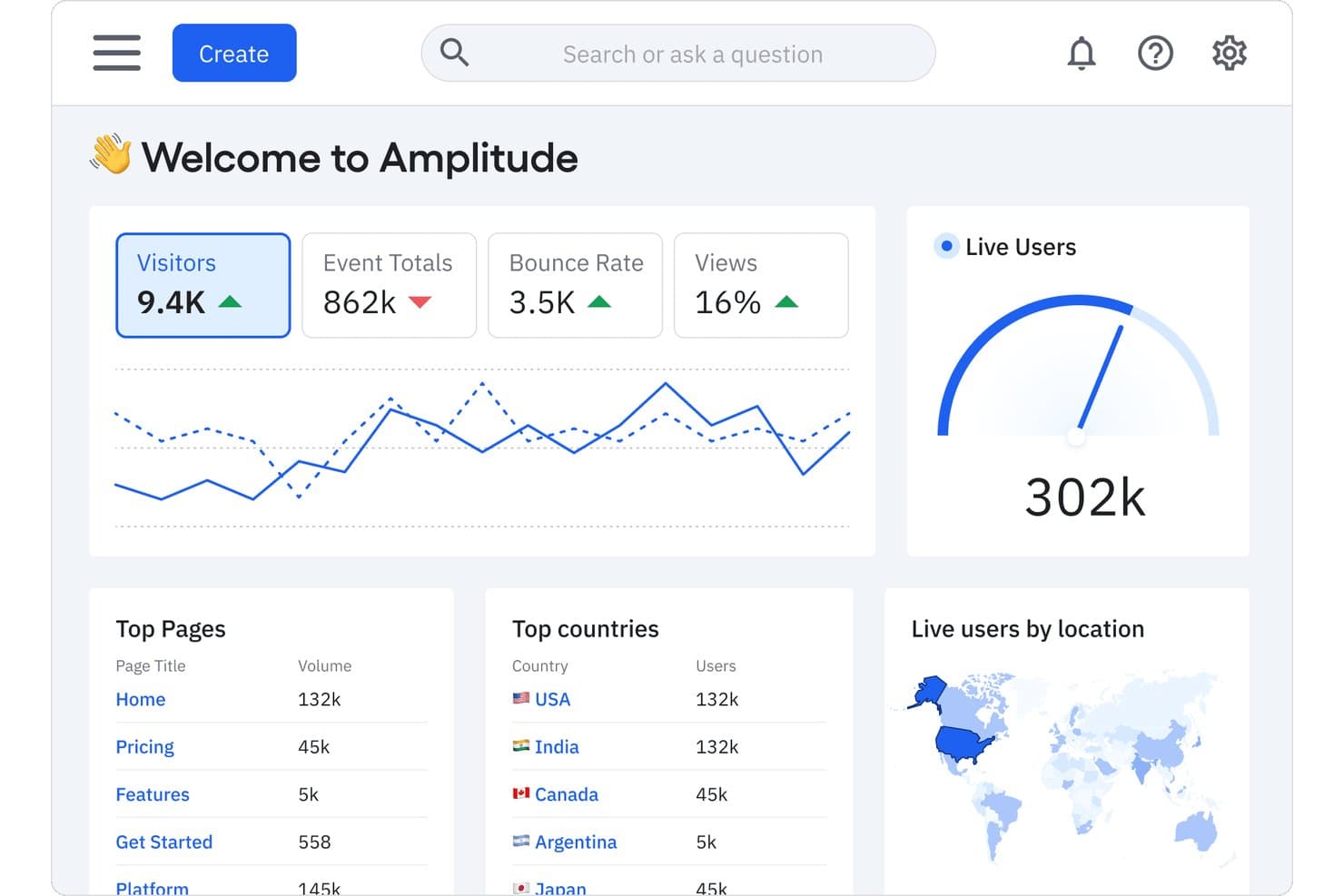
Amplitude tracks visitors, live users, and top pages in one dashboard. For teams comparing free digital adoption platforms, Amplitude is a product analytics platform with event tracking, behavioral analysis, funnels, and cohort tools.
Who Is Amplitude Best For?
Product managers at digital-product teams who need to analyze user behavior, build cohorts, and identify where customers drop off.
Why I Picked Amplitude
I picked Amplitude for advanced product analytics & cohorts because adoption decisions need evidence of what users do after launch. Its event tracking and behavioral analysis let me trace onboarding actions, while funnels reveal where users abandon key flows. I use cohorts to compare activation patterns across user groups and focus follow-up improvements.
Amplitude Key Features
- Session replay: Review recordings of individual user sessions.
- Feature flags: Control feature availability for selected users.
- Experimentation: Run product experiments and compare variants.
- Data integrations: Connect Amplitude with other data tools.
Amplitude Integrations
Amplitude’s integration directory lists 159 results, including Slack, Segment, and Snowflake; Atlassian Smart Links let you preview Amplitude charts in Jira and Confluence. Amplitude also supports HTTP API connections for custom data flows.
What's Free?
Amplitude’s free plan is free forever, not a time-limited trial, and includes unlimited seats and 2 million events per month. Behavioral Cohorts and custom data retention require a paid plan, while the free tier limits Guides & Surveys to one and active experiments to one.
Pros and Cons
Pros:
- Session replays add journey context
- Cohorts compare activation across user groups
- Funnels pinpoint onboarding drop-offs
Cons:
- Guidance tools trail dedicated adoption platforms
- Requires event instrumentation before insights emerge
Learn more about Amplitude: Best for product feedback
- Free plan + 30-day free trial + free demo available
- Pricing upon request
Visit WebsiteCustomer Rating:4.4/5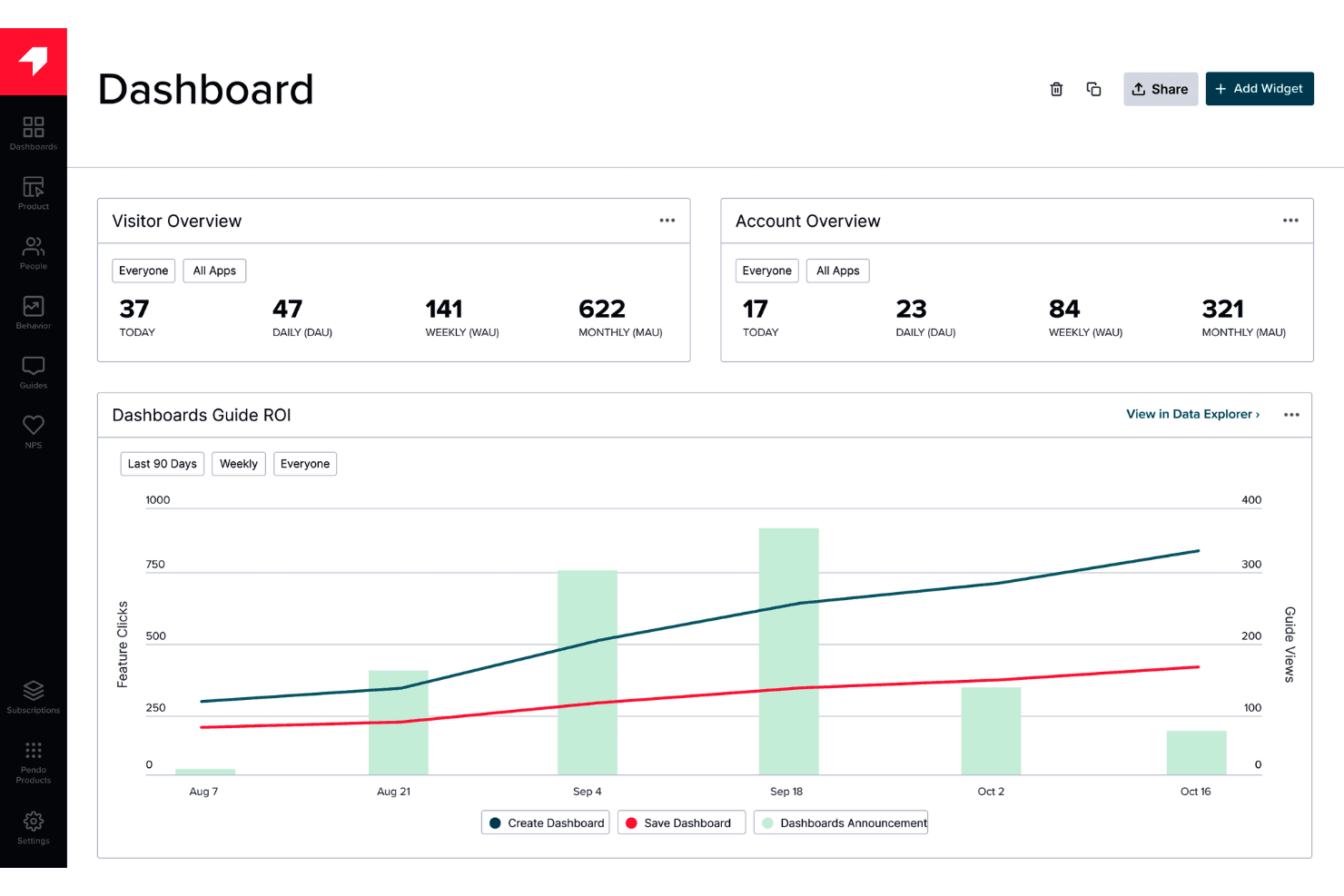
Pendo provides in-app guidance and feedback without requiring engineering work. Pendo is a digital adoption platform that combines product analytics, in-app guides, onboarding tools, and feedback collection for web and mobile applications.
Who Is Pendo Best For?
Product managers who want to gather in-app user feedback to inform decisions about their digital products.
Why I Picked Pendo
I picked Pendo as Best for product feedback because it pairs in-app surveys with product analytics. I use those tools to ask users about a confusing workflow, then compare their responses with feature usage data. That context helps product managers decide which friction points deserve attention.
Pendo Key Features
- In-app guides: Create walkthroughs, tooltips, and banners inside your product.
- Session replay: Review recorded user sessions to see how people interact with your product.
- Product roadmaps: Create visual roadmaps to communicate product direction and plans.
- Integrations: Connect Pendo with tools such as Salesforce, HubSpot, and Slack.
Pendo Integrations
Pendo lists 51 integrations, including HubSpot, Qualtrics, Salesforce, Slack, and Jira. Custom integrations are available through Pendo’s API and webhooks.
What’s Free?
Pendo offers a free-forever plan for up to 500 monthly active users, with unlimited internal users and web and mobile app keys. Third-party integrations aren’t included, and exceeding the user limit prevents you from creating new guides, NPS surveys, or segments.
Pros and Cons
Pros:
- Free plan supports product onboarding
- Supports guides across web and mobile apps
- Connects in-app feedback with product analytics
Cons:
- Feedback focus may be narrower than dedicated adoption tools
- Monthly user caps can block new guides
Learn more about Pendo: Best for SDK-based in-app onboarding flows
- Free plan available
- From $30/month
Visit WebsiteCustomer Rating:4.4/5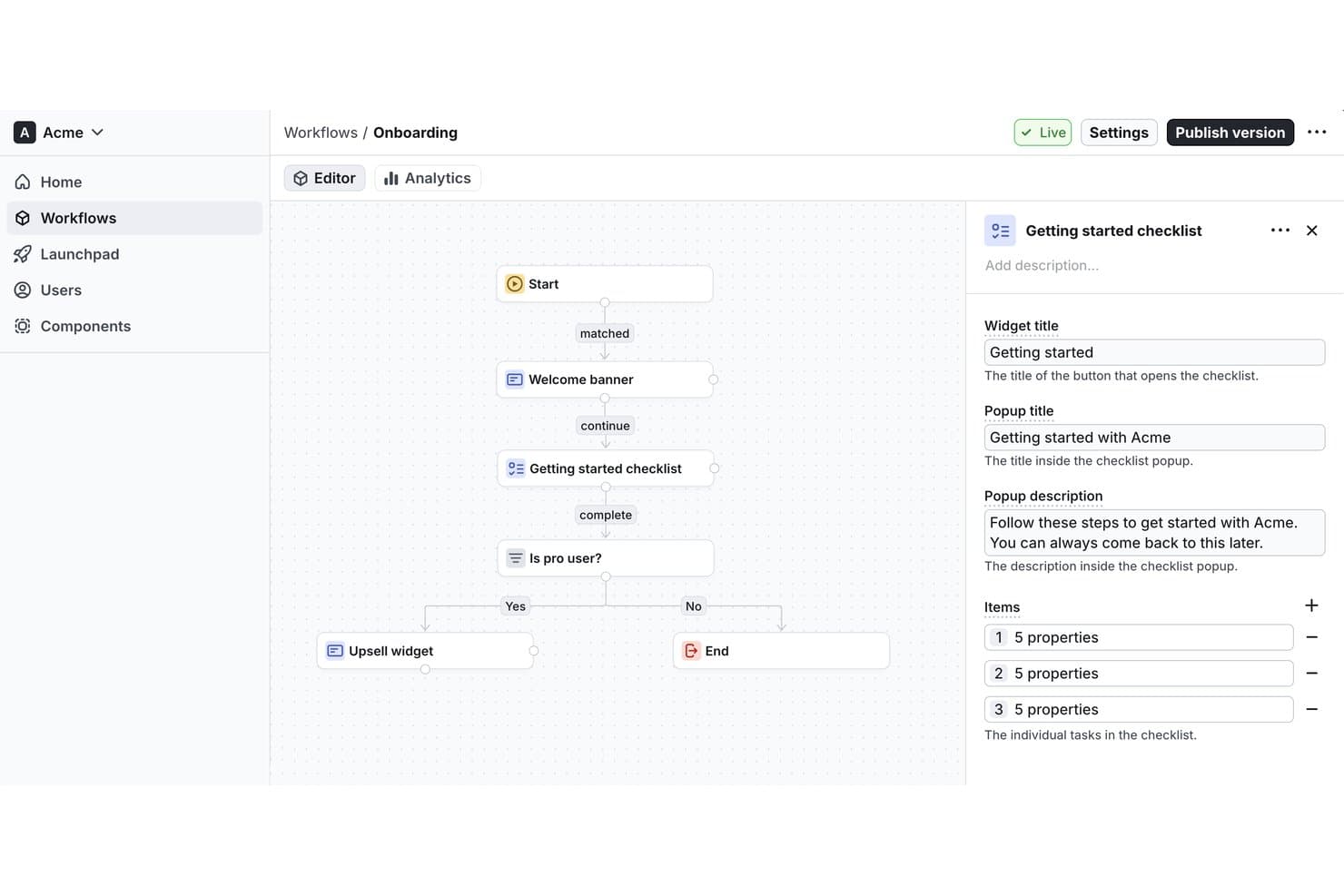
Flows lets users build onboarding workflows with checklists visually. Flows is a digital adoption platform for creating and embedding in-app onboarding experiences and guided user flows within software products.
Who Is Flows Best For?
Flows is best for SDK-based in-app onboarding flows, especially for product teams embedding guided experiences directly into their software.
Why I Picked Flows
I picked Flows because its SDK-based in-app onboarding flows let product teams embed guided experiences directly in their software. I’d use those flows to walk new users through product-specific setup steps inside the app, where the guidance matches the task they’re completing.
Flows Key Features
- User targeting: Segment users by properties or behavior to show relevant experiences.
- Workflow analytics: Track how users interact with workflows and where they drop off.
- Localization: Display experience versions that match each user’s locale.
- No-code editor: Let nontechnical teammates create and manage in-app experiences.
Flows Integrations
Native integrations are not clearly documented. Flows provides React and JavaScript SDKs and a component API for embedding in-app experiences in web applications.
What's Free?
Flows has a free-forever Hobby plan with no credit card required, limited to 100 monthly tracked users who see an experience. It’s intended for personal development, prototyping, and testing; custom components are preview-only, while unlimited workflows are included.
Pros and Cons
Pros:
- Localization supports users across markets
- Behavior targeting keeps guidance context-aware
- SDK-based flows fit product-specific onboarding
Cons:
- Custom components remain preview-only on Hobby
- Free plan limits monthly tracked users
Learn more about Flows: Best lightweight option for quick tutorials
- Free plan available
- From $9.99 (lifetime purchase)
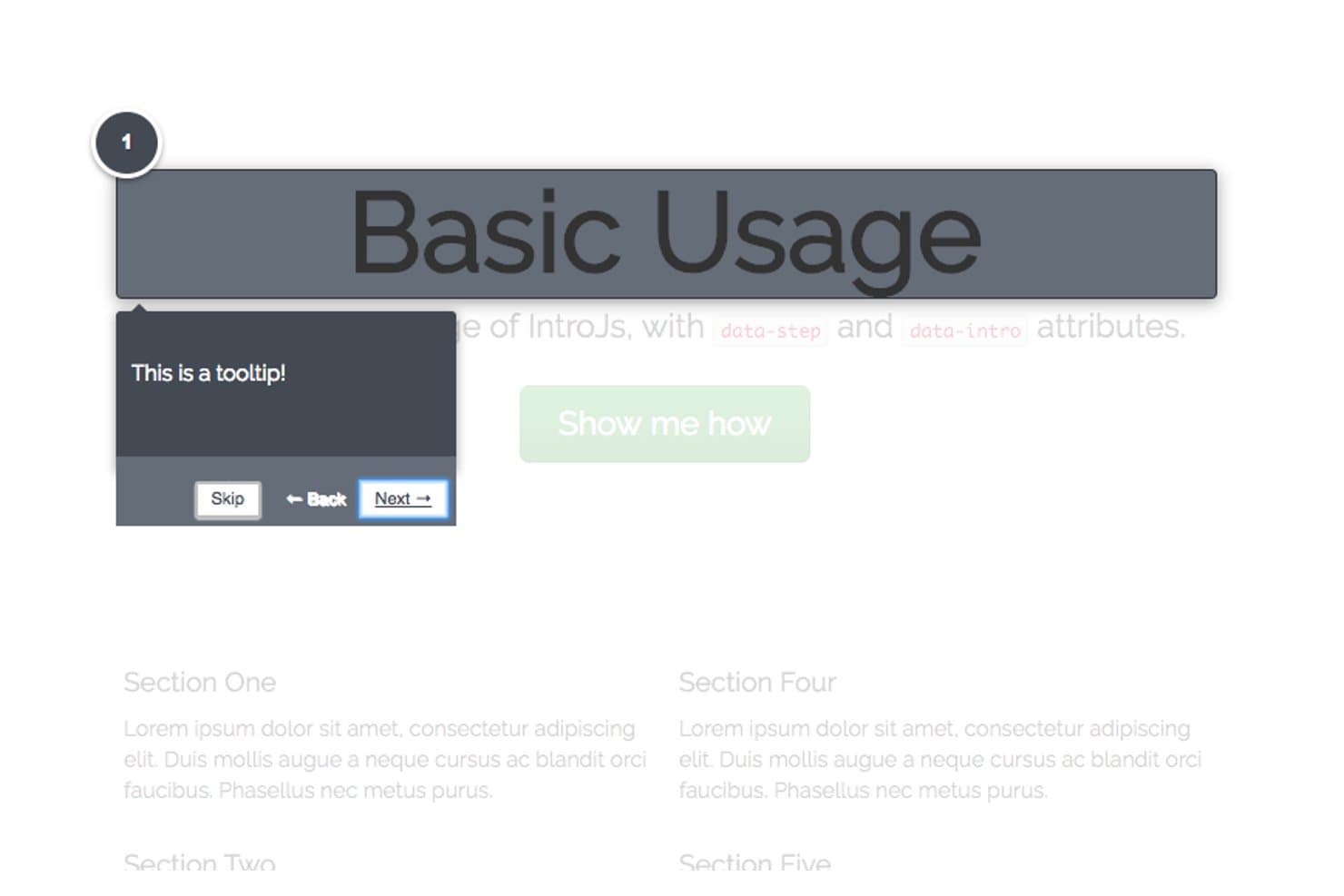
Intro.js guides users step-by-step with dark-themed tooltips. Intro.js is a JavaScript library for digital adoption that adds interactive product tours, step-by-step walkthroughs, and contextual tooltips to web applications.
Who Is Intro.js Best For?
Product teams with developer support who need to guide users through key workflows in a web application will find Intro.js a practical fit.
Why I Picked Intro.js
I picked Intro.js as the Best lightweight option for quick tutorials because its step-by-step tours guide users inside a web app. I like that tour steps can target specific interface elements and show contextual tooltips, such as explaining where to set a report filter while users work through the product.
Intro.js Key Features
- Progress indicator: Show users how far they’ve advanced through an introduction.
- Keyboard navigation: Let users move between steps with keyboard controls.
- “Don’t show again” option: Add a checkbox that saves a user’s preference in a cookie.
- Lifecycle callbacks: Run code when an introduction completes, exits, or changes steps.
Intro.js Integrations
Native integrations are not clearly documented. Intro.js provides a JavaScript API for adding custom tour behavior to web apps.
What's Free?
Intro.js is free under the AGPLv3 for open-source, personal, and noncommercial projects, with no time limit. Commercial applications, themes, or plugins require a paid commercial license.
Pros and Cons
Pros:
- Callbacks support custom tour behavior
- Tooltips target specific workflow controls
- Lightweight tours suit focused tutorials
Cons:
- Native integrations aren't clearly documented
- Requires JavaScript implementation and maintenance
Learn more about Intro.js: Best for web tour creation with unlimited users
- Free plan + 15-day free trial available
- From $19/month
Visit WebsiteCustomer Rating:4.6/5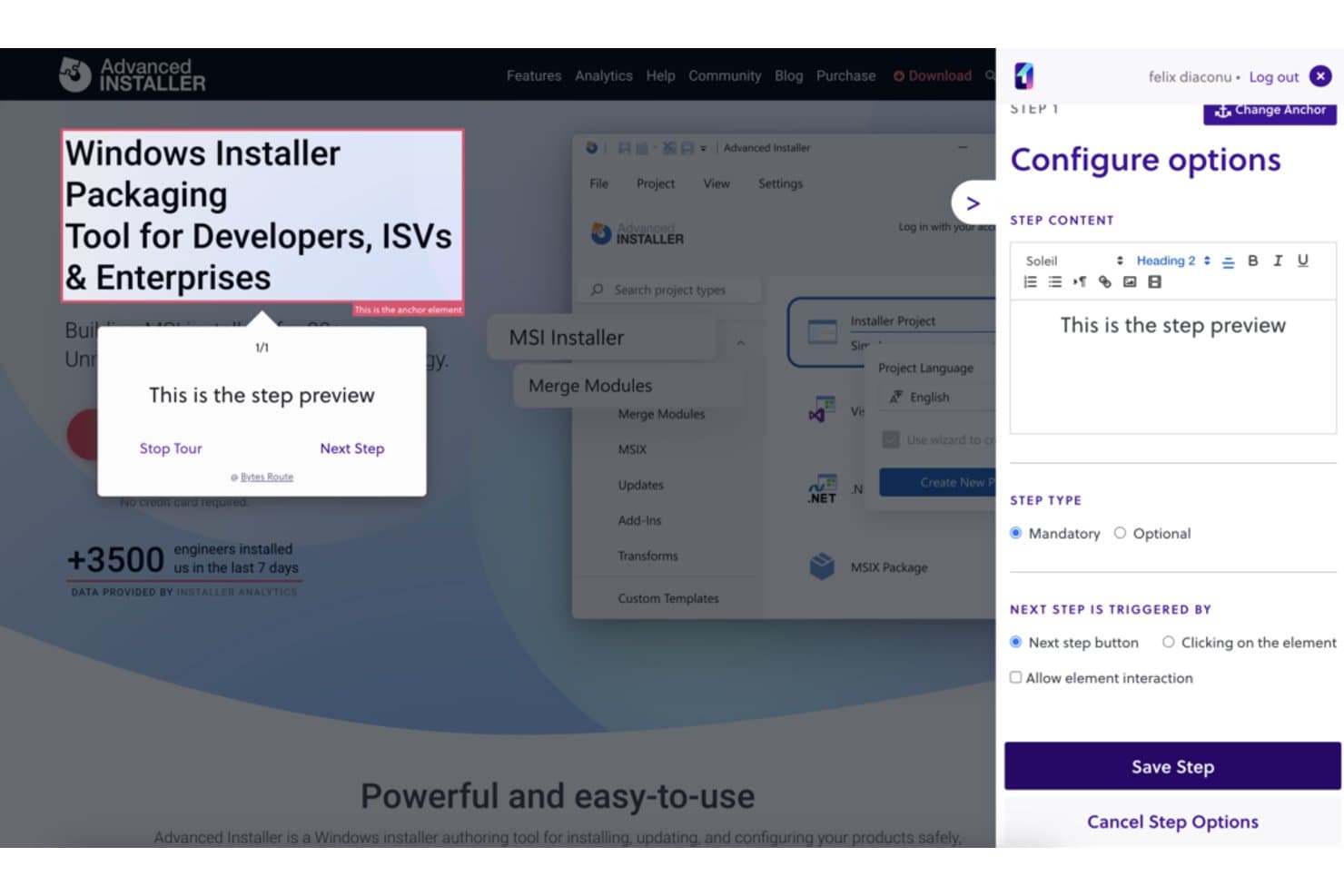
Bytes Route lets users configure guided tour steps with custom content. Bytes Route is a digital adoption platform for creating guided web tours, with tools to design and deliver walkthroughs on websites.
Who Is Bytes Route Best For?
Bytes Route is a good fit for product teams creating website walkthroughs, especially those needing web tour creation with unlimited users.
Why I Picked Bytes Route
I picked Bytes Route because it fits “Best for web tour creation with unlimited users.” Product teams can create guided web tours and deliver walkthroughs on websites, such as showing visitors the steps in a new feature flow. I like its focused fit for website adoption work.
Bytes Route Key Features
- Chrome extension: Create and edit tours through the Bytes Route Chrome extension.
- Tour analytics: Review analytics for published tours.
- Code-free setup: Connect the platform to your web domain without writing code.
- Cookie-free operation: Run Bytes Route without cookies.
Bytes Route Integrations
Native integrations are not clearly documented.
What's Free?
Bytes Route offers a $0 Free plan and a 15-day trial of its paid plans, with no credit card required. The Free plan is limited to one team member and three active tours, with basic analytics and a basic text editor.
Pros and Cons
Pros:
- Walkthroughs support in-app user onboarding
- Built-in statistics show tour performance
- Tours are quick to set up
Cons:
- Occasional lag can skip tour steps
- Guide design options are limited
Learn more about Bytes Route: Best open-source library for fully custom tours
- Free plan available
- From $50/lifetime
Visit WebsiteCustomer Rating:2.6/5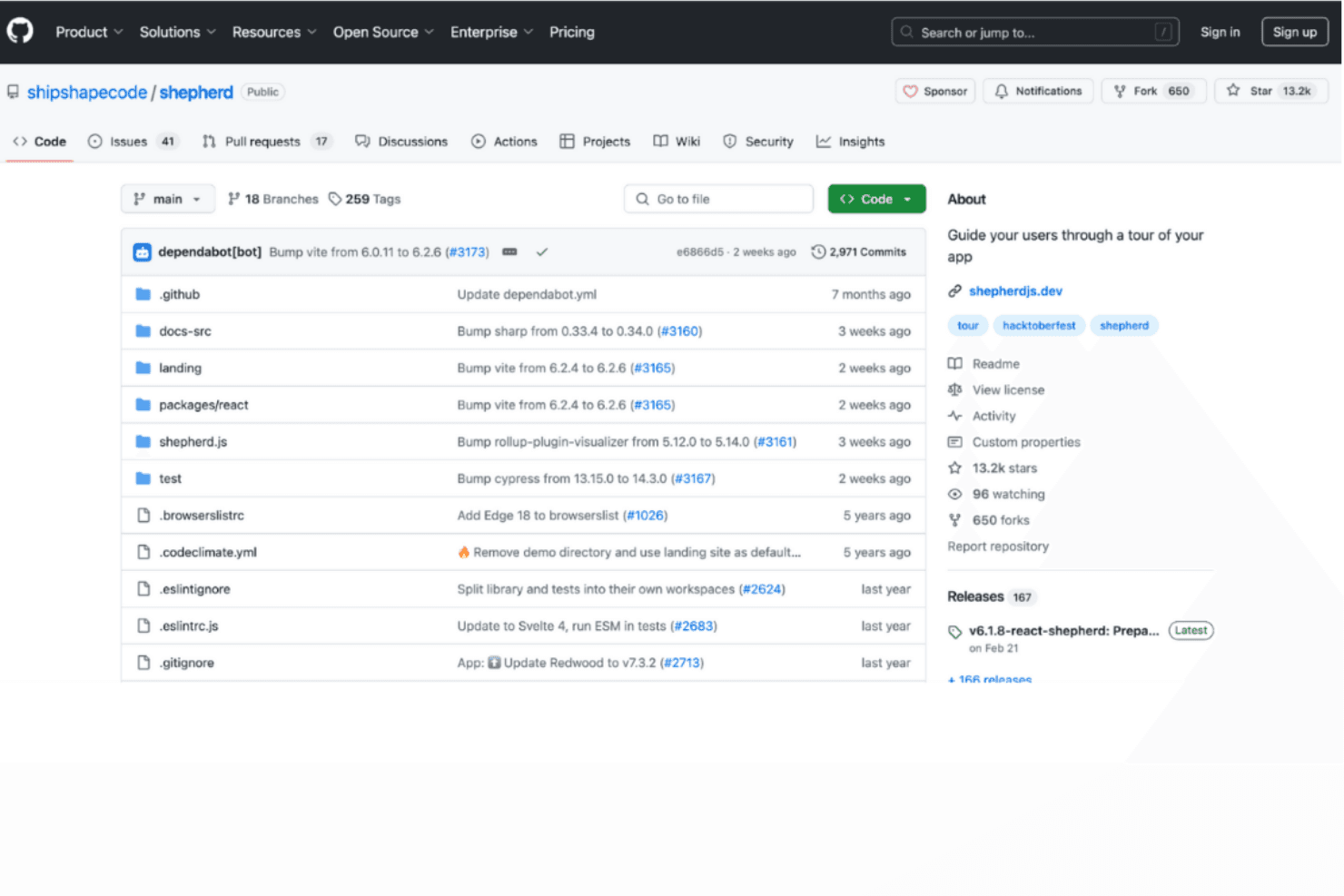
Shepherd.js delivers fully customizable tours for tailored guidance. Shepherd.js is a developer-focused digital adoption tool for creating in-app product tours with configurable steps, tooltips, and overlays in web applications.
Who Is Shepherd.js Best For?
Product and engineering teams building bespoke web onboarding will find Shepherd.js a fit as the Best open-source library for fully custom tours.
Why I Picked Shepherd.js
I picked Shepherd.js as the Best open-source library for fully custom tours because its step API lets me anchor guidance to specific interface elements and tailor tooltip content and buttons. I can add a modal overlay and guide users through a multi-screen setup, such as configuring permissions.
Shepherd.js Key Features
- Keyboard navigation: Configure keyboard controls for moving through tour steps.
- Lifecycle events: Respond to tour and step events with application logic.
- Scroll-to-step behavior: Scroll target elements into view when a step begins.
- CSS theming: Customize tour styling with CSS.
Shepherd.js Integrations
Shepherd.js provides framework wrappers for React, Ember, Angular, and Vue.js, with support for ES modules and plain JavaScript; it doesn’t document native integrations with third-party platforms.
What’s Free?
Shepherd.js is free for open-source, personal, and non-commercial projects under AGPL-3.0, while evaluation and testing are free for up to 30 days. Commercial or closed-source use requires a paid license; under AGPL-3.0, distributing or providing software over a network requires making its complete source code available under a compatible license.
Pros and Cons
Pros:
- Keyboard controls let users navigate tour steps
- Lifecycle events let teams trigger app logic
- Tour steps can target specific interface elements
Cons:
- No documented analytics for measuring tour completion
- Teams must build bespoke tours in code
Learn more about Shepherd.js: Best for self-hosted web app onboarding flows
- Free plan available
- From $59/month
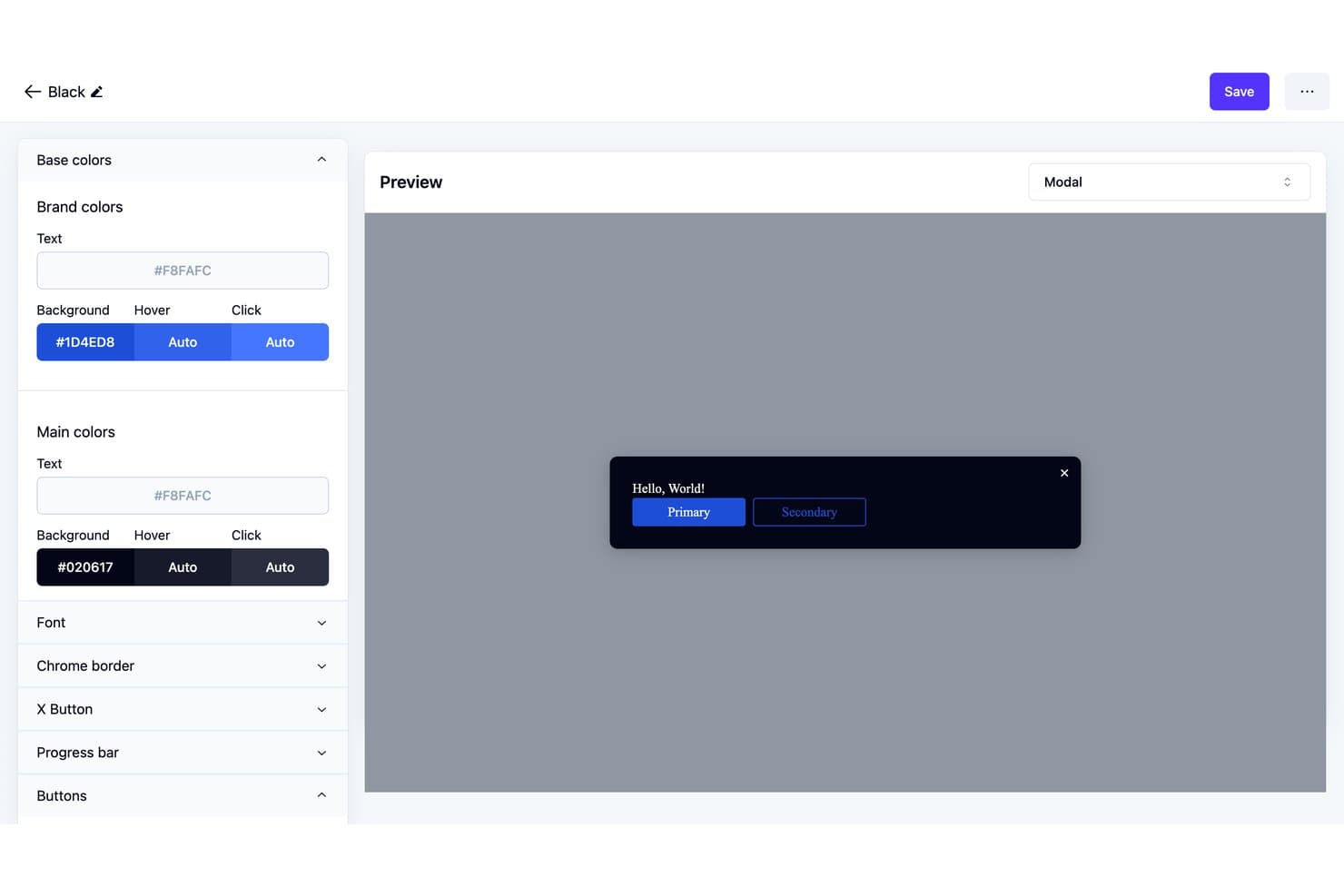
Usertour lets users customize modal theme colors and preview changes live. Usertour is an open-source digital adoption platform with a visual builder for in-app tours, checklists, surveys, banners, and resource centers, plus user targeting and flow analytics.
Who Is Usertour Best For?
Usertour’s fit: Best for self-hosted web app onboarding flows, especially for product teams that need to manage onboarding within their own web applications.
Why I Picked Usertour
I picked Usertour for Best Free Digital Adoption Platform Reviewed because it’s Best for self-hosted web app onboarding flows. Its open-source visual builder lets me create in-app tours and checklists, then target them to specific users. Flow analytics help me spot where people stop during onboarding.
Usertour Key Features
- In-app surveys: Add surveys to your web app to collect user feedback.
- Banners: Display announcements and updates inside your product.
- Resource centers: Give users an in-app place to access helpful resources.
- Open-source codebase: Review and adapt the platform’s source code.
Usertour Integrations
Usertour offers five native analytics integrations: Amplitude, Heap, Mixpanel, PostHog, and Segment. It also supports Zapier and provides a REST API for custom integrations.
What's Free?
Usertour offers a $0/month Hobby plan rather than a time-limited trial, with unlimited end users and up to 5,000 sessions per month. It includes one team member, one environment, and one-year data retention.
Pros and Cons
Pros:
- Community users praised checklist-driven onboarding
- Visual builder covers tours, checklists, and surveys
- Open-source code enables self-hosted control
Cons:
- Self-hosting puts deployment upkeep on your team
- Flow activation and selector bugs needed fixes
Learn more about Usertour: 10Best for click-through SOP guides on free
Tango
- Free plan available
- From $15/user/month (billed annually)
Visit WebsiteCustomer Rating:4.8/5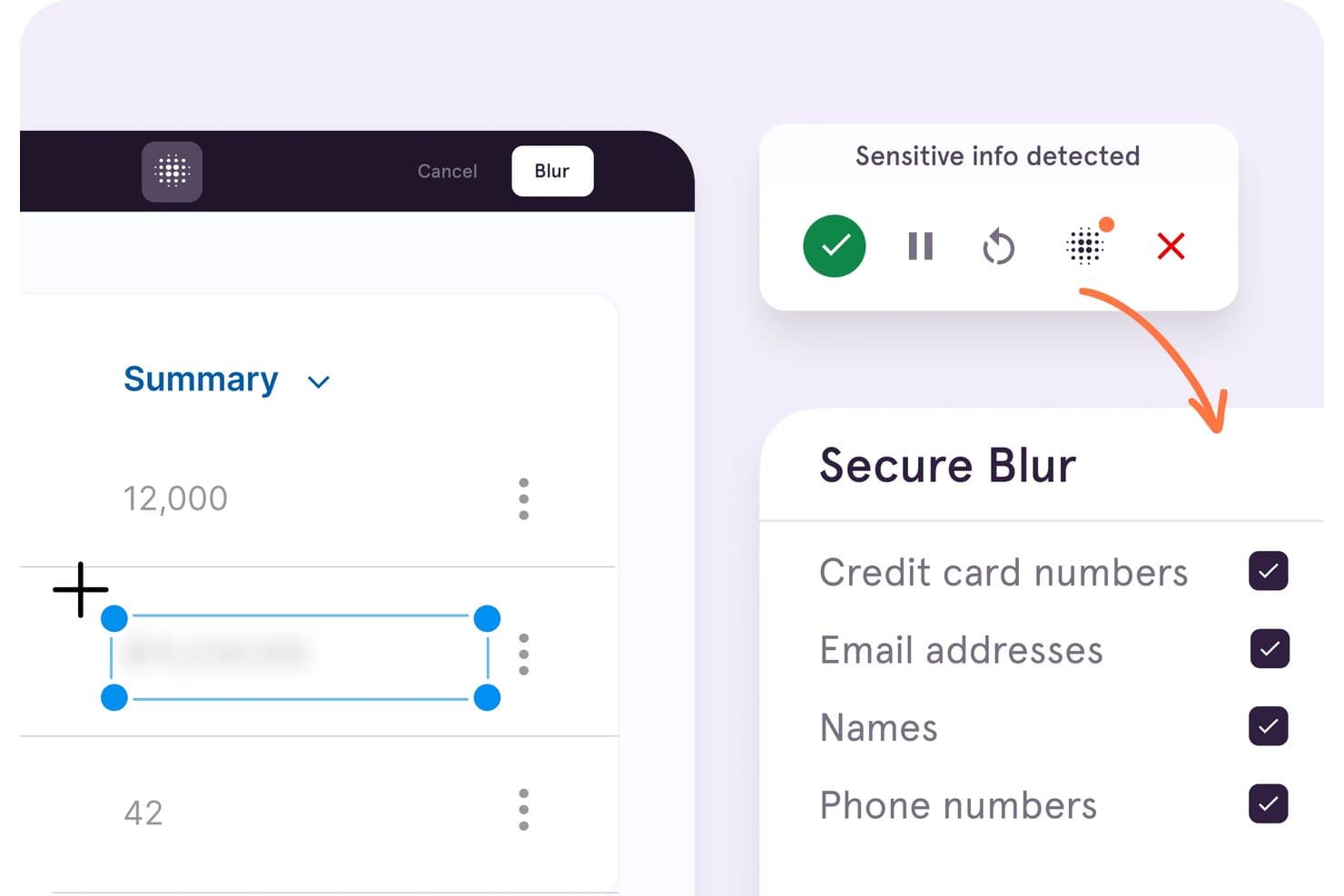
Tango automatically blurs sensitive info like credit cards and emails. Tango is a digital adoption platform centered on browser-based workflow capture, with step-by-step guides and Guide Me walkthroughs for web apps.
Who Is Tango Best For?
HR and training teams documenting repeatable software processes for employee onboarding can use Tango to create and share step-by-step guides.
Why I Picked Tango
I picked Tango for click-through SOP guides on free because it turns browser workflows into annotated, step-by-step instructions. Guide Me can then highlight each next click as a colleague follows a process in a web app such as a CRM. The free plan caps shared workflows at five, so I see it as a fit for a small set of internal guides, not a full-featured adoption platform.
Tango Key Features
- Link and embed sharing: Share workflows by link or embed them in other tools.
- Chrome and Edge support: Capture web workflows with the browser extension.
- Free workspace limits: Add up to 10 users and share up to five workflows.
- Viewer analytics: See limited viewer data for up to three unique viewers.
Tango Integrations
Tango’s browser extension works with web apps including Salesforce, HubSpot, Workday, NetSuite, Epic, and Gmail. You can embed Tango guides in Confluence and Notion.
What’s Free?
Tango offers a $0 free plan, not just a time-limited trial. It allows up to 10 users and five shared workflows, with viewer data limited to three unique viewers.
Pros and Cons
Pros:
- Works across web apps without app-side code
- Guide Me highlights each next in-app action
- Rapid capture turns workflows into guided SOPs
Cons:
- Free lacks Pins, branching, and targeting
- Five shared workflows constrain free deployments
Learn more about Tango:
Andre plattformer for digital adopsjon
Her er noen flere alternativer for plattformer for digital adopsjon som også tilbyr gratis abonnementer eller prøveperioder. Selv om disse verktøyene ikke kom med på listen min, er de likevel verdt å undersøke:
- 11Product FruitsBest budget-friendly onboarding tours for SMBs
How I Evaluate Free Digital Adoption Platforms
First, I define what counts as free. A digital adoption platform qualifies with a permanent plan, not a trial, even if user or guide caps limit a new-user workflow. From there, I split my evaluation into three parts: core functionality, which carries the most weight, like building no-code walkthroughs and tracking guide engagement; standout features, like a Chrome extension builder; and what a tool offers beyond its feature set, like a clear upgrade path.
Core Functionality (Table Stakes For This List)
In addition to my free plan requirements, I use a scoring system to select tools for my list. I score each one on a scale from 0 (does not offer the functionality) to 5 (excels in this area) for each core functionality listed below, based on what's available on the free plan. I then convert the total into a percentage to help assess each tool's overall fit, with extra weight on any functionalities I've deemed essential.
- No-Code Walkthrough Builder (Essential): I look for a way to build and revise multi-step guides without developer help, such as a walkthrough for setting up a profile.
- On-Screen Guidance: I assess whether teams can place tooltips, hotspots, or banners where users need help, such as beside an unfamiliar feature.
- Usage Analytics: I check whether the free plan tracks guide views or completions, so teams can see where users drop off in a workflow.
- Web Compatibility: I look for support across common web apps, allowing teams to guide users through workflows beyond a single proprietary system.
- User Segmentation: I assess whether guides can target users by URL or basic status, such as showing a first-use tour to new users.
Once I have a list of tools that meet the criteria, I consider what sets each platform apart.
Differentiating Factors (What Sets Vendors Apart)
Here's how I compare and contrast different vendors:
Standout Features
I look for a Chrome extension builder that lets you attach guides to any web app without deploying code. Tools like Userguiding and Helppier offer this, which means you can prototype a walkthrough in minutes and preview it live. I also check for smart element detection, since a guide that breaks after a minor UI update wastes iteration time. An in-app resource center matters too—it gives users one place to search FAQs, tours, and announcements without leaving the product.
Beyond Features
I check how quickly a product manager can deploy the tool solo—whether that's a single script tag or a browser extension install—since free tiers rarely include vendor onboarding support. I also evaluate upgrade path transparency, because a clear comparison between free and paid plans helps you build an internal business case without surprises. Data privacy matters too: guides overlay on live products, so I look for documented hosting and GDPR practices before connecting any customer-facing app.
Slik velger du gratis plattformer for digital adopsjon
Komplekse funksjonslister og prismodeller kan gjøre det vanskelig å finne ut hva du egentlig får med en gratis plattform for digital adopsjon. For å hjelpe deg med å holde fokus mens du går gjennom prosessen med å velge programvare, er det noen faktorer du bør ha i mente:
| Faktor | Hva du bør vurdere |
|---|---|
| FaktorOmfanget av gratistilbudet | Hva du bør vurdereFinn ut hva som er inkludert i gratisabonnementet, for eksempel brukerbegrensninger eller funksjoner, for å sikre at det dekker teamets behov uten uventede kostnader. |
| FaktorSkalerbarhet | Hva du bør vurdereVurder om plattformen kan vokse sammen med teamet ditt. Se etter alternativer som gjør det enkelt å oppgradere etter hvert som brukerbasen og behovet for funksjoner øker. |
| FaktorIntegrasjoner | Hva du bør vurdereKontroller om plattformen kan integreres med verktøyene du allerede bruker, for eksempel CRM- eller analyseprogramvare, slik at den eksisterende arbeidsflyten forbedres uten ekstra problemer. |
| FaktorBrukervennlighet | Hva du bør vurdereVurder brukergrensesnittet og hvor raskt teamet ditt kan lære å bruke verktøyet. Et enkelt og intuitivt design kan spare tid og redusere opplæringskostnadene. |
| FaktorTilpasning | Hva du bør vurdereSe etter tilpasningsmuligheter som lar deg skreddersy plattformen til merkevarens utseende og uttrykk, slik at brukerne får en sømløs opplevelse. |
| FaktorStøtteressurser | Hva du bør vurdereVurder tilgjengeligheten av støttemateriell som veiledninger, webinarer og chatstøtte for å hjelpe teamet med å utnytte plattformens muligheter maksimalt. |
| FaktorSikkerhet | Hva du bør vurdereSørg for at plattformen overholder bransjens sikkerhetsstandarder for å beskytte dataene dine og opprettholde brukernes tillit. |
| FaktorAnalyse | Hva du bør vurdereSe etter innebygde analyseverktøy som gir innsikt i brukeratferd og adopsjonsrater, slik at du kan måle hvor vellykket arbeidet med digital adopsjon er. |
Hva er en gratis plattform for digital adopsjon?
En plattform for digital adopsjon er et verktøy som hjelper brukere med å lære og bruke programvareapplikasjoner effektivt, og som tilbyr gratisabonnementer eller prøveperioder slik at man kan komme i gang uten kostnader. Disse verktøyene brukes ofte av produktledere, opplæringsteam og fagpersoner innen kundesuksess for å forbedre brukerintroduksjon og engasjement.
De skaper verdi ved å forenkle komplekse prosesser og øke brukernes produktivitet. Interaktive veiledninger, brukeranalyse og sjekklister for brukerintroduksjon bidrar til å forstå brukeratferd, tilby opplæring og sikre vellykket bruk av programvaren.
En plattform for digital adopsjon (DAP) er utviklet for å hjelpe sluttbrukere med å ta i bruk nye funksjoner og verktøy mer effektivt. Her er en oversikt over funksjonene som vanligvis er inkludert i gratis- og betalingsabonnementer.
Funksjoner i gratis plattformer for digital adopsjon
- Interaktive veiledninger: Leder brukerne gjennom trinnvise instruksjoner og reduserer behovet for supportsaker når de utforsker nye funksjoner.
- Sjekklister for brukerintroduksjon: Støtter introduksjonen av ansatte ved å sikre at viktige oppsettoppgaver fullføres tidlig.
- Grunnleggende brukeranalyse: Følg med på engasjementsmønstre for å se hvordan sluttbrukere samhandler med løsningen for digital adopsjon.
- Verktøytips og meldinger i applikasjonen: Gi kontekstuelle tips som veileder brukerne i applikasjonen og minimerer avhengigheten av ekstern hjelp eller en kunnskapsbase.
- Tilpassbare maler: Lag merkevaretilpassede veiledninger og gjennomganger som gjenspeiler organisasjonens stil.
Funksjoner i betalte plattformer for digital adopsjon
- Avansert brukersegmentering: Lever personlig tilpasset innhold og veiledninger som er skreddersydd for bestemte brukergrupper.
- Analyseoversikt i sanntid: Få dypere innsikt i adopsjonsrater og brukerengasjement.
- Innholdsanbefalinger basert på kunstig intelligens: Foreslå relevant læringsmateriell basert på brukeratferd.
- Integrasjoner med tredjepart: Koble plattformen til andre forretningssystemer for utvidet funksjonalitet.
- Tilpassede arbeidsflyter for brukerintroduksjon: Utform detaljerte prosesser for brukerintroduksjon som er tilpasset virksomhetens mål.
Fordeler med en gratis plattform for digital adopsjon
En gratis løsning for digital adopsjon kan gi reell verdi uten en umiddelbar investering. Noen av de viktigste fordelene er:
- Kostnadseffektiv læring: Gi teamene tilgang til grunnleggende opplæringsverktøy samtidig som budsjettene holdes under kontroll.
- Forbedret introduksjon av ansatte: Selvbetjente veiledninger og sjekklister effektiviserer adopsjonen og hjelper nyansatte med å bli produktive raskere.
- Bedre brukerengasjement: Kontekstuelle tips og analyser viser hvordan sluttbrukere samhandler med plattformen, slik at du kan forbedre kundeopplevelsen.
- Færre supportsaker: Proaktiv veiledning hjelper brukerne med å løse problemer selv, slik at antallet henvendelser til IT- eller supportavdelingen reduseres.
- Tilpasning: Maler gjør det enkelt å lage opplæringsinnhold som er i tråd med merkevaren din.
- Økt produktivitet blant ansatte: Enkle og tilgjengelige verktøy forkorter læringskurven, slik at teamene kan konsentrere seg om oppgaver med høyere verdi.
- Skalerbarhet for oppstartsbedrifter og små team: Gratisabonnementer tilbyr ofte tilstrekkelig funksjonalitet til å støtte tidlig vekst.
- Rask adopsjon: Med minimalt oppsett kan teamet ditt begynne å dra nytte av plattformen umiddelbart.
Kostnader og priser for en gratis digital adopsjonsplattform
Jeg forstår at du kom til denne artikkelen på jakt etter de beste alternativene for digitale adopsjonsplattformer som er tilgjengelige gratis. Siden gratisabonnementer imidlertid bare tilbyr begrensede funksjoner, er det en god sjanse for at du må oppgradere abonnementet ditt i fremtiden.
Tabellen nedenfor oppsummerer vanlige abonnementer, gjennomsnittsprisene deres og typiske funksjoner som er inkludert i løsninger for digitale adopsjonsplattformer:
Sammenligningstabell for digital adopsjonsplattform
| Abonnementstype | Gjennomsnittspris | Vanlige funksjoner |
|---|---|---|
| AbonnementstypeGratisabonnement | Gjennomsnittspris$0 | Vanlige funksjonerGrunnleggende veiledninger, verktøytips og begrenset analyse. |
| AbonnementstypePersonlig abonnement | Gjennomsnittspris$5-$25/bruker/måned | Vanlige funksjonerAvanserte veiledninger, brukersegmentering og grunnleggende integrasjoner. |
| AbonnementstypeBedriftsabonnement | Gjennomsnittspris$30-$75/bruker/måned | Vanlige funksjonerTilpassbare arbeidsflyter, forbedret analyse og flere integrasjoner. |
| AbonnementstypeVirksomhetsabonnement | Gjennomsnittspris$80-$150/bruker/måned | Vanlige funksjonerFull tilpasning, dedikert brukerstøtte og omfattende analyse. |
Vanlige spørsmål om gratis digital adopsjonsplattform
Her er noen svar på vanlige spørsmål om gratis digitale adopsjonsplattformer:
Hvordan fungerer en digital adopsjonsplattform?
En digital adopsjonsplattform fungerer ved å legge veiledning og støtte oppå andre programvareapplikasjoner. Den hjelper brukerne med viktige oppgaver gjennom trinnvise instruksjoner og kontekstuell informasjon. Denne tilnærmingen sørger for at brukerne raskt kan lære og navigere i nye verktøy uten ekstern hjelp.
Hva er en vanlig funksjon i en digital adopsjonsplattform?
Vanlige funksjoner omfatter interaktive gjennomganger som veileder brukerne gjennom bestemte oppgaver i sanntid. Disse oppgavene kan variere fra å opprette rapporter til å sende inn utgiftskrav, slik at brukerne fullfører nødvendige handlinger effektivt og nøyaktig.
Hva er den beste digitale adopsjonsplattformen?
Den beste digitale adopsjonsplattformen avhenger av teamets behov og budsjett. Ta hensyn til faktorer som brukervennlighet, tilgjengelige funksjoner og brukerstøttealternativer. Evaluer gratisversjoner for å se om de oppfyller de grunnleggende kravene dine før du vurderer oppgraderinger.
Hva er virkningen av digital adopsjon?
Digital adopsjon sørger for at brukerne integrerer virksomhetens verktøy fullt ut i arbeidsflytene sine, noe som minimerer motstand. Uten dette kan virksomheter oppleve lav bruk av programvare og bortkastede investeringer. Effektiv adopsjon øker produktiviteten og maksimerer verdien av digitale verktøy.
Kan jeg bruke en digital adopsjonsplattform gratis?
Ja, mange digitale adopsjonsplattformer tilbyr gratisversjoner eller prøveperioder. Disse inkluderer vanligvis grunnleggende funksjoner som brukerveiledninger og analyse, slik at du kan teste plattformens funksjoner før du binder deg til et betalt abonnement.
Hvordan velger jeg riktig digital adopsjonsplattform?
For å velge riktig plattform bør du vurdere teamets spesifikke behov, for eksempel hvor kompleks programvaren du bruker er, og hvilke opplæringskrav du har. Se etter gratis prøveperioder for å utforske funksjonene og sikre at plattformen samsvarer med målene dine.