

De beste alternativene til Intercom tilbyr pålitelig støtte i flere kanaler, automatiseringsalternativer og fleksible integrasjoner – slik at teamet ditt kan håndtere samtaler på sin egen måte. Hvis du ser etter alternativer til Intercom, ønsker du sannsynligvis bedre priser, enklere oppstart eller verktøy som passer arbeidsflytene dine. I denne veiledningen går jeg gjennom fremstående alternativer og hvem hvert av dem passer best for, slik at du kan finne en løsning som gir teamet og kundene dine det de faktisk trenger.
Hva er Intercom?
Intercom er en plattform for kundemeldinger som hjelper deg med å komme i kontakt med brukere gjennom direktechat, automatisering og målrettede meldinger på nettet og mobilen. Den samler kundesamtaler, kundestøttehenvendelser og verktøy for kundeengasjement på ett sted. Mange team bruker Intercom til å svare på spørsmål, løse problemer og automatisere repetitive oppgaver, slik at kundestøtteagenter kan fokusere på mer komplekse problemer.
Sammenligningstabell: Alternativer til Intercom
Denne sammenligningstabellen oppsummerer prisopplysningene for mine beste utvalgte alternativer til Intercom.
| Tool | Best For | Trial Info | Price | ||
|---|---|---|---|---|---|
| 1 | Best for in-app messaging and onboarding | 14-day free trial + free demo available | From $9.6/month | Website | |
| 2 | Best for all-in-one support with co-browsing | 14-day free trial + free plan available | From $45/month | Website | |
| 3 | Best for ecommerce ticket-based support | 7-day free trial | From $10/month | Website | |
| 4 | Best for customizable customer data management | Free demo available | Pricing upon request | Website | |
| 5 | Best for unified marketing and support | Free plan available | From $19/month | Website | |
| 6 | Best for integrated CRM and support workflows | 14-day free trial | From $20/user/month | Website | |
| 7 | Best for open-source support with data ownership | 15-day free trial + free plan available | From $19/agent/month (billed annually) | Website | |
| 8 | Best for collaborative shared inbox for teams | 14-day free trial | From $25/user/month (billed annually) | Website | |
| 9 | Best for AI-driven support without per-seat fees | Free plan available | From $95/month | Website | |
| 10 | Best for personalized customer email experiences | Free plan available | From $25/user/month | Website |


Hvorfor du kan stole på våre programvareanbefalinger
6,700+
Reviews
20
Industry experts
16+
Evaluation factors
14
Years
Teamet vårt har testet og anmeldt programvare siden 2012. Vi er selv produktledere, så vi vet hvor vanskelig og hvor viktig det er å velge riktig programvare.
I denne guiden har vi vurdert verktøyene gjennom praktisk testing og uavhengig research og gitt dem poeng ut fra våre utvelgelseskriterier.
Anmeldelsene våre bygger på vår egen redaksjonelle vurdering. De er ikke et salgsargument.
Ekspertanmeldere:
- Andrew LumbySenior TPM
- Cristiano ValimSenior UI/UX Lead


Anmeldelser av de beste alternativene til Intercom
Nedenfor finner du mine detaljerte sammendrag av de beste alternativene til Intercom som kom med på kortlisten min. Anmeldelsene mine gir et detaljert innblikk i funksjonene, de beste bruksområdene og integrasjonene til hver plattform, slik at du kan finne den som passer best for deg.
 Best for in-app messaging and onboarding
- 14-day free trial + free demo available
- From $9.6/month
Visit WebsiteCustomer Rating:4.8/5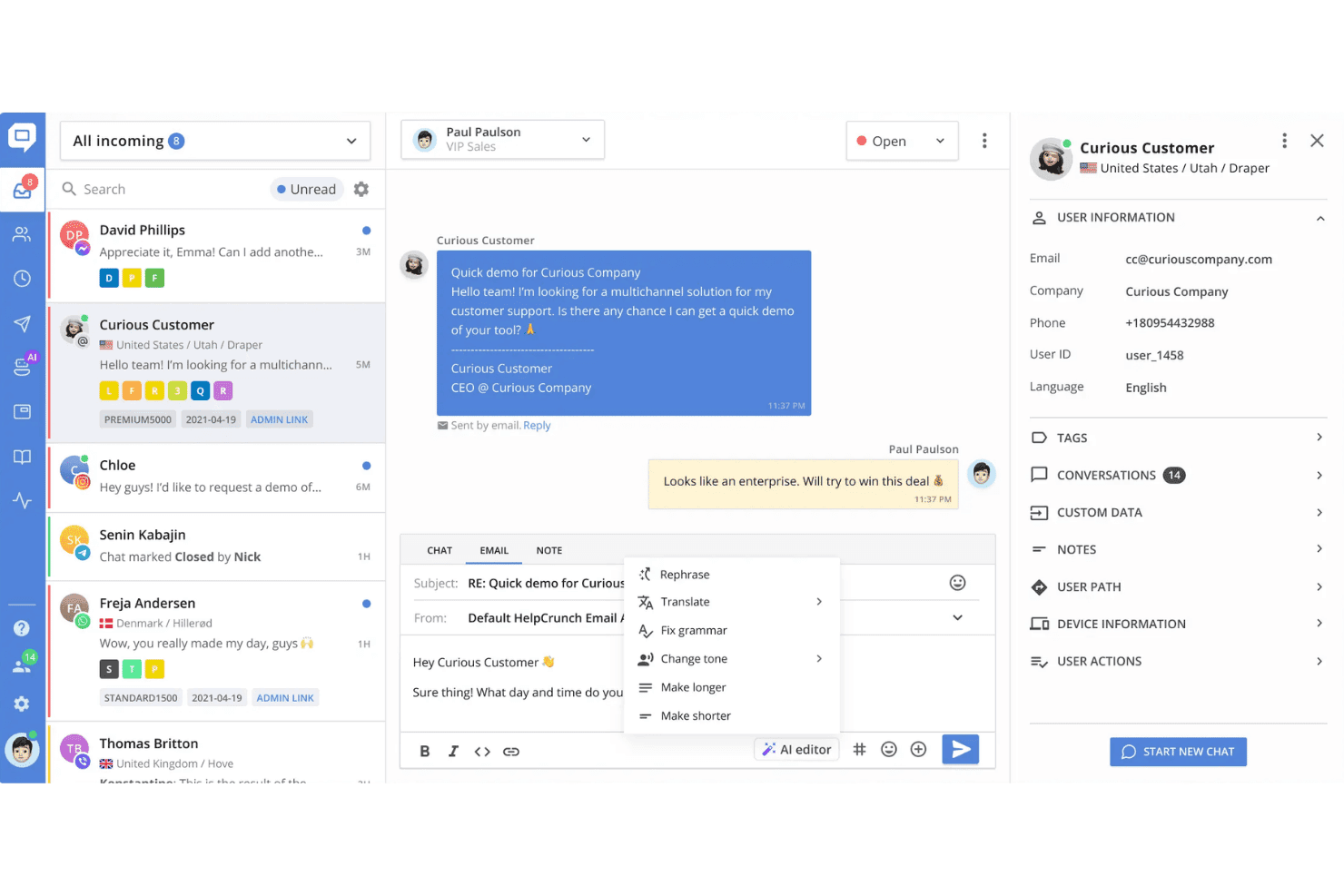
HelpCrunch offers a multichannel customer support inbox with AI-powered email editing tools, contact details, and conversation management in one interface. HelpCrunch is a customer communication platform for SaaS teams and growing businesses that want Intercom-level messaging, onboarding automation, and multi-channel support without the enterprise price tag.
Who Is HelpCrunch Best For?
HelpCrunch is a strong fit for small to mid-sized SaaS companies that need to run support, onboarding, and marketing from a single platform.
Why HelpCrunch Is a Good Intercom Alternative
I picked HelpCrunch as one of the best because it nails the two things Intercom is most known for: in-app messaging and onboarding automation. The mobile SDKs for iOS, Android, and React Native let my team trigger contextual messages directly inside the product based on user behavior. Pair that with event-driven email sequences and auto messages, and you get a complete onboarding flow without stitching together separate tools.
HelpCrunch Key Features
- Omnichannel shared inbox: Manage conversations from chat, email, WhatsApp, and social platforms in a unified agent workspace.
- Knowledge base builder: Create and organize branded self-serve help centers with multilingual support and analytics.
- Custom role permissions: Define agent roles, access, and approval flows to support team structure and security.
- Advanced tag automation: Set triggers and rules to auto-tag, assign, or escalate conversations based on message content or sentiment.
HelpCrunch Integrations
HelpCrunch offers native integrations with Slack, HubSpot, Facebook Messenger, Mailchimp, and Zapier. An API is available for custom integrations.
Pros and Cons
Pros:
- Flat per-seat pricing with no MAU-based fees
- Onboarding automation without third-party tools
- Behavior-triggered in-app messaging out of the box
Cons:
- Reporting lacks granular conversation analytics
- AI-powered bot capabilities are limited
Learn more about HelpCrunch: Best for all-in-one support with co-browsing
- 14-day free trial + free plan available
- From $45/month
Visit WebsiteCustomer Rating:4.5/5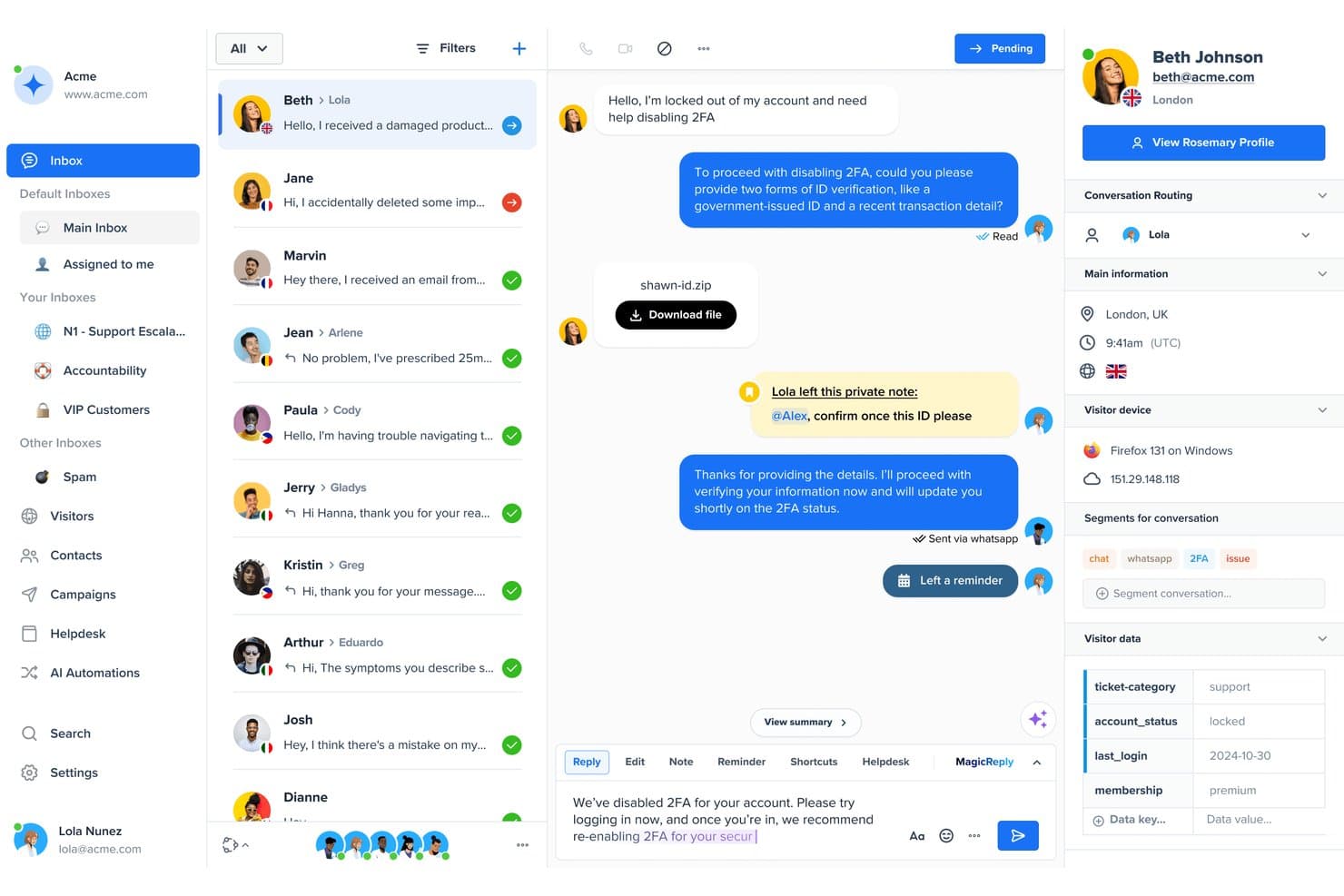
Crisp offers a multi-channel customer support inbox with conversation routing, visitor data, and private agent notes for team collaboration. Crisp is an AI-powered customer support platform built for SMBs and growing teams that need omnichannel messaging, chatbot automation, and real-time co-browsing in a single, flat-rate workspace.
Who Is Crisp Best For?
Crisp suits startups and small businesses that need a user-friendly customer communication platform with predictable pricing.
Why Crisp Is a Good Intercom Alternative
I picked Crisp as one of the best because MagicBrowse lets support agents co-browse with a user and take live screen control without any plugin installs on their end. When a user gets stuck mid-flow in your product, I can step in instantly and walk them through it in real time. Paired with Hugo (Crisp's no-code AI agent) and an omnichannel inbox covering WhatsApp, Instagram, email, and SMS, Crisp handles the full support cycle from first message to resolution.
Crisp Key Features
- Shared omnichannel inbox: Route and manage conversations from live chat, email, social channels, SMS, and more in one workspace.
- Internal AI Copilot: Drafts replies, summarizes conversations, and assists agents during live support interactions.
- Knowledge base builder: Create a branded, multilingual help center with advanced search and article feedback options.
- Workflow automation builder: Design visual, no-code chatbot flows and automated triggers for qualifying and routing support inquiries.
Crisp Integrations
Crisp offers native integrations with Slack, HubSpot, WhatsApp, Messenger, Instagram, Shopify, WordPress, Google Analytics, Zapier, and provides an API for custom integrations.
Pros and Cons
Pros:
- Knowledge base supports multilingual article creation
- Hugo AI resolves tier-1 tickets autonomously
- Co-browsing requires no customer-side plugin installs
Cons:
- In-app product tours not natively supported
- Conversation analytics less granular than Intercom's
Learn more about Crisp: Best for ecommerce ticket-based support
- 7-day free trial
- From $10/month
Visit WebsiteCustomer Rating:4.6/5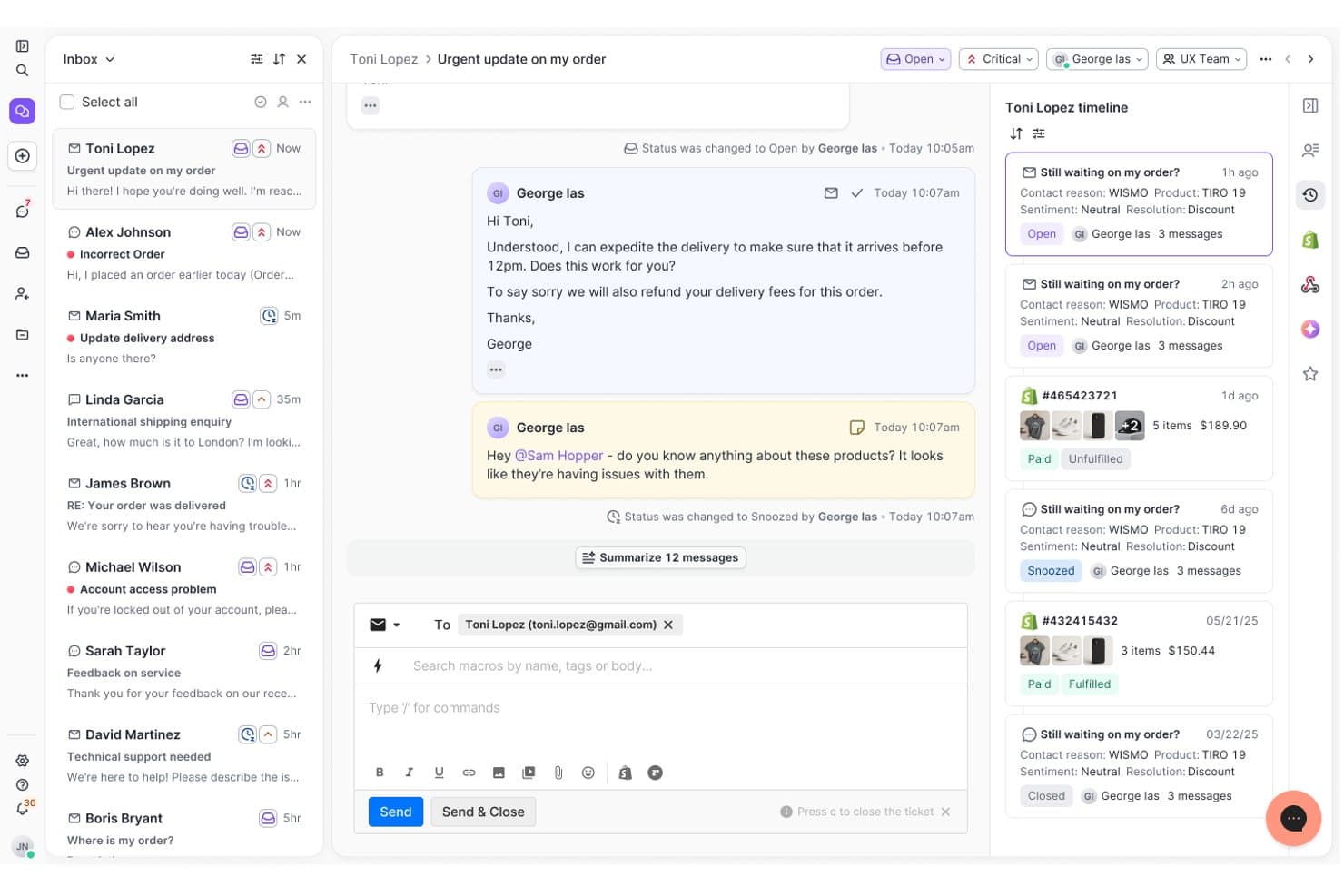
Gorgias unifies customer tickets, timelines, and order data in one view. For ecommerce brands, Gorgias is a customer support platform that brings shopper conversations and order context together, helping teams resolve questions faster across their support channels.
Who Is Gorgias Best For?
Gorgias suits ecommerce support teams that manage ticket-based shopper inquiries and need order context while resolving issues.
Why Gorgias Is a Good Intercom Alternative
I picked Gorgias because it’s built for ecommerce ticket-based support. My team uses ticket views, order data, and shopper conversation history to handle delivery questions, refunds, and product issues in one workspace. We can also connect support replies to ecommerce actions, such as updating orders or issuing refunds.
Gorgias Key Features
- Omnichannel inbox: Manage email, chat, social media, and voice conversations.
- Automation rules: Route, tag, and prioritize tickets based on set conditions.
- Help center: Publish self-service articles for frequently asked questions.
- Performance reporting: Track response times, resolution times, and agent metrics.
Gorgias Integrations
Gorgias offers 100+ marketplace integrations, including Shopify, BigCommerce, Magento, WooCommerce, Loop Returns, Yotpo, Recharge, Attentive, Aircall, and Zapier. It also provides an API for custom integrations.
Pros and Cons
Pros:
- Multiple channels share one support inbox
- Macros and rules reduce repetitive replies
- Order data sits beside shopper conversations
Cons:
- Advanced workflows need more configuration
- Reporting lacks depth for complex operations
Learn more about Gorgias: Best for customizable customer data management
- Free demo available
- Pricing upon request
Visit WebsiteCustomer Rating:4.5/5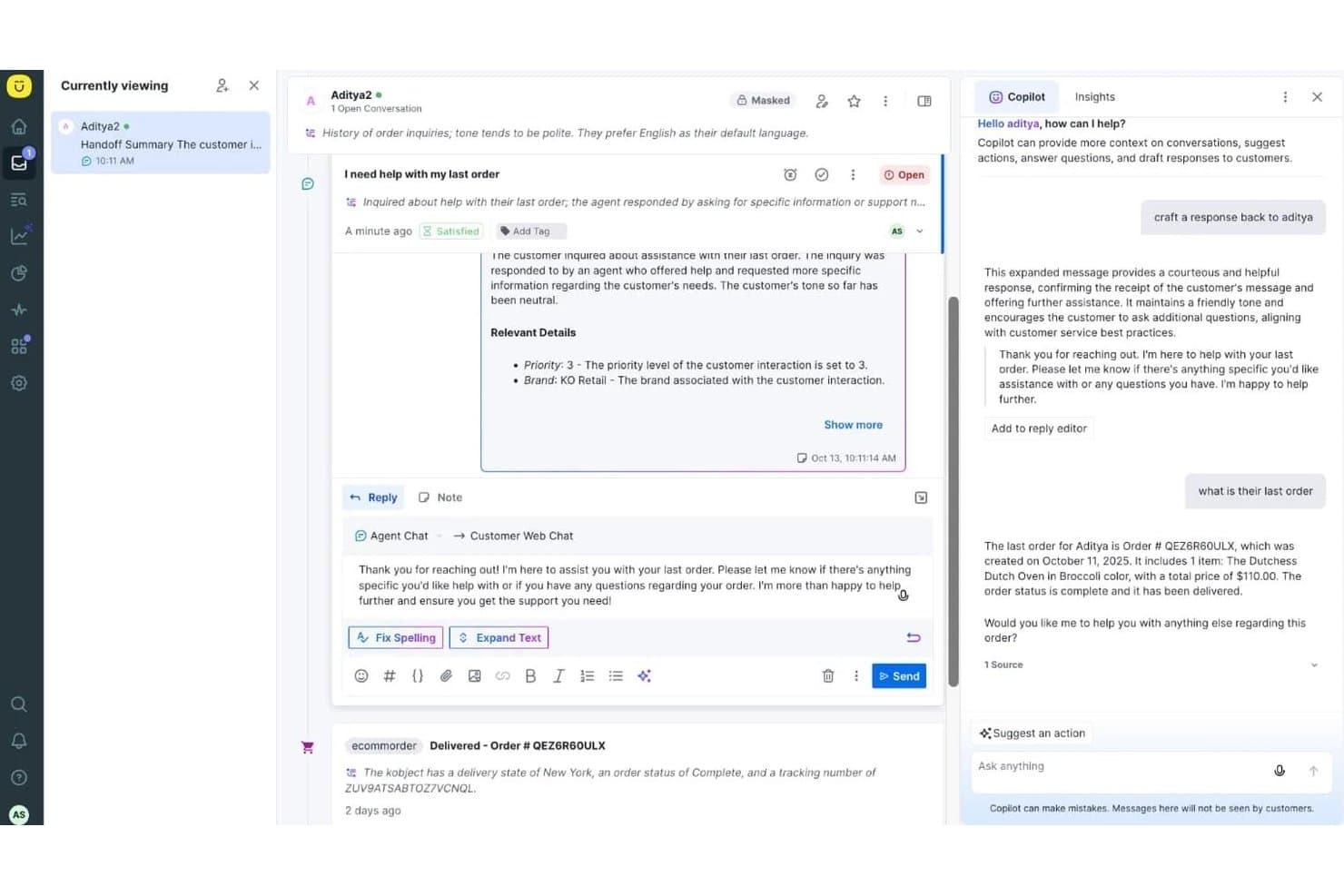
Kustomer offers an AI Copilot panel that suggests responses, retrieves order details, and drafts replies within its customer support interface. Kustomer is an AI-native customer service CRM that replaces ticket-centric workflows with a unified customer timeline, making it a strong fit for B2C support teams handling high-volume, omnichannel conversations.
Who Is Kustomer Best For?
Kustomer is well-suited to mid-market and enterprise B2C brands in retail, e-commerce, travel, and financial services that need a deeply customizable support platform to manage large volumes of customer interactions across multiple channels.
Why Kustomer Is a Good Intercom Alternative
I picked Kustomer as one of the best because its data model is genuinely unlike anything Intercom offers. Where Intercom organizes work around conversations, Kustomer builds everything around a fully customizable customer record, with custom objects, klasses, and up to 300 attributes per object class. I find this particularly valuable when support agents need instant access to order history, loyalty status, or flight details without switching tabs.
Kustomer Key Features
- Unified omnichannel inbox: Agents manage conversations from email, live chat, SMS, social, and voice in a single threaded workspace.
- AI-powered automation: AI agents and workflow tools autonomously classify, route, and resolve routine tickets across channels.
- Dynamic knowledge base: Teams create internal and customer-facing help centers with multi-language, article feedback, and smart search capabilities.
- Real-time conversation reporting: Supervisors track CSAT, ticket resolution time, and SLA performance with customizable dashboards and filters.
Kustomer Integrations
Kustomer offers native integrations with Salesforce, Shopify, Slack, Jira, Amazon Connect, Facebook Messenger, Instagram, WhatsApp, and Twilio, and provides an API for custom integrations.
Pros and Cons
Pros:
- AI agents autonomously resolve tier-1 tickets
- Unified customer timeline across all channels
- Fully customizable customer data model
Cons:
- No native in-app product tours
- Longer configuration time than most alternatives
Learn more about Kustomer: 5Best for unified marketing and support
Gist
- Free plan available
- From $19/month
Visit WebsiteCustomer Rating:4.6/5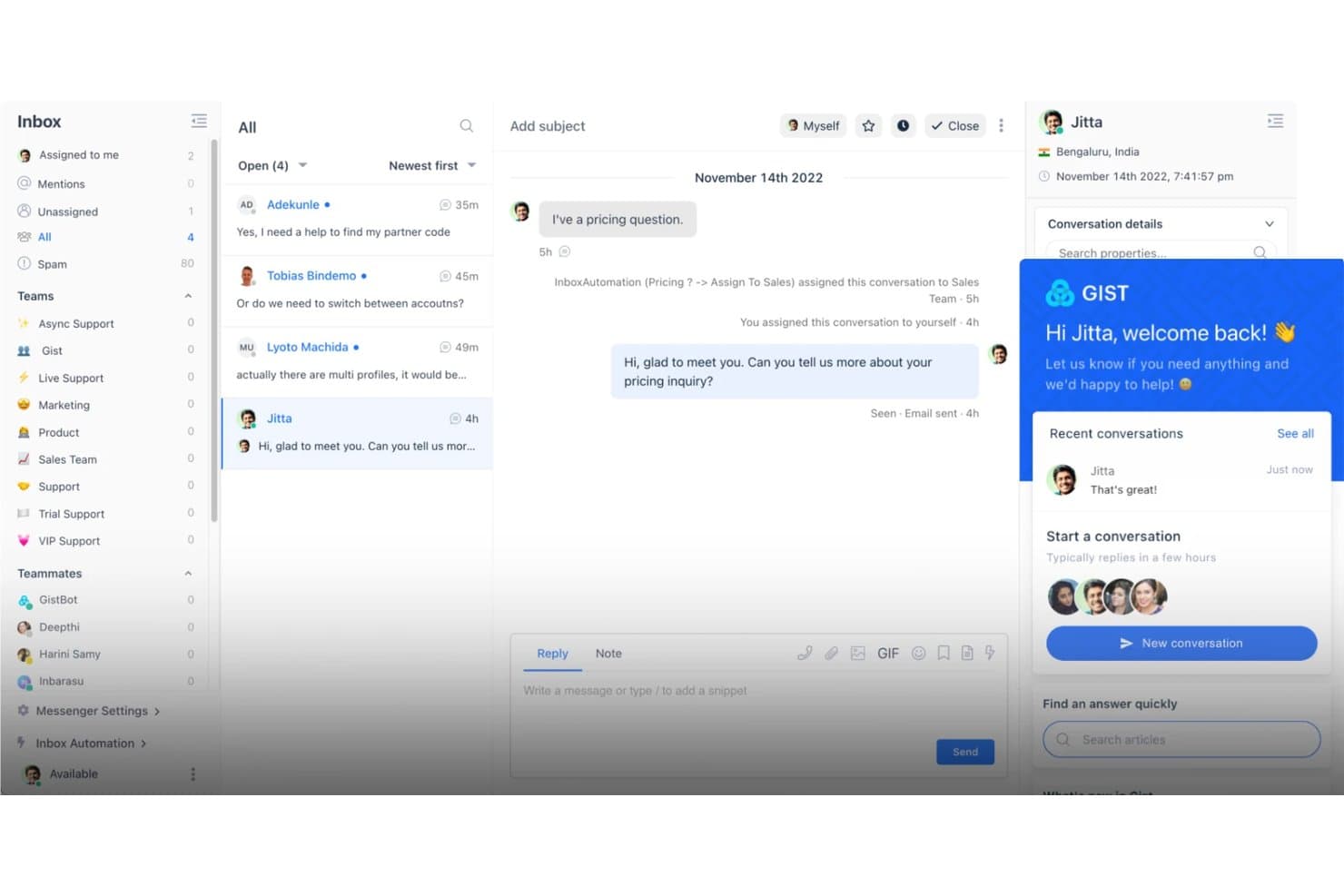
Gist centralizes customer conversations with inbox automation and live chat. Gist is customer support software for growing SaaS and ecommerce teams that combines live chat, help desk tools, and customer messaging to reduce scattered workflows and improve response quality.
Who Is Gist Best For?
Gist suits growing SaaS and ecommerce teams that need customer support and marketing teams to work from one platform.
Why Gist Is a Good Intercom Alternative
I picked Gist because it brings live chat, help desk tools, and customer messaging into one workspace. My team uses it to answer support questions, manage ongoing tickets, and send relevant customer messages without splitting work across separate systems. That unified marketing and support setup fits teams replacing Intercom with fewer disconnected workflows.
Gist Key Features
- Knowledge base: Create searchable help articles for customers.
- Chatbots: Build automated flows for common questions.
- Contact management: Organize customer profiles and interaction history.
- Reporting: Track support volume, response times, and team activity.
Gist Integrations
Gist lists featured and certified integrations with WordPress, Segment, WooCommerce, Stripe, Facebook, Google Calendar, Zoom, Google Analytics, Canny, and Beamer, plus Zapier. It also provides an API, OAuth, and webhooks for custom integrations and workflows.
Pros and Cons
Pros:
- Built-in help articles deflect repeat questions
- Behavioral targeting connects support with messaging
- Combines live chat and ticket workflows
Cons:
- Live chat notifications sometimes arrive late
- Website widget can slow page speed
Learn more about Gist: Best for integrated CRM and support workflows
- 14-day free trial
- From $20/user/month
Visit WebsiteCustomer Rating:4.4/5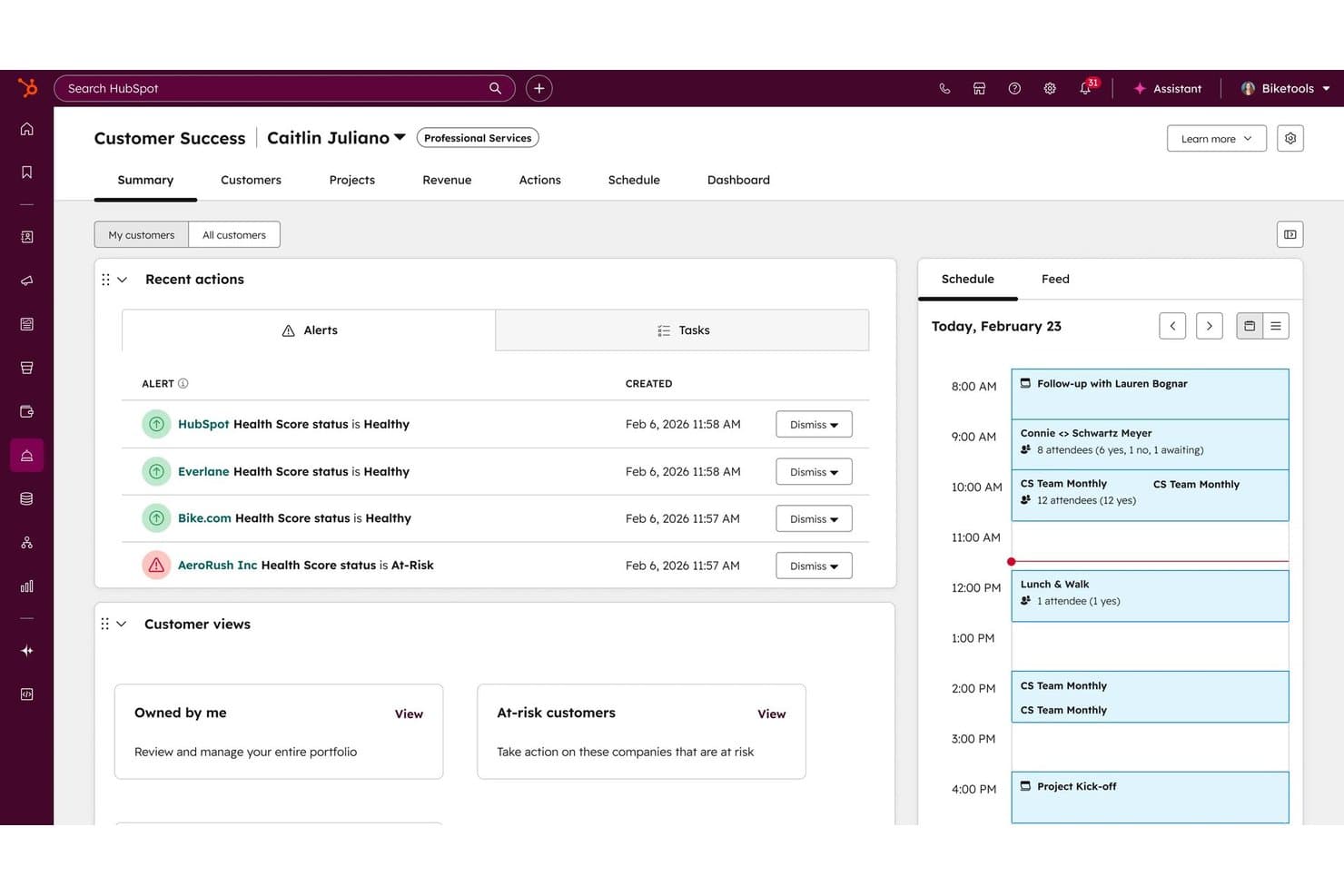
HubSpot Service Hub offers a Customer Success Workspace with health score alerts, customer views, and a daily schedule panel for managing accounts. HubSpot Service Hub is a CRM-native customer service platform that brings ticketing, live chat, AI-powered support, and customer health scoring into the same system your sales and marketing teams already use.
Who Is HubSpot Service Hub Best For?
It's a natural fit for mid-market teams already running sales and marketing in HubSpot who want support operations in the same platform.
Why HubSpot Service Hub Is a Good Intercom Alternative
I've included HubSpot Service Hub in my top picks because it does something Intercom can't: every support ticket, customer conversation, and NPS response lives on the same contact record your sales team is already working. That means when a customer escalates an issue, I can see their deal history, lifecycle stage, and prior interactions without switching tools. The Customer Success Workspace adds health scoring on top of that, so I can flag at-risk accounts before they churn, not after.
HubSpot Service Hub Key Features
- Omnichannel messaging: Manage email, live chat, phone, and social conversations in a unified workspace.
- Knowledge base: Build a branded, searchable help center to give users 24/7 self-service options.
- AI-powered automation: Use bots and workflows to route tickets, auto-respond, and handle repetitive support tasks.
- SLA management: Set, track, and enforce custom service-level agreements with built-in reminders and reporting.
HubSpot Service Hub Integrations
HubSpot Service Hub offers native integrations with Salesforce, Jira, Slack, Shopify, Zoom, Microsoft 365, Google Workspace, Facebook Messenger, WhatsApp, and Zapier. An API is available for custom integrations.
Pros and Cons
Pros:
- Native customer health scoring for proactive retention
- AI-drafted replies reduce manual agent workload
- Unified CRM data across sales, marketing, and support
Cons:
- Reporting customization requires higher-tier plans
- In-app messaging is weaker than Intercom's
Learn more about HubSpot Service Hub: Best for open-source support with data ownership
- 15-day free trial + free plan available
- From $19/agent/month (billed annually)
Visit WebsiteCustomer Rating:4.5/5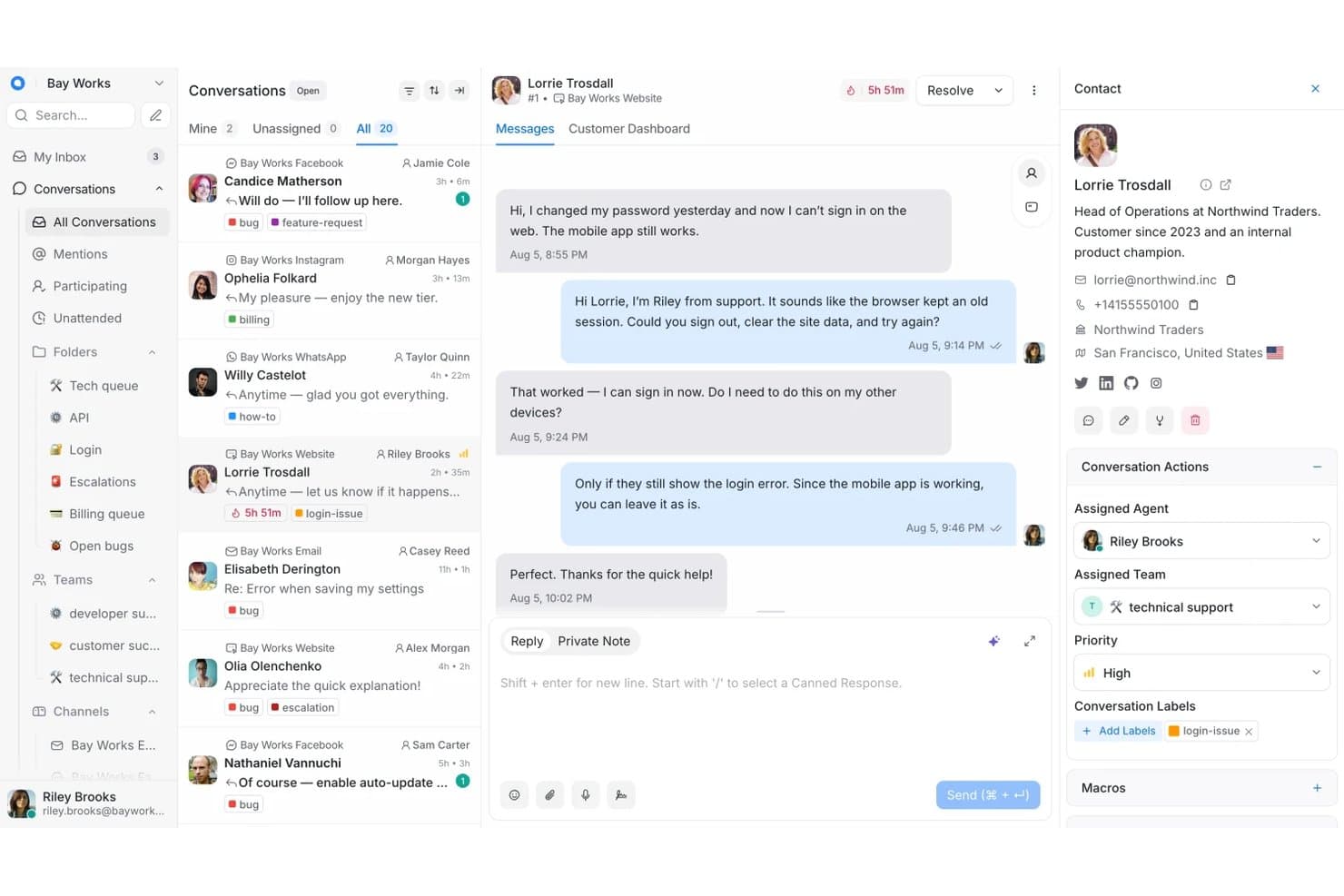
Chatwoot centralizes multi-channel support with contact details in one view. Chatwoot is customer support software for teams that need shared inboxes, live chat, and organized customer conversations without relying on a proprietary support platform.
Who Is Chatwoot Best For?
Support teams that want an open-source help desk with self-hosting options and greater control over customer conversation data.
Why Chatwoot Is a Good Intercom Alternative
I picked Chatwoot because it’s one of the few customer support platforms built for open-source support with data ownership. My team can self-host shared inboxes and live chat, keeping customer conversations within our infrastructure. That control suits product organizations with strict security requirements or internal data policies.
Chatwoot Key Features
- Omnichannel channels: Connect email, WhatsApp, Facebook, Instagram, and SMS conversations.
- Automation rules: Assign conversations and apply labels based on defined conditions.
- Canned responses: Save reusable replies for frequently asked questions.
- Conversation reports: Track response times, resolution times, volumes, and agent performance.
Chatwoot Integrations
Chatwoot offers six native integrations, including Slack, Linear, Google Translate, LeadSquared, Dialogflow, and Cloudflare RealtimeKit. It also provides a REST API and webhooks for custom integrations; Shopify, HubSpot, Zoho CRM, GitHub, and other integrations are listed for Q4 2026.
Pros and Cons
Pros:
- Automation rules reduce repetitive assignment work
- Shared inbox supports multiple conversation channels
- Self-hosting keeps customer data in-house
Cons:
- Reporting depth trails enterprise support platforms
- Self-hosting requires ongoing technical administration
Learn more about Chatwoot: Best for collaborative shared inbox for teams
- 14-day free trial
- From $25/user/month (billed annually)
Visit WebsiteCustomer Rating:4.6/5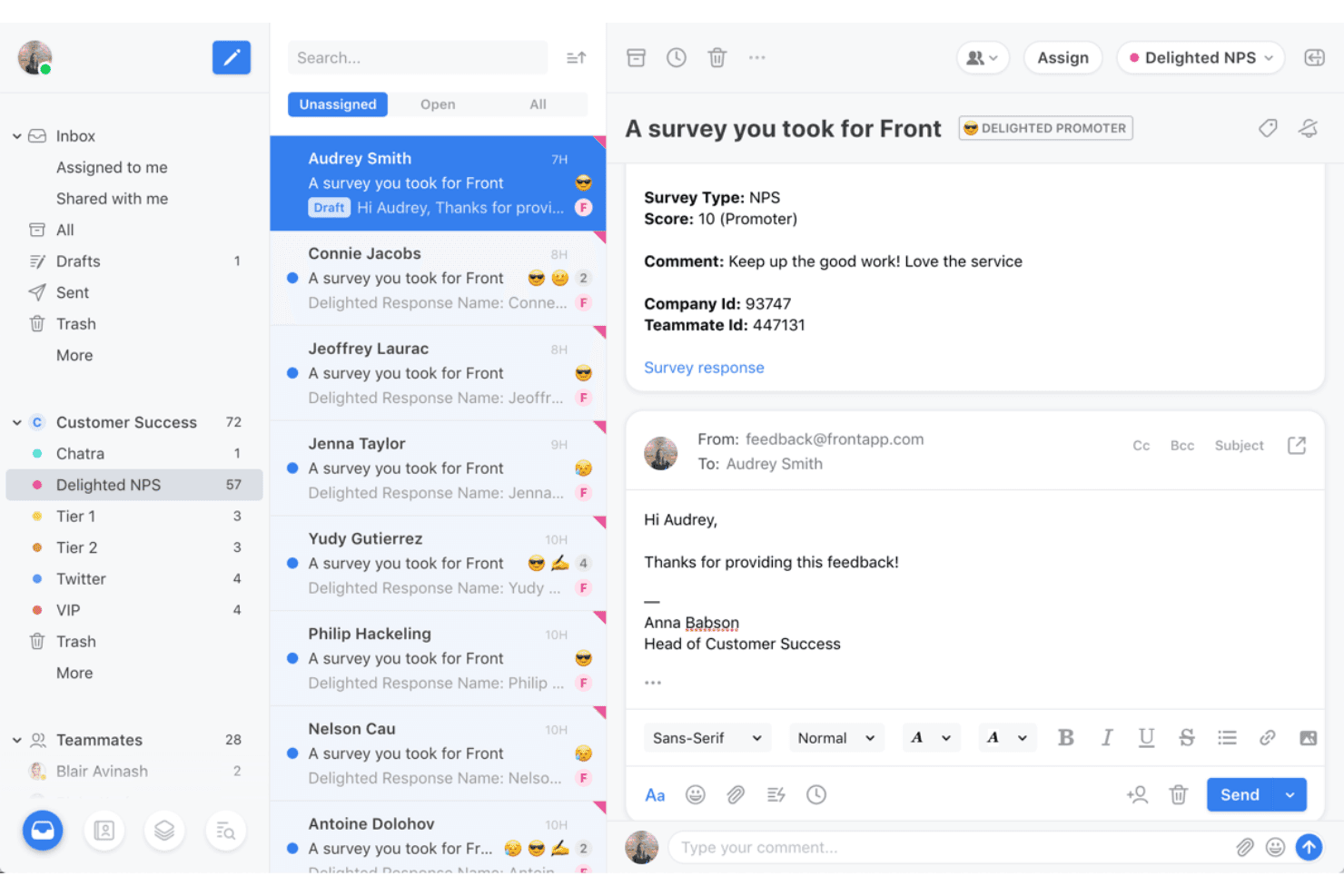
Front offers a shared inbox interface where customer success teams can manage NPS survey responses and reply to promoters directly from a unified email view. Front is an AI-powered customer operations platform built for CX and support teams who want to manage email, chat, SMS, and social in one shared, collaborative inbox rather than a traditional ticketing system.
Who Is Front Best For?
Front fits mid-sized support and customer success teams that handle high email volume and need visibility, ownership, and coordination across shared mailboxes.
Why Front Is a Good Intercom Alternative
I picked Front as one of the best because its collaborative shared inbox solves a problem Intercom doesn't prioritize: team coordination inside a conversation. I love that collision detection shows me who else is drafting a reply, which prevents duplicate responses from going out. Internal comments let my team discuss context or tone without the customer ever seeing it. Shared drafts take that further, letting us co-write a reply before it sends.
Front Key Features
- Omnichannel inbox: Manage customer conversations from email, SMS, WhatsApp, and social channels all in one shared workspace.
- Workflow automation: Build rules to automatically route, tag, or escalate messages based on keywords or channel.
- Integrated knowledge base: Provide public self-serve help articles and link them inside conversations.
- Granular workspace permissions: Set custom roles, workspace access, and approvals for teams with complex structures.
Front Integrations
Front offers 100+ native integrations, including Salesforce, HubSpot, Jira, Slack, Asana, Shopify, Aircall, Dialpad, Google Drive, and Microsoft Teams. An API is available for custom integrations.
Pros and Cons
Pros:
- Email-native inbox feels familiar to support teams
- Shared drafts enable real-time team co-authoring
- Collision detection prevents duplicate customer replies
Cons:
- Reporting lacks depth for SLA tracking
- Limited in-app messaging and product tour features
Learn more about Front: 9Best for AI-driven support without per-seat fees
Enjo
- Free plan available
- From $95/month
Visit WebsiteCustomer Rating:4.8/5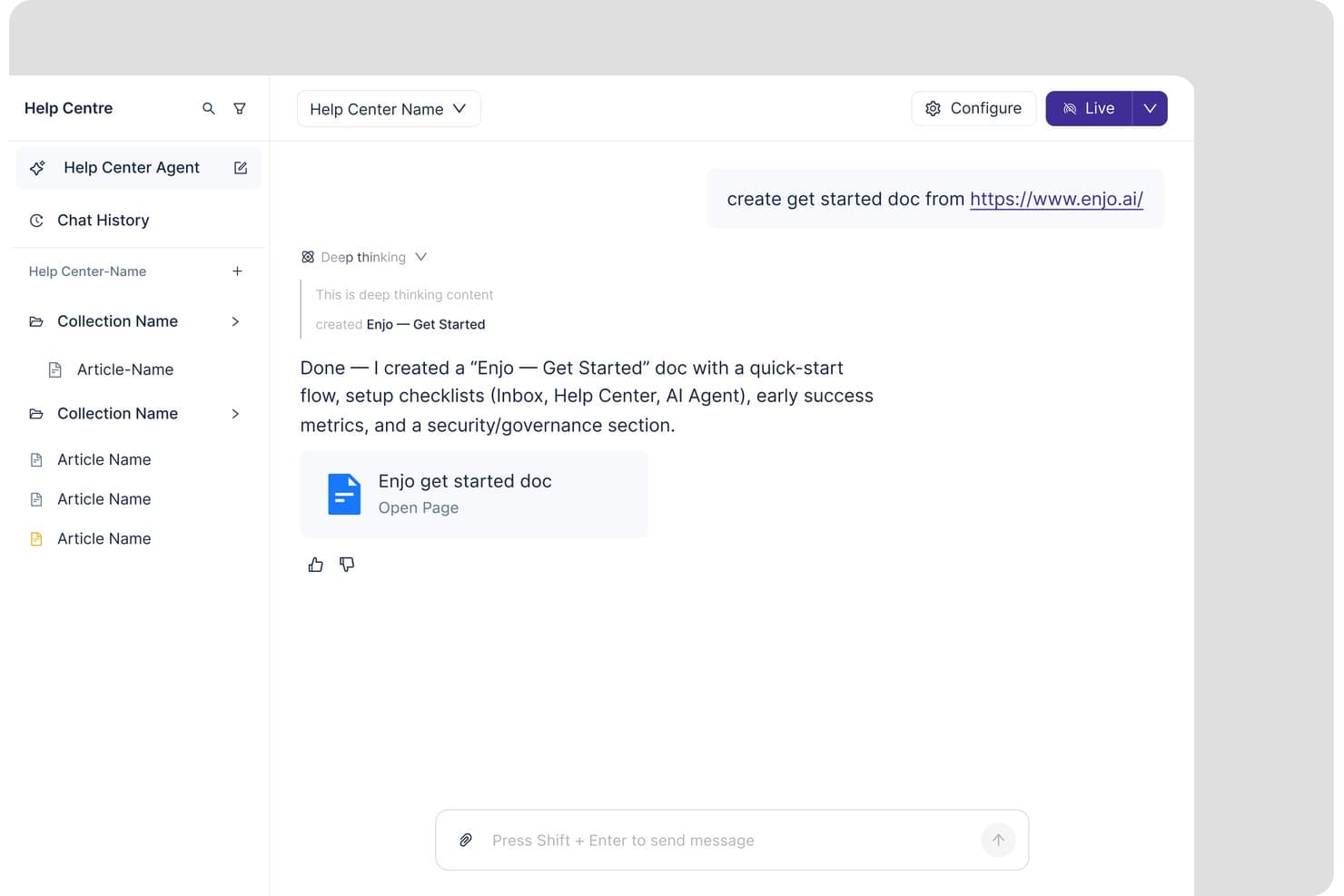
Enjo lets users generate help center docs from a URL instantly. Enjo is an AI customer support platform for teams that want to automate routine conversations, give customers faster answers, and reduce pressure on human agents without rebuilding their support operation.
Who Is Enjo Best For?
Enjo suits support teams that want to automate routine customer conversations without adding per-seat costs or replacing their existing support operation.
Why Enjo Is a Good Intercom Alternative
I picked Enjo because it provides AI-driven support without per-seat fees. I use it to automate routine customer conversations and help customers get faster answers. My team can reduce pressure on human agents while keeping our existing support operation in place.
Enjo Key Features
- Knowledge source connections: Connect Confluence, SharePoint, Drive, Notion, websites, and past tickets.
- Escalation inbox: Give human agents AI-drafted replies, summaries, and translation assistance.
- Branded help center: Create self-service portals with AI-powered search and multilingual support.
- No-code action builder: Build multi-step workflows with conditions, fallbacks, and audit trails.
Enjo Integrations
Enjo connects to knowledge sources including Confluence, SharePoint, Google Drive, Notion, websites, and past support tickets. Native integrations and API support are not clearly documented.
Pros and Cons
Pros:
- Human approval gates AI content publishing
- AI drafts articles from resolved conversations
- AI-powered request resolution earns user praise
Cons:
- Interface design draws user criticism
- G2 reviewers report bugs and lag
Learn more about Enjo: Best for personalized customer email experiences
- Free plan available
- From $25/user/month
Visit WebsiteCustomer Rating:4.5/5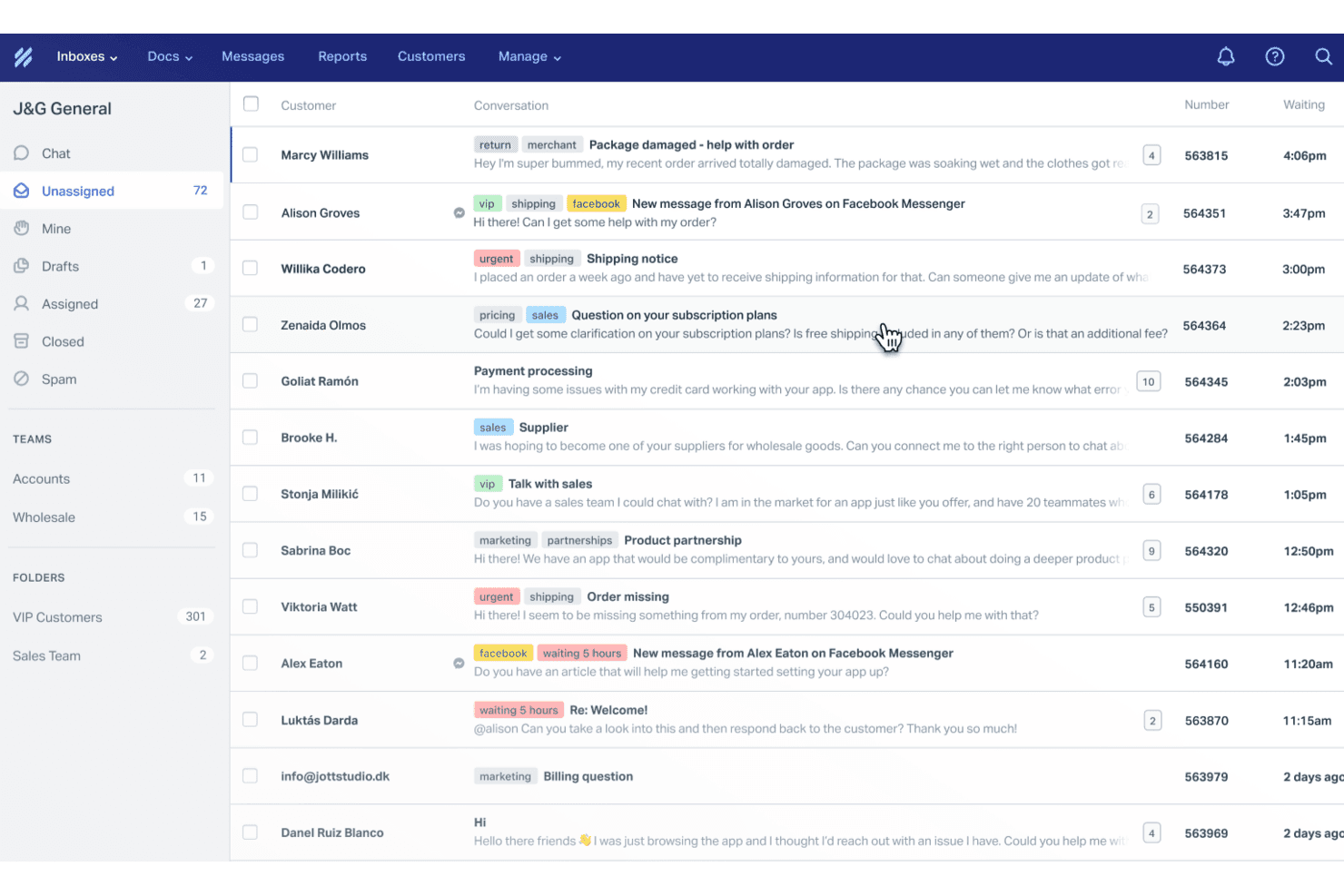
Help Scout offers a shared inbox interface showing customer conversations with tags, priority labels, and team assignment features. Help Scout is a customer support platform built for small-to-mid-sized teams that want email-first support with live chat and self-service tools—without the complexity or cost of enterprise-level platforms like Intercom.
Who Is Help Scout Best For?
Help Scout is a strong fit for lean support teams at startups and SMBs that handle most customer interactions over email and want a simple, affordable Intercom alternative.
Why Help Scout Is a Good Intercom Alternative
I picked Help Scout as one of the best because its email-first approach genuinely keeps customer conversations personal. Replies look like Gmail threads, not numbered tickets, which changes how customers experience your support. I also appreciate the collision detection feature: it shows when a teammate is already replying, so the same customer never gets two different responses. That kind of quiet coordination is what makes email feel personal at scale.
Help Scout Key Features
- Beacon in-app messenger: Embed live chat, knowledge base, and AI-powered answers directly in your product with a single widget.
- Docs knowledge base: Build and organize branded self-serve help centers with categories, search, and analytics.
- Workflow automation: Use rules to assign, tag, and prioritize incoming conversations automatically for efficient triage.
- Multi-channel inbox: Manage email, chat, and social messages from one place with collision detection and user assignment.
Help Scout Integrations
Help Scout offers native integrations with Slack, HubSpot, Salesforce, Jira, Shopify, Mailchimp, WooCommerce, and Microsoft 365. It also connects with Zapier and provides an API for custom integrations.
Pros and Cons
Pros:
- Collision detection prevents duplicate customer replies
- Beacon surfaces knowledge base inside your product
- Email conversations display as personal threads
Cons:
- Limited user segmentation for outbound campaigns
- No behavior-triggered in-app product tours
Learn more about Help Scout:
Andre alternativer til Intercom
Her er noen flere alternativer til Intercom som ikke kom med på kortlisten min, men som fortsatt er verdt å sjekke ut:
- 11ZendeskBest for enterprise-ready omnichannel support
- 12FreshchatBest for modern chat with automation features
- 13LiveChatBest for live chat with AI agent included
- 14KayakoBest for AI ticket resolution at outcome-based cost
- 15LiveAgentBest for help desk with advanced automation
- 16Zoho DeskBest for Zoho-stack support ticket management
- 17TidioBest for ecommerce chat automation
How I Evaluate Intercom Alternatives
I split my evaluation into three parts. First, core functionality: an alternative must support real-time chat with customers and centralize conversations across channels into a shared inbox—these carry the most weight. Second, I look for standout features like AI resolution bots and in-app product tours. Third, I consider pricing transparency and onboarding quality.
Core Functionality (Table Stakes For This List)
When I'm selecting tools for my list, I score each one on a scale from 0 (does not offer the functionality) to 5 (excels in this area) for each core functionality listed below. I then convert the total into a percentage to help assess each tool's overall fit, with extra weight on any functionalities I’ve deemed essential.
- Live Chat (Essential): I look for reliable two-way widget chat, agent assignment, and routing so a billing or setup question reaches the right team.
- Shared Inbox (Essential): I check whether chat, email, and other supported channels share assignment, internal notes, and collision visibility for a coordinated reply.
- Help Center: A searchable, organized article hub matters; I assess whether agents can link setup guidance and customers can find answers unaided.
- Chatbot Automation: I assess whether rules or AI can answer routine setup questions, collect context, and hand off unresolved cases with conversation history.
- In-App Messaging: I look for event- or attribute-triggered tips and announcements, such as guiding new users through a first key workflow.
- Customer Data: I evaluate custom user attributes and segments that let teams tailor onboarding or support messages to behavior and account context.
Once I have a list of tools that meet the criteria, I consider what sets each platform apart.
Differentiating Factors (What Sets Vendors Apart)
Here's how I compare and contrast different vendors:
Standout Features
I look for interactive product tours that let you build step-by-step walkthroughs without pulling in engineering. A tool like Userpilot, for example, lets you trigger tooltips tied to specific user actions during onboarding. I also evaluate AI resolution bots—not just canned replies, but agents that resolve common questions conversationally and pass context to humans when needed. Feature request voting boards matter too, since they connect user input directly to your roadmap priorities.
Beyond Features
Pricing transparency matters because some platforms charge per resolution or per contact, which makes costs unpredictable as your support volume grows. I check whether a vendor publishes clear per-seat or usage-based pricing so you can forecast spend. Integration depth is equally important—I evaluate how well each tool connects to product analytics platforms like Amplitude or PM tools like Jira, since a disconnected support stack means lost customer context. I also consider onboarding quality, looking for no-code setup wizards and migration guides that help non-technical teams go live fast.
Hvorfor se etter et alternativ til Intercom?
Intercom kombinerer kundestøtte, kundeengasjement og meldinger i appen, men passer kanskje ikke for alle teamenes budsjetter eller arbeidsflyter. Noen virksomheter trenger mer forutsigbare priser, bedre håndtering av kundestøttehenvendelser, mer omfattende rapportering eller bredere støtte for e-post, telefon og sosiale medier. Det kan hende du ser etter et alternativ til Intercom fordi …
- Mer åpne og forutsigbare priser
- Bedre integrasjoner med produkter og analyseverktøy
- Mer konfigurerbare automatiserings- og KI-verktøy
- Mer detaljerte roller og tillatelser
- Bedre flerspråklig kundestøtte
- Enklere flytting av kundestøttehenvendelser og hjelpesenterinnhold
Hvis noe av dette høres kjent ut, har du kommet til rett sted. Listen min inneholder flere gode alternativer til Intercom som passer bedre for team som møter disse utfordringene med Intercom og ser etter alternative løsninger.
Viktige funksjoner i Intercom
Her er noen av de viktigste funksjonene i Intercom, slik at du kan sammenligne plattformen med alternative løsninger.
Kommunikasjon med kunder og kundeengasjement
- Direktechat og meldinger: Engasjer brukere i sanntid gjennom synkrone og asynkrone samtaler på nett og mobil.
- Meldinger i appen: Lever målrettede bannere, verktøytips og popup-vinduer basert på brukerens atferd eller egenskaper.
- Kunnskapsbase for brukerstøtte: Tilby selvbetjeningsartikler, vanlige spørsmål og AI-drevet søk i chatwidgeten eller i et frittstående brukerstøttesenter.
- Samlet delt innboks: Administrer kundesamtaler fra nett, mobilapp, e-post og integrasjoner i ett arbeidsområde.
- Brukersegmentering og målretting: Opprett segmenter basert på kundedata, produktaktivitet og andre egenskaper.
- Støtte for flere språk: Tilby lokaliserte meldinger, innhold i brukerstøttesenteret og automatiserte arbeidsflyter for en global kundebase.
Automatisering, analyse og integrasjoner
- Chatboter og automatisering: Bruk en AI-chatbot, tilpassbare boter og arbeidsflyter for ruting til å kvalifisere potensielle kunder og løse kundestøttesaker.
- Proaktive utgående kampanjer: Send e-postmarkedsføringssekvenser, push-varsler og bannere basert på hendelser i kundelivssyklusen.
- Analyse av teamytelse: Følg med på kundetilfredshet, svartid, kvaliteten på kundestøtten og agentaktivitet gjennom instrumentpaneler og tilpassede rapporter.
- API og integrasjoner: Koble Intercom til CRM-systemer, analyseplattformer, samarbeidsverktøy og andre tillegg gjennom API-et og markedsplassen.
- AI-funksjoner: Hjelp kundestøtteagenter med foreslåtte svar, samtaleoppsummeringer og repetitive oppgaver på tvers av kundeinteraksjoner.