

Det kan være utfordrende å administrere produktmarkedsføringen, særlig hvis de nåværende verktøyene dine ikke dekker behovene dine. Det kan hende at Ignition ikke lenger passer perfekt for teamet ditt. Kanskje mangler det bestemte funksjoner, eller kanskje det ikke skalerer godt nok i takt med at virksomheten din vokser.
Etter min erfaring kan det å finne riktig programvare utgjøre en stor forskjell for hvor effektivt du og teamet ditt arbeider. Derfor har jeg uavhengig testet og vurdert ulike alternativer til Ignition.
I denne artikkelen deler jeg mine beste anbefalinger blant alternativene til Ignition, med fokus på de unike funksjonene deres og hvordan de løser vanlige utfordringer. Du får en objektiv og grundig vurdering som hjelper deg med å ta den beste beslutningen for virksomheten din.
Hva er Ignition?
Ignition er programvare for produktmarkedsføring som er utviklet for å hjelpe team med å administrere og gjennomføre strategier for markedslansering. Den brukes ofte av produktledere, markedsføringsteam og forretningsstrateger som trenger å samordne produktlanseringer og markedsføringsplaner. Funksjoner som samarbeidsverktøy, analysesporing og kampanjeadministrasjon hjelper med å organisere teamets innsats og holde oversikt over markedstrender. Alt i alt gir Ignition verdi ved å forbedre teamets evne til å planlegge og gjennomføre vellykkede produktlanseringer.
Why Trust Our Software Recommendations
6,700+
Reviews
20
Industry experts
16+
Evaluation factors
14
Years
Our team has been testing and reviewing software since 2012. As product managers ourselves, we know how difficult—and important—it is to choose the right software.
For this guide, we evaluated tools using hands-on testing and independent research, scoring tools using our selection criteria.
Our reviews reflect our human editorial judgment, not a sales pitch.
Expert reviewers:
- Andrew LumbySenior TPM
- Cristiano ValimSenior UI/UX Lead


Sammenligningstabell: Alternativer til Ignition
Denne sammenligningstabellen oppsummerer prisopplysningene for mine beste utvalgte alternativer til Ignition.
| Tool | Best For | Trial Info | Price | ||
|---|---|---|---|---|---|
| 1 | Best for accounting firms replacing Ignition | 14-day free trial | From $19/month (billed annually) | Website | |
| 2 | Best for accounting firm engagement letters | Free demo available | From $79/user/month | Website | |
| 3 | Best for accounting firms replacing siloed tools | Free demo available | From $700/seat/year | Website | |
| 4 | Best for interactive web-based proposals | 14-day free trial | From $35/user/month (billed annually) | Website | |
| 5 | Best for accounting engagement letters | 14-day free trial | From $20/month (billed annually) | Website | |
| 6 | Best for sign-and-pay in one document | Free plan available; 14-day free trial; Free demo available | From $19/user/month | Website | |
| 7 | Best for proposal-to-payment client onboarding | Free trial + free demo available | From $28/month (billed annually) | Website | |
| 8 | Best for per-payment billing with no subscription | Free demo available | Pricing upon request | Website | |
| 9 | Best for accounting firm pricing proposals | 30-day free trial | From $75/month | Website | |
| 10 | Best for accounting firms billing by proposal | 14-day free trial | From $15/user/month | Website |


Vurderinger av de beste alternativene til Ignition
Nedenfor finner du mine detaljerte sammendrag av de beste alternativene til Ignition som kom med på kortlisten min. Vurderingene mine gir et detaljert innblikk i de viktigste funksjonene, fordelene og ulempene, integrasjonene og ideelle bruksområdene for hvert verktøy, slik at du kan finne det beste alternativet for deg og teamet ditt.
 Best for accounting firms replacing Ignition
- 14-day free trial
- From $19/month (billed annually)
Visit WebsiteCustomer Rating:4.8/5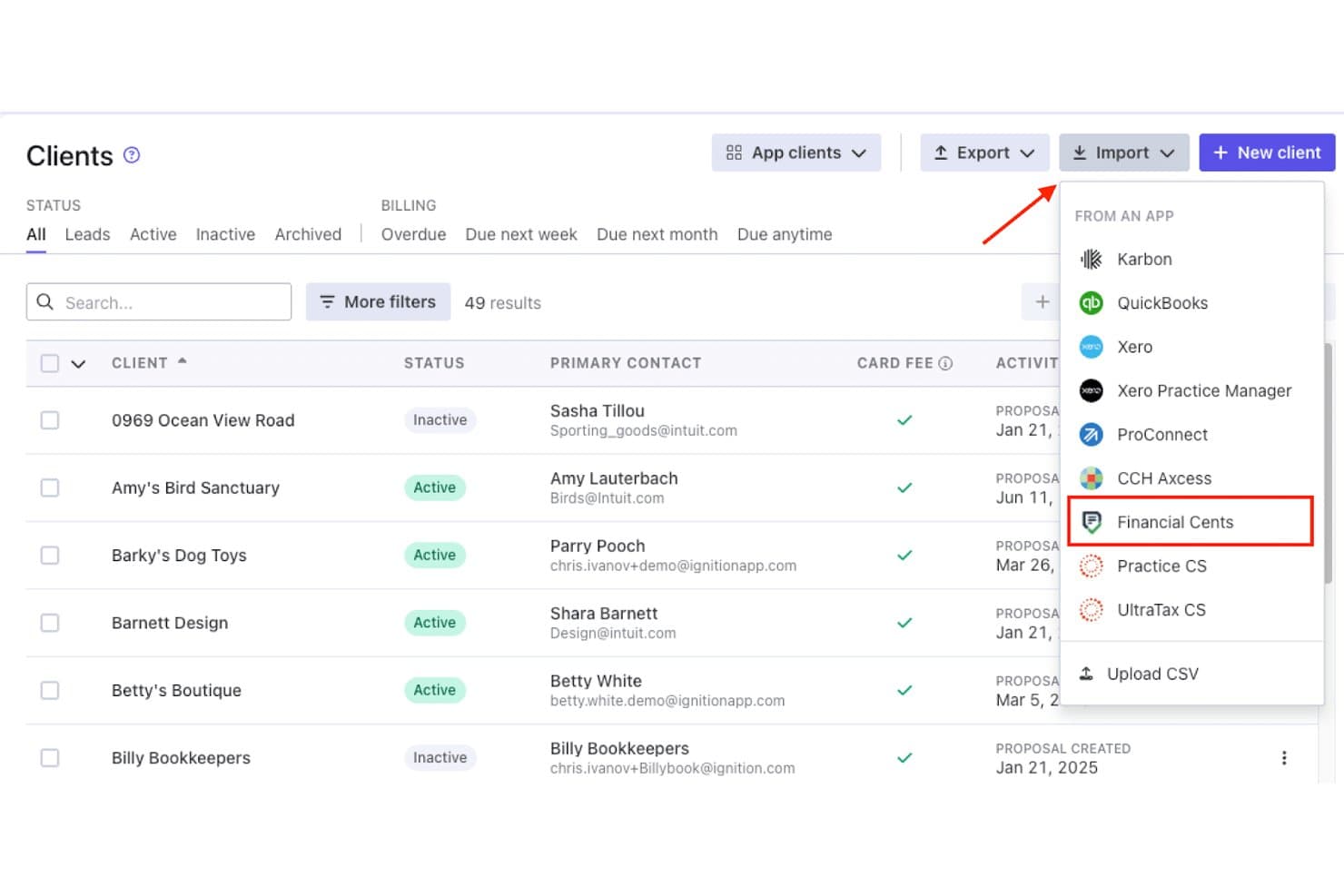
Financial Cents lets users import clients directly from the Ignition app. Financial Cents is accounting practice management software that helps firms organize workflows, deadlines, and client communication, making it Best for accounting firms replacing Ignition.
Who Is Financial Cents Best For?
Accounting firms replacing Ignition with a broader practice management system for proposals, payments, client work, and team workflows.
Why Financial Cents Is a Good Best Ignition Alternatives
I picked Financial Cents as a good Best Ignition Alternatives option because it supports accounting firms replacing Ignition with broader practice management. I use its proposals and payment workflows to move prospects into client work, then manage deadlines, team tasks, and client communication in one place.
Financial Cents Key Features
- Time tracking: Record billable hours against clients and projects.
- Client portal: Let clients upload files and review requested information.
- Workflow templates: Create repeatable processes for recurring engagements.
- Email integration: Connect email conversations to related client records.
Financial Cents Integrations
Financial Cents supports integrations with QuickBooks Online, SmartVault, OneDrive, Google Drive, Ignition, Gmail, and Outlook, plus Zapier. Scale and Enterprise plans also provide an open API for custom integrations.
Pros and Cons
Pros:
- Recurring templates expose deadlines and capacity
- Client portals reduce document-chasing
- Proposal signatures create workflows and invoices
Cons:
- Internal storage and high-level reporting feel limited
- Task views offer limited column control
Learn more about Financial Cents: Best for accounting firm engagement letters
- Free demo available
- From $79/user/month
Visit WebsiteCustomer Rating:4.8/5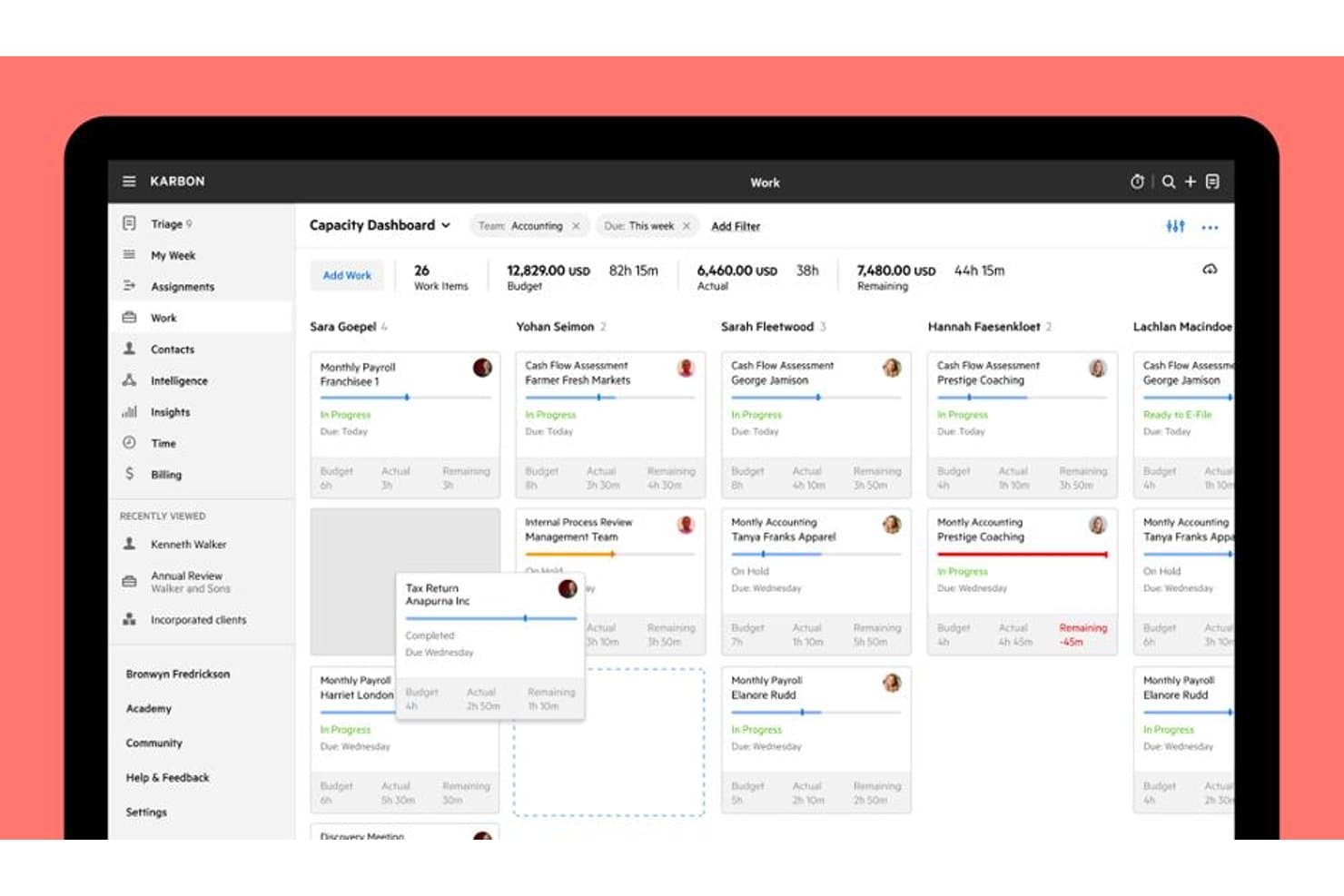
Karbon's Capacity Dashboard tracks team workload and budgets at a glance. Karbon is practice management software for accounting firms that helps teams coordinate client work, manage proposals, and turn approved services into clear engagement workflows.
Who Is Karbon Best For?
Accounting firms that need to draft, send, and manage engagement letters alongside client work.
Why Karbon Is a Good Best Ignition Alternatives
I picked Karbon because it connects proposal work with accounting firm engagement letters. I use its proposal workflows to move approved services into clear engagement workflows, while coordinating related client work in one place. That keeps the signed scope connected to delivery tasks instead of leaving it in a separate document.
Karbon Key Features
- Proposal templates: Create reusable templates for recurring accounting services.
- Custom fields: Add structured client and service details to proposal records.
- Email integration: Manage proposal-related email conversations within Karbon.
- Document storage: Keep proposal files and supporting documents with client records.
Karbon Integrations
Karbon documents integrations with Ignition, QuickBooks Online Accountant, Dropbox, Google Drive, Microsoft OneDrive, Slack, Microsoft Teams, Google Calendar, Outlook Calendar, and HubSpot. It also supports Zapier and provides a Karbon API for custom integrations.
Pros and Cons
Pros:
- Supports detailed task dependencies and deadlines
- Centralizes client emails and work history
- Connects engagement letters with delivery workflows
Cons:
- Setup demands substantial workflow configuration
- Interface can require too many clicks
Learn more about Karbon: Best for accounting firms replacing siloed tools
- Free demo available
- From $700/seat/year
Visit WebsiteCustomer Rating:4.7/5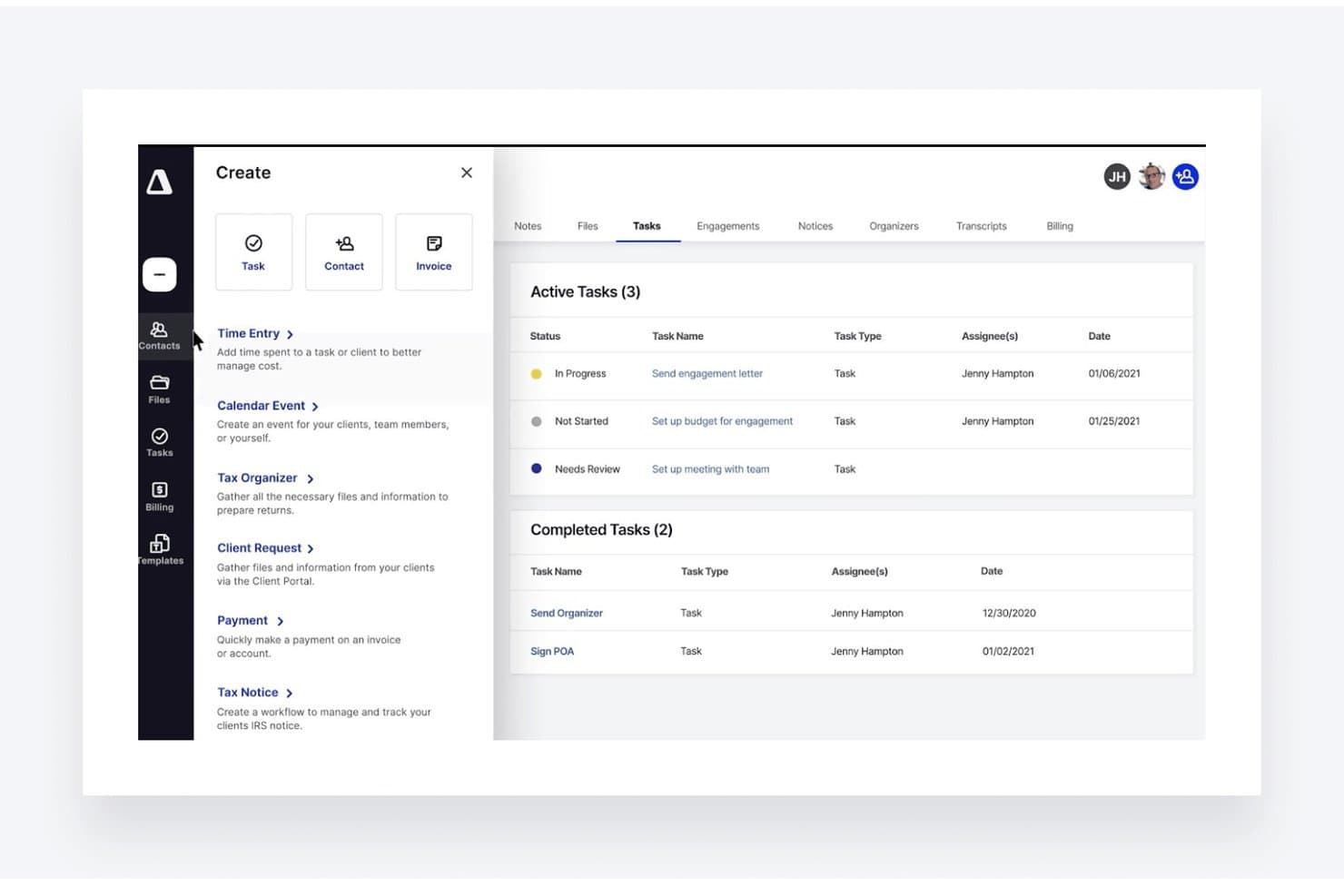
TaxDome lets users create and track client tasks from one dashboard. TaxDome is an all-in-one practice management platform for accounting firms that brings client communication, document workflows, billing, and team operations into one connected workspace.
Who Is TaxDome Best For?
TaxDome fits accounting firms that want one workspace for client communication, documents, billing, and team workflows instead of separate tools.
Why TaxDome Is a Good Best Ignition Alternatives
I picked TaxDome because it is best for accounting firms replacing siloed tools. I use its client portal, document workflows, billing, and team operations in one workspace, so client requests and approvals stay connected. My team can manage document collection, invoices, and communication without switching between separate systems.
TaxDome Key Features
- Contact management: Store client records, notes, tags, and custom fields.
- Email sync: Connect email accounts and save client correspondence automatically.
- Mobile app: Access client records and tasks from iOS and Android devices.
- Reporting dashboards: Track practice activity with configurable performance reports.
TaxDome Integrations
TaxDome offers documented integrations with QuickBooks Online and Xero Tax, plus Zapier. It works with tax programs such as Drake, UltraTax, Lacerte, CCH, TaxWise, ProSeries, and DATEV through its desktop print workflow, but it doesn’t have a public API.
Pros and Cons
Pros:
- Team task visibility keeps work coordinated
- Document collection supports repeatable client requests
- Unified client portal and billing workflows
Cons:
- Reporting feels limited for complex firms
- Setup requires significant workflow configuration
Learn more about TaxDome: Best for interactive web-based proposals
- 14-day free trial
- From $35/user/month (billed annually)
Visit WebsiteCustomer Rating:4.5/5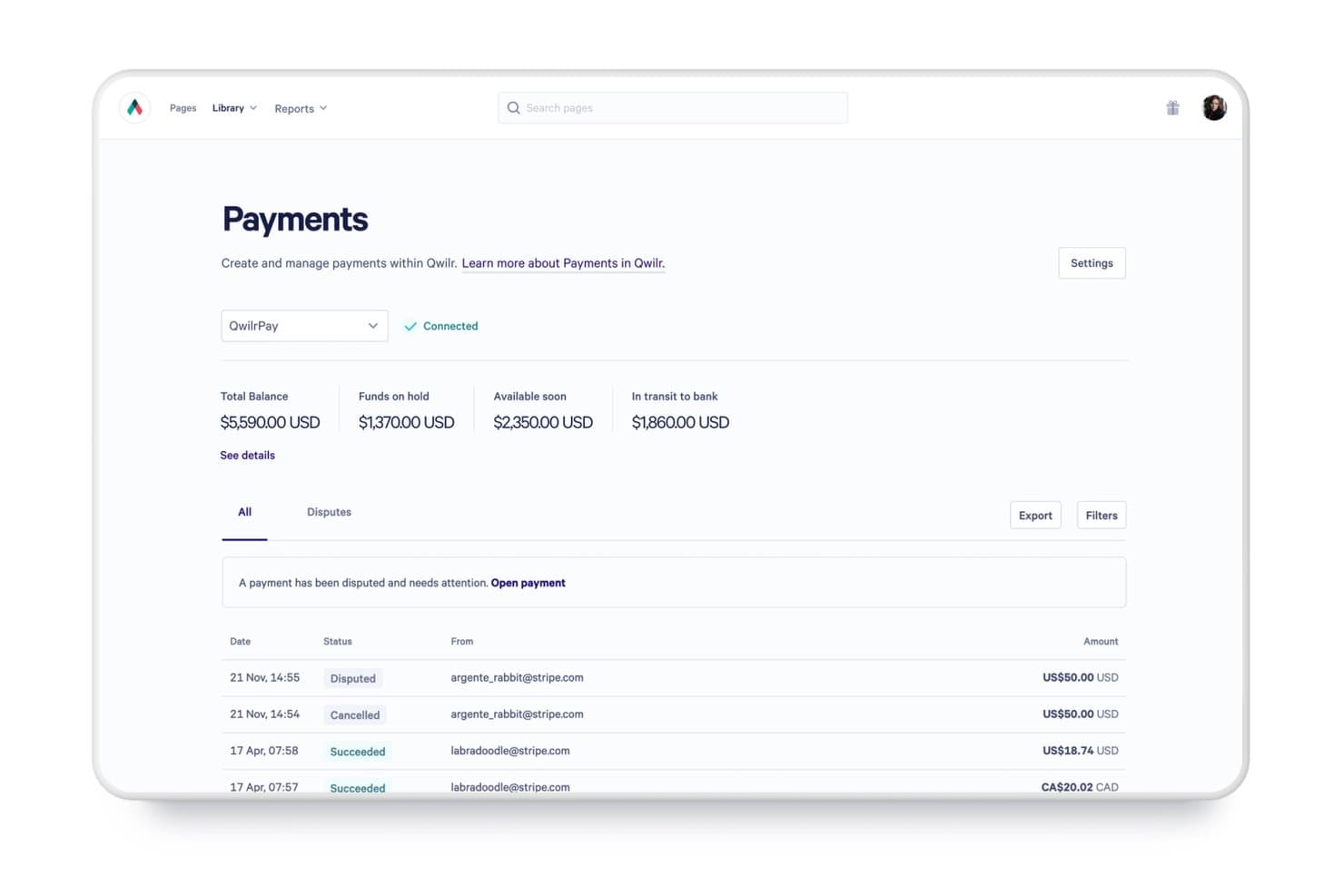
Qwilr tracks payment statuses, balances, and disputes in one place. Qwilr is a proposal management platform for sales and professional services teams that helps create polished, personalized proposals, centralize content, and guide prospects toward signed agreements.
Who Is Qwilr Best For?
Qwilr suits sales and professional services teams that create interactive proposals, tailor content for prospects, and move deals toward signed agreements.
Why Qwilr Is a Good Best Ignition Alternatives
I picked Qwilr as a Best Ignition Alternatives option because it turns proposals into interactive web-based proposals. I use branded pages with personalized content, videos, pricing tables, and embedded e-signatures to guide buyers from evaluation to approval. Proposal analytics also show which sections prospects view before follow-up.
Qwilr Key Features
- Proposal templates: Start documents with reusable, professionally designed templates.
- Content library: Store approved text, images, and assets for reuse.
- CRM integrations: Connect Qwilr with supported CRM platforms and workflows.
- Payment collection: Add payment options for clients to complete transactions.
Qwilr Integrations
Qwilr supports integrations with Microsoft Dynamics 365, HubSpot, Salesforce, Zoho CRM, Slack, Stripe, QuickBooks, and Pipedrive, and connects with Zapier. Qwilr also provides an API for custom integrations with CRMs, ERPs, and databases.
Pros and Cons
Pros:
- Embedded signing and payments shorten approval cycles
- Buyer engagement analytics guide timely follow-ups
- Interactive pages make proposals feel more engaging
Cons:
- Payment emails can get stuck
- Advanced template edits feel restrictive
Learn more about Qwilr: Best for accounting engagement letters
- 14-day free trial
- From $20/month (billed annually)
Visit WebsiteCustomer Rating:4.8/5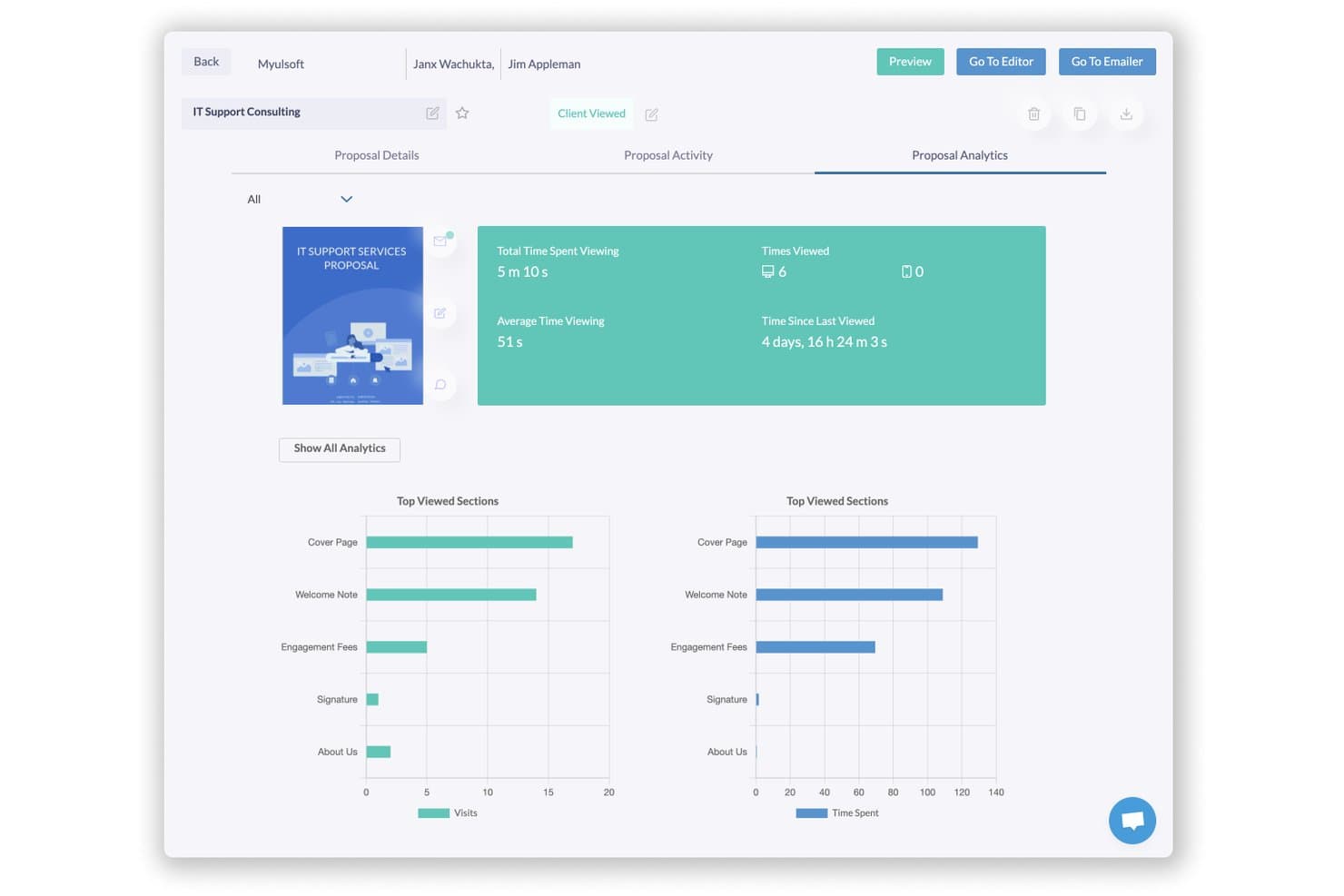
Fresh Proposals lets users track proposal views, time spent, and top sections. Fresh Proposals is proposal management software for accounting firms—Best for accounting engagement letters—that helps teams create, customize, send, and manage client proposals.
Who Is Fresh Proposals Best For?
Accounting firms that need reusable engagement letter templates and a central workflow for sending and managing client proposals.
Why Fresh Proposals Is a Good Best Ignition Alternatives
I picked Fresh Proposals because it’s Best for accounting engagement letters. I use its reusable proposal templates to create engagement letters, customize client details, and send them for approval. My team also tracks sent proposals and manages client responses from one workspace.
Fresh Proposals Key Features
- Electronic signatures: Add legally binding signature fields to proposals.
- Payment collection: Include payment options within proposal documents.
- Proposal analytics: Monitor views, time spent, and engagement activity.
- Team collaboration: Assign proposal tasks and manage internal approvals.
Fresh Proposals Integrations
Fresh Proposals offers 14+ native integrations, including HubSpot, Pipedrive, Zoho CRM, QuickBooks, Xero, CPACharge, LawPay, Trello, and Slack, and connects with Zapier. It also provides REST API and webhook access for custom integrations on request for enterprise accounts.
Pros and Cons
Pros:
- Responsive customer support
- Built-in signatures and payment collection
- Accounting-specific engagement letter templates
Cons:
- Design elements sometimes misalign
- Occasional slow performance and bugs
Learn more about Fresh Proposals: Best for sign-and-pay in one document
- Free plan available; 14-day free trial; Free demo available
- From $19/user/month
Visit WebsiteCustomer Rating:4.5/5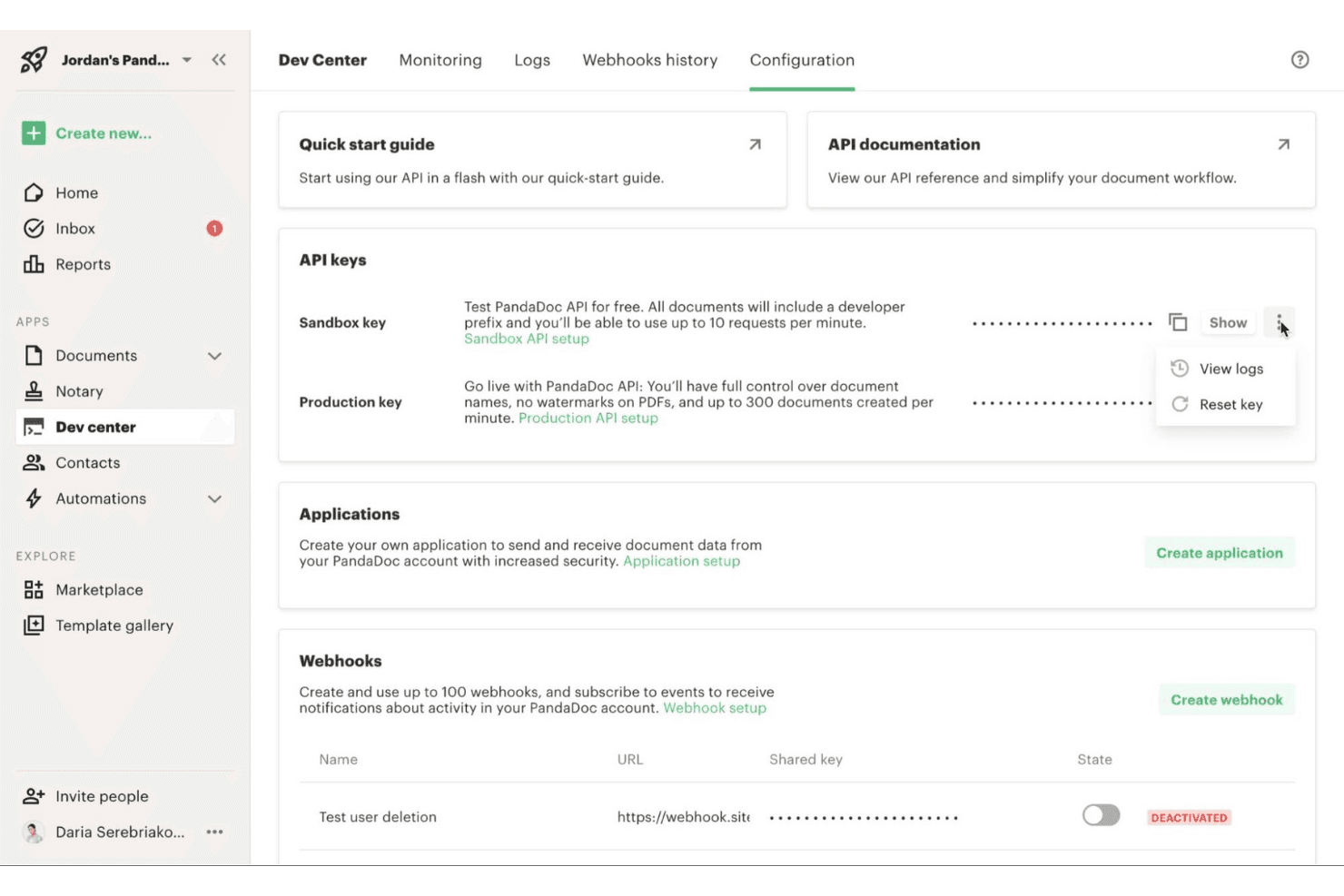
PandaDoc is a document automation tool that helps teams quickly build, send, and manage proposals, quotes, and contracts in one place. PandaDoc is a proposal management platform for sales and client-facing teams that brings document creation, approvals, e-signatures, and payment collection into one workflow, helping businesses reduce manual handoffs and move deals forward.
Who Is PandaDoc Best For?
PandaDoc suits sales teams and service businesses that need clients to review, sign, and pay from one document.
Why PandaDoc Is a Good Best Ignition Alternatives
I picked PandaDoc because it combines proposal creation, e-signatures, and payment collection in one document. My team uses it to send a client proposal, capture approval and signatures, then collect payment without switching workflows. That makes it a strong choice for sign-and-pay in one document.
PandaDoc Key Features
- Templates: Create reusable proposal templates with standardized content.
- Content library: Store approved text, images, pricing tables, and clauses.
- Approval workflows: Route documents to designated reviewers before sending.
- CRM integrations: Sync document data with supported customer relationship platforms.
PandaDoc Integrations
PandaDoc offers native integrations with Salesforce, HubSpot, and Pipedrive, plus an API for custom integrations. It also connects with Zapier.
Pros and Cons
Pros:
- Approval workflows reduce internal review delays
- Reusable templates support consistent client documents
- Combines proposals, signatures, and payments
Cons:
- Advanced reporting needs remain limited
- Complex documents may require formatting workarounds
Learn more about PandaDoc: Best for proposal-to-payment client onboarding
- Free trial + free demo available
- From $28/month (billed annually)
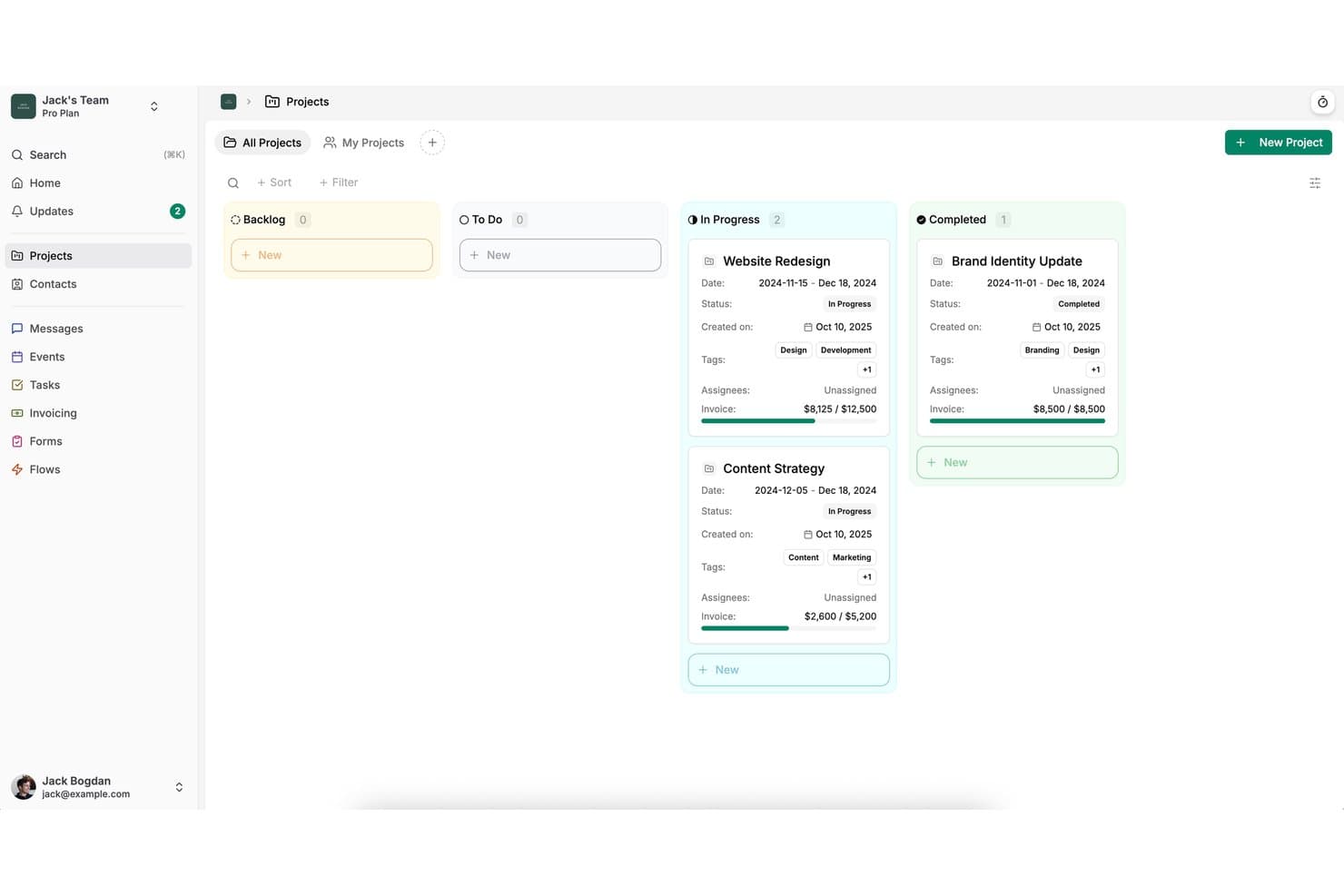
Dubsado organizes client projects by status in a kanban-style board view. Dubsado is client onboarding software for freelancers, agencies, and service businesses that brings forms, contracts, scheduling, invoices, and client communication into one workspace.
Who Is Dubsado Best For?
Dubsado suits freelancers and small service businesses that need to connect proposals, contracts, payments, and client communication in one workflow.
Why Dubsado Is a Good Best Ignition Alternatives
I picked Dubsado because it connects proposal, contract, scheduling, and payment steps in one client workflow. I use its forms and invoices to move a new client from signed proposal to paid engagement without switching platforms. That makes it a strong choice for proposal-to-payment client onboarding.
Dubsado Key Features
- Client portal: Give clients a private space for project details and documents.
- Workflow automation: Trigger emails and actions from defined workflow steps.
- Email templates: Save reusable messages for recurring client communications.
- Payment plans: Set installment schedules for client payment arrangements.
Dubsado Integrations
Dubsado offers direct integrations with QuickBooks Online, Xero, Zoom, Google Meet, Microsoft Teams, Google Calendar, Outlook, Square, and PayPal. It also connects with Zapier.
Pros and Cons
Pros:
- Flexible forms and workflows support repeat engagements
- Client portal keeps documents and communication together
- Proposal, contract, and payment workflow in one place
Cons:
- Reporting feels limited for detailed analysis
- Workflow builder takes time to configure
Learn more about Dubsado: Best for per-payment billing with no subscription
- Free demo available
- Pricing upon request
Visit WebsiteCustomer Rating:5/5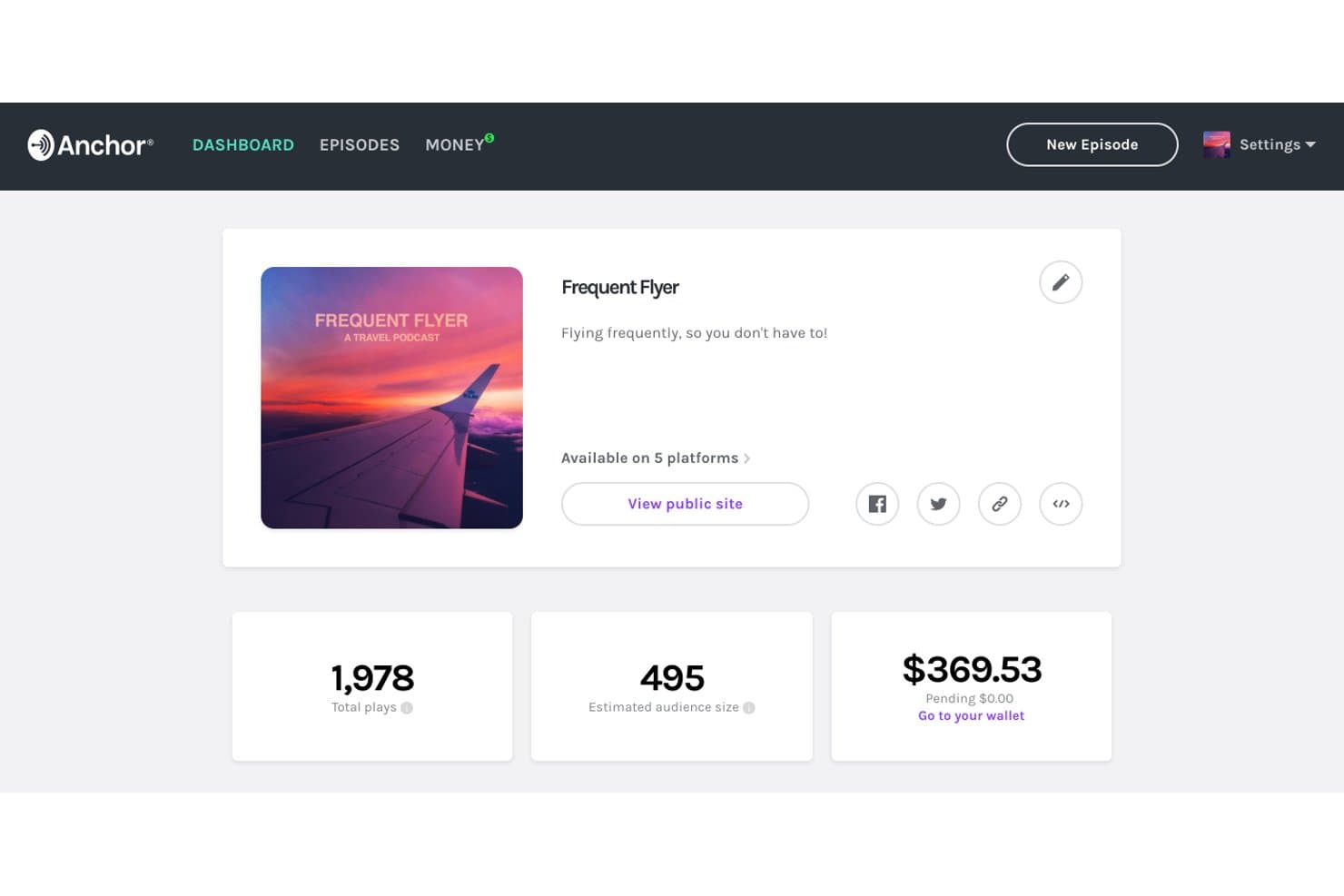
Anchor tracks plays, audience size, and earnings in one dashboard. Anchor is a data platform for teams that need to collect, organize, and access operational information without committing to a subscription, making it a flexible option for industrial data workflows.
Who Is Anchor Best For?
Anchor suits industrial teams that need to collect and access operational data without committing to recurring subscription fees.
Why Anchor Is a Good Best Ignition Alternatives
I picked Anchor because it supports industrial data workflows without requiring a recurring subscription. My team can collect, organize, and access operational information for SCADA-related projects, then pay per payment instead of committing to ongoing fees. That fits pilots, temporary deployments, and facilities with changing data requirements.
Anchor Key Features
- Operational data records: Capture structured information from industrial workflows.
- Asset grouping: Arrange records by equipment, site, or process.
- Data retrieval: Find stored information when reviewing SCADA operations.
- Workflow documentation: Maintain reference details for industrial projects.
Anchor Integrations
Anchor integrates with Okta, Microsoft Entra ID, Ping Identity, Microsoft 365, SharePoint, OneDrive, Box, and Dropbox. It also supports SIEM integration, but specific SIEM vendors and API support aren’t clearly documented.
Pros and Cons
Pros:
- Fits temporary industrial data deployments
- Organizes records by assets and sites
- Supports operational data collection workflows
Cons:
- Less suited to real-time control systems
- Limited evidence of native SCADA connectivity
Learn more about Anchor:
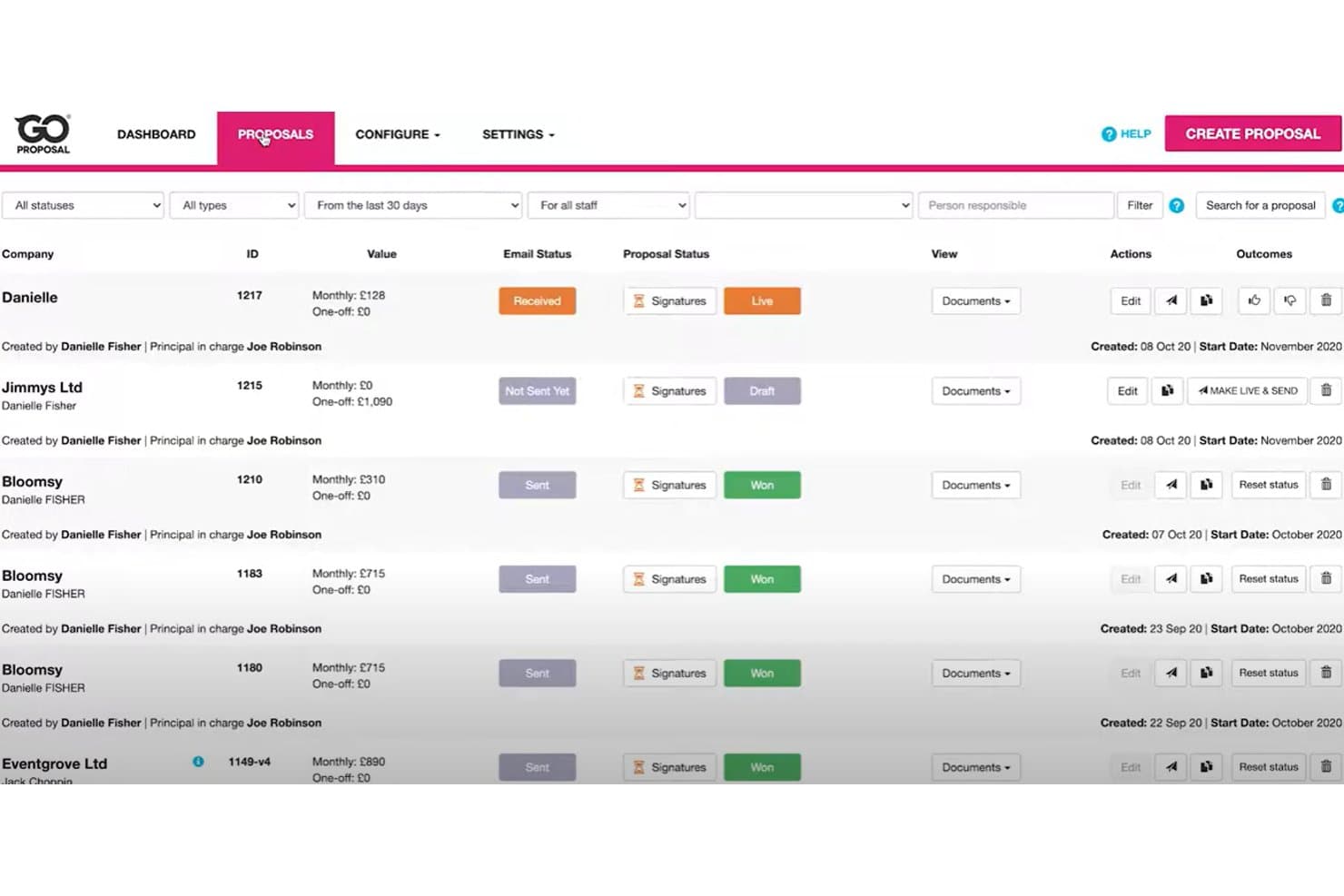
GoProposal tracks proposal statuses, values, and signatures in one view. GoProposal is a proposal platform for accounting firms that helps you package services, present pricing clearly, and secure client approval through a structured sales process.
Who Is GoProposal Best For?
Accounting firm owners and teams that need to package services, price engagements, and present client-ready proposals.
Why GoProposal Is a Good Best Ignition Alternatives
I picked GoProposal because it is Best for accounting firm pricing proposals. I use its service packaging, structured pricing, and client approval workflow to turn complex accounting engagements into clear proposals. That makes it a practical alternative when your priority is winning and defining accounting work rather than managing SCADA operations.
GoProposal Key Features
- Proposal templates: Start proposals with reusable layouts.
- E-signatures: Collect electronic signatures within proposals.
- CRM integrations: Connect proposal data with supported CRM tools.
- Sales reporting: Review proposal activity and conversion metrics.
GoProposal Integrations
GoProposal documents eight direct integrations, including Sage Accounting, Xero, QuickBooks, AccountancyManager, Karbon, Senta, GoCardless, and Dext Precision. It also connects with Zapier.
Pros and Cons
Pros:
- Guides clients through digital approval
- Packages services with clear pricing options
- Built specifically for accounting firm proposals
Cons:
- Proposal customization can feel restrictive
- Less suitable for non-accounting service businesses
Learn more about GoProposal:
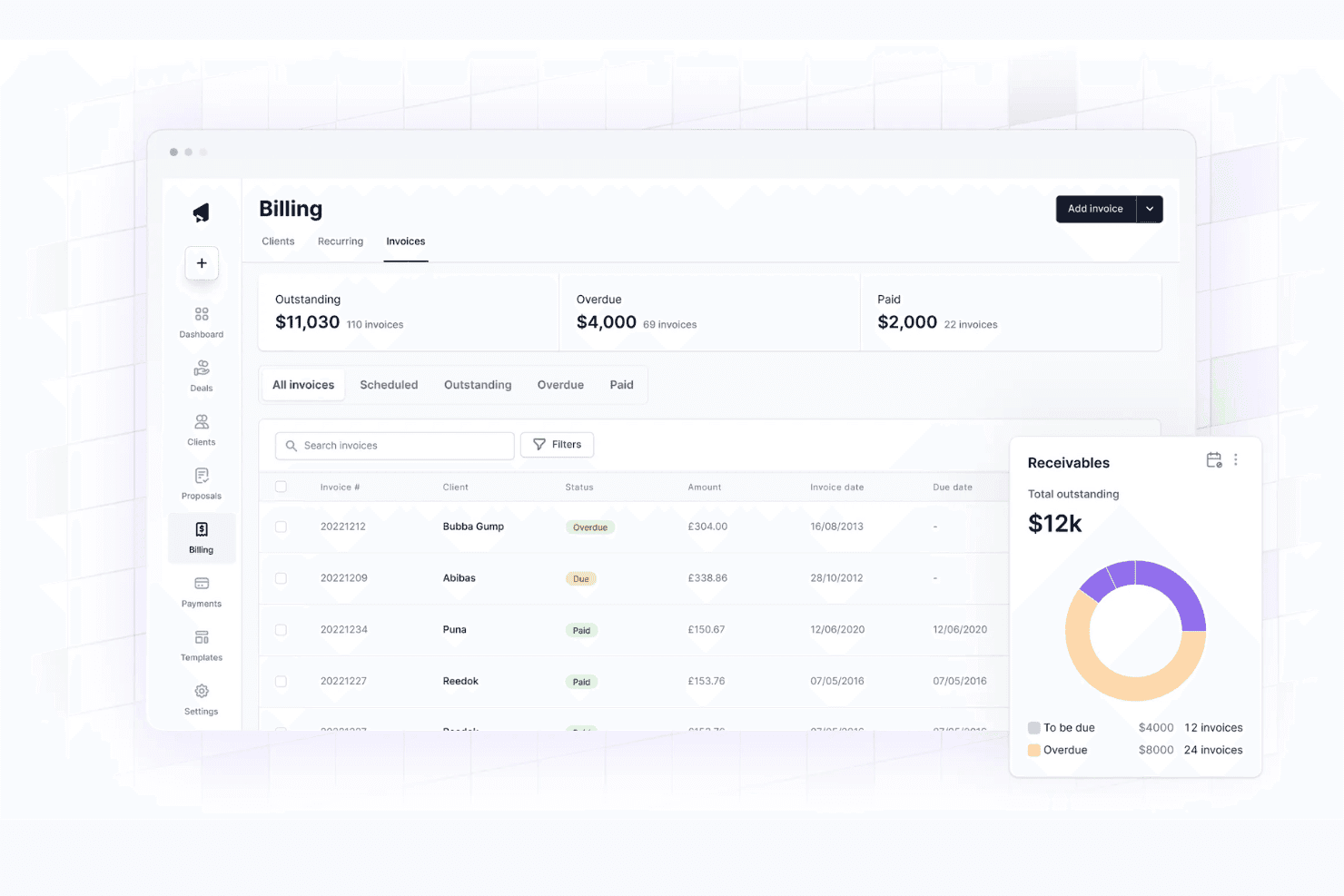
Cone tracks invoices, overdue amounts, and receivables in one billing view. Cone is practice management software for accounting firms that connects proposals, billing, payments, and client workflows in one place, helping teams reduce administrative work and manage engagements more clearly.
Who Is Cone Best For?
Accounting firms that price engagements through custom proposals can use Cone to turn approved scopes into recurring billing workflows.
Why Cone Is a Good Best Ignition Alternatives
I picked Cone because it turns approved proposals into billing workflows for accounting firms. I use its proposal, recurring billing, and payment tools to move an engagement from signed scope to collection without rebuilding the process elsewhere. Its client workflows also keep delivery and billing connected.
Cone Key Features
- Sales pipeline: Track prospective accounting engagements from lead to close.
- Projects: Organize active work with tasks, deadlines, and progress tracking.
- Time tracking: Record billable hours against client projects.
- Document management: Store and organize engagement-related files.
Cone Integrations
Cone offers native integrations with QuickBooks Online, Xero, Zoho Books, Stripe, GoCardless, Google Drive, SharePoint, Gmail, and Outlook, and connects with Zapier. An API schema is available for custom integrations, while Zapier, SharePoint, Gmail, and Outlook require the Growth plan.
Pros and Cons
Pros:
- Client portal keeps documents and tasks together
- Accounting-focused workflows fit recurring engagements
- Proposal approvals connect directly to billing
Cons:
- Reporting may feel basic for larger firms
- Broader practice management depth remains limited
Learn more about Cone:
Andre alternativer til Ignition
Her er noen flere alternativer til Ignition som ikke kom med på kortlisten min, men som likevel er verdt å se nærmere på:
- 11OnboardmeBest for accounting firms leaving Ignition
- 12DealHub AIBest for B2B sales quote-to-revenue workflows
- 13QuoteWerksBest for IT and MSP quote-to-signature workflows
- 14ProposifyBest for drag-and-drop proposal branding
- 15OdooBest for quote-to-cash on one platform
- 16BonsaiBest for creative firms managing proposals to payment
- 17AssemblyBest for AI-built, white-labeled client portals
- 18MoxieBest for freelancers sending proposals and contracts
- 19TidyflowBest for accounting firms scaling by team, not clients
- 20FigsFlowBest for UK accounting firm compliance proposals
How I Evaluate Ignition Alternatives
I split my evaluation into three parts. First—and most important—core functionality: can the tool create and send digital proposals, and does it capture legally binding e-signatures natively? Second, I look for standout features like automated renewal workflows and client payment portals. Third, I consider what's beyond features: onboarding support, pricing transparency, and integration depth with accounting and practice management ecosystems.
Core Functionality (Table Stakes For This List)
When I'm selecting tools for my list, I score each one on a scale from 0 (does not offer the functionality) to 5 (excels in this area) for each core functionality listed below. I then convert the total into a percentage to help assess each tool's overall fit, with extra weight on any functionalities I’ve deemed essential.
- Online Proposals (Essential): I look for customizable proposals or engagement letters with service packages, branding, reusable templates, and client-ready delivery.
- E-Signatures (Essential): I assess in-workflow signing, multi-party support, audit trails, reminders, and clear status visibility for accepted engagements.
- Billing And Payments: I check for one-time and recurring billing tied to accepted proposals, payment collection, retries, and client payment management.
- Pricing And Scope: Flexible packages, add-ons, discounts, and scope definitions show how well each tool supports varied service arrangements.
- Client Tracking: I look for sent, viewed, signed, and declined statuses, plus reminders that help teams follow proposals through onboarding.
- Accounting Integrations: I evaluate connections with accounting, CRM, and practice-management tools, including client, engagement, and billing data sync.
Once I have a list of tools that meet the criteria, I consider what sets each platform apart.
Differentiating Factors (What Sets Vendors Apart)
Here's how I compare and contrast different vendors:
Standout Features
I evaluate whether a tool offers automated renewal workflows—firms that manage hundreds of annual engagements need renewals to generate and send before expiration without manual tracking. Proposal analytics also matter: I check if the platform shows how long clients spend on each section, which helps teams adjust pricing or simplify confusing scope descriptions. A client payment portal where clients can update payment methods and settle invoices on their own cuts down on collection follow-ups, especially during busy seasons.
Beyond Features
I evaluate how quickly a firm can send its first proposal after signing up—some platforms offer guided migration from spreadsheets or legacy tools, while others leave you to figure it out. Integration depth matters just as much: I check whether sync with accounting platforms like QuickBooks or Xero is bidirectional and frequent enough to prevent duplicate client records or missed invoices. I also look at pricing transparency, since per-signature or per-proposal fees can quietly inflate costs as client volume grows.
Hvorfor se etter et alternativ til Ignition?
Selv om Ignition er en solid programvareløsning for administrasjon av tilbud og kundeprosesser, finnes det flere grunner til at fagfolk ser etter alternativer. Du vurderer kanskje å bytte fordi:
- Du trenger større kontroll over prismodellen din
- Du ser etter verktøy med bedre støtte for API-er og integrasjoner
- Introduksjonsprosessen din blir mer kompleks etter hvert som teamet vokser
- Du ønsker mer omfattende analyse- og rapporteringsfunksjoner
- Du opererer på tvers av flere språk eller regioner
- Du driver en liten bedrift eller er frilanser og ser etter et mer budsjettvennlig alternativ
En merknad om integrasjoner: Mange team bruker Ignition sammen med Excel, bokføringssystemer eller CRM-systemer for å støtte salgsprosessen, men integrasjonene kan være begrensede avhengig av teknologistakken din. Hvis dette er en bekymring, tilbyr flere av alternativene som er omtalt ovenfor mer fleksible og moderne løsninger for å skalere driften samtidig som brukeropplevelsen forbedres.
Viktige funksjoner i Ignition
Her får du en oversikt over hva Ignition tilbyr, slik at du kan sammenligne funksjonene med andre verktøy:
- Oppgavehåndtering – Tildel og følg opp oppgaver ved hjelp av tagger og trådede kommentarer for samarbeid.
- Prosjektvisualisering – Organiser arbeidet med Kanban-tavler, tidslinjevisninger, lister og oversikter.
- Sporing av OKR-er – Samkjør teamene med mål og nøkkelresultater, støttet av resultatmålinger.
- Lanseringsdokumentasjon – Utarbeid og organiser strategidokumenter med innebygde ressurser og versjonskontroll.
- Håndtering av digitale ressurser og dokumenter – Lagre filer, administrer godkjenninger og legg til tagger for enkel gjenfinning.
- KI-drevet automatisering – Generer innsikt, markedsføringstekster og prosjektplaner ved hjelp av kunstig intelligens.
- Maler og arbeidsflytlogikk – Bruk ferdigbygde maler og betingede arbeidsflyter for å øke effektiviteten.
- Konkurranseinnsikt – Automatiser gjennomganger av vunne og tapte salg, salgskort og spørreundersøkelser om kundetilbakemeldinger.
- Produkt- og funksjonsplanlegging – Administrer veikart, samle inn ideer og publiser versjonsnotater.