

Recensione Trello: Pro, Contro, Caratteristiche e Prezzi Spiegati
Trello si distingue per la sua semplicità visiva e flessibilità, rendendolo ideale per i team che cercano uno strumento di gestione progetti intuitivo.

Recensiamo gli strumenti in modo indipendente e le commissioni aiutano a finanziare i nostri test. Consulta la nostra politica sulla trasparenza, la nostra metodologia oppure suggerisci uno strumento.
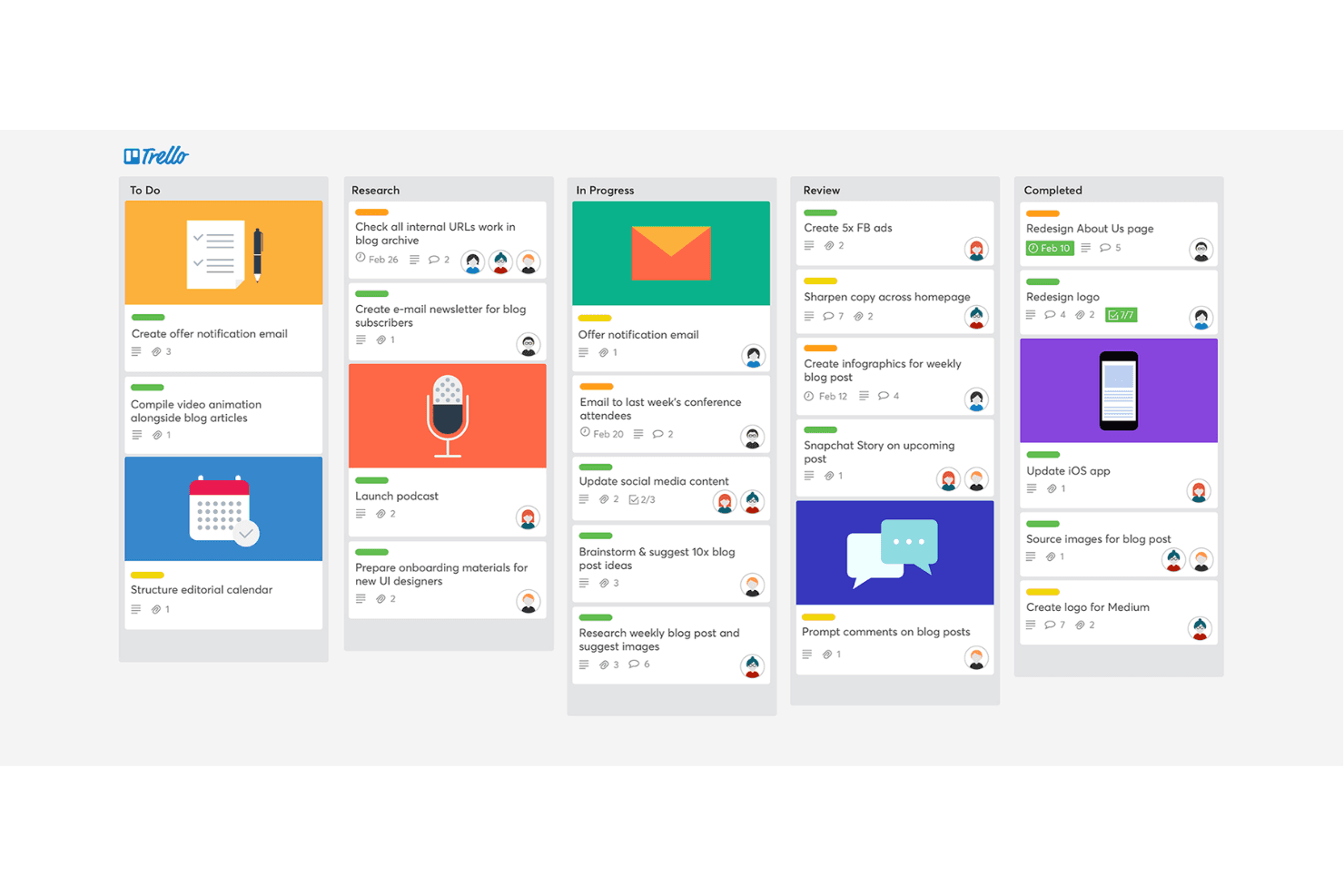
Trello is a simple yet flexible project management platform built around the visual workflows of kanban tools. I'd look at Trello when you want an easy way for your team to organize tasks, keep track of work-in-progress, and see progress at a glance—without a steep learning curve. Compared with Asana, Trello gives you a faster setup and a more intuitive drag-and-drop board that makes it easier to get your team collaborating right away.
Trello Evaluation Summary
4.5/5
- From $5/user/month (billed annually)
- 14-day free trial
Perché fidarsi dei nostri consigli sui software
6,700+
Reviews
20
Industry experts
16+
Evaluation factors
14
Years
Il nostro team testa e recensisce software dal 2012. In quanto product manager noi stessi, sappiamo quanto sia difficile — e importante — scegliere il software giusto.
Per questa guida, abbiamo valutato gli strumenti attraverso test pratici e ricerche indipendenti, assegnando un punteggio agli strumenti in base ai nostri criteri di selezione.
Le nostre recensioni riflettono il nostro giudizio editoriale umano, non un discorso di vendita.
Revisori esperti:
- Andrew LumbySenior TPM
- Cristiano ValimSenior UI/UX Lead


Trello Overview
When judging Trello as a kanban board tool, its drag-and-drop interface, and easy onboarding set it apart for teams new to project management. Trello’s pricing is accessible, and its integration options cover most common SaaS tools. However, it underperforms for users needing advanced reporting or complex workflow automation. If you’re selecting a tool for straightforward task tracking functionalities, collaborative planning, or project management, Trello is a top contender. For example, marketing teams and small product squads often find its simplicity and flexibility ideal, while larger organizations may need more depth.
Pros
- Kanban-based workflow makes project status visually clear.
- Power-Ups add automation and advanced features to boards.
- Mobile app syncs reliably with web and desktop versions.
Cons
- No built-in time tracking or workload management tools.
- Board limits and automation caps on free and lower tiers.
- Limited reporting and analytics for tracking project performance.
Is Trello Right For Your Needs?
Who Would be a Good Fit for Trello?
Trello is a strong choice for teams and organizations that value visual project tracking, need flexible workflows, and want a tool that’s easy to adopt. Its kanban-style boards, card system, and Power-Ups make it especially useful for creative, collaborative, and fast-moving environments. Trello works best for groups that don’t require deep analytics or complex process automation but need to organize tasks, share updates, and keep everyone aligned.
- Marketing TeamsTrello’s visual boards help manage campaigns, content calendars, and creative assets.
- Small StartupsStartups benefit from Trello’s low cost and quick setup for project tracking.
- FreelancersFreelancers use Trello to organize client projects and deadlines in one place.
- Education DepartmentsTeachers and administrators track assignments, lesson plans, and events easily.
- Product DesignDesign teams use cards to manage feedback, iterations, and design assets.
- Nonprofit OrganizationsNonprofits coordinate volunteers, events, and fundraising tasks with simple boards.
Who Would be a Bad Fit for Trello?
Trello is less effective for organizations that need advanced reporting, strict process controls, or highly specialized project management features. Teams with complex workflows, regulatory requirements, or large-scale resource planning may find Trello’s feature set limiting. If your work depends on granular analytics, built-in time tracking, or enterprise-level automation, Trello may not meet your needs.
- Enterprise ITIT departments need advanced workflow automation and audit trails not found in Trello.
- Large EnterprisesLarge companies often require resource management and reporting beyond Trello’s scope.
- Finance TeamsFinance teams need granular permissions and compliance features Trello lacks.
- Manufacturing OperationsManufacturing requires Gantt charts and capacity planning not available in Trello.
- Legal DepartmentsLegal teams need document management and approval workflows Trello doesn’t offer.
- Healthcare ProvidersHealthcare organizations require HIPAA compliance and secure data handling not supported by Trello.
Come Testiamo e Valutiamo gli Strumenti
Abbiamo passato anni a costruire, perfezionare e migliorare il nostro sistema di test e valutazione del software. Il nostro metodo è stato progettato per cogliere le sfumature della selezione del software e ciò che rende efficace uno strumento, concentrandosi sugli aspetti critici del processo decisionale. Qui sotto puoi vedere esattamente come funzionano i nostri test e la nostra valutazione suddivisa in sette criteri. Questo ci consente di offrire una valutazione imparziale del software sulla base delle funzionalità principali, delle caratteristiche distintive, della facilità d’uso, dell’onboarding, dell’assistenza clienti, delle integrazioni, delle recensioni dei clienti e del rapporto qualità/prezzo.
Funzionalità Principali (25% del punteggio finale)
Il punto di partenza della nostra valutazione sono sempre le funzionalità principali dello strumento. Possiede le funzioni di base che un utente si aspetterebbe di trovare? Alcune di queste sono riservate ai piani tariffari più alti? Ci aspettiamo che uno strumento rispetti almeno le funzionalità di base dei competitors.
Caratteristiche Distintive (25% del punteggio finale)
Successivamente, valutiamo le caratteristiche distintive e non comuni che vanno oltre le funzioni di base normalmente riscontrate in strumenti simili. Un punteggio alto indica funzionalità specializzate o uniche che rendono il prodotto più rapido, efficiente o forniscono un valore aggiunto all’utente. Valutiamo anche la facilità con cui si possono integrare altri strumenti solitamente presenti nella stack tecnologica, ampliando così funzionalità e utilità del software. Gli strumenti che offrono molte integrazioni native, collegamenti di terze parti e accesso API per integrazioni personalizzate ottengono i punteggi migliori.
Facilità d’Uso (10% del punteggio finale)
Consideriamo quanto sia rapido e semplice eseguire le attività definite dalle funzionalità principali tramite lo strumento. Il software con il punteggio più alto è ben progettato, intuitivo da usare, offre app per dispositivi mobili, modelli preimpostati e semplifica anche le attività più complesse.
Onboarding (10% del punteggio finale)
Sappiamo quanto sia importante una rapida adozione da parte del team, quindi valutiamo quanto sia facile imparare ad usare lo strumento con una formazione minima. Valutiamo la velocità con cui un membro del team può configurarsi e iniziare a utilizzare lo strumento senza esperienza. Le soluzioni con punteggio più alto richiedono poco o nessun supporto.
Assistenza Clienti (10% del punteggio finale)
Osserviamo quanto sia facile e veloce ottenere supporto tramite telefono, chat dal vivo o knowledge base. Gli strumenti che offrono supporto in tempo reale ottengono punteggi più alti, mentre i chatbot ricevono i punteggi peggiori.
Recensioni Clienti (10% del punteggio finale)
Oltre ai nostri test e valutazioni, consideriamo il net promoter score di clienti attuali e passati. Valutiamo la probabilità che scelgano nuovamente lo strumento in base alle funzionalità principali. Un software con punteggio elevato riflette un net promoter score alto.
Rapporto Qualità/Prezzo (10% del punteggio finale)
Infine, considerando tutti gli altri criteri, confrontiamo il prezzo medio dei piani base con le funzionalità principali, esaminando il valore degli altri criteri di valutazione. Il software che offre di più, a meno, otterrà un punteggio maggiore.
Core Features
Kanban Boards
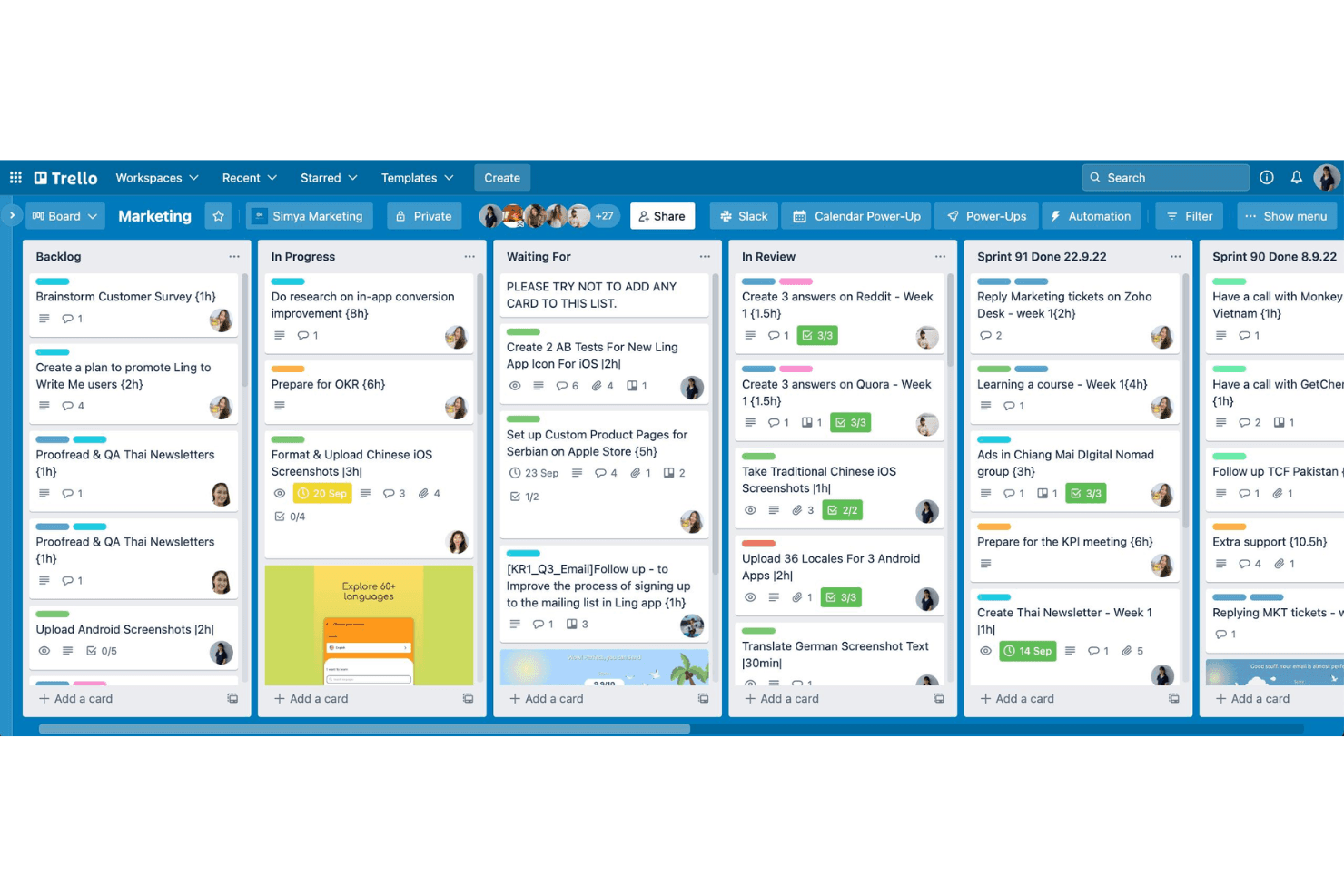
Organize projects visually with drag-and-drop cards on customizable boards. Each board represents a workflow, making task progress easy to track.
Cards and Lists
Break down projects into lists and cards for granular task management. Add checklists, attachments, and comments directly to each card.
Power-Ups
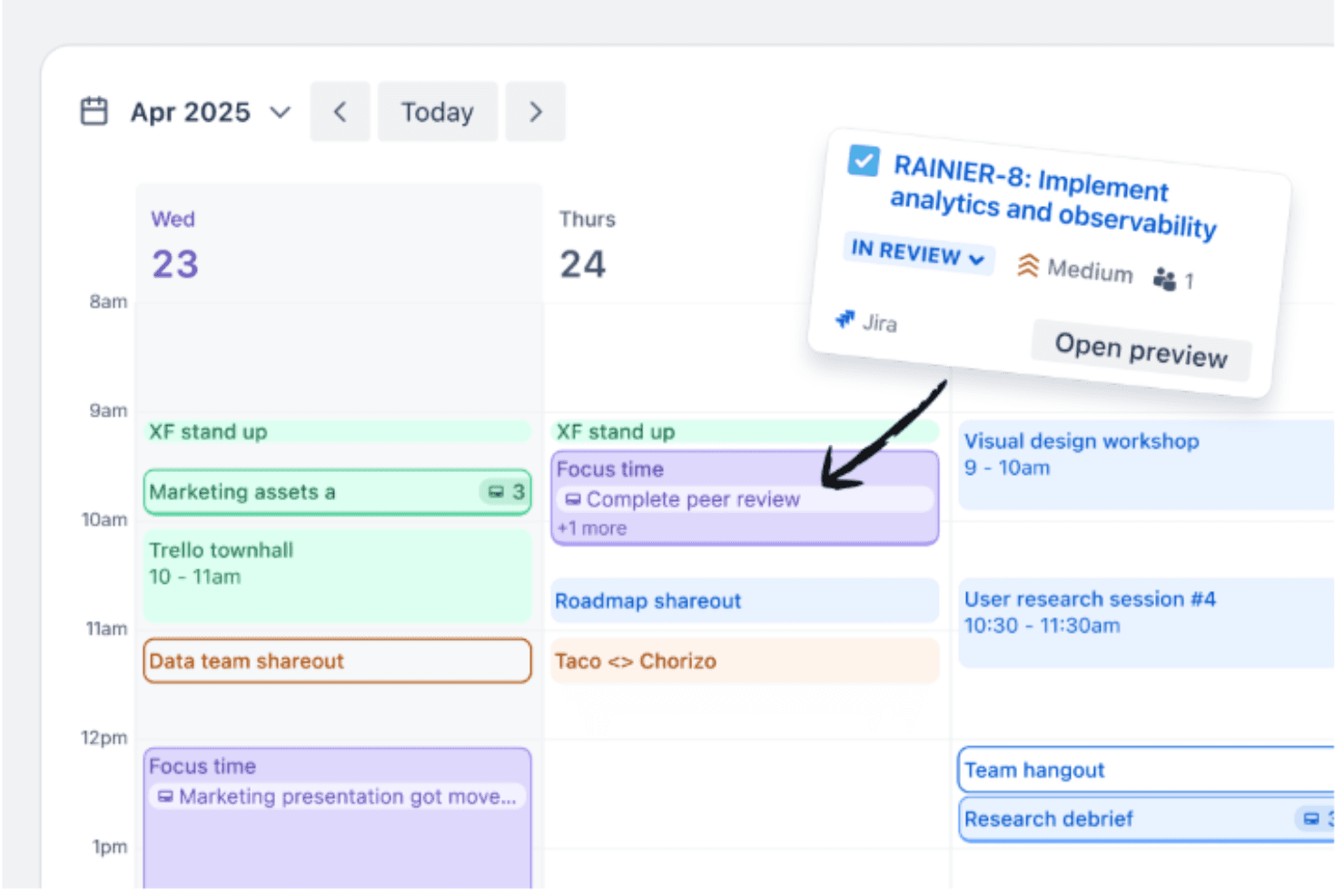
Enhance boards with add-ons for automation, calendar views, voting, and more. Power-Ups let you tailor Trello to specific project needs.
Butler Automation
Automate repetitive actions like moving cards or sending reminders with rule-based triggers. Butler helps reduce manual work and keeps boards updated.
Templates Library
Start quickly with pre-built templates for marketing, product launches, and team planning. Templates save setup time and provide proven workflows.
Mobile App
Access and update boards from iOS and Android devices. The app syncs in real time, so teams stay connected on the go.
Ease of Use
Trello is widely recognized for its intuitive, drag-and-drop interface and minimal setup requirements, making it accessible even for first-time users. The visual layout of boards and cards allows teams to organize work quickly without training. Users often highlight how easy it is to customize workflows and onboard new team members. While it may lack advanced features, Trello’s straightforward design keeps project management simple and approachable for most teams.
Integrations
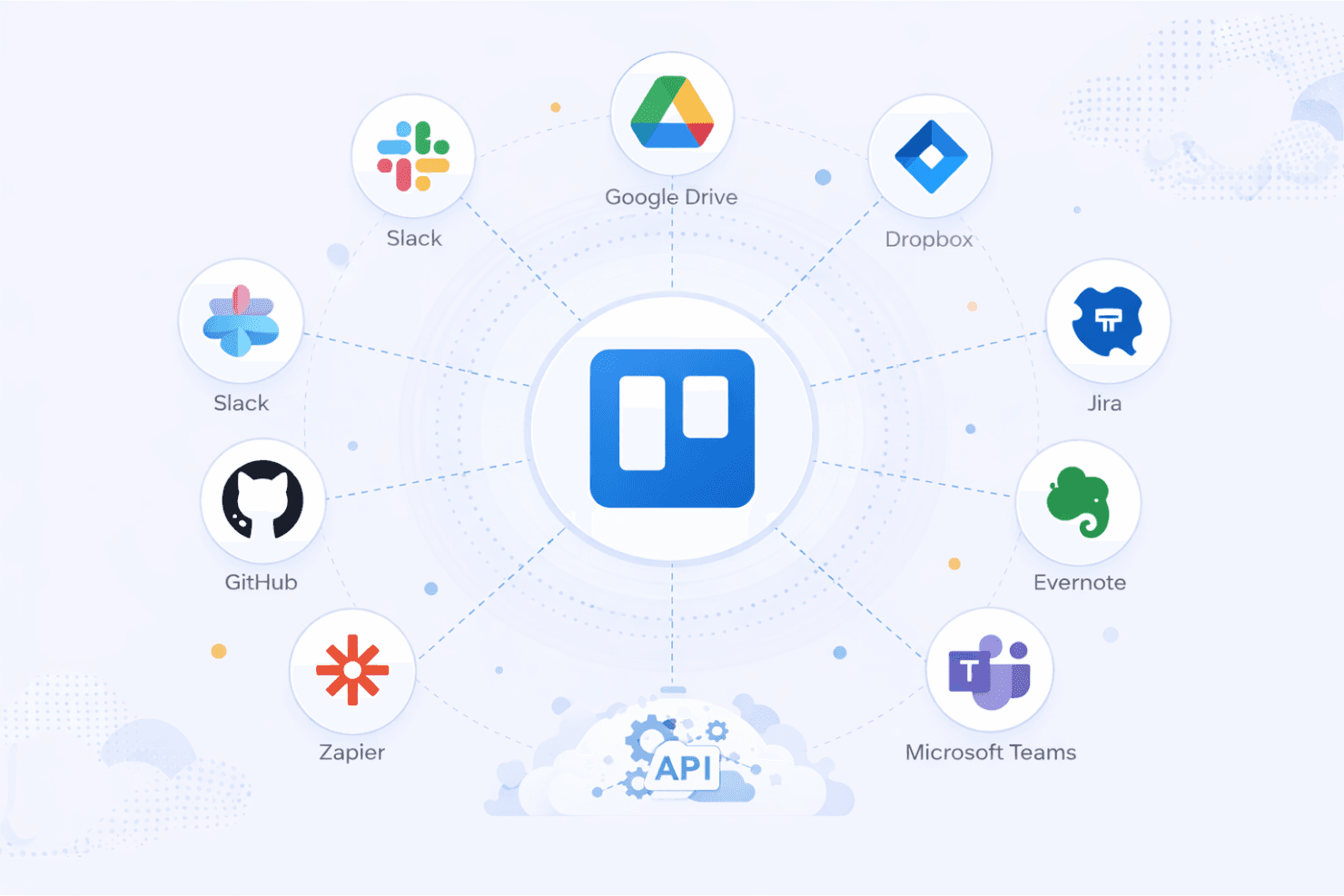
Trello integrates with Slack, Google Drive, Dropbox, Jira, Microsoft Teams, Evernote, Salesforce, GitHub, Zapier, and Confluence, among others.
Trello also offers a public API and connects with third-party integration tools for expanded automation and connectivity.
Trello Specs
- API: Yes
- Batch Permissions & Access: No
- Budgeting: Yes
- Calendar Management: Yes
- Collaboration Support: No
- Contact Management: No
- Contact Sharing: No
- Customer Management: No
- Dashboard: Yes
- Dashboards: Yes
- Data Export: Yes
- Data Import: Yes
- Data Visualization: Yes
- Dependency Tracking: Yes
- Document Sharing: Yes
- Expense Tracking: No
- External Integrations: Yes
- File Sharing: Yes
- Gantt Charts: Yes
- Kanban Boards: Yes
- Multi-User: Yes
- Notifications: Yes
- Project Management: Yes
- Resource Management: No
- Scheduling: Yes
- Task Scheduling/Tracking: Yes
- Third-Party Plugins/Add-Ons: Yes
- Time Management: Yes
- Travel Management: No
- Workflow Management: Yes


