

Recensione Datadog: Pro, Contro, Funzionalità e Prezzi
Scopri i pro, i contro, i prezzi e le funzionalità di Datadog a confronto con altri strumenti di monitoraggio utenti per capire se è adatto al tuo team.

Recensiamo gli strumenti in modo indipendente e le commissioni aiutano a finanziare i nostri test. Consulta la nostra politica sulla trasparenza, la nostra metodologia oppure suggerisci uno strumento.
Datadog is a user tracking software for engineering and product teams that need to connect frontend user behavior to backend performance data. I'd consider it over something like New Relic if your team already runs infrastructure monitoring in Datadog and wants real user monitoring, session replay, and error tracking in the same platform—rather than managing a separate tool just for the user-facing layer.
Datadog Evaluation Summary
4.5/5
- From $5/month (billed annually)
- Free plan available and 14-day free trial
Perché fidarsi dei nostri consigli sui software
6,700+
Reviews
20
Industry experts
16+
Evaluation factors
14
Years
Il nostro team testa e recensisce software dal 2012. In quanto product manager noi stessi, sappiamo quanto sia difficile — e importante — scegliere il software giusto.
Per questa guida, abbiamo valutato gli strumenti attraverso test pratici e ricerche indipendenti, assegnando un punteggio agli strumenti in base ai nostri criteri di selezione.
Le nostre recensioni riflettono il nostro giudizio editoriale umano, non un discorso di vendita.
Revisori esperti:
- Andrew LumbySenior TPM
- Cristiano ValimSenior UI/UX Lead


Datadog Overview
In my opinion, Datadog stands out with its powerful real-time monitoring features, making it ideal for tech-driven teams needing detailed insights. While it offers excellent integrations and customer support, its pricing may not suit smaller businesses. Compared to competitors, Datadog excels in data visualization and alerting but falls short on ease of use and onboarding. It's best for larger organizations or those with complex infrastructure needing robust analytics. If your team requires detailed monitoring and can handle a steeper learning curve, Datadog is a solid choice.
Pros
- You get real-time monitoring that helps your team catch issues quickly.
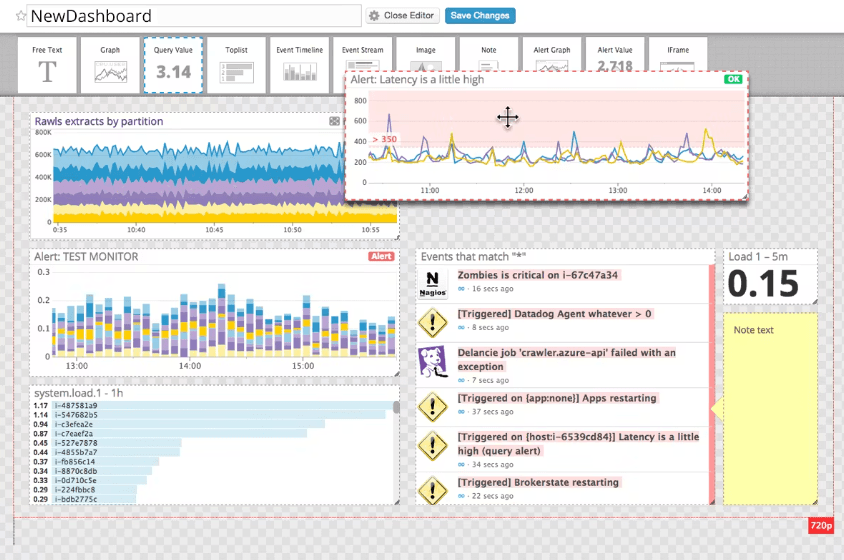
- Datadog's dashboards make it easy to visualize your data.
- The alerting system is customizable to fit your team's needs.
Cons
- You might find the interface a bit complex to navigate.
- Onboarding can be challenging for new users.
- Your team may need time to learn its advanced features.
Is Datadog Right For Your Needs?
Who Would be a Good Fit for Datadog?
Datadog is perfect for tech-driven teams in industries like finance and e-commerce where real-time data is crucial. If your team needs a robust monitoring tool with customizable alerts, Datadog's real-time analytics and visualization tools will serve you well. It's especially useful for IT operations and development teams dealing with complex infrastructures, as it helps identify performance issues quickly.
- Large EnterprisesDatadog's scalability and detailed analytics make it ideal for big companies needing comprehensive monitoring.
- IT OperationsYour IT team will benefit from Datadog's real-time monitoring and alerting features to manage system performance.
- E-commerceDatadog helps track and analyze user interactions in real-time, crucial for online retail businesses.
- Financial ServicesThe detailed insights and security monitoring make it suitable for finance sectors needing stringent oversight.
- DevOps TeamsYour DevOps team can leverage Datadog’s integration capabilities to streamline development and operations.
- Healthcare ITDatadog's robust data visualization and monitoring features support compliance and performance in healthcare tech environments.
Who Would be a Bad Fit for Datadog?
Datadog might not suit small businesses or startups with limited budgets and simpler monitoring needs. Its complex interface and steep learning curve can be overwhelming if your team lacks technical expertise. If you’re looking for a straightforward, user-friendly tool without extensive setup, Datadog’s advanced features might be overkill. It’s also not ideal if your team doesn't require real-time analytics or detailed customizations.
- Small StartupsDatadog's complexity and cost are unnecessary for startups needing simple monitoring solutions.
- Non-Tech TeamsYour non-tech team might struggle with Datadog's complex interface and advanced features.
- Budget-Constrained BusinessesIf your business has tight budgets, Datadog's pricing may not align with your financial plans.
- Simple Monitoring NeedsFor basic monitoring, Datadog's advanced capabilities are excessive and may not be cost-effective.
- Short-Term ProjectsIf your project is temporary, Datadog's setup time and learning curve might not be worth it.
- FreelancersFreelancers with simple tracking needs will find Datadog's features too extensive and costly.
Come Testiamo e Valutiamo gli Strumenti
Abbiamo passato anni a costruire, perfezionare e migliorare il nostro sistema di test e valutazione del software. Il nostro metodo è stato progettato per cogliere le sfumature della selezione del software e ciò che rende efficace uno strumento, concentrandosi sugli aspetti critici del processo decisionale. Qui sotto puoi vedere esattamente come funzionano i nostri test e la nostra valutazione suddivisa in sette criteri. Questo ci consente di offrire una valutazione imparziale del software sulla base delle funzionalità principali, delle caratteristiche distintive, della facilità d’uso, dell’onboarding, dell’assistenza clienti, delle integrazioni, delle recensioni dei clienti e del rapporto qualità/prezzo.
Funzionalità Principali (25% del punteggio finale)
Il punto di partenza della nostra valutazione sono sempre le funzionalità principali dello strumento. Possiede le funzioni di base che un utente si aspetterebbe di trovare? Alcune di queste sono riservate ai piani tariffari più alti? Ci aspettiamo che uno strumento rispetti almeno le funzionalità di base dei competitors.
Caratteristiche Distintive (25% del punteggio finale)
Successivamente, valutiamo le caratteristiche distintive e non comuni che vanno oltre le funzioni di base normalmente riscontrate in strumenti simili. Un punteggio alto indica funzionalità specializzate o uniche che rendono il prodotto più rapido, efficiente o forniscono un valore aggiunto all’utente. Valutiamo anche la facilità con cui si possono integrare altri strumenti solitamente presenti nella stack tecnologica, ampliando così funzionalità e utilità del software. Gli strumenti che offrono molte integrazioni native, collegamenti di terze parti e accesso API per integrazioni personalizzate ottengono i punteggi migliori.
Facilità d’Uso (10% del punteggio finale)
Consideriamo quanto sia rapido e semplice eseguire le attività definite dalle funzionalità principali tramite lo strumento. Il software con il punteggio più alto è ben progettato, intuitivo da usare, offre app per dispositivi mobili, modelli preimpostati e semplifica anche le attività più complesse.
Onboarding (10% del punteggio finale)
Sappiamo quanto sia importante una rapida adozione da parte del team, quindi valutiamo quanto sia facile imparare ad usare lo strumento con una formazione minima. Valutiamo la velocità con cui un membro del team può configurarsi e iniziare a utilizzare lo strumento senza esperienza. Le soluzioni con punteggio più alto richiedono poco o nessun supporto.
Assistenza Clienti (10% del punteggio finale)
Osserviamo quanto sia facile e veloce ottenere supporto tramite telefono, chat dal vivo o knowledge base. Gli strumenti che offrono supporto in tempo reale ottengono punteggi più alti, mentre i chatbot ricevono i punteggi peggiori.
Recensioni Clienti (10% del punteggio finale)
Oltre ai nostri test e valutazioni, consideriamo il net promoter score di clienti attuali e passati. Valutiamo la probabilità che scelgano nuovamente lo strumento in base alle funzionalità principali. Un software con punteggio elevato riflette un net promoter score alto.
Rapporto Qualità/Prezzo (10% del punteggio finale)
Infine, considerando tutti gli altri criteri, confrontiamo il prezzo medio dei piani base con le funzionalità principali, esaminando il valore degli altri criteri di valutazione. Il software che offre di più, a meno, otterrà un punteggio maggiore.
Core Features
Real-Time Monitoring
Datadog provides live data tracking, so your team can identify and resolve issues instantly. This feature is crucial for maintaining system health and performance.
Customizable Dashboards
You can tailor dashboards to display the most relevant data for your work. This flexibility helps you focus on what matters to your team and align monitoring workflows with your operational priorities.
Alerting System
Automate alerts to notify you of issues before they escalate. You can customize these alerts based on specific thresholds and conditions, helping your team respond quickly and reduce downtime.
Data Visualization
The platform offers clear, visual insights into your data. This makes it easier for you to analyze custom metrics, identify trends, and make informed decisions.
Log Management
Datadog efficiently collects and manages logs from your applications. When combined with APM, it helps you troubleshoot and optimize your system's performance.
Real User Monitoring (RUM)
Datadog lets you track how real users interact with your applications across devices and locations. This helps your team identify performance issues, user behavior, and improve the user experience.

Ease of Use
Datadog's interface can be a bit daunting at first, especially if your team isn't tech-savvy. The advanced features and customizable dashboards offer great flexibility, but they require a learning curve. You'll find that setting up alerts and configuring dashboards may take time, but once you get the hang of it, the insights are invaluable. Compared to other tools, Datadog offers powerful capabilities, but ease of use isn't its strongest suit for newcomers.
Integrations
Datadog integrates with AWS, Azure, Google Cloud, Slack, PagerDuty, Jira, GitHub, Docker, Kubernetes, and Apache.
Datadog also offers an API and connects with third-party integration tools to extend its capabilities.
Datadog Specs
- AI Integration: No
- API: Yes
- Automated Testing: No
- Browser Compatibility Testing: No
- Bug Tracking: Yes
- Code Review: No
- Custom Reports: Yes
- Data Export: Yes
- Data Import: Yes
- Developer Tools: Yes
- External Integrations: Yes
- Malware Protection: No
- Multi-User: Yes
- Notifications: Yes
- Performance Testing: Yes
- Process Reporting: No
- Static Analysis: No
- Status Notifications: Yes
- Workflow Management: No


