

Gli strumenti per la raccolta delle idee sono piattaforme basate sul cloud che aiutano a raccogliere, organizzare e gestire in un unico posto le idee del proprio team o degli stakeholder. Se stai cercando un modo per evitare che suggerimenti preziosi vadano persi, lo strumento giusto per la gestione delle idee può fare davvero la differenza. Con così tante opzioni disponibili, è difficile capire quale soluzione si adatti meglio al tuo flusso di lavoro, al tuo stile di collaborazione e ai tuoi obiettivi di innovazione aperta. Questo elenco ti aiuterà a confrontare rapidamente i migliori strumenti software del 2026, così potrai scegliere la migliore piattaforma per la gestione delle idee, sostenere la creatività del tuo team e trasformare le idee in risultati concreti.
Perché fidarsi dei nostri consigli sui software
6,700+
Reviews
20
Industry experts
16+
Evaluation factors
14
Years
Il nostro team testa e recensisce software dal 2012. In quanto product manager noi stessi, sappiamo quanto sia difficile — e importante — scegliere il software giusto.
Per questa guida, abbiamo valutato gli strumenti attraverso test pratici e ricerche indipendenti, assegnando un punteggio agli strumenti in base ai nostri criteri di selezione.
Le nostre recensioni riflettono il nostro giudizio editoriale umano, non un discorso di vendita.
Revisori esperti:
- Andrew LumbySenior TPM
- Cristiano ValimSenior UI/UX Lead


Tabella comparativa degli strumenti per la raccolta delle idee
La tabella seguente confronta i dettagli dei prezzi della mia selezione dei migliori strumenti per la raccolta delle idee.
| Tool | Best For | Trial Info | Price | ||
|---|---|---|---|---|---|
| 1 | Ideale per condividere gli aggiornamenti di Jira | Piano gratuito + prova gratuita disponibile | A partire da $1.10/utente/mese | Website | |
| 2 | Ideale per l'innovazione tramite partecipazione collettiva a livello governativo | Demo gratuita disponibile | Prezzi su richiesta | Website | |
| 3 | Ideale per bacheche visive che organizzano le idee creative | Piano gratuito disponibile | A partire da $9.99/utente/mese (fatturato annualmente) | Website | |
| 4 | Ideale per acquisire idee all'interno di Google Workspace | Piano gratuito disponibile | A partire da $7/utente/mese | Website | |
| 5 | Ideale per la gestione delle campagne aziendali per la raccolta di idee | Demo gratuita disponibile | Prezzi su richiesta | Website | |
| 6 | Ideale per organizzare le idee insieme ai documenti di progetto | Piano gratuito disponibile | A partire da $10/utente/mese (con fatturazione annuale) | Website | |
| 7 | Ideale per acquisire contenuti gratuitamente su tutti i dispositivi Apple | Piano gratuito disponibile | Utilizzabile gratuitamente | Website | |
| 8 | Ideale per acquisire contenuti in più formati su tutti i dispositivi | Piano gratuito + prova gratuita di 7 giorni disponibile | A partire da $8.25/mese (con fatturazione annuale) | Website | |
| 9 | Ideale per note che collegano le idee nel tempo | Prova gratuita di 14 giorni + demo gratuita disponibile | Prezzi su richiesta | Website | |
| 10 | Ideale per raccogliere i feedback degli utenti SaaS | Piano gratuito + prova gratuita + demo gratuita disponibili | A partire da $79/mese (fatturato annualmente) | Website |



Recensioni degli strumenti per la raccolta delle idee
Di seguito trovi i miei riepiloghi dettagliati degli strumenti per la raccolta delle idee che sono entrati nella mia selezione. Le mie recensioni offrono una panoramica dettagliata delle funzionalità, dei casi d’uso più adatti e delle integrazioni di ciascuna piattaforma, per aiutarti a trovare quella migliore per te.
 Ideale per condividere gli aggiornamenti di Jira
- Piano gratuito + prova gratuita disponibile
- A partire da $1.10/utente/mese
Visit WebsiteCustomer Rating:5/5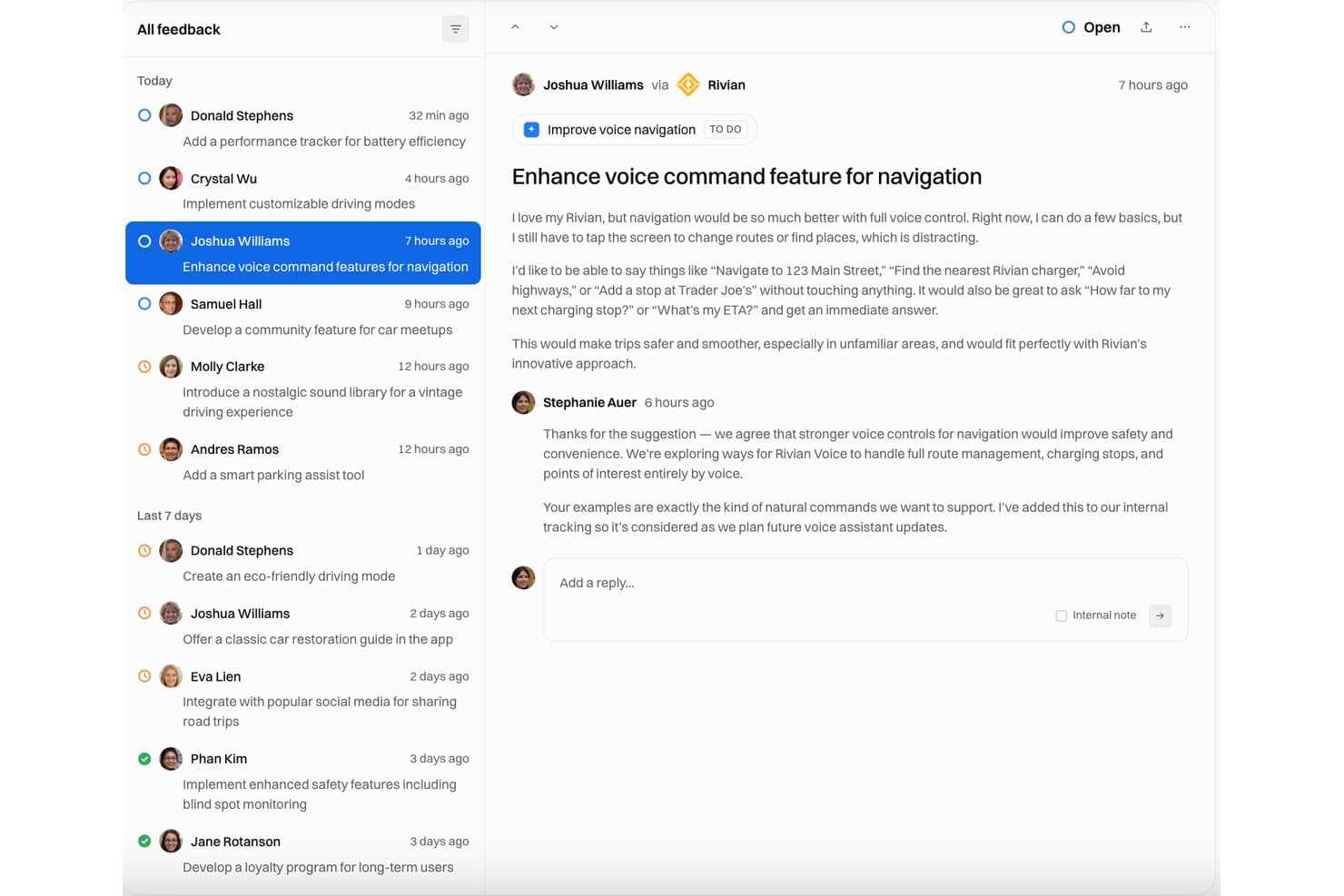
Released mostra una casella di posta per i feedback in cui le richieste di miglioramento della navigazione vocale sono monitorate con stato aperto e risposte del team. Released è uno strumento nativo di Jira per la raccolta dei feedback e la comunicazione della roadmap, che raccoglie idee di clienti e parti interessate tramite portali ospitati, moduli incorporabili e Slack, collegando direttamente gli invii alle issue di Jira e a Jira Product Discovery.
Per chi è più adatto Released?
Released è adatto ai team di prodotto già standardizzati su Jira che devono condividere i progressi della roadmap e gli aggiornamenti delle release con clienti o partner senza concedere loro l'accesso a Jira.
Perché ho scelto Released
Released si è guadagnato un posto nella mia selezione perché colma molto bene il divario comunicativo tra Jira e il mondo esterno. Mi piace poter pubblicare visualizzazioni della roadmap specifiche per il pubblico (una per i clienti, una per i dirigenti) a partire da un'unica fonte Jira, senza dover effettuare esportazioni o ricostruire presentazioni PowerPoint. Anche la funzionalità di note di rilascio basate sull'IA è davvero utile: prepara aggiornamenti accurati a partire dai ticket Jira completati, che posso pubblicare in pochi minuti in un registro delle modifiche personalizzato, su Slack o per gli iscritti alle email.
Funzionalità principali di Released
- Casella di posta centralizzata per i feedback: Tutte le idee e i feedback inviati confluiscono in una casella di posta per il triage, ricercabile e nativa di Jira.
- Modulo di feedback incorporabile: Aggiungi moduli per la raccolta delle idee direttamente nella tua app web, nel prodotto o nel sito web.
- Visualizzazione della roadmap: Crea e condividi roadmap pubbliche in tempo reale che si sincronizzano automaticamente dai progetti Jira.
- Integrazione con Jira Product Discovery: I feedback dei clienti possono generare approfondimenti collegati direttamente alle idee in Jira Product Discovery.
Integrazioni di Released
Released offre un'integrazione nativa con Jira. È disponibile un'API per le integrazioni personalizzate.
Pros and Cons
Pros:
- Raccolta delle idee nativa di Jira senza configurazioni aggiuntive
- L'IA prepara le note di rilascio a partire dai ticket chiusi
- Il portale pubblico non richiede un accesso a Jira
Cons:
- Funziona solo all'interno dell'ecosistema Jira
- Nessuna valutazione o prioritizzazione integrata delle idee
Learn more about Released: Ideale per l'innovazione tramite partecipazione collettiva a livello governativo
- Demo gratuita disponibile
- Prezzi su richiesta
Visit WebsiteCustomer Rating:4.6/5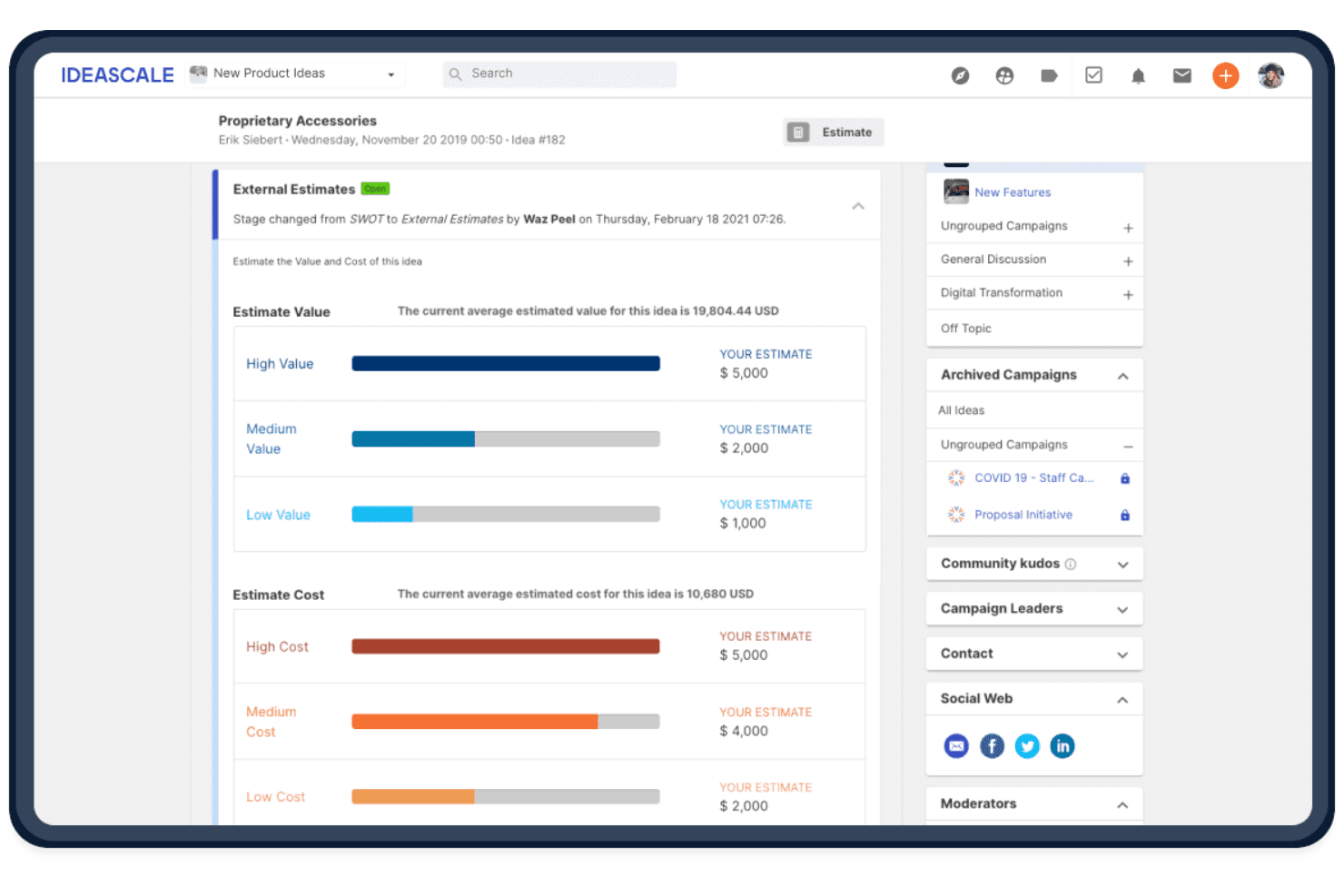
IdeaScale aiuta i team a valutare le idee raccolte confrontando il valore e il costo stimati per supportarne la definizione delle priorità. IdeaScale è una piattaforma aziendale per la gestione dell'innovazione che consente alle organizzazioni di raccogliere idee tramite partecipazione collettiva, organizzarle, valutarle e indirizzarle attraverso campagne e flussi di lavoro strutturati.
Per chi è più adatto IdeaScale?
IdeaScale è adatto ai team di innovazione e R&D di grandi aziende, enti governativi e università che devono gestire campagne di raccolta di idee strutturate e su scala aziendale.
Perché ho scelto IdeaScale
IdeaScale si è guadagnato un posto nella mia selezione perché è l'unica soluzione per la gestione delle idee certificata FedRAMP che abbia trovato, un aspetto estremamente importante quando si gestiscono campagne di innovazione all'interno di un ente governativo o di un'azienda regolamentata. Mi piace il modo in cui la piattaforma combina il voto della comunità, il rilevamento dei duplicati basato sull'intelligenza artificiale e la sincronizzazione bidirezionale con Jira per trasformare le idee dalla semplice proposta iniziale fino a un elemento prioritario del piano di sviluppo, senza passaggi manuali.
Funzionalità principali di IdeaScale
- Raccolta di idee tramite Slack e Teams: Invia idee direttamente da un comando Slack o da Microsoft Teams senza interrompere il tuo flusso di lavoro.
- Idee collegate: Collega idee correlate utilizzando sette tipi di relazione, tra cui 'simile a', 'supporta' e 'fa parte di', tra diverse campagne.
- Visualizzazione del portafoglio di idee: Esamina le idee di tutte le comunità in un'unica visualizzazione Kanban o elenco, con azioni collettive per aggiungere tag, assegnare responsabili ed esportare.
- Rilevamento dei duplicati tramite AI: Segnala le idee simili durante l'invio e mostra un confronto affiancato con una percentuale di somiglianza per ridurre le sovrapposizioni.
Integrazioni di IdeaScale
IdeaScale offre integrazioni native con Slack, Microsoft Teams, Jira, Azure Boards, Trello, YouTrack, Power BI e Tableau. Supporta inoltre callback web, un'API REST e Zapier per connessioni personalizzate.
Pros and Cons
Pros:
- Supporta campagne di raccolta di idee a livello aziendale
- Collega le idee a fasi di valutazione strutturate
- Individua i duplicati prima dell'invio
Cons:
- Richiede una configurazione organizzativa per la raccolta
- Testo e allegati limitano i formati di input
Learn more about IdeaScale: Ideale per bacheche visive che organizzano le idee creative
- Piano gratuito disponibile
- A partire da $9.99/utente/mese (fatturato annualmente)
Visit WebsiteCustomer Rating:4.7/5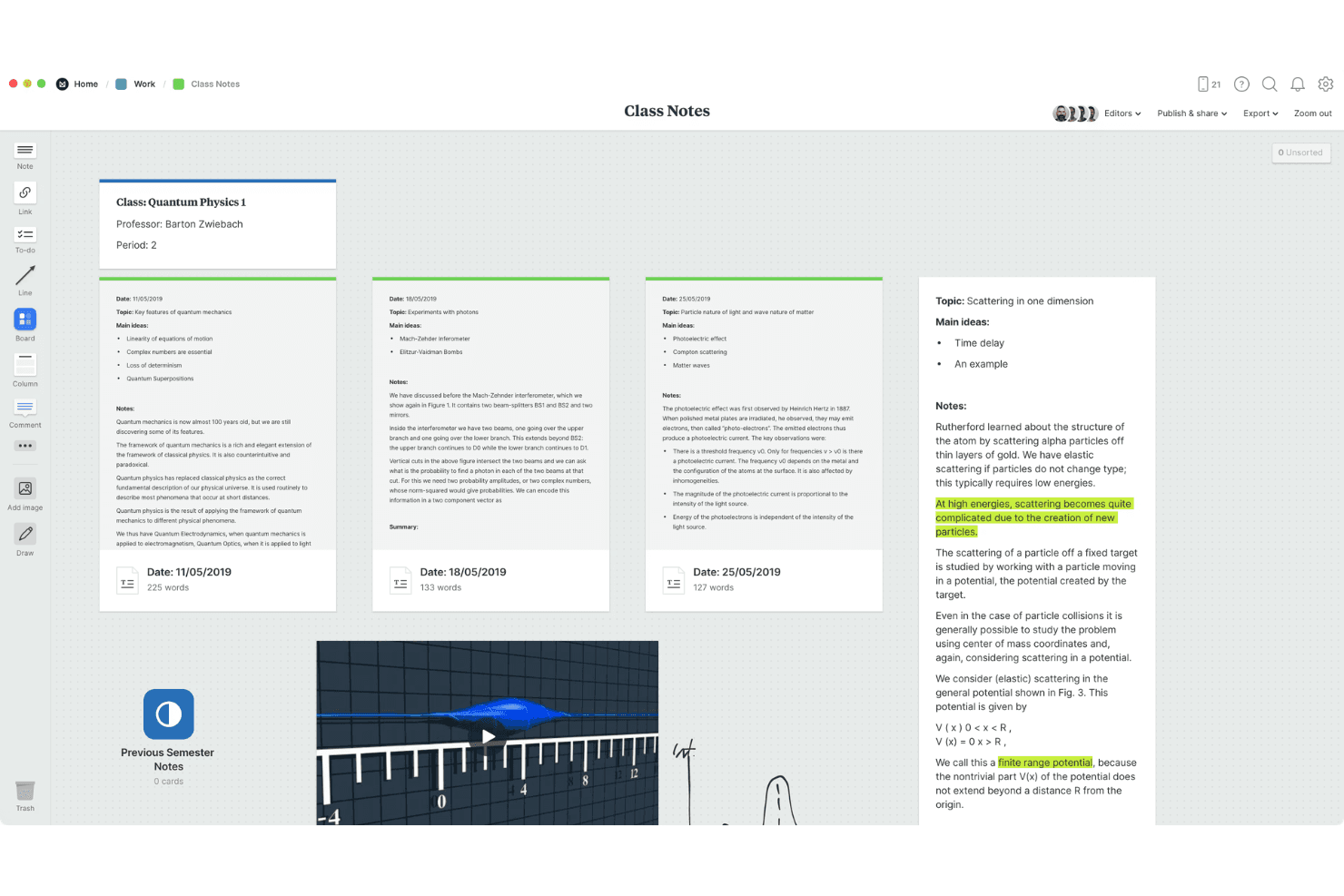
Il supporto multimediale aggiunge immagini, link e note alle bacheche. Milanote è uno strumento visivo per raccogliere idee che consente di riunire note, immagini, link, file e ritagli web in bacheche flessibili e nidificabili, con supporto per la collaborazione in tempo reale e la sincronizzazione tra più dispositivi.
Per chi è più adatto Milanote?
Milanote è ideale per i professionisti della conoscenza e i creativi indipendenti che pensano visivamente e desiderano uno spazio flessibile per raccogliere e collegare idee in diversi formati.
Perché ho scelto Milanote
Milanote si è guadagnato un posto nella mia selezione perché trasforma in modo naturale le idee sparse in bacheche visive organizzate. Mi piace il fatto che si possano trascinare note, immagini, link e ritagli web su un'unica tela e poi nidificare le bacheche all'interno di altre bacheche per creare una struttura davvero articolata. Le Note rapide su dispositivi mobili mi permettono di catturare immediatamente un pensiero fugace e di ordinarlo in un secondo momento nella bacheca corretta sul desktop.
Funzionalità principali di Milanote
- Strumento per ritagliare contenuti dal web: Un'estensione del browser per Chrome, Firefox e Safari che salva immagini, testo, link e video direttamente nelle bacheche, registrando automaticamente l'URL di origine.
- Bacheche nidificate: Le bacheche possono essere inserite all'interno di altre bacheche, permettendo di creare strutture a più livelli che crescono insieme al progetto senza perdere chiarezza visiva.
- Tela multiformato: Un'unica bacheca può contenere note di testo, immagini, video, schizzi, file, link ed elementi da completare, tutti disposti e collegati tramite trascinamento.
- Controlli flessibili per la condivisione: Condividi le bacheche tramite link modificabili, con accesso per i soli commenti o di sola lettura, con protezione tramite password opzionale e senza richiedere l'accesso per chi le visualizza.
Integrazioni di Milanote
Milanote non dispone di integrazioni native con strumenti di gestione dei prodotti o di collaborazione. Supporta i link ai file di Dropbox, le estensioni del browser per Chrome, Firefox e Safari e l'incorporamento delle bacheche, ma non è documentata alcuna API pubblica.
Pros and Cons
Pros:
- Le Note rapide catturano istantaneamente le idee fugaci
- Le bacheche nidificate organizzano progetti creativi complessi
- I contenuti multimediali mantengono il contesto accanto alle idee
Cons:
- Nessun accesso offline per rivedere le idee
- L'organizzazione manuale sostituisce i tag e i punteggi
Learn more about Milanote: Ideale per acquisire idee all'interno di Google Workspace
- Piano gratuito disponibile
- A partire da $7/utente/mese
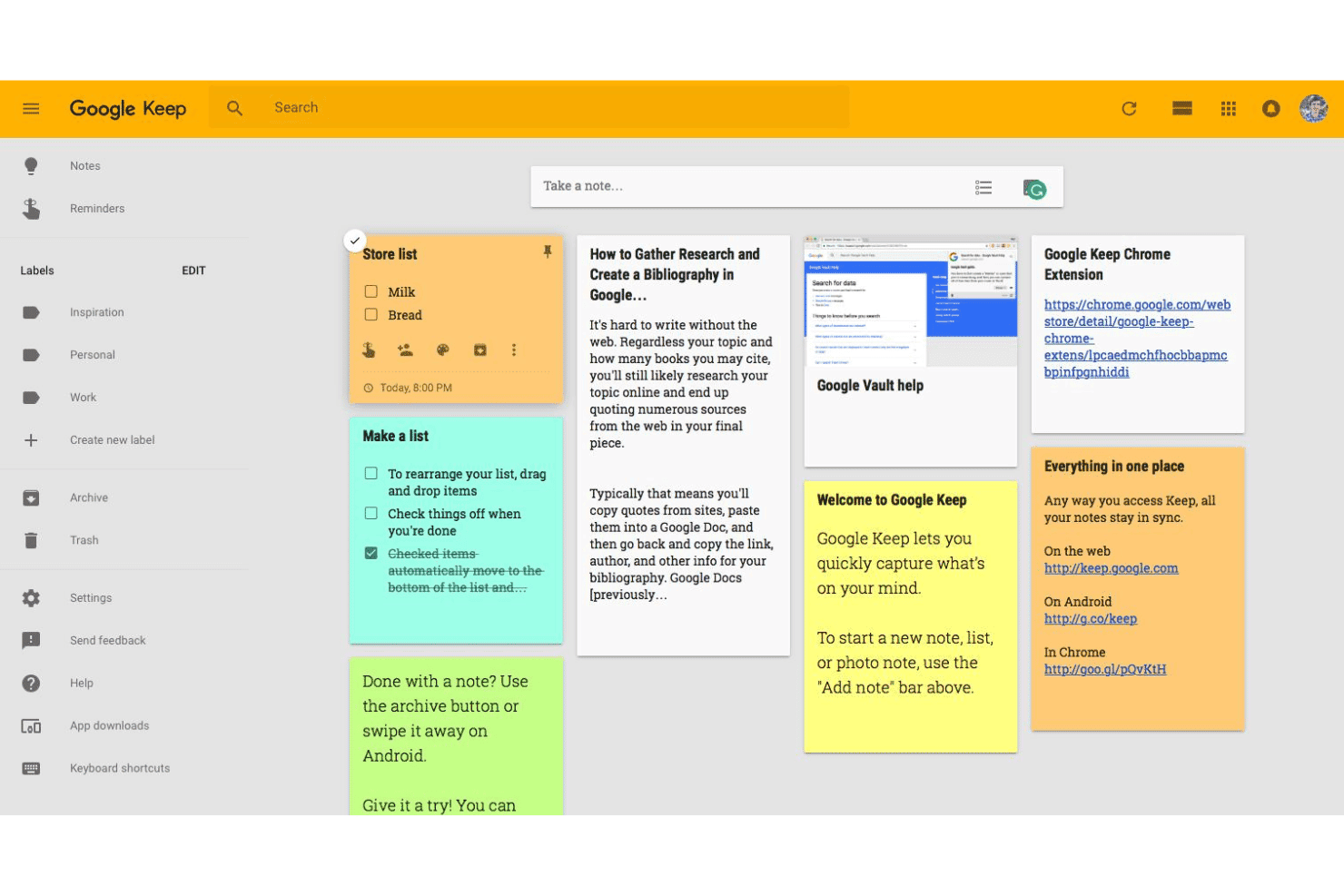
Google Keep aiuta gli utenti ad acquisire, organizzare e condividere le note senza difficoltà. Google Keep è uno strumento per prendere note e acquisire idee che supporta testo, liste di controllo, foto, disegni e registrazioni audio, con sincronizzazione in tempo reale tra i dispositivi e una collaborazione leggera tramite note condivise e modificabili da più utenti.
Per chi è più adatto Google Keep?
Google Keep è una scelta naturale per collaboratori individuali e fondatori che utilizzano già intensamente Google Workspace e desiderano un modo immediato per acquisire idee senza cambiare strumento.
Perché ho scelto Google Keep
Ho incluso Google Keep tra le mie scelte principali perché è l'unico strumento per acquisire idee integrato nativamente in Google Workspace: puoi annotare un pensiero direttamente dal pannello laterale di Gmail o Documenti senza mai aprire una nuova scheda. Mi piace il fatto che acquisisca idee sotto forma di testo, liste di controllo, foto, disegni e audio, quindi qualunque sia il formato in cui si presenta un pensiero, Keep lo gestisce. La sincronizzazione in tempo reale tra i dispositivi, inclusa la modifica offline, garantisce che nulla vada perso tra il telefono e il computer.
Funzionalità principali di Google Keep
- Organizzazione tramite etichette e colori: Assegna codici colore ed etichette semplici alle note per poter filtrare e individuare rapidamente idee specifiche.
- Esportazione in Documenti Google: Converti qualsiasi nota direttamente in un file di Documenti Google per trasformare un'idea grezza in un documento completo.
- Integrazione dei promemoria: Imposta promemoria basati sull'orario o sulla posizione per singole note, così da riprendere le idee al momento giusto.
- Estrazione del testo dalle immagini: Utilizza la funzione OCR integrata per estrarre il testo dalle foto, acquisendo note scritte a mano o contenuti stampati come testo ricercabile.
Integrazioni di Google Keep
Google Keep offre integrazioni native con Gmail e Documenti Google tramite il pannello laterale di Google Workspace.
Pros and Cons
Pros:
- Acquisisce testo, foto, disegni e audio
- Sincronizza le idee tra i dispositivi con modifica offline
- Le note condivise supportano la modifica collaborativa in tempo reale
Cons:
- Le etichette semplici limitano l'organizzazione delle idee
- Nessuna funzione per votare, assegnare punteggi o convertire in una roadmap
Learn more about Google Keep: Ideale per la gestione delle campagne aziendali per la raccolta di idee
- Demo gratuita disponibile
- Prezzi su richiesta

HYPE Innovation consente agli utenti di gestire visivamente le idee nelle diverse fasi di revisione. HYPE Innovation è una piattaforma aziendale per la gestione dell'innovazione che raccoglie, organizza e valuta le idee attraverso campagne strutturate, categorizzazione basata sull'IA e flussi di lavoro collaborativi per la revisione.
Per chi è più adatta HYPE Innovation?
HYPE Innovation è pensata per i responsabili dell'innovazione e i team di ricerca e sviluppo delle grandi organizzazioni che devono gestire campagne strutturate per la raccolta di idee tra migliaia di dipendenti.
Perché ho scelto HYPE Innovation
Ho scelto HYPE Innovation come una delle migliori soluzioni perché è stata progettata appositamente per gestire campagne strutturate per la raccolta di idee in grandi organizzazioni. Mi piace molto il modo in cui la categorizzazione intelligente basata sull'IA ordina automaticamente le idee ricevute per unità aziendale, priorità strategica o argomento, evitando che i revisori debbano gestire un'enorme quantità di proposte prive di tag. La Ricerca di somiglianze individua immediatamente le idee duplicate o correlate, un aspetto importante quando si gestiscono migliaia di contributi provenienti da una forza lavoro globale.
Caratteristiche principali di HYPE Innovation
- Componente aggiuntivo per l'innovazione aperta: Estende le campagne per la raccolta di idee oltre la forza lavoro interna, includendo partner esterni, fornitori e clienti come contributori.
- Assistente per le campagne: Utilizza l'elaborazione del linguaggio naturale per riassumere i risultati delle campagne e mettere in evidenza gli insight principali ricavati da grandi volumi di contributi.
- Flussi di lavoro con fasi e gate: Fa avanzare le idee attraverso fasi di revisione configurabili con checkpoint decisionali, mantenendo i valutatori allineati sullo stato di ogni idea.
- Integrazione del server MCP: Collega agenti di IA e copiloti come Microsoft Copilot Studio per leggere, creare e aggiornare i dati di HYPE rispettando le autorizzazioni esistenti.
Integrazioni di HYPE Innovation
HYPE Innovation offre integrazioni native con Microsoft Teams, SharePoint, Outlook, Jira, SAP, Power BI e Tableau. Le API REST e un server MCP supportano integrazioni personalizzate con agenti di IA e copiloti.
Pros and Cons
Pros:
- Le campagne aziendali organizzano le idee su larga scala
- La categorizzazione basata sull'IA riduce la necessità di rivedere idee duplicate
- Il supporto per votazioni e revisioni da parte di esperti favorisce la collaborazione
Cons:
- I moduli strutturati rallentano la raccolta spontanea delle idee
- La configurazione avanzata richiede assistenza esterna
Learn more about HYPE Innovation: Ideale per organizzare le idee insieme ai documenti di progetto
- Piano gratuito disponibile
- A partire da $10/utente/mese (con fatturazione annuale)
Visit WebsiteCustomer Rating:4.6/5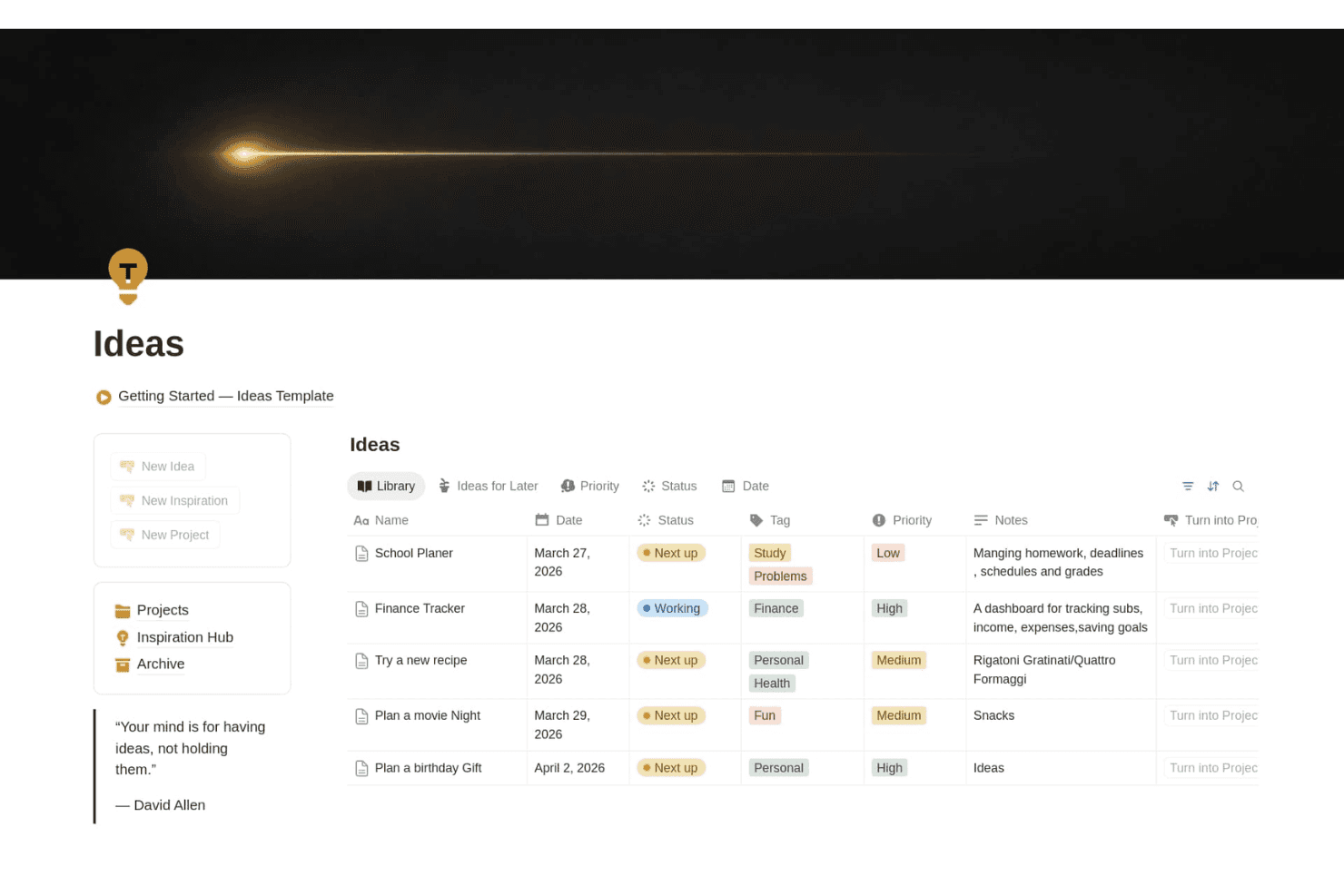
Notion aiuta i team a raccogliere e organizzare le idee in base a stato, priorità, tag, date e note in uno spazio di lavoro personalizzabile. Notion è uno strumento flessibile per l'area di lavoro che combina la raccolta delle idee, l'organizzazione basata su database e la gestione dei documenti tramite pagine, moduli, un clipper web e database collegati.
Per chi è più adatto Notion?
Notion è ideale per i responsabili di prodotto e i team di innovazione che vogliono raccogliere e organizzare le idee nello stesso spazio di lavoro in cui gestiscono roadmap e documenti di progetto.
Perché ho scelto Notion
Notion si è guadagnato un posto nella mia selezione perché è l'unico strumento qui presente che consente di conservare le idee nello stesso spazio di lavoro di roadmap, specifiche e documenti di progetto. Apprezzo particolarmente il modo in cui i database collegati permettono di connettere direttamente un'idea grezza a un'attività o a un elemento della roadmap, così nulla si perde in un'app separata. Il clipper web consente inoltre di importare direttamente in un database delle idee le pagine dei concorrenti o i feedback dei clienti, con tag e pronte per la revisione.
Funzionalità principali di Notion
- Clipper web: Un'estensione del browser che salva qualsiasi pagina web direttamente nello spazio di lavoro di Notion o in un database specifico per una revisione successiva.
- Proprietà personalizzate dei database: Aggiungi tag, stati, campi di selezione e filtri per organizzare le idee con la struttura necessaria al tuo team, maggiore o minore che sia.
- Moduli con logica condizionale: Raccogli gli invii di idee da colleghi o parti interessate direttamente in un database, disponibile nei piani Plus e superiori.
- Accesso offline: Le app desktop e mobili supportano entrambe l'utilizzo completo offline, così puoi raccogliere e rivedere le idee anche senza connessione.
Integrazioni di Notion
Notion offre integrazioni documentate con Slack, Google Drive, GitHub, Asana e Jira, con sincronizzazioni unidirezionali dei database per Jira, GitHub e Asana in versione beta. Fornisce inoltre un'API pubblica e webhook per integrazioni personalizzate.
Pros and Cons
Pros:
- Le idee si collegano direttamente alle roadmap
- I tag personalizzati supportano una revisione strutturata delle idee
- Il clipper web raccoglie le ricerche per un utilizzo successivo
Cons:
- La raccolta rapida da mobile risulta lenta
- Nessuna funzione nativa per votazioni o rilevamento dei duplicati
Learn more about Notion: Ideale per acquisire contenuti gratuitamente su tutti i dispositivi Apple
- Piano gratuito disponibile
- Utilizzabile gratuitamente
Visit WebsiteCustomer Rating:4.7/5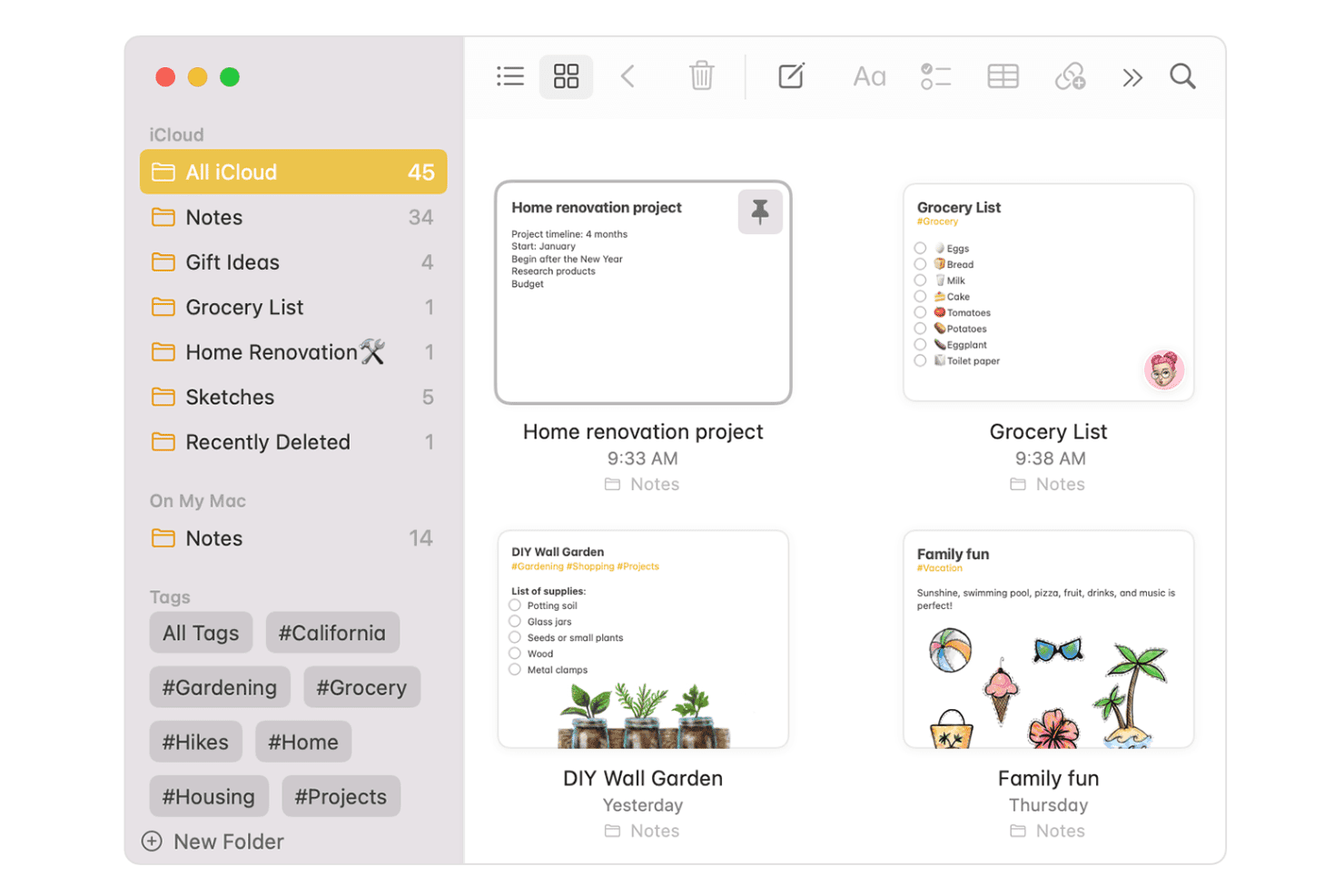
Apple Notes semplifica la presa di appunti, l'organizzazione e la collaborazione sui dispositivi Apple. Apple Notes è un'app gratuita per prendere appunti, integrata in ogni dispositivo Apple, che supporta testo, audio con trascrizione, disegni, scansioni e allegati: tutto organizzato tramite cartelle, tag e Cartelle intelligenti con sincronizzazione iCloud tra i dispositivi.
Per chi è più adatto Apple Notes?
Apple Notes è ideale per fondatori individuali e professionisti della conoscenza che desiderano uno spazio gratuito e sempre disponibile per annotare idee su iPhone, iPad, Mac e Apple Watch.
Perché ho scelto Apple Notes
Apple Notes si guadagna un posto nella mia selezione perché nessun altro strumento gratuito è altrettanto efficace nel catturare rapidamente contenuti su ogni dispositivo Apple. Mi piace poter toccare la schermata di blocco con un Apple Pencil per aprire immediatamente una nuova nota e il fatto che le registrazioni audio includano trascrizioni in tempo reale e ricercabili: così un rapido promemoria vocale dall'Apple Watch non finisce in un file senza etichetta. Le Cartelle intelligenti e i tag rendono poi semplice ritrovare in seguito le idee acquisite senza doverle ordinare manualmente.
Funzionalità principali di Apple Notes
- Scansione dei documenti: Usa la fotocamera per scansionare direttamente in una nota documenti cartacei, ricevute o lavagne, trasformandoli in file ricercabili e firmabili.
- Risoluzione matematica integrata: Digita una qualsiasi espressione matematica seguita da '=' e Apple Notes calcolerà automaticamente il risultato all'interno della nota.
- Cartelle intelligenti: Raggruppa automaticamente le note in base a tag, data o altri criteri, così le idee correlate vengono visualizzate insieme senza doverle ordinare manualmente.
- Collegamento tra note: Digita '>>' seguito dal titolo di una nota per creare un collegamento diretto tra le note e connettere idee correlate nella tua libreria.
Integrazioni di Apple Notes
Apple Notes offre integrazioni native nell'ecosistema Apple, tra cui Safari, Mappe, Foto, Siri, Apple Intelligence, iCloud Drive e iCloud.com.
Pros and Cons
Pros:
- Acquisizione istantanea dalla schermata di blocco e dall'Apple Watch
- Cerca nella scrittura a mano, nelle scansioni e negli oggetti delle immagini
- Collegamenti, tag e Cartelle intelligenti organizzano le idee
Cons:
- Nessun flusso di lavoro per votare o assegnare un punteggio alle idee
- Nessuna conversione diretta in attività o piani d'azione
Learn more about Apple Notes: Ideale per acquisire contenuti in più formati su tutti i dispositivi
- Piano gratuito + prova gratuita di 7 giorni disponibile
- A partire da $8.25/mese (con fatturazione annuale)
Visit WebsiteCustomer Rating:4.4/5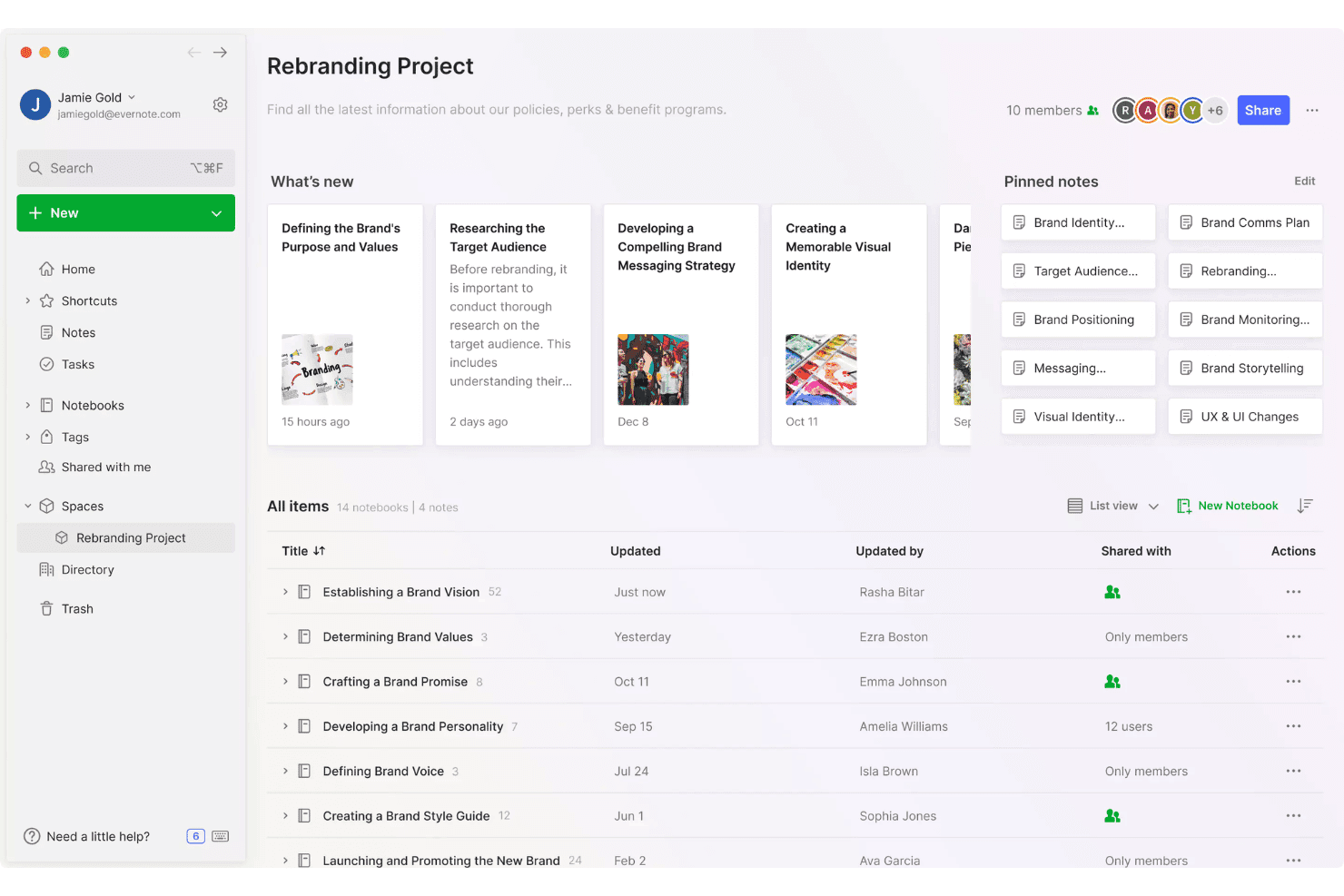
Evernote aiuta i team ad acquisire e organizzare le idee in spazi di progetto condivisi utilizzando note, taccuini, tag e contenuti fissati. Evernote è un'app per prendere appunti e acquisire idee che supporta testo, audio, scansione di documenti, ritaglio dal web e inserimento di testo scritto a mano su computer, dispositivi mobili e browser.
Per chi è più adatto Evernote?
Evernote è particolarmente adatto a fondatori indipendenti e professionisti della conoscenza che lavorano individualmente e hanno bisogno di acquisire rapidamente idee su più dispositivi e in diversi formati senza gestire uno strumento complesso.
Perché ho scelto Evernote
Evernote si è guadagnato un posto nella mia rosa ristretta perché nessun altro strumento che ho testato acquisisce idee in così tanti formati senza costringerti a cambiare app. Posso scattare una foto dello schizzo su una lavagna, registrare un promemoria vocale durante il tragitto e salvare la pagina dei prezzi di un concorrente da Chrome: tutto finisce in un'unica nota ricercabile. La ricerca semantica trova poi quella nota a partire da una descrizione in linguaggio naturale, anche a distanza di settimane.
Funzionalità principali di Evernote
- Assistente IA: Uno strumento di chat integrato che organizza le note, aggiunge tag e recupera contenuti dalle note esistenti utilizzando richieste in linguaggio naturale.
- Ritaglio dal web: Un'estensione del browser che salva pagine intere, articoli, PDF e schermate direttamente in Evernote, con la possibilità di aggiungere tag e ordinare i contenuti al momento dell'acquisizione.
- Attività collaborative: Attività assegnabili con scadenze e promemoria che risiedono all'interno delle note e favoriscono la responsabilità condivisa all'interno del team.
- Connettore MCP: Collega le note di Evernote a strumenti di IA esterni come Claude e ChatGPT, consentendo di interrogare la propria raccolta di note da questi ambienti.
Integrazioni di Evernote
Evernote offre integrazioni native con Gmail, Google Drive, Google Calendar, Microsoft Outlook e Slack. Il suo connettore MCP collega inoltre le note a Claude, ChatGPT e ad altri strumenti di IA compatibili con MCP.
Pros and Cons
Pros:
- Acquisisce audio, scansioni, ritagli e testo scritto a mano
- La ricerca semantica recupera le idee da descrizioni in linguaggio naturale
- Sincronizza le idee tra computer, dispositivi mobili e web
Cons:
- Il piano gratuito limita note, taccuini e dispositivi
- Nessuna funzione per votare, assegnare punteggi o convertire in una roadmap
Learn more about Evernote: Ideale per note che collegano le idee nel tempo
- Prova gratuita di 14 giorni + demo gratuita disponibile
- Prezzi su richiesta
Visit WebsiteCustomer Rating:4.8/5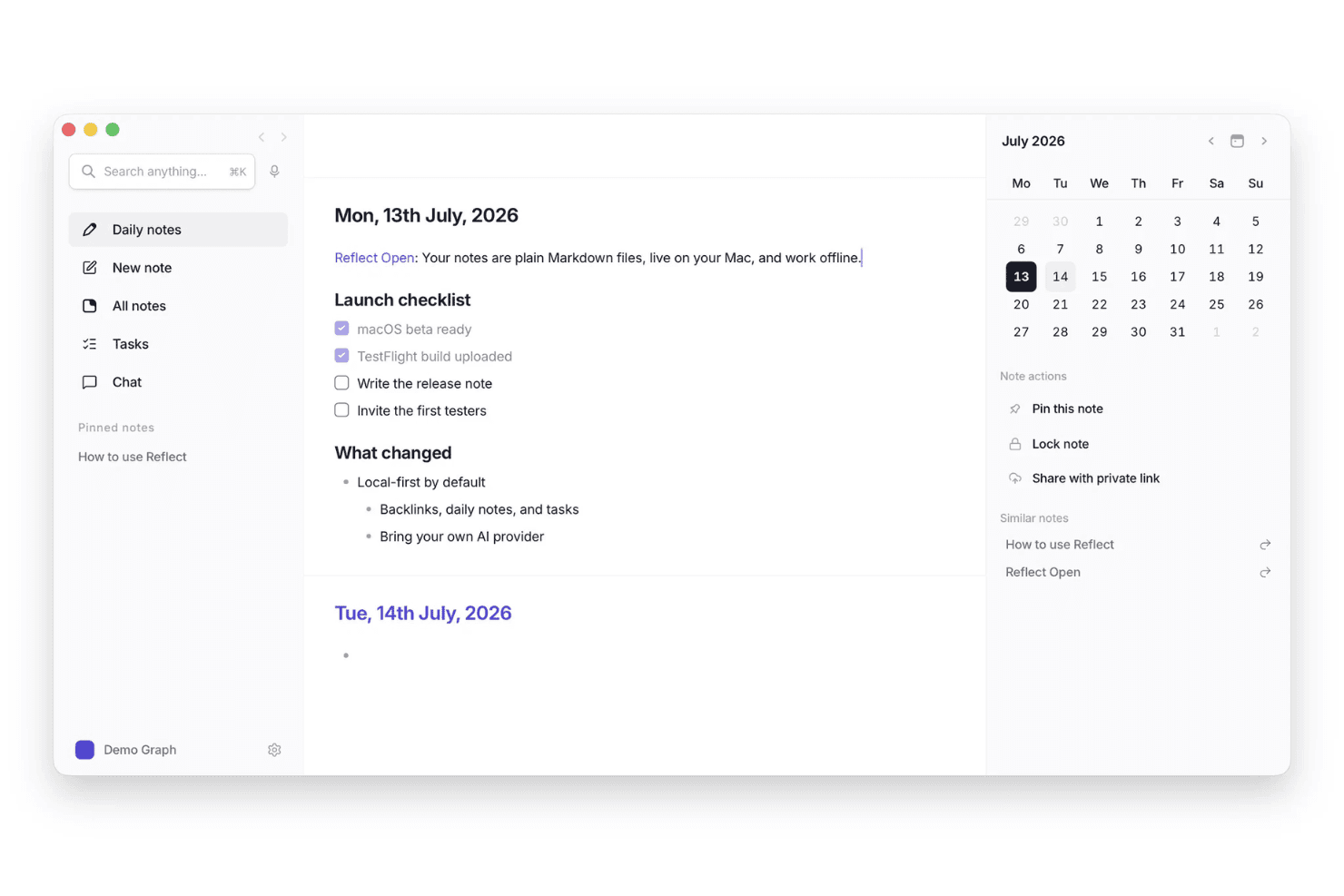
Reflect aiuta gli utenti a catturare idee nelle note giornaliere e a collegarle ad attività, note correlate e date del calendario. Reflect è uno strumento personale per prendere note e catturare idee, basato su note giornaliere, backlink, riepiloghi assistiti dall'IA e trascrizione vocale.
Per chi è più adatto Reflect?
Reflect è ideale per i professionisti della conoscenza e i pensatori indipendenti che hanno bisogno di un modo semplice e immediato per catturare e collegare idee tra note giornaliere, registrazioni vocali e contenuti web salvati.
Perché ho scelto Reflect
Ho incluso Reflect tra le mie scelte migliori perché si basa sull'idea che le note debbano collegarsi, non solo accumularsi. I backlink e una visualizzazione grafica consentono a un pensiero annotato mesi fa di riemergere quando si sta lavorando a qualcosa di nuovo. Apprezzo particolarmente la funzione di trascrizione vocale, che trasforma le idee pronunciate in note collegate senza interrompere il flusso di lavoro.
Funzionalità principali di Reflect
- Strumento per salvare contenuti dal web: Salva frammenti delle pagine web direttamente nelle tue note tramite l'estensione del browser Chrome o Safari.
- Crittografia end-to-end: Le note sono crittografate in modo che nemmeno Reflect possa accedere ai tuoi contenuti.
- Sincronizzazione di calendari e contatti: Collega i calendari e i contatti Google o Outlook per importare eventi e persone direttamente nelle tue note.
- Estrazione degli elementi da svolgere basata sull'IA: L'assistente IA integrato analizza le tue note ed evidenzia automaticamente i punti chiave e gli elementi da svolgere.
Integrazioni di Reflect
Reflect si integra con le evidenziazioni di Readwise e Kindle e con gli strumenti per salvare contenuti dal web di Chrome e Safari. Offre inoltre un'API per integrazioni personalizzate e supporta Zapier.
Pros and Cons
Pros:
- Le note giornaliere catturano i pensieri senza dover decidere in quale cartella inserirli
- La trascrizione vocale conserva le idee nei momenti più impegnativi
- I backlink fanno riemergere i collegamenti tra le note meno recenti
Cons:
- Non offre spazi condivisi per perfezionare le idee in collaborazione
- Non offre un percorso diretto dalle idee alle roadmap
Learn more about Reflect: 10Ideale per raccogliere i feedback degli utenti SaaS
Canny
- Piano gratuito + prova gratuita + demo gratuita disponibili
- A partire da $79/mese (fatturato annualmente)
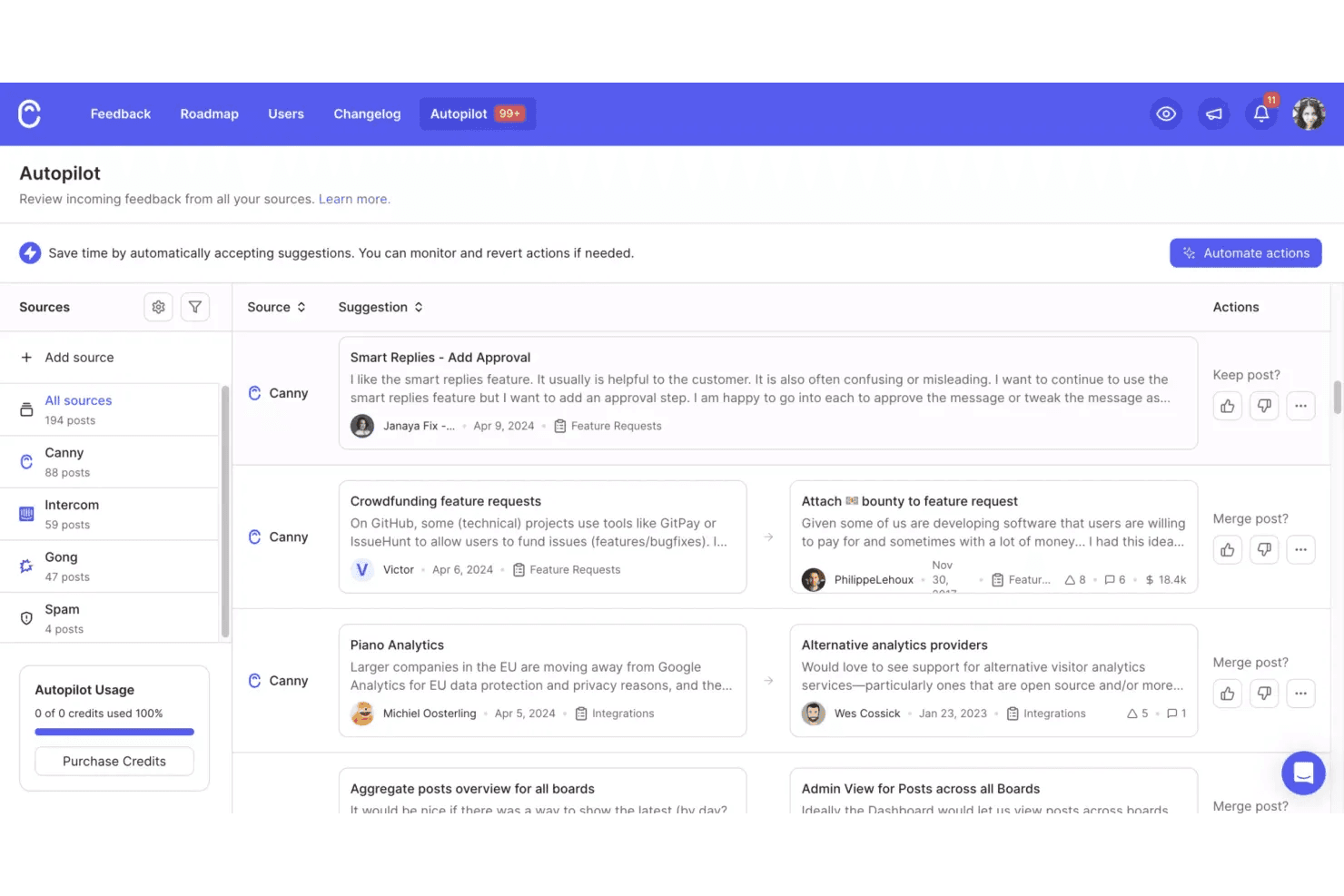
Canny aiuta i team a raccogliere e organizzare i feedback sui prodotti in arrivo da più fonti, con suggerimenti automatici per unire le idee correlate. Canny è una piattaforma per la raccolta dei feedback dei clienti e la gestione delle idee che consente ai team SaaS di raccogliere, organizzare e stabilire la priorità delle richieste di funzionalità tramite bacheche pubbliche o private, votazioni, raccolta dei feedback basata sull'intelligenza artificiale e pianificazione dei piani di sviluppo.
Per chi è più adatto Canny?
Canny è particolarmente adatto ai team di prodotto SaaS che desiderano trasformare i feedback dei clienti in elementi prioritari del piano di sviluppo senza dover analizzare manualmente decine di ticket di supporto e conversazioni.
Perché ho scelto Canny
Ho scelto Canny come una delle soluzioni migliori perché è progettato specificamente per qualcosa che la maggior parte degli strumenti di raccolta delle idee considera secondario: trasformare i feedback dei clienti SaaS in decisioni di prodotto prioritarie. La funzionalità Autopilot raccoglie automaticamente le richieste di funzionalità dalle conversazioni con l'assistenza, dalle trascrizioni delle chiamate e dalle recensioni pubbliche, così le idee non vanno perse in Zendesk o Gong. Mi piace anche il fatto che ogni idea sia collegata al cliente e all'account che l'hanno generata, il che significa che posso ordinare le richieste in base all'impatto sull'MRR, anziché basarmi solo sul numero di voti.
Funzionalità principali di Canny
- Rilevamento dei duplicati con Autopilot: identifica e unisce automaticamente le richieste di funzionalità ripetute provenienti da più fonti, mantenendo la bacheca dei feedback ordinata e utile.
- Segmentazione dei votanti: filtra le idee in base ad attributi degli utenti come il tipo di piano o l'impatto sull'MRR, consentendo di valutare le richieste in base agli account più importanti per la propria attività.
- Piani di sviluppo pubblici e privati: condivide la direzione del prodotto con i clienti oppure la mantiene interna, inviando automaticamente aggiornamenti sullo stato ai votanti man mano che gli elementi avanzano.
- Registro delle modifiche con widget integrato nell'app: pubblica le note di rilascio direttamente all'interno del prodotto, con rilasci programmati ed etichette per tenere gli utenti informati su ciò che è stato distribuito.
Integrazioni di Canny
Canny offre integrazioni con Jira, Linear, GitHub, ClickUp, Asana, Azure DevOps, Slack, Microsoft Teams, Salesforce e HubSpot. Fornisce inoltre un'API, webhook e connettività con Zapier.
Pros and Cons
Pros:
- Collega i feedback ai clienti e ai ricavi
- Autopilot raccoglie le richieste dalle conversazioni
- Trasforma i feedback in elementi prioritari del piano di sviluppo
Cons:
- Nessuna acquisizione nativa da dispositivi mobili o tramite voce
- La pubblicazione intenzionale rallenta la raccolta spontanea delle idee
Learn more about Canny:
Altri strumenti per la raccolta delle idee
Ecco alcune ulteriori opzioni di strumenti per la raccolta delle idee che non sono entrate nella mia selezione, ma che vale comunque la pena prendere in considerazione:
- 11DraftsIdeale per la scrittura su Apple incentrata sulla raccolta
- 12ProductboardIdeale per trasformare il feedback dei clienti in funzionalità
- 13ViimaIdeale per visualizzare l'avanzamento delle idee in tempo reale
- 14Microsoft OneNoteIdeale per prendere appunti nei team Microsoft 365
- 15ObsidianIdeale per collegare note e mappare come si connettono le idee
- 16IdeamapIdeale per esportare prototipi su Figma o in codice
- 17Aha! IdeasIdeale per trasformare il feedback dei clienti in idee per la roadmap
- 18Tana OutlinerIdeale per acquisire idee individuali con note strutturate dall'AI
Come valuto gli strumenti per acquisire le idee
Divido la mia valutazione in tre parti: funzionalità essenziali (acquisizione istantanea delle idee e recupero tramite ricerca), caratteristiche distintive come l'acquisizione da voce a testo e fattori oltre le funzionalità, come il supporto alla configurazione iniziale e la flessibilità dei prezzi. Le funzionalità essenziali hanno il peso maggiore.
Funzionalità essenziali (requisiti fondamentali per questo elenco)
Quando seleziono gli strumenti per il mio elenco, assegno a ciascuno un punteggio su una scala da 0 (non offre la funzionalità) a 5 (eccelle in quest'area) per ogni funzionalità essenziale elencata di seguito. Converto poi il totale in una percentuale per aiutare a valutare l'idoneità complessiva di ogni strumento, dando un peso aggiuntivo a tutte le funzionalità che ho considerato essenziali.
- Acquisizione rapida delle idee (essenziale): verifico se uno strumento consente di registrare un pensiero con una sola azione, tramite una scorciatoia da tastiera, un widget mobile o un comando vocale, senza dover prima navigare nei menu.
- Organizzazione e assegnazione di tag alle idee: qui sono importanti i tag flessibili e i raggruppamenti personalizzati. Cerco tag nidificati, campi personalizzati o cartelle intelligenti che rimangano efficaci anche quando si hanno centinaia di elementi.
- Sincronizzazione tra dispositivi: valuto se le idee vengono sincronizzate quasi istantaneamente tra computer, dispositivi mobili e web. L'accesso offline con risoluzione automatica dei conflitti è un elemento distintivo fondamentale.
- Supporto per input in più formati: gli strumenti dovrebbero accettare testi, memo vocali, immagini e ritagli web all'interno di un'unica registrazione dell'idea. Valuto quanto bene ogni formato si integri, non soltanto se è disponibile.
- Ricerca e recupero: verifico la ricerca per parole chiave nei contenuti delle idee, nei tag e negli allegati. Le opzioni di filtro per data, formato o tag mi indicano se il recupero rimane rapido all'aumentare del volume.
- Condivisione collaborativa: i team di prodotto hanno bisogno di spazi condivisi per le idee, con commenti e votazioni. Valuto se i membri del team possono creare e perfezionare le idee insieme senza ricorrere a soluzioni alternative basate sul copia e incolla.
Una volta ottenuto un elenco di strumenti che soddisfano i criteri, considero ciò che distingue ogni piattaforma.
Fattori distintivi (ciò che distingue i fornitori)
Ecco come confronto e metto in contrapposizione i diversi fornitori:
Caratteristiche distintive
Cerco un motore di rilevamento dei duplicati che segnali gli invii ripetuti o sovrapposti prima che si accumulino. Quando centinaia di idee arrivano da Slack, dai ticket di assistenza e dagli invii tramite portale, individuare manualmente i duplicati è irrealistico. Valuto anche l'acquisizione da voce a testo, verificando se le idee dettate vengono registrate come elementi strutturati anziché come semplici trascrizioni. È importante anche l'automazione dalla proposta alla roadmap. Verifico se le idee con il punteggio più alto vengono convertite direttamente in elementi del backlog in strumenti come Jira, senza doverle reinserire manualmente.
Oltre le funzionalità
Verifico se l'ecosistema di integrazioni di uno strumento si collega agli strumenti di gestione del prodotto e di assistenza che il team già utilizza, come Jira o Zendesk, poiché il trasferimento manuale delle idee annulla lo slancio. Anche la sicurezza dei dati è importante: cerco autorizzazioni basate sui ruoli e la conformità SOC 2, soprattutto quando le idee strategiche richiedono una visibilità limitata. Infine, valuto il supporto alla configurazione iniziale, perché uno strumento con modelli guidati e assistenza alla migrazione permette a un team di prodotto di iniziare ad acquisire idee in pochi giorni, non in settimane.
Come scegliere gli strumenti per la raccolta delle idee
È facile perdersi in lunghi elenchi di funzionalità e strutture di prezzo complesse. Per aiutarti a rimanere concentrato mentre affronti il tuo specifico processo di selezione del software, ecco una lista di fattori da tenere a mente:
| Fattore | Cosa considerare |
|---|---|
| FattoreScalabilità | Cosa considerareLo strumento supporterà il tuo team durante la crescita? Considera i limiti degli utenti, i limiti di archiviazione e gli aumenti di prezzo con l’espansione delle tue esigenze. |
| FattoreIntegrazioni | Cosa considerareLo strumento si collega alle app che già utilizzi, come quelle per la gestione dei progetti o la comunicazione? Verifica la presenza di integrazioni native, non solo dell’accesso tramite API. |
| FattorePersonalizzazione | Cosa considerarePuoi adattare categorie, tag o flussi di lavoro al processo del tuo team? Evita gli strumenti che impongono strutture rigide se le tue esigenze sono specifiche. |
| FattoreFacilità d’uso | Cosa considerareQuanto rapidamente i nuovi utenti possono iniziare a raccogliere idee? Cerca un numero minimo di passaggi per l’avvio e un’interfaccia chiara e priva di distrazioni. |
| FattoreImplementazione e avvio | Cosa considerareQuali risorse o quale supporto fornisce il fornitore per la configurazione? Valuta se avrai bisogno di formazione, migrazione dei dati o configurazione da parte dell’amministratore. |
| FattoreCosto | Cosa considerareSono previsti costi nascosti, aggiornamenti obbligatori o prezzi per utente? Confronta il costo totale di proprietà, non solo le tariffe mensili. |
| FattoreMisure di sicurezza | Cosa considerareLo strumento offre crittografia, controlli degli accessi e conformità agli standard sui dati del tuo settore? Informati sulla localizzazione dei dati e sulle politiche sulla privacy. |
| FattoreDisponibilità dell’assistenza | Cosa considerareQuali canali di assistenza sono disponibili, come chat, e-mail o telefono, e in quali orari? Valuta se avrai bisogno di un aiuto rapido durante le fasi critiche dei progetti. |
Cosa sono gli strumenti per la raccolta delle idee?
Questi strumenti tutto-in-uno per la raccolta delle idee sono piattaforme digitali progettate per aiutare singoli individui e team a registrare, organizzare e gestire rapidamente i concetti man mano che emergono durante la generazione di idee. Questo tipo di software per la gestione delle idee supporta vari tipi di input, come testo, immagini e note vocali, e spesso include funzionalità per categorizzare e recuperare le idee in un secondo momento. Svolgono un ruolo fondamentale nel garantire che gli spunti preziosi non vadano persi e possano essere sviluppati in progetti o soluzioni concrete.
Funzionalità
Quando selezioni gli strumenti per la raccolta delle idee, presta attenzione alle seguenti funzionalità chiave:
- Inserimento di testo: consente agli utenti di annotare rapidamente le idee in forma scritta, favorendo una raccolta veloce e una facile modifica.
- Allegati di immagini: consente di aggiungere foto, schermate o schizzi alle idee, facilitando la raccolta di ispirazioni visive o del contesto.
- Note vocali: permette di registrare idee espresse a voce, una funzione utile per catturare pensieri mentre si è in movimento o quando digitare non è pratico.
- Categorizzazione: mette a disposizione cartelle, tag o etichette per organizzare le idee per argomento, progetto o priorità e facilitarne il recupero.
- Ricerca e filtri: offre strumenti avanzati di ricerca e filtraggio, così gli utenti possono trovare rapidamente idee specifiche o raggruppare concetti correlati.
- Collaborazione: supporta la condivisione delle idee con i membri della squadra, consentendo riscontri, discussioni e lo sviluppo collettivo dei concetti.
- Promemoria e notifiche: consente agli utenti di impostare promemoria per riprendere o ampliare le idee, aiutando a garantire che nulla venga dimenticato.
- Opzioni di esportazione: consente agli utenti di esportare le idee in altri formati o su altre piattaforme, favorendo l'integrazione con flussi di lavoro più ampi.
- Disponibilità di un'app per dispositivi mobili: garantisce agli utenti la possibilità di raccogliere e consultare le idee da qualsiasi dispositivo, non solo da un computer desktop o da un browser web.
Vantaggi
L'implementazione di strumenti per la raccolta delle idee offre diversi vantaggi alla tua squadra e alla tua azienda. Eccone alcuni:
- Meno idee perse: le funzionalità di raccolta rapida garantiscono che gli spunti preziosi vengano registrati prima di essere dimenticati.
- Organizzazione migliore: gli strumenti di categorizzazione e ricerca semplificano l'ordinamento, la ricerca e la consultazione delle idee quando necessario.
- Collaborazione più rapida: le funzionalità di condivisione e commento aiutano le squadre a sviluppare e perfezionare insieme le idee in tempo reale.
- Maggiore produttività: promemoria e notifiche spingono gli utenti ad agire sulle idee, trasformando l'ispirazione in azione.
- Maggiore flessibilità: l'accesso da dispositivi mobili e le molteplici opzioni di input consentono agli utenti di raccogliere idee sempre e ovunque, nel formato più adatto a loro.
- Migliore conservazione delle conoscenze: l'archiviazione centralizzata mantiene tutte le idee in un unico luogo, facilitando lo sviluppo di riflessioni precedenti.
- Flussi di lavoro semplificati: le opzioni di esportazione e integrazione collegano la raccolta delle idee ad altri strumenti aziendali, supportando lo sviluppo dei progetti dall'inizio alla fine.
Costi e prezzi
La selezione degli strumenti per la raccolta delle idee richiede la comprensione dei vari modelli e piani tariffari disponibili. I costi variano in base alle funzionalità, alle dimensioni della squadra, ai componenti aggiuntivi e ad altri fattori. La tabella seguente riassume i piani più comuni, i relativi prezzi medi e le funzionalità tipicamente incluse nelle soluzioni per la raccolta delle idee:
Tabella comparativa dei piani per gli strumenti di raccolta delle idee
| Tipo di piano | Media | Funzionalità comuni |
|---|---|---|
| Tipo di pianoPiano gratuito | Media $0 | Funzionalità comuniRaccolta di base delle idee, spazio di archiviazione limitato, accesso per un singolo utente e ricerca e organizzazione di base. |
| Tipo di pianoPiano personale | Media $15–$40/utente/mese | Funzionalità comuniIdee illimitate, accesso all'app mobile, allegati di immagini e file e opzioni di esportazione di base. |
| Tipo di pianoPiano aziendale | Media $45–$90/utente/mese | Funzionalità comuniCollaborazione di squadra, organizzazione avanzata, integrazioni con altri strumenti e controlli per gli amministratori. |
| Tipo di pianoPiano per grandi aziende | Media $95–$150/utente/mese | Funzionalità comuniIntegrazioni personalizzate, sicurezza avanzata, assistenza prioritaria, analisi avanzate e supporto per l'avvio. |
Domande frequenti sugli strumenti per la raccolta delle idee
Ecco alcune risposte alle domande comuni sugli strumenti per la raccolta delle idee:
In che modo gli strumenti per la raccolta delle idee supportano i team remoti o ibridi?
Gli strumenti per la raccolta delle idee supportano i team remoti o ibridi offrendo uno spazio centralizzato per raccogliere, organizzare e condividere idee da qualsiasi luogo. Funzionalità come la collaborazione in tempo reale, l’accesso da dispositivi mobili e la sincronizzazione cloud aiutano i team distribuiti a contribuire e a esaminare le idee senza dover trovarsi nello stesso luogo.
Gli strumenti per la raccolta delle idee possono integrarsi con le piattaforme di gestione dei progetti?
Sì, molti strumenti per la raccolta delle idee offrono integrazioni con le piattaforme di gestione dei progetti. Ciò consente ai team di trasferire direttamente le idee nei flussi di lavoro dei progetti, assegnare attività e monitorare i progressi senza dover copiare manualmente le informazioni o passare da un sistema all’altro.
Quali funzionalità di sicurezza dovrei cercare negli strumenti per la raccolta delle idee?
Cerca funzionalità di sicurezza come la crittografia dei dati, i controlli degli accessi degli utenti e la conformità agli standard sulla privacy come il GDPR. Queste misure di protezione aiutano a salvaguardare le idee sensibili e garantiscono che solo gli utenti autorizzati possano accedere alle informazioni o modificarle.
Come posso migrare le idee esistenti in un nuovo strumento per la raccolta delle idee?
La maggior parte degli strumenti per la raccolta delle idee offre opzioni di importazione, come il caricamento di file CSV o le integrazioni con altre piattaforme. Prima della migrazione, consulta la documentazione dello strumento e valuta la possibilità di rivedere o organizzare le idee esistenti per rendere più agevole la transizione.
Esistono opzioni offline per raccogliere le idee?
Sì, alcuni strumenti per la raccolta delle idee offrono modalità offline che consentono di registrare le idee senza una connessione a Internet. Quando torni online, lo strumento sincronizza le nuove idee con il cloud, garantendo che nulla vada perso.