

Il software a codice sorgente aperto per la gestione delle idee ti offre visibilità e controllo completi sul modo in cui la tua squadra promuove il miglioramento continuo, consentendoti di ospitare, personalizzare ed estendere la piattaforma come preferisci. Se vuoi dare più autonomia alla tua squadra, garantire la trasparenza, evitare la dipendenza da un fornitore o semplicemente hai bisogno di una gestione delle idee conveniente, le opzioni a codice sorgente aperto ti mettono al comando. In questo elenco troverai le mie scelte tra i migliori strumenti per raccogliere, definire le priorità e trasformare le idee in azioni, così potrai convertire i contributi provenienti da ogni area della tua organizzazione in progressi misurabili.
Perché fidarsi dei nostri consigli sui software
6,700+
Reviews
20
Industry experts
16+
Evaluation factors
14
Years
Il nostro team testa e recensisce software dal 2012. In quanto product manager noi stessi, sappiamo quanto sia difficile — e importante — scegliere il software giusto.
Per questa guida, abbiamo valutato gli strumenti attraverso test pratici e ricerche indipendenti, assegnando un punteggio agli strumenti in base ai nostri criteri di selezione.
Le nostre recensioni riflettono il nostro giudizio editoriale umano, non un discorso di vendita.
Revisori esperti:
- Andrew LumbySenior TPM
- Cristiano ValimSenior UI/UX Lead


Tabella comparativa: software a codice sorgente aperto per la gestione delle idee
Questa tabella comparativa riassume i dettagli sui prezzi delle mie migliori selezioni di software a codice sorgente aperto per la gestione delle idee.
| Tool | Best For | Trial Info | Price | ||
|---|---|---|---|---|---|
| 1 | Ideale per il monitoraggio di idee basato su Kanban tramite hosting autonomo | Piano gratuito disponibile | Gratuito, a codice aperto | Website | |
| 2 | Ideale per flussi di lavoro autogestiti dalla pianificazione alla tabella di marcia | Versione di prova gratuita di 14 giorni + piano gratuito disponibile | A partire da $7.25/utente/mese (con fatturazione annuale) | Website | |
| 3 | Ideale per i team agili che monitorano le idee fino alla consegna | Piano gratuito disponibile | A partire da 5 €/mese | Website | |
| 4 | Ideale per la votazione di idee guidata dalla comunità su larga scala | Piano gratuito + prova gratuita di 14 giorni disponibile | A partire da $100/mese | Website | |
| 5 | Ideale per il triage dei duplicati basato sull'IA | Prova gratuita di 14 giorni disponibile | A partire da $19/mese (con fatturazione annuale) | Website | |
| 6 | Ideale per bacheche di feedback illimitate | Piano gratuito disponibile | A partire da $25/mese | Website | |
| 7 | La scelta migliore per piani di sviluppo pubblici integrati | Prova gratuita di 14 giorni + piano gratuito + demo gratuita disponibile | Da $9/mese | Website | |
| 8 | Ideale per bacheche di riscontri B2B ponderate in base ai ricavi | Piano gratuito disponibile | A partire da $15/utente/mese | Website | |
| 9 | Ideale per feedback con licenza MIT e sincronizzazione con GitHub | Piano gratuito disponibile | Gratuito, a codice aperto | Website | |
| 10 | Ideale per bacheche pubbliche di feedback rivolte agli sviluppatori | Piano gratuito disponibile | A partire da $3/utente/mese | Website |


Recensioni dei migliori software a codice sorgente aperto per la gestione delle idee
Di seguito trovi le mie analisi dettagliate dei migliori software a codice sorgente aperto per la gestione delle idee inclusi nel mio elenco. Le mie recensioni offrono uno sguardo approfondito alle funzionalità, alle integrazioni e ai migliori casi d’uso di ogni piattaforma, per aiutarti a ottimizzare il tuo processo di innovazione.
 Ideale per il monitoraggio di idee basato su Kanban tramite hosting autonomo
- Piano gratuito disponibile
- Gratuito, a codice aperto
Visit WebsiteCustomer Rating:4.8/5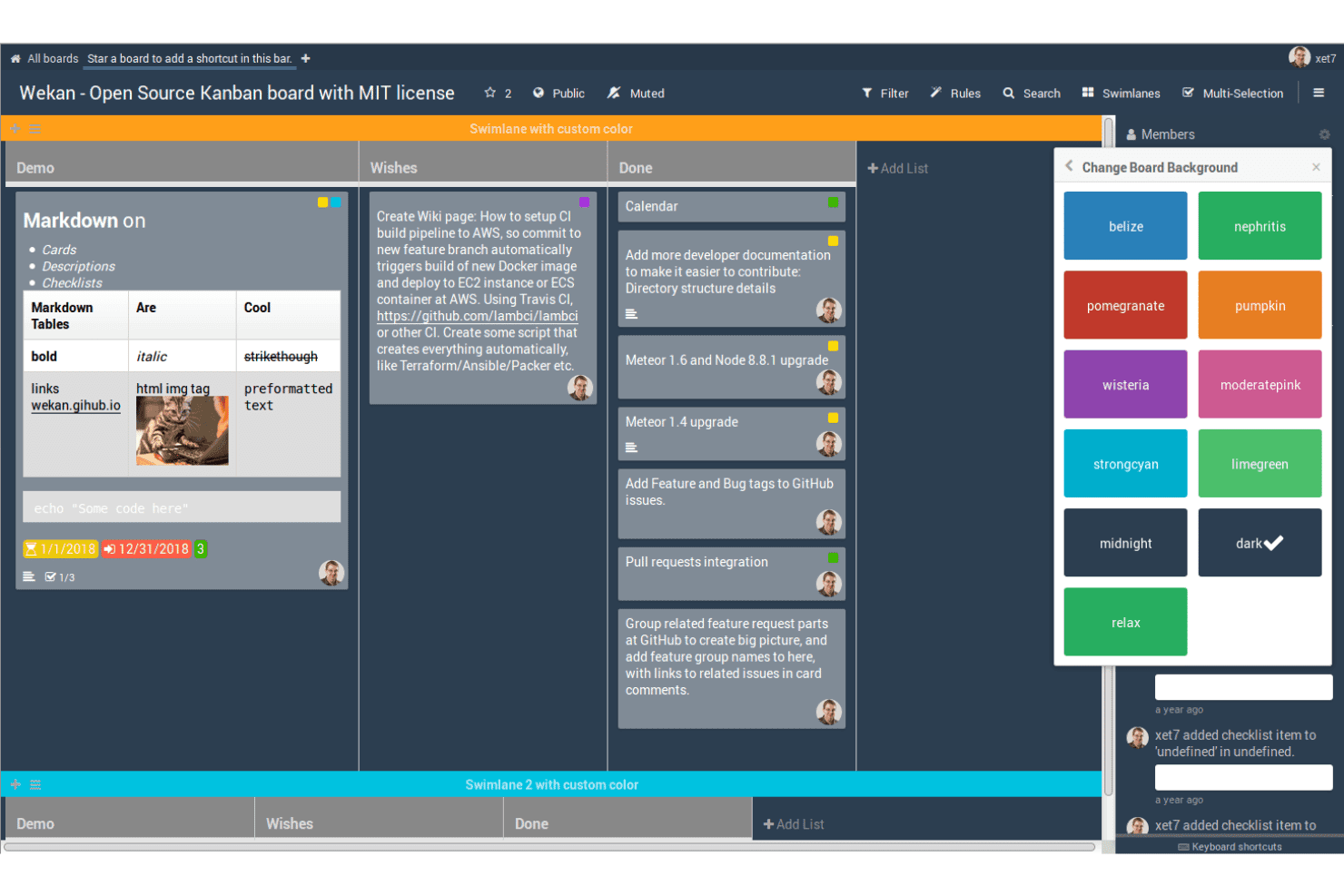
WeKan aiuta i team a raccogliere e organizzare le idee su bacheche Kanban a codice aperto utilizzando schede, liste, etichette e corsie personalizzabili. WeKan è uno strumento Kanban con licenza MIT e hosting autonomo, che organizza le idee sotto forma di schede su bacheche personalizzabili, con votazioni integrate, categorizzazione basata su etichette, regole di automazione e un'API REST per estendere i flussi di lavoro.
Per chi è più adatto WeKan?
WeKan è adatto ai team tecnicamente preparati che desiderano ospitare autonomamente uno strumento di monitoraggio delle idee basato su Kanban e hanno la possibilità di configurarlo in base al proprio flusso di lavoro.
Perché ho scelto WeKan
Ho scelto WeKan come uno dei migliori strumenti perché offre il pieno controllo sui dati delle idee grazie all'hosting autonomo, con opzioni di distribuzione che includono Docker, Helm, Snap e un pacchetto zip autonomo che funziona senza un container. Mi piace il fatto che sia possibile modellare un flusso completo per le idee utilizzando le liste come fasi, ad esempio 'In revisione → Pianificata → In corso', e aggiungere regole di automazione che spostano automaticamente le schede quando vengono soddisfatte determinate condizioni. La licenza MIT elimina qualsiasi limitazione proprietaria sulle personalizzazioni o sulle estensioni.
Funzionalità principali di WeKan
- Votazione delle schede: Ogni scheda include una votazione integrata A favore/Contrario con una data di fine facoltativa, visibilità pubblica o privata e un'opzione per consentire ai membri esterni alla bacheca di partecipare.
- Sistema di ruoli a nove livelli: Le bacheche supportano nove ruoli distinti, tra cui solo commento, sola lettura e operatore, offrendo un controllo preciso su chi può inviare, commentare o modificare.
- Regole di automazione: Un motore di regole basato su trigger e azioni sposta automaticamente le schede, aggiorna i campi o esegue azioni su più bacheche quando vengono soddisfatte determinate condizioni.
- Ampio supporto per l'importazione: WeKan importa bacheche da Trello, Jira, Asana, Kanboard, GitLab e diversi altri strumenti, riducendo le difficoltà del passaggio da una piattaforma all'altra.
Integrazioni di WeKan
WeKan offre connettività documentata per l'importazione e l'esportazione con Jira, Asana, GitLab, OpenProject, Kanboard, Nextcloud Deck e Zenkit. La sua API REST, il client Python, i webhook in uscita e il supporto per LDAP, CAS, OIDC/OAuth2 e SAML consentono di creare flussi di lavoro e sistemi di autenticazione personalizzati.
Pros and Cons
Pros:
- La licenza MIT consente personalizzazioni approfondite
- Le bacheche flessibili modellano i flussi di lavoro delle idee
- I ruoli granulari consentono una partecipazione controllata
Cons:
- La votazione A favore/Contrario non supporta la definizione di priorità ordinate
- Nessun portale per l'invio anonimo di idee
Learn more about WeKan: Ideale per flussi di lavoro autogestiti dalla pianificazione alla tabella di marcia
- Versione di prova gratuita di 14 giorni + piano gratuito disponibile
- A partire da $7.25/utente/mese (con fatturazione annuale)
Visit WebsiteCustomer Rating:4.5/5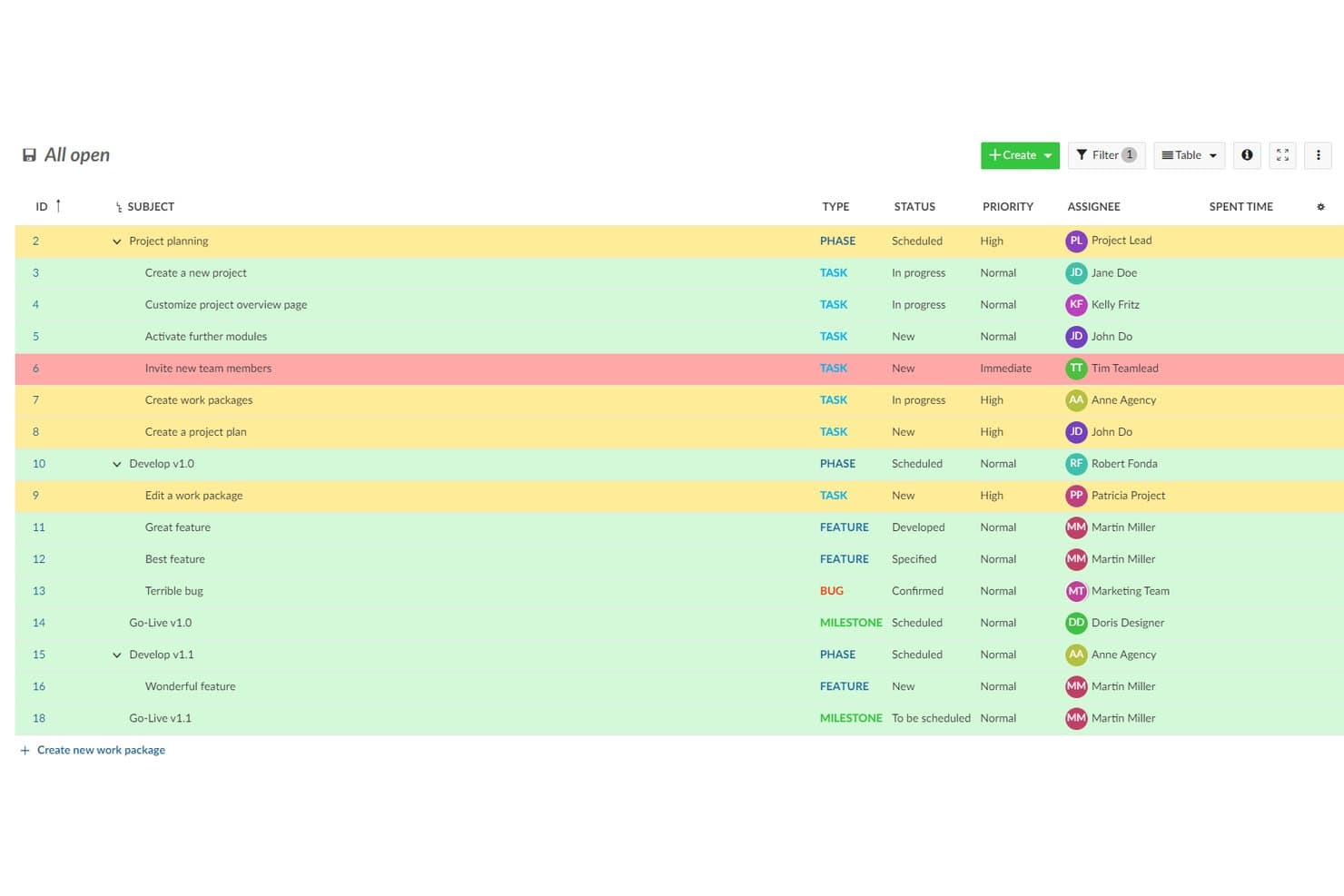
OpenProject organizza idee e attività evidenziando le priorità. OpenProject è una suite a codice aperto per la gestione dei progetti, rilasciata con licenza GPL-3.0, che consente ai team di registrare e monitorare le idee come pacchetti di lavoro, organizzarle tramite flussi di lavoro personalizzabili e trasferirle in bacheche Kanban, diagrammi di Gantt e tabelle di marcia del prodotto.
Per chi è più adatto OpenProject?
OpenProject è adatto ai team di prodotto e di ingegneria che devono ospitare autonomamente i propri strumenti e desiderano un unico spazio in cui portare le idee dalla pianificazione alla realizzazione e al monitoraggio della tabella di marcia.
Perché ho scelto OpenProject
Ho scelto OpenProject come uno dei migliori perché è l'unico strumento di questo elenco progettato per accompagnare le idee fino alla realizzazione senza uscire dalla propria infrastruttura. Le idee vengono registrate come pacchetti di lavoro, ricevono stati personalizzati e passano attraverso flussi di lavoro configurabili fino alle bacheche Kanban, ai diagrammi di Gantt e a una visualizzazione completa della tabella di marcia del prodotto, tutto all'interno di un'unica base di codice GPL-3.0 che si possiede interamente. Apprezzo soprattutto il fatto che l'hosting autonomo sia qui maturo, con opzioni Docker Compose, Helm e Kubernetes supportate da rilasci mensili attivi e avvisi di sicurezza pubblicati.
Funzionalità principali di OpenProject
- Tipi di pacchetti di lavoro personalizzati: gli amministratori possono creare tipi di attività dedicati come 'Idea' o 'Richiesta di funzionalità', ciascuno con i propri campi, stati e regole del flusso di lavoro.
- API REST e notifiche basate su eventi: OpenProject espone un'API REST completa e notifiche basate sugli eventi per progetti, attività e commenti, consentendo ai team di creare pipeline personalizzate per la raccolta delle idee o la reportistica.
- Regole del flusso di lavoro basate sui ruoli: gli amministratori definiscono quali transizioni di stato ogni ruolo può attivare per ciascun tipo di attività, così le idee passano attraverso le fasi di revisione in modo controllato e ripetibile.
- Modulo forum: i forum integrati con discussioni organizzate per argomento supportano conversazioni strutturate separate dai singoli pacchetti di lavoro, con pubblicazioni in evidenza, blocco delle discussioni e notifiche email per gli utenti iscritti.
Integrazioni di OpenProject
OpenProject dispone di integrazioni native documentate con GitHub, GitLab, Nextcloud, OneDrive e SharePoint, oltre a repository Git e SVN per le installazioni locali. La sua API REST e le notifiche basate su eventi supportano connessioni personalizzate.
Pros and Cons
Pros:
- La base di codice GPL-3.0 consente una personalizzazione completa
- L'hosting autonomo mantiene il controllo sui dati delle idee
- I flussi di lavoro collegano le idee alle tabelle di marcia del prodotto
Cons:
- Nessun sistema nativo di votazione o classificazione delle idee
- I riscontri esterni richiedono account e autorizzazioni
Learn more about OpenProject: Ideale per i team agili che monitorano le idee fino alla consegna
- Piano gratuito disponibile
- A partire da 5 €/mese
Visit WebsiteCustomer Rating:4.3/5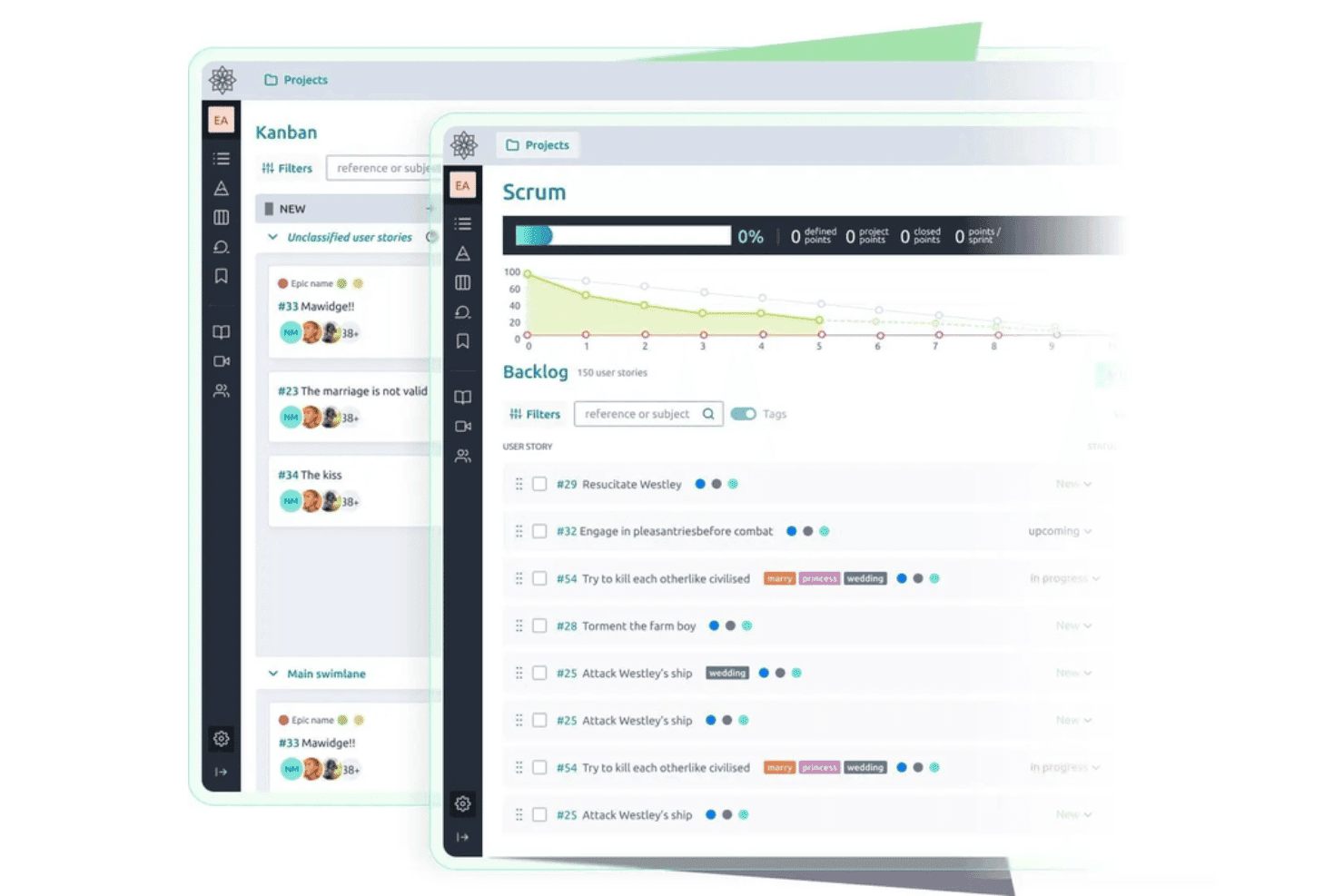
Taiga aiuta i team ad acquisire e sviluppare idee attraverso flussi di lavoro Kanban e Scrum a codice sorgente aperto con backlog e storie utente. Taiga è uno strumento a codice sorgente aperto per la gestione agile dei progetti che consente ai team di acquisire segnalazioni, storie utente ed epiche, votarle, monitorarle attraverso flussi di lavoro Scrum e Kanban personalizzabili e ospitare autonomamente l'intera piattaforma con una licenza MPL-2.0.
Per chi è più adatta Taiga?
Taiga è adatta ai team di sviluppo agili che desiderano ospitare autonomamente i propri strumenti di gestione dei progetti e monitorare le idee dal backlog fino alla consegna dello sprint all'interno di un'unica piattaforma a codice sorgente aperto.
Perché ho scelto Taiga
Ho incluso Taiga tra le mie scelte principali perché è uno dei pochi strumenti realmente a codice sorgente aperto che monitora un'idea dall'elemento grezzo del backlog fino alla consegna dello sprint con licenza MPL-2.0 e una configurazione Docker Compose documentata. Apprezzo il fatto che i team possano votare direttamente le segnalazioni dalla pagina dei dettagli della segnalazione, ordinarle in base al numero di voti e trasformare una segnalazione con molti voti in una storia utente senza dover cambiare strumento. Gli stati personalizzati, i tag colorati e i campi personalizzati consentono di adattare il flusso di lavoro al modo in cui il team porta effettivamente avanti le idee.
Funzionalità principali di Taiga
- Individuazione pubblica dei progetti: I team possono elencare i progetti nella pagina di esplorazione di Taiga, consentendo agli utenti esterni di esplorare e inviare idee senza essere membri di un progetto.
- Campi personalizzati per tutti i tipi di elementi: Gli amministratori possono aggiungere campi di testo, menu a discesa, data, numero e casella di controllo a epiche, storie, attività e segnalazioni per acquisire metadati strutturati sulle idee.
- API REST con endpoint per le votazioni: Taiga espone endpoint per voti positivi, voti negativi ed elenchi dei votanti per epiche, storie utente e segnalazioni, semplificando la creazione di flussi di acquisizione personalizzati.
- Hosting autonomo con Docker Compose: Un repository
taiga-dockersupportato, con un file.enve script di avvio, consente ai team di distribuire e gestire la propria istanza mantenendo il pieno controllo dei dati.
Integrazioni di Taiga
Taiga offre integrazioni native con GitHub, GitLab, Bitbucket, Gogs e Slack, oltre a strumenti di importazione per Jira, Trello, Asana e altro. La sua API REST e i webhook supportano integrazioni personalizzate ed è disponibile su Zapier.
Pros and Cons
Pros:
- La licenza MPL-2.0 consente un hosting autonomo autentico
- Gli stati personalizzati accompagnano le idee fino alla consegna
- I progetti pubblici invitano la comunità a votare
Cons:
- Nessun rilevamento dei duplicati o fusione delle idee
- I commenti piatti limitano la discussione della comunità
Learn more about Taiga: Ideale per la votazione di idee guidata dalla comunità su larga scala
- Piano gratuito + prova gratuita di 14 giorni disponibile
- A partire da $100/mese
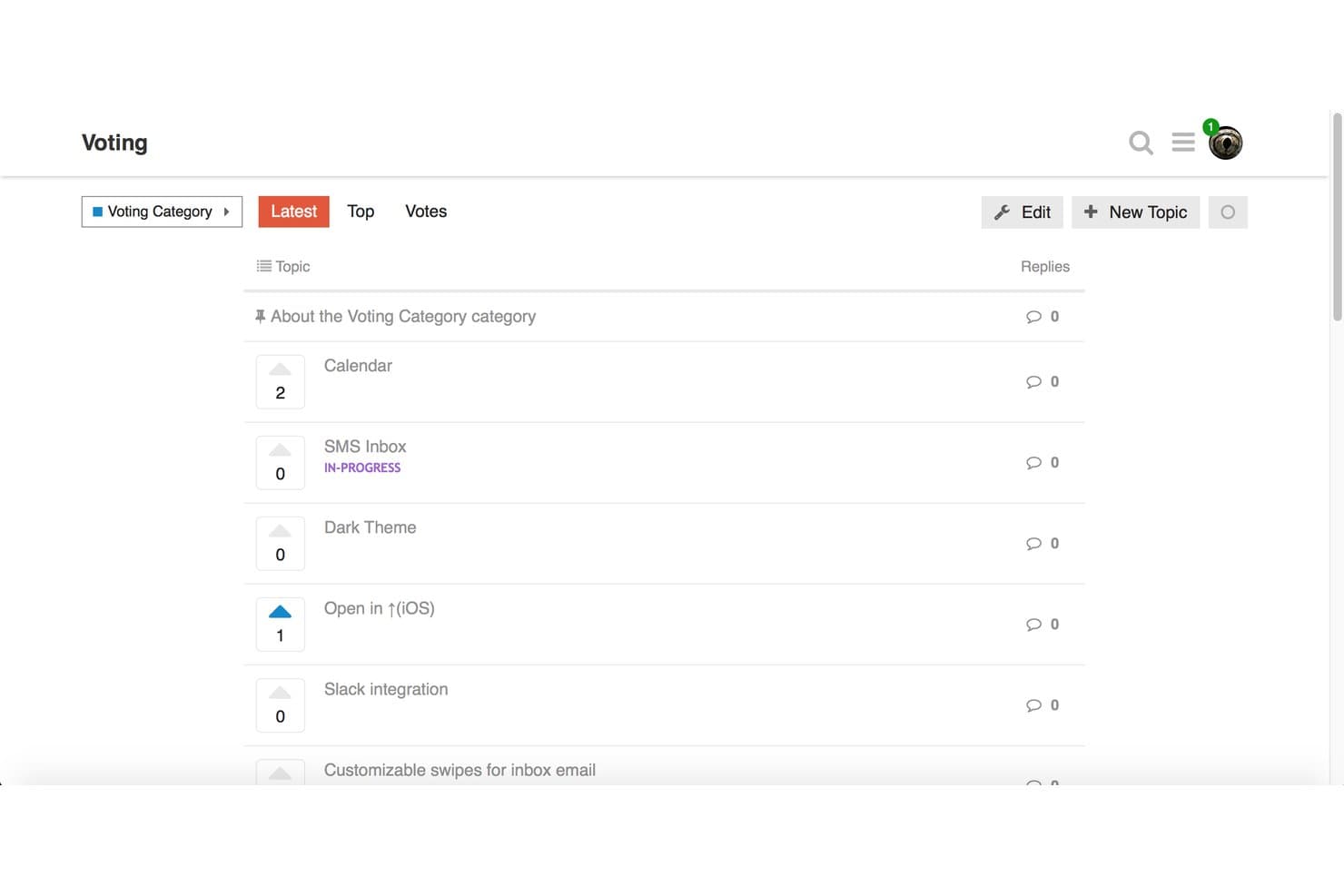
Discourse consente agli utenti di votare le idee sulle funzionalità per stabilire la priorità delle richieste della comunità. Discourse è una piattaforma di forum open source con licenza GPL che supporta l'invio di idee da parte della comunità, la votazione basata sugli argomenti, le discussioni nei thread e l'organizzazione per categorie.
Per chi è più adatto Discourse?
Discourse è ideale per i community manager e i team di prodotto che desiderano un'infrastruttura per forum open source, dove i membri possano inviare, votare e discutere idee su larga scala.
Perché ho scelto Discourse
Discourse si è guadagnato un posto nella mia lista ristretta perché gestisce la votazione delle idee guidata dalla comunità su una scala che gli strumenti progettati appositamente fanno fatica a eguagliare. Mi piace il fatto che la Votazione degli argomenti sia ora integrata nel nucleo del software, così chi gestisce autonomamente il proprio hosting può abilitare categorie di idee basate sui voti, ordinare gli invii in base all'attività di voto più recente e assegnare distintivi come 'Ideatore' senza installare nulla di aggiuntivo. Anche il tipo sperimentale di categoria Idee consente di rimuovere completamente i limiti di voto per utente, un'opzione significativa quando si gestisce una comunità aperta e numerosa con migliaia di contributori attivi.
Funzionalità principali di Discourse
- Base di codice open source con licenza GPL: Il codice sorgente completo di Discourse è disponibile pubblicamente su GitHub con licenza GPL, quindi è possibile esaminarlo, modificarlo e gestirlo autonomamente senza restrizioni.
- Hosting autonomo basato su Docker: Un singolo comando installa Discourse in un contenitore Docker, con aggiornamenti con un clic e backup automatici integrati nel pannello di amministrazione.
- Livelli di fiducia e moderazione della comunità: Nel tempo, i membri acquisiscono capacità di moderazione attraverso un sistema integrato di livelli di fiducia, consentendo alla comunità di contribuire alla gestione dei contenuti senza l'intervento degli amministratori.
- Plugin di integrazione con le chat: Collega il forum Discourse a Slack, Microsoft Teams, Discord e altre piattaforme di messaggistica, indirizzando i nuovi argomenti e post ai canali scelti.
Integrazioni di Discourse
Discourse offre integrazioni native con Slack, Microsoft Teams, Discord, Jira, Zendesk, Salesforce e GitHub, con disponibilità variabile in base al piano. La sua API REST e i webhook supportano integrazioni personalizzate.
Pros and Cons
Pros:
- La base di codice GPL consente un hosting autonomo reale
- La Votazione degli argomenti supporta la definizione delle priorità guidata dalla comunità
- Gli strumenti di moderazione supportano discussioni su larga scala
Cons:
- Il monitoraggio dello stato si basa sui tag
- I voti positivi non prevedono punteggi ponderati o negativi
Learn more about Discourse: Ideale per il triage dei duplicati basato sull'IA
- Prova gratuita di 14 giorni disponibile
- A partire da $19/mese (con fatturazione annuale)

Quackback offre bacheche per ordinare e gestire le richieste di feedback. Quackback è una piattaforma a codice sorgente aperto per la gestione delle idee, progettata per raccogliere, organizzare e selezionare le idee migliori con funzionalità collaborative e flussi di lavoro avanzati basati sull'IA.
Per chi è più indicato Quackback?
Team alla ricerca di una piattaforma collaborativa per gestire l'invio di idee e automatizzare il rilevamento dei duplicati con l'IA.
Perché ho scelto Quackback
Ho scelto Quackback come una delle soluzioni migliori perché il suo sistema di triage dei duplicati basato sull'IA consente al mio team di identificare e unire rapidamente le idee simili. Mi piace poter impostare regole personalizzate per stabilire come segnalare i duplicati e analizzare i suggerimenti in un'unica pannello di controllo.
Funzionalità principali di Quackback
- Sistema di votazione delle idee: Consente ai membri del team e alle parti interessate di votare a favore o contro le idee inviate.
- Organizzazione per categorie: Ordina e consulta le idee in base a categorie personalizzate per facilitarne l'individuazione.
- Discussioni con commenti: Consente discussioni mirate su ogni idea tramite conversazioni organizzate in discussioni.
- Triage dei duplicati basato sull'IA: Identifica, segnala e analizza automaticamente gli invii di idee simili per unire rapidamente i duplicati
Integrazioni di Quackback
Quackback offre integrazioni native con Slack, Microsoft Teams, Discord, Linear, Jira, Asana, ClickUp, Hubspot, Zendesk, Salesforce e altri strumenti. Si integra con Zapier e supporta integrazioni personalizzate tramite API.
Pros and Cons
Pros:
- L'IA evidenzia e suggerisce il raggruppamento delle idee
- Controlli personalizzabili per flussi di lavoro e triage
- A codice sorgente aperto con aggiornamenti regolari su GitHub
Cons:
- Documentazione limitata per le configurazioni complesse
- È necessario gestire autonomamente l'hosting per il piano gratuito
Learn more about Quackback: Ideale per bacheche di feedback illimitate
- Piano gratuito disponibile
- A partire da $25/mese

Fider offre strumenti di votazione, ordinamento e ricerca per gestire i feedback degli utenti. Fider è una piattaforma a codice aperto e di gestione delle idee guidata dalla comunità, pensata per raccogliere, organizzare e discutere i suggerimenti degli utenti tramite votazioni, thread di commenti, aggiornamenti sullo stato e strumenti di moderazione.
Per chi è più adatto Fider?
Fider è ideale per responsabili di prodotto e squadre della comunità che devono raccogliere feedback per favorire decisioni informate su un'ampia base di utenti.
Perché ho scelto Fider
Ho scelto Fider come una delle soluzioni migliori perché posso creare bacheche illimitate per raccogliere, organizzare e stabilire le priorità dei feedback provenienti da squadre o prodotti diversi. Mi piace quanto sia semplice configurare bacheche pubbliche o private per comunità separate, senza preoccuparsi dei limiti di volume o di utenti.
Funzionalità principali di Fider
- Monitoraggio dello stato: Assegna e aggiorna gli stati degli elementi di feedback per riflettere i progressi o le decisioni.
- Sistema di votazione: Consenti agli utenti di votare positivamente o negativamente i feedback per indicare domanda e priorità.
- Supporto SSO: Integra provider di autenticazione esterni per una gestione sicura e centralizzata degli accessi.
- Controlli della privacy: Crea bacheche pubbliche o private per gestire la visibilità dei feedback per comunità o squadre specifiche.
Integrazioni di Fider
Fider offre un'API per integrazioni personalizzate. Le integrazioni native non sono elencate pubblicamente.
Pros and Cons
Pros:
- Interfaccia intuitiva per le richieste di funzionalità
- Sistema di votazione per stabilire le priorità dei feedback
- Comunità attiva per lo sviluppo a codice aperto
Cons:
- Mancano tabelle di marcia pubbliche dei prodotti integrate
- Nessun pannello di reportistica integrato
Learn more about Fider: La scelta migliore per piani di sviluppo pubblici integrati
- Prova gratuita di 14 giorni + piano gratuito + demo gratuita disponibile
- Da $9/mese

ClearFlask offre strumenti per esaminare, aggiornare, trasformare e unire i riscontri. ClearFlask è una piattaforma a codice sorgente aperto per la gestione delle idee che consente di raccogliere, ordinare e ottenere suggerimenti dagli utenti tramite il voto, discussioni nei commenti, piani di sviluppo dei progetti e bacheche di riscontri personalizzabili.
Per chi è più adatto ClearFlask?
ClearFlask è adatto ai responsabili di prodotto e ai team di assistenza clienti delle aziende SaaS che necessitano di contributi diretti dagli utenti e desiderano condividere piani di sviluppo pubblici dei prodotti.
Perché ho scelto ClearFlask
Ho scelto ClearFlask come una delle mie opzioni principali perché posso configurare piani di sviluppo pubblici dei prodotti direttamente collegati ai riscontri degli utenti. Mi piace avere voti, aggiornamenti sullo stato e discussioni sulle idee tutti visibili accanto a un piano di sviluppo aggiornato, un aspetto che il mio team considera trasparente e utile per agire.
Funzionalità principali di ClearFlask
- Moduli di invio personalizzabili: Raccogli idee con moduli personalizzati in linea con il tuo processo di raccolta dei riscontri.
- Segmentazione degli utenti: Organizza e analizza i riscontri in base a diversi gruppi di utenti o segmenti di clientela.
- Strumenti avanzati di moderazione: Approva, rifiuta o modifica idee e commenti prima che vengano mostrati pubblicamente.
- Piani di sviluppo pubblici dei prodotti: Collega direttamente i riscontri degli utenti a un piano di sviluppo aggiornato per mantenere le parti interessate allineate sull'avanzamento delle funzionalità.
Integrazioni di ClearFlask
ClearFlask offre integrazioni native con Jira, Slack, Hotjar, GitLab, GitHub, Intercom, Segment e Discord. Si integra con Zapier ed è disponibile un'API per le integrazioni personalizzate.
Pros and Cons
Pros:
- Gli aggiornamenti del piano di sviluppo pubblico sono visibili agli utenti
- Le bacheche delle idee possono essere completamente personalizzate
- La base di codice a sorgente aperto consente un'installazione autonoma avanzata
Cons:
- La configurazione operativa è molto complessa
- Meno funzionalità di collaborazione rispetto ai concorrenti più grandi
Learn more about ClearFlask: Ideale per bacheche di riscontri B2B ponderate in base ai ricavi
- Piano gratuito disponibile
- A partire da $15/utente/mese
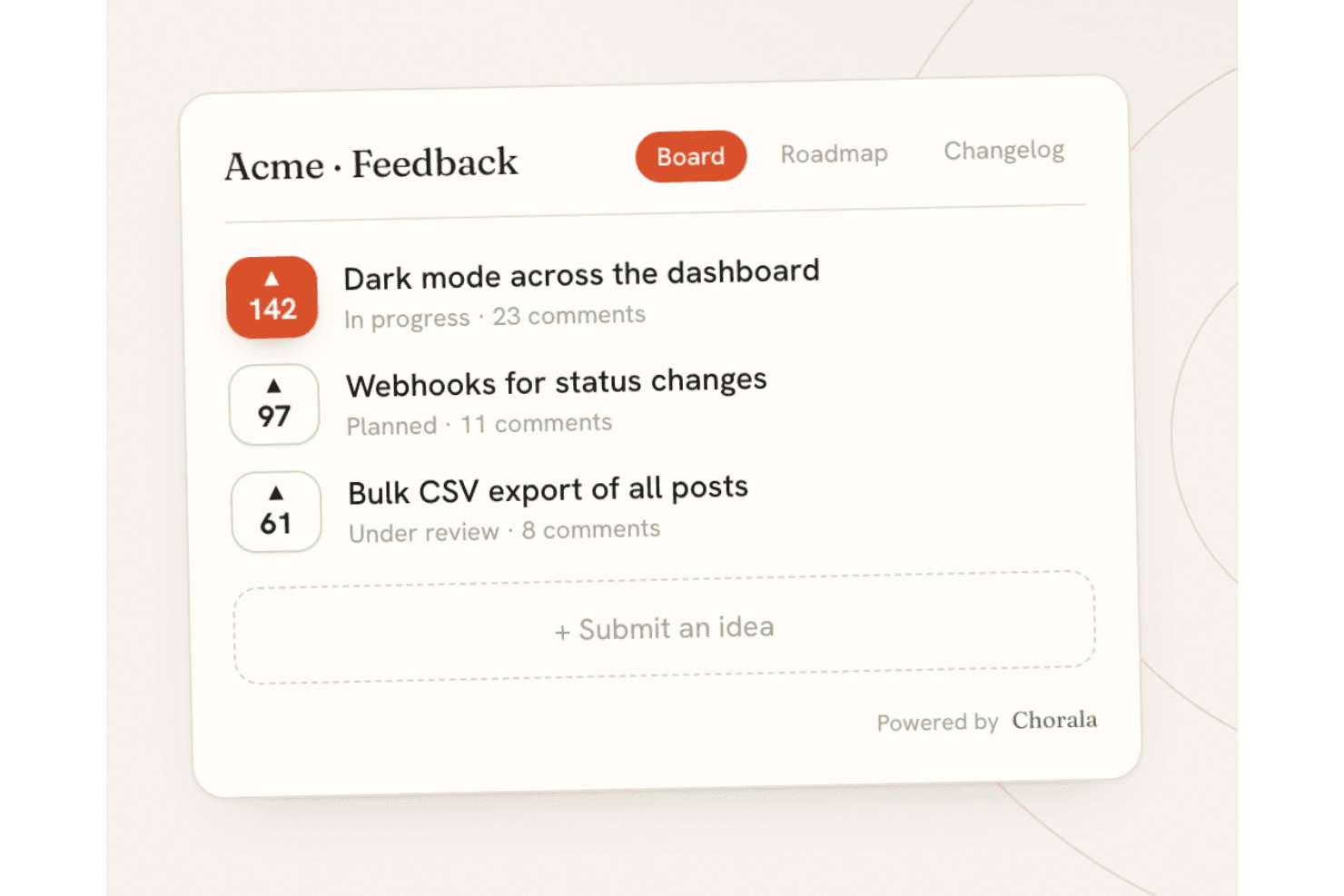
Chorala consente ai team di raccogliere, votare e definire le priorità delle idee attraverso una bacheca di riscontri a codice aperto. Chorala è una piattaforma di riscontri a codice aperto, installabile sui propri server, che combina l'invio e la votazione delle idee, la definizione delle priorità ponderata in base ai ricavi, piani di sviluppo pubblici, registri delle modifiche e classificazione assistita dall'IA attraverso bacheche multilingue incorporabili.
Per chi è più adatta Chorala?
Chorala è particolarmente adatta ai responsabili di prodotto B2B che devono definire le priorità delle richieste di funzionalità in base ai ricavi dei clienti anziché al semplice numero di voti.
Perché ho scelto Chorala
Ho scelto Chorala come una delle migliori perché risolve un problema reale di definizione delle priorità B2B: sapere che una funzionalità è richiesta da $200k di MRR ha un peso molto maggiore di 50 voti anonimi. La ponderazione in base ai ricavi di Chorala sincronizza l'MRR di ogni azienda e mostra direttamente sulla bacheca dei riscontri valori come '$40k di ricavi vogliono questa funzionalità'. Mi piace anche il fatto che gli amministratori possano aggiungere campi di valutazione RICE/ICE personalizzati e filtrare le idee in base a un MRR minimo, all'azienda o al piano, così che le decisioni sulle priorità si basino sull'impatto effettivo sul business anziché sulla voce più insistente.
Funzionalità principali di Chorala
- Autopilota IA: Incolla una conversazione di supporto e Chorala estrae le richieste di funzionalità come bozze, raggruppa le idee simili in cluster e risponde alle domande sui tuoi riscontri in linguaggio semplice.
- Distribuzione sui propri server: Esegui l'intera piattaforma sui tuoi server tramite Docker Compose, con migrazioni automatiche, postazioni amministratore illimitate e nessuna limitazione di fatturazione.
- Webhook in uscita firmati: Chorala invia eventi webhook firmati con HMAC-SHA256 alla creazione dei post, al cambio di stato, all'unione, ai commenti e ai voti, con nuovi tentativi automatici in caso di errore.
- Registri delle modifiche mirati al pubblico: Crea segmenti di pubblico a partire da qualsiasi attributo utente—piano, lingua o MRR—e invia annunci personalizzati del registro delle modifiche a specifici segmenti di clienti.
Integrazioni di Chorala
Le integrazioni native non sono attualmente elencate.
Pros and Cons
Pros:
- La definizione delle priorità ponderata in base ai ricavi riflette l'MRR dei clienti
- L'hosting autonomo include tutte le funzionalità della piattaforma
- Il raggruppamento tramite IA trasforma i riscontri in temi organizzati
Cons:
- Il progetto recente ha una validazione limitata da parte della community
- Per chi gestisce l'hosting autonomamente manca una guida documentata al dimensionamento
Learn more about Chorala: Ideale per feedback con licenza MIT e sincronizzazione con GitHub
- Piano gratuito disponibile
- Gratuito, a codice aperto
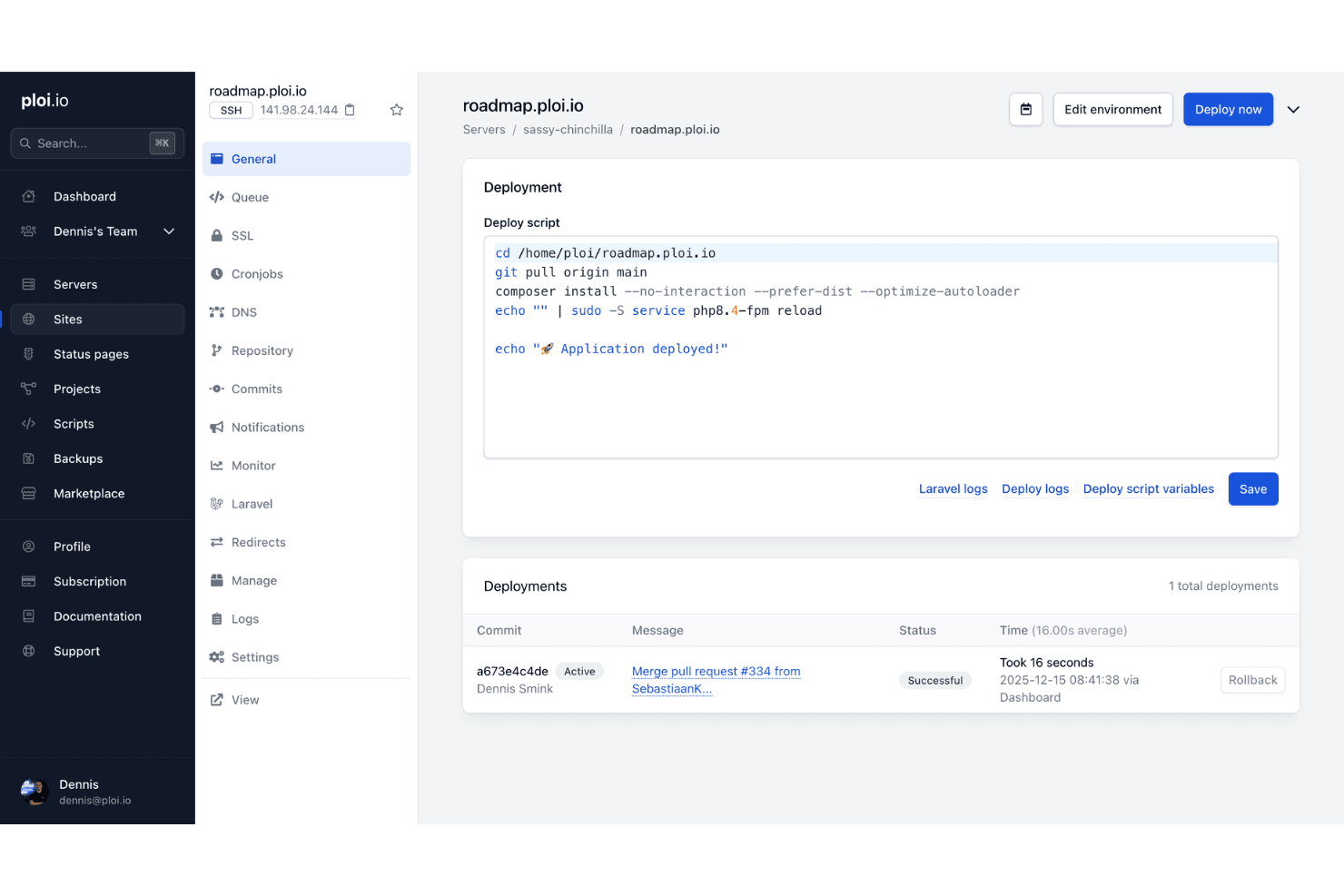
Ploi Roadmap aiuta i team a gestire e distribuire un ambiente a codice aperto per la gestione delle idee, con script configurabili e monitoraggio delle distribuzioni. Ploi Roadmap è uno strumento di gestione delle idee, autogestibile e con licenza MIT, basato su Laravel, che consente ai team di raccogliere richieste di funzionalità, organizzare le segnalazioni tra bacheche e progetti, abilitare votazioni degli utenti e commenti organizzati in discussioni, nonché sincronizzare direttamente gli elementi con le segnalazioni di GitHub.
Per chi è più adatto Ploi Roadmap?
Ploi Roadmap è particolarmente adatto ai team di sviluppo PHP che desiderano il pieno controllo sulla propria infrastruttura per la raccolta dei feedback, senza restrizioni di licenza.
Perché ho scelto Ploi Roadmap
Ho scelto Ploi Roadmap come uno dei migliori strumenti perché la sua licenza MIT è il vero elemento distintivo: puoi crearne una derivazione, modificarne il marchio e apportare liberamente modifiche senza alcun obbligo di copyleft. Apprezzo in particolare il fatto che la sincronizzazione con GitHub permetta di collegare gli elementi di feedback direttamente alle segnalazioni esistenti o di crearne di nuove senza uscire dalla bacheca, mantenendo così allineati prodotto e sviluppo. Anche la funzionalità di unione dei duplicati si distingue, poiché consolida voti e commenti provenienti da segnalazioni ridondanti in un unico elemento senza conteggiare due volte gli utenti votanti.
Funzionalità principali di Ploi Roadmap
- Bacheche per più progetti: Organizza i feedback tra più progetti, ciascuno con le proprie bacheche, impostazioni di visibilità e controlli di accesso per i membri.
- Traduzioni in oltre 80 lingue: L'interfaccia include file di localizzazione per più di 80 lingue, tra cui l'arabo, il giapponese e le varianti del cinese.
- Componente per la raccolta dei feedback incorporabile: Un componente JavaScript consente di raccogliere feedback direttamente dalla tua applicazione, con opzioni per la posizione del pulsante, il colore, la limitazione del dominio e la precompilazione dei dati dell'utente.
- Accesso SSO tramite OAuth 2: Gli utenti possono autenticarsi tramite qualsiasi servizio OAuth 2, offrendo ai team una gestione centralizzata degli accessi senza un sistema di identità separato.
Integrazioni di Ploi Roadmap
Ploi Roadmap offre un'integrazione nativa con GitHub per collegare i feedback alle segnalazioni o crearne di nuove. Supporta inoltre i webhook di Slack e Discord per le notifiche.
Pros and Cons
Pros:
- La licenza MIT consente una personalizzazione senza restrizioni
- L'unione dei duplicati preserva voti e commenti
- Il supporto per i progetti privati consente una raccolta controllata dei feedback
Cons:
- La documentazione si basa ampiamente sul README
- La distribuzione manuale richiede competenze in PHP
Learn more about Ploi Roadmap: 10Ideale per bacheche pubbliche di feedback rivolte agli sviluppatori
Sayr
- Piano gratuito disponibile
- A partire da $3/utente/mese
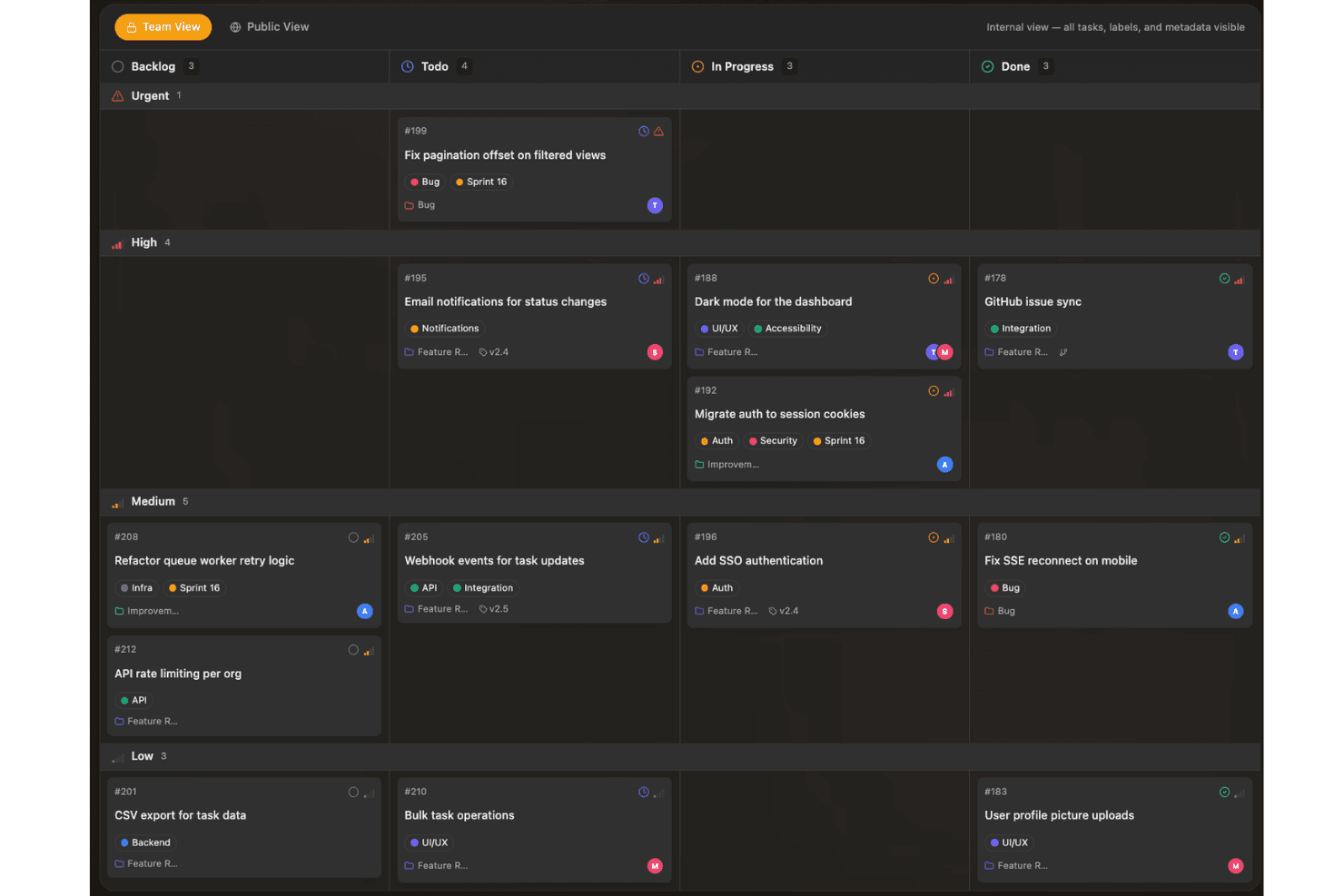
Sayr aiuta i team a raccogliere e definire la priorità delle idee su una bacheca visiva organizzata per stato, urgenza e avanzamento dello sviluppo. Sayr è uno strumento di gestione dei progetti disponibile con codice sorgente, dotato di un portale pubblico per i feedback che consente ai team di raccogliere, votare e discutere richieste di funzionalità e segnalazioni di bug tramite una bacheca autogestita o ospitata nel cloud, con integrazione con GitHub e supporto per i bot Discord.
Per chi è più adatto Sayr?
Sayr è particolarmente adatto ai team di sviluppatori e ai progetti a codice aperto che desiderano una bacheca di feedback autogestita e collegata a GitHub, dove i membri della comunità possano inviare e votare richieste di funzionalità.
Perché ho scelto Sayr
Ho scelto Sayr come una delle migliori soluzioni perché la sua sincronizzazione bidirezionale con GitHub è realmente progettata per le bacheche di feedback rivolte agli sviluppatori. Quando una richiesta di integrazione viene unita con
Fixes #Nnel messaggio del commit, Sayr chiude automaticamente l'attività collegata sulla bacheca pubblica, così la comunità visualizza sempre uno stato aggiornato e preciso senza interventi manuali. Apprezzo anche i controlli granulari sulla visibilità: puoi contrassegnare come interni singoli commenti, etichette e voci della cronologia, mantenendo privato il contesto tecnico e mostrando ai clienti solo ciò che è rilevante.Funzionalità principali di Sayr
- Bacheca pubblica per le votazioni: I visitatori possono consultare, votare positivamente e ordinare le richieste di funzionalità in base alla popolarità, alla novità o alle tendenze senza dover disporre di un account amministratore.
- Commenti interni e pubblici: I membri del team possono pubblicare commenti visibili esclusivamente all'interno su qualsiasi attività, mantenendo private le discussioni tecniche, mentre le risposte pubbliche restano visibili a chi ha inviato la richiesta.
- Integrazione con il bot Discord: Il comando
/sayr createconsente ai membri della comunità di inviare attività direttamente da Discord utilizzando i modelli di segnalazione predefiniti. - Rilasci e traguardi: Puoi raggruppare le attività nei rilasci con monitoraggio dei progressi, offrendo alla comunità una visualizzazione pubblica del registro delle modifiche e del piano di sviluppo.
Integrazioni di Sayr
Sayr offre integrazioni native con GitHub e Discord, tra cui la sincronizzazione bidirezionale di attività e segnalazioni GitHub e la creazione di attività su Discord tramite
/sayr create. Fornisce inoltre un'API REST e una CLI per integrazioni personalizzate.Pros and Cons
Pros:
- Controlli granulari sulla visibilità pubblica e privata
- Discussioni strutturate e moderazione avanzate
- Monitoraggio dello stato del piano di sviluppo in tempo reale
Cons:
- Disponibile con codice sorgente, ma non approvato dall'OSI
- Nessuna funzione per unire i duplicati o per il voto ponderato
Learn more about Sayr:
Altri software a codice sorgente aperto per la gestione delle idee
Ecco alcune altre opzioni di software a codice sorgente aperto per la gestione delle idee che non sono state incluse nel mio elenco, ma che vale comunque la pena valutare:
- 11FeatulIdeale per bacheche di feedback ospitate nell'UE con licenza MIT
- 12FeedlogIdeale per cicli di feedback con hosting autonomo e IA nativa
- 13eXo PlatformIdeale per spazi di lavoro aziendali condivisi
- 14KanboardIdeale per il monitoraggio di idee in stile kanban con licenza MIT
- 15OpenideaLIdeale per la gestione del ciclo di vita delle idee basata su Drupal
- 16LogChimpIdeale per portali autogestiti personalizzabili
- 17FeedbacklandIdeale per tabelle di marcia classificate generate dall'IA
Come valuto i software a codice sorgente aperto per la gestione delle idee
Divido la mia valutazione in tre parti, attribuendo il peso maggiore alle funzionalità fondamentali: raccogliere le idee, consentire agli utenti di votare e commentare e monitorare gli stati. Successivamente, cerco funzionalità distintive come l'accesso alle API e ai webhook. Infine, considero ciò che va oltre le funzionalità, tra cui il supporto all'installazione autonoma, la manutenzione, l'onboarding e il rapporto qualità-prezzo.
Funzionalità fondamentali (criteri indispensabili per questo elenco)
Quando seleziono gli strumenti da inserire nel mio elenco, assegno a ciascuno un punteggio su una scala da 0 (non offre la funzionalità) a 5 (eccelle in quest'area) per ogni funzionalità fondamentale elencata di seguito. Converto poi il totale in una percentuale per contribuire a valutare l'idoneità complessiva di ciascuno strumento, attribuendo un peso aggiuntivo alle funzionalità che ho ritenuto essenziali.
- Invio e votazione delle idee (essenziale): cerco moduli per le idee dei clienti, conteggi dei voti visibili, ordinamento, gestione dei duplicati e supporto per dare priorità alle richieste più votate.
- Base di codice a sorgente aperto (essenziale): valuto la presenza di licenze pubbliche, l'attività del repository, la documentazione per la configurazione, le indicazioni per i contributi e la possibilità per i team di ispezionare o modificare il codice.
- Monitoraggio dello stato delle idee: verifico la presenza di stati visibili e personalizzabili, come in fase di revisione, pianificata, in corso e completata.
- Commenti e discussioni: i commenti organizzati in thread, le notifiche, le menzioni e la moderazione aiutano i team a chiarire le richieste e a raccogliere il contesto.
- Distribuzione tramite installazione autonoma: cerco opzioni di distribuzione documentate tramite Docker o altri metodi, indicazioni sulla configurazione, note sugli aggiornamenti e supporto per le installazioni private.
- Classificazione e applicazione di tag alle idee: valuto bacheche, tag, filtri e ricerca per organizzare i feedback tra prodotti, gruppi di clienti e temi della roadmap.
Una volta ottenuto un elenco di strumenti che soddisfano i criteri, considero ciò che distingue ciascuna piattaforma.
Fattori distintivi (ciò che differenzia i fornitori)
Ecco come confronto e metto in evidenza le differenze tra i vari fornitori:
Funzionalità distintive
Per me, l'accesso alle API e ai webhook è particolarmente importante perché determina se è possibile sincronizzare le idee con la roadmap o gli strumenti di supporto esistenti senza copiare e incollare manualmente. Verifico la presenza di endpoint REST ben documentati e di trigger webhook che si attivano quando cambia lo stato o vengono aggiunti nuovi voti. Anche il supporto SSO è altrettanto importante: se il team utilizza SAML o OAuth, è necessario poter effettuare l'accesso senza creare un ulteriore insieme di credenziali. Valuto inoltre la localizzazione multilingue, poiché i team di prodotto globali hanno bisogno di bacheche di feedback che i partecipanti possano effettivamente leggere nella propria lingua.
Oltre le funzionalità
Controllo la frequenza dei commit su GitHub e la cadenza dei rilasci, perché un repository non aggiornato comporta l'accumulo di bug e il ritardo delle patch di sicurezza. Anche i costi dell'installazione autonoma sono importanti: il server, il database e il tempo dedicato dal team DevOps ai backup e agli aggiornamenti possono superare il costo di un piano ospitato. Valuto inoltre la proprietà dei dati, in particolare se uno strumento supporta la crittografia dei dati inattivi e una facile esportazione, poiché i team che gestiscono i feedback dei clienti devono spesso rispettare i requisiti del GDPR o quelli interni relativi alla residenza dei dati.
Come scegliere un software a codice sorgente aperto per la gestione delle idee
È facile perdersi in lunghi elenchi di funzionalità e strutture tariffarie complesse. Per aiutarti a rimanere concentrato mentre affronti il tuo processo di selezione del software, unico per le tue esigenze, ecco un elenco dei fattori da tenere presenti:
| Fattore | Cosa considerare |
|---|---|
| FattoreScalabilità | Cosa considerareIl software sarà in grado di gestire un numero maggiore di utenti, squadre o idee man mano che la tua organizzazione cresce? Esamina i limiti relativi a utenti, spazio di archiviazione e moduli. |
| FattoreIntegrazioni | Cosa considerareSi collega agli strumenti di comunicazione, documentazione o gestione dei progetti che utilizzi? Verifica il supporto per le API e le piattaforme principali. |
| FattorePersonalizzazione | Cosa considerarePuoi adattare moduli, flussi di lavoro e autorizzazioni ai processi specifici e alle esigenze di sicurezza della tua organizzazione? |
| FattoreSemplicità d'uso | Cosa considerareQuanta formazione servirà al tuo team per adottare lo strumento con sicurezza? Cerca un'interfaccia chiara e ben strutturata. |
| FattoreImplementazione e inserimento | Cosa considerareQuali risorse sono necessarie per la configurazione: documentazione, competenze tecniche, migrazione dei dati? Valuta se puoi implementare la soluzione e completare l'inserimento nei tempi previsti. |
| FattoreCosto | Cosa considerareOltre ai costi di licenza, considera i requisiti del server, la manutenzione e il carico amministrativo continuativo. Tieni conto di questi elementi nelle previsioni di budget. |
| FattoreMisure di sicurezza | Cosa considerareLo strumento può essere ospitato autonomamente, crittografato o protetto dietro un firewall? Verifica la registrazione dei controlli, le opzioni di autenticazione e la titolarità dei dati. |
| FattoreDisponibilità dell'assistenza | Cosa considerareQuale tipo di assistenza continuativa è disponibile: forum della comunità, contratti a pagamento, sistemi di tracciamento dei problemi o fornitori terzi? Informati su dove ottenere aiuto quando ne hai bisogno. |
Che cos'è un software a codice sorgente aperto per la gestione delle idee?
Il software a codice sorgente aperto per la gestione delle idee è una piattaforma che consente alle squadre di raccogliere, organizzare e stabilire le priorità di suggerimenti, riscontri e progetti di innovazione, grazie a un codice sorgente accessibile pubblicamente e personalizzabile. Questi strumenti aiutano i gruppi a favorire la collaborazione, monitorare il ciclo di vita delle idee e adattare i flussi di lavoro ai propri processi, offrendo al contempo alle organizzazioni il pieno controllo sull'implementazione, sulla sicurezza e sullo sviluppo futuro.
Funzionalità
Quando selezioni un software open source per la gestione delle idee, presta attenzione alle seguenti funzionalità chiave:
- Portale per l'invio delle idee: offre uno spazio dedicato in cui gli utenti possono proporre nuove idee, suggerimenti o feedback, spesso con moduli personalizzabili per diversi tipi di contributi.
- Strumenti di collaborazione: consentono agli utenti di discutere, commentare e perfezionare le idee tramite conversazioni organizzate in thread, menzioni o modifica condivisa, favorendo l'innovazione collettiva.
- Votazione e definizione delle priorità: consente agli utenti di votare positivamente, negativamente o assegnare un punteggio alle idee, così i team possono identificare rapidamente i suggerimenti più popolari o di maggiore impatto da esaminare.
- Monitoraggio dello stato: consente agli amministratori di assegnare a ogni idea stati come “in fase di revisione”, “pianificata” o “implementata”, migliorando la trasparenza e la visibilità dei progetti.
- Controlli di accesso: consentono agli amministratori di gestire chi può creare, visualizzare, modificare o moderare idee o commenti, proteggendo le informazioni sensibili e garantendo la responsabilità.
- Ricerca e filtri: offre funzionalità di ricerca avanzate e filtri che permettono agli utenti di trovare idee per parole chiave, categorie, tag o autori, velocizzando la navigazione e la scoperta dei contenuti.
- Automazione dei flussi di lavoro: supporta notifiche, assegnazioni o avanzamento automatici delle idee attraverso diverse fasi di revisione e approvazione, riducendo al minimo il lavoro manuale.
- Report e analisi: offre informazioni sulle tendenze relative all'invio delle idee, sui livelli di coinvolgimento e sui tassi di implementazione tramite dashboard e report esportabili.
- Supporto alle integrazioni: si collega a strumenti come piattaforme di chat, software per la gestione dei progetti o archiviazione cloud, semplificando l'integrazione della gestione delle idee nei flussi di lavoro esistenti.
Vantaggi
L'implementazione di un software open source per la gestione delle idee offre diversi vantaggi al tuo team e alla tua azienda. Eccone alcuni di cui potrai beneficiare:
- Proprietà e controllo dei dati: puoi implementare la piattaforma sulla tua infrastruttura, garantendo la privacy dei dati e il controllo sulle informazioni sensibili.
- Flussi di lavoro personalizzabili: la flessibilità dell'open source consente di acquisire idee innovative e adattare moduli di invio, approvazioni e stati ai tuoi specifici processi interni.
- Risparmio sui costi: evita i costi ricorrenti degli abbonamenti e il vincolo imposto dai fornitori sfruttando soluzioni disponibili gratuitamente o auto-ospitate.
- Collaborazione migliorata: le funzionalità integrate di comunicazione e feedback consentono all'intero team di partecipare insieme al perfezionamento e alla definizione delle priorità delle idee.
- Potenziale di integrazione: puoi collegare la gestione delle idee agli strumenti di chat, gestione dei progetti o archiviazione già in uso tramite API aperte e connettori documentati.
- Monitoraggio trasparente dell'innovazione: le funzionalità di gestione degli stati e di reportistica mantengono visibile l'avanzamento delle idee, favorendo la responsabilità e il coinvolgimento.
Costi e prezzi
La scelta di un software open source per la gestione delle idee richiede la comprensione dei vari modelli di prezzo e dei piani disponibili. I costi variano in base alle funzionalità, alle dimensioni del team, ai componenti aggiuntivi e ad altri fattori. La tabella seguente riepiloga i piani più comuni, i relativi prezzi medi e le funzionalità generalmente incluse nelle soluzioni open source per la gestione delle idee:
Tabella comparativa dei piani per software open source di gestione delle idee
| Tipo di piano | Prezzo medio | Funzionalità comuni |
|---|---|---|
| Tipo di pianoPiano gratuito | Prezzo medio$0 | Funzionalità comuniSupporto della comunità, invio di idee di base, strumenti fondamentali di collaborazione e personalizzazione limitata. |
| Tipo di pianoPiano personale | Prezzo medio$5-$10/utente/mese | Funzionalità comuniAutorizzazioni avanzate, supporto prioritario, ricerca avanzata e integrazioni limitate. |
| Tipo di pianoPiano aziendale | Prezzo medio$10-$25/utente/mese | Funzionalità comuniFlussi di lavoro personalizzati, strumenti di reportistica, più aree di lavoro, controlli amministrativi e accesso alle API. |
| Tipo di pianoPiano per grandi aziende | Prezzo medio$25-$50/utente/mese | Funzionalità comuniHosting autonomo, registrazione degli audit, sicurezza avanzata, funzionalità di conformità, supporto dedicato e utenti illimitati. |
Domande frequenti sul software open source per la gestione delle idee
Ecco alcune risposte alle domande comuni sul software open source per la gestione delle idee:
Il software open source per la gestione delle idee può essere ospitato autonomamente?
Sì, la maggior parte dei software open source per la gestione delle idee consente di eseguire l’hosting autonomamente sulla propria infrastruttura. Questo offre il pieno controllo sulla sicurezza dei dati, sulle configurazioni della privacy e sulle integrazioni personalizzate in base ai requisiti della propria organizzazione.
Quanto è difficile personalizzare gli strumenti open source per la gestione delle idee?
La personalizzazione varia in base allo strumento, ma in generale le piattaforme open source offrono un’elevata flessibilità se si possiedono alcune competenze tecniche. Prima di apportare modifiche sostanziali, è consigliabile consultare la documentazione della community e valutare le risorse di sviluppo disponibili.
Quali sono i compromessi tra il software open source e quello commerciale per la gestione delle idee?
Gli strumenti open source offrono risparmi sui costi e flessibilità, ma possono richiedere maggiori attività di configurazione, supporto tecnico e manutenzione continua. Le piattaforme commerciali offrono generalmente un’esperienza utente più curata e supporto dedicato, ma comportano costi ricorrenti più elevati.
L'utilizzo di un software open source per la gestione delle idee comporta costi nascosti?
Sì, anche se il software è gratuito, è necessario prevedere costi come l’hosting del server, gli aggiornamenti, il supporto tecnico e qualsiasi attività di sviluppo personalizzato necessaria al team per ottenere la configurazione desiderata.
In che modo gli strumenti open source gestiscono gli aggiornamenti e le patch di sicurezza?
La maggior parte dei progetti si basa su aggiornamenti gestiti dalla community e su versioni delle patch pubblicate. È necessario definire un processo per monitorare questi aggiornamenti e applicare le patch di sicurezza al fine di proteggere i dati, soprattutto nelle implementazioni ospitate autonomamente.