

Con così tante opzioni diverse di software per dashboard dello stato disponibili, capire quale sia quella giusta per te è difficile. Sai di voler aggregare dati in tempo reale provenienti da varie fonti e avere una visione completa dello stato di salute del prodotto, ma devi capire quale strumento sia più adatto allo scopo. Ci penso io! In questo articolo ti aiuterò a scegliere facilmente, condividendo la mia esperienza personale nell'utilizzo di decine di strumenti diversi con team numerosi e prodotti differenti, insieme alle mie scelte per i migliori software per dashboard dello stato.
Perché fidarsi dei nostri consigli sui software
6,700+
Reviews
20
Industry experts
16+
Evaluation factors
14
Years
Il nostro team testa e recensisce software dal 2012. In quanto product manager noi stessi, sappiamo quanto sia difficile — e importante — scegliere il software giusto.
Per questa guida, abbiamo valutato gli strumenti attraverso test pratici e ricerche indipendenti, assegnando un punteggio agli strumenti in base ai nostri criteri di selezione.
Le nostre recensioni riflettono il nostro giudizio editoriale umano, non un discorso di vendita.
Revisori esperti:
- Andrew LumbySenior TPM
- Cristiano ValimSenior UI/UX Lead


Tabella comparativa dei software per dashboard dello stato
Questa tabella comparativa riassume i dettagli dei prezzi delle mie migliori selezioni di software per dashboard dello stato:
| Tool | Best For | Trial Info | Price | ||
|---|---|---|---|---|---|
| 1 | Ideale per la conformità delle pagine di stato di livello governativo | Prova gratuita di 30 giorni | A partire da $29/mese | Website | |
| 2 | Ideale per monitorare le dipendenze da servizi di terze parti | Piano gratuito + prova gratuita di 14 giorni disponibile | A partire da 72 $/mese (con fatturazione annuale) | Website | |
| 3 | Ideale per la comunicazione degli incidenti nei team connessi ad Atlassian | Piano gratuito disponibile | A partire da $29/mese | Website | |
| 4 | Ideale per l'automazione delle pagine di stato basata sul monitoraggio | Piano gratuito + demo gratuita disponibile | A partire da $29/licenza/mese | Website | |
| 5 | Ideale per la creazione di dashboard basate sull'intelligenza artificiale | Piano gratuito disponibile | A partire da $16/mese (con fatturazione annuale) | Website | |
| 6 | Ideale per le integrazioni di monitoraggio con aggiornamenti automatici | Piano gratuito disponibile | A partire da $20/mese | Website | |
| 7 | Ideale per la comunicazione degli incidenti a più tipologie di destinatari | Prova gratuita di 14 giorni + demo gratuita disponibile | A partire da $49/mese | Website | |
| 8 | Ideale per pagine di stato degli incidenti collegate all'ITSM | Demo gratuita disponibile | Prezzi su richiesta | Website | |
| 9 | La soluzione migliore per l'automazione delle pagine di stato basata sul monitoraggio | Prova gratuita di 14 giorni + demo gratuita disponibile | A partire da $7/mese (con fatturazione annuale) | Website | |
| 10 | Ideale per pagine di stato a marchio personalizzato con assistenza 24 ore su 24, 7 giorni su 7 | Non disponibile | A partire da $79/mese | Website |


Recensioni dei migliori software per dashboard dello stato
Di seguito trovi i miei riepiloghi dettagliati dei migliori software per dashboard dello stato inclusi nella mia selezione. Le mie recensioni offrono uno sguardo approfondito alle funzionalità principali, ai pro e contro, alle integrazioni e ai casi d’uso ideali di ogni strumento, per aiutarti a trovare quello più adatto a te.
 Ideale per la conformità delle pagine di stato di livello governativo
- Prova gratuita di 30 giorni
- A partire da $29/mese
Visit WebsiteCustomer Rating:4.9/5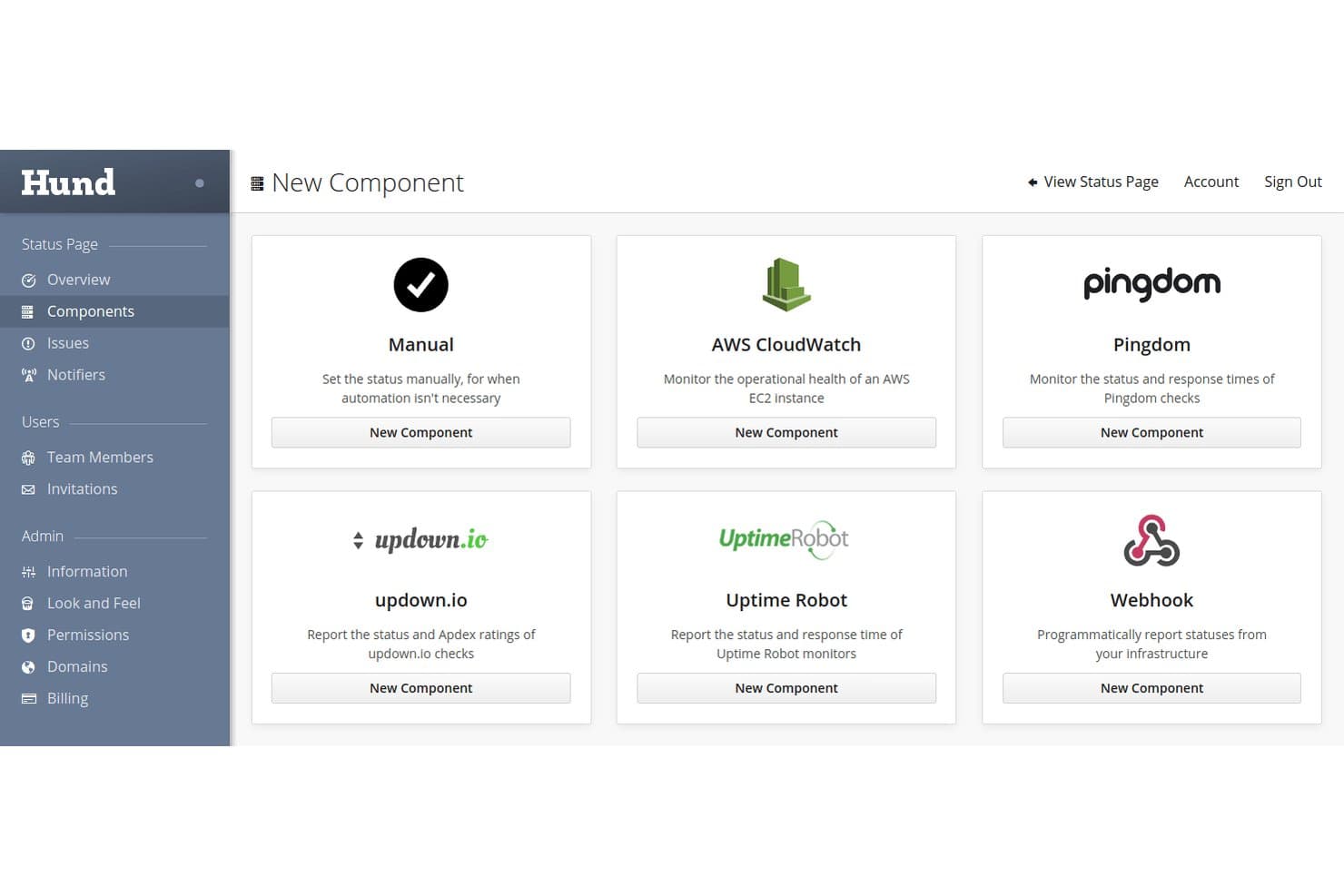
Hund.io supporta diverse integrazioni di monitoraggio come AWS, Pingdom e webhook. Hund.io è una piattaforma ospitata per pagine di stato con monitoraggio dei servizi integrato, notifiche degli incidenti su più canali e flussi di lavoro automatizzati per monitorare e comunicare lo stato dei componenti.
Per chi è più adatto Hund.io?
Hund.io è particolarmente adatto ai team DevOps e alle operazioni IT di organizzazioni attente alla sicurezza, soprattutto a quelli che devono affrontare requisiti di conformità governativi come FedRAMP o ITAR.
Perché ho scelto Hund.io
Ho incluso Hund.io tra le mie scelte principali perché è una delle poche piattaforme per pagine di stato dotate di un'infrastruttura progettata appositamente per la conformità governativa, incluse implementazioni isolate progettate per soddisfare i requisiti FedRAMP, ITAR e DoD SRG di livello 2 e 4. Apprezzo inoltre il fatto che il suo livello Enterprise sovrano offra una residenza dei dati personalizzata e un'infrastruttura completamente isolata e ad alta disponibilità, una caratteristica rara in questa categoria. Il registro di controllo è immutabile e i controlli RBAC arrivano fino ai singoli oggetti, quindi la responsabilità degli accessi è realmente rigorosamente protetta.
Funzionalità principali di Hund.io
- Monitoraggio di controllo: I controlli HTTP, TCP, DNS e ICMP integrati testano automaticamente i tuoi servizi da diverse regioni globali e aggiornano lo stato dei componenti senza inserimento manuale.
- Interruttore dell'uomo morto: Un webhook che monitora i processi pianificati e i controlli interni, aprendo automaticamente un'interruzione del servizio se un controllo non viene effettuato.
- Modelli di comunicazione: I modelli di messaggio predefiniti con variabili mantengono coerenti gli aggiornamenti sugli incidenti in tutto il team durante l'intero ciclo di vita dell'incidente.
- Provider Terraform: Un provider Terraform ufficiale consente di gestire l'infrastruttura della pagina di stato come codice insieme al resto della catena di strumenti DevOps.
Integrazioni di Hund.io
Hund.io si integra con PagerDuty, New Relic, AWS CloudWatch, Pingdom, UptimeRobot, Slack, Microsoft Teams e GitHub. Offre inoltre un'API REST e webhook per flussi di lavoro personalizzati di monitoraggio e gestione degli incidenti.
Pros and Cons
Pros:
- Opzioni di conformità di livello governativo
- Il monitoraggio automatizzato aggiorna lo stato dei componenti
- I controlli immutabili supportano la responsabilità degli accessi
Cons:
- La reportistica non dispone di analisi SLA documentate
- La copertura delle recensioni di terze parti rimane limitata
Learn more about Hund.io: Ideale per monitorare le dipendenze da servizi di terze parti
- Piano gratuito + prova gratuita di 14 giorni disponibile
- A partire da 72 $/mese (con fatturazione annuale)
Visit WebsiteCustomer Rating:5/5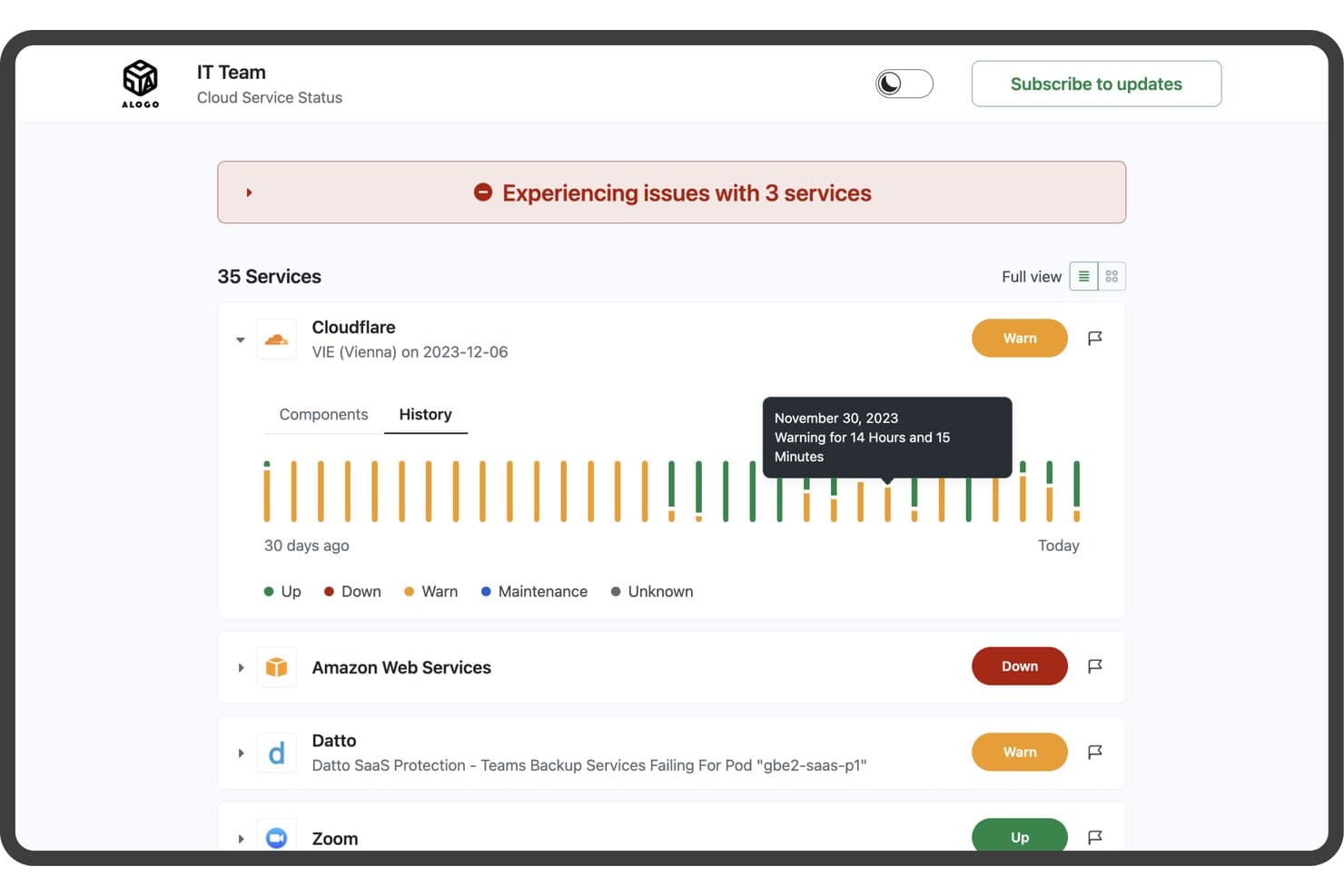
StatusGator monitora lo stato di salute dei servizi cloud con stato e storico in tempo reale. StatusGator è uno strumento per dashboard di stato che aggrega le pagine di stato dei servizi di terze parti insieme al proprio sito web, ai monitor dei ping e ai monitor personalizzati in un'unica pagina di stato pubblica o privata, con gestione degli incidenti, notifiche agli iscritti e storico dei tempi di attività.
Per chi è più adatto StatusGator?
StatusGator è particolarmente adatto ai team addetti alle operazioni IT e al supporto che fanno ampio affidamento su strumenti SaaS di terze parti e hanno bisogno di monitorare le interruzioni dei fornitori insieme alla propria infrastruttura in un unico luogo.
Perché ho scelto StatusGator
StatusGator si è guadagnato un posto nella mia lista ristretta perché monitora oltre 10.780 pagine di stato di fornitori di terze parti insieme ai propri monitor, tutto in un unico luogo. Apprezzo in particolare la sua funzione Segnali di allerta precoce, che rileva le interruzioni prima che i fornitori le riconoscano ufficialmente, segnalando ad esempio i problemi di Google Workspace con circa quattro ore di anticipo. Quando una dipendenza SaaS smette di funzionare, questo margine di tempo è importante. Abbinata alla creazione automatica degli incidenti dalle pagine di stato di terze parti, offre ai team IT e di supporto una visione realmente proattiva dello stato di salute dei fornitori.
Funzionalità principali di StatusGator
- Ciclo di vita strutturato degli incidenti: Crea incidenti con fasi definite (In fase di analisi, Identificato, Monitoraggio, Risolto), livelli di gravità e indicatori di stato per ciascun monitor, quindi pubblica aggiornamenti con indicazione temporale agli iscritti a ogni modifica.
- Finestre di manutenzione programmata: Imposta gli orari di inizio e fine per le interruzioni pianificate, spostale automaticamente nello stato 'In corso' e lascia che si risolvano automaticamente, così la pagina di stato rimane accurata senza interventi manuali.
- Notifiche agli iscritti su più canali: Avvisa gli interessati tramite e-mail, SMS, Slack, Microsoft Teams, Google Chat, Discord e notifiche push mobili, con filtri a livello di componente affinché gli iscritti ricevano solo le informazioni che li riguardano.
- Report dei tempi di attività esportabili: Recupera lo storico degli incidenti, le modifiche di stato e i riepiloghi dei componenti in formato CSV, JSON o Excel per qualsiasi intervallo di date direttamente dalla sezione Report.
Integrazioni di StatusGator
StatusGator offre integrazioni documentate con PagerDuty, Opsgenie, Freshdesk, Zendesk, Slack, Microsoft Teams, Datadog, Cisco Meraki, Atlassian Statuspage e AWS. Supporta inoltre l'API v3, i webhook, un server MCP e l'acquisizione privata dello stato da Azure, Google Cloud e Microsoft 365.
Pros and Cons
Pros:
- Visibilità sulle dipendenze da terze parti
- Avvisi anticipati prima della conferma del fornitore
- Lo storico dei tempi di attività esportabile favorisce la trasparenza
Cons:
- Gli incidenti relativi ai servizi personalizzati richiedono aggiornamenti manuali
- Il branding offre un controllo limitato sul design
Learn more about StatusGator: Ideale per la comunicazione degli incidenti nei team connessi ad Atlassian
- Piano gratuito disponibile
- A partire da $29/mese
Visit WebsiteCustomer Rating:4.2/5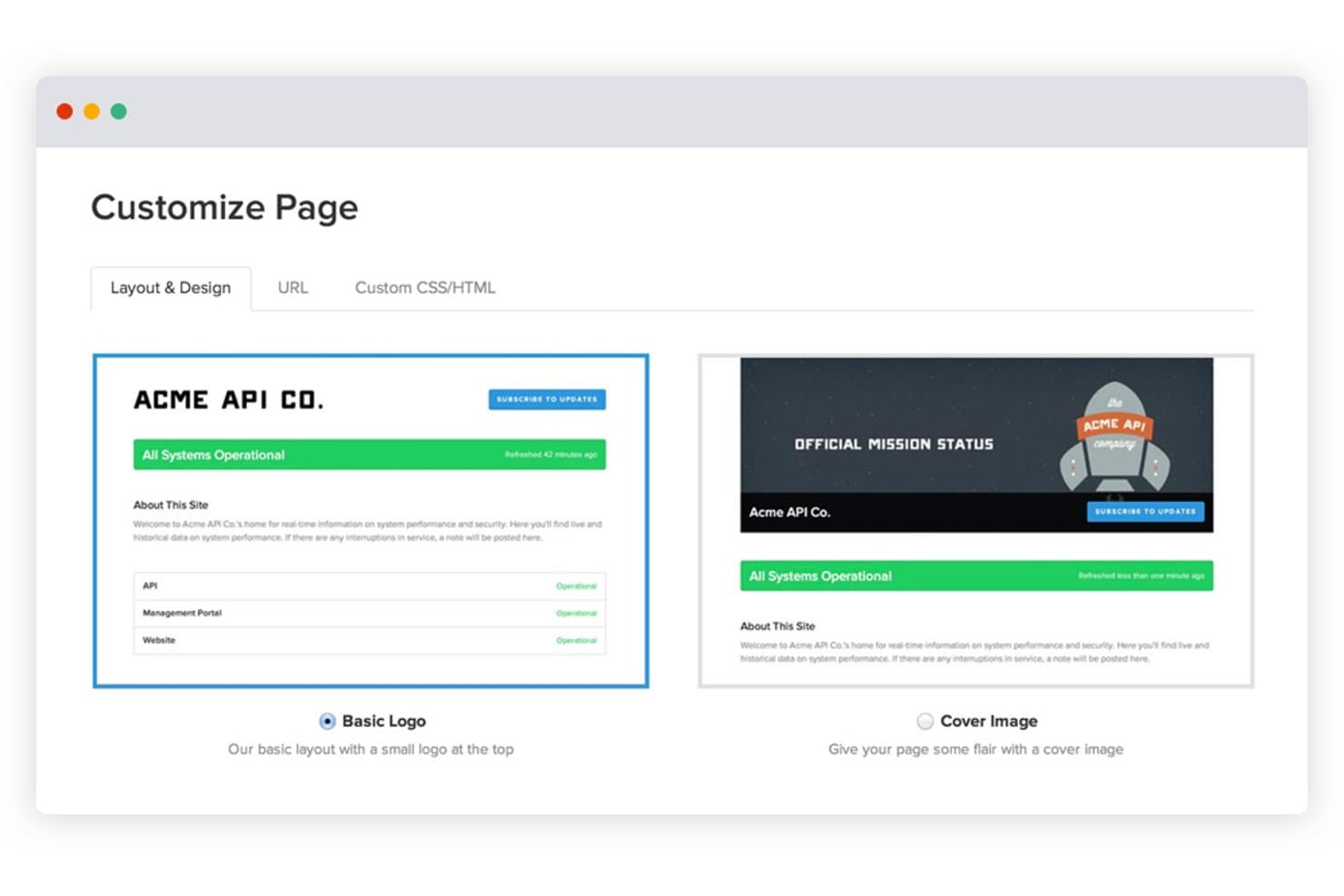
Statuspage consente agli utenti di personalizzare i layout delle pagine di stato con opzioni per il logo o l'immagine di copertina. Statuspage è uno strumento di dashboard dello stato ospitato di Atlassian che consente di pubblicare pagine di stato pubbliche, private e specifiche per il pubblico, con aggiornamenti sugli incidenti, manutenzione programmata, monitoraggio dei componenti e notifiche agli iscritti su più canali.
Per chi è più adatto Statuspage?
Statuspage è una soluzione particolarmente adatta ai team che operano già nell'ecosistema Atlassian e hanno bisogno di uno strumento maturo per comunicare gli incidenti ai clienti.
Perché ho scelto Statuspage
Statuspage è entrato nella mia rosa di candidati perché è stato progettato specificamente per i team connessi ad Atlassian che necessitano di un livello maturo di comunicazione degli incidenti rivolto ai clienti. Mi piace molto il fatto che supporti tre tipi distinti di pagina: pagine pubbliche per i clienti, pagine private autenticate tramite Okta o Ping Identity e pagine specifiche per il pubblico destinate a gruppi di utenti separati. Quando si verifica un incidente, gli aggiornamenti strutturati con indicazione temporale vengono inviati automaticamente tramite e-mail, SMS, Slack e Teams, mantenendo informati gli iscritti senza costringere il team a inviare manualmente gli aggiornamenti.
Funzionalità principali di Statuspage
- Widget dello stato incorporabile: un widget preconfigurato che puoi aggiungere al tuo sito web o alla tua app per mostrare lo stato aggiornato dei componenti senza indirizzare gli utenti a una pagina separata.
- Modelli per gli incidenti: modelli di messaggi riutilizzabili che consentono al team di pubblicare rapidamente aggiornamenti sugli incidenti coerenti e già scritti durante un'interruzione del servizio.
- Metriche pubbliche: una visualizzazione configurabile dei dati sulle prestazioni del sistema in tempo reale, che supporta fino a 50 metriche nei piani Enterprise e viene mostrata direttamente sulla pagina di stato.
- Monitoraggio dei componenti di terze parti: una funzionalità che consente di aggiungere alla pagina gli stati dei fornitori esterni, così che gli iscritti possano visualizzare le dipendenze a monte insieme ai tuoi servizi.
Integrazioni di Statuspage
Statuspage offre integrazioni native con Slack, Microsoft Teams, Twitter, Okta, Ping Identity, OneLogin e Bitium. Fornisce inoltre accesso all'API REST e webhook per integrazioni personalizzate.
Pros and Cons
Pros:
- Supporta pagine pubbliche, private e specifiche per il pubblico
- Pubblica aggiornamenti con indicazione temporale su più canali
- Fornisce widget incorporabili e dati storici sulla disponibilità
Cons:
- Richiede il monitoraggio esterno per i controlli automatici dello stato
- I controlli avanzati richiedono piani di livello superiore
Learn more about Statuspage: Ideale per l'automazione delle pagine di stato basata sul monitoraggio
- Piano gratuito + demo gratuita disponibile
- A partire da $29/licenza/mese
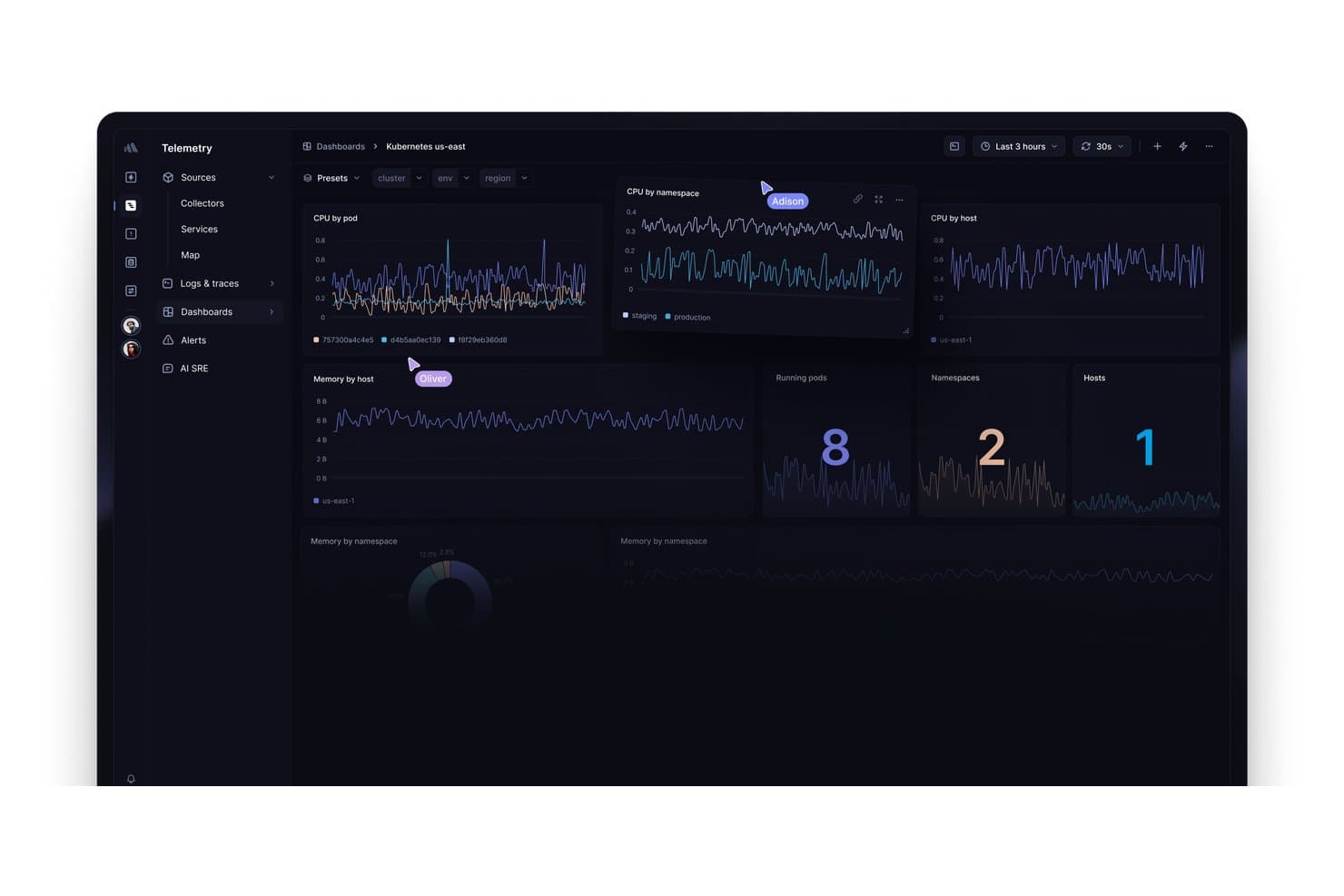
Better Stack visualizza le metriche Kubernetes relative a CPU, memoria, pod e host. Better Stack è una piattaforma di osservabilità che combina il monitoraggio dell'operatività, la gestione degli incidenti, la pianificazione della reperibilità e le pagine di stato ospitate in un unico prodotto integrato.
Per chi è più adatto Better Stack?
Better Stack è ideale per i team DevOps e SRE che desiderano riunire monitoraggio, gestione della reperibilità e pagine di stato in un unico luogo, invece di assemblare strumenti separati.
Perché ho scelto Better Stack
Better Stack è entrato nella mia rosa dei preferiti perché è l'unico strumento qui presente che collega direttamente il monitoraggio alla pagina di stato, così gli aggiornamenti sugli incidenti vengono pubblicati automaticamente quando un monitor rileva un'interruzione. Apprezzo molto la possibilità di configurare flussi di lavoro automatizzati per lo stato attraverso monitor HTTP, SSL, DNS e heartbeat senza scrivere una sola riga di codice. La pianificazione della reperibilità, i post-mortem assistiti dall'IA e i grafici in tempo reale dei tempi di risposta sulla pagina pubblica sono tutti integrati nello stesso prodotto.
Funzionalità principali di Better Stack
- Monitoraggio dell'operatività di più tipi: Esegui controlli HTTP, SSL, DNS, TCP, heartbeat e delle transazioni Playwright da più località globali, ciascuno con uno screenshot e una cronologia degli errori, secondo per secondo.
- Pagine di stato private: Limita l'accesso alle pagine di stato interne tramite SSO, password o elenco di indirizzi IP consentiti, rendendole accessibili solo a team specifici o utenti aziendali.
- Notifiche via e-mail per gli iscritti: Consenti agli utenti di iscriversi agli aggiornamenti dell'intera pagina o di singoli componenti, con 1.000 posti per iscritti inclusi nei piani a pagamento.
- Supporto per pagine in più lingue: Traduci la pagina di stato in qualsiasi lingua e modifica ogni stringa, così puoi servire il pubblico globale nella lingua preferita.
Integrazioni di Better Stack
Better Stack si integra con Datadog, New Relic, Grafana, Prometheus, Zabbix, AWS, Azure, Google Cloud, Slack e Microsoft Teams. Supporta inoltre l'API REST, Terraform, i webhook e la connettività con Zapier.
Pros and Cons
Pros:
- Gli incidenti rilevati dai monitor aggiornano automaticamente le pagine di stato
- I grafici dei tempi di risposta chiariscono lo stato del servizio
- Le pagine multilingue supportano gli stakeholder globali
Cons:
- Le notifiche agli iscritti si concentrano principalmente sulle e-mail
- Il raggruppamento giornaliero degli incidenti complica la reportistica delle interruzioni
Learn more about Better Stack: Ideale per la creazione di dashboard basate sull'intelligenza artificiale
- Piano gratuito disponibile
- A partire da $16/mese (con fatturazione annuale)
Visit WebsiteCustomer Rating:5/5
Interfaccia di selezione dei modelli di dashboard di Base44. Base44 è un generatore di app basato sull'intelligenza artificiale e senza codice che consente di progettare e distribuire app web personalizzate, inclusi dashboard, descrivendo ciò che si desidera in linguaggio naturale, senza scrivere codice.
Per chi è più adatto Base44?
Base44 è una soluzione adatta ai responsabili di prodotto che desiderano creare un prototipo di dashboard di stato personalizzata senza scrivere codice.
Perché ho scelto Base44
Ho scelto Base44 come una delle migliori soluzioni perché consente di creare una dashboard di stato completamente personalizzata descrivendo ciò che si desidera in linguaggio naturale, senza bisogno di programmare. Se hai bisogno di una dashboard adattata ai componenti specifici del tuo prodotto anziché di un modello generico, l'intelligenza artificiale genera in un'unica soluzione il front-end, il database e l'hosting. Ho riscontrato che i responsabili di prodotto che desiderano creare un prototipo di una visualizzazione dello stato personalizzata, con modelli di dati e marchio personalizzati, possono rendere operativo qualcosa in pochi giorni anziché in settimane.
Funzionalità principali di Base44
- Supporto per domini personalizzati: Puoi collegare il tuo dominio per offrire alla tua app un URL professionale e in linea con il tuo marchio.
- Database integrato: Base44 genera un database strutturato insieme alla tua app, includendo automaticamente modelli di dati personalizzati per i componenti del servizio.
- Integrazioni con un clic: Collega strumenti come Slack, SendGrid e Gmail per creare flussi di lavoro per le notifiche direttamente nella tua app.
- Sincronizzazione bidirezionale con GitHub: Esporta il codice sorgente completo della tua app su GitHub, ottenendo la piena proprietà di ciò che crei.
Integrazioni di Base44
Base44 elenca integrazioni con un clic con Slack, SendGrid, Gmail, Google Drive, Notion, HubSpot, Salesforce, Stripe e OpenAI, oltre alla sincronizzazione bidirezionale con GitHub nel piano Elite. Non dispone di integrazioni native documentate con strumenti di monitoraggio o avviso.
Pros and Cons
Pros:
- Creazione rapida di prototipi di dashboard personalizzate
- Database e hosting integrati
- Il codice sorgente esportabile garantisce la proprietà
Cons:
- Nessun monitoraggio nativo del tempo di attività
- Le correzioni dell'intelligenza artificiale possono consumare crediti a causa dei bug
Learn more about Base44: Ideale per le integrazioni di monitoraggio con aggiornamenti automatici
- Piano gratuito disponibile
- A partire da $20/mese
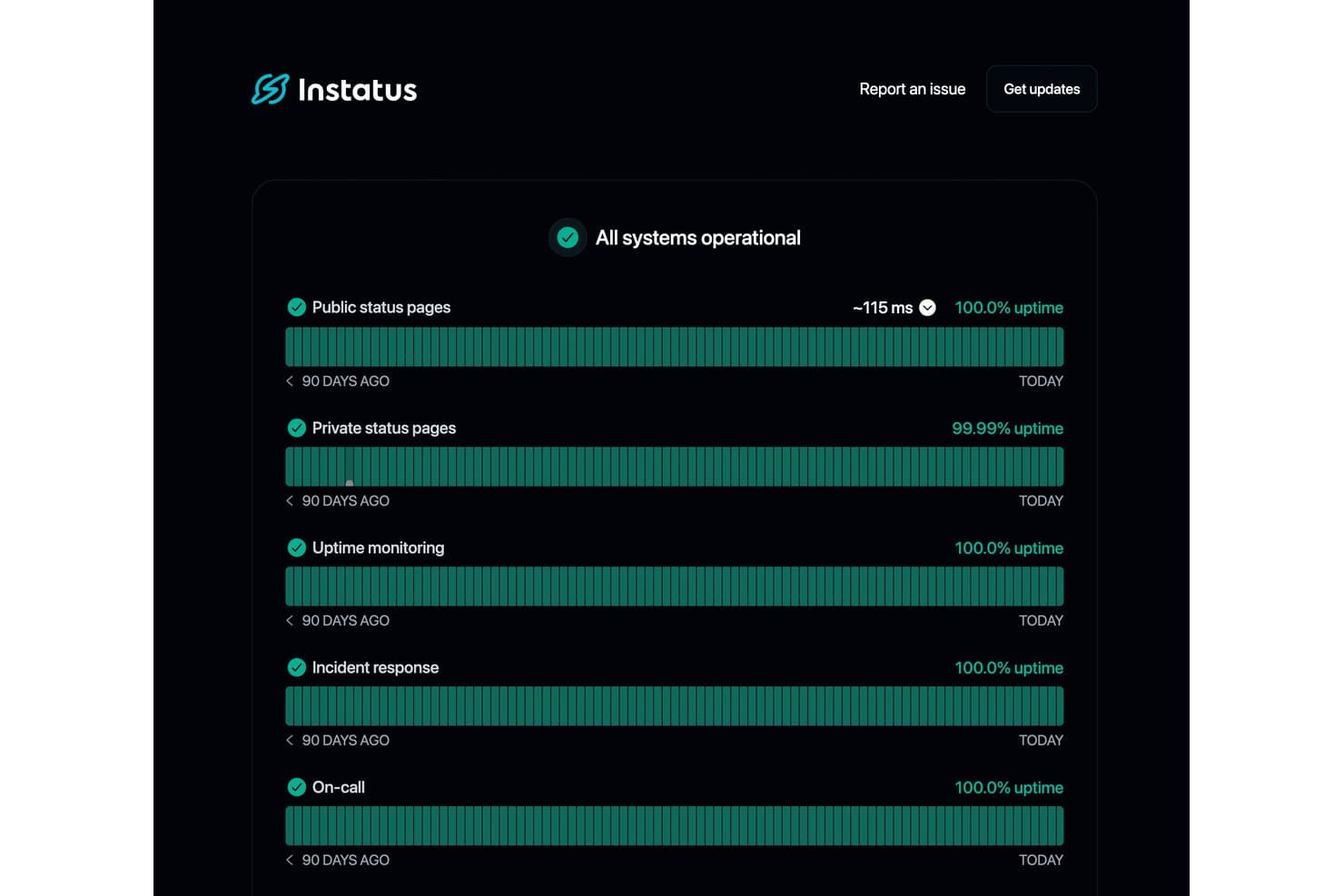
Instatus mostra metriche di disponibilità in tempo reale per tutti i servizi monitorati. Instatus è una piattaforma per pannelli di stato che combina pagine di stato pubbliche e private, monitoraggio integrato della disponibilità, gestione degli incidenti e notifiche agli iscritti su più canali in un unico strumento.
Per chi è più indicato Instatus?
Instatus è ideale per i team DevOps e SRE che desiderano il monitoraggio della disponibilità, l'escalation di reperibilità e una pagina di stato pubblica senza dover gestire tre strumenti separati.
Perché ho scelto Instatus
Instatus è entrato nella mia lista ristretta per il modo efficace in cui gestisce le integrazioni di monitoraggio con aggiornamenti automatici. Mi piace il fatto che, quando uno strumento connesso come Datadog o PagerDuty rileva un problema, Instatus crei automaticamente un incidente e aggiorni la pagina di stato, così il mio team non deve pubblicare manualmente aggiornamenti durante un'interruzione del servizio. Anche le escalation di reperibilità sono integrate, il che significa che le persone giuste vengono coinvolte senza dover usare uno strumento separato.
Funzionalità principali di Instatus
- Notifiche agli iscritti: Gli iscritti possono ricevere aggiornamenti su incidenti e manutenzioni tramite email, SMS, Slack, Microsoft Teams, webhook, RSS e X.
- Pianificazione della manutenzione: Pianifica e pubblica finestre di manutenzione programmate con componenti interessati, aggiornamenti sullo stato e avvisi automatici agli iscritti prima e durante l'evento.
- Identità visiva e stile personalizzati della pagina: Applica il tuo logo, favicon, colori del brand e HTML, CSS o JavaScript personalizzati in un massimo di cinque posizioni nella pagina di stato.
- Modulo di stato incorporabile: Incorpora un modulo di stato in tempo reale direttamente sul tuo sito web o nella messaggistica di Intercom, così gli utenti possono visualizzare gli aggiornamenti sullo stato del servizio nel contesto.
Integrazioni di Instatus
Instatus offre integrazioni native con Datadog, PagerDuty, Prometheus, Grafana, New Relic, Pingdom, UptimeRobot, Google Cloud Monitoring, Slack e Microsoft Teams. Supporta inoltre connessioni tramite API, webhook, email, Jira e Zapier.
Pros and Cons
Pros:
- Gli aggiornamenti automatici sugli incidenti riducono il lavoro manuale relativo allo stato
- La segmentazione flessibile del pubblico chiarisce lo stato dei componenti
- L'identità visiva avanzata favorisce comunicazioni affidabili con i clienti
Cons:
- Le funzionalità aziendali richiedono un passaggio a un piano superiore significativo
- I rapporti sulla disponibilità non includono prove SLA esportabili
Learn more about Instatus: Ideale per la comunicazione degli incidenti a più tipologie di destinatari
- Prova gratuita di 14 giorni + demo gratuita disponibile
- A partire da $49/mese
Visit WebsiteCustomer Rating:5/5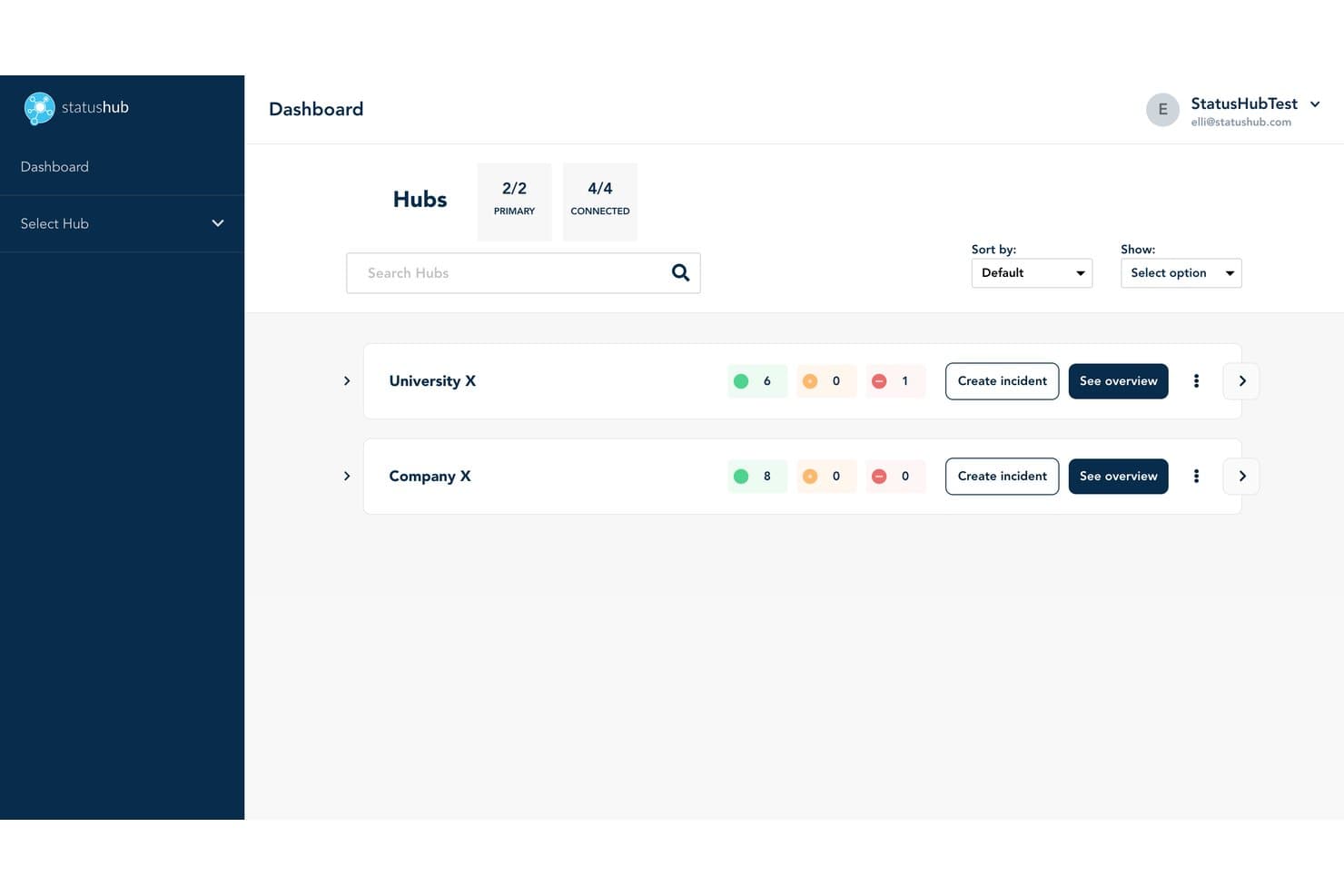
StatusHub consente agli utenti di monitorare più hub e lo stato dei servizi a colpo d'occhio. StatusHub è una piattaforma per dashboard di stato che consente di gestire pagine di stato pubbliche e private, gestire gli incidenti attraverso flussi di lavoro strutturati e inviare notifiche agli iscritti su più canali, tra cui email, SMS, Slack e Microsoft Teams.
A chi è più adatto StatusHub?
StatusHub è una soluzione particolarmente adatta ai team delle operazioni IT e dell'assistenza clienti che devono comunicare gli incidenti a più tipologie di destinatari distinti, come il personale interno, i clienti di specifiche aree geografiche o linee di prodotto separate.
Perché ho scelto StatusHub
Ho scelto StatusHub come una delle soluzioni migliori perché la sua funzionalità Hub connessi è diversa da qualsiasi altra abbia visto in questa categoria. Consente di gestire pagine di stato separate e mirate per destinatari distinti da un singolo account, così il personale IT interno, i clienti regionali e i clienti aziendali vedono ciascuno solo le informazioni pertinenti. Abbinando questa funzionalità a fasi degli incidenti strutturate e allineate a ITIL e a modelli di messaggio predefiniti, il team di assistenza può pubblicare rapidamente aggiornamenti chiari e coerenti, anche nel corso di un incidente.
Funzionalità principali di StatusHub
- Notifiche agli iscritti su più canali: gli iscritti selezionano autonomamente il canale preferito — email, SMS, Slack, Microsoft Teams o webhook — e filtrano gli avvisi in base al singolo servizio.
- Pagine private con SAML 2.0 e OAuth: le pagine di stato interne sono protette dall'autenticazione tramite accesso singolo, mantenendo gli aggiornamenti sugli incidenti sensibili visibili solo al personale autorizzato.
- Integrazioni con strumenti di monitoraggio: i collegamenti a Pingdom, New Relic, UptimeRobot, PagerDuty e altri strumenti aggiornano automaticamente lo stato dei servizi senza inserimento manuale.
- Widget di stato incorporabili: lo stato dei servizi in tempo reale può essere incorporato direttamente nel prodotto, nel sito web o nel portale di assistenza per una visibilità contestuale.
Integrazioni di StatusHub
StatusHub offre integrazioni documentate con Pingdom, New Relic, UptimeRobot, SolarWinds Observability, PagerDuty, Opsgenie, Zendesk, Slack, Microsoft Teams e Okta. La sua API REST e i webhook supportano connessioni personalizzate.
Pros and Cons
Pros:
- Gli hub connessi consentono di rivolgersi a destinatari distinti
- Le pagine private supportano la comunicazione interna sugli incidenti
- I modelli guidano la pubblicazione di aggiornamenti coerenti sulle interruzioni
Cons:
- I report non offrono analisi avanzate della disponibilità
- La gestione continuativa richiede un impegno considerevole
Learn more about StatusHub: Ideale per pagine di stato degli incidenti collegate all'ITSM
- Demo gratuita disponibile
- Prezzi su richiesta
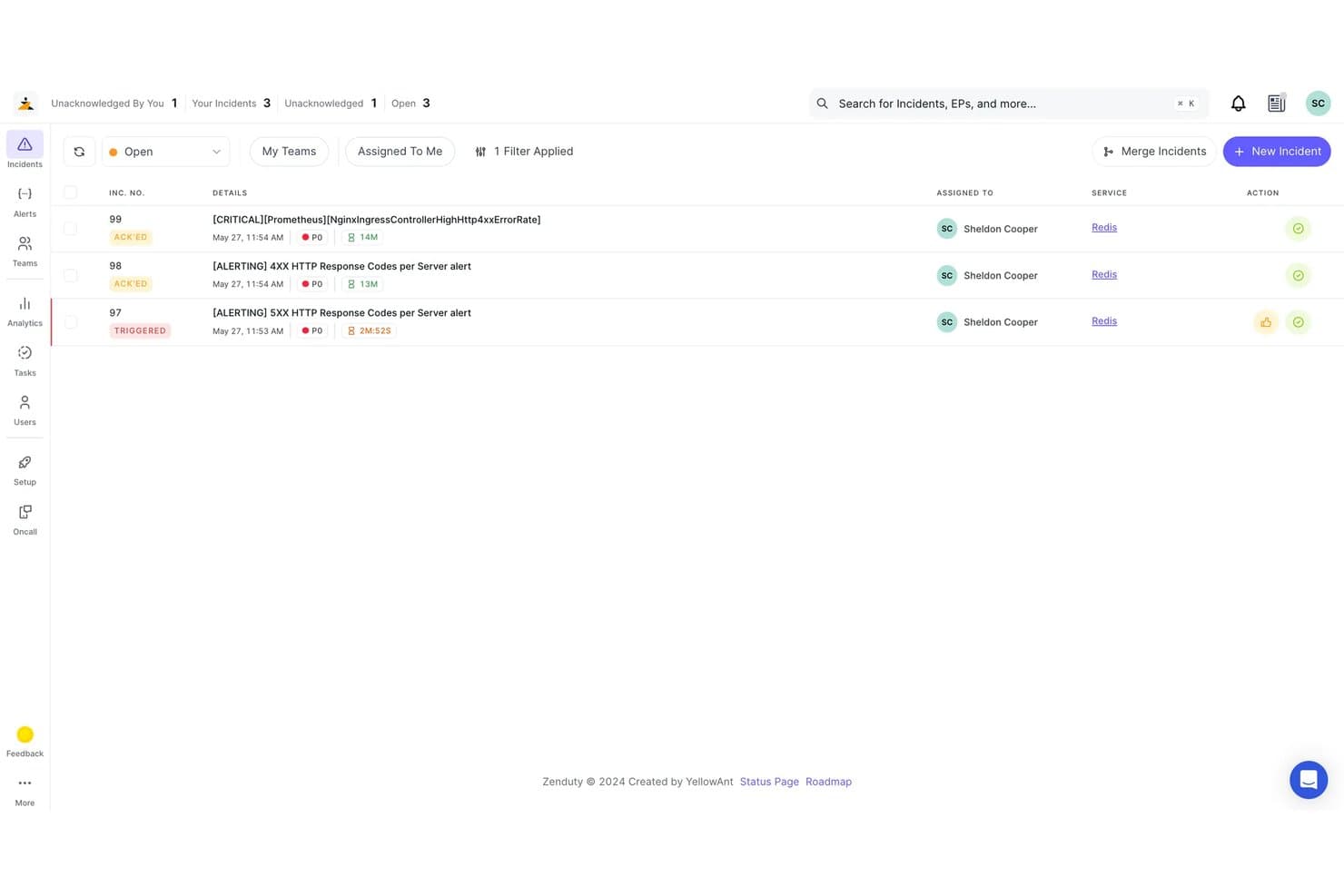
Xurrent consente agli utenti di monitorare e gestire gli incidenti aperti per priorità e stato. Xurrent è una piattaforma ITSM e di gestione degli incidenti che include pagine di stato con sincronizzazione degli incidenti in tempo reale, visualizzazioni specifiche per il pubblico, notifiche automatiche agli iscritti e oltre 150 integrazioni con strumenti di monitoraggio tramite i suoi connettori Beacon senza codice.
Per chi è più adatto Xurrent?
Xurrent è particolarmente adatto ai team di operazioni IT e DevOps che gestiscono già flussi di lavoro per gli incidenti e desiderano che le loro pagine di stato si aggiornino automaticamente in base a tali incidenti.
Perché ho scelto Xurrent
Xurrent si è guadagnato un posto nella mia selezione perché le sue pagine di stato sono collegate direttamente alla piattaforma di gestione degli incidenti, il che significa che la pagina pubblica si aggiorna nel momento in cui un responsabile modifica lo stato di un incidente in IMR. Apprezzo in particolare i connettori Beacon, che acquisiscono segnali da oltre 150 strumenti di monitoraggio e possono aprire, aggiornare e risolvere automaticamente gli incidenti senza che nessuno debba intervenire manualmente sulla pagina di stato. Le visualizzazioni specifiche per il pubblico consentono di offrire pagine di stato diverse a segmenti differenti di clienti da un unico centro di controllo, ciascuna con i propri componenti e le proprie regole di notifica.
Caratteristiche principali di Xurrent
- Finestre di manutenzione programmate: Imposta eventi di manutenzione con orari di fine stimati, regole di chiusura automatica e notifiche di promemoria a intervalli configurabili prima e durante la finestra.
- Report sugli SLA di disponibilità: Visualizza la disponibilità dei componenti e dei gruppi su intervalli giornalieri, settimanali, mensili e annuali, misurata rispetto alle soglie di avviso e critiche definite da te, con esportazione CSV.
- Accesso basato sui ruoli con SSO e SCIM: Controlla chi può visualizzare o gestire le pagine utilizzando SAML, OpenID Connect, il provisioning SCIM e i registri di controllo all'interno della tua organizzazione.
- Widget di stato incorporabili: Incorpora direttamente nei portali, nei siti SharePoint o in altre proprietà web widget con lo stato attuale e la cronologia della disponibilità, senza reindirizzare gli utenti a una pagina separata.
Integrazioni di Xurrent
Xurrent offre oltre 150 integrazioni tramite Beacon, tra cui Datadog, New Relic, Prometheus, Jira, ServiceNow, Slack, Microsoft Teams, GitHub e GitLab. La sua API REST supporta integrazioni personalizzate e flussi di lavoro per i dati sullo stato.
Pros and Cons
Pros:
- Gli stati degli incidenti aggiornano automaticamente le pagine pubbliche
- Le visualizzazioni specifiche per il pubblico chiariscono lo stato dei prodotti
- Le analisi post-incidente collegano le interruzioni alle azioni tracciate
Cons:
- Le pagine di stato richiedono un contesto ITSM più ampio
- La documentazione abbraccia marchi di prodotti legacy sovrapposti
Learn more about Xurrent: La soluzione migliore per l'automazione delle pagine di stato basata sul monitoraggio
- Prova gratuita di 14 giorni + demo gratuita disponibile
- A partire da $7/mese (con fatturazione annuale)
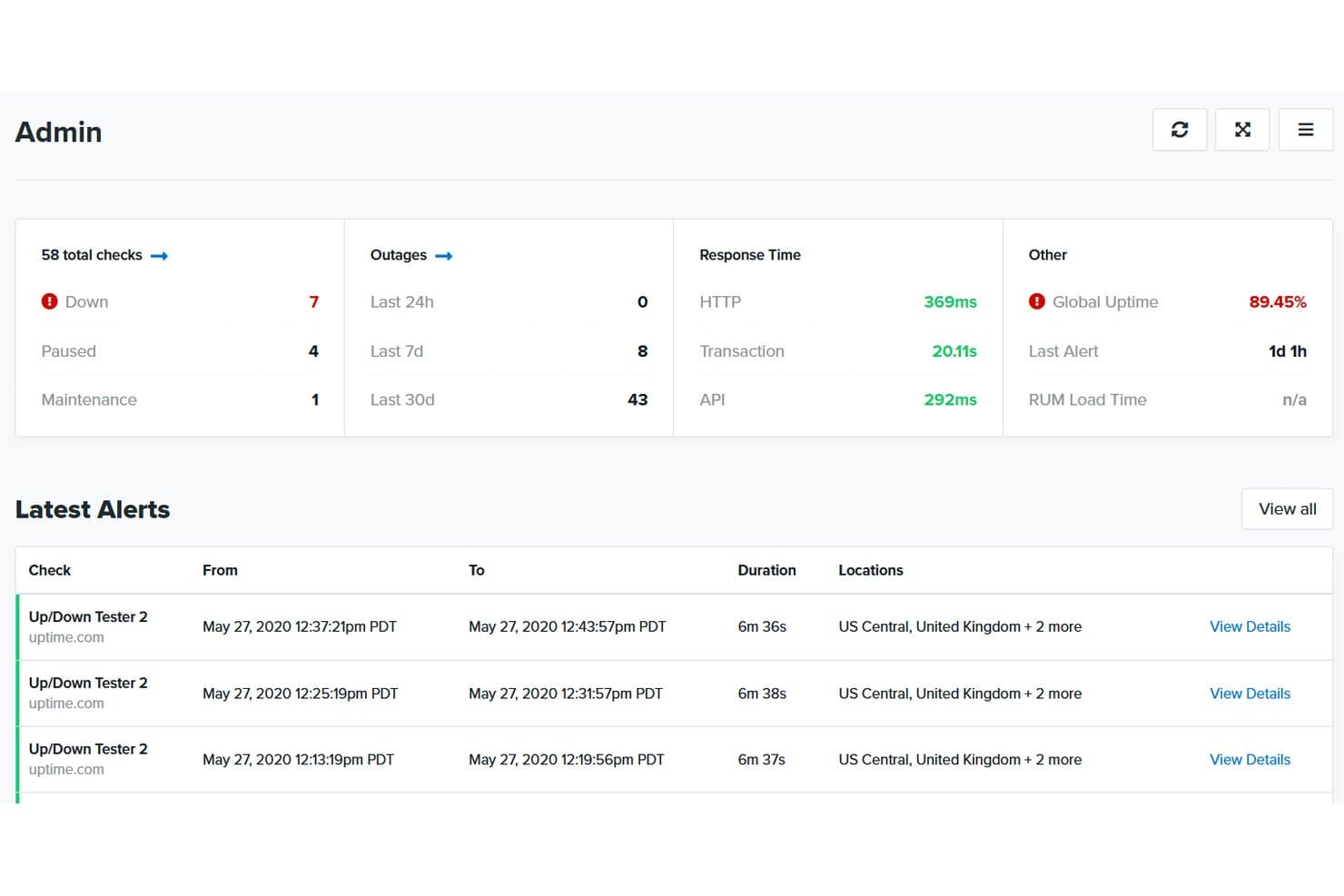
Uptime.com centralizza controlli di disponibilità, interruzioni e avvisi in un'unica dashboard. Uptime.com è una piattaforma di monitoraggio dei siti web che abbina i controlli di disponibilità a pagine di stato ospitate, offrendo gestione degli incidenti, monitoraggio dei componenti, notifiche agli iscritti e report SLA in un unico luogo.
A chi è più adatto Uptime.com?
Uptime.com è una soluzione particolarmente adatta ai team DevOps e alle squadre che si occupano delle operazioni IT e desiderano gestire il monitoraggio e le pagine di stato da un'unica piattaforma.
Perché ho scelto Uptime.com
Ho scelto Uptime.com come una delle soluzioni migliori perché è l'unico strumento di questo elenco in cui i controlli di monitoraggio e la pagina di stato appartengono realmente allo stesso sistema. Quando un controllo rileva un'interruzione, il componente collegato si aggiorna automaticamente, senza bisogno di pubblicare manualmente un aggiornamento. Mi piace anche il fatto che sia possibile gestire più pagine di stato da un unico account e clonarle mantenendo intatti i relativi componenti e la grafica: un vero risparmio di tempo quando si gestiscono diversi prodotti o ambienti.
Funzionalità principali di Uptime.com
- Filtraggio dei componenti da parte degli iscritti: gli iscritti scelgono i componenti specifici per i quali desiderano ricevere notifiche, così ricevono solo gli aggiornamenti pertinenti.
- Pagine di stato per più tenant: da un unico account è possibile predisporre visualizzazioni dello stato separate e sicure per diversi gruppi di clienti.
- Pianificazione delle finestre di manutenzione: gli interventi di manutenzione programmata possono essere pianificati e pubblicati direttamente sulla pagina di stato in anticipo.
- Report SLA: il monitoraggio e la reportistica SLA integrati consentono di misurare e condividere con le parti interessate i dati sulle prestazioni e sulla disponibilità.
Integrazioni di Uptime.com
Uptime.com si integra con PagerDuty, Slack e Opsgenie, oltre a offrire webhook personalizzati per inviare avvisi ad altri strumenti. La sua API supporta le integrazioni personalizzate.
Pros and Cons
Pros:
- Aggiornamenti automatici dei componenti a partire dai controlli di monitoraggio
- Le pagine per più tenant proteggono le visualizzazioni dei servizi specifiche per ciascun cliente
- Gli iscritti filtrano gli avvisi per componente
Cons:
- Le funzionalità avanzate richiedono una configurazione maggiore
- HTML e CSS personalizzati sono disponibili solo in determinati piani
Learn more about Uptime.com: Ideale per pagine di stato a marchio personalizzato con assistenza 24 ore su 24, 7 giorni su 7
- Non disponibile
- A partire da $79/mese
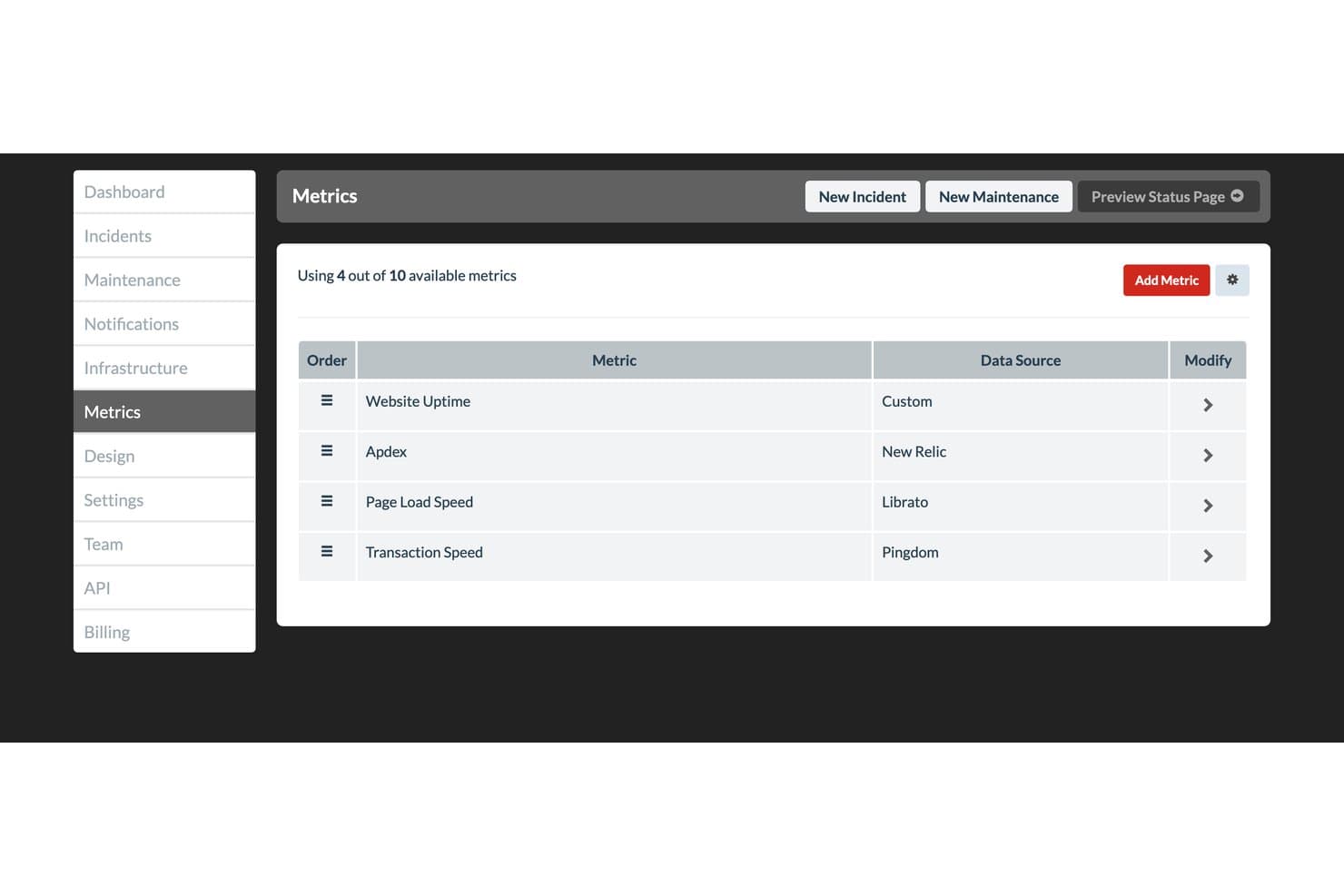
Status.io consente agli utenti di monitorare le metriche sull'integrità del prodotto da più fonti di dati. Status.io è una piattaforma ospitata per pagine di stato che consente di pubblicare aggiornamenti in tempo reale su incidenti e manutenzioni, gestire lo stato dei componenti e informare gli iscritti attraverso nove canali, tra cui email, SMS, Slack e webhook.
Per chi è più adatto Status.io?
Status.io è particolarmente adatto ai team delle operazioni IT e DevOps che hanno bisogno di una pagina di stato completamente personalizzabile, a marchio personalizzato, con integrazioni di monitoraggio avanzate e controlli degli accessi di livello aziendale.
Perché ho scelto Status.io
Status.io è entrato nella mia rosa di candidati perché è uno dei pochi strumenti per pagine di stato che offre un controllo completo del marchio personalizzato: dominio personalizzato, certificato TLS/SSL proprio e inserimento completo di HTML, CSS e JavaScript per adattarsi perfettamente al tuo marchio. Apprezzo molto anche l'assistenza umana 24 ore su 24, 7 giorni su 7, che è importante quando gestisci un incidente in corso alle 2 di notte e hai bisogno rapidamente di una risposta reale. Inoltre, le finestre di manutenzione automatizzate iniziano e terminano senza intervento manuale, così la tua pagina di stato rimane accurata anche quando nessuno la controlla.
Funzionalità principali di Status.io
- Notifiche agli iscritti su più canali: Gli iscritti ricevono aggiornamenti sugli incidenti attraverso nove canali, tra cui email, SMS, Slack, Microsoft Teams, webhook e RSS.
- Integrazioni con gli strumenti di monitoraggio: Status.io si connette a PagerDuty, OpsGenie, Nagios, New Relic, Pingdom e altri strumenti per attivare automaticamente le modifiche allo stato dei componenti.
- Visualizzazione della mappa delle località: Una mappa geografica mostra lo stato dei componenti per area geografica, consentendo agli utenti di identificare rapidamente dove si sta verificando un problema.
- Controlli di accesso alle pagine private: Le pagine possono essere limitate a specifici membri del team, indirizzi IP o utenti autenticati tramite provider di identità SAML o OIDC.
Integrazioni di Status.io
Status.io offre otto integrazioni native per l'automazione dello stato, tra cui PagerDuty, OpsGenie, Nagios, New Relic, Pingdom, Site24x7, StatusCake e UptimeRobot. Supporta inoltre le integrazioni email, oltre alle API per sviluppatori e pubbliche per connettività personalizzata.
Pros and Cons
Pros:
- Il controllo completo del marchio personalizzato si adatta all'identità del prodotto
- Le finestre di manutenzione automatizzate impediscono la pubblicazione di avvisi obsoleti
- Le mappe geografiche dei componenti chiariscono le interruzioni regionali
Cons:
- Lo storico di novanta giorni limita l'analisi dell'integrità a lungo termine
- Nessuna reportistica nativa post-incidente né monitoraggio degli SLA
Learn more about Status.io:
Altri software per dashboard dello stato
Ecco alcune altre opzioni di software per dashboard dello stato che non sono entrate nella mia selezione, ma che vale comunque la pena valutare:
- 11ChecklyIdeale per pagine di stato gestite come codice
- 12HyperpingIdeale per consolidare monitoraggio e pagine di stato
- 13PagerDutyIdeale per aggiornamenti di stato del servizio di reperibilità basati sugli incidenti
- 14Site24x7Ideale per il raggruppamento di pagine di stato native per il monitoraggio
- 15Oh DearIdeale per monitorare le pagine di stato delle agenzie specializzate nel monitoraggio
- 16FireHydrantIdeale per flussi di lavoro sullo stato degli incidenti guidati dal team operativo
- 17incident.ioIdeale per i flussi di lavoro nativi di Slack relativi allo stato degli incidenti
- 18StatusDashboardIdeale per le notifiche della pagina di stato su più canali
- 19PulseticIdeale per la configurazione di pagine di stato incentrata sul monitoraggio
Come valuto i software per dashboard di stato
Suddivido la valutazione in tre parti: funzionalità di base, funzionalità distintive e fattori che vanno oltre le funzionalità. Le funzionalità di base hanno il peso maggiore.
Funzionalità di base
Assegno a ogni strumento un punteggio da 0, che indica l'assenza della funzionalità, a 5, che indica eccellenza. Converto quindi il totale in una percentuale, attribuendo un peso aggiuntivo alle funzionalità essenziali.
- Pagina di stato pubblica: verifico che sia ospitata, aggiornata in tempo reale per più componenti e dotata di indicatori visivi chiari.
- Gestione degli incidenti: valuto le fasi strutturate del ciclo di vita, come analisi, identificazione, monitoraggio e risoluzione, con aggiornamenti corredati di timestamp.
- Monitoraggio dei componenti: verifico la possibilità di definire, raggruppare e monitorare i servizi in modo indipendente.
- Notifiche agli iscritti: considero la distribuzione tramite e-mail, SMS e webhook, oltre alla possibilità per gli iscritti di scegliere i componenti da seguire.
- Cronologia e metriche di disponibilità: valuto la disponibilità di dati storici e delle tempistiche degli incidenti.
- Personalizzazione e branding: considero domini personalizzati, temi cromatici e posizionamento del logo.
Fattori distintivi
Confronto le integrazioni con strumenti di monitoraggio come Datadog, PagerDuty e New Relic, l'automazione degli incidenti, la pianificazione delle manutenzioni, i widget incorporabili e l'accesso API.
Oltre le funzionalità
Valuto la facilità d'uso per gli stakeholder non tecnici, la qualità dell'assistenza, la trasparenza sulla cronologia di disponibilità, le opzioni di esportazione dei dati e il rapporto qualità-prezzo.
Come scegliere un software per dashboard dello stato
È facile perdersi in lunghi elenchi di funzionalità e strutture tariffarie complesse. Per aiutarti a rimanere concentrato mentre affronti il tuo particolare processo di selezione del software, ecco una lista di controllo dei fattori da tenere a mente:
| Fattore | Cosa considerare |
|---|---|
| FattoreScalabilità | Cosa considerareValuta se il software può crescere insieme alla tua azienda. Considera i limiti relativi agli utenti e la capacità dei dati. Uno strumento dovrebbe supportare le dimensioni attuali del tuo team e quelle future. |
| FattoreIntegrazioni | Cosa considerareVerifica la compatibilità con gli strumenti che già utilizzi. Assicurati che il software possa connettersi senza problemi a piattaforme come Slack, Jira e altre da cui dipendi. |
| FattorePersonalizzazione | Cosa considerareDetermina quanto puoi adattare il software alle tue esigenze. Cerca opzioni per modificare dashboard, avvisi e notifiche in modo che si adattino al tuo flusso di lavoro. |
| FattoreSemplicità d'uso | Cosa considerareValuta l'interfaccia utente. Assicurati che sia intuitiva per tutti i membri del team, così da ridurre i tempi di formazione e favorirne l'adozione. |
| FattoreImplementazione e avvio | Cosa considerareConsidera il tempo e le risorse necessari per la configurazione. Cerca strumenti con guide chiare, assistenza e una configurazione rapida per ridurre al minimo le interruzioni. |
| FattoreCosto | Cosa considerareConfronta i modelli tariffari e ciò che includono. Assicurati che rientri nel tuo budget e offra un buon valore per le funzionalità di cui hai bisogno. Fai attenzione ai costi nascosti. |
| FattoreMisure di sicurezza | Cosa considerareVerifica le misure di protezione dei dati. Cerca la crittografia, la conformità agli standard del settore e aggiornamenti di sicurezza regolari per proteggere le tue informazioni. |
| FattoreDisponibilità dell'assistenza | Cosa considerareControlla il livello di assistenza offerto. Considera la disponibilità, i tempi di risposta e i canali di supporto come chat, telefono ed e-mail, per assicurarti di ricevere aiuto tempestivamente. |
Che cos'è un software per dashboard dello stato?
Il software per il pannello di stato è uno strumento che mostra lo stato in tempo reale di sistemi e servizi tramite un semplice pannello di controllo. Il personale IT, i team di supporto e gli ingegneri DevOps lo utilizzano per verificare se tutto funziona e condividere rapidamente aggiornamenti con gli utenti quando qualcosa non va. Aiuta a individuare rapidamente i problemi, a tenere tutti informati e a rispondere agli inconvenienti prima che sfuggano di mano.
Funzionalità
Quando scegli il software per il pannello di stato, presta attenzione alle seguenti funzionalità chiave:
- Monitoraggio in tempo reale: Fornisce aggiornamenti immediati sullo stato del sistema, consentendo di rilevare e affrontare rapidamente i problemi.
- Avvisi personalizzabili: Consente di configurare notifiche adatte alle proprie esigenze, assicurando che il team sia informato degli eventi critici.
- Funzionalità di integrazione: Si collega agli strumenti esistenti come Slack e Jira per semplificare i flussi di lavoro e migliorare la comunicazione.
- Analisi dei dati storici: Offre informazioni sugli incidenti passati, contribuendo a identificare schemi e prevenire problemi futuri.
- Interfaccia intuitiva: Garantisce facilità d'uso, riducendo i tempi di formazione e incoraggiando l'adozione da parte del team.
- Personalizzazione del marchio: Permette di allineare la pagina di stato all'identità aziendale, aumentando la fiducia e il riconoscimento da parte degli utenti.
- Comunicazione multicanale: Supporta gli aggiornamenti su diverse piattaforme, mantenendo informati tutti gli interessati ovunque si trovino.
- Segnalazione automatizzata degli incidenti: Semplifica il processo di documentazione, facendo risparmiare tempo e garantendo coerenza nella comunicazione.
- Funzionalità di sicurezza: Protegge i dati con misure di crittografia e conformità normativa, salvaguardando le informazioni dagli accessi non autorizzati.
Vantaggi
L'implementazione del software per il pannello di stato offre diversi vantaggi al team e all'azienda. Ecco alcuni dei benefici che puoi aspettarti:
- Risposta migliorata agli incidenti: Il monitoraggio e gli avvisi in tempo reale aiutano il team a reagire rapidamente ai problemi, riducendo al minimo i tempi di inattività.
- Comunicazione potenziata: Gli aggiornamenti multicanale assicurano che tutti gli interessati ricevano informazioni tempestive, riducendo la confusione durante gli incidenti.
- Informazioni basate sui dati: L'analisi dei dati storici consente di individuare le tendenze e affrontare in modo proattivo i potenziali problemi.
- Maggiore trasparenza: Le pagine di stato personalizzabili mantengono gli utenti informati, rafforzando la fiducia e riducendo le richieste di assistenza.
- Coerenza del marchio: La personalizzazione del marchio allinea gli aggiornamenti sullo stato all'identità aziendale, rafforzando l'immagine professionale.
- Documentazione efficiente: La segnalazione automatizzata degli incidenti fa risparmiare tempo e garantisce una comunicazione coerente durante e dopo gli incidenti.
Costi & Prezzi
La scelta del software per il pannello di stato richiede una comprensione dei vari modelli e piani tariffari disponibili. I costi variano in base alle funzionalità, alle dimensioni del team, agli extra e ad altri fattori. La tabella seguente riassume i piani più comuni, i relativi prezzi medi e le funzionalità tipicamente incluse nelle soluzioni software per il pannello di stato:
Tabella di confronto dei piani per il software per il pannello di stato
| Tipo di piano | Prezzo medio | Funzionalità comuni |
|---|---|---|
| Tipo di pianoPiano gratuito | Prezzo medio$0 | Funzionalità comuniMonitoraggio di base, avvisi limitati e integrazioni essenziali. |
| Tipo di pianoPiano personale | Prezzo medio$5-$25/utente/mese | Funzionalità comuniMonitoraggio in tempo reale, avvisi personalizzabili e opzioni di personalizzazione del marchio. |
| Tipo di pianoPiano aziendale | Prezzo medio$30-$75/utente/mese | Funzionalità comuniAnalisi avanzate, comunicazione multicanale e funzionalità di sicurezza potenziate. |
| Tipo di pianoPiano per grandi aziende | Prezzo medio$100-$200/utente/mese | Funzionalità comuniReportistica completa, assistenza dedicata e funzionalità di integrazione complete. |
Domande frequenti sul software per dashboard di stato
Ecco alcune risposte alle domande comuni sul software per dashboard di stato:
Come posso mantenere coerenti gli aggiornamenti di stato durante gli incidenti?
È utile stabilire una procedura chiara su chi può pubblicare gli aggiornamenti e quando deve farlo. Assicurati che il tuo team utilizzi lo stesso tono, formato e livello di dettaglio in ogni messaggio. In questo modo si evita la confusione e si mantiene l’allineamento tra utenti e colleghi durante le interruzioni o gli interventi di manutenzione.
Con quale frequenza devo aggiornare la pagina di stato durante un'interruzione?
Dovresti pubblicare un aggiornamento non appena viene confermato un problema, quindi condividere aggiornamenti regolari fino alla sua risoluzione. Anche se non ci sono progressi significativi, brevi aggiornamenti rassicurano gli utenti sul fatto che il tuo team stia ancora lavorando al problema. Una volta risolto, includi una nota conclusiva che spieghi cosa è stato fatto e quando i servizi sono tornati alla normalità.
Come può il mio team gestire la comunicazione durante gli incidenti gravi?
Assegna ruoli chiari prima che si verifichi un incidente: una persona pubblica gli aggiornamenti, un’altra gestisce le richieste degli utenti e un’altra coordina la risposta tecnica. Mantenere separate queste responsabilità evita ritardi e messaggi contraddittori. Anche un calendario di comunicazione predefinito aiuta a mantenere la coerenza durante tutto l’evento.
Qual è il modo migliore per organizzare più servizi in un'unica dashboard?
Raggruppa i sistemi correlati in categorie chiare e utilizza nomi brevi e descrittivi. In questo modo chi visualizza la dashboard può trovare rapidamente il servizio interessato senza dover esaminare un lungo elenco. Mantenere semplice la struttura rende la dashboard più facile da leggere e più rapida da aggiornare durante le emergenze.
Come posso mantenere la fiducia dopo interruzioni ripetute?
La trasparenza è fondamentale. Riconosci sempre tempestivamente i problemi, fornisci informazioni oneste sullo stato e comunica chiaramente le tempistiche di risoluzione. Quando segui uno schema prevedibile di aggiornamenti, gli utenti iniziano a fidarsi del tuo processo di comunicazione anche se si verifica nuovamente un’interruzione.