

Con così tante soluzioni diverse disponibili per lo sviluppo di prodotti, è difficile capire quale sia quella giusta per te. Sai di voler gestire le esigenze dei clienti, offrire l'integrazione con gli strumenti per i sondaggi e consentire la raccolta dei feedback degli utenti, ma devi capire quale strumento sia il migliore. Ci penso io! In questo articolo ti aiuterò a rendere semplice la tua scelta condividendo le mie esperienze personali nell'utilizzo di decine di diversi strumenti per lo sviluppo di prodotti con team e progetti di grandi dimensioni, insieme alle mie scelte tra i migliori strumenti gratuiti per lo sviluppo di prodotti.
Perché fidarsi dei nostri consigli sui software
6,700+
Reviews
20
Industry experts
16+
Evaluation factors
14
Years
Il nostro team testa e recensisce software dal 2012. In quanto product manager noi stessi, sappiamo quanto sia difficile — e importante — scegliere il software giusto.
Per questa guida, abbiamo valutato gli strumenti attraverso test pratici e ricerche indipendenti, assegnando un punteggio agli strumenti in base ai nostri criteri di selezione.
Le nostre recensioni riflettono il nostro giudizio editoriale umano, non un discorso di vendita.
Revisori esperti:
- Andrew LumbySenior TPM
- Cristiano ValimSenior UI/UX Lead


Tabella di confronto: software gratuiti per lo sviluppo di prodotti
Questa tabella di confronto riassume i dettagli dei prezzi delle mie migliori selezioni di software gratuiti per lo sviluppo di prodotti.
| Tool | Best For | Trial Info | Price | ||
|---|---|---|---|---|---|
| 1 | Ideale per il monitoraggio di problemi e sprint nativo per gli sviluppatori | Prova gratuita di 30 giorni | A partire da $21/utente/mese | Website | |
| 2 | Ideale per il monitoraggio di sprint e attività con utenti illimitati | Piano gratuito + demo gratuita disponibile | A partire da $7/utente/mese (fatturato annualmente) | Website | |
| 3 | Ideale per il monitoraggio autogestito dello sviluppo senza limiti al numero di utenti | Prova gratuita di 14 giorni + piano gratuito disponibile | A partire da $7.25/utente/mese (con fatturazione annuale) | Website | |
| 4 | Ideale per i team di sviluppo che monitorano gli sprint con GitHub | Piano gratuito + prova gratuita di 14 giorni + demo gratuita disponibile | A partire da $8.50/utente/mese (con fatturazione annuale) | Website | |
| 5 | Ideale per la pianificazione degli sprint con posti gratuiti illimitati | Piano gratuito disponibile | Da $10/utente/mese (con fatturazione annuale) | Website | |
| 6 | Ideale per il monitoraggio flessibile dei progetti basato su database | Piano gratuito + demo gratuita + prova di 14 giorni disponibile | A partire da $20/utente/mese | Website | |
| 7 | Ideale per gestire documenti, roadmap e sprint in un unico spazio di lavoro | Piano gratuito + demo gratuita disponibile | A partire da $10/membro/mese (con fatturazione annuale) | Website | |
| 8 | Ideale per la gestione degli sprint Agile e del backlog | Piano gratuito disponibile | A partire da $7.91/utente/mese | Website | |
| 9 | Ideale per flussi di lavoro di roadmap e feedback assistiti dall'intelligenza artificiale | Piano gratuito + prova gratuita + demo gratuita disponibili | A partire da $12/utente/mese (con fatturazione annuale) | Website | |
| 10 | La scelta migliore per i flussi gratuiti dai riscontri al piano di sviluppo | Piano gratuito disponibile | Da $29/utente/mese (con fatturazione annuale) | Website |


Recensioni dei migliori software gratuiti per lo sviluppo di prodotti
Di seguito trovi i miei riepiloghi dettagliati dei migliori software gratuiti per lo sviluppo di prodotti inclusi nella mia selezione. Le mie recensioni offrono uno sguardo dettagliato alle caratteristiche principali, ai pro e contro, alle integrazioni e ai casi d’uso ideali di ogni strumento, per aiutarti a trovare quello più adatto a te. Mentre alcuni di questi strumenti offrono una versione completamente gratuita, altri offrono un periodo di prova gratuito. Ho aggiunto una nota su ciò che è gratuito in ciascuna delle mie recensioni.
 Ideale per il monitoraggio di problemi e sprint nativo per gli sviluppatori
- Prova gratuita di 30 giorni
- A partire da $21/utente/mese
Visit WebsiteCustomer Rating:4.8/5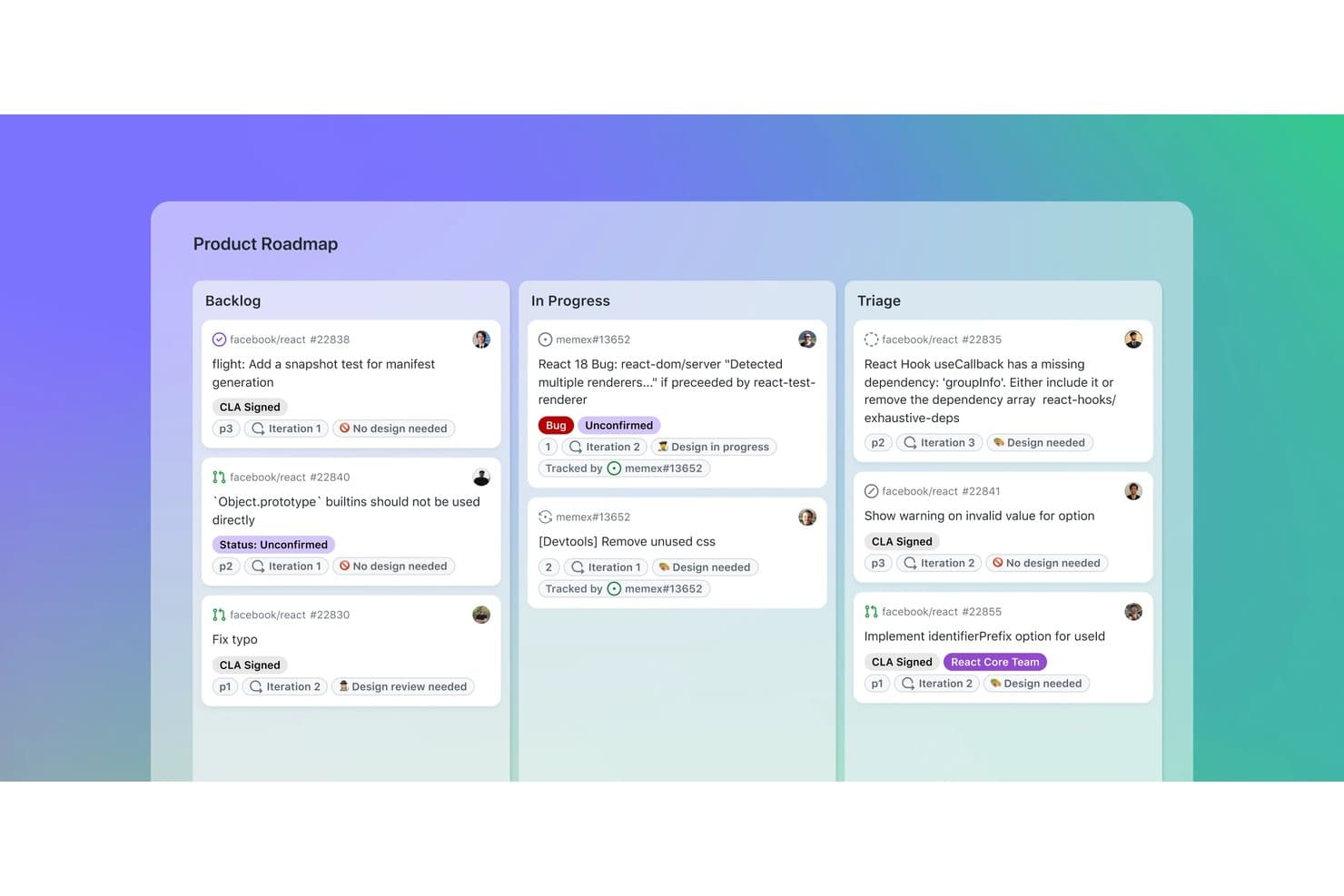
GitHub organizza le attività del prodotto nelle bacheche Backlog, In corso e Triage. GitHub è una piattaforma per lo sviluppo di prodotti che combina repository di codice con il monitoraggio dei problemi, roadmap dei progetti, bacheche per gli sprint, campi personalizzati, richieste pull e discussioni del team.
A chi è più adatto GitHub?
GitHub è adatto ai team di prodotto e di ingegneria che desiderano il monitoraggio di problemi e sprint nativo per gli sviluppatori, insieme a codice, richieste pull e rilasci.
Perché ho scelto GitHub
Ho scelto GitHub perché collega direttamente la pianificazione del prodotto al lavoro di sviluppo che ne consegue. I problemi sono collegati ai commit e alle richieste pull, mentre Projects aggiunge bacheche per gli sprint basate sulle iterazioni, sotto-problemi e dipendenze. Questo rende GitHub ideale per il monitoraggio di problemi e sprint nativo per gli sviluppatori, quando le decisioni sul prodotto devono avere un chiaro contesto di distribuzione.
Funzionalità principali di GitHub
- Moduli per i problemi: Crea richieste strutturate con campi, etichette e caricamenti di file.
- GitHub Discussions: Organizza feedback in discussioni concatenate, sondaggi, voti positivi e risposte contrassegnate.
- Grafici di analisi: Visualizza i dati attuali del progetto e i grafici storici di avanzamento.
- GitHub Actions: Automatizza gli aggiornamenti del progetto e i flussi di lavoro di sviluppo.
Integrazioni di GitHub
GitHub offre un'integrazione nativa con Slack, oltre a integrazioni del Marketplace con Zenhub, Azure Boards, Linear, CircleCI e Codecov. Le API REST e GraphQL, i webhook, GitHub Actions e il server MCP supportano la connettività personalizzata e i flussi di lavoro CI/CD.
Cosa è gratuito?
GitHub offre un piano gratuito per sempre con repository pubblici e privati illimitati e collaboratori illimitati. I repository privati presentano limiti per alcune funzionalità, tra cui 2.000 minuti di GitHub Actions e 500 MB di spazio di archiviazione Packages al mese; l'utilizzo aggiuntivo potrebbe richiedere un pagamento.
Pros and Cons
Pros:
- I problemi si collegano direttamente alle modifiche al codice
- Le bacheche degli sprint supportano dipendenze e gerarchie
- Le roadmap possono essere condivise con gli stakeholder esterni
Cons:
- La definizione delle priorità non dispone di framework di valutazione integrati
- La raccolta dei feedback richiede account GitHub
Learn more about GitHub: Ideale per il monitoraggio di sprint e attività con utenti illimitati
- Piano gratuito + demo gratuita disponibile
- A partire da $7/utente/mese (fatturato annualmente)
Visit WebsiteCustomer Rating:4.6/5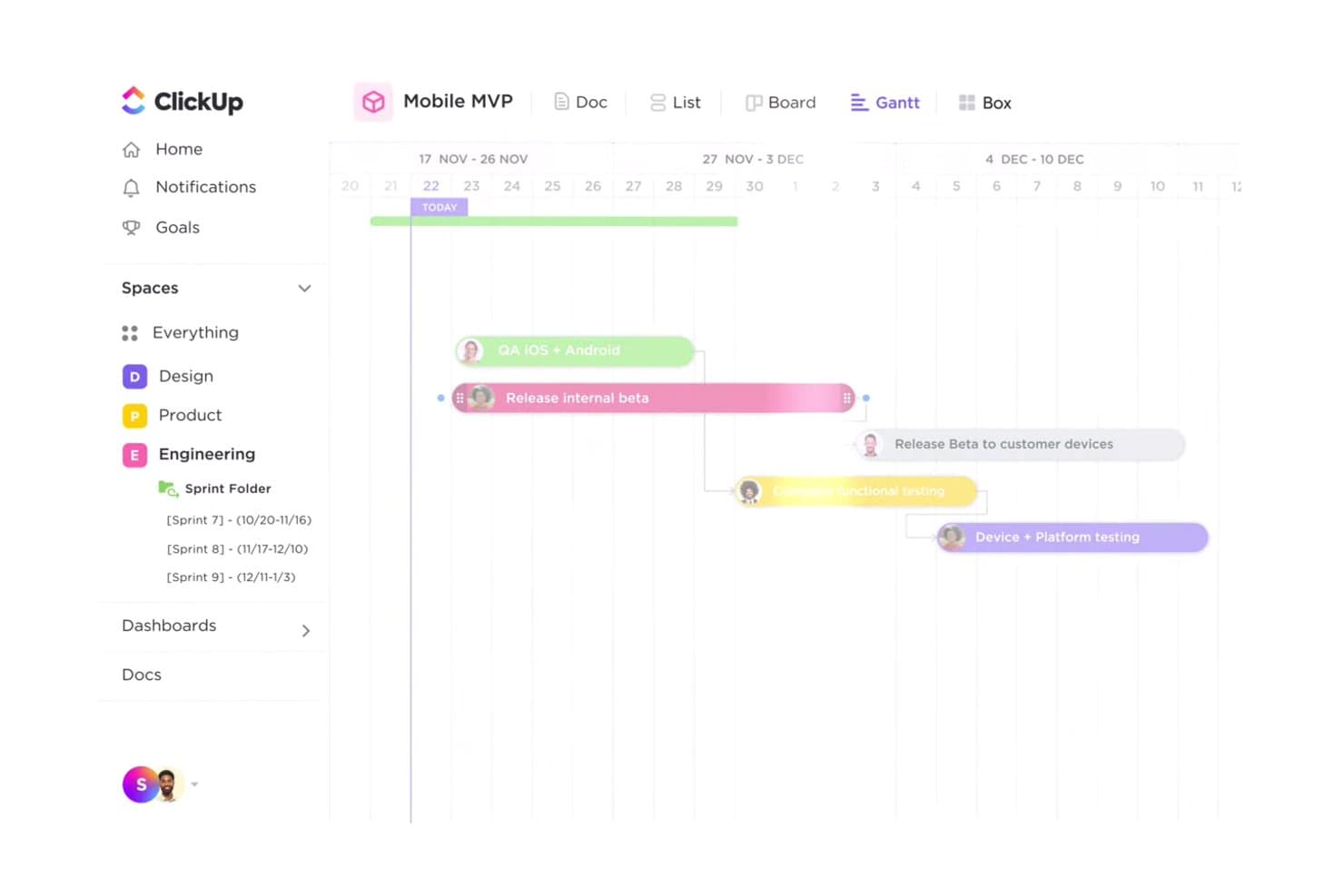
La vista Gantt di ClickUp aiuta i team a monitorare visivamente le tempistiche del lancio del prodotto. ClickUp è uno spazio di lavoro gratuito per lo sviluppo dei prodotti che combina il monitoraggio di attività e problemi, bacheche per gli sprint, tabelle di marcia, viste Gantt, Documenti, lavagne bianche, moduli e integrazioni per sviluppatori in un'unica piattaforma.
Per chi è più adatto ClickUp?
I responsabili di prodotto, gli sviluppatori e i responsabili di programma che desiderano un unico spazio di lavoro per sprint, pianificazione dei prodotti e distribuzione interfunzionale troveranno ClickUp una soluzione pratica.
Perché ho scelto ClickUp
Ho scelto ClickUp perché il suo piano gratuito supporta il monitoraggio di sprint e attività per un numero illimitato di utenti, senza limitare il volume delle attività. Il mio team può gestire flussi di lavoro Kanban, stati personalizzati, dipendenze e attività di sviluppo collegate a GitHub in un unico spazio di lavoro. Anche le durate personalizzate degli sprint ci aiutano a coordinare i rilasci dalla definizione del backlog fino al lancio.
Funzionalità principali di ClickUp
- Diagrammi di Gantt: Mappa dipendenze, traguardi, percorsi critici e tempi di margine.
- Moduli per i riscontri: Trasforma i riscontri dei clienti e le segnalazioni di bug in attività.
- Documenti collaborativi: Crea sintesi di prodotto, requisiti e note di rilascio.
- Lavagne bianche: Trasforma le idee visive in attività operative.
Integrazioni di ClickUp
ClickUp offre oltre 200 integrazioni native, tra cui GitHub, GitLab, Bitbucket, Figma, Slack, Microsoft Teams, Intercom, Zendesk e Google Drive. Supporta inoltre un'API pubblica, webhook, Zapier e Make.
Cosa è gratuito?
ClickUp offre un piano gratuito permanente anziché solo una prova a tempo limitato. Supporta un numero illimitato di utenti e attività per il monitoraggio di sprint e attività.
Pros and Cons
Pros:
- Attività e membri illimitati supportano i team più grandi
- Sprint personalizzati e Kanban coprono i flussi di lavoro di distribuzione
- Documenti, lavagne bianche e moduli collegano il lavoro di scoperta
Cons:
- I limiti permanenti sulle viste di pianificazione ostacolano le tabelle di marcia
- La raccolta gratuita dei riscontri è limitata a un solo modulo
Learn more about ClickUp: Ideale per il monitoraggio autogestito dello sviluppo senza limiti al numero di utenti
- Prova gratuita di 14 giorni + piano gratuito disponibile
- A partire da $7.25/utente/mese (con fatturazione annuale)
Visit WebsiteCustomer Rating:4.5/5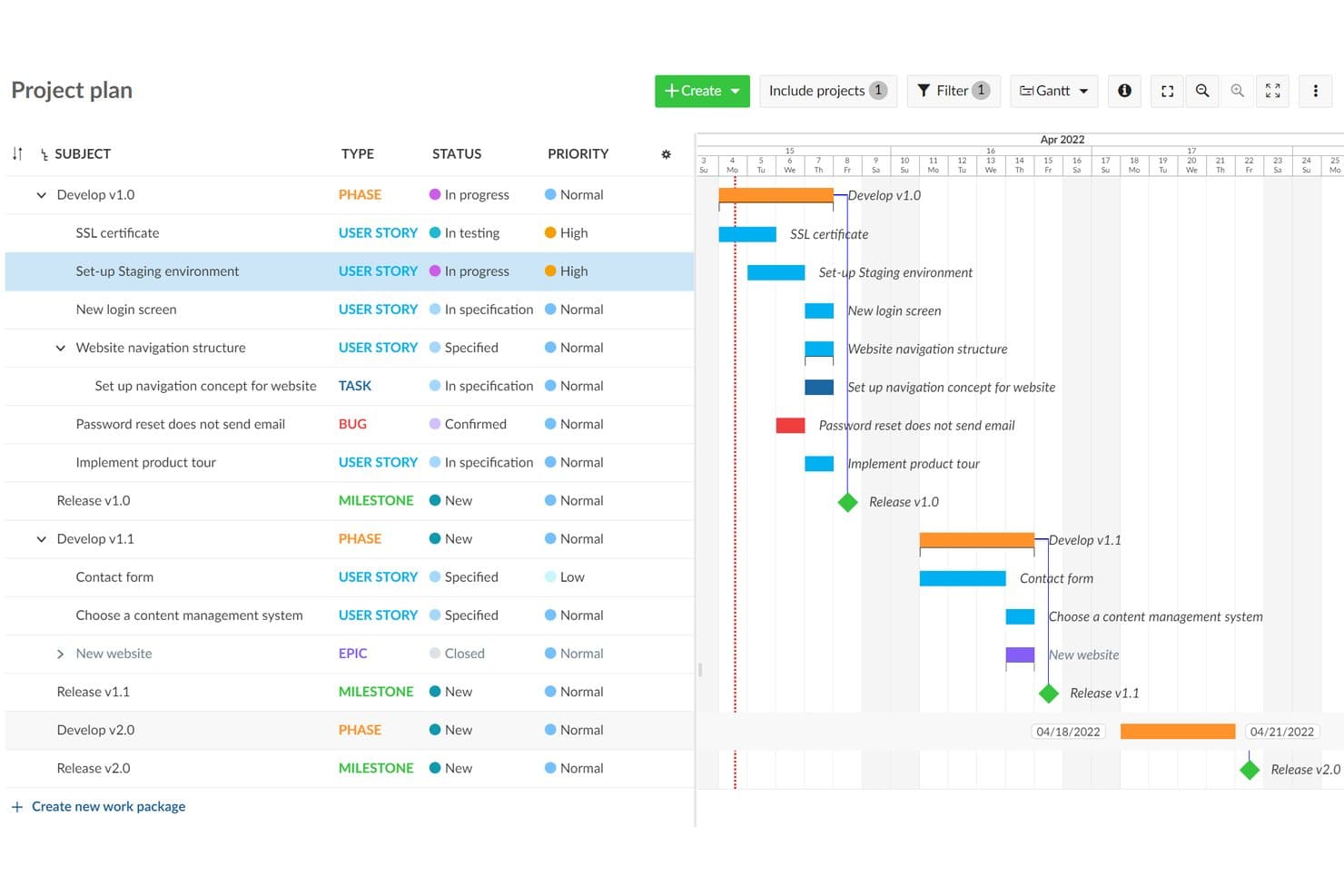
OpenProject visualizza le tempistiche del progetto con una vista della tabella di marcia basata su un diagramma di Gantt. OpenProject è una piattaforma a codice aperto per lo sviluppo dei prodotti che combina il monitoraggio dei pacchetti di lavoro, i backlog Scrum, la pianificazione tramite diagrammi di Gantt, le tabelle di marcia, la collaborazione e le bacheche dei flussi di lavoro in un'area di lavoro autogestita.
Per chi è più adatto OpenProject?
I team tecnici di prodotto che necessitano di utenti e progetti illimitati, del controllo dell'auto-ospitazione e del monitoraggio integrato dello sviluppo troveranno in OpenProject una soluzione pratica.
Perché ho scelto OpenProject
Ho scelto OpenProject perché combina il monitoraggio autogestito dello sviluppo senza limiti al numero di utenti con solidi strumenti di controllo della distribuzione dei prodotti. I team illimitati possono gestire pacchetti di lavoro, dipendenze e flussi di lavoro personalizzati, quindi pianificare sprint Scrum con punti storia e grafici del lavoro residuo. I diagrammi di Gantt collegano la pianificazione dei rilasci al lavoro tecnico che la sostiene.
Funzionalità principali di OpenProject
- Integrazioni Git: Collega GitHub, GitLab, SVN e i repository Git ai progetti di sviluppo.
- Modifica dei documenti in tempo reale: Collabora su documenti condivisi con testo formattato, pacchetti di lavoro collegati e grafici incorporati.
- Conversione delle e-mail in attività: Trasforma le e-mail in arrivo in pacchetti di lavoro monitorabili.
- Modelli di progetto: Riutilizza strutture di progetto standardizzate senza copiare dati relativi a budget o tempi.
Integrazioni di OpenProject
OpenProject offre integrazioni native con GitHub, GitLab, Nextcloud, SVN e i repository Git. La sua API REST e l'API BCF supportano integrazioni personalizzate.
Cosa è gratuito?
L'edizione Community di OpenProject è gratuita per sempre, autogestita e supporta utenti e progetti illimitati. Dovrai occuparti personalmente dell'auto-ospitazione e dell'amministrazione, mentre i componenti aggiuntivi aziendali, il supporto professionale e l'auto-ospitazione nel cloud richiedono un piano a pagamento.
Pros and Cons
Pros:
- Gestisce le dipendenze tra gerarchie di progetto complesse
- I backlog Scrum includono punti storia e grafici del lavoro residuo
- I modelli supportano flussi di lavoro di distribuzione ripetibili
Cons:
- Le tabelle di marcia si basano su viste di base dell'avanzamento delle versioni
- Richiede l'amministrazione di un server prima che i team possano iniziare
Learn more about OpenProject: Ideale per i team di sviluppo che monitorano gli sprint con GitHub
- Piano gratuito + prova gratuita di 14 giorni + demo gratuita disponibile
- A partire da $8.50/utente/mese (con fatturazione annuale)
Visit WebsiteCustomer Rating:4.5/5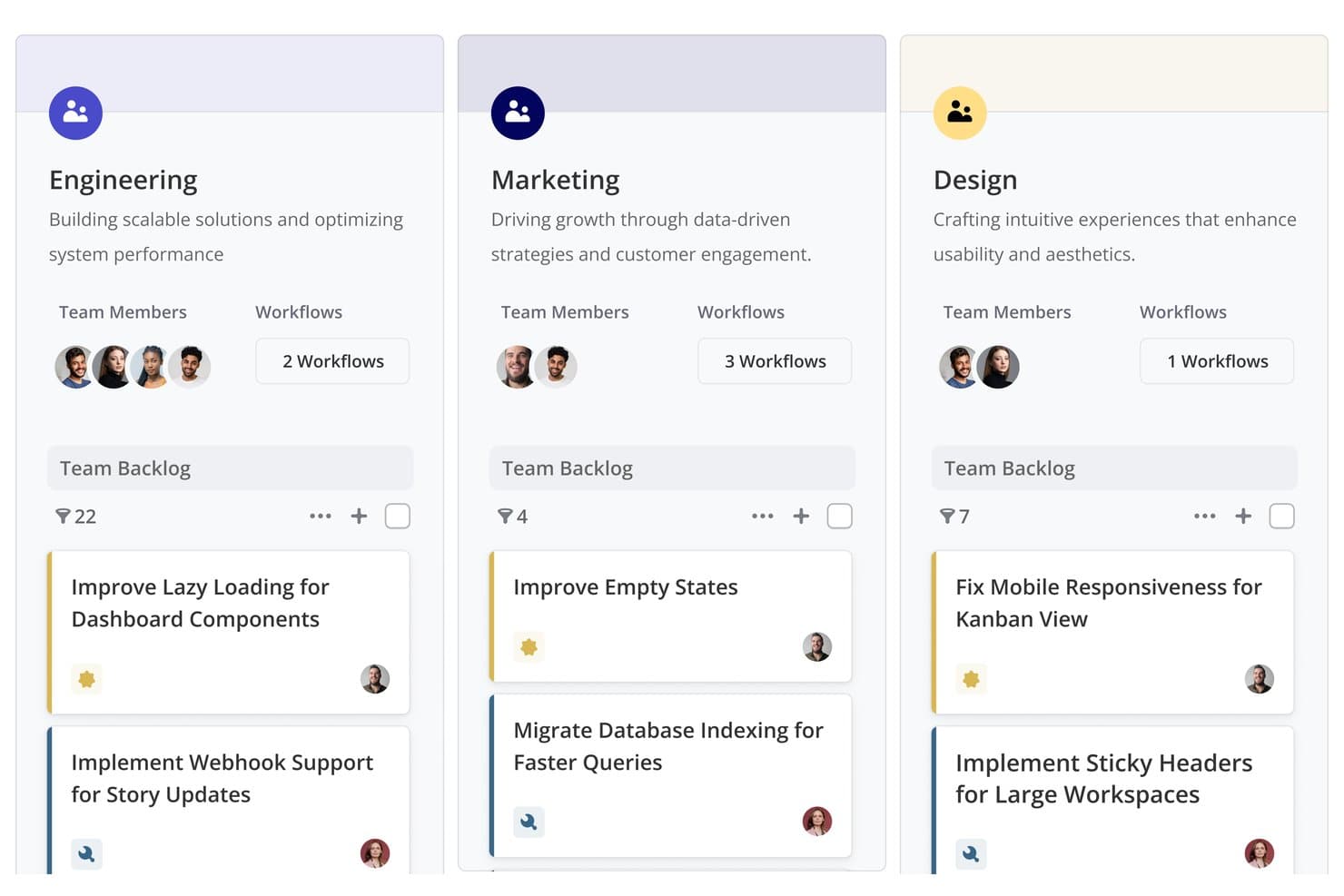
Shortcut organizza i backlog dei team per reparto con attività e flussi di lavoro. Shortcut è un software per lo sviluppo di prodotti con un piano gratuito per sempre che combina roadmap, epiche, storie, schede Kanban, iterazioni, documenti e flussi di lavoro di sviluppo collegati a GitHub.
Per chi è più adatto Shortcut?
Shortcut è adatto ai team di sviluppo software che hanno bisogno di pianificazione degli sprint collegata a GitHub, roadmap e monitoraggio delle consegne in un unico spazio di lavoro.
Perché ho scelto Shortcut
Considero Shortcut un'ottima soluzione per i team di sviluppo che monitorano gli sprint con GitHub. Le sue iterazioni, schede Kanban e relazioni sul lavoro rimanente collegano la pianificazione degli sprint alle attività quotidiane di consegna. Le storie possono avanzare man mano che procedono le richieste pull, così il mio team mantiene aggiornato lo stato dello sviluppo senza dover aggiornare manualmente ogni ticket.
Funzionalità principali di Shortcut
- Sottoattività: Suddividi le storie in elementi di lavoro stimati e monitorabili.
- Campi personalizzati: Organizza il lavoro con campi di prodotto e tecnici predefiniti.
- Visualizzazione del backlog: Ordina, filtra, raggruppa e riordina le storie.
- Integrazione con Slack: Crea storie dai messaggi e sincronizza le conversazioni.
Integrazioni di Shortcut
Shortcut si integra con GitHub, GitLab, Bitbucket Cloud, Slack, Figma, Zendesk, Productboard, Savio e Google Sheets. Offre inoltre un'API REST e la connettività con Zapier per flussi di lavoro personalizzati.
Cosa è gratuito?
Shortcut offre un piano gratuito per sempre con epiche, iterazioni, roadmap, documenti, integrazione con GitHub e storie illimitate. Supporta un team con un massimo di 10 utenti, mentre una prova di 14 giorni offre accesso completo senza richiedere una carta di credito.
Pros and Cons
Pros:
- Le storie illimitate supportano la consegna continua dei prodotti
- Le visualizzazioni della roadmap collegano la strategia all'esecuzione
- I report sugli sprint chiariscono l'avanzamento delle iterazioni
Cons:
- La definizione delle priorità si basa sull'ordinamento manuale
- Nessuna raccolta nativa dei feedback dei clienti
Learn more about Shortcut: Ideale per la pianificazione degli sprint con posti gratuiti illimitati
- Piano gratuito disponibile
- Da $10/utente/mese (con fatturazione annuale)
Visit WebsiteCustomer Rating:4.6/5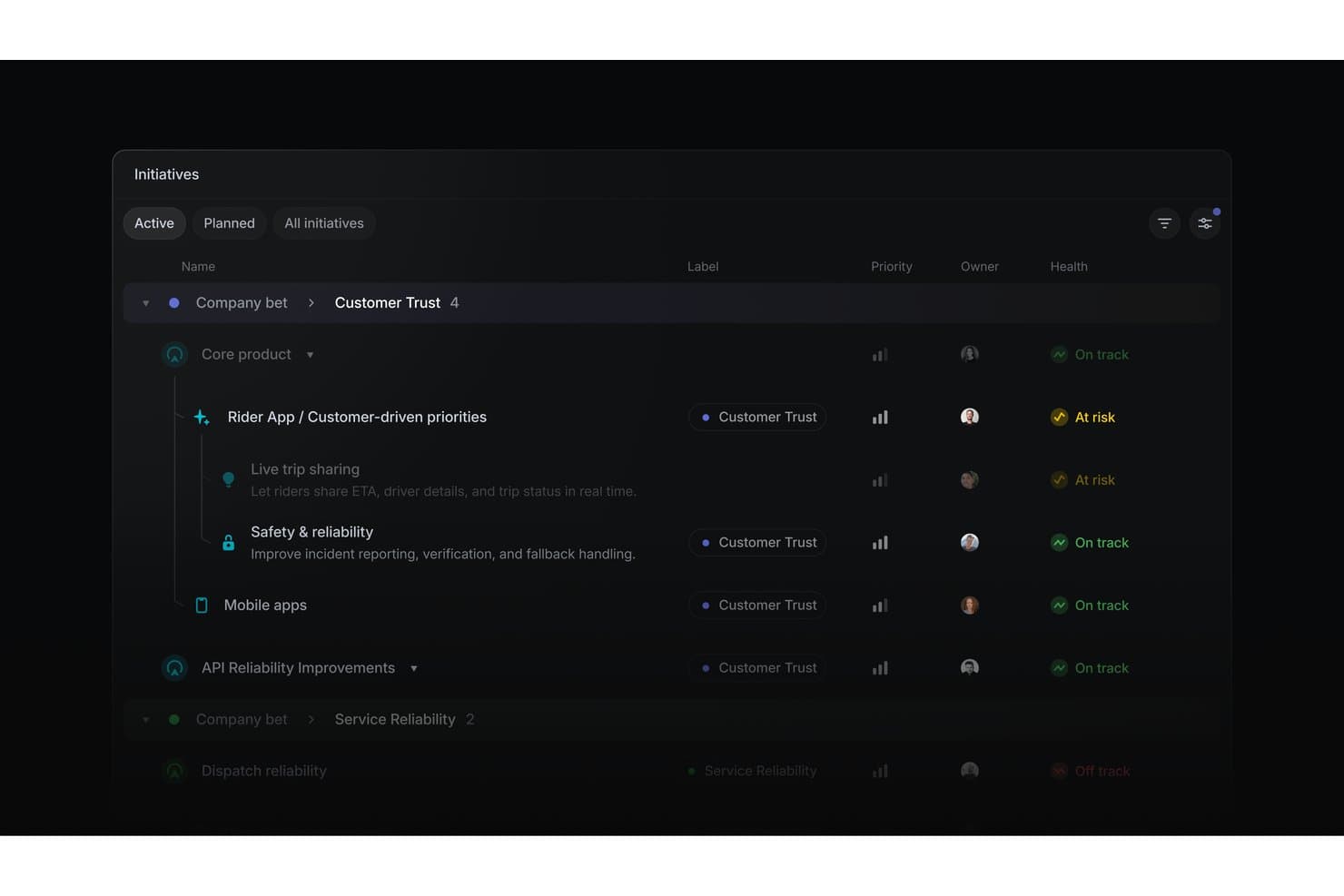
Linear organizza le iniziative di prodotto in base allo stato di salute, alla priorità e al responsabile. Linear è un software per lo sviluppo dei prodotti che consente di organizzare iniziative, progetti, problemi, cicli, tempistiche, dipendenze e integrazioni ingegneristiche in un unico spazio di lavoro.
Per chi è più indicato Linear?
Responsabili di prodotto e sviluppatori software presso startup che necessitano di pianificazione degli sprint, monitoraggio dei problemi e coordinamento della tabella di marcia con posti gratuiti illimitati.
Perché ho scelto Linear
Ho scelto Linear perché supporta la pianificazione degli sprint con posti gratuiti illimitati, consentendo ai team di prodotto, ingegneria e progettazione di collaborare in un unico spazio di lavoro. I cicli durano da una a otto settimane, trasferiscono in avanti i problemi non completati e includono il monitoraggio della capacità. Bacheche personalizzabili, corsie, stime, dipendenze e relazioni tra problemi aiutano il mio team a gestire il lavoro dello sprint dal backlog al rilascio.
Funzionalità principali di Linear
- Agente Linear: Crea e aggiorna problemi, progetti e iniziative tramite prompt in linguaggio naturale.
- Richieste dei clienti: Collega i riscontri inseriti manualmente a problemi e progetti.
- Modelli di progetto: Preimposta milestone, problemi, responsabili, membri e iniziative.
- Integrazione con GitHub: Sincronizza i problemi e automatizza gli aggiornamenti delle richieste di integrazione.
Integrazioni di Linear
Linear offre integrazioni native con GitHub, GitLab, Slack, Figma, Microsoft Teams, Notion e Google Sheets. Supporta inoltre connessioni personalizzate tramite API pubblica e webhook, oltre a Zapier.
Cosa è gratuito?
Linear offre un piano gratuito per sempre al costo di $0 per membri illimitati. Include due team e fino a 250 problemi, con caricamenti di file limitati a 10 MB.
Pros and Cons
Pros:
- I cicli trasferiscono in avanti il lavoro non completato
- Le iniziative collegano gli obiettivi ai rilasci
- Le corsie della bacheca chiariscono la responsabilità dello sprint
Cons:
- Le richieste dei clienti richiedono l'inserimento manuale
- Nessun punteggio integrato di impatto e impegno
Learn more about Linear: Ideale per il monitoraggio flessibile dei progetti basato su database
- Piano gratuito + demo gratuita + prova di 14 giorni disponibile
- A partire da $20/utente/mese
Visit WebsiteCustomer Rating:4.6/5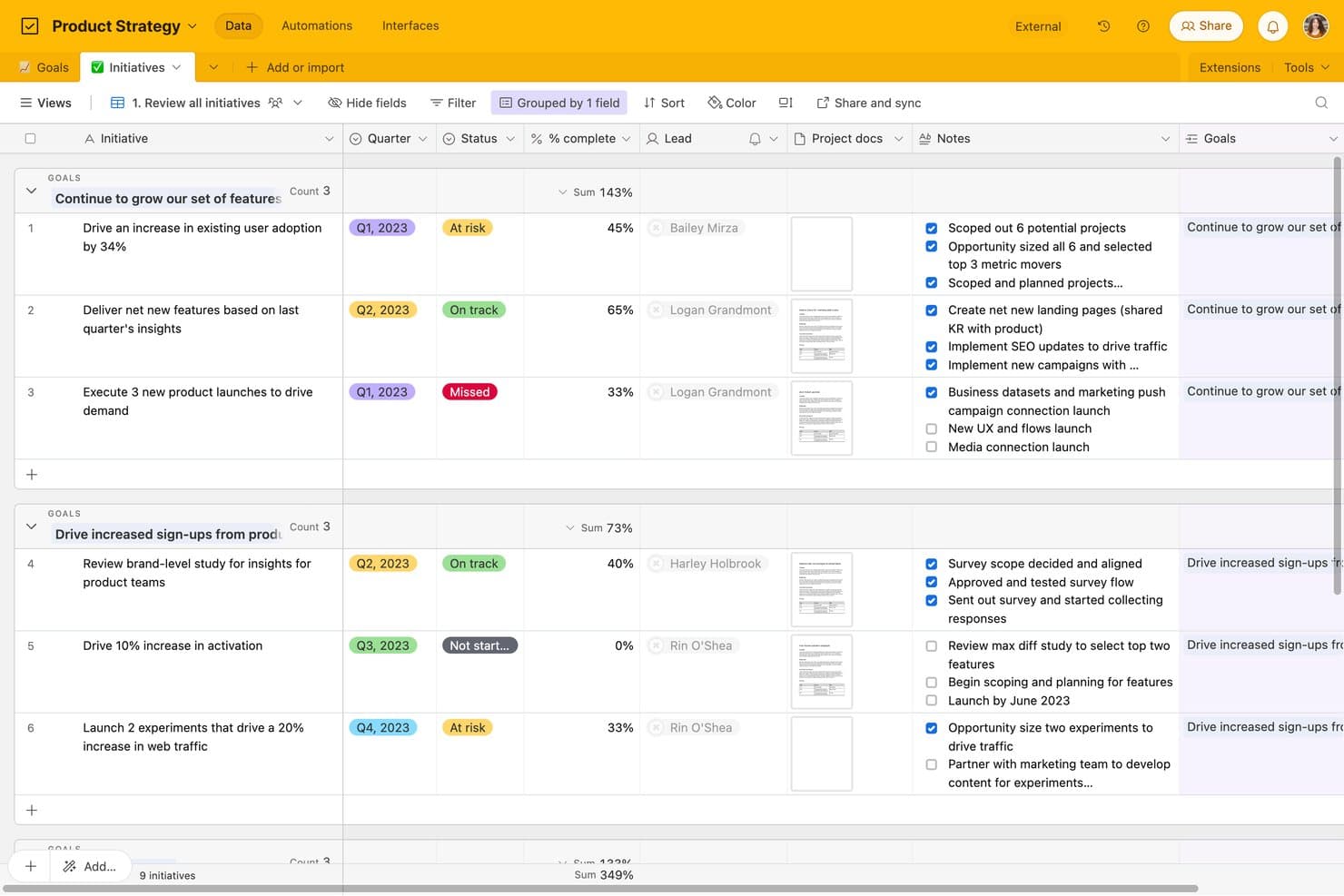
Airtable monitora le iniziative dei prodotti in base a obiettivo, stato e completamento. Airtable è un software per lo sviluppo dei prodotti basato su database relazionali, che combina la pianificazione della tabella di marcia, il monitoraggio delle attività, i moduli per i riscontri, i flussi di lavoro kanban, le visualizzazioni personalizzate e la collaborazione interfunzionale.
Per chi è più adatto Airtable?
I responsabili di prodotto, i fondatori di startup e i responsabili di programma possono collegare tabelle di marcia, riscontri e attività di consegna in un database relazionale flessibile.
Perché ho scelto Airtable
Ho scelto Airtable perché la sua struttura di database relazionale collega i riscontri sui prodotti, le iniziative della tabella di marcia e le attività di consegna in un unico spazio di lavoro. Utilizzo record collegati e dati aggregati per seguire le richieste dei clienti attraverso le epiche e il lavoro degli sprint, mentre le visualizzazioni kanban rendono visibile l'esecuzione. I moduli trasformano i nuovi riscontri in record che il team può stabilire come prioritari.
Funzionalità principali di Airtable
- Progettazione dell'interfaccia: Crea pagine personalizzate con layout a griglia, galleria, calendario, modulo e pannello di controllo.
- Attivatori delle automazioni: Avvia flussi di lavoro a partire da modifiche ai record, invii di moduli, pianificazioni, webhook o pulsanti.
- Condivisione delle visualizzazioni pubbliche: Condividi visualizzazioni e pagine dell'interfaccia tramite link senza richiedere account agli utenti che le visualizzano.
- Importazione ed esportazione CSV: Sposta i dati tra Airtable e altri strumenti utilizzando file CSV.
Integrazioni di Airtable
Airtable elenca 27 integrazioni, tra cui Jira, GitHub, Slack, Google Drive, Google Calendar, Salesforce, Zendesk, Miro e Typeform. Il piano gratuito include l'accesso API per le integrazioni personalizzate, mentre le integrazioni di sincronizzazione e l'automazione di Jira richiedono piani a pagamento.
Cosa è gratuito?
Airtable offre un piano gratuito senza scadenza, quindi non è necessario iniziare un abbonamento a pagamento dopo una prova. Supporta collaboratori in sola lettura illimitati, fino a cinque editor o creatori, 50 commentatori, 1.000 record per base, 1 GB di allegati e 1.000 chiamate API al mese; le integrazioni di sincronizzazione e l'automazione di Jira richiedono un piano a pagamento.
Pros and Cons
Pros:
- Collega riscontri, tabella di marcia e attività
- Monitoraggio relazionale flessibile per i flussi di lavoro dei prodotti
- Visibilità illimitata per le parti interessate in sola lettura
Cons:
- Le visualizzazioni della sequenza temporale e di Gantt richiedono il passaggio a un piano superiore
- Il livello gratuito limita i record e le esecuzioni delle automazioni
Learn more about Airtable: Ideale per gestire documenti, roadmap e sprint in un unico spazio di lavoro
- Piano gratuito + demo gratuita disponibile
- A partire da $10/membro/mese (con fatturazione annuale)
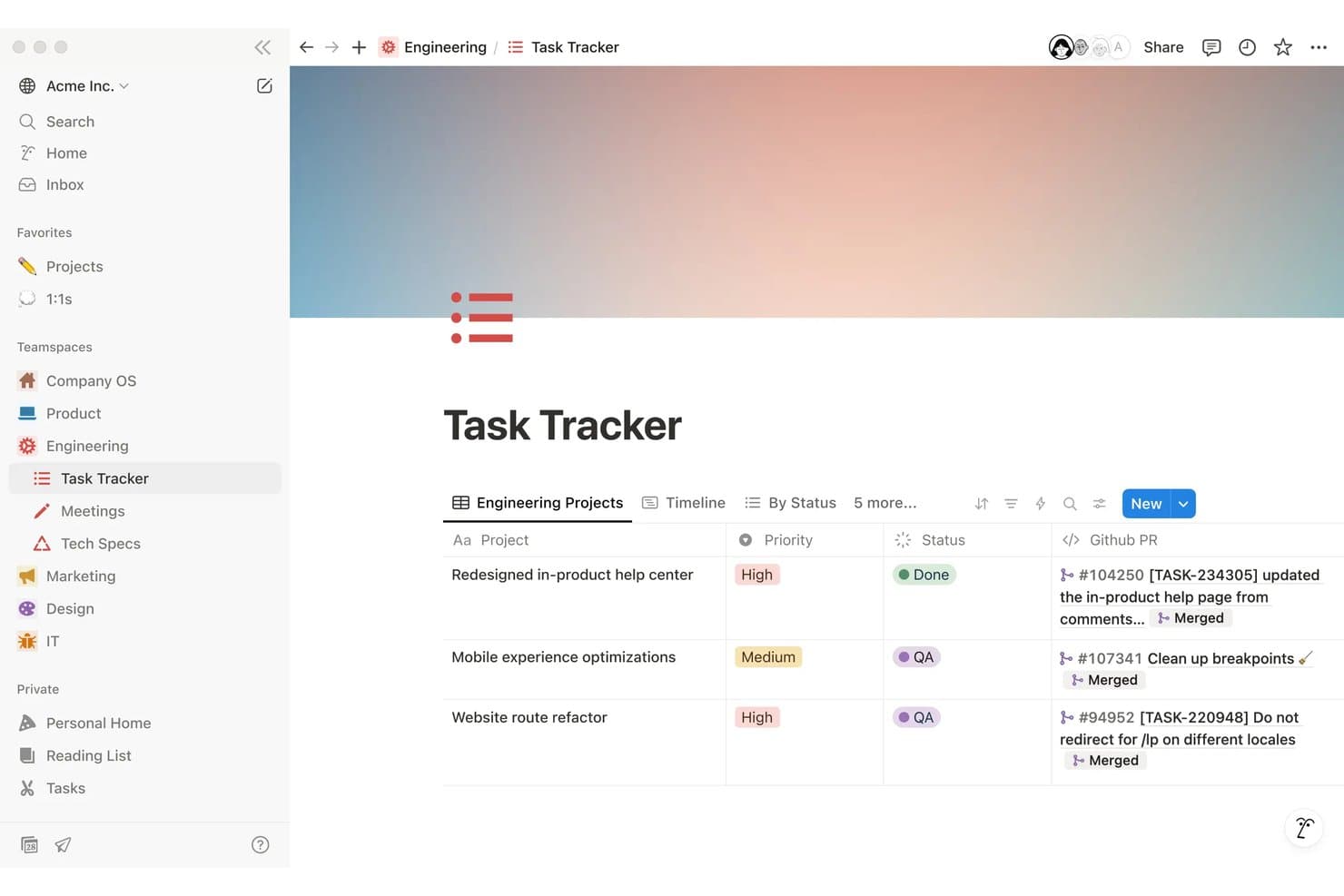
Notion monitora le attività di ingegneria con priorità, stato e richieste pull di GitHub collegate. Notion è uno spazio di lavoro gratuito per lo sviluppo dei prodotti, utile per creare PRD, gestire roadmap e attività, pianificare sprint, raccogliere feedback tramite moduli e collaborare tra database e documenti collegati.
Per chi è più adatto Notion?
Responsabili di prodotto di startup e piccoli team che hanno bisogno di un unico spazio di lavoro per PRD, roadmap, pianificazione degli sprint e collaborazione interfunzionale.
Perché ho scelto Notion
Ho scelto Notion come uno dei migliori strumenti gratuiti per lo sviluppo dei prodotti perché mantiene documenti, roadmap e sprint in un unico spazio di lavoro. Utilizzo le visualizzazioni della timeline per mappare i rilasci, collegare i PRD agli elementi della roadmap e gestire gli sprint con visualizzazioni dedicate per il backlog e la pianificazione. I team possono anche pubblicare le visualizzazioni della roadmap tramite Notion Sites.
Funzionalità principali di Notion
- Moduli illimitati: Raccogli risposte tramite moduli pubblici o incorporati senza richiedere account Notion.
- Dipendenze tra attività: Collega le attività correlate e individua il lavoro che deve essere completato per primo.
- ID personalizzati delle attività: Assegna prefissi e URL univoci alle attività per facilitarne il riferimento.
- Commenti nei database: Aggiungi commenti strutturati in thread a pagine, elementi e singole proprietà.
Integrazioni di Notion
Notion supporta connessioni con GitHub, Jira, Figma, Slack, Trello, Asana e altri strumenti. Offre inoltre un'API pubblica e webhook per integrazioni personalizzate, oltre a Zapier.
Cosa è incluso gratuitamente?
Notion offre un piano gratuito senza scadenza a $0 per membro al mese, con pagine e blocchi illimitati per gli utenti individuali. I limiti principali includono caricamenti di file da 5 MB, cronologia delle pagine di sette giorni, fino a 10 ospiti e blocchi collaborativi limitati per i team.
Pros and Cons
Pros:
- Collega PRD, roadmap e sprint
- Pubblica roadmap interattive
- Raccoglie un numero illimitato di risposte ai moduli di feedback
Cons:
- Gli spazi di lavoro gratuiti per i team limitano i blocchi
- Richiede la configurazione manuale del punteggio di prioritizzazione
Learn more about Notion: 8Ideale per la gestione degli sprint Agile e del backlog
Jira
- Piano gratuito disponibile
- A partire da $7.91/utente/mese
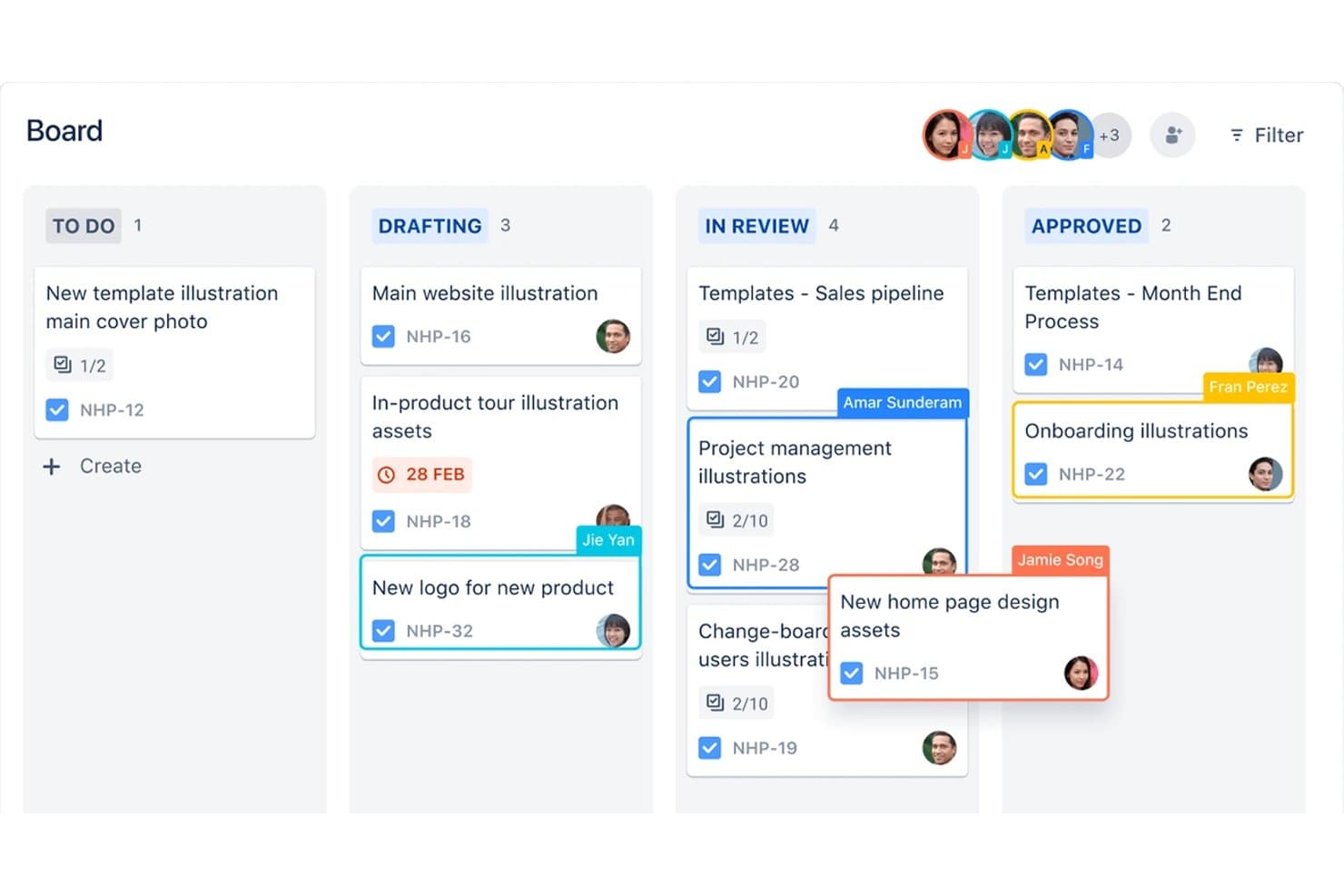
Jira organizza le attività di prodotto nelle fasi della bacheca kanban in base all'assegnatario. Jira è un software per lo sviluppo dei prodotti di Atlassian che combina la gestione del backlog e il monitoraggio dei ticket, le bacheche Scrum e Kanban, la pianificazione degli sprint, le roadmap temporali e Jira Product Discovery per la definizione delle priorità e la raccolta di informazioni sui clienti.
Per chi è più adatto Jira?
Jira è adatto ai team di prodotto e di ingegneria che gestiscono backlog Agile, sprint Scrum, flussi di lavoro Kanban e attività di distribuzione interfunzionali.
Perché ho scelto Jira
Ho scelto Jira perché è ideale per la gestione degli sprint Agile e del backlog, con bacheche Scrum e Kanban basate su backlog ordinati per priorità e sulla pianificazione degli sprint. Utilizzo i report di burndown, velocità, tempo di ciclo e flusso cumulativo per individuare i problemi di distribuzione. La sua visualizzazione temporale collega inoltre epiche, dipendenze e attività di rilascio in un unico piano di distribuzione.
Funzionalità principali di Jira
- Flussi di lavoro personalizzati: Configura stati, regole e transizioni per diversi processi di distribuzione.
- Campi personalizzati: Aggiungi campi di testo, menu a discesa, data, etichetta e selezione dell'utente agli elementi di lavoro.
- Importazione CSV: Sposta gli elementi di lavoro esistenti in Jira da un altro strumento.
- App del Marketplace: Estendi Jira con integrazioni e componenti aggiuntivi dal Marketplace di Atlassian.
Integrazioni di Jira
Jira offre integrazioni native con Confluence, Trello, Bitbucket, Slack, Microsoft Teams, Gmail, Figma e Jira Product Discovery. Il suo Marketplace di Atlassian offre più di 3.000 app, mentre la sua API REST supporta integrazioni personalizzate.
Che cosa è gratuito?
Jira offre un piano gratuito senza scadenza per un massimo di 10 utenti, con progetti, bacheche, backlog, report e visualizzazioni di base illimitati. Include 2 GB di spazio di archiviazione e 150 passaggi di automazione al mese, ma limita l'assistenza alla community ed esclude autorizzazioni avanzate, residenza dei dati e Rovo AI.
Pros and Cons
Pros:
- Le bacheche Agile supportano sprint e limiti WIP
- Gli elementi di lavoro illimitati supportano un monitoraggio dettagliato
- JPD collega i punteggi di discovery alla distribuzione
Cons:
- La pianificazione delle roadmap e la definizione delle priorità si estendono su prodotti separati
- Le autorizzazioni del piano gratuito rendono ogni utente amministratore
Learn more about Jira: Ideale per flussi di lavoro di roadmap e feedback assistiti dall'intelligenza artificiale
- Piano gratuito + prova gratuita + demo gratuita disponibili
- A partire da $12/utente/mese (con fatturazione annuale)
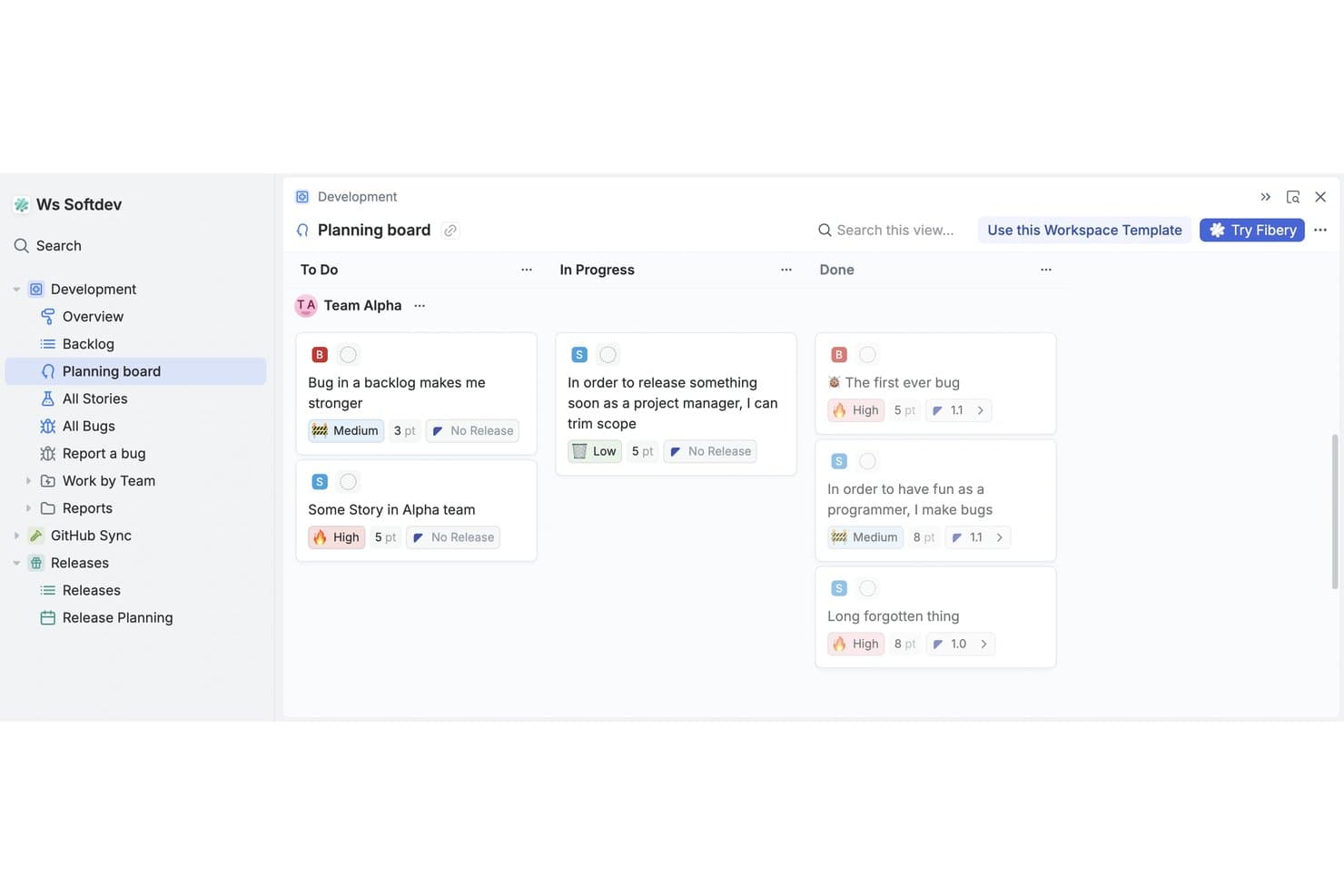
La bacheca di pianificazione di Fibery organizza le attività per stato tra i team. Fibery è una piattaforma gratuita per lo sviluppo dei prodotti che combina uno spazio di lavoro relazionale senza codice con feedback dei clienti, definizione delle priorità delle funzionalità, roadmap, specifiche di prodotto e monitoraggio dello sviluppo software.
Per chi è più adatto Fibery?
Team di prodotto di startup e piccole aziende che necessitano di analisi dei feedback assistita dall'intelligenza artificiale, definizione delle priorità, roadmap e monitoraggio dello sviluppo in un unico spazio di lavoro.
Perché ho scelto Fibery
Ho scelto Fibery perché le sue roadmap e i suoi flussi di lavoro per i feedback, assistiti dall'intelligenza artificiale, collegano direttamente le evidenze dei clienti alle decisioni sul prodotto. Uso l'intelligenza artificiale per identificare i temi ricorrenti nei feedback, suggerire collegamenti agli elementi del backlog e valutare il sentiment prima di definire le priorità del lavoro con le formule RICE, Kano, MoSCoW o WSJF. Posso poi pubblicare roadmap aggiornate e registri delle modifiche dallo stesso spazio di lavoro.
Funzionalità principali di Fibery
- Sincronizzazione Git: Collega rami, commit e richieste pull di GitHub o GitLab alle attività.
- Bacheche dei flussi di lavoro personalizzate: Configura stati, filtri e visualizzazioni per sprint, rilasci e priorità.
- Documenti collaborativi: Crea specifiche di prodotto, wiki e documentazione del team collegati.
- Moduli per i feedback: Raccogli contributi tramite link condivisibili, incorporamenti o codici QR.
Integrazioni di Fibery
Fibery offre integrazioni documentate con GitHub, GitLab, Jira, Linear, Intercom, Zendesk, HubSpot e Slack. Fornisce inoltre un'API REST, webhook, un server MCP e Zapier.
Cosa è incluso nel piano gratuito?
Fibery offre un piano gratuito senza scadenza per un massimo di 10 utenti e 10 ospiti. Include 10 database, entità illimitate, 1 GB di spazio di archiviazione per i file, 14 giorni di cronologia delle versioni, 250 crediti AI e 5.000 sincronizzazioni di entità.
Pros and Cons
Pros:
- Collega direttamente i feedback alla definizione delle priorità
- Pubblica roadmap e registri delle modifiche in tempo reale
- Supporta flussi di lavoro personalizzati per lo sviluppo dei prodotti
Cons:
- Richiede una configurazione iniziale significativa dello spazio di lavoro
- Il piano gratuito limita le visualizzazioni collaborative
Learn more about Fibery: La scelta migliore per i flussi gratuiti dai riscontri al piano di sviluppo
- Piano gratuito disponibile
- Da $29/utente/mese (con fatturazione annuale)
Visit WebsiteCustomer Rating:4.7/5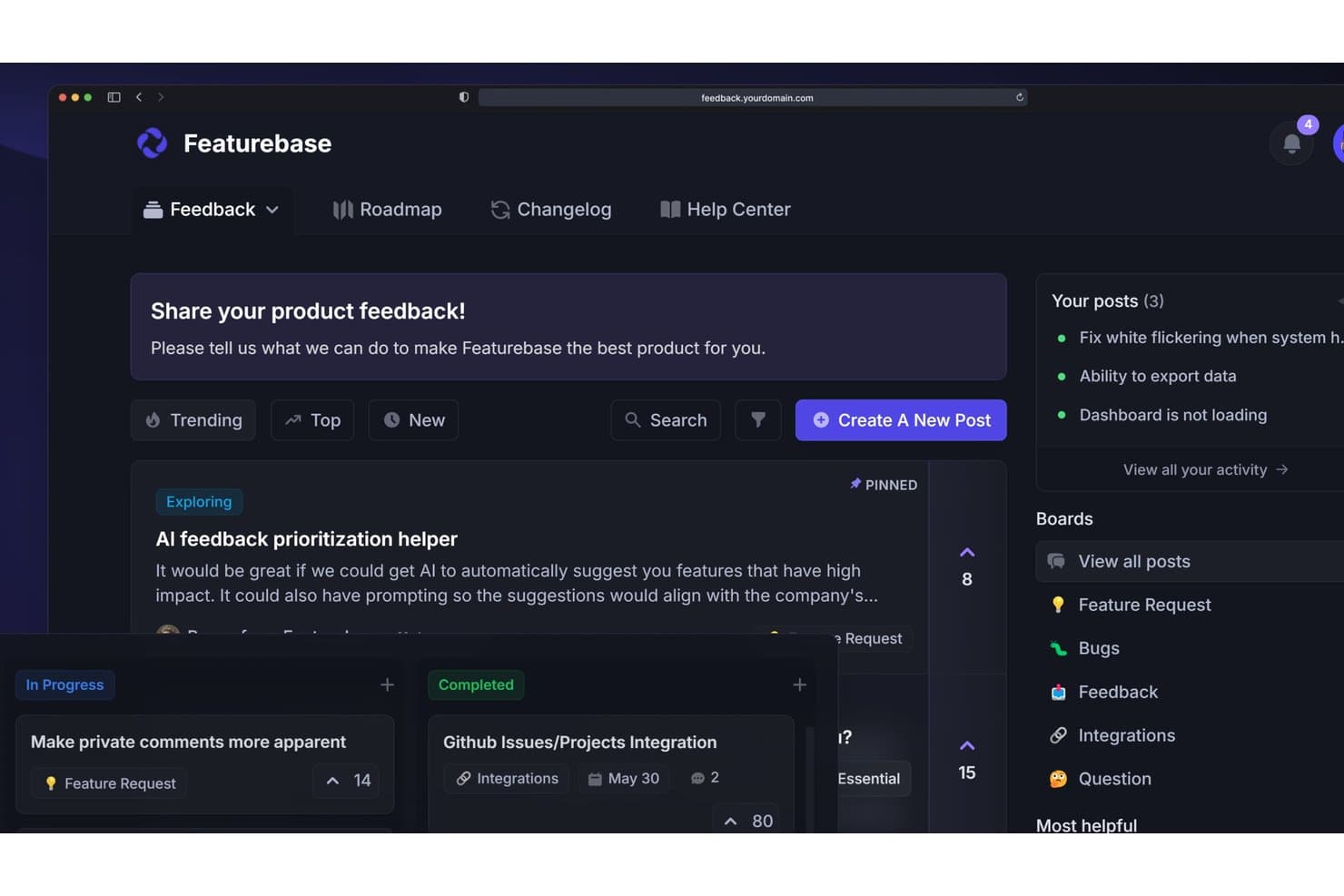
Featurebase consente agli utenti di raccogliere, definire le priorità e monitorare i riscontri sui prodotti in un unico posto. Featurebase è un software per lo sviluppo dei prodotti che combina la raccolta dei riscontri dei clienti, la definizione delle priorità delle richieste, i piani di sviluppo condivisibili, i registri delle modifiche delle versioni, i sondaggi e i flussi di assistenza in un'unica piattaforma.
Per chi è più adatto Featurebase?
Featurebase è adatto ai responsabili di prodotto indipendenti e ai fondatori di aziende in fase iniziale che hanno bisogno di trasformare i riscontri dei clienti in piani di sviluppo con priorità e condivisibili.
Perché ho scelto Featurebase
Considero Featurebase la scelta migliore per i flussi gratuiti dai riscontri al piano di sviluppo perché il suo portale e il componente integrato nell'app trasformano gli input dei clienti in richieste organizzate. Utilizzo la matrice valore/sforzo per classificare le opportunità, poi pubblico piani di sviluppo basati sullo stato o sulla data per le parti interessate. È più adatto alla pianificazione guidata dai riscontri che all'esecuzione delle iterazioni.
Caratteristiche principali di Featurebase
- Sondaggi NPS e CSAT: Crea sondaggi integrati nell'app per raccogliere le valutazioni dei clienti.
- Registro pubblico delle modifiche: Pubblica gli aggiornamenti del prodotto con notifiche delle versioni segmentate.
- Commenti sulle richieste: Aggiungi commenti pubblici o privati organizzati in thread, con strumenti di collaborazione.
- Gestione dei dati CSV: Importa i riscontri con la mappatura dei campi ed esporta i dati delle richieste.
Integrazioni di Featurebase
Featurebase offre integrazioni native con Linear, Jira, GitHub, ClickUp, Slack, Discord, Intercom, Zendesk, HubSpot e Segment. Supporta inoltre API, MCP, webhook e Zapier per connessioni personalizzate.
Cosa è gratuito?
Featurebase offre un piano gratuito, anziché soltanto una prova a tempo limitato. I dettagli dei piani disponibili non specificano i limiti relativi a utenti, integrazioni o utilizzo, quindi consulta la pagina dei prezzi attuale prima di sceglierlo per il tuo team.
Pros and Cons
Pros:
- Riscontri, piani di sviluppo e registri delle modifiche rimangono collegati
- La matrice valore/sforzo favorisce una definizione delle priorità più chiara
- I piani di sviluppo pubblici chiudono il ciclo dei riscontri
Cons:
- Nessuna pianificazione nativa delle iterazioni o delle dipendenze
- La collaborazione gratuita non supporta i team interfunzionali
Learn more about Featurebase:
Altri software gratuiti per lo sviluppo di prodotti
Ecco alcune opzioni aggiuntive di software per lo sviluppo di prodotti che offrono anch’esse piani o periodi di prova gratuiti. Sebbene questi strumenti non siano stati inclusi nella mia selezione, vale comunque la pena esaminarli:
- 11MiroIdeale per lavagne visive tra i gruppi
- 12Zoho ProjectsBuono per il monitoraggio dei progetti nell'ecosistema Zoho
- 13TrelloIdeale per le bacheche Kanban con un piano gratuito
- 14CannyIdeale per chiudere il ciclo del feedback dei clienti
- 15PlaneIdeale per il monitoraggio open source e con hosting autonomo delle roadmap
Come valuto i software gratuiti per lo sviluppo dei prodotti
Per prima cosa, definisco cosa si intende per gratuito. Per i software di sviluppo dei prodotti, ciò significa un vero piano gratuito per sempre, non una versione di prova, con funzionalità utilizzabili per la creazione della roadmap e il monitoraggio delle attività già incluse. Da qui, suddivido la mia valutazione in tre parti: funzionalità principali, che hanno il peso maggiore, come la creazione di roadmap dei prodotti e il monitoraggio delle attività attraverso un backlog; caratteristiche distintive, come i widget nativi per la raccolta dei feedback; e ciò che uno strumento offre oltre al suo insieme di funzionalità, ad esempio fino a che punto il piano gratuito può crescere prima di obbligare a effettuare un upgrade.
Funzionalità principali (requisiti fondamentali per questo elenco)
Oltre ai requisiti relativi al piano gratuito, utilizzo un sistema di punteggio per selezionare gli strumenti da inserire nel mio elenco. Assegno a ciascuno un punteggio su una scala da 0 (non offre la funzionalità) a 5 (eccelle in quest'area) per ogni funzionalità principale elencata di seguito, in base a ciò che è disponibile nel piano gratuito. Converto quindi il totale in una percentuale per aiutare a valutare l'idoneità complessiva di ciascuno strumento, attribuendo un peso aggiuntivo a tutte le funzionalità che ho ritenuto essenziali.
- Creazione della roadmap e pianificazione (essenziale): verifico se è possibile creare una roadmap visiva, modificare le tempistiche e condividerla con gli stakeholder direttamente dal piano gratuito.
- Monitoraggio di attività e problemi (essenziale): ogni strumento viene valutato in base a come gestisce gli elementi del backlog: assegnazioni, aggiornamenti dello stato, dipendenze e campi personalizzati sono tutti aspetti importanti.
- Strumenti di definizione delle priorità: cerco framework integrati per l'assegnazione di punteggi o la classificazione, come le matrici sforzo-impatto, che vadano oltre il semplice riordinamento tramite trascinamento.
- Raccolta dei feedback: gli strumenti che consentono di raccogliere i contributi degli utenti o degli stakeholder e associarli a specifici elementi del backlog ottengono un punteggio superiore rispetto a una semplice casella di posta con testo libero.
- Collaborazione e commenti: valuto se i team possono usare le @menzioni, organizzare discussioni in thread e ricevere notifiche, soprattutto nel lavoro tra team con funzioni diverse.
- Bacheche per sprint o flussi di lavoro: le bacheche Kanban e per sprint devono offrire colonne con trascinamento, opzioni di filtraggio e flessibilità sufficiente per adattarsi al flusso di lavoro effettivo del team.
Una volta ottenuto un elenco di strumenti che soddisfano i criteri, considero ciò che distingue ogni piattaforma dalle altre.
Fattori distintivi (ciò che differenzia i fornitori)
Ecco come confronto i diversi fornitori:
Caratteristiche distintive
Cerco un widget nativo per la raccolta dei feedback che consenta di raccogliere i contributi direttamente nell'app da utenti reali e associarli agli elementi del backlog. Una semplice casella di posta non è sufficiente: strumenti come Productboard e Canny consentono di incorporare un portale, in modo che i feedback confluiscano nel flusso di lavoro per la definizione delle priorità senza dover utilizzare uno strumento separato per i sondaggi. Valuto anche la condivisione pubblica della roadmap, poiché pubblicare un link sempre aggiornato per gli stakeholder elimina la necessità di inviare presentazioni statiche dopo ogni ciclo di pianificazione. Anche le raccolte di modelli sono importanti, soprattutto per i team nelle fasi iniziali che avviano la loro prima bacheca per sprint o roadmap senza dover partire da zero.
Oltre le funzionalità
Valuto fino a che punto può crescere un piano gratuito prima di raggiungere i propri limiti. I limiti sul numero di utenti, sui progetti e sullo spazio di archiviazione variano notevolmente, e un team di tre persone che supera i limiti del proprio piano nel bel mezzo di uno sprint subisce una reale interruzione del lavoro. La portabilità dei dati è altrettanto importante: verifico se è possibile esportare backlog e roadmap in formato CSV o PDF, poiché i formati proprietari creano un vincolo che diventa problematico quando si è pronti a cambiare strumento. Valuto inoltre quanto sia accessibile ogni spazio di lavoro per i membri del team che non si occupano di gestione del prodotto, come ingegneri e designer, che hanno bisogno di visibilità senza dover affrontare una curva di apprendimento ripida.
Come scegliere un software gratuito per lo sviluppo di prodotti
Gli elenchi complessi delle funzionalità e le strutture dei prezzi possono rendere difficile capire cosa si ottiene realmente da un software gratuito per lo sviluppo di prodotti. Per aiutarti a rimanere concentrato mentre esamini il processo di selezione del software, ecco alcuni fattori da tenere presenti:
| Fattore | Cosa considerare |
|---|---|
| FattoreAmbito dell'offerta gratuita | Cosa considerareEsamina cosa è incluso nel piano gratuito. Assicurati che copra le esigenze di base del tuo team senza costi nascosti. |
| FattoreScalabilità | Cosa considerareConsidera se il software può crescere insieme alla tua attività. Verifica se supporta un numero maggiore di utenti o progetti con l'espandersi delle tue esigenze. |
| FattoreIntegrazioni | Cosa considerareAssicurati che si integri con gli strumenti che il tuo team già utilizza, come Slack o Google Workspace, per evitare di interrompere i flussi di lavoro. |
| FattoreSemplicità d'uso | Cosa considerareValuta quanto sia intuitiva l'interfaccia. Il tuo team dovrebbe poter iniziare a utilizzarla con una formazione minima. |
| FattoreSicurezza | Cosa considerareVerifica se il software è conforme agli standard di sicurezza pertinenti al tuo settore, soprattutto se gestisci dati sensibili. |
| FattoreAssistenza clienti | Cosa considerareCerca le opzioni di assistenza disponibili nella versione gratuita, come il supporto via chat o e-mail, per aiutare il tuo team quando si verificano dei problemi. |
| FattorePersonalizzazione | Cosa considerareDetermina se puoi adattare il software ai tuoi flussi di lavoro specifici, anche nella versione gratuita, per massimizzare la produttività. |
| FattoreOpzioni per i feedback | Cosa considerareConsidera in che modo il software ti consente di raccogliere e utilizzare i feedback degli utenti per migliorare il processo di sviluppo del prodotto. |
Che cos'è il software gratuito per lo sviluppo dei prodotti?
Il software per lo sviluppo dei prodotti è progettato per aiutare i team a pianificare, gestire e realizzare le idee di prodotto. Questi strumenti offrono spesso piani gratuiti o periodi di prova, consentendo agli utenti di esplorare le funzionalità di base senza impegno finanziario. In genere, i responsabili di prodotto, i designer e gli sviluppatori utilizzano questi strumenti per migliorare la collaborazione e l'efficienza.
Funzionalità come la pianificazione della tabella di marcia, la gestione delle attività e la raccolta dei feedback aiutano i team a rimanere organizzati, a stabilire le priorità e a raccogliere informazioni essenziali, favorendo un processo di sviluppo più efficace.
Funzionalità
Vediamo le funzionalità comunemente presenti nei software per lo sviluppo dei prodotti e quali sono solitamente incluse nei piani gratuiti rispetto a quelli a pagamento.
Funzionalità solitamente gratuite dei software per lo sviluppo dei prodotti
- Gestione delle attività: Aiuta a organizzare e assegnare le attività ai membri del team, consentendo a tutti di rimanere concentrati sugli obiettivi.
- Pianificazione della tabella di marcia: Fornisce una sequenza temporale visiva degli obiettivi del prodotto, facilitando la pianificazione strategica.
- Raccolta dei feedback: Consente ai team di raccogliere informazioni dagli utenti, che possono guidare i miglioramenti del prodotto.
- Strumenti di collaborazione: Facilitano la comunicazione e il lavoro di squadra, assicurando che tutti siano allineati.
- Integrazioni di base: Si collegano ad altri strumenti come Slack o Google Workspace, migliorando il flusso di lavoro.
- Dashboard personalizzabili: Consentono agli utenti di adattare la propria visualizzazione per accedere rapidamente alle informazioni importanti.
- Gestione dei ruoli degli utenti: Permette di impostare le autorizzazioni per controllare l'accesso in base ai ruoli del team.
Funzionalità solitamente a pagamento dei software per lo sviluppo dei prodotti
- Analisi avanzate: Offrono un'analisi approfondita dei dati per aiutare i team a prendere decisioni informate.
- Notifiche automatiche: Mantengono i team aggiornati con avvisi automatici sulle modifiche ai progetti.
- Collaborazione in tempo reale: Consente a più utenti di lavorare contemporaneamente sugli stessi documenti.
- Funzionalità di sicurezza avanzate: Forniscono misure di sicurezza aggiuntive per proteggere i dati sensibili.
- Assistenza clienti prioritaria: Offre tempi di risposta più rapidi e supporto dedicato per i problemi urgenti.
- Spazio di archiviazione illimitato: Consente di gestire grandi quantità di dati, elemento essenziale per i team in crescita.
- Opzioni di personalizzazione avanzate: Offrono maggiore flessibilità per adattare il software a flussi di lavoro specifici.
Vantaggi
L'implementazione di un software gratuito per lo sviluppo dei prodotti offre diversi vantaggi al team e all'azienda. Ecco alcuni dei vantaggi che puoi aspettarti:
- Risparmio sui costi: Consente di accedere agli strumenti essenziali senza impegno finanziario, liberando il budget per altre esigenze.
- Organizzazione migliorata: Utilizza la gestione delle attività per mantenere chiari e sotto controllo i progetti e le responsabilità.
- Collaborazione migliorata: Gli strumenti di comunicazione integrati assicurano che il team rimanga connesso e allineato.
- Informazioni preziose: Le funzionalità di raccolta dei feedback aiutano a comprendere le esigenze degli utenti e a prendere decisioni informate.
- Flessibilità: Le dashboard personalizzabili consentono di adattare l'area di lavoro al proprio flusso di lavoro.
- Scalabilità: È possibile iniziare con le funzionalità di base ed espandersi con la crescita del team, adattandosi alle esigenze in evoluzione.
- Configurazione rapida: Le interfacce semplici e le integrazioni di base consentono di iniziare facilmente senza una formazione approfondita.
Costi & prezzi
Mi rendo conto che sei arrivato a questo articolo cercando le migliori opzioni di software per lo sviluppo dei prodotti disponibili gratuitamente. Tuttavia, poiché i piani gratuiti offrono solo funzionalità limitate, è molto probabile che in futuro dovrai passare a un piano superiore.
La tabella seguente riassume i piani più comuni, i relativi prezzi medi e le funzionalità tipicamente incluse nelle soluzioni software per lo sviluppo dei prodotti:
Tabella di confronto dei piani per i software di sviluppo dei prodotti
| Tipo di piano | Prezzo medio | Funzionalità comuni |
|---|---|---|
| Tipo di pianoPiano gratuito | Prezzo medio$0 | Funzionalità comuniGestione di base delle attività, pianificazione della roadmap, raccolta dei feedback, strumenti di collaborazione e integrazioni di base. |
| Tipo di pianoPiano personale | Prezzo medio$5-$25/user/month | Funzionalità comuniTutte le funzionalità gratuite, oltre alla gestione dei ruoli degli utenti, dashboard personalizzabili e spazio di archiviazione aggiuntivo. |
| Tipo di pianoPiano aziendale | Prezzo medio$30-$75/user/month | Funzionalità comuniTutte le funzionalità del piano personale, oltre ad analisi avanzate, notifiche automatiche e funzionalità di sicurezza avanzate. |
| Tipo di pianoPiano per grandi aziende | Prezzo medio$80-$150/user/month | Funzionalità comuniTutte le funzionalità del piano aziendale, oltre all'assistenza clienti prioritaria, spazio di archiviazione illimitato e opzioni di personalizzazione avanzate. |
Domande frequenti sul software gratuito per lo sviluppo di prodotti
Ecco alcune risposte alle domande frequenti sul software gratuito per lo sviluppo di prodotti:
Posso affidarmi a un software gratuito per lo sviluppo di prodotti per un uso a lungo termine?
Le versioni gratuite possono essere ottime per startup o piccoli team con esigenze di base. Tuttavia, con la crescita del team, potresti aver bisogno delle funzionalità avanzate disponibili nei piani a pagamento. È importante valutare se la versione gratuita soddisfa i tuoi obiettivi a lungo termine.
Quali limitazioni devo aspettarmi dal software gratuito per lo sviluppo di prodotti?
I piani gratuiti spesso offrono spazio di archiviazione limitato, meno integrazioni e un’assistenza di base. Potresti anche riscontrare restrizioni sul numero di utenti o progetti. Valuta queste limitazioni in relazione alle esigenze del tuo team per decidere se un piano gratuito è sufficiente.
Quanto è sicuro il software gratuito per lo sviluppo di prodotti?
Il livello di sicurezza può variare a seconda del fornitore. Cerca un software che offra funzionalità di sicurezza di base, come la crittografia dei dati. Per la gestione di informazioni sensibili, verifica la conformità del fornitore agli standard e alle normative del settore.
Posso passare facilmente da un piano gratuito a uno a pagamento?
La maggior parte dei fornitori offre una procedura di aggiornamento semplice. Di solito puoi mantenere i dati e le impostazioni esistenti quando passi a un piano a pagamento. Verifica con il fornitore la possibile presenza di interruzioni del servizio o problemi di migrazione dei dati durante l’aggiornamento.