

Con così tante soluzioni diverse di intelligence del prodotto disponibili, capire quale sia quella giusta per te è difficile. Sai di voler monitorare il comportamento degli utenti, ottimizzare la raccolta manuale dei dati, ottenere informazioni in modo più efficiente e accedere a dati dettagliati sulla concorrenza che ti consentano di prendere decisioni migliori grazie all'analisi predittiva, ma devi capire quale strumento sia il migliore. Ti aiuto io! In questo articolo ti aiuterò a rendere semplice la tua scelta, condividendo la mia esperienza personale nell'utilizzo di decine di diversi strumenti di intelligence con team numerosi e prodotti complessi, insieme alle mie scelte per il miglior software di intelligence del prodotto.
Perché fidarsi dei nostri consigli sui software
6,700+
Reviews
20
Industry experts
16+
Evaluation factors
14
Years
Il nostro team testa e recensisce software dal 2012. In quanto product manager noi stessi, sappiamo quanto sia difficile — e importante — scegliere il software giusto.
Per questa guida, abbiamo valutato gli strumenti attraverso test pratici e ricerche indipendenti, assegnando un punteggio agli strumenti in base ai nostri criteri di selezione.
Le nostre recensioni riflettono il nostro giudizio editoriale umano, non un discorso di vendita.
Revisori esperti:
- Andrew LumbySenior TPM
- Cristiano ValimSenior UI/UX Lead


Tabella comparativa: software di intelligence del prodotto
Questa tabella comparativa riassume i dettagli sui prezzi delle mie migliori selezioni di software di intelligence del prodotto.
| Tool | Best For | Trial Info | Price | ||
|---|---|---|---|---|---|
| 1 | Ideale per collegare il feedback ai risultati di prodotto | Demo gratuita disponibile | Prezzo su richiesta | Website | |
| 2 | Ideale per la riproduzione delle sessioni con informazioni utili basate sull’intelligenza artificiale | Piano gratuito disponibile | Prezzi su richiesta | Website | |
| 3 | Ideale per acquisire automaticamente tutte le interazioni degli utenti | Piano gratuito + prova gratuita + demo gratuita disponibili | Prezzo su richiesta | Website | |
| 4 | Ideale per l'analisi open source dei prodotti | Piano gratuito + demo gratuita + prova gratuita disponibili | Prezzi su richiesta | Website | |
| 5 | Ideale per visualizzare le interazioni degli utenti | Prova gratuita di 14 giorni | A partire da $83/mese | Website | |
| 6 | Ideale per stabilire le priorità dell'impatto sui ricavi basato sull'intelligenza artificiale | Dimostrazione gratuita disponibile | Prezzi su richiesta | Website | |
| 7 | Ideale per l’analisi dei prodotti e del comportamento degli utenti | Piano gratuito disponibile | Prezzo su richiesta | Website | |
| 8 | Ideale per il monitoraggio delle interazioni utente in-app | Prova gratuita di 30 giorni + piano gratuito + demo gratuita disponibile | Prezzo su richiesta | Website | |
| 9 | Ideale per analisi dei dati in tempo reale | Piano gratuito disponibile | A partire da $25/mese (fatturati annualmente) | Website | |
| 10 | Ideale per analisi digitali e di prodotto unificate | Piano gratuito + demo gratuita + prova gratuita di 15 giorni disponibili | A partire da $39/mese (con fatturazione annuale) | Website |


Recensioni dei migliori software di intelligence del prodotto
Di seguito trovi le mie descrizioni dettagliate dei migliori software di intelligence del prodotto inclusi nella mia selezione. Le mie recensioni offrono un’analisi approfondita delle funzionalità principali, dei pro e dei contro, delle integrazioni e dei casi d’uso ideali di ogni strumento, per aiutarti a trovare quello più adatto a te.
 Ideale per collegare il feedback ai risultati di prodotto
- Demo gratuita disponibile
- Prezzo su richiesta
Visit WebsiteCustomer Rating:4.8/5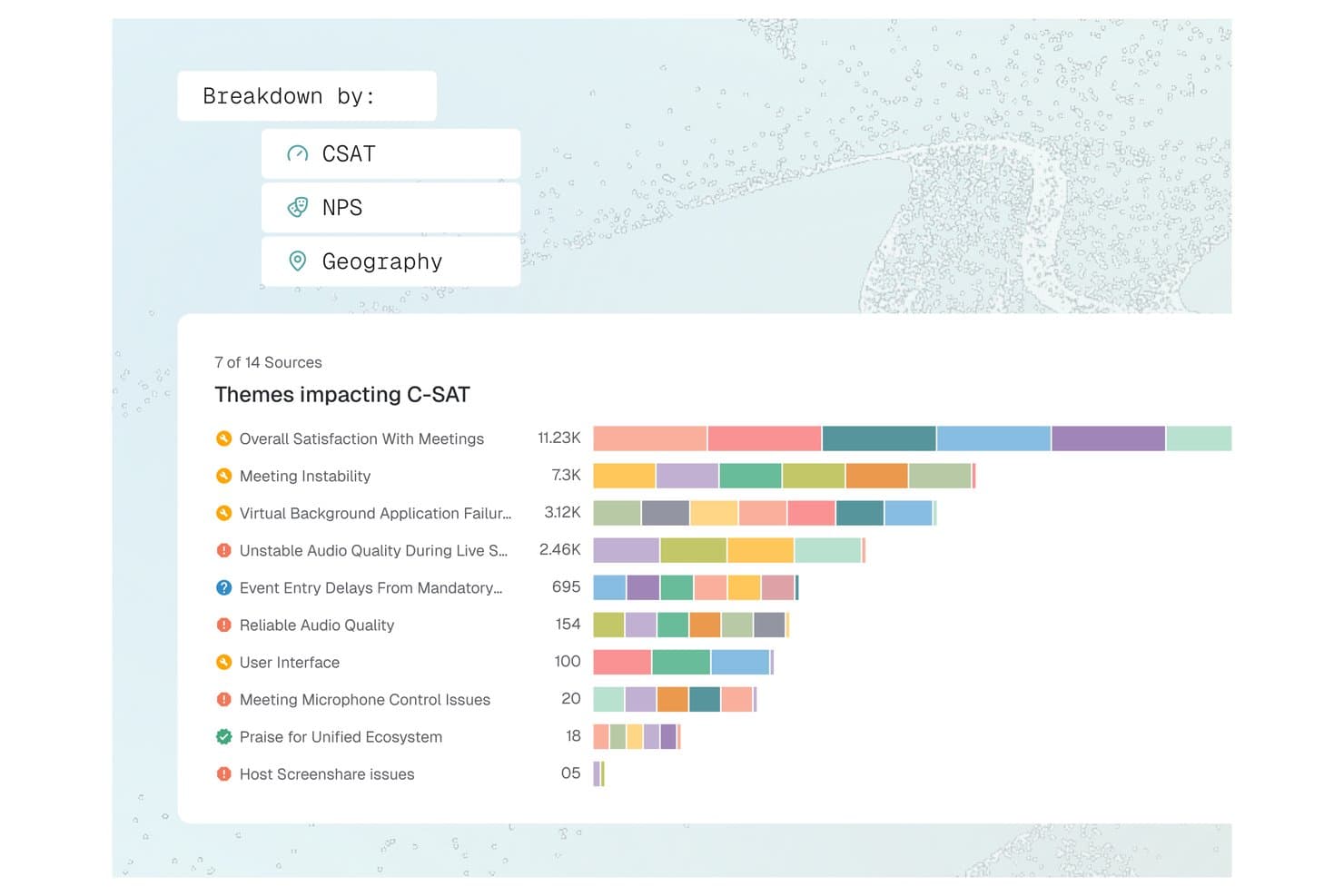
Enterpret offre una dashboard di suddivisione del tema C-SAT che visualizza gli argomenti di feedback come Instabilità delle riunioni e Qualità audio in base al volume attraverso più fonti. Enterpret è una piattaforma di intelligence sul feedback dei clienti che unifica ticket di supporto, registrazioni di chiamate, sondaggi e segnali social in insight di prodotto strutturati e analizzati dall'IA, attraverso una tassonomia adattiva e un grafo di contesto cliente.
Per chi è ideale Enterpret?
Enterpret è adatto a product manager e leader CX di aziende B2B SaaS di fascia media e grandi imprese che ricevono grandi volumi di feedback dei clienti tramite più canali ogni mese.
Perché ho scelto Enterpret
Enterpret si guadagna il suo posto grazie al modo in cui collega il feedback al reale contesto di prodotto. Il grafo del contesto cliente collega ogni riscontro ai dettagli dell'account, ai pattern di utilizzo e allo stato delle trattative, così posso leggere le lamentele nel contesto di chi effettivamente sta abbandonando. Wisdom, lo strato di query AI di Enterpret, permette di porre domande come “cosa dicono i power user sull'onboarding?” e di ottenere sintesi supportate da esempi reali di feedback, non solo da tag aggregati.
Caratteristiche principali di Enterpret
- Tassonomia adattiva: consente di classificare automaticamente i feedback non strutturati in temi dinamici e personalizzabili tramite tagging guidato dall’IA.
- Integrazione di feedback da più fonti: Connette e unifica feedback provenienti da strumenti di supporto, sondaggi, recensioni, registrazioni di chiamate e canali social.
- Arricchimento dei dati: Arricchisce ogni riscontro con informazioni su utente, account e contesto di prodotto da sistemi collegati.
- Workflow di chiusura del ciclo: Assegna task basati su feedback ai team di prodotto e ingegneria tramite integrazioni workflow come Jira e Slack.
Integrazioni di Enterpret
Enterpret offre integrazioni native con Zendesk, Intercom, Salesforce, Gong, Slack, Qualtrics, Linear, Jira, Google Play Store e Apple App Store. È disponibile una API per integrazioni personalizzate.
Pros and Cons
Pros:
- La tassonomia AI si adatta automaticamente al feedback
- Collega direttamente il feedback dei clienti ai metrici di prodotto
- Mette in luce tendenze su grandi volumi di feedback
Cons:
- La configurazione iniziale della tassonomia richiede tempo significativo
- Profondità dei report limitata senza configurazione tecnica
Learn more about Enterpret: Ideale per la riproduzione delle sessioni con informazioni utili basate sull’intelligenza artificiale
- Piano gratuito disponibile
- Prezzi su richiesta
Visit WebsiteCustomer Rating:4.5/5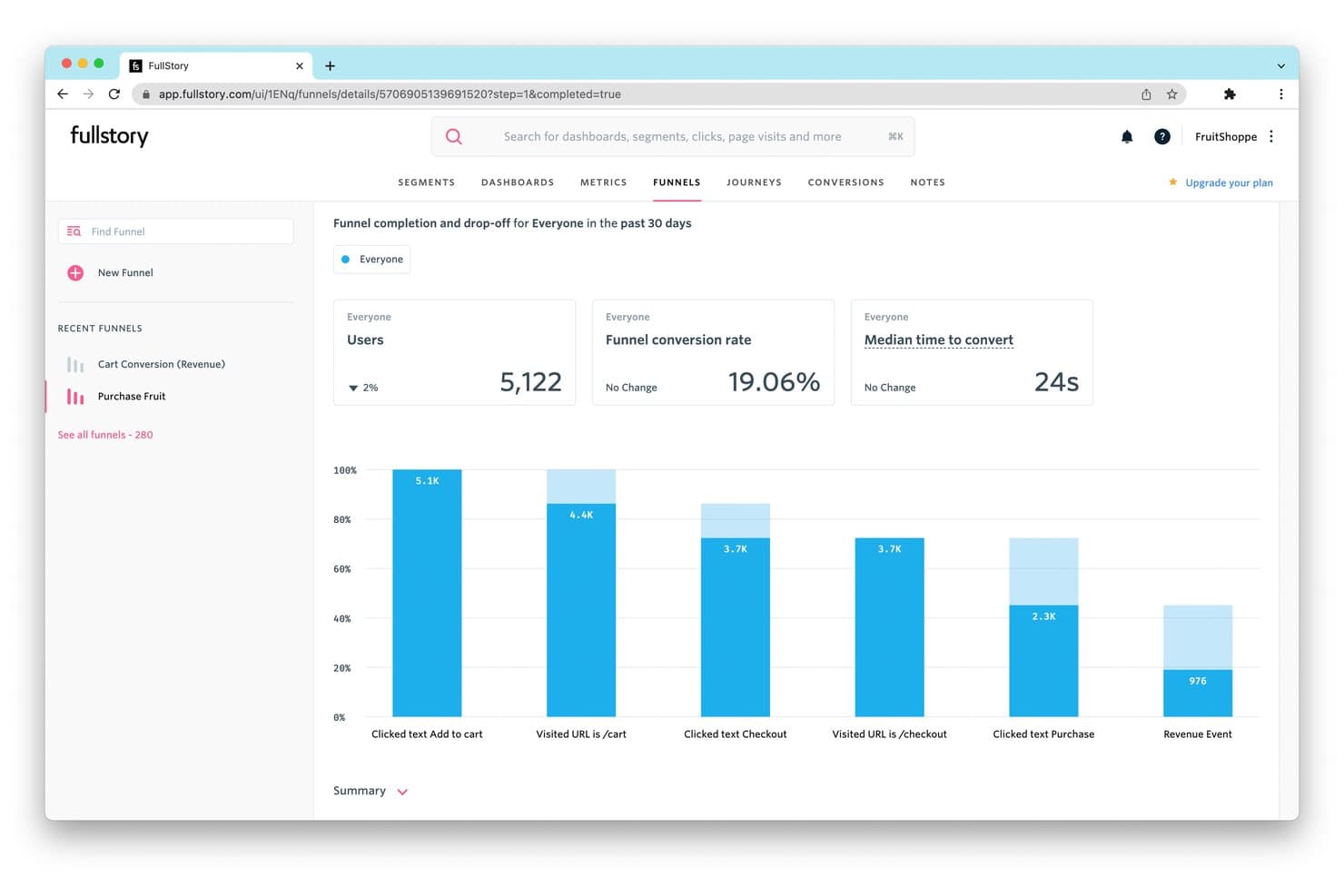
FullStory monitora i tassi di abbandono del funnel per rivelare dove gli utenti interrompono gli acquisti. Fullstory è una piattaforma di intelligence sui prodotti che combina la riproduzione delle sessioni, l’analisi comportamentale basata sulla raccolta automatica dei dati, l’analisi dei funnel e dei percorsi, il monitoraggio della fidelizzazione, le guide nell’app e il rilevamento delle informazioni utili basato sull’intelligenza artificiale nelle app web e mobili native.
Per chi è più adatto Fullstory?
Fullstory è particolarmente adatto ai team di prodotto e crescita di aziende del mercato medio e di livello aziendale che hanno bisogno di collegare il comportamento qualitativo nelle sessioni con l’analisi quantitativa in un unico posto.
Perché ho scelto Fullstory
Fullstory è entrato nella mia selezione ristretta perché la sua funzionalità di riproduzione delle sessioni va oltre quella della maggior parte degli strumenti che ho testato, abbinando registrazioni ad alta fedeltà a riepiloghi delle sessioni generati dall’intelligenza artificiale tramite StoryAI, che consentono di analizzare ore di filmati in pochi secondi. Apprezzo particolarmente Fullcapture™, che acquisisce retroattivamente ogni clic, scorrimento e interazione, permettendomi di definire oggi un nuovo segnale comportamentale e applicarlo ai dati di mesi prima. I segnali di frustrazione identificano automaticamente i clic ripetuti e i clic sugli errori, collegandoli all’impatto stimato sui ricavi.
Funzionalità principali di Fullstory
- Funnel di conversione: Analisi dei funnel in più passaggi con visualizzazione degli abbandoni, collegata direttamente alle riproduzioni delle sessioni degli utenti che hanno abbandonato in ogni fase.
- Mappe dei percorsi: Analisi dei percorsi basata sul ML che mette in evidenza i percorsi più comuni seguiti dagli utenti nel prodotto, incluse deviazioni impreviste e percorsi di uscita.
- Guide e sondaggi nell’app: Distribuisci visite guidate del prodotto, liste di controllo per la fase iniziale, descrizioni comandi e sondaggi NPS direttamente da Fullstory, senza il supporto del team tecnico.
- Anywhere: magazzino dati: Sincronizzazione oraria dei dati comportamentali con Snowflake, BigQuery e Redshift per i flussi di lavoro di BI e modellazione predittiva a valle.
Integrazioni di Fullstory
Fullstory offre integrazioni native con Twilio Segment, Amplitude, Snowflake, Google BigQuery, Amazon Redshift e RudderStack, oltre a Intercom, Invoca, Kustomer e Olark. Le sue API FS.Identity, Element, fs.event e Consent supportano le integrazioni personalizzate.
Pros and Cons
Pros:
- Riproduzione delle sessioni con riepiloghi delle sessioni basati sull’intelligenza artificiale
- Monitoraggio retroattivo degli eventi comportamentali per web e dispositivi mobili
- Raccolta dei dati orientata alla privacy con mascheramento automatico delle informazioni personali identificabili
Cons:
- Nessun test A/B né indicatori integrati delle funzionalità
- Le funzionalità di analisi avanzate sono disponibili solo nei piani di livello superiore
Learn more about Fullstory: Ideale per acquisire automaticamente tutte le interazioni degli utenti
- Piano gratuito + prova gratuita + demo gratuita disponibili
- Prezzo su richiesta
Visit WebsiteCustomer Rating:4.3/5
Ecco la funzione di confronto dei percorsi in Heap. Heap è una piattaforma di product analytics che rende i dati sulle interazioni degli utenti e sulle attività immediatamente accessibili e utilizzabili per le aziende. Il suo principale punto di forza è la funzionalità di acquisizione automatica dei dati, che elimina la necessità di configurare manualmente i tracciamenti, riducendo così il rischio di perdere dati o insight preziosi.
Perché ho scelto Heap:
Ho selezionato Heap per la mia lista grazie alla sua capacità di acquisire automaticamente le interazioni degli utenti, che la distingue da molti altri strumenti sul mercato. Mentre la maggior parte degli strumenti richiede una configurazione manuale per monitorare i diversi eventi, Heap cattura tutte le azioni degli utenti fin dall'inizio, rendendolo davvero 'ideale per acquisire automaticamente tutte le interazioni degli utenti'.
Funzionalità principali e integrazioni:
Le caratteristiche chiave di Heap includono la raccolta automatica degli eventi, l'analisi retroattiva e la governance dei dati, offrendo un ambiente ricco, flessibile e sicuro per l'analisi dei dati. Heap si integra facilmente con piattaforme come Salesforce, Optimizely e Google Ads.
Pros and Cons
Pros:
- Acquisizione automatica di tutte le interazioni degli utenti
- Capacità di effettuare analisi retroattiva
- Si integra bene con molte piattaforme comunemente utilizzate
Cons:
- La personalizzazione dei prezzi può mancare di trasparenza per i potenziali clienti
- Può essere costoso per piccole imprese o startup
- Alcuni utenti potrebbero trovare l'interfaccia meno intuitiva rispetto alle piattaforme concorrenti
Learn more about Heap (by Contentsquare): Ideale per l'analisi open source dei prodotti
- Piano gratuito + demo gratuita + prova gratuita disponibili
- Prezzi su richiesta
Visit WebsiteCustomer Rating:4.5/5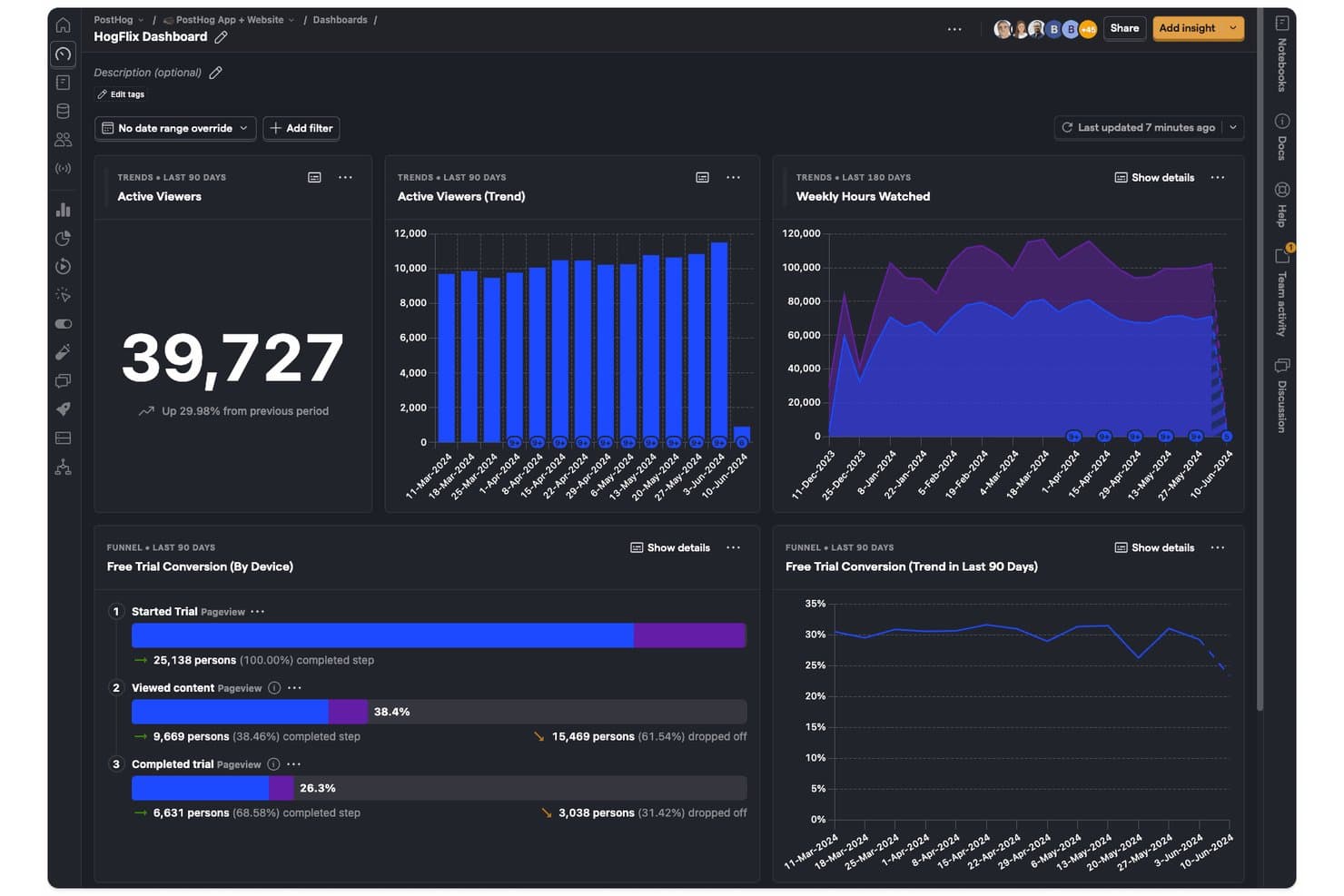
PostHog monitora le tendenze degli spettatori, le ore guardate e le conversioni della prova in un'unica dashboard. PostHog è una piattaforma open source di product intelligence che combina analisi del prodotto, registrazione delle sessioni, flag delle funzionalità, test A/B, sondaggi e un CDP integrato in un unico set di strumenti unificato.
Per chi è più adatto PostHog?
PostHog è particolarmente adatto ai team di prodotto tecnici e agli sviluppatori che desiderano un'unica piattaforma per gestire analisi, registrazione delle sessioni, flag delle funzionalità e sperimentazione senza dover integrare più strumenti.
Perché ho scelto PostHog
PostHog si è guadagnato un posto tra i migliori della mia selezione perché la sua base open source offre ai team di prodotto tecnici qualcosa che la maggior parte delle piattaforme di analisi non garantisce: piena visibilità su come i dati vengono raccolti, archiviati ed elaborati. Mi piace il fatto che la raccolta automatica registri clic, visualizzazioni di pagina e invii di moduli fin dal primo giorno, mentre l'analisi delle correlazioni mette automaticamente in evidenza i fattori comportamentali statisticamente associati alla conversione o all'abbandono. I team possono passare direttamente da qualsiasi fase del funnel alle registrazioni delle sessioni che la supportano, trasformando un punto dati in una storia reale dell'utente senza cambiare strumento.
Funzionalità principali di PostHog
- Analisi del ciclo di vita: segmenta gli utenti in categorie di nuovi, ricorrenti, di ritorno e inattivi, permettendo di monitorare nel tempo i cambiamenti nel coinvolgimento dell'intera base utenti.
- Test A/B e multivariati nativi: esegue esperimenti con motori statistici sia bayesiani sia frequentisti, inclusi gruppi di controllo e test a livello di gruppo per i prodotti B2B.
- Sondaggi in-app: attiva sondaggi NPS, CSAT, PMF e a risposta aperta in base al comportamento dell'utente, alla cronologia degli eventi o allo stato dei flag delle funzionalità, collegando le risposte direttamente ai dati analitici.
- Query personalizzate HogQL: consente di scrivere query SQL direttamente sui dati di PostHog per analisi ad hoc e report personalizzati oltre il generatore standard di insight.
Integrazioni di PostHog
PostHog offre oltre 50 destinazioni native per gli eventi, tra cui Slack, Braze, Customer.io, Salesforce, HubSpot, Intercom e PagerDuty. Si connette inoltre a Snowflake, BigQuery, Databricks e Redshift, con API aperte e funzioni Hog per pipeline di dati personalizzate.
Pros and Cons
Pros:
- Open source con opzione di distribuzione self-hosted
- Registrazione delle sessioni strettamente integrata con l'analisi
- Analisi avanzata dei funnel con insight sulle correlazioni
Cons:
- L'interfaccia può risultare eccessiva per i team di prodotto non tecnici
- Conservazione limitata delle registrazioni delle sessioni a 3 mesi
Learn more about PostHog: Ideale per visualizzare le interazioni degli utenti
- Prova gratuita di 14 giorni
- A partire da $83/mese
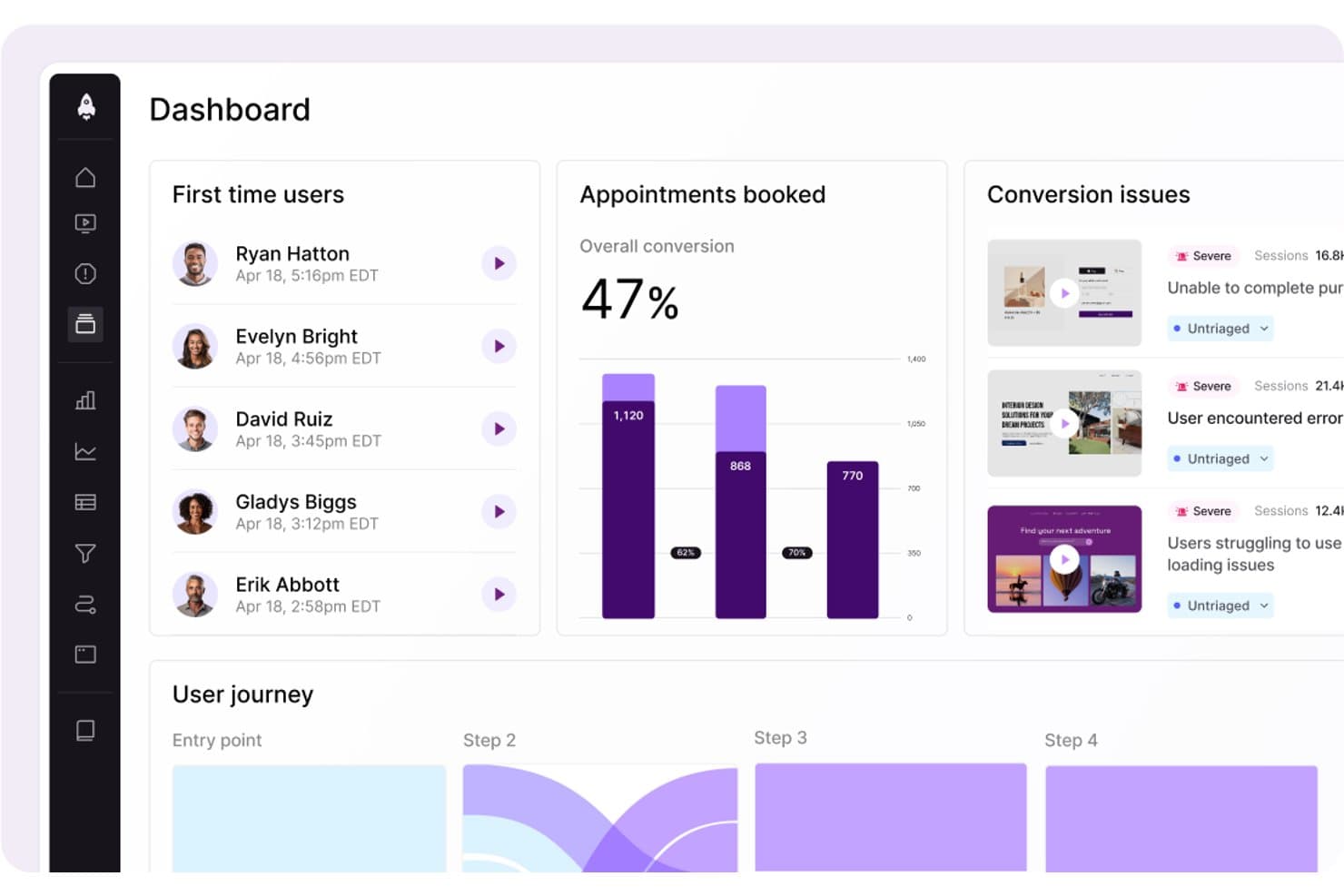
LogRocket mostra i problemi di conversione e i dati sul percorso degli utenti in un'unica dashboard. LogRocket è una piattaforma di intelligence del prodotto che combina riproduzione delle sessioni, analisi del prodotto, analisi dell'esperienza utente, monitoraggio degli errori e informazioni basate sull'intelligenza artificiale attraverso il suo livello Galileo AI, tutto in un unico strumento.
Per chi è più adatto LogRocket?
LogRocket è una scelta ottimale per i responsabili di prodotto e i team di analisi del prodotto che devono collegare i dati quantitativi del funnel al contesto reale delle sessioni per comprendere il 'perché' alla base del comportamento degli utenti.
Perché ho scelto LogRocket
LogRocket si è guadagnato un posto nella mia rosa ristretta grazie alla sua capacità di acquisire e visualizzare esattamente ciò che gli utenti sperimentano. La riproduzione delle sessioni è il suo principale punto di forza: una riproduzione perfetta a livello di pixel sul web e sui dispositivi mobili nativi, abbinata a mappe di calore, mappe dei clic e mappe dei clic ripetuti che trasformano i dati grezzi sulle interazioni in informazioni su cui è possibile intervenire concretamente. Mi piace anche il fatto che Galileo AI analizzi automaticamente le sessioni e metta in evidenza i momenti che richiedono la tua attenzione, così non devi scorrere ore di registrazioni per trovare i punti in cui gli utenti hanno incontrato difficoltà.
Funzionalità principali di LogRocket
- Acquisizione automatica con definizioni retroattive: LogRocket registra automaticamente ogni evento dell'utente e consente di assegnare etichette agli eventi in linguaggio naturale, applicandole immediatamente a tutte le sessioni precedenti.
- Analisi dei percorsi: Visualizza i percorsi esatti seguiti dagli utenti all'interno del prodotto, in avanti e all'indietro a partire da qualsiasi pagina o evento, inclusi i punti di abbandono.
- Sondaggi integrati nell'app: Raccoglie il feedback qualitativo degli utenti direttamente all'interno del prodotto, collegandolo ai dati comportamentali delle sessioni per fornire un contesto aggiuntivo.
- Esportazione continua dei dati: Fornisce una connessione continua e nativa per i data warehouse a Snowflake, BigQuery, Redshift, Databricks e Amazon S3 per l'analisi tramite BI.
Integrazioni di LogRocket
LogRocket offre oltre 75 integrazioni, tra cui Amplitude, Mixpanel, Segment, LaunchDarkly, Optimizely, Zendesk, Intercom, Jira, Slack e Snowflake. Offre inoltre accesso tramite API e MCP, oltre all'esportazione continua dei dati per il piano Enterprise verso Snowflake, BigQuery, Redshift, Databricks e Amazon S3.
Pros and Cons
Pros:
- Riproduzione delle sessioni perfetta a livello di pixel sul web e sui dispositivi mobili
- Acquisizione automatica con assegnazione retroattiva delle etichette agli eventi
- Informazioni su funnel e mappe di calore basate sull'intelligenza artificiale
Cons:
- Le funzionalità avanzate di intelligenza artificiale richiedono piani superiori
- L'analisi della fidelizzazione è meno avanzata rispetto ai principali concorrenti
Learn more about LogRocket: Ideale per stabilire le priorità dell'impatto sui ricavi basato sull'intelligenza artificiale
- Dimostrazione gratuita disponibile
- Prezzi su richiesta
Visit WebsiteCustomer Rating:4.7/5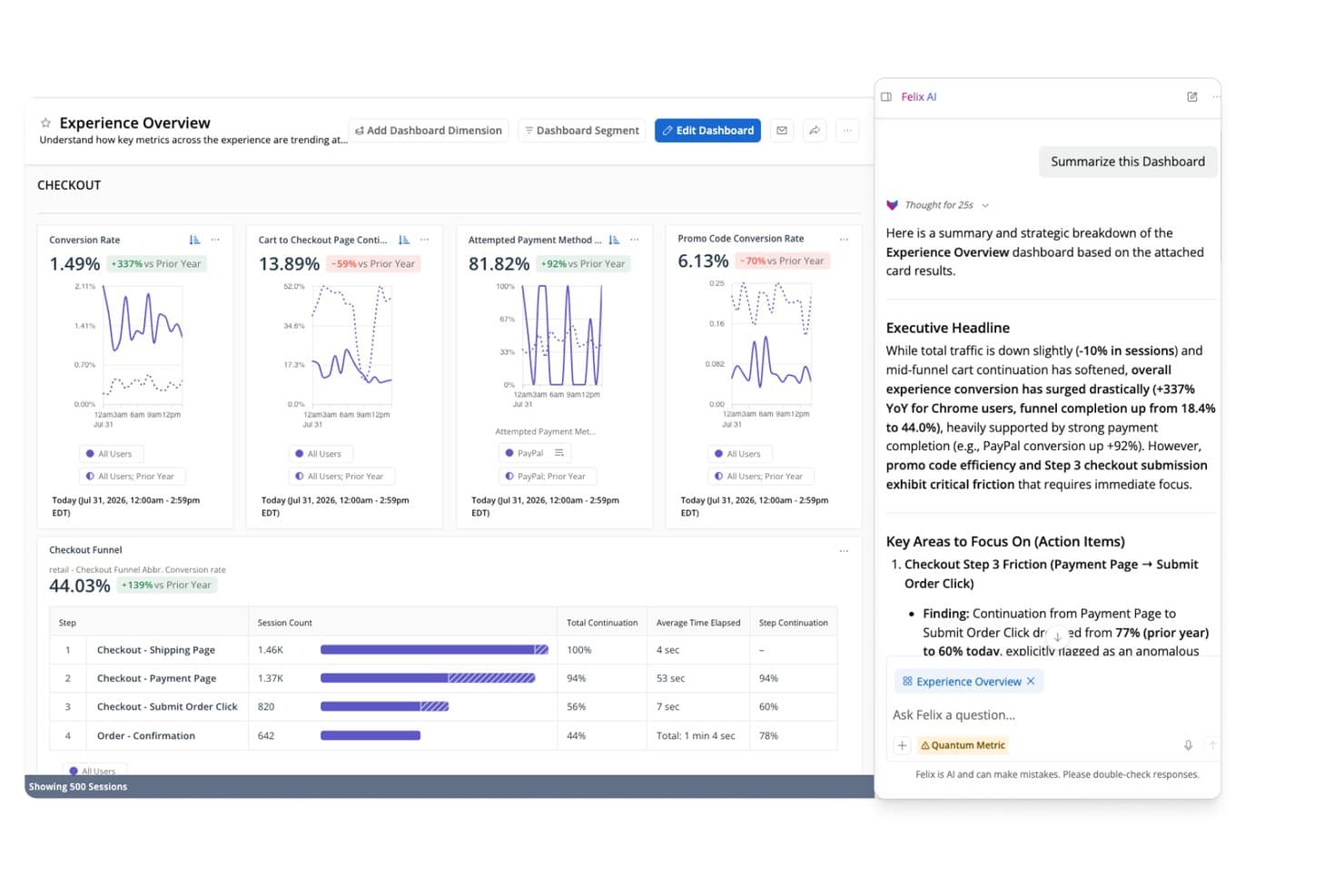
Felix AI di Quantum Metric riassume istantaneamente gli approfondimenti sull'imbuto di pagamento. Quantum Metric è una piattaforma di intelligence di prodotto che combina l'analisi comportamentale con l'acquisizione automatica dei dati, la riproduzione delle sessioni, l'analisi degli imbuti e dei percorsi, il rilevamento delle anomalie basato sull'intelligenza artificiale e l'attivazione dei dati in tempo reale nelle applicazioni web e mobili native.
Per chi è più adatto Quantum Metric?
Quantum Metric è particolarmente adatto ai team aziendali responsabili dei prodotti e delle attività digitali in settori regolamentati, come servizi finanziari, assicurazioni e vendita al dettaglio, che necessitano di una definizione delle priorità dei ricavi basata sull'intelligenza artificiale e supportata da rigorosi controlli sulla privacy dei dati.
Perché ho scelto Quantum Metric
Quantum Metric è entrato nella mia lista ristretta perché il suo livello Felix AI Agentic fa qualcosa che non ho visto eguagliato altrove: monitora continuamente i tuoi percorsi digitali, quantifica l'impatto sui ricavi di ogni punto di frizione e mette in evidenza i problemi prioritari prima che qualcuno debba cercarli. Apprezzo in particolare l'Analisi delle opportunità, che assegna automaticamente un punteggio alle frizioni in base all'impatto aziendale, così i team responsabili dei prodotti e delle attività digitali possono difendere le decisioni relative alla roadmap con cifre in dollari, invece che con semplici intuizioni. Se a questo si aggiunge l'acquisizione automatica di oltre 300 segnali comportamentali sul web e sulle applicazioni mobili native fin dal primo giorno, si ottiene una piattaforma concepita fin dall'inizio per stabilire le priorità in funzione dei ricavi.
Funzionalità principali di Quantum Metric
- Riproduzione delle sessioni: Riproduce le interazioni degli utenti web e mobili nativi con fedeltà basata sul DOM, includendo un riquadro tecnico con diagnostica di rete per il triage da parte degli ingegneri.
- Streaming dei dati: Esporta i dati comportamentali in tempo reale verso data warehouse come Snowflake, BigQuery, Redshift e Databricks, con supporto per filtri e allineamento di schemi personalizzati.
- Generatore di segmenti: Crea segmenti di pubblico comportamentali utilizzando la logica AND, OR, THEN e WHERE nidificata su centinaia di metriche, utilizzabili in tutte le viste della piattaforma.
- Scansione automatica delle informazioni personali identificabili: Esegue continuamente la scansione dei dati grezzi e delle riproduzioni delle sessioni utilizzando Cloud DLP per rilevare, mascherare ed eliminare le informazioni sensibili prima che vengano esposte.
Integrazioni di Quantum Metric
Quantum Metric offre integrazioni documentate con Snowflake, Google BigQuery, Databricks, Amazon Redshift, LaunchDarkly, Optimizely, Salesforce Service Cloud, Qualtrics, Medallia e Slack, oltre all'arricchimento dei dati provenienti da fonti offline, call center, VoC e POS.
Pros and Cons
Pros:
- Quantifica l'impatto sui ricavi di ogni frizione dell'utente
- Gli agenti Felix AI mettono proattivamente in evidenza le opportunità
- Passa dalla riproduzione delle sessioni a qualsiasi vista aggregata
Cons:
- Nessun periodo di prova gratuito né accesso per nuove imprese
- Si affida a strumenti di terze parti per la sperimentazione
Learn more about Quantum Metric: Ideale per l’analisi dei prodotti e del comportamento degli utenti
- Piano gratuito disponibile
- Prezzo su richiesta
Visit WebsiteCustomer Rating:4.5/5
Questa è la funzionalità dashboard KPI aziendali di Amplitude. Amplitude è una piattaforma completa di intelligence di prodotto nota per la sua capacità di tracciare e analizzare efficacemente i dati relativi ai prodotti e al comportamento degli utenti. Il suo punto di forza è la capacità di svelare i modelli del comportamento degli utenti, fornendo input preziosi per lo sviluppo e l’ottimizzazione dei prodotti.
Perché ho scelto Amplitude:
Ho inserito Amplitude nella mia lista grazie alle sue robuste e dettagliate analisi del comportamento degli utenti. Valutando varie piattaforme, ho riscontrato che Amplitude possiede un'eccezionale abilità nell’analizzare i dati comportamentali degli utenti e trarre deduzioni significative, rendendola una scelta distintiva. La sua affermazione di essere “Ideale per l’analisi dei prodotti e del comportamento degli utenti” è supportata da queste forti capacità.
Funzionalità distintive & integrazioni:
Le principali funzionalità di Amplitude includono analisi in tempo reale, analisi dei cohort e segmentazione avanzata, elementi fondamentali per comprendere e influenzare il comportamento degli utenti. Sul fronte delle integrazioni, Amplitude si integra bene con strumenti come Slack, Jira e Zendesk, facilitando la condivisione dei dati e la collaborazione tra i team.
Pros and Cons
Pros:
- Analisi completa del comportamento degli utenti
- Analisi in tempo reale
- Solide capacità di integrazione
Cons:
- Il costo potrebbe essere proibitivo per le aziende più piccole
- Potrebbe richiedere tempo per orientarsi e sfruttare appieno la complessa gamma di funzionalità
- Prezzi personalizzati poco trasparenti in anticipo
Learn more about Amplitude: Ideale per il monitoraggio delle interazioni utente in-app
- Prova gratuita di 30 giorni + piano gratuito + demo gratuita disponibile
- Prezzo su richiesta
Visit WebsiteCustomer Rating:4.4/5
Ecco la funzione di dashboard di analisi multi-app su Pendo. Pendo è una piattaforma di esperienza prodotto che consente alle aziende di comprendere le interazioni degli utenti all'interno dell'applicazione. Fornisce approfondimenti fondamentali sul comportamento degli utenti in-app e li sfrutta per offrire un'esperienza utente superiore.
Perché ho scelto Pendo:
Pendo si è distinto nella mia ricerca principalmente grazie alle sue capacità dettagliate di monitoraggio delle interazioni in-app. Ho notato che Pendo eccelle nell'offrire analisi dettagliate su come gli utenti navigano all'interno di un'applicazione. Si distingue dagli altri proprio per la sua attenzione unica nel massimizzare l'esperienza utente, perfettamente allineata con la sua competenza nel tracciare le interazioni in-app.
Funzionalità e integrazioni principali:
Pendo è ricco di funzionalità come la segmentazione degli utenti, che aiuta a mirare gruppi specifici di utenti. Offre funzioni avanzate di feedback e analisi, fornendo una visione olistica dell'esperienza utente. Le capacità di integrazione di Pendo sono molto ampie, supportando l'integrazione con i principali strumenti di CRM e marketing come Salesforce, Marketo e Slack.
Pros and Cons
Pros:
- Monitoraggio in-app esteso
- Funzionalità avanzate di feedback e analisi
- Ampie opzioni di integrazione
Cons:
- I costi possono essere elevati per le piccole imprese
- Curva di apprendimento più ripida rispetto a piattaforme simili
- La personalizzazione dei prezzi può mancare di trasparenza
Learn more about Pendo: Ideale per analisi dei dati in tempo reale
- Piano gratuito disponibile
- A partire da $25/mese (fatturati annualmente)

Screenshot della dashboard delle metriche di prodotto in Mixpanel. Mixpanel è una piattaforma di analisi avanzata progettata per analizzare, misurare e migliorare il coinvolgimento degli utenti su una vasta gamma di applicazioni. La sua capacità di fornire analisi dei dati in tempo reale la rende uno strumento potente per le aziende che hanno bisogno di rispondere rapidamente ai cambiamenti nelle tendenze degli utenti.
Perché ho scelto Mixpanel:
Scegliere Mixpanel per questa lista è stata una decisione semplice, soprattutto grazie alle sue eccezionali capacità di analisi in tempo reale. Confrontando Mixpanel con piattaforme simili, ho riscontrato che la sua analisi dei dati in tempo reale rappresenta un vantaggio distintivo, consentendo alle aziende di prendere decisioni tempestive basate sui dati. Lo strumento eccelle nel fornire informazioni in tempo reale, distinguendosi nell'affollato panorama dei software di intelligence di prodotto.
Caratteristiche principali e integrazioni:
Le caratteristiche distintive di Mixpanel includono il monitoraggio basato sugli eventi e i funnel del percorso utente, che offrono una comprensione approfondita delle interazioni degli utenti. Inoltre, la sua analisi delle coorti consente alle aziende di raggruppare gli utenti in base al comportamento, fornendo approfondimenti mirati. Per quanto riguarda le integrazioni, Mixpanel si sincronizza con numerose piattaforme come Salesforce, Zendesk e Jira, facilitando un flusso di lavoro unificato tra diversi sistemi.
Pros and Cons
Pros:
- Analisi in tempo reale
- Monitoraggio avanzato basato su eventi
- Numerose opzioni di integrazione
Cons:
- Il prezzo potrebbe essere elevato per le startup
- L'interfaccia utente può richiedere un periodo di apprendimento
- Prezzi personalizzati poco trasparenti in anticipo
Learn more about Mixpanel: Ideale per analisi digitali e di prodotto unificate
- Piano gratuito + demo gratuita + prova gratuita di 15 giorni disponibili
- A partire da $39/mese (con fatturazione annuale)
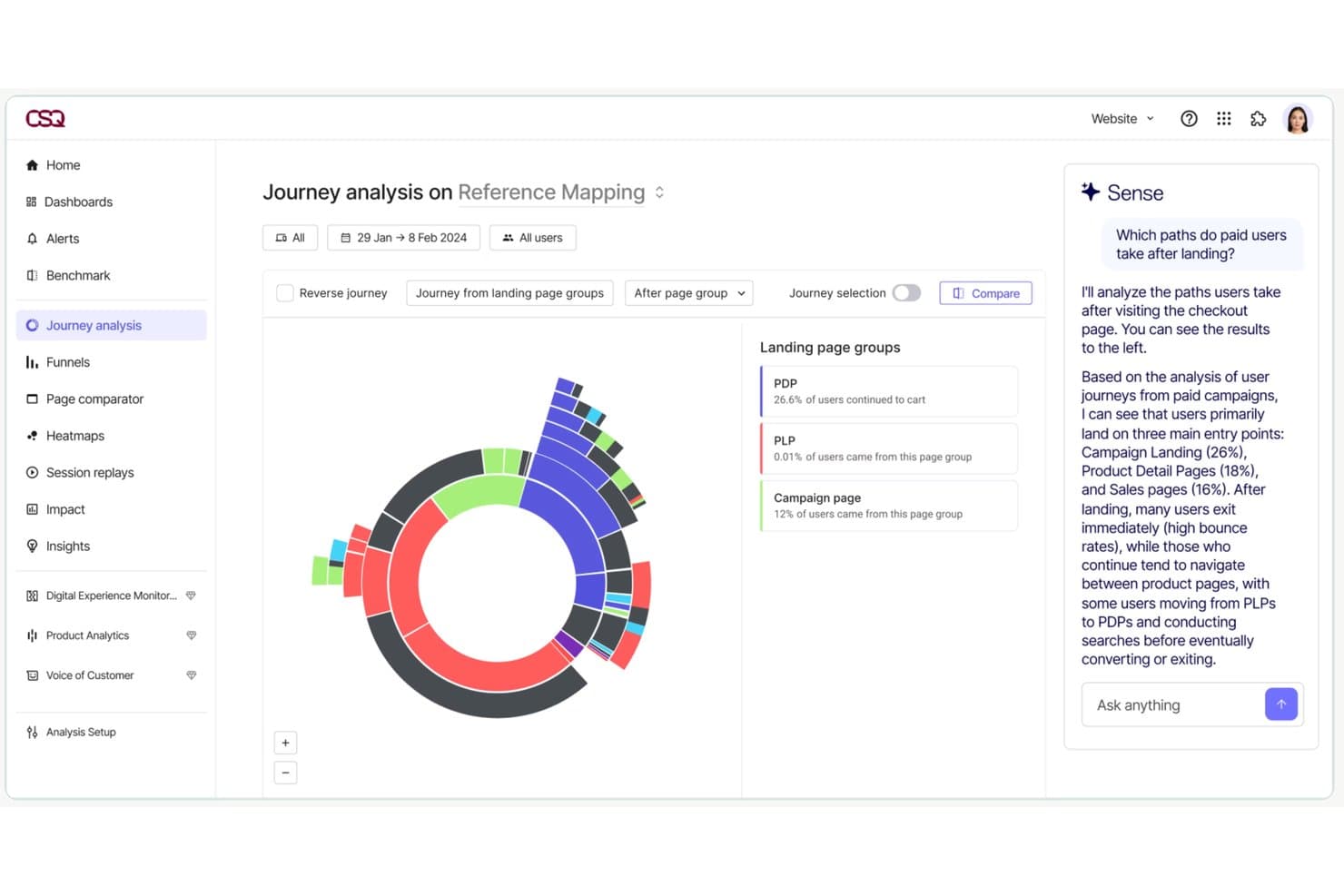
Contentsquare consente agli utenti di analizzare i percorsi degli utenti paganti con approfondimenti basati sull’IA. Contentsquare è una piattaforma di intelligence sull’esperienza digitale e di prodotto che combina analisi comportamentale con acquisizione automatica, riproduzione delle sessioni, mappe di calore, analisi dei percorsi, sondaggi in-app e analisi di prodotto in un’unica suite per web e dispositivi mobili.
Per chi è più adatto Contentsquare?
Contentsquare è particolarmente adatto ai team di prodotto del mercato medio e delle aziende enterprise che hanno bisogno di analisi comportamentale, riproduzione delle sessioni e analisi dei percorsi in un unico posto, invece di doverle combinare tra più strumenti.
Perché ho scelto Contentsquare
Contentsquare è entrato nella mia rosa dei candidati perché è l’unico strumento che ho visto unificare davvero l’analisi digitale e quella di prodotto senza costringerti a combinare piattaforme separate. Sono particolarmente colpito da Smart Capture, che registra automaticamente ogni interazione retroattivamente, così il mio team può definire nuove metriche sui dati storici senza dover coinvolgere il team tecnico. Abbinando questa funzione a Impact Quantification, che collega direttamente specifici punti di attrito ai ricavi, si ottiene un modo chiaro per giustificare le decisioni sulla roadmap con numeri concreti.
Funzionalità principali di Contentsquare
- Acquisizione automatica con Smart Capture: Registra automaticamente ogni interazione dell’utente sul web e nelle app mobili native senza etichettatura manuale degli eventi o interventi del team tecnico.
- Sondaggi in-app: Oltre 40 modelli di sondaggio predefiniti, un generatore di sondaggi basato sull’IA e trigger di intenzione di uscita consentono di raccogliere il feedback degli utenti direttamente all’interno del prodotto.
- Chat Sense AI: Un’interfaccia in linguaggio naturale che consente di interrogare i dati analitici e ottenere risposte in un linguaggio semplice senza bisogno di competenze specifiche sui dati.
- Esportazione ETL con Data Connect: Una pipeline gestita che esporta i dati comportamentali di Contentsquare direttamente in Snowflake, AWS o Azure per analisi a livello di data warehouse.
Integrazioni di Contentsquare
Contentsquare offre oltre 100 integrazioni, tra cui Snowflake, AWS, Azure, Segment, mParticle, RudderStack, Optimizely e VWO. Data Connect esporta i dati comportamentali nei data warehouse, mentre la sua API aperta e il server MCP supportano flussi di lavoro di analisi personalizzati.
Pros and Cons
Pros:
- Acquisisce automaticamente tutte le interazioni sul web e nelle app
- Collega direttamente i dati comportamentali ai ricavi
- Combina analisi, riproduzione delle sessioni e sondaggi
Cons:
- Le funzionalità di analisi avanzate richiedono piani di livello superiore
- La riproduzione delle sessioni potrebbe mostrare registrazioni incomplete
Learn more about Contentsquare:
Altri software di intelligence del prodotto
Ecco alcune ulteriori opzioni di software di intelligence del prodotto che non sono entrate nella mia selezione, ma che vale comunque la pena prendere in considerazione:
- 11Gainsight PXIdeale per l'adozione del prodotto B2B e l'allineamento con il CS
- 12StatsigIdeale per analisi dei prodotti guidata dagli esperimenti
- 13KissmetricsIdeale per il tracciamento del percorso cliente e dei funnel
- 14GlassboxIdeale per l'analisi degli attriti nei percorsi digitali aziendali
- 15UXCamIdeale per analizzare l'abbandono del funnel mobile tramite la riproduzione delle sessioni
- 16UserpilotDall'analisi all'azione nell'app in un unico flusso di lavoro
- 17CleverTapIdeale per aziende mobile-first
- 18Adobe AnalyticsIdeale per il monitoraggio delle performance di marketing
- 19KubitIdeale per l'analisi dei prodotti basata nativamente sul data warehouse
Come Valuto i Software di Product Intelligence
Divido la mia valutazione in due livelli: le funzionalità principali—come l’analisi dei funnel e la segmentazione delle coorti—che uno strumento deve possedere, e i fattori differenzianti che distinguono le migliori opzioni.
Funzionalità Base (Requisiti Fondamentali per Questa Lista)
Quando seleziono gli strumenti per la mia lista, valuto ciascuno su una scala da 0 (non offre la funzionalità) a 5 (eccelle in quest’area) per ogni funzionalità di base elencata di seguito. Poi, converto il punteggio totale dello strumento in una percentuale. Ogni strumento deve raggiungere un punteggio totale minimo del 65% per essere considerato per l’inclusione.
- Tracciamento degli Eventi Comportamentali: Verifico che lo strumento possa catturare azioni degli utenti come clic su pulsanti, invii di moduli e visualizzazioni di pagine su web e mobile con il minimo sforzo da parte degli ingegneri.
- Analisi di Funnel & Percorsi: Qui valuto funnel multi-step che mostrano dove gli utenti abbandonano—ad esempio, tra l’aggiunta di un articolo al carrello e il completamento dell’acquisto.
- Segmentazione di Coorti & Utenti: Cerco la capacità di raggruppare utenti in base a comportamenti e attributi, come il confronto tra utenti in prova che hanno completato l’onboarding rispetto a quelli che non l’hanno fatto.
- Analisi di Retention & Engagement: Gli strumenti dovrebbero mostrare curve di retention e metriche di fedeltà così da poter rispondere a domande come “gli utenti tornano dopo la prima settimana?”
- Session Replay o Approfondimenti a Livello Utente: Valuto se lo strumento fornisce un contesto qualitativo, come la possibilità di osservare un utente che ha difficoltà con una pagina delle impostazioni, insieme ai dati quantitativi.
- Integrazioni & Data Pipeline: Qui conta la compatibilità con data warehouse come Snowflake o BigQuery e CDP come Segment, oltre alla connettività con strumenti CRM e di marketing.
Una volta che ho una lista di strumenti che soddisfano i criteri, considero cosa differenzia ciascuna piattaforma.
Fattori Differenzianti (Cosa Distingue i Fornitori)
Ecco come confronto e metto a confronto diversi fornitori:
Funzionalità Distintive
Le informazioni supportate dall’IA sono un grande elemento di differenziazione—cerco strumenti che segnalano automaticamente cali inattesi di attivazione o retention senza richiedere un’esplorazione manuale delle dashboard. Anche i test A/B nativi sono un fattore che considero, poiché consentono ai team di prodotto di misurare l’impatto di un nuovo flusso di onboarding o di una pagina dei prezzi direttamente nell’ambiente di analisi. Valuto inoltre l’integrazione con feature flag, che collega gli eventi di rilascio ai dati di utilizzo così da vedere con esattezza come una nuova funzionalità influisce sull’engagement.
Oltre le Funzionalità
Il modello di prezzo è un aspetto molto importante. Il pricing basato sugli eventi può aumentare rapidamente man mano che il prodotto scala, quindi valuto se il modello di un fornitore rimane prevedibile con la crescita della base utenti. L’integrazione con il data warehouse e lo stack dati è altrettanto cruciale—verifico se uno strumento funziona nativamente con il warehouse esistente o richiede una pipeline separata. Considero anche la data governance, in particolare i controlli di accesso basati sui ruoli e le certificazioni di conformità, poiché i dati di prodotto spesso contengono comportamenti sensibili degli utenti a cui avranno accesso team in tutta l’organizzazione.
Come scegliere il software di intelligence del prodotto
È facile perdersi in lunghi elenchi di funzionalità e strutture tariffarie complesse. Per aiutarti a rimanere concentrato mentre affronti il tuo processo personalizzato di selezione del software, ecco una lista di fattori da tenere a mente:
| Fattore | Cosa considerare |
|---|---|
| FattoreScalabilità | Cosa considerareIl software può crescere insieme al tuo team? Considera la crescita futura e se lo strumento è in grado di gestire un aumento dei dati e degli utenti senza problemi di prestazioni. |
| FattoreIntegrazioni | Cosa considerareSi collega agli strumenti che già utilizzi? Verifica la compatibilità con il tuo CRM, le piattaforme di analisi e quelle di comunicazione per evitare interruzioni del flusso di lavoro. |
| FattorePersonalizzazione | Cosa considerarePuoi adattare il software alle tue esigenze? Cerca opzioni per modificare i pannelli di controllo, i rapporti e i flussi di lavoro in base alle preferenze del tuo team. |
| FattoreFacilità d'uso | Cosa considerareLo strumento è intuitivo? Valuta la curva di apprendimento e se il tuo team può adattarsi rapidamente senza una formazione approfondita. |
| FattoreImplementazione e inserimento | Cosa considerareLa configurazione è semplice? Considera il tempo e le risorse necessari per l'implementazione, inclusi la formazione e il supporto durante la transizione. |
| FattoreCosto | Cosa considerareRientra nel tuo budget? Confronta i piani tariffari, fai attenzione ai costi nascosti e valuta il valore delle funzionalità offerte in ogni livello. |
| FattoreMisure di sicurezza | Cosa considerareI tuoi dati e la tua privacy sono protetti? Cerca la crittografia, i controlli di accesso degli utenti e la conformità alle normative pertinenti sulla protezione dei dati. |
Che cos'è il software di intelligence del prodotto?
Il software di analisi del prodotto è uno strumento che aiuta le aziende a raccogliere e analizzare i dati relativi al modo in cui gli utenti interagiscono con i loro prodotti. I product manager, i professionisti del marketing e gli analisti dei dati utilizzano generalmente questi strumenti per prendere decisioni informate e migliorare l'offerta di prodotti. Funzionalità come il monitoraggio del comportamento degli utenti, l'analisi dei dati e la reportistica aiutano a comprendere le esigenze dei clienti e a migliorare lo sviluppo del prodotto. Nel complesso, questi strumenti forniscono informazioni preziose per favorire il successo del prodotto e la soddisfazione dei clienti.
Funzionalità
Quando selezioni un software di analisi del prodotto, presta attenzione alle seguenti funzionalità chiave:
- Monitoraggio del comportamento degli utenti: raccoglie dati sul modo in cui gli utenti interagiscono con il prodotto, aiutando a identificare le funzionalità più popolari e le aree da migliorare.
- Analisi dei dati: fornisce strumenti per analizzare i dati degli utenti e generare informazioni utili per orientare le decisioni e le strategie relative al prodotto.
- Reportistica: offre report personalizzabili per visualizzare le tendenze dei dati e monitorare le prestazioni del prodotto nel tempo.
- Segmentazione del pubblico: consente di categorizzare gli utenti in base al comportamento e alle caratteristiche, per analisi e attività di marketing mirate.
- Analisi predittiva: utilizza i dati storici per prevedere le tendenze future e i comportamenti degli utenti, favorendo un processo decisionale proattivo.
- Capacità di integrazione: si collega ad altri strumenti e piattaforme per garantire un flusso di dati continuo e un'analisi completa.
- Pannelli di controllo personalizzabili: consentono di adattare l'interfaccia per visualizzare le metriche e le informazioni più rilevanti per il team.
- Elaborazione dei dati in tempo reale: fornisce informazioni immediate sulle interazioni degli utenti, consentendo di rispondere più rapidamente a tendenze e problemi.
- Misure di sicurezza: garantisce la protezione dei dati tramite crittografia e controlli degli accessi, mantenendo al sicuro le informazioni degli utenti.
- Guide interattive del prodotto: guidano i nuovi utenti attraverso le funzionalità, migliorando la fase di inserimento e l'esperienza utente.
Vantaggi
L'implementazione di un software di analisi del prodotto offre diversi vantaggi al team e all'azienda. Ecco alcuni dei risultati che puoi aspettarti:
- Migliore processo decisionale: l'accesso ad analisi dettagliate dei dati aiuta il team a prendere decisioni informate sul prodotto, basate sul comportamento reale degli utenti.
- Maggiore comprensione dei clienti: il monitoraggio del comportamento degli utenti offre informazioni sulle esigenze e sulle preferenze dei clienti, consentendo di migliorare il prodotto in modo più mirato.
- Maggiore efficienza: la reportistica automatizzata fa risparmiare tempo fornendo un accesso rapido alle metriche chiave e agli indicatori delle prestazioni.
- Sviluppo proattivo: l'analisi predittiva consente al team di anticipare le tendenze e pianificare miglioramenti prima che si presentino problemi.
- Attività di marketing mirate: la segmentazione del pubblico consente di adottare strategie di marketing più precise identificando gruppi distinti di utenti.
- Migliore esperienza utente: le guide interattive del prodotto e le funzionalità di inserimento migliorano la soddisfazione degli utenti, rendendo il prodotto più facile da imparare e utilizzare.
- Garanzia della sicurezza dei dati: le misure di sicurezza proteggono i dati degli utenti, garantendo la conformità alle normative sulla privacy e rafforzando la fiducia dei clienti.
Costi e prezzi
La selezione di un software di analisi del prodotto richiede la comprensione dei diversi modelli e piani tariffari disponibili. I costi variano in base alle funzionalità, alle dimensioni del team, ai componenti aggiuntivi e ad altri fattori. La tabella seguente riassume i piani più comuni, i relativi prezzi medi e le funzionalità tipicamente incluse nelle soluzioni software di analisi del prodotto:
Tabella comparativa dei piani per il software di analisi del prodotto
| Tipo di piano | Prezzo medio | Funzionalità comuni |
|---|---|---|
| Tipo di pianoPiano gratuito | Prezzo medio$0 | Funzionalità comuniAnalisi di base, monitoraggio limitato degli utenti e reportistica di base. |
| Tipo di pianoPiano personale | Prezzo medio$5-$25/user/month | Funzionalità comuniAnalisi avanzate, pannelli di controllo personalizzati e assistenza via e-mail. |
| Tipo di pianoPiano aziendale | Prezzo medio$30-$60/user/month | Funzionalità comuniSegmentazione degli utenti, capacità di integrazione e assistenza prioritaria. |
| Tipo di pianoPiano aziendale avanzato | Prezzo medio$75-$150/user/month | Funzionalità comuniAnalisi predittiva, responsabile dell'account dedicato e funzionalità di sicurezza avanzate. |
Domande frequenti sul software di analisi del prodotto
Ecco alcune risposte alle domande comuni sul software di analisi del prodotto:
In che modo il software di analisi del prodotto raccoglie i dati?
Il software di analisi del prodotto raccoglie dati attraverso vari metodi, tra cui il monitoraggio delle interazioni degli utenti sul sito web o nell’app, l’integrazione con altri strumenti come i CRM e l’importazione di set di dati esistenti. Utilizza cookie, monitoraggio degli eventi e connessioni API per raccogliere informazioni. È necessario assicurarsi che il software sia conforme alle normative sulla privacy dei dati, come il GDPR, durante la raccolta dei dati degli utenti.
Il software di analisi del prodotto può funzionare per più team?
Sì, la maggior parte degli strumenti può supportare contemporaneamente i team di prodotto, marketing e assistenza. Ogni team può utilizzare dashboard diverse per concentrarsi sugli aspetti di maggiore interesse. I product manager potrebbero analizzare l’utilizzo delle funzionalità, mentre il team marketing si concentra sulle conversioni. È possibile impostare livelli di accesso personalizzati per evitare informazioni superflue.
In che modo i team di prodotto utilizzano i funnel nel software di analisi del prodotto?
I funnel aiutano a misurare il modo in cui gli utenti attraversano flussi chiave come l’onboarding o il checkout. È possibile individuare il punto in cui gli utenti abbandonano il percorso e testare modifiche per migliorare quella fase. I team di prodotto spesso creano funnel sia per i nuovi utenti sia per quelli di ritorno. È inoltre possibile suddividerli per segmento o piattaforma.
È necessaria una formazione per utilizzare il software di analisi del prodotto?
Sì, di solito è necessaria una certa formazione per utilizzare efficacemente il software di analisi del prodotto. Sebbene molti strumenti siano intuitivi, per comprenderne appieno le funzionalità potrebbero essere necessari tutorial o sessioni di formazione. È consigliabile cercare un software che offra risorse complete per l’onboarding, come video, webinar e documentazione, per permettere al team di acquisire rapidamente le competenze necessarie.