

Adobe Firefly -arvostelu: hyvät ja huonot puolet, ominaisuudet ja hinnoittelu selitettynä
Adobe Firefly erottuu saumattomilla tekoälypohjaisilla suunnittelutyökaluillaan ja kattavalla Adobe-integraatiollaan, mikä tekee siitä erinomaisen valinnan luovaa yhteistyötä ja tehokkuutta tavoitteleville tiimeille.

We review tools independently, and commissions help fund our testing. See our transparency policy, our methodology, or suggest a tool.
Adobe Firefly is an AI design software built directly into Adobe Creative Cloud, giving designers generative AI tools for image creation, text effects, and asset generation inside Photoshop and Illustrator. It's the tool I'd reach for if your team already works in the Adobe ecosystem and needs AI-generated assets that are commercially licensed and safe for client work. If you're weighing it against Midjourney, Firefly's advantage is that it generates assets directly within your existing design workflow, rather than requiring you to export and import between separate tools.
Adobe Firefly Evaluation Summary
4.4/5
- From $9.99/month
- Free plan available
Why Trust Our Software Recommendations
6,700+
Reviews
20
Industry experts
16+
Evaluation factors
14
Years
Our team has been testing and reviewing software since 2012. As product managers ourselves, we know how difficult—and important—it is to choose the right software.
For this guide, we evaluated tools using hands-on testing and independent research, scoring tools using our selection criteria.
Our reviews reflect our human editorial judgment, not a sales pitch.
Expert reviewers:
- Andrew LumbySenior TPM
- Cristiano ValimSenior UI/UX Lead


Adobe Firefly Overview
When judging AI design software, Adobe Firefly stands out for its intuitive AI-driven features, tight Adobe ecosystem integrations, and user-friendly onboarding. Its pricing is competitive for teams already using Adobe products, and the interface feels familiar to creative professionals. Firefly excels at rapid prototyping and creative iteration, but may underperform for teams needing highly specialized design tools or extensive third-party integrations. In my opinion, Firefly is best suited for marketing teams, agencies, and creative departments seeking a balance of automation, collaboration, and brand consistency. For example, its text to image and style transfer tools simplify creative workflows without steep learning curves.
Pros
- AI-powered tools accelerate ideation and content creation.
- Deep integration with Adobe Creative Cloud apps.
- Commercially safe outputs with IP indemnification options.
Cons
- Image quality sometimes lags behind leading AI competitors.
- Limited third-party app integrations outside Adobe ecosystem.
- Requires more complex prompts for precise image refinement.
Is Adobe Firefly Right For Your Needs?
Who Would be a Good Fit for Adobe Firefly?
Adobe Firefly is a strong choice for creative teams, marketing departments, and agencies that need fast, collaborative content generation and already use Adobe Creative Cloud. Its AI-driven features, brand control, and seamless integration with Adobe tools make it ideal for environments where visual consistency and rapid iteration matter. Firefly's commercial-use licensing and IP indemnification also appeal to businesses with strict brand and legal requirements. Teams that value automation and creative experimentation will find Firefly's generative AI especially useful for campaign assets, social content, and branded visuals. Whether you need image generation for social media or photorealistic graphics for product launches, Firefly delivers high-quality results that fit diverse graphic design needs.
- Marketing AgenciesFirefly's AI tools speed up campaign asset creation and brand adaptation.
- In-House Creative TeamsDirect integration with Adobe apps supports collaborative workflows and feedback.
- Social Media ManagersQuickly generate on-brand visuals for multiple platforms and campaigns.
- Small to Midsize BusinessesAffordable access to advanced design tools without hiring designers.
- Higher Education DepartmentsEnable collaborative student projects with safe, commercial-use outputs.
- E-commerce TeamsRapidly create product visuals and promotional graphics at scale.
Who Would be a Bad Fit for Adobe Firefly?
Adobe Firefly may not suit highly technical industries, large enterprises with complex IT stacks, or teams needing niche design features outside Adobe's ecosystem. Its limited third-party integrations and reliance on prompt-based AI can slow down workflows for users who need precise, specialized outputs or advanced automation. Organizations with strict data residency or on-premise requirements may also find Firefly's cloud-based model restrictive. Teams seeking cutting-edge functionality in areas like generative video or advanced video generation may find current capabilities don't yet match specialized video model platforms.
- Enterprise IT DepartmentsLacks advanced security controls and on-premise deployment options.
- Industrial Design FirmsMissing 3D modeling and CAD integration capabilities.
- Legal and Compliance TeamsAI-generated outputs may not meet strict regulatory documentation needs.
- Healthcare MarketingLimited HIPAA compliance and healthcare-specific design templates.
- Large Multinational CorporationsInsufficient support for complex, multi-region data residency requirements.
- Animation StudiosNo advanced animation or frame-by-frame editing features.
How We Test & Score Tools
We’ve spent years building, refining, and improving our software testing and scoring system. The rubric is designed to capture the nuances of software selection and what makes a tool effective, focusing on critical aspects of the decision-making process.
Below, you can see exactly how our testing and scoring works across seven criteria. It allows us to provide an unbiased evaluation of the software based on core functionality, standout features, ease of use, onboarding, customer support, integrations, customer reviews, and value for money.
Core Functionality (25% of final scoring)
The starting point of our evaluation is always the core functionality of the tool. Does it have the basic features and functions that a user would expect to see? Are any of those core features locked to higher-tiered pricing plans? At its core, we expect a tool to stand up against the baseline capabilities of its competitors.
Standout Features (25% of final scoring)
Next, we evaluate uncommon standout features that go above and beyond the core functionality typically found in tools of its kind. A high score reflects specialized or unique features that make the product faster, more efficient, or offer additional value to the user.
We also evaluate how easy it is to integrate with other tools typically found in the tech stack to expand the functionality and utility of the software. Tools offering plentiful native integrations, 3rd party connections, and API access to build custom integrations score best.
Ease of Use (10% of final scoring)
We consider how quick and easy it is to execute the tasks defined in the core functionality using the tool. High scoring software is well designed, intuitive to use, offers mobile apps, provides templates, and makes relatively complex tasks seem simple.
Onboarding (10% of final scoring)
We know how important rapid team adoption is for a new platform, so we evaluate how easy it is to learn and use a tool with minimal training. We evaluate how quickly a team member can get set up and start using the tool with no experience. High scoring solutions indicate little or no support is required.
Customer Support (10% of final scoring)
We review how quick and easy it is to get unstuck and find help by phone, live chat, or knowledge base. Tools and companies that provide real-time support score best, while chatbots score worst.
Customer Reviews (10% of final scoring)
Beyond our own testing and evaluation, we consider the net promoter score from current and past customers. We review their likelihood, given the option, to choose the tool again for the core functionality. A high scoring software reflects a high net promoter score from current or past customers.
Value for Money (10% of final scoring)
Lastly, in consideration of all the other criteria, we review the average price of entry level plans against the core features and consider the value of the other evaluation criteria. Software that delivers more, for less, will score higher.
Core Features
Generative AI Image Creation
Create images from text prompts and generative fill using Firefly's AI models for rapid ideation and visual experimentation.
Text Effects Generator
Apply stylized text effects by describing the look you want for branded headlines or typography.
Style Transfer
Transform images by applying different art styles for brand consistency or creative variations.
Collaborative Editing
Multiple users can edit, comment, and iterate on designs in real time for streamlined feedback.
Commercial-Use Licensing
All outputs cleared for commercial use with IP indemnification, reducing legal risk.
Brand Controls
Set brand guidelines to ensure generated content aligns with company standards consistently.
.png&w=3840&q=75)
Ease of Use
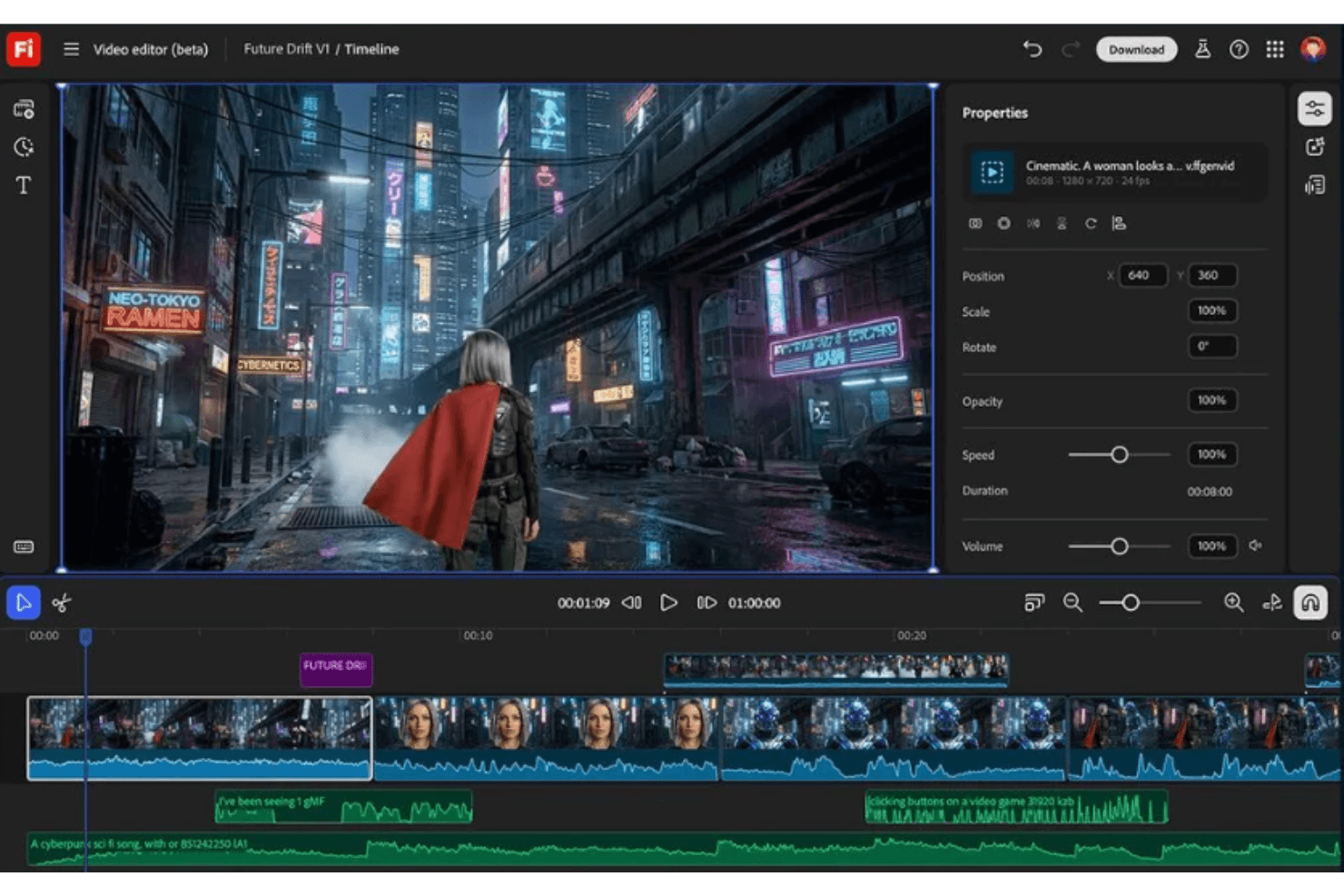
Adobe Firefly offers a familiar, intuitive interface for anyone used to Adobe's design tools, making onboarding quick for creative teams. Users highlight the clear prompt-based workflows and real-time collaboration features as easy to navigate, even for non-designers. The built-in brand controls and guided AI tools reduce friction in producing on-brand assets. However, some users note that achieving highly specific results can require more advanced prompt crafting than other design platforms. The Firefly app interface resembles other popular AI image generators, which helps users transition smoothly if they've worked with similar tools before.
.png&w=3840&q=75)
Integrations
Adobe Firefly integrates with Adobe Photoshop, Adobe Illustrator, Adobe Express, Adobe Stock, Adobe Creative Cloud Libraries, Adobe InDesign, Adobe Premiere Pro, Adobe After Effects, Adobe Acrobat, and Adobe Lightroom, among others.
Adobe Firefly also offers an API for direct connections with third-party integration tools outside the Adobe ecosystem.
.png&w=3840&q=75)
Adobe Firefly Specs
- A/B Testing: No
- AI Integration: Yes
- Analytics: No
- API: Yes
- Calendar Management: No
- Comparative Reporting: No
- Custom Reports: No
- Dashboard: No
- Data Export: Yes
- Data Import: No
- Data Mining: No
- Data Visualization: No
- External Integrations: Yes
- Forecasting: No
- Historical Data Analysis: No
- Multi-User: Yes
- Notifications: No
- Process Reporting: No
- Real-time Alerts: No
- Scenario Planning: No
- Scheduling: No
- Sentiment Analysis: No
- SEO: No
- Time Series Modeling: No
- Workflow Management: Yes


