

Reseña de Bitrix24: Ventajas, desventajas, características y precios explicados para 2026
Bitrix24 destaca como una plataforma todo en uno para el desarrollo de productos, ofreciendo potentes herramientas de colaboración y funciones CRM, aunque su complejidad puede disuadir a los equipos que buscan una solución más sencilla.

Revisamos las herramientas de forma independiente y las comisiones ayudan a financiar nuestras pruebas. Consulta nuestra política de transparencia, nuestra metodología, o sugiere una herramienta.
Bitrix24 is a product development software for teams that need to manage projects, tasks, internal communication, and CRM in a single workspace. I'd consider it if your team works across product, sales, and operations functions and needs everything connected—rather than stitching together separate tools. That's where it has a clear edge over something like Jira, which is built primarily for engineering and dev workflows. Bitrix24 gives cross-functional product teams a wider operational surface without requiring a separate CRM or collaboration platform alongside it.
Bitrix24 Evaluation Summary
4.2/5
- From $49/month (billed annually)
- 15-day free trial + free demo available
Por qué confiar en nuestras recomendaciones de software
6,700+
Reviews
20
Industry experts
16+
Evaluation factors
14
Years
Nuestro equipo lleva probando y evaluando software desde 2012. Como gestores de producto, sabemos lo difícil —y lo importante— que es elegir el software adecuado.
Para esta guía, evaluamos las herramientas mediante pruebas prácticas e investigación independiente, puntuando las herramientas según nuestros criterios de selección.
Nuestras reseñas reflejan nuestro criterio editorial humano, no un discurso de ventas.
Revisores expertos:
 Hannah ClarkSenior TPM
- Cristiano ValimSenior UI/UX Lead

Bitrix24 Overview
When judging Bitrix24 as a product development software, its all-in-one approach—combining project management, CRM, and communication—offers strong value for teams wanting a unified workspace. Its pricing is competitive, especially for small business and midsize teams, and the breadth of integrations supports diverse workflows. However, the user interface can feel crowded, and onboarding may require extra time compared to simpler project management tools. Bitrix24 excels for teams that need customizable automation and built-in collaboration, but may overwhelm those seeking a lightweight, narrowly focused solution. For example, cross-functional SaaS teams benefit from its centralized task, chat, and document management.
Pros
- Offers built-in task management with drag-and-drop Kanban, Gantt, and Scrum.
- Includes document management and version control for team members.
- Provides workflow automation and recurring task templates with notifications.
Cons
- Interface can feel cluttered and overwhelming for new users.
- Advanced reporting features are limited compared to competing providers.
- Customer support response times are inconsistent.
Is Bitrix24 Right For Your Needs?
Who Would be a Good Fit for Bitrix24?
Bitrix24 is best suited for organizations that need a centralized platform to manage projects, communication, and documentation in one place. Its built-in CRM, task automation, and collaboration tools make it a strong choice for teams that juggle multiple workflows and require transparency across departments. Companies with cross-functional teams, especially those in service, tech, or creative industries, can benefit from its customizable workspaces and integrated chat, while small business owners and midsize organizations appreciate its competitive pricing and scalable features. The mobile app ensures team members stay connected on the go.
- Marketing AgenciesBitrix24's client management and project tracking features support campaign planning, email marketing, and social media delivery.
- SaaS StartupsScrum, Kanban, and Gantt tools help manage agile product development cycles.
- Remote TeamsIntegrated chat, video calls, and document sharing enable real-time collaboration.
- HR DepartmentsAutomated workflows and employee directories streamline onboarding and HR processes.
- Consulting FirmsCRM and project management features help track client deliverables and communications.
- Educational InstitutionsTask assignment, document storage, and group chat support academic project coordination.
Who Would be a Bad Fit for Bitrix24?
Bitrix24 may not suit organizations that need highly specialized tools, minimal interfaces, or advanced analytics. Teams with strict regulatory requirements or those that rely on deep integrations with niche software may find Bitrix24's feature set limiting. Large enterprises with complex reporting needs or companies that prioritize simplicity over breadth of features might struggle with its interface and customization options.
- Enterprise IT DepartmentsLimited advanced reporting and analytics restrict large-scale IT project oversight.
- Regulated HealthcareLacks industry-specific compliance features for sensitive patient data management.
- Manufacturing OperationsDoes not offer specialized inventory or production tracking modules.
- FreelancersFeature set is excessive for solo users needing basic task tracking.
- Legal PracticesMissing advanced document management and case tracking tailored for legal workflows.
- Nonprofit Micro-TeamsInterface complexity outweighs benefits for very small, non-technical teams.
Cómo Probamos y Puntamos Herramientas
Llevamos años construyendo, refinando y mejorando nuestro sistema de pruebas y puntuación de software. La rúbrica está diseñada para captar los matices de la selección de software y lo que hace que una herramienta sea eficaz, centrándose en aspectos críticos del proceso de decisión. A continuación, puedes ver exactamente cómo funcionan nuestras pruebas y puntuaciones a través de siete criterios. Esto nos permite proporcionar una evaluación imparcial del software según funcionalidad principal, características destacadas, facilidad de uso, implementación, soporte al cliente, integraciones, reseñas de clientes y relación calidad-precio.
Funcionalidad Principal (25% de la puntuación final)
El punto de partida de nuestra evaluación siempre es la funcionalidad principal de la herramienta. ¿Cuenta con las funciones básicas que un usuario espera ver? ¿Alguna de esas funciones centrales está limitada a planes de precios superiores? Esperamos que una herramienta esté a la altura de las capacidades básicas de sus competidores.
Características Destacadas (25% de la puntuación final)
Luego evaluamos características especiales poco comunes que van más allá de la funcionalidad principal que normalmente se encuentra en herramientas similares. Una alta puntuación refleja características especializadas o únicas que hacen que el producto sea más rápido, eficiente u ofrezca valor añadido al usuario. También evaluamos lo fácil que es integrar con otras herramientas habituales en el entorno tecnológico para ampliar la funcionalidad y utilidad del software. Las herramientas que ofrecen integraciones nativas abundantes, conexiones de terceros y acceso por API para crear integraciones personalizadas obtienen la mejor puntuación.
Facilidad de Uso (10% de la puntuación final)
Consideramos lo rápido y sencillo que es llevar a cabo las tareas definidas en la funcionalidad principal usando la herramienta. El software con alta puntuación está bien diseñado, es intuitivo, ofrece apps móviles, tiene plantillas y hace que tareas relativamente complejas parezcan simples.
Implementación (10% de la puntuación final)
Sabemos lo importante que es la adopción rápida del equipo para una nueva plataforma, así que evaluamos la facilidad de aprendizaje y uso de una herramienta con entrenamiento mínimo. Evaluamos cuán rápidamente un miembro del equipo puede configurar y empezar a usar la herramienta sin experiencia previa. Las soluciones con alta puntuación indican que se requiere poco o ningún soporte.
Soporte al Cliente (10% de la puntuación final)
Revisamos lo rápido y sencillo que es desatascarse y encontrar ayuda por teléfono, chat en vivo o base de conocimientos. Los productos y empresas que ofrecen soporte en tiempo real obtienen mejor puntuación, mientras que los chats automáticos obtienen la peor.
Reseñas de Clientes (10% de la puntuación final)
Más allá de nuestras propias pruebas y evaluaciones, consideramos el net promoter score de clientes actuales y pasados. Revisamos su probabilidad, dadas las opciones, de elegir la herramienta de nuevo por su funcionalidad principal. Un software con alta puntuación refleja un alto net promoter score de clientes actuales o anteriores.
Relación Calidad-Precio (10% de la puntuación final)
Por último, teniendo en cuenta todos los demás criterios, revisamos el precio promedio de los planes de nivel de entrada frente a las funcionalidades principales y consideramos el valor de los demás criterios de evaluación. El software que ofrece más por menos, obtendrá una puntuación mayor.
Core Features
Task Management
Use Kanban boards, Gantt charts, and Scrum tools to organize and track tasks for any project.
Project Collaboration
Chat, video calls, comments, and file sharing are built in for real-time team communication.
Document Management
Store, edit, and manage documents with version control and secure cloud access.
Workflow Automation
Automate recurring tasks, approvals, and business processes with customizable rules and triggers
Time Tracking
Track time spent on tasks and projects, with built-in reporting for workload management.
AI Assistant (CoPilot)
Generate task descriptions, summaries, and ideas using AI to speed up planning and documentation.
Ease of Use
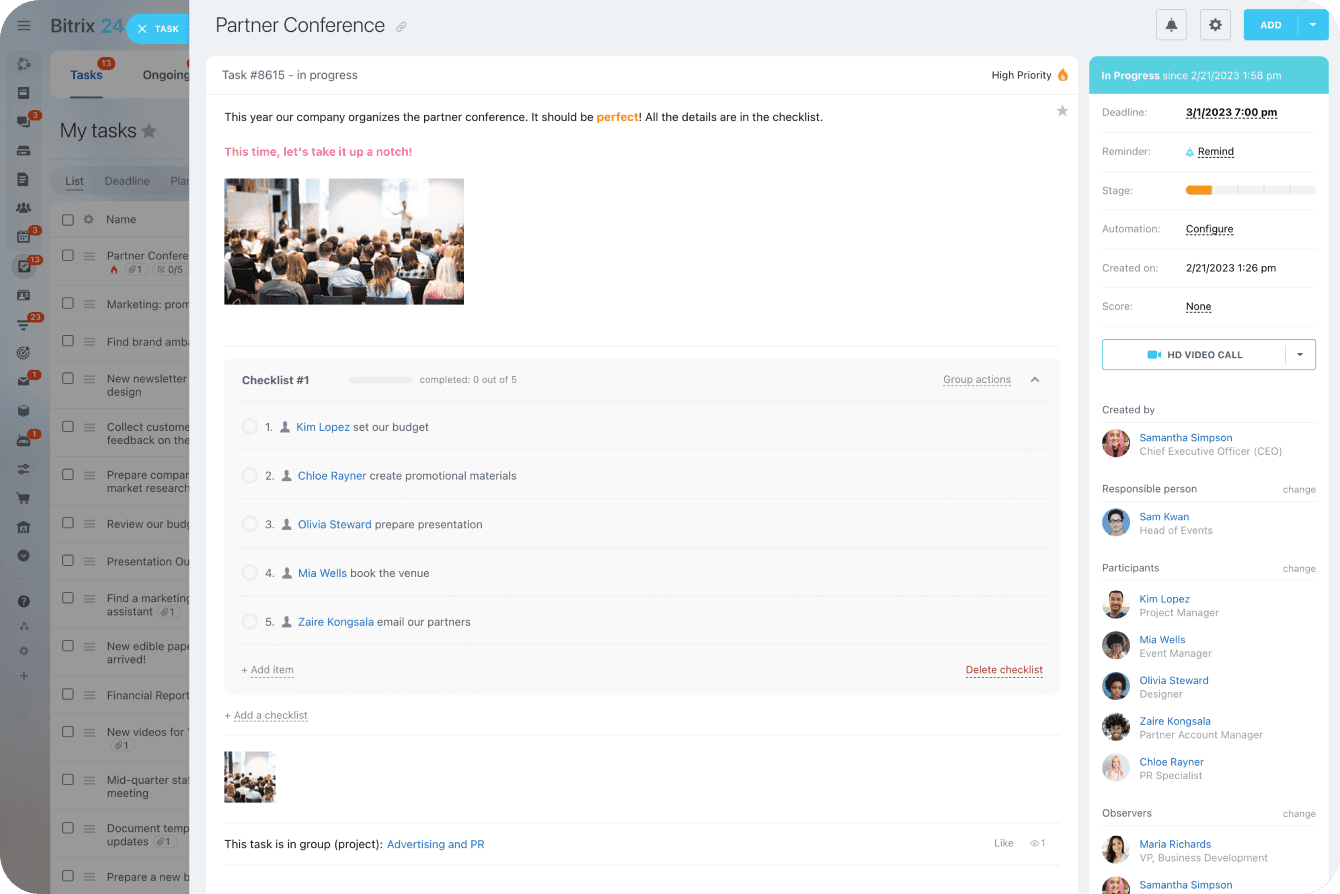
Bitrix24's interface offers extensive functionality, but many users find it cluttered and initially overwhelming. Navigating between modules like tasks, CRM, and chat can feel complex, especially for new users or small teams. However, once configured, its customizable dashboards and quick-access menus help streamline daily workflows. Users who invest time in setup and training often appreciate the platform's depth, but those seeking simplicity may find the learning curve steeper than with more focused tools.
Integrations
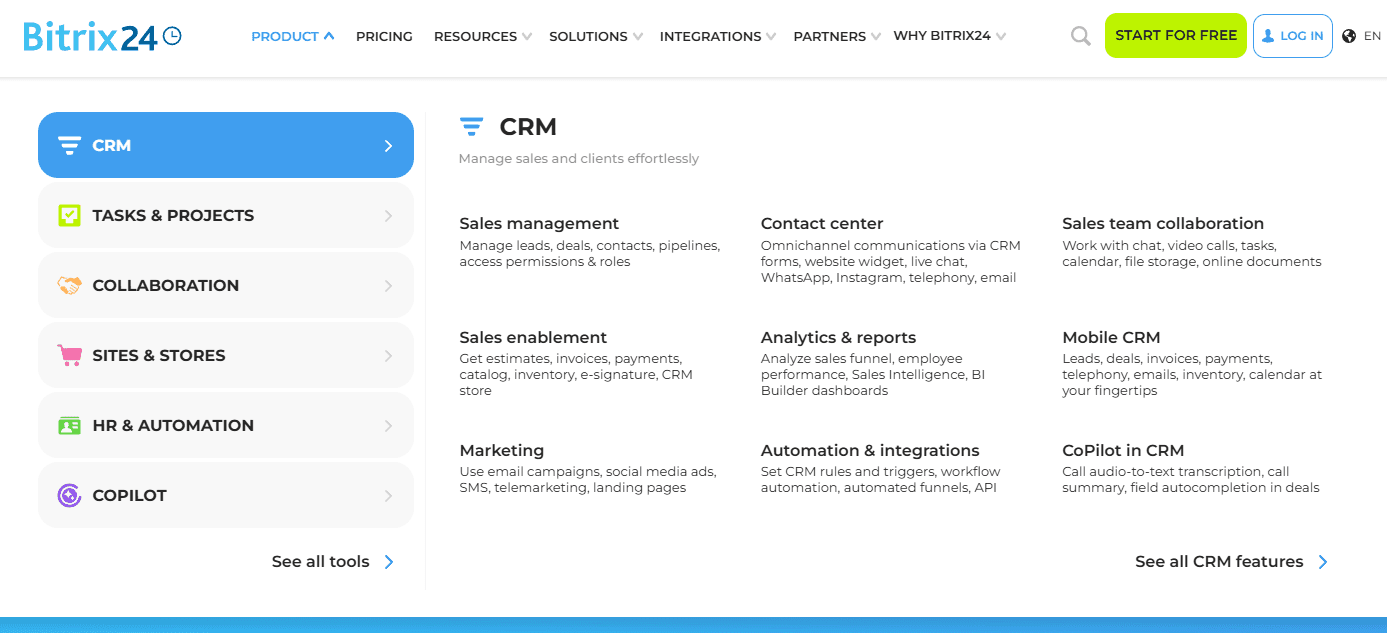
Bitrix24 integrates with Google Workspace, WhatsApp, Office 365, Dropbox, Box, and Mailchimp, among others.
Bitrix24 also offers an open API and connects with third-party integration tools through its marketplace.

Bitrix24 Specs
- 2-Factor Authentication: Yes
- API: Yes
- Calendar Management: Yes
- Call Tracking: Yes
- Campaign Management: No
- Click-to-Dial: Yes
- Contact Management: Yes
- Contact Sharing: Yes
- Custom Data Forms: No
- Customer Management: Yes
- Dashboard: Yes
- Data Export: Yes
- Data Import: Yes
- Data Visualization: Yes
- Email Integration: Yes
- External Integrations: Yes
- File Sharing: Yes
- File Transfer: Yes
- Google Apps Integration: Yes
- Lead Management: Yes
- Lead Scoring: Yes
- Marketing Automation: Yes
- Mobile App: No
- Multi-User: Yes
- Notifications: Yes
- Pipeline Management: Yes
- Sales Automation: Yes
- Scheduling: Yes
- Social-Media Integration: Yes
- Task Scheduling/Tracking: Yes
- Third-Party Plugins/Add-Ons: Yes


