

El software de reproducción de sesiones registra sesiones de usuarios reales en tu sitio web para que puedas ver dónde hacen clic, se desplazan, se quedan atascados o abandonan. Es una de las formas más rápidas de identificar problemas de UX, depurar errores y mejorar las conversiones, sin tener que hacer suposiciones.
Muchas de las mejores herramientas ofrecen planes gratuitos sólidos, pero no todas merecen tu tiempo. He revisado y probado las principales opciones gratuitas y basadas en periodos de prueba para ayudarte a encontrar herramientas que realmente proporcionen información útil sin pagar por adelantado. Esta lista elimina el ruido y muestra qué opciones son realmente utilizables sin coste.
Veamos las mejores opciones que pueden marcar la diferencia para tu equipo.
Por qué confiar en nuestras recomendaciones de software
6,700+
Reviews
20
Industry experts
16+
Evaluation factors
14
Years
Nuestro equipo lleva probando y evaluando software desde 2012. Como gestores de producto, sabemos lo difícil —y lo importante— que es elegir el software adecuado.
Para esta guía, evaluamos las herramientas mediante pruebas prácticas e investigación independiente, puntuando las herramientas según nuestros criterios de selección.
Nuestras reseñas reflejan nuestro criterio editorial humano, no un discurso de ventas.
Revisores expertos:
 Hannah ClarkSenior TPM
- Cristiano ValimSenior UI/UX Lead

Tabla comparativa de programas gratuitos de reproducción de sesiones
Estos son los costes base de cada uno de los planes de pago de las herramientas que formaron parte de mi lista:
| Tool | Best For | Trial Info | Price | ||
|---|---|---|---|---|---|
| 1 | La mejor opción para la reproducción contextual de sesiones de usuario | Plan gratuito + demostración gratuita + prueba gratuita de 14 días disponible | Desde $26/mes (facturado anualmente) | Website | |
| 2 | Bäst för självlärande prisjustering på små hotell | Gratis demonstration tillgänglig | Prisuppgift på begäran | Website | |
| 3 | La mejor opción para reproducciones vinculadas a salidas de embudos | Plan gratuito disponible | Desde $140/mes | Website | |
| 4 | Ideal para análisis de datos de comportamiento | Plan gratuito + demostración gratuita disponible | Precios bajo solicitud | Website | |
| 5 | Ideal para equipos de producto que necesitan recorridos de usuarios retroactivos | Plan gratuito disponible | Precio bajo solicitud | Website | |
| 6 | Ideal para filtrar sesiones según el comportamiento | Prueba gratuita de 14 días disponible | Los planes empiezan en 65 $/mes | Website | |
| 7 | La mejor opción para mapas de calor de seguimiento ocular en planes gratuitos | Plan gratuito disponible | Desde $33/mes (facturado anualmente) | Website | |
| 8 | La mejor opción para la reproducción de código abierto y autoalojada | Plan gratuito + demostración gratuita disponible | Desde $0.005/grabación | Website | |
| 9 | Ideal para depurar sesiones vinculadas a indicadores de funcionalidades | Plan gratuito + prueba gratuita disponible | Desde $50/mes | Website | |
| 10 | La mejor opción para la reproducción autoalojada de código abierto | Plan gratuito + prueba gratuita de 7 días disponible | Desde $5.95/1000 sesiones/mes | Website |


Reseñas de los mejores programas gratuitos de reproducción de sesiones
A continuación encontrarás mis resúmenes detallados de las mejores herramientas gratuitas de reproducción de sesiones que formaron parte de mi lista. Mis reseñas ofrecen un análisis detallado de las funciones principales, ventajas y desventajas, integraciones y casos de uso ideales de cada herramienta para ayudarte a encontrar la más adecuada para ti. Aunque la mayoría de estas herramientas ofrecen una versión completamente gratuita, otras ofrecen un periodo de prueba gratuito. He añadido una nota sobre lo que es gratuito en cada una de mis reseñas
 La mejor opción para la reproducción contextual de sesiones de usuario
- Plan gratuito + demostración gratuita + prueba gratuita de 14 días disponible
- Desde $26/mes (facturado anualmente)
Visit WebsiteCustomer Rating:4.6/5This rating combines scores from multiple user review sites to reflect overall customer sentiment about the product.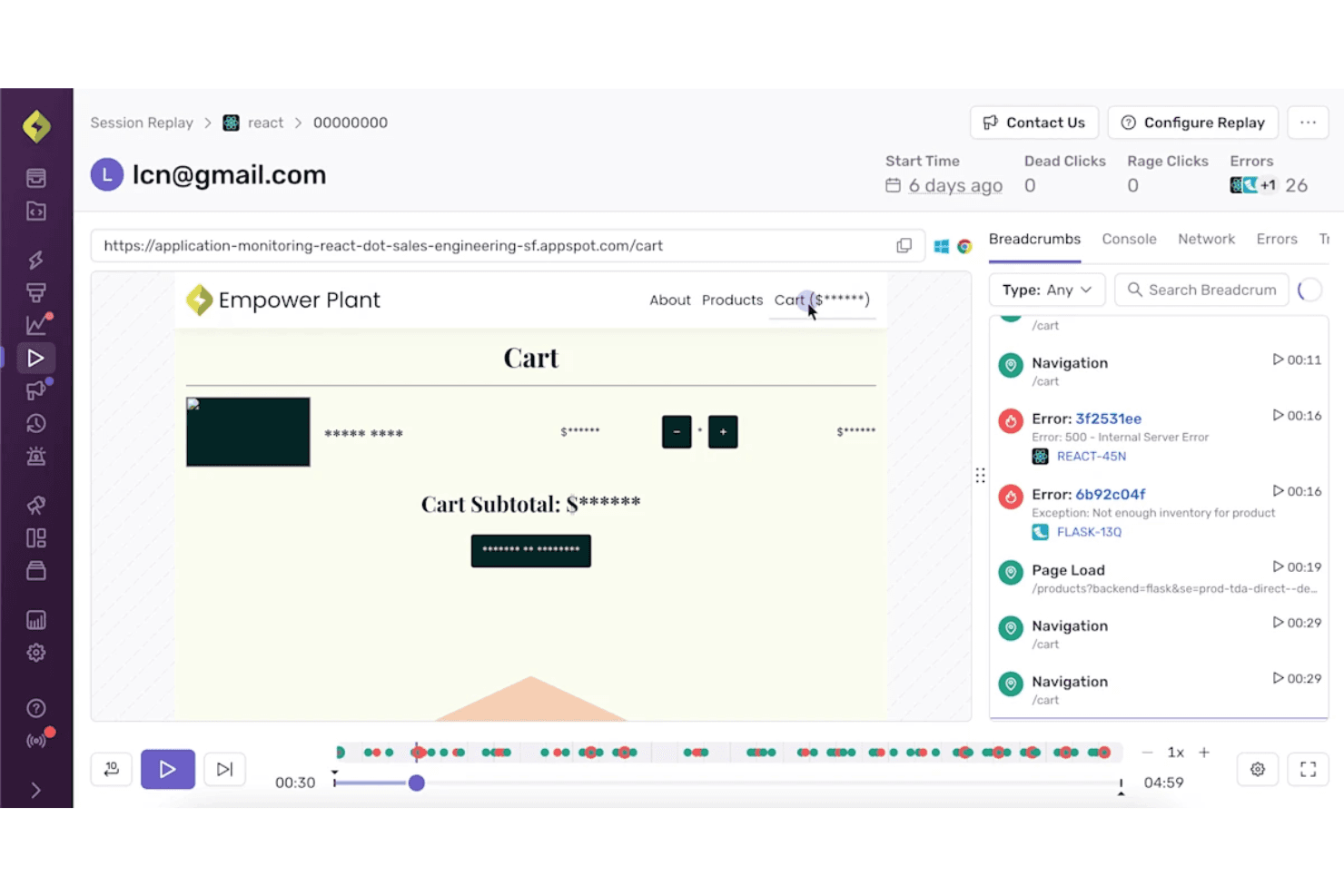
Sentry combina la reproducción de sesiones con los detalles de los errores para ofrecer un contexto de depuración más claro. Sentry es una plataforma gratuita de reproducción de sesiones para la depuración por parte de desarrolladores que reconstruye sesiones web y móviles, vinculando la reproducción con errores, trazas, registros de consola, solicitudes de red y señales de clics repetidos o clics inactivos.
¿Para quién es más adecuado Sentry?
Sentry es adecuado para equipos de producto dirigidos por desarrolladores que conectan las reproducciones de sesiones con errores, trazas, registros y señales de clics repetidos durante la clasificación de errores.
Por qué elegí Sentry
Elegí Sentry para la reproducción contextual de sesiones de usuario porque conecta directamente las reproducciones basadas en el DOM con errores, trazas, registros de consola y solicitudes de red. Utilizo las señales de clics repetidos y clics inactivos para localizar rápidamente las interacciones defectuosas y, después, pasar de un problema al momento exacto de la sesión. Su plan gratuito permite una depuración centrada con 50 reproducciones al mes.
Funciones principales de Sentry
- Reproducción de aplicaciones móviles: Captura sesiones en aplicaciones de iOS, Android, React Native y Flutter.
- Búsqueda de sesiones: Filtra las reproducciones por navegador, dispositivo, URL, versión, usuario y etiquetas personalizadas.
- Enmascaramiento de privacidad: Enmascara el texto, las imágenes y las pulsaciones de teclas antes de que los datos de reproducción salgan del navegador.
- Conservación de reproducciones: Almacena las reproducciones del plan gratuito durante 30 días.
Integraciones de Sentry
Sentry ofrece integraciones con Jira, GitHub, GitLab, Linear, Slack, Microsoft Teams, Datadog, Splunk, Grafana y Segment, además de SDK para marcos de trabajo web, móviles y de servidor.
¿Qué incluye el plan gratuito?
Sentry ofrece un plan gratuito permanente en lugar de una prueba por tiempo limitado. Incluye 50 reproducciones de sesiones al mes, y las reproducciones del plan gratuito se conservan durante 30 días.
Pros and Cons
Pros:
- Las reproducciones vinculadas a errores aceleran el diagnóstico de errores
- Los clics repetidos y los clics inactivos revelan las interacciones defectuosas
- El enmascaramiento predeterminado protege los datos de usuario reproducidos
Cons:
- El volumen limitado de reproducciones debilita la supervisión continua
- No incluye embudos ni mapas de calor para el análisis de la experiencia de usuario
Learn more about Sentry: Bäst för självlärande prisjustering på små hotell
- Gratis demonstration tillgänglig
- Prisuppgift på begäran
Visit WebsiteCustomer Rating:4.7/5This rating combines scores from multiple user review sites to reflect overall customer sentiment about the product.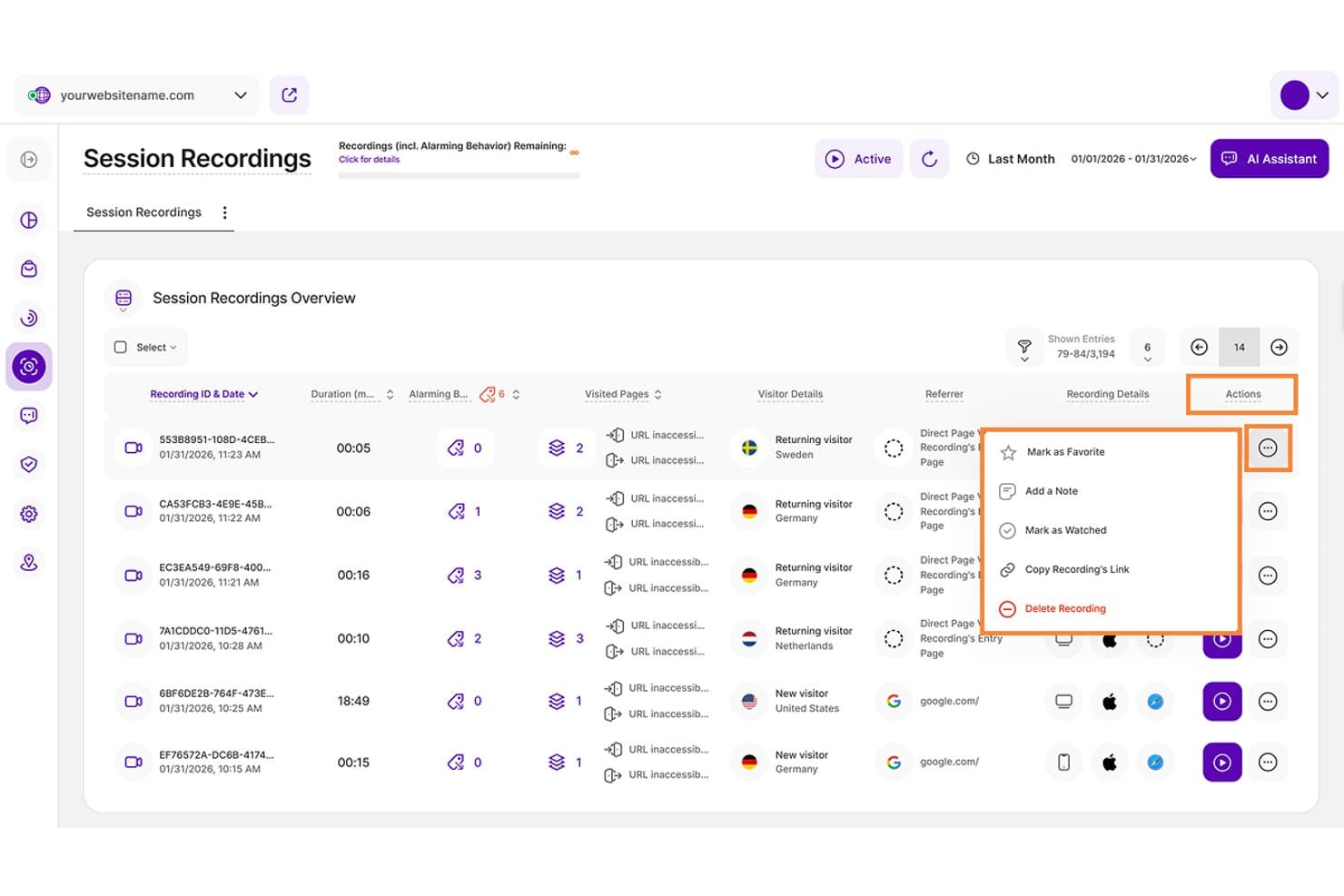
RevControl optimerar hotellpriser med hjälp av självlärande prissättning och flexibla AutoPublish-kontroller. RevControl är ett molnbaserat intäktshanteringssystem som använder en självlärande algoritm för att generera dynamiska prisrekommendationer, automatisera publicering av priser till ditt PMS eller din kanalhanterare och följa konkurrenternas priser upp till 365 dagar framåt.
Vem passar RevControl bäst för?
RevControl passar små och medelstora fristående hotell, vandrarhem och semesterparker som vill ha automatiserade prisrekommendationer utan att behöva hantera ett komplett RMS för större företag.
Varför jag valde RevControl
Jag valde RevControl som ett av de bästa alternativen eftersom den självlärande algoritmen diskret hanterar de prisbeslut som tar upp större delen av en mindre hotels dag. Jag uppskattar att den räknar om rekommendationerna upp till fyra gånger i timmen, 365 dagar framåt, så att priserna anpassas efter bokningstakt och marknadsutbud utan manuell inmatning. Funktionen AutoPublish skickar sedan priserna direkt till ditt PMS eller din kanalhanterare i manuellt, automatiskt eller hybridläge, vilket ger dig kontroll utan ständig övervakning.
RevControls viktigaste funktioner
- Prisbevakning av konkurrenter: Följ priserna hos din konkurrensuppsättning upp till 365 dagar framåt för att underbygga dina prisbeslut.
- Analys av aktuella bokningar: Jämför aktuella bokningar med samma period förra året för att bedöma bokningstakt och efterfrågan.
- Prisgrupper: Öppna och stäng automatiskt grupper av priser baserat på befintliga bokningar eller tröskelvärden för prognostiserad beläggning.
- Prisrekommendation för grupper: Beräkna grupppriser med hjälp av undanträngningsanalys för att avgöra om en gruppbokning överstiger de tillfälliga intäkter som den skulle tränga undan.
RevControls integrationer
På RevControls integrationssida listas 16 anslutningar till PMS och kanalhanterare, inklusive Oracle, Clock PMS, eZee, Little Hotelier och Ulyses Cloud. Där dokumenteras även anslutningar till Booking.com, Cloudbeds, SiteMinder, Stayntouch och Sihot; inget offentligt API finns dokumenterat.
Pros and Cons
Pros:
- Justerar priser var femtonde minut
- Lär sig av bokningstakten
- Stöder centraliserade insikter för flera fastigheter
Cons:
- Övervakning av prisparitet är fortfarande odokumenterad
- Funktioner för större företag är fortfarande oklara
Learn more about TWIPLA: La mejor opción para reproducciones vinculadas a salidas de embudos
- Plan gratuito disponible
- Desde $140/mes
Visit WebsiteCustomer Rating:4.5/5This rating combines scores from multiple user review sites to reflect overall customer sentiment about the product.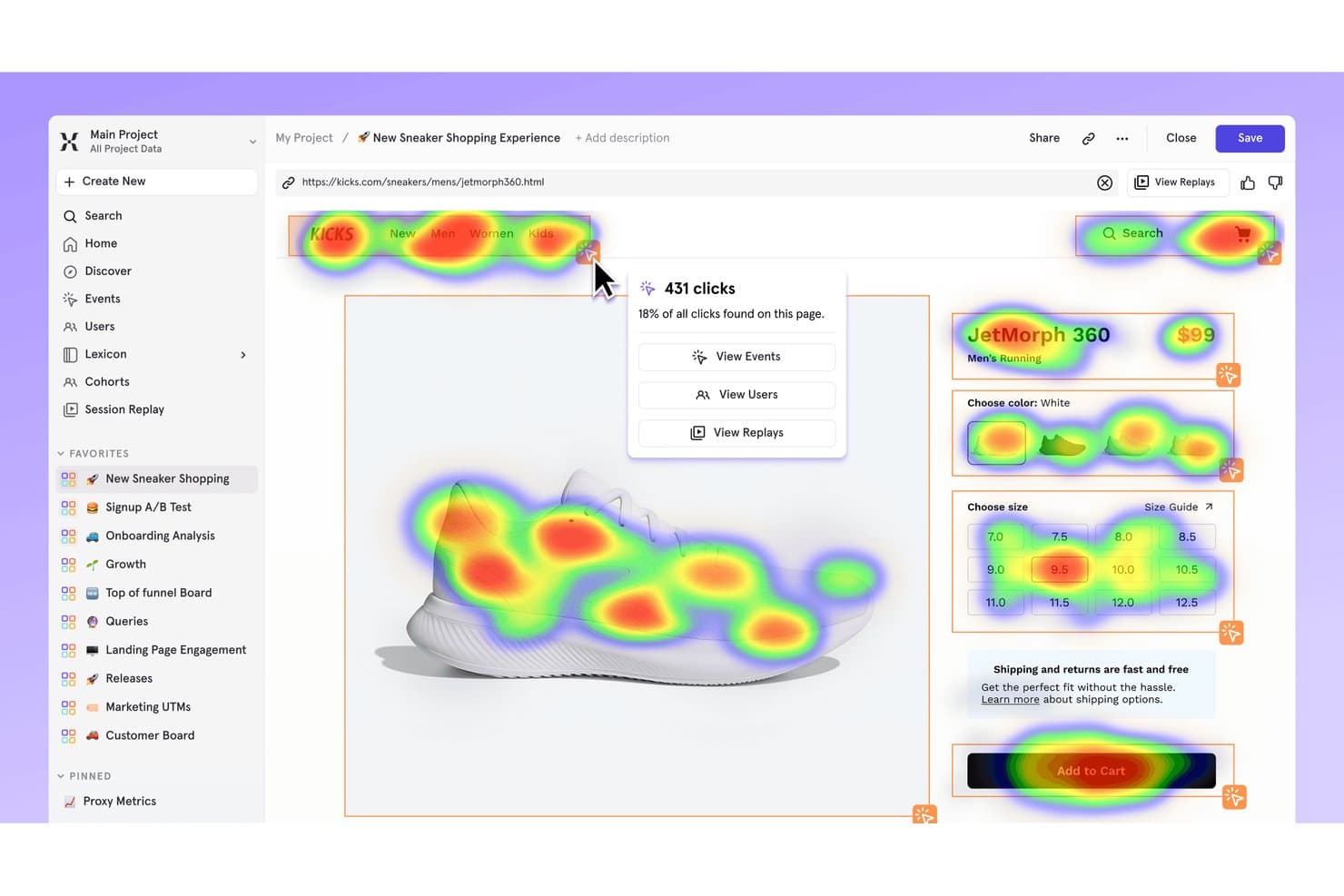
El mapa de calor de Mixpanel muestra dónde hacen clic los usuarios en una página de producto de zapatillas. Mixpanel es una plataforma gratuita de reproducción de sesiones y análisis de productos con reproducción basada en DOM, filtros de embudos y cohortes, mapas de calor, señales de frustración, registros de consola y red, y compatibilidad con la reproducción para aplicaciones web y móviles.
¿Para quién es mejor Mixpanel?
Responsables de producto y equipos de producto pequeños que necesitan conectar las reproducciones de sesiones con las salidas de los embudos, los datos de retención y los perfiles de usuario.
Por qué elegí Mixpanel
Elegí Mixpanel porque vincula directamente las reproducciones con las salidas de los embudos. Puedo abrir sesiones desde los gráficos de embudo, filtrarlas por eventos, cohortes o propiedades, e inspeccionar señales de frustración, registros de consola y llamadas de red. Esto ayuda a mi equipo a rastrear un fallo en el proceso de pago desde un informe analítico hasta el comportamiento del usuario que lo provoca.
Funciones principales de Mixpanel
- Reproducción basada en DOM: Reconstruye las sesiones a partir de la estructura y los cambios de la página en lugar de usar vídeo.
- Mapas de calor y mapas de desplazamiento: Visualiza los clics, las visitas a páginas y el desplazamiento en páginas web.
- Reproducción de sesiones móviles: Captura datos de reproducción de aplicaciones de iOS, Android, React Native y Flutter.
- Enmascaramiento de privacidad: Enmascara de forma predeterminada el texto, los campos de entrada, las imágenes, los vídeos y los campos confidenciales.
Integraciones de Mixpanel
Mixpanel ofrece integraciones nativas con Segment y mParticle, además de SDK de JavaScript, iOS, Android, React Native, Flutter y Electron. Sus API de ingesta, consulta y almacén de datos admiten integraciones personalizadas.
¿Qué incluye el plan gratuito?
Mixpanel ofrece un plan gratuito para siempre con un número ilimitado de puestos, hasta 1 millón de eventos mensuales y 10.000 reproducciones de sesiones al mes. No cobra excesos, pero el acceso a la plataforma se limita después de alcanzar el límite mensual de eventos.
Pros and Cons
Pros:
- Vincula directamente las reproducciones con las salidas de los embudos
- Admite la reproducción de sesiones web y móviles
- Enmascara los datos confidenciales de forma predeterminada
Cons:
- La retención finaliza después de 30 días
- Los mapas de calor y los mapas de desplazamiento excluyen los dispositivos móviles
 Ideal para análisis de datos de comportamiento
- Plan gratuito + demostración gratuita disponible
- Precios bajo solicitud
Visit WebsiteCustomer Rating:4.5/5This rating combines scores from multiple user review sites to reflect overall customer sentiment about the product.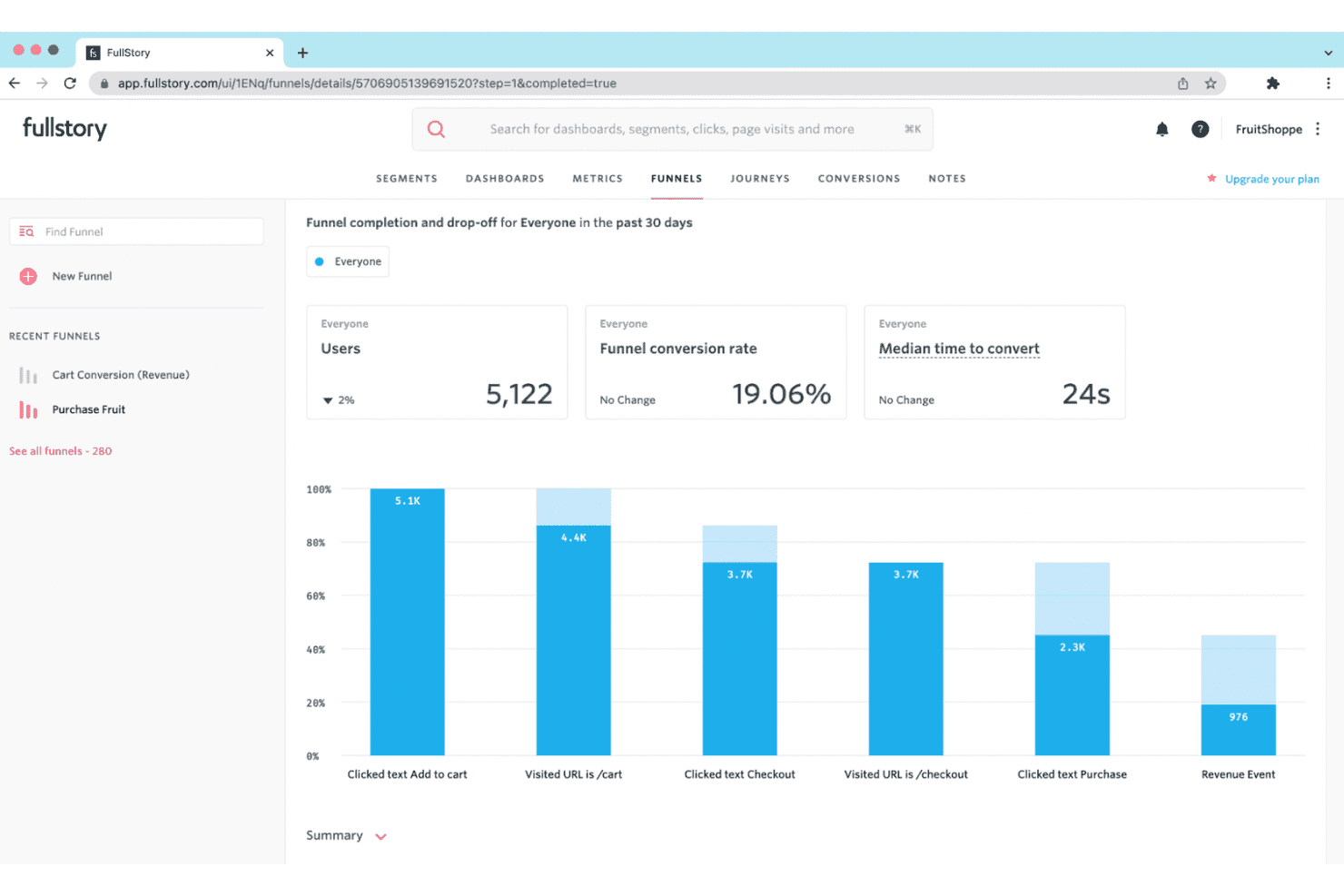
Fullstory proporciona reproducciones de sesiones e información sobre el comportamiento para ayudar a las empresas a mejorar las experiencias digitales. Fullstory es una plataforma gratuita de reproducción de sesiones con captura automática sin etiquetas, filtros de sesión con búsqueda, mapas de clics y desplazamiento, detección de señales de frustración y herramientas de depuración de consola y red.
¿Para quién es más adecuado Fullstory?
Fullstory es adecuado para gerentes de producto y diseñadores de UX que necesitan diagnosticar problemas de usabilidad mediante reproducciones de sesiones, mapas de calor y señales de comportamiento.
Por qué elegí Fullstory
Elegí Fullstory porque sus análisis de datos de comportamiento conectan la evidencia de las sesiones con la frustración de los usuarios. Utilizo OmniSearch para aislar clics repetidos, clics fallidos y problemas de velocidad de las páginas; después, reviso los mapas de clics y desplazamiento para localizar los puntos de fricción. Dev Tools también vincula los clics que generan errores con la actividad de la consola y de la red, lo que me ayuda a rastrear los problemas de usabilidad hasta su causa técnica.
Funciones principales de Fullstory
- Captura automática sin etiquetas: Captura las interacciones web sin etiquetado manual de eventos.
- Controles de reproducción: Ajusta la velocidad de reproducción, omite los periodos de inactividad y filtra las listas de eventos.
- Enmascaramiento de privacidad: Enmascara las contraseñas, los datos de pago y la información personal de forma predeterminada.
- Compartición con invitados: Crea enlaces de reproducción para visitantes externos sin utilizar plazas del equipo.
Integraciones de Fullstory
Fullstory ofrece integraciones con Slack, Segment, Jira, Adobe Analytics y Google Tag Manager. También proporciona una API abierta, webhooks, exportación de datos y API de consentimiento e identidad para establecer conexiones personalizadas.
¿Qué incluye el plan gratuito?
FullstoryFree es un plan gratuito, no una prueba limitada en el tiempo, y no requiere tarjeta de crédito. Incluye hasta 30.000 sesiones mensuales, 12 meses de retención y 10 usuarios, pero excluye funciones avanzadas como paneles, webhooks y StoryAI.
Pros and Cons
Pros:
- Las señales detalladas de frustración revelan puntos de fricción ocultos
- Los registros de consola y red ayudan a diagnosticar errores
- Los mapas de calor revelan el comportamiento de los clics y el desplazamiento
Cons:
- La captura se detiene después de alcanzar el límite mensual de sesiones
- Los datos gratuitos pueden utilizarse para entrenar la IA
Learn more about Fullstory: Ideal para equipos de producto que necesitan recorridos de usuarios retroactivos
- Plan gratuito disponible
- Precio bajo solicitud
Visit WebsiteCustomer Rating:4.5/5This rating combines scores from multiple user review sites to reflect overall customer sentiment about the product.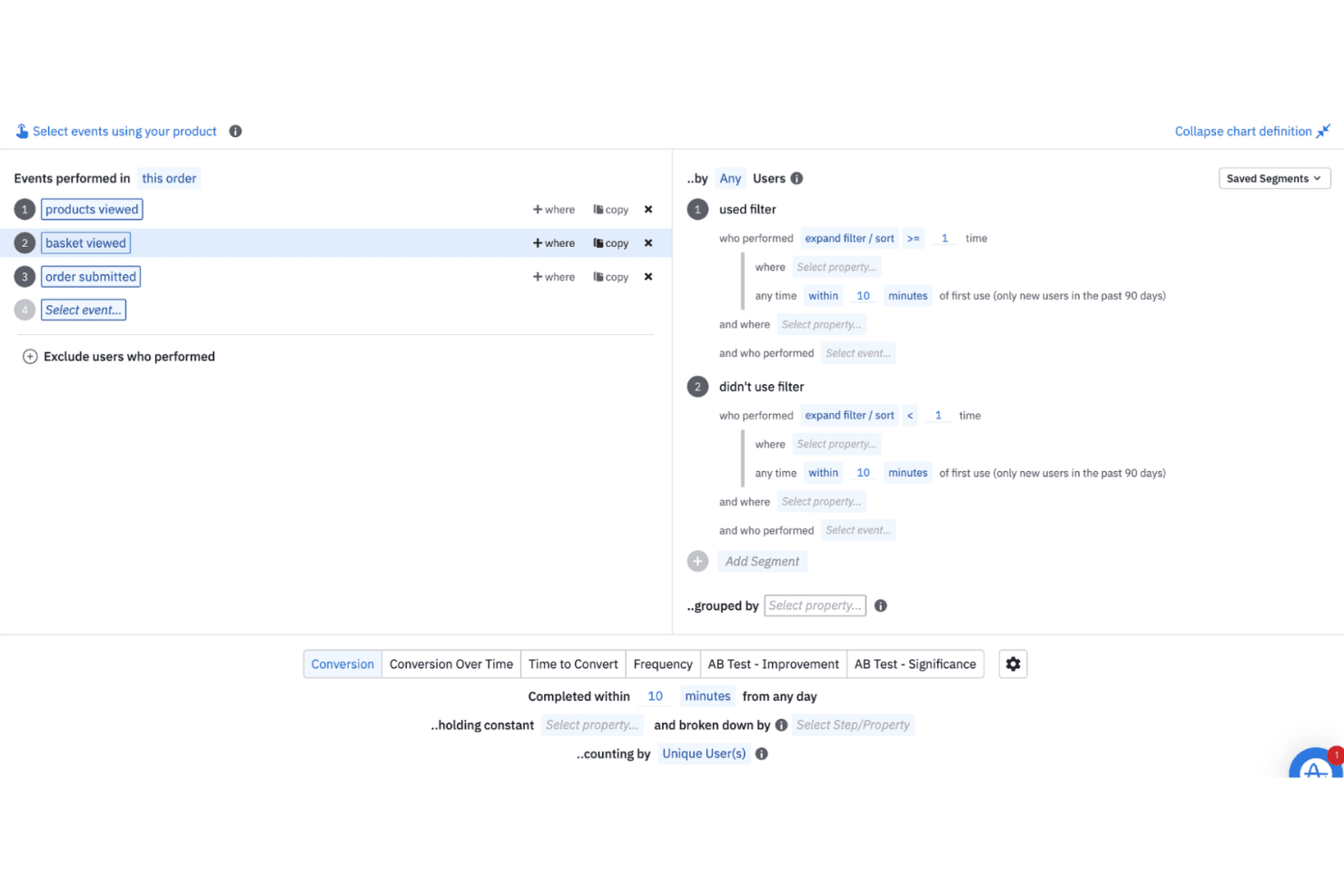
Amplitude ayuda a los equipos a analizar el comportamiento de los usuarios en tiempo real e histórico para orientar las decisiones de producto. Amplitude es una plataforma gratuita de software de reproducción de sesiones con grabación web y móvil, cronologías de eventos, vistas de embudos y recorridos, búsqueda de reproducciones, detección de clics de frustración y registros de consola y red.
¿Para quién es más adecuado Amplitude?
Responsables de producto y especialistas en marketing digital que necesitan conectar las reproducciones de sesiones con embudos, recorridos, experimentos y datos sobre el comportamiento de los usuarios.
Por qué elegí Amplitude
Elegí Amplitude porque vincula directamente las reproducciones de sesiones con los embudos y los recorridos. Puedo abrir grabaciones desde un punto de abandono de conversión y, después, usar cronologías de eventos, búsqueda de reproducciones y detección de clics de frustración para investigar los obstáculos. Su plan gratuito incluye 10.000 reproducciones al mes, lo que hace práctico el diagnóstico continuo del producto.
Características principales de Amplitude
- Registros de consola y red: Revisa mensajes de JavaScript, solicitudes fallidas y actividad de API junto a las reproducciones.
- Reproducción de aplicaciones móviles: Captura sesiones de aplicaciones para iOS, Android, React Native y Flutter.
- Enmascaramiento de privacidad: Enmascara de forma predeterminada campos de texto, entradas, contraseñas, tarjetas, teléfonos y correos electrónicos.
- Omitir inactividad: Salta los periodos inactivos con los controles de reproducción y una velocidad de reproducción ajustable.
Integraciones de Amplitude
Amplitude incluye más de 159 integraciones, entre ellas Segment, Snowflake, BigQuery, Slack, Optimizely, LaunchDarkly y HubSpot. Los SDK, Google Tag Manager y la API de búsqueda de reproducciones permiten utilizar datos personalizados y flujos de trabajo de reproducciones.
¿Qué incluye el plan gratuito?
Amplitude ofrece un plan gratuito para siempre sin necesidad de tarjeta de crédito. Incluye hasta 10.000 reproducciones de sesiones y 2 millones de eventos al mes, con un mes de conservación de reproducciones y un número ilimitado de usuarios.
Pros and Cons
Pros:
- Vincula directamente las reproducciones con los embudos y los recorridos
- Muestra los errores de consola y red junto a las reproducciones
- Admite aplicaciones web, iOS, Android y multiplataforma
Cons:
- Las reproducciones caducan después de un mes
- Requiere instrumentación mediante SDK antes de grabar las sesiones
Learn more about Amplitude: Ideal para filtrar sesiones según el comportamiento
- Prueba gratuita de 14 días disponible
- Los planes empiezan en 65 $/mes
Visit WebsiteCustomer Rating:4.6/5This rating combines scores from multiple user review sites to reflect overall customer sentiment about the product.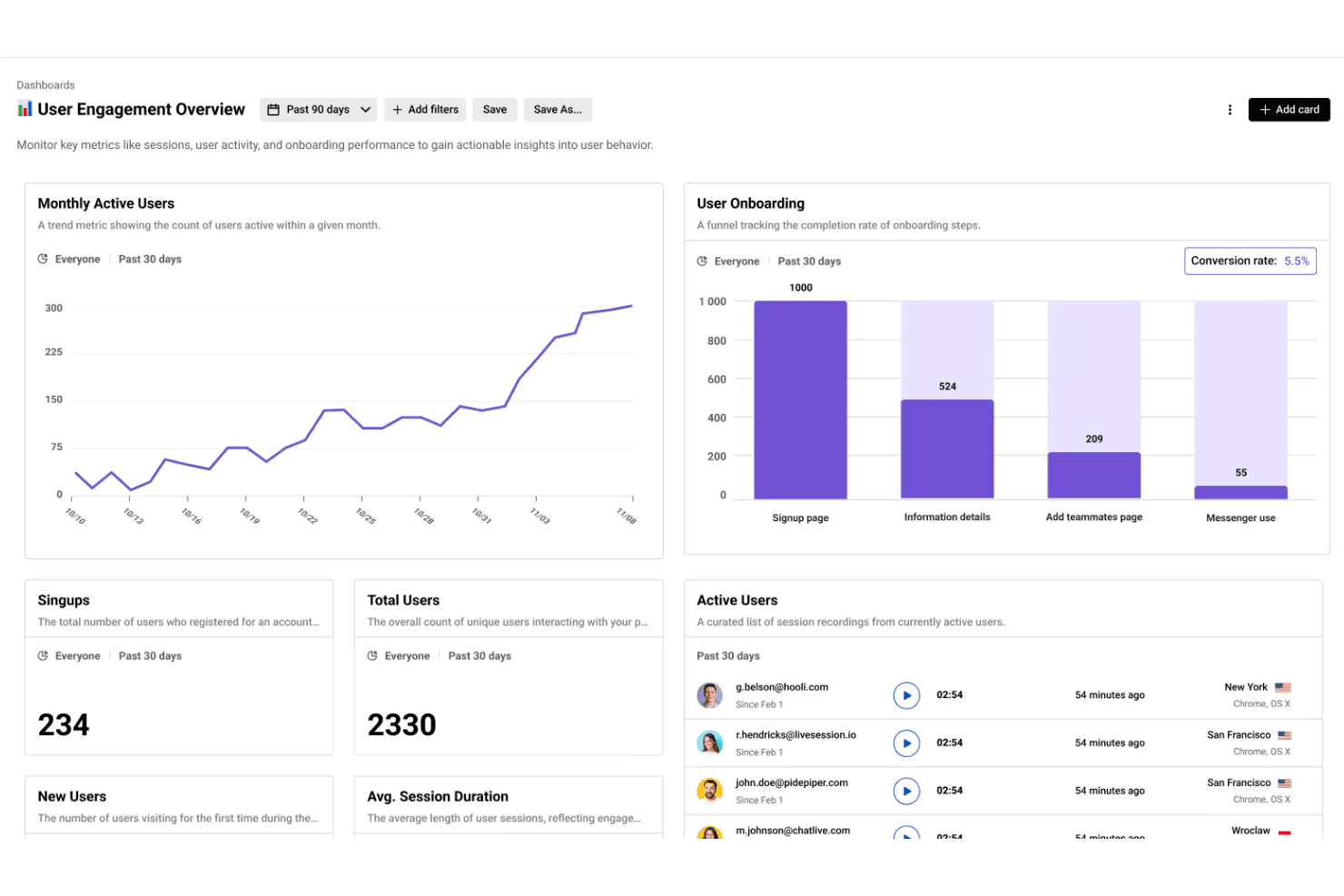
LiveSession combina reproducciones de sesiones con análisis para ayudar a los equipos a realizar un seguimiento de los KPI y aumentar la participación de los usuarios. LiveSession es una plataforma de reproducción de sesiones y análisis de productos que combina grabaciones del ratón, los clics y el desplazamiento con mapas de calor, embudos, segmentos, filtros y detección de clics de frustración y de error.
¿Para quién es más adecuado LiveSession?
LiveSession es adecuado para gestores de productos y diseñadores de UX de equipos pequeños que necesitan filtros basados en el comportamiento para diagnosticar problemas en las experiencias web.
Por qué elegí LiveSession
Elegí LiveSession porque sus filtros de sesiones basados en el comportamiento me ayudan a investigar problemas sin tener que ver las grabaciones al azar. Puedo combinar términos de búsqueda, guardar segmentos reutilizables y usar el Modo de inspección para encontrar clics en elementos CSS específicos. El explorador de eventos también conecta los clics de frustración y de error con las reproducciones en las que los usuarios tuvieron dificultades.
Características principales de LiveSession
- Mapas de calor: Visualiza la actividad de los clics y la intensidad de la interacción por URL.
- Análisis de embudos: Realiza un seguimiento del progreso de los usuarios a través de un flujo de conversión definido.
- Copia de seguridad de recursos: Conserva los estilos y las fuentes de las reproducciones después de que se eliminen los archivos originales.
- Enmascaramiento de entradas sensibles: Anonimiza automáticamente las contraseñas y los datos de las tarjetas.
Integraciones de LiveSession
LiveSession documenta 26 integraciones, incluidas Google Analytics, Segment, Mixpanel, Sentry, Bugsnag, Intercom, Zendesk, Slack, Google Tag Manager y Zapier. Su API REST está disponible en el plan Pro y superiores para integraciones personalizadas.
¿Qué incluye el plan gratuito?
LiveSession ofrece un plan gratuito permanente con reproducción de sesiones, mapas de calor, embudos, filtros y segmentos. Incluye 1.000 sesiones mensuales, un mes de conservación de datos, tres miembros del equipo y dos sitios web o proyectos; las sesiones que superen el límite mensual no se graban. También hay disponible una prueba de 14 días del plan Pro sin necesidad de tarjeta de crédito.
Pros and Cons
Pros:
- Los filtros basados en el comportamiento agilizan la investigación de las reproducciones
- Los clics de frustración y de error revelan problemas
- Los mapas de calor complementan las reproducciones del ratón y del desplazamiento
Cons:
- La reproducción nativa de aplicaciones móviles todavía no está disponible
- El diagnóstico para desarrolladores carece de contexto de consola y red
Learn more about LiveSession: La mejor opción para mapas de calor de seguimiento ocular en planes gratuitos
- Plan gratuito disponible
- Desde $33/mes (facturado anualmente)
Visit WebsiteCustomer Rating:4.1/5This rating combines scores from multiple user review sites to reflect overall customer sentiment about the product.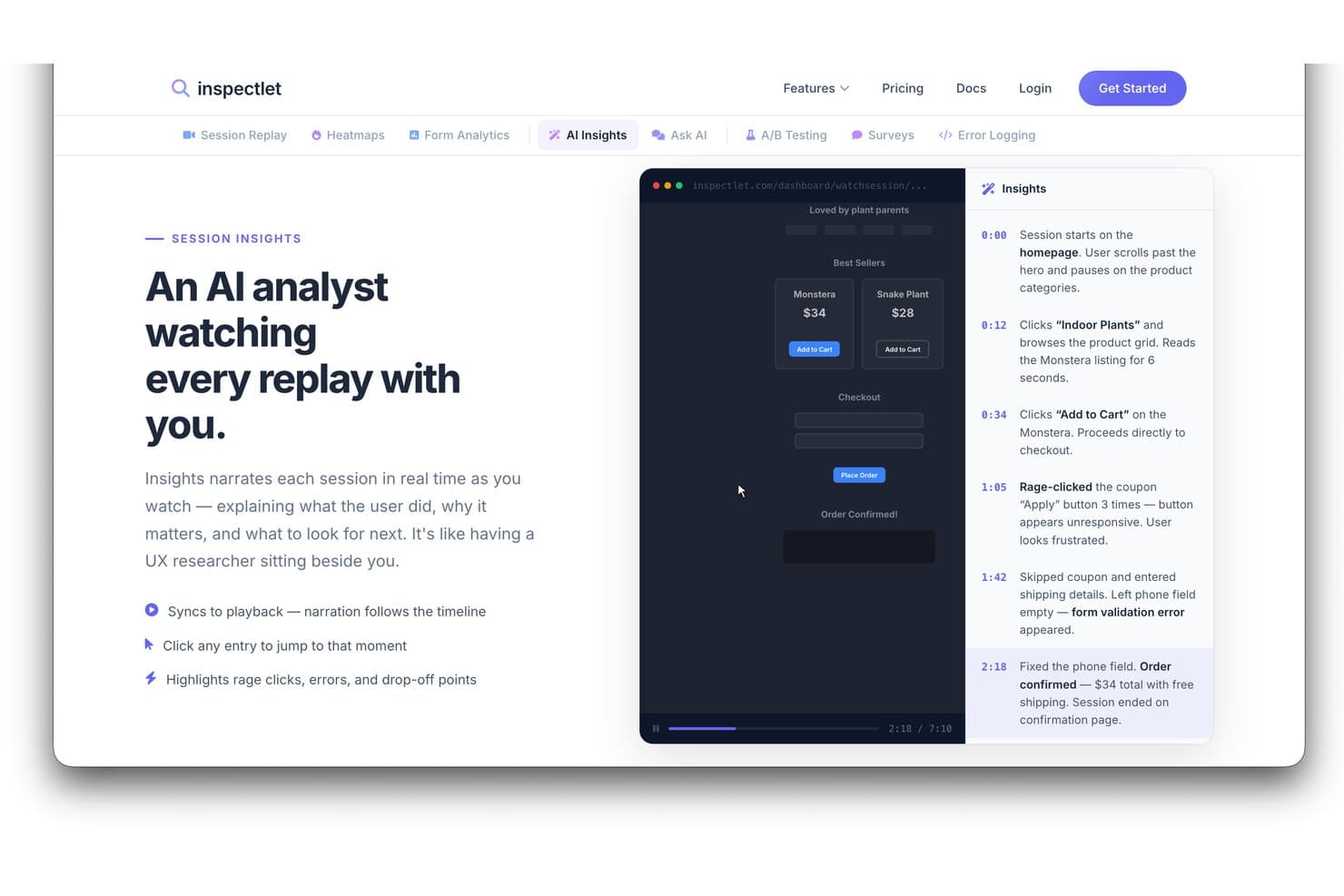
La función de información de IA de Inspectlet narra las reproducciones de sesiones con eventos marcados con la hora. Inspectlet es un software gratuito de reproducción de sesiones que combina grabaciones de visitantes, mapas de calor, análisis de sesiones mediante IA, detección de errores y clics de frustración, filtrado y pruebas A/B para sitios web y aplicaciones de una sola página.
¿Para quién es más adecuado Inspectlet?
Inspectlet es adecuado para gerentes de producto y diseñadores de UX que necesitan una reproducción gratuita de sesiones con mapas de calor de seguimiento ocular para diagnosticar problemas de usabilidad web.
Por qué elegí Inspectlet
Elegí Inspectlet como la mejor opción para mapas de calor de seguimiento ocular en planes gratuitos porque su nivel gratuito registra el movimiento del ratón en páginas activas. Utilizo puntos de clic y mapas de profundidad de desplazamiento para ver si los visitantes notan las CTA importantes o abandonan pronto. La detección de clics de frustración y errores de JavaScript vinculada a las reproducciones conecta después la fricción visual con las sesiones que requieren investigación.
Características principales de Inspectlet
- Línea de tiempo de la sesión: Revisa los clics, la navegación y los eventos de la página en secuencia.
- Filtrado de sesiones: Combina filtros de visitante, fuente, dispositivo, página y conversión.
- Pruebas A/B: Crea experimentos con un editor visual y cálculos de significancia.
- Enmascaramiento de datos confidenciales: Excluye las contraseñas y los campos seleccionados de las grabaciones.
Integraciones de Inspectlet
Inspectlet documenta integraciones u opciones de configuración para Google Tag Manager, WordPress, Shopify, HubSpot, Convert.com, Slack y webhooks. El acceso a la API comienza en el plan Growth para integraciones personalizadas.
¿Qué es gratuito?
Inspectlet ofrece un plan gratuito para siempre, sin tarjeta de crédito ni límite de tiempo, que cubre hasta 2.500 sesiones grabadas al mes en tres sitios web. Incluye reproducción de sesiones, mapas de calor y pruebas A/B, pero almacena los datos durante un mes y deja de grabar nuevas sesiones cuando alcanzas el límite mensual.
Pros and Cons
Pros:
- Los mapas de calor de seguimiento ocular aclaran la atención visual
- Los clics de frustración enlazan directamente con las reproducciones
- Los revisores elogian el filtrado de sesiones específicas
Cons:
- La retención gratuita limita las comparaciones históricas
- El acceso para un solo usuario limita la revisión por parte del equipo
Learn more about Inspectlet: La mejor opción para la reproducción de código abierto y autoalojada
- Plan gratuito + demostración gratuita disponible
- Desde $0.005/grabación
Visit WebsiteCustomer Rating:4.5/5This rating combines scores from multiple user review sites to reflect overall customer sentiment about the product.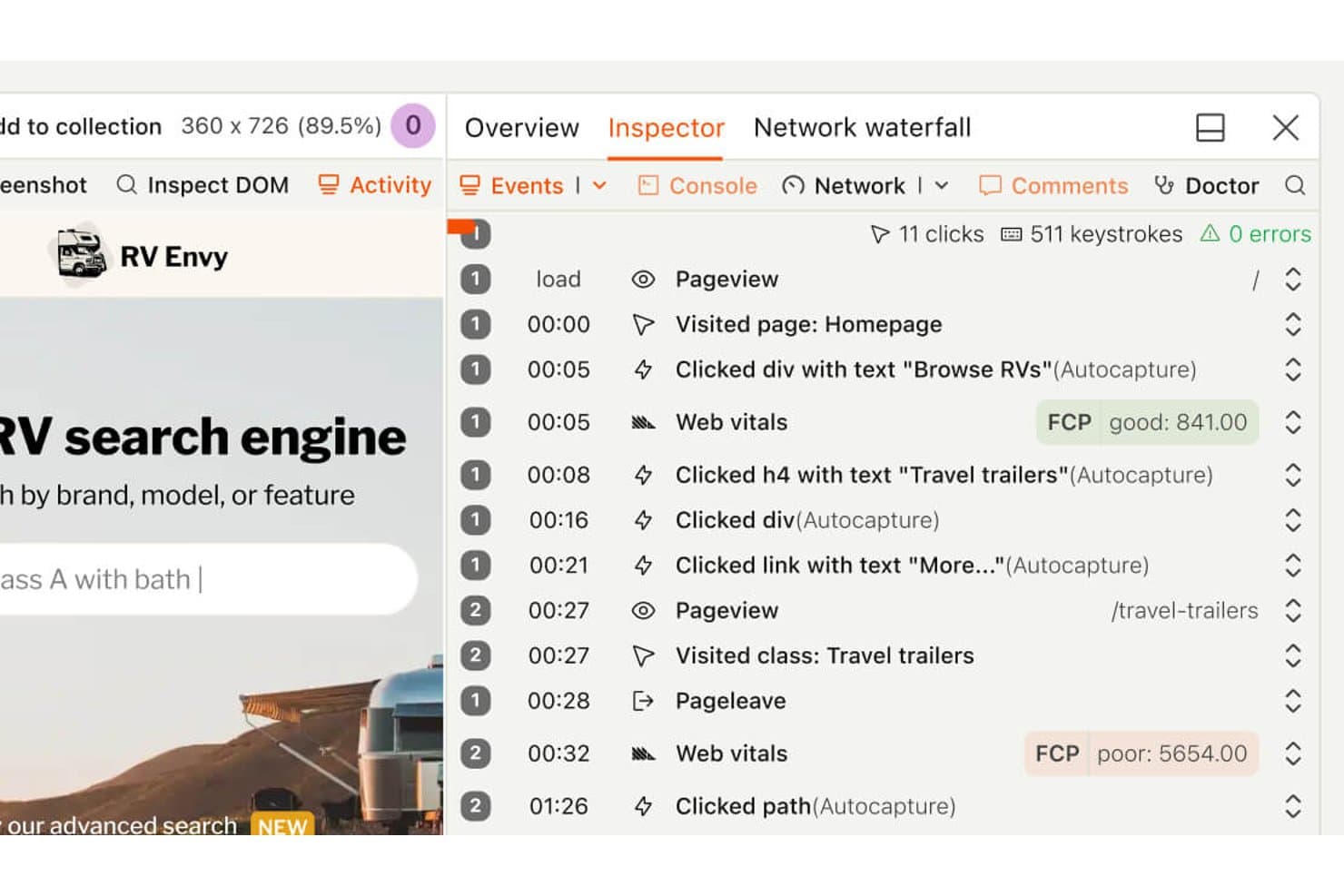
La línea de tiempo de reproducción de sesiones de PostHog muestra los clics de los usuarios y las visitas a las páginas. PostHog es un software gratuito de reproducción de sesiones que combina reproducción al estilo de una grabadora de vídeo digital, mapas de calor, análisis de embudos, indicadores de funciones, experimentos, seguimiento de errores y registros sincronizados de consola y red en aplicaciones web y móviles.
¿Para quién es mejor PostHog?
PostHog es adecuado para equipos de producto e ingeniería que necesitan una reproducción de sesiones de código abierto y autoalojada, junto con embudos, experimentos y seguimiento de errores.
Por qué elegí PostHog
Elegí PostHog porque su reproducción de código abierto y autoalojada se ejecuta bajo la licencia MIT, lo que proporciona a los equipos control sobre su pila de análisis. Puedo combinar la reproducción al estilo de una grabadora de vídeo digital con registros de consola sincronizados, gráficos de cascada de red y un explorador del DOM para investigar errores. Los enlaces entre embudos y reproducciones también muestran dónde abandonan los usuarios los flujos clave del producto.
Funciones principales de PostHog
- Mapas de calor: Crea mapas de calor, mapas de desplazamiento y mapas de clics para un máximo de tres URL.
- Señales de frustración: Encuentra sesiones con clics repetidos, clics sin efecto o excepciones.
- Reproducción móvil: Captura sesiones de aplicaciones iOS, Android, React Native y Flutter.
- Resúmenes de sesiones mediante IA: Pide a PostHog AI que encuentre, vea y resuma grabaciones.
Integraciones de PostHog
PostHog se integra con Intercom y Crisp para los enlaces de reproducción, además de más de 50 destinos de CDP, incluidos Slack, Salesforce, HubSpot y PagerDuty. También proporciona una API y un servidor MCP para flujos de trabajo personalizados.
¿Qué es gratuito?
El plan gratuito de PostHog dura indefinidamente, sin necesidad de tarjeta de crédito ni vencimiento de la prueba, e incluye 5.000 grabaciones web o 2.500 grabaciones móviles al mes. Admite un número ilimitado de miembros del equipo, pero limita el uso a un proyecto y a un mes de conservación de grabaciones; las asignaciones de grabaciones no utilizadas no se acumulan.
Pros and Cons
Pros:
- El autoalojamiento de código abierto permite controlar los análisis
- Los registros sincronizados de consola y red facilitan la depuración
- Los enlaces de embudos conectan los abandonos con las grabaciones
Cons:
- Los mapas de calor solo cubren tres URL de páginas
- El texto general de la página requiere enmascaramiento manual
Learn more about PostHog: Ideal para depurar sesiones vinculadas a indicadores de funcionalidades
- Plan gratuito + prueba gratuita disponible
- Desde $50/mes
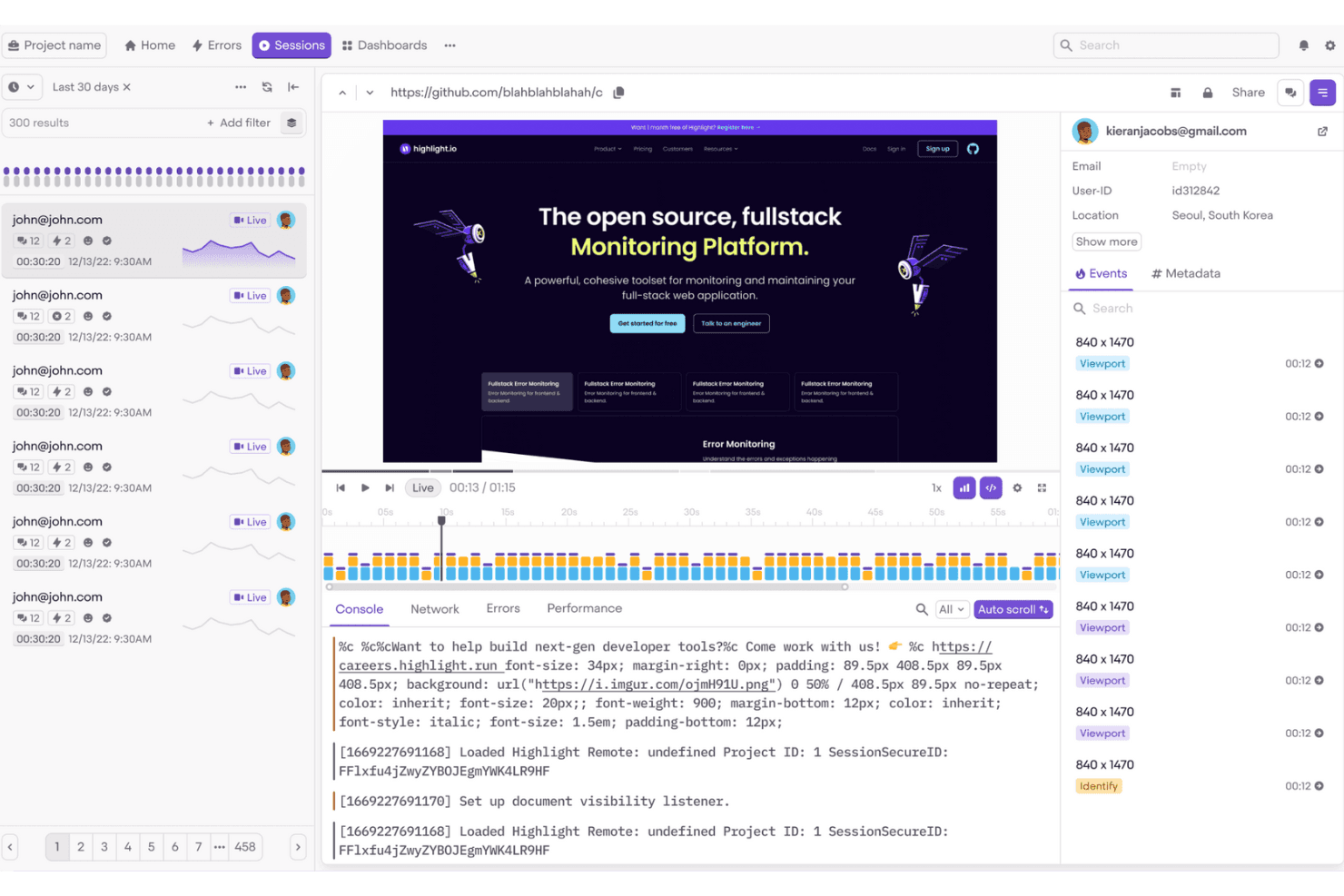
Highlight.io ayuda a los equipos de interfaz a supervisar y depurar fácilmente las sesiones de los usuarios. Highlight es un software de reproducción de sesiones y observabilidad, que ahora se ofrece a través de LaunchDarkly, con reproducción web y móvil, búsqueda flexible de sesiones, registros de consola y red, detección de errores y clics repetidos, y contexto de indicadores de funcionalidades.
¿Para quién es más adecuado Highlight?
Highlight es adecuado para equipos de producto cercanos al desarrollo que necesitan depurar sesiones de usuarios junto con indicadores de funcionalidades, errores y contexto de lanzamientos.
Por qué elegí Highlight
Elegí Highlight porque es ideal para depurar sesiones vinculadas a indicadores de funcionalidades. Puedo comparar sesiones reproducidas según los indicadores que vieron los usuarios y, después, inspeccionar los registros de consola y red junto con los errores o los clics repetidos. Esto facilita verificar si un cambio de diseño controlado por un indicador causó fricción antes de ampliar su implementación.
Características principales de Highlight
- Búsqueda flexible de sesiones: Filtra sesiones por identidad, dispositivo, ubicación, URL, clics y propiedades de eventos personalizadas.
- Enmascaramiento de privacidad: Oculta texto, imágenes, campos de formulario y datos confidenciales antes de la recopilación.
- Compatibilidad con la reproducción móvil: Graba sesiones de aplicaciones Android, iOS, Flutter y React Native.
- Mapas de calor: Visualiza los clics, toques y la actividad de desplazamiento mediante mapas codificados por colores.
Integraciones de Highlight
Highlight ofrece una integración nativa con Jira Cloud y conecta Vega con GitHub y Slack. También admite OpenTelemetry y un servidor MCP para flujos de trabajo de observabilidad personalizados.
¿Qué es gratuito?
Highlight ofrece un plan gratuito, por lo que puedes usarlo sin una prueba limitada por tiempo. El precio de pago está disponible previa solicitud, pero aquí no se indican los límites específicos del plan gratuito.
Pros and Cons
Pros:
- Depura sesiones junto con indicadores de funcionalidades
- Busca sesiones según un contexto detallado del usuario
- Conecta las reproducciones con errores y registros
Cons:
- Requiere una configuración del SDK dirigida por desarrolladores
- La grabación gratuita se detiene al alcanzar el límite mensual
Learn more about Highlight: La mejor opción para la reproducción autoalojada de código abierto
- Plan gratuito + prueba gratuita de 7 días disponible
- Desde $5.95/1000 sesiones/mes
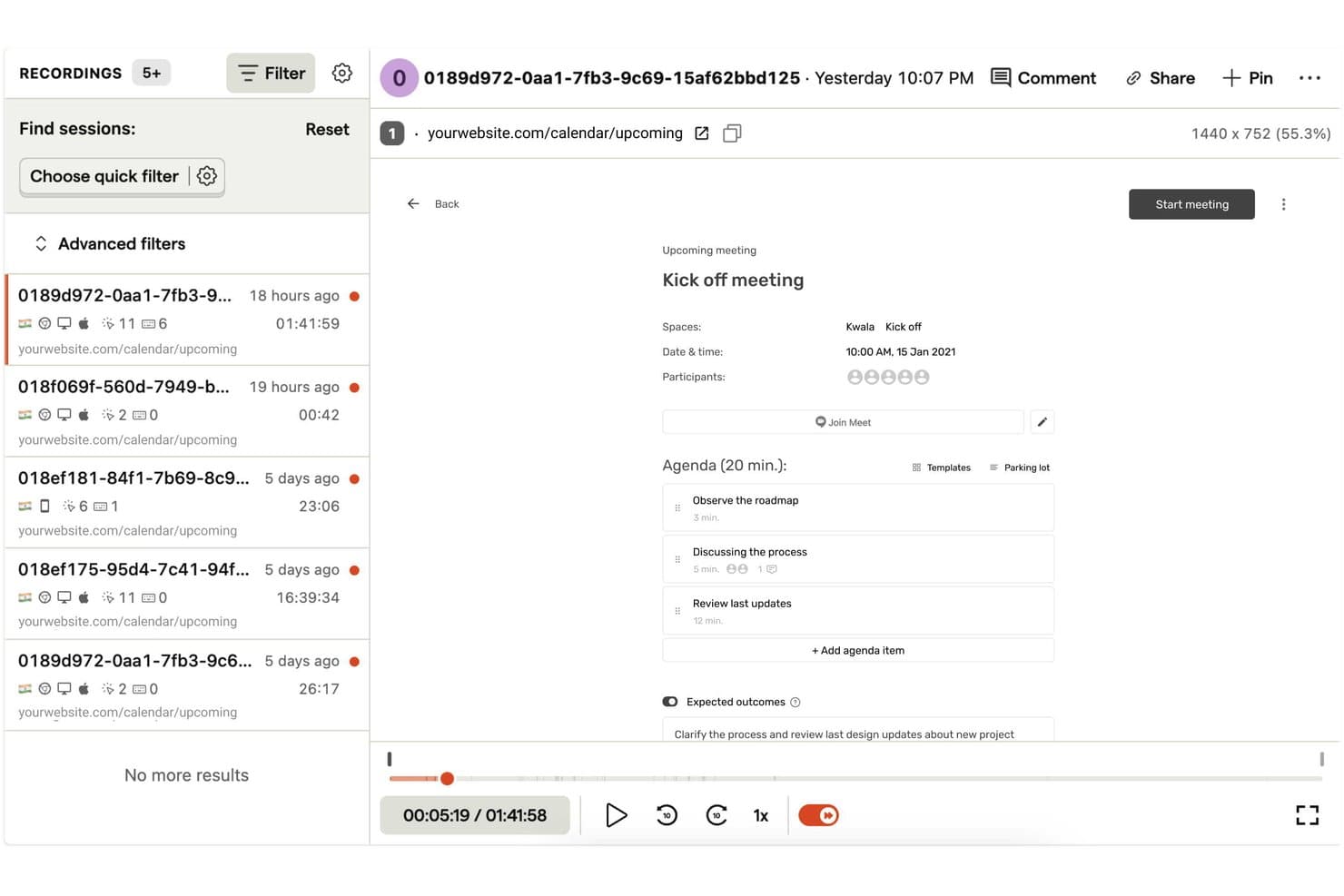
OpenReplay permite a los usuarios reproducir y filtrar fácilmente las sesiones de usuario grabadas. OpenReplay es una plataforma de reproducción de sesiones con grabaciones web y móviles con precisión a nivel de píxel, registros de consola y red sincronizados, mapas de calor, seguimiento de errores, analítica de productos y búsqueda de reproducciones.
¿Para quién es más adecuado OpenReplay?
Equipos de producto y UX con soporte de DevOps que necesitan una reproducción personalizable y autoalojada, además de un control total sobre los datos de los usuarios.
Por qué elegí OpenReplay
Elegí OpenReplay porque su edición gratuita, de código abierto y autoalojada proporciona a mi equipo control sobre los datos de reproducción y la personalización. Podemos inspeccionar los clics de frustración, los errores y los clics en elementos sin acción mediante OmniSearch, y después revisar los registros de consola y red sincronizados. Esto nos ayuda a diagnosticar un fallo en el proceso de pago sin enviar los datos de los clientes a un procesador externo.
Características principales de OpenReplay
- Sesiones con varias pestañas: Une la actividad de varias pestañas del navegador en un único recorrido del usuario.
- Mapas de calor: Visualiza los clics, el movimiento del ratón y los puntos problemáticos de clics repetidos.
- Reproducción de aplicaciones móviles: Admite los SDK de iOS, Android, React Native y Flutter.
- Momentos destacados de las sesiones: Permite recortar momentos de la reproducción con notas, etiquetas y enlaces para compartir.
Integraciones de OpenReplay
OpenReplay ofrece integraciones con Sentry, Datadog, Jira, GitHub, Slack, Google Tag Manager, Redux, Vuex, Pinia y Apollo. Su API REST admite conexiones personalizadas para sesiones, usuarios, eventos y datos en tiempo real.
¿Qué es gratis?
La edición de código abierto de OpenReplay es gratuita para siempre cuando la alojas en tu propia infraestructura. Está destinada a aplicaciones con poco tráfico, y gestionarás el alojamiento, el almacenamiento, el escalado y el soporte a través de la comunidad.
Pros and Cons
Pros:
- El autoalojamiento gratuito conserva el control total de los datos
- Los diagnósticos detallados conectan las reproducciones con el contexto técnico
- La retención ajustable de 180 días permite investigaciones más prolongadas
Cons:
- El autoalojamiento exige un mantenimiento continuo de DevOps
- La edición gratuita está destinada a aplicaciones con poco tráfico
Learn more about OpenReplay:
Otros programas gratuitos de reproducción de sesiones
Estas son algunas opciones adicionales de programas de reproducción de sesiones que también ofrecen planes o periodos de prueba gratuitos. Aunque estas herramientas no formaron parte de mi lista, merece la pena echarles un vistazo:
- 11FullSessionIdeal para la reproducción gratuita de sesiones móviles y web
- 12Microsoft ClarityLa mejor opción para obtener reproducciones ilimitadas de sesiones
- 13Hotjar (by Contentsquare)Ideal para mapas de calor, encuestas y repeticiones de sesiones en uno solo
- 14UXCamLa mejor opción gratuita para reproducir sesiones de aplicaciones móviles
- 15Lucky OrangeIdeal para chat en vivo activado por clics de frustración
- 16MouseflowIdeal para el abandono de formularios y la reproducción a nivel de campo
- 17LogRocketIdeal para la depuración a nivel de desarrollo en la reproducción de sesiones
- 18StatsigIdeal para repeticiones filtradas por exposición al experimento
- 19ContentsquareMejor para empresas que requieren pruebas compatibles con GDPR
Cómo evalúo el software gratuito de repetición de sesiones
Primero, defino qué se considera gratuito. Un plan gratuito para siempre necesita ofrecer grabaciones continuas significativas y una retención útil, no una prueba. A partir de ahí, divido mi evaluación en tres partes: funcionalidad principal, que tiene el mayor peso, como reproducir sesiones y filtrar grabaciones; características destacadas, como la generación de mapas de calor; y aspectos más allá del conjunto de funciones, como la ruta de actualización.
Funcionalidad principal (requisitos básicos para esta lista)
Además de mis requisitos para los planes gratuitos, utilizo un sistema de puntuación para seleccionar las herramientas de mi lista. Puntúo cada una en una escala de 0 (no ofrece la funcionalidad) a 5 (sobresale en esta área) para cada funcionalidad principal que se indica a continuación, según lo disponible en el plan gratuito. Después convierto el total en un porcentaje para ayudar a evaluar la adecuación general de cada herramienta, dando un peso adicional a cualquier funcionalidad que haya considerado esencial.
- Grabación de sesiones (esencial): Busco una reproducción fiable que muestre las acciones del usuario, los cambios de página y los controles estándar para revisar problemas de usabilidad.
- Cuota de grabación gratuita (esencial): Evalúo si el límite permite realizar revisiones continuas, como comprobar cada semana las sesiones de registro.
- Filtrado de sesiones: Los filtros combinados para página, dispositivo, fecha o acción del usuario deberían mostrar rápidamente las grabaciones relevantes.
- Seguimiento de clics y desplazamientos: Compruebo que se muestren claramente los clics, la profundidad de desplazamiento y el movimiento del puntero al revisar la navegación o el comportamiento de los formularios.
- Detección de errores y clics frustrados: Busco indicadores de clics frustrados, clics inactivos y errores de JavaScript que señalen posibles puntos de fricción.
- Retención de datos: El plan gratuito debería conservar las grabaciones el tiempo suficiente para comparar sesiones durante un ciclo de revisión del producto.
Una vez que tengo una lista de herramientas que cumplen los criterios, considero qué diferencia a cada plataforma.
Factores diferenciadores (lo que distingue a los proveedores)
Así es como comparo y contrasto los distintos proveedores:
Características destacadas
Busco planes gratuitos que generen automáticamente mapas de calor de clics y desplazamientos a partir de las sesiones grabadas. Los mapas de calor muestran el comportamiento agregado de un vistazo, lo que es más rápido que revisar individualmente las reproducciones cuando estás validando un cambio de diseño. Los enlaces de reproducción que se pueden compartir también son importantes. Cuando detecto un flujo de pago confuso, necesito enviar un enlace en Slack a mi ingeniero, no programar una sesión para compartir pantalla. Herramientas como Hotjar y Microsoft Clarity gestionan esto bien en sus niveles gratuitos. También compruebo si los registros de consola y de red aparecen integrados en la línea de tiempo de la reproducción, ya que eso me permite señalar un error de JS junto con la acción exacta del usuario que lo provocó.
Más allá de las características
Compruebo si los planes gratuitos incluyen el enmascaramiento predeterminado de la IIP, ya que los equipos de producto que revisan sesiones con entradas de formularios o páginas de cuentas necesitan esa protección sin tener que actualizar el plan. La postura respecto a la privacidad de los datos es importante incluso en el nivel gratuito; herramientas como PostHog y Microsoft Clarity gestionan el enmascaramiento desde el primer momento. También evalúo los límites de usuarios y las opciones para compartir, porque un PM que no puede involucrar a un diseñador o ingeniero sin encontrarse con un muro de pago pierde la mitad del valor de la repetición de sesiones. Por último, analizo el esfuerzo de instalación: una configuración con un único fragmento de código permite empezar a grabar en minutos, mientras que una incorporación con muchos SDK puede frenar durante días a un equipo reducido.
Cómo elegir un programa gratuito de reproducción de sesiones
Las listas complejas de funciones y las estructuras de precios pueden dificultar saber qué obtienes realmente de un programa gratuito de reproducción de sesiones. Para ayudarte a mantener la atención mientras avanzas en el proceso de selección del software, estos son algunos factores que debes tener en cuenta:
| Factor | Qué debes considerar |
| Alcance de la oferta gratuita | Comprueba qué incluye el plan gratuito, como los límites de sesiones, las funciones y el acceso de los usuarios. Asegúrate de que cubre tus necesidades básicas sin tener que actualizarlo de inmediato. |
| Escalabilidad | Considera si la herramienta puede crecer junto con tu equipo. Busca planes flexibles que se adapten al aumento del tráfico y de las necesidades de los usuarios con el tiempo. |
| Integraciones | Asegúrate de que sea compatible con tus herramientas actuales. Busca integraciones con plataformas como Google Analytics, sistemas de CRM y herramientas de marketing. |
| Facilidad de uso | Evalúa la interfaz de usuario y la navegación. Una herramienta fácil de configurar y utilizar ahorrará tiempo a tu equipo y reducirá la curva de aprendizaje. |
| Cumplimiento de la privacidad | Verifica que la herramienta cumpla con las normativas de protección de datos, como el RGPD. Esto es fundamental para proteger los datos de los usuarios y mantener su confianza. |
| Profundidad de las funciones | Evalúa la profundidad de las funciones disponibles, como los mapas de calor, las reproducciones de sesiones y la segmentación de usuarios. Un mayor número de funciones proporciona mejores conocimientos sobre el comportamiento de los usuarios. |
| Atención al cliente | Busca opciones de asistencia con capacidad de respuesta, como el chat en directo o el correo electrónico. Una asistencia fiable ayuda a resolver los problemas rápidamente y mantiene la productividad de tu equipo. |
¿Qué es el software gratuito de reproducción de sesiones?
El software de reproducción de sesiones es una herramienta que registra las interacciones de los usuarios en sitios web o aplicaciones, proporcionando información sobre su comportamiento. Estas herramientas suelen ofrecer planes o pruebas gratuitos con funciones limitadas o límites de uso. Los responsables de producto, diseñadores de UX y profesionales del marketing suelen utilizarlas para mejorar la experiencia del usuario y optimizar las tasas de conversión. Los mapas de calor, las grabaciones de sesiones y el análisis de las rutas de los usuarios ayudan a los equipos a comprender su comportamiento e identificar áreas de mejora.
Funciones del software gratuito de reproducción de sesiones
Revisemos las funciones que suelen incluirse en el software de reproducción de sesiones y cuáles se ofrecen normalmente en los planes gratuitos frente a los de pago.
Funciones habituales del software gratuito de reproducción de sesiones
- Grabaciones de sesiones: Captura las interacciones de los usuarios en tu sitio para comprender su comportamiento e identificar problemas.
- Mapas de calor: Visualiza dónde hacen clic y se desplazan los usuarios para optimizar el diseño y el contenido de las páginas.
- Análisis de las rutas de los usuarios: Sigue el recorrido que realizan los usuarios en tu sitio para encontrar puntos de abandono.
- Analítica básica: Obtén información sobre el comportamiento de los usuarios mediante métricas y datos sencillos.
- Herramientas de comentarios: Recopila directamente las opiniones de los usuarios para mejorar la experiencia general.
Funciones habituales del software de pago de reproducción de sesiones
- Segmentación avanzada: Filtra los datos de las sesiones por características demográficas o comportamiento de los usuarios para obtener información más detallada.
- Pruebas A/B: Prueba distintas versiones de tu sitio para comprobar cuál funciona mejor con los usuarios.
- Supervisión en tiempo real: Observa las interacciones de los usuarios mientras ocurren para resolver rápidamente los problemas.
- Paneles personalizables: Adapta las vistas de datos para centrarte en las métricas más relevantes para tus objetivos.
- Herramientas de cumplimiento de la privacidad: Asegúrate de que la recopilación de datos cumple normativas como el RGPD y la CCPA.
Ventajas del software gratuito de reproducción de sesiones
La implementación de un software gratuito de reproducción de sesiones ofrece varias ventajas para tu equipo y tu empresa. Estas son algunas de las que puedes esperar:
- Análisis rentable: Obtén información sobre el comportamiento de los usuarios sin gastar dinero, lo que lo hace ideal para empresas emergentes y pequeñas empresas.
- Información sobre el comportamiento de los usuarios: Comprende cómo interactúan los usuarios con tu sitio mediante grabaciones de sesiones y mapas de calor, lo que te ayudará a identificar las áreas problemáticas.
- Mejora de la experiencia del usuario: Utiliza herramientas de comentarios para recopilar las opiniones de los usuarios y realizar los ajustes necesarios para mejorar la experiencia general.
- Decisiones basadas en datos: Aprovecha la analítica básica para fundamentar tus decisiones y optimizar el rendimiento del sitio web basándote en datos reales de los usuarios.
- Configuración rápida: Muchas herramientas gratuitas ofrecen una instalación y configuración sencillas, lo que permite a tu equipo empezar a analizar rápidamente el comportamiento de los usuarios.
- Sin compromiso a largo plazo: Prueba las funciones y ventajas sin quedar sujeto a un contrato, lo que te ofrece flexibilidad para explorar distintas opciones.
- Cumplimiento de la privacidad: Algunas herramientas gratuitas incluyen funciones básicas de privacidad para ayudar a garantizar que los datos de los usuarios se gestionen de forma responsable.
Costes y precios del software gratuito de reproducción de sesiones
Entiendo que has llegado a este artículo buscando las mejores opciones de software de reproducción de sesiones disponibles de forma gratuita. Sin embargo, como los planes gratuitos solo ofrecen funciones limitadas, es muy probable que en el futuro necesites ampliar tu plan.
La siguiente tabla resume los planes habituales, sus precios medios y las funciones que suelen incluir las soluciones de software de reproducción de sesiones:
Tabla comparativa de planes de software de reproducción de sesiones
| Tipo de plan | Precio medio | Funciones habituales |
| Plan gratuito | $0 | Grabaciones de sesiones, analítica básica, mapas de calor, herramientas de comentarios de los usuarios y almacenamiento de datos limitado. |
| Plan personal | $5-$25/usuario/ mes | Analítica avanzada, segmentación de usuarios, mayor almacenamiento de datos y asistencia prioritaria al cliente. |
| Plan empresarial | $50-$100/usuario /mes | Paneles personalizables, supervisión en tiempo real, pruebas A/B y herramientas mejoradas de cumplimiento de la privacidad. |
| Plan para empresas | $150+/usuario/ mes | Acceso a todas las funciones, gestión de cuenta específica, integraciones personalizadas y asistencia integral. |
Preguntas frecuentes sobre software gratuito de reproducción de sesiones
Aquí tienes respuestas a preguntas frecuentes sobre el software gratuito de reproducción de sesiones:
¿Por qué deberías utilizar reproducciones de sesiones en la investigación de usuarios para aplicaciones móviles?
\u003cspan style=\u0022font-weight: 400\u0022\u003eLas reproducciones de sesiones proporcionan información muy valiosa sobre las interacciones de los usuarios con tu aplicación. Ayudan a tu equipo a identificar rápidamente los problemas y depurar más rápido, mejorando la experiencia del usuario en cada visita. Estos datos son fundamentales para perfeccionar el diseño y la funcionalidad de las aplicaciones móviles y satisfacer las expectativas de los usuarios.\u003c/span\u003e
¿Cuál es el objetivo principal de la reproducción de sesiones?
\u003cspan style=\u0022font-weight: 400\u0022\u003eEl objetivo principal de la reproducción de sesiones es comprender el comportamiento de los usuarios e identificar dónde se interrumpe su recorrido. Estos datos te ayudan a crear flujos de usuario que cumplan las expectativas de los clientes y mejoren el rendimiento general del sitio.\u003c/span\u003e
¿Cómo funciona la reproducción de sesiones de Datadog?
\u003cspan style=\u0022font-weight: 400\u0022\u003eLa reproducción de sesiones de Datadog registra como eventos cada cambio en el DOM, como las entradas de los usuarios. A continuación, agrupa estos eventos en una representación visual de la sesión de cada usuario, lo que te permite ver exactamente lo que los usuarios experimentan en tu sitio.\u003c/span\u003e
¿Cuál es la tasa de muestreo de la reproducción de sesiones de Datadog?
\u003cspan style=\u0022font-weight: 400\u0022\u003eLa tasa de muestreo en la configuración de reproducción de sesiones de Datadog oscila entre 0,0 y 100,0. Determina el porcentaje de sesiones grabadas: 0 significa que no se realizan reproducciones y 100 significa que se incluyen todas las sesiones. Ajusta este valor para controlar el volumen de datos.\u003c/span\u003e
¿Cómo ayudan las reproducciones de sesiones a mejorar los recorridos de los clientes?
\u003cspan style=\u0022font-weight: 400\u0022\u003eLas reproducciones de sesiones ponen de relieve las áreas en las que los usuarios encuentran dificultades, lo que te ayuda a localizar y resolver los problemas. Al comprender estos puntos débiles, tu equipo puede tomar decisiones basadas en datos para facilitar el recorrido del cliente y mejorar su satisfacción.\u003c/span\u003e
¿Se pueden utilizar los datos de reproducción de sesiones para la depuración?
\u003cspan style=\u0022font-weight: 400\u0022\u003eSí, los datos de reproducción de sesiones son increíblemente útiles para la depuración. Al ver las reproducciones, los desarrolladores pueden comprobar exactamente dónde se producen los errores en el recorrido del usuario, lo que permite identificar y resolver los problemas más rápidamente.\u003c/span\u003e