

Con tantas soluciones diferentes de crecimiento impulsado por el producto disponibles, resulta difícil determinar cuál es la adecuada para ti. Sabes que quieres aumentar la adopción por parte de los usuarios, la adquisición orgánica de clientes mediante el boca a boca, la satisfacción del cliente y contar con un modelo de adquisición de clientes más eficiente y escalable, pero necesitas averiguar qué herramienta es la mejor para el trabajo. ¡Estoy aquí para ayudarte! En esta publicación te ayudaré a elegir fácilmente, compartiendo mis experiencias personales utilizando docenas de herramientas con equipos grandes y productos diversos, junto con mis selecciones del mejor software de crecimiento impulsado por el producto.
Por qué confiar en nuestras recomendaciones de software
6,700+
Reviews
20
Industry experts
16+
Evaluation factors
14
Years
Nuestro equipo lleva probando y evaluando software desde 2012. Como gestores de producto, sabemos lo difícil —y lo importante— que es elegir el software adecuado.
Para esta guía, evaluamos las herramientas mediante pruebas prácticas e investigación independiente, puntuando las herramientas según nuestros criterios de selección.
Nuestras reseñas reflejan nuestro criterio editorial humano, no un discurso de ventas.
 Hannah ClarkSenior TPM
- Cristiano ValimSenior UI/UX Lead
Resumen del mejor software de crecimiento impulsado por el producto
Esta tabla comparativa resume los detalles de precios de mis principales selecciones de software de crecimiento impulsado por el producto para ayudarte a encontrar la mejor opción para tu presupuesto y las necesidades de tu negocio.
| Tool | Best For | Trial Info | Price | ||
|---|---|---|---|---|---|
| 1 | Ideal para flujos personalizados de incorporación de usuarios | Prueba gratuita de 14 días | Desde $174/mes (facturado anualmente) | Website | |
| 2 | Ideal para la incorporación dentro de la aplicación sin código y el análisis de embudos | Prueba gratuita de 14 días | Desde $500/mes | Website | |
| 3 | La mejor opción para la orientación y adopción integradas en la aplicación en empresas | Prueba gratuita disponible | Precios disponibles previa solicitud | Website | |
| 4 | Am besten für tiefgehende Open-Source-Produktanalysen geeignet | Kostenloser Tarif verfügbar | Preise auf Anfrage | Website | |
| 5 | Ideal para el análisis retrospectivo del recorrido del usuario | Plan gratuito disponible | Precios disponibles bajo solicitud | Website | |
| 6 | Ideal para obtener información sobre la adopción del producto guiada por IA | Prueba gratuita de 14 días + demostración gratuita disponible | Desde $299/mes | Website | |
| 7 | Ideal para incorporación sin código con resultados desde el primer día | Prueba gratuita disponible | Precios bajo consulta | Website | |
| 8 | Ideal para análisis unificados y orientación dentro de la aplicación | Plan gratuito disponible | Precios disponibles bajo solicitud | Website | |
| 9 | Lo mejor para experiencias de incorporación personalizadas | Prueba gratuita de 30 días + plan gratuito + demo gratuita disponible | Precio disponible bajo solicitud | Website | |
| 10 | La mejor opción para obtener análisis de producto de código abierto en profundidad | Plan gratuito disponible | Precios disponibles bajo solicitud | Website |


Análisis del mejor software de crecimiento impulsado por el producto
A continuación encontrarás mis resúmenes detallados del mejor software de crecimiento impulsado por el producto que llegó a mi lista de preseleccionados. Mis análisis ofrecen una mirada detallada a las funciones principales, las ventajas y desventajas, las integraciones y los casos de uso ideales de cada herramienta para ayudarte a encontrar la mejor opción para ti.
 Ideal para flujos personalizados de incorporación de usuarios
- Prueba gratuita de 14 días
- Desde $174/mes (facturado anualmente)
Visit WebsiteRating:4.7/5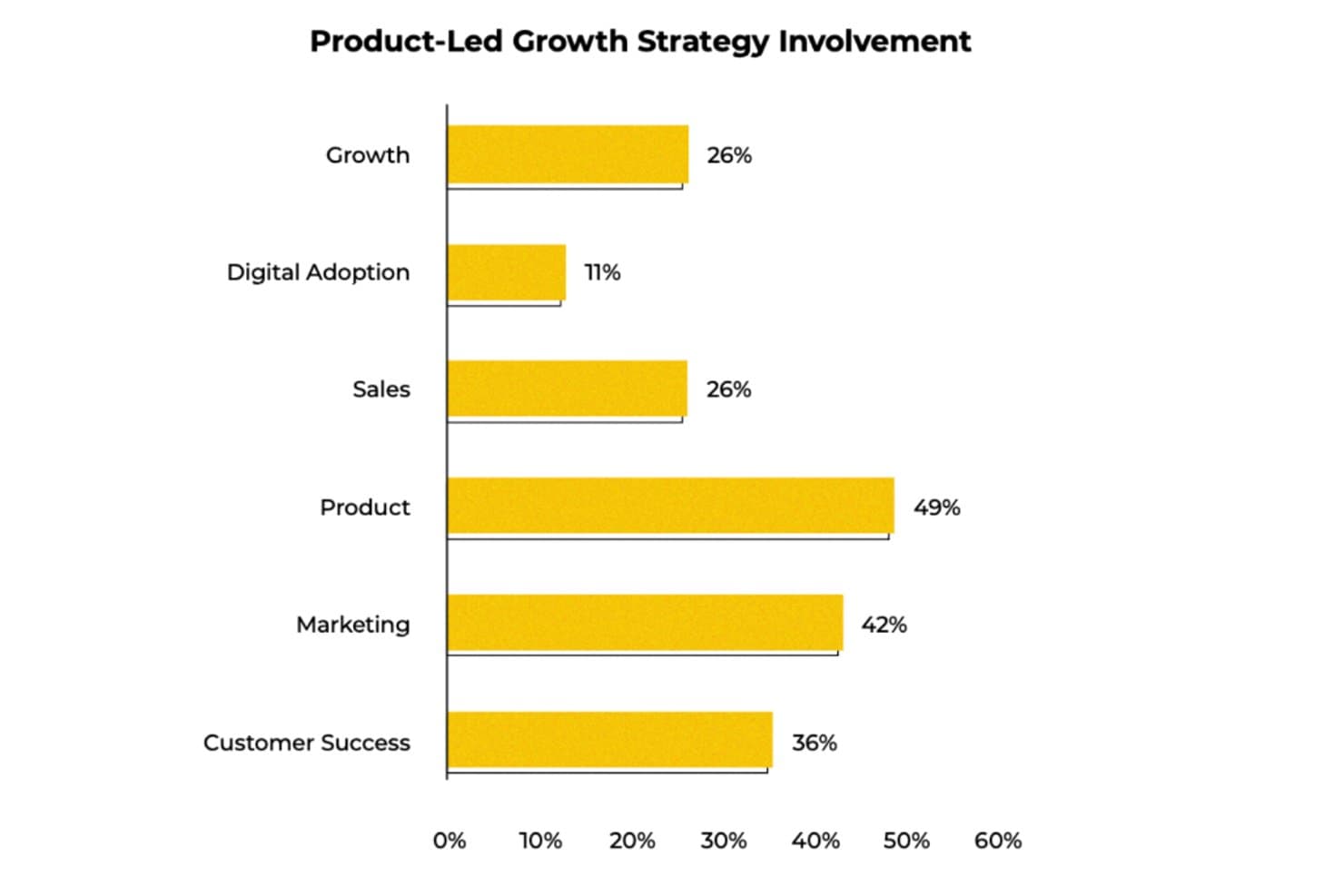
UserGuiding muestra qué equipos están más involucrados en las estrategias de crecimiento impulsado por el producto. UserGuiding es una plataforma sin código de incorporación de usuarios y adopción de productos que combina guías dentro de la aplicación, listas de verificación, información sobre herramientas, encuestas, centros de recursos y seguimiento de eventos para ayudar a los equipos a captar y activar usuarios directamente dentro de su producto.
¿Para quién es UserGuiding más adecuado?
UserGuiding es una opción ideal para gestores de producto de empresas SaaS pequeñas y medianas que desean crear y lanzar flujos de incorporación dentro de la aplicación sin depender de recursos de ingeniería.
Por qué elegí UserGuiding
Elegí UserGuiding como una de las mejores opciones porque su creador sin código permite lanzar flujos de incorporación, listas de verificación e información sobre herramientas personalizados sin recurrir a recursos de ingeniería. Me gusta especialmente la segmentación por capas, que permite dirigir la experiencia a los usuarios simultáneamente según los datos de eventos, el tipo de plan y los atributos de la empresa, de modo que un usuario del 'plan Pro que no ha utilizado la función de exportación' tenga una experiencia diferente a la de un usuario nuevo en periodo de prueba.
Funciones clave de UserGuiding
- Seguimiento de eventos sin código: La captura de eventos mediante apuntar y hacer clic permite realizar un seguimiento del uso de las funciones sin escribir una sola línea de código ni esperar al equipo de ingeniería.
- Encuestas NPS dentro de la aplicación: Las encuestas NPS nativas recopilan la opinión de los usuarios directamente en el producto, con resultados que pueden activar acciones automatizadas de seguimiento en Intercom.
- Reproducción de sesiones: La reproducción de sesiones integrada registra las interacciones de los usuarios para que puedas observar cómo recorren tu producto y detectar puntos de fricción.
- Servidor MCP: Conecta los datos de tu producto con clientes de IA como Claude o Cursor, lo que permite consultar métricas de participación y segmentar el comportamiento en lenguaje natural.
Integraciones de UserGuiding
UserGuiding ofrece integraciones nativas con HubSpot, Salesforce, Intercom, Slack, Segment, Mixpanel, Amplitude, Google Analytics y Woopra. También admite webhooks, una API y un servidor MCP para conexiones personalizadas y consultas de datos del producto asistidas por IA.
Pros and Cons
Pros:
- Los flujos personalizados de incorporación se lanzan sin necesidad de ingeniería
- Segmenta a los usuarios según su comportamiento y los atributos de la empresa
- El NPS nativo conecta los comentarios con las iniciativas de adopción
Cons:
- Carece de análisis de cohortes, rutas y retención
- No ofrece una puntuación específica de clientes potenciales cualificados por el producto
Learn more about UserGuiding: Ideal para la incorporación dentro de la aplicación sin código y el análisis de embudos
- Prueba gratuita de 14 días
- Desde $500/mes
Visit WebsiteRating:4.8/5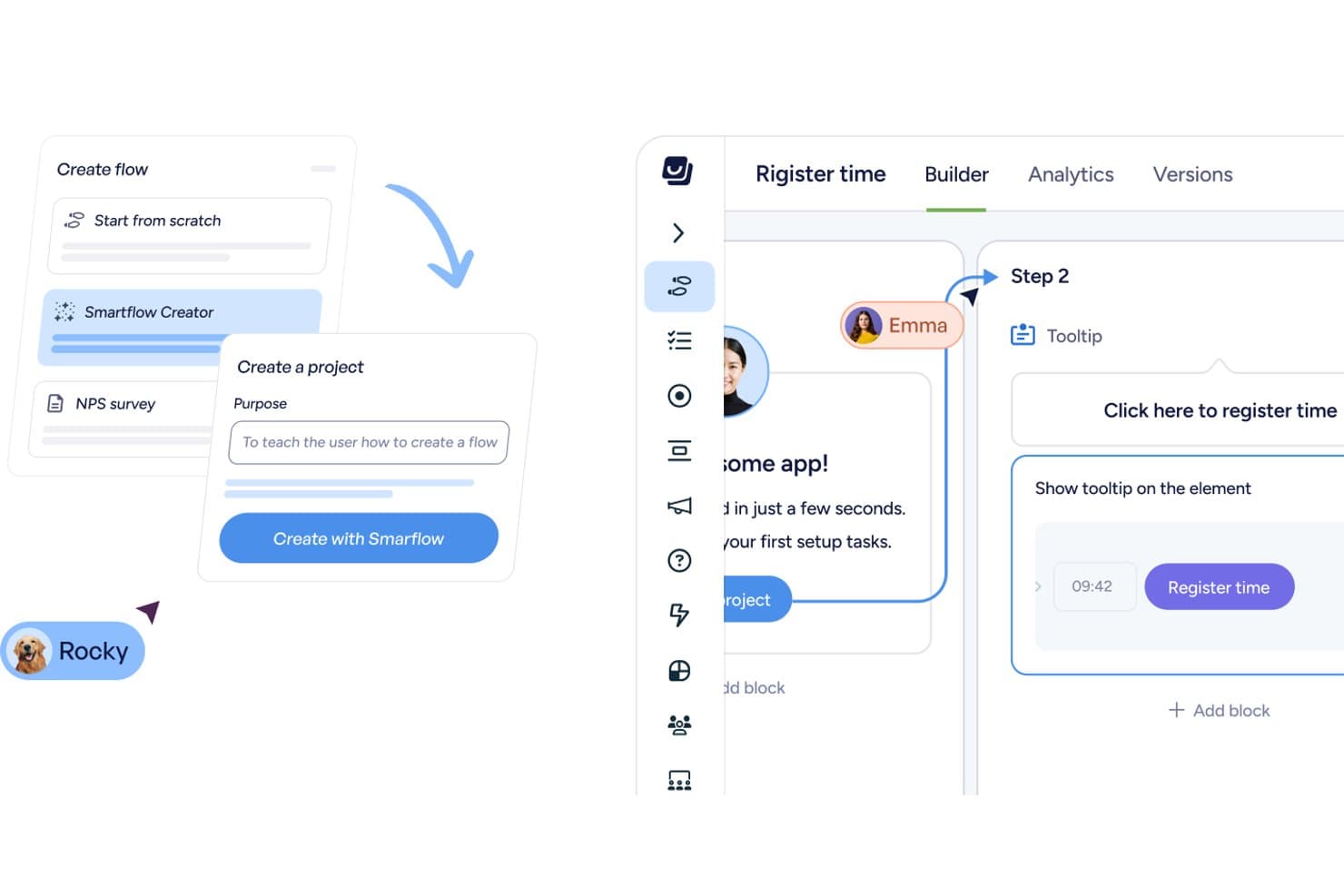
Userflow permite crear flujos de incorporación con consejos emergentes y pasos asistidos por IA. Userflow es una plataforma PLG sin código que combina flujos de incorporación dentro de la aplicación, recorridos del producto, listas de comprobación, encuestas y análisis de uso —incluidos el análisis de embudos y el seguimiento de eventos— en una sola herramienta creada para aplicaciones web.
¿Para quién es más adecuado Userflow?
Userflow es ideal para responsables de producto y equipos de crecimiento de empresas B2B SaaS que quieren crear y optimizar la incorporación dentro de la aplicación sin escribir código.
Por qué elegí Userflow
Elegí Userflow como una de las mejores opciones porque su Estudio de adopción sin código permite crear flujos, listas de comprobación y consejos emergentes sin escribir una sola línea de código, y después ver inmediatamente dónde abandonan los usuarios mediante el análisis de embudos integrado. Me gusta especialmente el Constructor FlowAI, que redacta los pasos de los flujos a partir de una instrucción, para que puedas pasar de detectar una brecha en el embudo a lanzar una solución de incorporación específica en cuestión de minutos. El flujo de trabajo 'Perspectiva → Acción → Impacto' es lo que lo diferencia: identificas un abandono en el embudo y luego diriges un flujo correctivo al segmento exacto de usuarios, todo dentro de una sola herramienta.
Características principales de Userflow
- Constructor FlowAI: Redacta los pasos y la estructura de un flujo dentro de la aplicación a partir de una instrucción, para que puedas lanzar orientación sin escribir una sola línea de código.
- Agente de adopción: Un asistente de IA entrenado con tu aplicación, documentación y biblioteca de flujos que responde a las preguntas de los usuarios, inicia flujos adecuados o completa tareas directamente dentro de tu producto.
- Sincronización con los CRM HubSpot y Salesforce: La integración bidireccional con el CRM está incluida en todos los planes, por lo que los datos de comportamiento de los usuarios se transfieren automáticamente entre Userflow y tus herramientas de ingresos.
- Userflow MCP: Conecta Userflow con herramientas de IA como Claude y ChatGPT, lo que permite consultar el rendimiento de los flujos y crear segmentos o paneles mediante una interfaz conversacional.
Integraciones de Userflow
Userflow ofrece seis integraciones nativas con HubSpot, Salesforce, Slack, Mixpanel, Heap y Amplitude. También admite la API REST, los webhooks y conexiones de Userflow MCP con Claude, ChatGPT y Gemini.
Pros and Cons
Pros:
- Los abandonos del embudo activan una incorporación específica
- FlowAI redacta rápidamente los pasos de incorporación
- Los usuarios elogian la asistencia rápida y útil
Cons:
- Los análisis no incluyen vistas de retención ni de cohortes
- Los flujos requieren mantenimiento después de cambios en la interfaz
Learn more about Userflow: La mejor opción para la orientación y adopción integradas en la aplicación en empresas
- Prueba gratuita disponible
- Precios disponibles previa solicitud
Visit WebsiteRating:4.6/5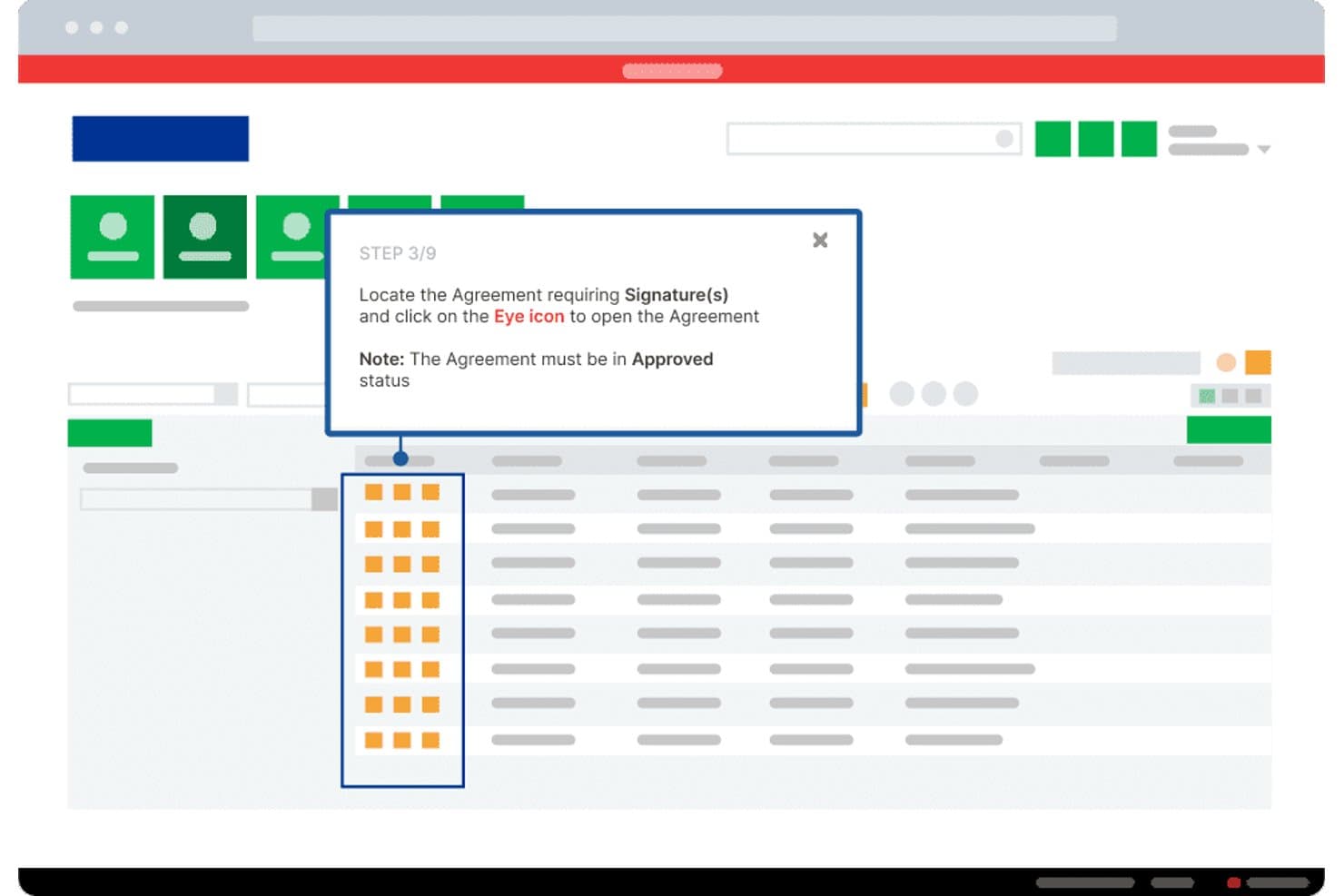
Whatfix guía a los usuarios durante la firma de acuerdos mediante información sobre herramientas paso a paso. Whatfix es una plataforma empresarial de adopción digital (DAP) que combina herramientas de orientación integradas en la aplicación y sin código —incluidos recorridos guiados, información sobre herramientas y listas de comprobación— con análisis de producto que incluyen seguimiento de eventos mediante AutoCapture, informes de embudo e información de uso basada en IA.
¿Para quién es más adecuado Whatfix?
Whatfix es adecuado para equipos empresariales que necesitan impulsar la adopción de software en implementaciones grandes y complejas, especialmente cuando las herramientas internas abarcan varias plataformas.
Por qué elegí Whatfix
Whatfix ocupa un lugar en mi lista de opciones principales porque su conjunto de herramientas de orientación integradas en la aplicación y sin código es realmente el mejor de su categoría para equipos empresariales que intentan impulsar la adopción a gran escala. Me encanta cómo AutoCapture permite realizar un seguimiento del uso de las funciones y de los puntos de abandono sin tocar una sola línea de código, y luego responder con Flujos o consejos inteligentes específicos creados en la misma plataforma. El agente de información de IA va aún más lejos, ya que permite hacer preguntas en lenguaje natural sobre el comportamiento de los usuarios y detectar tendencias antes de que se conviertan en problemas.
Características principales de Whatfix
- Segmentos en tiempo real: Segmenta automáticamente a los usuarios según señales de comportamiento en directo, para que puedas dirigir contenido integrado en la aplicación a grupos específicos sin crear listas manualmente.
- Reproducción de sesiones: Registra las sesiones de los usuarios con enmascaramiento de información de identificación personal (PII) integrado, lo que permite observar exactamente dónde tienen dificultades dentro de tu producto.
- Encuestas NPS y de usabilidad: Las herramientas de encuesta integradas recopilan comentarios de los usuarios directamente en el producto, con análisis basado en IA de las respuestas abiertas.
- Implementación multiplataforma: Funciona en entornos web, de escritorio, móviles y VDI, cubriendo toda tu pila de software desde una única plataforma.
Integraciones de Whatfix
Whatfix ofrece integraciones documentadas con Amplitude, Mixpanel, Segment, Google Analytics, Salesforce, Heap, FullStory, Power BI, Google Sheets y Microsoft Excel. El plan Estándar admite dos integraciones, mientras que el plan Premium admite más y el plan Empresarial admite integraciones ilimitadas.
Pros and Cons
Pros:
- Los cambios de incorporación sin código no requieren ingeniería
- AutoCapture conecta los datos de adopción con la orientación
- Admite implementaciones complejas en varias aplicaciones
Cons:
- No ofrece puntuación PQL nativa para equipos de crecimiento
- La configuración empresarial puede requerir mantenimiento continuo
Learn more about Whatfix: Am besten für tiefgehende Open-Source-Produktanalysen geeignet
- Kostenloser Tarif verfügbar
- Preise auf Anfrage
Visit WebsiteRating:4.5/5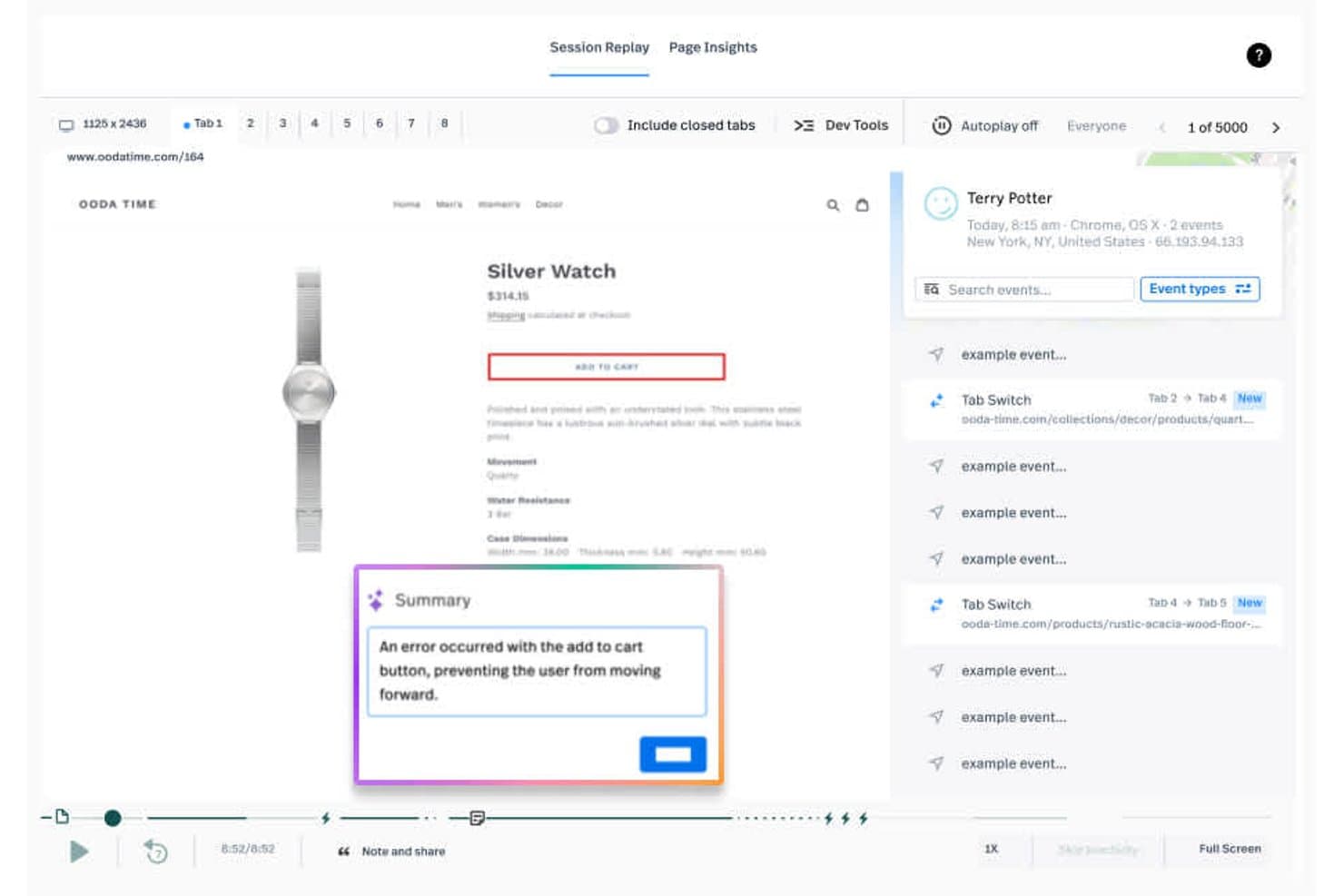
PostHog erfasst Website-Verweise und Sitzungen in visuellen Übersichten. PostHog ist eine Open-Source-Plattform für produktorientiertes Wachstum, die Produktanalysen, Sitzungsaufzeichnungen, Funktionsflags, A/B-Tests, Umfragen und eine integrierte CDP unter einem Konto vereint.
Für wen ist PostHog am besten geeignet?
PostHog eignet sich besonders für technische Produktteams – insbesondere für Teams mit Entwicklerressourcen –, die detaillierte Analysen, Sitzungsaufzeichnungen und Experimente in einer einzigen Open-Source-Plattform nutzen möchten.
Warum ich mich für PostHog entschieden habe
PostHog hat sich einen Platz auf meiner Auswahlliste verdient, weil die Analysen sofort einsatzbereit so tiefgehend sind. Ich spreche von HogQL-Abfragen, Pfadanalyse, Lebenszyklusberichten und Stickiness-Metriken an einem Ort. Dadurch kann mein Team genau feststellen, wo Nutzer abspringen und warum. Besonders gefällt mir, wie Sitzungsaufzeichnungen direkt mit den Abbruchpunkten im Trichter verknüpft sind. Statt zu raten, sieht man echte Nutzer, die auf echte Hürden stoßen.
Die wichtigsten Funktionen von PostHog
- Funktionsflags: Steuern Sie, welche Nutzer neue Funktionen oder Änderungen sehen, und führen Sie Produktaktualisierungen für bestimmte Segmente ein, ohne eine vollständige Veröffentlichung durchführen zu müssen.
- A/B-Tests: Führen Sie integrierte Experimente durch, die messen, wie sich Produktänderungen auf Aktivierung, Bindung und Konversionsraten auswirken.
- NPS- und Rückmeldungsumfragen: Sammeln Sie Nutzerrückmeldungen innerhalb des Produkts mithilfe integrierter Umfragevorlagen, einschließlich NPS, das direkt mit Verhaltensdaten verknüpft ist.
- CDP mit mehr als 50 Zielsystemen: Übertragen Sie Verhaltensdaten mithilfe von Echtzeittransformationen und Webhook-Zustellung an Werkzeuge wie Salesforce, HubSpot und Customer.io.
PostHog-Integrationen
Die CDP von PostHog lässt sich mit mehr als 50 Zielsystemen verbinden, darunter Salesforce, HubSpot, Braze, Customer.io, Vitally, Gainsight, Slack und PagerDuty. Außerdem bestehen Verbindungen zu Snowflake und BigQuery, mit Echtzeittransformationen und Webhook-Zustellung über Hog-Funktionen.
Pros and Cons
Pros:
- Detaillierte Trichter zeigen Abbrüche bei der Aktivierung auf
- Sitzungsaufzeichnungen verknüpfen Hürden mit dem Nutzerverhalten
- Kohorten ermöglichen gezielte Experimente und Umfragen
Cons:
- Produkttouren für die Einführung sind noch unausgereift
- Die PQL-Bewertung erfordert die manuelle Erstellung von Signalen
Learn more about Fullstory: Ideal para el análisis retrospectivo del recorrido del usuario
- Plan gratuito disponible
- Precios disponibles bajo solicitud
Visit WebsiteRating:4.3/5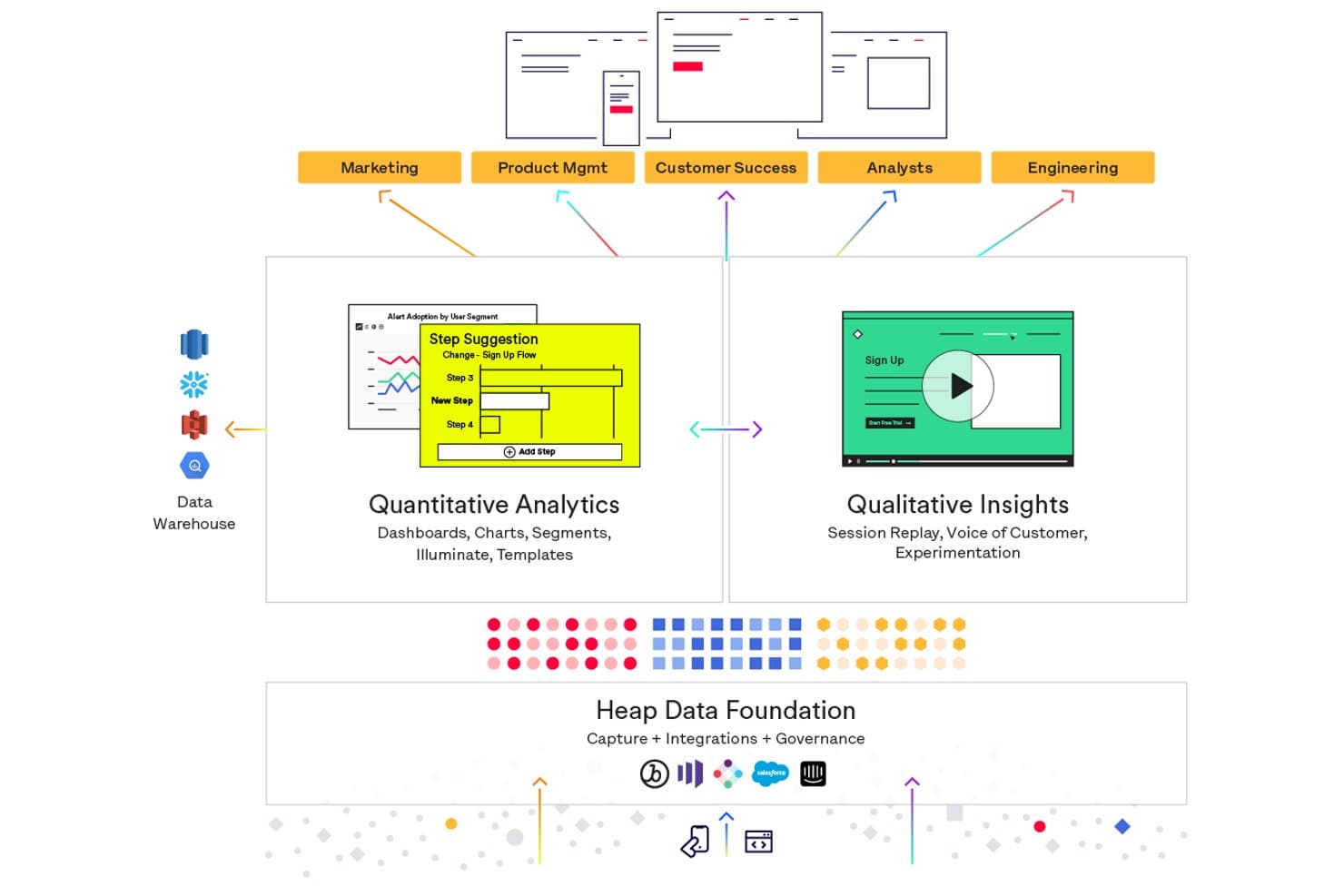
Heap unifica los análisis cuantitativos y la información cualitativa en una sola plataforma. Heap (by Contentsquare) es una plataforma de análisis de productos que captura automáticamente cada interacción del usuario en la web y en dispositivos móviles, lo que permite crear embudos, mapas de recorrido, informes de retención y análisis de interacción sin etiquetar previamente los eventos.
¿Para quién es más adecuado Heap (by Contentsquare)?
Heap es una opción ideal para los equipos de producto que necesitan analizar retrospectivamente el comportamiento de los usuarios sin depender de los ingenieros para etiquetar previamente cada evento.
Por qué elegí Heap (by Contentsquare)
Heap ocupa un lugar en mi lista de favoritos porque su motor de captura automática registra cada interacción del usuario, de modo que puedo crear embudos y mapas de recorrido en torno a eventos que nunca se etiquetaron previamente. Esta capacidad de análisis retrospectivo significa que, si se lanza una funcionalidad y su adopción se estanca tres semanas después, puedo reconstruir el recorrido completo del usuario sin esperar a que el equipo de ingeniería instrumente nada. La matriz de interacción de Heap se suma a esto al mostrar qué funcionalidades adoptan realmente los usuarios y cuáles ignoran.
Características principales de Heap (by Contentsquare)
- Captura automática: Heap registra automáticamente cada interacción del usuario en la web y en dispositivos móviles sin requerir eventos instrumentados previamente.
- Heap Illuminate: Una capa basada en IA que revela patrones de comportamiento e información que no sabías que debías buscar.
- Análisis basado en cuentas: Realiza un seguimiento del uso del producto y de las tendencias de adopción a nivel de cuenta, no solo a nivel de usuario individual.
- Heap Activate: Envía los datos de comportamiento de Heap a herramientas de interacción de terceros para activar campañas de correo electrónico y mensajería dentro de la aplicación.
Integraciones de Heap (by Contentsquare)
Heap incluye integraciones con Split, Statsig, Segment, Census, Userlist, Product Fruits, Userflow, Candu, CommandBar e Intercom. Heap también ofrece API y Heap Connect para la sincronización con almacenes de datos.
Pros and Cons
Pros:
- Analiza retrospectivamente los recorridos de usuarios sin etiquetar
- La captura automática reduce el trabajo de instrumentación del equipo de ingeniería
- Revela patrones de adopción y retención de funcionalidades
Cons:
- No incluye un creador nativo de incorporación dentro de la aplicación
- Los datos capturados automáticamente pueden saturar el análisis
Learn more about Heap (by Contentsquare): Ideal para obtener información sobre la adopción del producto guiada por IA
- Prueba gratuita de 14 días + demostración gratuita disponible
- Desde $299/mes
Visit WebsiteRating:4.7/5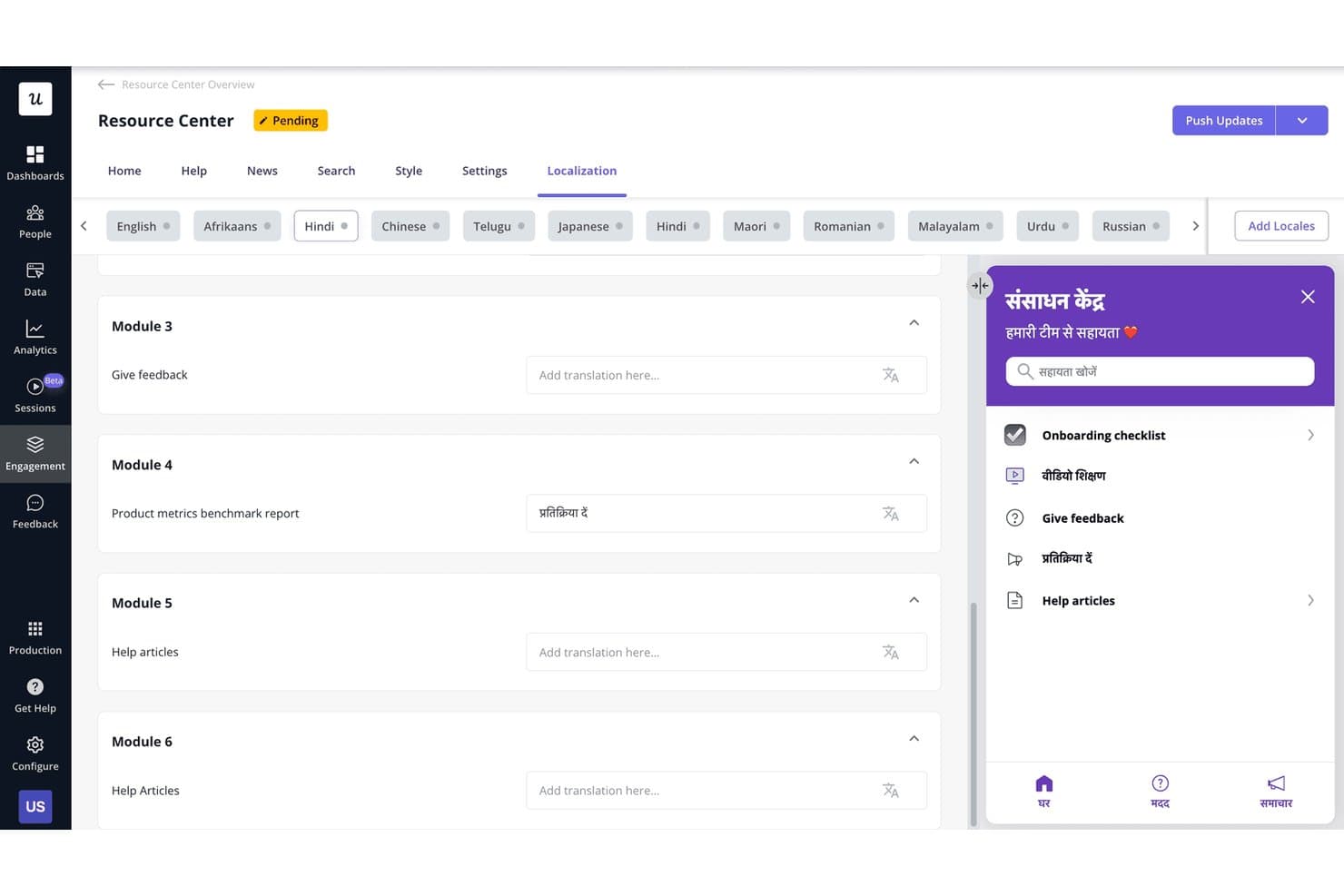
Userpilot permite a los usuarios localizar el contenido del Centro de recursos en varios idiomas. Userpilot es una plataforma de crecimiento impulsado por el producto que reúne análisis de productos, interacción en la aplicación sin código, segmentación de usuarios, reproducción de sesiones y herramientas de comentarios en un solo lugar.
¿Para quién es más adecuado Userpilot?
Userpilot es una opción excelente para gerentes de producto y gerentes de marketing de producto en empresas B2B SaaS que necesitan análisis, interacción en la aplicación y comentarios de los usuarios en un solo lugar.
Por qué elegí Userpilot
Elegí Userpilot como una de las mejores opciones porque su agente de IA Lia realmente cambia la forma en que los equipos de producto interpretan los datos de adopción. En lugar de revisar manualmente los embudos y los informes de cohortes, puedo hacerle a Lia una pregunta directa sobre la adopción de una función y obtener una respuesta predictiva en segundos. La captura automática retroactiva de eventos también destaca para los flujos de trabajo de PLG, ya que significa que nunca pierdes el acceso al análisis histórico solo porque hayas definido un evento nuevo tarde.
Funciones principales de Userpilot
- Constructor de interacción en la aplicación sin código: Crea flujos de varios pasos, información sobre herramientas, listas de verificación y banners sin escribir una sola línea de código.
- Encuestas NPS y dentro de la aplicación: Recopila comentarios de los usuarios directamente dentro de tu producto mediante NPS, CSAT y formatos de encuesta personalizados.
- Reproducción de sesiones con señales de frustración: Mira sesiones de usuarios grabadas que marcan automáticamente los clics repetidos y los errores relacionados con el abandono del embudo.
- Segmentación de usuarios: Crea segmentos a partir del comportamiento, los atributos de los usuarios y los datos de la empresa para mostrar contenido dentro de la aplicación en tiempo real.
Integraciones de Userpilot
Userpilot ofrece seis integraciones nativas documentadas, incluidas Segment, Mixpanel, Amplitude, Heap, Intercom y Slack. El plan Enterprise añade integraciones con HubSpot y Salesforce, mientras que Growth y los planes superiores incluyen una API HTTP y webhooks para conectividad personalizada.
Pros and Cons
Pros:
- La IA aclara rápidamente las tendencias de adopción
- La captura retroactiva conserva el historial de eventos omitidos
- Los flujos sin código se ponen en marcha sin apoyo del equipo de ingeniería
Cons:
- Los análisis avanzados requieren acceso a planes de nivel superior
- Los usuarios informan de bloqueos y fallos ocasionales
Learn more about Userpilot: Ideal para incorporación sin código con resultados desde el primer día
- Prueba gratuita disponible
- Precios bajo consulta
Visit WebsiteRating:4.7/5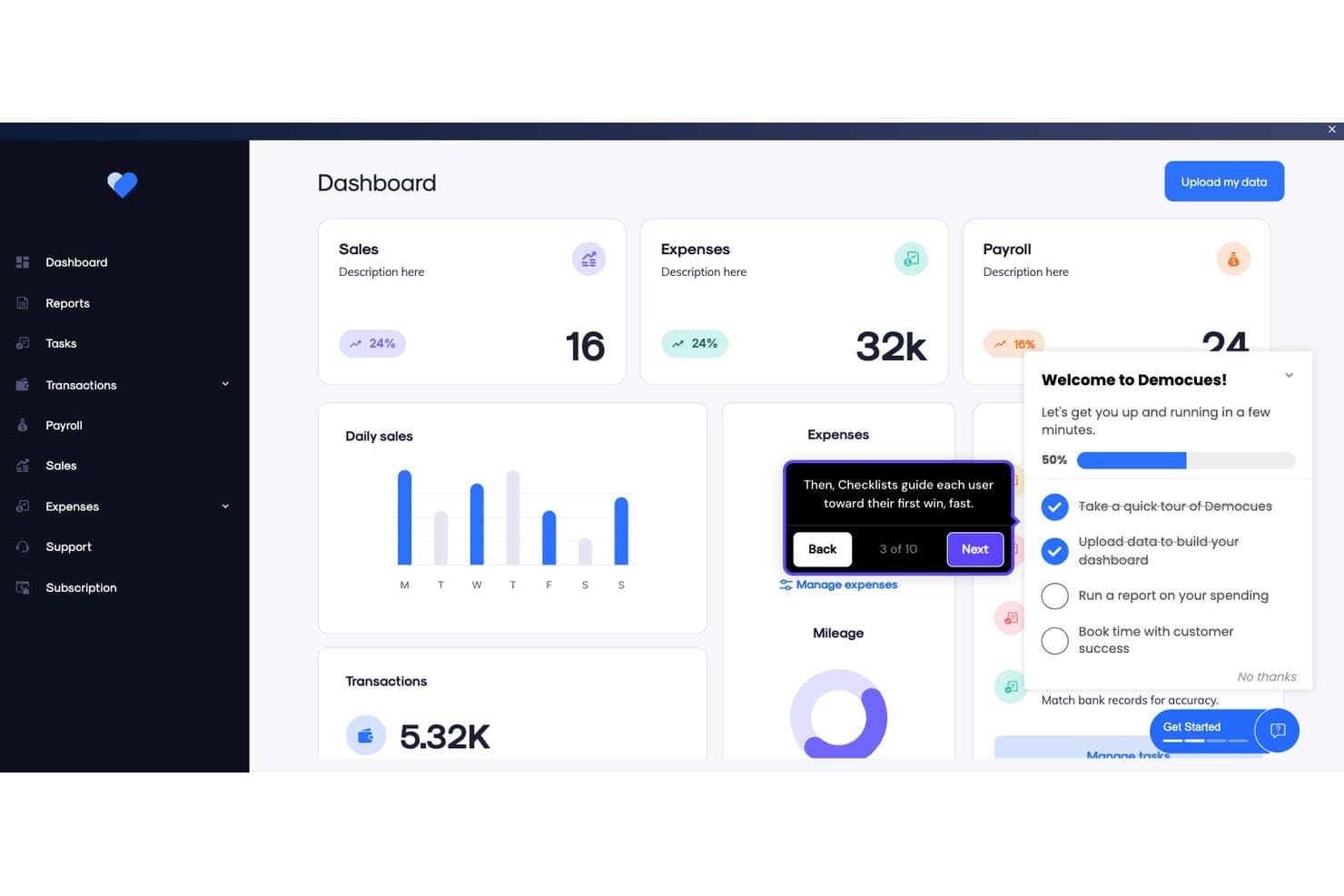
Appcues guía a los usuarios durante la incorporación con listas de comprobación e informaciones sobre herramientas. Appcues es una plataforma de crecimiento impulsado por el producto sin código que combina herramientas de interacción dentro de la aplicación—flujos, listas de comprobación, información sobre herramientas, banners y encuestas—con analítica de producto y creación de experiencias asistida por IA.
¿Para quién es más adecuado Appcues?
Appcues es una excelente opción para gerentes de producto y gerentes de marketing de producto en empresas SaaS que necesitan lanzar flujos de incorporación y experiencias dentro de la aplicación sin recurrir al equipo de ingeniería.
Por qué elegí Appcues
Elegí Appcues como una de las mejores opciones porque su creador sin código ofrece resultados reales desde el primer día: la mayoría de los equipos lanza su primer flujo de incorporación en un plazo de 24 horas desde la instalación, sin intervención del equipo de ingeniería. Me encanta que los recursos de marca se carguen una sola vez y se apliquen automáticamente a todos los flujos, listas de comprobación e informaciones sobre herramientas. La IA redacta experiencias basadas en los datos de tu producto y detecta enlaces rotos en los flujos activos, por lo que tu incorporación se mantiene actualizada sin auditorías manuales constantes.
Características principales de Appcues
- Segmentación basada en el comportamiento: Dirige contenido a los usuarios según acciones y atributos específicos dentro de la aplicación, enriquecidos con datos de tu CRM, CDP o almacén de datos.
- Segmentación por correo electrónico y notificaciones push: Activa campañas de correo electrónico y notificaciones push junto con experiencias dentro de la aplicación desde una sola plataforma, utilizando las mismas reglas de segmentación.
- Análisis del incremento: Mide si una experiencia específica cambió el comportamiento de los usuarios que la vieron, en comparación con quienes no la vieron.
- Integración con servidor MCP: Consulta datos de producto en tiempo real de Appcues directamente desde herramientas de IA como Claude, ChatGPT y Cursor utilizando lenguaje natural.
Integraciones de Appcues
Appcues ofrece integraciones bidireccionales nativas con Salesforce, HubSpot, Segment, Mixpanel, Heap, Intercom y Slack para conectar la interacción con el producto con los flujos de trabajo de crecimiento e ingresos. También proporciona API y webhooks, además de Zapier.
Pros and Cons
Pros:
- Lanza la incorporación sin recurrir al equipo de ingeniería
- Mide el incremento más allá de la adopción de funcionalidades
- Dirige a los usuarios hacia hitos de activación con experiencias contextuales
Cons:
- No incluye puntuación de PQL
- La repetición de sesiones requiere otro producto
Learn more about Appcues: Ideal para análisis unificados y orientación dentro de la aplicación
- Plan gratuito disponible
- Precios disponibles bajo solicitud
Visit WebsiteRating:4.5/5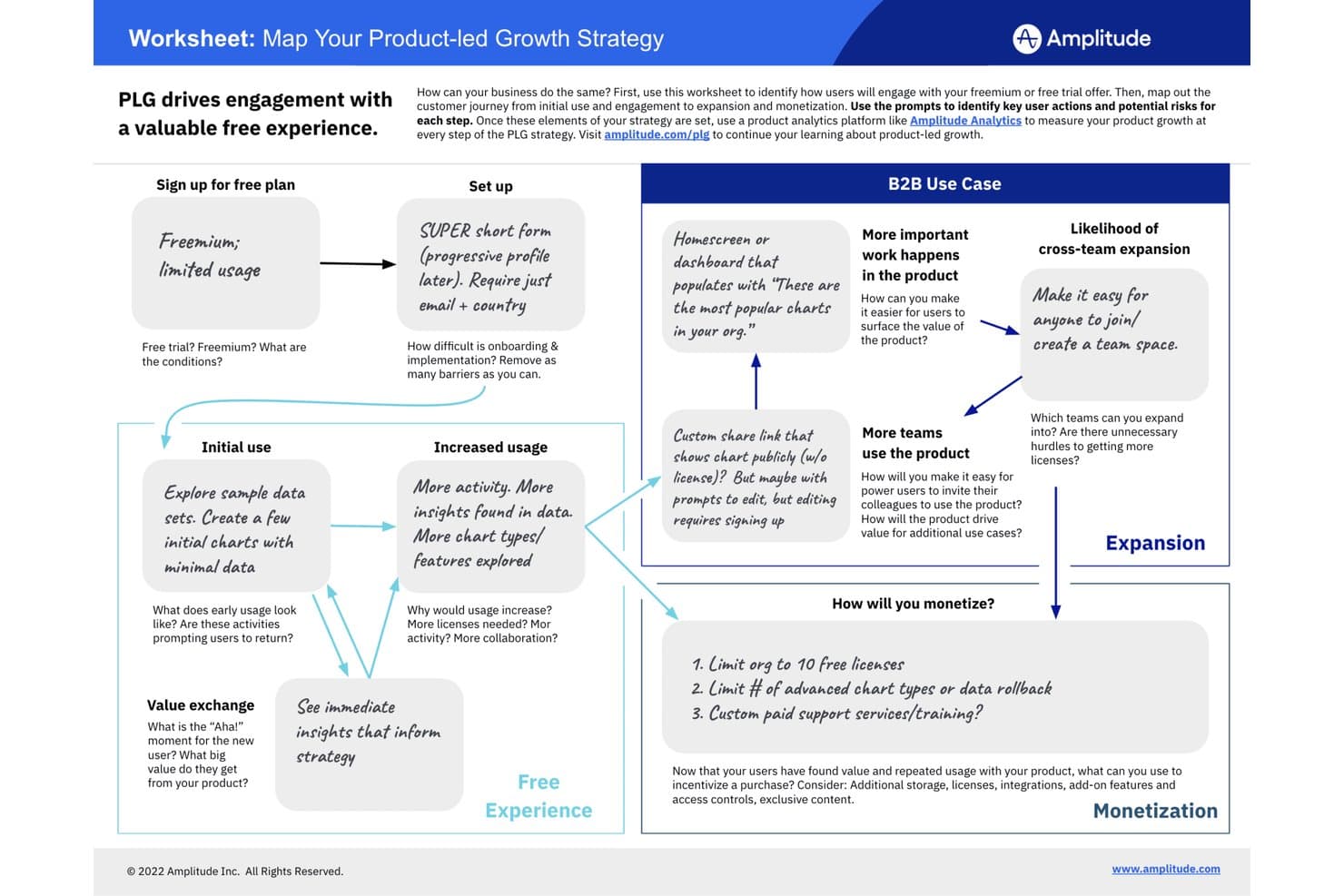
Amplitude traza la estrategia de crecimiento liderado por el producto desde el registro gratuito hasta la monetización. Amplitude es una plataforma de crecimiento liderado por el producto que combina análisis del comportamiento, guías y encuestas dentro de la aplicación, reproducción de sesiones, mapas de calor y experimentación en un único conjunto de herramientas unificado.
¿Para quién es más adecuado Amplitude?
Amplitude es una opción excelente para equipos de producto que desean una única plataforma para analizar el comportamiento de los usuarios, ejecutar guías dentro de la aplicación y probar cambios en el producto sin tener que gestionar herramientas independientes.
Por qué elegí Amplitude
Amplitude ocupa un lugar en mi lista de favoritos porque es la única herramienta de aquí que permite analizar el comportamiento de los usuarios y actuar en función de él —mediante guías y encuestas dentro de la aplicación— sin salir de la plataforma. Me encanta que las mismas cohortes de comportamiento que impulsan tus informes de embudo y retención puedan activar al instante una lista de comprobación de incorporación específica o una encuesta NPS para ese segmento exacto de usuarios. En la práctica, esto significa que mi equipo puede ejecutar una guía sin código, probarla mediante la experimentación de Amplitude y medir el aumento de adopción en un solo lugar.
Características principales de Amplitude
- Cohortes de comportamiento: Crea segmentos de usuarios dinámicos a partir de datos de eventos en tiempo real y compártelos entre análisis, guías, encuestas y experimentos sin duplicar datos.
- Reproducción de sesiones: Mira sesiones de usuarios grabadas para ver exactamente dónde dudan o abandonan los usuarios, con hasta 50K reproducciones al mes en el plan empresarial.
- Experimentación de funcionalidades: Prueba mediante A/B los cambios del producto y las guías dentro de la aplicación directamente en Amplitude, y mide el impacto en la adopción comparándolo con tus datos actuales de retención y embudo.
- Análisis web: Implementa el seguimiento web con una sola línea de código para obtener información automatizada sobre el comportamiento de los visitantes junto con los datos de eventos del producto.
Integraciones de Amplitude
Amplitude ofrece sincronización nativa de cohortes con HubSpot y Salesforce Marketing Cloud. Estas integraciones conectan los segmentos de comportamiento con los flujos de trabajo de marketing posteriores para campañas de crecimiento liderado por el producto dirigidas.
Pros and Cons
Pros:
- Las cohortes compartidas activan una orientación específica dentro de la aplicación
- Los embudos conectan la adopción con los resultados de retención
- Las reproducciones de sesiones revelan los obstáculos durante la incorporación
Cons:
- No incluye un modelo nativo de puntuación de PQL
- Los límites de las guías restringen los programas de incorporación con múltiples flujos
Learn more about Amplitude: Lo mejor para experiencias de incorporación personalizadas
- Prueba gratuita de 30 días + plan gratuito + demo gratuita disponible
- Precio disponible bajo solicitud
Visit WebsiteRating:4.4/5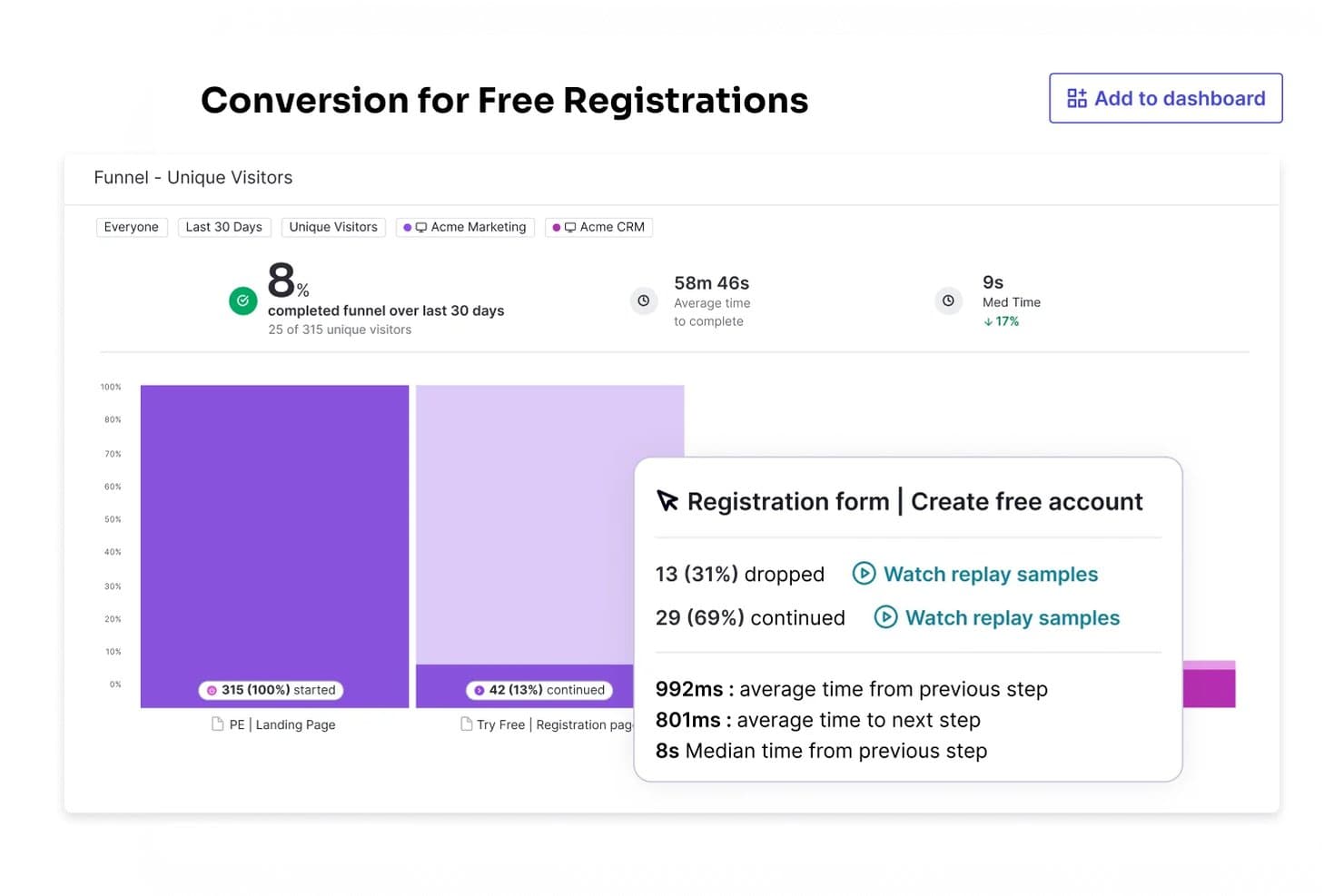
El panel de Pendo proporciona analíticas para ayudar a los equipos de producto a tomar decisiones basadas en datos. Pendo está diseñado para empresas de los sectores de tecnología, salud y educación, con el objetivo de mejorar la usabilidad del software y la participación de los usuarios. Al ofrecer herramientas de analítica, orientación dentro de la aplicación y retroalimentación de usuarios, Pendo te ayuda a optimizar la experiencia de tu software, aumentar los ingresos y reducir costos.
Por qué elegí Pendo
Elegí Pendo por su capacidad única de proporcionar información profunda sobre el comportamiento de los usuarios. La función de analítica de la plataforma te permite comprender cómo interactúan los usuarios con tu producto, lo que te permite tomar decisiones basadas en datos para mejorar la experiencia del usuario. Además, las herramientas de orientación dentro de la aplicación de Pendo te ayudan a crear experiencias de incorporación personalizadas, asegurando que los usuarios obtengan valor inmediato de tu producto. Estas características abordan el desafío de la participación y retención de usuarios, convirtiendo a Pendo en una herramienta valiosa para empresas que buscan crecer a través de la excelencia del producto.
Características clave de Pendo
Además de la analítica y la orientación dentro de la aplicación, Pendo ofrece varias otras funcionalidades que pueden apoyar tu estrategia de crecimiento liderada por producto:
- Retroalimentación de usuarios: Obtén información directamente de tus usuarios a través de encuestas y sondeos, lo que te ayuda a priorizar mejoras del producto basadas en necesidades reales de los clientes.
- Visualización de hoja de ruta: Crea y comparte hojas de ruta de producto claras para alinear a tu equipo y partes interesadas sobre los desarrollos futuros y las prioridades estratégicas.
- Incorporación y capacitación: Diseña flujos de incorporación personalizados y módulos de capacitación para garantizar que los nuevos usuarios comprendan y adopten rápidamente tu producto.
- Análisis de sentimiento: Analiza la retroalimentación de los usuarios para determinar el sentimiento general, permitiéndote abordar de manera proactiva áreas de preocupación y mejorar la satisfacción del usuario.
Integraciones de Pendo
Las integraciones incluyen Salesforce, HubSpot, Zendesk, Intercom, Segment, Okta, Jira, Slack, Snowflake y Optimizely.
Pros and Cons
Pros:
- La función de analítica proporciona información profunda sobre el comportamiento de los usuarios
- Las capacidades de análisis de sentimiento permiten a las empresas medir la satisfacción del usuario
- Las herramientas sin código lo hacen accesible para usuarios sin conocimientos técnicos
Cons:
- Faltan funciones avanzadas de reportes
- El costo puede ser elevado para equipos pequeños o startups
Learn more about Pendo: 10La mejor opción para obtener análisis de producto de código abierto en profundidad
PostHog
- Plan gratuito disponible
- Precios disponibles bajo solicitud
Visit WebsiteRating:4.5/5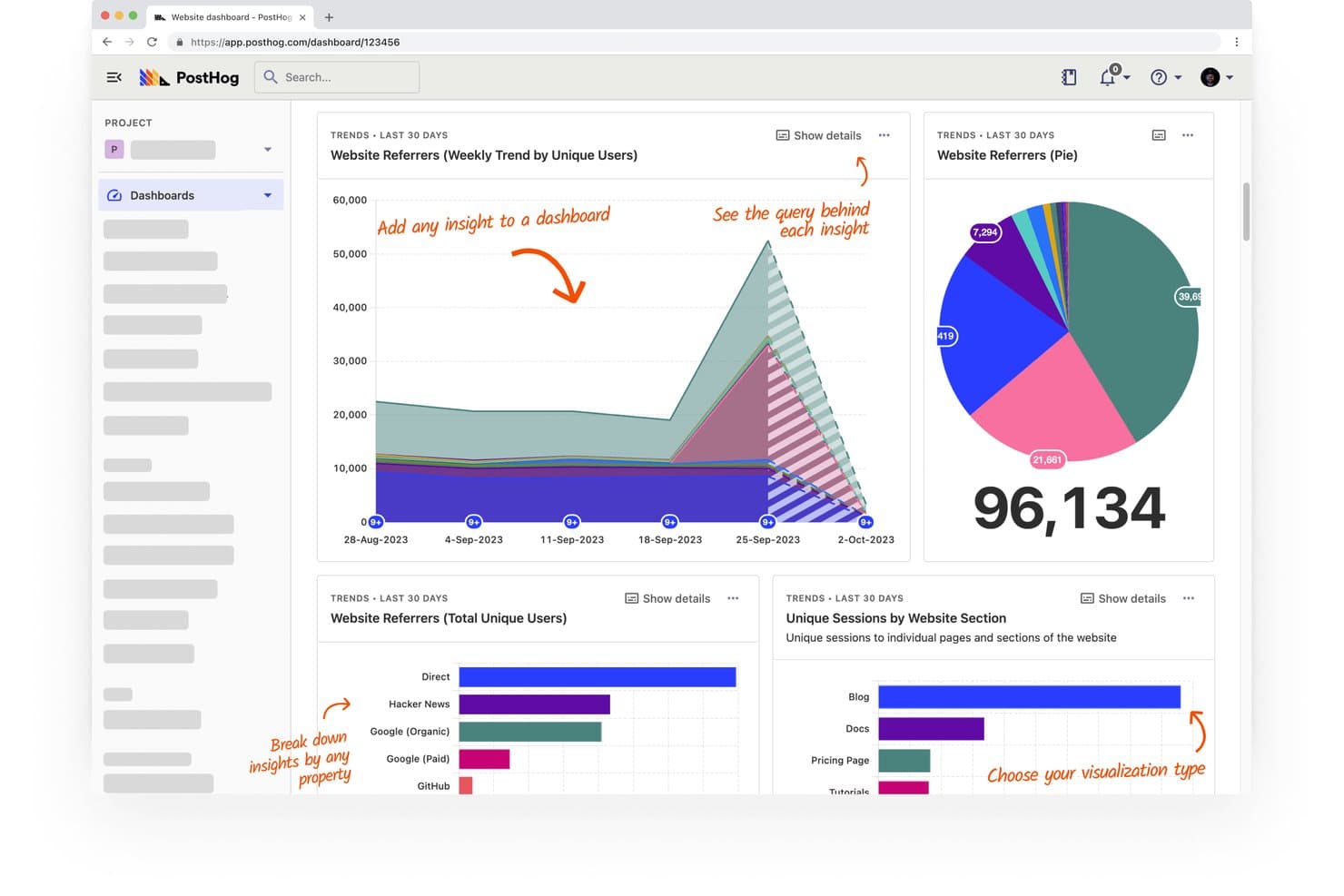
PostHog realiza un seguimiento de los referentes y las sesiones del sitio web en paneles visuales. PostHog es una plataforma de crecimiento impulsado por el producto de código abierto que combina análisis de producto, reproducción de sesiones, indicadores de funcionalidades, pruebas A/B, encuestas y un CDP integrado en una sola cuenta.
¿Para quién es más adecuado PostHog?
PostHog es una excelente opción para equipos técnicos de producto, especialmente aquellos que cuentan con recursos de desarrollo y desean disponer de análisis exhaustivos, reproducción de sesiones y experimentación en una sola plataforma de código abierto.
Por qué elegí PostHog
PostHog merece estar en mi lista de finalistas por la profundidad de sus análisis desde el primer momento. Me refiero a consultas de HogQL, análisis de rutas, informes del ciclo de vida y métricas de recurrencia, todo en un mismo lugar, lo que permite a mi equipo diagnosticar exactamente dónde abandonan los usuarios y por qué. Me gusta especialmente que las reproducciones de sesiones estén vinculadas directamente a los puntos de abandono del embudo, porque, en lugar de hacer suposiciones, puedes observar a usuarios reales encontrarse con problemas reales.
Características principales de PostHog
- Indicadores de funcionalidades: Controla qué usuarios ven nuevas funcionalidades o cambios, lo que te permite implementar actualizaciones del producto para segmentos específicos sin realizar un lanzamiento completo.
- Pruebas A/B: Ejecuta experimentos integrados que miden cómo los cambios del producto afectan a la activación, la retención y los resultados de conversión.
- Encuestas de NPS y comentarios: Recopila comentarios de los usuarios dentro del producto mediante plantillas de encuesta integradas, incluido el NPS, vinculadas directamente a los datos de comportamiento.
- CDP con más de 50 destinos: Envía datos de comportamiento a herramientas como Salesforce, HubSpot y Customer.io mediante transformaciones en tiempo real y entrega a través de webhooks.
Integraciones de PostHog
El CDP de PostHog se conecta con más de 50 destinos, incluidos Salesforce, HubSpot, Braze, Customer.io, Vitally, Gainsight, Slack y PagerDuty. También se conecta con Snowflake y BigQuery, con transformaciones en tiempo real y entrega a través de webhooks mediante funciones de Hog.
Pros and Cons
Pros:
- Los embudos detallados revelan los abandonos durante la activación
- Las reproducciones de sesiones vinculan los problemas con el comportamiento
- Las cohortes permiten realizar experimentos y encuestas segmentados
Cons:
- Los recorridos del producto aún son inmaduros para la incorporación
- La puntuación de PQL requiere crear señales manualmente
Learn more about PostHog:
Otro software de crecimiento impulsado por el producto
Estas son algunas opciones adicionales de software de crecimiento impulsado por el producto que no llegaron a mi lista de preseleccionados, pero que aún merece la pena considerar:
- 11MixpanelIdentifica información valiosa para captar, convertir y retener clientes, y conoce sus comportamientos.
- 12Gainsight PXIdeal para vincular el uso del producto con las puntuaciones de salud del éxito del cliente
- 13ChartMogulIdeal para vincular las etapas del embudo PLG con los ingresos
- 14ChameleonLa mejor opción para la segmentación de usuarios dentro de la aplicación sincronizada con el CRM
Cómo Evalúo el Software de Crecimiento Liderado por el Producto
Evalúo las herramientas PLG en dos capas: las capacidades principales que una plataforma debe tener—como incorporación dentro de la aplicación y seguimiento de eventos—y los diferenciadores que hacen destacar a las mejores opciones.
Funcionalidad Principal (Requisitos Básicos Para Esta Lista)
Cuando selecciono herramientas para mi lista, califico cada una en una escala del 0 (no ofrece la funcionalidad) al 5 (sobresale en esta área) para cada funcionalidad principal detallada a continuación. Luego, calculo la puntuación total de la herramienta en porcentaje. Cada herramienta necesita alcanzar una puntuación mínima total del 65% para ser considerada.
- Análisis de Producto y Seguimiento de Comportamiento: Verifico si una herramienta captura eventos de usuario detallados, embudos y retención de cohortes—como rastrear hasta qué punto llegan los usuarios en un asistente de configuración.
- Onboarding y Guía Dentro de la Aplicación: La plataforma debe permitir a los PM crear recorridos, consejos y listas de comprobación sin código. Analizo cuánta personalización del flujo es posible sin ayuda de desarrollo.
- Segmentación y Orientación de Usuarios: Evalúo si los segmentos pueden combinar disparadores de comportamiento y atributos del usuario, como apuntar a usuarios de prueba que completaron la incorporación pero omitieron una función clave.
- Mensajería y Engagement Dentro de la Aplicación: Importan los modales contextuales, banners y encuestas activadas por acciones reales del usuario. Busco orientación basada en el comportamiento en lugar de mensajes estáticos y basados en el tiempo.
- Optimización del Embudo de Conversión: Busco pruebas A/B integradas en los flujos de registro a pago y análisis claro de los puntos de abandono. Herramientas como Amplitude y Pendo abordan esto de manera diferente pero ambas lo cubren.
- Integraciones con el Stack PLG: La herramienta debe conectarse a CRMs, CDPs, almacenes de datos y plataformas de facturación. Verifico sincronizaciones bidireccionales que permitan que los datos PQL fluyan hacia los flujos de trabajo de ventas.
Una vez tengo una lista de herramientas que cumplen estos criterios, considero qué distingue a cada plataforma.
Factores Diferenciadores (Lo Que Distingue a los Proveedores)
Así es como comparo y contrasto diferentes proveedores:
Características Destacadas
La puntuación PQL es un diferenciador importante. Busco herramientas que identifiquen automáticamente usuarios gratuitos con alta intención según hitos de activación, proporcionando a los equipos de ventas un punto claro de traspaso. La reproducción de sesiones y los mapas de calor también son relevantes ya que revelan dónde se atascan los usuarios de maneras que los datos de embudo no pueden. Además, evalúo si una plataforma arroja perspectivas impulsadas por IA, como patrones de riesgo de abandono o funciones infrautilizadas, sin requerir análisis manual por parte de tu equipo.
Más Allá de las Características
El tiempo para obtener valor es muy relevante aquí. Evalúo la rapidez con la que un PM puede pasar de la instalación al lanzamiento de su primer flujo de onboarding sin generar tickets para ingeniería. La estructura de precios es igualmente importante porque las herramientas PLG a menudo cobran por usuarios rastreados mensualmente, y los costos pueden dispararse rápido a medida que escala tu producto. También verifico el cumplimiento de SOC 2 Tipo II y GDPR, especialmente para equipos que manejan datos de comportamiento en varias regiones.
Cómo elegir un software de crecimiento impulsado por el producto
Es fácil perderse entre largas listas de funciones y complejas estructuras de precios. Para ayudarte a mantener la concentración mientras avanzas en tu proceso particular de selección de software, aquí tienes una lista de factores que debes tener en cuenta:
| Factor | Qué considerar |
|---|---|
| FactorEscalabilidad | Qué considerar¿El software crecerá junto con las necesidades de tu equipo? Considera si puede gestionar un mayor número de usuarios y datos a medida que tu producto crece. Busca planes flexibles que se adapten al crecimiento sin grandes aumentos de precio. |
| FactorIntegraciones | Qué considerar¿Se conecta con tus herramientas actuales? Comprueba la compatibilidad con tus sistemas actuales, como el CRM, las plataformas de análisis y las plataformas de comunicación. Evita las herramientas que requieran demasiadas soluciones alternativas o costes adicionales. |
| FactorPersonalización | Qué considerar¿Puedes adaptarlo a tus flujos de trabajo? Evalúa si el software te permite ajustar la configuración, los recorridos de los usuarios y los informes para que se ajusten a tus requisitos específicos. Evita los sistemas rígidos que limiten la adaptabilidad. |
| FactorFacilidad de uso | Qué considerar¿Es sencillo de usar para tu equipo? Evalúa la interfaz de usuario y la navegación. Una herramienta compleja puede ralentizar la adopción y reducir la eficiencia. Busca un diseño intuitivo e instrucciones claras. |
| FactorImplementación e incorporación | Qué considerar¿Cuánto tiempo llevará ponerlo en funcionamiento? Considera el tiempo y los recursos necesarios para la configuración y la formación. Las herramientas con amplia asistencia para la incorporación, como tutoriales y plantillas, pueden agilizar el proceso. |
| FactorCoste | Qué considerar¿Se ajusta a tu presupuesto? Compara los planes de precios y las funciones incluidas. Presta atención a los costes ocultos, como las tarifas por usuarios adicionales o los cargos por asistencia premium. |
| FactorMedidas de seguridad | Qué considerar¿Cumple con tus necesidades de seguridad? Comprueba el cifrado de datos, el cumplimiento de normas como el RGPD y las actualizaciones de seguridad periódicas. Proteger los datos de los usuarios debe ser una prioridad absoluta. |
| FactorDisponibilidad de asistencia | Qué considerar¿Qué opciones de asistencia hay? Busca asistencia las 24 horas, los 7 días de la semana, chat en directo y una base de conocimientos completa. Considera cuánta asistencia necesitará tu equipo y con qué rapidez se pueden resolver los problemas. |
¿Qué es el software de crecimiento liderado por el producto?
El software de crecimiento liderado por el producto es una herramienta que te ayuda a utilizar tu producto como la principal forma de atraer, convertir y conservar clientes. Los responsables de producto, los equipos de crecimiento y los profesionales del marketing utilizan estas herramientas para orientar a los usuarios, realizar un seguimiento de su comportamiento y aumentar la interacción, haciendo que el propio producto se encargue de la mayor parte del trabajo de venta y venta adicional. Esto ayuda a los equipos a identificar qué mantiene satisfechos a los usuarios y permite que el crecimiento se produzca de forma natural.
Características
Al seleccionar un software de crecimiento liderado por el producto, presta atención a las siguientes características clave:
- Incorporación de usuarios: Guía a los nuevos usuarios por el producto, mejora su experiencia inicial y aumenta las tasas de retención.
- Mensajería dentro de la aplicación: Permite comunicarse con los usuarios directamente en la aplicación y ofrecer asistencia y actualizaciones oportunas.
- Análisis de usuarios: Realiza un seguimiento del comportamiento y las interacciones de los usuarios, y ofrece información que puede orientar las decisiones y mejoras del producto.
- Recopilación de comentarios: Recoge las opiniones de los usuarios mediante encuestas y sondeos, lo que te ayuda a comprender sus necesidades y su grado de satisfacción.
- Opciones de personalización: Permite adaptar la experiencia del usuario para que se ajuste a tu marca y satisfaga necesidades específicas.
- Capacidades de integración: Se conecta con las herramientas y plataformas existentes para crear un ecosistema tecnológico cohesionado.
- Medidas de seguridad: Protege los datos de los usuarios mediante cifrado y el cumplimiento de las normas de protección de datos.
- Escalabilidad: Admite el crecimiento de la base de usuarios y de la carga de datos a medida que tu empresa se expande, sin problemas de rendimiento.
- Tours interactivos del producto: Proporciona orientación paso a paso para ayudar a los usuarios a comprender y utilizar eficazmente las nuevas funciones.
- Información en tiempo real: Ofrece datos y análisis instantáneos, lo que permite tomar decisiones y realizar ajustes rápidamente.
Beneficios
La implementación de un software de crecimiento liderado por el producto ofrece varios beneficios para tu equipo y tu empresa. Estos son algunos de los que puedes esperar:
- Mayor interacción de los usuarios: La mensajería dentro de la aplicación y las herramientas de incorporación de usuarios mantienen a los usuarios activos e interesados en tu producto.
- Decisiones basadas en datos: El análisis de usuarios y la información en tiempo real ayudan a tu equipo a tomar decisiones fundamentadas basadas en el comportamiento real de los usuarios.
- Mayor satisfacción de los usuarios: La recopilación de comentarios te permite comprender y atender las necesidades de los usuarios, lo que se traduce en clientes más satisfechos.
- Mayores tasas de retención: Una incorporación eficaz y los tours interactivos del producto garantizan que los usuarios perciban rápidamente el valor de tu producto.
- Uso eficiente de los recursos: Las capacidades de integración conectan tus herramientas actuales, reducen la necesidad de introducir datos manualmente y ahorran tiempo.
- Crecimiento escalable: Las funciones de escalabilidad garantizan que tu software pueda crecer junto con tu empresa sin perjudicar el rendimiento.
- Flexibilidad de personalización: Las opciones de personalización te permiten adaptar las experiencias de los usuarios para alinearlas con la identidad de la marca y sus necesidades específicas.
Costos y precios
Seleccionar un software de crecimiento impulsado por el producto requiere comprender los diversos modelos de precios y planes disponibles. Los costos varían según las funciones, el tamaño del equipo, los complementos y otros factores. La tabla a continuación resume los planes habituales, sus precios promedio y las funciones que suelen incluir las soluciones de software de crecimiento impulsado por el producto:
Tabla comparativa de planes de software de crecimiento impulsado por el producto
| Tipo de plan | Precio promedio | Funciones habituales |
|---|---|---|
| Tipo de planPlan gratuito | Precio promedio$0 | Funciones habitualesIncorporación básica de usuarios, análisis limitados y personalización mínima. |
| Tipo de planPlan personal | Precio promedio$10-$30/user/month | Funciones habitualesHerramientas mejoradas de incorporación, mensajería básica dentro de la aplicación y análisis estándar. |
| Tipo de planPlan empresarial | Precio promedio$50-$100/user/month | Funciones habitualesAnálisis avanzado de usuarios, flujos de incorporación personalizables e integración con herramientas de terceros. |
| Tipo de planPlan corporativo | Precio promedio$150-$300/user/month | Funciones habitualesOpciones de personalización completa, asistencia prioritaria y datos exhaustivos sobre información y funciones de seguridad. |
Preguntas frecuentes sobre el software de crecimiento impulsado por el producto
Estas son algunas respuestas a preguntas frecuentes sobre el software de crecimiento impulsado por el producto:
¿Necesito conocimientos técnicos para utilizar un software de crecimiento impulsado por el producto?
No, por lo general no necesitas conocimientos técnicos avanzados para utilizar un software de crecimiento impulsado por el producto. Muchas plataformas ofrecen interfaces fáciles de usar con funciones de arrastrar y soltar, lo que te permite crear flujos de incorporación y analizar datos sin programar. Sin embargo, algunas tareas de personalización e integración pueden requerir conocimientos técnicos básicos o la asistencia de tu equipo de TI.
¿Cómo mido el éxito del uso de un software de crecimiento impulsado por el producto?
Mide el éxito del software de crecimiento impulsado por el producto realizando un seguimiento de indicadores clave de rendimiento (KPI), como las tasas de interacción de los usuarios, las tasas de finalización de la incorporación y la retención de clientes. Utiliza las herramientas de análisis del software para supervisar estas métricas a lo largo del tiempo. Revisa y ajusta periódicamente tus estrategias según la información obtenida para mejorar continuamente el impacto de tu producto.
¿Qué métricas debería seguir al utilizar un software de crecimiento impulsado por el producto?
Deberías realizar un seguimiento de las tasas de interacción, activación, retención y conversión. Estas métricas te ayudan a comprender cómo interactúan los usuarios con tu producto y en qué punto abandonan el recorrido. Revisar periódicamente estas cifras proporciona a tu equipo información sobre la eficacia de tu estrategia de crecimiento.
¿Qué papel desempeña el éxito del cliente en un enfoque de crecimiento impulsado por el producto?
Los equipos de éxito del cliente ayudan a los usuarios a mantener su interacción y alcanzar sus objetivos dentro de tu producto. Analizan los patrones de uso para identificar a los usuarios que pueden necesitar ayuda o estímulo adicionales. Este enfoque proactivo genera confianza y mantiene activos a los usuarios con el tiempo.
¿Cómo influye la opinión de los usuarios sobre el producto en las estrategias de crecimiento impulsado por el producto?
La opinión de los usuarios orienta a tu equipo sobre qué aspectos mejorar o simplificar. Al actuar en función de estos comentarios, haces que el producto sea más fácil de usar y esté mejor alineado con las necesidades de los usuarios. Este ciclo continuo ayuda a impulsar la adopción orgánica y el crecimiento a largo plazo.
¿Qué sigue?
Si estás investigando un software de crecimiento impulsado por el producto, conecta con un asesor de SoftwareSelect para recibir recomendaciones gratuitas.
Rellenas un formulario y tienes una breve conversación en la que analizan los detalles específicos de tus necesidades. Después recibirás una lista reducida de programas para revisar. Incluso te acompañarán durante todo el proceso de compra, incluidas las negociaciones de precios.