

Como responsable de producto, te enfrentas al reto de comprender a tus usuarios sin salirte del presupuesto. Necesitas obtener información sobre el comportamiento de los usuarios para mejorar tu producto, pero las herramientas caras no siempre son una opción. Aquí es donde el software gratuito de seguimiento de usuarios resulta útil.
He revisado y probado varias opciones para ayudarte a encontrar las mejores soluciones gratuitas. Gracias a mi experiencia en el sector de la gestión de productos, mi objetivo es ofrecerte un análisis imparcial y bien documentado de las mejores opciones que ofrecen planes o pruebas gratuitas.
En este artículo descubrirás programas que pueden ayudar a tu equipo a obtener información valiosa sobre el comportamiento de los usuarios, lo que te permitirá tomar decisiones fundamentadas sin una inversión económica significativa. Veamos las opciones que podrían adaptarse perfectamente a tus necesidades.
Por qué confiar en nuestras recomendaciones de software
6,700+
Reviews
20
Industry experts
16+
Evaluation factors
14
Years
Nuestro equipo lleva probando y evaluando software desde 2012. Como gestores de producto, sabemos lo difícil —y lo importante— que es elegir el software adecuado.
Para esta guía, evaluamos las herramientas mediante pruebas prácticas e investigación independiente, puntuando las herramientas según nuestros criterios de selección.
Nuestras reseñas reflejan nuestro criterio editorial humano, no un discurso de ventas.
Revisores expertos:
 Hannah ClarkSenior TPM
- Cristiano ValimSenior UI/UX Lead

Tabla comparativa: programas gratuitos de seguimiento de usuarios
Esta tabla comparativa resume los detalles de precios de mi selección de los mejores programas gratuitos de seguimiento de usuarios.
| Tool | Best For | Trial Info | Price | ||
|---|---|---|---|---|---|
| 1 | Ideal para detectar clics repetidos y abandonos | Prueba gratuita de 30 días + plan gratuito disponible | Desde $55/mes | Website | |
| 2 | La mejor opción para mapas de calor con embudos y análisis de abandonos | Prueba gratuita de 14 días + plan gratuito disponible | Desde $32/mes | Website | |
| 3 | La mejor opción para mapas de calor con capturas gratuitas ilimitadas | Plan gratuito disponible | Desde $39/mes (facturado anualmente) | Website | |
| 4 | La mejor opción para obtener 12 meses de retención gratuita de reproducciones de sesiones | Plan gratuito disponible | Precios bajo solicitud | Website | |
| 5 | La mejor opción para la reproducción de sesiones vinculada a análisis a escala | Plan gratuito disponible | Precios bajo solicitud | Website | |
| 6 | Ideal para reproducir sesiones con fricción identificada por IA | Plan gratuito disponible | Desde $39/mes | Website | |
| 7 | Paras avoimen lähdekoodin tuoteanalytiikkaan | Ilmaispaketti saatavilla | Hinnoittelu pyynnöstä | Website | |
| 8 | Ideal para analizar el abandono de los embudos y los clics repetitivos | Plan gratuito disponible | Desde $140/mes | Website | |
| 9 | Ideal para el seguimiento autoalojado y sin consentimiento | Prueba gratuita de 21 días | Desde $26/mes (facturado anualmente) | Website | |
| 10 | Ideal para la reproducción autohospedada con propiedad total de los datos | Plan gratuito + prueba gratuita de 7 días disponible | Desde $199/mes | Website |


Análisis de los mejores programas gratuitos de seguimiento de usuarios
A continuación encontrarás mis resúmenes detallados de los mejores programas gratuitos de seguimiento de usuarios que se incluyeron en mi lista. En mis análisis examino en detalle las funciones principales, las ventajas & desventajas, las integraciones y los casos de uso ideales de cada herramienta para ayudarte a encontrar la mejor opción para ti. Aunque algunas de estas herramientas ofrecen una versión completamente gratuita, otras ofrecen un periodo de prueba gratuito. He añadido una nota sobre qué es gratuito en cada uno de mis análisis.
 Ideal para detectar clics repetidos y abandonos
- Prueba gratuita de 30 días + plan gratuito disponible
- Desde $55/mes
Visit WebsiteCustomer Rating:4.6/5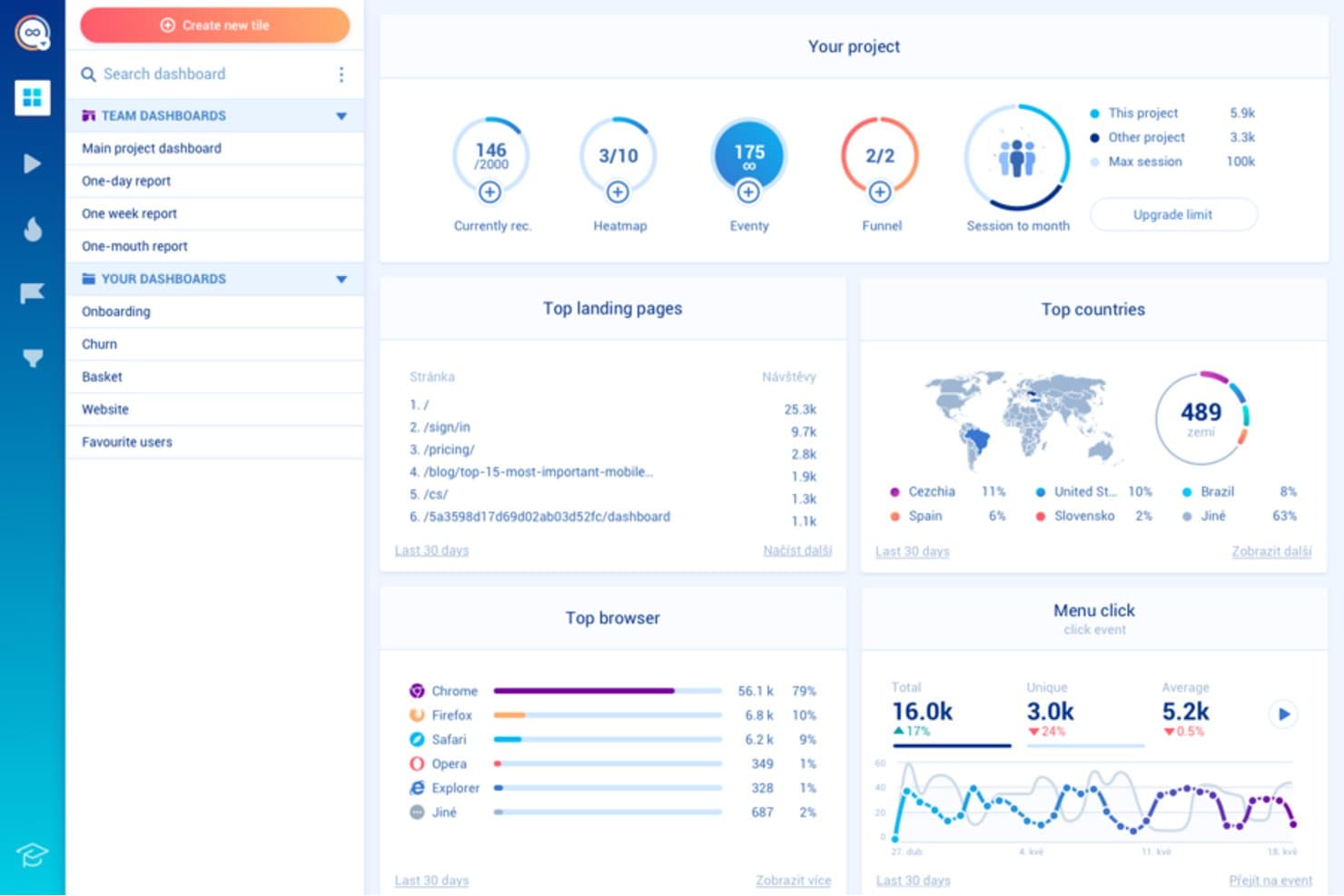
Smartlook muestra cómo interactúan los usuarios para mejorar el diseño y la experiencia de usuario. Smartlook es un software gratuito de seguimiento de usuarios diseñado para gerentes de producto y diseñadores de UX. Revela cómo interactúan los usuarios con tu sitio web o aplicación para contribuir a un mejor diseño y experiencia de usuario.
Por qué elegí Smartlook: El plan gratuito de Smartlook ofrece funciones como grabaciones de sesiones y mapas de calor, que son esenciales para comprender el comportamiento de los usuarios. Te permite realizar un seguimiento de eventos ilimitados, lo que proporciona una visión integral de las interacciones de los usuarios. Puedes analizar los recorridos de los usuarios e identificar áreas de mejora. Esto lo convierte en una excelente opción para equipos que desean obtener datos detallados sobre el comportamiento sin costes iniciales.
Funciones e integraciones destacadas:
Las funciones incluyen análisis de embudos, seguimiento de eventos y alertas automatizadas para ayudar a supervisar eficazmente el comportamiento de los usuarios. El análisis de embudos muestra en qué punto abandonan los usuarios el proceso de conversión, lo que te ayuda a identificar puntos de fricción. El seguimiento de eventos registra acciones específicas de los usuarios, mientras que las alertas automatizadas te notifican en tiempo real sobre cambios o actividades importantes.
Las integraciones incluyen Google Analytics, Slack, Mixpanel, Intercom, Zendesk, HubSpot, Salesforce, WordPress, Shopify y Adobe Commerce.
¿Qué es gratuito? Smartlook ofrece un plan gratuito para siempre con limitaciones en el número de eventos y grabaciones que puedes almacenar cada mes.
Pros and Cons
Pros:
- Seguimiento ilimitado de eventos
- Análisis detallado del recorrido de los usuarios
- Función de alertas automatizadas
Cons:
- Almacenamiento limitado para las grabaciones
- Interfaz compleja para usuarios nuevos
Learn more about Smartlook: La mejor opción para mapas de calor con embudos y análisis de abandonos
- Prueba gratuita de 14 días + plan gratuito disponible
- Desde $32/mes
Visit WebsiteCustomer Rating:4.7/5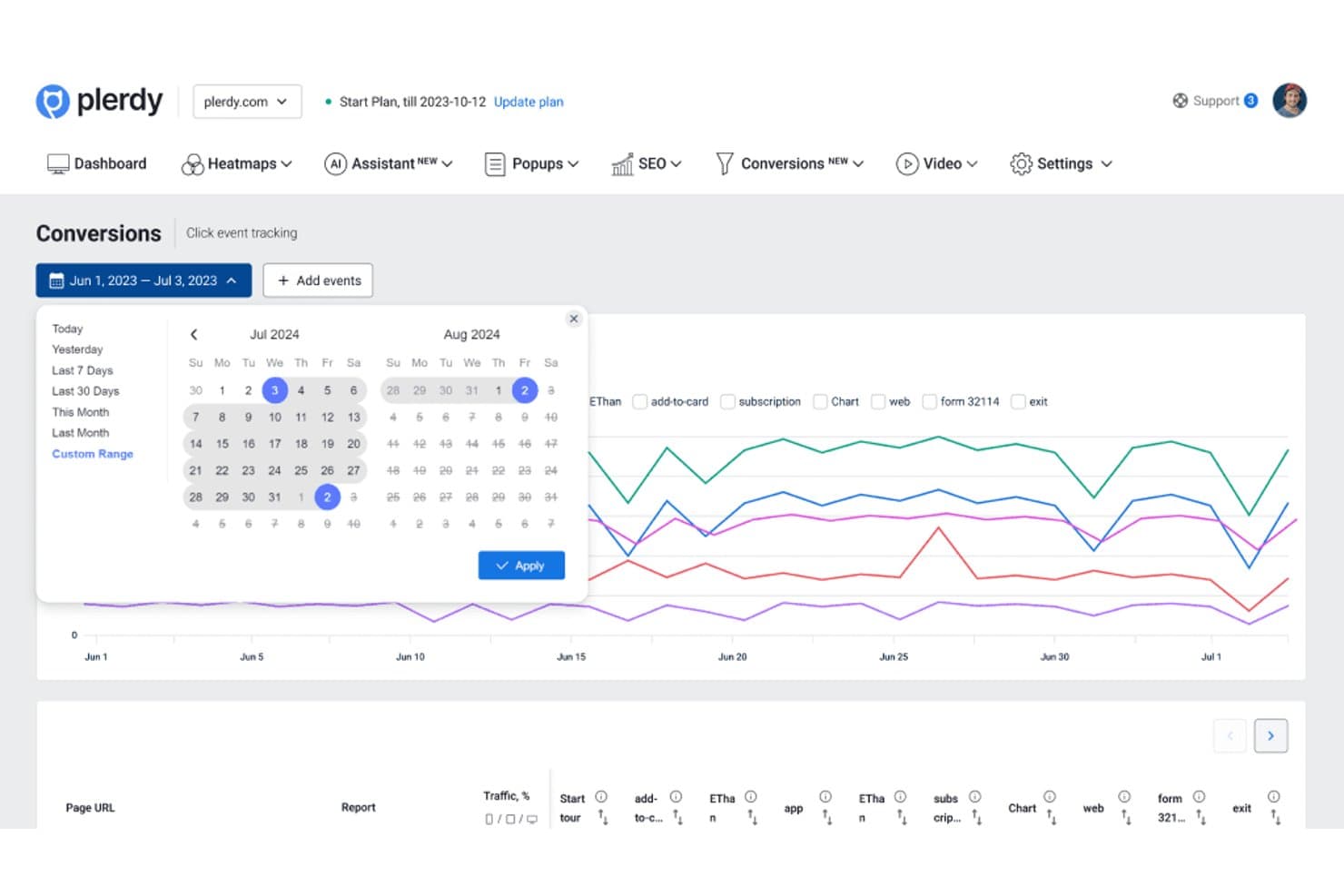
Plerdy permite a los usuarios analizar eventos de conversión en intervalos de fechas personalizados. Plerdy es una plataforma de seguimiento de usuarios y análisis de sitios web que combina mapas de calor, grabaciones de sesiones, seguimiento de eventos, análisis de conversiones e informes de rendimiento de formularios en una sola interfaz.
¿Para quién es más adecuado Plerdy?
Plerdy es adecuado para equipos de crecimiento, comercio electrónico y producto que necesitan relacionar el comportamiento en los mapas de calor con la conversión del embudo y el análisis de abandonos.
Por qué elegí Plerdy
Elegí Plerdy porque conecta los datos del comportamiento visual con el análisis de conversiones. Sus mapas de calor muestran dónde hacen clic los usuarios, hasta dónde se desplazan y dónde pierden el interés, mientras que los informes del embudo revelan qué pasos provocan abandonos. Utilizo estas vistas conjuntamente para diagnosticar problemas en el proceso de pago o priorizar experimentos de producto.
Características principales de Plerdy
- Grabaciones de sesiones : Reproduce visitas individuales para examinar las rutas de navegación reales.
- Seguimiento de eventos : Supervisa interacciones personalizadas en páginas y elementos de la interfaz.
- Análisis de formularios : Revisa la interacción con cada campo y los abandonos en los formularios del sitio web.
- Encuestas de opinión de usuarios : Recopila respuestas directas de los visitantes mediante mensajes en el sitio.
Integraciones de Plerdy
Plerdy se integra con Google Analytics 4 y permite la instalación mediante Shopify y WordPress. También es compatible con Zapier mediante una clave de API para enviar datos de formularios.
¿Qué incluye el plan gratuito?
Plerdy ofrece un plan gratuito permanente, no solo una prueba con duración limitada. Incluye hasta 100 mapas de calor al día, 500 sesiones de vídeo, 5.000 auditorías de SEO y 100 visualizaciones de ventanas emergentes, por lo que los equipos con mayor volumen necesitarán un plan de pago.
Pros and Cons
Pros:
- Relaciona los mapas de calor con los abandonos del embudo
- Incluye grabaciones de sesiones para analizar los recorridos
- Realiza un seguimiento del abandono de formularios a nivel de campo
Cons:
- Los límites del plan gratuito restringen el análisis de grandes volúmenes
- Las ventanas emergentes pueden distraer del análisis principal
Learn more about Plerdy: La mejor opción para mapas de calor con capturas gratuitas ilimitadas
- Plan gratuito disponible
- Desde $39/mes (facturado anualmente)
Visit WebsiteCustomer Rating:4.5/5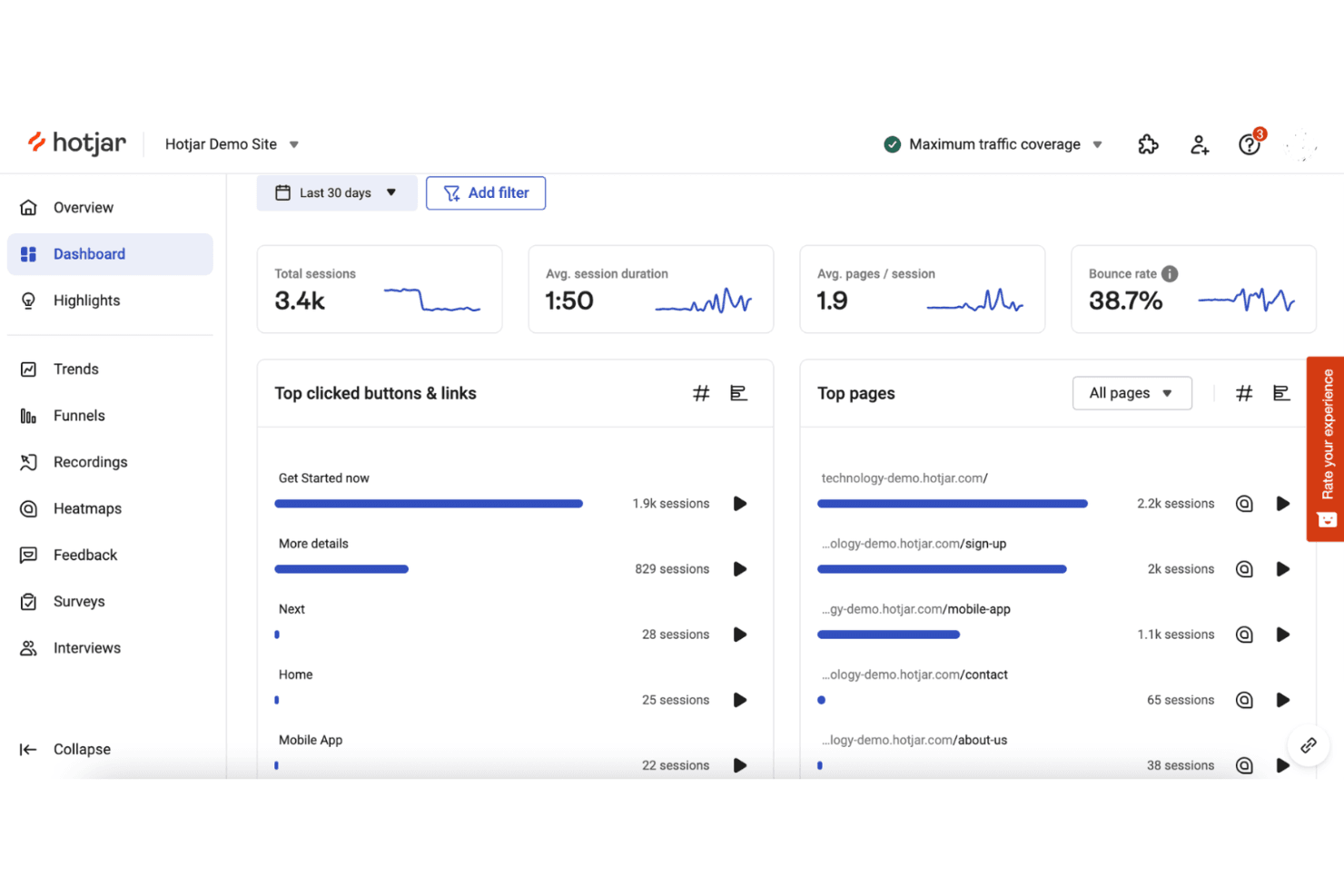
Hotjar registra el comportamiento de los usuarios mediante mapas de calor y grabaciones de sesiones. Hotjar (by Contentsquare) es un software de seguimiento de usuarios para mapas de calor, grabaciones de sesiones, encuestas de opinión, cuestionarios y análisis del comportamiento de los usuarios en sitios web y productos digitales.
¿Para quién es más adecuado Hotjar (by Contentsquare)?
Hotjar es adecuado para equipos de producto y experiencia de usuario que necesitan mapas de calor con capturas gratuitas ilimitadas para comprender el comportamiento de los usuarios sin un gran presupuesto de analítica.
Por qué elegí Hotjar (by Contentsquare)
Elegí Hotjar (by Contentsquare) porque es la mejor opción para mapas de calor con capturas gratuitas ilimitadas. Utilizo mapas de calor de clics, movimientos y desplazamientos para ver dónde interactúan los usuarios o abandonan páginas clave. Después, las grabaciones de sesiones ayudan a relacionar esos patrones con problemas específicos de navegación y usabilidad.
Características principales de Hotjar (by Contentsquare)
- Encuestas: Crea encuestas en el sitio para recopilar respuestas específicas de los usuarios.
- Widgets de opinión: Añade widgets para que los usuarios compartan sus comentarios sobre páginas específicas.
- Análisis de embudos: Revisa el avance de los usuarios a través de pasos de conversión definidos.
- Atributos de usuario: Filtra los datos de comportamiento según propiedades de usuario personalizadas.
Integraciones de Hotjar (by Contentsquare)
Hotjar cuenta con integraciones documentadas con Linear, Asana y Unbounce, además de Zapier. Su API admite conexiones personalizadas para compartir datos de Hotjar con otras herramientas.
¿Qué es gratuito?
Hotjar (by Contentsquare) ofrece un plan gratuito con capturas ilimitadas de mapas de calor, además de una prueba gratuita de 15 días para las funciones de pago. Los límites de usuarios, sesiones y funciones del plan gratuito varían según el nivel de uso.
Pros and Cons
Pros:
- Capturas gratuitas ilimitadas de mapas de calor
- Vistas del comportamiento de clics, movimientos y desplazamientos
- Las encuestas relacionan los comentarios con el comportamiento observado
Cons:
- Los límites del plan gratuito afectan a los usuarios y las sesiones
- El análisis avanzado requiere acceso de pago
Learn more about Hotjar (by Contentsquare): La mejor opción para obtener 12 meses de retención gratuita de reproducciones de sesiones
- Plan gratuito disponible
- Precios bajo solicitud
Visit WebsiteCustomer Rating:4.5/5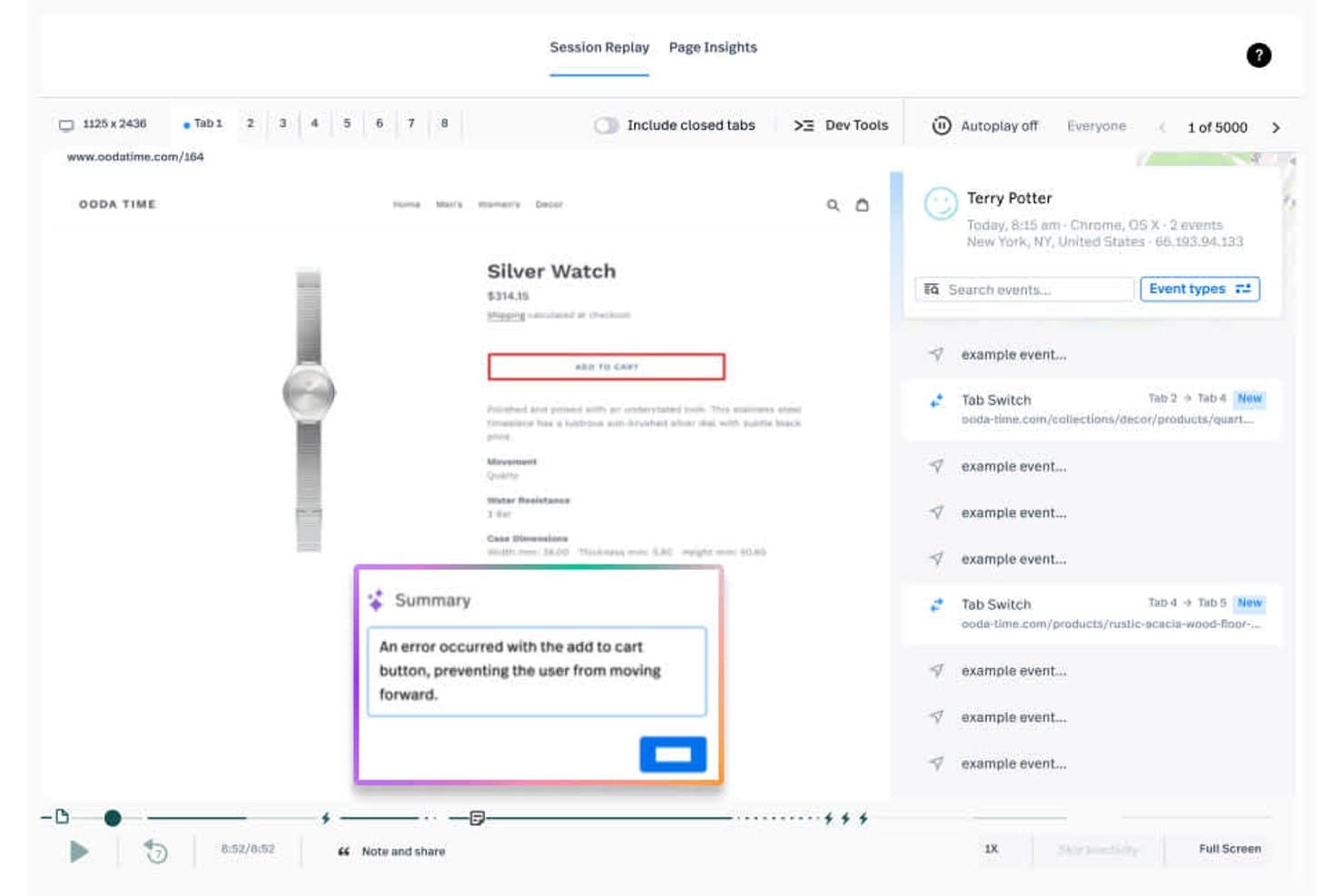
Fullstory permite a los usuarios reproducir sesiones y detectar errores del carrito al instante. Fullstory es una plataforma de seguimiento de usuarios y análisis de productos que combina la reproducción de sesiones, el seguimiento de eventos, los mapas de calor, los embudos y las señales de fricción para analizar las experiencias digitales.
¿Para quién es más adecuado Fullstory?
Fullstory es adecuado para equipos de producto y UX de empresas digitales en crecimiento que necesitan la reproducción de sesiones a largo plazo para investigar la fricción y validar las decisiones de producto.
Por qué elegí Fullstory
Elegí Fullstory porque combina 12 meses de retención gratuita de reproducciones de sesiones con el seguimiento de eventos y las señales de fricción. Puedo revisar sesiones de usuarios antiguas, vincularlas con eventos de conversión e investigar clics repetidos de frustración o clics muertos. Esto facilita comparar los cambios del producto con el comportamiento histórico de los usuarios.
Características principales de Fullstory
- Mapas de calor: Visualiza los clics, la profundidad de desplazamiento y los patrones de interacción en distintas páginas.
- Análisis de embudos: Crea embudos de conversión para identificar dónde abandonan los usuarios.
- Paneles: Organiza las métricas del producto y los datos de la experiencia en vistas compartidas.
- Integraciones: Conecta Fullstory con otras herramientas de tu conjunto de análisis de productos.
Integraciones de Fullstory
Fullstory documenta integraciones con Google Analytics, Google Tag Manager, Adobe Analytics, Bugsnag y Google BigQuery. Su API para desarrolladores admite integraciones personalizadas.
¿Qué incluye el plan gratuito?
El plan gratuito de Fullstory es un plan gratuito permanente con hasta 30.000 sesiones al mes, 12 meses de retención de datos y compatibilidad con hasta 10 usuarios. Incluye reproducción de sesiones, análisis básico y depuración, pero no incluye funciones avanzadas ni asistencia para planes de pago; las sesiones nuevas se pausan si superas el límite mensual.
Pros and Cons
Pros:
- Conserva las reproducciones de sesiones gratuitas durante 12 meses
- Conecta las reproducciones con los eventos de conversión
- Detecta clics repetidos de frustración y clics muertos
Cons:
- Las sesiones nuevas se pausan después de alcanzar los límites mensuales
- El análisis avanzado requiere un plan de pago
Learn more about Fullstory: La mejor opción para la reproducción de sesiones vinculada a análisis a escala
- Plan gratuito disponible
- Precios bajo solicitud
Visit WebsiteCustomer Rating:4.5/5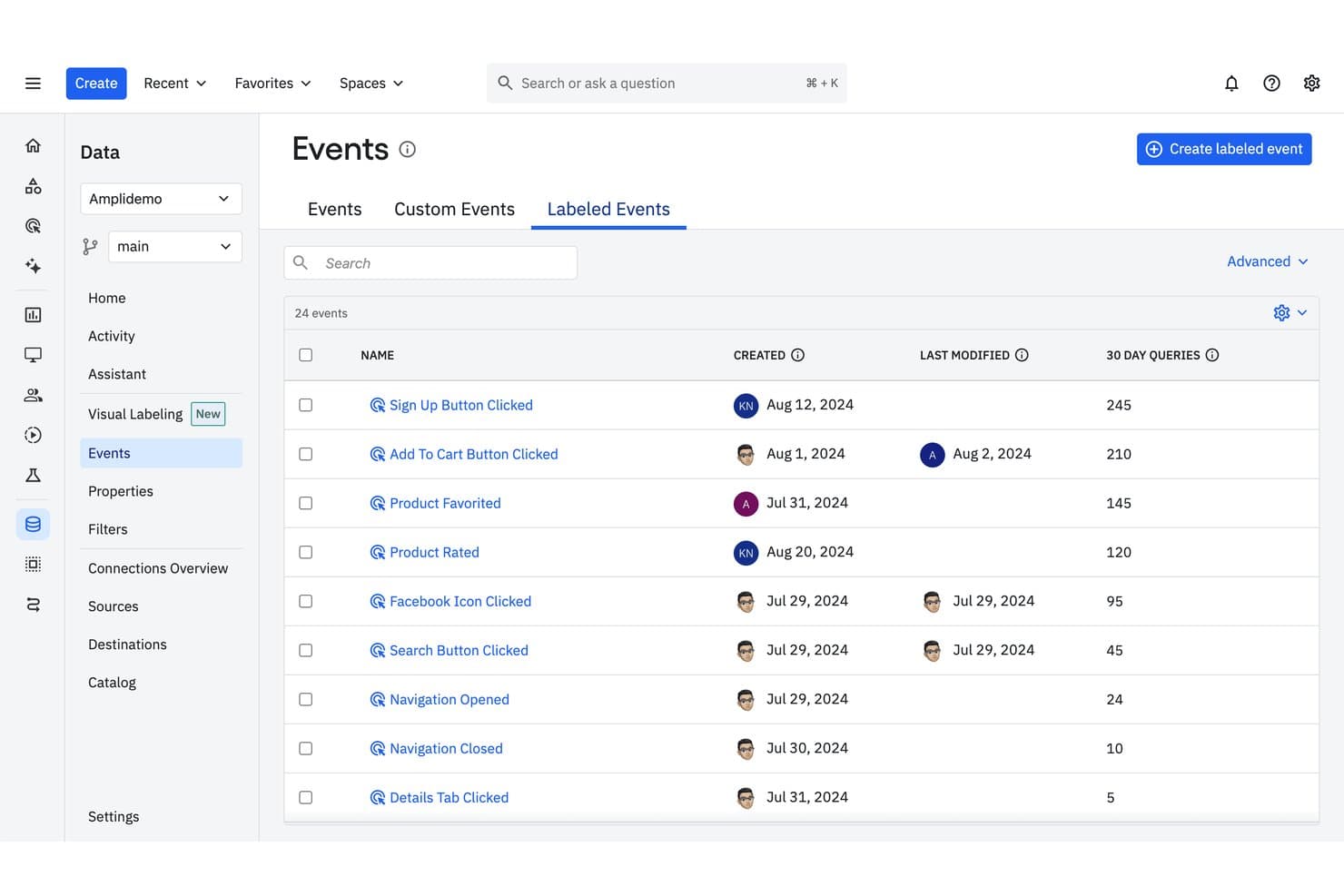
Amplitude registra eventos etiquetados con la frecuencia de consulta y el historial de modificaciones. Amplitude es un software de seguimiento de usuarios que combina análisis de productos, seguimiento de eventos, embudos, informes de retención, cohortes y reproducción de sesiones en una sola plataforma.
¿Para quién es más adecuado Amplitude?
Equipos de producto de empresas en crecimiento que necesitan reproducción de sesiones vinculada a análisis a escala para conectar el comportamiento de los usuarios con las decisiones sobre el producto.
Por qué elegí Amplitude
Elegí Amplitude porque es la mejor opción para la reproducción de sesiones vinculada a análisis a escala. Utilizo flujos de eventos, embudos e informes de retención para identificar dónde tienen dificultades los usuarios y, después, reviso las reproducciones de sesiones relacionadas para comprender el comportamiento subyacente. Las cohortes ayudan a comparar esos patrones entre segmentos de usuarios antes de priorizar cambios en el producto.
Características principales de Amplitude
- Perfiles de usuario: Consulta las propiedades y el historial de actividad de usuarios individuales.
- Recorridos: Rastrea las rutas que siguen los usuarios dentro de tu producto.
- Paneles: Reúne gráficos y métricas en espacios de trabajo que se pueden compartir.
- Gobernanza de datos: Gestiona definiciones de eventos, propiedades y planes de seguimiento.
Integraciones de Amplitude
Entre las integraciones documentadas se incluyen Segment, Iterable, Chameleon y Snowflake. Amplitude también proporciona API para la incorporación personalizada de eventos y las actualizaciones de propiedades de usuario.
¿Qué incluye el plan gratuito?
Amplitude ofrece un plan gratuito permanente sin necesidad de tarjeta de crédito. Incluye 2 millones de eventos al mes, usuarios ilimitados y 10.000 reproducciones de sesiones al mes, pero los datos de reproducción se conservan durante un mes y algunas funciones, incluidos los experimentos, las Guías y las Encuestas, tienen limitaciones.
Pros and Cons
Pros:
- Conecta las reproducciones de sesiones con el análisis de productos
- El plan gratuito admite volúmenes considerables de eventos
- Las cohortes revelan el comportamiento entre segmentos de usuarios
Cons:
- El historial de reproducciones del plan gratuito caduca después de un mes
- Las funciones avanzadas de experimentación requieren acceso de pago
Learn more about Amplitude: Ideal para reproducir sesiones con fricción identificada por IA
- Plan gratuito disponible
- Desde $39/mes
Visit WebsiteCustomer Rating:4.1/5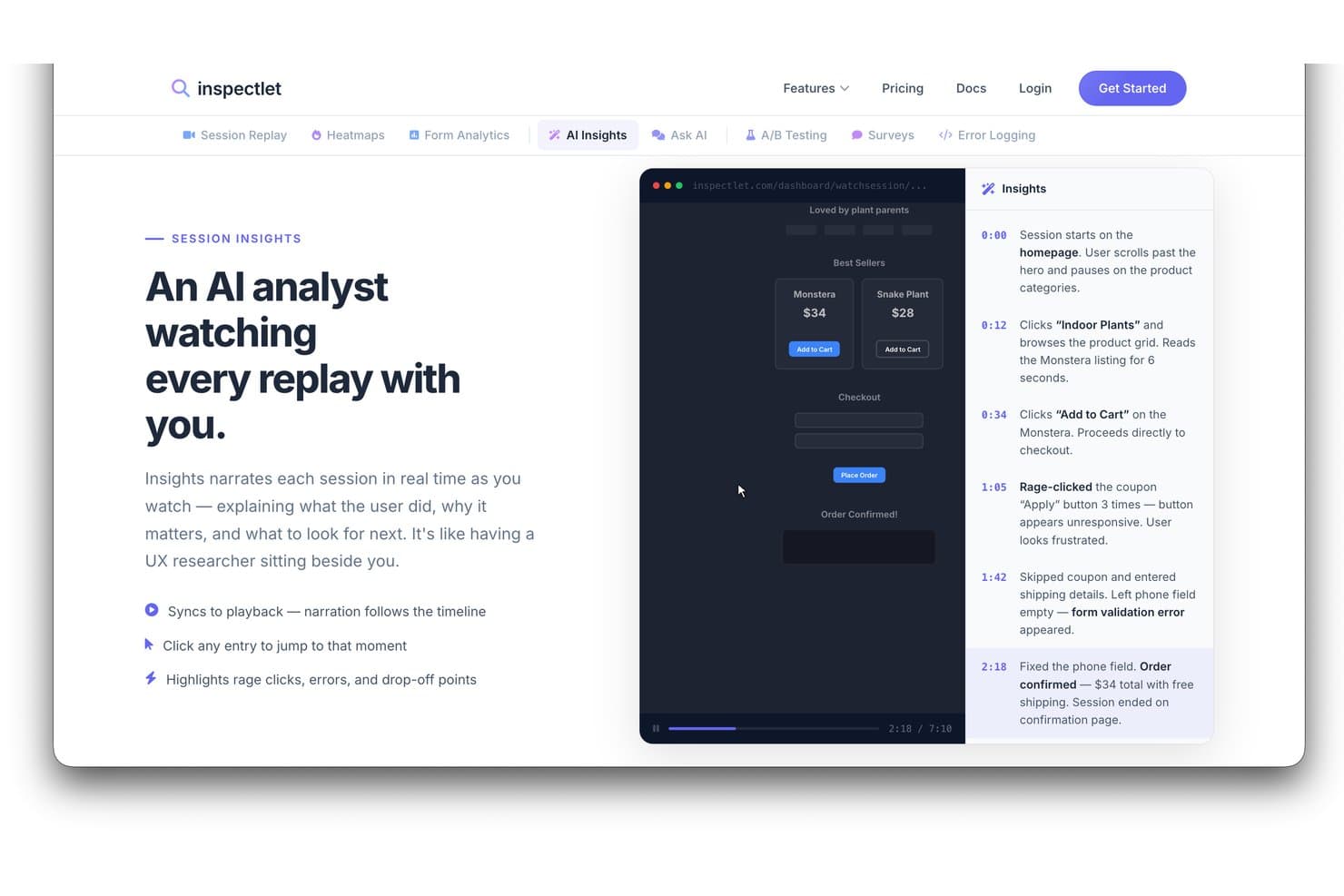
La función Insights de IA de Inspectlet narra las reproducciones de sesiones para destacar el comportamiento de los usuarios. Inspectlet es un software de seguimiento de usuarios y análisis del comportamiento que combina grabaciones de sesiones, mapas de calor, seguimiento de eventos, embudos y análisis de formularios para analizar productos y sitios web.
¿Para quién es más adecuado Inspectlet?
Inspectlet es adecuado para equipos de producto y especialistas en marketing de crecimiento que necesitan reproducir sesiones para detectar la fricción de los usuarios y mejorar las experiencias en el sitio web.
Por qué elegí Inspectlet
Elegí Inspectlet para la reseña del mejor software gratuito de seguimiento de usuarios porque combina la reproducción de sesiones con la fricción identificada por IA. Utilizo grabaciones y mapas de calor para comprobar dónde tienen dificultades los visitantes y, después, reviso los análisis de embudos y formularios para relacionar esos problemas con los abandonos. Esto ayuda a los equipos de producto a investigar flujos confusos, formularios abandonados y conversiones fallidas.
Características principales de Inspectlet
- Supervisión de visitantes en directo: Observa cómo los visitantes activos navegan por tu sitio en tiempo real.
- API de JavaScript: Envía datos personalizados y controla el seguimiento mediante JavaScript.
- Controles de privacidad: Oculta campos confidenciales y limita los datos registrados de los visitantes.
- Seguimiento VIP: Recibe notificaciones cuando las sesiones coincidan con los criterios seleccionados.
Integraciones de Inspectlet
Inspectlet documenta integraciones y opciones de instalación para HubSpot, Google Tag Manager, WordPress y Shopify. Su API REST basada en JSON permite crear integraciones personalizadas.
¿Qué incluye el plan gratuito?
Inspectlet ofrece un plan gratuito permanente sin necesidad de tarjeta de crédito ni límite de tiempo. Incluye 2.500 sesiones registradas al mes en hasta tres sitios web, además de reproducción de sesiones, mapas de calor y pruebas A/B; la retención de datos está limitada a un mes e Inspectlet deja de registrar nuevas sesiones cuando alcanzas el límite mensual.
Pros and Cons
Pros:
- La IA identifica la fricción durante las reproducciones de sesiones
- El plan gratuito admite tres sitios web
- Combina grabaciones, mapas de calor y embudos
Cons:
- La retención de datos del plan gratuito dura un mes
- La grabación se detiene al alcanzar el límite mensual de sesiones
Learn more about Inspectlet: Paras avoimen lähdekoodin tuoteanalytiikkaan
- Ilmaispaketti saatavilla
- Hinnoittelu pyynnöstä
Visit WebsiteCustomer Rating:4.5/5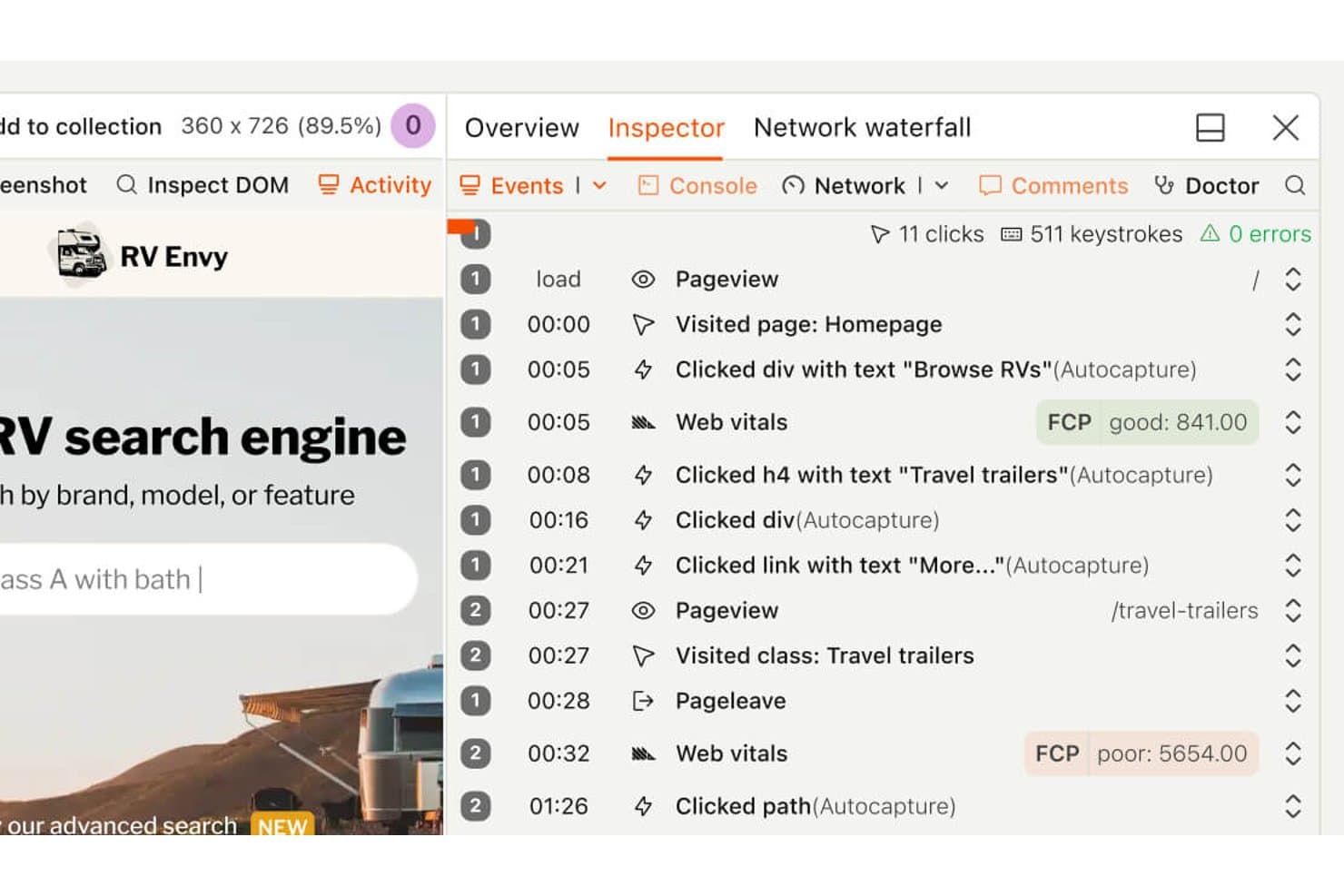
PostHogin avulla käyttäjät voivat toistaa istuntoja yksityiskohtaisen tapahtuma-aikajanan avulla. PostHog on tuoteanalytiikka- ja käyttäjäseuranta-alusta, joka yhdistää tapahtumaseurannan, suppilot, istuntotallenteet, ominaisuusliput ja kokeilut yhteen kehittäjille suunnattuun työtilaan.
Kenelle PostHog sopii parhaiten?
Tuotetiimeille ja kehittäjille, jotka etsivät avoimen lähdekoodin analytiikkaa tapahtumaseurannalla, istuntotallenteilla, ominaisuuslipuilla ja kokeiluilla yhdessä työtilassa.
Miksi valitsin PostHogin
Valitsin PostHogin, koska se on valintani parhaaksi avoimen lähdekoodin tuoteanalytiikaksi. Käytän tapahtumaseurantaa ja suppiloita yhdistääkseni käyttäjien toiminnan tuotteesta saatuihin tuloksiin ja tarkastelen sitten istuntotallenteita ymmärtääkseni lukujen taustalla olevaa kitkaa. Ominaisuusliput ja kokeilut auttavat minua vahvistamaan muutokset ennen niiden laajempaa käyttöönottoa.
PostHogin tärkeimmät ominaisuudet
- Käyttäjäkohortit: Ryhmittele käyttäjiä yhteisten ominaisuuksien tai käyttäytymiskriteerien perusteella.
- Palaavien käyttäjien raportit: Vertaile palaavia käyttäjiä valituilla ajanjaksoilla.
- SQL-editori: Tee tuotedatasta kyselyitä mukautettavilla SQL-lausekkeilla.
- Sovelluksen sisäiset kyselyt: Luo kyselyitä ja kohdista ne tuotteesi sisällä.
PostHog-integraatiot
PostHog tukee yli 50 dokumentoitua CDP-kohdetta, kuten HubSpotia, Slackia, Microsoft Teamsia, Brazea, Customer.io:ta, Snowflakea ja BigQueryä. Sen ohjelmointirajapinta ja webhookit tukevat mukautettuja integraatioita.
Mitä ilmaispaketti sisältää?
PostHog tarjoaa pysyvästi ilmaisen paketin ilman luottokorttia. Pakettiin sisältyy 1 miljoona tuoteanalytiikan tapahtumaa ja 5 000 istuntotallennetta kuukaudessa. Ilmaispaketti sisältää rajattomasti tiimin jäseniä, mutta rajoittaa käytön yhteen projektiin ja yhden vuoden tietojen säilytykseen. Kuukausittaisten käyttörajojen ylittävä käyttö lopetetaan, ellet siirry käytön mukaan laskutettavaan hinnoitteluun.
Pros and Cons
Pros:
- Avoimen lähdekoodin perusta tukee datan hallintaa
- Yhdistää seurannan, tallenteet ja kokeilut
- SQL-käyttöoikeus tukee räätälöityä tuoteanalyysiä
Cons:
- Instrumentointi edellyttää kehittäjien osallistumista
- Laajempi työtila lisää navigoinnin kuormittavuutta
Learn more about PostHog: Ideal para analizar el abandono de los embudos y los clics repetitivos
- Plan gratuito disponible
- Desde $140/mes
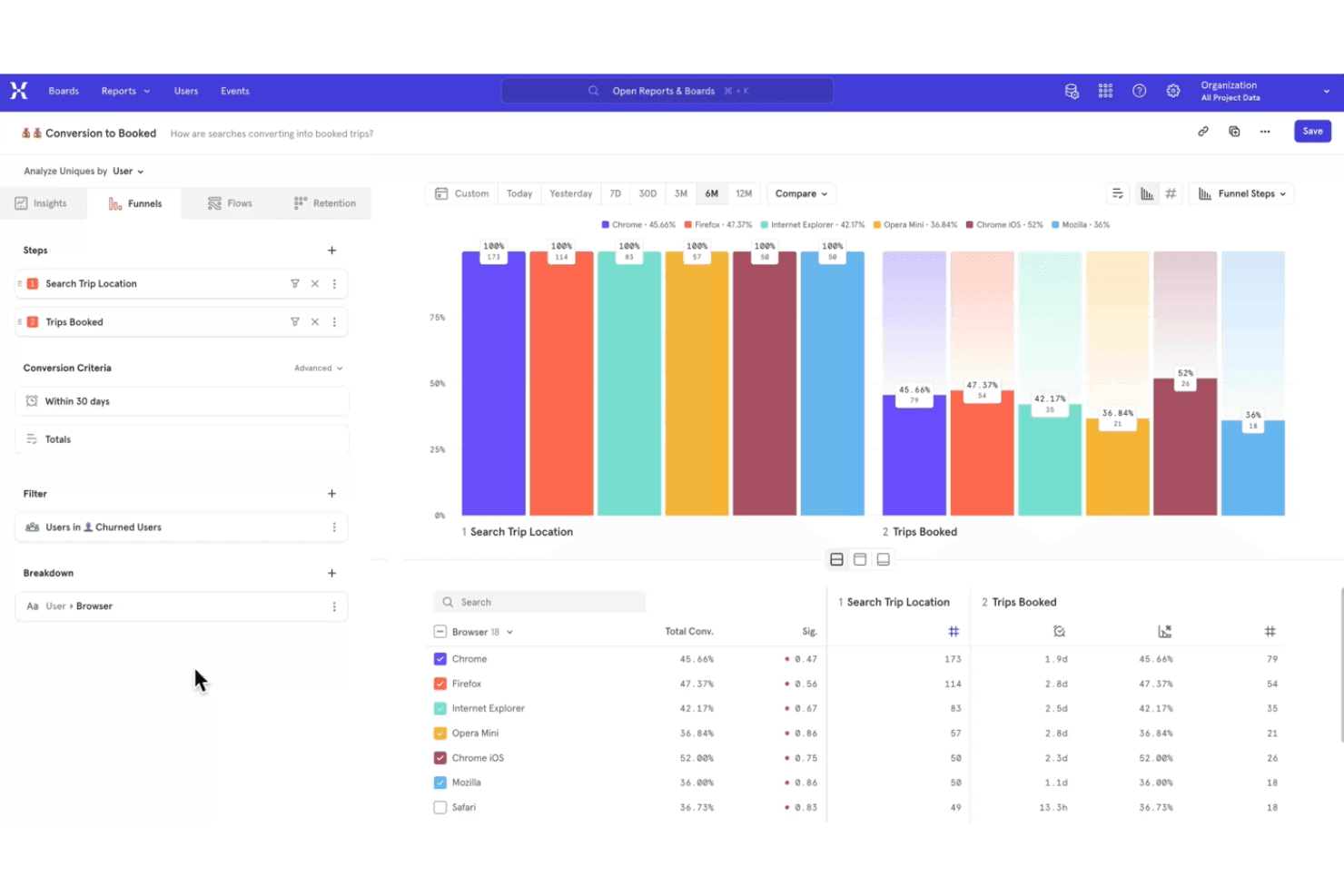
Mixpanel realiza un seguimiento de las interacciones de los usuarios para optimizar las experiencias de los productos digitales. Mixpanel es una plataforma de analítica de productos y seguimiento de usuarios que captura datos de eventos, mapea los recorridos de los usuarios y proporciona informes sobre cohortes, retención y uso del producto.
¿Para quién es más adecuado Mixpanel?
Mixpanel es adecuado para equipos de producto de empresas digitales que necesitan obtener información basada en eventos sobre el comportamiento de los usuarios, la retención y la adopción de funciones.
Por qué elegí Mixpanel
Elegí Mixpanel porque es ideal para analizar el abandono de los embudos y los clics repetitivos. Sus embudos basados en eventos muestran dónde los usuarios abandonan el registro o el proceso de pago, mientras que la reproducción de sesiones revela las pantallas detrás de los clics repetidos. El plan gratuito ofrece a los equipos de producto una forma práctica de investigar los puntos de fricción antes de priorizar las correcciones.
Principales funciones de Mixpanel
- Informes de retención : Comparar los usuarios que regresan durante periodos seleccionados.
- Análisis de cohortes : Crear cohortes a partir de propiedades compartidas o acciones de los usuarios.
- Informes de impacto : Medir cómo los eventos influyen en la conversión o la retención.
- Conectores de almacenes de datos : Exportar los datos de Mixpanel a sistemas de almacén compatibles.
Integraciones de Mixpanel
Mixpanel se integra con BigQuery, Snowflake, Amazon Redshift, Segment y herramientas asociadas como ConfigCat y Marketo. También ofrece API para la recopilación personalizada de eventos y las integraciones.
¿Qué incluye el plan gratuito?
Mixpanel cuenta con un plan gratuito permanente con usuarios ilimitados y sin necesidad de tarjeta de crédito. Incluye hasta 1 millón de eventos y 10.000 reproducciones de sesiones al mes, con una retención de las reproducciones de 30 días y límites en los informes guardados, las alertas, los experimentos y los indicadores de funciones.
Pros and Cons
Pros:
- Los informes de embudos identifican con precisión el abandono del registro
- La reproducción de sesiones revela los clics repetitivos
- El plan gratuito admite volúmenes de eventos significativos
Cons:
- La configuración de eventos requiere una instrumentación metódica
- La retención limitada de las reproducciones restringe el análisis histórico
Learn more about Mixpanel: Ideal para el seguimiento autoalojado y sin consentimiento
- Prueba gratuita de 21 días
- Desde $26/mes (facturado anualmente)
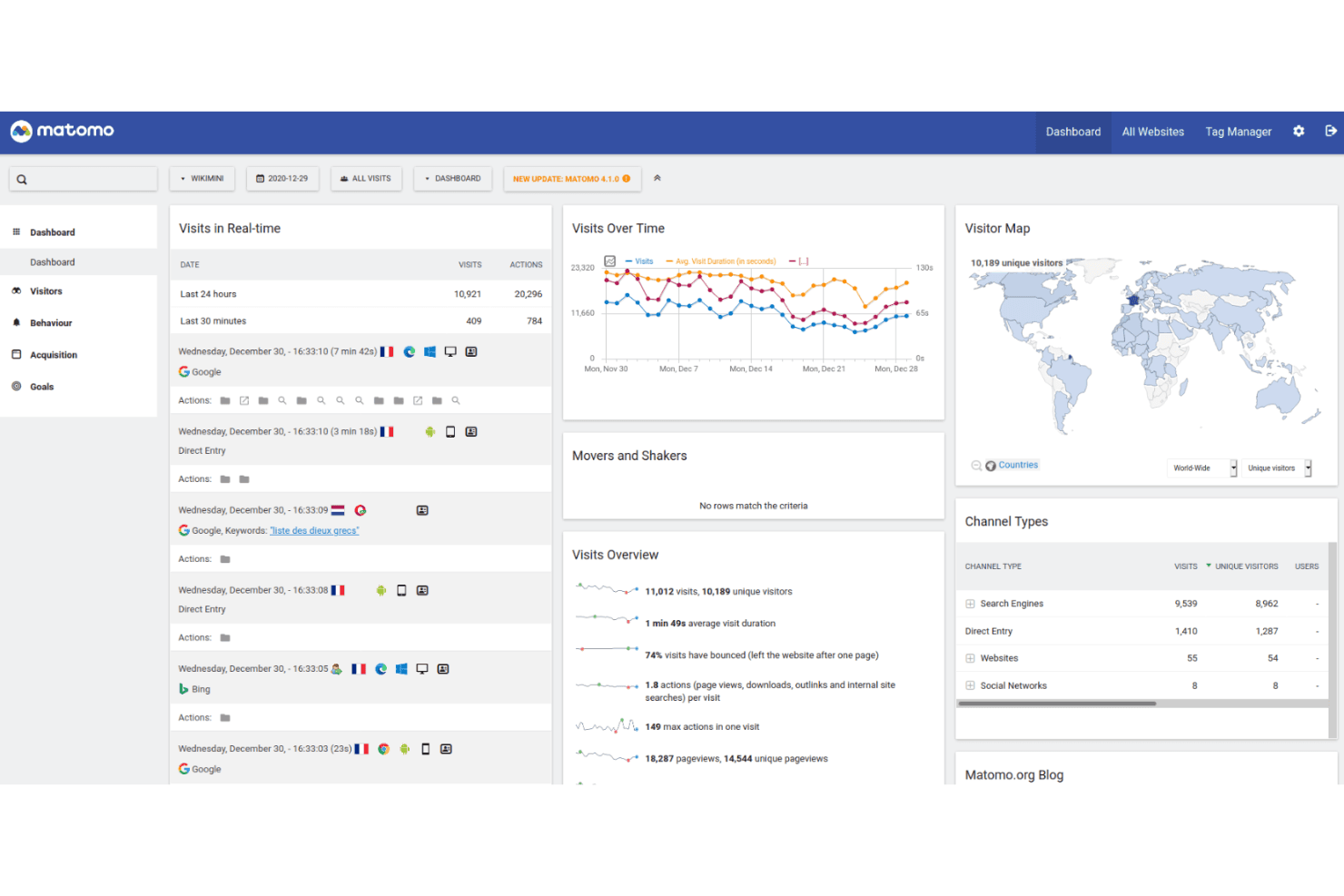
Matomo realiza un seguimiento de la actividad de los usuarios con control total de los datos y un alojamiento centrado en la privacidad. Matomo es una plataforma de seguimiento de usuarios y análisis web con seguimiento de eventos, grabaciones de sesiones, mapas de calor, atribución de campañas e informes personalizables para sitios web y productos.
¿Para quién es más adecuado Matomo?
Los equipos de producto y las organizaciones preocupadas por la privacidad que necesitan un seguimiento autoalojado y sin consentimiento encontrarán en Matomo una opción práctica.
Por qué elegí Matomo
Elegí Matomo porque permite realizar un seguimiento autoalojado y sin consentimiento sin enviar los datos del producto a un proveedor externo de análisis. Utilizo el seguimiento de eventos, las grabaciones de sesiones y los mapas de calor para relacionar el comportamiento de los usuarios con las decisiones sobre el producto. Sus informes personalizables también ayudan a los equipos a analizar los recorridos de los clientes conforme a sus propias normas de gobernanza de datos.
Funciones principales de Matomo
- Atribución de campañas: Realiza un seguimiento de las visitas y conversiones procedentes de distintas fuentes de campañas de marketing.
- Seguimiento de objetivos: Mide las acciones de los visitantes en relación con objetivos de conversión definidos.
- Administrador de etiquetas: Añade y gestiona etiquetas de seguimiento sin editar el código del sitio.
- Análisis de comercio electrónico: Registra las visualizaciones de productos, los pedidos, los ingresos y la actividad del carrito.
Integraciones de Matomo
Matomo se integra con más de 100 tecnologías, entre ellas WordPress, WooCommerce, Shopify, Drupal, Magento 2 y Jira Cloud. Sus API de análisis y seguimiento permiten crear integraciones personalizadas, mientras que Matomo Marketplace añade conexiones basadas en complementos.
¿Qué es gratis?
La edición Community de Matomo On-Premise es gratuita para siempre, con usuarios y visitas ilimitados, pero debes encargarte del alojamiento y el mantenimiento, mientras que los complementos premium y el soporte son de pago. Matomo Cloud ofrece una prueba gratuita de 21 días con todas las funciones principales y sin tarjeta de crédito; después, el precio depende del tráfico mensual.
Pros and Cons
Pros:
- La implementación autoalojada mantiene los datos dentro de la organización
- El seguimiento sin consentimiento permite realizar mediciones centradas en la privacidad
- Los informes personalizados respaldan la toma de decisiones sobre el producto
Cons:
- El alojamiento y el mantenimiento siguen siendo responsabilidad tuya
- Los informes avanzados pueden requerir conocimientos especializados en análisis
Learn more about Matomo: Ideal para la reproducción autohospedada con propiedad total de los datos
- Plan gratuito + prueba gratuita de 7 días disponible
- Desde $199/mes
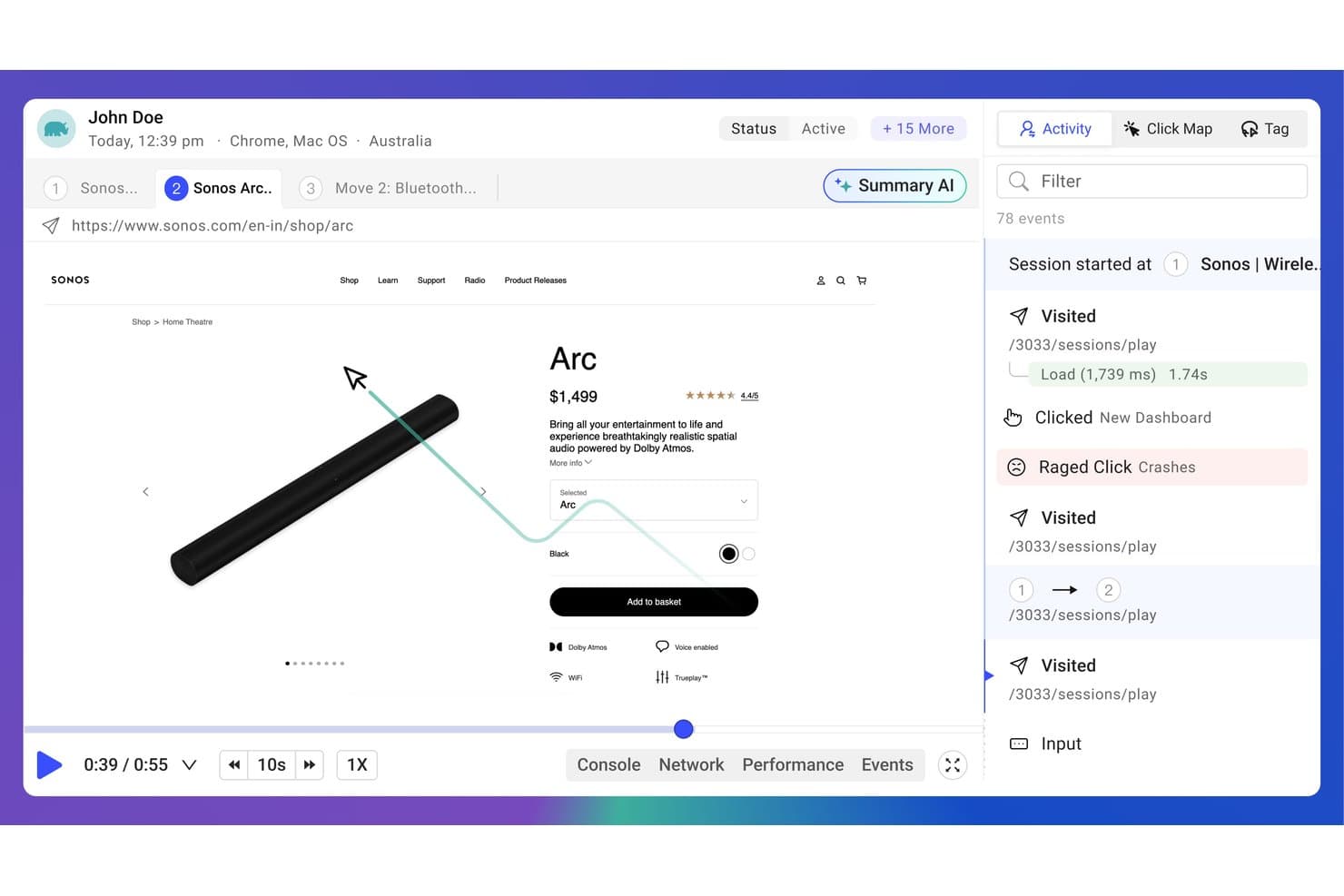
OpenReplay permite a los usuarios reproducir sesiones y realizar un seguimiento visual de los clics de frustración. OpenReplay es una plataforma de código abierto para el seguimiento de usuarios, la reproducción de sesiones, el análisis de productos, la supervisión del rendimiento y las herramientas para desarrolladores que capturan registros de consola, actividad de red e interacciones de los usuarios.
¿Para quién es más adecuado OpenReplay?
Equipos de producto e ingeniería que necesitan reproducción de sesiones autohospedada, diagnósticos para desarrolladores y control total sobre los datos de los usuarios capturados.
Por qué elegí OpenReplay
Elegí OpenReplay porque su configuración de código abierto y autohospedada proporciona a mi equipo la propiedad total de los datos sin enviar los datos de reproducción a una nube de terceros. Utilizo la reproducción de sesiones junto con los registros de consola, la actividad de red y las interacciones de los usuarios para investigar errores en el proceso de pago o flujos de trabajo confusos, manteniendo los datos confidenciales del producto dentro de nuestra infraestructura.
Características principales de OpenReplay
- Análisis de productos: Analiza el comportamiento de los usuarios con datos de uso del producto.
- Supervisión del rendimiento: Supervisa el rendimiento de la aplicación durante las sesiones de los usuarios.
- Seguimiento de problemas: Relaciona la actividad de los usuarios con problemas que requieren investigación.
- Herramientas para desarrolladores: Inspecciona el comportamiento de la aplicación mediante herramientas técnicas de depuración.
Integraciones de OpenReplay
OpenReplay documenta 10 integraciones, entre ellas Sentry, Datadog, Elastic, Dynatrace, Jira Cloud, Zendesk, GitHub, Slack, Microsoft Teams y Google Tag Manager. Su API REST admite integraciones personalizadas y exportaciones de datos.
¿Qué es gratis?
La edición de código abierto y autohospedada de OpenReplay es gratuita para siempre, pero debes alojarla y mantenerla en tu propia infraestructura. El plan gestionado Dedicado incluye una prueba gratuita de siete días sin necesidad de tarjeta de crédito y luego comienza en $199 al mes.
Pros and Cons
Pros:
- Propiedad total de los datos de reproducción
- El autohospedaje de código abierto permite cumplir los requisitos de privacidad
- Los datos de consola y de red facilitan la depuración
Cons:
- El autohospedaje requiere mantenimiento de la infraestructura
- La configuración técnica supera a la de las herramientas de seguimiento más sencillas
Learn more about OpenReplay:
Otros programas gratuitos de seguimiento de usuarios
Estas son algunas opciones adicionales de programas de seguimiento de usuarios que también ofrecen planes o pruebas gratuitas. Aunque estas herramientas no se incluyeron en mi lista, merece la pena echarles un vistazo:
- 11
- 12Google AnalyticsIdeal para el tráfico web y el análisis de las pérdidas en el embudo
- 13
- 14MouseflowLa mejor opción para la puntuación de fricción en un plan gratuito
- 15UserpilotIdeal para el seguimiento del comportamiento vinculado a intervenciones dentro de la aplicación
- 16Microsoft ClarityIdeal para embudos sin código y señales de frustración
Cómo evalúo el software gratuito de seguimiento de usuarios
Primero, defino qué se considera gratuito. Para el software de seguimiento de usuarios, exijo un plan gratuito para siempre, no una prueba, con funciones utilizables a pesar de los límites de usuarios, datos o funcionalidades. Después divido la evaluación en tres partes: funcionalidad principal, con la mayor ponderación, como reproducir sesiones y realizar un seguimiento de las acciones; características destacadas, como la instrumentación de captura automática; y aspectos adicionales, como una ruta de actualización clara.
Funcionalidad principal (requisitos básicos para esta lista)
Además de mis requisitos para el plan gratuito, utilizo un sistema de puntuación para seleccionar las herramientas de mi lista. Puntúo cada una en una escala de 0 (no ofrece la funcionalidad) a 5 (sobresale en esta área) para cada funcionalidad principal que se indica a continuación, según lo disponible en el plan gratuito. Después convierto el total en un porcentaje para ayudar a evaluar la adecuación general de cada herramienta, con una ponderación adicional para las funcionalidades que he considerado esenciales.
- Seguimiento del comportamiento de los usuarios (esencial): Busco datos sobre clics, desplazamientos, rutas de navegación y tiempo en la página que revelen dónde interactúan los usuarios o abandonan.
- Grabación de sesiones (esencial): Evalúo si las reproducciones ayudan a investigar problemas, comparar recorridos y comprender los puntos de fricción en sesiones de usuarios reales.
- Informes visuales del comportamiento: Compruebo si ofrece mapas útiles de clics, desplazamientos o movimientos que aclaren los patrones de interacción en páginas clave.
- Seguimiento de varias páginas: Evalúo si el seguimiento acompaña los recorridos a través de páginas de destino, áreas de cuenta, pasos de pago o varias pantallas de la aplicación.
- Acceso a los datos y generación de informes: Busco filtros, paneles y exportaciones que permitan a los equipos de producto revisar los hallazgos o compartir informes útiles.
Una vez que tengo una lista de herramientas que cumplen los criterios, considero qué distingue a cada plataforma.
Factores diferenciadores (qué distingue a los proveedores)
Así es como comparo y contrasto los distintos proveedores:
Características destacadas
La instrumentación de captura automática es un aspecto importante: compruebo si una herramienta registra automáticamente los clics, toques y vistas de página para que los responsables de producto no tengan que esperar a que el equipo de ingeniería etiquete cada elemento nuevo. Los creadores de embudos sin código son igual de importantes, porque permiten reajustar los pasos de conversión sobre la marcha cuando las prioridades cambian a mitad del sprint. También evalúo la paridad de los SDK móviles, ya que herramientas como PostHog y Mixpanel ofrecen seguimiento nativo para iOS y Android en los niveles gratuitos, algo esencial si el producto no es exclusivamente web.
Más allá de las características
Compruebo durante cuánto tiempo conserva cada plan gratuito los datos de eventos sin procesar, ya que un periodo de 30 días puede hacer imposible comparar cohortes de retención entre trimestres. El esfuerzo de implementación también importa: las herramientas con captura automática, como PostHog o Hotjar, me permiten empezar a recopilar información sin esperar a que el equipo de ingeniería instrumente cada botón. También evalúo los límites de puestos, porque un nivel gratuito que limite los colaboradores a dos o tres obliga a actualizarse antes de que el equipo de producto pueda siquiera compartir los hallazgos.
Cómo elegir un programa gratuito de seguimiento de usuarios
Las listas de funciones y las estructuras de precios complejas pueden dificultar saber qué obtienes realmente de un programa gratuito de seguimiento de usuarios. Para ayudarte a mantener la concentración mientras avanzas en el proceso de selección del software, estos son algunos factores que debes tener en cuenta:
| Factor | Qué debes tener en cuenta |
|---|---|
| FactorAlcance de la oferta gratuita | Qué debes tener en cuentaComprueba qué incluye el plan gratuito. Asegúrate de que cubre funciones esenciales, como el seguimiento de usuarios y el análisis de datos, sin costes ocultos. |
| FactorEscalabilidad | Qué debes tener en cuentaConsidera si la herramienta puede crecer junto con tu equipo. Busca opciones que permitan actualizar el plan fácilmente a medida que aumenten tus necesidades. |
| FactorIntegraciones | Qué debes tener en cuentaAsegúrate de que el programa se integra con las herramientas que ya utilizas, como plataformas de CRM o de marketing, para agilizar los flujos de trabajo. |
| FactorFacilidad de uso | Qué debes tener en cuentaElige un programa que requiera una formación mínima y ofrezca una visualización clara de los datos. Una interfaz fácil de usar es imprescindible. |
| FactorPrivacidad de los datos | Qué debes tener en cuentaAsegúrate de que la herramienta cumple la normativa de protección de datos, como el RGPD, especialmente si gestionas información confidencial. |
| FactorPersonalización | Qué debes tener en cuentaBusca un programa que te permita adaptar los informes y paneles para ajustarlos a tus necesidades y preferencias específicas. |
| FactorAsistencia | Qué debes tener en cuentaEvalúa el nivel de asistencia al cliente disponible, como el chat en directo o los foros, para recibir ayuda cuando la necesites. |
| FactorRendimiento | Qué debes tener en cuentaComprueba si la herramienta proporciona actualizaciones de datos en tiempo real y un procesamiento rápido para mantener informado a tu equipo sin retrasos. |
¿Qué es un programa gratuito de seguimiento de usuarios?
El software de seguimiento de usuarios es una herramienta que supervisa y analiza las interacciones de los usuarios en sitios web o aplicaciones, y que a menudo está disponible mediante planes gratuitos o pruebas. Estas herramientas suelen ser utilizadas por gerentes de producto, especialistas en marketing y diseñadores de UX para obtener información sobre el comportamiento de los usuarios y mejorar su experiencia. Funciones como las grabaciones de sesiones, los mapas de calor y los análisis en tiempo real ayudan a comprender la interacción de los usuarios, identificar puntos problemáticos y mejorar la usabilidad del producto.
Funciones del software gratuito de seguimiento de usuarios
Repasemos las funciones que suelen encontrarse en el software de seguimiento de usuarios y cuáles suelen incluirse en los planes gratuitos y de pago.
Funciones que suelen incluirse en el software gratuito de seguimiento de usuarios
- Grabaciones de sesiones: Capturan y reproducen las interacciones de los usuarios para comprender su comportamiento e identificar problemas.
- Mapas de calor: Muestran visualmente dónde hacen clic y se desplazan los usuarios, lo que ayuda a ver qué áreas del sitio resultan más atractivas.
- Análisis en tiempo real: Proporcionan información inmediata sobre la actividad actual de los usuarios, lo que permite responder rápidamente a las tendencias.
- Seguimiento básico de eventos: Supervisa acciones específicas de los usuarios, como clics o envíos de formularios, para analizar los patrones de interacción.
- Segmentación de visitantes: Agrupa a los usuarios según su comportamiento o datos demográficos para adaptar las experiencias y el contenido.
- Conformidad con la privacidad: Garantiza que la recopilación de datos cumpla normativas como el RGPD y proteja la privacidad de los usuarios.
- Paneles personalizables: Permiten adaptar la vista de los datos para centrarse en las métricas más importantes para tu equipo.
Funciones que suelen incluirse en el software de pago de seguimiento de usuarios
- Segmentación avanzada: Crea grupos de usuarios detallados basados en criterios complejos para realizar análisis más específicos.
- Pruebas A/B: Prueba distintas versiones de tu sitio o aplicación para determinar cuál funciona mejor con los usuarios.
- Análisis del embudo: Realiza un seguimiento de los recorridos de los usuarios por tu sitio para identificar los puntos de abandono y optimizar las rutas de conversión.
- Informes automatizados: Genera informes detallados automáticamente para ahorrar tiempo y garantizar un análisis de datos coherente.
- Seguimiento entre dispositivos: Supervisa las interacciones de los usuarios en varios dispositivos para obtener una visión completa de su recorrido.
- Exportación avanzada de datos: Exporta datos en diversos formatos para realizar análisis más profundos o integrarlos con otras herramientas.
- Creación de eventos personalizados: Define eventos específicos para realizar un seguimiento de acciones adaptadas a las necesidades particulares de tu empresa.
Ventajas del software gratuito de seguimiento de usuarios
Implementar un software gratuito de seguimiento de usuarios ofrece varias ventajas para tu equipo y tu empresa. Estas son algunas de las que puedes esperar:
- Información rentable: Obtén información valiosa sobre el comportamiento de los usuarios sin realizar una inversión económica, lo que te permite destinar recursos a otras áreas.
- Mejora de la experiencia del usuario: Utiliza funciones como las grabaciones de sesiones y los mapas de calor para identificar y solucionar problemas de usabilidad, mejorando la satisfacción de los usuarios.
- Toma de decisiones rápida: Los análisis en tiempo real proporcionan datos inmediatos, lo que permite a tu equipo tomar decisiones fundamentadas con rapidez.
- Segmentación mejorada: La segmentación de visitantes ayuda a adaptar el contenido y las experiencias a grupos de usuarios específicos, aumentando la interacción.
- Garantía de privacidad de los datos: El cumplimiento de normativas de privacidad como el RGPD garantiza que los datos de los usuarios se recopilen de forma responsable y genera confianza en tu audiencia.
- Flexibilidad de personalización: Los paneles personalizables te permiten centrarte en las métricas más importantes, optimizando tu proceso de análisis.
- Prueba sin compromiso: Las versiones gratuitas te permiten probar las capacidades del software y comprobar sus ventajas de primera mano antes de decidirte por un plan de pago.
Costes y precios del software gratuito de seguimiento de usuarios
Entiendo que has llegado a este artículo en busca de las mejores opciones de software gratuito de seguimiento de usuarios disponibles. Sin embargo, como los planes gratuitos solo ofrecen funciones limitadas, es muy probable que en el futuro necesites ampliar tu plan, por lo que he incluido el cuadro siguiente.
La tabla siguiente resume los planes habituales, sus precios medios y las funciones que suelen incluir las soluciones de software de seguimiento de usuarios:
Tabla comparativa de planes de software de seguimiento de usuarios
| Tipo de plan | Precio medio | Funciones habituales |
|---|---|---|
| Tipo de planPlan gratuito | Precio medio$0 | Funciones habitualesAnálisis básicos, grabaciones de sesiones, mapas de calor y segmentación de visitantes. |
| Tipo de planPlan personal | Precio medio$5-$25/usuario/mes | Funciones habitualesAnálisis avanzados, seguimiento de eventos personalizados, datos en tiempo real e informes básicos. |
| Tipo de planPlan empresarial | Precio medio$50-$100/usuario/mes | Funciones habitualesAnálisis de embudos, pruebas A/B, informes automatizados y seguimiento entre dispositivos. |
| Tipo de planPlan para empresas | Precio medio$150+/usuario/mes | Funciones habitualesIntegraciones personalizadas, asistencia especializada, exportación avanzada de datos y personalización completa. |