

Projeleri yönetmek, özellikle birden fazla görevi ve teslim tarihini aynı anda takip ediyorsanız baş ağrıtıcı olabilir. Ekibinizin net bir yol haritasına ihtiyacı vardır ve ücretsiz kilometre taşı yazılımları tam da bu noktada devreye girer. Bu yazılımlar, tek kuruş harcamadan projeleri düzenlemenize, ilerlemeyi takip etmenize ve hiçbir şeyin gözden kaçmamasını sağlamanıza yardımcı olur.
Deneyimlerime göre doğru aracı seçmek büyük bir fark yaratabilir. Ekibinizin ihtiyaçlarına uyan, kullanımı kolay ve en önemlisi ücretsiz bir çözüm istersiniz. En uygun seçeneği bulmanıza yardımcı olmak için bu araçlardan çeşitli örnekleri test edip inceledim.
Bu makalede, bilinçli bir karar vermeniz için ihtiyaç duyduğunuz bilgileri sunarak ücretsiz kilometre taşı yazılımları arasındaki en iyi seçimlerimi paylaşacağım.
Yazılım İncelemelerimize Neden Güvenmelisiniz?
2020'den beri ürün yönetimi yazılımlarını test ediyor ve inceliyoruz. Biz de ürün yöneticileri olduğumuz için yazılım seçerken doğru kararı vermenin ne kadar kritik ve zor olduğunu biliyoruz. Kitlemizin daha iyi yazılım satın alma kararları vermesine yardımcı olmak için kapsamlı araştırmalara yatırım yapıyoruz.
Farklı ürün yönetimi kullanım senaryoları için 2.000'den fazla aracı test ettik ve 1.000'den fazla kapsamlı yazılım incelemesi kaleme aldık. Şeffaflığımızı nasıl koruduğumuzu öğrenin ve yazılım inceleme metodolojimize göz atın.
Ücretsiz Kilometre Taşı Yazılımları Karşılaştırma Tablosu
Listeme giren araçların her biri için temel maliyetler aşağıda yer alıyor.
Score legend (out of 5)
- Excellent4.5–5
- Good4–4.4
- Average3–3.9
- Below average2–2.9
- Poor1–1.9
Sorted by: Default
| Tool | Starting Price | Website | |||||||
|---|---|---|---|---|---|---|---|---|---|
Best for cross-project milestone rollups on free | 3.3 out of 5 | 3 | 3 | 3 | 4 | 3 | 4 | $2.49/user/month Free plan + 14-day trial available | Website |
Best for sharing roadmaps with outside stakeholders | 3.2 out of 5 | 4 | 4 | 3 | 2 | 3 | 3 | $8/user/month Free demo available | Website |
Best for Gantt-based deadline tracking at no cost | 3.0 out of 5 | 3 | 4 | 4 | 3 | 2 | 2 | €69/month Free plan + 15-day free trial + free demo available | Website |
Best for Agile release and sprint milestone tracking | 2.8 out of 5 | 2 | 4 | 1 | 4 | 3 | 3 | $7.91/user/month Free plan + free trial available | Website |
Best for dev teams tracking milestones in code repos | 3.2 out of 5 | 4 | 4 | 1 | 3 | 4 | 3 | $4/user/month Free plan available | Website |
Best for auto-updating milestone progress tracking | 4.3 out of 5 | 4 | 4 | 3 | 5 | 5 | 5 | $10/user/month Free plan + 14-day free trial available | Website |
Best for multi-view milestone and Gantt tracking | 4.0 out of 5 | 3 | 5 | 3 | 5 | 4 | 4 | $12/user/month Free plan + free trial + free demo available | Website |
Best for switching views on a single dataset | 3.5 out of 5 | 3 | 5 | 3 | 3 | 3 | 4 | €8/user/month 14-day free trial + demo available | Website |
Best for note-taking teams tracking milestones | 3.7 out of 5 | 4 | 5 | 2 | 4 | 3 | 4 | $10/user/month Free plan + 30-day trial available | Website |
Best for open source collaboration | 3.8 out of 5 | 3 | 5 | 4 | 3 | 4 | 4 | €5.95/user/month Free plan available; 14-day free trial available for Enterprise Cloud and on-premises | Website |


En İyi Ücretsiz Kilometre Taşı Yazılımları İncelemeleri
Aşağıda, listeme giren en iyi ücretsiz kilometre taşı yazılımlarına ilişkin ayrıntılı özetlerimi bulabilirsiniz. İncelemelerim, size en uygun aracı bulmanıza yardımcı olmak için her bir aracın temel özelliklerine, artılarına & eksilerine, entegrasyonlarına ve ideal kullanım alanlarına ayrıntılı bir bakış sunuyor. Bu araçlardan bazıları tamamen ücretsiz bir sürüm sunarken diğerleri ücretsiz deneme süresi sunuyor. İncelemelerimin her birinde hangi özelliklerin ücretsiz olduğuna dair bir not ekledim
 Best for cross-project milestone rollups on free
- Free plan + 14-day trial available
- From $2.49/user/month
Visit WebsiteCustomer Rating:4.7/5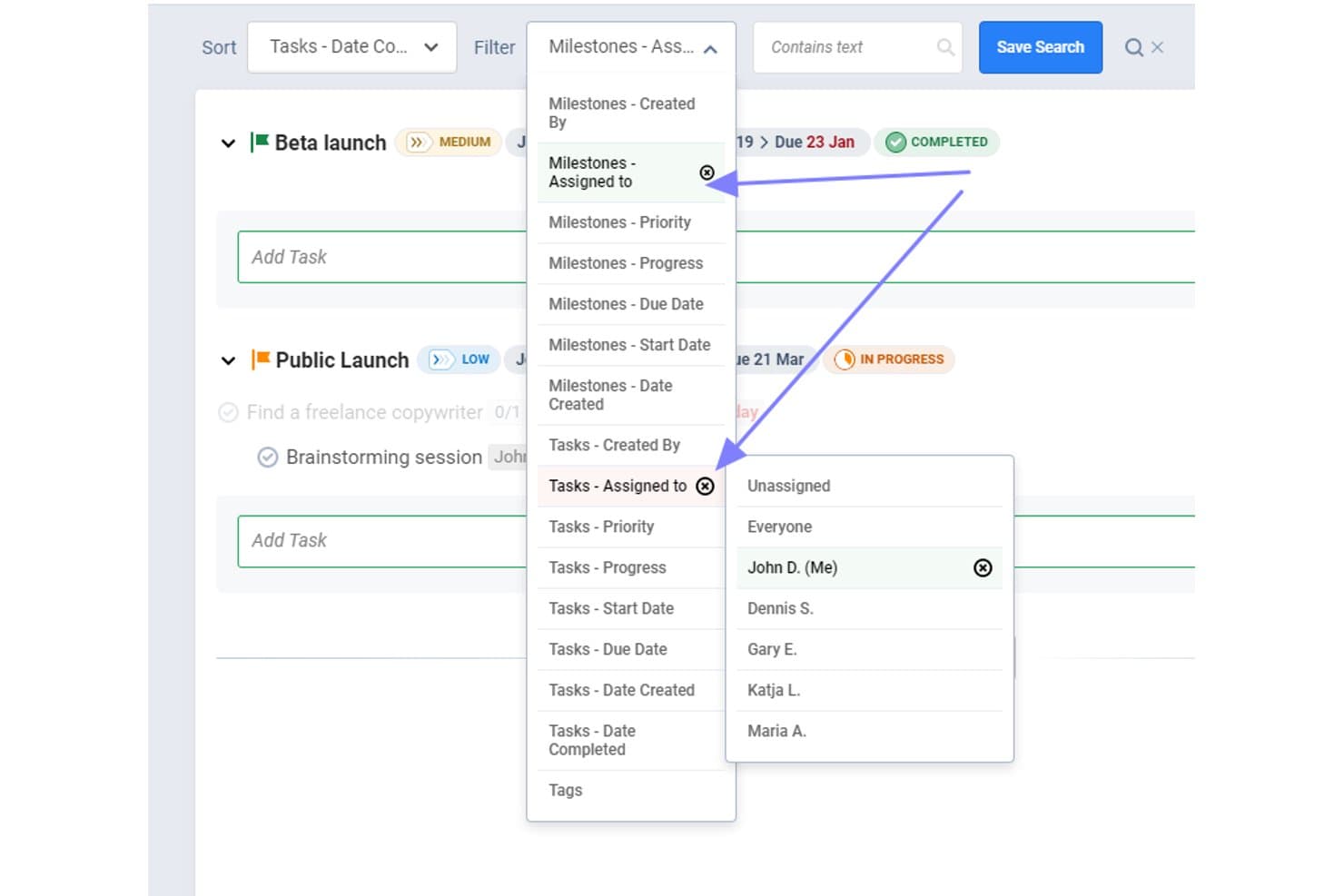
Freedcamp lets users filter milestones and tasks by assignee. Freedcamp is a free milestone management and project planning platform with due dates, linked tasks, status rollups, assignees, comments, and List, Kanban, Table, and Calendar views.
Who Is Freedcamp Best For?
Freedcamp suits project managers and PMO leads who need free, cross-project milestone rollups with linked tasks and shared progress visibility.
Why I Picked Freedcamp
I picked Freedcamp because its free plan handles cross-project milestone rollups on free. I use the Milestones Board and Calendar Board to review deadlines across projects, while linked tasks show each milestone’s not-done, in-progress, and done counts. The milestones widget adds another portfolio-level progress view.
Freedcamp Key Features
- Public projects: Publish project details as an externally accessible roadmap.
- ICS calendar sharing: Share milestone calendars with Google Calendar, Outlook, or Apple Calendar.
- Recap emails: Receive summaries of overdue and upcoming milestones.
- Milestone comments: Add comments, attachments, followers, and @mentions to milestones.
Freedcamp Integrations
Freedcamp doesn't have any native integrations, but it supports GitHub, Jira, Airtable, and Typeform through Pabbly, plus an API for custom integrations and Zapier.
What's Free?
Freedcamp offers a free-forever plan with unlimited users, projects, and storage, subject to a fair-use policy. The plan has fewer apps and features than paid tiers, and integrations require Zapier, Pabbly, or the API rather than native connections.
Pros and Cons
Pros:
- Public projects support external roadmap sharing
- Linked tasks show milestone completion status
- Cross-project milestone rollups improve portfolio visibility
Cons:
- Ten initial invites constrain team onboarding
- Free users lack Gantt timeline planning
Learn more about Freedcamp: Best for sharing roadmaps with outside stakeholders
- Free demo available
- From $8/user/month
Visit WebsiteCustomer Rating:4.6/5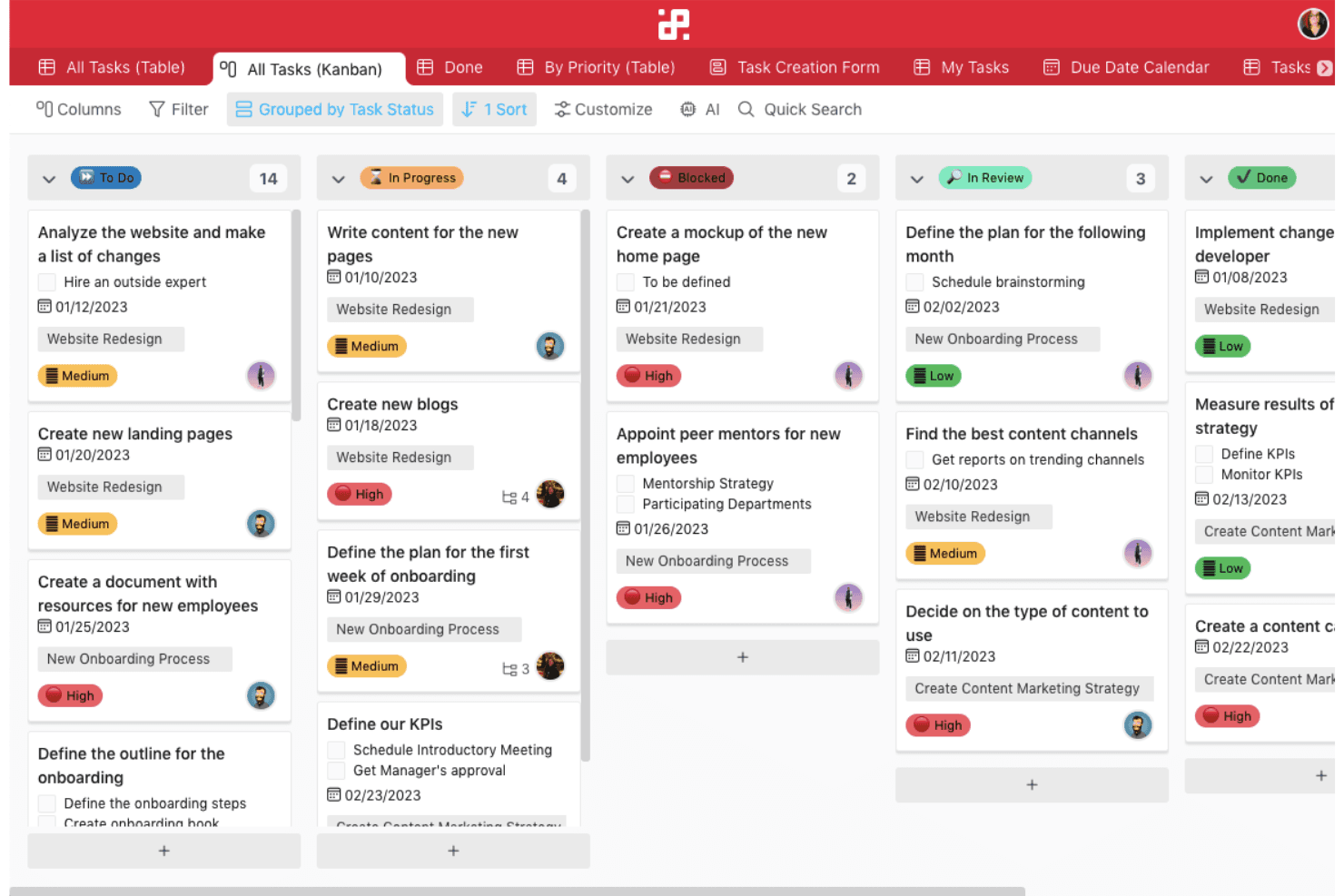
Infinity lets teams manage unlimited tasks across custom workflows with flexible features like tagging and structured automations. Infinity is a milestone and roadmap planning platform that models milestones with customizable items and attributes, then organizes them through Gantt, calendar, sub-item, progress, and public board views.
Who Is Infinity Best For?
Infinity suits product and project managers who need flexible milestone tracking and roadmap sharing with clients, executives, and outside stakeholders.
Why I Picked Infinity
I picked Infinity because it turns custom items and date attributes into trackable milestones, then presents them in Gantt and calendar views. I especially like its public, embeddable boards, guest permissions, password protection, and PDF exports for sharing roadmaps with outside stakeholders. Infinity has no free plan, so it’s a paid alternative rather than a true free option.
Infinity Key Features
- Custom attributes: Add labels, progress bars, checklists, formulas, and member fields to milestone records.
- Sub-items: Break milestones into smaller tasks with separate dates, labels, and assignees.
- Reminder automations: Trigger notifications or emails before or after date attributes.
- Roadmap templates: Start with Product Roadmap, Sprint Planning, or Project Tracker templates.
Infinity Integrations
Infinity offers native integrations with Trello, Google Calendar, Google Drive, iCalendar, and Clockify. It also supports API access, webhooks, and Zapier; Jira and GitHub aren’t native integrations.
What's Free?
Infinity doesn’t offer a free-forever plan; it provides a free demo instead. Continued use requires a paid plan, starting at $6 per user per month when billed annually.
Pros and Cons
Pros:
- Custom attributes adapt to milestone workflows
- Drag-and-drop Gantt supports deadline planning
- Public boards simplify stakeholder roadmap sharing
Cons:
- Sub-item progress requires manual updates
- No native milestone object
Learn more about Infinity: Best for Gantt-based deadline tracking at no cost
- Free plan + 15-day free trial + free demo available
- From €69/month
Visit WebsiteCustomer Rating:4.2/5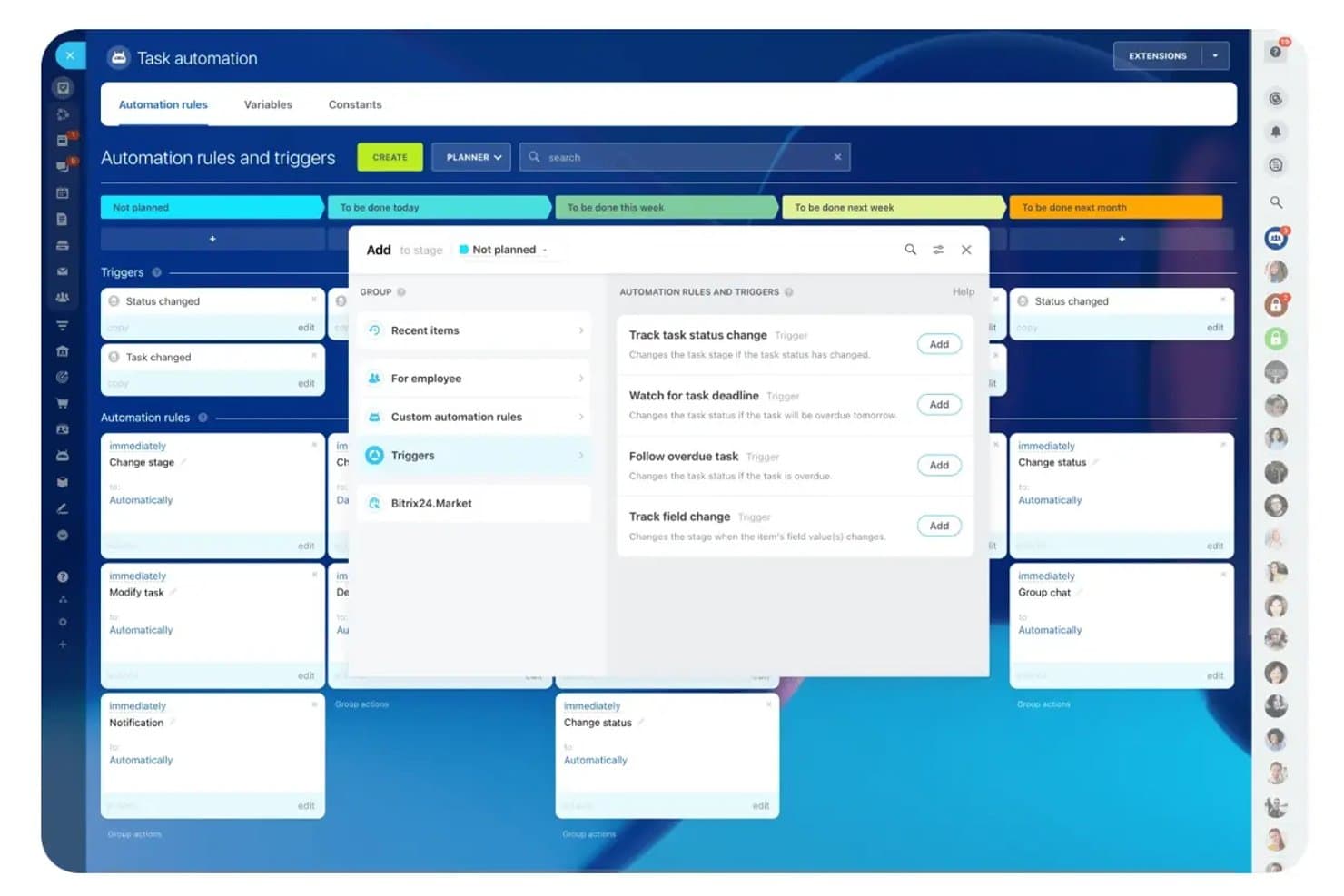
Bitrix24 automates task stage changes using trigger-based rules. Bitrix24 is free project management software for milestone planning, with Gantt charts, task dependencies, shared calendars, Kanban boards, Scrum tools, reminders, and collaboration features, using deadline-based tasks instead of dedicated milestones.
Who Is Bitrix24 Best For?
Project managers on small teams can use Bitrix24 for free Gantt-based deadline tracking, task dependencies, and built-in team collaboration.
Why I Picked Bitrix24
I picked Bitrix24 for Gantt-based deadline tracking at no cost because I can model launch gates as parent tasks with deadlines and dependencies. Its drag-and-drop Gantt shifts linked work when dates change, while shared calendars and deadline reminders keep delivery checkpoints visible.
Bitrix24 Key Features
- Scrum backlog: Organize epics, story points, sprints, burndown charts, and team velocity.
- Subtasks and checklists: Break deliverables into actionable work with nested tasks and checklists.
- Task status views: Track work through List, Kanban, Planner, and status-based task views.
- Task comments: Discuss deliverables directly through comments, task chats, and shared feeds.
Bitrix24 Integrations
Bitrix24 documents integrations with Google Drive and Zoom on its free-plan materials. Its Marketplace offers over 550 apps, including a paid Jira Service Management Cloud app, and its REST API supports custom integrations.
What's Free?
Bitrix24 offers a free-forever plan with unlimited users, including task management, Gantt charts, Kanban boards, and Scrum tools. Paid plans add expanded storage, automation, and advanced features, while the platform also offers a 15-day trial for paid features.
Pros and Cons
Pros:
- Scrum views organize epics and sprints
- Reminders work across multiple notification channels
- Free Gantt supports deadline dependencies
Cons:
- No cross-project milestone rollup views
- No dedicated milestone object
Learn more about Bitrix24: 4Best for Agile release and sprint milestone tracking
Jira
- Free plan + free trial available
- From $7.91/user/month
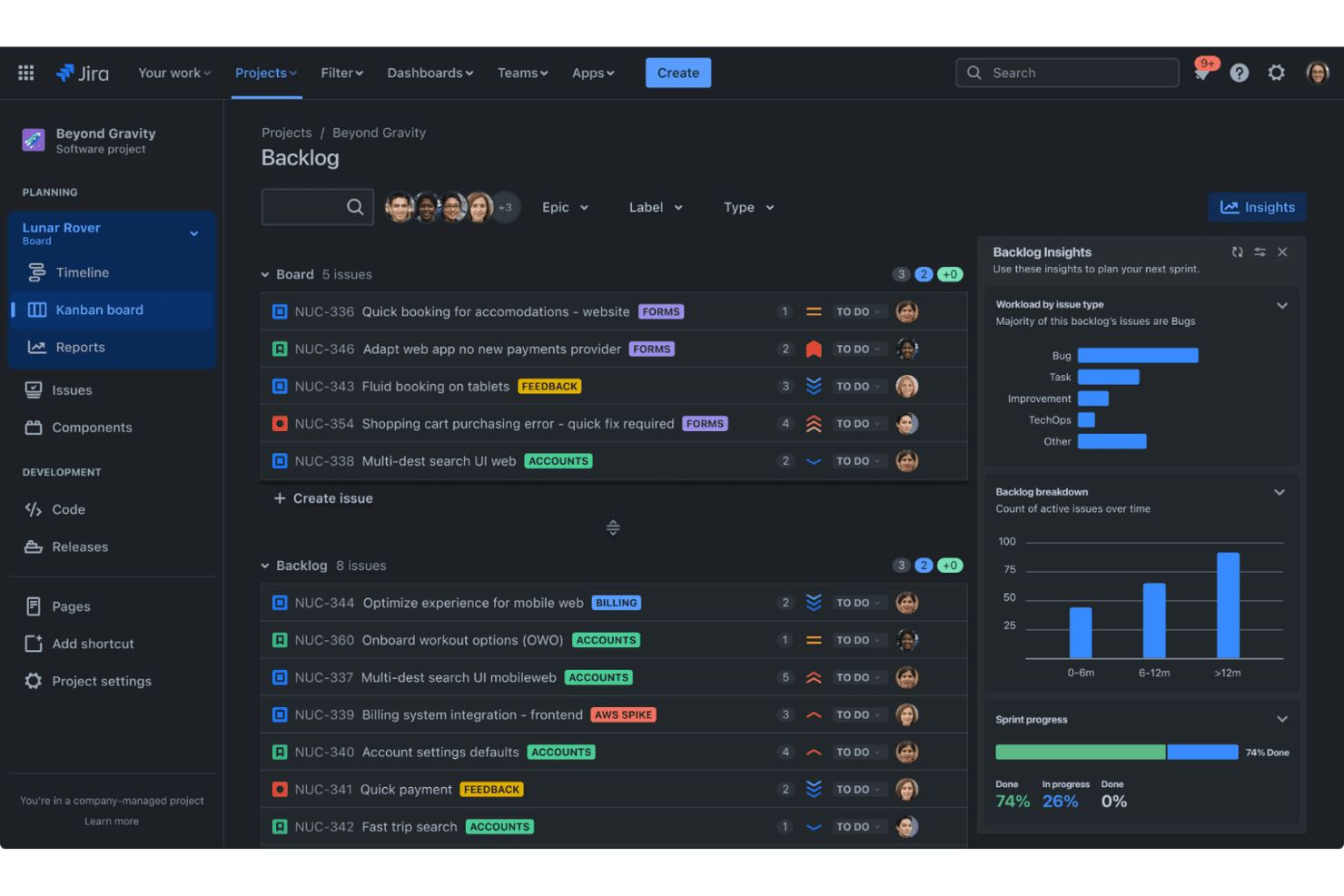
Jira helps Agile teams track issues and plan sprints efficiently. Jira is an agile project management platform with a free tier that uses versions as release milestones alongside epics, sprints, timelines, dependency mapping, and progress reports.
Who Is Jira Best For?
Jira fits engineering-led product teams that coordinate sprint work, epics, dependencies, and release milestones in one workspace.
Why I Picked Jira
I picked Jira because it excels at Agile release and sprint milestone tracking. I use versions as dated release milestones, then connect epics and tasks through the Fix version field. Its timeline marks overdue releases, while sprint burndown reports show completed, remaining, and newly added work.
Jira Key Features
- Dependency mapping: Link work items to visualize blockers and downstream impacts.
- Custom workflows: Configure statuses and transitions for different work types.
- Summary view: Filter work progress by date, assignee, status, parent, or priority.
- GitHub integration: Display branches, commits, pull requests, builds, and deployments.
Jira Integrations
Jira integrates with GitHub, Bitbucket, Confluence, Slack, Microsoft Teams, Google Workspace, Zoom, and Figma. Its marketplace offers 3,000+ apps, and REST APIs support custom integrations.
What's Free?
Jira’s Free plan is free forever for up to 10 users, with 2GB of file storage and Community Support. It includes 100 automation rule runs per month, while larger teams need a paid plan.
Pros and Cons
Pros:
- Timeline maps dependencies and rolled-up dates
- Sprint burndowns forecast projected finish dates
- Release versions provide dated milestone markers
Cons:
- Milestone reminders require custom automation rules
- Free timeline covers only one space
Learn more about Jira: Best for dev teams tracking milestones in code repos
- Free plan available
- From $4/user/month
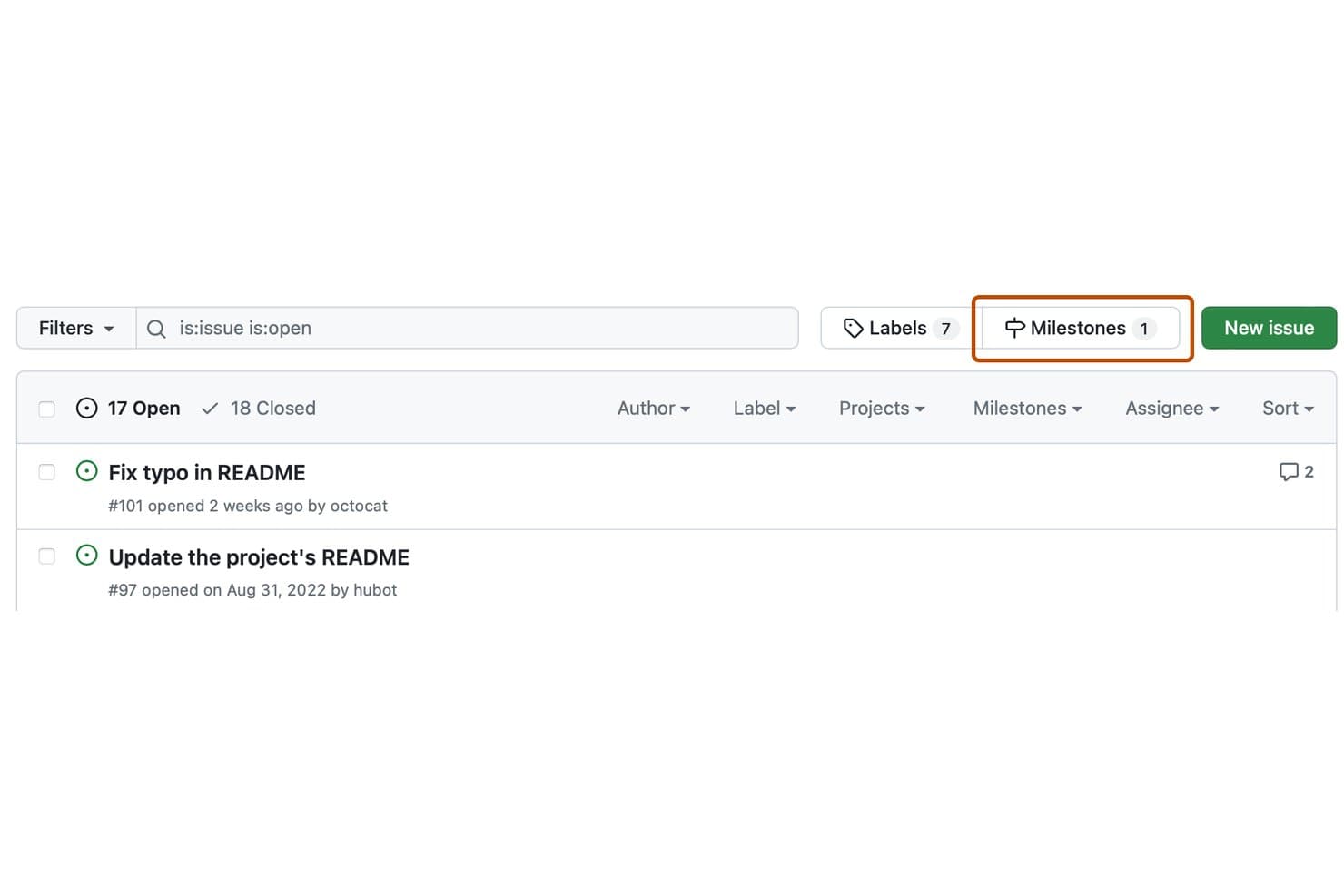
GitHub Issues lets users filter and manage milestones from the issues list. GitHub Issues is free milestone software integrated with GitHub Projects, combining repository-based milestones with issues, pull requests, sub-issues, dependencies, progress indicators, and a roadmap timeline.
Who Is GitHub Issues Best For?
Engineering and developer teams can track release checkpoints beside issues, pull requests, dependencies, and code repositories without adopting separate milestone software.
Why I Picked GitHub Issues
I picked GitHub Issues because it’s best for dev teams tracking milestones in code repos. I use repository milestones to monitor release progress through due dates, open and closed issue counts, and percent-complete indicators. GitHub Projects adds roadmap views, sub-issues, and dependency tracking for coordinating work across repositories.
GitHub Issues Key Features
- Markdown descriptions: Add formatted context to milestones and issues.
- Project status updates: Mark projects as on track or at risk.
- Public project visibility: Share project views with anyone online.
- Built-in automations: Update item statuses when issues close or pull requests merge.
GitHub Issues Integrations
GitHub Issues integrates natively with GitHub Actions and Slack, connects with GitHub CLI and GitHub Mobile, and supports custom integrations through its GraphQL API. Marketplace integrations add options such as milestone due-date reminders.
What's Free?
GitHub Issues is free forever through GitHub Free, which includes Issues and Projects for unlimited public and private repositories. The plan has separate usage limits, including 2,000 GitHub Actions minutes monthly and 500 MB of Packages storage.
Pros and Cons
Pros:
- Sub-issues break releases into nested checkpoints
- Roadmap markers connect dates, iterations, milestones
- Milestone progress shows open and closed counts
Cons:
- Milestones provide no native due-date alerts
- Milestones lack owners and dependency mapping
Learn more about GitHub Issues: Best for auto-updating milestone progress tracking
- Free plan + 14-day free trial available
- From $10/user/month (billed annually)
Visit WebsiteCustomer Rating:4.6/5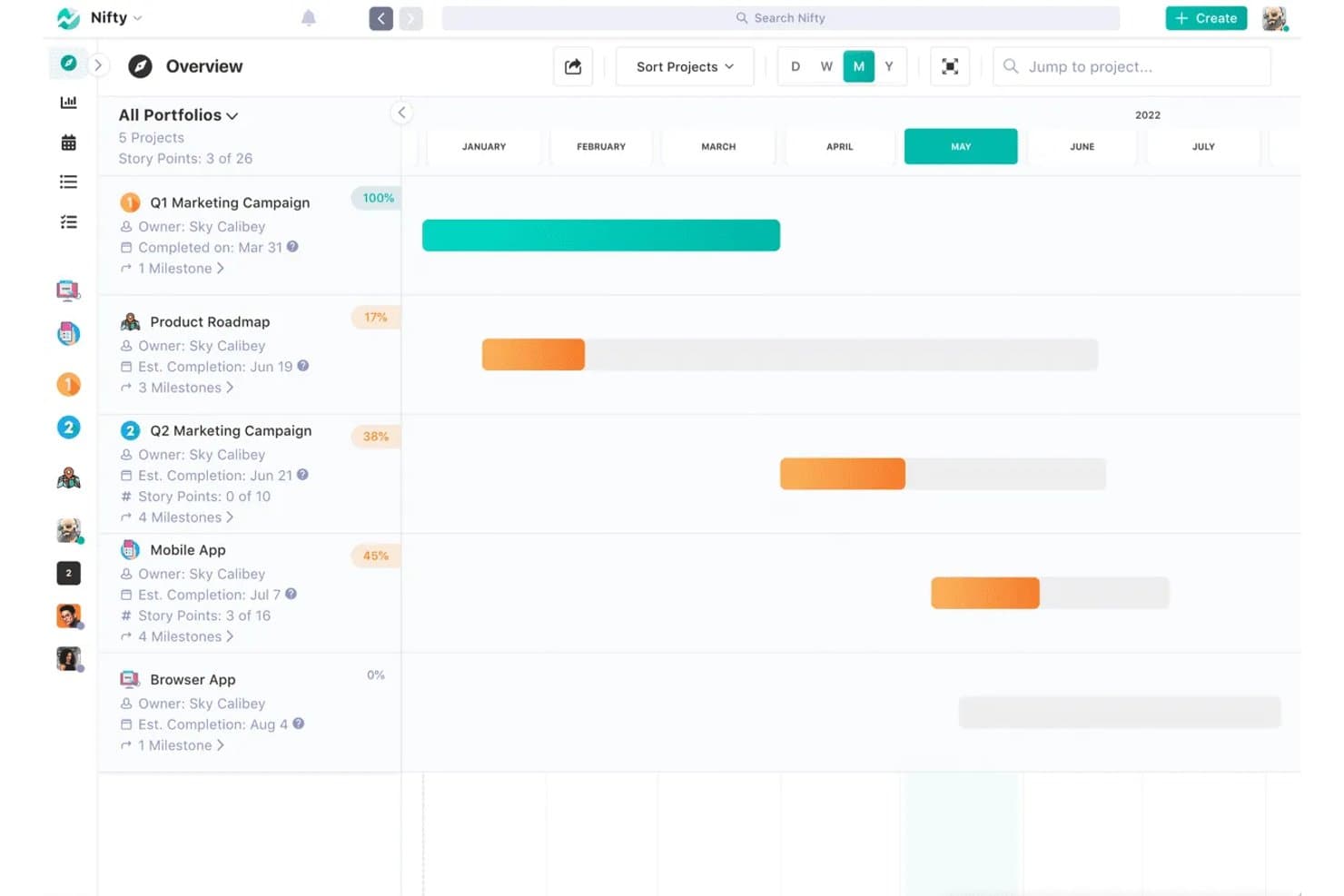
Nifty tracks project milestones and progress across a timeline view. Nifty is free milestone project management software with Roadmap timelines, task-linked milestones, auto or manual dates, dependencies, recurring milestones, and colour-coded progress tracking.
Who Is Nifty Best For?
Project and product managers who need task-linked milestones to update progress automatically across a small number of active projects.
Why I Picked Nifty
I picked Nifty because it handles auto-updating milestone progress tracking without requiring separate status reports. I link tasks to milestones, and Nifty recalculates completion percentages and colour-codes milestones green, orange, red, or gray as work changes. Auto milestone dates follow task ranges, while dependencies lock later work until earlier tasks finish.
Nifty Key Features
- Public roadmap links: Share read-only milestone timelines without requiring stakeholder logins.
- Recurring milestones: Schedule repeating milestones for sprints or monthly reviews.
- Roadmap views: Switch between Day, Week, Month, and Year timeline zoom levels.
- Progress exports: Export milestone reports as CSV or PDF files.
Nifty Integrations
Nifty offers native integrations with GitHub, GitLab, Slack, Google Drive, Google Calendar, Microsoft 365, Outlook Calendar, Zoom, Webex, and Miro. Zapier is also supported, while API access for custom integrations requires Business or higher.
What's Free?
Nifty offers a free-forever plan with unlimited team members and core features, including milestones, dependencies, recurring tasks, and portfolios. It limits you to two active projects and 100 MB of storage, while advanced features such as time tracking and automations require a paid plan.
Pros and Cons
Pros:
- Public roadmaps simplify stakeholder updates
- Dependencies shift downstream milestone dates
- Milestones update progress automatically from tasks
Cons:
- Gantt customization remains relatively limited
- Free plan limits active projects
Learn more about Nifty: Best for multi-view milestone and Gantt tracking
- Free plan + free trial + free demo available
- From $12/user/month
Visit WebsiteCustomer Rating:4.7/5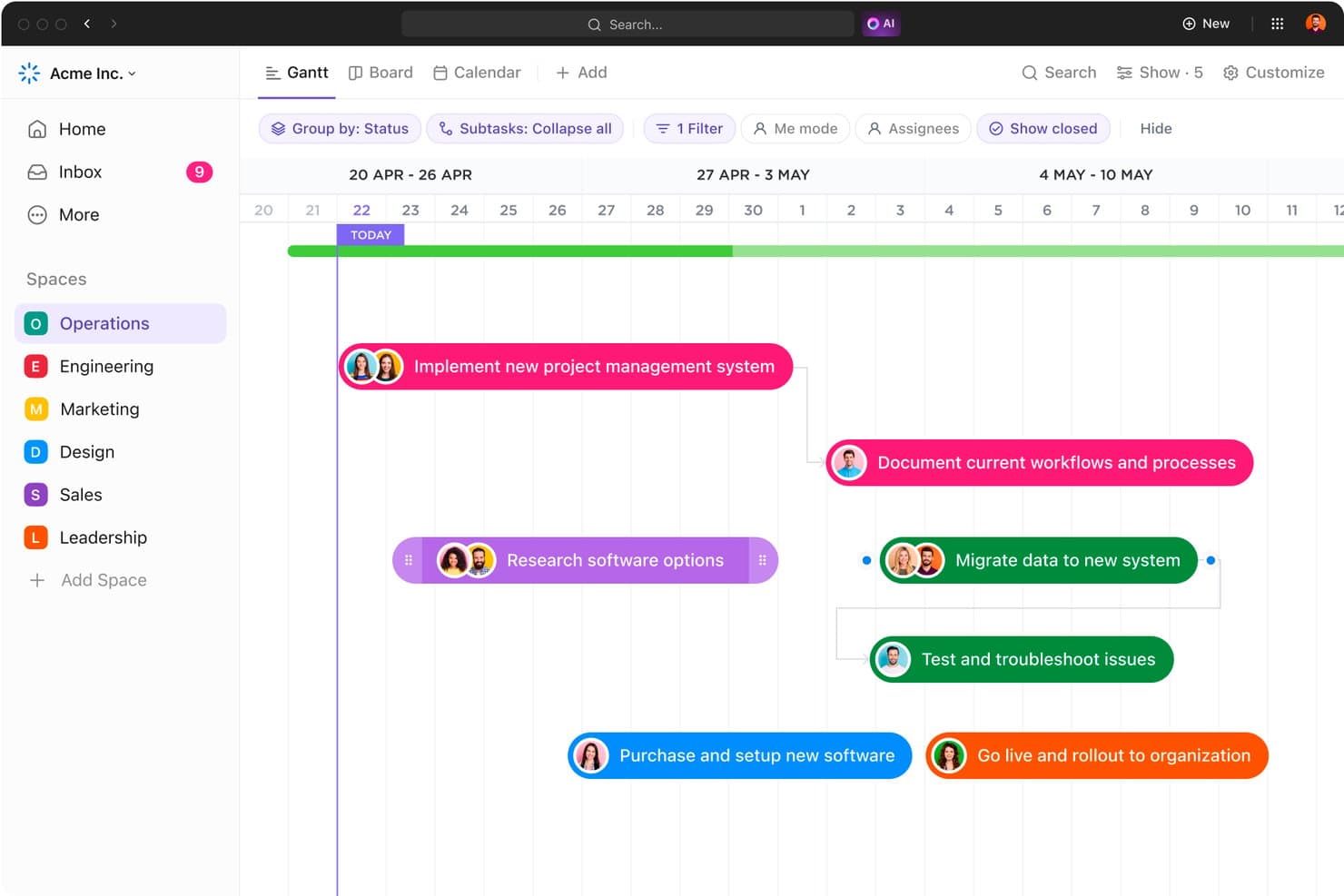
ClickUp's Gantt chart maps project milestones across a visual timeline. ClickUp is free milestone software that treats milestones as task types and combines Gantt, List, Board, and Calendar views with dependencies, subtasks, roadmap templates, and GitHub integration.
Who Is ClickUp Best For?
Product managers and engineering leads coordinating releases will appreciate ClickUp’s roadmaps, GitHub integration, dependencies, and flexible milestone views.
Why I Picked ClickUp
I picked ClickUp because its milestone tasks appear as diamonds across Gantt, List, Board, and Calendar views. I can connect release checkpoints to subtasks and dependencies, then use roadmap templates to map product launches. The Free Forever plan includes these tools, although milestone and Gantt uses have lifetime limits.
ClickUp Key Features
- Native GitHub integration: Link commits, branches, and pull requests to ClickUp tasks.
- Custom statuses: Define workflow stages for tasks and milestone progress.
- Reminders: Create recurring, delegated, and due-date reminders.
- Public links: Share read-only Lists, Folders, tasks, and Docs without accounts.
ClickUp Integrations
ClickUp offers native integrations with GitHub, GitLab, Bitbucket, Slack, Microsoft Teams, Google Drive, Figma, and Miro. It also provides a public API and webhooks for custom integrations, plus Zapier.
What's Free?
ClickUp offers a Free Forever plan with milestone tasks, Gantt views, dependencies, subtasks, and roadmap templates. However, the free plan has lifetime limits on Gantt views and milestone uses, so teams with frequent release planning may need a paid plan.
Pros and Cons
Pros:
- Roadmap templates support structured launch planning
- Dependencies connect deliverables to release checkpoints
- Milestones appear across multiple planning views
Cons:
- Guest permissions cannot be restricted
- Lifetime view limits constrain long-term tracking
Learn more about ClickUp: Best for switching views on a single dataset
- 14-day free trial + demo available
- From €8/user/month (billed annually)
Visit WebsiteCustomer Rating:4.6/5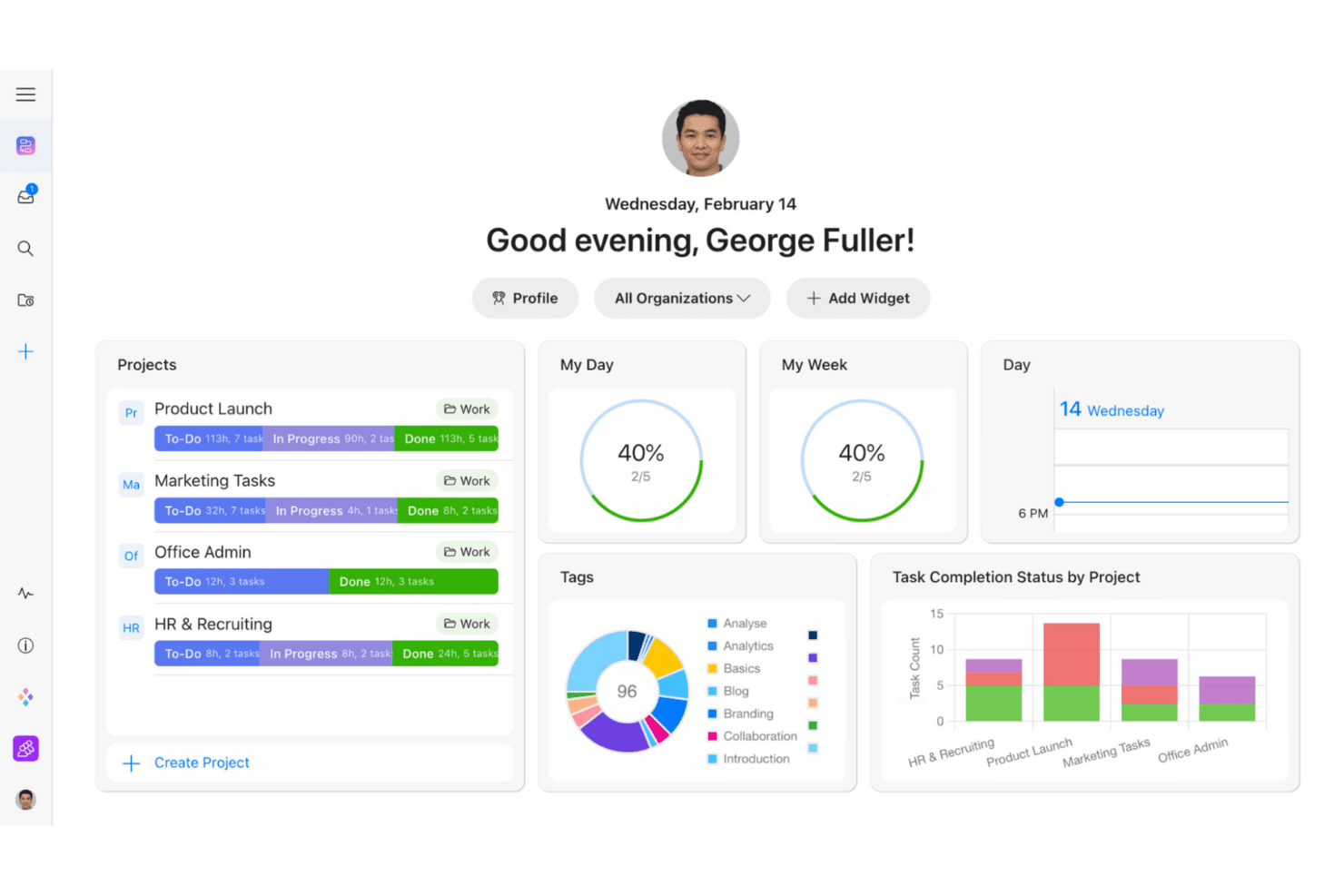
Zenkit helps teams track tasks with customizable project views. Zenkit is a milestone and project management platform with Gantt scheduling, dependencies, subitems, status fields, public timeline links, and multiple views for the same project data.
Who Is Zenkit Best For?
Project managers who need to plan milestones visually and switch between Gantt, Kanban, Calendar, and Table views.
Why I Picked Zenkit
I picked Zenkit because its Gantt view turns fixed deadlines into trackable milestones with dependencies and drag-and-drop scheduling. I can switch the same project data into Calendar, Kanban, Table, or Mind Map views without duplicating work. Published timeline links also let stakeholders review dates without creating accounts. Zenkit currently offers a 14-day trial, not a long-term free plan.
Zenkit Key Features
- Multi-level subitems: Build parent-child hierarchies across project deliverables.
- Personal reminders: Set date-based alerts with customizable timing.
- Comments and mentions: Discuss work directly within project items.
- Dashboard widgets: Monitor project data through customizable reports.
Zenkit Integrations
Zenkit documents integrations with Google Calendar, Google Sheets, Google Drive, Slack, Microsoft Teams, Trello, Asana, Dropbox, and Box. REST API access is available on Business and above, with Integrately and Zapier also supported.
What's Free?
Zenkit offers a 14-day free trial rather than a free-forever plan. After the trial, you’ll need a paid plan, starting at €8 per user monthly.
Pros and Cons
Pros:
- Public timelines simplify stakeholder reviews
- Gantt milestones support dependency-based scheduling
- Switches between multiple milestone views
Cons:
- Milestone progress lacks automatic rollups
- No long-term free plan currently
Learn more about Zenkit: Best for note-taking teams tracking milestones
- Free plan + 30-day trial available
- From $10/user/month
Visit WebsiteCustomer Rating:4.6/5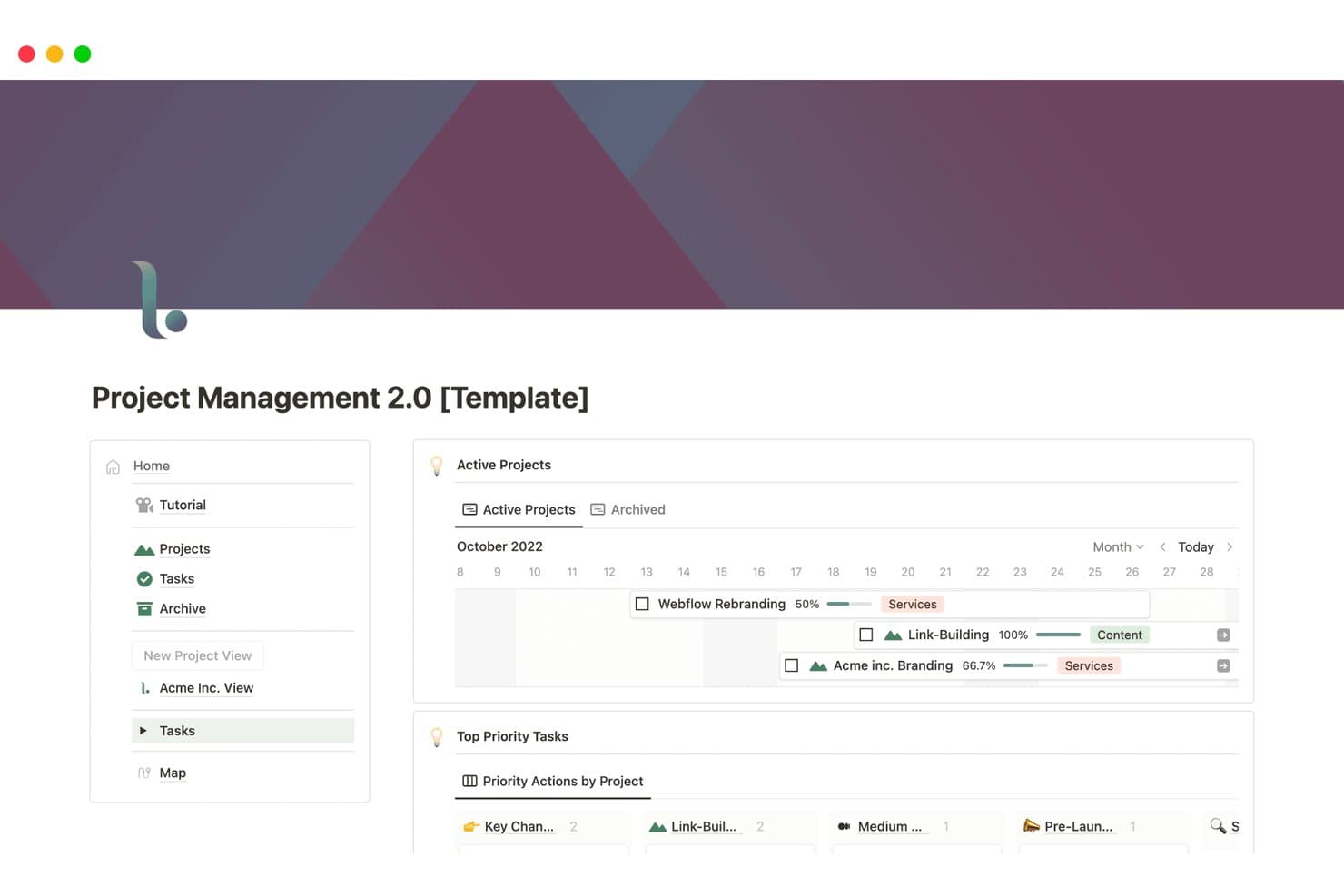
Notion tracks project milestones and progress visually on a timeline. Notion is a free milestone tracking workspace that uses customizable databases, Timeline, Calendar, Board, and List views, plus sub-items and dependencies, instead of a dedicated milestone object.
Who Is Notion Best For?
Notion suits note-taking teams tracking milestones, especially product teams that keep project plans, roadmaps, and documentation together.
Why I Picked Notion
I picked Notion because my team can keep milestone dates beside project notes, roadmaps, and decision records in one workspace. Its Timeline view supports date ranges, drag-to-reschedule, and dependencies, while sub-items break launches into trackable checkpoints. I also use linked database views to connect tasks with milestones when a project needs more structure than a simple notes page.
Notion Key Features
- Calendar view: Displays database dates alongside calendar events.
- Public web publishing: Shares roadmap pages through viewable public links.
- Date reminders: Sends in-app, push, and email notifications.
- Sprint database: Organizes work into current, planning, and backlog views.
Notion Integrations
Notion offers native integrations with Jira Cloud and GitHub, though both require a Business plan. Its public API and webhooks support custom integrations.
What's Free?
Notion offers a free-forever plan, so you can track milestones without a time-limited trial. Native Jira Cloud and GitHub integrations require the Business plan, and larger teams may need paid features as their workspace grows.
Pros and Cons
Pros:
- Public pages share stakeholder-ready roadmap views
- Roadmap templates support trackable product checkpoints
- Timeline view reschedules dates by dragging
Cons:
- Progress rollups require manual setup
- Milestones require manual database configuration
Learn more about Notion: Best for open source collaboration
- Free plan available; 14-day free trial available for Enterprise Cloud and on-premises
- From €5.95/user/month (billed annually)
Visit WebsiteCustomer Rating:4.5/5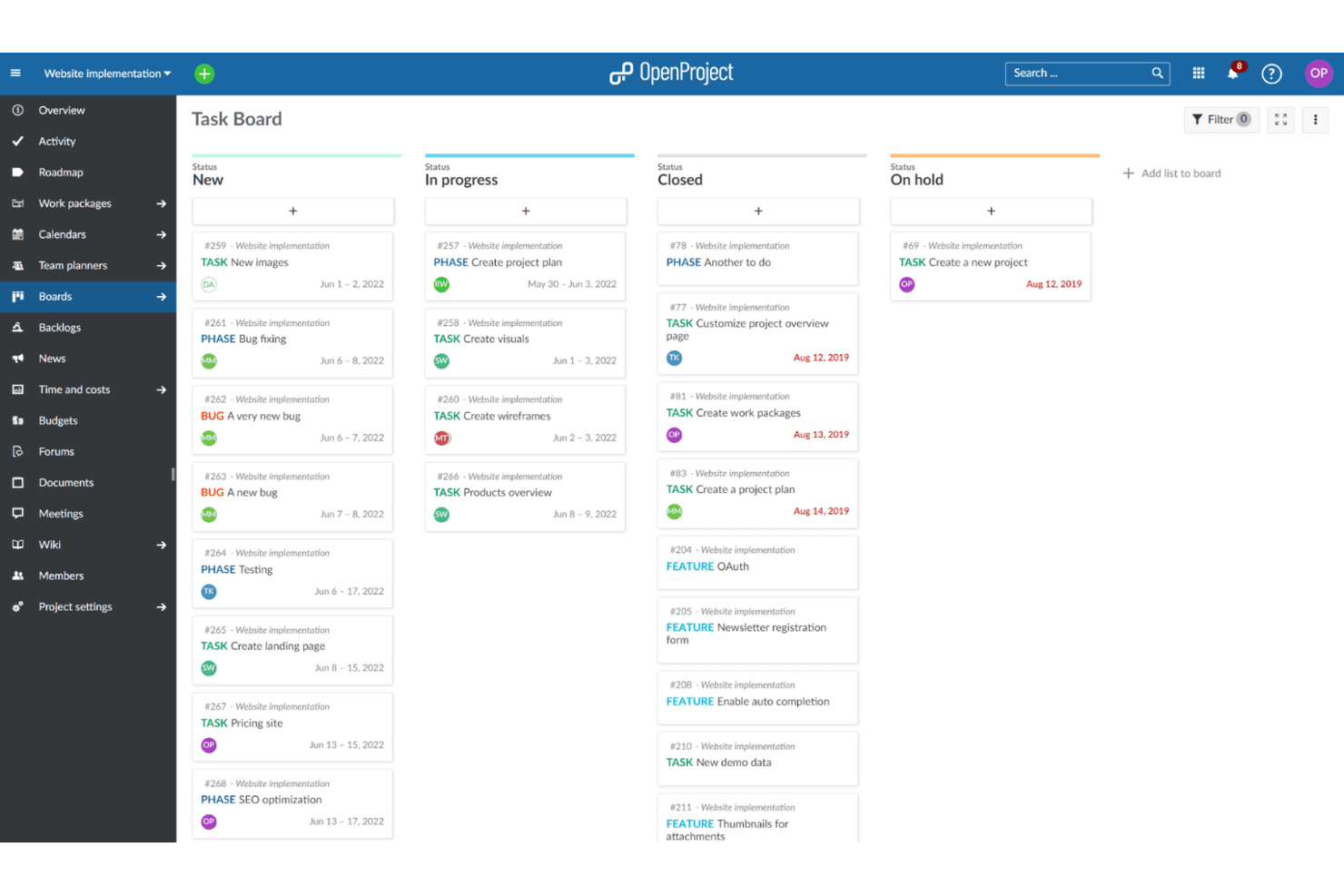
OpenProject lets teams plan and track work in shared boards. OpenProject is a self-hosted milestone management platform with Gantt charts, roadmaps, versions, dependencies, agile boards, and cross-project timeline tracking.
Who Is OpenProject Best For?
Project, product, and program managers in engineering-focused teams that need self-hosted, open-source milestone planning and cross-project collaboration.
Why I Picked OpenProject
I picked OpenProject because its open source collaboration model gives teams full control over milestone planning. I use cross-project Gantt charts to connect dependencies across initiatives, while versions and roadmaps map release goals to trackable work packages. Public projects, comments, and shared views help engineering and product teams coordinate without vendor lock-in.
OpenProject Key Features
- Calendar views: Plan and adjust work in monthly or weekly calendar views.
- Action boards: Move cards to update status, assignee, version, or parent fields.
- Date alerts: Receive configurable reminders for upcoming and overdue dates.
- Custom workflows: Configure statuses, workflows, and custom fields for your process.
OpenProject Integrations
OpenProject documents integrations with GitHub, GitLab, and Nextcloud, plus a free Jira Migrator. It also offers a REST API for custom integrations and supports SVN and Git repositories for on-premises installations.
What's Free?
OpenProject offers a free-forever Community plan for self-hosted installations or its cloud version. It includes core milestone planning features, but Git and SVN repositories are available only for on-premises deployments, while enterprise add-ons and priority support require a paid plan.
Pros and Cons
Pros:
- Open-source control supports self-hosted collaboration
- Versions map releases to trackable work
- Cross-project Gantt connects related deadlines
Cons:
- Stakeholder sharing has notable limits
- Milestones cannot contain child work packages
Learn more about OpenProject:
Diğer Ücretsiz Kilometre Taşı Yazılımları
Ücretsiz planlar veya deneme sürümleri sunan bazı ek kilometre taşı yazılımı seçenekleri şunlardır. Bu araçlar listeme girememiş olsa da yine de göz atmaya değer:
- 11HiveBest for stakeholder-ready timeline sharing
- 12Zoho ProjectsBest for small teams
- 13BasecampBest for communication and built-in scheduling
- 14ProductboardBest for product roadmaps
- 15FlowluBest for combining CRM, finance, and project tools
How I Evaluate Free Milestone Software
First, I define what counts as free. A qualifying milestone platform offers a long-term free plan, not just a trial, for tracking release dates and deliverables over time. From there, I weigh three parts: core functionality (dating milestones, viewing timelines), standout features (public roadmap sharing), and beyond-feature factors (free-plan scalability).
Core Functionality (Table Stakes For This List)
In addition to my free plan requirements, I use a scoring system to select tools for my list. I score each one on a scale from 0 (does not offer the functionality) to 5 (excels in this area) for each core functionality listed below, based on what's available on the free plan. I then convert the total into a percentage to help assess each tool's overall fit, with extra weight on any functionalities I've deemed essential.
- Milestone Tracking (Essential): I look for dated milestones with clear status and ownership, so a launch checkpoint has an accountable lead and a visible completion state.
- Visual Timeline (Essential): I check whether a timeline, calendar, or roadmap view makes upcoming releases and schedule changes easy to scan.
- Task Linking: I assess whether teams can connect delivery tasks to milestones and see how work contributes to a release.
- Progress Indicators: I look for visible status or completion signals that help identify slippage before a milestone date passes.
- Collaboration & Sharing: I consider whether teammates can update plans and stakeholders can view key dates without adding unnecessary access friction.
- Notifications & Reminders: I check for alerts about approaching or overdue dates, which help teams follow up on launch work before checkpoints slip.
Once I have a list of tools that meet the criteria, I consider what sets each platform apart.
Differentiating Factors (What Sets Vendors Apart)
Here's how I compare and contrast different vendors:
Standout Features
I look for sprint-to-milestone mapping that lets teams tie individual sprints or epics directly to a launch date. Without it, delivery cadence and release planning live in separate worlds. I also evaluate cross-project milestone rollups, which give portfolio-level visibility into release health across products. Public roadmap sharing matters too—tools like Notion and Nifty let you publish read-only timelines to customers or leadership without extra formatting or slide decks.
Beyond Features
I check whether a free plan's user and project caps can actually support a growing team—hitting a seat limit mid-cycle forces painful migrations. Integration with dev tools like Jira or GitHub matters just as much, since milestone status that doesn't sync with engineering work means someone's manually copying updates. I also evaluate how easily non-PM stakeholders can onboard; if a marketing lead or exec can't pick up the tool in minutes, milestone tracking tends to die after the first sprint.
Ücretsiz Kilometre Taşı Yazılımı Nasıl Seçilir?
Karmaşık özellik listeleri ve fiyatlandırma yapıları, ücretsiz bir kilometre taşı yazılımından gerçekten ne elde ettiğinizi anlamanızı zorlaştırabilir. Yazılım seçim sürecinizde ilerlerken odağınızı korumanıza yardımcı olmak için göz önünde bulundurmanız gereken bazı faktörleri aşağıda bulabilirsiniz:
| Faktör | Dikkat Edilmesi Gerekenler |
| Ücretsiz Teklifin Kapsamı | Ücretsiz sürüme hangi özelliklerin dahil olduğunu kontrol edin. Bazı araçlar projeleri, kullanıcıları veya depolama alanını sınırlayabilir. |
| Ölçeklenebilirlik | Ekibinizle birlikte büyüyebilecek yazılımları tercih edin. Gerektiğinde ücretli planlara kolayca yükseltme seçeneği sunduğundan emin olun. |
| Entegrasyonlar | Yazılımın Slack, Google Drive veya Trello gibi hâlihazırda kullandığınız araçlarla entegre olduğundan emin olun. |
| Kullanım Kolaylığı | Kullanıcı arayüzünü değerlendirin. Basit ve sezgisel bir tasarım size zaman kazandırabilir ve hayal kırıklığını azaltabilir. |
| Müşteri Desteği | Sunulan destek seçeneklerini göz önünde bulundurun. Sohbet veya e-posta desteğine erişim, sorun giderme açısından kritik olabilir. |
| Özelleştirme | İş akışlarını ekibinizin ihtiyaçlarına uyacak şekilde uyarlayıp uyarlayamayacağınızı kontrol edin. Özel alanlar ve panolar faydalı olabilir. |
| Mobil Erişim | Ekibiniz hareket hâlinde çalışıyorsa yazılımın tüm işlevlere sahip bir mobil uygulaması olduğundan emin olun. |
| Veri Güvenliği | Özellikle hassas proje bilgilerini işlerken yazılımın veri koruma önlemlerini doğrulayın. |
Ücretsiz Kilometre Taşı Yazılımı Nedir?
Kilometre taşı yazılımı, proje kilometre taşlarını ve son teslim tarihlerini planlamak, izlemek ve yönetmek için kullanılan bir araçtır. Bu ürünler genellikle ücretsiz sürümler veya denemeler sunarak kullanıcılara projeler ya da kullanıcılar konusunda bazı sınırlamalarla birlikte temel özelliklere erişim sağlar. Proje yöneticileri, ekip liderleri ve serbest çalışanlar gibi profesyoneller, projeleri planlandığı şekilde ilerletmek ve ekip iş birliğini geliştirmek için bu araçları yaygın olarak kullanır. Görev yönetimi, zaman çizelgesi takibi ve iş birliği özellikleri ekiplerin düzenli kalmasına, son teslim tarihlerine uymasına ve etkili iletişim kurmasına yardımcı olur.
Ücretsiz Kilometre Taşı Yazılımının Özellikleri
Kilometre taşı yazılımında yaygın olarak bulunan özellikleri ve bunlardan hangilerinin genellikle ücretsiz ve ücretli planlara dahil edildiğini inceleyelim.
Genellikle Ücretsiz Kilometre Taşı Yazılımı Özellikleri
- Görev yönetimi: Görevler oluşturmanıza, atamanıza ve izlemenize olanak tanıyarak ekibinizin düzenli kalmasını ve programa uymasını sağlar.
- Zaman çizelgesi takibi: Proje ilerlemesini izlemenize ve son teslim tarihlerine uyulmasını sağlamanıza yardımcı olur.
- İş birliği araçları: Ekibiniz içindeki iletişimi ve bilgi paylaşımını kolaylaştırır.
- Temel raporlama: Proje durumu ve ekip performansı hakkında içgörüler sunar.
- Kanban panoları: İş akışlarını ve görevleri yönetmek için görsel bir yöntem sunarak proje ilerlemesini görmeyi kolaylaştırır.
- Zaman takibi: Kaynak yönetimine yardımcı olmak üzere farklı görevlere ne kadar zaman harcandığını izlemenizi sağlar.
- Özelleştirilebilir görünümler: Liste veya takvim gibi farklı görünümler arasında geçiş yapmanıza olanak tanıyarak proje verilerini görüntüleme biçiminizde esneklik sağlar.
- Mobil erişim: Ekibinizin hareket hâlindeyken proje bilgilerine erişmesini sağlayarak süreklilik ve esneklik sunar.
Genellikle Ücretli Kilometre Taşı Yazılımı Özellikleri
- Gelişmiş raporlama: Proje performansı ve ekip verimliliği hakkında ayrıntılı içgörüler ve analizler sunar.
- Entegrasyon özellikleri: İş akışlarını ve veri paylaşımını kolaylaştırmak için diğer araçlara ve platformlara bağlanır.
- Kaynak yönetimi: Projeler genelinde kaynakların verimli bir şekilde planlanmasına ve tahsis edilmesine yardımcı olur.
- Otomasyon özellikleri: Tekrarlayan görevleri otomatikleştirerek zamandan tasarruf sağlar ve manuel çalışmayı azaltır.
- Özel iş akışları: İş akışlarını ekibinizin özel süreçlerine ve ihtiyaçlarına uyacak şekilde uyarlamanıza olanak tanır.
- Öncelik belirleme: Görevleri aciliyet ve önem durumuna göre işaretlemenize olanak tanıyarak ekiplerin kritik görevlere odaklanmasına yardımcı olur.
- Gelişmiş güvenlik: Hassas proje bilgilerinin güvende olmasını sağlamak için ek veri koruma önlemleri sunar.
- Sınırsız proje: Yönetebileceğiniz proje sayısındaki kısıtlamaları kaldırarak daha fazla ölçeklenebilirlik sağlar.
Ücretsiz Kilometre Taşı Yazılımının Faydaları
Ücretsiz kilometre taşı yazılımını uygulamak ekibiniz ve işletmeniz için çeşitli faydalar sağlar. Yararlanabileceğiniz faydalardan bazıları şunlardır:
- Maliyet tasarrufu: Ücretsiz planlar, ek maliyetlere katlanmadan projeleri yönetmenize olanak tanıyarak küçük ekipler için bütçe dostu bir seçenek sunar.
- Geliştirilmiş düzen: Görev yönetimi ve zaman çizelgesi takibi gibi özellikler, projelerinizi düzenli ve yolunda tutmanıza yardımcı olur.
- Gelişmiş işbirliği: İşbirliği araçları, daha iyi iletişimi ve ekip çalışmasını teşvik ederek herkesin bilgi sahibi olmasını sağlar.
- Esneklik: Özelleştirilebilir görünümler ve mobil erişim, yazılımı iş akışınıza uyacak şekilde düzenlemenize ve hareket hâlindeyken erişmenize olanak tanır.
- Zaman yönetimi: Zaman takibi özellikleri, görevlere harcanan zamanı izlemenize ve kaynak tahsisini iyileştirmenize yardımcı olur.
- Görsel yönetim: Kanban panoları, görevleri ve iş akışlarını yönetmek için görsel bir yöntem sunarak ilerlemeyi bir bakışta görmeyi kolaylaştırır.
- Erişilebilirlik: Ücretsiz yazılım seçenekleri, bütçe kısıtlamalarından bağımsız olarak her büyüklükteki ekibin proje yönetimi araçlarına erişmesini sağlar.
Ücretsiz Kilometre Taşı Yazılımının Maliyetleri ve Fiyatlandırması
Bu makaleye, ücretsiz olarak sunulan en iyi kilometre taşı yazılımı seçeneklerini aradığınız için geldiğinizi biliyorum. Ancak ücretsiz planlar yalnızca sınırlı özellikler sunduğundan, gelecekte planınızı yükseltmeniz gerekme ihtimali oldukça yüksektir.
Aşağıdaki tablo, kilometre taşı yazılımı çözümlerindeki yaygın planları, ortalama fiyatlarını ve genellikle sunulan özellikleri özetlemektedir:
Kilometre Taşı Yazılımı İçin Plan Karşılaştırma Tablosu
| Plan Türü | Ortalama Fiyat | Yaygın Özellikler |
| Ücretsiz Plan | $0 | Görev yönetimi, zaman çizelgesi takibi, işbirliği araçları ve temel raporlama. |
| Kişisel Plan | $5-$15/kullanıcı/ ay | Gelişmiş raporlama, özel görünümler, öncelik belirleme ve zaman takibi. |
| İşletme Planı | $20-$40/ kullanıcı/ay | Entegrasyon olanakları, özel iş akışları, kaynak yönetimi ve otomasyon. |
| Kurumsal Plan | $50-$100/ kullanıcı/ay | Gelişmiş güvenlik, sınırsız proje, özel destek ve gelişmiş analizler. |
Ücretsiz Kilometre Taşı Yazılımı Hakkında Sık Sorulan Sorular
Ücretsiz kilometre taşı yazılımı hakkında sık sorulan soruların bazı yanıtları:
Ücretsiz kilometre taşı yazılımında ne gibi sınırlamalar beklemeliyim?
Ücretsiz kilometre taşı yazılımı genellikle sınırlı sayıda proje, kullanıcı sayısı sınırı ve kısıtlı depolama alanı gibi sınırlamalarla birlikte gelir. Gelişmiş raporlama veya entegrasyonlar gibi bazı özelliklerin yalnızca ücretli sürümlerde sunulduğunu da görebilirsiniz. Bu sınırlamaların projenizin ihtiyaçlarını etkileyip etkilemediğini değerlendirmek önemlidir.
Ücretsiz kilometre taşı yazılımı diğer araçlarla entegre olabilir mi?
Evet, birçok ücretsiz kilometre taşı yazılımı Slack, Google Drive ve Trello gibi popüler araçlarla temel entegrasyonlar sunar. Ancak entegrasyonların kapsamı ücretli planlara kıyasla sınırlı olabilir. Ücretsiz sürümün ekibinizin hâlihazırda kullandığı araçlarla entegre olup olmadığını kontrol edin.
Ücretsiz kilometre taşı yazılımı ne kadar güvenlidir?
Ücretsiz kilometre taşı yazılımındaki güvenlik özellikleri değişiklik gösterebilir. Genellikle bazı temel güvenlik önlemleri bulunsa da gelişmiş veri şifreleme veya uyumluluk sertifikaları gibi daha kapsamlı güvenlik seçenekleri yalnızca ücretli planlarda sunulabilir. Seçtiğiniz yazılımın güvenlik özelliklerini her zaman doğrulayın.
Ekibimin yeni ücretsiz kilometre taşı yazılımına uyum sağlamasını nasıl garantileyebilirim?
Ekibinizin uyum sağlamasına yardımcı olmak için eğitimler, web seminerleri veya bilgi tabanı gibi eğitim kaynakları sunan ücretsiz kilometre taşı yazılımlarını tercih edin. Bazı platformlar etkileşimli tanıtımlar veya başlangıç kılavuzları da sağlar. Bu kaynaklar geçiş sürecini kolaylaştırabilir ve ekibinizin yazılımdan en iyi şekilde yararlanmasına yardımcı olabilir.
Ücretsiz kilometre taşı yazılımının gizli maliyetleri var mı?
Yazılımın kendisi ücretsiz olsa da daha fazla işlev için ek özellikler veya gerekli yükseltmelerle ilgili gizli maliyetler olabilir. Ayrıca mevcut süreçleri yazılıma uyarlamak ya da eğitim almak için oluşabilecek maliyetleri de göz önünde bulundurun. Fiyatlandırma ayrıntılarını ve hizmet koşullarını her zaman inceleyin.
Ekibim için doğru ücretsiz kilometre taşı yazılımını nasıl seçerim?
Kullanıcı sayısı, gerekli özellikler ve entegrasyon ihtiyaçları gibi ekibinizin özel gereksinimlerini göz önünde bulundurun. Ücretsiz sürüm için kullanılabilirlik düzeyini ve sunulan destek seçeneklerini değerlendirin. Mümkünse farklı seçenekleri deneyerek hangi yazılımın iş akışınız ve gereksinimlerinizle en iyi şekilde örtüştüğünü görün.