

Gestire i progetti può essere un vero grattacapo, soprattutto quando devi coordinare molteplici attività e scadenze. Il tuo team ha bisogno di un percorso chiaro, ed è qui che entra in gioco il software gratuito per le pietre miliari. Ti aiuta a organizzare i progetti, monitorare i progressi e assicurarti che nulla sfugga di mano, il tutto senza spendere un centesimo.
In base alla mia esperienza, scegliere lo strumento giusto può fare una grande differenza. Cerchi qualcosa che soddisfi le esigenze del tuo team, sia facile da usare e, soprattutto, sia gratuito. Ho testato e recensito una serie di questi strumenti per aiutarti a trovare quello più adatto.
In questo articolo condividerò le mie migliori scelte tra i software gratuiti per le pietre miliari, fornendoti le informazioni necessarie per prendere una decisione consapevole.
Perché fidarsi delle nostre recensioni dei software
Testiamo e recensiamo software per la gestione dei prodotti dal 2020. Essendo noi stessi responsabili di prodotto, sappiamo quanto sia importante e difficile prendere la decisione giusta quando si sceglie un software. Investiamo in ricerche approfondite per aiutare il nostro pubblico a prendere decisioni migliori sull'acquisto di software.
Abbiamo testato più di 2.000 strumenti per diversi casi d'uso della gestione dei prodotti e scritto oltre 1.000 recensioni complete di software. Scopri come manteniamo la trasparenza & consulta la nostra metodologia di recensione dei software.
Tabella comparativa dei software gratuiti per le pietre miliari
Ecco i costi di base di ciascuno degli strumenti inclusi nel mio elenco.
| Tool | Best For | Trial Info | Price | ||
|---|---|---|---|---|---|
| 1 | Ideale per i riepiloghi gratuiti delle milestone tra progetti | Piano gratuito disponibile | Da $1.49/utente/mese (con fatturazione annuale) | Website | |
| 2 | Ideale per condividere le roadmap con stakeholder esterni | Garanzia di rimborso di 14 giorni | A partire da 6 $/utente/mese (con fatturazione annuale) | Website | |
| 3 | Ideale per monitorare gratuitamente le scadenze basate sui diagrammi di Gantt | Prova gratuita di 15 giorni + demo gratuita disponibile | A partire da $49/mese (fatturati annualmente) | Website | |
| 4 | Ideale per il monitoraggio dei rilasci agili e dei traguardi degli sprint | Piano gratuito disponibile | A partire da $7.91/utente/mese | Website | |
| 5 | Ideale per i team di sviluppo che monitorano le milestone nei repository di codice | Piano gratuito disponibile | A partire da $4/utente/mese | Website | |
| 6 | Ideale per il monitoraggio automatico dei progressi dei traguardi | Prova gratuita di 14 giorni + demo gratuita + piano gratuito disponibile | A partire da $10/utente/mese (con fatturazione annuale) | Website | |
| 7 | Ideale per il monitoraggio delle tappe e dei diagrammi Gantt in più viste | Piano gratuito disponibile | A partire da $7/utente/mese (con fatturazione annuale) | Website | |
| 8 | Ideale per visualizzazioni flessibili | Prova gratuita di 14 giorni; nessun piano gratuito a lungo termine disponibile | A partire da $8/utente/mese (con fatturazione annuale) | Website | |
| 9 | Ideale per i team che prendono appunti e monitorano le milestone | Piano gratuito + demo gratuita disponibile | A partire da $10/utente/mese (con fatturazione annuale) | Website | |
| 10 | Ideale per la collaborazione a codice sorgente aperto | Prova gratuita di 14 giorni + piano gratuito disponibile | A partire da 5,95 € per utente al mese (con fatturazione annuale) | Website |


Recensioni dei migliori software gratuiti per le pietre miliari
Di seguito trovi i miei riepiloghi dettagliati dei migliori software gratuiti per le pietre miliari inclusi nel mio elenco. Le mie recensioni offrono uno sguardo approfondito alle funzionalità principali, ai pro e contro, alle integrazioni e ai casi d’uso ideali di ogni strumento, per aiutarti a trovare quello più adatto a te. Sebbene alcuni di questi strumenti offrano una versione completamente gratuita, altri mettono a disposizione un periodo di prova gratuito. In ciascuna recensione ho aggiunto una nota su ciò che è gratuito
 Ideale per i riepiloghi gratuiti delle milestone tra progetti
- Piano gratuito disponibile
- Da $1.49/utente/mese (con fatturazione annuale)
Visit WebsiteCustomer Rating:4.7/5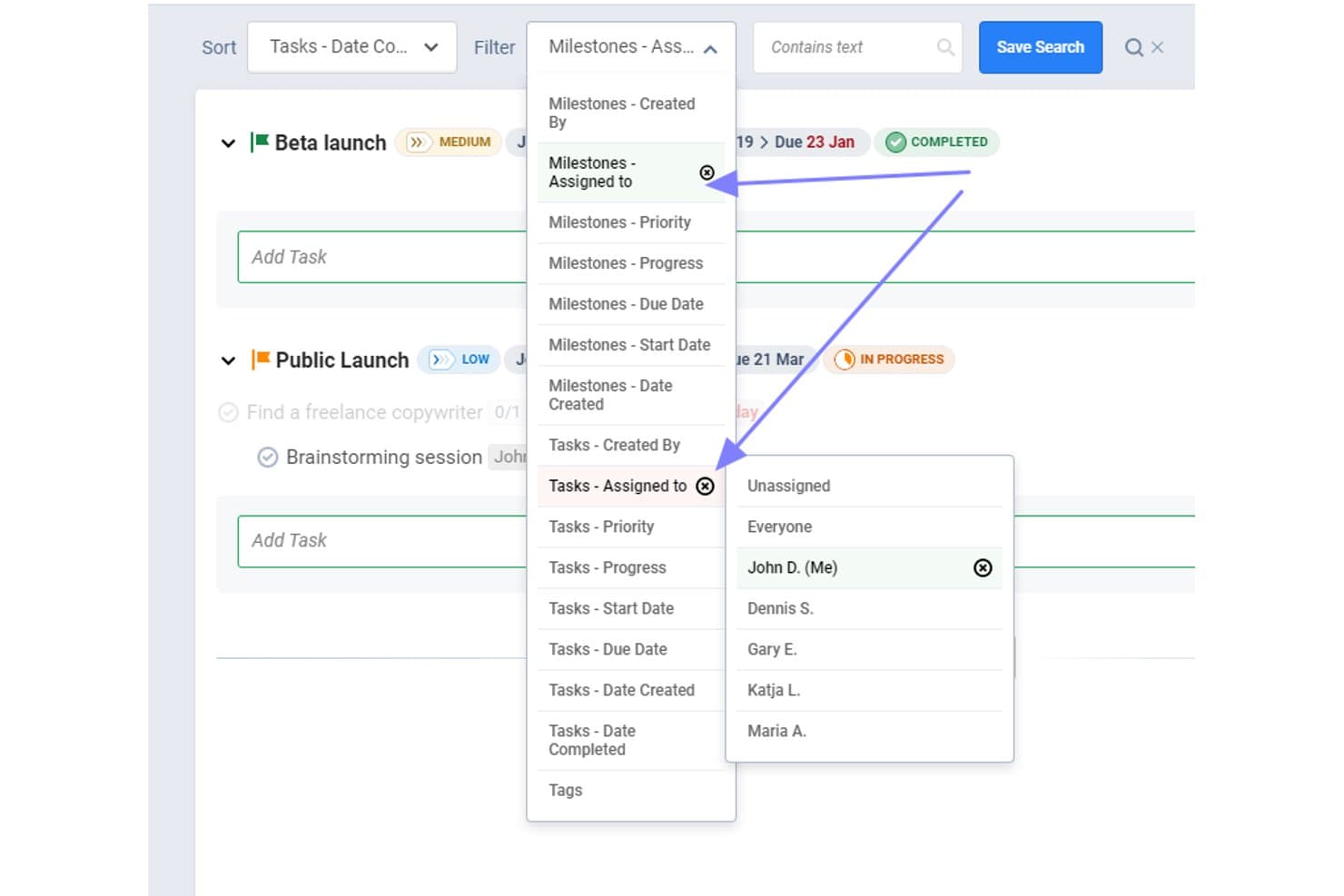
Freedcamp consente agli utenti di filtrare milestone e attività per assegnatario. Freedcamp è una piattaforma gratuita per la gestione delle milestone e la pianificazione dei progetti, con scadenze, attività collegate, riepiloghi dello stato, assegnatari, commenti e viste Elenco, Kanban, Tabella e Calendario.
Per chi è più adatto Freedcamp?
Freedcamp è adatto ai project manager e ai responsabili PMO che hanno bisogno di riepiloghi gratuiti delle milestone tra progetti, con attività collegate e visibilità condivisa sui progressi.
Perché ho scelto Freedcamp
Ho scelto Freedcamp perché il suo piano gratuito gestisce i riepiloghi delle milestone tra progetti senza costi. Utilizzo la Bacheca delle milestone e la Bacheca del calendario per esaminare le scadenze tra i progetti, mentre le attività collegate mostrano il numero di milestone non completate, in corso e completate. Il widget delle milestone aggiunge un'ulteriore visualizzazione dei progressi a livello di portafoglio.
Funzionalità principali di Freedcamp
- Progetti pubblici: Pubblica i dettagli del progetto come roadmap accessibile esternamente.
- Condivisione del calendario ICS: Condividi i calendari delle milestone con Google Calendar, Outlook o Apple Calendar.
- Email di riepilogo: Ricevi riepiloghi delle milestone scadute e imminenti.
- Commenti sulle milestone: Aggiungi commenti, allegati, follower e @menzioni alle milestone.
Integrazioni di Freedcamp
Freedcamp non dispone di integrazioni native, ma supporta GitHub, Jira, Airtable e Typeform tramite Pabbly, oltre a un'API per le integrazioni personalizzate e Zapier.
Cosa è gratuito?
Freedcamp offre un piano gratuito a tempo indeterminato con utenti, progetti e spazio di archiviazione illimitati, soggetto a una politica di utilizzo corretto. Il piano dispone di meno app e funzionalità rispetto ai livelli a pagamento e le integrazioni richiedono Zapier, Pabbly o l'API invece di connessioni native.
Pros and Cons
Pros:
- I riepiloghi delle milestone tra progetti migliorano la visibilità del portafoglio
- Le attività collegate mostrano lo stato di completamento delle milestone
- I progetti pubblici consentono di condividere roadmap esternamente
Cons:
- Gli utenti gratuiti non dispongono della pianificazione con cronologia Gantt
- Dieci inviti iniziali limitano l'inserimento del team
Learn more about Freedcamp: Ideale per condividere le roadmap con stakeholder esterni
- Garanzia di rimborso di 14 giorni
- A partire da 6 $/utente/mese (con fatturazione annuale)
Visit WebsiteCustomer Rating:4.6/5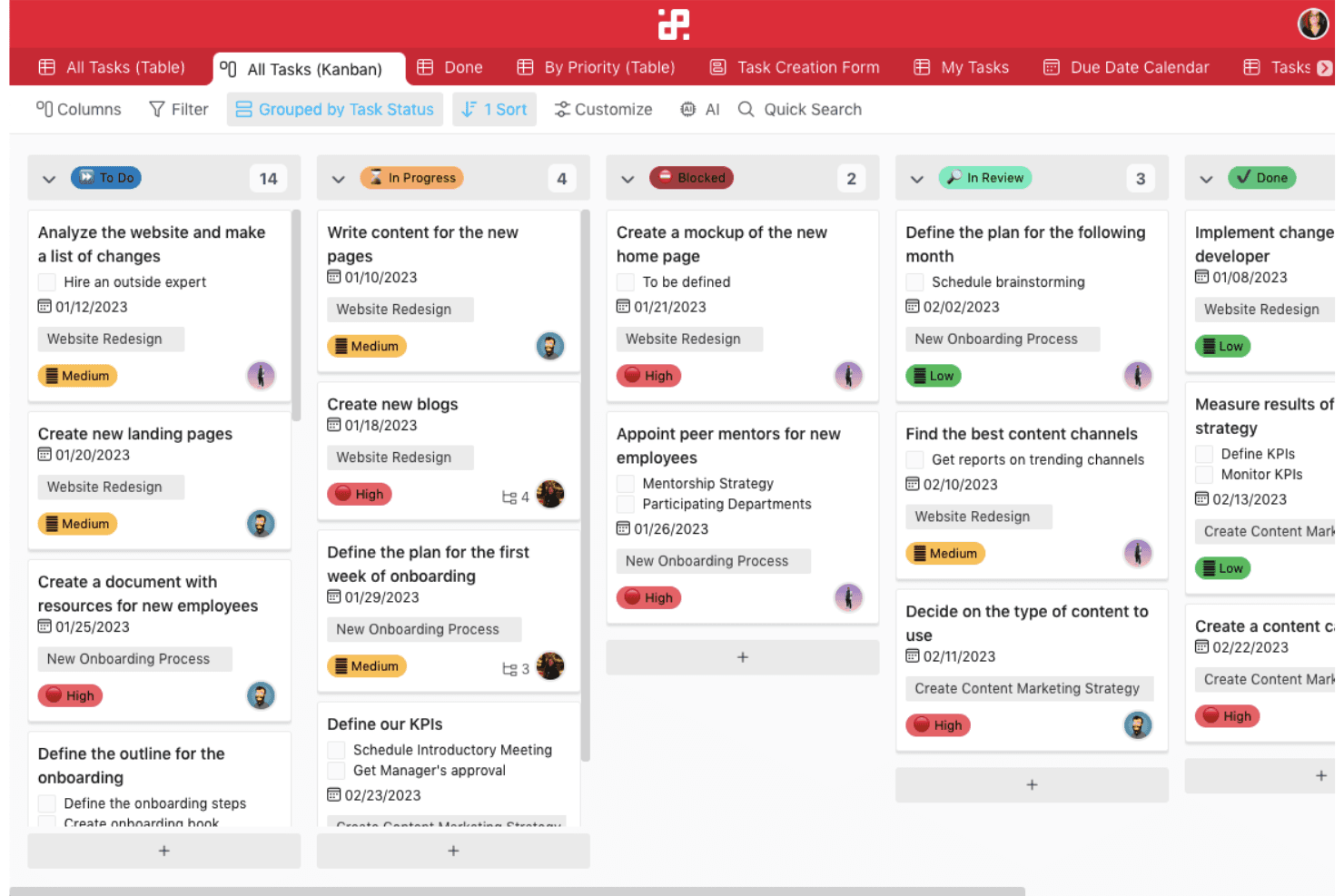
Infinity consente ai team di gestire attività illimitate attraverso flussi di lavoro personalizzati, con funzionalità flessibili come l'assegnazione di tag e le automazioni strutturate. Infinity è una piattaforma per la pianificazione di traguardi e roadmap che modella i traguardi con elementi e attributi personalizzabili, quindi li organizza attraverso visualizzazioni Gantt, calendario, sottoelementi, avanzamento e bacheca pubblica.
Per chi è più adatto Infinity?
Infinity è adatto ai responsabili di prodotto e di progetto che hanno bisogno di un monitoraggio flessibile dei traguardi e di condividere le roadmap con clienti, dirigenti e stakeholder esterni.
Perché ho scelto Infinity
Ho scelto Infinity perché trasforma gli elementi personalizzati e gli attributi di data in traguardi monitorabili, per poi presentarli nelle visualizzazioni Gantt e calendario. Apprezzo in particolare le sue bacheche pubbliche incorporabili, le autorizzazioni per gli ospiti, la protezione con password e le esportazioni in PDF per condividere le roadmap con stakeholder esterni. Infinity non ha un piano gratuito, quindi è un'alternativa a pagamento anziché una vera opzione gratuita.
Funzionalità principali di Infinity
- Attributi personalizzati: Aggiungi etichette, barre di avanzamento, checklist, formule e campi per i membri alle schede dei traguardi.
- Sottoelementi: Suddividi i traguardi in attività più piccole con date, etichette e assegnatari separati.
- Automazioni per i promemoria: Attiva notifiche o email prima o dopo gli attributi di data.
- Modelli di roadmap: Inizia con i modelli Roadmap del prodotto, Pianificazione degli sprint o Monitoraggio del progetto.
Integrazioni di Infinity
Infinity offre integrazioni native con Trello, Google Calendar, Google Drive, iCalendar e Clockify. Supporta inoltre l'accesso API, i webhook e Zapier; Jira e GitHub non sono integrazioni native.
Cosa è gratuito?
Infinity non offre un piano gratuito a tempo indeterminato; mette invece a disposizione una demo gratuita. Per continuare a utilizzarlo è necessario un piano a pagamento, a partire da 6 $ per utente al mese con fatturazione annuale.
Pros and Cons
Pros:
- Le bacheche pubbliche semplificano la condivisione delle roadmap con gli stakeholder
- Il Gantt con trascinamento supporta la pianificazione delle scadenze
- Gli attributi personalizzati si adattano ai flussi di lavoro dei traguardi
Cons:
- Nessun oggetto traguardo nativo
- L'avanzamento dei sottoelementi richiede aggiornamenti manuali
Learn more about Infinity: Ideale per monitorare gratuitamente le scadenze basate sui diagrammi di Gantt
- Prova gratuita di 15 giorni + demo gratuita disponibile
- A partire da $49/mese (fatturati annualmente)
Visit WebsiteCustomer Rating:4.2/5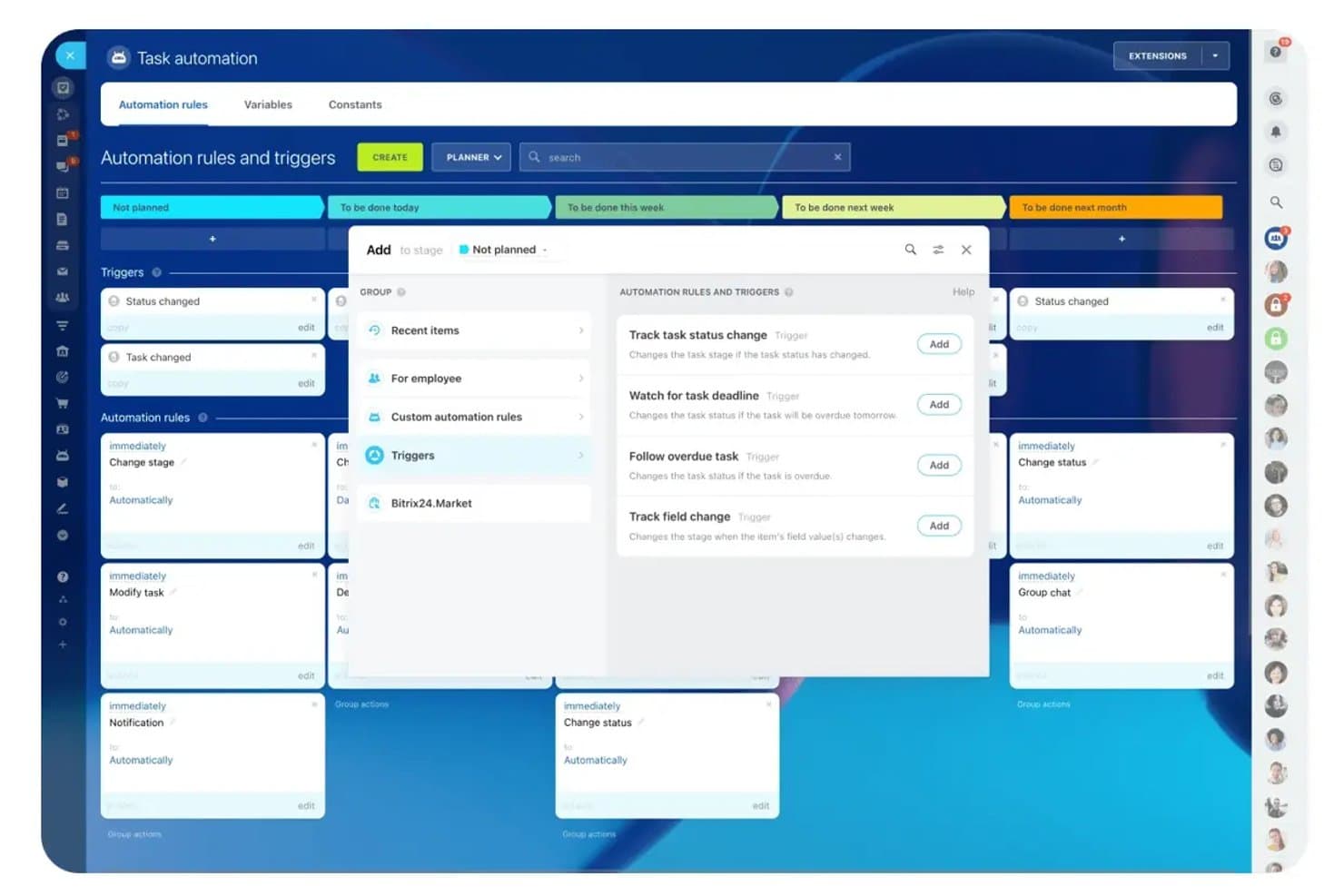
Bitrix24 automatizza le modifiche delle fasi delle attività utilizzando regole basate su attivatori. Bitrix24 è un software gratuito di gestione dei progetti per la pianificazione delle tappe fondamentali, con diagrammi di Gantt, dipendenze tra attività, calendari condivisi, bacheche Kanban, strumenti Scrum, promemoria e funzionalità di collaborazione, che utilizza attività basate sulle scadenze invece di tappe fondamentali dedicate.
A chi è più adatto Bitrix24?
I project manager di piccoli team possono utilizzare Bitrix24 gratuitamente per monitorare le scadenze basate sui diagrammi di Gantt, gestire le dipendenze tra attività e collaborare con il team tramite strumenti integrati.
Perché ho scelto Bitrix24
Ho scelto Bitrix24 per monitorare gratuitamente le scadenze basate sui diagrammi di Gantt, perché posso modellare le fasi di approvazione del lancio come attività principali con scadenze e dipendenze. Il diagramma di Gantt con trascinamento modifica le attività collegate quando cambiano le date, mentre i calendari condivisi e i promemoria delle scadenze mantengono visibili i punti di controllo della consegna.
Funzionalità principali di Bitrix24
- Registro delle attività Scrum: Organizza epiche, punti storia, sprint, grafici di avanzamento e velocità del team.
- Sottoattività ed elenchi di controllo: Suddividi i risultati da consegnare in attività operative con attività annidate ed elenchi di controllo.
- Visualizzazioni dello stato delle attività: Monitora il lavoro tramite visualizzazioni delle attività basate su Elenco, Kanban, Pianificatore e stato.
- Commenti alle attività: Discuti direttamente dei risultati da consegnare tramite commenti, chat delle attività e flussi condivisi.
Integrazioni di Bitrix24
Bitrix24 documenta le integrazioni con Google Drive e Zoom nei materiali relativi al piano gratuito. Il suo mercato delle app offre oltre 550 applicazioni, tra cui un'applicazione a pagamento Jira Service Management Cloud, mentre la sua API REST supporta integrazioni personalizzate.
Cosa è gratuito?
Bitrix24 offre un piano gratuito per sempre con utenti illimitati, che include la gestione delle attività, diagrammi di Gantt, bacheche Kanban e strumenti Scrum. I piani a pagamento aggiungono maggiore spazio di archiviazione, automazione e funzionalità avanzate, mentre la piattaforma offre anche una prova di 15 giorni per le funzionalità a pagamento.
Pros and Cons
Pros:
- Il diagramma di Gantt gratuito supporta le dipendenze tra scadenze
- I promemoria funzionano su più canali di notifica
- Le viste Scrum organizzano epiche e sprint
Cons:
- Nessun oggetto dedicato alle tappe fondamentali
- Nessuna visualizzazione riepilogativa delle tappe fondamentali tra progetti
Learn more about Bitrix24: 4Ideale per il monitoraggio dei rilasci agili e dei traguardi degli sprint
Jira
- Piano gratuito disponibile
- A partire da $7.91/utente/mese
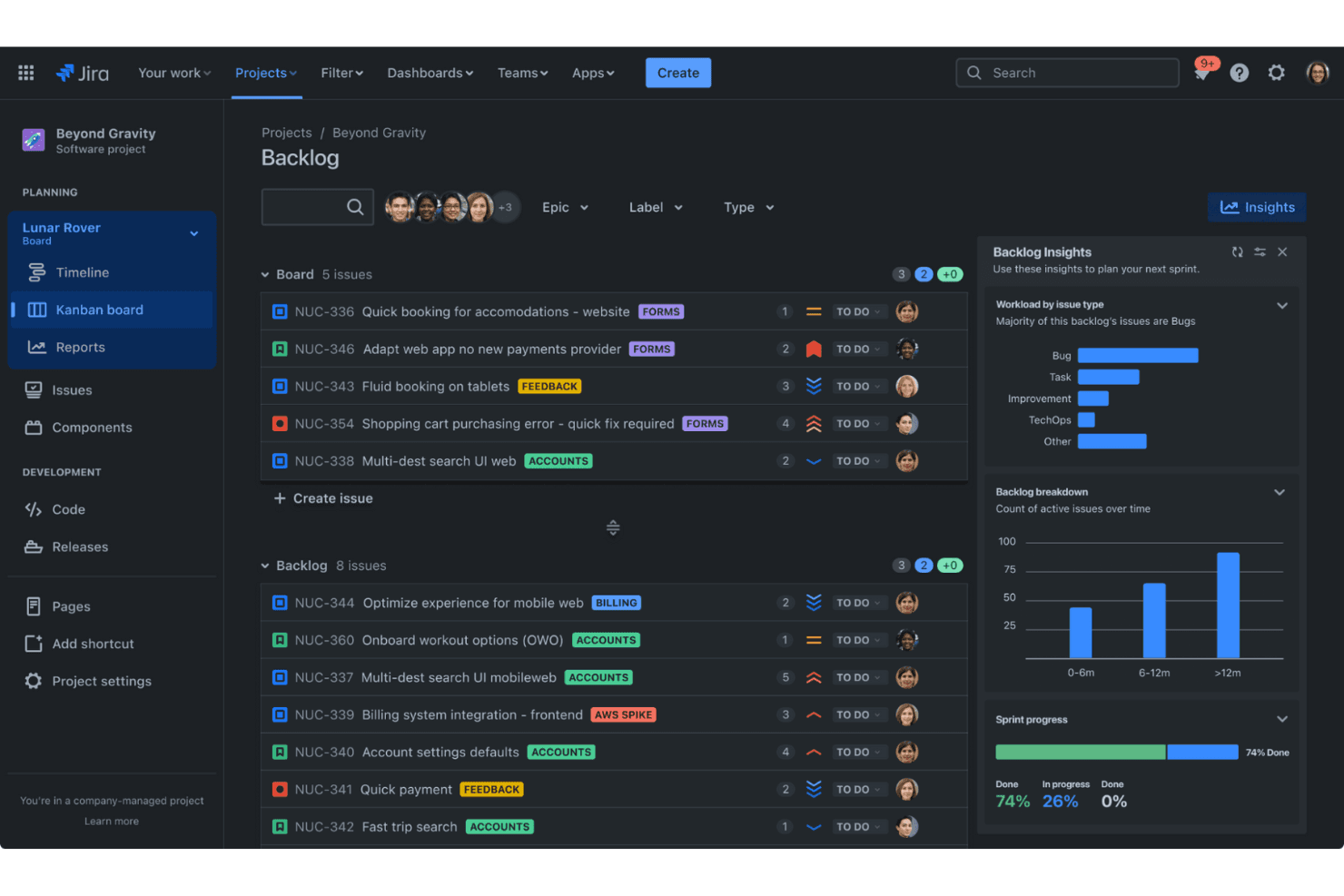
Jira aiuta le squadre agili a monitorare i problemi e a pianificare gli sprint in modo efficiente. Jira è una piattaforma agile per la gestione dei progetti con un piano gratuito che utilizza le versioni come traguardi di rilascio insieme a epiche, sprint, cronologie, mappatura delle dipendenze e report sullo stato di avanzamento.
Per chi è più adatto Jira?
Jira è adatto alle squadre di prodotto guidate dall'ingegneria che coordinano il lavoro degli sprint, le epiche, le dipendenze e i traguardi di rilascio in un unico spazio di lavoro.
Perché ho scelto Jira
Ho scelto Jira perché eccelle nel monitoraggio dei rilasci agili e dei traguardi degli sprint. Utilizzo le versioni come traguardi di rilascio con data, quindi collego epiche e attività tramite il campo Versione di correzione. La cronologia evidenzia i rilasci in ritardo, mentre i report sul lavoro rimanente degli sprint mostrano il lavoro completato, quello rimanente e quello aggiunto di recente.
Funzionalità principali di Jira
- Mappatura delle dipendenze: Collega gli elementi di lavoro per visualizzare i blocchi e gli impatti sulle attività successive.
- Flussi di lavoro personalizzati: Configura stati e transizioni per diversi tipi di lavoro.
- Vista riepilogativa: Filtra l'avanzamento del lavoro per data, assegnatario, stato, elemento principale o priorità.
- Integrazione con GitHub: Visualizza rami, commit, richieste di pull, compilazioni e distribuzioni.
Integrazioni di Jira
Jira si integra con GitHub, Bitbucket, Confluence, Slack, Microsoft Teams, Google Workspace, Zoom e Figma. Il suo mercato offre oltre 3.000 applicazioni e le API REST supportano integrazioni personalizzate.
Cosa è gratuito?
Il piano gratuito di Jira è gratuito per sempre per un massimo di 10 utenti, con 2 GB di spazio di archiviazione per i file e supporto della community. Include 100 esecuzioni di regole di automazione al mese, mentre le squadre più grandi devono ricorrere a un piano a pagamento.
Pros and Cons
Pros:
- Le versioni di rilascio forniscono indicatori dei traguardi con data
- I report sul lavoro rimanente degli sprint prevedono le date di completamento stimate
- La cronologia mappa le dipendenze e le date riepilogate
Cons:
- La cronologia gratuita copre un solo spazio
- I promemoria dei traguardi richiedono regole di automazione personalizzate
Learn more about Jira: Ideale per i team di sviluppo che monitorano le milestone nei repository di codice
- Piano gratuito disponibile
- A partire da $4/utente/mese
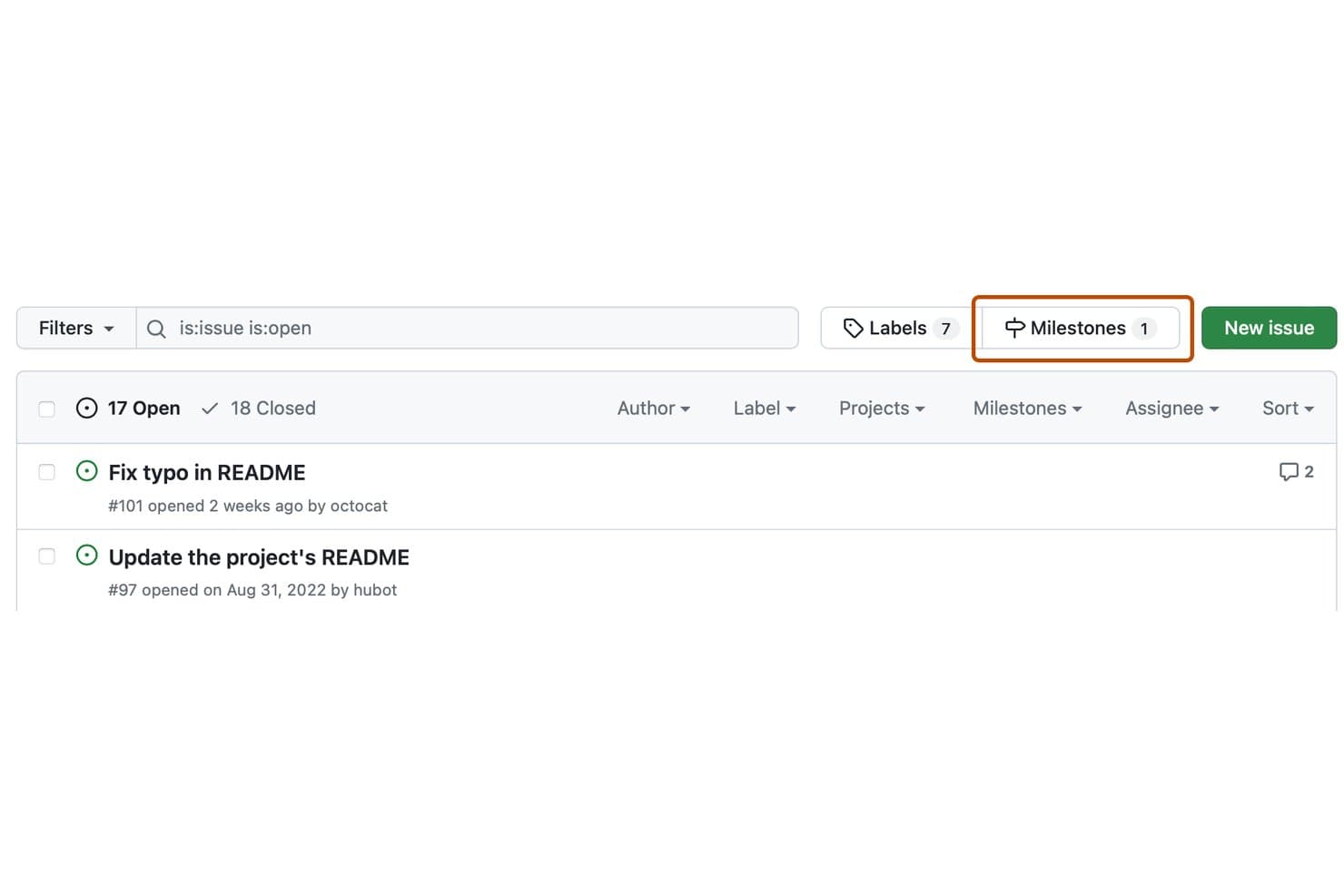
GitHub Issues consente agli utenti di filtrare e gestire le milestone dall'elenco delle issue. GitHub Issues è un software gratuito per le milestone integrato con GitHub Projects, che combina milestone basate sui repository con issue, richieste pull, sotto-issue, dipendenze, indicatori di avanzamento e una sequenza temporale della roadmap.
Per chi è più adatto GitHub Issues?
I team di ingegneria e sviluppo possono monitorare i punti di controllo delle release insieme a issue, richieste pull, dipendenze e repository di codice senza adottare un software separato per le milestone.
Perché ho scelto GitHub Issues
Ho scelto GitHub Issues perché è ideale per i team di sviluppo che monitorano le milestone nei repository di codice. Utilizzo le milestone dei repository per monitorare l'avanzamento delle release attraverso le date di scadenza, il conteggio delle issue aperte e chiuse e gli indicatori della percentuale di completamento. GitHub Projects aggiunge visualizzazioni della roadmap, sotto-issue e il monitoraggio delle dipendenze per coordinare il lavoro tra i repository.
Funzionalità principali di GitHub Issues
- Descrizioni Markdown: Aggiungi un contesto formattato alle milestone e alle issue.
- Aggiornamenti sullo stato del progetto: Indica i progetti come in linea con i piani o a rischio.
- Visibilità pubblica del progetto: Condividi le visualizzazioni del progetto con chiunque online.
- Automazioni integrate: Aggiorna gli stati degli elementi quando le issue vengono chiuse o le richieste pull vengono unite.
Integrazioni di GitHub Issues
GitHub Issues si integra nativamente con GitHub Actions e Slack, si connette a GitHub CLI e GitHub Mobile e supporta integrazioni personalizzate tramite la sua API GraphQL. Le integrazioni del Marketplace aggiungono opzioni come i promemoria per le date di scadenza delle milestone.
Cosa è gratuito?
GitHub Issues è gratuito per sempre tramite GitHub Free, che include Issues e Projects per un numero illimitato di repository pubblici e privati. Il piano prevede limiti di utilizzo separati, tra cui 2.000 minuti mensili di GitHub Actions e 500 MB di spazio di archiviazione per Packages.
Pros and Cons
Pros:
- L'avanzamento delle milestone mostra i conteggi delle issue aperte e chiuse
- Gli indicatori della roadmap collegano date, iterazioni e milestone
- Le sotto-issue suddividono le release in punti di controllo nidificati
Cons:
- Le milestone non includono proprietari né una mappatura delle dipendenze
- Le milestone non forniscono avvisi nativi sulle date di scadenza
Learn more about GitHub Issues: Ideale per il monitoraggio automatico dei progressi dei traguardi
- Prova gratuita di 14 giorni + demo gratuita + piano gratuito disponibile
- A partire da $10/utente/mese (con fatturazione annuale)
Visit WebsiteCustomer Rating:4.6/5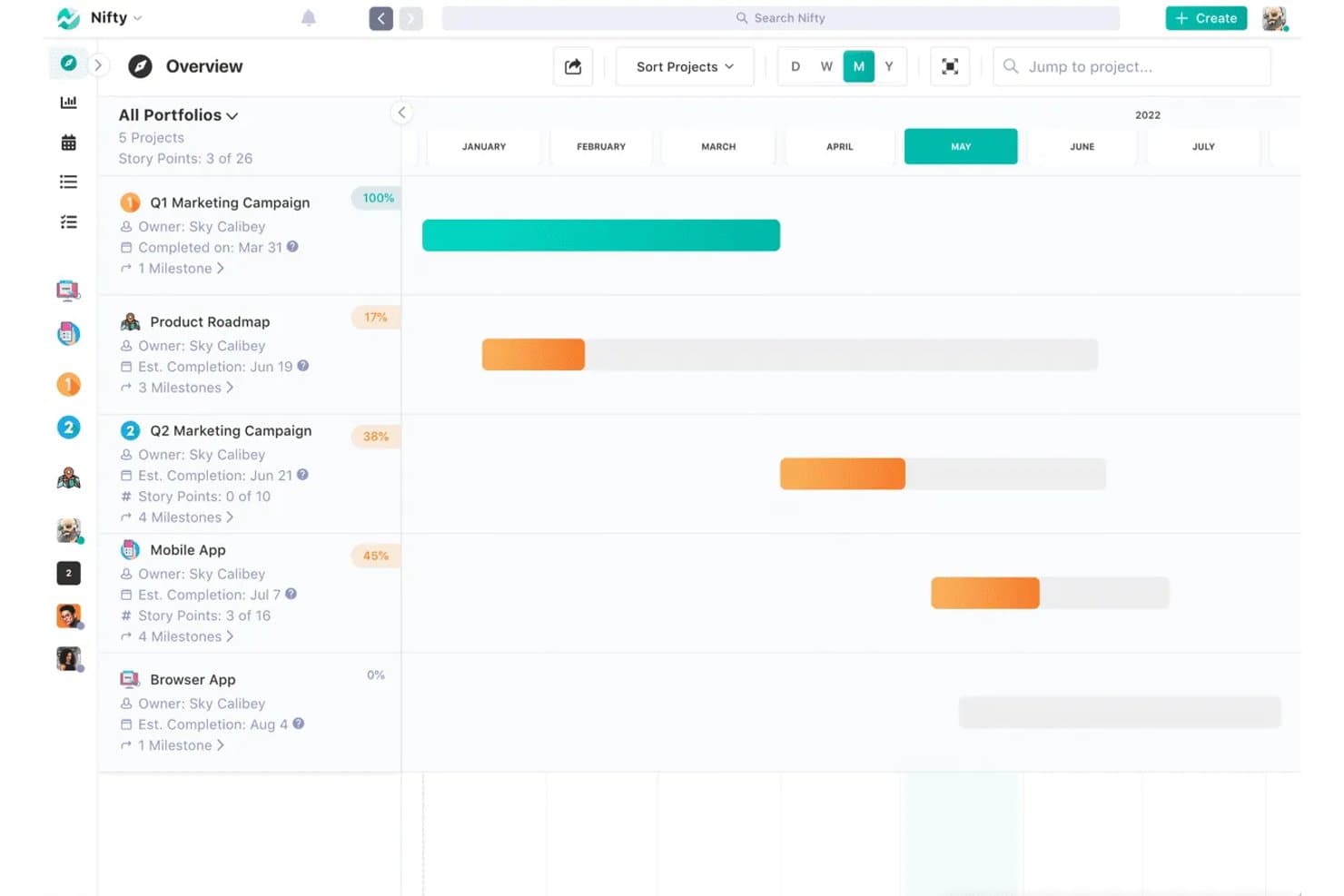
Nifty monitora i traguardi e i progressi dei progetti in una visualizzazione della cronologia. Nifty è un software gratuito per la gestione dei progetti con cronologie del piano di sviluppo, traguardi collegati alle attività, date automatiche o manuali, dipendenze, traguardi ricorrenti e monitoraggio dei progressi codificato a colori.
A chi è più adatto Nifty?
Responsabili di progetto e di prodotto che hanno bisogno di traguardi collegati alle attività per aggiornare automaticamente i progressi in un numero ridotto di progetti attivi.
Perché ho scelto Nifty
Ho scelto Nifty perché gestisce il monitoraggio automatico dei progressi dei traguardi senza richiedere report sullo stato separati. Collego le attività ai traguardi e Nifty ricalcola le percentuali di completamento, assegnando ai traguardi i colori verde, arancione, rosso o grigio man mano che il lavoro cambia. Le date automatiche dei traguardi seguono gli intervalli delle attività, mentre le dipendenze bloccano il lavoro successivo finché le attività precedenti non sono completate.
Funzionalità principali di Nifty
- Collegamenti pubblici al piano di sviluppo: Condividi cronologie dei traguardi di sola lettura senza richiedere agli stakeholder di accedere.
- Traguardi ricorrenti: Pianifica traguardi ripetuti per gli sprint o le revisioni mensili.
- Visualizzazioni del piano di sviluppo: Passa tra i livelli di ingrandimento della cronologia Giorno, Settimana, Mese e Anno.
- Esportazione dei progressi: Esporta i report sui traguardi come file CSV o PDF.
Integrazioni di Nifty
Nifty offre integrazioni native con GitHub, GitLab, Slack, Google Drive, Google Calendar, Microsoft 365, Outlook Calendar, Zoom, Webex e Miro. È supportato anche Zapier, mentre l'accesso API per le integrazioni personalizzate richiede il piano Business o superiore.
Cosa è gratuito?
Nifty offre un piano gratuito per sempre con membri del team illimitati e funzionalità principali, tra cui traguardi, dipendenze, attività ricorrenti e portafogli. Il piano limita a due i progetti attivi e offre 100 MB di spazio di archiviazione, mentre le funzionalità avanzate come il monitoraggio del tempo e le automazioni richiedono un piano a pagamento.
Pros and Cons
Pros:
- I traguardi aggiornano automaticamente i progressi in base alle attività
- Le dipendenze modificano le date dei traguardi successivi
- I piani di sviluppo pubblici semplificano gli aggiornamenti agli stakeholder
Cons:
- Il piano gratuito limita i progetti attivi
- La personalizzazione dei diagrammi di Gantt rimane relativamente limitata
Learn more about Nifty: Ideale per il monitoraggio delle tappe e dei diagrammi Gantt in più viste
- Piano gratuito disponibile
- A partire da $7/utente/mese (con fatturazione annuale)
Visit WebsiteCustomer Rating:4.7/5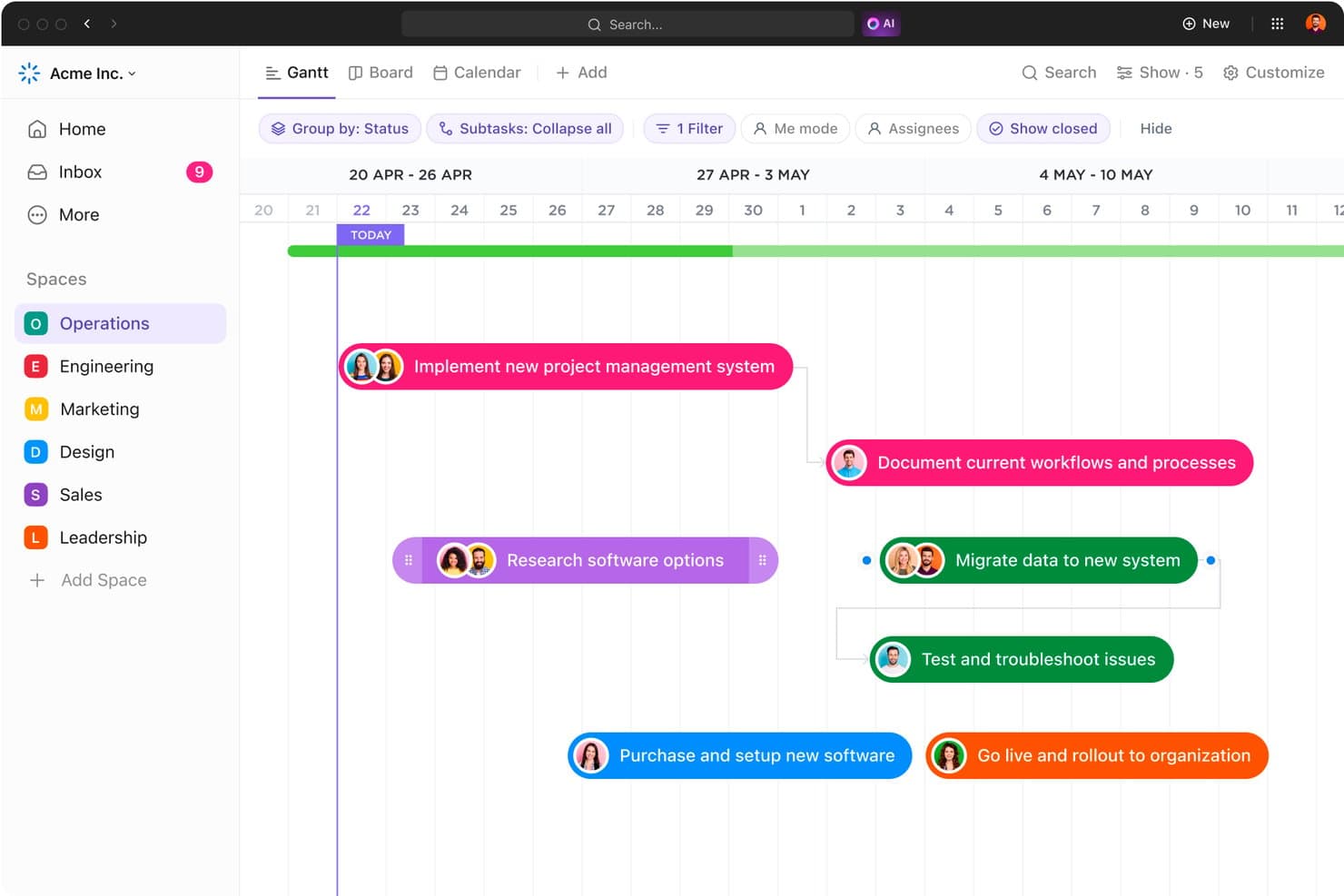
Il diagramma Gantt di ClickUp mappa le tappe del progetto lungo una sequenza temporale visiva. ClickUp è un software gratuito per la gestione delle tappe che le tratta come tipi di attività e combina le viste Gantt, Elenco, Bacheca e Calendario con dipendenze, sottoattività, modelli di piani di sviluppo e integrazione con GitHub.
Per chi è più adatto ClickUp?
I responsabili di prodotto e i responsabili dell'ingegneria che coordinano i rilasci apprezzeranno i piani di sviluppo di ClickUp, l'integrazione con GitHub, le dipendenze e le viste flessibili delle tappe.
Perché ho scelto ClickUp
Ho scelto ClickUp perché le sue attività relative alle tappe vengono visualizzate come rombi nelle viste Gantt, Elenco, Bacheca e Calendario. Posso collegare i punti di controllo del rilascio a sottoattività e dipendenze, quindi usare i modelli di piani di sviluppo per pianificare i lanci dei prodotti. Il piano gratuito permanente include questi strumenti, anche se gli utilizzi delle tappe e dei diagrammi Gantt sono soggetti a limiti a vita.
Funzionalità principali di ClickUp
- Integrazione nativa con GitHub: Collega commit, rami e richieste di integrazione alle attività di ClickUp.
- Stati personalizzati: Definisci le fasi del flusso di lavoro per le attività e l'avanzamento delle tappe.
- Promemoria: Crea promemoria ricorrenti, delegati e con scadenza.
- Link pubblici: Condividi Elenchi, Cartelle, attività e Documenti in sola lettura senza account.
Integrazioni di ClickUp
ClickUp offre integrazioni native con GitHub, GitLab, Bitbucket, Slack, Microsoft Teams, Google Drive, Figma e Miro. Fornisce inoltre un'API pubblica e webhook per integrazioni personalizzate, oltre a Zapier.
Cosa è incluso nel piano gratuito?
ClickUp offre un piano gratuito permanente con attività relative alle tappe, viste Gantt, dipendenze, sottoattività e modelli di piani di sviluppo. Tuttavia, il piano gratuito prevede limiti a vita per le viste Gantt e gli utilizzi delle tappe, quindi i team che pianificano frequentemente i rilasci potrebbero aver bisogno di un piano a pagamento.
Pros and Cons
Pros:
- Le tappe vengono visualizzate in più viste di pianificazione
- Le dipendenze collegano i risultati ai punti di controllo del rilascio
- I modelli di piani di sviluppo supportano una pianificazione strutturata dei lanci
Cons:
- I limiti a vita delle viste ostacolano il monitoraggio a lungo termine
- Le autorizzazioni degli ospiti non possono essere limitate
Learn more about ClickUp: Ideale per visualizzazioni flessibili
- Prova gratuita di 14 giorni; nessun piano gratuito a lungo termine disponibile
- A partire da $8/utente/mese (con fatturazione annuale)
Visit WebsiteCustomer Rating:4.6/5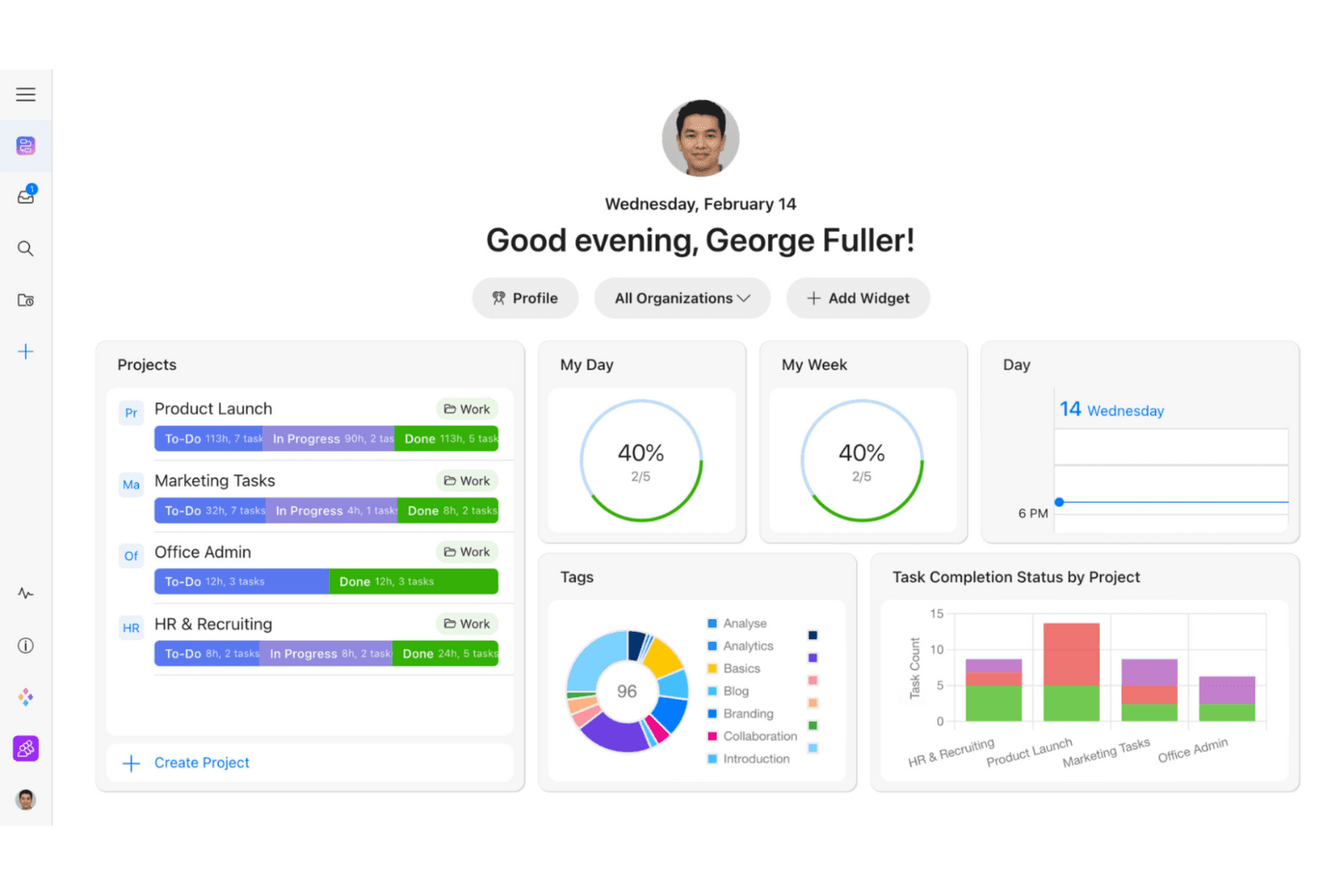
Zenkit aiuta i team a monitorare le attività con visualizzazioni di progetto personalizzabili. Zenkit è una piattaforma per la gestione delle milestone e dei progetti con pianificazione Gantt, dipendenze, sottoelementi, campi di stato, link pubblici alle tempistiche e più visualizzazioni per gli stessi dati di progetto.
Per chi è più adatto Zenkit?
Responsabili di progetto che devono pianificare visivamente le milestone e passare dalle visualizzazioni Gantt, Kanban, Calendario e Tabella.
Perché ho scelto Zenkit
Ho scelto Zenkit perché la visualizzazione Gantt trasforma le scadenze fisse in milestone monitorabili con dipendenze e pianificazione tramite trascinamento. Posso passare dagli stessi dati di progetto alle visualizzazioni Calendario, Kanban, Tabella o Mappa mentale senza duplicare il lavoro. I link pubblicati alle tempistiche consentono inoltre agli stakeholder di consultare le date senza creare account. Attualmente Zenkit offre una prova di 14 giorni, non un piano gratuito a lungo termine.
Funzionalità principali di Zenkit
- Sottoelementi multilivello: Crea gerarchie padre-figlio tra i risultati finali del progetto.
- Promemoria personali: Imposta avvisi basati sulle date con tempistiche personalizzabili.
- Commenti e menzioni: Discuti il lavoro direttamente all'interno degli elementi del progetto.
- Widget del pannello di controllo: Monitora i dati del progetto tramite report personalizzabili.
Integrazioni di Zenkit
Zenkit documenta le integrazioni con Google Calendar, Google Sheets, Google Drive, Slack, Microsoft Teams, Trello, Asana, Dropbox e Box. L'accesso all'API REST è disponibile con i piani Business e superiori; sono supportati anche Integrately e Zapier.
Cosa è incluso gratuitamente?
Zenkit offre una prova gratuita di 14 giorni anziché un piano gratuito senza scadenza. Al termine della prova, sarà necessario un piano a pagamento, a partire da €8 per utente al mese.
Pros and Cons
Pros:
- Passaggio tra più visualizzazioni delle milestone
- Le milestone Gantt supportano la pianificazione basata sulle dipendenze
- Le tempistiche pubbliche semplificano le revisioni degli stakeholder
Cons:
- Attualmente non è disponibile un piano gratuito a lungo termine
- L'avanzamento delle milestone non dispone di riepiloghi automatici
Learn more about Zenkit: Ideale per i team che prendono appunti e monitorano le milestone
- Piano gratuito + demo gratuita disponibile
- A partire da $10/utente/mese (con fatturazione annuale)
Visit WebsiteCustomer Rating:4.6/5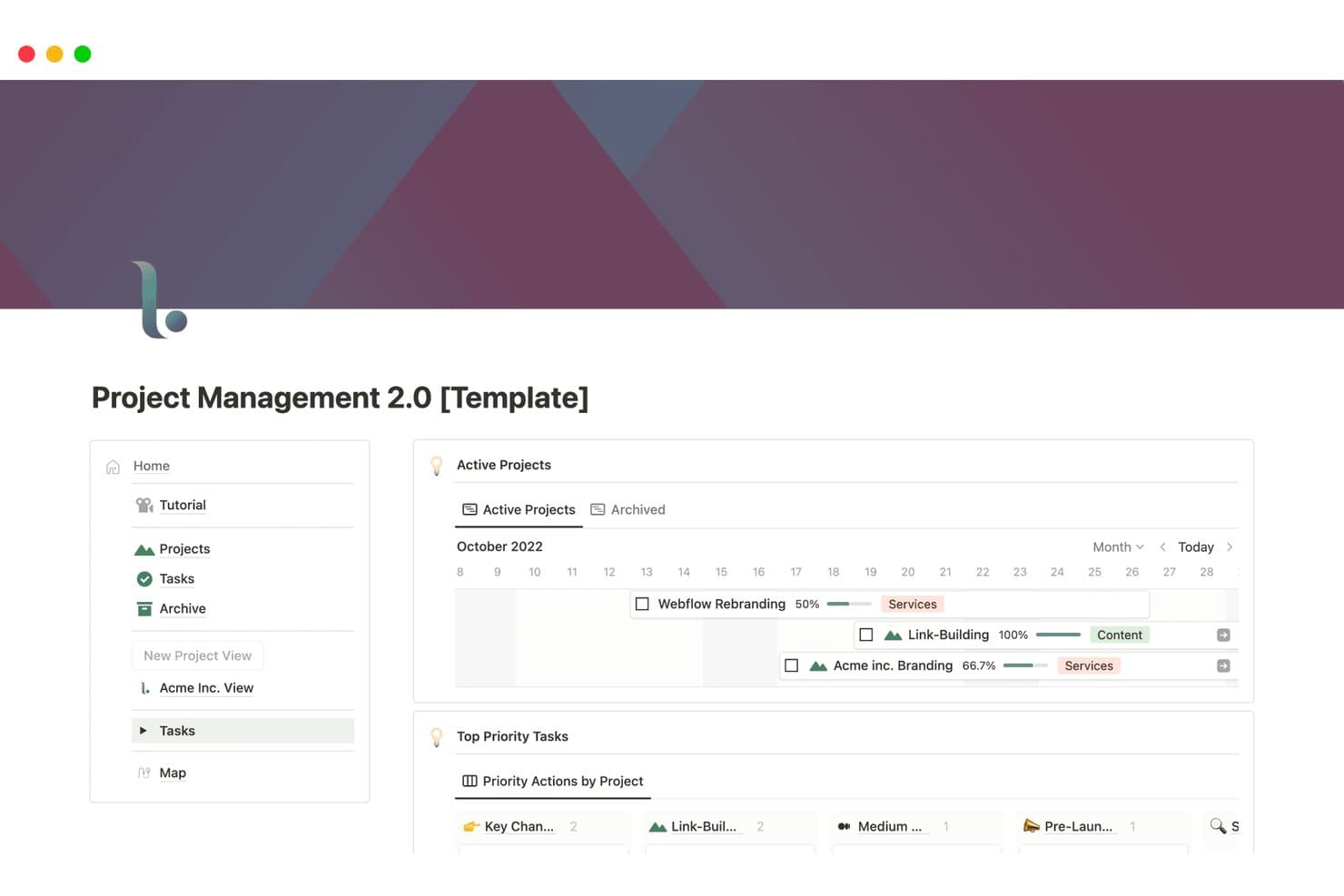
Notion monitora visivamente le milestone e i progressi del progetto su una sequenza temporale. Notion è uno spazio di lavoro gratuito per il monitoraggio delle milestone che utilizza database personalizzabili e viste Sequenza temporale, Calendario, Bacheca ed Elenco, oltre a sotto-elementi e dipendenze, invece di un oggetto milestone dedicato.
A chi è più adatto Notion?
Notion è adatto ai team che prendono appunti e monitorano le milestone, in particolare ai team di prodotto che mantengono insieme piani di progetto, roadmap e documentazione.
Perché ho scelto Notion
Ho scelto Notion perché il mio team può conservare le date delle milestone accanto agli appunti di progetto, alle roadmap e ai verbali delle decisioni in un unico spazio di lavoro. La vista Sequenza temporale supporta intervalli di date, la riprogrammazione tramite trascinamento e le dipendenze, mentre i sotto-elementi suddividono i lanci in punti di controllo monitorabili. Utilizzo anche viste collegate dei database per connettere le attività alle milestone quando un progetto richiede più struttura di una semplice pagina di appunti.
Funzionalità principali di Notion
- Vista Calendario: Mostra le date dei database insieme agli eventi del calendario.
- Pubblicazione sul Web: Condivide le pagine delle roadmap tramite link pubblici visualizzabili.
- Promemoria per le date: Invia notifiche nell'app, push e via e-mail.
- Database degli sprint: Organizza il lavoro nelle viste corrente, pianificazione e arretrato.
Integrazioni di Notion
Notion offre integrazioni native con Jira Cloud e GitHub, sebbene entrambe richiedano un piano Business. La sua API pubblica e i webhook supportano integrazioni personalizzate.
Cosa è gratuito?
Notion offre un piano gratuito senza scadenza, quindi puoi monitorare le milestone senza una prova a tempo limitato. Le integrazioni native con Jira Cloud e GitHub richiedono il piano Business e i team più grandi potrebbero aver bisogno di funzionalità a pagamento man mano che il loro spazio di lavoro cresce.
Pros and Cons
Pros:
- La vista Sequenza temporale riprogramma le date tramite trascinamento
- I modelli di roadmap supportano punti di controllo del prodotto monitorabili
- Le pagine pubbliche condividono viste della roadmap pronte per gli stakeholder
Cons:
- Le milestone richiedono una configurazione manuale del database
- I riepiloghi dei progressi richiedono una configurazione manuale
Learn more about Notion: Ideale per la collaborazione a codice sorgente aperto
- Prova gratuita di 14 giorni + piano gratuito disponibile
- A partire da 5,95 € per utente al mese (con fatturazione annuale)
Visit WebsiteCustomer Rating:4.5/5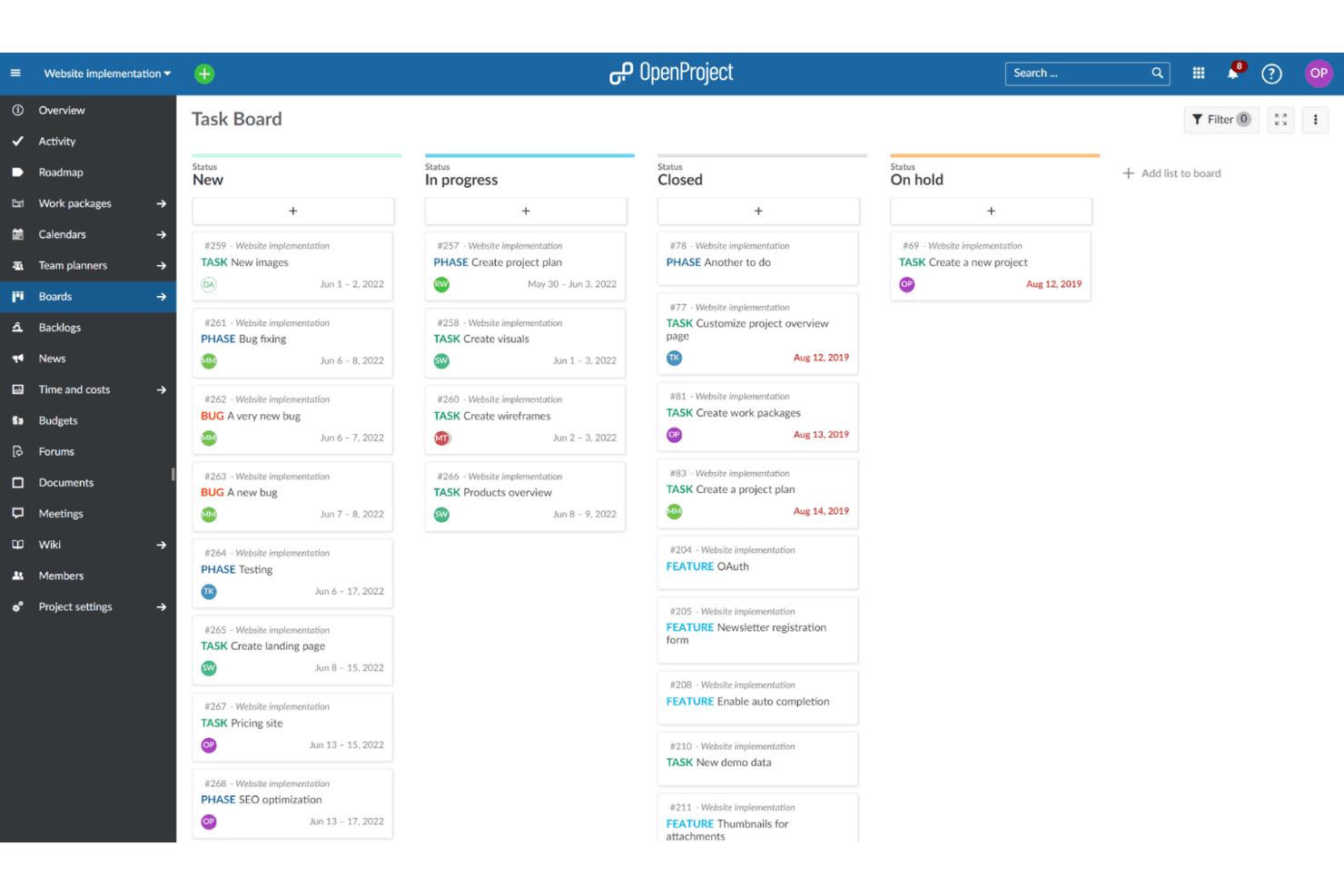
OpenProject consente ai team di pianificare e monitorare il lavoro in bacheche condivise. OpenProject è una piattaforma di gestione delle tappe fondamentali ospitata autonomamente, con diagrammi di Gantt, piani di rilascio, versioni, dipendenze, bacheche agili e monitoraggio della sequenza temporale tra progetti.
Per chi è più adatto OpenProject?
Responsabili di progetto, prodotto e programma in team orientati all'ingegneria che necessitano di una pianificazione delle tappe fondamentali ospitata autonomamente e a codice sorgente aperto, oltre alla collaborazione tra progetti.
Perché ho scelto OpenProject
Ho scelto OpenProject perché il suo modello di collaborazione a codice sorgente aperto offre ai team il pieno controllo sulla pianificazione delle tappe fondamentali. Utilizzo i diagrammi di Gantt tra progetti per collegare le dipendenze tra le iniziative, mentre le versioni e i piani di rilascio associano gli obiettivi di rilascio a pacchetti di lavoro monitorabili. I progetti pubblici, i commenti e le viste condivise aiutano i team di ingegneria e prodotto a coordinarsi senza vincoli rispetto al fornitore.
Funzionalità principali di OpenProject
- Viste calendario: Pianifica e modifica il lavoro nelle viste calendario mensili o settimanali.
- Bacheche operative: Sposta le schede per aggiornare i campi relativi a stato, assegnatario, versione o elemento padre.
- Avvisi sulle date: Ricevi promemoria configurabili per le date imminenti e scadute.
- Flussi di lavoro personalizzati: Configura stati, flussi di lavoro e campi personalizzati per il tuo processo.
Integrazioni di OpenProject
OpenProject documenta le integrazioni con GitHub, GitLab e Nextcloud, oltre a offrire uno strumento gratuito per la migrazione da Jira. Offre anche un'API REST per le integrazioni personalizzate e supporta repository SVN e Git per le installazioni locali.
Cosa è gratuito?
OpenProject offre un piano gratuito per la comunità, senza scadenza, per le installazioni ospitate autonomamente o per la sua versione ospitata. Include le funzionalità fondamentali di pianificazione delle tappe fondamentali, ma i repository Git e SVN sono disponibili solo per le distribuzioni locali, mentre i componenti aggiuntivi aziendali e il supporto prioritario richiedono un piano a pagamento.
Pros and Cons
Pros:
- Il diagramma di Gantt tra progetti collega le scadenze correlate
- Le versioni associano i rilasci a elementi di lavoro monitorabili
- Il controllo a codice sorgente aperto supporta la collaborazione ospitata autonomamente
Cons:
- Le tappe fondamentali non possono contenere pacchetti di lavoro figlio
- La condivisione con i portatori di interesse presenta limiti rilevanti
Learn more about OpenProject:
Altri software gratuiti per le pietre miliari
Ecco alcune opzioni aggiuntive di software per le pietre miliari che offrono anch’esse piani o prove gratuite. Sebbene questi strumenti non siano entrati nel mio elenco, vale comunque la pena dare loro un’occhiata:
- 11HiveIdeale per condividere cronologie pronte per le parti interessate
- 12Zoho ProjectsIdeale per piccoli team
- 13FlowluIdeale per combinare strumenti CRM, finanziari e di gestione dei progetti
Come valuto i software gratuiti per le milestone
Per prima cosa, definisco cosa si intende per gratuito. Per i software per le milestone, gratuito significa un piano gratuito a tempo indeterminato, non una prova, con accesso a date, stati e sequenza temporale, soggetto a limiti sul numero di utenti o di progetti. Dopodiché, suddivido la mia valutazione in tre parti: funzionalità fondamentali, come impostare le date e monitorare i progressi; caratteristiche distintive, come la condivisione di roadmap pubbliche; e fattori oltre le funzionalità, come la scalabilità del piano gratuito.
Funzionalità fondamentali (requisiti di base per questo elenco)
Oltre ai requisiti per il piano gratuito, utilizzo un sistema di punteggio per selezionare gli strumenti da includere nel mio elenco. Assegno a ciascuno un punteggio su una scala da 0 (non offre la funzionalità) a 5 (eccelle in quest'area) per ogni funzionalità fondamentale elencata di seguito, in base a ciò che è disponibile nel piano gratuito. Converto quindi il totale in una percentuale per aiutare a valutare l'idoneità complessiva di ogni strumento, assegnando un peso aggiuntivo alle funzionalità che ho ritenuto essenziali.
- Monitoraggio delle milestone (essenziale): cerco milestone con date, stati, descrizioni e responsabili, ad esempio per monitorare un lancio pianificato dalla fase di analisi fino alla pubblicazione.
- Sequenze temporali visive (essenziale): verifico la presenza di visualizzazioni sequenza temporale, calendario o roadmap che rendano facili da individuare le date di pubblicazione e i deliverable in ritardo.
- Collegamento delle attività: le attività dovrebbero essere collegate alle milestone, in modo che i team possano associare il lavoro di progettazione, sviluppo e lancio a un deliverable più ampio.
- Indicatori di avanzamento: valuto le etichette di stato, le percentuali di completamento o le barre di avanzamento che mostrano se una milestone è in linea con i piani.
- Collaborazione e condivisione: cerco accesso per il team, commenti e piani condivisibili che supportino le revisioni con i team di sviluppo, progettazione e con gli stakeholder.
- Notifiche e promemoria: verifico la presenza di avvisi sulle date imminenti o scadute, che aiutino i team a intervenire prima che le milestone di pubblicazione subiscano ritardi.
Una volta ottenuto un elenco di strumenti che soddisfano i criteri, considero ciò che distingue ogni piattaforma.
Fattori distintivi (ciò che differenzia i fornitori)
Ecco come confronto i diversi fornitori:
Caratteristiche distintive
Cerco la condivisione di roadmap pubbliche, perché consente di pubblicare un link a una sequenza temporale di sola lettura per i responsabili o i clienti senza dover creare una presentazione separata. I riepiloghi delle milestone tra più progetti sono altrettanto importanti: quando gestisci più prodotti, poter visualizzare lo stato delle pubblicazioni di tutti in un'unica schermata fa risparmiare ore di aggregazione manuale. Valuto anche la mappatura tra sprint e milestone, verificando se uno strumento collega nativamente gli sprint o le epiche alle date di lancio, così che il ritmo delle consegne rimanga legato agli impegni.
Oltre le funzionalità
Verifico se un piano gratuito limita il numero di postazioni dei collaboratori, poiché il monitoraggio delle milestone viene meno quando i team di sviluppo, progettazione o marketing non possono accedere alla bacheca. L'integrazione con strumenti di sviluppo come Jira o GitHub è altrettanto importante: se lo stato delle milestone non si sincronizza con il sistema di gestione delle issue, qualcuno finisce per copiare e incollare gli aggiornamenti a ogni riunione giornaliera. Valuto anche quanto siano presentabili le visualizzazioni delle milestone già pronte all'uso, cercando opzioni di esportazione o condivisione che consentano di inserire una sequenza temporale in una revisione con i responsabili senza doverla ricostruire nelle slide.
Come scegliere un software gratuito per le pietre miliari
Gli elenchi complessi di funzionalità e le strutture tariffarie possono rendere difficile capire cosa si ottiene davvero da un software gratuito per le pietre miliari. Per aiutarti a rimanere concentrato mentre porti avanti il processo di selezione del software, ecco alcuni fattori da tenere a mente:
| Fattore | Cosa considerare |
| Ambito dell'offerta gratuita | Verifica quali funzionalità sono incluse nella versione gratuita. Alcuni strumenti possono limitare i progetti, gli utenti o lo spazio di archiviazione. |
| Scalabilità | Cerca un software in grado di crescere insieme al tuo team. Assicurati che offra aggiornamenti semplici ai piani a pagamento, se necessario. |
| Integrazioni | Assicurati che il software si integri con gli strumenti che già utilizzi, come Slack, Google Drive o Trello. |
| Facilità d'uso | Valuta l'interfaccia utente. Un design semplice e intuitivo può farti risparmiare tempo e ridurre la frustrazione. |
| Assistenza clienti | Considera le opzioni di assistenza disponibili. L'accesso al supporto tramite chat o e-mail può essere fondamentale per la risoluzione dei problemi. |
| Personalizzazione | Verifica se puoi adattare i flussi di lavoro alle esigenze del tuo team. I campi personalizzati e i dashboard possono essere utili. |
| Accesso da dispositivi mobili | Se il tuo team lavora in mobilità, assicurati che il software disponga di un'app mobile con tutte le funzionalità. |
| Sicurezza dei dati | Verifica le misure di protezione dei dati del software, soprattutto se gestisci informazioni sensibili sui progetti. |
Che cos'è un software gratuito per le tappe fondamentali?
Il software per la gestione delle tappe fondamentali è uno strumento utilizzato per pianificare, monitorare e gestire le tappe fondamentali e le scadenze dei progetti. Questi prodotti offrono spesso versioni o periodi di prova gratuiti, consentendo agli utenti di accedere alle funzionalità di base con limitazioni sul numero di progetti o utenti. Professionisti come project manager, responsabili di team e freelance utilizzano comunemente questi strumenti per mantenere i progetti nei tempi previsti e migliorare la collaborazione del team. Le funzionalità di gestione delle attività, monitoraggio della sequenza temporale e collaborazione aiutano i team a rimanere organizzati, rispettare le scadenze e comunicare in modo efficace.
Funzionalità dei software gratuiti per le tappe fondamentali
Passiamo in rassegna le funzionalità comunemente presenti nei software per la gestione delle tappe fondamentali e vediamo quali sono solitamente incluse nei piani gratuiti rispetto a quelli a pagamento.
Funzionalità solitamente gratuite dei software per le tappe fondamentali
- Gestione delle attività: consente di creare, assegnare e monitorare le attività, mantenendo il team organizzato e in linea con il programma.
- Monitoraggio della sequenza temporale: aiuta a controllare l'avanzamento del progetto e ad assicurarsi che le scadenze vengano rispettate.
- Strumenti di collaborazione: facilitano la comunicazione e la condivisione delle informazioni all'interno del team.
- Reportistica di base: fornisce informazioni sullo stato del progetto e sulle prestazioni del team.
- Bacheche Kanban: offrono un modo visivo per gestire i flussi di lavoro e le attività, facilitando la visualizzazione dell'avanzamento del progetto.
- Monitoraggio del tempo: consente di controllare quanto tempo viene dedicato alle diverse attività, favorendo la gestione delle risorse.
- Visualizzazioni personalizzabili: consentono di passare da una visualizzazione all'altra, ad esempio elenco o calendario, offrendo flessibilità nel modo in cui vengono visualizzati i dati del progetto.
- Accesso da dispositivi mobili: consente al team di accedere alle informazioni sul progetto anche in mobilità, garantendo continuità e flessibilità.
Funzionalità solitamente a pagamento dei software per le tappe fondamentali
- Reportistica avanzata: offre informazioni dettagliate e analisi sulle prestazioni del progetto e sulla produttività del team.
- Funzionalità di integrazione: collega altri strumenti e piattaforme per ottimizzare i flussi di lavoro e la condivisione dei dati.
- Gestione delle risorse: aiuta a pianificare e allocare le risorse in modo efficiente tra i progetti.
- Funzionalità di automazione: automatizza le attività ripetitive, facendo risparmiare tempo e riducendo il lavoro manuale.
- Flussi di lavoro personalizzati: consente di adattare i flussi di lavoro ai processi e alle esigenze specifiche del team.
- Impostazione delle priorità: consente di contrassegnare le attività in base all'urgenza e all'importanza, aiutando i team a concentrarsi sulle attività critiche.
- Sicurezza avanzata: offre misure aggiuntive di protezione dei dati, garantendo la sicurezza delle informazioni sensibili sui progetti.
- Progetti illimitati: elimina le restrizioni sul numero di progetti gestibili, consentendo una maggiore scalabilità.
Vantaggi dei software gratuiti per le tappe fondamentali
L'implementazione di un software gratuito per la gestione delle tappe fondamentali offre diversi vantaggi al tuo team e alla tua azienda. Ecco alcuni dei vantaggi che puoi aspettarti:
- Risparmio sui costi: I piani gratuiti consentono di gestire i progetti senza sostenere costi aggiuntivi, rendendoli convenienti per i piccoli team.
- Organizzazione migliorata: Funzionalità come la gestione delle attività e il monitoraggio della sequenza temporale aiutano a mantenere i progetti organizzati e in linea con i programmi.
- Collaborazione potenziata: Gli strumenti di collaborazione favoriscono una comunicazione e un lavoro di squadra migliori, garantendo che tutti siano informati.
- Flessibilità: Le visualizzazioni personalizzabili e l'accesso da dispositivi mobili consentono di adattare il software al proprio flusso di lavoro e di accedervi ovunque ci si trovi.
- Gestione del tempo: Le funzionalità di monitoraggio del tempo aiutano a controllare il tempo dedicato alle attività, migliorando l'allocazione delle risorse.
- Gestione visiva: Le bacheche Kanban offrono un modo visivo per gestire attività e flussi di lavoro, semplificando la visualizzazione immediata dei progressi.
- Accessibilità: Le opzioni software gratuite rendono gli strumenti di gestione dei progetti accessibili a team di qualsiasi dimensione, indipendentemente dai vincoli di budget.
Costi e prezzi del software gratuito per la gestione dei traguardi
Mi rendo conto che sei arrivato a questo articolo cercando le migliori opzioni di software per la gestione dei traguardi disponibili gratuitamente. Tuttavia, poiché i piani gratuiti offrono solo funzionalità limitate, è probabile che in futuro dovrai passare a un piano superiore.
La tabella seguente riassume i piani più comuni, i relativi prezzi medi e le funzionalità tipicamente incluse nelle soluzioni software per la gestione dei traguardi:
Tabella di confronto dei piani per il software di gestione dei traguardi
| Tipo di piano | Prezzo medio | Funzionalità comuni |
| Piano gratuito | $0 | Gestione delle attività, monitoraggio della sequenza temporale, strumenti di collaborazione e reportistica di base. |
| Piano personale | $5-$15/utente/ mese | Reportistica avanzata, visualizzazioni personalizzate, impostazione delle priorità e monitoraggio del tempo. |
| Piano aziendale | $20-$40/ utente/mese | Funzionalità di integrazione, flussi di lavoro personalizzati, gestione delle risorse e automazione. |
| Piano per grandi aziende | $50-$100/ utente/mese | Sicurezza avanzata, progetti illimitati, supporto dedicato e analisi avanzate. |
Domande frequenti sul software gratuito per le milestone
Ecco alcune risposte alle domande comuni sul software gratuito per le milestone:
Quali limitazioni devo aspettarmi dal software gratuito per le milestone?
Il software gratuito per le milestone presenta spesso limitazioni come un numero ristretto di progetti, un limite al numero di utenti e uno spazio di archiviazione limitato. Potresti inoltre scoprire che alcune funzionalità, come la reportistica avanzata o le integrazioni, sono disponibili solo nelle versioni a pagamento. È importante valutare se queste limitazioni incidono sulle esigenze del tuo progetto.
Il software gratuito per le milestone può integrarsi con altri strumenti?
Sì, molte soluzioni software gratuite per le milestone offrono integrazioni di base con strumenti diffusi come Slack, Google Drive e Trello. Tuttavia, la gamma di integrazioni potrebbe essere limitata rispetto ai piani a pagamento. Verifica che la versione gratuita si integri con gli strumenti che il tuo team utilizza già.
Quanto è sicuro il software gratuito per le milestone?
Le funzionalità di sicurezza del software gratuito per le milestone possono variare. Sebbene siano generalmente presenti alcune misure di sicurezza di base, opzioni più avanzate, come una crittografia dei dati potenziata o certificazioni di conformità, potrebbero essere disponibili solo nei piani a pagamento. Verifica sempre le funzionalità di sicurezza del software che scegli.
Come posso assicurarmi che il mio team si adatti al nuovo software gratuito per le milestone?
Per aiutare il tuo team ad adattarsi, cerca un software gratuito per le milestone che offra risorse di formazione come tutorial, webinar o una base di conoscenza. Alcune piattaforme forniscono anche tour interattivi o guide per l’introduzione. Queste risorse possono agevolare la transizione e aiutare il tuo team a sfruttare al meglio il software.
Ci sono costi nascosti con il software gratuito per le milestone?
Sebbene il software sia gratuito, potrebbero esserci costi nascosti legati a funzionalità aggiuntive o aggiornamenti necessari per ottenere maggiori funzionalità. Considera inoltre i potenziali costi della formazione o dell’adattamento dei processi esistenti al software. Esamina sempre i dettagli dei prezzi e i termini del servizio.
Come scelgo il software gratuito per le milestone più adatto al mio team?
Considera le esigenze specifiche del tuo team, come il numero di utenti, le funzionalità necessarie e le esigenze di integrazione. Valuta l’usabilità e le opzioni di assistenza disponibili per la versione gratuita. Se possibile, prova diverse opzioni per capire quale software si adatta meglio al tuo flusso di lavoro e ai tuoi requisiti.