

Gestionar proyectos puede ser un quebradero de cabeza, especialmente cuando tienes que compaginar varias tareas y fechas límite. Tu equipo necesita un camino claro, y ahí es donde entra en juego el software gratuito de hitos. Te ayuda a organizar proyectos, hacer un seguimiento del progreso y asegurarte de que nada se quede atrás, todo ello sin gastar ni un céntimo.
Por mi experiencia, elegir la herramienta adecuada puede marcar una gran diferencia. Quieres algo que se adapte a las necesidades de tu equipo, que sea fácil de usar y, lo más importante, que sea gratuito. He probado y analizado una variedad de estas herramientas para ayudarte a encontrar la opción que mejor encaje contigo.
En este artículo, compartiré mis principales opciones de software gratuito de hitos para ofrecerte la información que necesitas y tomar una decisión fundamentada.
Por qué confiar en nuestras reseñas de software
Llevamos probando y analizando software de gestión de productos desde 2020. Como gestores de productos, sabemos lo decisivo y difícil que es tomar la decisión correcta al seleccionar un software. Invertimos en una investigación exhaustiva para ayudar a nuestra audiencia a tomar mejores decisiones de compra de software.
Hemos probado más de 2.000 herramientas para distintos casos de uso de gestión de productos y hemos escrito más de 1.000 reseñas exhaustivas de software. Descubre cómo mantenemos la transparencia y consulta nuestra metodología de reseñas de software.
Tabla comparativa de software gratuito de hitos
Estos son los costes básicos de cada una de las herramientas que han entrado en mi selección.
| Tool | Best For | Trial Info | Price | ||
|---|---|---|---|---|---|
| 1 | Ideal para acumulados de hitos entre proyectos de forma gratuita | Plan gratuito disponible | Desde $1.49/usuario/mes (facturado anualmente) | Website | |
| 2 | Ideal para compartir hojas de ruta con partes interesadas externas | Garantía de devolución del dinero de 14 días | Desde $6/usuario/mes (facturación anual) | Website | |
| 3 | Ideal para el seguimiento de plazos basado en Gantt sin coste | Prueba gratuita de 15 días + demostración gratuita disponible | Desde $49/mes (facturado anualmente) | Website | |
| 4 | Ideal para el seguimiento de lanzamientos ágiles y de hitos de sprints | Plan gratuito disponible | Desde $7.91/usuario/mes | Website | |
| 5 | Ideal para equipos de desarrollo que realizan un seguimiento de los hitos en repositorios de código | Plan gratuito disponible | Desde $4/usuario/mes | Website | |
| 6 | Ideal para el seguimiento automático del progreso de los hitos | Prueba gratuita de 14 días + demostración gratuita + plan gratuito disponible | Desde $10/usuario/mes (facturado anualmente) | Website | |
| 7 | Ideal para el seguimiento de hitos y Gantt en múltiples vistas | Plan gratuito disponible | Desde $7/user/month (facturado anualmente) | Website | |
| 8 | Ideal para vistas flexibles | Prueba gratuita de 14 días, sin plan gratuito permanente | Desde $8/usuario/mes (con facturación anual) | Website | |
| 9 | Ideal para equipos que toman notas y realizan un seguimiento de los hitos | Plan gratuito + demostración gratuita disponible | Desde $10/usuario/mes (facturado anualmente) | Website | |
| 10 | La mejor opción para la colaboración de código abierto | Prueba gratuita de 14 días + plan gratuito disponible | Desde €5.95/usuario/mes (facturado anualmente) | Website |


Reseñas del mejor software gratuito de hitos
A continuación encontrarás mis resúmenes detallados del mejor software gratuito de hitos que ha entrado en mi selección. Mis reseñas ofrecen un análisis detallado de las funciones principales, ventajas y desventajas, integraciones y casos de uso ideales de cada herramienta para ayudarte a encontrar la mejor opción para ti. Aunque algunas de estas herramientas ofrecen una versión completamente gratuita, otras ofrecen un periodo de prueba gratuito. He añadido una nota sobre qué es gratuito en cada una de mis reseñas
 Ideal para acumulados de hitos entre proyectos de forma gratuita
- Plan gratuito disponible
- Desde $1.49/usuario/mes (facturado anualmente)
Visit WebsiteCustomer Rating:4.7/5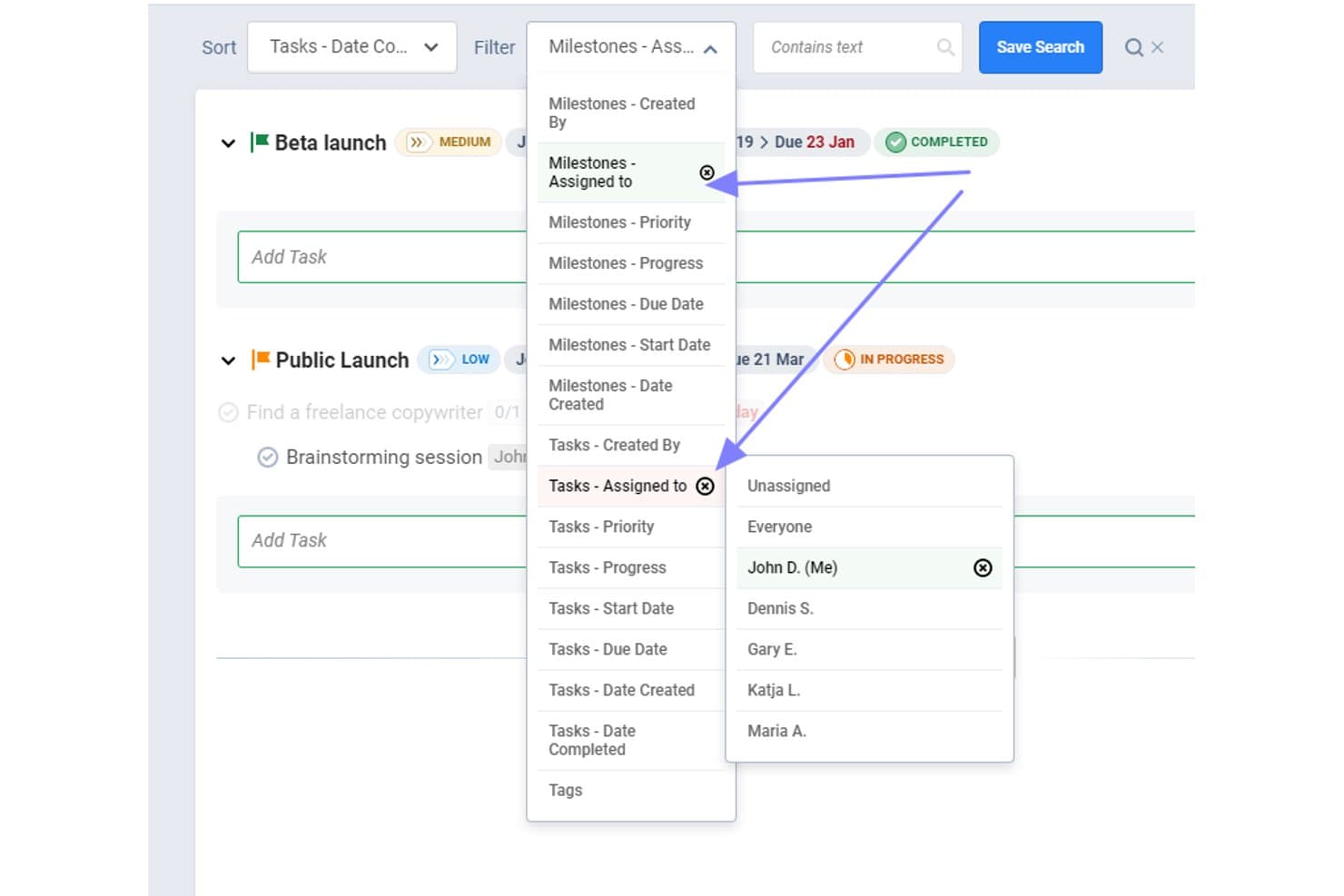
Freedcamp permite a los usuarios filtrar hitos y tareas por responsable. Freedcamp es una plataforma gratuita de gestión de hitos y planificación de proyectos con fechas de vencimiento, tareas vinculadas, acumulados de estados, responsables, comentarios y vistas de Lista, Kanban, Tabla y Calendario.
¿Para quién es más adecuado Freedcamp?
Freedcamp es adecuado para gestores de proyectos y responsables de PMO que necesitan acumulados gratuitos de hitos entre proyectos, con tareas vinculadas y visibilidad compartida del progreso.
Por qué elegí Freedcamp
Elegí Freedcamp porque su plan gratuito gestiona acumulados de hitos entre proyectos sin coste. Utilizo el Panel de hitos y el Panel de calendario para revisar las fechas límite de varios proyectos, mientras que las tareas vinculadas muestran los recuentos de cada hito: no realizadas, en curso y realizadas. El widget de hitos añade otra vista del progreso a nivel de cartera.
Características principales de Freedcamp
- Proyectos públicos: Publica los detalles del proyecto como una hoja de ruta accesible externamente.
- Compartición de calendarios ICS: Comparte calendarios de hitos con Google Calendar, Outlook o Apple Calendar.
- Correos electrónicos de resumen: Recibe resúmenes de los hitos atrasados y próximos.
- Comentarios en los hitos: Añade comentarios, archivos adjuntos, seguidores y @menciones a los hitos.
Integraciones de Freedcamp
Freedcamp no tiene integraciones nativas, pero admite GitHub, Jira, Airtable y Typeform mediante Pabbly, además de una API para integraciones personalizadas y Zapier.
¿Qué incluye el plan gratuito?
Freedcamp ofrece un plan gratuito para siempre con usuarios, proyectos y almacenamiento ilimitados, sujeto a una política de uso razonable. El plan tiene menos aplicaciones y funciones que los niveles de pago, y las integraciones requieren Zapier, Pabbly o la API en lugar de conexiones nativas.
Pros and Cons
Pros:
- Los acumulados de hitos entre proyectos mejoran la visibilidad de la cartera
- Las tareas vinculadas muestran el estado de finalización de los hitos
- Los proyectos públicos permiten compartir hojas de ruta externamente
Cons:
- Los usuarios gratuitos no disponen de planificación de cronogramas de Gantt
- Las diez invitaciones iniciales limitan la incorporación del equipo
Learn more about Freedcamp: Ideal para compartir hojas de ruta con partes interesadas externas
- Garantía de devolución del dinero de 14 días
- Desde $6/usuario/mes (facturación anual)
Visit WebsiteCustomer Rating:4.6/5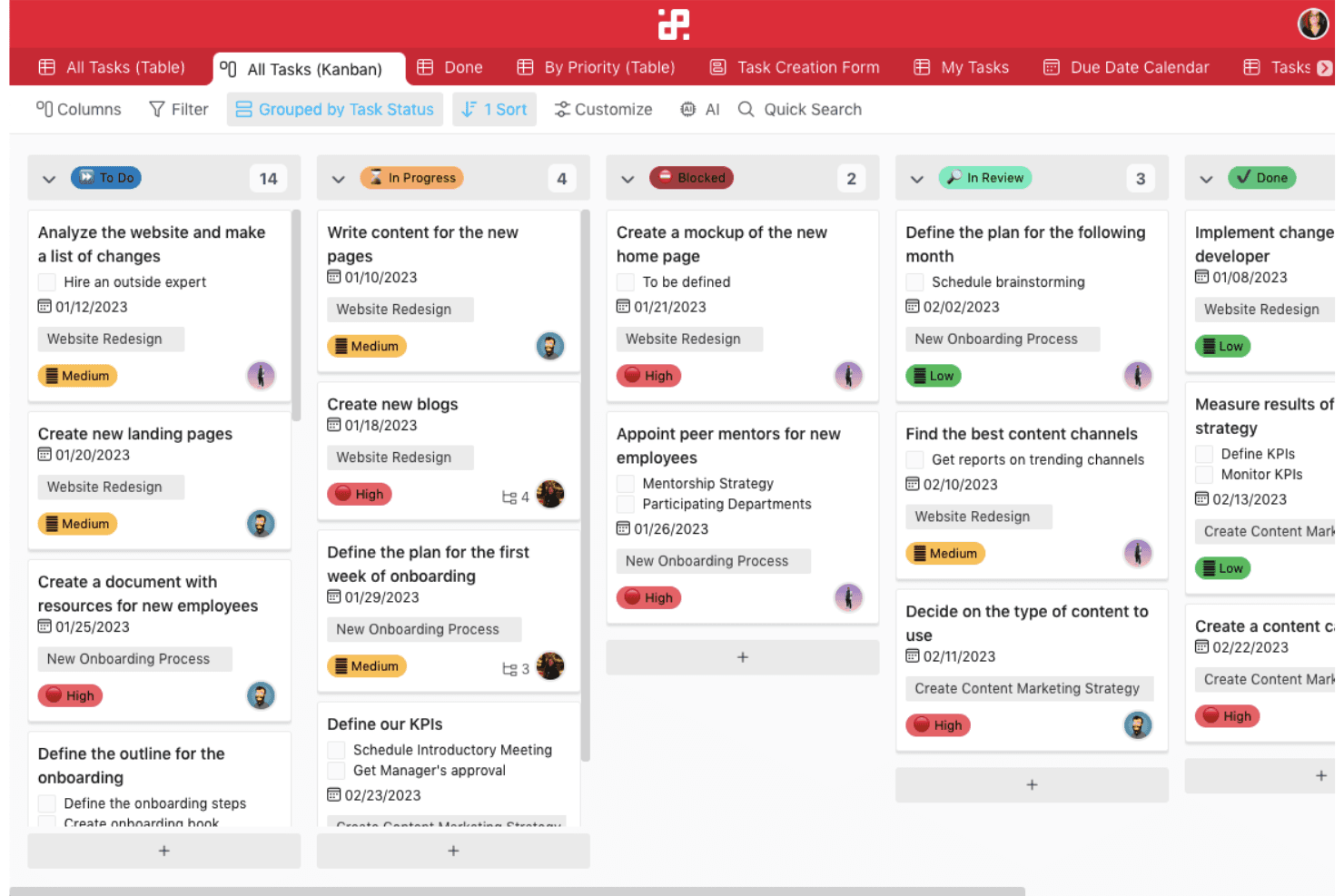
Infinity permite a los equipos gestionar un número ilimitado de tareas mediante flujos de trabajo personalizados y funciones flexibles como el etiquetado y las automatizaciones estructuradas. Infinity es una plataforma de planificación de hitos y hojas de ruta que modela los hitos con elementos y atributos personalizables, y luego los organiza mediante vistas de Gantt, calendario, subelementos, progreso y paneles públicos.
¿Para quién es más adecuado Infinity?
Infinity es ideal para gestores de productos y proyectos que necesitan un seguimiento flexible de hitos y compartir hojas de ruta con clientes, ejecutivos y partes interesadas externas.
Por qué elegí Infinity
Elegí Infinity porque convierte los elementos personalizados y los atributos de fecha en hitos que se pueden seguir, y luego los presenta en vistas de Gantt y calendario. Me gustan especialmente sus paneles públicos que se pueden insertar, los permisos para invitados, la protección mediante contraseña y las exportaciones a PDF para compartir hojas de ruta con partes interesadas externas. Infinity no tiene un plan gratuito, por lo que es una alternativa de pago en lugar de una opción realmente gratuita.
Funciones principales de Infinity
- Atributos personalizados: Añade etiquetas, barras de progreso, listas de verificación, fórmulas y campos de miembros a los registros de hitos.
- Subelementos: Divide los hitos en tareas más pequeñas con fechas, etiquetas y responsables independientes.
- Automatizaciones de recordatorios: Activa notificaciones o correos electrónicos antes o después de los atributos de fecha.
- Plantillas de hojas de ruta: Empieza con las plantillas Hoja de ruta del producto, Planificación de sprints o Seguimiento de proyectos.
Integraciones de Infinity
Infinity ofrece integraciones nativas con Trello, Google Calendar, Google Drive, iCalendar y Clockify. También admite acceso a la API, webhooks y Zapier; Jira y GitHub no son integraciones nativas.
¿Qué es gratuito?
Infinity no ofrece un plan gratuito permanente; en su lugar, proporciona una demostración gratuita. Para continuar utilizándolo se requiere un plan de pago, desde $6 por usuario al mes con facturación anual.
Pros and Cons
Pros:
- Los paneles públicos simplifican el uso compartido de hojas de ruta con las partes interesadas
- El Gantt de arrastrar y soltar facilita la planificación de plazos
- Los atributos personalizados se adaptan a los flujos de trabajo de los hitos
Cons:
- No existe un objeto de hito nativo
- El progreso de los subelementos requiere actualizaciones manuales
Learn more about Infinity: Ideal para el seguimiento de plazos basado en Gantt sin coste
- Prueba gratuita de 15 días + demostración gratuita disponible
- Desde $49/mes (facturado anualmente)
Visit WebsiteCustomer Rating:4.2/5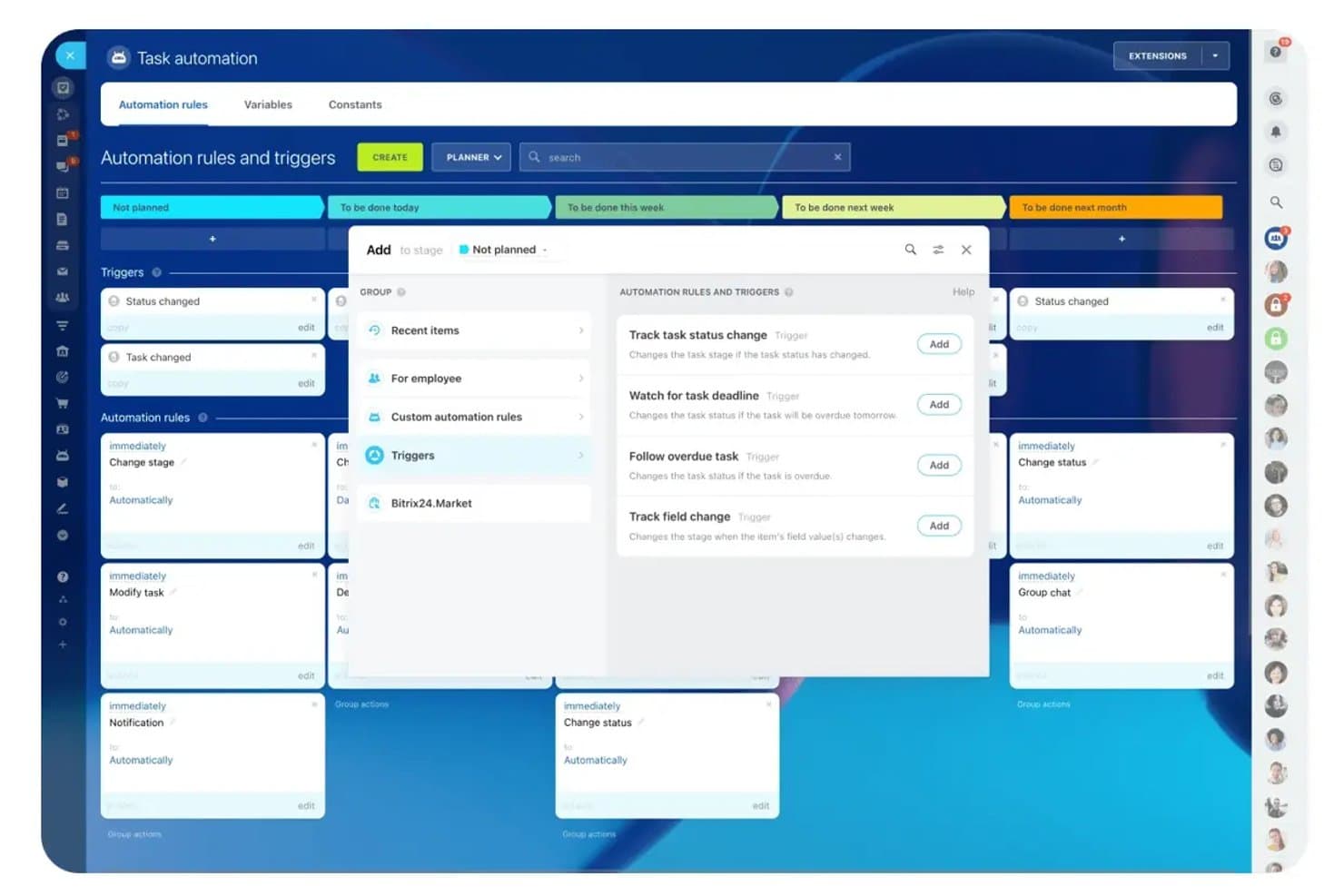
Bitrix24 automatiza los cambios de etapa de las tareas mediante reglas basadas en activadores. Bitrix24 es un software gratuito de gestión de proyectos para planificar hitos, con diagramas de Gantt, dependencias de tareas, calendarios compartidos, tableros Kanban, herramientas Scrum, recordatorios y funciones de colaboración, utilizando tareas basadas en plazos en lugar de hitos específicos.
¿Para quién es más adecuado Bitrix24?
Los gestores de proyectos de equipos pequeños pueden usar Bitrix24 de forma gratuita para hacer un seguimiento de plazos basado en Gantt, gestionar dependencias de tareas y colaborar con el equipo mediante funciones integradas.
Por qué elegí Bitrix24
Elegí Bitrix24 para hacer un seguimiento de plazos basado en Gantt sin coste porque puedo modelar los puntos de control del lanzamiento como tareas principales con plazos y dependencias. Su diagrama de Gantt de arrastrar y soltar ajusta las tareas vinculadas cuando cambian las fechas, mientras que los calendarios compartidos y los recordatorios de plazos mantienen visibles los puntos de control de entrega.
Características principales de Bitrix24
- Lista de pendientes de Scrum: Organiza épicas, puntos de historia, sprints, gráficos de trabajo pendiente y velocidad del equipo.
- Subtareas y listas de comprobación: Divide los entregables en trabajo práctico con tareas anidadas y listas de comprobación.
- Vistas del estado de las tareas: Haz un seguimiento del trabajo mediante las vistas de tareas Lista, Kanban, Planificador y basadas en el estado.
- Comentarios de tareas: Debate los entregables directamente mediante comentarios, chats de tareas y fuentes compartidas.
Integraciones de Bitrix24
Bitrix24 documenta integraciones con Google Drive y Zoom en sus materiales sobre el plan gratuito. Su mercado de aplicaciones ofrece más de 550 aplicaciones, incluida una aplicación de pago de Jira Service Management Cloud, y su API REST permite realizar integraciones personalizadas.
¿Qué incluye el plan gratuito?
Bitrix24 ofrece un plan gratuito para siempre con usuarios ilimitados, que incluye gestión de tareas, diagramas de Gantt, tableros Kanban y herramientas Scrum. Los planes de pago añaden más almacenamiento, automatización y funciones avanzadas, mientras que la plataforma también ofrece una prueba de 15 días para las funciones de pago.
Pros and Cons
Pros:
- El Gantt gratuito admite dependencias de plazos
- Los recordatorios funcionan en varios canales de notificación
- Las vistas de Scrum organizan épicas y sprints
Cons:
- No hay un objeto de hito específico
- No hay vistas de resumen de hitos entre proyectos
Learn more about Bitrix24: 4Ideal para el seguimiento de lanzamientos ágiles y de hitos de sprints
Jira
- Plan gratuito disponible
- Desde $7.91/usuario/mes
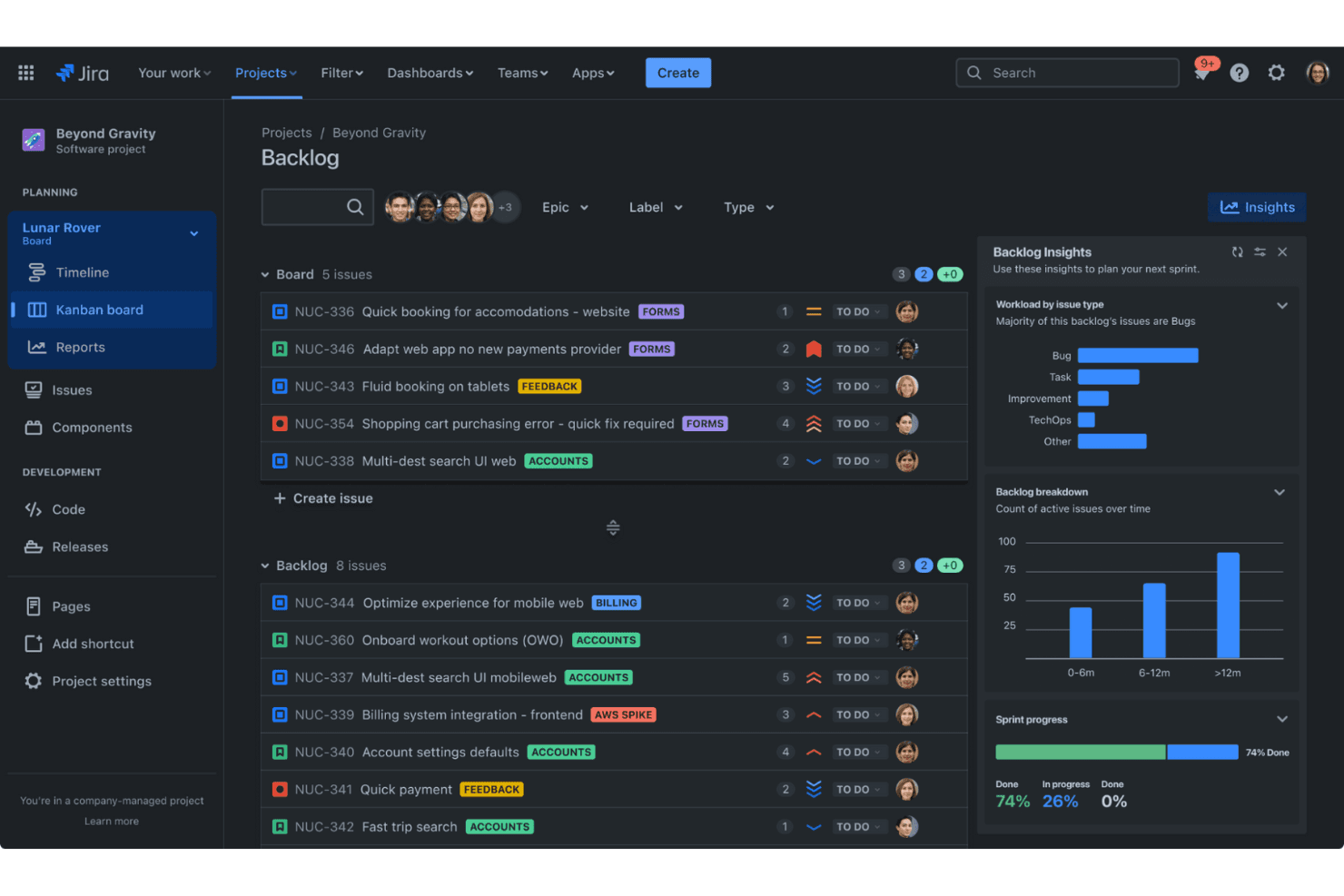
Jira ayuda a los equipos ágiles a realizar un seguimiento eficiente de las incidencias y a planificar los sprints. Jira es una plataforma de gestión de proyectos ágiles con un nivel gratuito que utiliza versiones como hitos de lanzamiento, junto con épicas, sprints, cronogramas, mapeo de dependencias e informes de progreso.
¿Para quién es más adecuado Jira?
Jira es ideal para equipos de producto dirigidos por ingeniería que coordinan el trabajo de los sprints, las épicas, las dependencias y los hitos de lanzamiento en un solo espacio de trabajo.
Por qué elegí Jira
Elegí Jira porque destaca en el seguimiento de lanzamientos ágiles y de hitos de sprints. Utilizo las versiones como hitos de lanzamiento con fecha y, después, conecto las épicas y las tareas mediante el campo Versión de corrección. Su cronograma marca los lanzamientos atrasados, mientras que los informes de evolución del sprint muestran el trabajo completado, pendiente y añadido recientemente.
Características principales de Jira
- Mapeo de dependencias: Vincula elementos de trabajo para visualizar los bloqueos y los impactos posteriores.
- Flujos de trabajo personalizados: Configura estados y transiciones para distintos tipos de trabajo.
- Vista de resumen: Filtra el progreso del trabajo por fecha, persona asignada, estado, elemento principal o prioridad.
- Integración con GitHub: Muestra ramas, confirmaciones, solicitudes de incorporación de cambios, compilaciones e implementaciones.
Integraciones de Jira
Jira se integra con GitHub, Bitbucket, Confluence, Slack, Microsoft Teams, Google Workspace, Zoom y Figma. Su marketplace ofrece más de 3.000 aplicaciones, y las API REST permiten crear integraciones personalizadas.
¿Qué incluye el plan gratuito?
El plan Gratuito de Jira es gratis para siempre para un máximo de 10 usuarios, con 2 GB de almacenamiento de archivos y asistencia de la comunidad. Incluye 100 ejecuciones de reglas de automatización al mes, mientras que los equipos más grandes necesitan un plan de pago.
Pros and Cons
Pros:
- Las versiones de lanzamiento proporcionan marcadores de hitos con fecha
- Los informes de evolución del sprint pronostican las fechas de finalización previstas
- El cronograma mapea las dependencias y las fechas consolidadas
Cons:
- El cronograma gratuito solo cubre un espacio
- Los recordatorios de hitos requieren reglas de automatización personalizadas
Learn more about Jira: Ideal para equipos de desarrollo que realizan un seguimiento de los hitos en repositorios de código
- Plan gratuito disponible
- Desde $4/usuario/mes
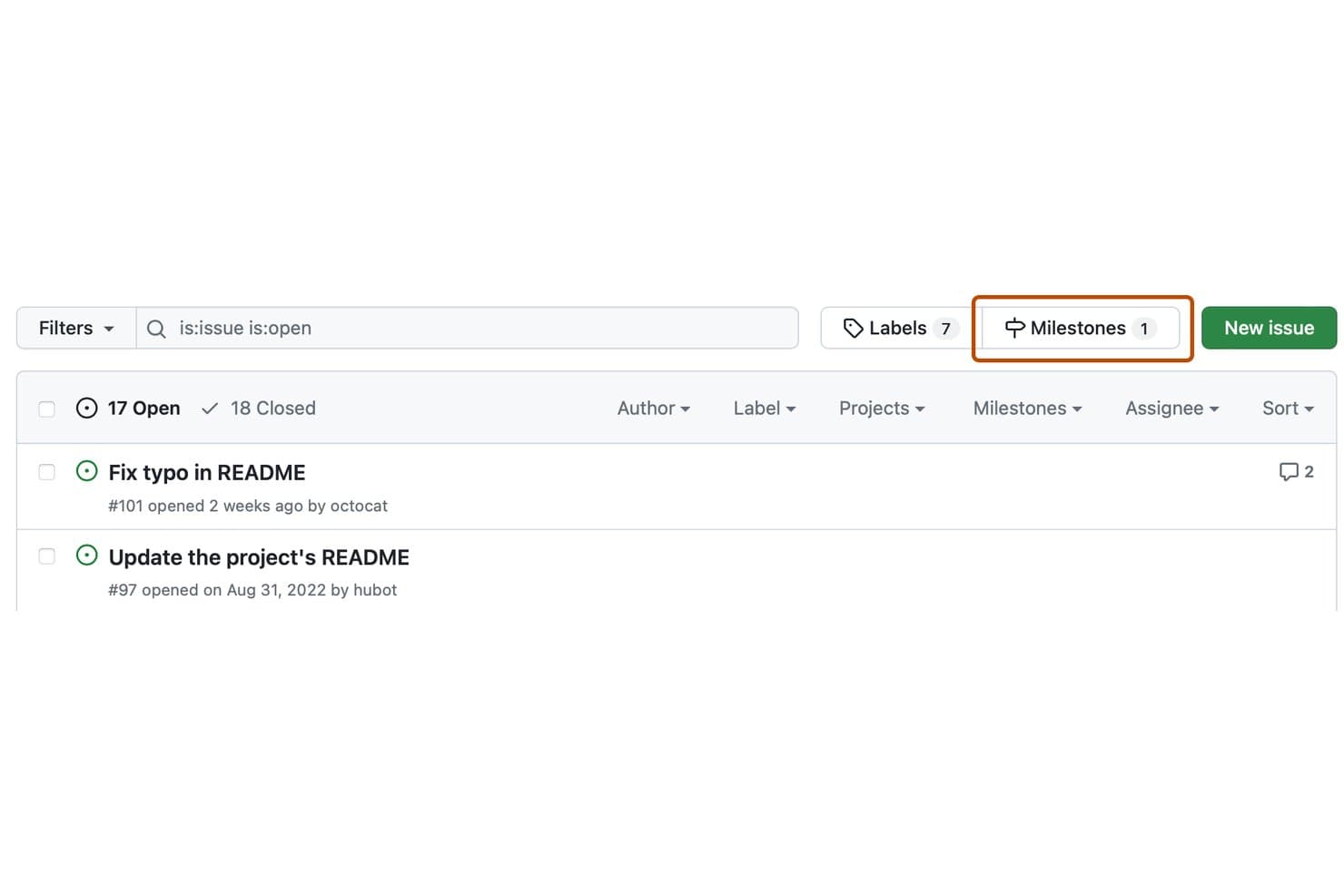
GitHub Issues permite a los usuarios filtrar y gestionar hitos desde la lista de incidencias. GitHub Issues es un software gratuito de gestión de hitos integrado con GitHub Projects, que combina hitos basados en repositorios con incidencias, solicitudes de extracción, subincidencias, dependencias, indicadores de progreso y una línea de tiempo de hoja de ruta.
¿Para quién es más adecuado GitHub Issues?
Los equipos de ingeniería y desarrollo pueden realizar un seguimiento de los puntos de control de las versiones junto a las incidencias, solicitudes de extracción, dependencias y repositorios de código sin adoptar un software de gestión de hitos independiente.
Por qué elegí GitHub Issues
Elegí GitHub Issues porque es la mejor opción para los equipos de desarrollo que realizan un seguimiento de los hitos en repositorios de código. Utilizo los hitos de los repositorios para supervisar el progreso de las versiones mediante fechas límite, recuentos de incidencias abiertas y cerradas e indicadores de porcentaje completado. GitHub Projects añade vistas de hoja de ruta, subincidencias y seguimiento de dependencias para coordinar el trabajo entre repositorios.
Funciones principales de GitHub Issues
- Descripciones en Markdown: Añade contexto con formato a los hitos y las incidencias.
- Actualizaciones del estado del proyecto: Marca los proyectos como en curso o en riesgo.
- Visibilidad pública del proyecto: Comparte las vistas del proyecto con cualquier persona en línea.
- Automatizaciones integradas: Actualiza los estados de los elementos cuando se cierran incidencias o se fusionan solicitudes de extracción.
Integraciones de GitHub Issues
GitHub Issues se integra de forma nativa con GitHub Actions y Slack, se conecta con GitHub CLI y GitHub Mobile, y permite integraciones personalizadas mediante su API GraphQL. Las integraciones del Marketplace añaden opciones como recordatorios de fechas límite de los hitos.
¿Qué es gratis?
GitHub Issues es gratis para siempre mediante GitHub Free, que incluye Issues y Projects para un número ilimitado de repositorios públicos y privados. El plan tiene límites de uso independientes, incluidos 2.000 minutos mensuales de GitHub Actions y 500 MB de almacenamiento de Packages.
Pros and Cons
Pros:
- El progreso de los hitos muestra los recuentos de elementos abiertos y cerrados
- Los marcadores de la hoja de ruta conectan fechas, iteraciones e hitos
- Las subincidencias dividen las versiones en puntos de control anidados
Cons:
- Los hitos carecen de responsables y de un mapa de dependencias
- Los hitos no proporcionan alertas nativas de fechas límite
Learn more about GitHub Issues: Ideal para el seguimiento automático del progreso de los hitos
- Prueba gratuita de 14 días + demostración gratuita + plan gratuito disponible
- Desde $10/usuario/mes (facturado anualmente)
Visit WebsiteCustomer Rating:4.6/5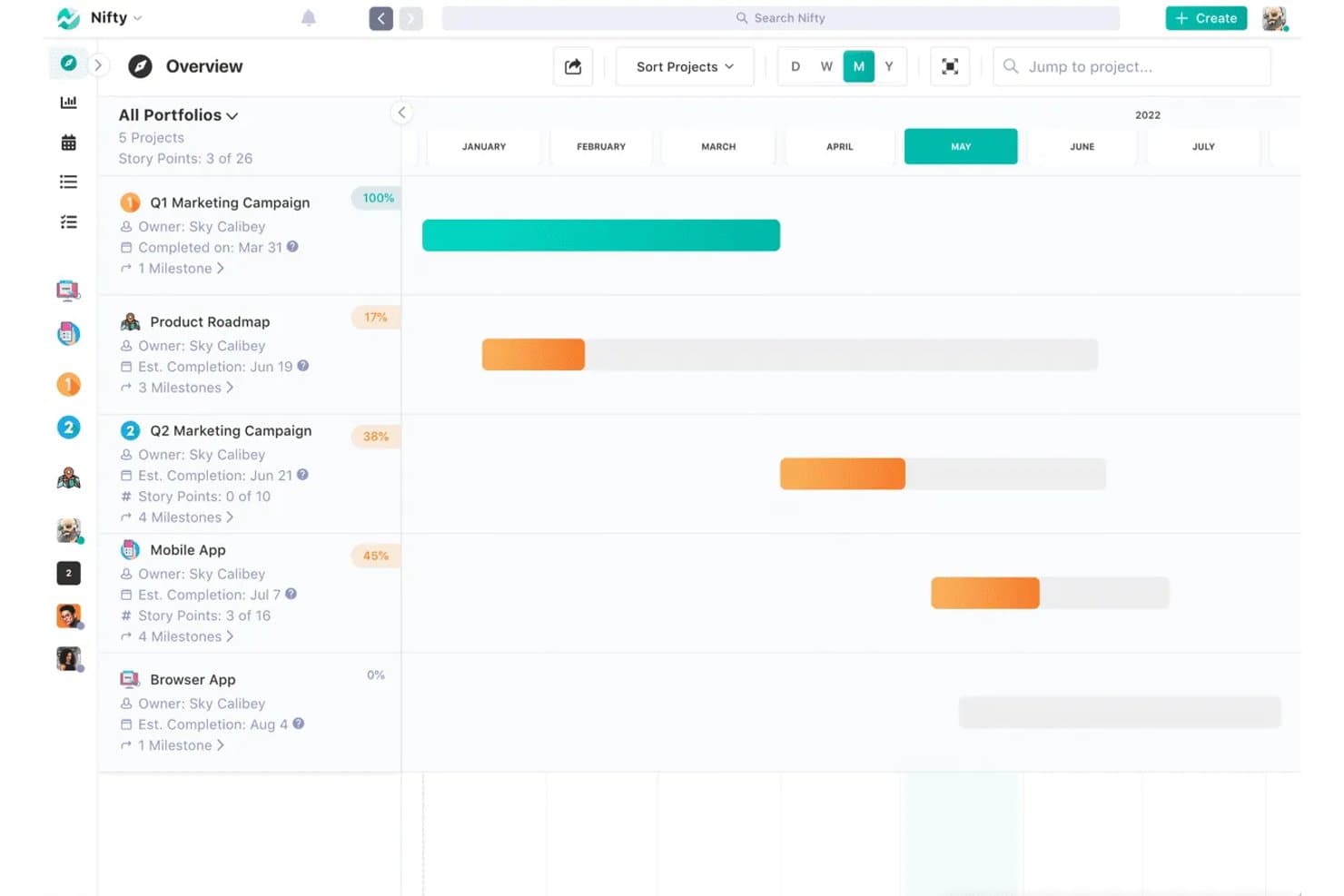
Nifty realiza un seguimiento de los hitos y el progreso de los proyectos en una vista de cronología. Nifty es un software gratuito de gestión de proyectos basado en hitos, con cronogramas de hoja de ruta, hitos vinculados a tareas, fechas automáticas o manuales, dependencias, hitos recurrentes y seguimiento del progreso mediante códigos de colores.
¿Para quién es más adecuado Nifty?
Para gestores de proyectos y productos que necesitan hitos vinculados a tareas para actualizar automáticamente el progreso en un número reducido de proyectos activos.
Por qué elegí Nifty
Elegí Nifty porque gestiona el seguimiento automático del progreso de los hitos sin requerir informes de estado independientes. Vinculo las tareas a los hitos y Nifty recalcula los porcentajes de finalización y asigna a los hitos los colores verde, naranja, rojo o gris a medida que cambia el trabajo. Las fechas automáticas de los hitos siguen los intervalos de las tareas, mientras que las dependencias bloquean el trabajo posterior hasta que finalizan las tareas anteriores.
Características principales de Nifty
- Enlaces públicos de la hoja de ruta: Comparte cronogramas de hitos de solo lectura sin requerir que las partes interesadas inicien sesión.
- Hitos recurrentes: Programa hitos repetitivos para sprints o revisiones mensuales.
- Vistas de la hoja de ruta: Cambia entre niveles de zoom de la cronología por día, semana, mes y año.
- Exportaciones del progreso: Exporta informes de hitos como archivos CSV o PDF.
Integraciones de Nifty
Nifty ofrece integraciones nativas con GitHub, GitLab, Slack, Google Drive, Google Calendar, Microsoft 365, Outlook Calendar, Zoom, Webex y Miro. También es compatible con Zapier, mientras que el acceso a la API para integraciones personalizadas requiere el plan Business o uno superior.
¿Qué incluye el plan gratuito?
Nifty ofrece un plan gratuito para siempre con miembros de equipo ilimitados y funciones principales, incluidos hitos, dependencias, tareas recurrentes y carteras. Te limita a dos proyectos activos y 100 MB de almacenamiento, mientras que las funciones avanzadas, como el seguimiento del tiempo y las automatizaciones, requieren un plan de pago.
Pros and Cons
Pros:
- Los hitos actualizan automáticamente el progreso a partir de las tareas
- Las dependencias modifican las fechas de los hitos posteriores
- Las hojas de ruta públicas simplifican las actualizaciones para las partes interesadas
Cons:
- El plan gratuito limita los proyectos activos
- La personalización de Gantt sigue siendo relativamente limitada
Learn more about Nifty: Ideal para el seguimiento de hitos y Gantt en múltiples vistas
- Plan gratuito disponible
- Desde $7/user/month (facturado anualmente)
Visit WebsiteCustomer Rating:4.7/5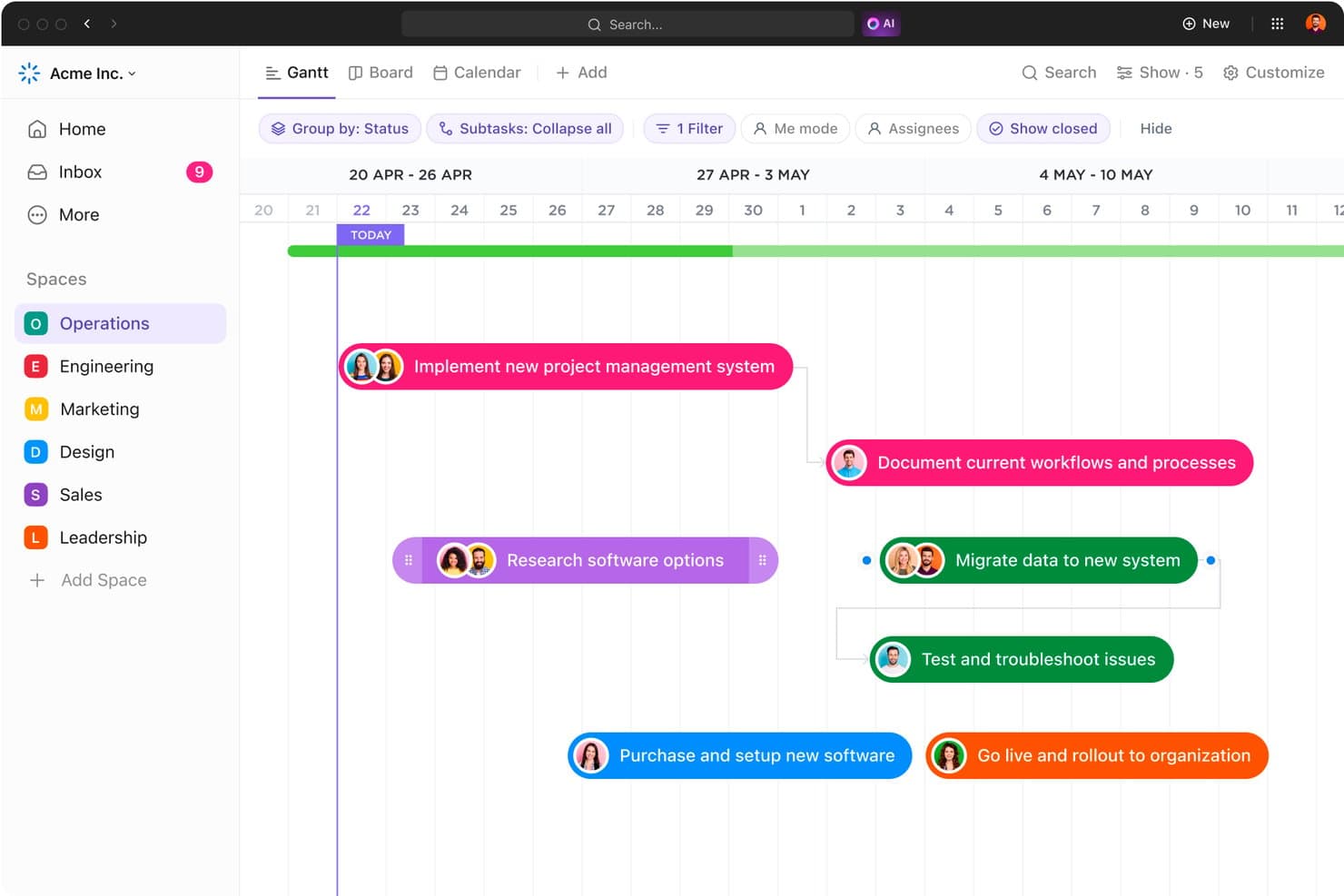
El diagrama de Gantt de ClickUp representa los hitos del proyecto en una línea de tiempo visual. ClickUp es un software gratuito de hitos que trata los hitos como tipos de tareas y combina las vistas de Gantt, Lista, Tablero y Calendario con dependencias, subtareas, plantillas de hojas de ruta e integración con GitHub.
¿Para quién es más adecuado ClickUp?
Los gerentes de producto y los responsables de ingeniería que coordinan lanzamientos valorarán las hojas de ruta de ClickUp, la integración con GitHub, las dependencias y sus flexibles vistas de hitos.
Por qué elegí ClickUp
Elegí ClickUp porque sus tareas de hitos aparecen como diamantes en las vistas de Gantt, Lista, Tablero y Calendario. Puedo conectar los puntos de control de los lanzamientos con subtareas y dependencias, y después usar plantillas de hojas de ruta para planificar los lanzamientos de productos. El plan Gratis para siempre incluye estas herramientas, aunque los usos de hitos y Gantt tienen límites de por vida.
Características principales de ClickUp
- Integración nativa con GitHub: Vincula confirmaciones, ramas y solicitudes de incorporación de cambios con las tareas de ClickUp.
- Estados personalizados: Define las etapas del flujo de trabajo para las tareas y el progreso de los hitos.
- Recordatorios: Crea recordatorios recurrentes, delegados y con fecha de vencimiento.
- Enlaces públicos: Comparte listas, carpetas, tareas y documentos en modo de solo lectura sin necesidad de cuentas.
Integraciones de ClickUp
ClickUp ofrece integraciones nativas con GitHub, GitLab, Bitbucket, Slack, Microsoft Teams, Google Drive, Figma y Miro. También proporciona una API pública y webhooks para integraciones personalizadas, además de Zapier.
¿Qué es gratis?
ClickUp ofrece un plan Gratis para siempre con tareas de hitos, vistas de Gantt, dependencias, subtareas y plantillas de hojas de ruta. Sin embargo, el plan gratuito tiene límites de por vida para las vistas de Gantt y los usos de hitos, por lo que los equipos que planifican lanzamientos con frecuencia podrían necesitar un plan de pago.
Pros and Cons
Pros:
- Los hitos aparecen en varias vistas de planificación
- Las dependencias conectan los entregables con los puntos de control de los lanzamientos
- Las plantillas de hojas de ruta permiten una planificación estructurada de los lanzamientos
Cons:
- Los límites de vistas de por vida dificultan el seguimiento a largo plazo
- Los permisos de los invitados no se pueden restringir
Learn more about ClickUp: Ideal para vistas flexibles
- Prueba gratuita de 14 días, sin plan gratuito permanente
- Desde $8/usuario/mes (con facturación anual)
Visit WebsiteCustomer Rating:4.6/5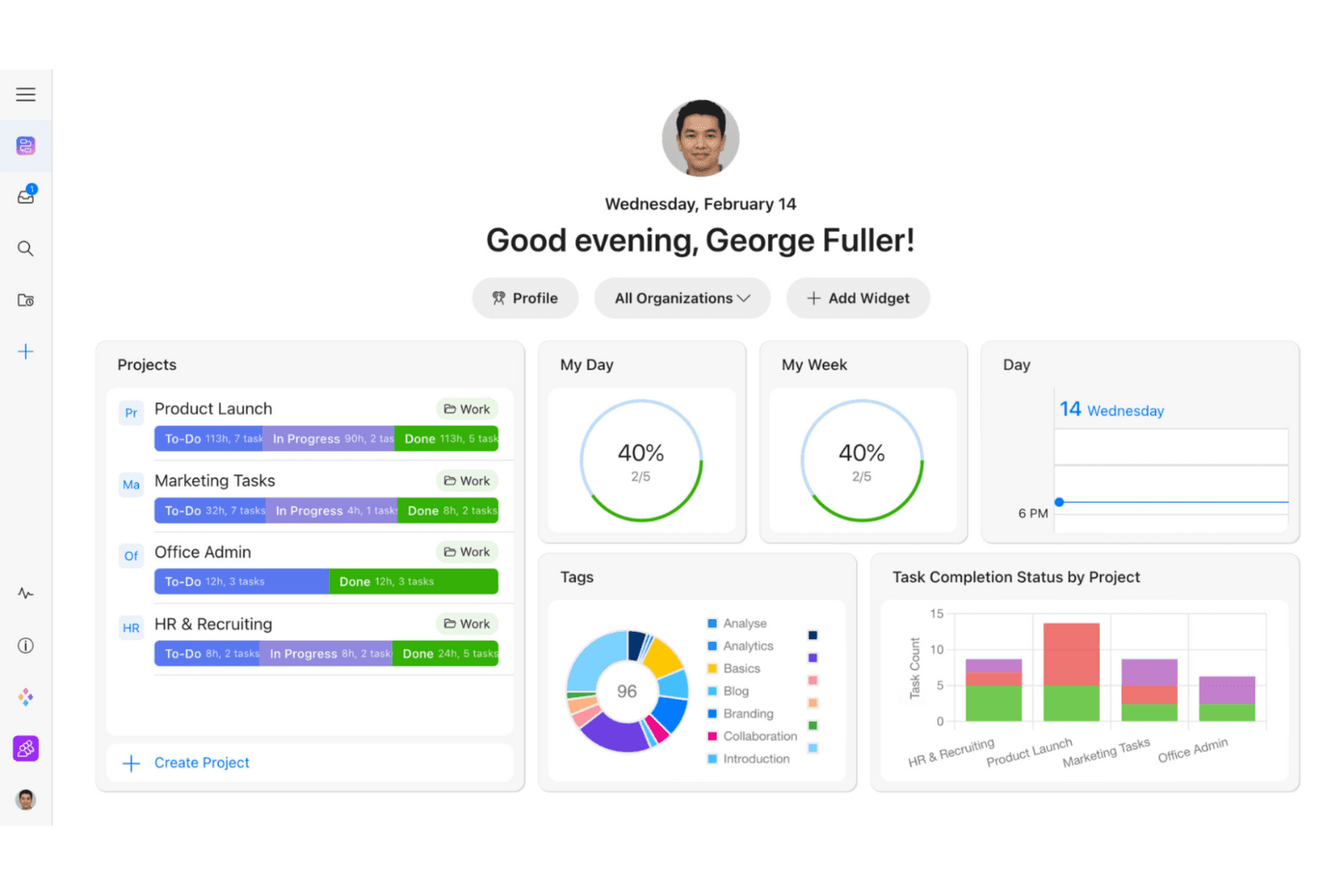
Zenkit ayuda a los equipos a realizar un seguimiento de las tareas con vistas de proyecto personalizables. Zenkit es una plataforma de gestión de proyectos y hitos con programación de Gantt, dependencias, subelementos, campos de estado, enlaces públicos de cronogramas y múltiples vistas para los mismos datos del proyecto.
¿Para quién es mejor Zenkit?
Para gestores de proyectos que necesitan planificar hitos visualmente y cambiar entre las vistas de Gantt, Kanban, Calendario y Tabla.
Por qué elegí Zenkit
Elegí Zenkit porque su vista de Gantt convierte las fechas límite fijas en hitos rastreables con dependencias y programación mediante arrastrar y soltar. Puedo cambiar los mismos datos del proyecto a las vistas de Calendario, Kanban, Tabla o Mapa mental sin duplicar el trabajo. Los enlaces de cronogramas publicados también permiten que las partes interesadas revisen las fechas sin crear cuentas. Actualmente, Zenkit ofrece una prueba de 14 días, no un plan gratuito a largo plazo.
Características principales de Zenkit
- Subelementos multinivel: Crea jerarquías de elementos principales y secundarios en los entregables del proyecto.
- Recordatorios personales: Configura alertas basadas en fechas con horarios personalizables.
- Comentarios y menciones: Debate el trabajo directamente dentro de los elementos del proyecto.
- Widgets del panel: Supervisa los datos del proyecto mediante informes personalizables.
Integraciones de Zenkit
Zenkit documenta integraciones con Google Calendar, Google Sheets, Google Drive, Slack, Microsoft Teams, Trello, Asana, Dropbox y Box. El acceso a la API REST está disponible en el plan Business y superiores, y también son compatibles Integrately y Zapier.
¿Qué es gratis?
Zenkit ofrece una prueba gratuita de 14 días en lugar de un plan gratuito permanente. Después de la prueba, necesitarás un plan de pago, desde 8 € por usuario al mes.
Pros and Cons
Pros:
- Permite cambiar entre múltiples vistas de hitos
- Los hitos de Gantt permiten una programación basada en dependencias
- Los cronogramas públicos simplifican las revisiones de las partes interesadas
Cons:
- Actualmente no hay un plan gratuito a largo plazo
- El progreso de los hitos no tiene acumulaciones automáticas
Learn more about Zenkit: Ideal para equipos que toman notas y realizan un seguimiento de los hitos
- Plan gratuito + demostración gratuita disponible
- Desde $10/usuario/mes (facturado anualmente)
Visit WebsiteCustomer Rating:4.6/5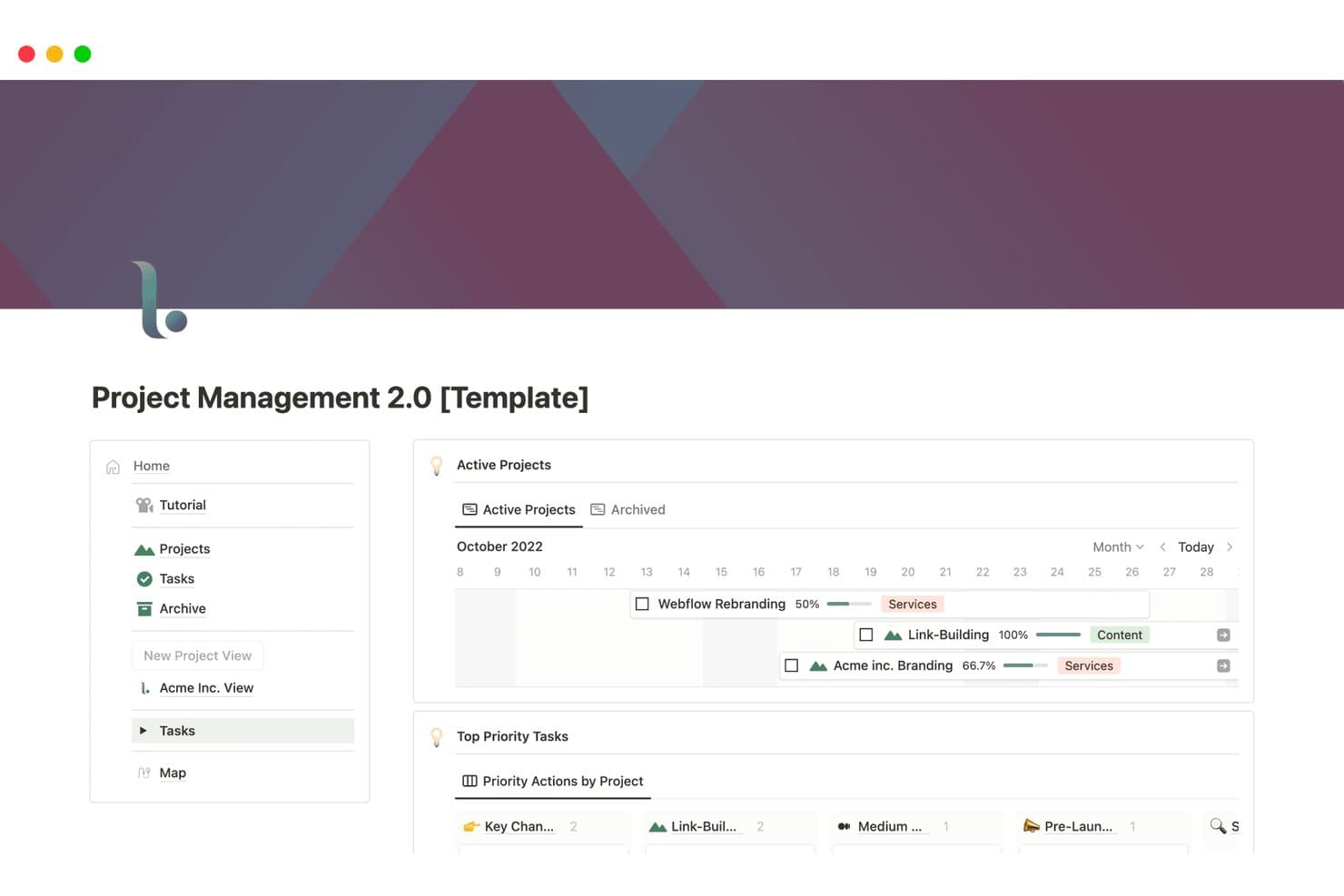
Notion realiza un seguimiento visual de los hitos y el progreso del proyecto en una cronología. Notion es un espacio de trabajo gratuito para el seguimiento de hitos que utiliza bases de datos personalizables y vistas de Cronología, Calendario, Tablero y Lista, además de subelementos y dependencias, en lugar de un objeto de hito dedicado.
¿Para quién es mejor Notion?
Notion es adecuado para equipos que toman notas y realizan un seguimiento de los hitos, especialmente equipos de producto que mantienen juntos los planes de proyecto, las hojas de ruta y la documentación.
Por qué elegí Notion
Elegí Notion porque mi equipo puede mantener las fechas de los hitos junto a las notas del proyecto, las hojas de ruta y los registros de decisiones en un solo espacio de trabajo. Su vista de Cronología admite rangos de fechas, reprogramación mediante arrastrar y soltar y dependencias, mientras que los subelementos dividen los lanzamientos en puntos de control que se pueden supervisar. También utilizo vistas vinculadas de bases de datos para conectar las tareas con los hitos cuando un proyecto necesita más estructura que una simple página de notas.
Características principales de Notion
- Vista de Calendario: Muestra las fechas de la base de datos junto con los eventos del calendario.
- Publicación web pública: Comparte páginas de hojas de ruta mediante enlaces públicos visibles.
- Recordatorios de fechas: Envía notificaciones dentro de la aplicación, automáticas y por correo electrónico.
- Base de datos de iteraciones: Organiza el trabajo en vistas actuales, de planificación y de tareas pendientes.
Integraciones de Notion
Notion ofrece integraciones nativas con Jira Cloud y GitHub, aunque ambas requieren un plan Business. Su API pública y sus webhooks permiten crear integraciones personalizadas.
¿Qué incluye el plan gratuito?
Notion ofrece un plan gratuito permanente, por lo que puedes realizar un seguimiento de los hitos sin una prueba limitada en el tiempo. Las integraciones nativas con Jira Cloud y GitHub requieren el plan Business, y los equipos más grandes pueden necesitar funciones de pago a medida que crece su espacio de trabajo.
Pros and Cons
Pros:
- La vista de Cronología reprograma las fechas mediante arrastrar y soltar
- Las plantillas de hojas de ruta permiten realizar un seguimiento de los puntos de control del producto
- Las páginas públicas comparten vistas de hojas de ruta preparadas para las partes interesadas
Cons:
- Los hitos requieren una configuración manual de la base de datos
- Los resúmenes del progreso requieren una configuración manual
Learn more about Notion: La mejor opción para la colaboración de código abierto
- Prueba gratuita de 14 días + plan gratuito disponible
- Desde €5.95/usuario/mes (facturado anualmente)
Visit WebsiteCustomer Rating:4.5/5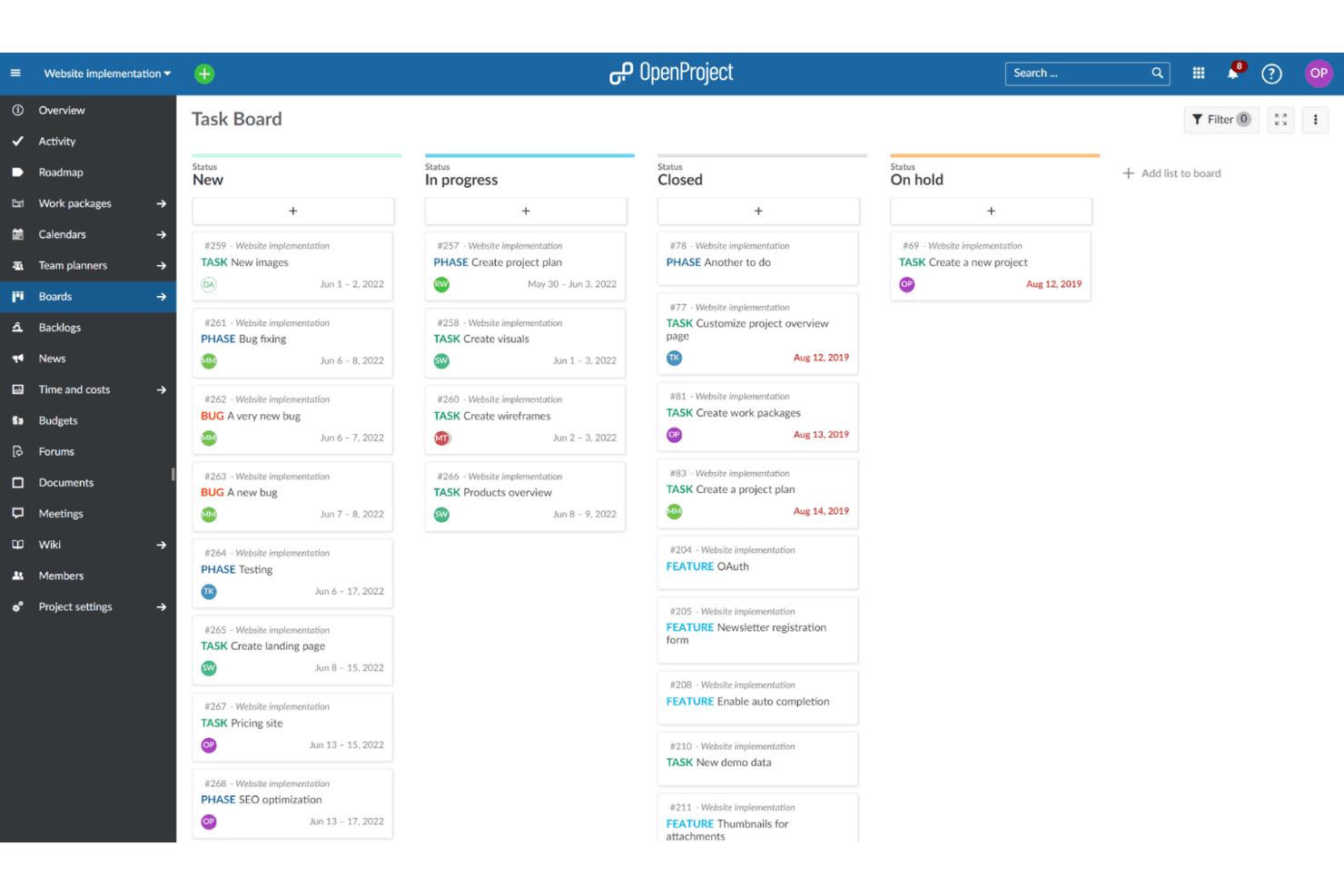
OpenProject permite a los equipos planificar y hacer un seguimiento del trabajo en tableros compartidos. OpenProject es una plataforma autohospedada de gestión de hitos con diagramas de Gantt, hojas de ruta, versiones, dependencias, tableros ágiles y seguimiento de cronogramas entre proyectos.
¿Para quién es mejor OpenProject?
Directores de proyectos, productos y programas en equipos centrados en la ingeniería que necesitan planificación de hitos autohospedada y de código abierto, además de colaboración entre proyectos.
Por qué elegí OpenProject
Elegí OpenProject porque su modelo de colaboración de código abierto ofrece a los equipos un control total sobre la planificación de hitos. Utilizo diagramas de Gantt entre proyectos para conectar dependencias entre iniciativas, mientras que las versiones y las hojas de ruta vinculan los objetivos de lanzamiento con paquetes de trabajo rastreables. Los proyectos públicos, los comentarios y las vistas compartidas ayudan a los equipos de ingeniería y producto a coordinarse sin depender de un proveedor.
Características principales de OpenProject
- Vistas de calendario: Planifica y ajusta el trabajo en vistas de calendario mensuales o semanales.
- Tableros de acciones: Mueve tarjetas para actualizar los campos de estado, asignado, versión o elemento principal.
- Alertas de fechas: Recibe recordatorios configurables sobre fechas próximas y vencidas.
- Flujos de trabajo personalizados: Configura estados, flujos de trabajo y campos personalizados para tu proceso.
Integraciones de OpenProject
OpenProject documenta integraciones con GitHub, GitLab y Nextcloud, además de un Migrador gratuito de Jira. También ofrece una API REST para integraciones personalizadas y admite repositorios SVN y Git para instalaciones locales.
¿Qué es gratis?
OpenProject ofrece un plan Community gratuito para siempre para instalaciones autohospedadas o para su versión en la nube. Incluye funciones básicas de planificación de hitos, pero los repositorios Git y SVN solo están disponibles en implementaciones locales, mientras que los complementos empresariales y el soporte prioritario requieren un plan de pago.
Pros and Cons
Pros:
- El diagrama de Gantt entre proyectos conecta fechas límite relacionadas
- Las versiones vinculan los lanzamientos con trabajo rastreable
- El control de código abierto facilita la colaboración autohospedada
Cons:
- Los hitos no pueden contener paquetes de trabajo secundarios
- El uso compartido con las partes interesadas tiene limitaciones importantes
Learn more about OpenProject:
Otros programas gratuitos de software de hitos
Estas son algunas opciones adicionales de software de hitos que también ofrecen planes o pruebas gratuitas. Aunque estas herramientas no han entrado en mi selección, merece la pena echarles un vistazo:
- 11HiveIdeal para compartir cronogramas listos para las partes interesadas
- 12Zoho ProjectsIdeal para equipos pequeños
- 13FlowluIdeal para combinar CRM, finanzas y herramientas de gestión de proyectos
Cómo evalúo el software gratuito para hitos
Primero, defino qué se considera gratuito. En el caso del software para hitos, gratuito significa un plan gratis para siempre, no una prueba, con acceso a fechas, estados y cronogramas, sujeto a límites de usuarios o proyectos. A partir de ahí, divido mi evaluación en tres partes: funcionalidad principal, como establecer fechas y hacer seguimiento del progreso; características destacadas, como compartir una hoja de ruta pública; y factores más allá de las funciones, como la escalabilidad del nivel gratuito.
Funcionalidad principal (requisitos básicos para esta lista)
Además de mis requisitos para los planes gratuitos, utilizo un sistema de puntuación para seleccionar las herramientas de mi lista. Puntúo cada una en una escala de 0 (no ofrece la funcionalidad) a 5 (sobresale en esta área) para cada funcionalidad principal que se indica a continuación, según lo disponible en el plan gratuito. Después convierto el total en un porcentaje para ayudar a evaluar la adecuación general de cada herramienta, con peso adicional para las funcionalidades que he considerado esenciales.
- Seguimiento de hitos (esencial): Busco hitos con fecha, estados, descripciones y responsables, como el seguimiento de un lanzamiento planificado desde el descubrimiento hasta la publicación.
- Cronogramas visuales (esencial): Compruebo si hay vistas de cronograma, calendario u hoja de ruta que faciliten identificar las fechas de lanzamiento y los entregables atrasados.
- Vinculación de tareas: Las tareas deben conectarse con los hitos para que los equipos puedan relacionar el trabajo de diseño, ingeniería y lanzamiento con un entregable de mayor envergadura.
- Indicadores de progreso: Evalúo las etiquetas de estado, los porcentajes de finalización o las barras de progreso que muestran si un hito avanza según lo previsto.
- Colaboración y uso compartido: Busco acceso para equipos, comentarios y planes que se puedan compartir y que faciliten las revisiones con los equipos de ingeniería y diseño, así como con las partes interesadas.
- Notificaciones y recordatorios: Compruebo si hay alertas sobre fechas próximas o atrasadas, lo que ayuda a los equipos a hacer seguimiento antes de que se retrasen los hitos de lanzamiento.
Una vez que tengo una lista de herramientas que cumplen los criterios, considero qué diferencia a cada plataforma.
Factores diferenciadores (lo que distingue a los proveedores)
Así es como comparo y contrasto los distintos proveedores:
Características destacadas
Busco opciones para compartir hojas de ruta públicas porque permiten publicar un enlace de solo lectura al cronograma para la dirección o los clientes sin tener que crear una presentación independiente. Los resúmenes de hitos entre proyectos son igual de importantes: cuando gestionas varios productos, ver el estado de los lanzamientos de todos ellos en una sola vista ahorra horas de consolidación manual. También evalúo la asignación de sprints a hitos, comprobando si una herramienta conecta de forma nativa los sprints o épicas con las fechas de lanzamiento para que el ritmo de entrega siga vinculado a los compromisos.
Más allá de las funciones
Compruebo si un plan gratuito limita el número de puestos para colaboradores, ya que el seguimiento de hitos se desmorona cuando los equipos de ingeniería, diseño o marketing no pueden acceder al panel. La integración con herramientas de desarrollo como Jira o GitHub es igual de importante: si el estado de los hitos no se sincroniza con el gestor de incidencias, alguien termina copiando y pegando actualizaciones en cada reunión diaria. También evalúo qué tan presentables son las vistas de hitos desde el primer momento, buscando opciones de exportación o uso compartido que permitan insertar un cronograma en una revisión con la dirección sin tener que reconstruirlo en diapositivas.
Cómo elegir un software gratuito de hitos
Las listas de funciones complejas y las estructuras de precios pueden dificultar saber qué estás obteniendo realmente de un software gratuito de hitos. Para ayudarte a mantener la concentración mientras avanzas en el proceso de selección del software, estos son algunos factores que debes tener en cuenta:
| Factor | Qué tener en cuenta |
| Alcance de la oferta gratuita | Comprueba qué funciones incluye la versión gratuita. Algunas herramientas pueden limitar los proyectos, los usuarios o el almacenamiento. |
| Escalabilidad | Busca un software que pueda crecer con tu equipo. Asegúrate de que ofrezca actualizaciones sencillas a planes de pago si es necesario. |
| Integraciones | Asegúrate de que el software se integre con las herramientas que ya utilizas, como Slack, Google Drive o Trello. |
| Facilidad de uso | Evalúa la interfaz de usuario. Un diseño sencillo e intuitivo puede ahorrarte tiempo y reducir la frustración. |
| Atención al cliente | Considera las opciones de asistencia disponibles. El acceso al soporte por chat o correo electrónico puede ser crucial para resolver problemas. |
| Personalización | Comprueba si puedes adaptar los flujos de trabajo a las necesidades de tu equipo. Los campos y paneles personalizados pueden resultar útiles. |
| Acceso móvil | Si tu equipo trabaja desde cualquier lugar, asegúrate de que el software tenga una aplicación móvil con todas las funciones. |
| Seguridad de los datos | Verifica las medidas de protección de datos del software, especialmente si gestionas información confidencial de proyectos. |
¿Qué es el software gratuito para hitos?
El software para hitos es una herramienta que se utiliza para planificar, realizar el seguimiento y gestionar los hitos y las fechas límite de los proyectos. Estos productos suelen ofrecer versiones o pruebas gratuitas, lo que permite a los usuarios acceder a funciones básicas con limitaciones en cuanto a proyectos o usuarios. Profesionales como gestores de proyectos, responsables de equipo y autónomos utilizan habitualmente estas herramientas para mantener los proyectos encaminados y mejorar la colaboración del equipo. Las funciones de gestión de tareas, seguimiento de cronogramas y colaboración ayudan a los equipos a mantenerse organizados, cumplir los plazos y comunicarse de forma eficaz.
Funciones del software gratuito para hitos
Repasemos las funciones que suelen encontrarse en el software para hitos y cuáles suelen incluirse en los planes gratuitos y de pago.
Funciones que suele incluir el software gratuito para hitos
- Gestión de tareas: Permite crear, asignar y realizar el seguimiento de tareas, manteniendo al equipo organizado y dentro del plazo previsto.
- Seguimiento del cronograma: Ayuda a supervisar el progreso del proyecto y a garantizar el cumplimiento de los plazos.
- Herramientas de colaboración: Facilitan la comunicación y el intercambio de información dentro del equipo.
- Informes básicos: Proporcionan información sobre el estado del proyecto y el rendimiento del equipo.
- Tableros Kanban: Ofrecen una forma visual de gestionar los flujos de trabajo y las tareas, lo que facilita ver el progreso del proyecto.
- Seguimiento del tiempo: Permite controlar cuánto tiempo se dedica a las distintas tareas, lo que ayuda a gestionar los recursos.
- Vistas personalizables: Permite cambiar entre distintas vistas, como la de lista o la de calendario, ofreciendo flexibilidad en la forma de visualizar los datos del proyecto.
- Acceso móvil: Permite al equipo acceder a la información del proyecto desde cualquier lugar, garantizando la continuidad y la flexibilidad.
Funciones que suele incluir el software de pago para hitos
- Informes avanzados: Ofrecen información y análisis detallados sobre el rendimiento del proyecto y la productividad del equipo.
- Capacidades de integración: Se conectan con otras herramientas y plataformas para optimizar los flujos de trabajo y el intercambio de datos.
- Gestión de recursos: Ayuda a planificar y asignar recursos de forma eficiente entre los proyectos.
- Funciones de automatización: Automatizan las tareas repetitivas, ahorrando tiempo y reduciendo el trabajo manual.
- Flujos de trabajo personalizados: Permiten adaptar los flujos de trabajo a los procesos y necesidades específicos del equipo.
- Establecimiento de prioridades: Permite marcar las tareas según su urgencia e importancia, ayudando a los equipos a centrarse en las tareas críticas.
- Seguridad mejorada: Proporciona medidas adicionales de protección de datos para garantizar la seguridad de la información confidencial de los proyectos.
- Proyectos ilimitados: Elimina las restricciones sobre el número de proyectos que puedes gestionar, permitiendo una mayor escalabilidad.
Ventajas del software gratuito para hitos
La implementación de un software gratuito para hitos ofrece varias ventajas para tu equipo y tu empresa. Estas son algunas de las que puedes esperar:
- Ahorro de costes: Los planes gratuitos permiten gestionar proyectos sin incurrir en costes adicionales, lo que los hace económicos para equipos pequeños.
- Mejor organización: Funciones como la gestión de tareas y el seguimiento de cronogramas ayudan a mantener los proyectos organizados y encaminados.
- Colaboración mejorada: Las herramientas de colaboración fomentan una mejor comunicación y trabajo en equipo, garantizando que todos estén informados.
- Flexibilidad: Las vistas personalizables y el acceso móvil permiten adaptar el software a tu flujo de trabajo y acceder a él desde cualquier lugar.
- Gestión del tiempo: Las funciones de seguimiento del tiempo ayudan a controlar el tiempo dedicado a las tareas, mejorando la asignación de recursos.
- Gestión visual: Los tableros Kanban ofrecen una forma visual de gestionar tareas y flujos de trabajo, lo que facilita ver el progreso de un vistazo.
- Accesibilidad: Las opciones de software gratuitas hacen que las herramientas de gestión de proyectos sean accesibles para equipos de cualquier tamaño, independientemente de sus limitaciones presupuestarias.
Costes y precios del software gratuito de hitos
Entiendo que has llegado a este artículo buscando las mejores opciones de software de hitos disponibles de forma gratuita. Sin embargo, como los planes gratuitos solo ofrecen funciones limitadas, es muy probable que necesites ampliar tu plan en el futuro.
La tabla siguiente resume los planes habituales, sus precios medios y las funciones típicas incluidas en las soluciones de software de hitos:
Tabla comparativa de planes para software de hitos
| Tipo de plan | Precio medio | Funciones habituales |
| Plan gratuito | $0 | Gestión de tareas, seguimiento de cronogramas, herramientas de colaboración e informes básicos. |
| Plan personal | $5-$15/usuario/ mes | Informes avanzados, vistas personalizadas, establecimiento de prioridades y seguimiento del tiempo. |
| Plan empresarial | $20-$40/ usuario/mes | Funciones de integración, flujos de trabajo personalizados, gestión de recursos y automatización. |
| Plan corporativo | $50-$100/ usuario/mes | Seguridad mejorada, proyectos ilimitados, asistencia especializada y análisis avanzados. |
Preguntas frecuentes sobre software gratuito de hitos
Estas son algunas respuestas a preguntas frecuentes sobre el software gratuito de hitos:
¿Qué limitaciones debo esperar del software gratuito de hitos?
El software gratuito de hitos suele incluir limitaciones, como un número restringido de proyectos, un límite de usuarios y espacio de almacenamiento limitado. También es posible que algunas funciones, como los informes avanzados o las integraciones, solo estén disponibles en las versiones de pago. Es importante evaluar si estas limitaciones afectan a las necesidades de tu proyecto.
¿Puede el software gratuito de hitos integrarse con otras herramientas?
Sí, muchas soluciones de software gratuito de hitos ofrecen integraciones básicas con herramientas populares como Slack, Google Drive y Trello. Sin embargo, la variedad de integraciones puede ser limitada en comparación con los planes de pago. Comprueba si la versión gratuita se integra con las herramientas que tu equipo ya utiliza.
¿Qué nivel de seguridad ofrece el software gratuito de hitos?
Las funciones de seguridad del software gratuito de hitos pueden variar. Aunque normalmente se incluyen algunas medidas de seguridad básicas, las opciones de seguridad más avanzadas, como un cifrado de datos mejorado o certificaciones de cumplimiento, pueden estar disponibles únicamente en los planes de pago. Verifica siempre las funciones de seguridad del software que elijas.
¿Cómo puedo asegurarme de que mi equipo se adapte al nuevo software gratuito de hitos?
Para ayudar a tu equipo a adaptarse, busca un software gratuito de hitos que ofrezca recursos de formación, como tutoriales, seminarios web o una base de conocimientos. Algunas plataformas también proporcionan recorridos interactivos o guías de incorporación. Estos recursos pueden facilitar la transición y ayudar a tu equipo a aprovechar al máximo el software.
¿Hay costes ocultos asociados al software gratuito de hitos?
Aunque el software en sí es gratuito, puede haber costes ocultos relacionados con funciones adicionales o actualizaciones necesarias para obtener más funcionalidades. También debes tener en cuenta los posibles costes de formación o de adaptación de los procesos existentes para ajustarlos al software. Revisa siempre los detalles de precios y las condiciones del servicio.
¿Cómo elijo el software gratuito de hitos adecuado para mi equipo?
Ten en cuenta las necesidades específicas de tu equipo, como el número de usuarios, las funciones necesarias y las necesidades de integración. Evalúa la facilidad de uso y las opciones de asistencia disponibles para la versión gratuita. Prueba distintas opciones, si es posible, para comprobar qué software se adapta mejor a tu flujo de trabajo y a tus requisitos.