

Con tantas soluciones diferentes de desarrollo de productos disponibles, es difícil determinar cuál es la adecuada para ti. Sabes que quieres gestionar las necesidades de los clientes, ofrecer integración con herramientas de encuestas y permitir la recopilación de comentarios de los usuarios, pero necesitas averiguar qué herramienta es la mejor. ¡Yo te ayudo! En este artículo, te ayudaré a elegir fácilmente compartiendo mis experiencias personales al utilizar decenas de herramientas diferentes de desarrollo de productos con equipos y proyectos grandes, junto con mi selección de las mejores herramientas gratuitas para el desarrollo de productos.
Por qué confiar en nuestras recomendaciones de software
6,700+
Reviews
20
Industry experts
16+
Evaluation factors
14
Years
Nuestro equipo lleva probando y evaluando software desde 2012. Como gestores de producto, sabemos lo difícil —y lo importante— que es elegir el software adecuado.
Para esta guía, evaluamos las herramientas mediante pruebas prácticas e investigación independiente, puntuando las herramientas según nuestros criterios de selección.
Nuestras reseñas reflejan nuestro criterio editorial humano, no un discurso de ventas.
Revisores expertos:
 Hannah ClarkSenior TPM
- Cristiano ValimSenior UI/UX Lead

Tabla comparativa: software gratuito para el desarrollo de productos
Esta tabla comparativa resume los detalles de precios de mis principales selecciones de software gratuito para el desarrollo de productos.
| Tool | Best For | Trial Info | Price | ||
|---|---|---|---|---|---|
| 1 | Ideal para el seguimiento de incidencias y sprints nativo para desarrolladores | Prueba gratuita de 30 días | Desde $21/usuario/mes | Website | |
| 2 | La mejor opción para el seguimiento de sprints y tareas para usuarios ilimitados | Plan gratuito + demostración gratuita disponible | Desde $7/usuario/mes (facturado anualmente) | Website | |
| 3 | La mejor opción para el seguimiento del desarrollo autohospedado sin límites de usuarios | Prueba gratuita de 14 días + plan gratuito disponible | Desde $7.25/usuario/mes (facturado anualmente) | Website | |
| 4 | Ideal para equipos de desarrollo que hacen seguimiento de sprints con GitHub | Plan gratuito + prueba gratuita de 14 días + demostración gratuita disponible | Desde $8.50/usuario/mes (facturado anualmente) | Website | |
| 5 | Ideal para la planificación de sprints con usuarios gratuitos ilimitados | Plan gratuito disponible | Desde $10/usuario/mes (facturado anualmente) | Website | |
| 6 | La mejor opción para el seguimiento flexible de proyectos basado en bases de datos | Plan gratuito + demostración gratuita + prueba de 14 días disponibles | Desde $20/usuario/mes | Website | |
| 7 | Ideal para documentos, hojas de ruta y sprints en un único espacio de trabajo | Plan gratuito + demostración gratuita disponible | Desde $10/miembro/mes (facturado anualmente) | Website | |
| 8 | La mejor opción para gestionar sprints y listas de trabajo pendientes ágiles | Plan gratuito disponible | Desde $7.91/usuario/mes | Website | |
| 9 | Ideal para flujos de trabajo de hojas de ruta y comentarios asistidos por IA | Plan gratuito + prueba gratuita + demostración gratuita disponibles | Desde $12/usuario/mes (facturado anualmente) | Website | |
| 10 | La mejor opción para flujos de trabajo gratuitos de comentarios a hojas de ruta | Plan gratuito disponible | Desde $29/user/month (facturado anualmente) | Website |


Análisis del mejor software gratuito para el desarrollo de productos
A continuación encontrarás mis resúmenes detallados del mejor software gratuito para el desarrollo de productos que ha llegado a mi selección. Mis análisis ofrecen una visión detallada de las funciones clave, ventajas y & desventajas, integraciones y casos de uso ideales de cada herramienta para ayudarte a encontrar la mejor opción para ti. Aunque algunas de estas herramientas ofrecen una versión completamente gratuita, otras ofrecen un periodo de prueba gratuito. He añadido una nota sobre lo que es gratis en cada uno de mis análisis.
 Ideal para el seguimiento de incidencias y sprints nativo para desarrolladores
- Prueba gratuita de 30 días
- Desde $21/usuario/mes
Visit WebsiteCustomer Rating:4.8/5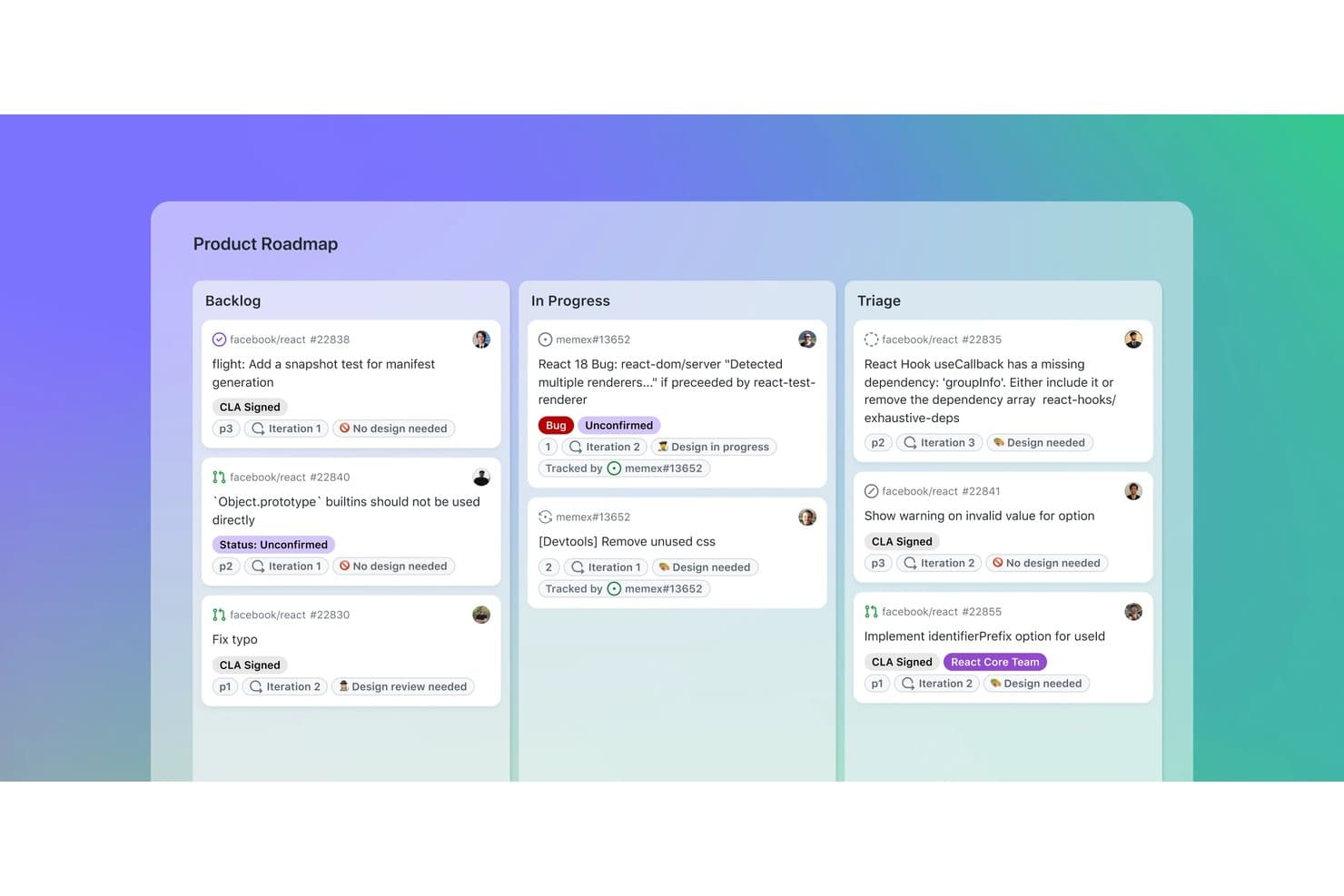
GitHub organiza las tareas del producto en los tableros Pendientes, En curso y Triaje. GitHub es una plataforma de desarrollo de productos que combina repositorios de código con seguimiento de incidencias, hojas de ruta de proyectos, tableros de sprints, campos personalizados, solicitudes de cambios y debates de equipo.
¿Para quién es GitHub más adecuado?
GitHub es adecuado para equipos de producto e ingeniería que desean realizar un seguimiento de incidencias y sprints nativo para desarrolladores, junto con código, solicitudes de cambios y lanzamientos.
Por qué elegí GitHub
Elegí GitHub porque conecta directamente la planificación del producto con el trabajo de desarrollo posterior. Las incidencias se vinculan con las confirmaciones y las solicitudes de cambios, mientras que Projects añade tableros de sprints basados en iteraciones, subincidencias y dependencias. Esto hace que GitHub sea ideal para el seguimiento de incidencias y sprints nativo para desarrolladores cuando las decisiones de producto necesitan un contexto claro de entrega.
Características principales de GitHub
- Formularios de incidencias: Crea solicitudes estructuradas con campos, etiquetas y cargas de archivos.
- Debates de GitHub: Organiza comentarios en hilos, encuestas, votos positivos y respuestas marcadas.
- Gráficos de información: Consulta los datos actuales del proyecto y gráficos históricos de avance acumulado.
- GitHub Actions: Automatiza las actualizaciones del proyecto y los flujos de trabajo de desarrollo.
Integraciones de GitHub
GitHub ofrece integración nativa con Slack, además de integraciones del Marketplace con Zenhub, Azure Boards, Linear, CircleCI y Codecov. Las API REST y GraphQL, los webhooks, GitHub Actions y el servidor MCP permiten establecer conexiones personalizadas y flujos de trabajo de CI/CD.
¿Qué incluye el plan gratuito?
GitHub ofrece un plan gratuito permanente con repositorios públicos y privados ilimitados, así como colaboradores ilimitados. Los repositorios privados tienen límites de funciones, incluidos 2.000 minutos de GitHub Actions y 500 MB de almacenamiento de Packages al mes; el uso adicional puede requerir un pago.
Pros and Cons
Pros:
- Las incidencias se conectan directamente con los cambios de código
- Los tableros de sprints admiten dependencias y jerarquías
- Las hojas de ruta se pueden compartir con partes interesadas externas
Cons:
- La priorización carece de marcos de puntuación integrados
- La recopilación de comentarios requiere cuentas de GitHub
Learn more about GitHub: La mejor opción para el seguimiento de sprints y tareas para usuarios ilimitados
- Plan gratuito + demostración gratuita disponible
- Desde $7/usuario/mes (facturado anualmente)
Visit WebsiteCustomer Rating:4.6/5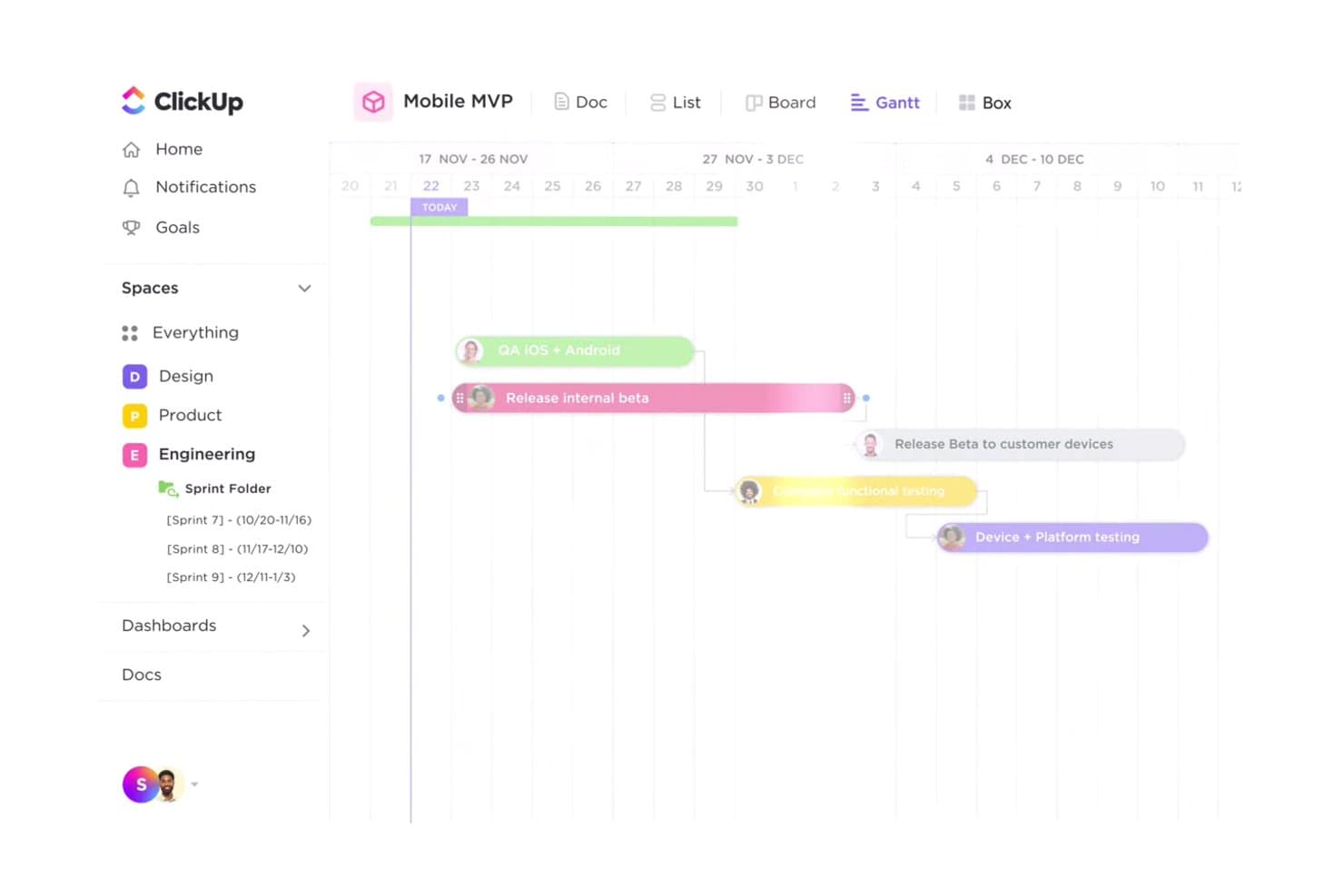
La vista de Gantt de ClickUp ayuda a los equipos a realizar un seguimiento visual de los plazos de lanzamiento de productos. ClickUp es un espacio de trabajo gratuito para el desarrollo de productos que combina el seguimiento de tareas y problemas, tableros de sprints, hojas de ruta, vistas de Gantt, Documentos, Pizarras, Formularios e integraciones para desarrolladores en una sola plataforma.
¿Para quién es más adecuado ClickUp?
Los gerentes de producto, desarrolladores y gerentes de programas que buscan un espacio de trabajo para sprints, planificación de productos y entregas interfuncionales encontrarán en ClickUp una opción práctica.
Por qué elegí ClickUp
Elegí ClickUp porque su plan gratuito admite el seguimiento de sprints y tareas para usuarios ilimitados sin limitar el volumen de tareas. Mi equipo puede gestionar flujos de trabajo Kanban, estados personalizados, dependencias y tareas de desarrollo vinculadas a GitHub en un solo espacio de trabajo. Las duraciones personalizadas de los sprints también nos ayudan a coordinar los lanzamientos desde el perfeccionamiento del backlog hasta el lanzamiento.
Funciones principales de ClickUp
- Diagramas de Gantt: Mapea dependencias, hitos, rutas críticas y tiempo de holgura.
- Formularios de comentarios: Convierte los comentarios de los clientes y los informes de errores en tareas.
- Documentos colaborativos: Crea resúmenes de productos, requisitos y notas de lanzamiento.
- Pizarras: Convierte ideas visuales en tareas prácticas.
Integraciones de ClickUp
ClickUp ofrece más de 200 integraciones nativas, incluidas GitHub, GitLab, Bitbucket, Figma, Slack, Microsoft Teams, Intercom, Zendesk y Google Drive. También admite una API pública, webhooks, Zapier y Make.
¿Qué es gratuito?
ClickUp ofrece un plan gratuito permanente en lugar de únicamente una prueba con duración limitada. Admite usuarios y tareas ilimitados para el seguimiento de sprints y tareas.
Pros and Cons
Pros:
- Las tareas y los miembros ilimitados dan soporte a equipos grandes
- Los sprints personalizados y Kanban cubren los flujos de trabajo de entrega
- Los Documentos, las Pizarras y los formularios conectan el trabajo de descubrimiento
Cons:
- Los límites de por vida en las vistas de planificación interrumpen las hojas de ruta
- La captura de comentarios gratuita está limitada a un formulario
Learn more about ClickUp: La mejor opción para el seguimiento del desarrollo autohospedado sin límites de usuarios
- Prueba gratuita de 14 días + plan gratuito disponible
- Desde $7.25/usuario/mes (facturado anualmente)
Visit WebsiteCustomer Rating:4.5/5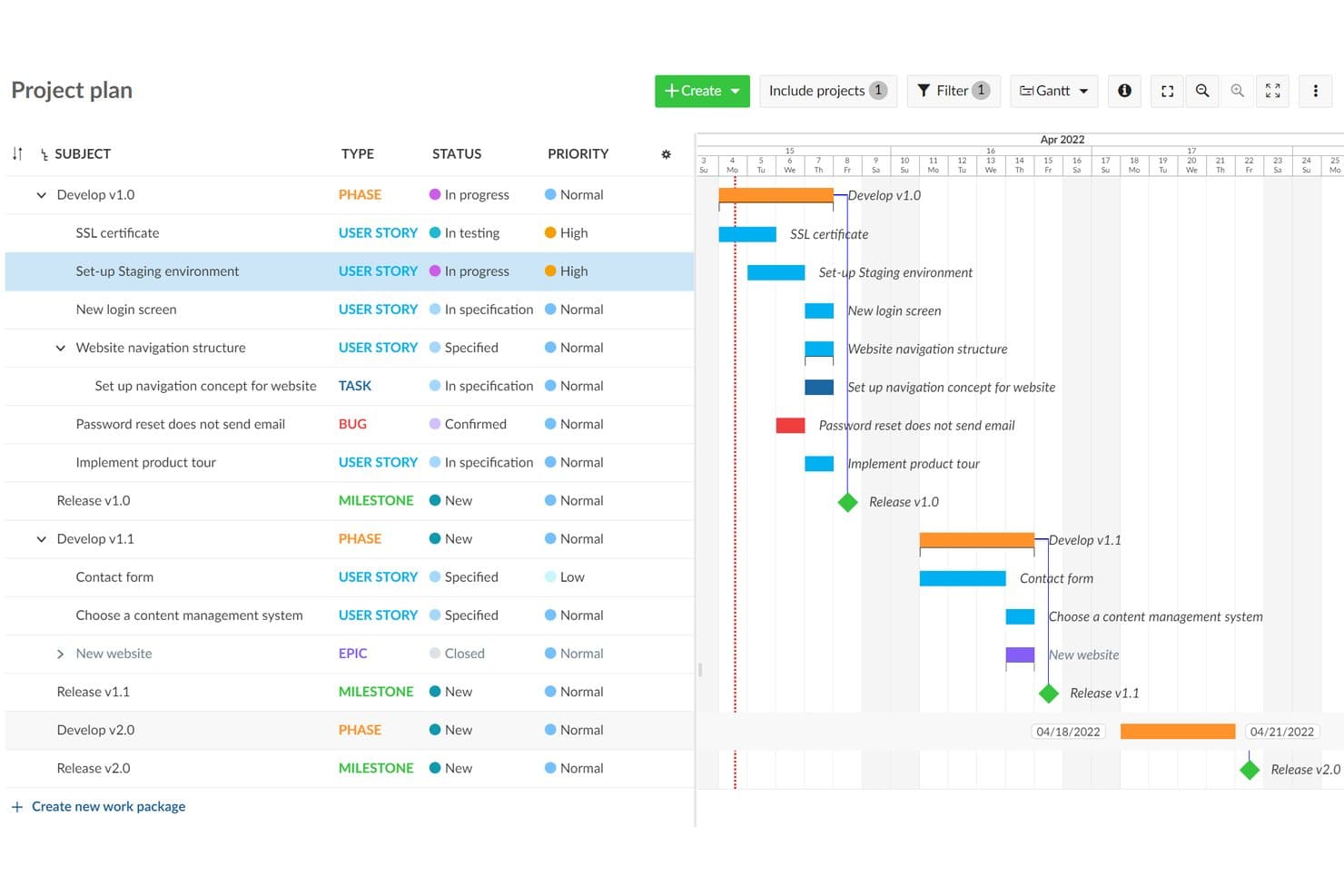
OpenProject visualiza las líneas de tiempo de los proyectos con una vista de hoja de ruta en forma de gráfico de Gantt. OpenProject es una plataforma de desarrollo de productos de código abierto que combina el seguimiento de paquetes de trabajo, los backlogs de Scrum, la planificación de Gantt, las hojas de ruta, la colaboración y los tableros de flujo de trabajo en un espacio de trabajo autohospedado.
¿Para quién es más adecuado OpenProject?
Los equipos técnicos de productos que necesitan usuarios y proyectos ilimitados, control autohospedado y seguimiento integrado del desarrollo encontrarán en OpenProject una opción práctica.
Por qué elegí OpenProject
Elegí OpenProject porque combina el seguimiento del desarrollo autohospedado sin límites de usuarios con sólidos controles para la entrega de productos. Los equipos ilimitados pueden gestionar paquetes de trabajo, dependencias y flujos de trabajo personalizados, y luego planificar sprints de Scrum con puntos de historia y gráficos de trabajo pendiente. Las líneas de tiempo de Gantt conectan la planificación de lanzamientos con el trabajo de ingeniería que la respalda.
Características principales de OpenProject
- Integraciones con Git: Conecta GitHub, GitLab, SVN y repositorios Git con proyectos de desarrollo.
- Edición de documentos en tiempo real: Colabora en documentos compartidos con texto enriquecido, paquetes de trabajo vinculados y gráficos integrados.
- Conversión de correo electrónico en tareas: Convierte los correos electrónicos entrantes en paquetes de trabajo rastreables.
- Plantillas de proyecto: Reutiliza estructuras de proyecto estandarizadas sin copiar presupuestos ni datos de tiempo.
Integraciones de OpenProject
OpenProject ofrece integraciones nativas con GitHub, GitLab, Nextcloud, SVN y repositorios Git. Sus API REST y BCF permiten crear integraciones personalizadas.
¿Qué incluye el plan gratuito?
La edición Community de OpenProject es gratuita para siempre, autohospedada y admite usuarios y proyectos ilimitados. Tendrás que alojarla y administrarla por tu cuenta, mientras que los complementos empresariales, el soporte profesional y el alojamiento en la nube gestionado requieren un plan de pago.
Pros and Cons
Pros:
- Gestiona dependencias en jerarquías de proyectos complejas
- Los backlogs de Scrum incluyen puntos de historia y gráficos de trabajo pendiente
- Las plantillas permiten flujos de trabajo de entrega repetibles
Cons:
- Las hojas de ruta dependen de vistas básicas del progreso de las versiones
- Requiere administrar un servidor antes de que los equipos puedan comenzar
Learn more about OpenProject: Ideal para equipos de desarrollo que hacen seguimiento de sprints con GitHub
- Plan gratuito + prueba gratuita de 14 días + demostración gratuita disponible
- Desde $8.50/usuario/mes (facturado anualmente)
Visit WebsiteCustomer Rating:4.5/5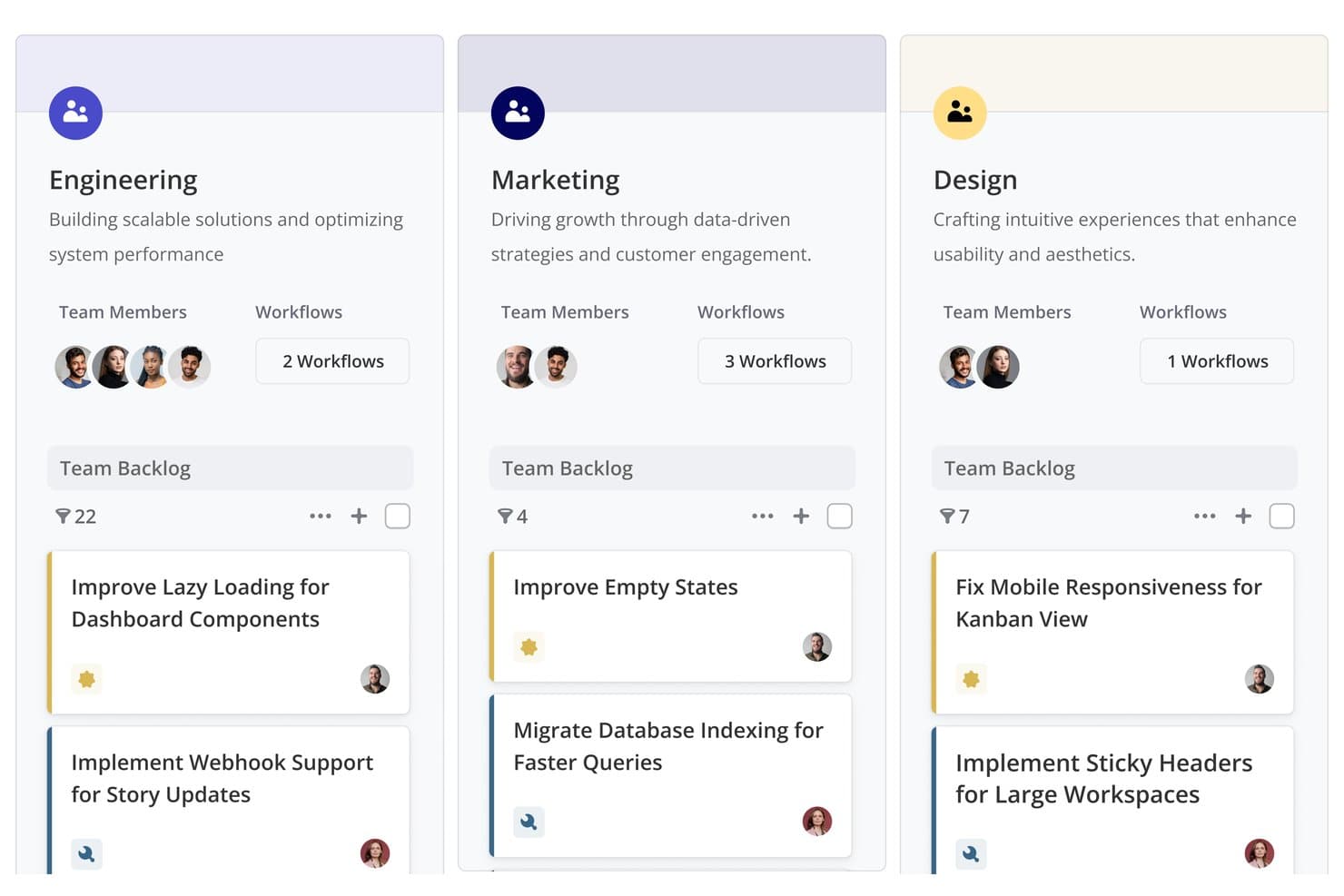
Shortcut organiza las carteras de tareas de los equipos por departamento, con tareas y flujos de trabajo. Shortcut es un software de desarrollo de productos con un plan gratuito para siempre que combina hojas de ruta, épicas, historias, tableros Kanban, iteraciones, documentos y flujos de trabajo de desarrollo vinculados a GitHub.
¿Para quién es más adecuado Shortcut?
Shortcut es adecuado para equipos de desarrollo de software que necesitan planificación de sprints conectada con GitHub, hojas de ruta y seguimiento de entregas en un solo espacio de trabajo.
Por qué elegí Shortcut
Valoro mucho Shortcut para equipos de desarrollo que hacen seguimiento de sprints con GitHub. Sus iteraciones, tableros Kanban e informes de trabajo restante conectan la planificación de sprints con el trabajo diario de entrega. Las historias pueden avanzar a medida que progresan las solicitudes de incorporación de cambios, por lo que mi equipo mantiene actualizado el estado del desarrollo sin tener que actualizar cada tarea manualmente.
Funciones principales de Shortcut
- Subtareas: Divide las historias en elementos de trabajo estimados y rastreables.
- Campos personalizados: Organiza el trabajo con campos de producto y técnicos predefinidos.
- Vista de la cartera de tareas: Ordena, filtra, agrupa y reorganiza las historias.
- Integración con Slack: Crea historias a partir de mensajes y sincroniza conversaciones.
Integraciones de Shortcut
Shortcut se integra con GitHub, GitLab, Bitbucket Cloud, Slack, Figma, Zendesk, Productboard, Savio y Google Sheets. También ofrece una API REST y conectividad con Zapier para flujos de trabajo personalizados.
¿Qué incluye el plan gratuito?
Shortcut ofrece un plan gratuito para siempre con épicas, iteraciones, hojas de ruta, documentos, integración con GitHub e historias ilimitadas. Admite un equipo con hasta 10 usuarios, mientras que una prueba de 14 días proporciona acceso completo sin requerir una tarjeta de crédito.
Pros and Cons
Pros:
- Las historias ilimitadas respaldan la entrega continua de productos
- Las vistas de hojas de ruta conectan la estrategia con la ejecución
- Los informes de sprints aclaran el progreso de las iteraciones
Cons:
- La priorización depende de la clasificación manual
- No ofrece recopilación nativa de comentarios de clientes
Learn more about Shortcut: Ideal para la planificación de sprints con usuarios gratuitos ilimitados
- Plan gratuito disponible
- Desde $10/usuario/mes (facturado anualmente)
Visit WebsiteCustomer Rating:4.6/5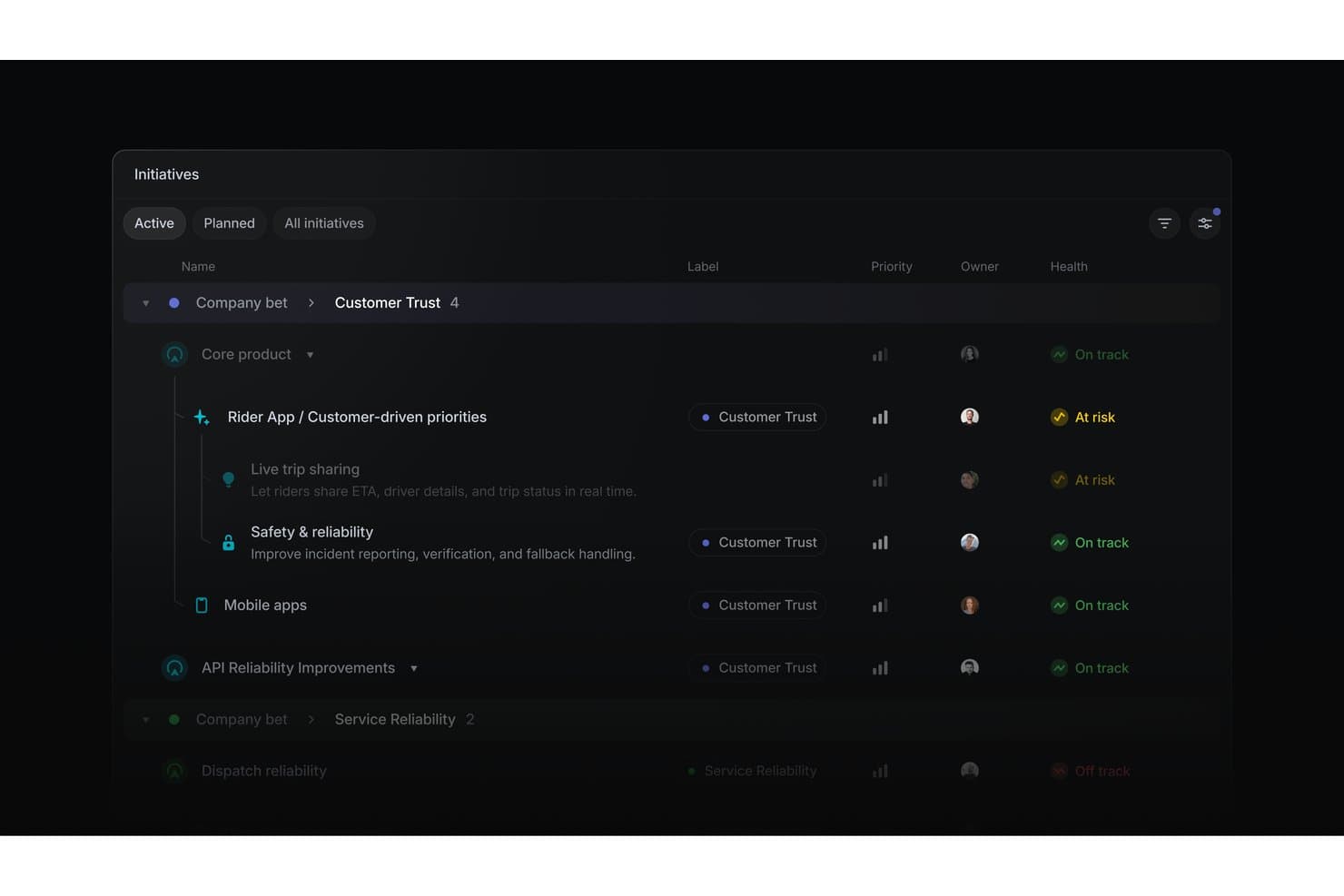
Linear organiza las iniciativas de productos por estado de salud, prioridad y responsable. Linear es un software de desarrollo de productos para organizar iniciativas, proyectos, incidencias, ciclos, cronogramas, dependencias e integraciones de ingeniería en un solo espacio de trabajo.
¿Para quién es mejor Linear?
Responsables de producto y desarrolladores de software en startups que necesitan planificación de sprints, seguimiento de incidencias y coordinación de hojas de ruta con usuarios gratuitos ilimitados.
Por qué elegí Linear
Elegí Linear porque admite la planificación de sprints con usuarios gratuitos ilimitados, lo que permite que los equipos de producto, ingeniería y diseño colaboren en un solo espacio de trabajo. Los ciclos duran de una a ocho semanas, permiten trasladar las incidencias sin terminar al siguiente ciclo e incluyen seguimiento de la capacidad. Los tableros personalizables, los carriles, las estimaciones, las dependencias y las relaciones entre incidencias ayudan a mi equipo a gestionar el trabajo del sprint desde el backlog hasta el lanzamiento.
Características principales de Linear
- Agente de Linear: Crea y actualiza incidencias, proyectos e iniciativas mediante indicaciones en lenguaje natural.
- Solicitudes de clientes: Vincula los comentarios introducidos manualmente con incidencias y proyectos.
- Plantillas de proyectos: Preconfigura hitos, incidencias, responsables, miembros e iniciativas.
- Integración con GitHub: Sincroniza incidencias y automatiza las actualizaciones de las solicitudes de incorporación de cambios.
Integraciones de Linear
Linear ofrece integraciones nativas con GitHub, GitLab, Slack, Figma, Microsoft Teams, Notion y Google Sheets. También admite conexiones personalizadas mediante su API pública y webhooks, además de Zapier.
¿Qué incluye el plan gratuito?
Linear ofrece un plan gratuito permanente de $0 para un número ilimitado de miembros. Incluye dos equipos y hasta 250 incidencias, con cargas de archivos limitadas a 10 MB.
Pros and Cons
Pros:
- Los ciclos trasladan el trabajo sin terminar al siguiente ciclo
- Las iniciativas conectan los objetivos con los lanzamientos
- Los carriles del tablero aclaran la responsabilidad del sprint
Cons:
- Las solicitudes de clientes requieren introducción manual
- No incluye una puntuación integrada de impacto y esfuerzo
Learn more about Linear: La mejor opción para el seguimiento flexible de proyectos basado en bases de datos
- Plan gratuito + demostración gratuita + prueba de 14 días disponibles
- Desde $20/usuario/mes
Visit WebsiteCustomer Rating:4.6/5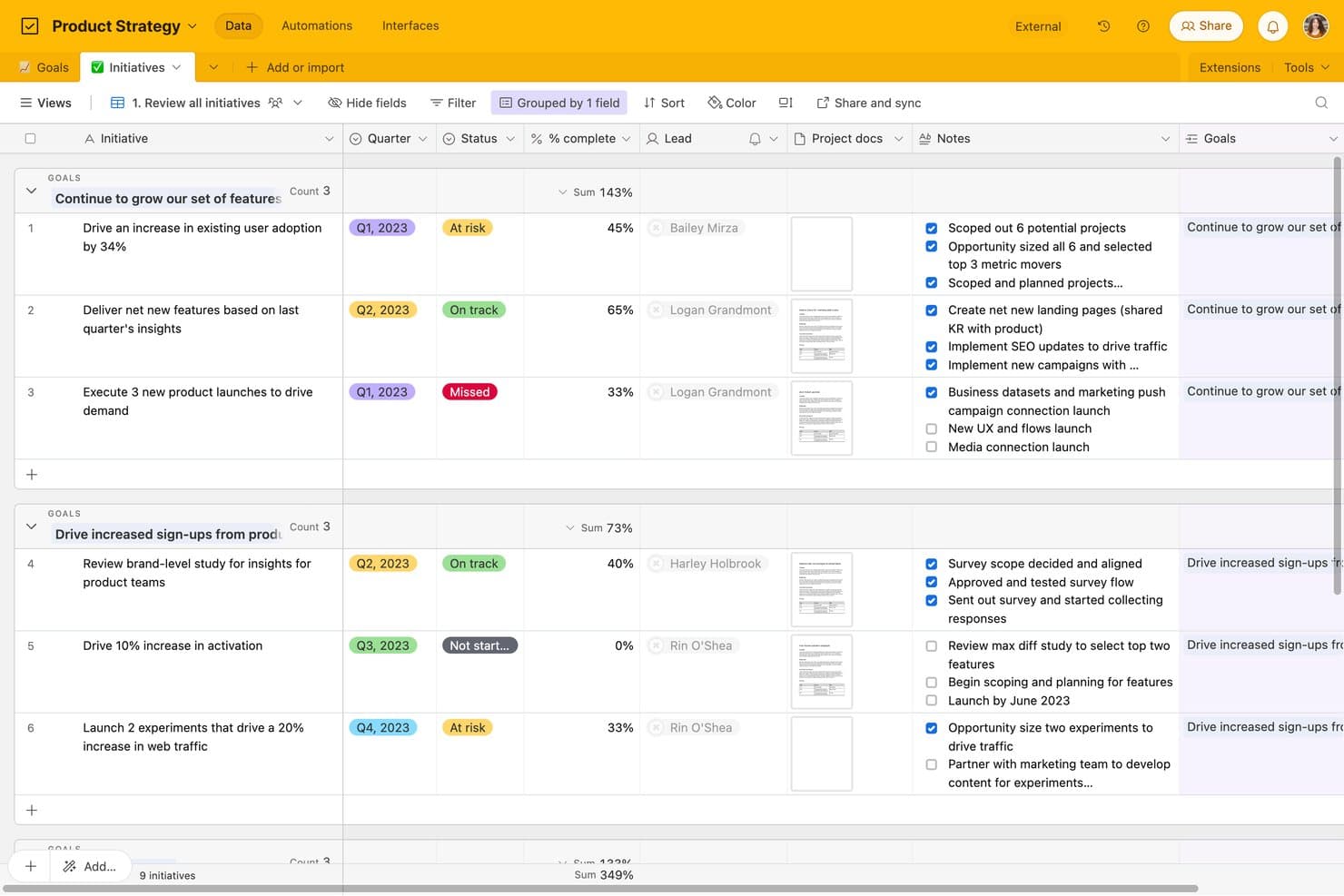
Airtable realiza el seguimiento de las iniciativas de producto por objetivo, estado y finalización. Airtable es un software de desarrollo de productos basado en bases de datos relacionales, que combina la planificación de hojas de ruta, el seguimiento de tareas, los formularios de comentarios, los flujos de trabajo kanban, las vistas personalizadas y la colaboración interfuncional.
¿Para quién es más adecuado Airtable?
Los responsables de producto, los fundadores de startups y los responsables de programas pueden conectar hojas de ruta, comentarios y tareas de entrega en una base de datos relacional flexible.
Por qué elegí Airtable
Elegí Airtable porque su estructura de base de datos relacional conecta los comentarios sobre el producto, las iniciativas de la hoja de ruta y las tareas de entrega en un solo espacio de trabajo. Utilizo registros vinculados y acumulaciones para rastrear las solicitudes de los clientes a través de épicas y tareas de los sprints, mientras que las vistas kanban mantienen visible la ejecución. Los formularios convierten los nuevos comentarios en registros que el equipo puede priorizar.
Características principales de Airtable
- Diseñador de interfaces: Crea páginas personalizadas con diseños de cuadrícula, galería, calendario, formulario y panel.
- Activadores de automatización: Inicia flujos de trabajo a partir de cambios en los registros, envíos de formularios, programaciones, webhooks o botones.
- Uso compartido de vistas públicas: Comparte vistas y páginas de interfaz mediante enlaces sin requerir cuentas para los usuarios que las visualizan.
- Importación y exportación de CSV: Mueve datos entre Airtable y otras herramientas mediante archivos CSV.
Integraciones de Airtable
Airtable incluye 27 integraciones, entre ellas Jira, GitHub, Slack, Google Drive, Google Calendar, Salesforce, Zendesk, Miro y Typeform. Su plan gratuito incluye acceso a la API para integraciones personalizadas, mientras que las integraciones de sincronización y la automatización de Jira requieren planes de pago.
¿Qué es gratis?
Airtable ofrece un plan gratuito permanente, por lo que no es necesario iniciar una suscripción de pago después de una prueba. Admite colaboradores con acceso ilimitado de solo lectura, hasta cinco editores o creadores, 50 comentaristas, 1.000 registros por base, 1 GB de archivos adjuntos y 1.000 llamadas a la API al mes; las integraciones de sincronización y la automatización de Jira requieren un plan de pago.
Pros and Cons
Pros:
- Conecta comentarios, hojas de ruta y tareas
- Seguimiento relacional flexible para los flujos de trabajo de producto
- Visibilidad ilimitada para las partes interesadas con acceso de solo lectura
Cons:
- Las vistas de cronograma y Gantt requieren mejoras de plan
- El nivel gratuito limita los registros y las ejecuciones de automatización
Learn more about Airtable: Ideal para documentos, hojas de ruta y sprints en un único espacio de trabajo
- Plan gratuito + demostración gratuita disponible
- Desde $10/miembro/mes (facturado anualmente)
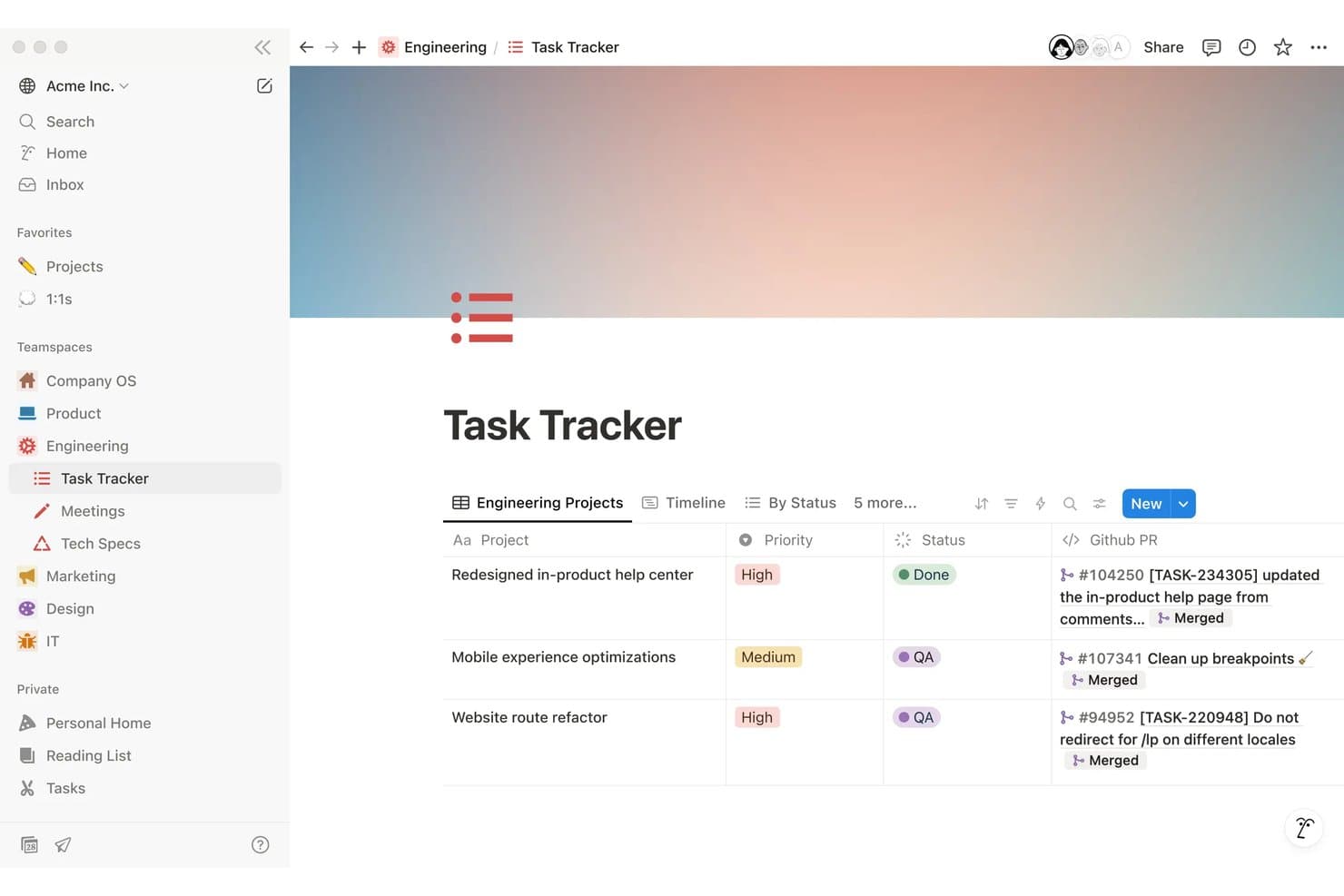
Notion realiza un seguimiento de las tareas de ingeniería con prioridad, estado y solicitudes de incorporación de cambios de GitHub vinculadas. Notion es un espacio de trabajo gratuito para el desarrollo de productos que permite crear documentos de requisitos de producto (PRD), gestionar hojas de ruta y tareas, planificar sprints, recopilar comentarios mediante formularios y colaborar en bases de datos y documentos vinculados.
¿Para quién es más adecuado Notion?
Responsables de producto de startups y equipos pequeños que necesitan un único espacio de trabajo para documentos de requisitos de producto, hojas de ruta, planificación de sprints y colaboración interfuncional.
Por qué elegí Notion
Elegí Notion como una de las mejores herramientas gratuitas para el desarrollo de productos porque mantiene los documentos, las hojas de ruta y los sprints en un único espacio de trabajo. Utilizo las vistas de cronología para trazar los lanzamientos, vinculo los documentos de requisitos de producto con los elementos de la hoja de ruta y ejecuto sprints con vistas específicas para el trabajo pendiente y la planificación. Los equipos también pueden publicar vistas de la hoja de ruta mediante Notion Sites.
Funciones principales de Notion
- Formularios ilimitados: Recopila respuestas mediante formularios públicos o incrustados sin requerir cuentas de Notion.
- Dependencias de tareas: Vincula tareas relacionadas e identifica el trabajo que debe realizarse primero.
- Identificadores de tareas personalizados: Asigna prefijos y URL únicas a las tareas para facilitar su consulta.
- Comentarios en bases de datos: Añade comentarios en cadena a páginas, elementos y propiedades individuales.
Integraciones de Notion
Notion admite conexiones con GitHub, Jira, Figma, Slack, Trello, Asana y más. También proporciona una API pública y webhooks para integraciones personalizadas, además de Zapier.
¿Qué incluye el plan gratuito?
Notion ofrece un plan gratuito para siempre a $0 por miembro al mes, con páginas y bloques ilimitados para usuarios individuales. Entre los límites importantes se incluyen cargas de archivos de 5 MB, historial de páginas de siete días, hasta 10 invitados y bloques colaborativos limitados para equipos.
Pros and Cons
Pros:
- Vincula documentos de requisitos de producto, hojas de ruta y sprints
- Publica hojas de ruta interactivas públicamente
- Recopila respuestas ilimitadas de formularios de comentarios
Cons:
- Los espacios de trabajo gratuitos para equipos limitan los bloques
- Requiere configurar manualmente la puntuación de priorización
Learn more about Notion: 8La mejor opción para gestionar sprints y listas de trabajo pendientes ágiles
Jira
- Plan gratuito disponible
- Desde $7.91/usuario/mes
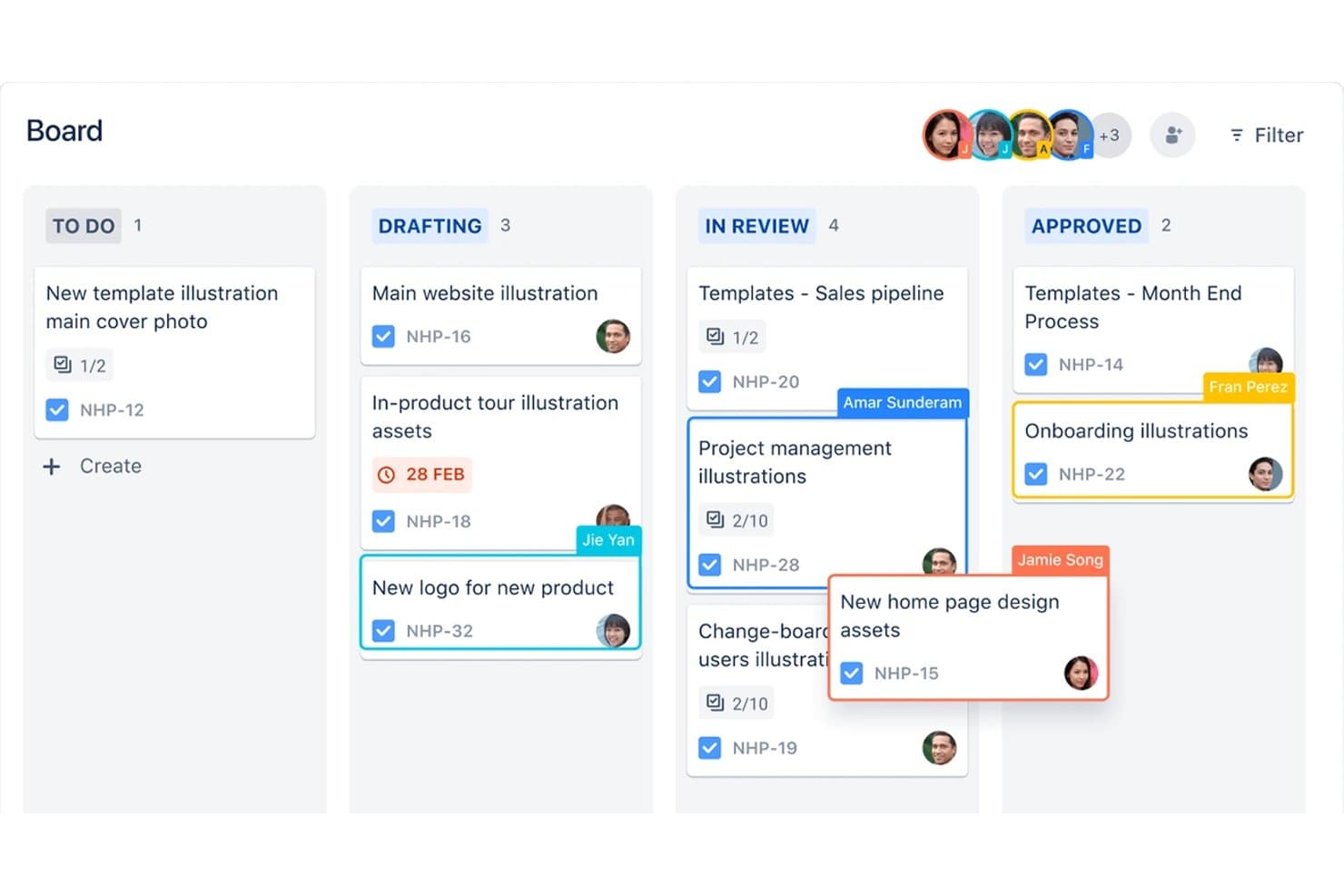
Jira organiza las tareas de producto en las distintas etapas de un tablero kanban según el responsable. Jira es un software de desarrollo de productos de Atlassian que combina la gestión de listas de trabajo pendientes y el seguimiento de incidencias, tableros Scrum y Kanban, planificación de sprints, hojas de ruta con cronogramas y Jira Product Discovery para la priorización y el análisis de los clientes.
¿Para quién es más adecuado Jira?
Jira es adecuado para equipos de producto e ingeniería que gestionan listas de trabajo pendientes ágiles, sprints de Scrum, flujos de trabajo Kanban y entregas interfuncionales.
Por qué elegí Jira
Elegí Jira porque es la mejor opción para gestionar sprints y listas de trabajo pendientes ágiles, con tableros Scrum y Kanban organizados en torno a listas de trabajo pendientes clasificadas y la planificación de sprints. Utilizo informes de gráficos de trabajo pendiente, velocidad, tiempo de ciclo y flujo acumulado para detectar problemas de entrega. Su vista de cronograma también conecta épicas, dependencias y trabajo de lanzamiento en un único plan de entrega.
Características principales de Jira
- Flujos de trabajo personalizados: Configura estados, reglas y transiciones para distintos procesos de entrega.
- Campos personalizados: Añade campos de texto, listas desplegables, fechas, etiquetas y selección de usuarios a los elementos de trabajo.
- Importación de CSV: Traslada elementos de trabajo existentes a Jira desde otra herramienta.
- Aplicaciones del Marketplace: Amplía Jira con integraciones y complementos del Atlassian Marketplace.
Integraciones de Jira
Jira ofrece integraciones nativas con Confluence, Trello, Bitbucket, Slack, Microsoft Teams, Gmail, Figma y Jira Product Discovery. Su Atlassian Marketplace ofrece más de 3,000 aplicaciones, mientras que su API REST permite crear integraciones personalizadas.
¿Qué incluye el plan gratuito?
Jira ofrece un plan gratuito permanente para hasta 10 usuarios, con proyectos, tableros, listas de trabajo pendientes, informes y vistas básicas ilimitados. Incluye 2 GB de almacenamiento y 150 pasos de automatización mensuales, pero limita la asistencia a la comunidad y excluye los permisos avanzados, la residencia de datos y Rovo AI.
Pros and Cons
Pros:
- Los tableros ágiles admiten sprints y límites de trabajo en curso
- Los elementos de trabajo ilimitados permiten un seguimiento detallado
- JPD conecta las puntuaciones de descubrimiento con la entrega
Cons:
- La planificación de hojas de ruta y la priorización abarcan productos independientes
- Los permisos del plan gratuito convierten a cada usuario en administrador
Learn more about Jira: Ideal para flujos de trabajo de hojas de ruta y comentarios asistidos por IA
- Plan gratuito + prueba gratuita + demostración gratuita disponibles
- Desde $12/usuario/mes (facturado anualmente)
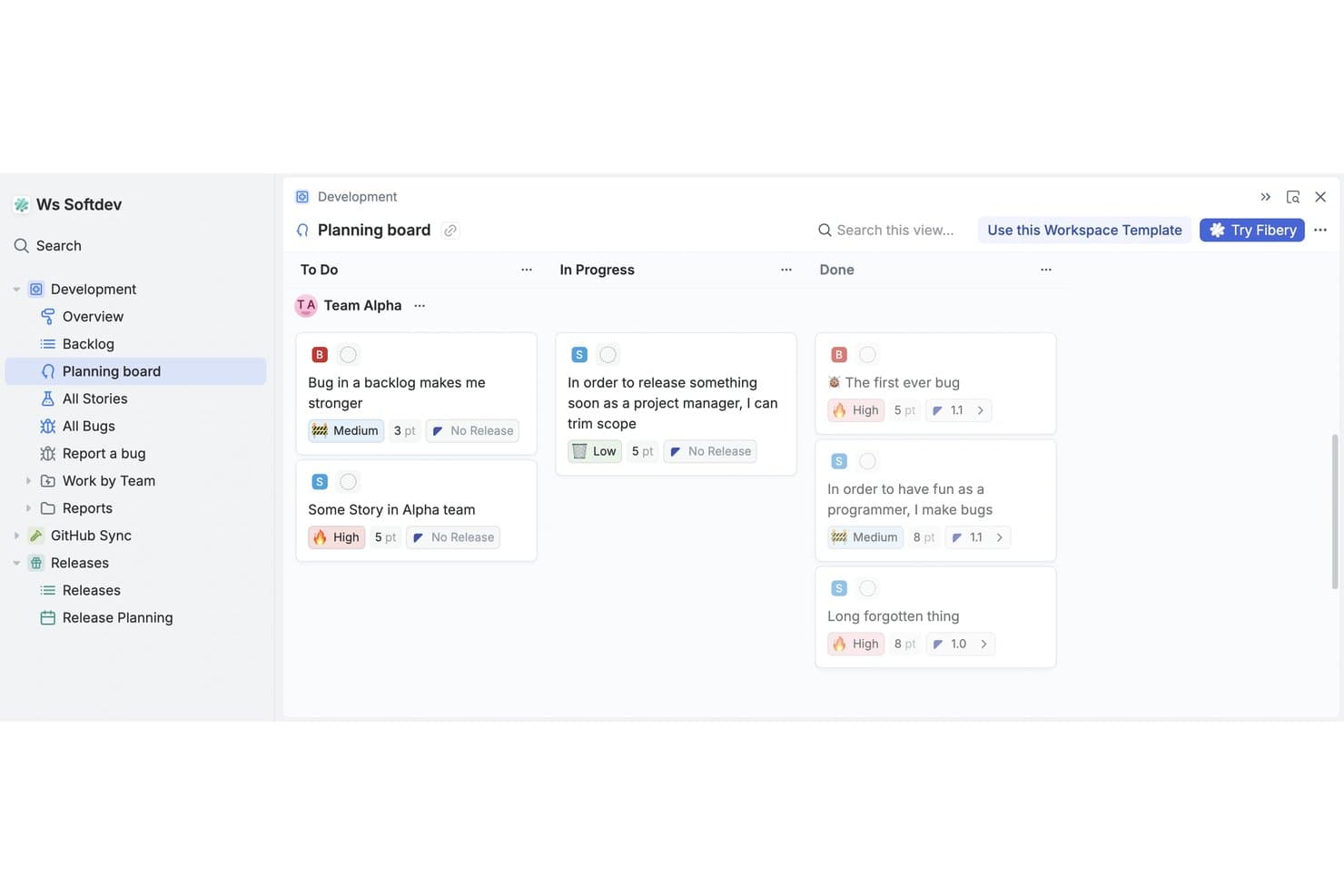
El tablero de planificación de Fibery organiza las tareas por estado entre los equipos. Fibery es una plataforma gratuita de desarrollo de productos que combina un espacio de trabajo relacional sin código con análisis de comentarios de clientes, priorización de funcionalidades, hojas de ruta, especificaciones de productos y seguimiento del desarrollo de software.
¿Para quién es Fibery?
Equipos de producto de startups y pequeñas empresas que necesitan análisis de comentarios asistido por IA, priorización, hojas de ruta y seguimiento del desarrollo en un solo espacio de trabajo.
Por qué elegí Fibery
Elegí Fibery porque sus flujos de trabajo de hojas de ruta y comentarios asistidos por IA conectan directamente las evidencias de los clientes con las decisiones de producto. Utilizo la IA para identificar temas en los comentarios, sugerir vínculos con elementos del backlog y puntuar el sentimiento antes de priorizar el trabajo con las fórmulas RICE, Kano, MoSCoW o WSJF. Después, puedo publicar hojas de ruta y registros de cambios actualizados desde el mismo espacio de trabajo.
Características principales de Fibery
- Sincronización con Git: Conecta ramas, commits y solicitudes de incorporación de cambios de GitHub o GitLab con las incidencias.
- Tableros de flujo de trabajo personalizados: Configura estados, filtros y vistas para sprints, lanzamientos y prioridades.
- Documentos colaborativos: Crea especificaciones de productos, wikis y documentación del equipo vinculadas.
- Formularios de comentarios: Recopila envíos mediante enlaces compartibles, elementos incrustados o códigos QR.
Integraciones de Fibery
Fibery ofrece integraciones documentadas con GitHub, GitLab, Jira, Linear, Intercom, Zendesk, HubSpot y Slack. También proporciona una API REST, webhooks, un servidor MCP y Zapier.
¿Qué incluye el plan gratuito?
Fibery ofrece un plan gratuito para siempre para un máximo de 10 usuarios y 10 invitados. Incluye 10 bases de datos, entidades ilimitadas, 1 GB de almacenamiento de archivos, 14 días de historial de versiones, 250 créditos de IA y 5.000 sincronizaciones de entidades.
Pros and Cons
Pros:
- Conecta los comentarios directamente con la priorización
- Publica hojas de ruta y registros de cambios en directo
- Admite flujos de trabajo de desarrollo de productos personalizados
Cons:
- Requiere una configuración inicial considerable del espacio de trabajo
- El plan gratuito limita las vistas colaborativas
Learn more about Fibery: La mejor opción para flujos de trabajo gratuitos de comentarios a hojas de ruta
- Plan gratuito disponible
- Desde $29/user/month (facturado anualmente)
Visit WebsiteCustomer Rating:4.7/5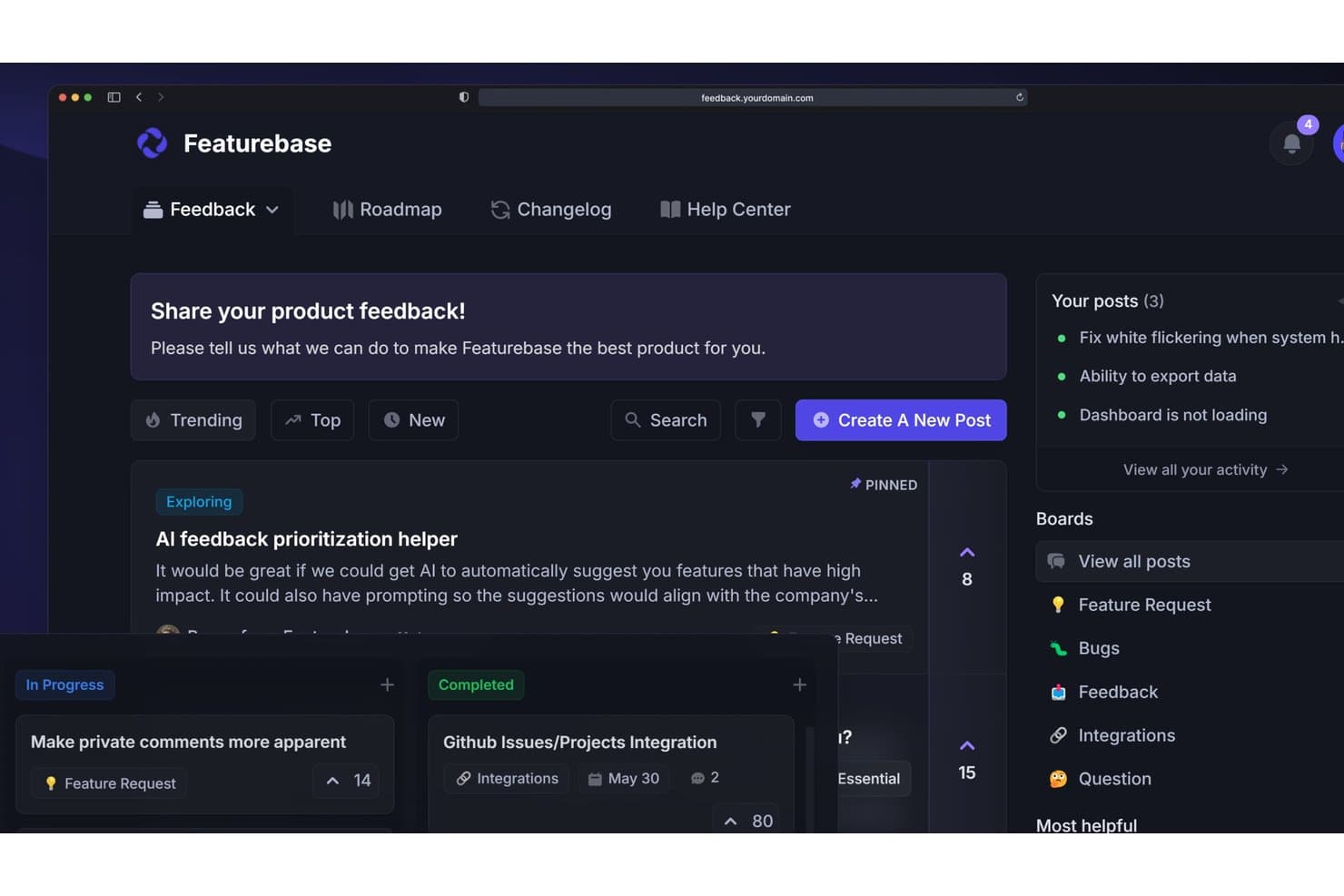
Featurebase permite a los usuarios recopilar, priorizar y hacer seguimiento de los comentarios sobre productos en un solo lugar. Featurebase es un software de desarrollo de productos que combina la recopilación de comentarios de clientes, la priorización de solicitudes, las hojas de ruta compartibles, los registros de cambios de versiones, las encuestas y los flujos de trabajo de soporte en una sola plataforma.
¿Para quién es más adecuado Featurebase?
Featurebase es adecuado para gerentes de producto independientes y fundadores en etapas iniciales que necesitan convertir los comentarios de los clientes en hojas de ruta priorizadas y compartibles.
Por qué elegí Featurebase
Considero que Featurebase es la mejor opción para flujos de trabajo gratuitos de comentarios a hojas de ruta porque su portal y su componente integrado en la aplicación convierten las aportaciones de los clientes en solicitudes organizadas. Utilizo la matriz de valor/esfuerzo para clasificar las oportunidades y, después, publico hojas de ruta basadas en el estado o en fechas para las partes interesadas. Se adapta mejor a la planificación basada en comentarios que a la ejecución de iteraciones.
Características principales de Featurebase
- Encuestas NPS y CSAT: Crea encuestas integradas en la aplicación para recopilar las valoraciones de los clientes.
- Registro público de cambios: Publica actualizaciones del producto con notificaciones de versiones segmentadas.
- Comentarios en las solicitudes: Añade comentarios públicos o privados organizados en hilos con contexto.
- Gestión de datos CSV: Importa comentarios con asignación de campos y exporta datos de solicitudes.
Integraciones de Featurebase
Featurebase ofrece integraciones nativas con Linear, Jira, GitHub, ClickUp, Slack, Discord, Intercom, Zendesk, HubSpot y Segment. También admite API, MCP, webhooks y Zapier para conexiones personalizadas.
¿Qué incluye el plan gratuito?
Featurebase ofrece un plan gratuito, en lugar de únicamente una prueba con tiempo limitado. Los detalles del plan disponible no especifican límites de usuarios, integraciones o uso, así que consulta su página de precios actual antes de elegirlo para tu equipo.
Pros and Cons
Pros:
- Los comentarios, las hojas de ruta y el registro de cambios permanecen vinculados
- La matriz de valor/esfuerzo permite una priorización más clara
- Las hojas de ruta públicas cierran el ciclo de comentarios
Cons:
- No ofrece planificación nativa de iteraciones ni dependencias
- La colaboración gratuita no admite equipos multifuncionales
Learn more about Featurebase:
Otro software gratuito para el desarrollo de productos
Estas son algunas opciones adicionales de software para el desarrollo de productos que también ofrecen planes o pruebas gratuitas. Aunque estas herramientas no llegaron a mi selección, merece la pena echarles un vistazo:
- 11MiroIdeal para pizarras visuales entre equipos
- 12Zoho ProjectsBueno para el seguimiento de proyectos en el ecosistema de Zoho
- 13TrelloIdeal para tableros Kanban en un plan gratuito
- 14CannyIdeal para cerrar el ciclo de comentarios de los clientes
- 15PlaneIdeal para el seguimiento de hojas de ruta de código abierto y autohospedado
Cómo evalúo el software gratuito de desarrollo de productos
Primero, defino qué se considera gratuito. En el caso del software de desarrollo de productos, eso significa un plan realmente gratuito para siempre, no una prueba, con funciones utilizables de elaboración de hojas de ruta y seguimiento de tareas integradas. A partir de ahí, divido mi evaluación en tres partes: funcionalidad principal, que es la que más peso tiene, como crear hojas de ruta de productos y hacer un seguimiento de las tareas mediante un backlog; características destacadas, como los widgets nativos de recopilación de comentarios; y lo que ofrece una herramienta más allá de su conjunto de funciones, como hasta dónde escala el plan gratuito antes de obligar a actualizarlo.
Funcionalidad principal (requisitos básicos para esta lista)
Además de mis requisitos para los planes gratuitos, utilizo un sistema de puntuación para seleccionar las herramientas de mi lista. Puntúo cada una en una escala de 0 (no ofrece la funcionalidad) a 5 (sobresale en esta área) para cada funcionalidad principal que se indica a continuación, basándome en lo disponible en el plan gratuito. Después convierto el total en un porcentaje para ayudar a evaluar la adecuación general de cada herramienta, con un peso adicional para las funcionalidades que he considerado esenciales.
- Elaboración de hojas de ruta y planificación (esencial): Compruebo si se puede crear una hoja de ruta visual, ajustar los plazos y compartirla con las partes interesadas directamente desde el plan gratuito.
- Seguimiento de tareas e incidencias (esencial): Evalúo cada herramienta según cómo gestiona los elementos del backlog; aquí importan las asignaciones, las actualizaciones de estado, las dependencias y los campos personalizados.
- Herramientas de priorización: Busco marcos integrados de puntuación o clasificación, como las matrices de esfuerzo frente a impacto, que vayan más allá de un simple reordenamiento mediante arrastrar y soltar.
- Recopilación de comentarios: Las herramientas que permiten capturar aportaciones de usuarios o partes interesadas y etiquetarlas en elementos específicos del backlog obtienen una puntuación superior a la de una bandeja de entrada básica de texto libre.
- Colaboración y comentarios: Evalúo si los equipos pueden usar @menciones, organizar conversaciones por hilos y mantenerse informados, especialmente en flujos de trabajo interfuncionales.
- Tableros de sprints o flujos de trabajo: Los tableros Kanban y de sprints necesitan columnas de arrastrar y soltar, opciones de filtrado y suficiente flexibilidad para adaptarse al flujo de trabajo real de tu equipo.
Una vez que tengo una lista de herramientas que cumplen los criterios, considero qué distingue a cada plataforma.
Factores diferenciadores (qué distingue a los proveedores)
Así es como comparo y contrasto los distintos proveedores:
Características destacadas
Busco un widget nativo de comentarios que permita recopilar aportaciones dentro de la aplicación de usuarios reales y vincularlas directamente a elementos del backlog. Una bandeja de entrada básica no es suficiente: herramientas como Productboard y Canny permiten insertar un portal para que los comentarios lleguen a tu flujo de trabajo de priorización sin necesidad de una herramienta de encuestas independiente. También evalúo la posibilidad de compartir hojas de ruta públicas, ya que publicar un enlace activo para las partes interesadas elimina la necesidad de enviar presentaciones estáticas después de cada ciclo de planificación. Las bibliotecas de plantillas también son importantes, especialmente para equipos en etapas iniciales que ponen en marcha su primer tablero de sprints o su primera hoja de ruta sin tener que empezar desde cero.
Más allá de las funciones
Evalúo hasta dónde escala un plan gratuito antes de llegar a un límite. Los topes de usuarios, los límites de proyectos y los límites de almacenamiento varían considerablemente, y un equipo de tres personas que supera los límites de su plan a mitad de un sprint se enfrenta a una interrupción real. La portabilidad de los datos es igual de importante: compruebo si se pueden exportar los backlogs y las hojas de ruta como CSV o PDF, ya que los formatos propietarios generan una dependencia difícil de resolver cuando llega el momento de cambiar de herramienta. También observo hasta qué punto es accesible cada espacio de trabajo para compañeros que no son gestores de productos, como ingenieros y diseñadores, que necesitan visibilidad sin tener que superar una curva de aprendizaje pronunciada.
Cómo elegir un software gratuito para el desarrollo de productos
Las listas de funciones complejas y las estructuras de precios pueden dificultar la tarea de averiguar qué obtienes realmente con un software gratuito para el desarrollo de productos. Para ayudarte a mantener la concentración mientras avanzas en el proceso de selección del software, estos son algunos factores que debes tener en cuenta:
| Factor | Qué debes tener en cuenta |
|---|---|
| FactorAlcance de la oferta gratuita | Qué debes tener en cuentaRevisa qué incluye el plan gratuito. Asegúrate de que cubra las necesidades básicas de tu equipo sin costes ocultos. |
| FactorEscalabilidad | Qué debes tener en cuentaConsidera si el software puede crecer junto con tu empresa. Comprueba si admite más usuarios o proyectos a medida que aumenten tus necesidades. |
| FactorIntegraciones | Qué debes tener en cuentaAsegúrate de que se integre con las herramientas que tu equipo ya utiliza, como Slack o Google Workspace, para evitar alterar los flujos de trabajo. |
| FactorFacilidad de uso | Qué debes tener en cuentaEvalúa lo intuitiva que es la interfaz. Tu equipo debería poder empezar a utilizarla con una formación mínima. |
| FactorSeguridad | Qué debes tener en cuentaComprueba si el software cumple las normas de seguridad pertinentes para tu sector, especialmente si gestionas datos confidenciales. |
| FactorAtención al cliente | Qué debes tener en cuentaBusca las opciones de asistencia disponibles en la versión gratuita, como el soporte por chat o correo electrónico, para ayudar a tu equipo cuando surjan problemas. |
| FactorPersonalización | Qué debes tener en cuentaDetermina si puedes adaptar el software a tus flujos de trabajo específicos, incluso en la versión gratuita, para maximizar la productividad. |
| FactorOpciones de comentarios | Qué debes tener en cuentaConsidera cómo te permite el software recopilar y utilizar los comentarios de los usuarios para mejorar tu proceso de desarrollo de productos. |
¿Qué es el software gratuito de desarrollo de productos?
El software de desarrollo de productos está diseñado para ayudar a los equipos a planificar, gestionar y ejecutar ideas de productos. Estas herramientas suelen ofrecer planes gratuitos o periodos de prueba para que los usuarios exploren las funciones básicas sin compromiso financiero. Normalmente, los responsables de producto, diseñadores y desarrolladores utilizan estas herramientas para mejorar la colaboración y la eficiencia.
Funciones como la planificación de hojas de ruta, la gestión de tareas y la recopilación de comentarios ayudan a los equipos a mantenerse organizados, priorizar tareas y obtener información esencial, lo que favorece un proceso de desarrollo más eficaz.
Funciones
Repasemos las funciones que suelen encontrarse en el software de desarrollo de productos y cuáles suelen incluirse en los planes gratuitos y de pago.
Funciones habituales del software gratuito de desarrollo de productos
- Gestión de tareas: Ayuda a organizar y asignar tareas a los miembros del equipo, para que todos mantengan el rumbo.
- Planificación de hojas de ruta: Proporciona una cronología visual de los objetivos del producto, lo que facilita la planificación estratégica.
- Recopilación de comentarios: Permite a los equipos reunir información de los usuarios, que puede orientar las mejoras del producto.
- Herramientas de colaboración: Facilitan la comunicación y el trabajo en equipo, garantizando que todos estén informados y alineados.
- Integraciones básicas: Se conectan con otras herramientas, como Slack o Google Workspace, para mejorar el flujo de trabajo.
- Paneles personalizables: Permiten a los usuarios adaptar su vista para acceder rápidamente a la información importante.
- Gestión de roles de usuario: Permite establecer permisos para controlar el acceso según los roles del equipo.
Funciones habituales del software de pago de desarrollo de productos
- Análisis avanzado: Ofrece un análisis detallado de los datos para ayudar a los equipos a tomar decisiones fundamentadas.
- Notificaciones automatizadas: Mantienen a los equipos informados mediante alertas automáticas sobre los cambios del proyecto.
- Colaboración en tiempo real: Permite que varios usuarios trabajen simultáneamente en los mismos documentos.
- Funciones de seguridad mejoradas: Proporciona medidas de seguridad adicionales para proteger los datos confidenciales.
- Asistencia prioritaria al cliente: Ofrece tiempos de respuesta más rápidos y asistencia específica para problemas urgentes.
- Almacenamiento ilimitado: Admite grandes cantidades de datos, algo esencial para los equipos en crecimiento.
- Opciones avanzadas de personalización: Proporciona mayor flexibilidad para adaptar el software a flujos de trabajo específicos.
Ventajas
Implementar software gratuito de desarrollo de productos ofrece varias ventajas para tu equipo y tu empresa. Estas son algunas de las que puedes esperar:
- Ahorro de costes: Accede a herramientas esenciales sin compromiso financiero y libera presupuesto para otras necesidades.
- Mejor organización: Utiliza la gestión de tareas para mantener claros y controlados los proyectos y las responsabilidades.
- Colaboración mejorada: Las herramientas de comunicación integradas garantizan que tu equipo se mantenga conectado y alineado.
- Información valiosa: Las funciones de recopilación de comentarios te ayudan a comprender las necesidades de los usuarios y a tomar decisiones fundamentadas.
- Flexibilidad: Los paneles personalizables te permiten adaptar tu espacio de trabajo a tu flujo de trabajo.
- Escalabilidad: Empieza con funciones básicas y amplía las capacidades a medida que crezca tu equipo, adaptándote a las necesidades cambiantes.
- Configuración rápida: Las interfaces sencillas y las integraciones básicas facilitan el inicio sin necesidad de una formación exhaustiva.
Costes y precios
Entiendo que has llegado a este artículo buscando las mejores opciones de software de desarrollo de productos disponibles de forma gratuita. Sin embargo, como los planes gratuitos solo ofrecen funciones limitadas, es muy probable que en el futuro necesites ampliar tu plan.
La siguiente tabla resume los planes habituales, sus precios medios y las funciones que suelen incluir las soluciones de software de desarrollo de productos:
Tabla comparativa de planes de software de desarrollo de productos
| Tipo de plan | Precio medio | Características comunes |
|---|---|---|
| Tipo de planPlan gratuito | Precio medio$0 | Características comunesGestión básica de tareas, planificación de la hoja de ruta, recopilación de comentarios, herramientas de colaboración e integraciones básicas. |
| Tipo de planPlan personal | Precio medio$5-$25/usuario/mes | Características comunesTodas las características gratuitas, además de gestión de roles de usuario, paneles personalizables y almacenamiento adicional. |
| Tipo de planPlan empresarial | Precio medio$30-$75/usuario/mes | Características comunesTodas las características personales, además de análisis avanzados, notificaciones automatizadas y funciones de seguridad mejoradas. |
| Tipo de planPlan corporativo | Precio medio$80-$150/usuario/mes | Características comunesTodas las características empresariales, además de asistencia prioritaria al cliente, almacenamiento ilimitado y opciones avanzadas de personalización. |
Preguntas frecuentes sobre el software gratuito de desarrollo de productos
Estas son algunas respuestas a preguntas frecuentes sobre el software gratuito de desarrollo de productos:
¿Puedo confiar en un software gratuito de desarrollo de productos para utilizarlo a largo plazo?
Las versiones gratuitas pueden ser excelentes para empresas emergentes o equipos pequeños con necesidades básicas. Sin embargo, a medida que el equipo crezca, es posible que necesites funciones avanzadas disponibles en los planes de pago. Es importante evaluar si la versión gratuita satisface tus objetivos a largo plazo.
¿Qué limitaciones debo esperar en un software gratuito de desarrollo de productos?
Los planes gratuitos suelen tener almacenamiento limitado, menos integraciones y asistencia básica. También puedes encontrar restricciones en el número de usuarios o proyectos. Evalúa estas limitaciones en relación con las necesidades de tu equipo para decidir si un plan gratuito es suficiente.
¿Qué nivel de seguridad ofrece el software gratuito de desarrollo de productos?
La seguridad puede variar según el proveedor. Busca un software que ofrezca funciones de seguridad básicas, como el cifrado de datos. Para gestionar información confidencial, considera el cumplimiento del proveedor con las normas y regulaciones del sector.
¿Puedo pasar fácilmente de un plan gratuito a uno de pago?
La mayoría de los proveedores ofrecen un proceso de actualización sencillo. Normalmente puedes conservar tus datos y configuraciones existentes al cambiar a un plan de pago. Consulta con el proveedor cualquier posible interrupción del servicio o aspecto relacionado con la migración de datos durante la actualización.