

Las mejores plataformas gratuitas de adopción digital te ayudan a incorporar a los usuarios, impulsar la adopción de productos y mejorar la participación, sin poner a prueba tu presupuesto. Sin la herramienta adecuada, la incorporación puede resultar desarticulada, los empleados pueden tener dificultades para adoptar funciones clave y la participación disminuye, lo que te deja con un software infrautilizado y equipos frustrados.
La plataforma adecuada te proporciona orientación dentro de la aplicación, recorridos guiados y análisis para garantizar una adopción fluida a gran escala. Tras probar y analizar personalmente varias soluciones gratuitas, he identificado las plataformas más eficaces que equilibran el coste, la facilidad de uso y el impacto, para que puedas ofrecer una mejor incorporación y adopción sin gastar de más.
Por qué confiar en nuestras recomendaciones de software
6,700+
Reviews
20
Industry experts
16+
Evaluation factors
14
Years
Nuestro equipo lleva probando y evaluando software desde 2012. Como gestores de producto, sabemos lo difícil —y lo importante— que es elegir el software adecuado.
Para esta guía, evaluamos las herramientas mediante pruebas prácticas e investigación independiente, puntuando las herramientas según nuestros criterios de selección.
Nuestras reseñas reflejan nuestro criterio editorial humano, no un discurso de ventas.
Revisores expertos:
 Hannah ClarkSenior TPM
- Cristiano ValimSenior UI/UX Lead

Tabla comparativa de plataformas gratuitas de adopción digital
Esta tabla comparativa muestra los costes iniciales de mis principales selecciones de plataformas gratuitas de adopción digital, incluidas las opciones de actualización de pago disponibles.
| Tool | Best For | Trial Info | Price | ||
|---|---|---|---|---|---|
| 1 | Ideal para listas de comprobación de incorporación | Prueba gratuita de 14 días | Desde $174/mes (facturado anualmente) | Website | |
| 2 | Idéal pour les listes de contrôle d’intégration | Essai gratuit de 14 jours | À partir de $174/mois (facturé annuellement) | Website | |
| 3 | Ideal para analítica avanzada de productos y cohortes | Plan gratuito disponible | Precios bajo consulta | Website | |
| 4 | La mejor opción para los comentarios sobre el producto | Plan gratuito + prueba gratuita de 30 días + demostración gratuita disponible | Precio bajo solicitud | Website | |
| 5 | Het meest geschikt voor onboardingtrajecten in zelfgehoste webapps | Gratis abonnement beschikbaar | Vanaf $59/maand | Website | |
| 6 | La mejor opción ligera para tutoriales rápidos | Plan gratuito disponible | Desde $9.99 (compra de por vida) | Website | |
| 7 | Ideal para crear recorridos web con usuarios ilimitados | Plan gratuito + prueba gratuita de 15 días disponible | Desde $19/mes | Website | |
| 8 | La mejor biblioteca de código abierto para recorridos totalmente personalizados | Plan gratuito disponible | Desde $50/de por vida | Website | |
| 9 | Ideal para flujos de incorporación en aplicaciones web autohospedadas | Plan gratuito disponible | Desde $59/mes | Website | |
| 10 | Plan gratuito disponible | Desde $16/usuario/mes (facturado anualmente) | Website |


Análisis de las mejores plataformas gratuitas de adopción digital
A continuación encontrarás mis resúmenes detallados de las mejores plataformas gratuitas de adopción digital que llegaron a mi selección. Mis análisis ofrecen una visión detallada de las funciones clave, las ventajas y desventajas, las integraciones y los casos de uso ideales de cada herramienta para ayudarte a encontrar la mejor opción para ti. Aunque algunas de estas herramientas ofrecen una versión completamente gratuita, otras ofrecen un periodo de prueba gratuito. He añadido una nota sobre qué incluye la opción gratuita en cada uno de mis análisis.
 Ideal para listas de comprobación de incorporación
- Prueba gratuita de 14 días
- Desde $174/mes (facturado anualmente)
Visit WebsiteCustomer Rating:4.7/5
UserGuiding simplifica los recorridos con indicaciones, señales y pasos de progreso. UserGuiding es una plataforma de adopción digital sin código para productos SaaS, con herramientas para crear guías dentro de la aplicación, recorridos del producto, información sobre herramientas, flujos de incorporación y encuestas.
¿Para quién es más adecuado UserGuiding?
Los equipos de productos SaaS que necesitan listas de comprobación de incorporación para guiar a los nuevos usuarios durante las tareas de configuración son buenos candidatos para UserGuiding.
Por qué elegí UserGuiding
Elegí UserGuiding porque sus listas de comprobación de incorporación guían a los nuevos usuarios durante las tareas de configuración, lo que lo convierte en una opción adecuada para los equipos que evalúan plataformas de adopción digital. Las guías dentro de la aplicación y la información sobre herramientas pueden explicar cada paso en contexto, mientras que los recorridos del producto presentan el flujo de trabajo general.
Características principales de UserGuiding
- Encuestas dentro de la aplicación: Crea encuestas para recopilar comentarios de los usuarios dentro de tu producto.
- Centro de recursos: Añade un menú donde los usuarios puedan acceder a contenido de ayuda y recursos del producto.
- Segmentación de usuarios: Dirige las experiencias dentro de la aplicación a grupos según los atributos de los usuarios.
- Panel de análisis: Revisa los datos de interacción de tu contenido dentro de la aplicación.
Integraciones de UserGuiding
UserGuiding se integra con Segment, Google Analytics, Mixpanel e Intercom. Los webhooks permiten conexiones con aplicaciones de terceros, y UserGuiding ofrece una API de usuario.
¿Qué incluye el plan gratuito?
UserGuiding ofrece una prueba gratuita de 14 días, no un plan gratuito permanente. Puedes probar sus funciones sin introducir una tarjeta de crédito.
Pros and Cons
Pros:
- Las listas de comprobación guían a los usuarios durante las tareas de configuración
- Las guías sin código reducen las solicitudes al equipo de ingeniería
- La información sobre herramientas explica los flujos de trabajo en contexto
Cons:
- Las guías complejas pueden requerir código
- La orientación en aplicaciones móviles tiene un soporte limitado
Learn more about UserGuiding: Idéal pour les listes de contrôle d’intégration
- Essai gratuit de 14 jours
- À partir de $174/mois (facturé annuellement)
Visit WebsiteCustomer Rating:4.5/5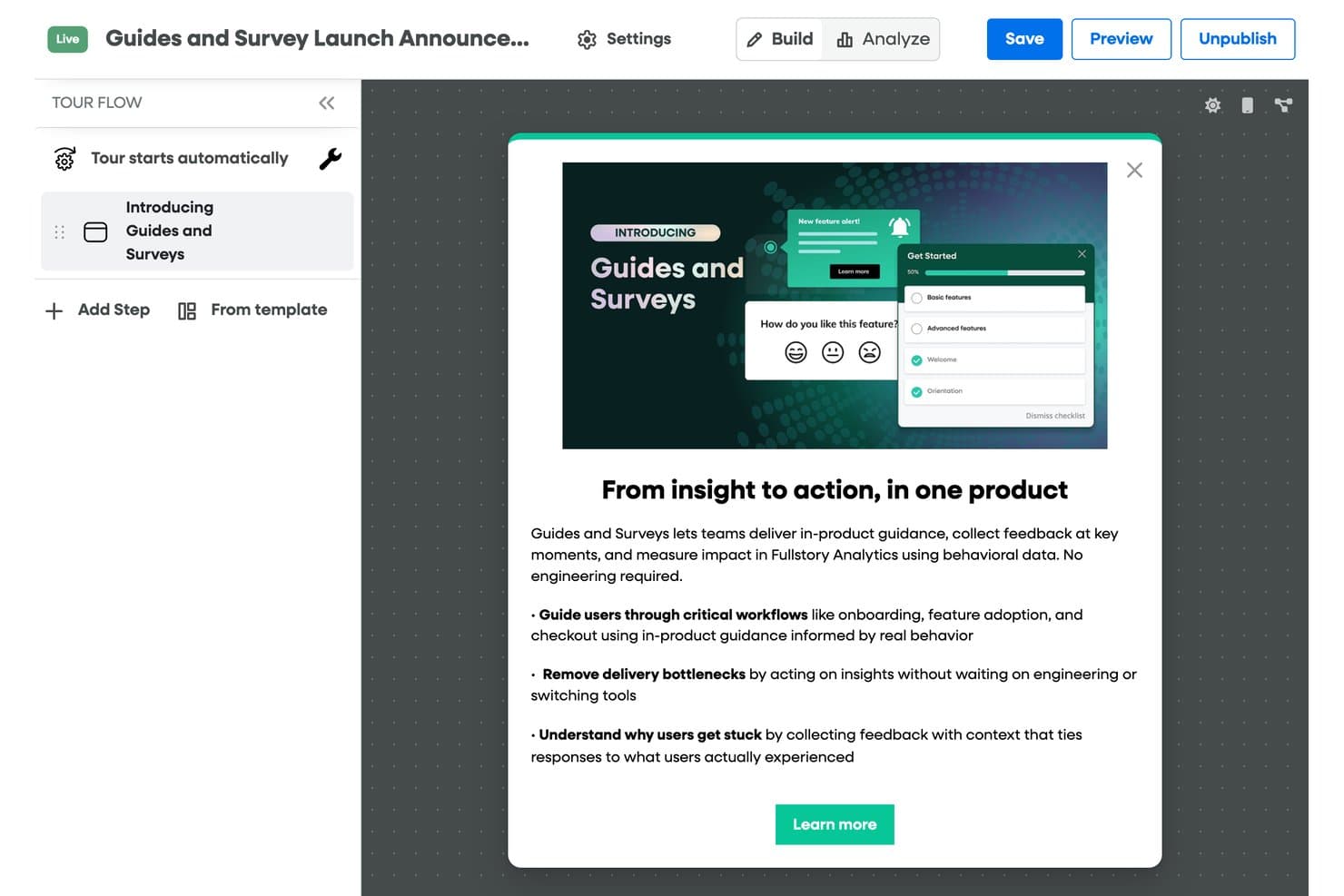
UserGuiding simplifie les visites guidées grâce à des invites, des indications et des étapes de progression. UserGuiding est une plateforme d’adoption numérique sans code pour les produits SaaS, avec des outils permettant de créer des guides intégrés à l’application, des visites guidées du produit, des info-bulles, des parcours d’intégration et des sondages.
À qui UserGuiding convient-il le mieux ?
Les équipes produit SaaS qui ont besoin de listes de contrôle d’intégration pour guider les nouveaux utilisateurs dans les tâches de configuration correspondent bien à UserGuiding.
Pourquoi j’ai choisi UserGuiding
J’ai choisi UserGuiding parce que ses listes de contrôle d’intégration guident les nouveaux utilisateurs dans les tâches de configuration, ce qui en fait une solution adaptée aux équipes qui évaluent des plateformes d’adoption numérique. Les guides intégrés à l’application et les info-bulles peuvent expliquer chaque étape dans son contexte, tandis que les visites guidées du produit présentent le flux de travail global.
Principales fonctionnalités de UserGuiding
- Sondages intégrés à l’application : créez des sondages pour recueillir les commentaires des utilisateurs au sein de votre produit.
- Centre de ressources : ajoutez un menu permettant aux utilisateurs d’accéder aux contenus d’aide et aux ressources du produit.
- Segmentation des utilisateurs : ciblez les expériences intégrées à l’application en fonction des caractéristiques des utilisateurs.
- Tableau de bord analytique : consultez les données d’engagement relatives à vos contenus intégrés à l’application.
Intégrations de UserGuiding
UserGuiding s’intègre à Segment, Google Analytics, Mixpanel et Intercom. Les webhooks permettent de se connecter à des applications tierces, et UserGuiding fournit une API utilisateur.
Qu’est-ce qui est gratuit ?
UserGuiding propose un essai gratuit de 14 jours, mais pas de forfait gratuit permanent. Vous pouvez essayer ses fonctionnalités sans saisir de carte bancaire.
Pros and Cons
Pros:
- Les listes de contrôle guident les utilisateurs dans les tâches de configuration
- Les guides sans code réduisent les demandes adressées aux équipes d’ingénierie
- Les info-bulles expliquent les flux de travail dans leur contexte
Cons:
- Les guides complexes peuvent nécessiter du code
- La prise en charge des conseils dans les applications mobiles est limitée
Learn more about Fullstory: Ideal para analítica avanzada de productos y cohortes
- Plan gratuito disponible
- Precios bajo consulta
Visit WebsiteCustomer Rating:4.5/5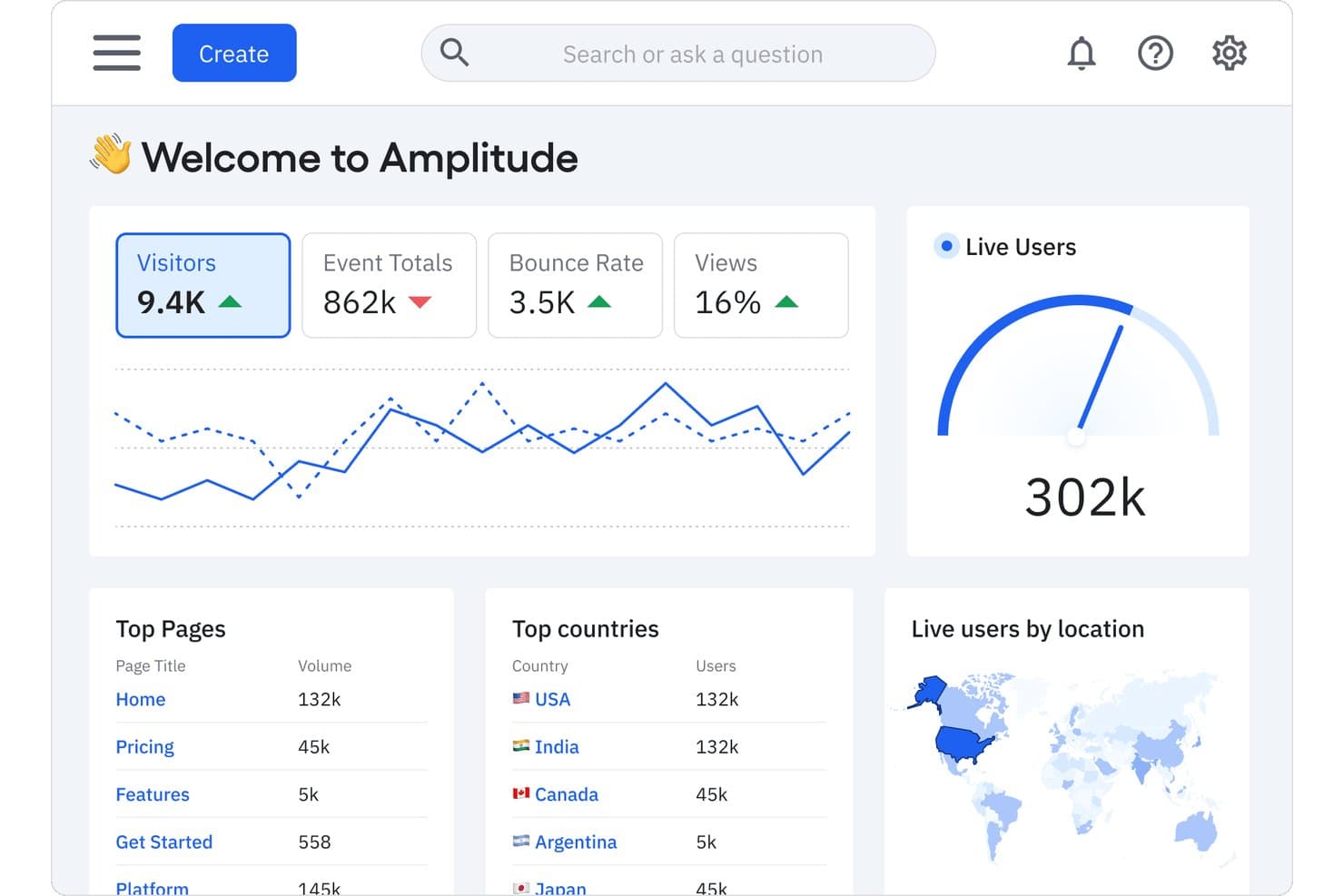
Amplitude realiza el seguimiento de visitantes, usuarios activos y páginas principales en un único panel. Para los equipos que comparan plataformas gratuitas de adopción digital, Amplitude es una plataforma de analítica de productos con seguimiento de eventos, análisis del comportamiento, embudos y herramientas de cohortes.
¿Para quién es más adecuada Amplitude?
Responsables de producto de equipos de productos digitales que necesitan analizar el comportamiento de los usuarios, crear cohortes e identificar dónde abandonan los clientes.
Por qué elegí Amplitude
Elegí Amplitude por su analítica avanzada de productos y sus cohortes, porque las decisiones sobre adopción necesitan pruebas de lo que hacen los usuarios después del lanzamiento. Su seguimiento de eventos y análisis del comportamiento me permiten rastrear las acciones de incorporación, mientras que los embudos revelan dónde abandonan los usuarios los flujos clave. Utilizo cohortes para comparar los patrones de activación entre grupos de usuarios y centrar las mejoras de seguimiento.
Principales funciones de Amplitude
- Reproducción de sesiones: Revisa grabaciones de sesiones de usuarios individuales.
- Banderas de funciones: Controla la disponibilidad de funciones para usuarios seleccionados.
- Experimentación: Ejecuta experimentos de producto y compara variantes.
- Integraciones de datos: Conecta Amplitude con otras herramientas de datos.
Integraciones de Amplitude
El directorio de integraciones de Amplitude enumera 159 resultados, incluidos Slack, Segment y Snowflake; Atlassian Smart Links te permiten previsualizar gráficos de Amplitude en Jira y Confluence. Amplitude también admite conexiones mediante la API HTTP para flujos de datos personalizados.
¿Qué incluye el plan gratuito?
El plan gratuito de Amplitude es gratis para siempre, no una prueba limitada en el tiempo, e incluye puestos ilimitados y 2 millones de eventos al mes. Las cohortes de comportamiento y la retención de datos personalizada requieren un plan de pago, mientras que el nivel gratuito limita Guías y encuestas a una y los experimentos activos a uno.
Pros and Cons
Pros:
- Los embudos identifican con precisión los abandonos durante la incorporación
- Las cohortes comparan la activación entre grupos de usuarios
- Las reproducciones de sesiones aportan contexto sobre el recorrido
Cons:
- Requiere instrumentar eventos antes de obtener información
- Las herramientas de orientación están por detrás de las plataformas de adopción especializadas
Learn more about Amplitude: La mejor opción para los comentarios sobre el producto
- Plan gratuito + prueba gratuita de 30 días + demostración gratuita disponible
- Precio bajo solicitud
Visit WebsiteCustomer Rating:4.4/5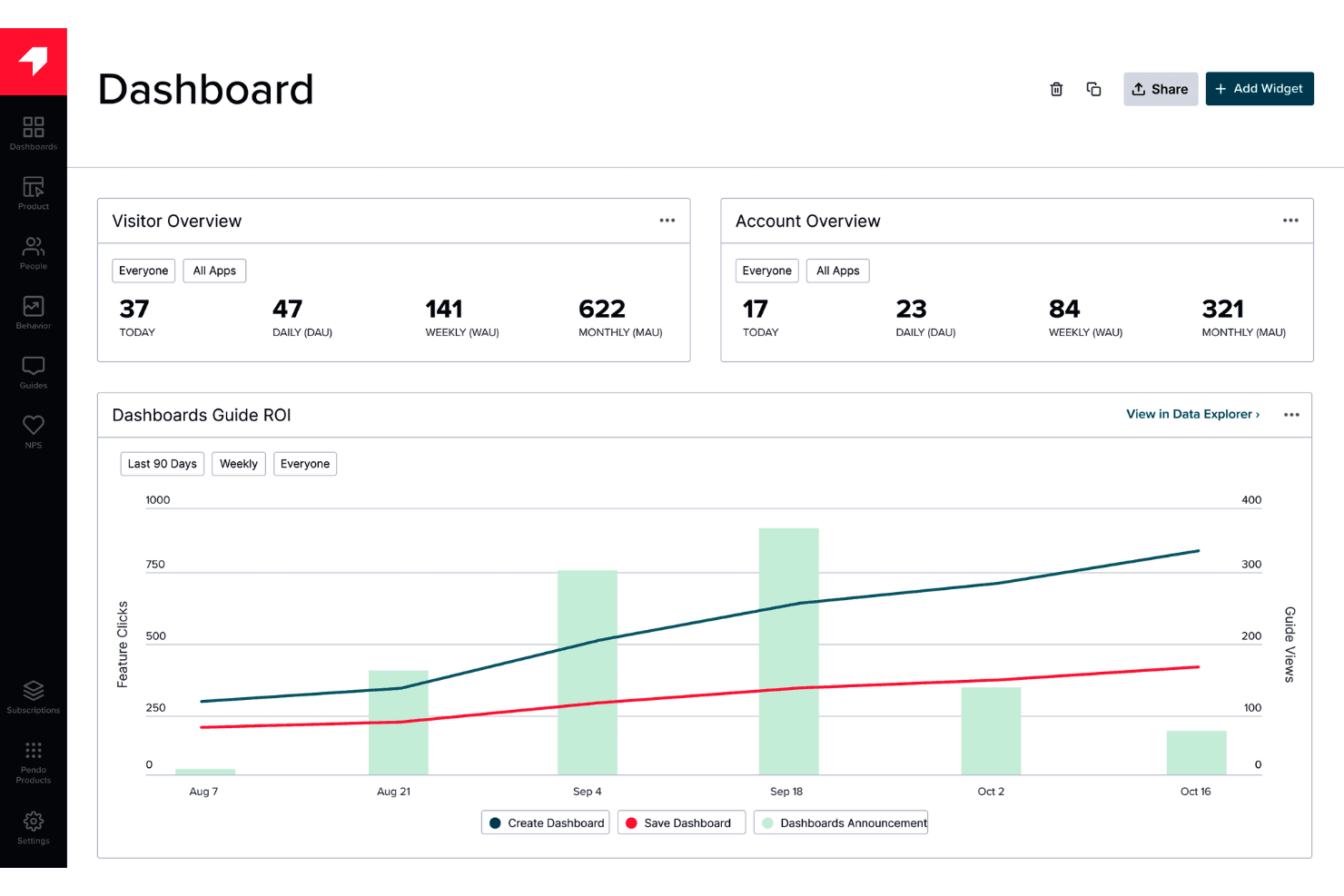
Pendo proporciona orientación y comentarios dentro de la aplicación sin requerir trabajo de ingeniería. Pendo es una plataforma de adopción digital que combina análisis de productos, guías dentro de la aplicación, herramientas de incorporación y recopilación de comentarios para aplicaciones web y móviles.
¿Para quién es más adecuado Pendo?
Responsables de producto que quieren recopilar comentarios de los usuarios dentro de la aplicación para fundamentar decisiones sobre sus productos digitales.
Por qué elegí Pendo
Elegí Pendo como la mejor opción para los comentarios sobre el producto porque combina encuestas dentro de la aplicación con análisis del producto. Utilizo estas herramientas para preguntar a los usuarios sobre un flujo de trabajo confuso y después comparo sus respuestas con los datos de uso de las funciones. Ese contexto ayuda a los responsables de producto a decidir qué puntos de fricción merecen atención.
Características principales de Pendo
- Guías dentro de la aplicación: Crea recorridos guiados, información sobre herramientas y banners dentro de tu producto.
- Reproducción de sesiones: Revisa sesiones de usuarios grabadas para ver cómo interactúan las personas con tu producto.
- Hojas de ruta del producto: Crea hojas de ruta visuales para comunicar la dirección y los planes del producto.
- Integraciones: Conecta Pendo con herramientas como Salesforce, HubSpot y Slack.
Integraciones de Pendo
Pendo incluye 51 integraciones, entre ellas HubSpot, Qualtrics, Salesforce, Slack y Jira. Las integraciones personalizadas están disponibles mediante la API y los webhooks de Pendo.
¿Qué es gratis?
Pendo ofrece un plan gratuito permanente para hasta 500 usuarios activos mensuales, con usuarios internos ilimitados y claves para aplicaciones web y móviles. Las integraciones de terceros no están incluidas, y superar el límite de usuarios impide crear nuevas guías, encuestas NPS o segmentos.
Pros and Cons
Pros:
- Conecta los comentarios dentro de la aplicación con el análisis del producto
- Admite guías en aplicaciones web y móviles
- El plan gratuito permite la incorporación al producto
Cons:
- Los límites mensuales de usuarios pueden impedir la creación de nuevas guías
- El enfoque en los comentarios puede ser más limitado que el de las herramientas de adopción especializadas
Learn more about Pendo: Het meest geschikt voor onboardingtrajecten in zelfgehoste webapps
- Gratis abonnement beschikbaar
- Vanaf $59/maand
Visit WebsiteCustomer Rating:4.4/5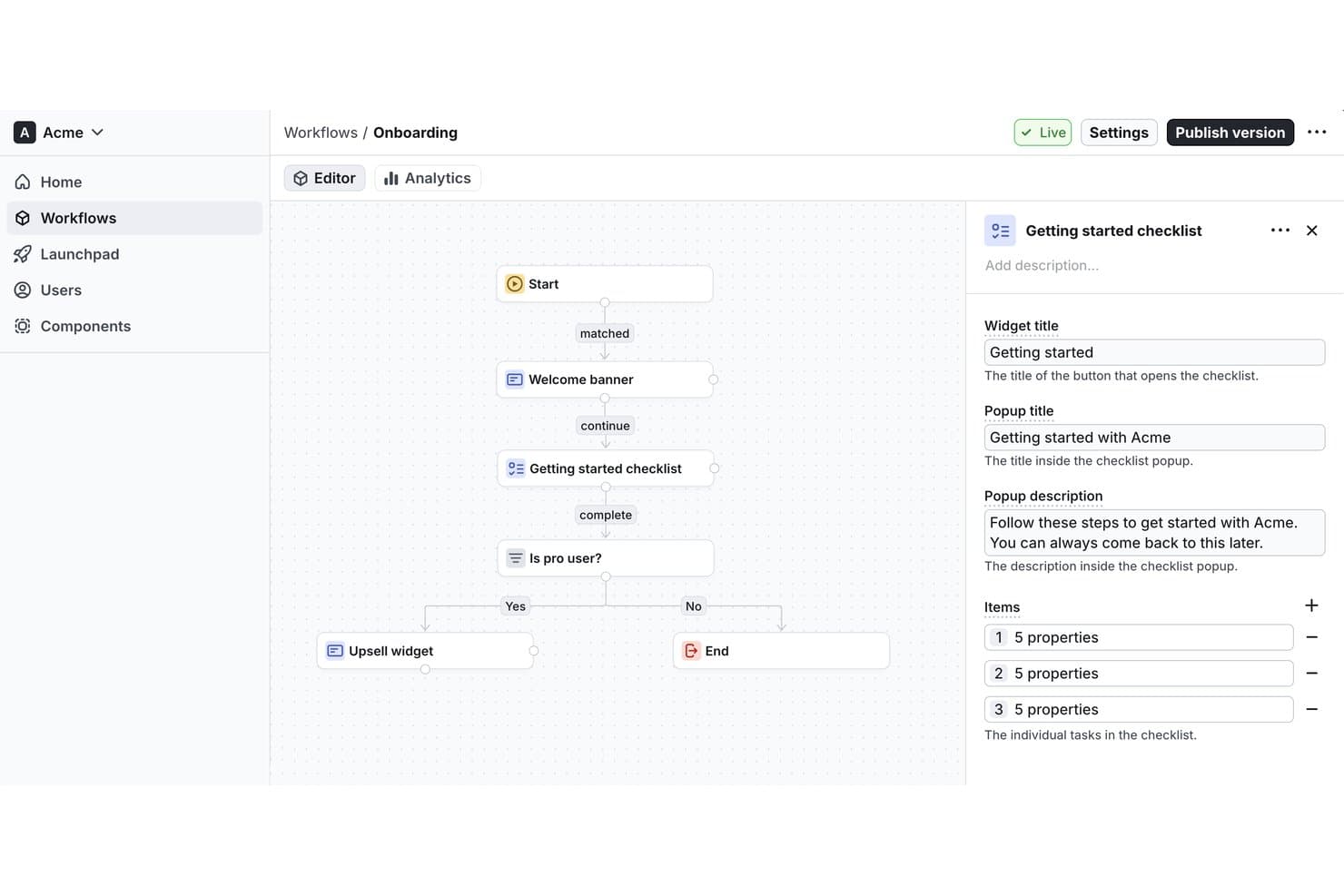
Met Usertour kunnen gebruikers de themakleuren van modals aanpassen en wijzigingen live bekijken. Usertour is een opensourceplatform voor digitale adoptie met een visuele bouwer voor rondleidingen in de app, checklists, enquêtes, banners en resourcecentra, plus doelgroeptargeting en trajectanalyses.
Voor wie is Usertour het meest geschikt?
Geschiktheid van Usertour: Het meest geschikt voor onboardingtrajecten in zelfgehoste webapps, vooral voor productteams die onboarding binnen hun eigen webapplicaties moeten beheren.
Waarom ik Usertour heb gekozen
Ik heb Usertour gekozen voor het beste gratis platform voor digitale adoptie dat ik heb beoordeeld, omdat het het meest geschikt is voor onboardingtrajecten in zelfgehoste webapps. Met de opensourcevisuele bouwer kan ik rondleidingen en checklists in de app maken en deze vervolgens op specifieke gebruikers richten. Met trajectanalyses kan ik zien waar mensen tijdens de onboarding afhaken.
Belangrijkste functies van Usertour
- Enquêtes in de app: Voeg enquêtes toe aan je webapp om feedback van gebruikers te verzamelen.
- Banners: Toon aankondigingen en updates binnen je product.
- Resourcecentra: Geef gebruikers een plek in de app om toegang te krijgen tot nuttige bronnen.
- Opensourcecodebase: Bekijk en pas de broncode van het platform aan.
Integraties van Usertour
Usertour biedt vijf native integraties voor analyse: Amplitude, Heap, Mixpanel, PostHog en Segment. Het ondersteunt ook Zapier en biedt een REST API voor aangepaste integraties.
Wat is gratis?
Usertour biedt een hobbyabonnement van $0/maand in plaats van een proefperiode met beperkte duur, met een onbeperkt aantal eindgebruikers en maximaal 5.000 sessies per maand. Het omvat één teamlid, één omgeving en een gegevensbewaartermijn van één jaar.
Pros and Cons
Pros:
- Met opensourcecode houd je zelf controle over hosting
- De visuele bouwer ondersteunt rondleidingen, checklists en enquêtes
- Communitygebruikers waren positief over onboarding op basis van checklists
Cons:
- Problemen met trajectactivering en selectors moesten worden opgelost
- Bij zelfhosting ligt het onderhoud van de implementatie bij je team
Learn more about Flows: La mejor opción ligera para tutoriales rápidos
- Plan gratuito disponible
- Desde $9.99 (compra de por vida)
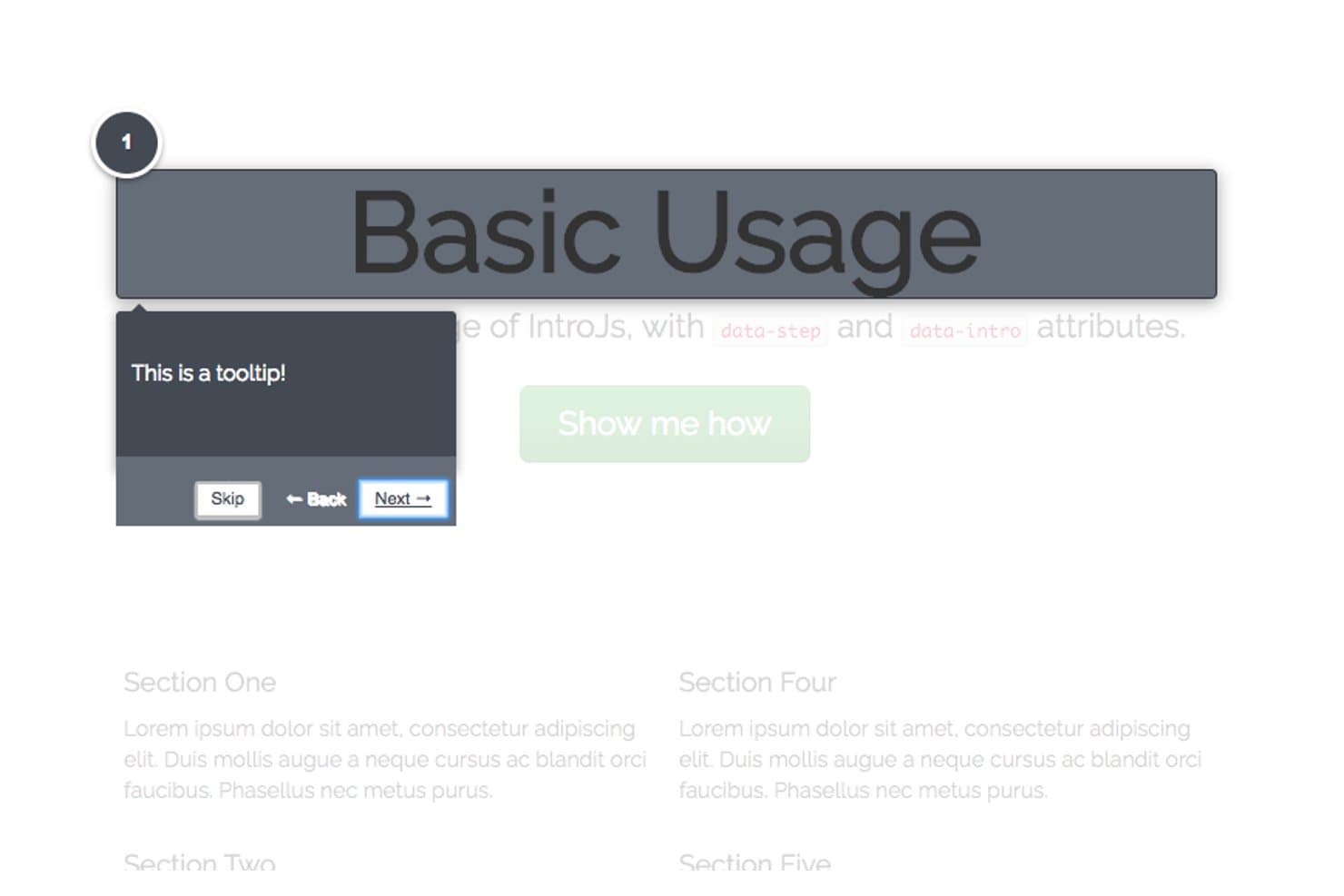
Intro.js guía a los usuarios paso a paso con ayudas emergentes de tema oscuro. Intro.js es una biblioteca de JavaScript para la adopción digital que añade recorridos interactivos por el producto, guías paso a paso y ayudas emergentes contextuales a las aplicaciones web.
¿Para quién es más adecuada Intro.js?
Los equipos de producto con apoyo de desarrolladores que necesitan guiar a los usuarios por los flujos de trabajo clave de una aplicación web encontrarán en Intro.js una opción práctica.
Por qué elegí Intro.js
Elegí Intro.js como la mejor opción ligera para tutoriales rápidos porque sus recorridos paso a paso guían a los usuarios dentro de una aplicación web. Me gusta que los pasos del recorrido puedan dirigirse a elementos específicos de la interfaz y mostrar ayudas emergentes contextuales, como explicar dónde configurar un filtro de informe mientras los usuarios trabajan con el producto.
Características principales de Intro.js
- Indicador de progreso: Muestra a los usuarios cuánto han avanzado en una introducción.
- Navegación con teclado: Permite a los usuarios desplazarse entre los pasos mediante controles del teclado.
- Opción «No volver a mostrar»: Añade una casilla de verificación que guarda la preferencia del usuario en una cookie.
- Funciones de retorno del ciclo de vida: Ejecuta código cuando una introducción finaliza, se cierra o cambia de paso.
Integraciones de Intro.js
Las integraciones nativas no están documentadas claramente. Intro.js proporciona una API de JavaScript para añadir comportamientos personalizados a los recorridos en aplicaciones web.
¿Qué es gratis?
Intro.js es gratuita bajo la AGPLv3 para proyectos de código abierto, personales y no comerciales, sin límite de tiempo. Las aplicaciones, los temas o los complementos comerciales requieren una licencia comercial de pago.
Pros and Cons
Pros:
- Los recorridos ligeros son adecuados para tutoriales centrados
- Las ayudas emergentes se dirigen a controles específicos del flujo de trabajo
- Las funciones de retorno permiten personalizar el comportamiento de los recorridos
Cons:
- Requiere implementación y mantenimiento en JavaScript
- Las integraciones nativas no están documentadas claramente
Learn more about Intro.js: Ideal para crear recorridos web con usuarios ilimitados
- Plan gratuito + prueba gratuita de 15 días disponible
- Desde $19/mes
Visit WebsiteCustomer Rating:4.6/5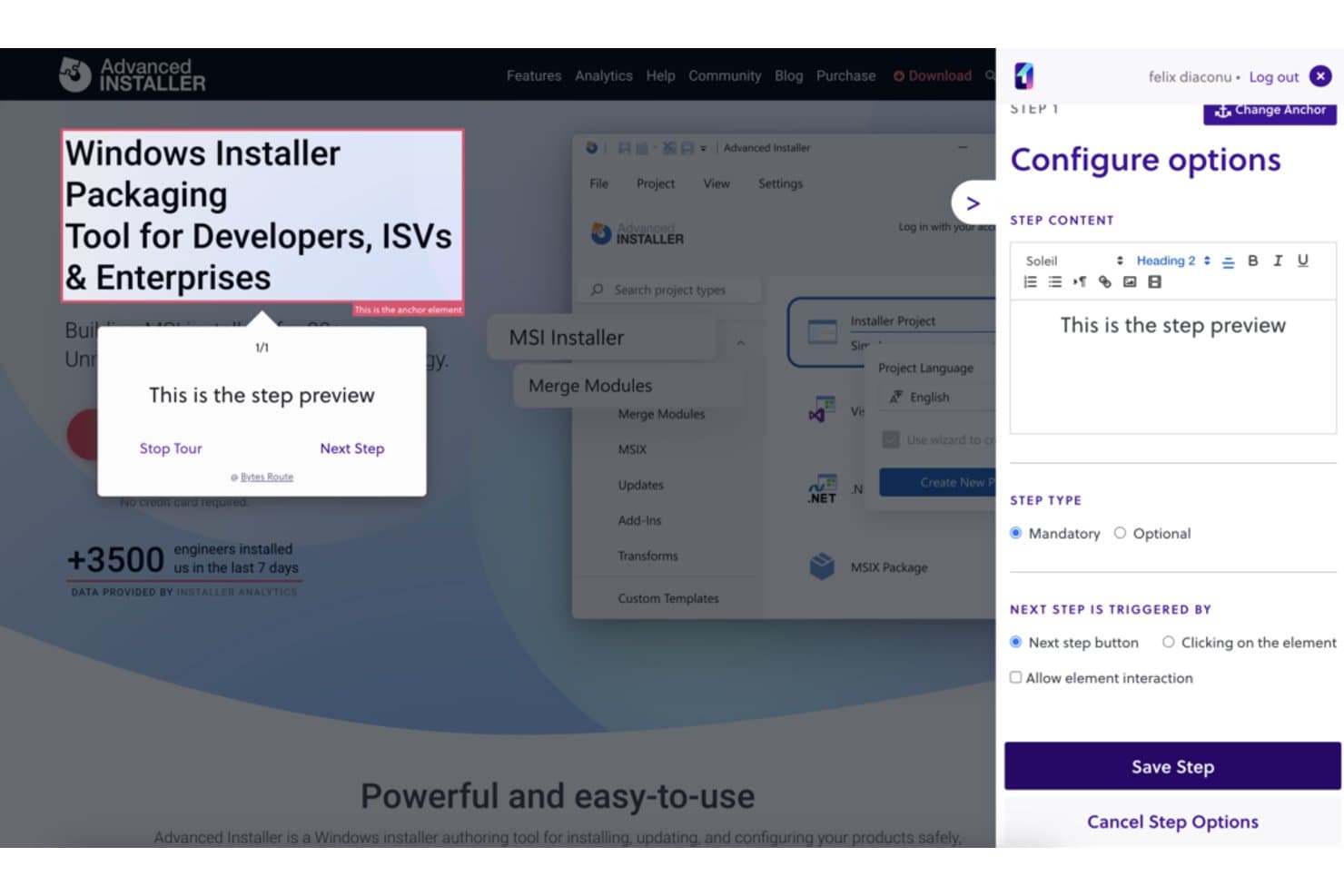
Bytes Route permite a los usuarios configurar pasos de recorridos guiados con contenido personalizado. Bytes Route es una plataforma de adopción digital para crear recorridos web guiados, con herramientas para diseñar y ofrecer tutoriales en sitios web.
¿Para quién es más adecuado Bytes Route?
Bytes Route es una buena opción para equipos de producto que crean tutoriales para sitios web, especialmente aquellos que necesitan crear recorridos web con usuarios ilimitados.
Por qué elegí Bytes Route
Elegí Bytes Route porque se ajusta a “Ideal para crear recorridos web con usuarios ilimitados”. Los equipos de producto pueden crear recorridos web guiados y ofrecer tutoriales en sitios web, como mostrar a los visitantes los pasos de un nuevo flujo de funcionalidades. Me gusta su enfoque específico en el trabajo de adopción de sitios web.
Características principales de Bytes Route
- Extensión de Chrome: Crea y edita recorridos mediante la extensión de Chrome de Bytes Route.
- Análisis de recorridos: Consulta los análisis de los recorridos publicados.
- Configuración sin código: Conecta la plataforma a tu dominio web sin escribir código.
- Funcionamiento sin cookies: Utiliza Bytes Route sin cookies.
Integraciones de Bytes Route
Las integraciones nativas no están documentadas claramente.
¿Qué incluye el plan gratuito?
Bytes Route ofrece un plan gratuito de $0 y una prueba de 15 días de sus planes de pago, sin necesidad de tarjeta de crédito. El plan gratuito está limitado a un miembro del equipo y tres recorridos activos, con análisis básicos y un editor de texto básico.
Pros and Cons
Pros:
- Los recorridos se configuran rápidamente
- Las estadísticas integradas muestran el rendimiento de los recorridos
- Los tutoriales permiten la incorporación de usuarios dentro de la aplicación
Cons:
- Las opciones de diseño de las guías son limitadas
- En ocasiones, el retraso puede hacer que se omitan pasos del recorrido
Learn more about Bytes Route: La mejor biblioteca de código abierto para recorridos totalmente personalizados
- Plan gratuito disponible
- Desde $50/de por vida
Visit WebsiteCustomer Rating:2.6/5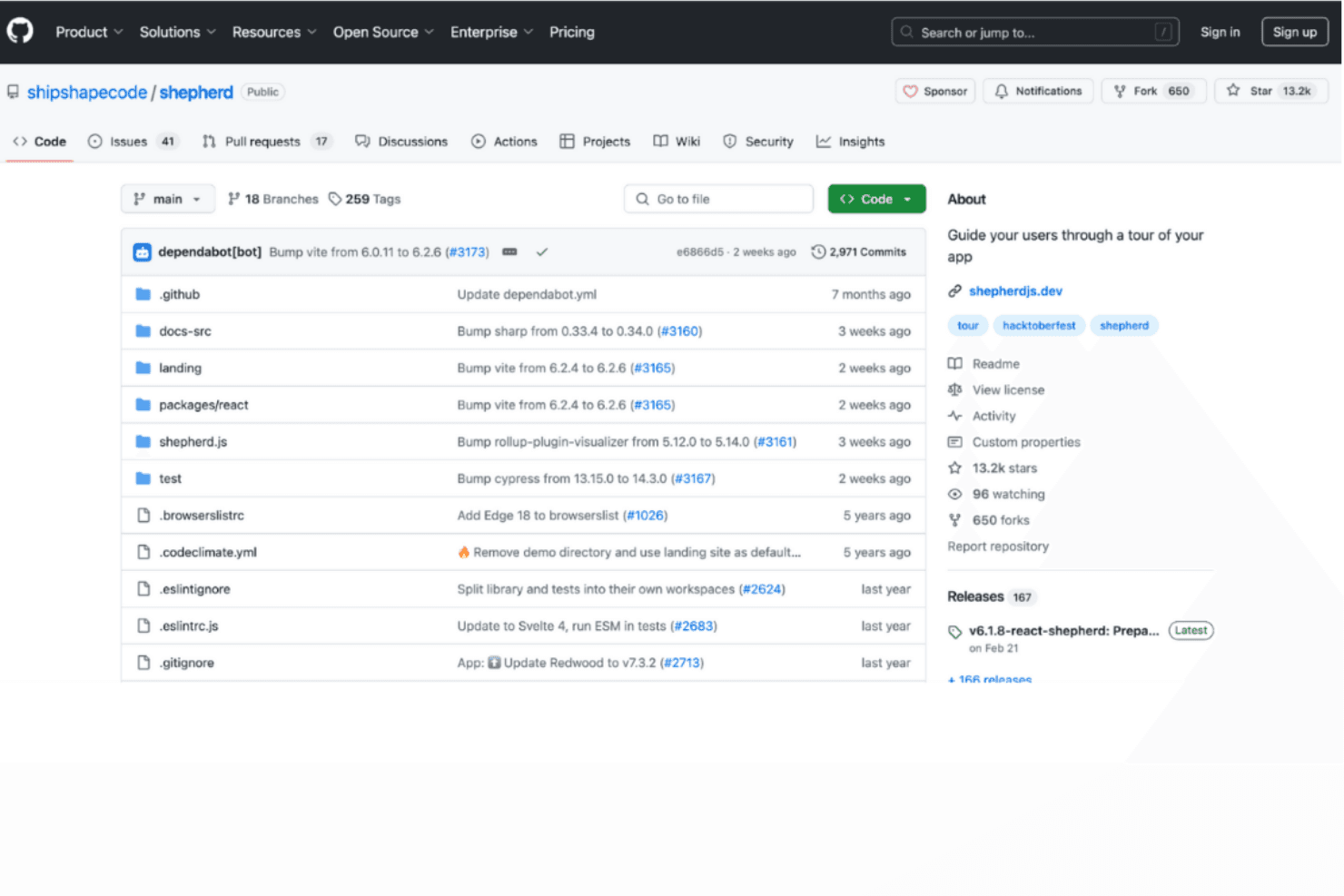
Shepherd.js ofrece recorridos totalmente personalizables para proporcionar instrucciones adaptadas. Shepherd.js es una herramienta de adopción digital centrada en desarrolladores para crear recorridos de producto dentro de la aplicación con pasos, información sobre herramientas y superposiciones configurables en aplicaciones web.
¿Para quién es más adecuado Shepherd.js?
Los equipos de producto e ingeniería que crean experiencias de incorporación web personalizadas encontrarán en Shepherd.js una opción adecuada como la mejor biblioteca de código abierto para recorridos totalmente personalizados.
Por qué elegí Shepherd.js
Elegí Shepherd.js como la mejor biblioteca de código abierto para recorridos totalmente personalizados porque su API de pasos me permite anclar las instrucciones a elementos específicos de la interfaz y adaptar el contenido y los botones de la información sobre herramientas. Puedo añadir una superposición modal y guiar a los usuarios por una configuración de varias pantallas, como la configuración de permisos.
Características principales de Shepherd.js
- Navegación mediante teclado: Configura controles de teclado para avanzar por los pasos del recorrido.
- Eventos del ciclo de vida: Responde a los eventos del recorrido y de los pasos mediante la lógica de la aplicación.
- Comportamiento de desplazamiento hasta el paso: Desplaza los elementos de destino hasta hacerlos visibles cuando comienza un paso.
- Personalización con CSS: Personaliza el estilo del recorrido con CSS.
Integraciones de Shepherd.js
Shepherd.js proporciona adaptaciones para los frameworks React, Ember, Angular y Vue.js, con compatibilidad con módulos ES y JavaScript sin framework; no documenta integraciones nativas con plataformas de terceros.
¿Qué es gratis?
Shepherd.js es gratuito para proyectos de código abierto, personales y no comerciales bajo AGPL-3.0, mientras que la evaluación y las pruebas son gratuitas durante un máximo de 30 días. El uso comercial o de código cerrado requiere una licencia de pago; bajo AGPL-3.0, distribuir o proporcionar software a través de una red exige poner a disposición su código fuente completo bajo una licencia compatible.
Pros and Cons
Pros:
- Los pasos del recorrido pueden dirigirse a elementos específicos de la interfaz
- Los eventos del ciclo de vida permiten a los equipos activar la lógica de la aplicación
- Los controles de teclado permiten a los usuarios navegar por los pasos del recorrido
Cons:
- Los equipos deben crear recorridos personalizados mediante código
- No hay análisis documentados para medir la finalización de los recorridos
Learn more about Shepherd.js: Ideal para flujos de incorporación en aplicaciones web autohospedadas
- Plan gratuito disponible
- Desde $59/mes
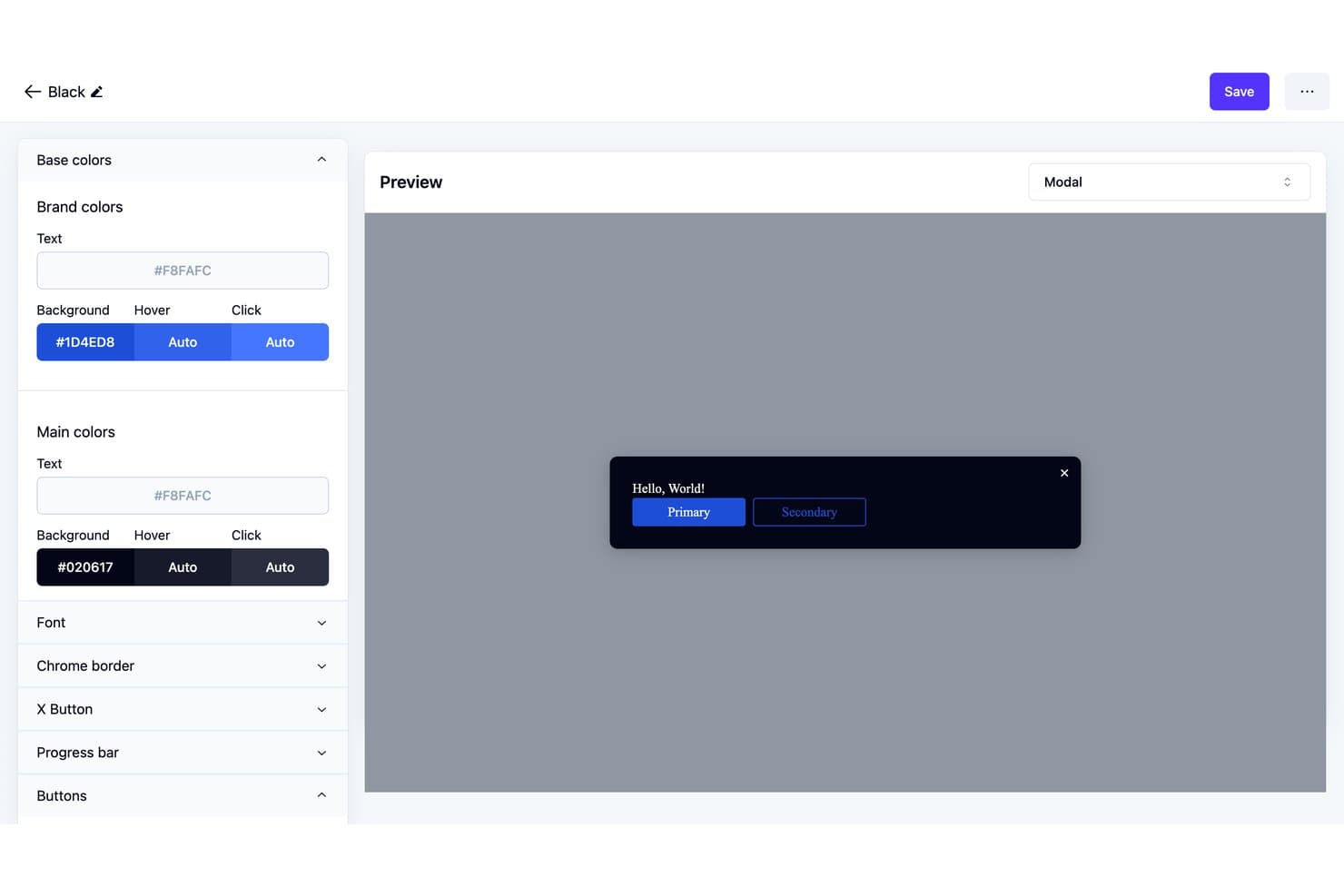
Usertour permite a los usuarios personalizar los colores del tema de los modales y previsualizar los cambios en directo. Usertour es una plataforma de adopción digital de código abierto con un creador visual para recorridos dentro de la aplicación, listas de verificación, encuestas, banners y centros de recursos, además de segmentación de usuarios y análisis de flujos.
¿Para quién es más adecuado Usertour?
Perfil de Usertour: Ideal para flujos de incorporación en aplicaciones web autohospedadas, especialmente para equipos de producto que necesitan gestionar la incorporación dentro de sus propias aplicaciones web.
Por qué elegí Usertour
Elegí Usertour para la reseña de la mejor plataforma gratuita de adopción digital porque es ideal para flujos de incorporación en aplicaciones web autohospedadas. Su creador visual de código abierto me permite crear recorridos y listas de verificación dentro de la aplicación, y luego dirigirlos a usuarios específicos. Los análisis de flujos me ayudan a detectar dónde abandonan las personas durante la incorporación.
Características principales de Usertour
- Encuestas dentro de la aplicación: Añade encuestas a tu aplicación web para recopilar comentarios de los usuarios.
- Banners: Muestra anuncios y actualizaciones dentro de tu producto.
- Centros de recursos: Ofrece a los usuarios un lugar dentro de la aplicación para acceder a recursos útiles.
- Base de código abierta: Revisa y adapta el código fuente de la plataforma.
Integraciones de Usertour
Usertour ofrece cinco integraciones analíticas nativas: Amplitude, Heap, Mixpanel, PostHog y Segment. También admite Zapier y proporciona una API REST para integraciones personalizadas.
¿Qué incluye el plan gratuito?
Usertour ofrece un plan para aficionados de $0/mes en lugar de una prueba con duración limitada, con usuarios finales ilimitados y hasta 5.000 sesiones al mes. Incluye un miembro del equipo, un entorno y un año de retención de datos.
Pros and Cons
Pros:
- La base de código abierta permite el control autohospedado
- El creador visual incluye recorridos, listas de verificación y encuestas
- Los usuarios de la comunidad elogiaron la incorporación basada en listas de verificación
Cons:
- Los errores de activación de flujos y selectores necesitaron correcciones
- El autohospedaje deja el mantenimiento de la implementación en manos de tu equipo
Learn more about Usertour: 10
10Tango
- Plan gratuito disponible
- Desde $16/usuario/mes (facturado anualmente)
Visit WebsiteCustomer Rating:4.8/5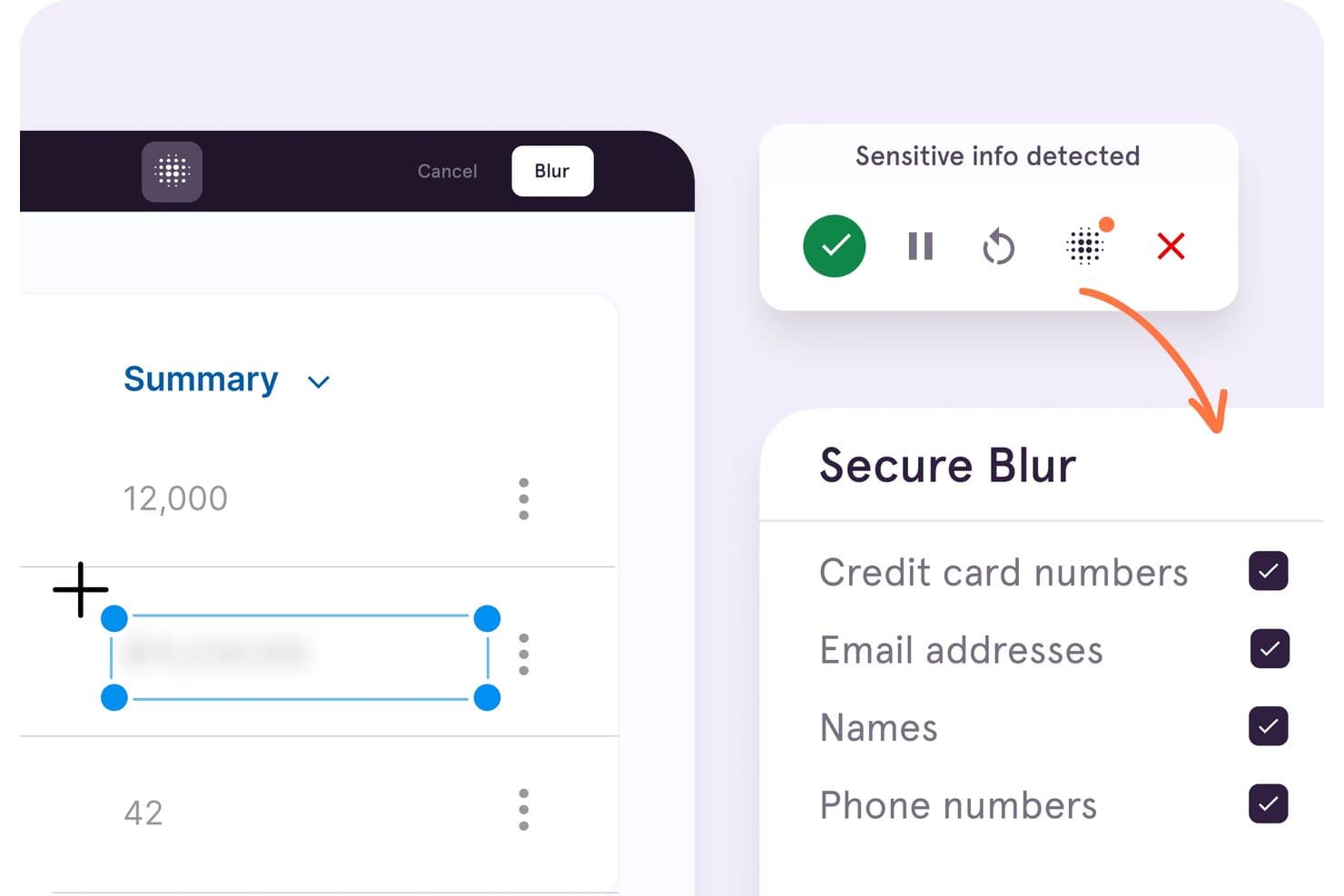
Tango difumina automáticamente información confidencial, como tarjetas de crédito y correos electrónicos. Tango es una plataforma de adopción digital centrada en la captura de flujos de trabajo basados en el navegador, con guías paso a paso y recorridos de Guide Me para aplicaciones web.
¿Para quién es mejor Tango?
Los equipos de RR. HH. y de formación que documentan procesos de software repetibles para la incorporación de empleados pueden usar Tango para crear y compartir guías paso a paso.
Por qué elegí Tango
Elegí Tango para crear guías de procedimientos operativos estándar (SOP) de seguimiento de clics de forma gratuita porque convierte los flujos de trabajo del navegador en instrucciones anotadas paso a paso. Guide Me puede resaltar cada clic siguiente mientras un compañero sigue un proceso en una aplicación web, como un CRM. El plan gratuito limita los flujos de trabajo compartidos a cinco, por lo que lo considero adecuado para un pequeño conjunto de guías internas, no para una plataforma de adopción con todas las funciones.
Características principales de Tango
- Compartición mediante enlaces e inserción: Comparte flujos de trabajo mediante un enlace o insértalos en otras herramientas.
- Compatibilidad con Chrome y Edge: Captura flujos de trabajo web con la extensión del navegador.
- Límites del espacio de trabajo gratuito: Añade hasta 10 usuarios y comparte hasta cinco flujos de trabajo.
- Análisis de visitantes: Consulta datos limitados de visitantes para un máximo de tres visitantes únicos.
Integraciones de Tango
La extensión del navegador de Tango funciona con aplicaciones web como Salesforce, HubSpot, Workday, NetSuite, Epic y Gmail. Puedes insertar las guías de Tango en Confluence y Notion.
¿Qué incluye el plan gratuito?
Tango ofrece un plan gratuito de $0, no solo una prueba limitada en el tiempo. Permite hasta 10 usuarios y cinco flujos de trabajo compartidos, con datos de visitantes limitados a tres visitantes únicos.
Pros and Cons
Pros:
- La captura rápida convierte los flujos de trabajo en procedimientos operativos estándar guiados
- Guide Me resalta cada acción siguiente dentro de la aplicación
- Funciona en aplicaciones web sin código en la aplicación
Cons:
- Los cinco flujos de trabajo compartidos limitan las implementaciones gratuitas
- El plan gratuito carece de marcadores, ramificaciones y segmentación
Learn more about Tango:
Otras plataformas de adopción digital
Estas son algunas opciones adicionales de plataformas de adopción digital que también ofrecen planes o pruebas gratuitas. Aunque estas herramientas no llegaron a mi selección, merece la pena echarles un vistazo:
- 11Product FruitsLos mejores recorridos de incorporación económicos para pymes
Cómo evalúo las plataformas gratuitas de adopción digital
Primero, defino qué se considera gratuito. Una plataforma de adopción digital necesita un plan gratuito permanente, no una prueba, aunque pueden aplicarse límites. A partir de ahí, divido mi evaluación en tres partes: funcionalidad básica, como crear recorridos guiados y segmentar a los usuarios; funciones destacadas, como los widgets de comentarios; y aspectos que van más allá de las funciones, como las opciones de actualización.
Funcionalidad básica (requisitos esenciales para esta lista)
Además de mis requisitos para los planes gratuitos, utilizo un sistema de puntuación para seleccionar las herramientas de mi lista. Puntúo cada una en una escala de 0 (no ofrece la funcionalidad) a 5 (sobresale en esta área) para cada funcionalidad básica indicada a continuación, basándome en lo disponible en el plan gratuito. Después convierto el total en un porcentaje para ayudar a evaluar la adecuación general de cada herramienta, dando un peso adicional a las funcionalidades que he considerado esenciales.
- Creación de orientación dentro de la aplicación (esencial): busco recorridos guiados de varios pasos, información sobre herramientas y anuncios que guíen a los usuarios en tareas reales del producto.
- Editor sin código: evalúo si los equipos pueden crear, colocar y modificar visualmente la orientación sin la ayuda de desarrolladores.
- Segmentación de usuarios: compruebo si permite dirigir contenidos según el rol, el comportamiento o los atributos, como mostrar una lista de verificación de configuración a los usuarios nuevos.
- Análisis y seguimiento del uso: evalúo las visualizaciones de las guías, las tasas de finalización y las tendencias de interacción que relacionan la actividad de incorporación con la adopción.
- Compatibilidad con varias aplicaciones: busco una orientación que pueda admitir varias aplicaciones web, como herramientas orientadas a clientes e internas.
Una vez que tengo una lista de herramientas que cumplen los criterios, considero qué distingue a cada plataforma.
Factores diferenciadores (lo que distingue a los proveedores)
Así es como comparo y distingo entre los distintos proveedores:
Funciones destacadas
Busco widgets de comentarios integrados —encuestas NPS o microencuestas incorporadas junto a las guías— porque me permiten relacionar directamente la percepción de los usuarios con un paso específico de la incorporación. Los activadores basados en eventos también son importantes: una información sobre herramientas que se activa por inactividad o por el envío fallido de un formulario es mucho más útil que una que solo está vinculada a la carga de una página. Compruebo si cada herramienta ofrece un centro de recursos que agrupe guías, preguntas frecuentes y enlaces en un único lanzador, proporcionando a los usuarios ayuda autoservicio sin necesidad de abrir una solicitud de asistencia.
Más allá de las funciones
Evalúo la rapidez con la que un responsable de producto no técnico puede poner en marcha su primera guía, ya que algunos planes gratuitos todavía requieren un fragmento de JavaScript que involucra al departamento de TI. También compruebo si los límites del nivel gratuito sobre los usuarios activos mensuales o el número de guías se ajustan a una audiencia piloto real, ya que superar esos límites durante el despliegue puede interrumpir un flujo de incorporación activo. Una documentación sólida de autoservicio y unos foros de la comunidad también son importantes, porque los planes gratuitos rara vez incluyen asistencia dedicada, y una implementación atascada cuesta más tiempo del que la herramienta ahorra.
Cómo elegir plataformas gratuitas de adopción digital
Las listas de funciones complejas y las estructuras de precios pueden dificultar saber qué obtienes realmente de una plataforma gratuita de adopción digital. Para ayudarte a mantener la atención mientras avanzas en el proceso de selección de software, estos son algunos factores que debes tener en cuenta:
| Factor | Qué considerar |
|---|---|
| FactorAlcance de la oferta gratuita | Qué considerarDetermina qué incluye el plan gratuito, como los límites de usuarios o las funciones, para asegurarte de que satisface las necesidades de tu equipo sin costes inesperados. |
| FactorEscalabilidad | Qué considerarConsidera si la plataforma puede crecer con tu equipo. Busca opciones que permitan realizar actualizaciones fácilmente a medida que aumenten tu base de usuarios y tus necesidades funcionales. |
| FactorIntegraciones | Qué considerarComprueba si la plataforma se integra con las herramientas que ya utilizas, como el software de CRM o de análisis, para mejorar tu flujo de trabajo actual sin complicaciones adicionales. |
| FactorFacilidad de uso | Qué considerarEvalúa la interfaz de usuario y la rapidez con la que tu equipo puede aprender a utilizar la herramienta. Un diseño sencillo e intuitivo puede ahorrar tiempo y reducir los costes de formación. |
| FactorPersonalización | Qué considerarBusca opciones de personalización que te permitan adaptar la plataforma a la imagen y el estilo de tu marca, garantizando una experiencia fluida para tus usuarios. |
| FactorRecursos de asistencia | Qué considerarConsidera la disponibilidad de materiales de asistencia, como tutoriales, seminarios web y asistencia por chat, para ayudar a tu equipo a aprovechar al máximo las capacidades de la plataforma. |
| FactorSeguridad | Qué considerarAsegúrate de que la plataforma cumple las normas de seguridad del sector para proteger tus datos y mantener la confianza de los usuarios. |
| FactorAnálisis | Qué considerarBusca análisis integrados que proporcionen información sobre el comportamiento de los usuarios y las tasas de adopción, ayudándote a medir el éxito de tus esfuerzos de adopción digital. |
¿Qué es una plataforma gratuita de adopción digital?
Una plataforma de adopción digital es una herramienta que ayuda a los usuarios a aprender a utilizar aplicaciones de software e interactuar con ellas de forma eficaz, ofreciendo planes o pruebas gratuitas para empezar sin coste. Estas herramientas suelen utilizarlas los responsables de producto, los equipos de formación y los profesionales de éxito del cliente para mejorar la incorporación y la participación de los usuarios.
Estas plataformas aportan valor al simplificar procesos complejos y aumentar la productividad de los usuarios. Las guías interactivas, los análisis de usuarios y las listas de comprobación de incorporación ayudan a comprender el comportamiento de los usuarios, proporcionar formación y garantizar una adopción satisfactoria del software.
Una plataforma de adopción digital (DAP) está diseñada para ayudar a los usuarios finales a adaptarse a nuevas funciones y herramientas de forma más eficaz. A continuación, se describen las funciones que suelen incluir los planes gratuitos y de pago.
Funciones de una plataforma gratuita de adopción digital
- Guías interactivas: Guían a los usuarios mediante instrucciones paso a paso, reduciendo la necesidad de enviar solicitudes de asistencia al explorar nuevas funciones.
- Listas de comprobación de incorporación: Ayudan a incorporar a los empleados al garantizar que las tareas de configuración esenciales se completen desde el principio.
- Análisis básicos de usuarios: Realizan un seguimiento de los patrones de participación para comprobar cómo interactúan los usuarios finales con tu solución de adopción digital.
- Información sobre herramientas y mensajes dentro de la aplicación: Proporcionan consejos contextuales que guían a los usuarios dentro de la aplicación, minimizando la dependencia de la ayuda externa o de una base de conocimientos.
- Plantillas personalizables: Permiten crear tutoriales y recorridos guiados con la identidad de marca que reflejen el estilo de tu organización.
Funciones de una plataforma de pago de adopción digital
- Segmentación avanzada de usuarios: Ofrece contenido y guías personalizados adaptados a grupos de usuarios específicos.
- Panel de análisis en tiempo real: Proporciona información más detallada sobre las tasas de adopción y la participación de los usuarios.
- Recomendaciones de contenido basadas en inteligencia artificial: Sugiere material de aprendizaje relevante en función del comportamiento de los usuarios.
- Integraciones con terceros: Conecta la plataforma con otros sistemas empresariales para mejorar su funcionalidad.
- Flujos de trabajo de incorporación personalizados: Permiten diseñar procesos de incorporación detallados alineados con los objetivos empresariales.
Ventajas de una plataforma gratuita de adopción digital
Una solución gratuita de adopción digital puede aportar un valor real sin necesidad de realizar una inversión inmediata. Algunas de sus principales ventajas son:
- Aprendizaje rentable: Proporciona a los equipos herramientas de formación esenciales y mantiene los presupuestos bajo control.
- Mejora de la incorporación de empleados: Las guías y listas de comprobación de autoservicio agilizan la adopción y ayudan a los nuevos empleados a ser productivos más rápidamente.
- Mayor participación de los usuarios: Los consejos contextuales y los análisis muestran cómo interactúan los usuarios finales con la plataforma, lo que te ayuda a perfeccionar la experiencia del cliente.
- Reducción de las solicitudes de asistencia: La orientación proactiva ayuda a los usuarios a resolver problemas de forma independiente, reduciendo las solicitudes al departamento de TI o al equipo de asistencia.
- Personalización: Las plantillas facilitan la creación de contenido de formación que se ajusta a tu marca.
- Aumento de la productividad de los empleados: Las herramientas sencillas y accesibles acortan la curva de aprendizaje y permiten a los equipos centrarse en tareas de mayor valor.
- Escalabilidad para empresas emergentes y equipos pequeños: Los planes gratuitos suelen ofrecer funcionalidades suficientes para respaldar el crecimiento inicial.
- Adopción rápida: Con una configuración mínima, tu equipo puede empezar a beneficiarse de la plataforma de inmediato.
Costes y precios de una plataforma de adopción digital gratuita
Me doy cuenta de que has llegado a este artículo buscando las mejores opciones de plataformas de adopción digital disponibles de forma gratuita. Sin embargo, dado que los planes gratuitos solo ofrecen funciones limitadas, es muy probable que necesites ampliar tu plan en el futuro.
La siguiente tabla resume los planes habituales, sus precios medios y las funciones típicas incluidas en las soluciones de plataformas de adopción digital:
Tabla comparativa de planes para plataformas de adopción digital
| Tipo de plan | Precio medio | Funciones habituales |
|---|---|---|
| Tipo de planPlan gratuito | Precio medio$0 | Funciones habitualesGuías básicas, información sobre herramientas y análisis limitados. |
| Tipo de planPlan personal | Precio medio$5-$25/usuario/mes | Funciones habitualesGuías avanzadas, segmentación de usuarios e integraciones básicas. |
| Tipo de planPlan empresarial | Precio medio$30-$75/usuario/mes | Funciones habitualesFlujos de trabajo personalizables, análisis mejorados y más integraciones. |
| Tipo de planPlan corporativo | Precio medio$80-$150/usuario/mes | Funciones habitualesPersonalización completa, asistencia exclusiva y análisis exhaustivos. |
Preguntas frecuentes sobre las plataformas de adopción digital gratuitas
Estas son algunas respuestas a preguntas frecuentes sobre las plataformas de adopción digital gratuitas:
¿Cómo funciona una plataforma de adopción digital?
Una plataforma de adopción digital funciona superponiendo orientación y asistencia a otras aplicaciones de software. Ayuda a los usuarios a realizar tareas clave mediante instrucciones paso a paso e información contextual. Este enfoque garantiza que los usuarios puedan aprender rápidamente a utilizar y navegar por nuevas herramientas sin ayuda externa.
¿Cuál de las siguientes es una función habitual de una plataforma de adopción digital?
Entre las funciones habituales se incluyen los recorridos interactivos que guían a los usuarios en tiempo real a través de tareas específicas. Estas tareas pueden ir desde crear informes hasta presentar solicitudes de reembolso de gastos, lo que garantiza que los usuarios completen las acciones necesarias de forma eficaz y precisa.
¿Cuál es la mejor plataforma de adopción digital?
La mejor plataforma de adopción digital depende de las necesidades y el presupuesto de tu equipo. Ten en cuenta factores como la facilidad de uso, las funciones disponibles y las opciones de asistencia. Evalúa las versiones gratuitas para comprobar si satisfacen tus requisitos básicos antes de considerar una actualización.
¿Cuál es el impacto de la adopción digital?
La adopción digital garantiza que los usuarios integren plenamente las herramientas de la empresa en sus flujos de trabajo, minimizando la resistencia. Sin ella, las empresas pueden enfrentarse a un bajo uso del software y a inversiones desaprovechadas. Una adopción eficaz impulsa la productividad y maximiza el valor de las herramientas digitales.
¿Puedo utilizar una plataforma de adopción digital de forma gratuita?
Sí, muchas plataformas de adopción digital ofrecen versiones o pruebas gratuitas. Estas suelen incluir funciones básicas, como guías para usuarios y análisis, lo que te permite probar las capacidades de la plataforma antes de contratar un plan de pago.
¿Cómo elijo la plataforma de adopción digital adecuada?
Para elegir la plataforma adecuada, evalúa las necesidades específicas de tu equipo, como la complejidad del software que utilizas y tus requisitos de formación. Busca pruebas gratuitas para explorar las funciones y asegurarte de que la plataforma se ajusta a tus objetivos.