

Las herramientas para capturar ideas son plataformas basadas en la nube que te ayudan a recopilar, organizar y gestionar las ideas de tu equipo o de las partes interesadas en un solo lugar. Si buscas formas de evitar que las sugerencias valiosas caigan en el olvido, la herramienta de gestión de ideas adecuada puede marcar la diferencia. Con tantas opciones disponibles, es difícil saber qué solución se adapta mejor a tu flujo de trabajo, estilo de colaboración y objetivos de innovación abierta. Esta lista te ayudará a comparar rápidamente las principales herramientas de software para 2026, para que puedas elegir la mejor plataforma de gestión de ideas para impulsar la creatividad de tu equipo y convertir las ideas en resultados reales.
Por qué confiar en nuestras recomendaciones de software
6,700+
Reviews
20
Industry experts
16+
Evaluation factors
14
Years
Nuestro equipo lleva probando y evaluando software desde 2012. Como gestores de producto, sabemos lo difícil —y lo importante— que es elegir el software adecuado.
Para esta guía, evaluamos las herramientas mediante pruebas prácticas e investigación independiente, puntuando las herramientas según nuestros criterios de selección.
Nuestras reseñas reflejan nuestro criterio editorial humano, no un discurso de ventas.
Revisores expertos:
 Hannah ClarkSenior TPM
- Cristiano ValimSenior UI/UX Lead

Tabla comparativa de herramientas para capturar ideas
La siguiente tabla compara los detalles de precios de mi selección de las mejores herramientas para capturar ideas.
| Tool | Best For | Trial Info | Price | ||
|---|---|---|---|---|---|
| 1 | Ideal para compartir actualizaciones de Jira | Plan gratuito + prueba gratuita disponible | Desde $1.10/usuario/mes | Website | |
| 2 | Ideal para la innovación colaborativa con estándares gubernamentales | Demostración gratuita disponible | Precios disponibles bajo solicitud | Website | |
| 3 | Ideal para tableros visuales que organizan ideas creativas | Plan gratuito disponible | Desde $9.99/usuario/mes (facturado anualmente) | Website | |
| 4 | Ideal para capturar ideas dentro de Google Workspace | Plan gratuito disponible | Desde $7/usuario/mes | Website | |
| 5 | Ideal para gestionar campañas de ideas en toda la empresa | Demostración gratuita disponible | Precio bajo solicitud | Website | |
| 6 | Ideal para organizar ideas junto con documentos de proyectos | Plan gratuito disponible | Desde $10/usuario/mes (facturado anualmente) | Website | |
| 7 | La mejor opción para capturar contenido gratis en todos los dispositivos Apple | Plan gratuito disponible | Uso gratuito | Website | |
| 8 | Ideal para capturar contenido en varios formatos desde cualquier dispositivo | Plan gratuito + prueba gratuita de 7 días disponible | Desde $8.25/mes (facturado anualmente) | Website | |
| 9 | Ideal para notas que conectan ideas a lo largo del tiempo | Prueba gratuita de 14 días + demostración gratuita disponible | Precios bajo consulta | Website | |
| 10 | Ideal para recopilar comentarios de usuarios de SaaS | Plan gratuito + prueba gratuita + demostración gratuita disponibles | Desde $79/mes (facturado anualmente) | Website |



Análisis de herramientas para capturar ideas
A continuación encontrarás mis resúmenes detallados de las herramientas para capturar ideas que llegaron a mi lista de selección. Mis análisis ofrecen una visión detallada de las funciones, los casos de uso más adecuados y las integraciones de cada plataforma para ayudarte a encontrar la mejor opción para ti.
 Ideal para compartir actualizaciones de Jira
- Plan gratuito + prueba gratuita disponible
- Desde $1.10/usuario/mes
Visit WebsiteCustomer Rating:5/5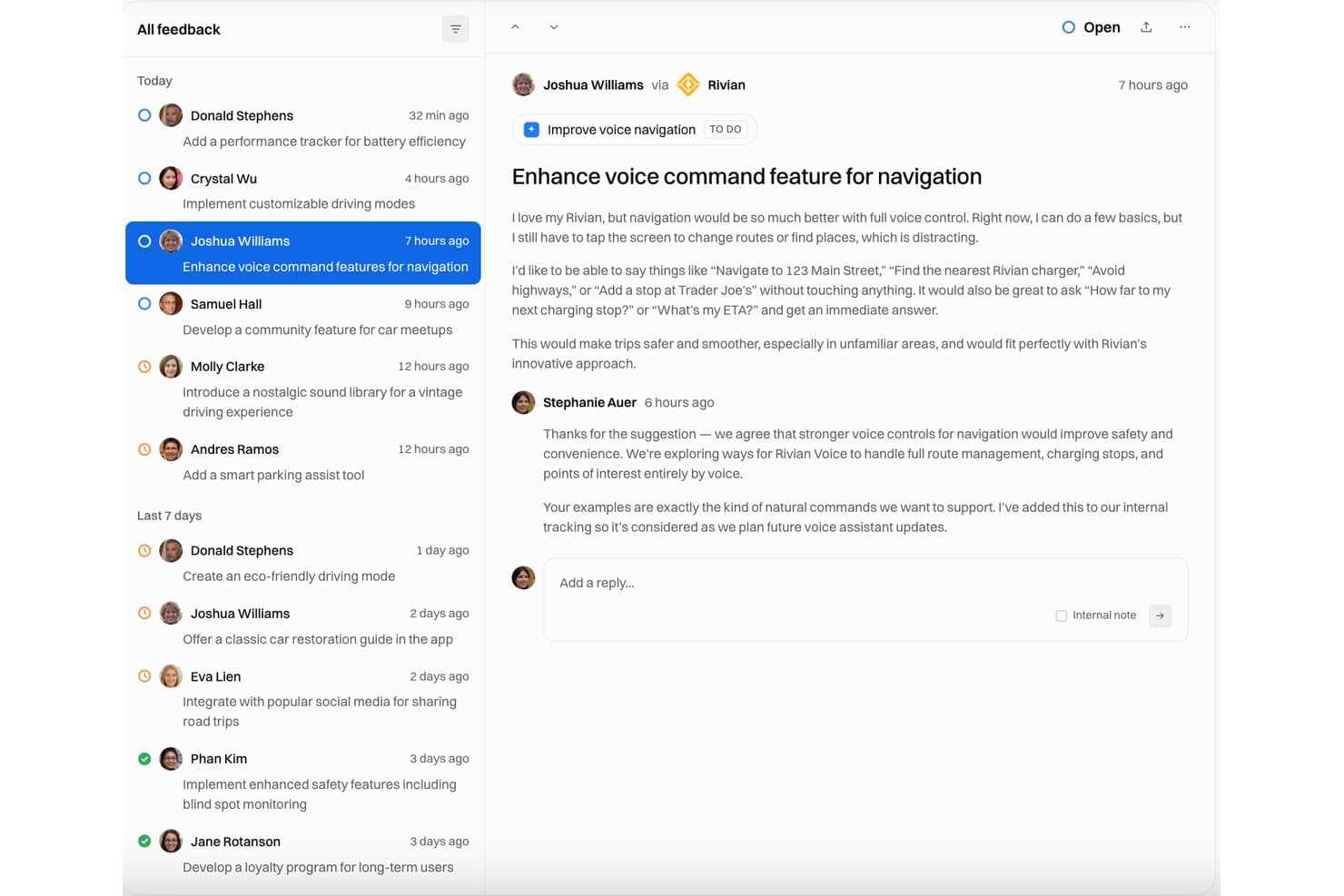
Released muestra una bandeja de entrada de comentarios donde se realiza el seguimiento de las solicitudes de mejora de la navegación por voz, con estado abierto y respuestas del equipo. Released es una herramienta nativa de Jira para recopilar comentarios y comunicar hojas de ruta, que recoge ideas de clientes y partes interesadas a través de portales alojados, formularios integrables y Slack, vinculando los envíos directamente con incidencias de Jira y Jira Product Discovery.
¿Para quién es más adecuado Released?
Released es adecuado para equipos de producto que ya utilizan Jira como estándar y necesitan compartir el progreso de la hoja de ruta y las actualizaciones de las versiones con clientes o socios sin darles acceso a Jira.
Por qué elegí Released
Released ocupa un lugar en mi lista de favoritos por lo bien que cierra la brecha de comunicación entre Jira y el mundo exterior. Me encanta poder publicar vistas de la hoja de ruta específicas para cada audiencia (una para clientes y otra para ejecutivos) desde una única fuente de Jira, sin necesidad de exportaciones ni de rehacer presentaciones de PowerPoint. La función de notas de versión con IA también resulta realmente útil: redacta actualizaciones pulidas a partir de incidencias de Jira completadas, que puedo enviar a un registro de cambios con marca, Slack o suscriptores de correo electrónico en cuestión de minutos.
Características principales de Released
- Bandeja de entrada de comentarios centralizada: Todas las ideas y comentarios enviados llegan a una bandeja de entrada de clasificación en Jira que permite realizar búsquedas.
- Formulario de comentarios integrable: Añade formularios para recopilar ideas directamente dentro de tu aplicación web, producto o sitio web.
- Visualización de la hoja de ruta: Crea y comparte hojas de ruta públicas en tiempo real que se sincronizan automáticamente con los proyectos de Jira.
- Integración con Jira Product Discovery: Los comentarios de los clientes pueden generar información vinculada directamente a las ideas en Jira Product Discovery.
Integraciones de Released
Released ofrece integración nativa con Jira. Hay una API disponible para integraciones personalizadas.
Pros and Cons
Pros:
- Recopilación de ideas nativa de Jira sin configuración adicional
- La IA redacta notas de versión a partir de incidencias cerradas
- El portal público no requiere iniciar sesión en Jira
Cons:
- Solo funciona dentro del ecosistema de Jira
- No incluye puntuación ni priorización de ideas
Learn more about Released: Ideal para la innovación colaborativa con estándares gubernamentales
- Demostración gratuita disponible
- Precios disponibles bajo solicitud
Visit WebsiteCustomer Rating:4.6/5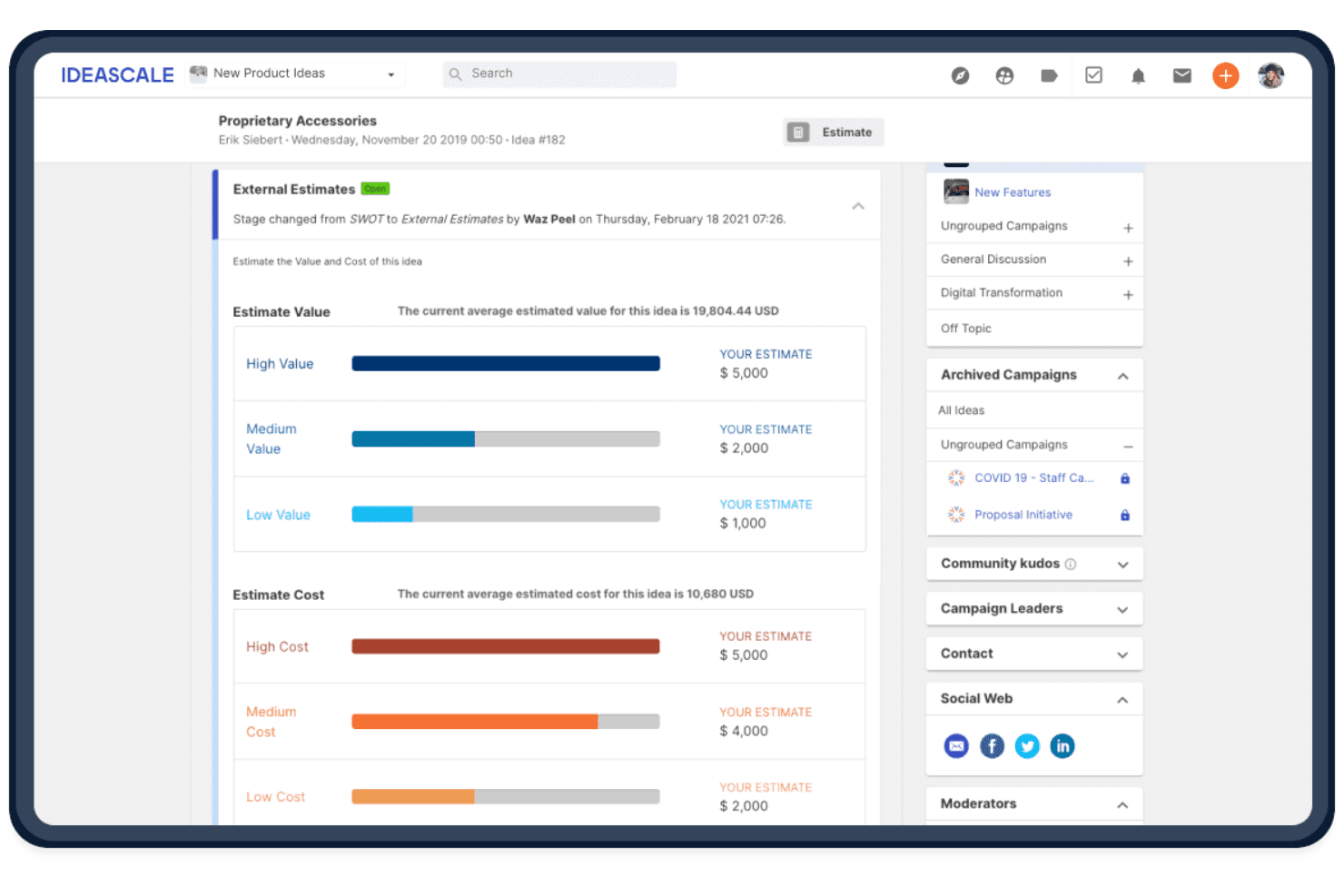
IdeaScale ayuda a los equipos a evaluar las ideas capturadas comparando el valor y el coste estimados para facilitar la priorización. IdeaScale es una plataforma empresarial de gestión de la innovación que permite a las organizaciones recopilar ideas de la comunidad, organizarlas, evaluarlas y dirigirlas mediante campañas y flujos de trabajo estructurados.
¿Para quién es más adecuada IdeaScale?
IdeaScale es adecuada para equipos de innovación e I+D de grandes empresas, organismos gubernamentales y universidades que necesitan ejecutar campañas de ideas estructuradas en toda la organización y a gran escala.
Por qué elegí IdeaScale
IdeaScale ocupa un lugar en mi lista de opciones principales porque es la única solución de gestión de ideas con certificación FedRAMP que he encontrado, algo de enorme importancia cuando se ejecutan campañas de innovación dentro de un organismo gubernamental o una empresa regulada. Me gusta cómo la plataforma combina la votación de la comunidad, la detección de duplicados mediante IA y la sincronización bidireccional con Jira para trasladar las ideas desde el envío inicial hasta un elemento priorizado de la hoja de ruta sin transferencias manuales.
Características principales de IdeaScale
- Captura de ideas en Slack y Teams: Envía ideas directamente desde un comando de Slack o Microsoft Teams sin salir de tu flujo de trabajo.
- Ideas vinculadas: Conecta ideas relacionadas mediante siete tipos de relación, como «similar a», «respalda» y «forma parte de», en distintas campañas.
- Vista de cartera de ideas: Revisa las ideas de todas las comunidades en una única vista Kanban o de lista, con acciones masivas para etiquetar, asignar responsables y exportar.
- Detección de duplicados mediante IA: Marca ideas similares durante el envío y muestra una comparación en paralelo con un porcentaje de similitud para reducir la duplicación.
Integraciones de IdeaScale
IdeaScale ofrece integraciones nativas con Slack, Microsoft Teams, Jira, Azure Boards, Trello, YouTrack, Power BI y Tableau. También admite webhooks, una API REST y Zapier para conexiones personalizadas.
Pros and Cons
Pros:
- Admite campañas de ideas en toda la organización
- Vincula las ideas con etapas de evaluación estructuradas
- Detecta duplicados antes del envío
Cons:
- Requiere una configuración organizativa para la captura
- El texto y los archivos adjuntos limitan los formatos de entrada
Learn more about IdeaScale: Ideal para tableros visuales que organizan ideas creativas
- Plan gratuito disponible
- Desde $9.99/usuario/mes (facturado anualmente)
Visit WebsiteCustomer Rating:4.7/5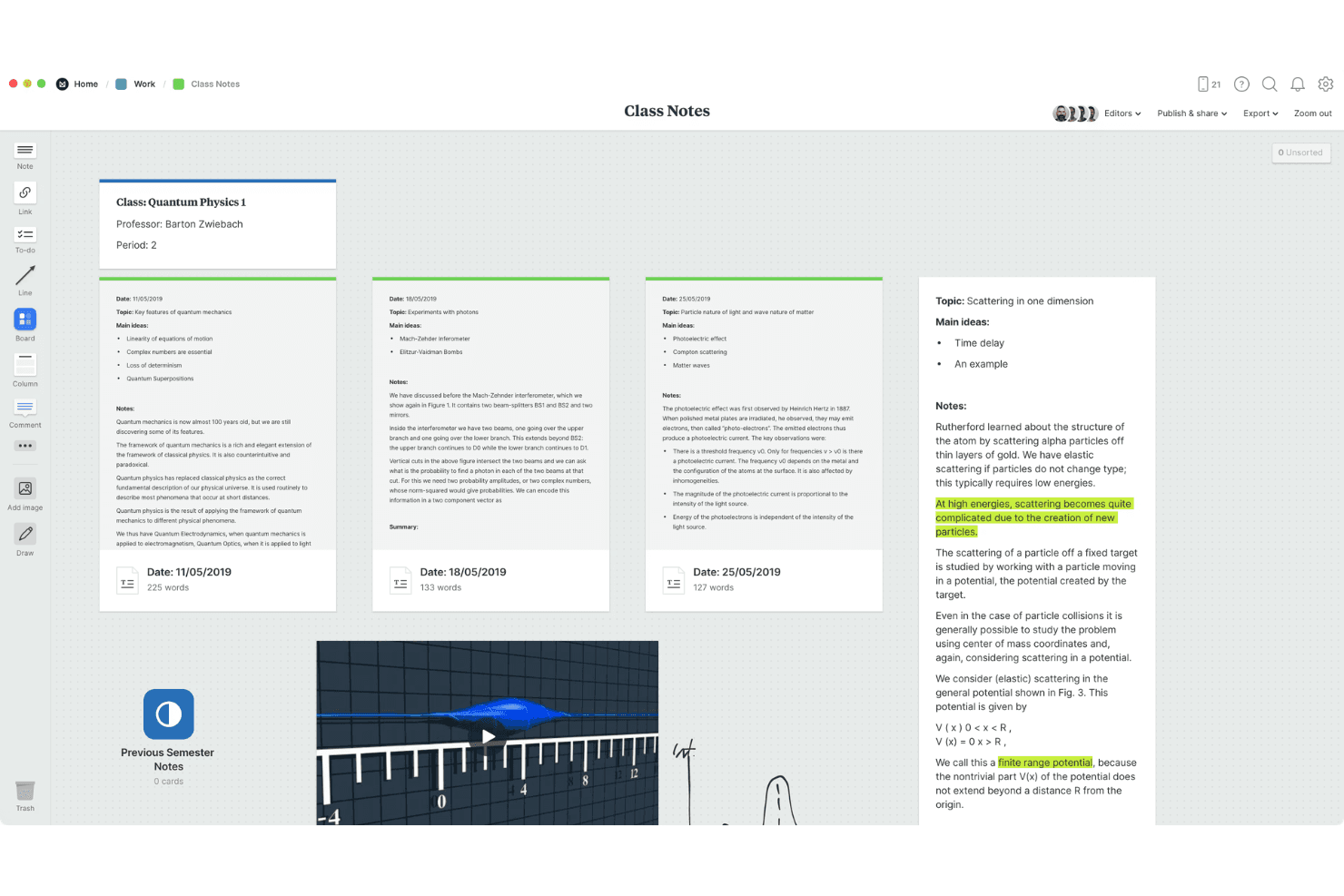
La compatibilidad con contenido multimedia añade imágenes, enlaces y notas a los tableros. Milanote es una herramienta visual para capturar ideas que permite recopilar notas, imágenes, enlaces, archivos y recortes web en tableros flexibles y anidables, con compatibilidad para la colaboración en tiempo real y la sincronización entre varios dispositivos.
¿Para quién es más adecuado Milanote?
Milanote es una excelente opción para profesionales del conocimiento individuales y creativos independientes que piensan visualmente y quieren un espacio flexible para capturar y conectar ideas en múltiples formatos.
Por qué elegí Milanote
Milanote está en mi lista de favoritos por la naturalidad con la que convierte ideas dispersas en tableros visuales organizados. Me encanta que puedas arrastrar notas, imágenes, enlaces y recortes web a un único lienzo y después anidar tableros dentro de otros para crear una estructura realmente organizada. Notas rápidas en dispositivos móviles me permite capturar al instante un pensamiento fugaz y luego clasificarlo en el tablero adecuado desde el ordenador.
Características principales de Milanote
- Recortador web: Una extensión del navegador para Chrome, Firefox y Safari que guarda imágenes, texto, enlaces y vídeos directamente en tus tableros, registrando automáticamente la URL de origen.
- Tableros anidados: Los tableros pueden colocarse dentro de otros tableros, lo que permite crear estructuras por capas que crecen con un proyecto sin perder claridad visual.
- Lienzo multiformato: Un solo tablero puede contener notas de texto, imágenes, vídeos, bocetos, archivos, enlaces y elementos de tareas pendientes, todos organizados y conectados mediante arrastrar y soltar.
- Controles de uso compartido flexibles: Comparte tableros mediante enlaces con permisos de edición, solo para comentarios o de solo lectura, con protección opcional mediante contraseña y sin necesidad de iniciar sesión para los espectadores.
Integraciones de Milanote
Milanote no tiene integraciones nativas con herramientas de gestión de productos o colaboración. Es compatible con enlaces de archivos de Dropbox, extensiones del navegador para Chrome, Firefox y Safari, e inserciones de tableros, pero no hay una API pública documentada.
Pros and Cons
Pros:
- Notas rápidas captura ideas fugaces al instante
- Los tableros anidados organizan proyectos creativos extensos
- Los medios combinados mantienen el contexto junto a las ideas
Cons:
- No hay acceso sin conexión para revisar ideas
- La organización manual reemplaza las etiquetas y la puntuación
Learn more about Milanote: Ideal para capturar ideas dentro de Google Workspace
- Plan gratuito disponible
- Desde $7/usuario/mes
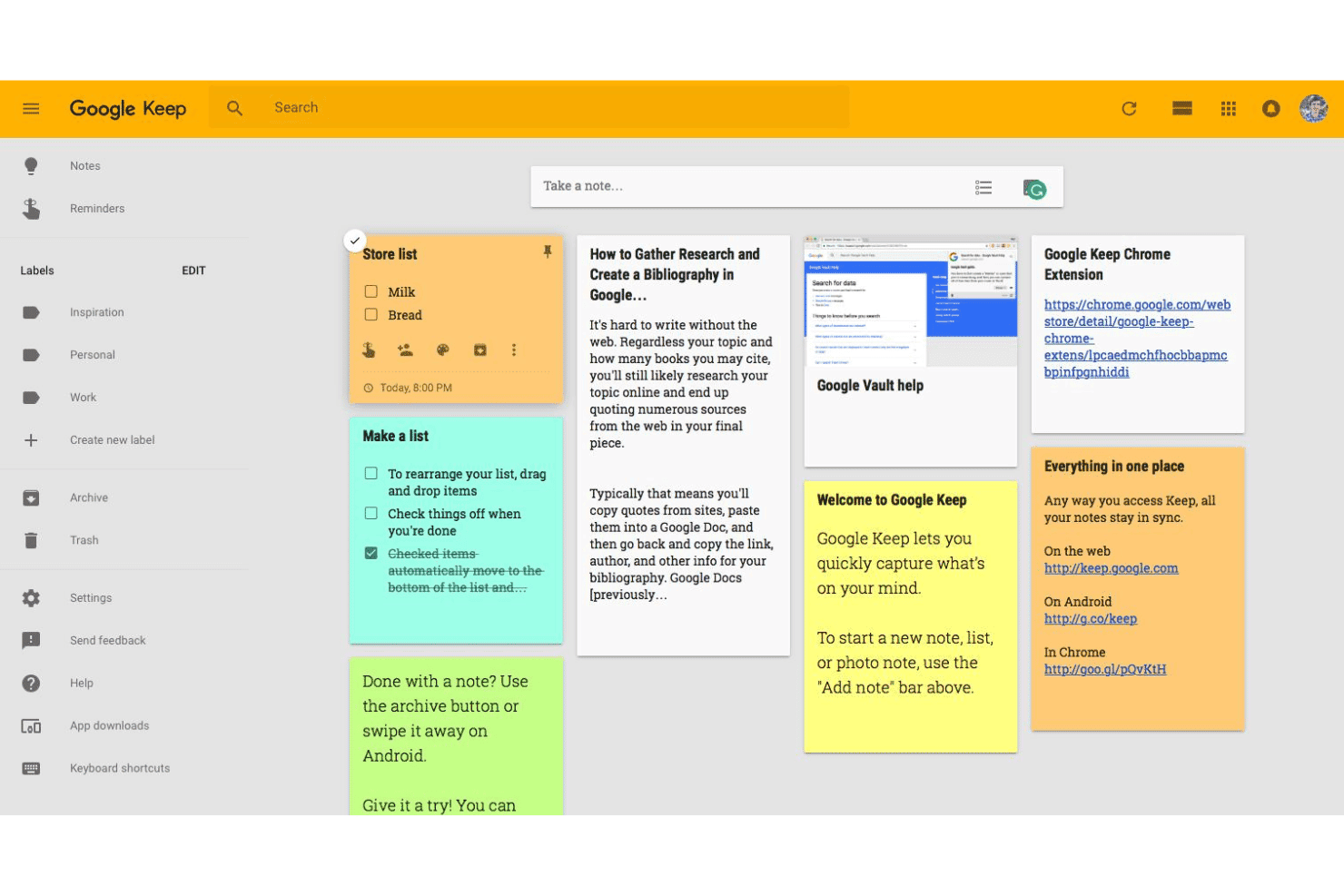
Google Keep ayuda a los usuarios a capturar, organizar y compartir notas sin esfuerzo. Google Keep es una herramienta para tomar notas y capturar ideas que admite texto, listas de verificación, fotos, dibujos y grabaciones de audio, con sincronización en tiempo real entre dispositivos y colaboración básica mediante notas compartidas y editables por varias personas.
¿Para quién es más adecuado Google Keep?
Google Keep es una opción natural para colaboradores individuales y fundadores que ya trabajan intensamente con Google Workspace y quieren una forma sencilla de capturar ideas sin cambiar de herramienta.
Por qué elegí Google Keep
He incluido Google Keep entre mis opciones principales porque es la única herramienta para capturar ideas que está integrada de forma nativa en Google Workspace, lo que significa que puedes registrar un pensamiento directamente desde el panel lateral de Gmail o Docs sin abrir una pestaña nueva. Me encanta que permita capturar ideas en forma de texto, listas de verificación, fotos, dibujos y audio, por lo que Keep puede manejar cualquier formato en el que surja un pensamiento. La sincronización en tiempo real entre dispositivos, incluida la edición sin conexión, significa que nada se pierde entre el teléfono y el ordenador.
Características principales de Google Keep
- Organización mediante etiquetas y colores: Asigna códigos de color y etiquetas simples a las notas para poder filtrar y localizar rápidamente ideas específicas.
- Exportación a Google Docs: Convierte cualquier nota directamente en un archivo de Google Docs para ampliar una idea inicial hasta convertirla en un documento completo.
- Integración de recordatorios: Configura recordatorios basados en la hora o la ubicación para notas individuales y retoma las ideas en el momento adecuado.
- Extracción de texto de imágenes: Usa el reconocimiento óptico de caracteres integrado para extraer texto de las fotos, lo que te permite capturar notas manuscritas o contenido impreso como texto que se puede buscar.
Integraciones de Google Keep
Google Keep ofrece integraciones nativas con Gmail y Google Docs mediante el panel lateral de Google Workspace.
Pros and Cons
Pros:
- Captura texto, fotos, dibujos y audio
- Sincroniza ideas entre dispositivos con edición sin conexión
- Las notas compartidas permiten la edición colaborativa en tiempo real
Cons:
- Las etiquetas simples limitan la organización de ideas
- No ofrece votación, puntuación ni conversión en hoja de ruta
Learn more about Google Keep: Ideal para gestionar campañas de ideas en toda la empresa
- Demostración gratuita disponible
- Precio bajo solicitud

HYPE Innovation permite a los usuarios gestionar ideas visualmente en distintas etapas de revisión. HYPE Innovation es una plataforma empresarial de gestión de la innovación que recopila, organiza y evalúa ideas mediante campañas estructuradas, categorización basada en IA y flujos de trabajo de revisión colaborativa.
¿Para quién es más adecuada HYPE Innovation?
HYPE Innovation está diseñada para líderes de innovación y equipos de I+D de grandes organizaciones que necesitan ejecutar campañas estructuradas de ideas entre miles de empleados.
Por qué elegí HYPE Innovation
Elegí HYPE Innovation como una de las mejores opciones porque está diseñada específicamente para ejecutar campañas estructuradas de ideas en grandes organizaciones. Me gusta que la categorización inteligente mediante IA clasifique automáticamente las ideas recibidas por unidad de negocio, prioridad estratégica o tema, para que los revisores no tengan que lidiar con envíos sin etiquetas. La búsqueda de similitudes muestra al instante ideas duplicadas o relacionadas, algo importante cuando se gestionan miles de propuestas de una plantilla global.
Características principales de HYPE Innovation
- Complemento de innovación abierta: Amplía las campañas de ideas más allá de la plantilla interna para incluir a socios externos, proveedores y clientes como colaboradores.
- Asistente de campañas: Utiliza el procesamiento del lenguaje natural para resumir los resultados de las campañas y destacar información clave a partir de grandes volúmenes de propuestas.
- Flujos de trabajo por etapas: Hace avanzar las ideas por fases de revisión configurables con puntos de decisión, lo que permite que los evaluadores sepan en qué estado se encuentra cada idea.
- Integración con servidores MCP: Conecta agentes de IA y asistentes como Microsoft Copilot Studio para leer, crear y actualizar datos de HYPE respetando los permisos existentes.
Integraciones de HYPE Innovation
HYPE Innovation ofrece integraciones nativas con Microsoft Teams, SharePoint, Outlook, Jira, SAP, Power BI y Tableau. Las API REST y un servidor MCP permiten integraciones personalizadas con agentes de IA y asistentes.
Pros and Cons
Pros:
- Las campañas para toda la empresa organizan ideas a gran escala
- La categorización mediante IA reduce la revisión de ideas duplicadas
- La votación y la revisión por expertos favorecen la colaboración
Cons:
- Los formularios estructurados ralentizan la captura espontánea de ideas
- La configuración avanzada requiere ayuda externa
Learn more about HYPE Innovation: Ideal para organizar ideas junto con documentos de proyectos
- Plan gratuito disponible
- Desde $10/usuario/mes (facturado anualmente)
Visit WebsiteCustomer Rating:4.6/5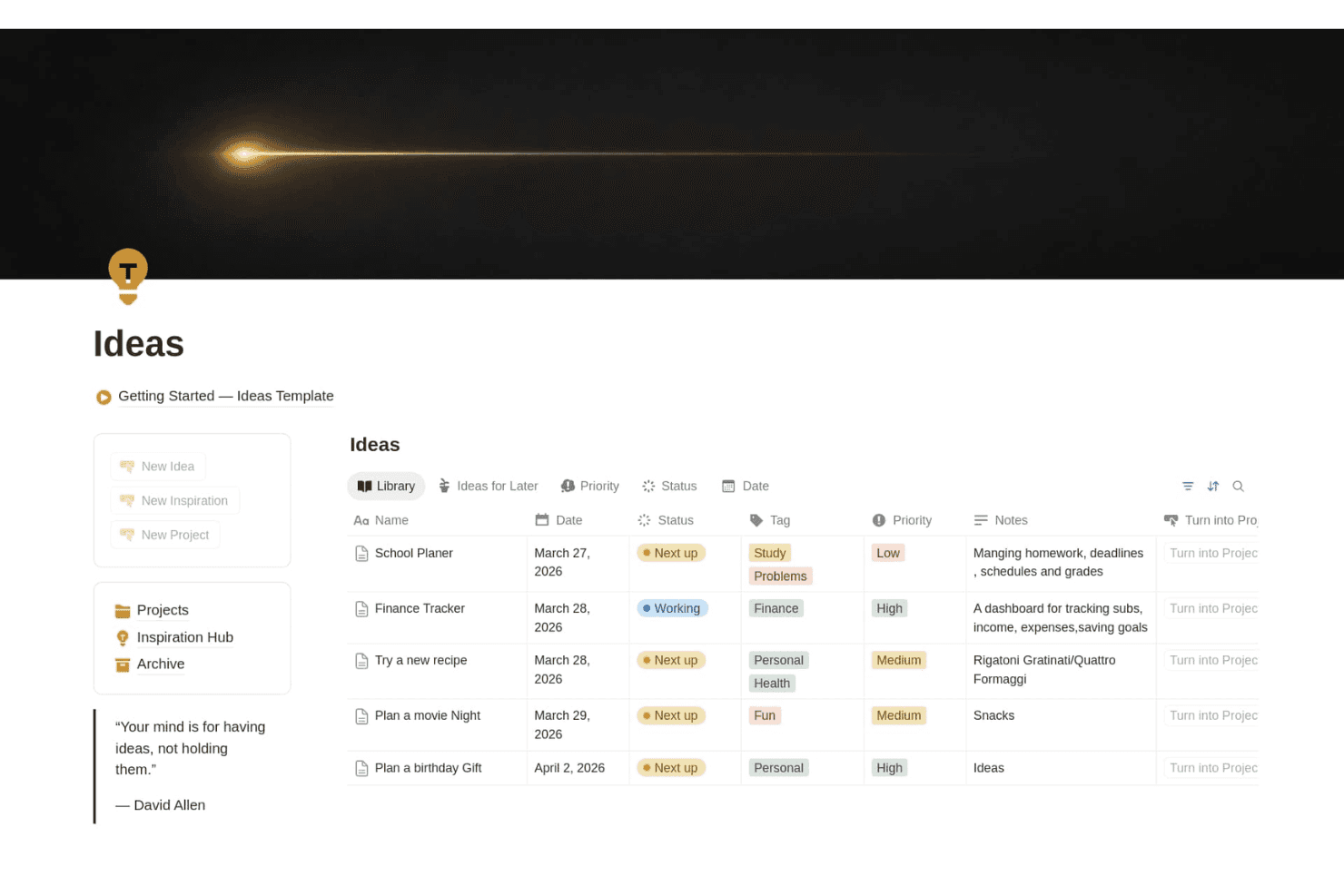
Notion ayuda a los equipos a capturar y organizar ideas por estado, prioridad, etiquetas, fechas y notas en un espacio de trabajo personalizable. Notion es una herramienta de espacio de trabajo flexible que combina la captura de ideas, la organización basada en bases de datos y la gestión de documentos mediante páginas, formularios, un recortador web y bases de datos relacionadas.
¿Para quién es más adecuado Notion?
Notion funciona mejor para gerentes de producto y equipos de innovación que quieren capturar y organizar ideas dentro del mismo espacio de trabajo donde gestionan hojas de ruta y documentos de proyectos.
Por qué elegí Notion
Notion ocupa un lugar en mi lista de favoritos porque es la única herramienta de aquí que permite que tus ideas estén en el mismo espacio de trabajo que tus hojas de ruta, especificaciones y documentos de proyectos. Me gusta especialmente cómo las bases de datos relacionadas permiten conectar una idea sin procesar directamente con una tarea o un elemento de la hoja de ruta, para que nada se pierda en una aplicación independiente. El recortador web también permite incorporar páginas de la competencia o comentarios de clientes directamente a una base de datos de ideas, con etiquetas y listas para revisar.
Características principales de Notion
- Recortador web: Una extensión del navegador que guarda cualquier página web directamente en tu espacio de trabajo de Notion o en una base de datos específica para revisarla más adelante.
- Propiedades personalizadas de las bases de datos: Añade etiquetas, estados, campos de selección y filtros para organizar las ideas con tanta o tan poca estructura como necesite tu equipo.
- Formularios con lógica condicional: Recopila propuestas de ideas de compañeros de equipo o partes interesadas directamente en una base de datos, disponible en los planes Plus y superiores.
- Acceso sin conexión: Las aplicaciones de escritorio y móviles admiten un uso completo sin conexión, para que puedas capturar y revisar ideas sin conexión a Internet.
Integraciones de Notion
Notion ofrece integraciones documentadas con Slack, Google Drive, GitHub, Asana y Jira, con sincronizaciones unidireccionales de bases de datos para Jira, GitHub y Asana en versión beta. También proporciona una API pública y webhooks para integraciones personalizadas.
Pros and Cons
Pros:
- Las ideas se conectan directamente con las hojas de ruta
- Las etiquetas personalizadas permiten revisar las ideas de forma estructurada
- El recortador web captura investigaciones para revisarlas más adelante
Cons:
- La captura rápida en móviles resulta lenta
- No ofrece votación nativa ni detección de duplicados
Learn more about Notion: La mejor opción para capturar contenido gratis en todos los dispositivos Apple
- Plan gratuito disponible
- Uso gratuito
Visit WebsiteCustomer Rating:4.7/5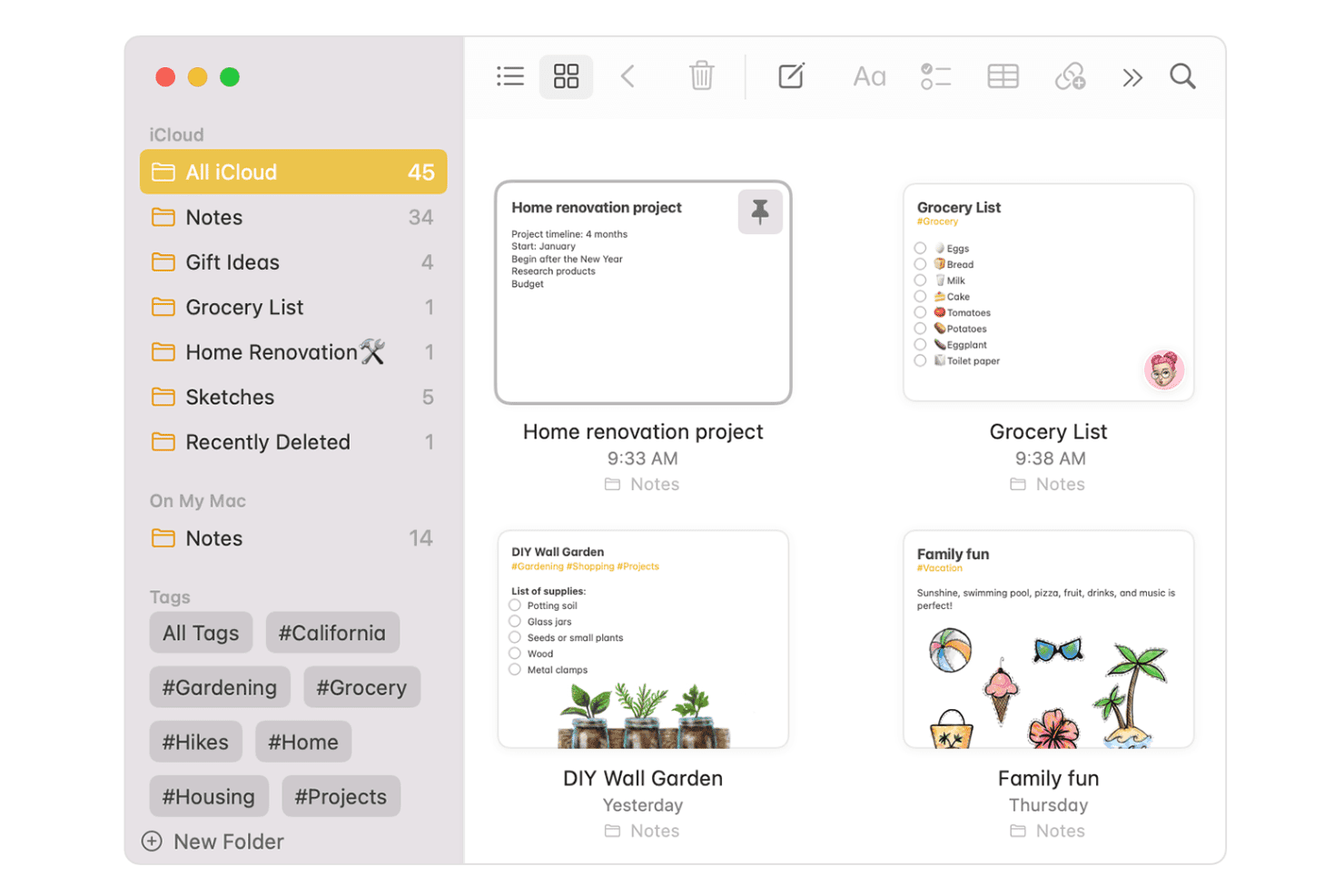
Apple Notes simplifica la toma de notas, la organización y la colaboración entre dispositivos Apple. Apple Notes es una aplicación gratuita para tomar notas integrada en todos los dispositivos Apple que admite texto, audio con transcripción, dibujos, escaneos y archivos adjuntos, todo organizado mediante carpetas, etiquetas y carpetas inteligentes con sincronización de iCloud entre dispositivos.
¿Para quién es más adecuado Apple Notes?
Apple Notes es ideal para fundadores individuales y profesionales del conocimiento que trabajan por su cuenta y quieren un lugar gratuito y siempre disponible para capturar ideas en su iPhone, iPad, Mac y Apple Watch.
Por qué elegí Apple Notes
Apple Notes ocupa un lugar en mi lista de favoritos porque ninguna otra herramienta gratuita iguala su velocidad de captura en todos los dispositivos Apple. Me encanta que tocar la pantalla bloqueada con un Apple Pencil abra al instante una nota nueva y que las grabaciones de audio incluyan transcripciones en directo y con capacidad de búsqueda, de modo que una nota de voz rápida desde el Apple Watch no desaparezca en un archivo sin etiqueta. Después, las carpetas inteligentes y las etiquetas facilitan encontrar esas ideas capturadas sin tener que clasificarlas manualmente.
Funciones clave de Apple Notes
- Escaneo de documentos: Usa la cámara para escanear documentos físicos, recibos o pizarras directamente en una nota como un archivo con capacidad de búsqueda y firma.
- Resolución de operaciones matemáticas integrada: Escribe cualquier expresión matemática seguida de '=' y Apple Notes calculará el resultado automáticamente dentro de la nota.
- Carpetas inteligentes: Agrupa automáticamente las notas por etiquetas, fecha u otros criterios para que las ideas relacionadas aparezcan juntas sin tener que clasificarlas manualmente.
- Enlaces entre notas: Escribe '>>' seguido del título de una nota para crear un enlace directo entre notas y conectar ideas relacionadas en toda tu biblioteca.
Integraciones de Apple Notes
Apple Notes ofrece integraciones nativas en todo el ecosistema de Apple, como Safari, Mapas, Fotos, Siri, Apple Intelligence, iCloud Drive e iCloud.com.
Pros and Cons
Pros:
- Captura instantánea desde la pantalla bloqueada y el Apple Watch
- Busca en textos manuscritos, escaneos y objetos de imágenes
- Los enlaces, las etiquetas y las carpetas inteligentes organizan las ideas
Cons:
- No ofrece flujos de trabajo para votar o puntuar ideas
- No permite convertir directamente el contenido en tareas o hojas de ruta
Learn more about Apple Notes: Ideal para capturar contenido en varios formatos desde cualquier dispositivo
- Plan gratuito + prueba gratuita de 7 días disponible
- Desde $8.25/mes (facturado anualmente)
Visit WebsiteCustomer Rating:4.4/5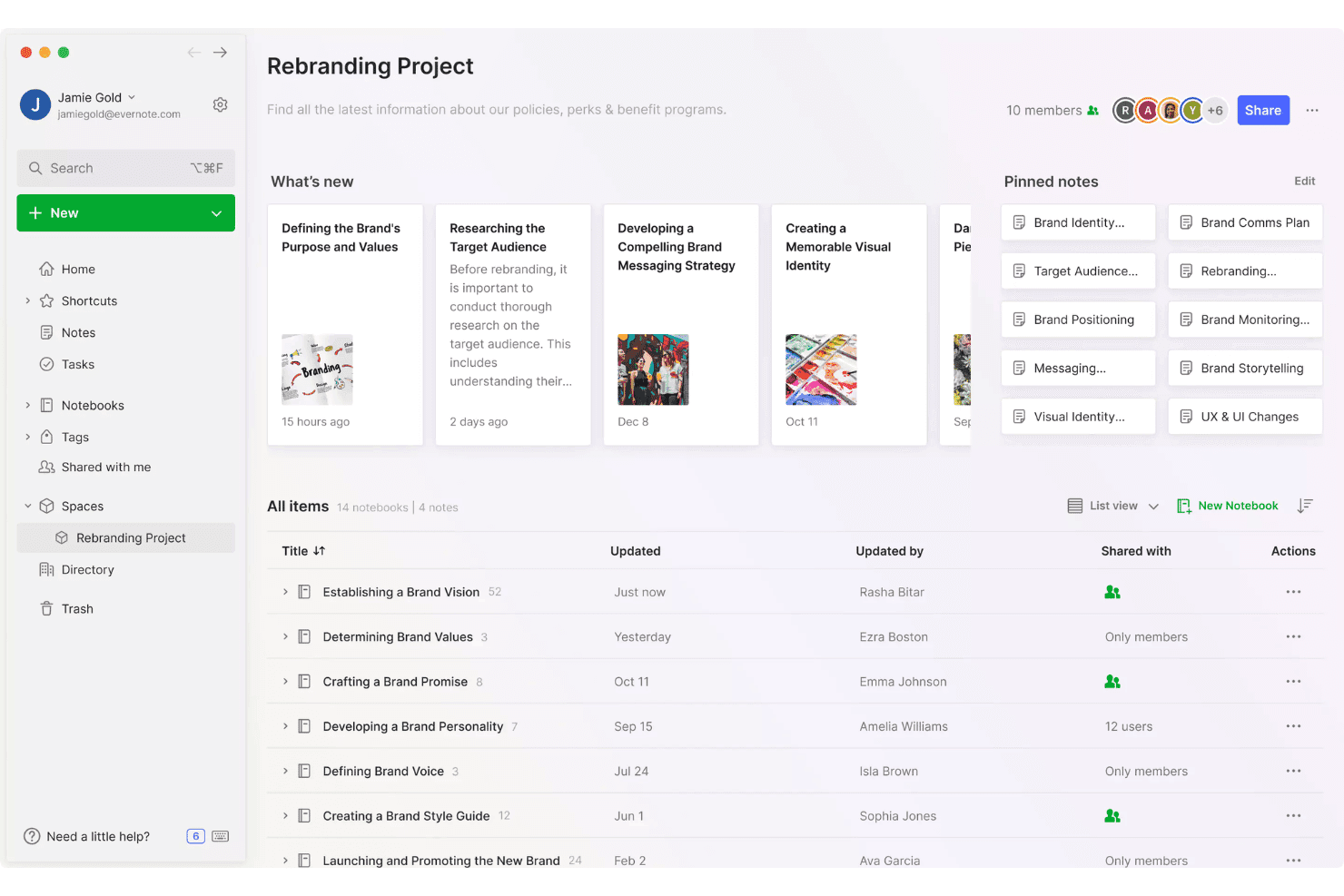
Evernote ayuda a los equipos a capturar y organizar ideas en espacios de proyectos compartidos mediante notas, libretas, etiquetas y contenido fijado. Evernote es una aplicación para tomar notas y capturar ideas que admite texto, audio, escaneo de documentos, recortes web y escritura a mano en entornos de escritorio, móviles y de navegador.
¿Para quién es más adecuado Evernote?
Evernote es una opción excelente para fundadores independientes y profesionales del conocimiento que necesitan capturar ideas rápidamente en varios dispositivos y formatos sin tener que gestionar una herramienta compleja.
Por qué elegí Evernote
Evernote ocupa un lugar en mi lista de favoritos porque ninguna otra herramienta que haya probado captura ideas en tantos formatos sin obligarte a cambiar de aplicación. Puedo tomar una foto de un boceto en una pizarra, grabar una nota de voz durante mi trayecto y recortar la página de precios de un competidor desde Chrome, y todo termina en una sola nota que se puede buscar. La búsqueda semántica encuentra esa nota a partir de una descripción en lenguaje natural, incluso semanas después.
Características principales de Evernote
- Asistente de IA: Una herramienta de chat integrada que organiza notas, añade etiquetas y recupera contenido de tus notas existentes mediante indicaciones en lenguaje natural.
- Recortador web: Una extensión del navegador que guarda páginas completas, artículos, archivos PDF y capturas de pantalla directamente en Evernote, con opciones para etiquetar y ordenar durante la captura.
- Tareas colaborativas: Tareas asignables con fechas de vencimiento y recordatorios que viven dentro de las notas y permiten compartir la responsabilidad dentro de un equipo.
- Conector MCP: Conecta tus notas de Evernote con herramientas de IA externas como Claude y ChatGPT, lo que te permite consultar tu biblioteca de notas desde esos entornos.
Integraciones de Evernote
Evernote ofrece integraciones nativas con Gmail, Google Drive, Google Calendar, Microsoft Outlook y Slack. Su conector MCP también conecta las notas con Claude, ChatGPT y otras herramientas de IA compatibles con MCP.
Pros and Cons
Pros:
- Captura audio, escaneos, recortes y escritura a mano
- La búsqueda semántica recupera ideas a partir de descripciones sencillas
- Sincroniza ideas entre el escritorio, el móvil y la web
Cons:
- El plan gratuito limita las notas, las libretas y los dispositivos
- No ofrece votaciones, puntuaciones ni conversión a hoja de ruta
Learn more about Evernote: Ideal para notas que conectan ideas a lo largo del tiempo
- Prueba gratuita de 14 días + demostración gratuita disponible
- Precios bajo consulta
Visit WebsiteCustomer Rating:4.8/5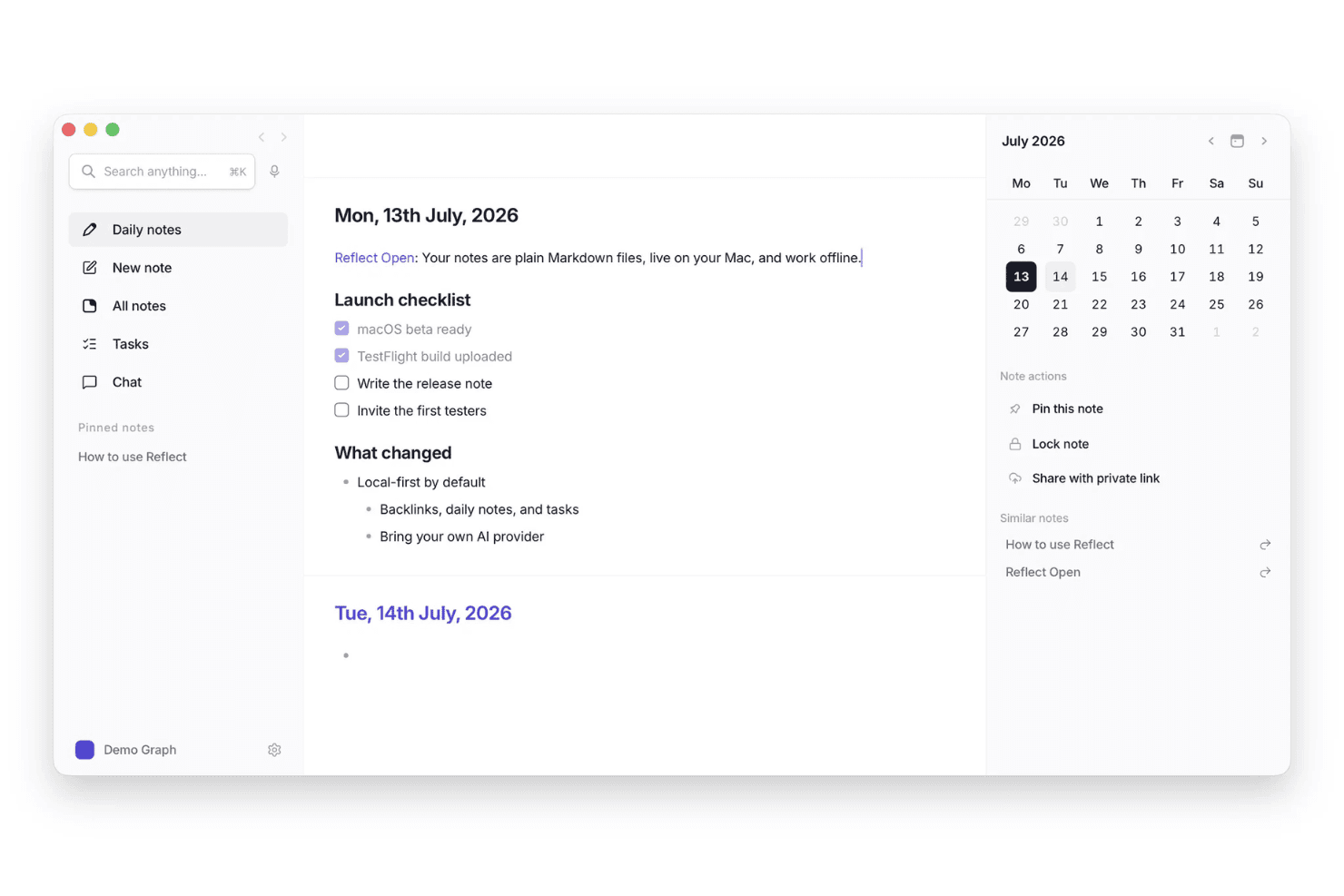
Reflect ayuda a los usuarios a capturar ideas en notas diarias y conectarlas con tareas, notas relacionadas y fechas del calendario. Reflect es una herramienta personal para tomar notas y capturar ideas, basada en notas diarias, enlaces de retorno, resúmenes asistidos por IA y transcripción de voz.
¿Para quién es más adecuado Reflect?
Reflect funciona mejor para profesionales del conocimiento y pensadores independientes que necesitan una forma sencilla de capturar y conectar ideas mediante notas diarias, voz y fragmentos web.
Por qué elegí Reflect
He incluido Reflect entre mis opciones principales porque se basa en la idea de que las notas deben conectarse, no solo acumularse. Los enlaces de retorno y la vista gráfica visual permiten que un pensamiento que capturaste hace meses vuelva a aparecer cuando estás trabajando en algo nuevo. Me gusta especialmente la función de transcripción de voz, que convierte las ideas habladas en notas vinculadas sin interrumpir tu flujo de trabajo.
Características principales de Reflect
- Recortador web: Guarda fragmentos de páginas web directamente en tus notas mediante la extensión del navegador Chrome o Safari.
- Cifrado de extremo a extremo: Las notas están cifradas, por lo que ni siquiera Reflect puede acceder a tu contenido.
- Sincronización de calendarios y contactos: Conecta los calendarios y contactos de Google o Outlook para incorporar eventos y personas directamente a tus notas.
- Extracción de elementos de acción mediante IA: El asistente de IA integrado analiza tus notas y muestra automáticamente las conclusiones clave y los elementos de acción.
Integraciones de Reflect
Reflect se integra con los destacados de Readwise y Kindle, así como con los recortadores web de Chrome y Safari. También ofrece una API para integraciones personalizadas y es compatible con Zapier.
Pros and Cons
Pros:
- Las notas diarias permiten capturar pensamientos sin tener que decidir en qué carpeta guardarlos
- La transcripción de voz conserva las ideas durante los momentos de mayor actividad
- Los enlaces de retorno vuelven a mostrar conexiones entre notas antiguas
Cons:
- No hay espacios compartidos para perfeccionar ideas de forma colaborativa
- No existe una vía directa de las ideas a las hojas de ruta
Learn more about Reflect: 10Ideal para recopilar comentarios de usuarios de SaaS
Canny
- Plan gratuito + prueba gratuita + demostración gratuita disponibles
- Desde $79/mes (facturado anualmente)
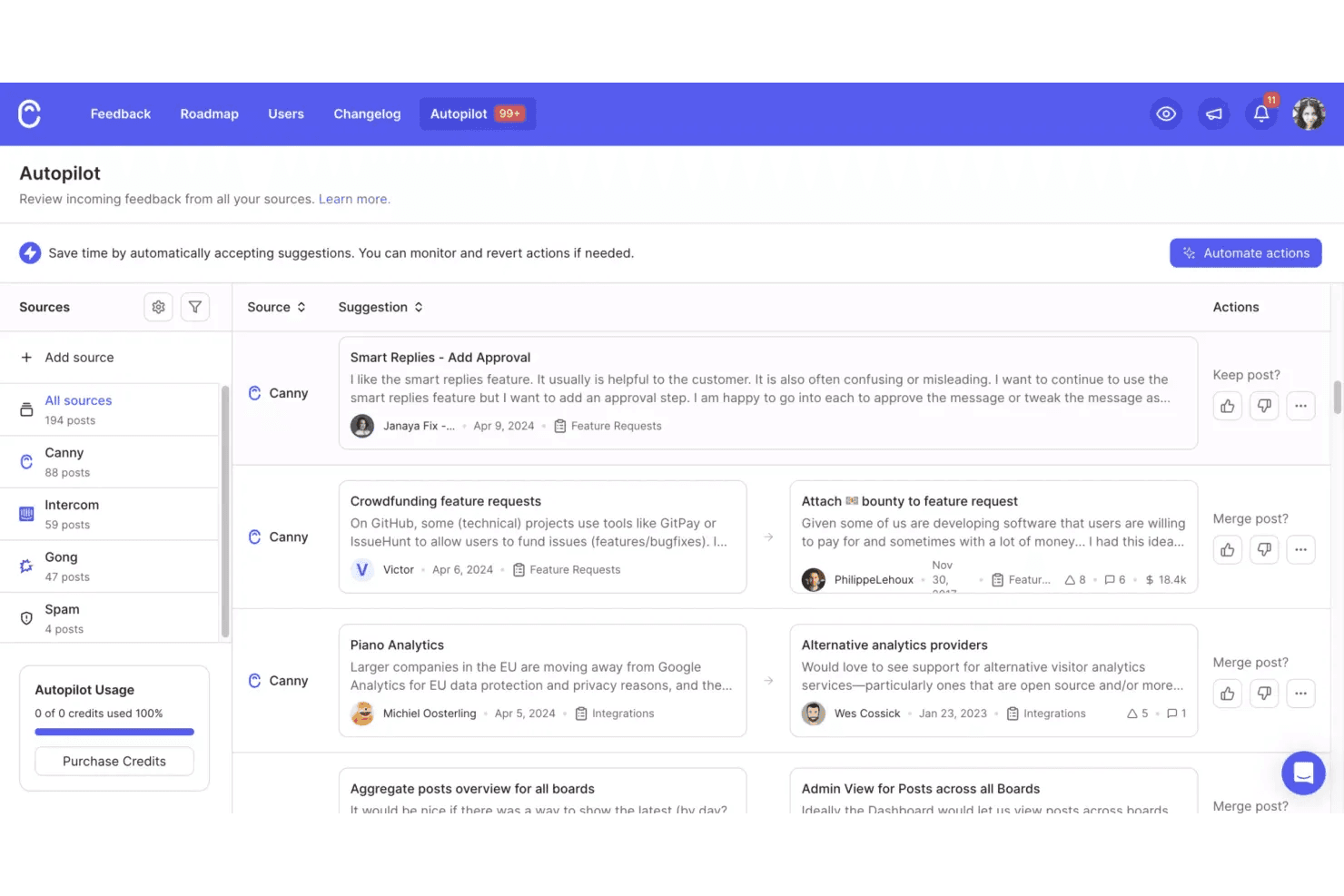
Canny ayuda a los equipos a recopilar y organizar los comentarios de producto recibidos desde varias fuentes, con sugerencias automatizadas para combinar ideas relacionadas. Canny es una plataforma de gestión de comentarios e ideas de clientes que permite a los equipos de SaaS recopilar, organizar y priorizar solicitudes de funciones mediante paneles públicos o privados, votaciones, captura de comentarios basada en IA y planificación de hojas de ruta.
¿Para quién es mejor Canny?
Canny es una opción ideal para los equipos de producto de SaaS que quieren convertir los comentarios de los clientes en elementos priorizados de la hoja de ruta sin clasificar manualmente decenas de tickets de soporte y conversaciones.
Por qué elegí Canny
Elegí Canny como una de las mejores opciones porque está diseñado específicamente para algo que la mayoría de las herramientas de captura de ideas tratan como algo secundario: convertir los comentarios de los clientes de SaaS en decisiones de producto priorizadas. Su función Autopilot extrae automáticamente las solicitudes de funciones de las conversaciones de soporte, las transcripciones de llamadas y las reseñas públicas, para que las ideas no se pierdan en Zendesk o Gong. También me gusta que cada idea esté vinculada al cliente y la cuenta que la respaldan, lo que significa que puedo ordenar las solicitudes por impacto en los ingresos recurrentes mensuales (MRR) en lugar de basarme únicamente en el número de votos.
Funciones principales de Canny
- Detección de duplicados de Autopilot: Identifica y combina automáticamente las solicitudes de funciones repetidas de varias fuentes para que tu panel de comentarios se mantenga limpio y práctico.
- Segmentación de votantes: Filtra las ideas por atributos de los usuarios, como el tipo de plan o el impacto en los ingresos recurrentes mensuales (MRR), para que puedas valorar las solicitudes según las cuentas más importantes para tu negocio.
- Hojas de ruta públicas y privadas: Comparte la dirección del producto con los clientes o mantenla interna, con actualizaciones de estado enviadas automáticamente a los votantes a medida que avanzan los elementos.
- Registro de cambios con widget integrado en la aplicación: Publica las notas de lanzamiento directamente dentro de tu producto, con lanzamientos programados y etiquetas para mantener informados a los usuarios sobre lo que se ha publicado.
Integraciones de Canny
Canny ofrece integraciones con Jira, Linear, GitHub, ClickUp, Asana, Azure DevOps, Slack, Microsoft Teams, Salesforce y HubSpot. También proporciona una API, webhooks y conectividad con Zapier.
Pros and Cons
Pros:
- Vincula los comentarios con los clientes y los ingresos
- Autopilot captura solicitudes de las conversaciones
- Convierte los comentarios en elementos priorizados de la hoja de ruta
Cons:
- No ofrece captura móvil ni por voz nativa
- La publicación deliberada ralentiza la captura espontánea de ideas
Learn more about Canny:
Otras herramientas para capturar ideas
Estas son algunas opciones adicionales de herramientas para capturar ideas que no llegaron a mi lista de selección, pero que aun así merece la pena consultar:
- 11DraftsIdeal para escribir priorizando la captura en dispositivos Apple
- 12ProductboardIdeal para convertir los comentarios de los clientes en funcionalidades
- 13ViimaLa mejor opción para visualizar el progreso de las ideas en tiempo real
- 14Microsoft OneNoteIdeal para tomar notas en equipos de Microsoft 365
- 15ObsidianIdeal para vincular notas y mostrar cómo se conectan las ideas
- 16IdeamapMejor con agrupación de ideas impulsada por IA
- 17Aha! IdeasIdeal para convertir los comentarios de los clientes en ideas para la hoja de ruta
- 18Tana OutlinerIdeal para capturar ideas individuales con notas estructuradas por IA
Cómo evalúo las herramientas para capturar ideas
Divido mi evaluación en tres partes: funcionalidad principal (capturar ideas al instante y recuperarlas mediante búsquedas), funciones destacadas como la captura de voz a texto y factores más allá de las funciones, como la asistencia durante la incorporación y la flexibilidad de precios. La funcionalidad principal tiene el mayor peso.
Funcionalidad principal (requisitos básicos indispensables para esta lista)
Al seleccionar herramientas para mi lista, puntúo cada una en una escala de 0 (no ofrece la funcionalidad) a 5 (sobresale en esta área) para cada funcionalidad principal que se indica a continuación. Después convierto el total en un porcentaje para ayudar a evaluar la adecuación general de cada herramienta, con peso adicional para cualquier funcionalidad que haya considerado esencial.
- Captura rápida de ideas (esencial): Compruebo si una herramienta permite registrar un pensamiento con una sola acción —un atajo de teclado, un widget móvil o un comando de voz— sin tener que navegar primero por los menús.
- Organización y etiquetado de ideas: El etiquetado flexible y la agrupación personalizada son importantes aquí. Busco etiquetas anidadas, campos personalizados o carpetas inteligentes que sigan siendo útiles cuando se tienen cientos de entradas.
- Sincronización entre dispositivos: Evalúo si las ideas se sincronizan casi al instante entre equipos de escritorio, dispositivos móviles y la web. El acceso sin conexión con resolución automática de conflictos es un factor diferenciador clave.
- Compatibilidad con varios formatos de entrada: Las herramientas deberían aceptar texto, notas de voz, imágenes y recortes web dentro de un mismo registro de idea. Me fijo en qué tan bien se integra cada formato, no solo en si está disponible.
- Búsqueda y recuperación: Pruebo la búsqueda por palabras clave en el contenido de las ideas, las etiquetas y los archivos adjuntos. Las opciones de filtrado por fecha, formato o etiqueta me indican si la recuperación sigue siendo rápida a medida que aumenta el volumen.
- Uso compartido colaborativo: Los equipos de producto necesitan espacios de ideas compartidos con funciones para comentar y votar. Evalúo si los compañeros de equipo pueden crear y perfeccionar ideas en conjunto sin recurrir a soluciones alternativas de copiar y pegar.
Una vez que tengo una lista de herramientas que cumplen los criterios, considero qué distingue a cada plataforma.
Factores diferenciadores (lo que distingue a los proveedores)
Así es como comparo y contrasto a los distintos proveedores:
Funciones destacadas
Busco un motor de detección de duplicados que señale los envíos repetidos o coincidentes antes de que se acumulen. Cuando llegan cientos de ideas desde Slack, los tickets de soporte y los envíos a través del portal, detectar duplicados manualmente no es realista. También evalúo la captura de voz a texto, comprobando si las ideas dictadas se registran como entradas estructuradas en lugar de transcripciones sin procesar. La automatización de ideas a hojas de ruta también es importante. Compruebo si las ideas con puntuaciones altas se convierten directamente en elementos de la lista de tareas pendientes en herramientas como Jira, sin tener que volver a introducirlas manualmente.
Más allá de las funciones
Compruebo si el ecosistema de integraciones de una herramienta se conecta con las herramientas de gestión de productos y soporte que tu equipo ya utiliza, como Jira o Zendesk, ya que transferir ideas manualmente acaba con el impulso. La seguridad de los datos también es importante: busco permisos basados en roles y cumplimiento de SOC 2, especialmente cuando las ideas estratégicas necesitan una visibilidad restringida. Por último, evalúo la asistencia durante la incorporación, porque una herramienta con plantillas guiadas y ayuda para la migración permite que un equipo de producto empiece a capturar ideas en días, no en semanas.
Cómo elegir herramientas para capturar ideas
Es fácil perderse entre largas listas de funciones y estructuras de precios complejas. Para ayudarte a mantener la concentración mientras avanzas en tu proceso particular de selección de software, aquí tienes una lista de factores que debes tener en cuenta:
| Factor | Qué debes tener en cuenta |
|---|---|
| FactorEscalabilidad | Qué debes tener en cuenta¿La herramienta será compatible con tu equipo a medida que crezca? Ten en cuenta los límites de usuarios, las limitaciones de almacenamiento y los saltos de precio a medida que aumenten tus necesidades. |
| FactorIntegraciones | Qué debes tener en cuenta¿La herramienta se conecta con tus aplicaciones actuales, como las de gestión de proyectos o comunicación? Comprueba que existan integraciones nativas, no solo acceso mediante API. |
| FactorPersonalización | Qué debes tener en cuenta¿Puedes adaptar las categorías, etiquetas o flujos de trabajo para que coincidan con el proceso de tu equipo? Evita las herramientas que impongan estructuras rígidas si tus necesidades son específicas. |
| FactorFacilidad de uso | Qué debes tener en cuenta¿Con qué rapidez pueden los nuevos usuarios empezar a capturar ideas? Busca pocos pasos de incorporación y una interfaz clara y sin distracciones. |
| FactorImplementación e incorporación | Qué debes tener en cuenta¿Qué recursos o asistencia ofrece el proveedor para la configuración? Valora si necesitarás formación, migración de datos o configuración administrativa. |
| FactorCoste | Qué debes tener en cuenta¿Hay tarifas ocultas, actualizaciones obligatorias o precios por usuario? Compara el coste total de propiedad, no solo las tarifas mensuales. |
| FactorMedidas de seguridad | Qué debes tener en cuenta¿La herramienta ofrece cifrado, controles de acceso y cumplimiento de las normas de datos de tu sector? Pregunta por la ubicación de los datos y las políticas de privacidad. |
| FactorDisponibilidad del soporte | Qué debes tener en cuenta¿Qué canales de asistencia se ofrecen, como chat, correo electrónico o teléfono, y en qué horario? Valora si necesitarás ayuda rápida durante las fases críticas del proyecto. |
¿Qué son las herramientas para capturar ideas?
Estas herramientas integrales para capturar ideas son plataformas digitales diseñadas para ayudar a individuos y equipos a registrar, organizar y gestionar rápidamente conceptos a medida que surgen durante la generación de ideas. Este tipo de software de gestión de ideas admite diversos tipos de entrada, como texto, imágenes y notas de voz, y a menudo incluye funciones para categorizar y recuperar ideas más adelante. Desempeñan un papel clave a la hora de garantizar que no se pierdan conocimientos valiosos y que puedan desarrollarse como proyectos o soluciones prácticas.
Funciones
Al seleccionar herramientas para capturar ideas, presta atención a las siguientes funciones clave:
- Entrada de texto: Permite a los usuarios anotar rápidamente ideas por escrito, facilitando la captura rápida y la edición sencilla.
- Archivos adjuntos de imagen: Permite añadir fotos, capturas de pantalla o bocetos a las ideas, lo que facilita la captura de inspiración visual o contexto.
- Notas de voz: Permite grabar ideas habladas, lo que resulta útil para capturar pensamientos mientras te desplazas o cuando escribir no es práctico.
- Categorización: Proporciona carpetas, etiquetas o rótulos para organizar las ideas por tema, proyecto o prioridad y recuperarlas más fácilmente.
- Búsqueda y filtrado: Ofrece herramientas sólidas de búsqueda y filtrado para que los usuarios puedan encontrar rápidamente ideas específicas o agrupar conceptos relacionados.
- Colaboración: Permite compartir ideas con los miembros del equipo, facilitando los comentarios, el debate y el desarrollo colectivo de conceptos.
- Recordatorios y notificaciones: Permite a los usuarios establecer recordatorios para revisar o ampliar ideas, ayudando a garantizar que no se olvide nada.
- Opciones de exportación: Permite a los usuarios exportar ideas a otros formatos o plataformas, facilitando la integración con flujos de trabajo más amplios.
- Disponibilidad de aplicación móvil: Garantiza que los usuarios puedan capturar y acceder a ideas desde cualquier dispositivo, no solo desde un ordenador de sobremesa o un navegador web.
Ventajas
Implementar herramientas para capturar ideas ofrece varias ventajas para tu equipo y tu empresa. Estas son algunas de las que puedes esperar:
- Menos ideas perdidas: Las funciones de captura rápida garantizan que los conocimientos valiosos se registren antes de que se olviden.
- Mejor organización: Las herramientas de categorización y búsqueda facilitan ordenar, encontrar y volver a consultar ideas cuando sea necesario.
- Colaboración más rápida: Las funciones para compartir y comentar ayudan a los equipos a desarrollar y perfeccionar ideas juntos en tiempo real.
- Mayor productividad: Los recordatorios y las notificaciones impulsan a los usuarios a actuar sobre las ideas y convertir la inspiración en acción.
- Mayor flexibilidad: El acceso móvil y las múltiples opciones de entrada permiten a los usuarios capturar ideas en cualquier momento y lugar, en el formato que mejor se adapte a ellos.
- Mejor retención del conocimiento: El almacenamiento centralizado mantiene todas las ideas en un solo lugar, facilitando la ampliación de reflexiones anteriores.
- Flujos de trabajo optimizados: Las opciones de exportación e integración conectan la captura de ideas con otras herramientas empresariales, facilitando el desarrollo de proyectos de principio a fin.
Costes y precios
Seleccionar herramientas para capturar ideas requiere comprender los distintos modelos de precios y planes disponibles. Los costes varían en función de las funciones, el tamaño del equipo, los complementos y otros factores. La tabla siguiente resume los planes habituales, sus precios medios y las funciones que suelen incluir las soluciones de herramientas para capturar ideas:
Tabla comparativa de planes para herramientas de captura de ideas
| Tipo de plan | Promedio | Funciones habituales |
|---|---|---|
| Tipo de planPlan gratuito | Promedio $0 | Funciones habitualesCaptura básica de ideas, almacenamiento limitado, acceso para un solo usuario y búsqueda y organización básicas. |
| Tipo de planPlan personal | Promedio $15–$40/usuario/mes | Funciones habitualesIdeas ilimitadas, acceso a la aplicación móvil, archivos adjuntos de imágenes y archivos, y opciones básicas de exportación. |
| Tipo de planPlan empresarial | Promedio $45–$90/usuario/mes | Funciones habitualesColaboración en equipo, organización avanzada, integraciones con otras herramientas y controles de administración. |
| Tipo de planPlan corporativo | Promedio $95–$150/usuario/mes | Funciones habitualesIntegraciones personalizadas, seguridad mejorada, asistencia prioritaria, análisis avanzados y asistencia para la incorporación. |
Preguntas frecuentes sobre herramientas para capturar ideas
Aquí tienes algunas respuestas a preguntas frecuentes sobre las herramientas para capturar ideas:
¿Cómo ayudan las herramientas para capturar ideas a los equipos remotos o híbridos?
Las herramientas para capturar ideas ayudan a los equipos remotos o híbridos al proporcionar un espacio centralizado para recopilar, organizar y compartir ideas desde cualquier lugar. Funciones como la colaboración en tiempo real, el acceso móvil y la sincronización en la nube ayudan a los equipos distribuidos a aportar y revisar ideas sin necesidad de estar en el mismo lugar.
¿Pueden las herramientas para capturar ideas integrarse con plataformas de gestión de proyectos?
Sí, muchas herramientas para capturar ideas ofrecen integraciones con plataformas de gestión de proyectos. Esto permite a los equipos trasladar las ideas directamente a los flujos de trabajo de los proyectos, asignar tareas y hacer un seguimiento del progreso sin tener que copiar manualmente la información ni cambiar de sistema.
¿Qué funciones de seguridad debo buscar en las herramientas para capturar ideas?
Busca funciones de seguridad como el cifrado de datos, los controles de acceso de los usuarios y el cumplimiento de normas de privacidad como el RGPD. Estas medidas de protección ayudan a proteger las ideas confidenciales y garantizan que solo los usuarios autorizados puedan acceder a la información o modificarla.
¿Cómo puedo migrar las ideas existentes a una nueva herramienta para capturar ideas?
La mayoría de las herramientas para capturar ideas ofrecen opciones de importación, como cargas de archivos CSV o integraciones con otras plataformas. Antes de migrar, revisa la documentación de la herramienta y considera la posibilidad de depurar u organizar tus ideas existentes para facilitar la transición.
¿Existen opciones sin conexión para capturar ideas?
Sí, algunas herramientas para capturar ideas ofrecen modos sin conexión que permiten registrar ideas sin conexión a Internet. Cuando vuelves a conectarte, la herramienta sincroniza tus nuevas ideas con la nube, lo que garantiza que no se pierda nada.