

Encontrar las herramientas adecuadas puede resultar abrumador cuando trabajas con un presupuesto ajustado. Aun así, necesitas una forma de crear maquetas atractivas que te ayuden a compartir ideas, pero no siempre es posible pagar por un software prémium. Los generadores de maquetas gratuitos pueden cubrir esa necesidad al ofrecerte opciones prácticas sin añadir costes adicionales.
Según mi experiencia, estas herramientas te ayudan a visualizar ideas rápidamente, lo que permite obtener comentarios e iterar con mayor rapidez. He revisado y probado de forma independiente varios generadores de maquetas para ofrecerte una lista imparcial de las mejores opciones gratuitas disponibles.
En este artículo encontrarás reseñas detalladas de las mejores opciones, cada una con funciones únicas para satisfacer las necesidades de tu equipo. Tanto si trabajas en interfaces de aplicaciones como en materiales de marketing, aquí encontrarás una herramienta que te ayudará a alcanzar tus objetivos.
Por qué confiar en nuestras recomendaciones de software
6,700+
Reviews
20
Industry experts
16+
Evaluation factors
14
Years
Nuestro equipo lleva probando y evaluando software desde 2012. Como gestores de producto, sabemos lo difícil —y lo importante— que es elegir el software adecuado.
Para esta guía, evaluamos las herramientas mediante pruebas prácticas e investigación independiente, puntuando las herramientas según nuestros criterios de selección.
Nuestras reseñas reflejan nuestro criterio editorial humano, no un discurso de ventas.
Revisores expertos:
 Hannah ClarkSenior TPM
- Cristiano ValimSenior UI/UX Lead

Tabla comparativa de generadores de maquetas gratuitos
Esta tabla comparativa muestra los precios iniciales de cada generador de maquetas gratuito de mi selección, incluidas las opciones de actualización de pago.
| Tool | Best For | Trial Info | Price | ||
|---|---|---|---|---|---|
| 1 | La mejor opción para crear rápidamente maquetas con tecnología de IA en distintos formatos | Prueba gratuita + plan gratuito disponible | Desde $144/usuario/año (facturado anualmente) | Website | |
| 2 | La mejor opción para crear maquetas de productos personalizados con más de 1000 plantillas | Plan gratuito disponible | Desde $39/mes | Website | |
| 3 | Ideal para la variedad de maquetas 3D de envases y dispositivos | Plan gratuito disponible; prueba gratuita de 7 días | Desde $17/usuario/mes (facturado anualmente) | Website | |
| 4 | Ideal para personalizar maquetas fácilmente en línea | Plan gratuito disponible | Desde €3.75/mes (facturado anualmente) | Website | |
| 5 | Ideal para mockups de productos con IA y sin marcas de agua | Plan gratuito disponible | Desde $5.7/mes (facturado anualmente) | Website | |
| 6 | Ideal para maquetas mediante arrastrar y soltar en más de 5.300 escenas | Plan gratuito disponible | Desde $15/mes | Website | |
| 7 | Ideal para imágenes de maquetas de dispositivos 3D y animadas | Plan gratuito disponible | Desde $228/año (facturado anualmente) | Website | |
| 8 | Ideal para maquetas de dispositivos en 3D con integración con Figma | Plan gratuito disponible | Desde $15/mes | Website | |
| 9 | Ideal para recursos de capturas de pantalla de App Store, gratis para siempre | Plan gratuito disponible | Desde $19/mes | Website | |
| 10 | Ideal para maquetas de dispositivos centradas en la privacidad y sin iniciar sesión | Plan gratuito disponible | Precio bajo consulta | Website |


Reseñas de los mejores generadores de maquetas gratuitos
Aunque todos los generadores de maquetas de mi lista ofrecen opciones gratuitas, también cuentan con planes de pago por si deseas actualizarte. Estos son los costes básicos de cada una de las herramientas que llegaron a mi selección:
 La mejor opción para crear rápidamente maquetas con tecnología de IA en distintos formatos
- Prueba gratuita + plan gratuito disponible
- Desde $144/usuario/año (facturado anualmente)
Visit WebsiteCustomer Rating:4.7/5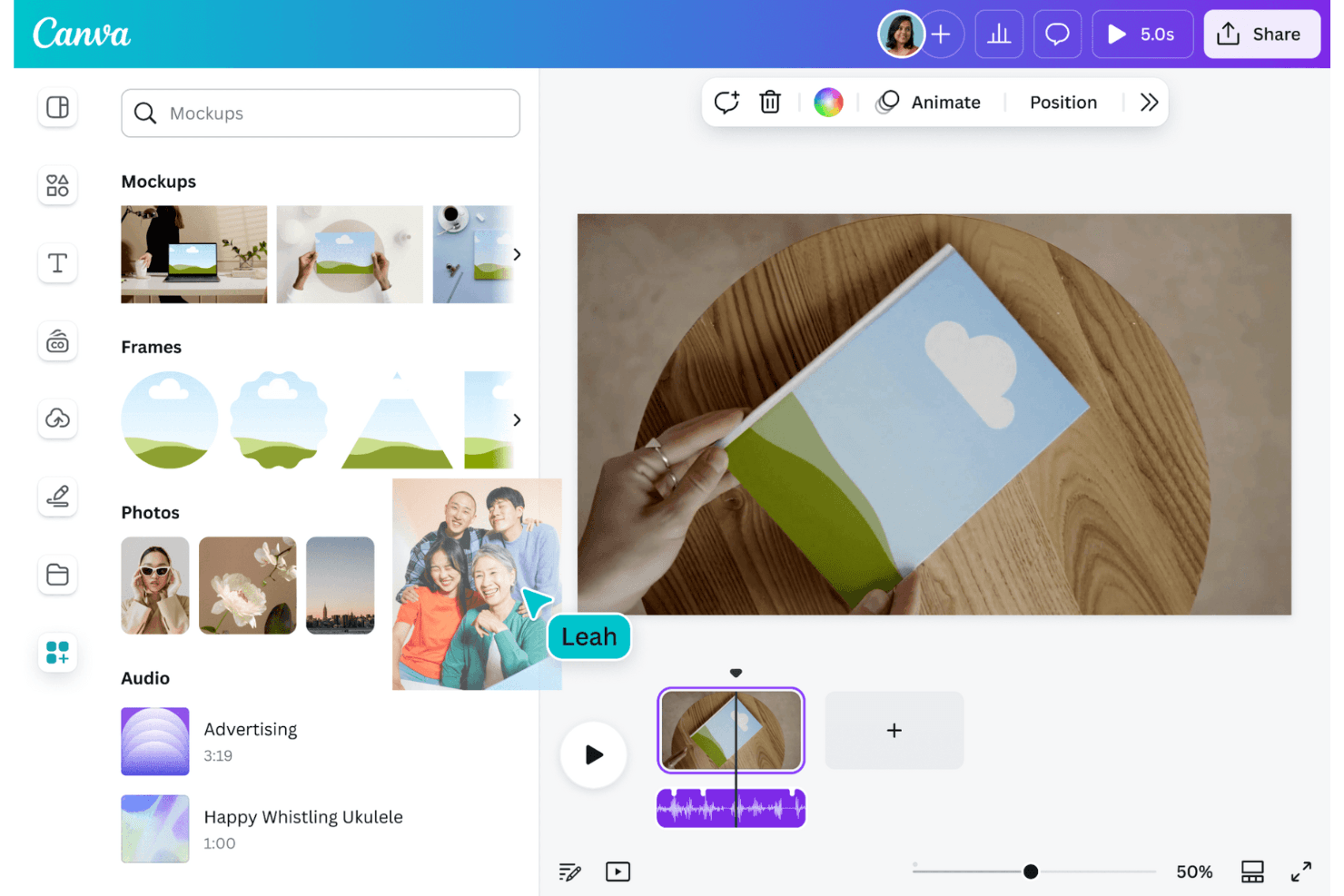
Canva permite a los usuarios crear gráficos y maquetas fácilmente. Canva es un generador gratuito de maquetas y un editor de diseño basado en el navegador con plantillas para dispositivos, prendas de vestir, embalajes e impresión, controles de colocación de imágenes, creación de maquetas con tecnología de IA, herramientas de personalización y opciones de exportación.
¿Para quién es Canva más adecuado?
Responsables de producto, diseñadores de UX y equipos de marketing que necesitan maquetas rápidas y listas para presentaciones en dispositivos, prendas de vestir, embalajes e impresión.
Por qué elegí Canva
Elegí Canva porque merece la etiqueta “La mejor opción para crear rápidamente maquetas con tecnología de IA en distintos formatos”. Utilizo sus funciones Recorte inteligente y ajuste del ángulo para las pantallas de teléfonos, portátiles y tabletas, y luego coloco esas maquetas en presentaciones para clientes o recursos para redes sociales. Su biblioteca también incluye prendas de vestir, embalajes, impresos y escenas de estilo de vida.
Funciones principales de Canva
- Límite de maquetas gratuitas: Crea hasta 2.500 maquetas gratuitas sin marcas de agua.
- Cargas JPG y PNG: Añade archivos de diseño existentes mediante el panel Cargas.
- Controles Rellenar y Ajustar: Elige cómo rellenan los diseños cargados cada marco de maqueta.
- Edición colaborativa: Comparte diseños, añade comentarios, asigna tareas y edita en equipo.
Integraciones de Canva
Canva admite integraciones del mercado a través de su mercado de aplicaciones, incluidas Mockups, Mockup Studio y App Screenshot Gen. Creación masiva se conecta con Canva Sheets, CSV, Excel, aplicaciones de datos de Google, HubSpot y Salesforce.
¿Qué es gratis?
Canva ofrece un plan gratuito para siempre con hasta 2.500 maquetas sin marcas de agua. Las plantillas, los recursos y algunas funciones de IA premium requieren un plan de pago.
Pros and Cons
Pros:
- 2.500 maquetas sin marcas de agua permiten realizar proyectos recurrentes
- El Recorte inteligente gestiona las pantallas de dispositivos inclinadas
- La biblioteca de escenas incluye dispositivos, prendas de vestir y embalajes
Cons:
- Se requiere una cuenta antes de exportar las maquetas
- Los elementos premium pueden añadir marcas de agua a los diseños
Learn more about Canva: La mejor opción para crear maquetas de productos personalizados con más de 1000 plantillas
- Plan gratuito disponible
- Desde $39/mes
Visit WebsiteCustomer Rating:4.6/5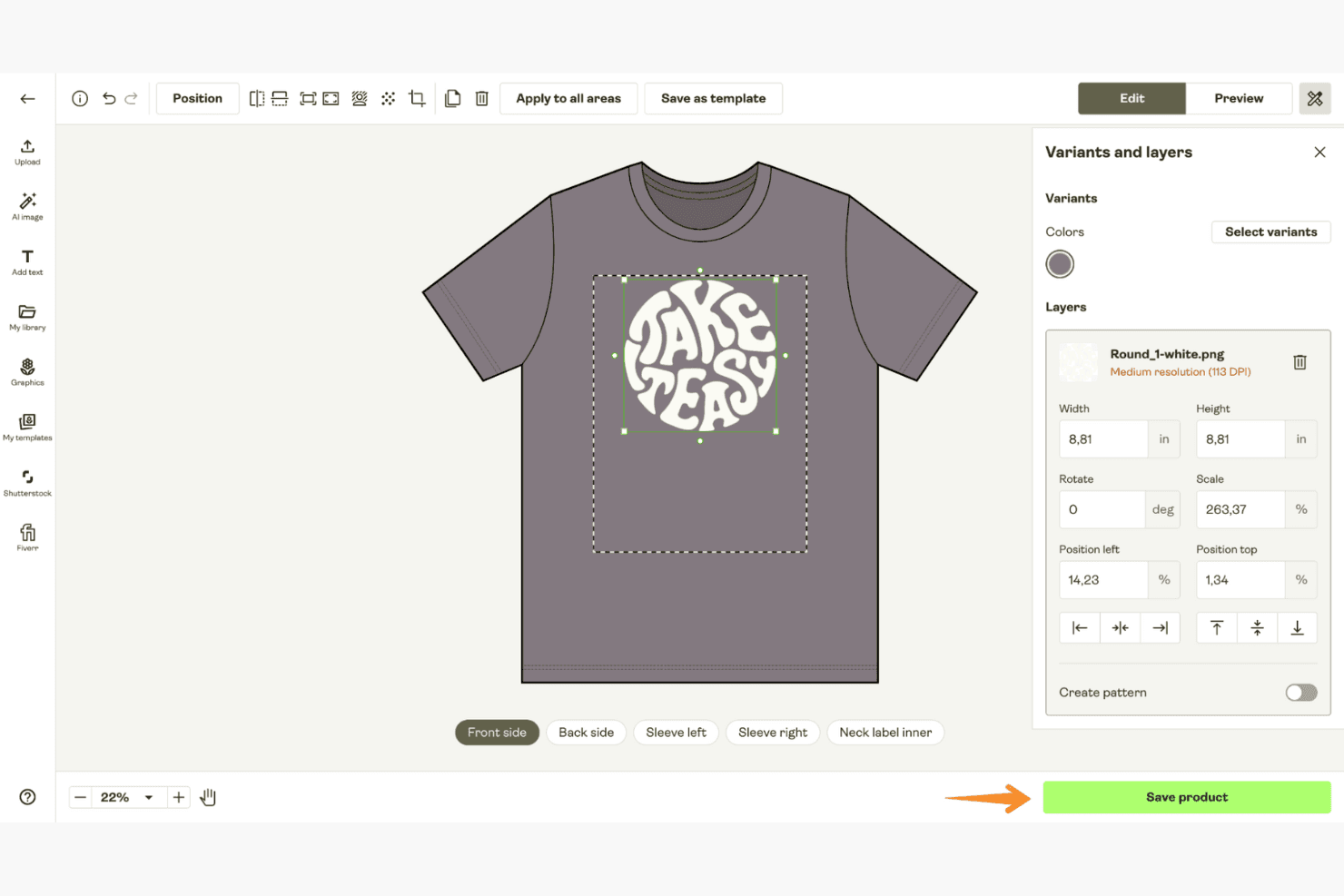
Printify genera maquetas de productos personalizados para una amplia variedad de artículos imprimibles. Printify es un generador gratuito de maquetas para productos físicos, con un Creador de productos para colocar ilustraciones subidas en prendas de vestir, artículos para bebidas, accesorios, pósteres y otros artículos de impresión bajo demanda en escenas de estilo de vida y composiciones cenitales.
¿Para quién es mejor Printify?
Printify es ideal para vendedores de productos de impresión bajo demanda y equipos creativos que necesitan maquetas de productos físicos para prendas de vestir, artículos para bebidas, pósteres y listados de tiendas.
Por qué elegí Printify
Elegí Printify porque es la mejor opción para crear maquetas de productos personalizados con más de 1000 plantillas. Utilizo su Creador de productos para colocar ilustraciones en prendas de vestir, tazas, pósteres, fundas para teléfonos y otros productos, y luego selecciono escenas de estilo de vida, composiciones cenitales o distintos ángulos. Su Biblioteca de maquetas también permite descargar imágenes con fondo transparente y ofrece múltiples variantes de productos.
Características principales de Printify
- Cargas desde varias fuentes: Importa archivos JPEG, PNG o SVG desde Dropbox y Google Drive.
- Edición de capas: Organiza hasta 20 capas de diseño dentro de las áreas de impresión compatibles.
- Eliminación del fondo: Elimina los fondos de las imágenes con un solo clic.
- Editor de texto: Añade fuentes personalizadas, texto y alfabetos no latinos a los diseños.
Integraciones de Printify
Printify ofrece integraciones con Shopify, WooCommerce, Wix, Squarespace, BigCommerce, Etsy, eBay, Amazon y TikTok Shop. También admite cargas desde Dropbox y Google Drive, además de una API para conexiones personalizadas.
¿Qué es gratis?
Printify ofrece un plan gratuito para siempre para crear maquetas de productos y configurar productos de impresión bajo demanda. Hay mejoras de pago disponibles para obtener funciones adicionales, mientras que el plan gratuito sigue disponible sin límite de tiempo.
Pros and Cons
Pros:
- Descargas ilimitadas de archivos PNG sin marca de agua
- Más de 2000 opciones de maquetas de productos físicos
- El editor de arrastrar y soltar admite 20 capas
Cons:
- No incluye pantallas de teléfonos, portátiles o tabletas
- Los fondos personalizados son compatibles con un número limitado de productos
Learn more about Printify: Ideal para la variedad de maquetas 3D de envases y dispositivos
- Plan gratuito disponible; prueba gratuita de 7 días
- Desde $17/usuario/mes (facturado anualmente)
Visit WebsiteCustomer Rating:4.5/5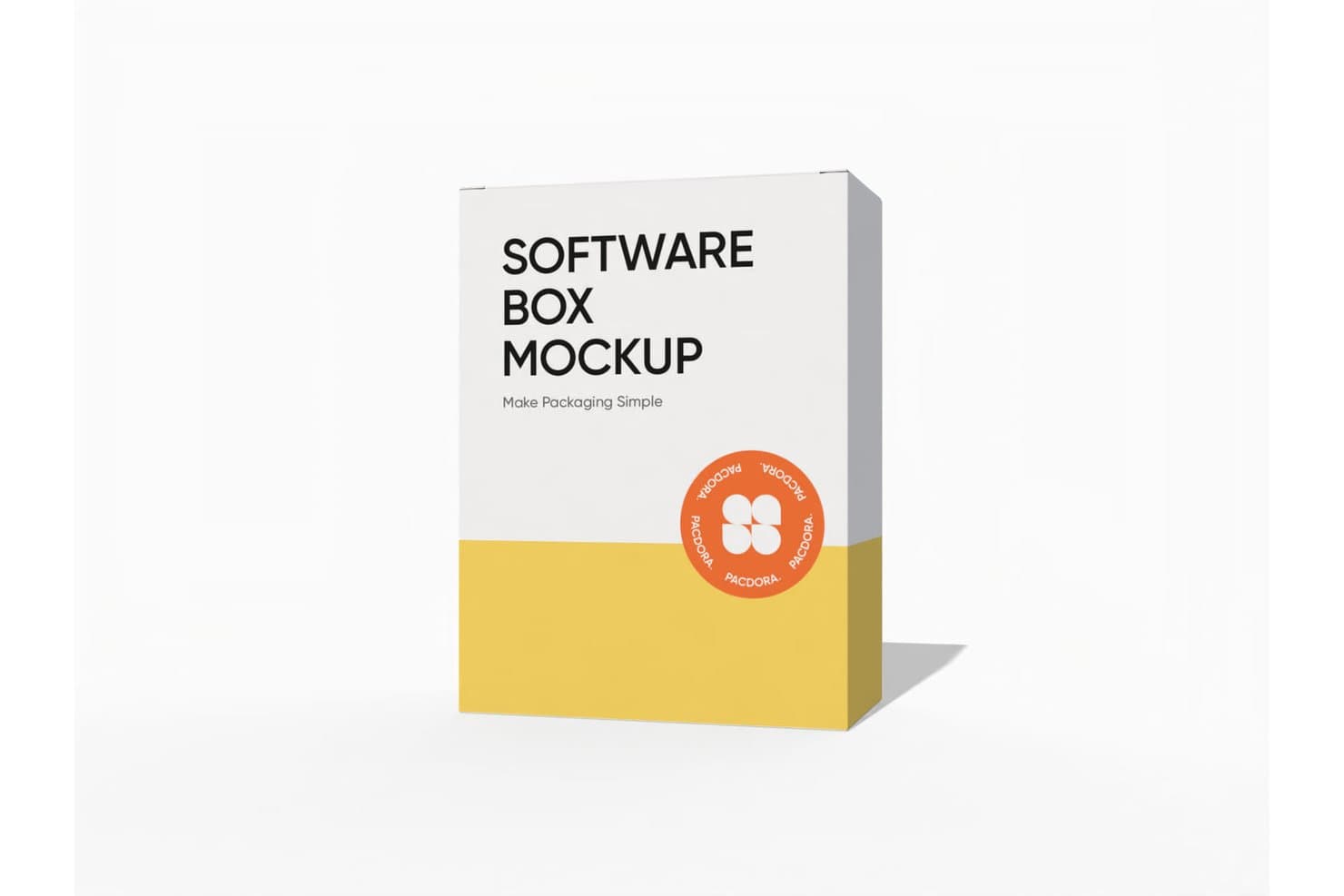
Pacdora permite a los usuarios crear maquetas de cajas de software con diseños personalizados. Pacdora es un generador de maquetas 3D basado en navegador con plantillas de envases y dispositivos, carga de imágenes, escenas personalizables, vistas previas en vivo, exportaciones de imágenes y vídeos, y enlaces 3D compartibles.
¿Para quién es más adecuado Pacdora?
Pacdora es ideal para diseñadores de envases y equipos de producto que necesitan imágenes 3D realistas para conceptos, presentaciones y comentarios de las partes interesadas.
Por qué elegí Pacdora
Elegí Pacdora por su variedad de maquetas 3D de envases y dispositivos, especialmente cuando un concepto necesita algo más que una imagen plana de pantalla. Su biblioteca incluye plantillas de envases, iPhone, iPad, MacBook y Apple Watch, además de iluminación, ángulos, fondos y escenas ajustables. También puedo crear imágenes giratorias en MP4 o MOV para presentaciones comerciales y revisiones de las partes interesadas, aunque las exportaciones gratuitas pueden incluir marcas de agua.
Características principales de Pacdora
- Proyectos y cargas ilimitados: Crea y almacena maquetas sin límites de volumen especificados.
- Exportaciones PNG y JPG: Descarga maquetas estáticas en formatos de imagen habituales.
- Enlaces 3D compartibles: Envía maquetas interactivas para recibir comentarios a distancia.
- Generador de fondos con IA: Crea entornos personalizados para imágenes de productos.
Integraciones de Pacdora
Pacdora no tiene integraciones nativas. Los planes de pago exportan troqueles de envases en formato AI para usarlos en Adobe Illustrator.
¿Qué incluye el plan gratuito?
Pacdora ofrece un plan gratuito permanente junto con una prueba gratuita de 7 días de las funciones de pago. Las exportaciones gratuitas pueden incluir marcas de agua y Pacdora no tiene integraciones nativas.
Pros and Cons
Pros:
- Proyectos y cargas ilimitados
- Escenas e iluminación 3D realistas
- Exporta imágenes, vídeos y enlaces compartibles
Cons:
- Las plantillas de dispositivos se centran principalmente en Apple
- Las exportaciones gratuitas pueden incluir marcas de agua
Learn more about Pacdora: Ideal para personalizar maquetas fácilmente en línea
- Plan gratuito disponible
- Desde €3.75/mes (facturado anualmente)
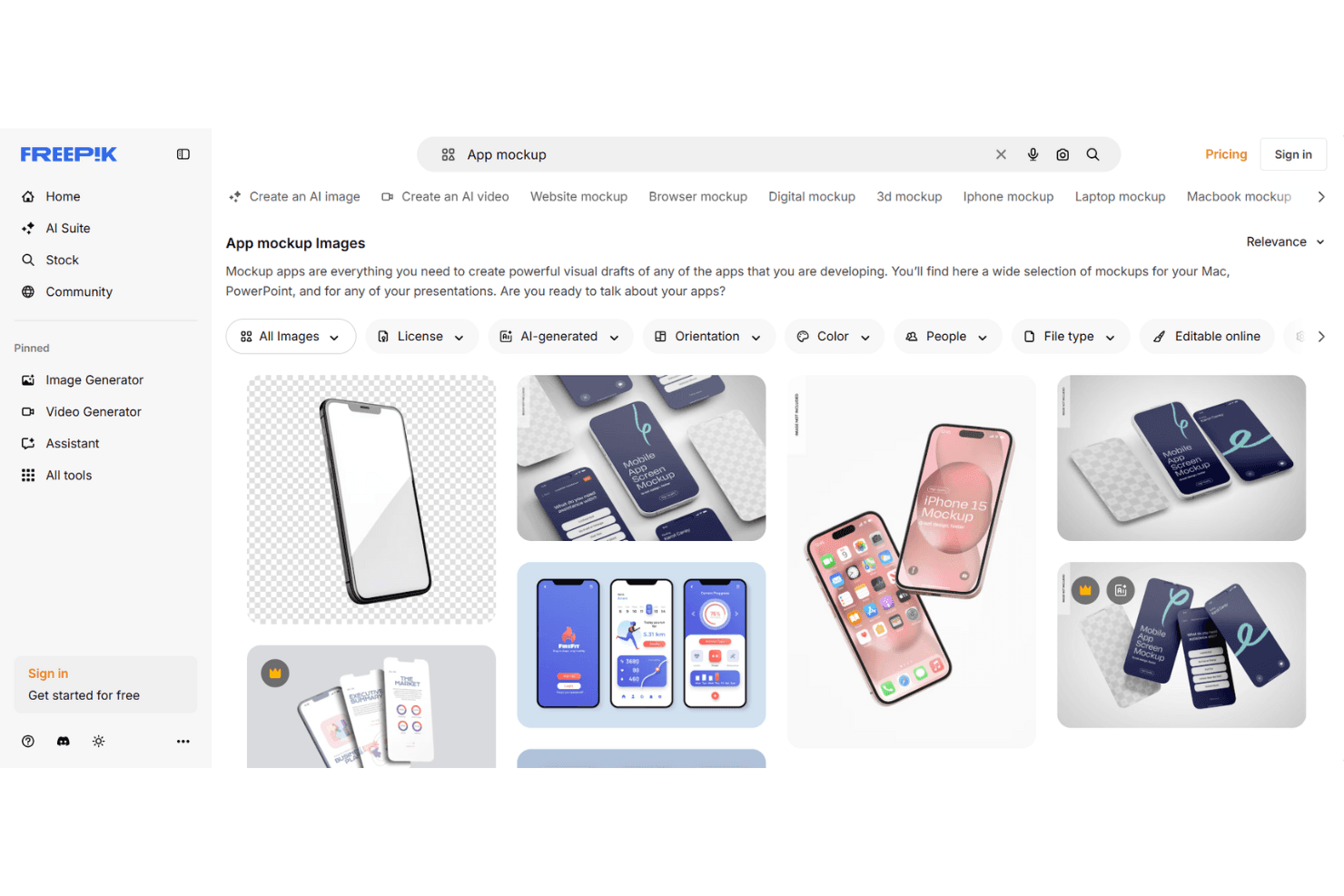
Freepik ofrece una personalización sencilla de maquetas mediante una amplia selección de plantillas. Freepik es un generador de maquetas basado en el navegador con plantillas editables de prendas de vestir, dispositivos, impresos, embalajes y estilos de vida, colocación manual de imágenes, personalización de escenas con IA y exportaciones JPEG o PNG sin marca de agua de hasta 5K.
¿Para quién es mejor Freepik?
Diseñadores de UI/UX y equipos creativos que necesitan maquetas pulidas y listas para presentaciones sin instalar software de diseño.
Por qué elegí Freepik
Elegí Freepik porque hace práctica la personalización de maquetas en línea para revisiones rápidas de diseño. Puedo cargar archivos PNG, JPG, SVG o WebP, colocarlos en escenas de prendas de vestir, dispositivos, embalajes e impresos editables desde el navegador y ajustar su posición manualmente. Sus indicaciones para escenas con IA también ayudan a convertir un concepto básico de producto en una imagen lista para presentaciones.
Características principales de Freepik
- Exportaciones sin marca de agua: Descarga archivos JPEG o PNG con una resolución de hasta 5K.
- Biblioteca gratuita de maquetas: Accede a 100 maquetas editables en línea sin una suscripción.
- Generación de escenas con IA: Crea escenas de maquetas personalizadas a partir de indicaciones de texto.
- Uso comercial de maquetas: Utiliza las maquetas generadas en proyectos personales y comerciales.
Integraciones de Freepik
Freepik ofrece integraciones mediante su complemento para After Effects, el complemento de Figma Community, MCP y ComfyUI. Los planes de pago incluyen acceso a la API para integraciones personalizadas.
¿Qué es gratis?
Freepik ofrece un plan gratuito, por lo que puedes utilizar sus herramientas de maquetas sin iniciar una prueba de pago. El nivel gratuito incluye 100 maquetas editables en línea, mientras que el acceso a la API y otras funciones de pago requieren una suscripción.
Pros and Cons
Pros:
- Las exportaciones sin marca de agua alcanzan una resolución de 5K
- Las escenas con IA amplían las opciones más allá de las plantillas fijas
- Las escenas de prendas de vestir y embalajes son adecuadas para materiales visuales de marketing
Cons:
- La colocación manual no detecta los biseles
- La biblioteca gratuita limita el trabajo repetitivo con maquetas
Learn more about Freepik: Ideal para mockups de productos con IA y sin marcas de agua
- Plan gratuito disponible
- Desde $5.7/mes (facturado anualmente)
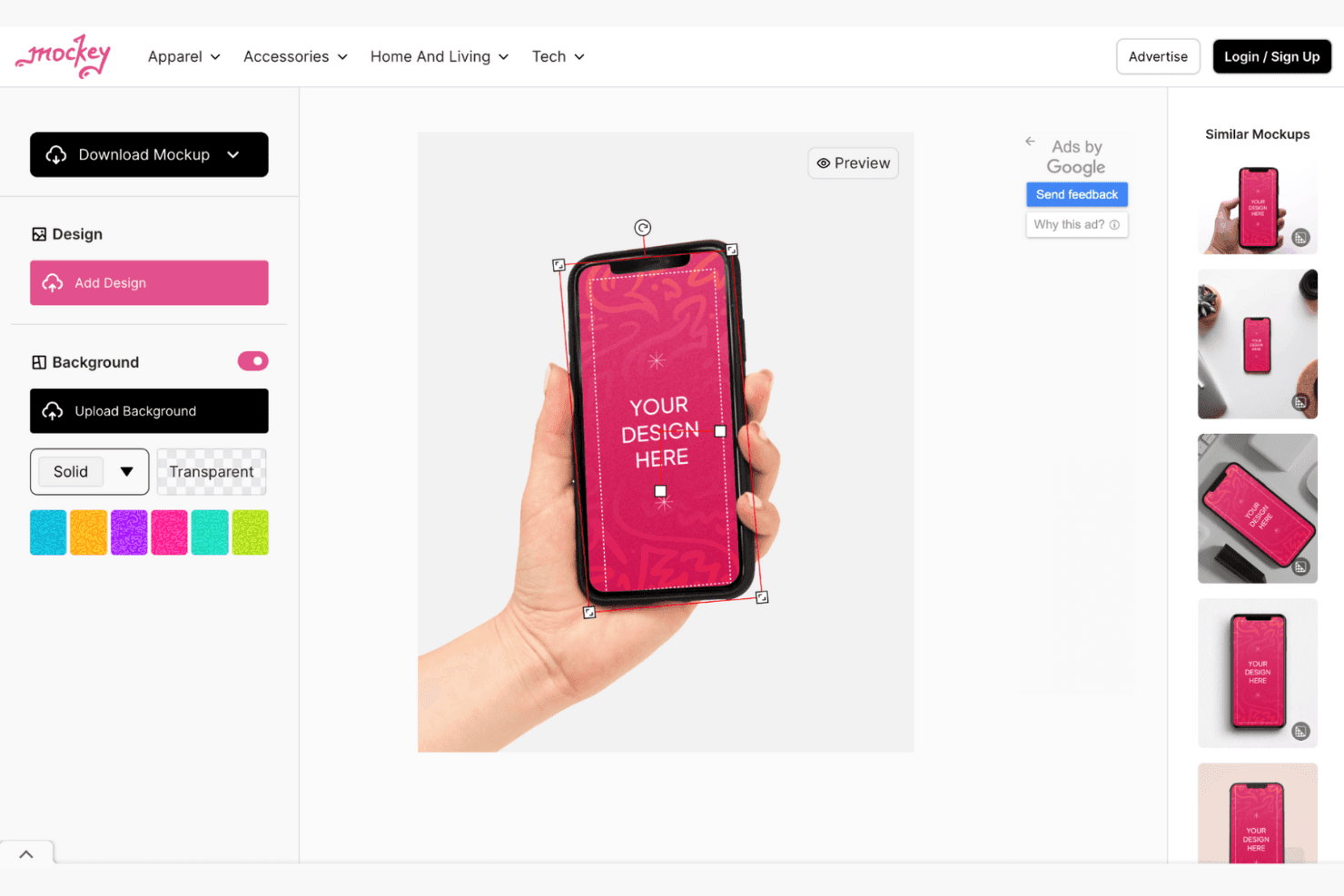
Mockey permite crear diversos mockups de productos en muchas categorías. Mockey es un generador de mockups basado en el navegador con plantillas de tecnología, ropa, embalaje y estilo de vida, además de cargas de imágenes, colocación automática de dispositivos, edición de fondos, herramientas de escenas con IA y mockups de vídeo y 3D.
¿Para quién es mejor Mockey?
Mockey es ideal para diseñadores de UI/UX y equipos de marketing que necesitan mockups de dispositivos, productos y estilo de vida sin marcas de agua y sin Photoshop.
Por qué elegí Mockey
Elegí Mockey porque crea mockups de productos con IA y sin marcas de agua, con escenas realistas de tecnología y estilo de vida. Utilizo sus plantillas de iPhone y MacBook para colocar diseños de interfaces con proporciones de recorte adaptadas al modelo y, después, perfecciono las presentaciones con AI Photoshoot y fondos generados. Sus exportaciones gratuitas en JPG son adecuadas para presentaciones rápidas, elementos visuales de portafolios y conceptos iniciales de marketing.
Características principales de Mockey
- Cargas en varios formatos: Importa diseños PNG, JPG y WebP.
- Controles de colocación: Ajusta, rellena, gira, voltea, alinea, amplía y distorsiona los diseños.
- Edición del color del dispositivo: Cambia los colores de los productos con paletas o códigos hexadecimales.
- Complemento de Figma: Crea mockups directamente dentro de archivos de Figma.
Integraciones de Mockey
Mockey ofrece cuatro integraciones documentadas: Figma, Shopify, Etsy y ChatGPT. El complemento de Figma es el más relevante para diseñadores, mientras que Shopify y Etsy son compatibles con flujos de trabajo de comercio electrónico.
¿Qué es gratis?
Mockey ofrece un plan gratuito en lugar de limitarse a una prueba por tiempo limitado. Incluye exportaciones JPG sin marcas de agua, mientras que las funciones avanzadas y otras opciones de exportación pueden requerir un plan de pago.
Pros and Cons
Pros:
- Las exportaciones sin marcas de agua son adecuadas para borradores de portafolios
- Las proporciones de pantalla coinciden con los dispositivos actuales
- Las escenas con IA mejoran los elementos visuales de las presentaciones
Cons:
- Las exportaciones gratuitas se limitan al formato JPG
- No ofrece prototipos interactivos para pruebas de usuario
Learn more about Mockey: Ideal para maquetas mediante arrastrar y soltar en más de 5.300 escenas
- Plan gratuito disponible
- Desde $15/mes
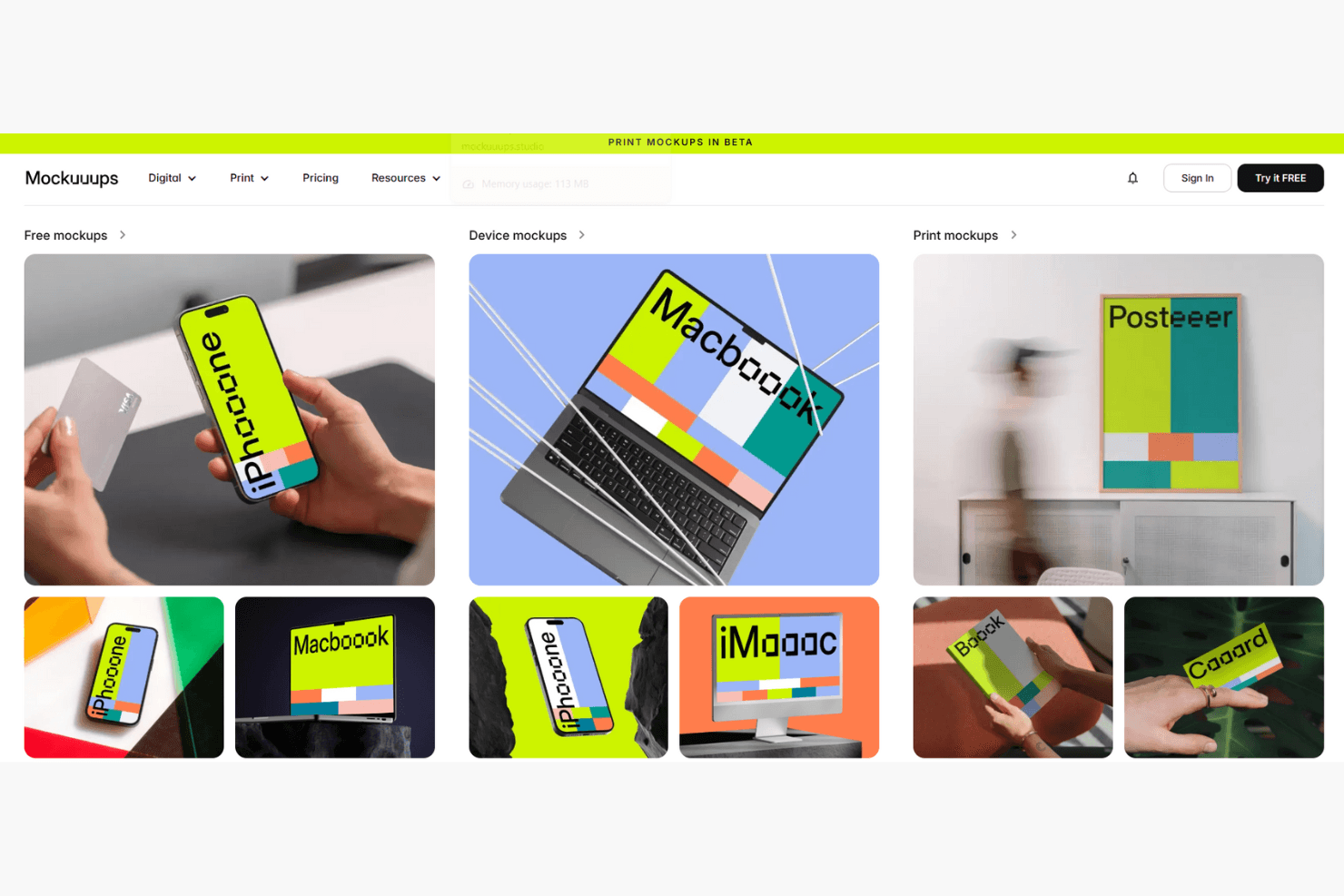
Mockuuups Studio crea maquetas de aplicaciones y dispositivos mediante un flujo de trabajo de arrastrar y soltar. Mockuuups Studio es un generador gratuito de maquetas con colocación de capturas de pantalla mediante arrastrar y soltar, escenas fotorrealistas de dispositivos y estilos de vida, fondos personalizables e integraciones con Figma, Sketch, Penpot y Adobe Express.
¿Para quién es más adecuado Mockuuups Studio?
Directores de producto y diseñadores de UI/UX que necesitan elementos visuales realistas para presentaciones de propuestas, presentaciones para las partes interesadas y revisiones rápidas de conceptos.
Por qué elegí Mockuuups Studio
Elegí Mockuuups Studio por sus maquetas mediante arrastrar y soltar en más de 5.300 escenas, incluidos teléfonos, portátiles, tabletas y entornos de estilo de vida. Puedo colocar una captura de pantalla en toda la biblioteca y luego elegir ángulos de dispositivos, colores, sombras y fondos para presentaciones de propuestas o revisiones de conceptos. Las exportaciones gratuitas son limitadas y las maquetas premium incluyen marcas de agua.
Características principales de Mockuuups Studio
- Complementos para herramientas de diseño: Se integra con Figma, Sketch, Penpot y Adobe Express.
- Formatos de exportación: Permite descargar archivos PNG, JPG y WebP.
- Herramienta de recorte: Ofrece recorte manual y áreas de recorte predeterminadas.
- Aplicaciones de escritorio: Ofrece aplicaciones para macOS, Windows y Linux.
Integraciones de Mockuuups Studio
Mockuuups Studio ofrece cinco integraciones documentadas con herramientas de diseño: Figma, Sketch, Penpot, Adobe Express y Frontify. También proporciona una API REST con compatibilidad con Zapier para integraciones personalizadas.
¿Qué incluye el plan gratuito?
Mockuuups Studio ofrece un plan gratuito para siempre con acceso a su biblioteca de maquetas y editor de arrastrar y soltar. Las exportaciones gratuitas son limitadas y las maquetas premium incluyen marcas de agua.
Pros and Cons
Pros:
- Más de 5.300 escenas fotorrealistas de dispositivos y estilos de vida
- Coloca automáticamente las capturas de pantalla en toda la biblioteca
- Añade con frecuencia maquetas de dispositivos lanzados recientemente
Cons:
- Las exportaciones gratuitas incluyen marcas de agua y exigen atribución
- No ofrece exportación masiva ni plantillas con tamaños para tiendas
Learn more about Mockuuups Studio: Ideal para imágenes de maquetas de dispositivos 3D y animadas
- Plan gratuito disponible
- Desde $228/año (facturado anualmente)
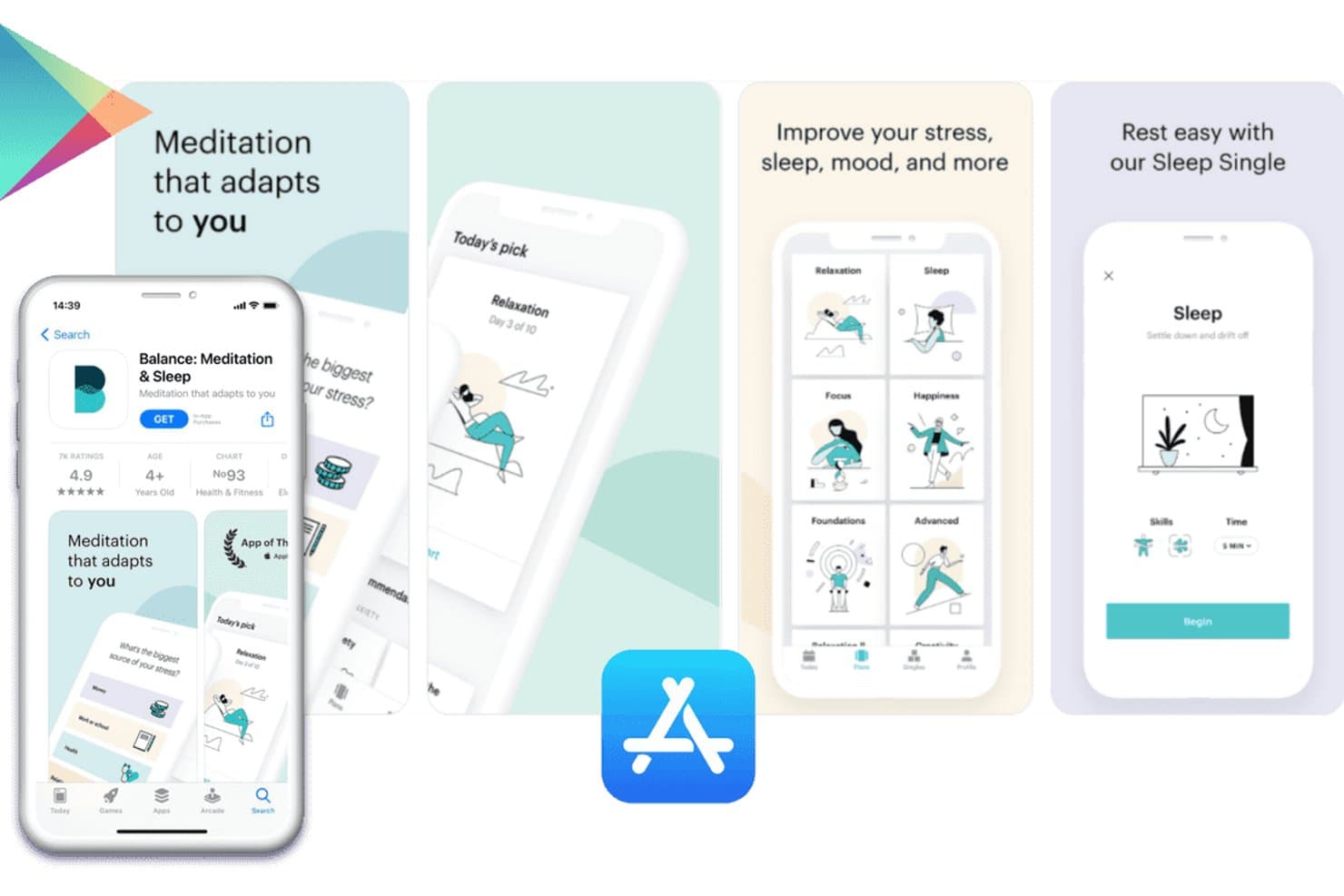
Previewed permite a los usuarios crear capturas de pantalla para App Store con maquetas de dispositivos. Previewed es un generador de maquetas basado en navegador con plantillas de dispositivos 2D y 3D, cargas de imágenes y videos, escenas personalizables, diseños para redes sociales y exportaciones estáticas o animadas.
¿Para quién es mejor Previewed?
Diseñadores de UI/UX y pequeños equipos de producto que crean imágenes pulidas de dispositivos en 2D, 3D y animadas para presentaciones o portafolios.
Por qué elegí Previewed
Previewed se gana un lugar en mi lista de opciones porque gestiona imágenes de maquetas de dispositivos 3D y animadas junto con diseños 2D estándar. Uso su editor 3D para configurar ángulos de cámara, entornos y estilos de dispositivos de arcilla para presentaciones de productos. Las escenas animadas y las exportaciones en MP4 también ayudan a convertir las pantallas de las aplicaciones en imágenes promocionales pulidas.
Funciones principales de Previewed
- Biblioteca de plantillas de dispositivos: Incluye iPhones, teléfonos Android, tabletas, laptops, monitores y marcos de navegador.
- Cargas de contenido multimedia para pantallas: Reemplaza los marcadores de posición de los dispositivos con imágenes cargadas o videos MP4.
- Conjuntos de capturas panorámicas: Crea diseños de capturas de pantalla con varias imágenes para App Store y Google Play.
- Plantillas para redes sociales: Ofrece diseños para Instagram, Facebook, Twitter y LinkedIn.
Integraciones de Previewed
Previewed no cuenta con integraciones nativas, una API documentada, un complemento para Figma o Sketch, ni conexión directa con App Store Connect y Google Play Console. Admite iniciar sesión con Google, Facebook y Twitter, además de compartir contenido con equipos dentro de Previewed.
¿Qué incluye el plan gratuito?
Previewed ofrece un plan Lite gratuito para siempre para una aplicación o proyecto. Incluye exportaciones 2D ilimitadas a 720p, pero añade el requisito de atribución de Creative Commons y excluye las exportaciones 3D y de video; el uso comercial requiere un plan de pago.
Pros and Cons
Pros:
- Crea imágenes 3D y animadas pulidas
- Ofrece controles avanzados de cámara y entorno
- Admite diseños panorámicos de capturas de pantalla para tiendas de aplicaciones
Cons:
- Las exportaciones gratuitas requieren atribución y están limitadas a 720p
- La biblioteca de dispositivos carece de modelos de teléfonos inteligentes más recientes
Learn more about Previewed: Ideal para maquetas de dispositivos en 3D con integración con Figma
- Plan gratuito disponible
- Desde $15/mes
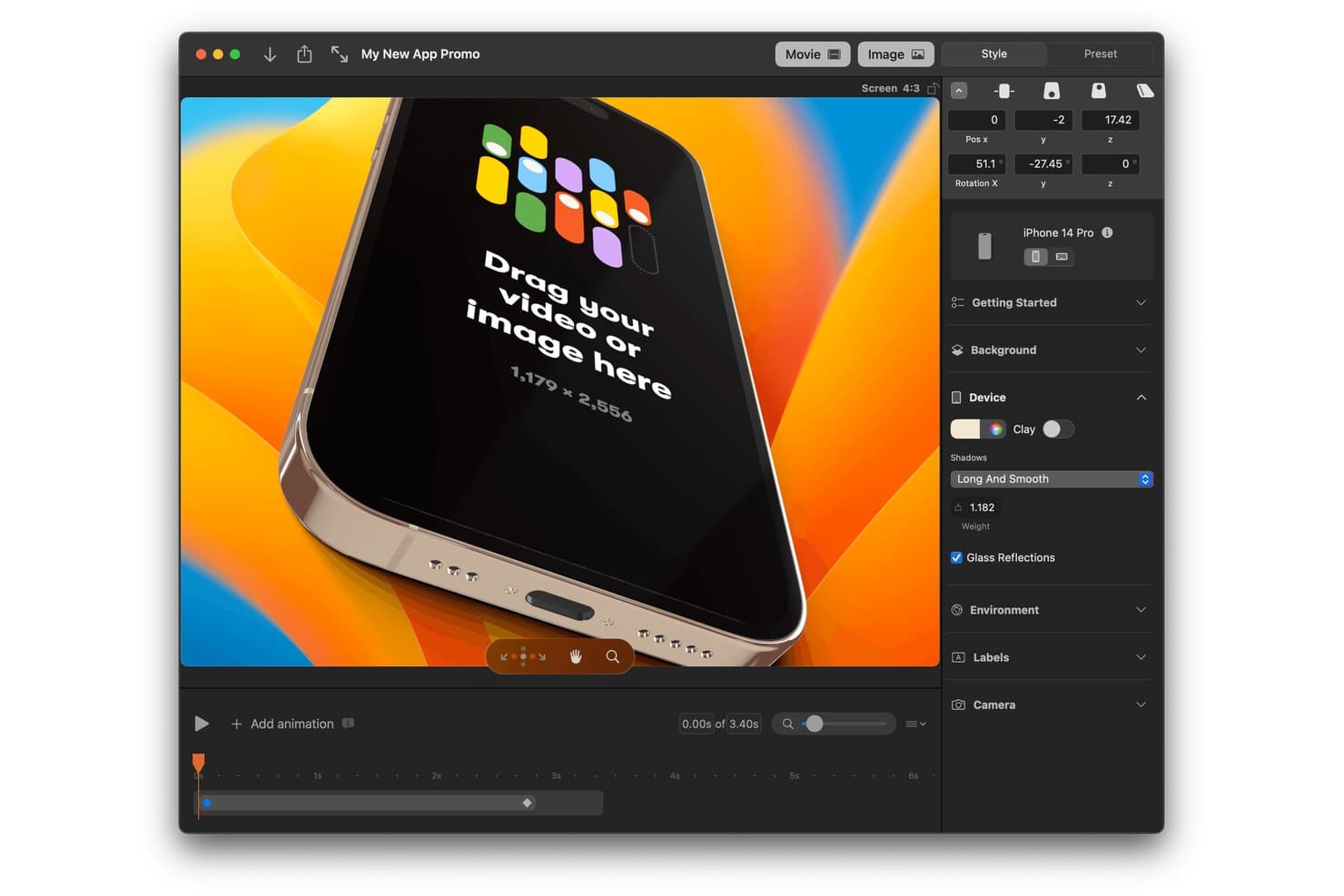
Rotato permite a los usuarios crear maquetas de iPhone en 3D con animaciones y fondos personalizados. Rotato es un generador de maquetas de dispositivos en 3D para convertir pantallas de aplicaciones, grabaciones y sitios web en imágenes estáticas y vídeos personalizables, con integración con Figma, escenas animadas y exportación de capturas de pantalla para App Store.
¿Para quién es ideal Rotato?
Los diseñadores de UI/UX y los equipos creativos que trabajan en Mac apreciarán Rotato por sus imágenes pulidas de aplicaciones, demostraciones animadas y maquetas de dispositivos listas para presentaciones.
Por qué elegí Rotato
Elegí Rotato por sus maquetas de dispositivos en 3D pulidas y su integración con Figma. Puedo colocar pantallas de aplicaciones o grabaciones en teléfonos, tabletas, portátiles y relojes, y luego crear escenas animadas para presentaciones comerciales o imágenes de portafolio. Su exportación para App Store admite varios tamaños de iPhone, aunque las exportaciones gratuitas incluyen una marca de agua.
Características principales de Rotato
- Prueba gratuita ilimitada: Crea maquetas ilimitadas sin límite de tiempo, con exportaciones que incluyen una marca de agua.
- Amplia compatibilidad con archivos: Importa archivos PNG, JPG, HEIC, PSD, SVG, TIFF, WebP, RAW, MOV y MP4.
- Modo de presentación: Presenta escenas durante llamadas de Zoom, Teams y Google Meet.
- Fondos personalizados: Usa colores, imágenes, vídeos o degradados 3D detrás de las representaciones de dispositivos.
Integraciones de Rotato
Rotato cuenta con integraciones documentadas con Figma y Sketch. No hay integraciones nativas más amplias claramente documentadas.
¿Qué es gratis?
Rotato ofrece una prueba gratuita ilimitada sin límite de tiempo, pero las maquetas exportadas incluyen una marca de agua. Puedes crear maquetas y probar sus funciones gratis, mientras que las exportaciones sin marca de agua requieren un plan de pago.
Pros and Cons
Pros:
- La biblioteca actual de dispositivos incluye teléfonos modernos
- Las exportaciones alcanzan 8K con vídeo transparente
- Renderiza por lotes tamaños de iPhone para App Store
Cons:
- Las exportaciones gratuitas conservan una marca de agua
- Las representaciones inclinadas pueden ocultar detalles de la tienda
Learn more about Rotato: Ideal para recursos de capturas de pantalla de App Store, gratis para siempre
- Plan gratuito disponible
- Desde $19/mes
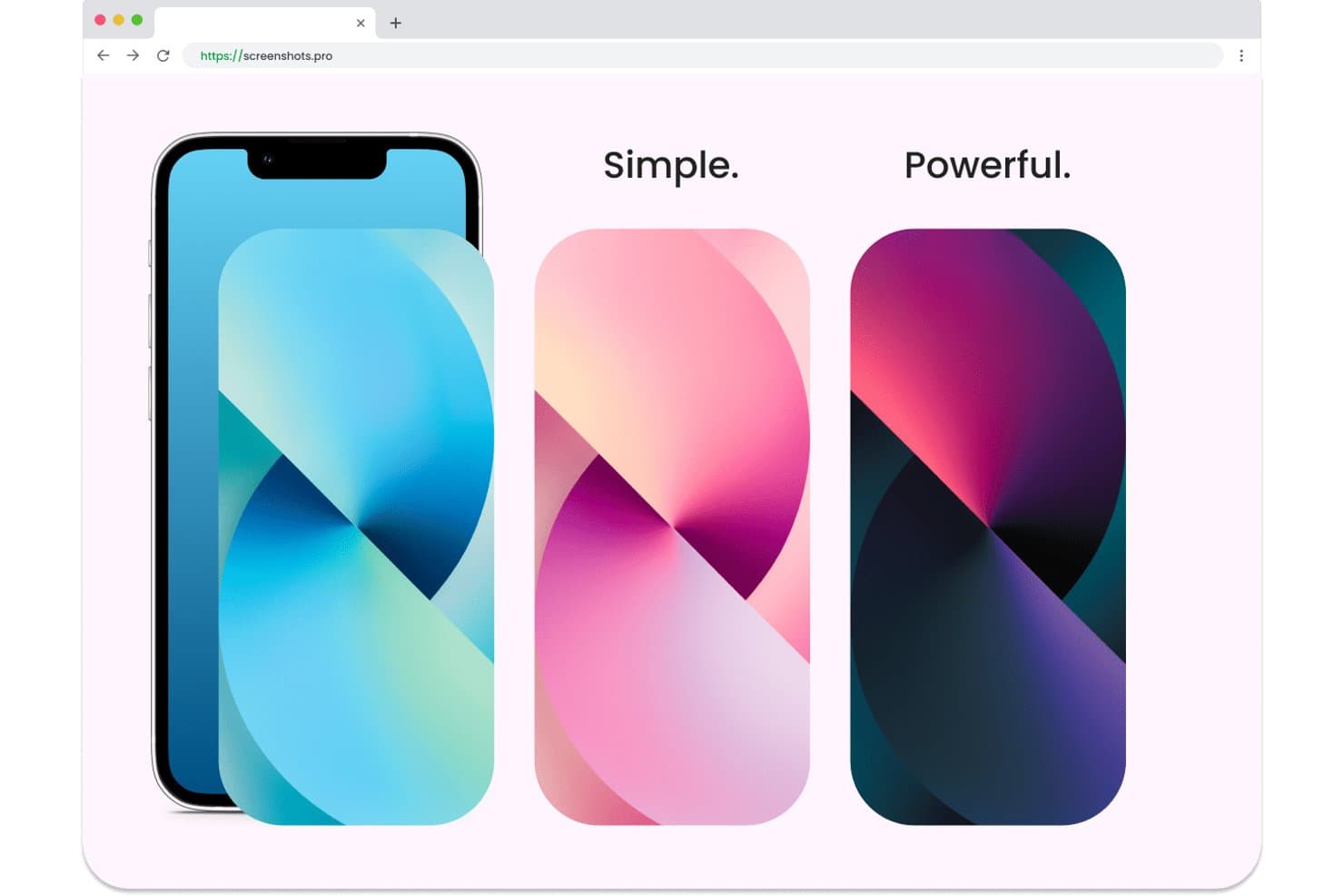
Screenshots.pro permite a los usuarios crear maquetas con varios temas de color. Screenshots.pro es un generador de maquetas de aplicaciones basado en el navegador, centrado en capturas de pantalla para App Store y Google Play, con marcos de dispositivos, plantillas prediseñadas, edición mediante arrastrar y soltar, personalización de marcos y exportación inteligente para los tamaños de las tiendas.
¿Para quién es mejor Screenshots.pro?
Desarrolladores independientes de aplicaciones y pequeños equipos de producto que necesitan conjuntos de capturas de pantalla listos para App Store y Google Play sin utilizar software de diseño.
Por qué elegí Screenshots.pro
Elegí Screenshots.pro porque está diseñado específicamente para crear recursos de capturas de pantalla de App Store y es gratis para siempre. Utilizo sus marcos de dispositivos, plantillas prediseñadas para tiendas y exportación inteligente para convertir un diseño de aplicación en archivos PNG de alta resolución para todos los tamaños de App Store y Google Play. Su enfoque resulta adecuado para desarrolladores que preparan un lanzamiento, en lugar de para quienes crean maquetas generales de estilo de vida.
Características principales de Screenshots.pro
- Editor de arrastrar y soltar: Coloca, cambia el tamaño, gira y aplica estilos a capturas de pantalla y textos.
- Personalización de marcos: Elige estilos realistas o de arcilla, colores y orientaciones.
- Guardado automático y sincronización: Guarda los proyectos automáticamente en las sesiones compatibles.
- Exportación PNG de alta resolución: Descarga los recursos para tiendas como archivos PNG de 4K o superior.
Integraciones de Screenshots.pro
Screenshots.pro no dispone de integraciones nativas. Su API REST, disponible en el plan Extended, admite flujos de trabajo CI/CD personalizados y genera capturas de pantalla a partir de URL de imágenes públicas.
¿Qué es gratis?
Screenshots.pro ofrece un plan gratuito para siempre para crear recursos de capturas de pantalla de App Store y Google Play. Las integraciones nativas no están disponibles, y el acceso a la API REST para flujos de trabajo CI/CD requiere el plan Extended.
Pros and Cons
Pros:
- Las exportaciones gratuitas cubren todos los tamaños de las tiendas
- Los marcos de dispositivos se adaptan a los flujos de trabajo de las tiendas de aplicaciones
- Los diseños de arrastrar y soltar permiten iterar rápidamente
Cons:
- Las salidas gratuitas requieren atribución a Screenshots.pro
- Las plantillas no incluyen maquetas de estilo de vida ni de objetos
Learn more about Screenshots.pro: Ideal para maquetas de dispositivos centradas en la privacidad y sin iniciar sesión
- Plan gratuito disponible
- Precio bajo consulta
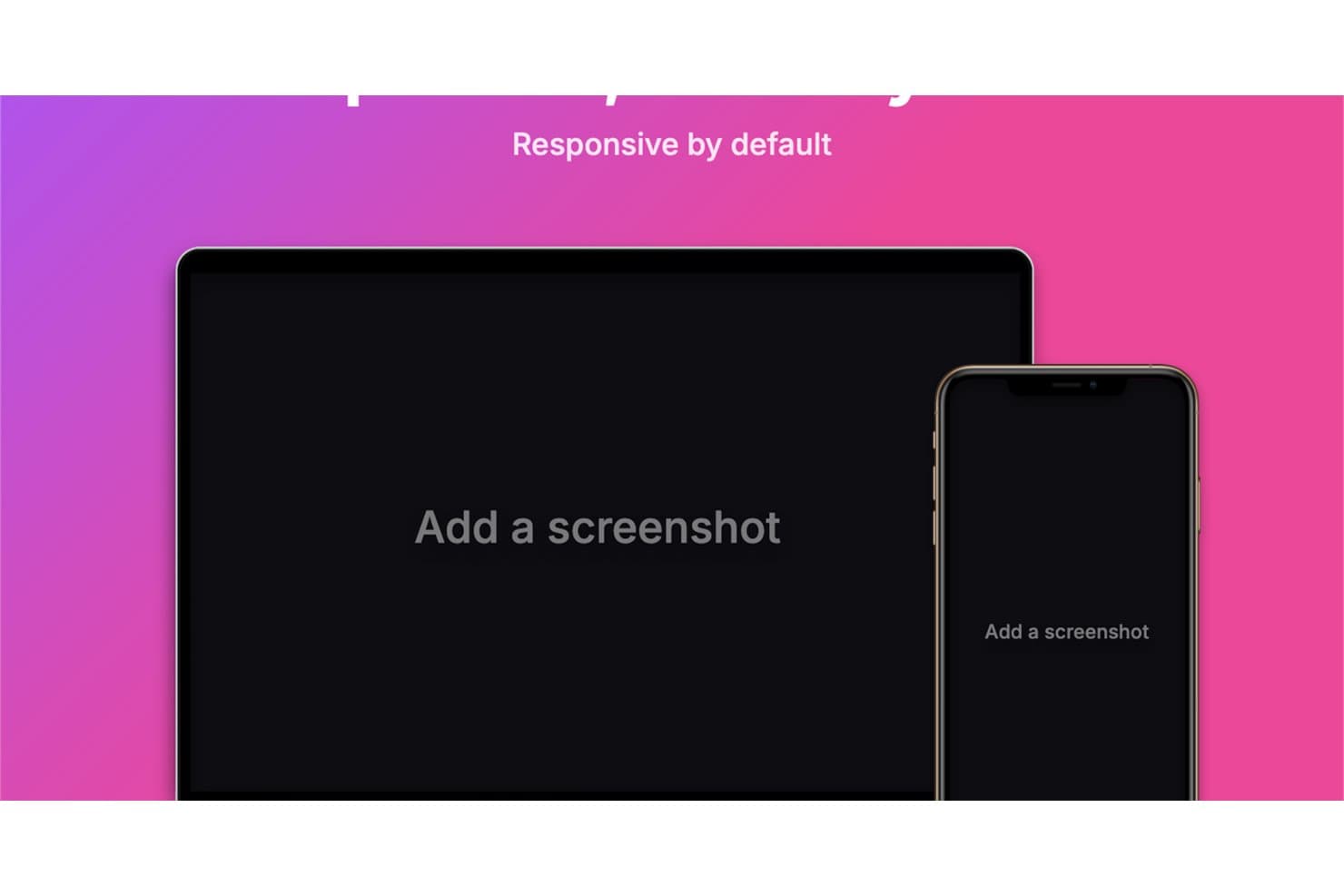
Device Shots genera maquetas adaptables para escritorio y dispositivos móviles. Device Shots es un generador gratuito de maquetas con 76 marcos de dispositivos, 412 plantillas de plataformas, edición por capas, diseños multidispositivo y exportaciones en PNG, JPG, WebP o SVG.
¿Para quién es mejor Device Shots?
Para gerentes de producto, diseñadores de UI/UX y equipos de marketing que necesitan maquetas centradas en la privacidad y sin iniciar sesión para presentaciones, prototipos, recursos para redes sociales y elementos visuales para tiendas de aplicaciones.
Por qué elegí Device Shots
Elegí Device Shots porque es uno de los mejores generadores gratuitos de maquetas para crear maquetas de dispositivos centradas en la privacidad y sin iniciar sesión. Puedo colocar capturas de pantalla confidenciales en 76 marcos de dispositivos sin subirlas y luego perfeccionar los diseños con capas, guías, iconos y composiciones multidispositivo. Sus 412 plantillas también me ayudan a preparar directamente en el navegador elementos visuales para presentaciones, redes sociales y tiendas de aplicaciones.
Características principales de Device Shots
- Modos de ajuste: Elige colocar el contenido en modo cubrir, contener o estirar.
- Formatos de exportación: Descarga archivos PNG, JPG, WebP o SVG.
- Preajustes de lienzo: Crea recursos para redes sociales, tiendas de aplicaciones y presentaciones.
- Controles de fondo: Aplica colores sólidos, degradados, fondos de pantalla, imágenes o transparencia.
Integraciones de Device Shots
Device Shots no tiene integraciones nativas. Admite copiar al portapapeles en Figma, Slack y Notion, pero no cuenta con una API, un complemento ni conexiones con mercados documentados.
¿Qué incluye el plan gratuito?
Device Shots ofrece un plan gratuito en lugar de una prueba con duración limitada y no requiere iniciar sesión. Admite la creación de maquetas en el navegador con un enfoque centrado en la privacidad, pero no cuenta con integraciones nativas, API, complemento ni conexiones con mercados.
Pros and Cons
Pros:
- La edición exclusiva en el navegador protege las capturas de pantalla confidenciales
- Las 412 plantillas cubren los principales formatos de contenido
- Los controles de capas permiten crear composiciones multidispositivo refinadas
Cons:
- Los marcos de dispositivos no incluyen modelos de hardware recientes
- No incluye escenas fotográficas de estilo de vida para recursos visuales de marketing
Learn more about Device Shots:
Otros generadores de maquetas
Estas son algunas opciones adicionales de generadores de maquetas que también ofrecen planes o pruebas gratuitas. Aunque estas herramientas no llegaron a mi selección, merece la pena echarles un vistazo:
- 11ShotsIdeal para crear maquetas de dispositivos sin iniciar sesión y con profundidad de estilo
- 12Artboard StudioIdeal para más de 5,000 plantillas de dispositivos y escenas
- 13KittlIdeal para maquetas de prendas y productos de alta calidad
- 14RecraftIdeal para crear maquetas empresariales generadas por IA en segundos
- 15PlaceitIdeal para biblioteca grande de mockups y uso empresarial
- 16MediamodifierIdeal para crear maquetas desde el navegador en cualquier dispositivo
- 17MockupLabsIdeal para mockups con IA y más de 10.000 plantillas
- 18Dynamic MockupsIdeal para la creación automatizada y realista de imágenes de productos
Cómo evalúo los generadores de maquetas gratuitos
Primero, defino qué se considera gratuito. Un generador de maquetas necesita un plan gratuito para siempre, no una prueba, con múltiples plantillas, cargas, personalización y exportaciones. A partir de ahí, divido mi evaluación en tres partes: funcionalidad principal, con el mayor peso, como colocar diseños y exportar; funciones destacadas, como la generación por lotes; y aspectos que van más allá del conjunto de funciones, como la escalabilidad del nivel gratuito.
Funcionalidad principal (requisitos básicos para esta lista)
Además de mis requisitos para el plan gratuito, utilizo un sistema de puntuación para seleccionar las herramientas de mi lista. Puntúo cada una en una escala de 0 (no ofrece la funcionalidad) a 5 (sobresale en esta área) para cada una de las funcionalidades principales indicadas a continuación, según lo disponible en el plan gratuito. Después convierto el total en un porcentaje para ayudar a evaluar la adecuación general de cada herramienta, con peso adicional para cualquier funcionalidad que haya considerado esencial.
- Plantillas de dispositivos y escenas (esencial): Evalúo la variedad de plantillas para teléfonos, portátiles, embalajes, prendas de vestir y escenas de estilo de vida para distintos conceptos de producto.
- Carga y colocación de imágenes (esencial): Compruebo si las capturas de pantalla y los diseños se cargan fácilmente, se ajustan con precisión y admiten tipos de archivo habituales para las reseñas de productos.
- Exportación y descarga (esencial): Busco maquetas descargables en formatos de imagen prácticos para presentaciones comerciales, fichas de aplicaciones, presentaciones y sesiones de comentarios.
- Personalización básica: Evalúo los controles gratuitos para fondos, ángulos, colores y variantes de plantillas que ayudan a los equipos a adaptar las presentaciones a sus necesidades.
- Múltiples resultados de maquetas: Compruebo si los equipos pueden crear varias maquetas para comparar vistas de dispositivos, conceptos u opciones de presentación.
Una vez que tengo una lista de herramientas que cumplen los criterios, considero qué distingue a cada plataforma.
Factores diferenciadores (lo que distingue a los proveedores)
Así es como comparo y contrasto distintos proveedores:
Funciones destacadas
Busco una exportación rápida sin iniciar sesión porque los responsables de producto a menudo necesitan una maqueta en cuestión de minutos antes de una llamada con las partes interesadas, no después de completar un proceso de registro. La generación masiva es igual de importante: cuando estás preparando la ficha de una aplicación en una tienda o una presentación comercial, crear varias vistas de dispositivos una a una supone un verdadero cuello de botella. También evalúo las bibliotecas de escenas y fondos, ya que colocar una pantalla en un contexto de estilo de vida, como una mano sosteniendo un teléfono, vende una idea más rápido que un marco de dispositivo plano.
Más allá de las funciones
Compruebo si una herramienta permite a personas que no son diseñadoras producir una maqueta pulida sin entender las capas ni los trazados vectoriales. Si cargar una captura de pantalla y exportar un marco de dispositivo requiere más de unos pocos clics, resulta demasiado complejo para un responsable de producto que se prepara para una revisión de la hoja de ruta a última hora. También evalúo hasta qué punto el nivel gratuito es sostenible para un uso recurrente: las maquetas aparecen en cada etapa, desde el descubrimiento hasta el lanzamiento, por lo que una prueba única no es suficiente. Herramientas como Smartmockups y Media Modifier mantienen niveles gratuitos estables que permiten seguir trabajando sin muros de pago inesperados.
Cómo elegir un generador de maquetas gratuito
Las listas de funciones complejas y las estructuras de precios pueden dificultar la comprensión de lo que realmente obtienes con un generador de maquetas gratuito. Para ayudarte a mantener la concentración mientras avanzas en el proceso de selección del software, estos son algunos factores que debes tener en cuenta:
| Factor | Qué debes tener en cuenta |
|---|---|
| FactorAlcance de la oferta gratuita | Qué debes tener en cuentaComprueba qué funciones están disponibles en el plan gratuito. ¿Cubre necesidades básicas como el acceso a plantillas y las opciones de exportación? Busca cualquier limitación que pueda afectar a tu trabajo. |
| FactorEscalabilidad | Qué debes tener en cuentaConsidera si la herramienta puede crecer junto con tu equipo. ¿Podrá gestionar un aumento de la carga de trabajo o proyectos más complejos? Asegúrate de que cubra tus necesidades a largo plazo. |
| FactorIntegraciones | Qué debes tener en cuentaBusca compatibilidad con otras herramientas que utilices. ¿Puede conectarse con software de diseño o plataformas de gestión de proyectos para mejorar tu flujo de trabajo? |
| FactorFacilidad de uso | Qué debes tener en cuentaEvalúa lo intuitiva que es la interfaz. ¿Tú y tu equipo podéis utilizarla fácilmente sin una formación extensa? Un diseño fácil de usar ahorra tiempo y reduce la frustración. |
| FactorPersonalización | Qué debes tener en cuentaDetermina el nivel de personalización disponible. ¿Puedes adaptar fácilmente las plantillas para ajustarlas a la identidad de tu marca o estás limitado a opciones predeterminadas? |
| FactorAtención al cliente | Qué debes tener en cuentaComprueba si la asistencia está disponible cuando la necesitas. ¿Hay varias opciones de contacto y recursos como preguntas frecuentes o tutoriales que te ayuden? |
| FactorRendimiento | Qué debes tener en cuentaEvalúa la rapidez y fiabilidad con la que funciona la herramienta. ¿Gestiona archivos grandes sin problemas o se ralentiza durante tareas importantes? |
| FactorRentabilidad | Qué debes tener en cuentaCompara el plan gratuito con las opciones de pago. Si decides actualizarte, ¿merecen la pena las funciones por su coste? Busca una buena relación calidad-precio tanto en los niveles gratuitos como en los de pago. |
¿Qué es un generador de maquetas gratuito?
Un generador de maquetas es una herramienta que permite a los usuarios crear representaciones visuales de productos, y que a menudo ofrece planes gratuitos o pruebas para acceder a funciones básicas. Estas herramientas suelen ser utilizadas por diseñadores, profesionales del marketing y equipos de producto para visualizar conceptos y presentar ideas de forma eficaz.
Proporcionan valor al permitir a los usuarios crear rápidamente maquetas de aspecto profesional sin necesidad de conocimientos avanzados de diseño. Funciones como las interfaces de arrastrar y soltar, las bibliotecas de plantillas y las opciones de personalización ayudan a crear y visualizar diseños de forma eficiente.
Funciones
Repasemos las funciones que suelen incluir los generadores de maquetas y cuáles suelen estar incluidas en los planes gratuitos y de pago.
Funciones habituales de los generadores de maquetas gratuitos
- Biblioteca de plantillas: Ofrece una variedad de diseños listos para usar, lo que facilita empezar a crear maquetas sin tener que comenzar desde cero.
- Interfaz de arrastrar y soltar: Simplifica el proceso de diseño al permitir a los usuarios mover y colocar fácilmente elementos dentro de sus maquetas.
- Personalización básica: Ofrece opciones para modificar colores, texto e imágenes, ayudando a los usuarios a adaptar los diseños para que se ajusten a su marca.
- Exportaciones de alta resolución: Garantiza que las maquetas se puedan descargar con una alta calidad para presentaciones o ediciones posteriores.
- Maquetas de dispositivos: Incluye plantillas para varios dispositivos, como teléfonos inteligentes y portátiles, lo que ayuda a visualizar los diseños en distintas plataformas.
- Acceso a recursos de diseño: Proporciona acceso a elementos de diseño básicos, como iconos y formas, para mejorar las maquetas.
- Interfaz fácil de usar: Está diseñada para ser intuitiva, lo que permite a los usuarios aprender a utilizar y explorar la herramienta rápidamente.
Funciones habituales de los generadores de maquetas de pago
- Personalización avanzada: Ofrece opciones de diseño más complejas, como ajustes detallados y efectos exclusivos, para crear maquetas personalizadas.
- Colaboración en tiempo real: Permite que varios usuarios trabajen simultáneamente en un diseño, facilitando el trabajo en equipo y la aportación de comentarios.
- Herramientas basadas en IA: Utilizan inteligencia artificial para mejorar las capacidades de diseño, como ajustes automatizados o sugerencias inteligentes.
- Marca personalizada: Permite a los usuarios crear maquetas con elementos específicos de su marca, garantizando la coherencia en todos los diseños.
- Integración con otras herramientas: Proporciona conexiones con otros programas, como herramientas de diseño o de gestión de proyectos, para mejorar la eficiencia del flujo de trabajo.
- Amplia biblioteca de recursos: Incluye una mayor variedad de elementos y recursos de diseño, lo que ofrece a los usuarios más opciones para desarrollar su creatividad.
- Asistencia prioritaria al cliente: Ofrece una ayuda más rápida y personalizada a los usuarios de los planes de pago, garantizando una resolución rápida de los problemas.
Ventajas
Implementar un generador de maquetas gratuito ofrece varias ventajas para tu equipo y tu empresa. Estas son algunas de las que puedes esperar:
- Ahorro de costes: Accede a herramientas de diseño esenciales sin gastar dinero, lo que permite a tu equipo trabajar dentro de las limitaciones presupuestarias.
- Inicio rápido: Utiliza bibliotecas de plantillas e interfaces de arrastrar y soltar para empezar a crear maquetas de inmediato, ahorrando tiempo en el aprendizaje de programas complejos.
- Mayor creatividad: Experimenta con distintas ideas de diseño utilizando una variedad de plantillas y opciones de personalización, fomentando la innovación.
- Mayor eficiencia: Crea rápidamente maquetas de alta calidad con herramientas intuitivas, lo que permite completar los proyectos más rápidamente.
- Colaboración: Comparte fácilmente los diseños con tu equipo, facilitando los comentarios y las mejoras iterativas sin costes adicionales.
- Acceso a recursos de diseño: Utiliza iconos y formas básicos para enriquecer tus diseños, incluso con un plan gratuito.
- Desarrollo de habilidades: Mejora las habilidades de diseño de tu equipo practicando con herramientas fáciles de usar, preparándolo para tareas más avanzadas.
Costes & precios
Entiendo que has llegado a este artículo buscando las mejores opciones de generadores de maquetas disponibles de forma gratuita. Sin embargo, dado que los planes gratuitos solo ofrecen funciones limitadas, es muy probable que en el futuro necesites ampliar tu plan.
La tabla siguiente resume los planes habituales, sus precios medios y las funciones que suelen incluir las soluciones de generación de maquetas:
Tabla comparativa de planes para generadores de maquetas
| Tipo de plan | Precio medio | Características habituales |
|---|---|---|
| Tipo de planPlan gratuito | Precio medio$0 | Características habitualesAcceso a plantillas básicas, opciones de personalización limitadas, descargas sin marca de agua y acceso a recursos de diseño. |
| Tipo de planPlan personal | Precio medio$5-$25/usuario/mes | Características habitualesMás opciones de plantillas, personalización avanzada, exportaciones de mayor resolución y asistencia prioritaria. |
| Tipo de planPlan empresarial | Precio medio$30-$60/usuario/mes | Características habitualesFunciones de colaboración en equipo, amplia biblioteca de plantillas, integración con otras herramientas y opciones de personalización de marca. |
| Tipo de planPlan para empresas | Precio medio$75+/usuario/mes | Características habitualesFunciones de seguridad avanzadas, gestor de cuenta exclusivo, capacidades de integración completas y acceso ilimitado a todas las plantillas y recursos de diseño. |
Preguntas frecuentes sobre generadores gratuitos de maquetas
Aquí tienes algunas respuestas a preguntas habituales sobre los generadores gratuitos de maquetas:
¿Qué grado de personalización puedo conseguir con un generador gratuito de maquetas?
Un generador gratuito de maquetas suele permitirte cargar un archivo PNG o JPG, ajustar los fondos, aplicar sombras y cambiar el tamaño de tu diseño para distintos productos, como camisetas, sudaderas, tarjetas de visita e incluso pantallas de iPhone y Android. Las ediciones más avanzadas, como el control detallado de la iluminación, los ajustes por capas o los ángulos alternativos, pueden requerir una actualización de pago. La mayoría de las opciones gratuitas funcionan bien para borradores rápidos, listados básicos de comercio electrónico y tareas sencillas de diseño gráfico.
¿Admite el uso comercial un generador gratuito de maquetas?
Algunas herramientas permiten el uso comercial, mientras que otras lo restringen exclusivamente a proyectos personales. Revisa siempre las políticas de licencia antes de utilizar una imagen de maqueta en campañas de marketing, listados de comercio electrónico o publicaciones de Instagram. Algunos planes gratuitos pueden limitar las exportaciones de alta resolución o las descargas sin marca de agua, por lo que debes verificar los derechos de uso si necesitas maquetas realistas para trabajos profesionales.
¿Son adecuados los generadores gratuitos de maquetas para diseñadores profesionales?
Sí: las herramientas gratuitas de maquetas pueden ser útiles para conceptos rápidos, primeros borradores o imágenes de productos realizadas con rapidez. Los diseñadores suelen utilizarlas para crear una maqueta sencilla de una camiseta, una composición de producto en vista cenital o una vista previa de un dispositivo antes de perfeccionar el diseño en otro lugar. Aun así, los profesionales pueden encontrar limitaciones en el nivel de personalización y la calidad de exportación, lo que a veces les lleva a actualizar a funciones avanzadas o acceder a plantillas de diseño más amplias.
¿Qué limitaciones debo esperar de los generadores gratuitos de maquetas?
Entre las limitaciones habituales se incluyen bibliotecas de plantillas más pequeñas, menos opciones de personalización y una calidad de exportación restringida. Algunas plataformas limitan el número de proyectos guardados o los tipos de imágenes de maqueta que se pueden generar. También puedes encontrar menos maquetas realistas o menos escenas basadas en dispositivos, como pantallas de iPhone o Android. Evalúa si el plan gratuito se ajusta a tus objetivos antes de depender de él para los recursos finales.
¿Puedo colaborar con mi equipo utilizando un generador gratuito de maquetas?
Algunos generadores gratuitos de maquetas incluyen herramientas básicas de colaboración, como enlaces compartidos o comentarios sencillos. Sin embargo, la edición en tiempo real o la compatibilidad con varios usuarios suelen requerir un plan de pago. Si la colaboración es importante para tu flujo de trabajo, busca generadores gratuitos de maquetas que ofrezcan funciones adecuadas para equipos sin exigir una actualización inmediata.
¿Con qué frecuencia actualizan sus plantillas los generadores gratuitos de maquetas?
La frecuencia de actualización varía. Algunas plataformas añaden periódicamente nuevas plantillas de diseño para prendas de vestir, tarjetas de visita, pantallas digitales y otras escenas de productos reales. Otras actualizan sus bibliotecas con menor frecuencia. Elegir una herramienta que renueve a menudo sus categorías de maquetas garantiza que siempre tengas acceso a estilos actuales y nuevas opciones visuales.