

Con tantas soluciones de inteligencia de productos diferentes disponibles, es difícil determinar cuál es la adecuada para ti. Sabes que quieres realizar un seguimiento del comportamiento de los usuarios, optimizar la recopilación manual de datos, obtener información de forma más eficiente y acceder a información detallada sobre tu competencia que te ayude a tomar decisiones mediante análisis predictivos, pero necesitas averiguar qué herramienta es la mejor. ¡Yo te ayudo! En este artículo te ayudaré a elegir fácilmente, compartiendo mis experiencias personales con docenas de herramientas de inteligencia diferentes, trabajando con equipos grandes y productos complejos, además de mis selecciones del mejor software de inteligencia de productos.
Por qué confiar en nuestras recomendaciones de software
6,700+
Reviews
20
Industry experts
16+
Evaluation factors
14
Years
Nuestro equipo lleva probando y evaluando software desde 2012. Como gestores de producto, sabemos lo difícil —y lo importante— que es elegir el software adecuado.
Para esta guía, evaluamos las herramientas mediante pruebas prácticas e investigación independiente, puntuando las herramientas según nuestros criterios de selección.
Nuestras reseñas reflejan nuestro criterio editorial humano, no un discurso de ventas.
Revisores expertos:
 Hannah ClarkSenior TPM
- Cristiano ValimSenior UI/UX Lead

Tabla comparativa: software de inteligencia de productos
Esta tabla comparativa resume los detalles de precios de mis principales selecciones de software de inteligencia de productos.
| Tool | Best For | Trial Info | Price | ||
|---|---|---|---|---|---|
| 1 | Ideal para conectar la retroalimentación con los resultados del producto | Demo gratuita disponible | Precio bajo consulta | Website | |
| 2 | La mejor opción para la reproducción de sesiones con insights basados en IA | Plan gratuito disponible | Precio bajo solicitud | Website | |
| 3 | Ideal para capturar todas las interacciones de los usuarios automáticamente | Plan gratuito + prueba gratuita + demostración gratuita disponible | Precio disponible bajo solicitud | Website | |
| 4 | Ideal para análisis de productos de código abierto | Plan gratuito + demostración gratuita + prueba gratuita disponibles | Precios bajo solicitud | Website | |
| 5 | Ideal para visualizar las interacciones de los usuarios | Prueba gratuita de 14 días | Desde $83/mes | Website | |
| 6 | Ideal para priorizar el impacto en los ingresos impulsado por IA | Demostración gratuita disponible | Precios disponibles previa solicitud | Website | |
| 7 | Mejor para análisis de productos y comportamiento de usuarios | Plan gratuito disponible | Precios a consultar | Website | |
| 8 | Ideal para el seguimiento de interacciones de usuario dentro de la app | Prueba gratuita de 30 días + plan gratuito + demo gratis disponible | Precios a consultar | Website | |
| 9 | Mejor para análisis de datos en tiempo real | Plan gratuito disponible | Desde $25/mes (facturado anualmente) | Website | |
| 10 | Ideal para análisis digital y de producto unificados | Plan gratuito + demostración gratuita + prueba gratuita de 15 días disponibles | Desde $39/mes (facturado anualmente) | Website |


Análisis del mejor software de inteligencia de productos
A continuación encontrarás mis resúmenes detallados del mejor software de inteligencia de productos que ha llegado a mi lista de selección. Mis análisis ofrecen una visión detallada de las funciones clave, ventajas y desventajas, integraciones y casos de uso ideales de cada herramienta para ayudarte a encontrar la mejor opción para ti.
 Ideal para conectar la retroalimentación con los resultados del producto
- Demo gratuita disponible
- Precio bajo consulta
Visit WebsiteCustomer Rating:4.8/5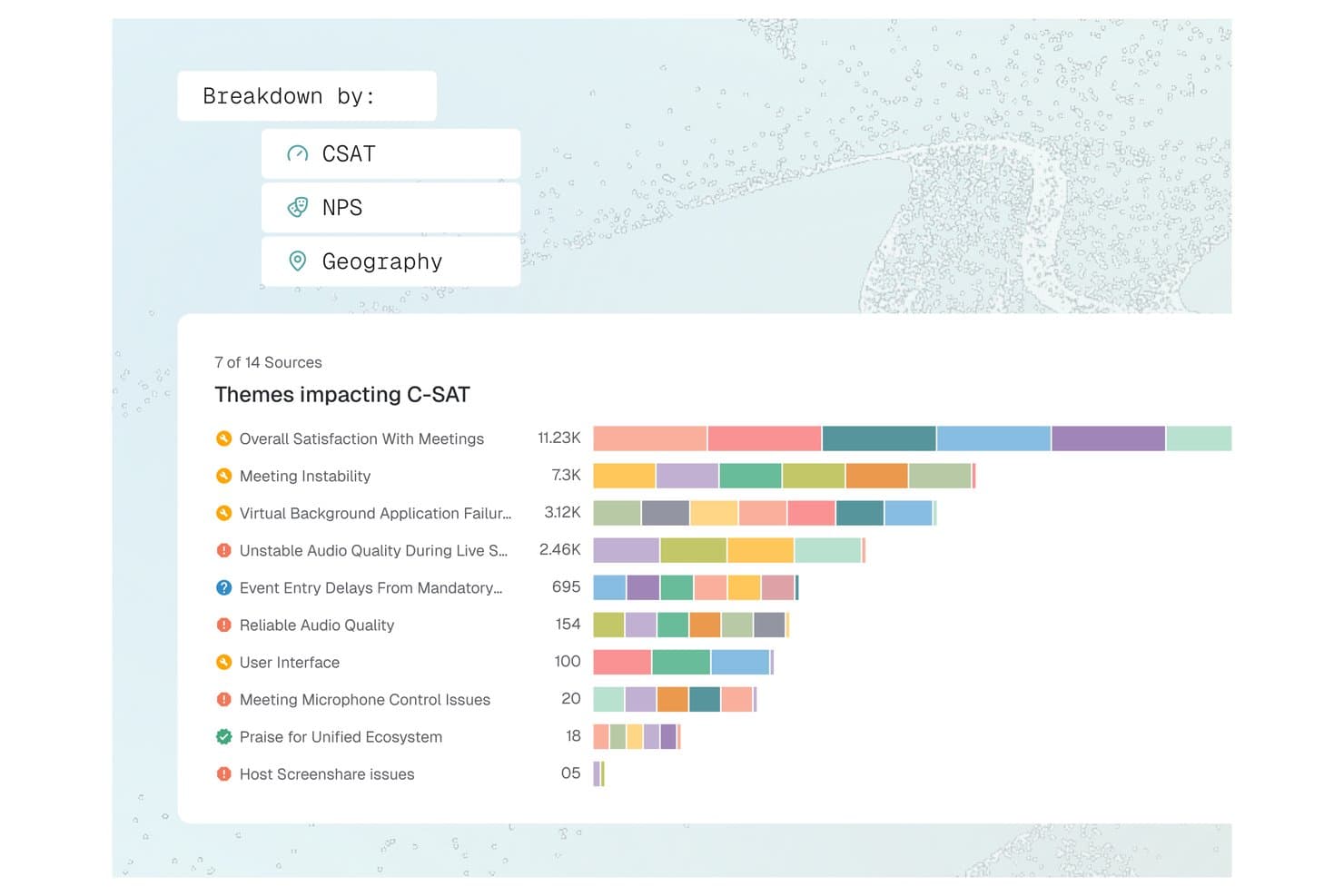
Enterpret ofrece un panel de desglose de temas de satisfacción del cliente (C-SAT) que visualiza temas de retroalimentación como inestabilidad en reuniones y calidad de audio por volumen a través de múltiples fuentes. Enterpret es una plataforma de inteligencia de retroalimentación de clientes que unifica tickets de soporte, grabaciones de llamadas, encuestas y señales sociales en información del producto estructurada y analizada por IA, a través de una taxonomía adaptativa y un grafo de contexto del cliente.
¿Para quién es mejor Enterpret?
Enterpret es ideal para gerentes de producto y líderes de experiencia del cliente (CX) en empresas B2B SaaS de tamaño medio a empresarial que reciben grandes volúmenes de retroalimentación de clientes a través de múltiples canales cada mes.
Por qué elegí Enterpret
Elegí Enterpret por la manera en que conecta la retroalimentación con el contexto real del producto. El Grafo de Contexto del Cliente vincula cada registro de retroalimentación con los detalles de la cuenta, patrones de uso y estado del acuerdo, por lo que puedo leer las quejas en el contexto de quién realmente está abandonando. Wisdom, la capa de consultas de IA de Enterpret, me permite preguntar, por ejemplo, '¿qué dicen los usuarios avanzados sobre la incorporación?' y recibir resúmenes respaldados por ejemplos reales de retroalimentación, no solo etiquetas agregadas.
Características clave de Enterpret
- Taxonomía adaptativa: Permite clasificar automáticamente la retroalimentación no estructurada en temas dinámicos y personalizables mediante etiquetas impulsadas por IA.
- Integraciones de retroalimentación de múltiples fuentes: Conecta y unifica la retroalimentación de herramientas de soporte, encuestas, reseñas, grabaciones de llamadas y canales sociales.
- Enriquecimiento de datos: Enriquece cada registro de retroalimentación con contexto de usuario, cuenta y producto desde los sistemas conectados.
- Flujos de trabajo de cierre de ciclo: Asigna tareas basadas en retroalimentación a los equipos de producto e ingeniería mediante integraciones con flujos de trabajo como Jira y Slack.
Integraciones de Enterpret
Enterpret ofrece integraciones nativas con Zendesk, Intercom, Salesforce, Gong, Slack, Qualtrics, Linear, Jira, Google Play Store y Apple App Store. Hay una API disponible para integraciones personalizadas.
Pros and Cons
Pros:
- La taxonomía de IA se adapta automáticamente a la retroalimentación
- Vincula la retroalimentación de clientes directamente con métricas del producto
- Detecta tendencias en grandes volúmenes de datos de retroalimentación
Cons:
- La configuración inicial de la taxonomía requiere tiempo considerable
- La profundidad en los informes es limitada sin configuración técnica
Learn more about Enterpret: La mejor opción para la reproducción de sesiones con insights basados en IA
- Plan gratuito disponible
- Precio bajo solicitud
Visit WebsiteCustomer Rating:4.5/5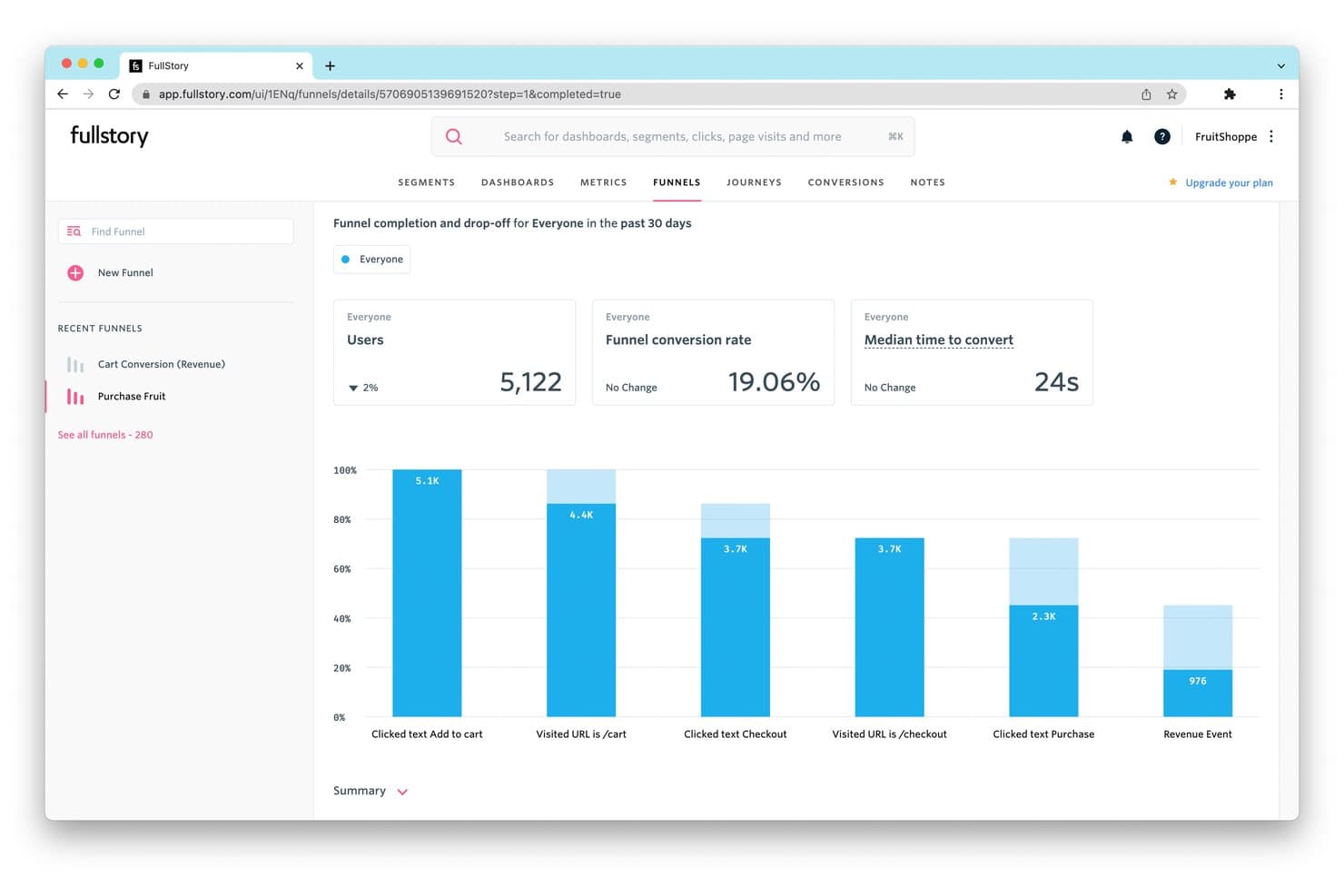
FullStory realiza un seguimiento de las tasas de abandono del embudo para revelar dónde abandonan los usuarios sus compras. Fullstory es una plataforma de inteligencia de productos que combina la reproducción de sesiones, análisis del comportamiento basado en la captura automática, análisis de embudos y recorridos, seguimiento de la retención, guías dentro de la aplicación y detección de insights mediante IA en aplicaciones web y móviles nativas.
¿Para quién es más adecuada Fullstory?
Fullstory es una opción excelente para los equipos de producto y crecimiento de empresas medianas y grandes que necesitan conectar el comportamiento cualitativo de las sesiones con los análisis cuantitativos en un solo lugar.
Por qué elegí Fullstory
Fullstory ocupa un lugar en mi lista de opciones principales porque su capacidad de reproducción de sesiones va más allá que la de la mayoría de las herramientas que he probado, al combinar grabaciones de alta fidelidad con resúmenes de sesiones generados por IA mediante StoryAI, que permiten analizar horas de grabaciones en cuestión de segundos. Me atrae especialmente Fullcapture™, que captura retroactivamente cada clic, desplazamiento e interacción, de modo que puedo definir hoy una nueva señal de comportamiento y aplicarla a datos de hace meses. Las señales de frustración identifican automáticamente los clics repetidos y los clics en errores, y los relacionan con el impacto estimado en los ingresos.
Características principales de Fullstory
- Embudos de conversión: Análisis de embudos de varios pasos con visualización del abandono, enlazado directamente con las reproducciones de sesiones de los usuarios que abandonaron en cada paso.
- Mapas de recorrido: Análisis de rutas basado en ML que muestra los recorridos más habituales que siguen los usuarios por tu producto, incluidos los desvíos inesperados y las rutas de salida.
- Guías y encuestas dentro de la aplicación: Implementa recorridos de producto, listas de comprobación de incorporación, información sobre herramientas y encuestas NPS desde Fullstory sin apoyo de ingeniería.
- Anywhere: Almacén: Sincronización horaria de datos de comportamiento con Snowflake, BigQuery y Redshift para flujos de trabajo posteriores de inteligencia empresarial y modelado predictivo.
Integraciones de Fullstory
Fullstory ofrece integraciones nativas con Twilio Segment, Amplitude, Snowflake, Google BigQuery, Amazon Redshift y RudderStack, además de Intercom, Invoca, Kustomer y Olark. Sus API FS.Identity, Element, fs.event y Consent permiten realizar integraciones personalizadas.
Pros and Cons
Pros:
- Reproducción de sesiones con resúmenes de sesiones basados en IA
- Seguimiento retroactivo de eventos de comportamiento en la web y dispositivos móviles
- Captura de datos centrada en la privacidad con enmascaramiento automático de información personal identificable
Cons:
- No incluye pruebas A/B ni indicadores de funcionalidades
- Los análisis avanzados están limitados a los planes de niveles superiores
Learn more about Fullstory: Ideal para capturar todas las interacciones de los usuarios automáticamente
- Plan gratuito + prueba gratuita + demostración gratuita disponible
- Precio disponible bajo solicitud
Visit WebsiteCustomer Rating:4.3/5
Aquí se muestra la función de comparación de rutas en Heap. Heap es una plataforma de analítica de productos que hace que los datos de interacciones y actividad de los usuarios sean instantáneamente accesibles y utilizables para las empresas. Su principal fortaleza es la función de captura automática de datos, que elimina la necesidad de configurar seguimientos manuales, reduciendo así las posibilidades de pérdida de datos o información relevante.
Por qué elegí Heap:
Seleccioné Heap para mi lista debido a su capacidad para capturar automáticamente las interacciones de los usuarios, lo que lo diferencia de muchas otras herramientas en el mercado. Mientras que la mayoría de las herramientas requieren configuración manual para seguir diferentes eventos, Heap capta todas las acciones de los usuarios desde el principio, lo que lo hace realmente “ideal para capturar todas las interacciones de los usuarios automáticamente”.
Características destacadas e integraciones:
Las características clave de Heap incluyen la captura automática de eventos, análisis retroactivo y la gobernanza de datos, ofreciendo un entorno rico, flexible y seguro para el análisis de datos. Heap se integra perfectamente con plataformas como Salesforce, Optimizely y Google Ads.
Pros and Cons
Pros:
- Captura automática de todas las interacciones de usuario
- Permite realizar análisis retroactivos
- Se integra bien con muchas plataformas comúnmente utilizadas
Cons:
- La personalización de precios puede carecer de transparencia para los posibles clientes
- Puede ser caro para pequeñas empresas o startups
- Algunos usuarios pueden encontrar la interfaz menos intuitiva que la de plataformas competidoras
Learn more about Heap (by Contentsquare): Ideal para análisis de productos de código abierto
- Plan gratuito + demostración gratuita + prueba gratuita disponibles
- Precios bajo solicitud
Visit WebsiteCustomer Rating:4.5/5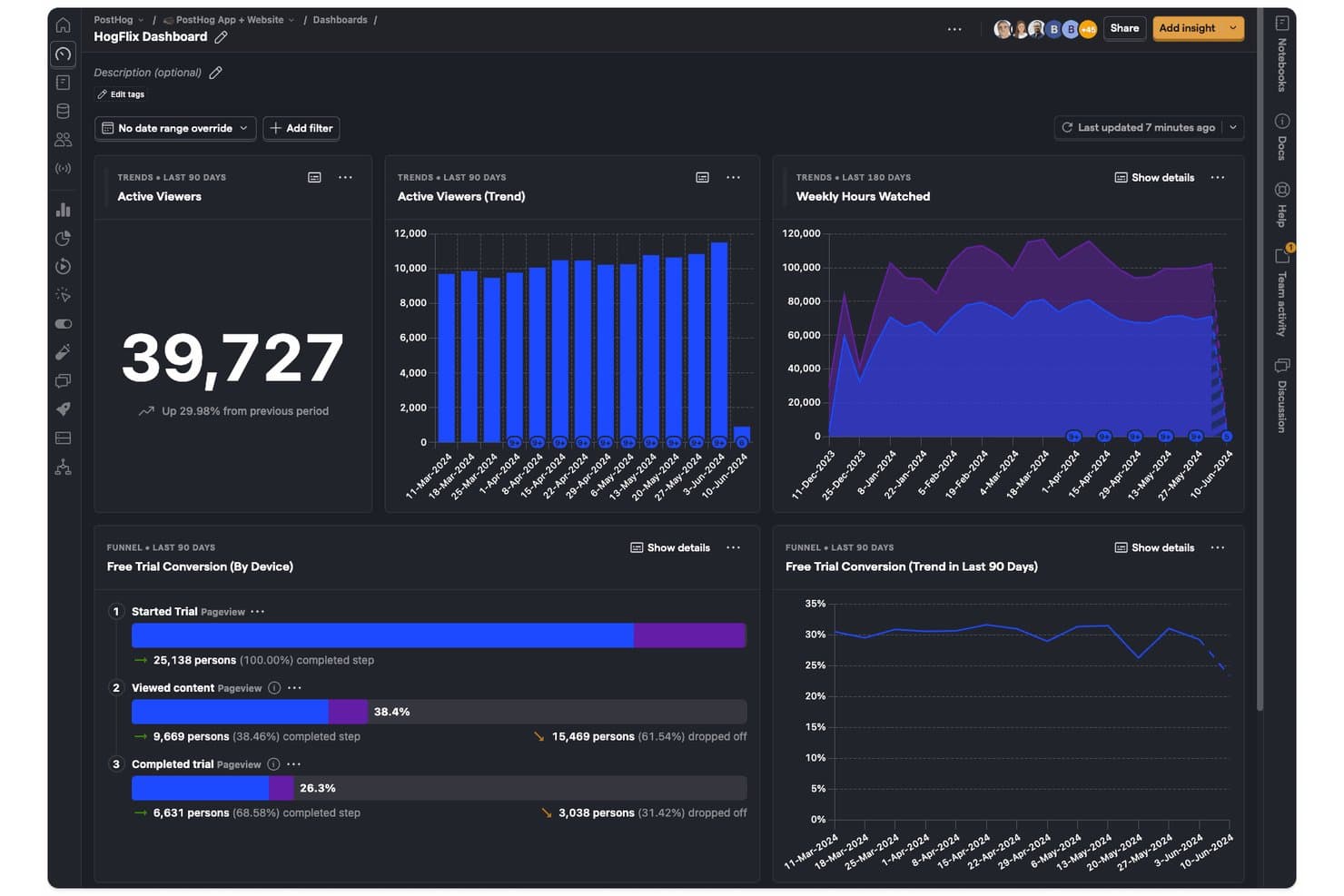
PostHog registra las tendencias de espectadores, las horas de visualización y las conversiones de prueba en un único panel. PostHog es una plataforma de inteligencia de productos de código abierto que combina análisis de productos, reproducción de sesiones, indicadores de funciones, pruebas A/B, encuestas y un CDP integrado en un único conjunto de herramientas unificado.
¿Para quién es más adecuado PostHog?
PostHog es una excelente opción para equipos de productos técnicos y desarrolladores que quieren cubrir el análisis, la reproducción de sesiones, los indicadores de funciones y la experimentación en una sola plataforma, sin tener que integrar varias herramientas.
Por qué elegí PostHog
PostHog se gana un lugar entre los mejores de mi lista porque su base de código abierto ofrece a los equipos de productos técnicos algo que la mayoría de las plataformas de análisis no ofrece: visibilidad completa sobre cómo se recopilan, almacenan y procesan sus datos. Me encanta que la captura automática registre clics, visualizaciones de páginas y envíos de formularios desde el primer día, mientras que el Análisis de correlación identifica automáticamente los factores de comportamiento vinculados estadísticamente a la conversión o al abandono. Los equipos pueden pasar directamente desde cualquier paso del embudo a las grabaciones de sesiones que lo respaldan, convirtiendo un punto de datos en una historia real de usuario sin cambiar de herramienta.
Características principales de PostHog
- Análisis del ciclo de vida: Segmenta a los usuarios en categorías de nuevos, recurrentes, reactivados e inactivos para que puedas realizar un seguimiento de los cambios en la interacción de toda tu base de usuarios a lo largo del tiempo.
- Pruebas A/B y multivariantes nativas: Ejecuta experimentos con motores estadísticos bayesianos y frecuentistas, incluidos grupos de control y pruebas a nivel de grupo para productos B2B.
- Encuestas dentro de la aplicación: Activa encuestas NPS, CSAT, PMF y de texto abierto en función del comportamiento del usuario, el historial de eventos o el estado del indicador de funciones, con respuestas vinculadas directamente a los datos analíticos.
- Consultas personalizadas con HogQL: Permite escribir SQL directamente sobre tus datos de PostHog para realizar análisis ad hoc y crear informes personalizados más allá del generador de insights estándar.
Integraciones de PostHog
PostHog ofrece más de 50 destinos de eventos nativos, incluidos Slack, Braze, Customer.io, Salesforce, HubSpot, Intercom y PagerDuty. También se conecta con Snowflake, BigQuery, Databricks y Redshift, con API abiertas y funciones de Hog para canalizaciones de datos personalizadas.
Pros and Cons
Pros:
- Código abierto con opción de implementación autoalojada
- Reproducción de sesiones estrechamente integrada con el análisis
- Análisis avanzado de embudos con información de correlación
Cons:
- La interfaz resulta abrumadora para los equipos de productos no técnicos
- Retención limitada de la reproducción de sesiones a 3 meses
Learn more about PostHog: Ideal para visualizar las interacciones de los usuarios
- Prueba gratuita de 14 días
- Desde $83/mes
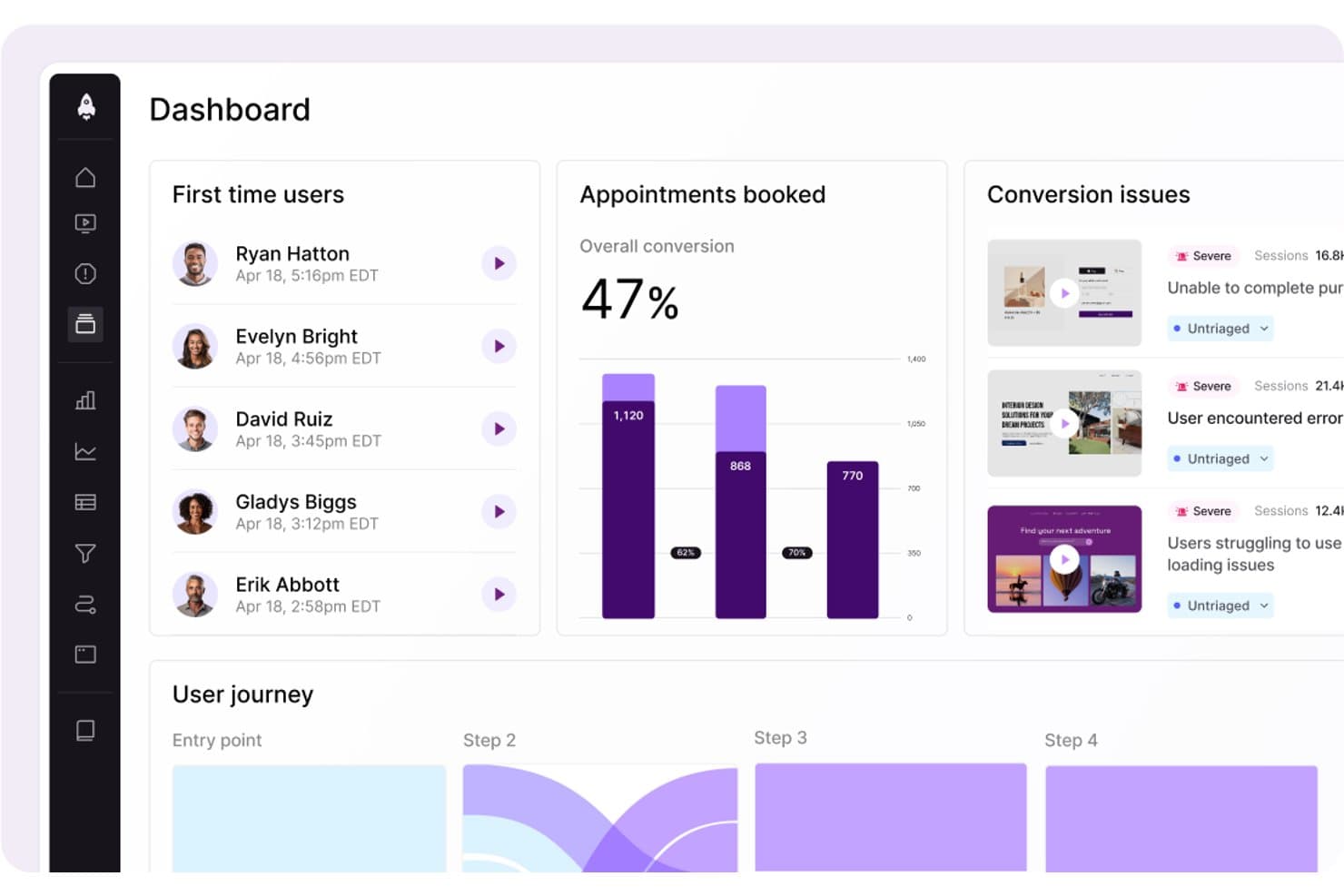
LogRocket muestra los problemas de conversión y los datos del recorrido del usuario en un solo panel. LogRocket es una plataforma de inteligencia de productos que combina la repetición de sesiones, el análisis de productos, el análisis de UX, el seguimiento de errores y las perspectivas impulsadas por IA mediante su capa Galileo AI en una sola herramienta.
¿Para quién es más adecuado LogRocket?
LogRocket es una opción excelente para gerentes de producto y equipos de análisis de productos que necesitan conectar los datos cuantitativos del embudo con el contexto real de las sesiones para comprender el 'porqué' del comportamiento de los usuarios.
Por qué elegí LogRocket
LogRocket ocupa un lugar en mi lista de favoritos por lo bien que captura y visualiza exactamente lo que experimentan los usuarios. La repetición de sesiones es su principal fortaleza: reproducción con precisión de píxel en la web y en aplicaciones móviles nativas, junto con mapas de calor, mapas de clics y mapas de clics repetidos que convierten los datos de interacción sin procesar en información sobre la que realmente se puede actuar. También me encanta que Galileo AI observe las sesiones automáticamente y destaque los momentos que merecen tu atención, para que no tengas que revisar horas de grabaciones hasta encontrar dónde tuvieron dificultades los usuarios.
Funciones principales de LogRocket
- Captura automática con definiciones retroactivas: LogRocket registra automáticamente todos los eventos de los usuarios y permite etiquetarlos en lenguaje sencillo, aplicando las etiquetas al instante a todas las sesiones históricas.
- Análisis de rutas: Visualiza las rutas exactas que siguen los usuarios por tu producto, hacia delante y hacia atrás desde cualquier página o evento, incluidos los puntos de abandono.
- Encuestas dentro de la aplicación: Recopila comentarios cualitativos de los usuarios directamente dentro de tu producto, vinculados a los datos de comportamiento de las sesiones para aportar contexto adicional.
- Exportación de datos en streaming: Proporciona una conexión continua de datos nativa del almacén de datos con Snowflake, BigQuery, Redshift, Databricks y Amazon S3 para el análisis de inteligencia empresarial.
Integraciones de LogRocket
LogRocket ofrece más de 75 integraciones, incluidas Amplitude, Mixpanel, Segment, LaunchDarkly, Optimizely, Zendesk, Intercom, Jira, Slack y Snowflake. También proporciona acceso mediante API y MCP, además de exportaciones en streaming para empresas a Snowflake, BigQuery, Redshift, Databricks y Amazon S3.
Pros and Cons
Pros:
- Repetición de sesiones con precisión de píxel en la web y dispositivos móviles
- Captura automática con etiquetado retroactivo de eventos
- Perspectivas de embudos y mapas de calor impulsadas por IA
Cons:
- Las funciones avanzadas de IA requieren planes superiores
- El análisis de retención es menos avanzado que el de los principales competidores
Learn more about LogRocket: Ideal para priorizar el impacto en los ingresos impulsado por IA
- Demostración gratuita disponible
- Precios disponibles previa solicitud
Visit WebsiteCustomer Rating:4.7/5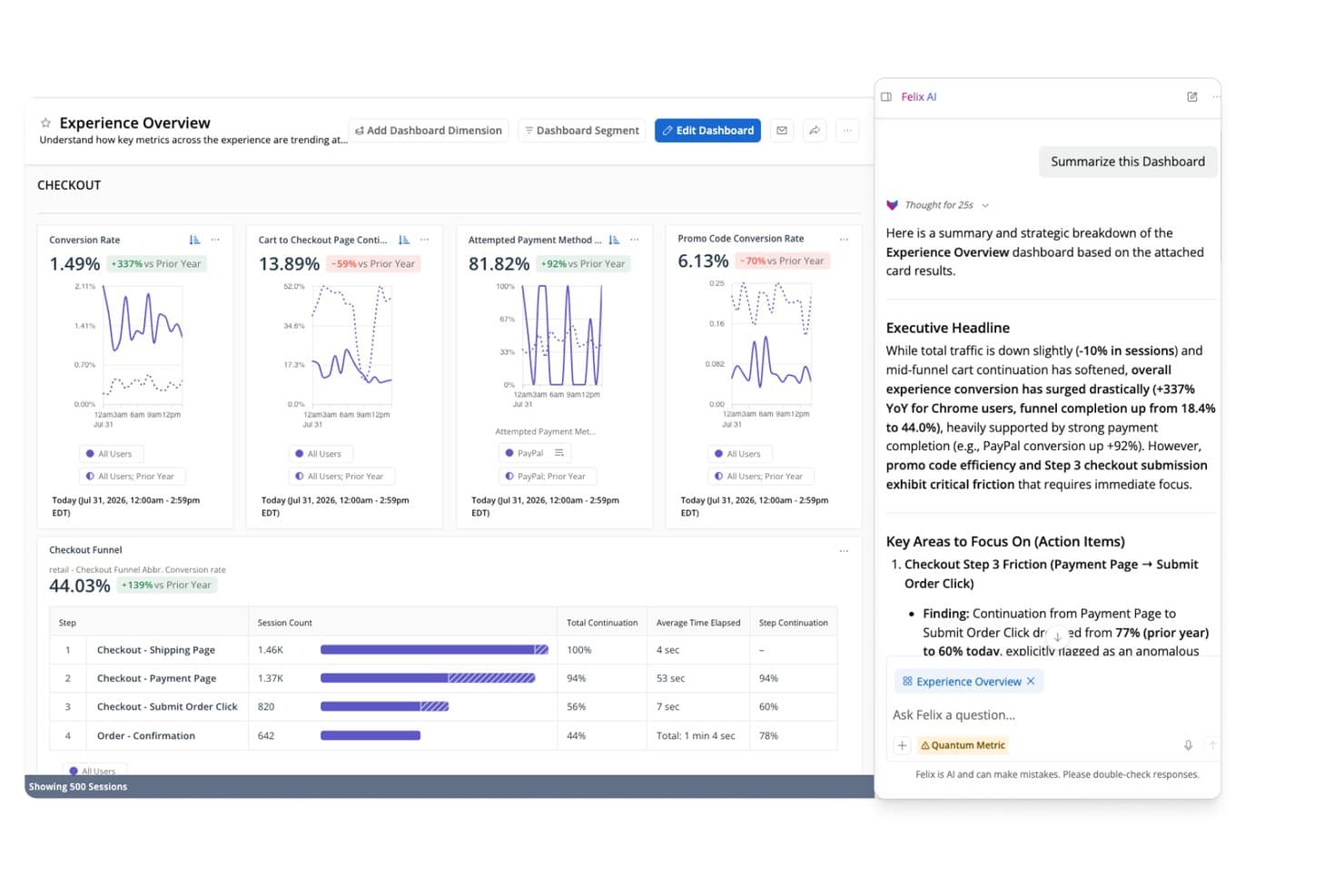
Felix AI de Quantum Metric resume al instante los hallazgos del embudo de pago. Quantum Metric es una plataforma de inteligencia de productos que combina análisis de comportamiento con captura automática, reproducción de sesiones, análisis de embudos y recorridos, detección de anomalías basada en IA y activación de datos en tiempo real en aplicaciones web y móviles nativas.
¿Para quién es más adecuada Quantum Metric?
Quantum Metric es una excelente opción para equipos empresariales de producto y transformación digital en sectores regulados—como servicios financieros, seguros y comercio minorista—que necesitan priorizar los ingresos mediante IA, con el respaldo de estrictos controles de privacidad de datos.
Por qué elegí Quantum Metric
Quantum Metric ocupa un lugar en mi lista de opciones porque su capa agéntica Felix AI hace algo que no he visto igualado en ningún otro lugar: supervisa continuamente tus recorridos digitales, cuantifica el impacto en los ingresos de cada punto de fricción y muestra los problemas priorizados antes de que nadie tenga que buscarlos. Me gusta especialmente el Análisis de oportunidades, que puntúa automáticamente la fricción en función del impacto empresarial para que los equipos de producto y transformación digital puedan justificar las decisiones de la hoja de ruta con cifras en dólares, no con intuición. Si a eso le sumas la captura automática de más de 300 señales de comportamiento en la web y en aplicaciones móviles nativas desde el primer día, obtienes una plataforma concebida desde cero para priorizar en función de los ingresos.
Funciones clave de Quantum Metric
- Reproducción de sesiones: Reproduce las interacciones de los usuarios en la web y en aplicaciones móviles nativas con fidelidad basada en el DOM, incluido un panel técnico con diagnósticos de red para la clasificación de incidencias de ingeniería.
- Transmisión de datos: Exporta datos de comportamiento en tiempo real a almacenes como Snowflake, BigQuery, Redshift y Databricks, con compatibilidad con filtros personalizados y alineación de esquemas.
- Generador de segmentos: Crea segmentos de audiencia basados en el comportamiento mediante lógica anidada AND, OR, THEN y WHERE en cientos de métricas, utilizables en todas las vistas de la plataforma.
- Escaneo automático de información de identificación personal: Analiza continuamente los datos sin procesar y las reproducciones de sesiones mediante Cloud DLP para detectar, ocultar y eliminar información confidencial antes de que quede expuesta.
Integraciones de Quantum Metric
Quantum Metric ofrece integraciones documentadas con Snowflake, Google BigQuery, Databricks, Amazon Redshift, LaunchDarkly, Optimizely, Salesforce Service Cloud, Qualtrics, Medallia y Slack, además de enriquecimiento de datos procedentes de fuentes sin conexión, centros de llamadas, VoC y POS.
Pros and Cons
Pros:
- Cuantifica el impacto en los ingresos de cada fricción del usuario
- Los agentes de Felix AI muestran oportunidades de forma proactiva
- Permite pasar a la reproducción de sesiones desde cualquier vista agregada
Cons:
- No ofrece prueba gratuita ni acceso para empresas emergentes
- Depende de herramientas de terceros para la experimentación
Learn more about Quantum Metric: Mejor para análisis de productos y comportamiento de usuarios
- Plan gratuito disponible
- Precios a consultar
Visit WebsiteCustomer Rating:4.5/5
Aquí tienes la función del panel de KPI de negocios de Amplitude. Amplitude es una plataforma integral de inteligencia de productos conocida por su capacidad para rastrear y analizar datos sobre productos y comportamiento de usuarios de manera eficaz. Su fortaleza radica en descubrir patrones en el comportamiento de los usuarios, proporcionando datos valiosos para el desarrollo y la optimización de productos.
Por qué elegí Amplitude:
Incluí Amplitude en mi lista debido a sus sólidos y detallados análisis del comportamiento de los usuarios. Al evaluar varias plataformas, descubrí que Amplitude ofrece una excepcional capacidad para analizar datos de comportamiento del usuario y extraer conclusiones significativas, lo que la convierte en una opción destacada. Su afirmación de ser 'La mejor para análisis de productos y comportamiento de usuarios' está respaldada por estas sólidas capacidades.
Características destacadas e integraciones:
Las características clave de Amplitude incluyen analíticas en tiempo real, análisis de cohortes y segmentación avanzada, esenciales para comprender e influir en el comportamiento de los usuarios. En cuanto a integraciones, Amplitude se integra bien con herramientas como Slack, Jira y Zendesk, lo que fomenta el intercambio de datos y la colaboración en equipo.
Pros and Cons
Pros:
- Analítica exhaustiva del comportamiento del usuario
- Analítica en tiempo real
- Sólidas capacidades de integración
Cons:
- El costo puede ser prohibitivo para empresas más pequeñas
- Puede tomar tiempo navegar y aprovechar completamente el conjunto complejo de funciones
- La fijación de precios personalizada carece de claridad inicial
Learn more about Amplitude: Ideal para el seguimiento de interacciones de usuario dentro de la app
- Prueba gratuita de 30 días + plan gratuito + demo gratis disponible
- Precios a consultar
Visit WebsiteCustomer Rating:4.4/5
Aquí está la función del panel de análisis multi-app en Pendo. Pendo es una plataforma de experiencia del producto que permite a las empresas entender las interacciones de sus usuarios dentro de la aplicación. Proporciona información crítica sobre el comportamiento de los usuarios en la app y aprovecha estos datos para ofrecer una mejor experiencia de usuario.
Por qué elegí Pendo:
Pendo surgió como un fuerte candidato en mi investigación, principalmente por sus capacidades exhaustivas de seguimiento de interacciones dentro de la aplicación. Noté que Pendo sobresale al ofrecer analíticas detalladas sobre cómo los usuarios navegan dentro de una aplicación. Se destaca del resto por su enfoque único en maximizar la experiencia del usuario, lo cual se alinea directamente con su destreza para rastrear interacciones en la app.
Características destacadas e integraciones:
Pendo está repleto de funciones como la segmentación de usuarios, que ayuda a dirigirse a grupos de usuarios específicos. Ofrece funciones avanzadas de retroalimentación y análisis, proporcionando una visión integral de la experiencia del usuario. Las capacidades de integración de Pendo son amplias, admitiendo la integración con las principales herramientas de CRM y marketing como Salesforce, Marketo y Slack.
Pros and Cons
Pros:
- Seguimiento extenso dentro de la aplicación
- Capacidades avanzadas de retroalimentación y análisis
- Amplias opciones de integración
Cons:
- El precio puede ser elevado para empresas más pequeñas
- Curva de aprendizaje más pronunciada en comparación con plataformas similares
- El precio personalizado puede carecer de transparencia
Learn more about Pendo: Mejor para análisis de datos en tiempo real
- Plan gratuito disponible
- Desde $25/mes (facturado anualmente)

Captura de pantalla del panel de métricas del producto en Mixpanel. Mixpanel es una plataforma avanzada de análisis diseñada para analizar, medir y mejorar la interacción de los usuarios en una variedad de aplicaciones. Su capacidad para proporcionar análisis de datos en tiempo real lo convierte en una herramienta poderosa para las empresas que necesitan responder rápidamente a las tendencias cambiantes de los usuarios.
Por qué elegí Mixpanel:
Incluir Mixpanel en esta lista fue una decisión sencilla, principalmente por sus destacadas capacidades de análisis en tiempo real. Al comparar Mixpanel con plataformas similares, encontré que sus análisis de datos en tiempo real representan una ventaja notoria, permitiendo a las empresas tomar decisiones rápidas y basadas en datos. La herramienta sobresale al ofrecer información en tiempo real, marcando la diferencia en el competitivo campo del software de inteligencia de productos.
Características destacadas e integraciones:
Entre las características más relevantes de Mixpanel se incluyen el seguimiento basado en eventos y los embudos de recorrido del usuario, que ofrecen una comprensión profunda de las interacciones de los usuarios. Además, su análisis de cohortes permite a las empresas agrupar usuarios según su comportamiento, proporcionando información segmentada. En cuanto a integraciones, Mixpanel se sincroniza con numerosas plataformas, como Salesforce, Zendesk y Jira, facilitando un flujo de trabajo unificado entre diferentes sistemas.
Pros and Cons
Pros:
- Análisis en tiempo real
- Seguimiento avanzado basado en eventos
- Amplias opciones de integración
Cons:
- El precio puede ser elevado para startups
- La interfaz de usuario puede requerir una curva de aprendizaje
- La tarificación personalizada carece de transparencia inicial
Learn more about Mixpanel: Ideal para análisis digital y de producto unificados
- Plan gratuito + demostración gratuita + prueba gratuita de 15 días disponibles
- Desde $39/mes (facturado anualmente)
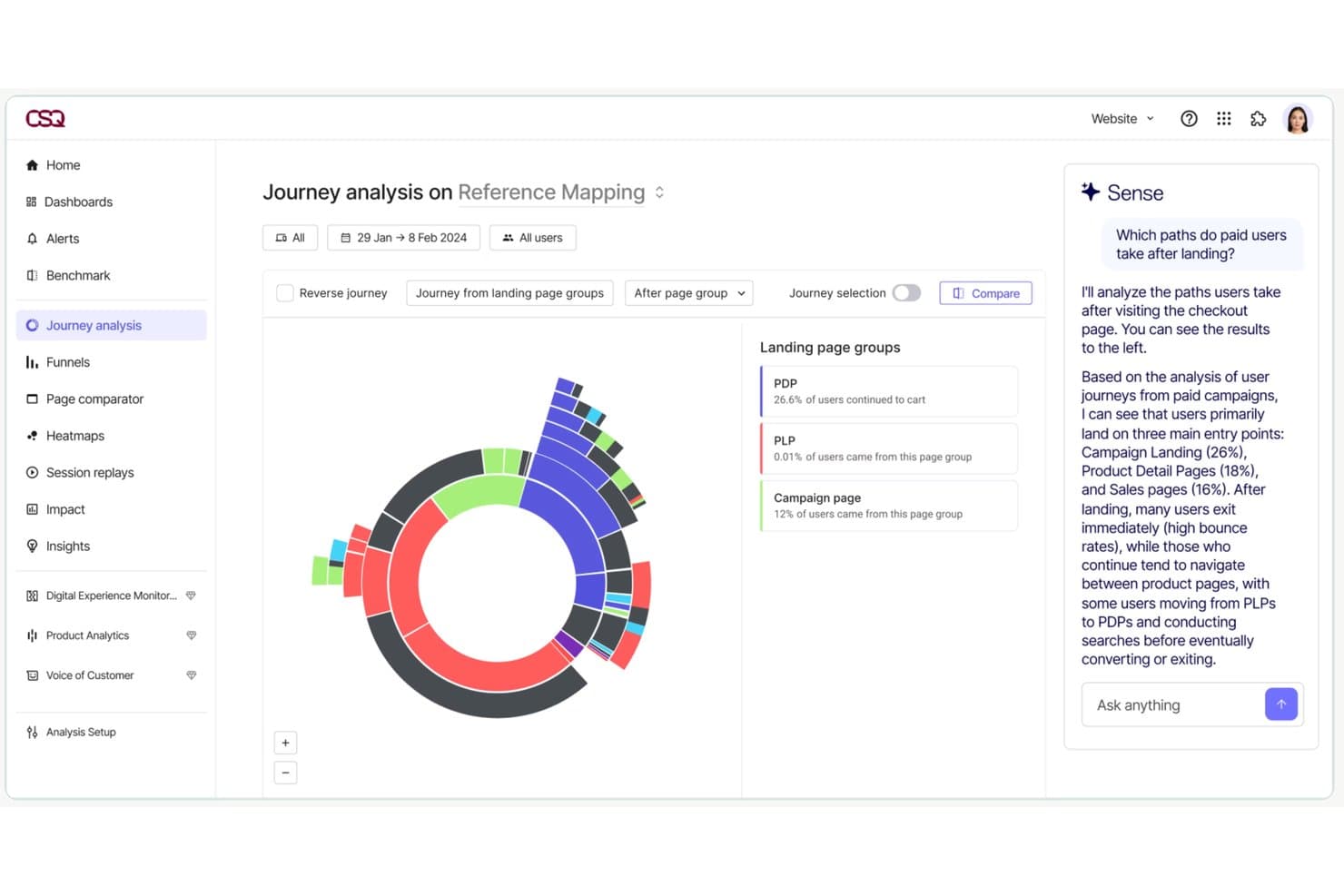
Contentsquare permite a los usuarios analizar las rutas de recorrido de los usuarios de pago con información basada en AI. Contentsquare es una plataforma de inteligencia sobre la experiencia digital y de producto que combina análisis de comportamiento con captura automática, reproducción de sesiones, mapas de calor, análisis de recorridos, encuestas dentro de la aplicación y análisis de producto en una única suite para web y dispositivos móviles.
¿Para quién es más adecuado Contentsquare?
Contentsquare es una opción especialmente adecuada para equipos de producto de empresas medianas y grandes que necesitan análisis de comportamiento, reproducción de sesiones y análisis de recorridos en un solo lugar, en vez de integrarlos mediante varias herramientas.
Por qué elegí Contentsquare
Contentsquare ocupa un lugar en mi lista de favoritos porque es la única herramienta que he visto que unifica realmente el análisis digital y de producto sin obligarte a integrar plataformas independientes. Me impresiona especialmente Smart Capture, que registra automáticamente cada interacción de forma retroactiva, por lo que mi equipo puede definir nuevas métricas con datos históricos sin tener que molestar al equipo de ingeniería. Si a eso le sumas Impact Quantification, que vincula puntos de fricción específicos directamente con los ingresos, obtienes una forma clara de justificar las decisiones de la hoja de ruta con cifras concretas.
Características principales de Contentsquare
- Captura automática Smart Capture: Registra automáticamente cada interacción del usuario en sitios web y aplicaciones móviles nativas, sin etiquetado manual de eventos ni trabajo de ingeniería.
- Encuestas dentro de la aplicación: Más de 40 plantillas de encuestas prediseñadas, un generador de encuestas con AI y activadores de intención de salida te permiten recopilar comentarios de los usuarios directamente dentro de tu producto.
- Chat de AI Sense: Una interfaz de lenguaje natural que te permite consultar tus datos analíticos y obtener respuestas en lenguaje sencillo sin necesidad de conocimientos especializados en datos.
- Exportación ETL de Data Connect: Una canalización gestionada que exporta los datos de comportamiento de Contentsquare directamente a Snowflake, AWS o Azure para realizar análisis a nivel de almacén de datos.
Integraciones de Contentsquare
Contentsquare ofrece más de 100 integraciones, entre ellas Snowflake, AWS, Azure, Segment, mParticle, RudderStack, Optimizely y VWO. Data Connect exporta datos de comportamiento a almacenes de datos, mientras que su API abierta y el servidor MCP permiten crear flujos de trabajo de análisis personalizados.
Pros and Cons
Pros:
- Captura automáticamente todas las interacciones web y de las aplicaciones
- Vincula los datos de comportamiento directamente con los ingresos
- Combina análisis, reproducción de sesiones y encuestas
Cons:
- Las funciones de análisis avanzadas requieren planes superiores
- La reproducción de sesiones puede mostrar grabaciones incompletas
Learn more about Contentsquare:
Otro software de inteligencia de productos
Estas son algunas opciones adicionales de software de inteligencia de productos que no llegaron a mi lista de selección, pero que aún merece la pena consultar:
- 11Gainsight PXIdeal para la adopción de productos B2B y la alineación con CS
- 12StatsigLa mejor opción para el análisis de productos basado en experimentos
- 13KissmetricsIdeal para el seguimiento del recorrido del cliente y embudos de conversión
- 14GlassboxIdeal para el análisis de la fricción en los recorridos digitales empresariales
- 15UXCamIdeal para analizar el abandono del embudo móvil mediante la reproducción de sesiones
- 16UserpilotLa mejor opción para pasar de la analítica a la acción dentro de la aplicación en un solo flujo de trabajo
- 17CleverTapMejor para empresas con enfoque móvil
- 18Adobe AnalyticsLa mejor opción para el seguimiento del rendimiento de marketing
- 19KubitIdeal para análisis de productos nativos del almacén de datos
Cómo evalúo el software de inteligencia de producto
Divido mi evaluación en dos capas: las capacidades principales—como el análisis de embudos y la segmentación de cohortes—que una herramienta debe tener, y los diferenciadores que distinguen a las mejores opciones.
Funcionalidad básica (requisitos indispensables para esta lista)
Cuando selecciono herramientas para mi lista, califico cada una en una escala del 0 (no ofrece la funcionalidad) al 5 (sobresale en esta área) para cada funcionalidad principal que se detalla a continuación. Luego, calculo la puntuación total de la herramienta como un porcentaje. Cada herramienta necesita alcanzar una puntuación total mínima del 65% para ser considerada en la inclusión.
- Seguimiento de eventos de comportamiento: Compruebo si la herramienta puede capturar acciones de usuario como clics en botones, envíos de formularios y vistas de página tanto en web como en móvil con un esfuerzo mínimo de ingeniería.
- Análisis de embudos y caminos: Evalúo aquí embudos de varios pasos que muestran dónde los usuarios abandonan—por ejemplo, entre añadir un artículo al carrito y finalizar la compra.
- Segmentación de cohortes y usuarios: Busco la capacidad de agrupar usuarios por comportamiento y atributos, como comparar usuarios en prueba que completaron la incorporación frente a los que no lo hicieron.
- Analítica de retención y compromiso: Las herramientas deben mostrar curvas de retención y métricas de fidelización para que puedas responder preguntas como "¿están volviendo los usuarios después de su primera semana?"
- Repetición de sesiones o información a nivel de usuario: Evalúo si la herramienta brinda contexto cualitativo, como ver a un usuario tener dificultades con una página de configuración, junto con datos cuantitativos.
- Integraciones y canalización de datos: Aquí importa la compatibilidad con almacenes de datos como Snowflake o BigQuery y CDPs como Segment, además de la conectividad con CRM y herramientas de marketing.
Una vez que tengo una lista de herramientas que cumplen los criterios, considero qué distingue a cada plataforma.
Factores diferenciadores (qué distingue a los proveedores)
Así es como comparo y contrasto diferentes proveedores:
Funciones destacadas
Las ideas impulsadas por IA son un gran diferenciador—busco herramientas que detectan automáticamente caídas inesperadas en la activación o retención sin requerir una exploración manual del tablero. Las pruebas A/B nativas son otro factor que valoro, ya que permiten a los equipos de producto medir el impacto de un nuevo flujo de incorporación o de una página de precios directamente dentro del entorno de análisis. También evalúo la integración de "feature flags", que vincula los eventos de lanzamiento con los datos de uso para que puedas ver exactamente cómo una nueva función afecta el compromiso.
Más allá de las funciones
El modelo de precios es muy importante aquí. Un precio basado en eventos puede escalar rápidamente a medida que tu producto crece, así que evalúo si el modelo de un proveedor se mantiene predecible a medida que aumenta tu base de usuarios. El ajuste con el almacén de datos y la arquitectura tecnológica es igualmente relevante—verifico si una herramienta funciona de forma nativa con tu almacén de datos existente o requiere un canal de datos separado. También considero la gobernanza de datos, especialmente los controles de acceso basados en roles y las certificaciones de cumplimiento, ya que los datos de producto a menudo contienen información sensible sobre el comportamiento de usuario a la que accederán equipos de toda la organización.
Cómo elegir un software de inteligencia de productos
Es fácil perderse entre largas listas de funciones y estructuras de precios complejas. Para ayudarte a mantener la atención mientras avanzas en tu proceso único de selección de software, aquí tienes una lista de factores que debes tener en cuenta:
| Factor | Qué debes tener en cuenta |
|---|---|
| FactorEscalabilidad | Qué debes tener en cuenta¿Puede el software crecer junto con tu equipo? Ten en cuenta el crecimiento futuro y si la herramienta puede gestionar un aumento de datos y usuarios sin problemas de rendimiento. |
| FactorIntegraciones | Qué debes tener en cuenta¿Se conecta con tus herramientas actuales? Comprueba la compatibilidad con tu CRM y tus plataformas de análisis y comunicación para evitar interrupciones en los flujos de trabajo. |
| FactorPersonalización | Qué debes tener en cuenta¿Puedes adaptar el software a tus necesidades? Busca opciones para ajustar los paneles, informes y flujos de trabajo a las preferencias de tu equipo. |
| FactorFacilidad de uso | Qué debes tener en cuenta¿La herramienta es fácil de usar? Evalúa la curva de aprendizaje y si tu equipo puede adaptarse rápidamente sin una formación exhaustiva. |
| FactorImplementación e incorporación | Qué debes tener en cuenta¿Qué tan sencilla es la configuración? Ten en cuenta el tiempo y los recursos necesarios para la implementación, incluida la formación y la asistencia durante la transición. |
| FactorCoste | Qué debes tener en cuenta¿Se ajusta a tu presupuesto? Compara los planes de precios, presta atención a las tarifas ocultas y considera el valor de las funciones ofrecidas en cada nivel. |
| FactorMedidas de seguridad | Qué debes tener en cuenta¿Están protegidos tus datos y tu privacidad? Busca cifrado, controles de acceso de usuarios y cumplimiento de las normativas pertinentes de protección de datos. |
¿Qué es el software de inteligencia de productos?
El software de inteligencia de producto (PI) es una herramienta que ayuda a las empresas a recopilar y analizar datos sobre cómo interactúan los usuarios con sus productos. Los responsables de producto, los profesionales de marketing y los analistas de datos suelen utilizar estas herramientas para tomar decisiones fundamentadas y mejorar la oferta de productos. Funciones como el seguimiento del comportamiento de los usuarios, el análisis de datos y la elaboración de informes ayudan a comprender las necesidades de los clientes y a mejorar el desarrollo de productos. En general, estas herramientas proporcionan información valiosa para impulsar el éxito del producto y la satisfacción del cliente.
Funciones
Al seleccionar un software de inteligencia de producto, presta atención a las siguientes funciones clave:
- Seguimiento del comportamiento de los usuarios: Recopila datos sobre cómo interactúan los usuarios con tu producto para ayudar a identificar las funciones más populares y las áreas que se deben mejorar.
- Análisis de datos: Proporciona herramientas para analizar los datos de los usuarios y generar información que sirva para fundamentar las decisiones y estrategias de producto.
- Elaboración de informes: Ofrece informes personalizables para visualizar las tendencias de los datos y realizar un seguimiento del rendimiento del producto a lo largo del tiempo.
- Segmentación de la audiencia: Permite categorizar a los usuarios en función de su comportamiento y características para realizar análisis y acciones de marketing específicos.
- Análisis predictivo: Utiliza datos históricos para pronosticar tendencias y comportamientos futuros de los usuarios, lo que ayuda a tomar decisiones de forma proactiva.
- Capacidades de integración: Se conecta con otras herramientas y plataformas para garantizar un flujo de datos fluido y un análisis exhaustivo.
- Paneles personalizables: Permiten adaptar la interfaz para mostrar las métricas y la información más relevantes para tu equipo.
- Procesamiento de datos en tiempo real: Proporciona información inmediata sobre las interacciones de los usuarios, lo que permite responder más rápidamente a las tendencias y los problemas.
- Medidas de seguridad: Garantiza la protección de los datos mediante cifrado y controles de acceso, manteniendo a salvo la información de los usuarios.
- Recorridos interactivos del producto: Guían a los nuevos usuarios por las funciones, mejorando la incorporación y la experiencia de usuario.
Ventajas
La implementación de un software de inteligencia de producto ofrece varias ventajas para tu equipo y tu empresa. Estas son algunas de las que puedes esperar:
- Mejora en la toma de decisiones: El acceso a un análisis detallado de los datos ayuda a tu equipo a tomar decisiones de producto fundamentadas en el comportamiento real de los usuarios.
- Mayor conocimiento de los clientes: El seguimiento del comportamiento de los usuarios ofrece información sobre las necesidades y preferencias de los clientes, lo que permite mejorar los productos de forma más específica.
- Mayor eficiencia: La elaboración automatizada de informes ahorra tiempo al proporcionar un acceso rápido a las métricas y los indicadores de rendimiento clave.
- Desarrollo proactivo: El análisis predictivo permite a tu equipo anticiparse a las tendencias y planificar mejoras antes de que surjan problemas.
- Acciones de marketing específicas: La segmentación de la audiencia permite aplicar estrategias de marketing más precisas al identificar grupos de usuarios diferenciados.
- Mejor experiencia de usuario: Los recorridos interactivos del producto y las funciones de incorporación mejoran la satisfacción de los usuarios al facilitar el aprendizaje y el uso del producto.
- Garantía de seguridad de los datos: Las medidas de seguridad protegen los datos de los usuarios, garantizan el cumplimiento de las normativas de privacidad y generan confianza en los clientes.
Costes y precios
La selección de un software de inteligencia de producto requiere comprender los distintos modelos de precios y planes disponibles. Los costes varían en función de las funciones, el tamaño del equipo, los complementos y otros factores. La tabla siguiente resume los planes habituales, sus precios medios y las funciones que suelen incluir las soluciones de software de inteligencia de producto:
Tabla comparativa de planes de software de inteligencia de producto
| Tipo de plan | Precio medio | Funciones habituales |
|---|---|---|
| Tipo de planPlan gratuito | Precio medio$0 | Funciones habitualesAnálisis básicos, seguimiento limitado de usuarios y elaboración de informes básicos. |
| Tipo de planPlan personal | Precio medio$5-$25/usuario/mes | Funciones habitualesAnálisis avanzados, paneles personalizados y asistencia por correo electrónico. |
| Tipo de planPlan empresarial | Precio medio$30-$60/usuario/mes | Funciones habitualesSegmentación de usuarios, capacidades de integración y asistencia prioritaria. |
| Tipo de planPlan para empresas | Precio medio$75-$150/usuario/mes | Funciones habitualesAnálisis predictivo, un gestor de cuentas dedicado y funciones de seguridad avanzadas. |
Preguntas frecuentes sobre el software de inteligencia de producto
Estas son algunas respuestas a preguntas frecuentes sobre el software de inteligencia de producto:
¿Cómo recopila datos el software de inteligencia de producto?
El software de inteligencia de producto recopila datos mediante diversos métodos, como el seguimiento de las interacciones de los usuarios en tu sitio web o aplicación, la integración con otras herramientas, como los CRM, y la importación de conjuntos de datos existentes. Utiliza cookies, el seguimiento de eventos y conexiones API para recopilar información. Deberás asegurarte de que tu software cumpla las normativas de privacidad de datos, como el RGPD, al recopilar datos de los usuarios.
¿Puede el software de inteligencia de producto funcionar en varios equipos?
Sí, la mayoría de las herramientas pueden dar soporte simultáneamente a los equipos de producto, marketing y soporte. Cada equipo puede utilizar diferentes paneles para centrarse en lo que le interesa. Los responsables de producto pueden analizar el uso de las funcionalidades, mientras que los especialistas de marketing se centran en las conversiones. Puedes establecer niveles de acceso personalizados para evitar el exceso de información irrelevante.
¿Cómo utilizan los equipos de producto los embudos en el software de inteligencia de producto?
Los embudos te ayudan a medir cómo avanzan los usuarios por flujos clave, como la incorporación o el proceso de pago. Puedes identificar dónde abandonan los usuarios y probar cambios para mejorar ese paso. Los equipos de producto suelen crear embudos tanto para usuarios nuevos como para usuarios recurrentes. También puedes desglosarlos por segmento o plataforma.
¿Es necesaria formación para utilizar el software de inteligencia de producto?
Sí, normalmente se necesita cierta formación para utilizar eficazmente el software de inteligencia de producto. Aunque muchas herramientas son fáciles de usar, comprender todas sus capacidades puede requerir tutoriales o sesiones de formación. Busca un software que ofrezca recursos completos de incorporación, como vídeos, seminarios web y documentación, para que tu equipo pueda ponerse al día rápidamente.